Live Korean, English, Thai, and Japanese captions for macOS.
See the code
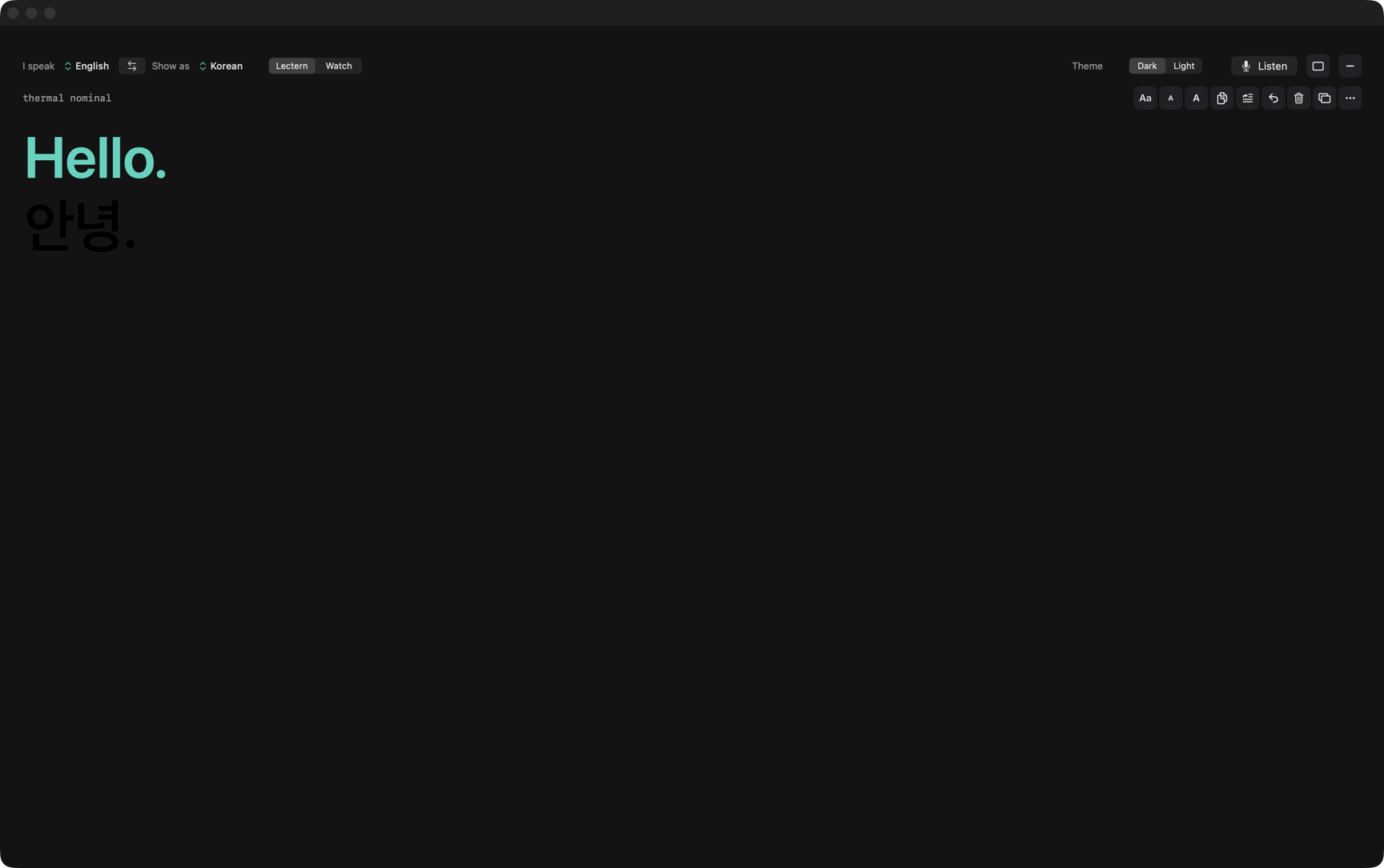
Each sentence appears when it is ready.
Connecting Captions is live subtitles for macOS, with translation on the machine. Choose I speak and Show as from the compatible language choices. Voice Engine shows which languages each model supports and which are ready on this Mac. Translate follows I speak into Show as. The same language needs no translation pack. A sentence appears when it is ready. Best with one speaker and a close mic. It listens through any input device you pick — the built-in microphone, a wired, USB, or line-in mic, a Bluetooth headset in call mode, or a virtual loopback input (BlackHole or Loopback) when you route other audio into it.
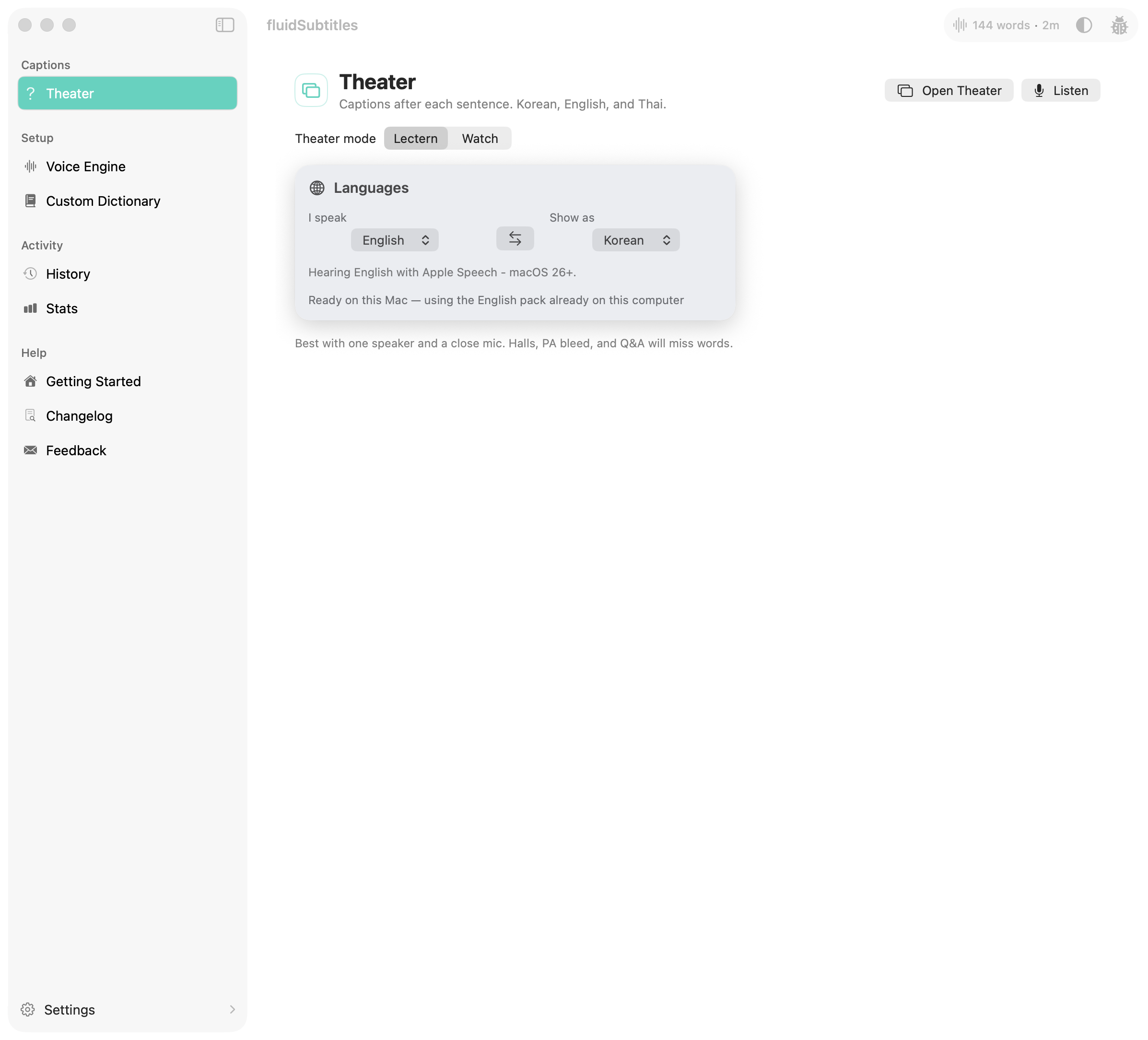
Open Theater, set I speak and Show as, then press Open Theater and Listen. A new Listen starts with an empty board. Closing Theater hides the window; it does not keep the last talk for the next Listen. A separate shortcut types the current translation into another app. Translation uses Apple’s on-device Translation framework.
By Chris Swim Lee. Licensed under GPLv3.
Download · Homebrew · Product page · For work
For work: a named license is $60 per Mac per year, five Macs minimum. Prices are on the license page. The app stays free for everyone, work use included.
In Overlay, choose Unlock text area from the hover controls or the menu-bar Theater menu. Drag to move it, resize its edges or corners, then choose Lock text area. The saved area stays fixed even while Tools are visible.
Accessibility permission is only required if you want a translation typed into other apps. Theater captions on your screen do not need it.
Theater is a measured on-device pipeline, not a cloud caption API.
AVAudioEngine on the live path. It captures from any Core Audio input device, not just the built-in microphone: wired, USB, or line-in gear, Bluetooth headsets in call (HFP) mode, and virtual loopback inputs such as BlackHole or Loopback when you route system or app audio into them. Voice and Translate both use it.mic · e2e · ASR · MT from Core Audio host time. Those values come from a real Listen. Hosted CI cannot prove a live Theater listen.The systems write-up is docs/APPLE_SILICON_STREAMING.md. Latency budgets and the HUD are in docs/LIVE_TRANSLATION_LATENCY.md.
mic · e2e · ASR · MT clock. Screenshots and a whole-screen Zoom or Meet share include Theater. Share the slides window when remote viewers should not see captions. Pause holds capture and drops a leftover; Resume does not bring that leftover back. Minimize hides Theater; Listen stays. Clear wipes the board. Talk notes stay. Lines past the latest 48 leave the board. Translate shows Behind or Caught up so you do not outrun the caption. A sentence appears once when it is accepted. The board is not a text field.Voice Engine lists every available model with Supported languages, Ready on this Mac, and the status of the current I speak language. Apple engines are built in, but this does not guarantee that a particular language works offline or has its speech assets installed. Other engines use a model download.
Whisper, Parakeet, Cohere, and Nemotron appear where enabled for this Mac. The app’s supported language lists reflect its integrated routes. For example, Parakeet is currently exposed for English, Cohere excludes Thai, and Nemotron’s Thai route remains experimental. Whisper supports Thai.
Language Packs only shows supported Apple Translation pairs for I speak. Either way appears when Whisper Small is installed and translation is ready in both directions. Turning it off keeps the selected engine.
See Speech and translation support for the capability checks and download behavior.
Preferred. Download Connecting-Captions.zip. That name tracks the latest release. A notarized Developer ID zip should stay quiet in Gatekeeper. Drag Connecting Captions to Applications, open Theater, allow the microphone, and press Listen.
Homebrew.
brew tap chrisswimlee/connectingcaptions
brew trust chrisswimlee/connectingcaptions
brew install --cask connectingcaptions
Preview zip (unsigned). If only a pre-release is published, download Connecting-Captions-{version}-preview-unsigned.zip. macOS blocks it the first time: click Done, then System Settings → Privacy & Security → Open Anyway. In-app updates stay off for previews.
Build from source (Xcode). Permissions stay across rebuilds. See Building from Source.
The app is unsandboxed (Hardened Runtime on). Theater needs microphone access. Insert-into-another-app needs Accessibility. Apple Translation packs download on first use when I speak and Show as differ; they are not inside the zip.
Maintainers: push a tag like preview-1.6.12-1 (git tag preview-1.6.12-1 && git push origin preview-1.6.12-1) and the Preview workflow publishes that commit as a pre-release (./build.sh preview). A signed release needs a Developer ID: ./build.sh release with APPLE_ID, APPLE_TEAM_ID, and APPLE_APP_SPECIFIC_PASSWORD, then a v* tag such as v1.6.12 runs .github/workflows/release.yml. Hosted CI cannot prove a live Theater listen.
You need an Apple Silicon Mac on macOS 15 or later, Xcode 26 (CI uses 26.3), and a free Apple Account. No paid developer membership.
Get a free signing certificate (once). In Xcode, open Settings → Accounts, add your Apple Account, select its Personal Team, click Manage Certificates…, then + → Apple Development. Signing keeps Microphone and Accessibility granted across rebuilds.
Clone and build:
git clone https://github.com/chrisswimlee/connectingCaptions.git
cd connectingCaptions
./build.sh
./build.sh finds your Apple Development certificate and its team. The first build resolves Swift packages and takes several minutes. With more than one team, pin one:
cp xcconfig/Local.xcconfig.example xcconfig/Local.xcconfig
# set DEVELOPMENT_TEAM to your 10-character team ID
Launch DerivedData/Build/Products/Debug/Connecting Captions Debug.app. Always launch this same path after rebuilding so macOS keeps its permissions.
First run. Open Theater, allow the microphone, pick Original language or Translate, and press Listen. For Translate, download the Apple Translation pack when asked. Allow Accessibility only if you use Type the board or Listen, then type.
Update later:
git pull
./build.sh
No certificate? ./build.sh unsigned builds without one, but macOS may ask for Accessibility again after each rebuild. You can also open connectingCaptions.xcodeproj and run from Xcode. App Swift packages are pinned in connectingCaptions.xcodeproj/project.xcworkspace/xcshareddata/swiftpm/Package.resolved; root Package.swift only builds the C capture helper.
Architecture notes live in docs/ARCHITECTURE.md. Latency budgets and the Theater HUD are in docs/LIVE_TRANSLATION_LATENCY.md. Score a recorded talk with docs/STAGE_SCORE.md. Signing and notarization are in docs/SIGNING.md. The systems write-up is docs/APPLE_SILICON_STREAMING.md.
See CONTRIBUTING.md for the first hour (Release zip or signed ./build.sh, Apple Speech, Theater on macOS 15+, ./scripts/format-and-lint.sh, tests minus UITests). Please read the code of conduct and security policy before opening an issue or pull request.
When a change belongs in the upstream dictation engine rather than translation or captions, file it on FluidVoice. Starter tickets are listed in .github/GOOD_FIRST_ISSUES.md.
For a complete local validation with saved logs, run sh scripts/validate-release.sh.
The release validation guide covers real microphone,
IME, offline, installer and demo checks. Export Quality review (JSONL) from
Theater to prepare human-reviewed recognition and translation measurements.
Settings → General → App language offers all setup languages for interface copy. Additional interface translations run on this Mac and are cached locally; Apple may request a language pack. English remains available during preparation. The app language is independent of I speak and Show as.
Full local run, matching the Build and Test CI gate (CI skips the Theater smoke and
the flaky Tiny Whisper E2E because hosted runners can't prove either):
xcodebuild test -project connectingCaptions.xcodeproj -scheme connectingCaptions \
  -destination 'platform=macOS,arch=arm64' \
  -skip-testing:ConnectingCaptionsUITests \
  -skip-testing:ConnectingCaptionsIntegrationTests/DictationE2ETests/testDictationEndToEnd_whisperTiny_transcribesFixture
CI runs the guard chain before that test command, in this order: test wiring, team ID, UI copy, quality-scorer vectors, interface catalog, Python tooling tests, SwiftLint strict, then the two standalone harnesses and xcodebuild test with the two skips above:
sh scripts/test-omitted-tests.sh
bash scripts/check-team-id.sh
sh scripts/test-ui-copy.sh
sh scripts/test-quality-score.sh
python3 scripts/update-interface-catalog.py --check
python3 -m unittest discover -s scripts -p 'test_*.py'
sh Tests/run_paste_key_cache_tests.sh
sh Tests/run_history_persistence_tests.sh
The paste-key and history harnesses are not XCTest targets — they compile via swiftc in those scripts (CLT or full Xcode). Pass --live to the paste harness only on a local Mac with Accessibility; CI never passes that flag.
Connecting Captions is local-first. Your voice, audio, and transcribed text never leave your machine unless you explicitly opt in to a cloud AI provider.
This release does not send analytics, feedback, or update checks to a third-party analytics host. Voice Engine weights stay in this app's folder. A model already in the shared FluidAudio cache is copied once, and that cache is not deleted. A FluidVoice install on the same Mac is left alone: this app does not read or delete that app's Keychain or Application Support folder.
Not collected:
connectingCaptions is free for everyone under GPLv3, work use included. Theater Listen stays unlocked. A commercial license is optional.
Firms that need a vendor they can sanction — a named license, a security contact, or a written SLA — buy at the published price:
A paid key is air-gapped. It replaces the in-app work notice with Licensed to your organization. It does not phone home. A written SLA and a signed seat list are optional. A Jamf or Fleet package can install the key, the seat list, and caption settings. The on-device audit log stores no captions. See docs/COMMERCIAL.md.
This is not consulting. Consulting is Engage.
Speech recognition comes from FluidVoice by altic-dev under GPLv3. Theater captions and insert are this product.
From 2026-02-23 onward, this project is licensed under the GNU General Public License, Version 3.0 (GPLv3).
Versions published before this date were licensed under Apache License 2.0.
Third-party notices for models, frameworks, and logos are in NOTICE.
Live Korean, English, Thai, and Japanese captions for macOS.
See the code
Each sentence appears when it is ready.
Connecting Captions is live subtitles for macOS, with translation on the machine. Choose I speak and Show as from the compatible language choices. Voice Engine shows which languages each model supports and which are ready on this Mac. Translate follows I speak into Show as. The same language needs no translation pack. A sentence appears when it is ready. Best with one speaker and a close mic. It listens through any input device you pick — the built-in microphone, a wired, USB, or line-in mic, a Bluetooth headset in call mode, or a virtual loopback input (BlackHole or Loopback) when you route other audio into it.
Open Theater, set I speak and Show as, then press Open Theater and Listen. A new Listen starts with an empty board. Closing Theater hides the window; it does not keep the last talk for the next Listen. A separate shortcut types the current translation into another app. Translation uses Apple’s on-device Translation framework.
By Chris Swim Lee. Licensed under GPLv3.
Download · Homebrew · Product page · For work
For work: a named license is $60 per Mac per year, five Macs minimum. Prices are on the license page. The app stays free for everyone, work use included.
In Overlay, choose Unlock text area from the hover controls or the menu-bar Theater menu. Drag to move it, resize its edges or corners, then choose Lock text area. The saved area stays fixed even while Tools are visible.
Accessibility permission is only required if you want a translation typed into other apps. Theater captions on your screen do not need it.
Theater is a measured on-device pipeline, not a cloud caption API.
AVAudioEngine on the live path. It captures from any Core Audio input device, not just the built-in microphone: wired, USB, or line-in gear, Bluetooth headsets in call (HFP) mode, and virtual loopback inputs such as BlackHole or Loopback when you route system or app audio into them. Voice and Translate both use it.mic · e2e · ASR · MT from Core Audio host time. Those values come from a real Listen. Hosted CI cannot prove a live Theater listen.The systems write-up is docs/APPLE_SILICON_STREAMING.md. Latency budgets and the HUD are in docs/LIVE_TRANSLATION_LATENCY.md.
mic · e2e · ASR · MT clock. Screenshots and a whole-screen Zoom or Meet share include Theater. Share the slides window when remote viewers should not see captions. Pause holds capture and drops a leftover; Resume does not bring that leftover back. Minimize hides Theater; Listen stays. Clear wipes the board. Talk notes stay. Lines past the latest 48 leave the board. Translate shows Behind or Caught up so you do not outrun the caption. A sentence appears once when it is accepted. The board is not a text field.Voice Engine lists every available model with Supported languages, Ready on this Mac, and the status of the current I speak language. Apple engines are built in, but this does not guarantee that a particular language works offline or has its speech assets installed. Other engines use a model download.
Whisper, Parakeet, Cohere, and Nemotron appear where enabled for this Mac. The app’s supported language lists reflect its integrated routes. For example, Parakeet is currently exposed for English, Cohere excludes Thai, and Nemotron’s Thai route remains experimental. Whisper supports Thai.
Language Packs only shows supported Apple Translation pairs for I speak. Either way appears when Whisper Small is installed and translation is ready in both directions. Turning it off keeps the selected engine.
See Speech and translation support for the capability checks and download behavior.
Preferred. Download Connecting-Captions.zip. That name tracks the latest release. A notarized Developer ID zip should stay quiet in Gatekeeper. Drag Connecting Captions to Applications, open Theater, allow the microphone, and press Listen.
Homebrew.
brew tap chrisswimlee/connectingcaptions
brew trust chrisswimlee/connectingcaptions
brew install --cask connectingcaptions
Preview zip (unsigned). If only a pre-release is published, download Connecting-Captions-{version}-preview-unsigned.zip. macOS blocks it the first time: click Done, then System Settings → Privacy & Security → Open Anyway. In-app updates stay off for previews.
Build from source (Xcode). Permissions stay across rebuilds. See Building from Source.
The app is unsandboxed (Hardened Runtime on). Theater needs microphone access. Insert-into-another-app needs Accessibility. Apple Translation packs download on first use when I speak and Show as differ; they are not inside the zip.
Maintainers: push a tag like preview-1.6.12-1 (git tag preview-1.6.12-1 && git push origin preview-1.6.12-1) and the Preview workflow publishes that commit as a pre-release (./build.sh preview). A signed release needs a Developer ID: ./build.sh release with APPLE_ID, APPLE_TEAM_ID, and APPLE_APP_SPECIFIC_PASSWORD, then a v* tag such as v1.6.12 runs .github/workflows/release.yml. Hosted CI cannot prove a live Theater listen.
You need an Apple Silicon Mac on macOS 15 or later, Xcode 26 (CI uses 26.3), and a free Apple Account. No paid developer membership.
Get a free signing certificate (once). In Xcode, open Settings → Accounts, add your Apple Account, select its Personal Team, click Manage Certificates…, then + → Apple Development. Signing keeps Microphone and Accessibility granted across rebuilds.
Clone and build:
git clone https://github.com/chrisswimlee/connectingCaptions.git
cd connectingCaptions
./build.sh
./build.sh finds your Apple Development certificate and its team. The first build resolves Swift packages and takes several minutes. With more than one team, pin one:
cp xcconfig/Local.xcconfig.example xcconfig/Local.xcconfig
# set DEVELOPMENT_TEAM to your 10-character team ID
Launch DerivedData/Build/Products/Debug/Connecting Captions Debug.app. Always launch this same path after rebuilding so macOS keeps its permissions.
First run. Open Theater, allow the microphone, pick Original language or Translate, and press Listen. For Translate, download the Apple Translation pack when asked. Allow Accessibility only if you use Type the board or Listen, then type.
Update later:
git pull
./build.sh
No certificate? ./build.sh unsigned builds without one, but macOS may ask for Accessibility again after each rebuild. You can also open connectingCaptions.xcodeproj and run from Xcode. App Swift packages are pinned in connectingCaptions.xcodeproj/project.xcworkspace/xcshareddata/swiftpm/Package.resolved; root Package.swift only builds the C capture helper.
Architecture notes live in docs/ARCHITECTURE.md. Latency budgets and the Theater HUD are in docs/LIVE_TRANSLATION_LATENCY.md. Score a recorded talk with docs/STAGE_SCORE.md. Signing and notarization are in docs/SIGNING.md. The systems write-up is docs/APPLE_SILICON_STREAMING.md.
See CONTRIBUTING.md for the first hour (Release zip or signed ./build.sh, Apple Speech, Theater on macOS 15+, ./scripts/format-and-lint.sh, tests minus UITests). Please read the code of conduct and security policy before opening an issue or pull request.
When a change belongs in the upstream dictation engine rather than translation or captions, file it on FluidVoice. Starter tickets are listed in .github/GOOD_FIRST_ISSUES.md.
For a complete local validation with saved logs, run sh scripts/validate-release.sh.
The release validation guide covers real microphone,
IME, offline, installer and demo checks. Export Quality review (JSONL) from
Theater to prepare human-reviewed recognition and translation measurements.
Settings → General → App language offers all setup languages for interface copy. Additional interface translations run on this Mac and are cached locally; Apple may request a language pack. English remains available during preparation. The app language is independent of I speak and Show as.
Full local run, matching the Build and Test CI gate (CI skips the Theater smoke and
the flaky Tiny Whisper E2E because hosted runners can't prove either):
xcodebuild test -project connectingCaptions.xcodeproj -scheme connectingCaptions \
  -destination 'platform=macOS,arch=arm64' \
  -skip-testing:ConnectingCaptionsUITests \
  -skip-testing:ConnectingCaptionsIntegrationTests/DictationE2ETests/testDictationEndToEnd_whisperTiny_transcribesFixture
CI runs the guard chain before that test command, in this order: test wiring, team ID, UI copy, quality-scorer vectors, interface catalog, Python tooling tests, SwiftLint strict, then the two standalone harnesses and xcodebuild test with the two skips above:
sh scripts/test-omitted-tests.sh
bash scripts/check-team-id.sh
sh scripts/test-ui-copy.sh
sh scripts/test-quality-score.sh
python3 scripts/update-interface-catalog.py --check
python3 -m unittest discover -s scripts -p 'test_*.py'
sh Tests/run_paste_key_cache_tests.sh
sh Tests/run_history_persistence_tests.sh
The paste-key and history harnesses are not XCTest targets — they compile via swiftc in those scripts (CLT or full Xcode). Pass --live to the paste harness only on a local Mac with Accessibility; CI never passes that flag.
Connecting Captions is local-first. Your voice, audio, and transcribed text never leave your machine unless you explicitly opt in to a cloud AI provider.
This release does not send analytics, feedback, or update checks to a third-party analytics host. Voice Engine weights stay in this app's folder. A model already in the shared FluidAudio cache is copied once, and that cache is not deleted. A FluidVoice install on the same Mac is left alone: this app does not read or delete that app's Keychain or Application Support folder.
Not collected:
connectingCaptions is free for everyone under GPLv3, work use included. Theater Listen stays unlocked. A commercial license is optional.
Firms that need a vendor they can sanction — a named license, a security contact, or a written SLA — buy at the published price:
A paid key is air-gapped. It replaces the in-app work notice with Licensed to your organization. It does not phone home. A written SLA and a signed seat list are optional. A Jamf or Fleet package can install the key, the seat list, and caption settings. The on-device audit log stores no captions. See docs/COMMERCIAL.md.
This is not consulting. Consulting is Engage.
Speech recognition comes from FluidVoice by altic-dev under GPLv3. Theater captions and insert are this product.
From 2026-02-23 onward, this project is licensed under the GNU General Public License, Version 3.0 (GPLv3).
Versions published before this date were licensed under Apache License 2.0.
Third-party notices for models, frameworks, and logos are in NOTICE.



