Turn GitHub into an iCloud-style drive for macOS. Native Finder integration, files on demand, real git history, Git LFS, and optional ML-KEM + X25519 encryption where GitHub sees only random data.
Swift
128
62 commits
updated Oct 14, 2026

Your private GitHub repos as a drive in Finder. Files download when you open them and can be removed from your Mac without leaving the cloud.



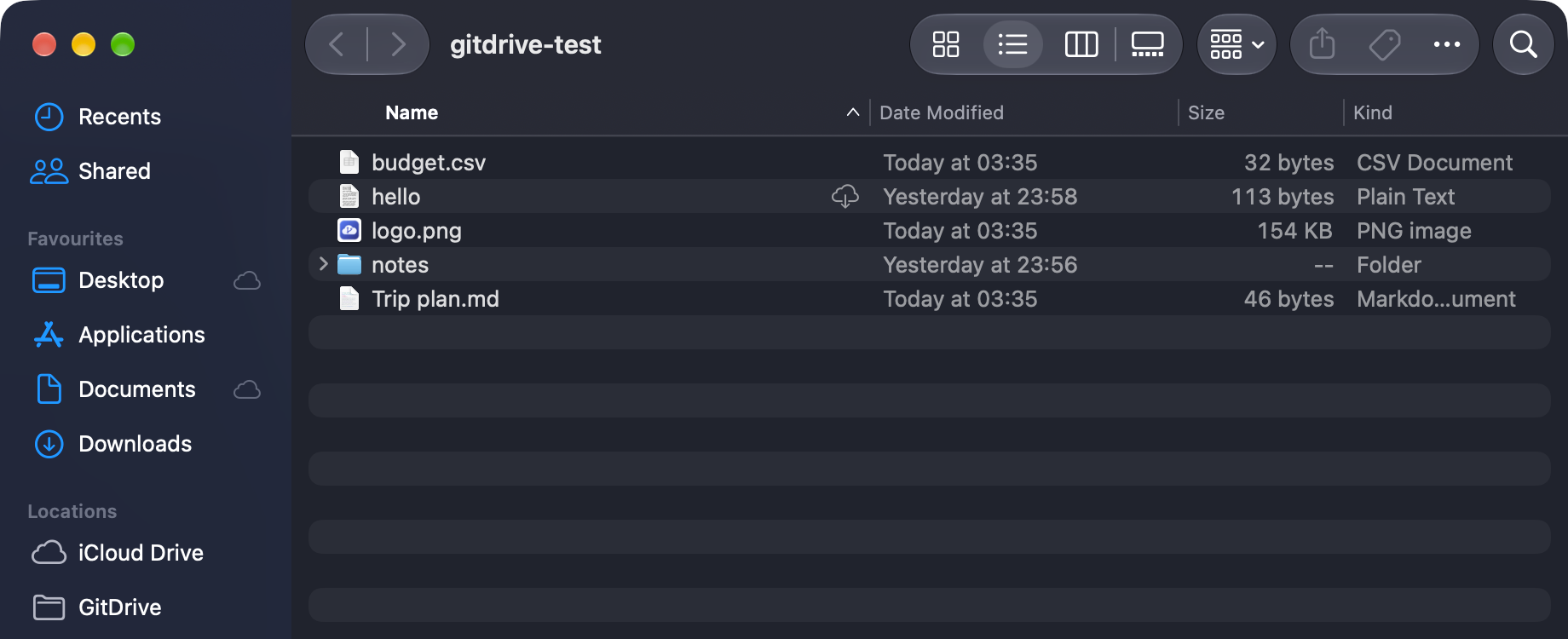

drive-<folder>.Optional features, each with a switch in Settings → Extras:
Details and defaults are in docs/EXTRAS.md.
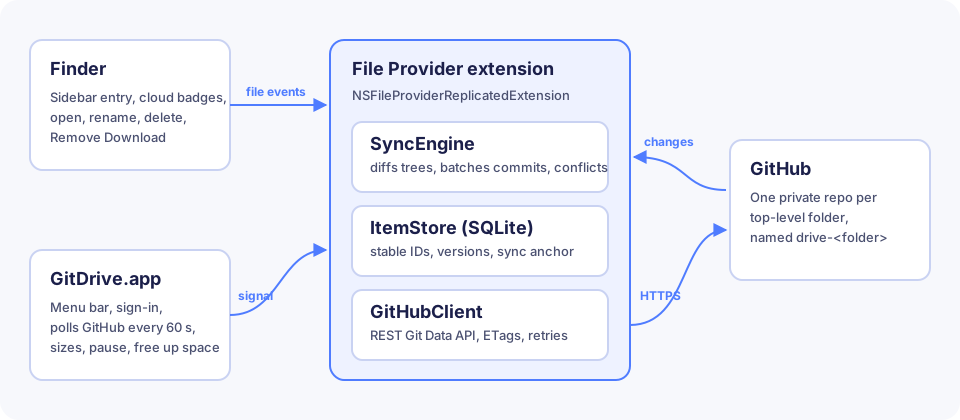
The File Provider extension serves the drive to Finder. It keeps a small SQLite index of every file and folder, turns your edits into commits through the GitHub Git Data API, and pulls in remote changes by comparing trees. The menu bar app handles sign-in and asks the extension to check for changes every minute.
More detail is in docs/ARCHITECTURE.md.
GitDrive is free and installs from source. You need macOS 14 or later, Xcode (free), and an Apple ID added to Xcode under Settings → Accounts. A free Apple ID works; no paid developer account needed.
git clone https://github.com/deeeeone/gitdrive.git
cd gitdrive
./scripts/install.sh
The script installs XcodeGen if needed, finds your signing team, builds GitDrive, copies it to /Applications and opens it. It takes a minute or two the first time.
brew install xcodegen
cp Config/Local.xcconfig.example Config/Local.xcconfig
Set DEVELOPMENT_TEAM and GITDRIVE_BUNDLE_ID in Config/Local.xcconfig, then:
xcodegen generate
open GitDrive.xcodeproj
Choose the GitDrive scheme and press Run.
[!NOTE] There are no prebuilt downloads. macOS only loads File Provider extensions from apps signed by a developer team, so each person builds GitDrive with their own Apple ID. Builds made this way run on the Mac that built them.
repo and delete_repo scopes. Without delete_repo, deleting a top-level folder fails unless you switch it to archive.Already have repos you want in the drive? Open Settings → Folders → Your other repos and choose Add to Drive.
GitHub is built for source code, not as a general file host, so keep these in mind:
| Limit | What happens |
|---|---|
| 100 MB per file | Turn on Settings → General → Large files to store bigger files with Git LFS, up to 2 GB each. |
| Git LFS quota | GitHub Free includes 10 GiB of LFS storage and 10 GiB of downloads a month. Opening a file counts as a download. |
| Repo size | GitHub recommends repos under 1 GB and strongly recommends under 5 GB. The menu bar warns past 1 GB. |
| History | Deleted files still count toward repo size. Settings → Folders → Compact History keeps only the current files. |
| API rate limit | 5,000 requests per hour. GitDrive uses conditional requests and backs off when it gets close. |
| Top level | Each top-level item is a repo, so files go inside a folder, not at the very top. |
Please read GitHub's Acceptable Use Policies before storing large amounts of non-code data.
Found a security problem? See SECURITY.md.
Does it work offline? Downloaded files open and save as usual. GitDrive uploads your changes when you are back online.
Can I use the repos with normal git? Yes. They are ordinary repos. Clone them, push to them, and GitDrive picks up the changes.
What happens if I uninstall? Nothing on GitHub changes. Sign out first to remove the downloaded copies from your Mac.
Why one repo per folder? It keeps each repo small, lets you share or archive folders separately, and keeps the API traffic for one folder independent of the others.
Contributions are welcome. Read CONTRIBUTING.md for setup, code style and how to run the tests. Please follow the Code of Conduct.
GitDrive is released under the MIT License.
Turn GitHub into an iCloud-style drive for macOS. Native Finder integration, files on demand, real git history, Git LFS, and optional ML-KEM + X25519 encryption where GitHub sees only random data.
Swift
128
62 commits
updated Oct 14, 2026
Your private GitHub repos as a drive in Finder. Files download when you open them and can be removed from your Mac without leaving the cloud.
drive-<folder>.Optional features, each with a switch in Settings → Extras:
Details and defaults are in docs/EXTRAS.md.
The File Provider extension serves the drive to Finder. It keeps a small SQLite index of every file and folder, turns your edits into commits through the GitHub Git Data API, and pulls in remote changes by comparing trees. The menu bar app handles sign-in and asks the extension to check for changes every minute.
More detail is in docs/ARCHITECTURE.md.
GitDrive is free and installs from source. You need macOS 14 or later, Xcode (free), and an Apple ID added to Xcode under Settings → Accounts. A free Apple ID works; no paid developer account needed.
git clone https://github.com/deeeeone/gitdrive.git
cd gitdrive
./scripts/install.sh
The script installs XcodeGen if needed, finds your signing team, builds GitDrive, copies it to /Applications and opens it. It takes a minute or two the first time.
brew install xcodegen
cp Config/Local.xcconfig.example Config/Local.xcconfig
Set DEVELOPMENT_TEAM and GITDRIVE_BUNDLE_ID in Config/Local.xcconfig, then:
xcodegen generate
open GitDrive.xcodeproj
Choose the GitDrive scheme and press Run.
[!NOTE] There are no prebuilt downloads. macOS only loads File Provider extensions from apps signed by a developer team, so each person builds GitDrive with their own Apple ID. Builds made this way run on the Mac that built them.
repo and delete_repo scopes. Without delete_repo, deleting a top-level folder fails unless you switch it to archive.Already have repos you want in the drive? Open Settings → Folders → Your other repos and choose Add to Drive.
GitHub is built for source code, not as a general file host, so keep these in mind:
| Limit | What happens |
|---|---|
| 100 MB per file | Turn on Settings → General → Large files to store bigger files with Git LFS, up to 2 GB each. |
| Git LFS quota | GitHub Free includes 10 GiB of LFS storage and 10 GiB of downloads a month. Opening a file counts as a download. |
| Repo size | GitHub recommends repos under 1 GB and strongly recommends under 5 GB. The menu bar warns past 1 GB. |
| History | Deleted files still count toward repo size. Settings → Folders → Compact History keeps only the current files. |
| API rate limit | 5,000 requests per hour. GitDrive uses conditional requests and backs off when it gets close. |
| Top level | Each top-level item is a repo, so files go inside a folder, not at the very top. |
Please read GitHub's Acceptable Use Policies before storing large amounts of non-code data.
Found a security problem? See SECURITY.md.
Does it work offline? Downloaded files open and save as usual. GitDrive uploads your changes when you are back online.
Can I use the repos with normal git? Yes. They are ordinary repos. Clone them, push to them, and GitDrive picks up the changes.
What happens if I uninstall? Nothing on GitHub changes. Sign out first to remove the downloaded copies from your Mac.
Why one repo per folder? It keeps each repo small, lets you share or archive folders separately, and keeps the API traffic for one folder independent of the others.
Contributions are welcome. Read CONTRIBUTING.md for setup, code style and how to run the tests. Please follow the Code of Conduct.
GitDrive is released under the MIT License.



