
Fast on huge repositories, honest about every command it runs,
and built entirely with SwiftUI and AppKit.


Download · Install · Tour · Shortcuts · FAQ · Development
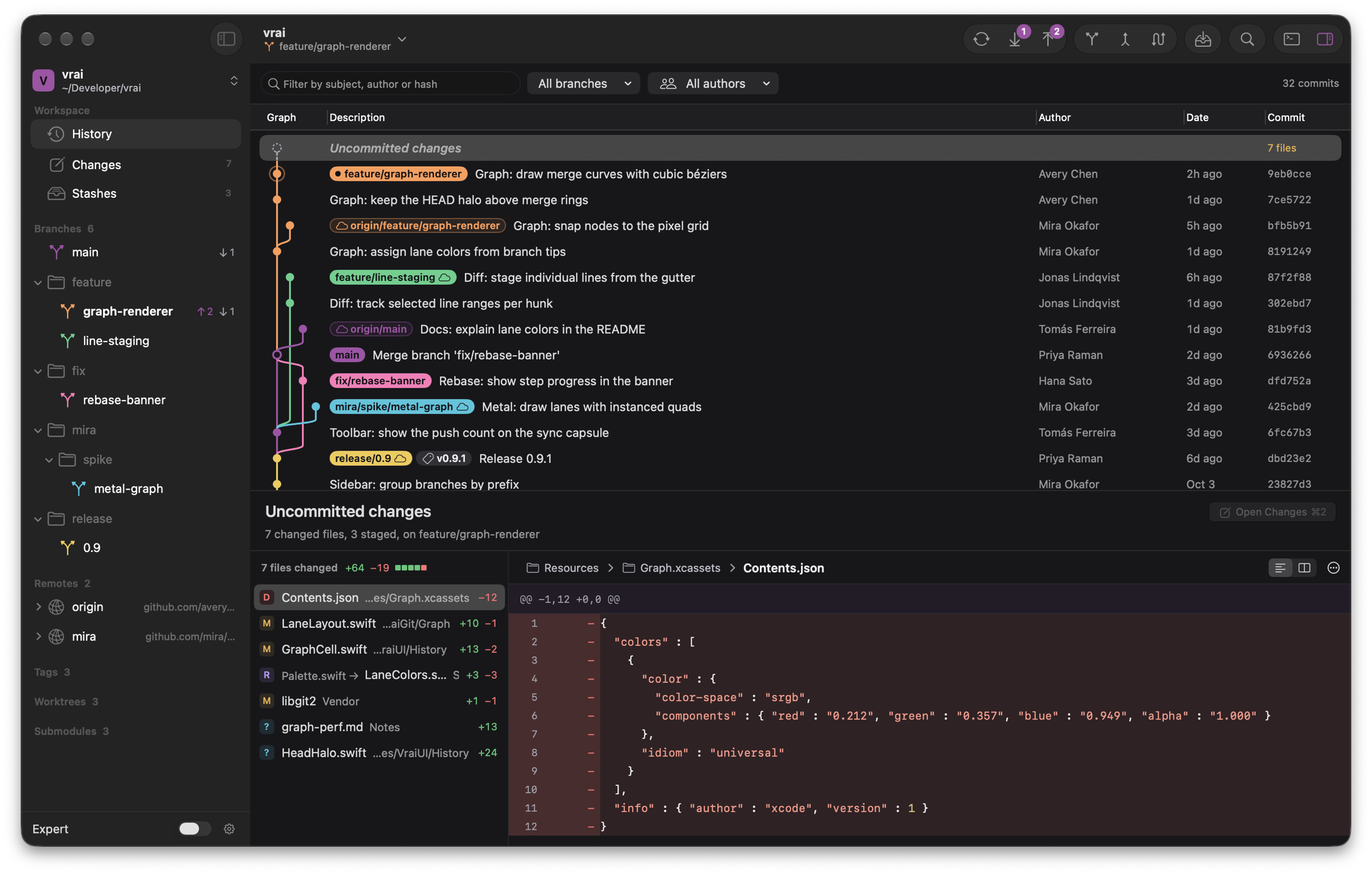
Vrai is a Git client that feels like it shipped with your Mac. It drives the git you already have instead of a bundled reimplementation, so everything it does is a real git command, shown in the console as it runs. You get a graph that keeps up with repositories of any size, careful handling of anything destructive, and CI results right next to your commits.
|
A graph that keeps up Scrolls through hundreds of thousands of commits without stutter, with colored lanes that stay stable as history grows. |
Line-level staging Stage a file, a hunk or a single line, then commit with ⌘↩. |
History editing without fear Drag to reorder an interactive rebase, resolve conflicts in place, and undo the result if it went wrong. |
|
CI where you work GitHub checks and Actions runs appear beside every commit and branch, and Vrai tells you when a push turns red. |
Lives in the notch Fetches, pushes and paused rebases show up as quiet icons around the notch, and open only when they need you. |
Touch ID for risky actions Force pushes and other destructive operations ask for your fingerprint before they run. |
brew install --cask aaravmaloo/tap/vrai
Vrai-<version>.dmg from the latest release.[!NOTE] Vrai is not notarized yet, so macOS blocks the first launch. Open System Settings › Privacy & Security, find the message about Vrai and click Open Anyway. You only need to do this once.
| macOS | 26 Tahoe or later |
| Processor | Apple silicon or Intel (universal binary) |
| git | 2.45 or later, from Apple's command line tools or Homebrew |
Vrai uses the git it finds on your Mac, preferring Homebrew's when both are installed. You can point it at a different binary in Settings › Git.
Vrai updates itself with Sparkle. It checks in the background, shows the release notes before installing, and verifies every download against an EdDSA signature. Choose Vrai › Check for updates to check right away. Homebrew installs update the same way.
The history view pairs the commit graph with a filter for message, author or hash, plus menus to narrow it to one branch or one author.
--force-with-lease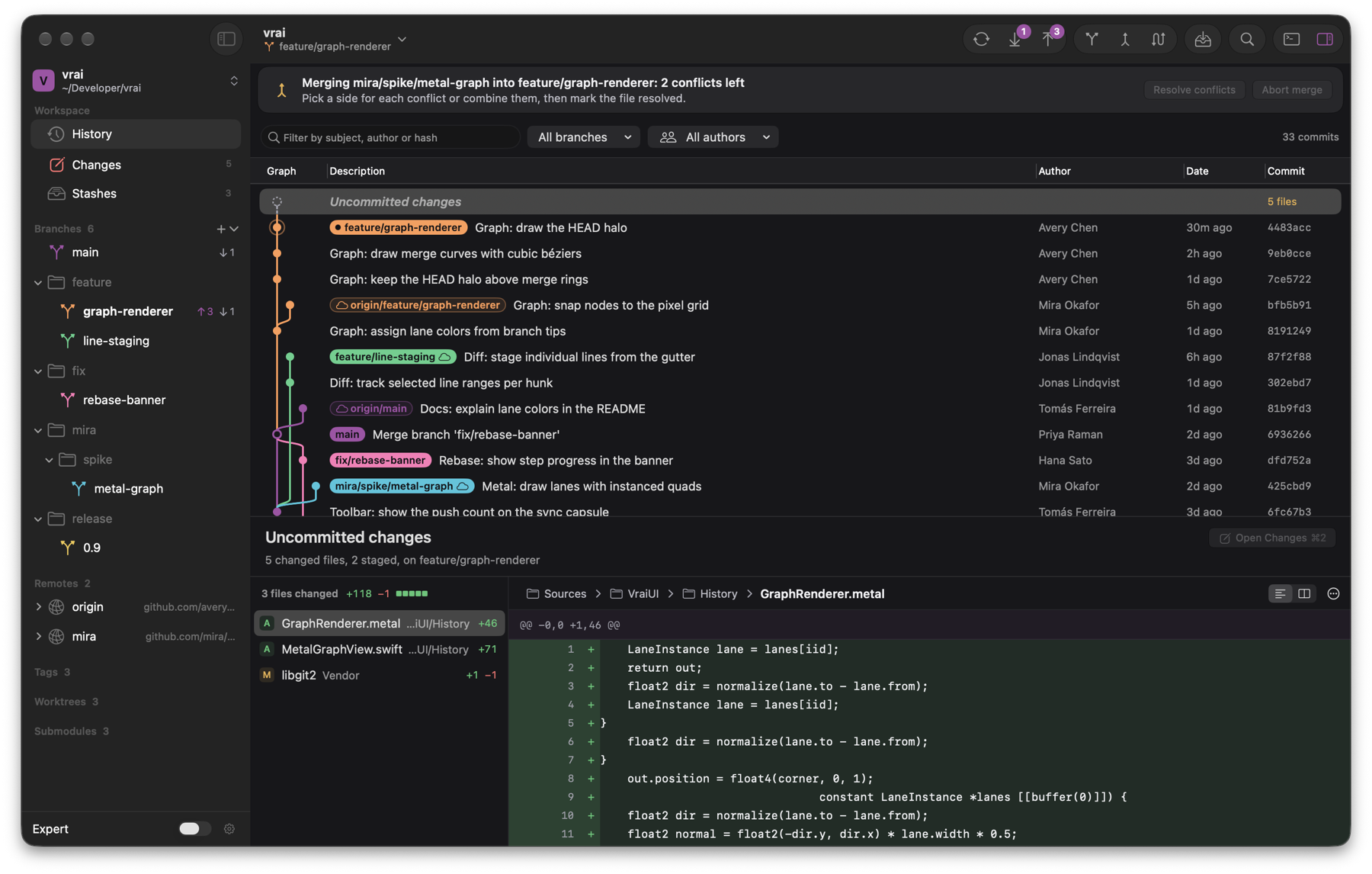 | 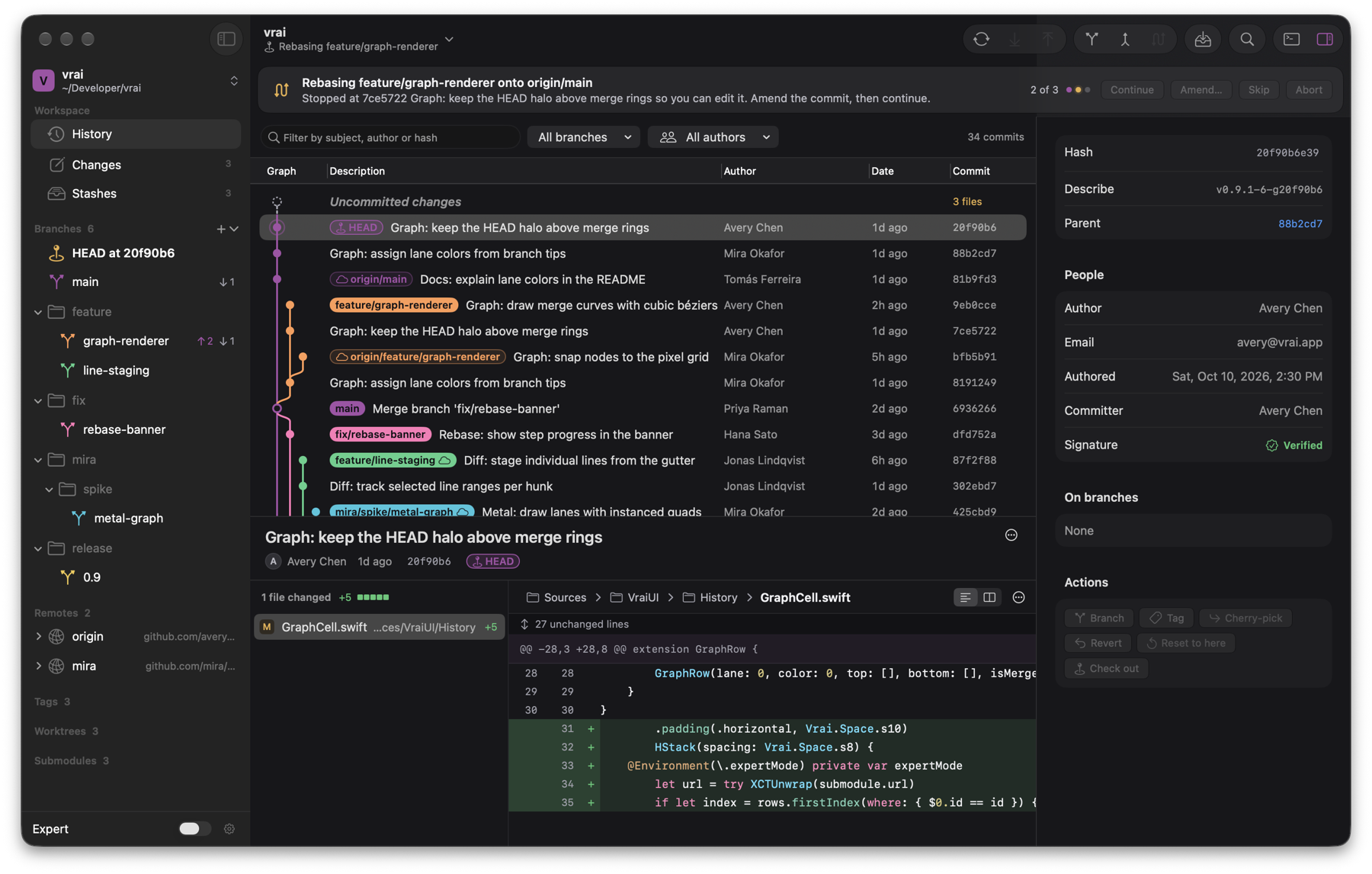 |
| A merge paused on conflicts | A rebase stopped for an edit, step 2 of 3 |
gh login, GH_TOKEN or the token git already has for the host

On Macs with a notch, Vrai turns it into a status area in the style of the Dynamic Island. A fetch, pull or push shows a ring that fills as git works. A paused rebase, merge or bisect stays beside the notch until it is done. Nothing expands unless a decision is needed, such as a rejected push or a failing build, and hovering shows the details and the actions that apply.
On Macs without a notch the same activity appears as a small pill at the top of the screen.
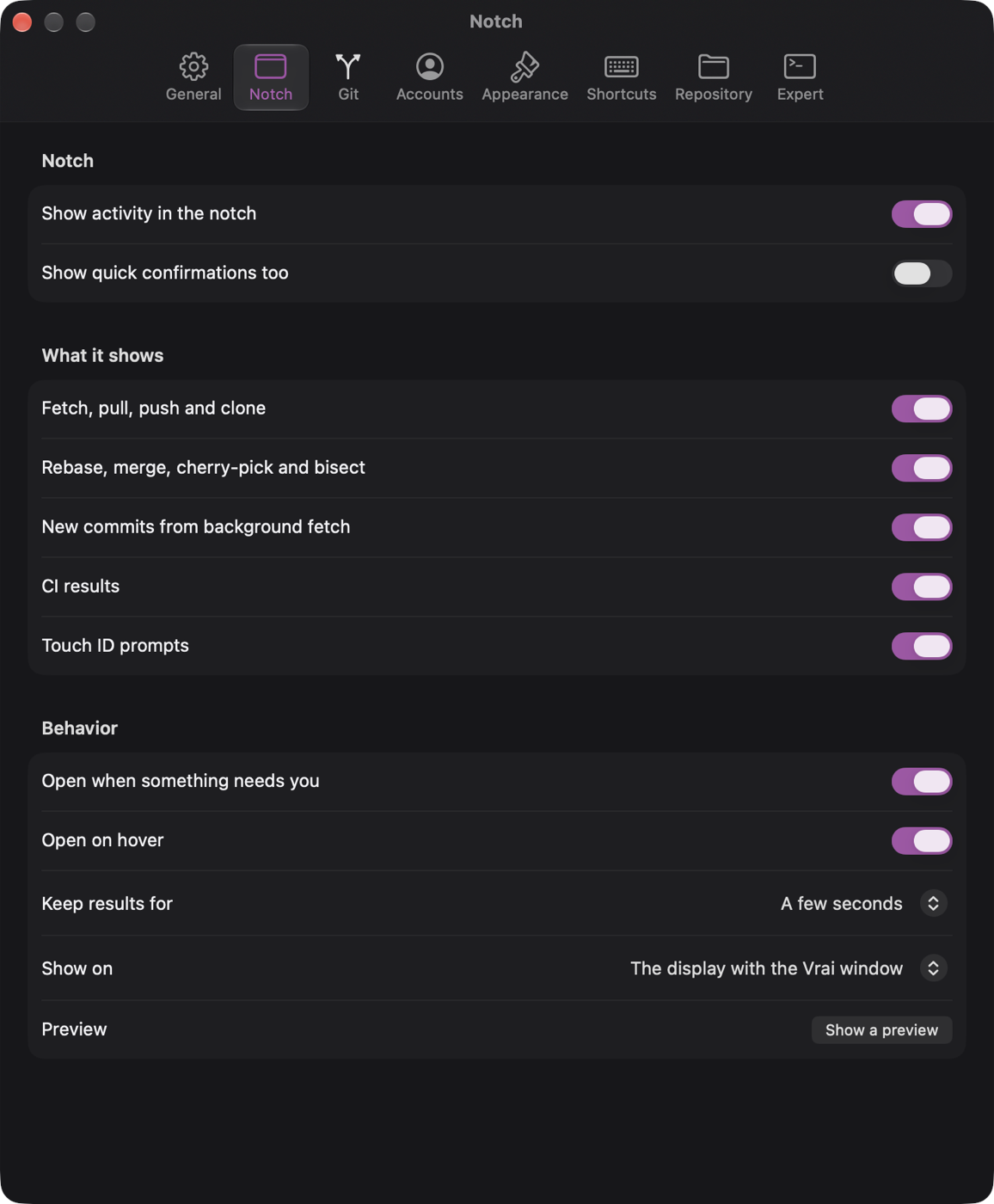
Choose what appears in the notch, whether it opens on hover or only on click, how long results stay, and which display it uses.
| Action | Shortcut |
|---|---|
| Command palette | ⌘ K |
| Filter history | ⌘ F |
| History, Changes, Stashes, Reflog | ⌘ 1 to 4 |
| Show console | ⌘ J |
| Show inspector | ⌥ ⌘ 0 |
| Hide sidebar | ⌃ ⌘ S |
| Switch repository | ⌘ T |
| Open repository | ⌘ O |
| Clone repository | ⇧ ⌘ O |
| New repository | ⌥ ⌘ N |
| Commit | ⌘ ↩ |
| Commit and push | ⌥ ⌘ ↩ |
| Undo, Redo | ⌘ Z, ⇧ ⌘ Z |
| Fetch | ⇧ ⌘ F |
| Fetch all remotes and prune | ⌥ ⇧ ⌘ F |
| Pull | ⇧ ⌘ L |
| Pull with rebase | ⌥ ⇧ ⌘ L |
| Push | ⇧ ⌘ P |
| Force push with lease | ⌥ ⇧ ⌘ P |
| Stash changes | ⇧ ⌘ S |
| Switch branch | ⌘ B |
| New branch | ⇧ ⌘ B |
| Merge into current branch | ⇧ ⌘ M |
| Rebase current branch | ⇧ ⌘ R |
| Interactive rebase | ⌥ ⇧ ⌘ R |
| Copy full commit hash | ⌥ ⌘ C |
| Expert mode | ⌥ ⌘ E |
| Welcome window | ⇧ ⌘ 1 |
Every shortcut is also listed in Settings › Shortcuts.
| Pane | Covers |
|---|---|
| General | Welcome window, background fetch and its interval, new commit notifications, GitHub checks, console behavior, terminal app |
| Notch | What the notch shows, when it opens, how long results stay, which display it uses |
| Git | First branch name, pull strategy, reused conflict resolutions, force push confirmation, Touch ID, diff algorithm, rename detection, git binary |
| Accounts | Signed in hosts, SSH keys, commit and tag signing, your name and email |
| Appearance | Light or dark, density, code size, whitespace, line wrapping, sidebar and inspector defaults |
| Shortcuts | Every keyboard shortcut in one place |
| Repository | Identity for this repository, hooks, Git LFS, background maintenance |
| Expert | Expert mode, command previews, git configuration |
Vrai has no accounts, analytics or telemetry. It talks to the network only when one of these applies:
Credentials stay with git's credential helper and your keychain.
You need Xcode 27, XcodeGen and Node.js. Node is only used to generate test fixtures.
brew install xcodegen node
git clone https://github.com/aaravmaloo/vrai.git
cd vrai
xcodegen generate
open Vrai.xcodeproj
Vrai.xcodeproj is generated from project.yml and is not committed. Run
xcodegen generate again after editing project.yml. To build without
opening Xcode:
xcodebuild -scheme Vrai -destination 'platform=macOS' -derivedDataPath build/dd build
open build/dd/Build/Products/Debug/Vrai.app
Debug builds report build number 1 and do not check for updates.
The tests run against real repositories generated into a sandbox under
$TMPDIR, covering merges, rebases, conflicts, bisects, authentication,
offline remotes and a 200,000 commit monorepo.
Scripts/make-fixtures.sh            # add --no-large to skip the monorepo
cd Packages/VraiKit && swift test
UI tests in UITests/ launch the app and drive it, so they take control of
the mouse and keyboard while they run. CI runs the package tests on every
push using Homebrew's git, which is usually a release ahead of Apple's.
git tag v1.1.0
git push origin v1.1.0
Pushing a tag runs the tests, builds and signs a universal DMG, publishes a
GitHub release with the DMG and the Sparkle appcast, and updates the Homebrew
cask in aaravmaloo/homebrew-tap.
Tags with a suffix, such as v1.1.0-beta, become pre-releases that existing
installs are not offered.
Release notes are written on the GitHub release page. Edits are copied into
the appcast within a minute, so the update window always matches. Build
numbers are the release commit's UTC time, for example 20261013.1204.
App/                     App target, Info.plist, icon, Sparkle setup
Helpers/                 vrai-askpass and vrai-editor, which git calls back into
Packages/VraiKit/
  Sources/VraiGit/       Process execution, output parsing, commit graph
  Sources/VraiCore/      Repository state, file watching, settings, CI checks
  Sources/VraiUI/        Views, windows and design tokens
  Tests/                 Unit and integration tests
UITests/                 End to end tests
Scripts/                 Fixtures, releases, screenshots, performance, cleanup
The code is Swift 6 with complete concurrency checking, and any warning fails the build.
| Script | Purpose |
|---|---|
Scripts/make-fixtures.sh | Generate the sandbox repositories the tests use |
Scripts/release.sh | Archive, sign and package a release; --adhoc skips notarization |
Scripts/appcast-notes.sh <tag> | Copy a release's notes into its appcast |
Scripts/screenshots.sh | Run the UI flows and export screenshots |
Scripts/perf.sh | Run the performance suite |
Scripts/cleanup.sh | Remove build products and caches; --dry-run previews |
Vrai is built with Sparkle for updates, XcodeGen for the project file and dmgbuild for the disk image.
Vrai is available under the MIT License.
Fast on huge repositories, honest about every command it runs,
and built entirely with SwiftUI and AppKit.
Download · Install · Tour · Shortcuts · FAQ · Development
Vrai is a Git client that feels like it shipped with your Mac. It drives the git you already have instead of a bundled reimplementation, so everything it does is a real git command, shown in the console as it runs. You get a graph that keeps up with repositories of any size, careful handling of anything destructive, and CI results right next to your commits.
|
A graph that keeps up Scrolls through hundreds of thousands of commits without stutter, with colored lanes that stay stable as history grows. |
Line-level staging Stage a file, a hunk or a single line, then commit with ⌘↩. |
History editing without fear Drag to reorder an interactive rebase, resolve conflicts in place, and undo the result if it went wrong. |
|
CI where you work GitHub checks and Actions runs appear beside every commit and branch, and Vrai tells you when a push turns red. |
Lives in the notch Fetches, pushes and paused rebases show up as quiet icons around the notch, and open only when they need you. |
Touch ID for risky actions Force pushes and other destructive operations ask for your fingerprint before they run. |
brew install --cask aaravmaloo/tap/vrai
Vrai-<version>.dmg from the latest release.[!NOTE] Vrai is not notarized yet, so macOS blocks the first launch. Open System Settings › Privacy & Security, find the message about Vrai and click Open Anyway. You only need to do this once.
| macOS | 26 Tahoe or later |
| Processor | Apple silicon or Intel (universal binary) |
| git | 2.45 or later, from Apple's command line tools or Homebrew |
Vrai uses the git it finds on your Mac, preferring Homebrew's when both are installed. You can point it at a different binary in Settings › Git.
Vrai updates itself with Sparkle. It checks in the background, shows the release notes before installing, and verifies every download against an EdDSA signature. Choose Vrai › Check for updates to check right away. Homebrew installs update the same way.
The history view pairs the commit graph with a filter for message, author or hash, plus menus to narrow it to one branch or one author.
--force-with-lease | |
| A merge paused on conflicts | A rebase stopped for an edit, step 2 of 3 |
gh login, GH_TOKEN or the token git already has for the host
On Macs with a notch, Vrai turns it into a status area in the style of the Dynamic Island. A fetch, pull or push shows a ring that fills as git works. A paused rebase, merge or bisect stays beside the notch until it is done. Nothing expands unless a decision is needed, such as a rejected push or a failing build, and hovering shows the details and the actions that apply.
On Macs without a notch the same activity appears as a small pill at the top of the screen.
Choose what appears in the notch, whether it opens on hover or only on click, how long results stay, and which display it uses.
| Action | Shortcut |
|---|---|
| Command palette | ⌘ K |
| Filter history | ⌘ F |
| History, Changes, Stashes, Reflog | ⌘ 1 to 4 |
| Show console | ⌘ J |
| Show inspector | ⌥ ⌘ 0 |
| Hide sidebar | ⌃ ⌘ S |
| Switch repository | ⌘ T |
| Open repository | ⌘ O |
| Clone repository | ⇧ ⌘ O |
| New repository | ⌥ ⌘ N |
| Commit | ⌘ ↩ |
| Commit and push | ⌥ ⌘ ↩ |
| Undo, Redo | ⌘ Z, ⇧ ⌘ Z |
| Fetch | ⇧ ⌘ F |
| Fetch all remotes and prune | ⌥ ⇧ ⌘ F |
| Pull | ⇧ ⌘ L |
| Pull with rebase | ⌥ ⇧ ⌘ L |
| Push | ⇧ ⌘ P |
| Force push with lease | ⌥ ⇧ ⌘ P |
| Stash changes | ⇧ ⌘ S |
| Switch branch | ⌘ B |
| New branch | ⇧ ⌘ B |
| Merge into current branch | ⇧ ⌘ M |
| Rebase current branch | ⇧ ⌘ R |
| Interactive rebase | ⌥ ⇧ ⌘ R |
| Copy full commit hash | ⌥ ⌘ C |
| Expert mode | ⌥ ⌘ E |
| Welcome window | ⇧ ⌘ 1 |
Every shortcut is also listed in Settings › Shortcuts.
| Pane | Covers |
|---|---|
| General | Welcome window, background fetch and its interval, new commit notifications, GitHub checks, console behavior, terminal app |
| Notch | What the notch shows, when it opens, how long results stay, which display it uses |
| Git | First branch name, pull strategy, reused conflict resolutions, force push confirmation, Touch ID, diff algorithm, rename detection, git binary |
| Accounts | Signed in hosts, SSH keys, commit and tag signing, your name and email |
| Appearance | Light or dark, density, code size, whitespace, line wrapping, sidebar and inspector defaults |
| Shortcuts | Every keyboard shortcut in one place |
| Repository | Identity for this repository, hooks, Git LFS, background maintenance |
| Expert | Expert mode, command previews, git configuration |
Vrai has no accounts, analytics or telemetry. It talks to the network only when one of these applies:
Credentials stay with git's credential helper and your keychain.
You need Xcode 27, XcodeGen and Node.js. Node is only used to generate test fixtures.
brew install xcodegen node
git clone https://github.com/aaravmaloo/vrai.git
cd vrai
xcodegen generate
open Vrai.xcodeproj
Vrai.xcodeproj is generated from project.yml and is not committed. Run
xcodegen generate again after editing project.yml. To build without
opening Xcode:
xcodebuild -scheme Vrai -destination 'platform=macOS' -derivedDataPath build/dd build
open build/dd/Build/Products/Debug/Vrai.app
Debug builds report build number 1 and do not check for updates.
The tests run against real repositories generated into a sandbox under
$TMPDIR, covering merges, rebases, conflicts, bisects, authentication,
offline remotes and a 200,000 commit monorepo.
Scripts/make-fixtures.sh            # add --no-large to skip the monorepo
cd Packages/VraiKit && swift test
UI tests in UITests/ launch the app and drive it, so they take control of
the mouse and keyboard while they run. CI runs the package tests on every
push using Homebrew's git, which is usually a release ahead of Apple's.
git tag v1.1.0
git push origin v1.1.0
Pushing a tag runs the tests, builds and signs a universal DMG, publishes a
GitHub release with the DMG and the Sparkle appcast, and updates the Homebrew
cask in aaravmaloo/homebrew-tap.
Tags with a suffix, such as v1.1.0-beta, become pre-releases that existing
installs are not offered.
Release notes are written on the GitHub release page. Edits are copied into
the appcast within a minute, so the update window always matches. Build
numbers are the release commit's UTC time, for example 20261013.1204.
App/                     App target, Info.plist, icon, Sparkle setup
Helpers/                 vrai-askpass and vrai-editor, which git calls back into
Packages/VraiKit/
  Sources/VraiGit/       Process execution, output parsing, commit graph
  Sources/VraiCore/      Repository state, file watching, settings, CI checks
  Sources/VraiUI/        Views, windows and design tokens
  Tests/                 Unit and integration tests
UITests/                 End to end tests
Scripts/                 Fixtures, releases, screenshots, performance, cleanup
The code is Swift 6 with complete concurrency checking, and any warning fails the build.
| Script | Purpose |
|---|---|
Scripts/make-fixtures.sh | Generate the sandbox repositories the tests use |
Scripts/release.sh | Archive, sign and package a release; --adhoc skips notarization |
Scripts/appcast-notes.sh <tag> | Copy a release's notes into its appcast |
Scripts/screenshots.sh | Run the UI flows and export screenshots |
Scripts/perf.sh | Run the performance suite |
Scripts/cleanup.sh | Remove build products and caches; --dry-run previews |
Vrai is built with Sparkle for updates, XcodeGen for the project file and dmgbuild for the disk image.
Vrai is available under the MIT License.



