
See what people are saying
README
Keep
A Git GUI client inspired by Tower, built with Electron.

Download
Always the latest release:
| Platform | |
|---|---|
| macOS — Apple Silicon | M1 and later |
| macOS — Intel | |
| Windows | 64-bit installer |
Or browse all releases. No Linux download — build that one.
Or build it yourself
The macOS builds are signed and notarized. The Windows installer is not, so SmartScreen warns on first run. To skip that, or to run Keep on Linux, build it:
git clone https://github.com/yarism/keep.git
cd keep
npm install
npm run dist          # macOS .dmg — or dist:win, or dist:linux
The installer lands in dist/. A local build has no quarantine flag, so neither
warning appears.
Features
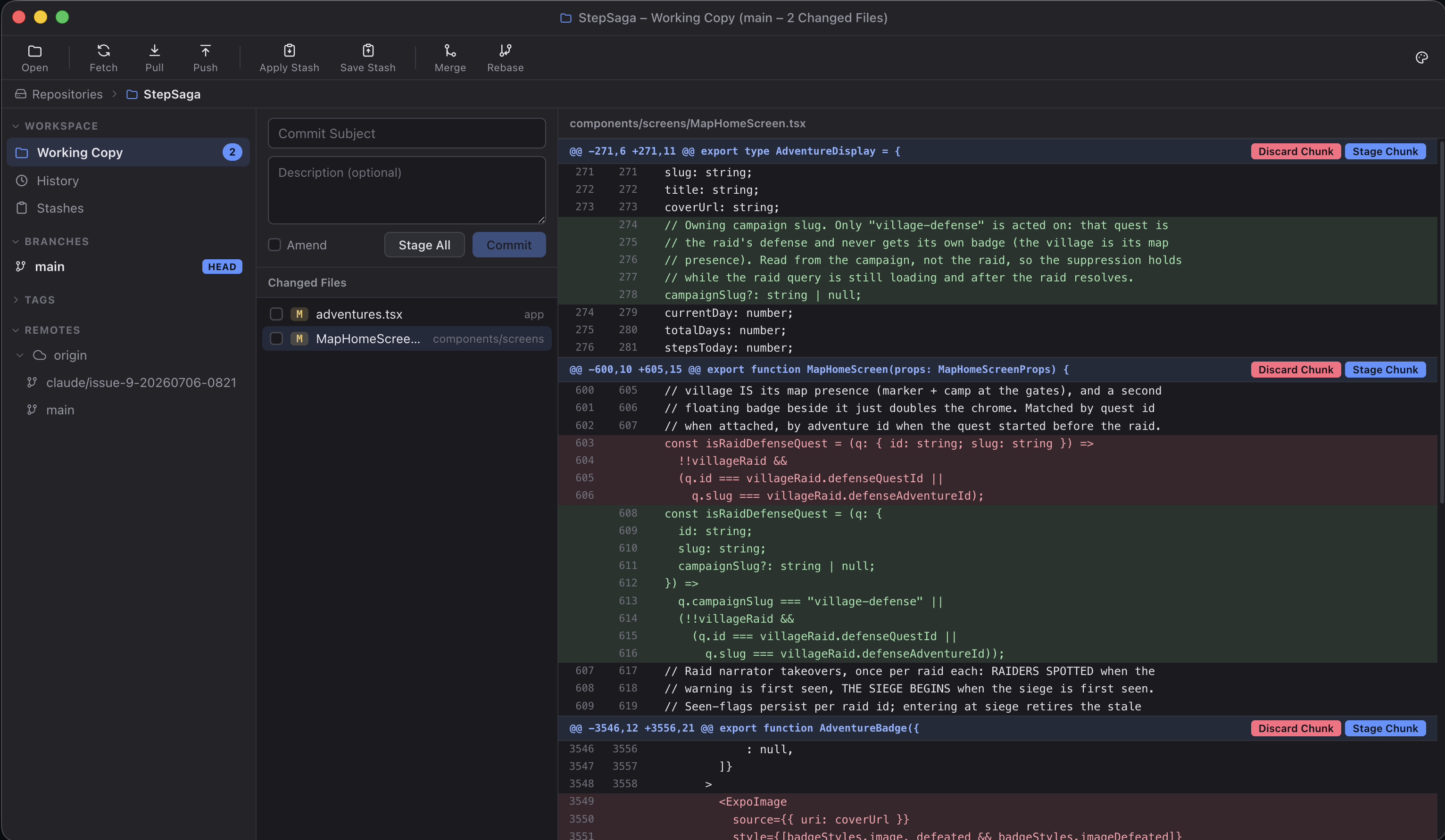
- Visual working copy with staged/unstaged changes
- Inline diffs with hunk-level staging and discarding
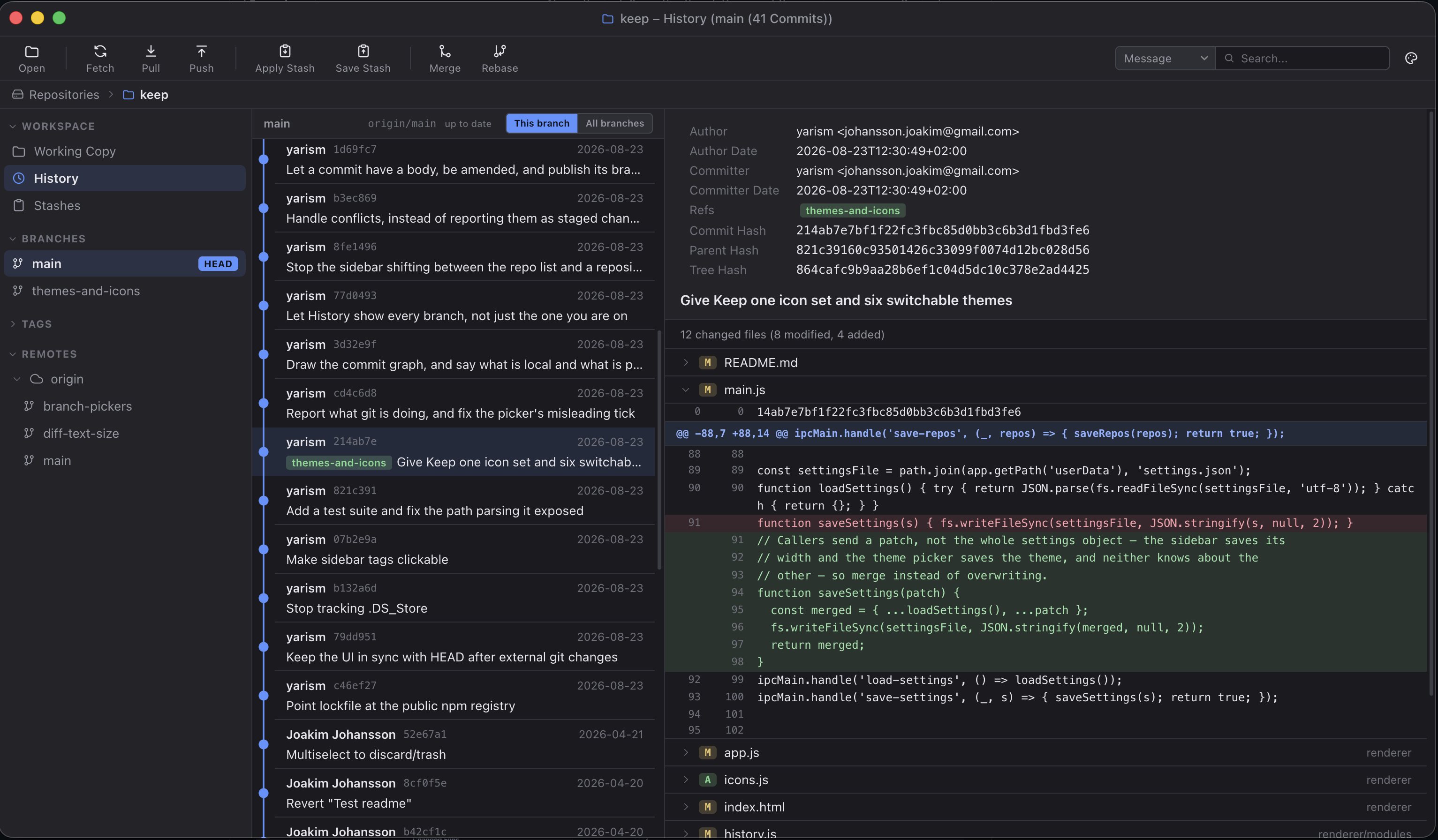
- Commit history browser with a commit graph, full details and changesets
- Local vs remote at a glance — ahead/behind counts on branches and on the Pull and Push buttons, and unpushed commits drawn as hollow nodes
- History scoped to one branch or to every branch at once
- Commit subjects and descriptions, amending, and publishing a new branch
- Conflict handling — merge and rebase state, per-file resolution, abort
- Branch management — create, rename, delete, checkout
- Remote branches visible under each remote
- Stash support — save, apply, drop
- Merge, rebase, cherry-pick, and revert operations
- Removing the last commit, or resetting a branch back to an earlier one, with the changes kept as uncommitted work
- Tag creation
- Multi-repository support
- Detached HEAD state handling
- Context menus throughout (right-click on branches, commits, files)
- Open pull requests from GitHub, listed and reviewed in place — each one's description, commits and full diff, read from the local repository rather than the API
- Review comments shown inline on the diff line they were left on; draft your own on any line and submit them together as Approve, Request changes or Comment. Drafts survive a quit and nothing reaches GitHub until you submit
- Links out to GitHub, GitLab and Bitbucket — open a pull request from a branch, or view a branch or commit on the web, straight from the context menu
- Seven colour themes, switchable from the toolbar
- Progress and results reported for every toolbar command
- System notifications for what finishes while Keep is in the background: pulls, pushes, releases, GitHub builds, and the moment your branch falls behind its upstream
- Keep Chess: the whole world plays one game, and a commit buys one move
Fetching
Keep fetches in the background every five minutes, and again the moment the window comes back to front (at most once a minute), so the ahead/behind counts mean something without you pressing Fetch first. Fetches prune, so a branch deleted on the remote (a merged PR, usually) disappears from the sidebar instead of lingering. The working copy and your local branches are never touched, only the remote-tracking refs, and it all runs non-interactively, so a repository that would ask for a password is skipped rather than left hanging. The Fetch button's tooltip says when the last one got through.
To change the interval, or switch it off, set autoFetchMinutes in
settings.json (0 disables it). The file lives in Electron's user-data
directory — ~/Library/Application Support/Keep on macOS.
Notifications
What finishes while Keep is in the background arrives as a system notification: a pull or push you started, a release command, the GitHub build it set off, and the moment a background fetch first finds new commits on your branch's upstream. While the window is front, nothing is posted; the toasts, badges and the build card already say it, closer to the work. Clicking a notification brings Keep back.
Falling behind notifies once, not once per commit: the first new commits are news, and the ones that pile on after them are not. Pull, and the next arrival is news again.
macOS asks whether to allow Keep's notifications the first time one is
posted, not at launch, and the answer can be changed any time in System
Settings, under Notifications. To turn the feature off in Keep itself, set
notifications to false in settings.json (the same file as above).
Keep Chess
Everyone running Keep shares one game of chess. After a commit, the current position appears; you play one move, for whichever side is to move, and the next move belongs to whoever commits next, anywhere in the world. The game lives at yarism/keep-chess: each move is an issue that the repository's referee Action validates and commits, so the game's history is a git log and every move is credited to its player.
Reading the board needs nothing. Playing a move opens an issue under your
name, which needs a GitHub token; Keep reads whatever your git credential
helper or the GitHub CLI already holds (gh auth login is the quickest way
to have one found), and never stores it. If no token turns up, the Play
button explains instead of playing.
Not everyone wants a chess board after every commit: "Never show again" in
the overlay turns it off, which is stored as "chess": false in
settings.json (the same file as above). Delete the line, or set it to
true, to rejoin the game. chessRepo ("owner/repo") points Keep at a
different game, if a fork of the world is more your speed.
Themes
Click the palette button at the right of the toolbar to switch themes. The popover is a short, fixed list — following the system appearance, then four themes, plus whichever one is in force if it is not among them — with More themes at the bottom opening a gallery of all of them, each shown as a small mock of the window rather than a strip of colours. Nothing changes as the pointer passes over a theme: clicking is what tries it, in both places, and it applies straight away. The gallery stays open when you click so you can try the next one; the popover closes, having only the one row to give. The choice is remembered between launches.
| Theme | |
|---|---|
| Graphite Light | the default — neutral greys, blue accent |
| Graphite Dark | the same palette after dark |
| Claude | Claude Code's own palette — warm near-black, clay, bright diffs |
| Ivory | warm paper, espresso ink, bronze — the restrained one |
| Sage | cool light greys with a green cast, deep teal accent |
| Ember | warm charcoal with amber — the dark one that isn't blue |
| Synthwave | deep indigo with magenta and mint — the loud one |
A theme is just a map of CSS custom properties in renderer/themes.js — no
colour is written literally in styles.css, so adding one means adding an entry
to that file and nothing else. It lands in the gallery, not the popover, so the
toolbar menu stays the same length however many themes there are. test/theme.test.mjs enforces both halves of
that rule.
Requirements
Getting Started
1. Clone and install
git clone https://github.com/yarism/keep.git
cd keep
npm install
2. Run in development mode
npm start
3. Build distributables
# macOS (.dmg)
npm run dist

# Windows (.exe installer)
npm run dist:win

# Linux (.AppImage)
npm run dist:linux

# All platforms
npm run dist:all
Output goes to the dist/ folder.
Releasing
One command:
npm version patch   # 1.0.0 -> 1.0.1  a fix
npm version minor   # 1.0.0 -> 1.1.0  a new feature
npm version major   # 1.0.0 -> 2.0.0  a breaking change
Tests run first and abort on failure, then the version is bumped, committed, tagged and pushed. GitHub Actions builds on macOS and Windows runners and publishes the release itself, with notes from the commits since the last tag. Nothing to approve — the links above point at it a few minutes later.
Pushes to main build the same installers as workflow
artifacts without releasing them.
Updating
Installed copies update themselves from those same releases, so a new version is not a trip back to this page. Keep checks a few seconds after launch and every six hours it stays open, downloads anything newer in the background, and puts a strip above the workspace when it is ready: Restart to Update. Ignoring the strip costs nothing — the update installs the next time Keep quits. Keep → Check for Updates… asks on demand, and is the only path that says anything when the answer is no.
Three things have to be true for that to work, and all three are configured:
- macOS builds a
.zipas well as the.dmg, because Squirrel.Mac — the updater underneath — cannot read a DMG. The DMG is still what a first-time download gets. - The release carries
latest-mac.yml/latest.ymlnext to the installers. That file is the update feed; without it the app finds a release and nothing to compare against. The.blockmapbeside it is why a patch release usually transfers a fraction of the app rather than all 110 MB. - The two macOS arches are declared per target in
package.json, never as--arm64 --x64on the command line. Flags split the build into a run per arch, and each run overwrites the previous one'slatest-mac.yml, leaving a feed that names one arch and an updater that finds nothing on the other. The release looks complete either way, which is what makes it worth a test. - macOS refuses to install an update that is not signed by the same Developer ID as the running app, so this depends on the certificate below.
Windows updates work the same way but are unsigned, so each one shows a SmartScreen warning. Releases from v1.0.8 and earlier have no feed file and cannot be updated from — that generation has to be replaced by hand, once.
Signing
macOS builds are signed and notarized in CI from five repository secrets:
| Secret | Where it comes from |
|---|---|
MAC_CERT_P12 | Developer ID Application certificate, base64 -i cert.p12 |
MAC_CERT_PASSWORD | the password used to export it |
APPLE_ID | your Apple ID email |
APPLE_APP_SPECIFIC_PASSWORD | appleid.apple.com → Sign-In and Security |
APPLE_TEAM_ID | developer.apple.com → Membership |
Without MAC_CERT_P12 a tagged build fails instead of shipping a DMG macOS
refuses to open. Windows installers are still unsigned.
Installing Without Terminal
macOS
- Double-click the
.dmgto mount it - Drag Keep into your Applications folder
- Open it — the builds are signed and notarized, so Gatekeeper stays quiet
Windows
- Run the
.exeinstaller - The installer is unsigned, so SmartScreen warns — More info → Run anyway
- Follow the setup wizard, then launch Keep from the Start Menu
Linux
- Make the
.AppImageexecutable:chmod +x Keep-*.AppImage - Double-click it or run it from the terminal
Project Structure
keep/
├── main.js              # Electron main process
├── preload.js           # IPC bridge between main and renderer
├── git.js               # All git operations (child_process)
├── renderer/
│   ├── index.html       # App shell
│   ├── app.js           # App initialization and navigation
│   ├── styles.css       # All styles (colours come from themes.js)
│   ├── themes.js        # Colour themes as CSS custom property maps
│   ├── icons.js         # The app's icon set
│   ├── git-output.js    # Turns raw git output into a readable line or two
│   └── modules/
│       ├── state.js         # Shared state and DOM helpers
│       ├── working-copy.js  # Working copy / staging view
│       ├── history.js       # Commit history view
│       ├── sidebar.js       # Sidebar (branches, tags, remotes)
│       ├── context-menu.js  # Right-click context menus
│       ├── diff.js          # Diff rendering
│       ├── modal.js         # Modal dialogs
│       ├── theme.js         # Theme switching and the picker
│       ├── toast.js         # Transient status messages
│       └── repos.js         # Repository list management
├── assets/
│   ├── icon.icns        # macOS app icon
│   ├── icon.png         # App icon (1024x1024)
│   └── icon.svg         # Icon source
└── package.json
License
ISC, see LICENSE.
Contributors

171 commits
Similar repos


Languages
JavaScript
86.7%
CSS
10.9%
HTML
2.4%
See what people are saying
README
Keep
A Git GUI client inspired by Tower, built with Electron.
Download
Always the latest release:
| Platform | |
|---|---|
| macOS — Apple Silicon | M1 and later |
| macOS — Intel | |
| Windows | 64-bit installer |
Or browse all releases. No Linux download — build that one.
Or build it yourself
The macOS builds are signed and notarized. The Windows installer is not, so SmartScreen warns on first run. To skip that, or to run Keep on Linux, build it:
git clone https://github.com/yarism/keep.git
cd keep
npm install
npm run dist          # macOS .dmg — or dist:win, or dist:linux
The installer lands in dist/. A local build has no quarantine flag, so neither
warning appears.
Features
- Visual working copy with staged/unstaged changes
- Inline diffs with hunk-level staging and discarding
- Commit history browser with a commit graph, full details and changesets
- Local vs remote at a glance — ahead/behind counts on branches and on the Pull and Push buttons, and unpushed commits drawn as hollow nodes
- History scoped to one branch or to every branch at once
- Commit subjects and descriptions, amending, and publishing a new branch
- Conflict handling — merge and rebase state, per-file resolution, abort
- Branch management — create, rename, delete, checkout
- Remote branches visible under each remote
- Stash support — save, apply, drop
- Merge, rebase, cherry-pick, and revert operations
- Removing the last commit, or resetting a branch back to an earlier one, with the changes kept as uncommitted work
- Tag creation
- Multi-repository support
- Detached HEAD state handling
- Context menus throughout (right-click on branches, commits, files)
- Open pull requests from GitHub, listed and reviewed in place — each one's description, commits and full diff, read from the local repository rather than the API
- Review comments shown inline on the diff line they were left on; draft your own on any line and submit them together as Approve, Request changes or Comment. Drafts survive a quit and nothing reaches GitHub until you submit
- Links out to GitHub, GitLab and Bitbucket — open a pull request from a branch, or view a branch or commit on the web, straight from the context menu
- Seven colour themes, switchable from the toolbar
- Progress and results reported for every toolbar command
- System notifications for what finishes while Keep is in the background: pulls, pushes, releases, GitHub builds, and the moment your branch falls behind its upstream
- Keep Chess: the whole world plays one game, and a commit buys one move
Fetching
Keep fetches in the background every five minutes, and again the moment the window comes back to front (at most once a minute), so the ahead/behind counts mean something without you pressing Fetch first. Fetches prune, so a branch deleted on the remote (a merged PR, usually) disappears from the sidebar instead of lingering. The working copy and your local branches are never touched, only the remote-tracking refs, and it all runs non-interactively, so a repository that would ask for a password is skipped rather than left hanging. The Fetch button's tooltip says when the last one got through.
To change the interval, or switch it off, set autoFetchMinutes in
settings.json (0 disables it). The file lives in Electron's user-data
directory — ~/Library/Application Support/Keep on macOS.
Notifications
What finishes while Keep is in the background arrives as a system notification: a pull or push you started, a release command, the GitHub build it set off, and the moment a background fetch first finds new commits on your branch's upstream. While the window is front, nothing is posted; the toasts, badges and the build card already say it, closer to the work. Clicking a notification brings Keep back.
Falling behind notifies once, not once per commit: the first new commits are news, and the ones that pile on after them are not. Pull, and the next arrival is news again.
macOS asks whether to allow Keep's notifications the first time one is
posted, not at launch, and the answer can be changed any time in System
Settings, under Notifications. To turn the feature off in Keep itself, set
notifications to false in settings.json (the same file as above).
Keep Chess
Everyone running Keep shares one game of chess. After a commit, the current position appears; you play one move, for whichever side is to move, and the next move belongs to whoever commits next, anywhere in the world. The game lives at yarism/keep-chess: each move is an issue that the repository's referee Action validates and commits, so the game's history is a git log and every move is credited to its player.
Reading the board needs nothing. Playing a move opens an issue under your
name, which needs a GitHub token; Keep reads whatever your git credential
helper or the GitHub CLI already holds (gh auth login is the quickest way
to have one found), and never stores it. If no token turns up, the Play
button explains instead of playing.
Not everyone wants a chess board after every commit: "Never show again" in
the overlay turns it off, which is stored as "chess": false in
settings.json (the same file as above). Delete the line, or set it to
true, to rejoin the game. chessRepo ("owner/repo") points Keep at a
different game, if a fork of the world is more your speed.
Themes
Click the palette button at the right of the toolbar to switch themes. The popover is a short, fixed list — following the system appearance, then four themes, plus whichever one is in force if it is not among them — with More themes at the bottom opening a gallery of all of them, each shown as a small mock of the window rather than a strip of colours. Nothing changes as the pointer passes over a theme: clicking is what tries it, in both places, and it applies straight away. The gallery stays open when you click so you can try the next one; the popover closes, having only the one row to give. The choice is remembered between launches.
| Theme | |
|---|---|
| Graphite Light | the default — neutral greys, blue accent |
| Graphite Dark | the same palette after dark |
| Claude | Claude Code's own palette — warm near-black, clay, bright diffs |
| Ivory | warm paper, espresso ink, bronze — the restrained one |
| Sage | cool light greys with a green cast, deep teal accent |
| Ember | warm charcoal with amber — the dark one that isn't blue |
| Synthwave | deep indigo with magenta and mint — the loud one |
A theme is just a map of CSS custom properties in renderer/themes.js — no
colour is written literally in styles.css, so adding one means adding an entry
to that file and nothing else. It lands in the gallery, not the popover, so the
toolbar menu stays the same length however many themes there are. test/theme.test.mjs enforces both halves of
that rule.
Requirements
Getting Started
1. Clone and install
git clone https://github.com/yarism/keep.git
cd keep
npm install
2. Run in development mode
npm start
3. Build distributables
# macOS (.dmg)
npm run dist

# Windows (.exe installer)
npm run dist:win

# Linux (.AppImage)
npm run dist:linux

# All platforms
npm run dist:all
Output goes to the dist/ folder.
Releasing
One command:
npm version patch   # 1.0.0 -> 1.0.1  a fix
npm version minor   # 1.0.0 -> 1.1.0  a new feature
npm version major   # 1.0.0 -> 2.0.0  a breaking change
Tests run first and abort on failure, then the version is bumped, committed, tagged and pushed. GitHub Actions builds on macOS and Windows runners and publishes the release itself, with notes from the commits since the last tag. Nothing to approve — the links above point at it a few minutes later.
Pushes to main build the same installers as workflow
artifacts without releasing them.
Updating
Installed copies update themselves from those same releases, so a new version is not a trip back to this page. Keep checks a few seconds after launch and every six hours it stays open, downloads anything newer in the background, and puts a strip above the workspace when it is ready: Restart to Update. Ignoring the strip costs nothing — the update installs the next time Keep quits. Keep → Check for Updates… asks on demand, and is the only path that says anything when the answer is no.
Three things have to be true for that to work, and all three are configured:
- macOS builds a
.zipas well as the.dmg, because Squirrel.Mac — the updater underneath — cannot read a DMG. The DMG is still what a first-time download gets. - The release carries
latest-mac.yml/latest.ymlnext to the installers. That file is the update feed; without it the app finds a release and nothing to compare against. The.blockmapbeside it is why a patch release usually transfers a fraction of the app rather than all 110 MB. - The two macOS arches are declared per target in
package.json, never as--arm64 --x64on the command line. Flags split the build into a run per arch, and each run overwrites the previous one'slatest-mac.yml, leaving a feed that names one arch and an updater that finds nothing on the other. The release looks complete either way, which is what makes it worth a test. - macOS refuses to install an update that is not signed by the same Developer ID as the running app, so this depends on the certificate below.
Windows updates work the same way but are unsigned, so each one shows a SmartScreen warning. Releases from v1.0.8 and earlier have no feed file and cannot be updated from — that generation has to be replaced by hand, once.
Signing
macOS builds are signed and notarized in CI from five repository secrets:
| Secret | Where it comes from |
|---|---|
MAC_CERT_P12 | Developer ID Application certificate, base64 -i cert.p12 |
MAC_CERT_PASSWORD | the password used to export it |
APPLE_ID | your Apple ID email |
APPLE_APP_SPECIFIC_PASSWORD | appleid.apple.com → Sign-In and Security |
APPLE_TEAM_ID | developer.apple.com → Membership |
Without MAC_CERT_P12 a tagged build fails instead of shipping a DMG macOS
refuses to open. Windows installers are still unsigned.
Installing Without Terminal
macOS
- Double-click the
.dmgto mount it - Drag Keep into your Applications folder
- Open it — the builds are signed and notarized, so Gatekeeper stays quiet
Windows
- Run the
.exeinstaller - The installer is unsigned, so SmartScreen warns — More info → Run anyway
- Follow the setup wizard, then launch Keep from the Start Menu
Linux
- Make the
.AppImageexecutable:chmod +x Keep-*.AppImage - Double-click it or run it from the terminal
Project Structure
keep/
├── main.js              # Electron main process
├── preload.js           # IPC bridge between main and renderer
├── git.js               # All git operations (child_process)
├── renderer/
│   ├── index.html       # App shell
│   ├── app.js           # App initialization and navigation
│   ├── styles.css       # All styles (colours come from themes.js)
│   ├── themes.js        # Colour themes as CSS custom property maps
│   ├── icons.js         # The app's icon set
│   ├── git-output.js    # Turns raw git output into a readable line or two
│   └── modules/
│       ├── state.js         # Shared state and DOM helpers
│       ├── working-copy.js  # Working copy / staging view
│       ├── history.js       # Commit history view
│       ├── sidebar.js       # Sidebar (branches, tags, remotes)
│       ├── context-menu.js  # Right-click context menus
│       ├── diff.js          # Diff rendering
│       ├── modal.js         # Modal dialogs
│       ├── theme.js         # Theme switching and the picker
│       ├── toast.js         # Transient status messages
│       └── repos.js         # Repository list management
├── assets/
│   ├── icon.icns        # macOS app icon
│   ├── icon.png         # App icon (1024x1024)
│   └── icon.svg         # Icon source
└── package.json
License
ISC, see LICENSE.
Similar repos
Contributors
171 commits
Languages
JavaScript
86.7%
CSS
10.9%
HTML
2.4%