
An encrypted, local-first file vault backed by Gemini conversations — no app-imposed storage quota.
JavaScript
0
9 commits
updated Sep 18, 2026
See what people are saying (1)
README




Cryox Gemini Drive
Cryox Gemini Drive is an encrypted, local-first file vault backed by Gemini conversations, with no application-imposed storage quota.
Files are encrypted locally before they are sent to Gemini. Cryox keeps the vault index, encryption key, encrypted local mirror, session state, and recovery metadata on the local machine, while a persistent Gemini conversation provides the remote attachment layer used for storage and recovery.
Cryox does not claim that Gemini provides unlimited storage. The application does not impose its own per-file or aggregate storage quota, but upstream Gemini limits, account restrictions, network conditions, and available process memory still apply.
[!IMPORTANT] Cryox Gemini Drive uses an unofficial Gemini Web transport and is not affiliated with or endorsed by Google. Gemini's private web protocol can change without notice and may require compatibility updates.
Interface
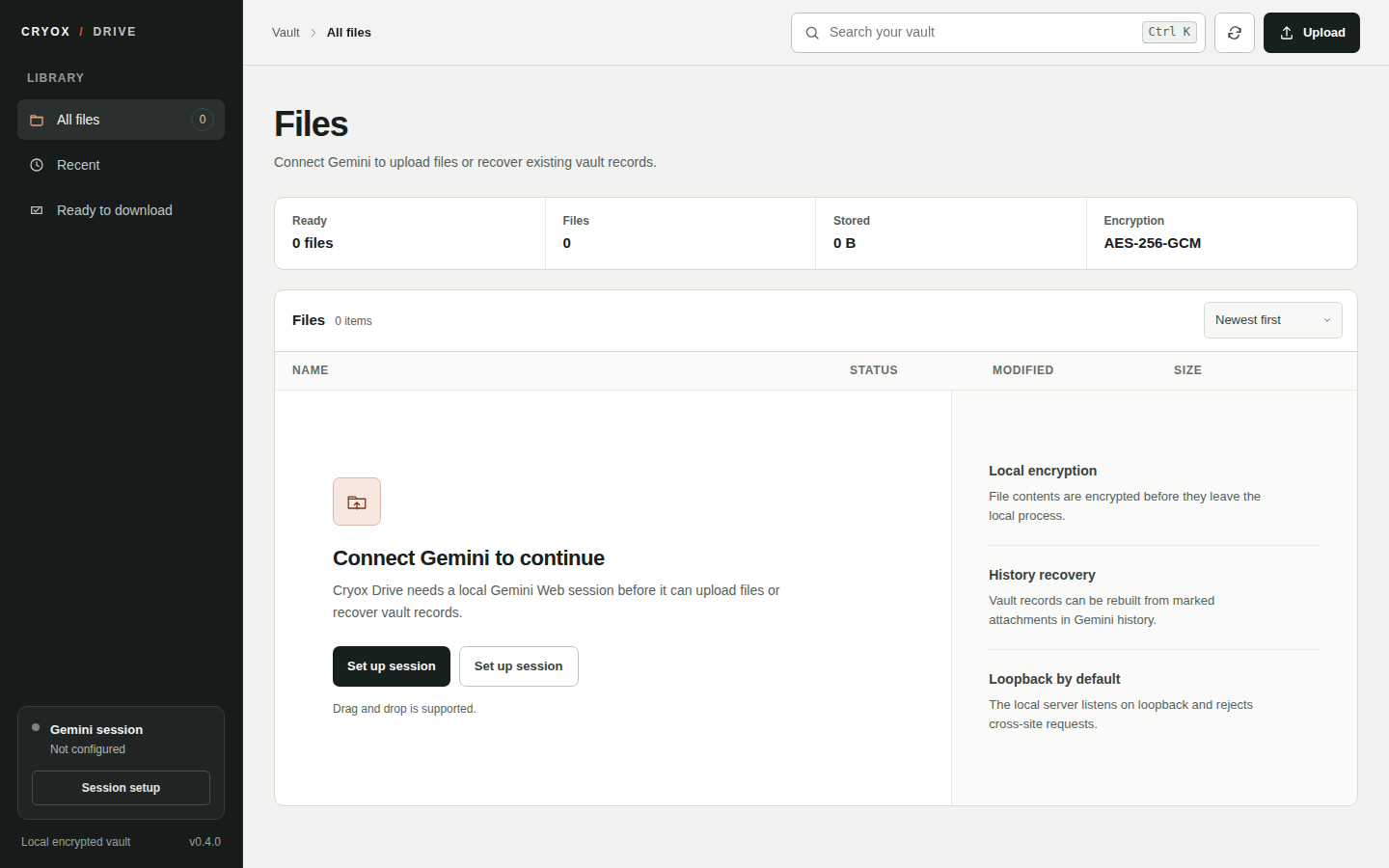
The preview shows the empty-vault state without account data, file contents, or session credentials.
Overview
Cryox is designed around a simple boundary: plaintext belongs on the local machine, and the remote provider receives an encrypted vault envelope rather than the original file.
A normal upload follows this path:
Browser
  |
  | raw file bytes
  v
Local Cryox server
  |
  | validate metadata and declared size
  | encrypt with AES-256-GCM
  v
Cryox vault envelope
  |\
  | +----> encrypted local mirror
  |
  +------> Gemini attachment upload
             |
             v
        persistent Cryox storage marker
        in Gemini conversation history
A normal download reverses the process. Cryox obtains the encrypted envelope from an approved Gemini-hosted URL when one is available, or falls back to the encrypted local mirror, authenticates and decrypts it in memory, and returns the original bytes to the browser.
Core behavior
Local encryption before provider storage
New uploads use the cryox-vault-v2 envelope format. The original file bytes are encrypted with AES-256-GCM using a locally managed 256-bit vault key and a unique 96-bit IV.
The envelope contains:
CryoxVault__<original-name>.zip
  payload.bin    encrypted file payload
  meta.json      authenticated vault metadata
The v2 format authenticates the canonical file metadata as AES-GCM associated data. The stored file name, MIME type, original size, SHA-256 digest, and IV are therefore bound to the encrypted payload. Changing authenticated metadata causes decryption to fail.
The reader retains compatibility with cryox-vault-v1 so existing encrypted mirrors are not invalidated by the newer format.
Persistent Gemini storage record
After the encrypted envelope is uploaded, Cryox writes a structured storage marker into its persistent Gemini conversation and verifies that the record can be found in conversation history before the upload is committed to the local index.
Only records containing the Cryox storage marker are considered part of the vault. Ordinary Gemini conversations and unrelated attachments are ignored during recovery.
Local encrypted mirror
Cryox keeps an encrypted local copy of each current vault envelope. This copy is not plaintext and is used as a reliable download fallback when a provider URL is unavailable or temporarily fails.
If an upload fails before provider persistence is confirmed, the temporary encrypted mirror created for that upload is removed instead of leaving a partially committed vault entry.
Recovery from Gemini history
The local index is recoverable from Gemini conversation history. On startup, Cryox performs incremental reconciliation of conversations that are new or changed since the last successful scan. When the local index is empty, it performs a broader recovery scan.
The manual Sync action forces reconciliation. Recovered records preserve the Cryox file identifier, original metadata, Gemini conversation association, and any usable provider download URL discovered in the stored conversation.
Local removal and tombstones
Removing a file from Cryox is intentionally a local vault operation:
- The record is removed from the local index.
- The encrypted local mirror is deleted.
- The file ID is written to the local hidden-ID set so later recovery scans do not silently restore it.
- The historical Gemini attachment is not deleted.
This distinction is important. Removing an entry from the Cryox vault does not claim to erase the corresponding attachment from Gemini history.
Requirements
- Node.js 22 or newer
- npm
- A Gemini Web session belonging to the user running the application
The frontend has no third-party browser runtime dependencies. The local server uses Express and the provider transport uses impit.
Installation
Clone the repository and install dependencies:
git clone https://github.com/Cry0x404/cryox-gemini-drive.git
cd cryox-gemini-drive
npm install
Start the local server:
npm start
Open:
http://127.0.0.1:3000
For development with Node's watch mode:
npm run dev
Gemini session setup
Cryox uses the current user's Gemini Web browser session. It does not ship a Google API key, OAuth client, or service account.
The project root contains an empty placeholder:
[]
Export the cookies from an active Gemini browser session as JSON and replace the contents of cookies.json with that export. The export must include:
__Secure-1PSID
__Secure-1PSIDTS
On startup, Cryox validates the export and can persist a minimized private session under the platform application-data directory. The minimized copy stores only the required authenticated session values. A populated cookies.json remains local and is excluded from normal Git tracking.
Advanced setups can provide the required values through environment variables instead:
CRYOX_GEMINI_PSID
CRYOX_GEMINI_PSIDTS
Treat Gemini browser cookies as account credentials. Do not commit them, force-add them, publish them in logs, include them in screenshots, or attach them to bug reports.
See docs/authentication.md for the session-loading rules and failure behavior.
Using the vault
Upload
The browser streams the selected file to the local /api/upload route with bounded metadata headers. The server verifies the declared size, reads the upload, encrypts it, creates the vault envelope, stores the encrypted local mirror, uploads the encrypted envelope to Gemini, and then verifies the persistent storage record.
The original plaintext is not intentionally written to disk. The current implementation does buffer the plaintext upload in process memory while building the encrypted envelope, so available RAM remains a practical constraint for very large files.
Browse and search
The browser UI works from the local vault index. File rows expose the original name, type, size, upload time, and download availability. Filtering and sorting happen in the local interface rather than through Gemini.
Download
For a current vault entry, Cryox prefers a trusted Gemini-hosted HTTPS download when one is available. Provider URLs are validated before use. If remote retrieval fails, Cryox can fall back to the encrypted local mirror.
For encrypted envelopes, decryption includes authenticated metadata verification, original-size verification, and SHA-256 integrity verification before the plaintext bytes are returned to the browser.
Older records created by versions that stored only an opaque provider handle may not be remotely downloadable if no encrypted local mirror remains. In that case the application reports the limitation instead of returning unverified data.
Sync and recovery
The Sync action scans Gemini history for Cryox markers and merges valid records into the local index. Incremental scan state is persisted locally so normal startup does not need to rescan every conversation every time.
Remove
Removing a file hides it from the local vault and future recovery scans. It does not delete the historical provider attachment. See Local removal and tombstones above.
Persistent local state
Runtime state is stored outside the repository so replacing the source checkout or extracting a newer release does not reset the vault.
Default storage roots are:
| Platform | Location |
|---|---|
| Windows | %LOCALAPPDATA%\Cryox\GeminiDrive |
| macOS | ~/Library/Application Support/Cryox Gemini Drive |
| Linux | ${XDG_DATA_HOME:-~/.local/share}/cryox-gemini-drive |
The storage root contains data such as:
data/
  gemini-session.json    minimized local Gemini session
  vault.key              local 256-bit encryption key
  vault-index.json       local file index
  vault-state.json       current vault/provider state
  history-scan.json      incremental recovery scan state
  vault-hidden.json      locally removed file IDs
  vault-cache/           encrypted local vault envelopes

gemini-threads/          provider continuation metadata
Pre-0.2 builds stored some runtime data beside the source tree. Current releases copy compatible legacy state into the persistent application-data location only when the destination does not already exist. Existing persistent state wins, and migration does not delete the old files.
Security model
Cryox is local-first, but local-first does not mean risk-free. The main security boundaries are explicit and intentionally narrow.
Vault key
A random 256-bit key is created on first use unless CRYOX_VAULT_KEY_HEX supplies an explicit key. File creation is exclusive so a concurrent process cannot silently replace an existing key during initialization.
Loss of the vault key means encrypted Cryox envelopes created with that key cannot be decrypted. Protect backups accordingly.
Local HTTP boundary
The default bind address is 127.0.0.1. While using the default loopback binding, Cryox rejects non-loopback Host values, cross-site requests, and mismatched Origin headers.
State-changing API requests must also carry the local X-Cryox-Request: 1 marker used by the browser client.
The browser surface applies security headers including:
- restrictive Content Security Policy
- frame denial
- MIME sniffing protection
- no-referrer policy
- same-origin opener and resource policies
- disabled DNS prefetching
- disabled camera, microphone, and geolocation permissions
no-storehandling for API responses
Changing HOST to a non-loopback address changes this threat model. Do not expose the application directly to an untrusted network without an appropriate authenticated reverse proxy or equivalent access-control layer.
Provider URL validation
Provider download links are accepted only when they use HTTPS, contain no embedded credentials, use the expected HTTPS port, and belong to approved Google attachment host families. Arbitrary URLs discovered in provider content are not treated as trusted download targets.
Repository credential hygiene
The repository's secret scanner checks for common credential patterns as part of npm run check and CI. .gitignore excludes local session exports, credentials, private keys, runtime state, encrypted mirrors, logs, dependency directories, and build output.
The scanner is defense in depth, not a substitute for reviewing changes before publication.
For the complete threat model and reporting process, read docs/security.md and SECURITY.md.
Configuration
| Variable | Purpose | Default |
|---|---|---|
PORT | Local HTTP port | 3000 |
HOST | Bind address | 127.0.0.1 |
CRYOX_STORAGE_ROOT | Root directory for persistent local runtime state | platform application-data directory |
CRYOX_GEMINI_COOKIE_FILE | Browser cookie export path | <project>/cookies.json |
CRYOX_GEMINI_SESSION_FILE | Minimized private Gemini session path | <storage-root>/data/gemini-session.json |
CRYOX_GEMINI_PSID | Required Gemini session cookie override | unset |
CRYOX_GEMINI_PSIDTS | Required Gemini session cookie override | unset |
CRYOX_VAULT_KEY_FILE | Vault key path | <storage-root>/data/vault.key |
CRYOX_VAULT_KEY_HEX | Optional 64-character hexadecimal vault key override | unset |
Local API surface
The browser interface communicates only with the local /api/* routes.
| Method | Route | Purpose |
|---|---|---|
GET | /api/status | Check local session configuration, live Gemini availability, conversation state, and file count |
GET | /api/files | Read the local vault index |
POST | /api/sync | Reconcile valid Cryox records from Gemini history |
POST | /api/upload | Encrypt and persist a new file |
GET | /api/files/:id/download | Retrieve, authenticate, decrypt, and return a vault file |
DELETE | /api/files/:id | Remove a local record, encrypted mirror, and add a recovery tombstone |
Mutation routes are intended for the bundled local browser client and require the Cryox request marker enforced by the HTTP middleware.
Repository layout
.github/
  workflows/              CI, CodeQL, dependency review, and release automation
  ISSUE_TEMPLATE/         structured issue forms

docs/                     architecture, authentication, security, and UI documentation
lib/                      Gemini transport, session storage, vault encryption, record encoding
public/
  js/                     browser API, file model, upload flow, rendering, and application bootstrap
  styles/                 tokens, shell, file browser, overlays, and responsive rules
scripts/                  syntax and repository secret validation
src/
  http/                   local request guards, security headers, metadata validation
  routes/                 local API endpoints
  services/               history reconciliation and provider URL handling
  store/                  local index, state, tombstones, and encrypted mirror
test/                     Node.js regression tests
server.js                 process entry point
The provider protocol is deliberately isolated in lib/gemini-web.js. Changes in Gemini Web should generally be handled there rather than leaking provider-specific behavior into the vault, API, or browser layers.
Development and verification
Run the complete local verification path with:
npm run verify
This runs:
JavaScript syntax validation
repository secret scan
complete Node.js regression test suite
Individual commands are also available:
npm run check
npm test
CI validates supported Node.js versions on Linux and Windows. CodeQL runs separately, and dependency review runs for pull requests.
GitHub automation
The repository includes:
- CI on Node.js 22 and 24 for Linux
- CI on Node.js 24 for Windows
- CodeQL analysis for JavaScript and TypeScript
- dependency review for pull requests
- Dependabot configuration
- release validation and source archive generation
- issue and pull-request templates
- CODEOWNERS
Release archives are built from Git source, include an empty cookies.json, and publish a SHA-256 checksum alongside the archive.
Operational limitations
Cryox Gemini Drive is alpha software. The following constraints are intentional and should be understood before relying on it for important data:
- Gemini Web is an undocumented upstream interface and can change independently of this project.
- Browser sessions expire or rotate and may need to be refreshed.
- The application imposes no storage quota of its own, but upstream Gemini/account limits still apply.
- Upload encryption currently buffers the file in process memory, so available RAM is a practical file-size constraint.
- Local removal does not erase the historical Gemini attachment.
- Losing the local vault key makes encrypted Cryox envelopes unrecoverable.
- The default security model assumes loopback-only operation.
- This project is not presented as independently audited security software.
Documentation
docs/architecture.mddescribes module boundaries and data flow.docs/authentication.mddocuments Gemini session loading and lifetime behavior.docs/security.mddocuments the local security model and provider trust boundaries.docs/design-system.mdrecords the interface system.PRODUCT.mdrecords product behavior and non-visual constraints.DESIGN.mdrecords durable visual and interaction decisions.RELEASING.mddocuments the release process.
Contributing
Read CONTRIBUTING.md before opening a pull request. Keep protocol, storage, security, and UI changes focused and independently reviewable where practical.
Security-sensitive reports must follow SECURITY.md. Never include live session cookies, vault keys, private provider handles, signed download URLs, or account-specific material in a public issue.
License
Copyright (c) 2026 Cry0x404.
Cryox Gemini Drive is licensed under the GNU General Public License v3.0 only (GPL-3.0-only). You may use, study, modify, and redistribute the software under the terms of that license. Distributed modified versions and other covered derivative works must remain under GPL-3.0-only and provide the corresponding source as required by the license.
See LICENSE for the complete license terms.
Contributors

9 commits
Similar repos


Languages
JavaScript
80.9%
CSS
13.4%
HTML
5.7%
An encrypted, local-first file vault backed by Gemini conversations — no app-imposed storage quota.
JavaScript
0
9 commits
updated Sep 18, 2026
See what people are saying (1)
README
Cryox Gemini Drive
Cryox Gemini Drive is an encrypted, local-first file vault backed by Gemini conversations, with no application-imposed storage quota.
Files are encrypted locally before they are sent to Gemini. Cryox keeps the vault index, encryption key, encrypted local mirror, session state, and recovery metadata on the local machine, while a persistent Gemini conversation provides the remote attachment layer used for storage and recovery.
Cryox does not claim that Gemini provides unlimited storage. The application does not impose its own per-file or aggregate storage quota, but upstream Gemini limits, account restrictions, network conditions, and available process memory still apply.
[!IMPORTANT] Cryox Gemini Drive uses an unofficial Gemini Web transport and is not affiliated with or endorsed by Google. Gemini's private web protocol can change without notice and may require compatibility updates.
Interface
The preview shows the empty-vault state without account data, file contents, or session credentials.
Overview
Cryox is designed around a simple boundary: plaintext belongs on the local machine, and the remote provider receives an encrypted vault envelope rather than the original file.
A normal upload follows this path:
Browser
  |
  | raw file bytes
  v
Local Cryox server
  |
  | validate metadata and declared size
  | encrypt with AES-256-GCM
  v
Cryox vault envelope
  |\
  | +----> encrypted local mirror
  |
  +------> Gemini attachment upload
             |
             v
        persistent Cryox storage marker
        in Gemini conversation history
A normal download reverses the process. Cryox obtains the encrypted envelope from an approved Gemini-hosted URL when one is available, or falls back to the encrypted local mirror, authenticates and decrypts it in memory, and returns the original bytes to the browser.
Core behavior
Local encryption before provider storage
New uploads use the cryox-vault-v2 envelope format. The original file bytes are encrypted with AES-256-GCM using a locally managed 256-bit vault key and a unique 96-bit IV.
The envelope contains:
CryoxVault__<original-name>.zip
  payload.bin    encrypted file payload
  meta.json      authenticated vault metadata
The v2 format authenticates the canonical file metadata as AES-GCM associated data. The stored file name, MIME type, original size, SHA-256 digest, and IV are therefore bound to the encrypted payload. Changing authenticated metadata causes decryption to fail.
The reader retains compatibility with cryox-vault-v1 so existing encrypted mirrors are not invalidated by the newer format.
Persistent Gemini storage record
After the encrypted envelope is uploaded, Cryox writes a structured storage marker into its persistent Gemini conversation and verifies that the record can be found in conversation history before the upload is committed to the local index.
Only records containing the Cryox storage marker are considered part of the vault. Ordinary Gemini conversations and unrelated attachments are ignored during recovery.
Local encrypted mirror
Cryox keeps an encrypted local copy of each current vault envelope. This copy is not plaintext and is used as a reliable download fallback when a provider URL is unavailable or temporarily fails.
If an upload fails before provider persistence is confirmed, the temporary encrypted mirror created for that upload is removed instead of leaving a partially committed vault entry.
Recovery from Gemini history
The local index is recoverable from Gemini conversation history. On startup, Cryox performs incremental reconciliation of conversations that are new or changed since the last successful scan. When the local index is empty, it performs a broader recovery scan.
The manual Sync action forces reconciliation. Recovered records preserve the Cryox file identifier, original metadata, Gemini conversation association, and any usable provider download URL discovered in the stored conversation.
Local removal and tombstones
Removing a file from Cryox is intentionally a local vault operation:
- The record is removed from the local index.
- The encrypted local mirror is deleted.
- The file ID is written to the local hidden-ID set so later recovery scans do not silently restore it.
- The historical Gemini attachment is not deleted.
This distinction is important. Removing an entry from the Cryox vault does not claim to erase the corresponding attachment from Gemini history.
Requirements
- Node.js 22 or newer
- npm
- A Gemini Web session belonging to the user running the application
The frontend has no third-party browser runtime dependencies. The local server uses Express and the provider transport uses impit.
Installation
Clone the repository and install dependencies:
git clone https://github.com/Cry0x404/cryox-gemini-drive.git
cd cryox-gemini-drive
npm install
Start the local server:
npm start
Open:
http://127.0.0.1:3000
For development with Node's watch mode:
npm run dev
Gemini session setup
Cryox uses the current user's Gemini Web browser session. It does not ship a Google API key, OAuth client, or service account.
The project root contains an empty placeholder:
[]
Export the cookies from an active Gemini browser session as JSON and replace the contents of cookies.json with that export. The export must include:
__Secure-1PSID
__Secure-1PSIDTS
On startup, Cryox validates the export and can persist a minimized private session under the platform application-data directory. The minimized copy stores only the required authenticated session values. A populated cookies.json remains local and is excluded from normal Git tracking.
Advanced setups can provide the required values through environment variables instead:
CRYOX_GEMINI_PSID
CRYOX_GEMINI_PSIDTS
Treat Gemini browser cookies as account credentials. Do not commit them, force-add them, publish them in logs, include them in screenshots, or attach them to bug reports.
See docs/authentication.md for the session-loading rules and failure behavior.
Using the vault
Upload
The browser streams the selected file to the local /api/upload route with bounded metadata headers. The server verifies the declared size, reads the upload, encrypts it, creates the vault envelope, stores the encrypted local mirror, uploads the encrypted envelope to Gemini, and then verifies the persistent storage record.
The original plaintext is not intentionally written to disk. The current implementation does buffer the plaintext upload in process memory while building the encrypted envelope, so available RAM remains a practical constraint for very large files.
Browse and search
The browser UI works from the local vault index. File rows expose the original name, type, size, upload time, and download availability. Filtering and sorting happen in the local interface rather than through Gemini.
Download
For a current vault entry, Cryox prefers a trusted Gemini-hosted HTTPS download when one is available. Provider URLs are validated before use. If remote retrieval fails, Cryox can fall back to the encrypted local mirror.
For encrypted envelopes, decryption includes authenticated metadata verification, original-size verification, and SHA-256 integrity verification before the plaintext bytes are returned to the browser.
Older records created by versions that stored only an opaque provider handle may not be remotely downloadable if no encrypted local mirror remains. In that case the application reports the limitation instead of returning unverified data.
Sync and recovery
The Sync action scans Gemini history for Cryox markers and merges valid records into the local index. Incremental scan state is persisted locally so normal startup does not need to rescan every conversation every time.
Remove
Removing a file hides it from the local vault and future recovery scans. It does not delete the historical provider attachment. See Local removal and tombstones above.
Persistent local state
Runtime state is stored outside the repository so replacing the source checkout or extracting a newer release does not reset the vault.
Default storage roots are:
| Platform | Location |
|---|---|
| Windows | %LOCALAPPDATA%\Cryox\GeminiDrive |
| macOS | ~/Library/Application Support/Cryox Gemini Drive |
| Linux | ${XDG_DATA_HOME:-~/.local/share}/cryox-gemini-drive |
The storage root contains data such as:
data/
  gemini-session.json    minimized local Gemini session
  vault.key              local 256-bit encryption key
  vault-index.json       local file index
  vault-state.json       current vault/provider state
  history-scan.json      incremental recovery scan state
  vault-hidden.json      locally removed file IDs
  vault-cache/           encrypted local vault envelopes

gemini-threads/          provider continuation metadata
Pre-0.2 builds stored some runtime data beside the source tree. Current releases copy compatible legacy state into the persistent application-data location only when the destination does not already exist. Existing persistent state wins, and migration does not delete the old files.
Security model
Cryox is local-first, but local-first does not mean risk-free. The main security boundaries are explicit and intentionally narrow.
Vault key
A random 256-bit key is created on first use unless CRYOX_VAULT_KEY_HEX supplies an explicit key. File creation is exclusive so a concurrent process cannot silently replace an existing key during initialization.
Loss of the vault key means encrypted Cryox envelopes created with that key cannot be decrypted. Protect backups accordingly.
Local HTTP boundary
The default bind address is 127.0.0.1. While using the default loopback binding, Cryox rejects non-loopback Host values, cross-site requests, and mismatched Origin headers.
State-changing API requests must also carry the local X-Cryox-Request: 1 marker used by the browser client.
The browser surface applies security headers including:
- restrictive Content Security Policy
- frame denial
- MIME sniffing protection
- no-referrer policy
- same-origin opener and resource policies
- disabled DNS prefetching
- disabled camera, microphone, and geolocation permissions
no-storehandling for API responses
Changing HOST to a non-loopback address changes this threat model. Do not expose the application directly to an untrusted network without an appropriate authenticated reverse proxy or equivalent access-control layer.
Provider URL validation
Provider download links are accepted only when they use HTTPS, contain no embedded credentials, use the expected HTTPS port, and belong to approved Google attachment host families. Arbitrary URLs discovered in provider content are not treated as trusted download targets.
Repository credential hygiene
The repository's secret scanner checks for common credential patterns as part of npm run check and CI. .gitignore excludes local session exports, credentials, private keys, runtime state, encrypted mirrors, logs, dependency directories, and build output.
The scanner is defense in depth, not a substitute for reviewing changes before publication.
For the complete threat model and reporting process, read docs/security.md and SECURITY.md.
Configuration
| Variable | Purpose | Default |
|---|---|---|
PORT | Local HTTP port | 3000 |
HOST | Bind address | 127.0.0.1 |
CRYOX_STORAGE_ROOT | Root directory for persistent local runtime state | platform application-data directory |
CRYOX_GEMINI_COOKIE_FILE | Browser cookie export path | <project>/cookies.json |
CRYOX_GEMINI_SESSION_FILE | Minimized private Gemini session path | <storage-root>/data/gemini-session.json |
CRYOX_GEMINI_PSID | Required Gemini session cookie override | unset |
CRYOX_GEMINI_PSIDTS | Required Gemini session cookie override | unset |
CRYOX_VAULT_KEY_FILE | Vault key path | <storage-root>/data/vault.key |
CRYOX_VAULT_KEY_HEX | Optional 64-character hexadecimal vault key override | unset |
Local API surface
The browser interface communicates only with the local /api/* routes.
| Method | Route | Purpose |
|---|---|---|
GET | /api/status | Check local session configuration, live Gemini availability, conversation state, and file count |
GET | /api/files | Read the local vault index |
POST | /api/sync | Reconcile valid Cryox records from Gemini history |
POST | /api/upload | Encrypt and persist a new file |
GET | /api/files/:id/download | Retrieve, authenticate, decrypt, and return a vault file |
DELETE | /api/files/:id | Remove a local record, encrypted mirror, and add a recovery tombstone |
Mutation routes are intended for the bundled local browser client and require the Cryox request marker enforced by the HTTP middleware.
Repository layout
.github/
  workflows/              CI, CodeQL, dependency review, and release automation
  ISSUE_TEMPLATE/         structured issue forms

docs/                     architecture, authentication, security, and UI documentation
lib/                      Gemini transport, session storage, vault encryption, record encoding
public/
  js/                     browser API, file model, upload flow, rendering, and application bootstrap
  styles/                 tokens, shell, file browser, overlays, and responsive rules
scripts/                  syntax and repository secret validation
src/
  http/                   local request guards, security headers, metadata validation
  routes/                 local API endpoints
  services/               history reconciliation and provider URL handling
  store/                  local index, state, tombstones, and encrypted mirror
test/                     Node.js regression tests
server.js                 process entry point
The provider protocol is deliberately isolated in lib/gemini-web.js. Changes in Gemini Web should generally be handled there rather than leaking provider-specific behavior into the vault, API, or browser layers.
Development and verification
Run the complete local verification path with:
npm run verify
This runs:
JavaScript syntax validation
repository secret scan
complete Node.js regression test suite
Individual commands are also available:
npm run check
npm test
CI validates supported Node.js versions on Linux and Windows. CodeQL runs separately, and dependency review runs for pull requests.
GitHub automation
The repository includes:
- CI on Node.js 22 and 24 for Linux
- CI on Node.js 24 for Windows
- CodeQL analysis for JavaScript and TypeScript
- dependency review for pull requests
- Dependabot configuration
- release validation and source archive generation
- issue and pull-request templates
- CODEOWNERS
Release archives are built from Git source, include an empty cookies.json, and publish a SHA-256 checksum alongside the archive.
Operational limitations
Cryox Gemini Drive is alpha software. The following constraints are intentional and should be understood before relying on it for important data:
- Gemini Web is an undocumented upstream interface and can change independently of this project.
- Browser sessions expire or rotate and may need to be refreshed.
- The application imposes no storage quota of its own, but upstream Gemini/account limits still apply.
- Upload encryption currently buffers the file in process memory, so available RAM is a practical file-size constraint.
- Local removal does not erase the historical Gemini attachment.
- Losing the local vault key makes encrypted Cryox envelopes unrecoverable.
- The default security model assumes loopback-only operation.
- This project is not presented as independently audited security software.
Documentation
docs/architecture.mddescribes module boundaries and data flow.docs/authentication.mddocuments Gemini session loading and lifetime behavior.docs/security.mddocuments the local security model and provider trust boundaries.docs/design-system.mdrecords the interface system.PRODUCT.mdrecords product behavior and non-visual constraints.DESIGN.mdrecords durable visual and interaction decisions.RELEASING.mddocuments the release process.
Contributing
Read CONTRIBUTING.md before opening a pull request. Keep protocol, storage, security, and UI changes focused and independently reviewable where practical.
Security-sensitive reports must follow SECURITY.md. Never include live session cookies, vault keys, private provider handles, signed download URLs, or account-specific material in a public issue.
License
Copyright (c) 2026 Cry0x404.
Cryox Gemini Drive is licensed under the GNU General Public License v3.0 only (GPL-3.0-only). You may use, study, modify, and redistribute the software under the terms of that license. Distributed modified versions and other covered derivative works must remain under GPL-3.0-only and provide the corresponding source as required by the license.
See LICENSE for the complete license terms.
Similar repos
Contributors
9 commits
Languages
JavaScript
80.9%
CSS
13.4%
HTML
5.7%