What if Unity Hub and GitHub Desktop had a Baby but its Adopted? Yeah..
See the code
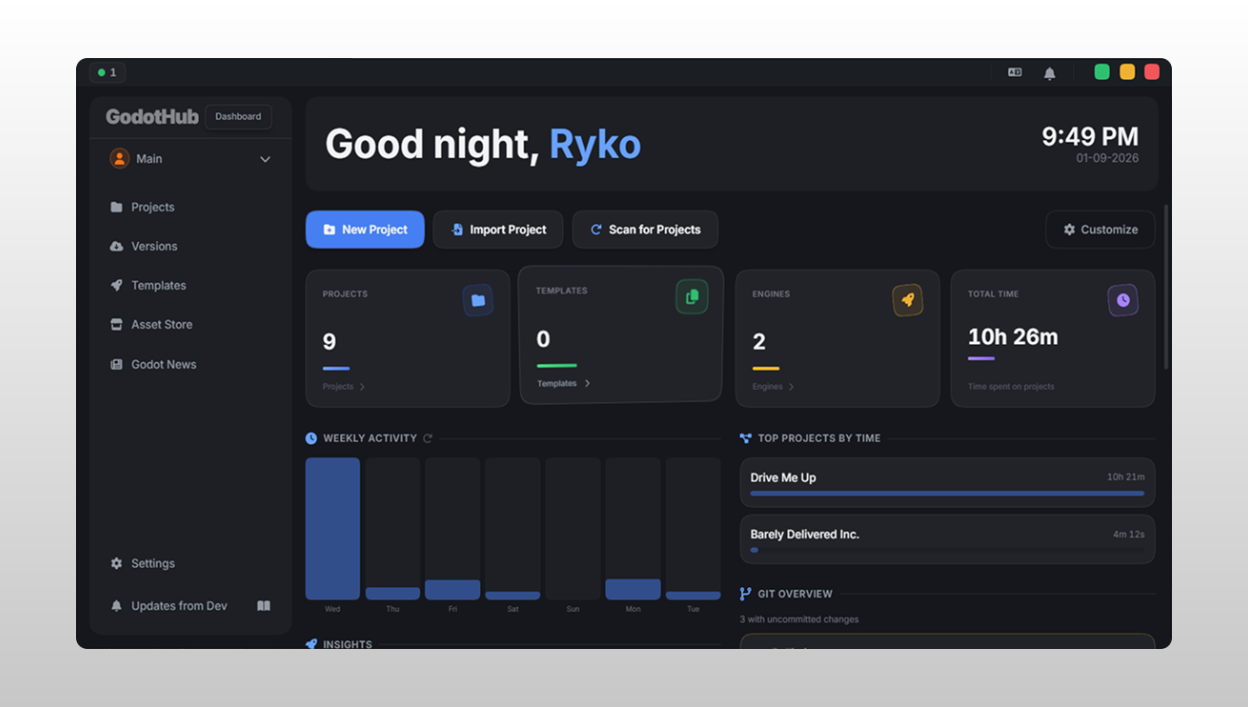
Dashboard |
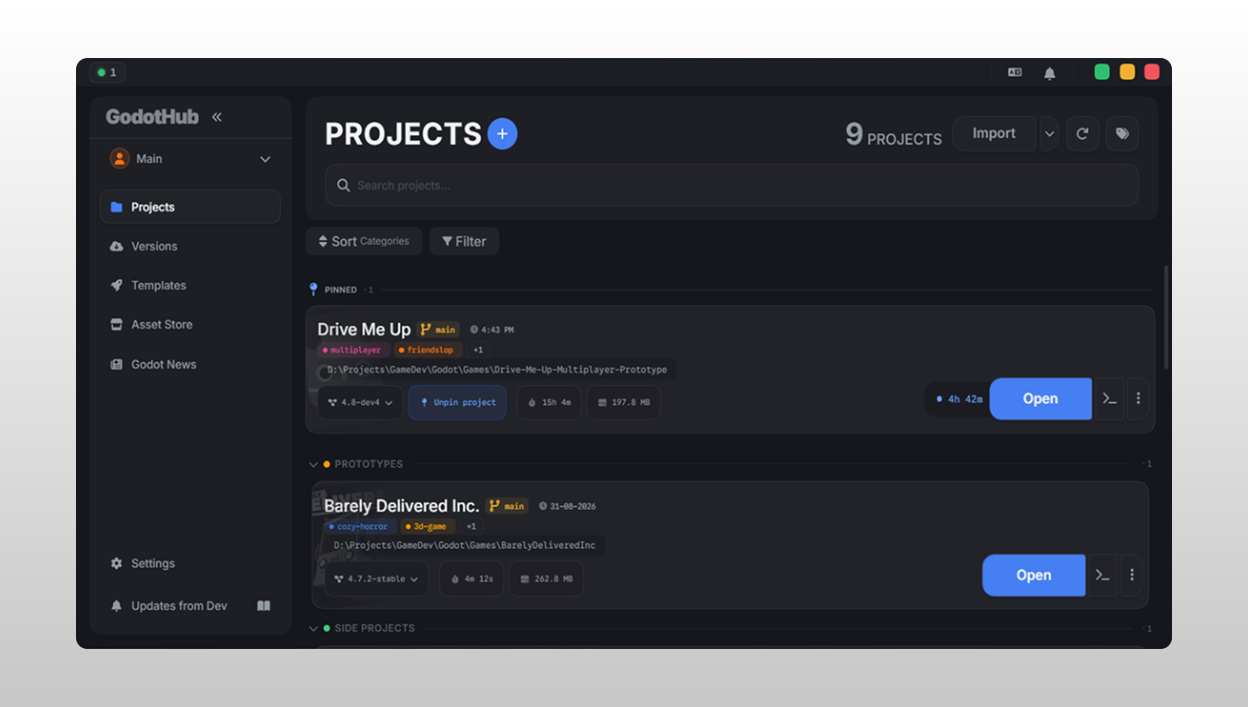
Projects |
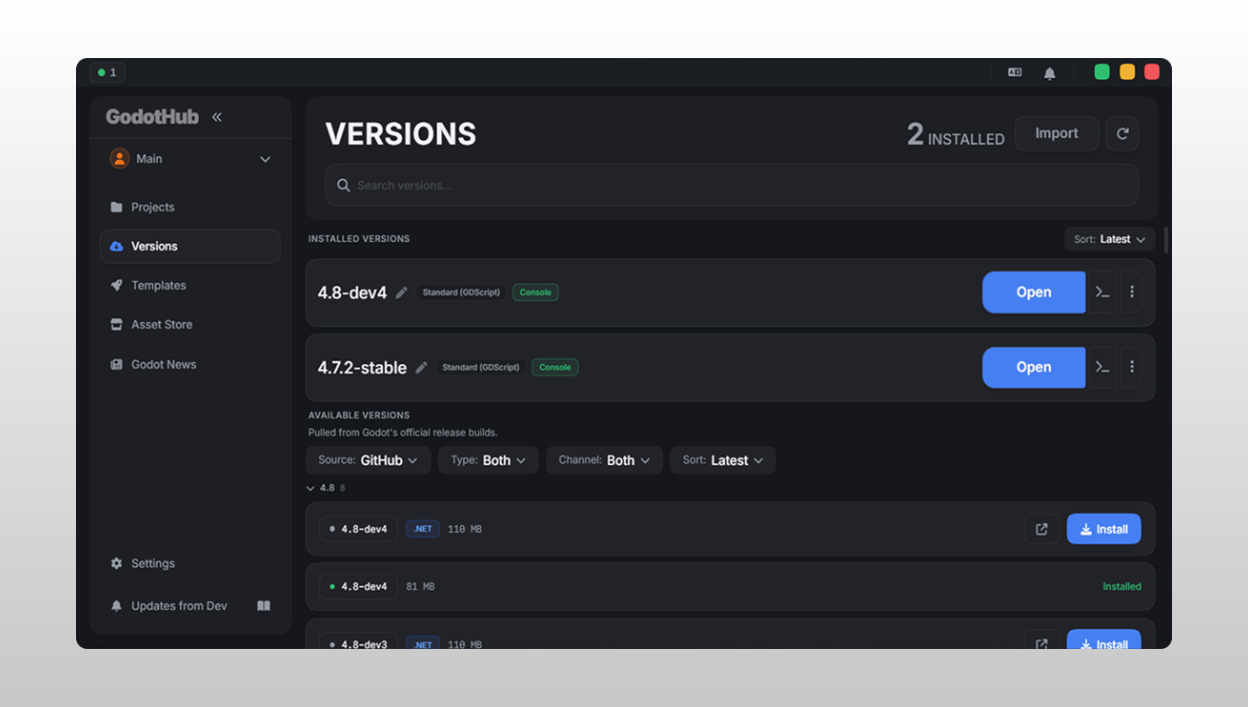
Versions |
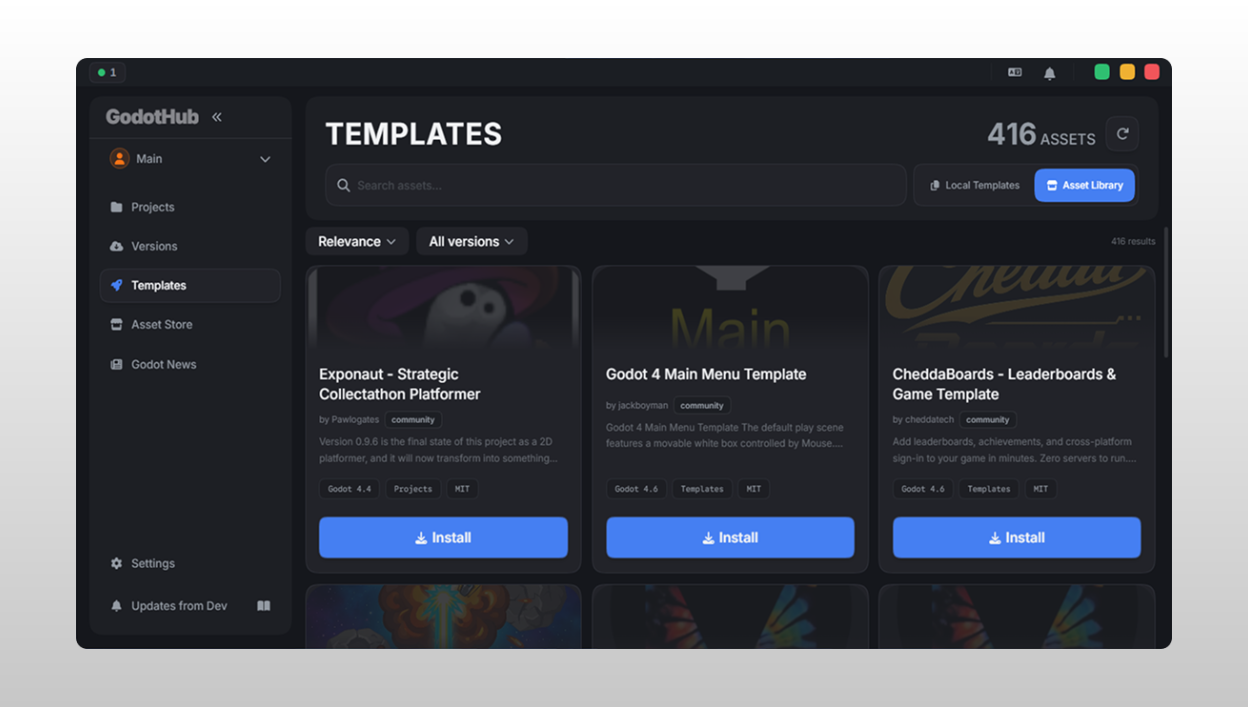
Templates |
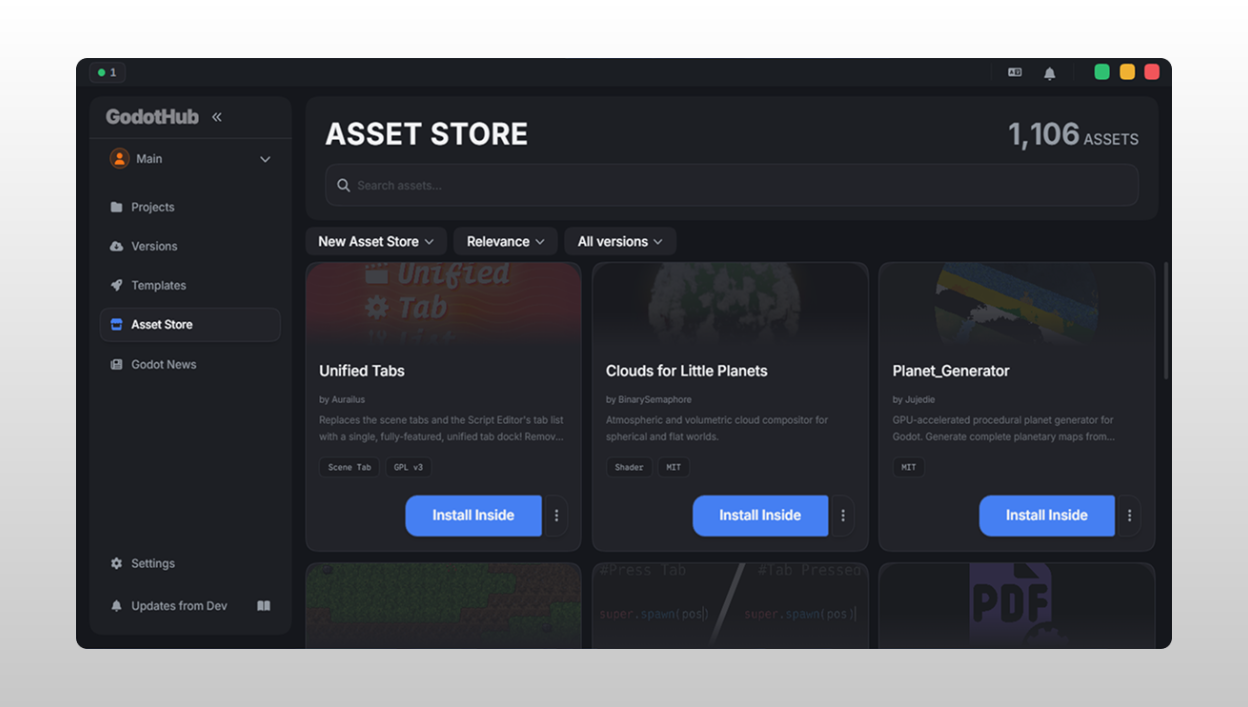
Asset Store |
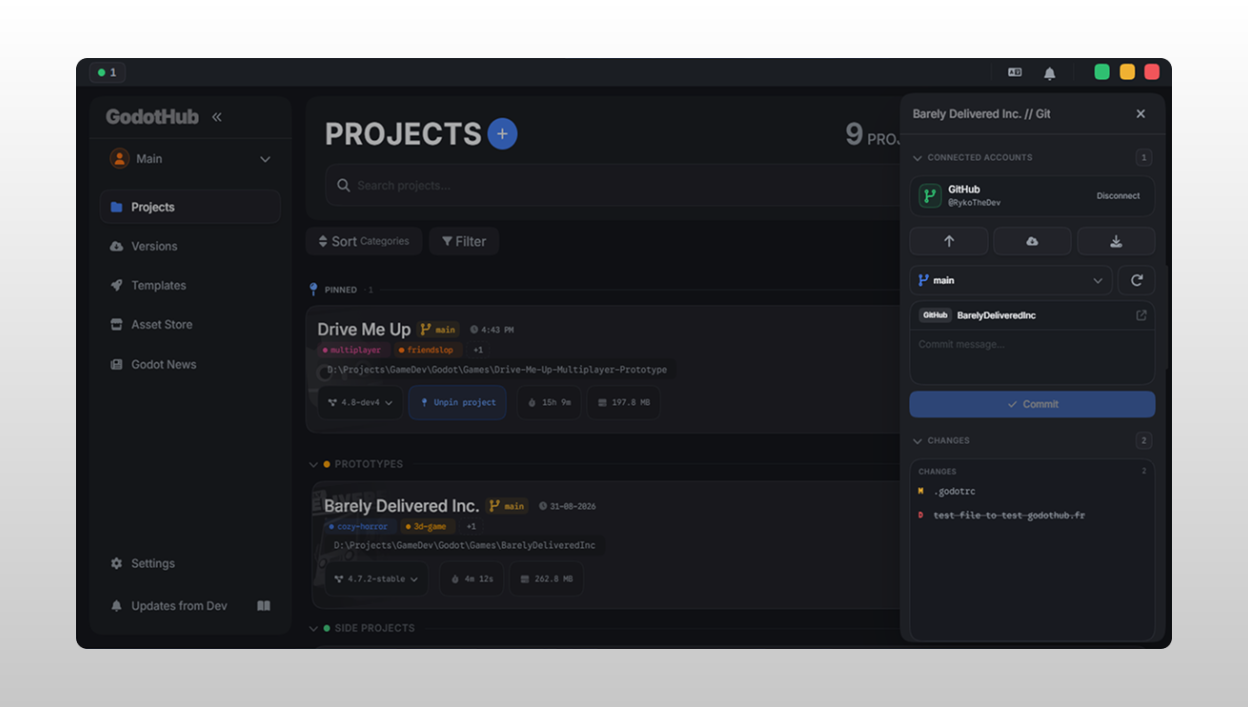
Git Integration |
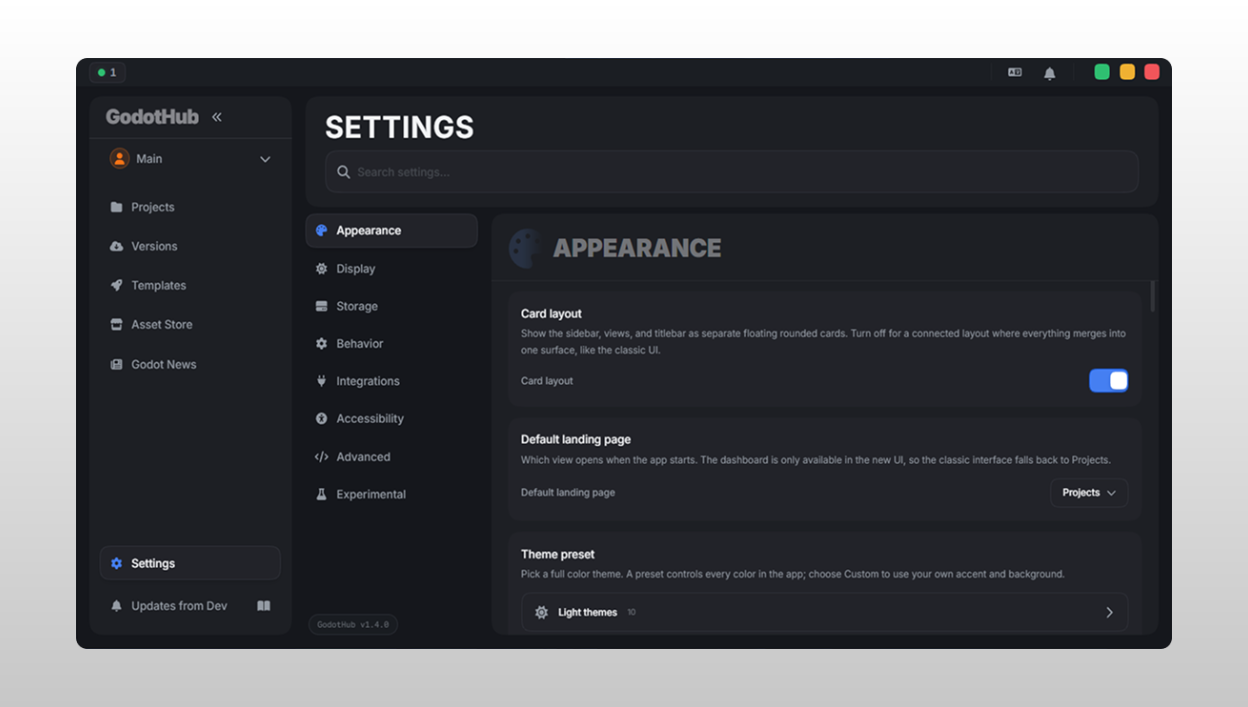
Appearance & Settings |
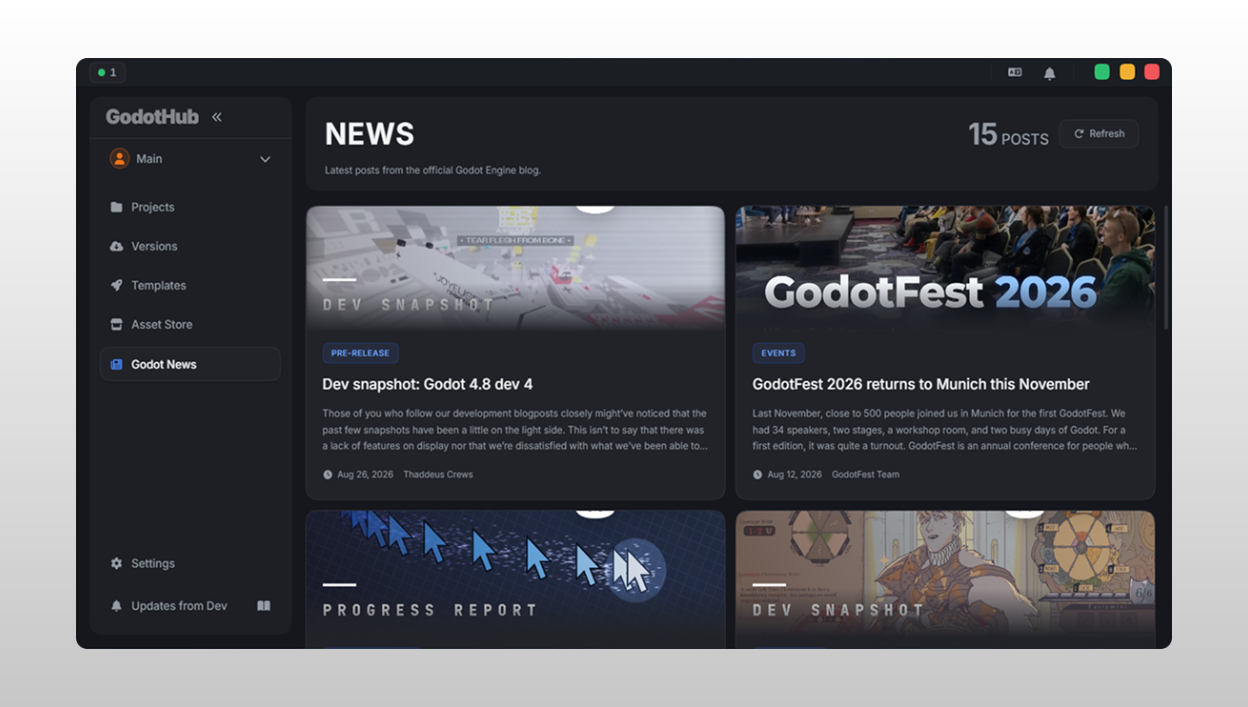
News Feed |
Screenshots show the dark theme with the default accent color. Everything shown is customizable.


| Feature | Description |
|---|---|
| Create & Import | Create new projects from scratch or from templates, import existing ones from disk, or clone directly from a Git repo. |
| Drag & Drop Reorder | Rearrange projects with drag-and-drop, within a category or between categories. |
| Pin Projects | Pin projects to a dedicated section at the top. |
| Tags | Tags are read straight from project.godot, so they stay in sync with the Godot launcher. Edit, add, or delete them and the sync follows. |
| Batch Operations | Select multiple projects at once to change versions, assign categories, toggle pins, or remove from the library. |
| Search & Filter | Search by name or path, filter by category, sort by custom order, name, date, last opened, or size. |
| Version Warnings | Flags when a project's bound Godot version is missing or there's a major version mismatch. |
| Project Properties | A file breakdown by type (scripts, scenes, images, audio, 3D models, etc.) with sizes and counts. |
| Custom Launch Args | Add custom command-line arguments when launching a project. |
| Quick Actions | Open the project folder, open in an external editor, or open a terminal at the project path, all from the project card. |
| Feature | Description |
|---|---|
| Browse Releases | Pulls the full list of official Godot builds from GitHub, filtered for your platform. |
| Download & Install | Progress tracking, resume support, and concurrent downloads (configurable up to 10 at once). |
| Export Templates | Install the matching export templates (.tpz) for each version, with resumable downloads, SHA-512 verification, and cleanup of unused template folders. |
| Import Versions | Import an existing Godot install from any folder, or drag-and-drop a .zip. |
| Grouped Display | Versions grouped by major.minor with collapsible sections. |
| Filtering | Filter by build type (Standard / Mono / Both) and channel (Stable / Unstable / Both). |
| Custom Names | Give installed versions your own names. |
| Pin as Current | Mark one version as the current one. GodotHub drops a Godot launcher into its aliases folder, so scripts, test runners, and MCP servers get a stable path that follows the pin. |
| Version Aliases | Give extra command names to specific versions; godot-mono, godot-next, whatever you like. Manage them from the Versions view; delete a launcher from the folder and the alias disappears from the app too. |
| Auto-Cleanup | Prunes missing executables from the registry automatically. |
| Feature | Description |
|---|---|
| Save as Template | Turn any existing project into a reusable template. |
| Create from Template | Start new projects pre-populated with a template's content. |
| Preview Contents | Browse a template's full directory tree before using it. |
| Sync from Directory | Auto-import templates from a configured scan folder. |
| File Watcher | The template directory is watched, so editing a template folder updates the library automatically. |
| Feature | Description |
|---|---|
| Status Overview | Branch name, uncommitted changes, and repo status at a glance. |
| Stage / Unstage | Individual files or everything at once. |
| Commit | Commit messages with optional amend. |
| Push / Pull / Fetch | Sync with remotes. |
| Branch Management | List, switch, create, and delete branches. |
| Stash | Push, list, apply, and drop stashes. |
| Diff Viewer | Inline diff viewer with syntax-colored additions and deletions. |
| Discard Changes | Discard all uncommitted changes, with confirmation. |
| Init & Remote | Initialize a repo, set or remove remotes. |
| Undo | Undo the last commit, or undo a pull. |
| Auto-Refresh | Git status polls every 30 seconds. |
| Feature | Description |
|---|---|
| Multiple Workspaces | Separate workspaces for different projects, clients, or game jams. |
| Custom Icons & Colors | Each workspace gets its own icon and color. |
| Quick Switch | Switch workspaces from the sidebar dropdown. |
| Feature | Description |
|---|---|
| Create & Customize | Custom names and colors from a rich palette. |
| Collapsible Sections | Collapse and expand category sections. |
| Hide & Restore | Right-click a category to hide it and its projects, then bring it back from the Hidden Categories section. |
| Drag Between Categories | Drag projects between categories (@dnd-kit-powered). |
| Filter by Category | Filter the project list by any category. |
| Enable / Disable | Turn categories on or off globally from Settings. |
| Feature | Description |
|---|---|
| RSS Feed | Godot-related news and updates. |
| Cached | Feed data is cached for performance. |
| Open in Browser | Click a news item to open the full article. |
| Feature | Description |
|---|---|
| Dark / Light Mode | Switch between dark and light themes. |
| Accent Color | 18 preset accent colors, or any custom hex color. |
| Background Color | Presets, or generate one at random. |
| "Feeling Lucky" | Randomly generate a whole color scheme in one click. |
| Corner Radius | 0 (sharp) to 20px (rounded), applied everywhere. |
| UI Density | Scale padding and spacing from 75% (compact) to 125% (spacious). |
| Font Scale | Scale all text from 85% to 130%. |
| Reduce Motion | Minimize animations for accessibility. |
| Sidebar Width | Set expanded and collapsed widths independently. |
| Feature | Description |
|---|---|
| Storage Locations | Configure scan directories for projects, Godot versions, and templates. |
| Auto-Scan on Startup | Discover new projects and versions automatically on launch. |
| File Watchers | Real-time detection of changes in project, version, and template directories. |
| Download Concurrency | How many Godot versions download at once (1-10). |
| Scan Depth | How deep to scan folders (1-10 levels). |
| Close on Launch | Quit or minimize to tray when launching a project. |
| Reopen After Godot Closes | Restore GodotHub automatically when the editor closes. |
| Tray Menu | Recent projects in the system tray context menu (configurable count). |
| Tooltip Delay | 100ms to 1000ms. |
| Command Palette Keybind | Rebind Ctrl/Cmd + <key> to whatever you want. |
| Export / Import | Back up or transfer all settings as JSON. |
| Reset & Wipe | Reset settings to defaults, or wipe all app data. |
| Feature | Description |
|---|---|
| Drag & Drop Import | Drag project folders or .zip version archives straight into the app window. |
| Command Palette | Ctrl/Cmd + P (or your own keybind) for quick navigation. |
| System Tray | Minimize to tray with a right-click menu of recently opened projects. |
| Custom Titlebar | Frameless window, custom title bar. |
| Splash Screen | An animated splash screen on startup. |
| Onboarding Wizard | Guided first-time setup for scan folders, categories, and appearance. |
| Auto-Updates | Checks for updates on startup, downloads them via the Tauri updater. |
| Bug Reporting | Report issues directly from the app. |
| Changelog Viewer | See what changed in each release. |
| Keyboard Shortcuts | Full shortcut cheatsheet, available anytime. |
Some parts of this codebase have been restructured and had small bugs fixed with the help of DeepSeek AI. I review and test every change myself before merging anything. The whole codebase was written by a freshly baked human from scratch.
For anyone who doesn't read commits: Copilot is not used here. It accidentally got added to the collaborators list after fixing a PR that literally just removed a space. I've since disabled it, and it has no authority over this repo, including reviews. As for Codebuff AI, I never even had a subscription to it. I was just testing it out before realizing that, and it somehow snuck into a commit message.
Contributors can use AI during development, but every PR is manually reviewed before I merge it. I use AI myself for assistance, but I'm strictly against "vibe-coding" and don't allow unchecked AI output. I can't speak for how contributors use AI, nor am I responsible for it, as long as the PR does its job correctly.
GodotHub is available as a desktop app for:
| Platform | Download |
|---|---|
| Windows | GodotHub-<version>-windows-x64-setup.exe (installer), GodotHub-<version>-windows-x64.msi (installer), or GodotHub-<version>-windows-x64-portable.exe (no install needed) |
| macOS | GodotHub-<version>-darwin-universal.dmg (Apple Silicon and Intel) |
| Linux | GodotHub-<version>-linux-amd64.deb, GodotHub-<version>-linux-x86_64.rpm, or GodotHub-<version>-linux-amd64.AppImage |
Replace <version> with the release you're downloading (for example 1.4.4). Releases before v1.4.4 use the older file names.
GodotHub is on the Windows Package Manager (winget). On Windows 10/11:
[!NOTE] Winget can lag behind the latest release. Maintainers don't always merge updates right away.
winget install Ryko.GodotHub
To update:
winget upgrade Ryko.GodotHub
scoop bucket add extras
scoop install godothub
To update:
scoop update godothub
| Dependency | Version | Purpose |
|---|---|---|
| Bun | >= 1.0 | JavaScript runtime & package manager |
| Rust | Latest stable | Backend compilation |
| Tauri 2 Prerequisites | n/a | Platform-specific build tools |
# Clone the repository
git clone https://github.com/RykoTheDev/godothub.git
cd godothub

# Install frontend dependencies
bun install

# Run in development mode (with hot-reload)
bun tauri dev

# Build for production
bun tauri build
[!TIP] The built app ends up in
src-tauri/target/release/bundle/.
| Layer | Technology |
|---|---|
| Frontend Framework | React 19 + TypeScript |
| Styling | Tailwind CSS 4 |
| Animations | Framer Motion |
| Drag & Drop | @dnd-kit |
| Desktop Framework | Tauri 2 (Rust) |
| Icons | Font Awesome Free via react-fontawesome |
| HTTP Client | reqwest (Rust) |
| File Watchers | notify (Rust) |
| RSS Parsing | feed-rs (Rust) |
| Build Tool | Vite + Bun |
MIT, see LICENSE for details.
| Project | Why |
|---|---|
| Godot Engine | The open-source engine this whole tool is built around. |
| Tauri | Makes cross-platform desktop apps with web tech possible. |
| React | The UI library the frontend is built on. |
| Tailwind CSS | Utility-first CSS framework for styling. |
| Font Awesome | Icons used throughout the app. |
Plus every other open-source library that makes GodotHub possible, see package.json and Cargo.toml for the full list.
154 followers · starred Jul 2026
55 followers · starred Jul 2026
35 followers · starred Jul 2026
18 followers · starred Jul 2026
What if Unity Hub and GitHub Desktop had a Baby but its Adopted? Yeah..
See the code
|
Dashboard |
Projects |
|
Versions |
Templates |
|
Asset Store |
Git Integration |
|
Appearance & Settings |
News Feed |
Screenshots show the dark theme with the default accent color. Everything shown is customizable.
| Feature | Description |
|---|---|
| Create & Import | Create new projects from scratch or from templates, import existing ones from disk, or clone directly from a Git repo. |
| Drag & Drop Reorder | Rearrange projects with drag-and-drop, within a category or between categories. |
| Pin Projects | Pin projects to a dedicated section at the top. |
| Tags | Tags are read straight from project.godot, so they stay in sync with the Godot launcher. Edit, add, or delete them and the sync follows. |
| Batch Operations | Select multiple projects at once to change versions, assign categories, toggle pins, or remove from the library. |
| Search & Filter | Search by name or path, filter by category, sort by custom order, name, date, last opened, or size. |
| Version Warnings | Flags when a project's bound Godot version is missing or there's a major version mismatch. |
| Project Properties | A file breakdown by type (scripts, scenes, images, audio, 3D models, etc.) with sizes and counts. |
| Custom Launch Args | Add custom command-line arguments when launching a project. |
| Quick Actions | Open the project folder, open in an external editor, or open a terminal at the project path, all from the project card. |
| Feature | Description |
|---|---|
| Browse Releases | Pulls the full list of official Godot builds from GitHub, filtered for your platform. |
| Download & Install | Progress tracking, resume support, and concurrent downloads (configurable up to 10 at once). |
| Export Templates | Install the matching export templates (.tpz) for each version, with resumable downloads, SHA-512 verification, and cleanup of unused template folders. |
| Import Versions | Import an existing Godot install from any folder, or drag-and-drop a .zip. |
| Grouped Display | Versions grouped by major.minor with collapsible sections. |
| Filtering | Filter by build type (Standard / Mono / Both) and channel (Stable / Unstable / Both). |
| Custom Names | Give installed versions your own names. |
| Pin as Current | Mark one version as the current one. GodotHub drops a Godot launcher into its aliases folder, so scripts, test runners, and MCP servers get a stable path that follows the pin. |
| Version Aliases | Give extra command names to specific versions; godot-mono, godot-next, whatever you like. Manage them from the Versions view; delete a launcher from the folder and the alias disappears from the app too. |
| Auto-Cleanup | Prunes missing executables from the registry automatically. |
| Feature | Description |
|---|---|
| Save as Template | Turn any existing project into a reusable template. |
| Create from Template | Start new projects pre-populated with a template's content. |
| Preview Contents | Browse a template's full directory tree before using it. |
| Sync from Directory | Auto-import templates from a configured scan folder. |
| File Watcher | The template directory is watched, so editing a template folder updates the library automatically. |
| Feature | Description |
|---|---|
| Status Overview | Branch name, uncommitted changes, and repo status at a glance. |
| Stage / Unstage | Individual files or everything at once. |
| Commit | Commit messages with optional amend. |
| Push / Pull / Fetch | Sync with remotes. |
| Branch Management | List, switch, create, and delete branches. |
| Stash | Push, list, apply, and drop stashes. |
| Diff Viewer | Inline diff viewer with syntax-colored additions and deletions. |
| Discard Changes | Discard all uncommitted changes, with confirmation. |
| Init & Remote | Initialize a repo, set or remove remotes. |
| Undo | Undo the last commit, or undo a pull. |
| Auto-Refresh | Git status polls every 30 seconds. |
| Feature | Description |
|---|---|
| Multiple Workspaces | Separate workspaces for different projects, clients, or game jams. |
| Custom Icons & Colors | Each workspace gets its own icon and color. |
| Quick Switch | Switch workspaces from the sidebar dropdown. |
| Feature | Description |
|---|---|
| Create & Customize | Custom names and colors from a rich palette. |
| Collapsible Sections | Collapse and expand category sections. |
| Hide & Restore | Right-click a category to hide it and its projects, then bring it back from the Hidden Categories section. |
| Drag Between Categories | Drag projects between categories (@dnd-kit-powered). |
| Filter by Category | Filter the project list by any category. |
| Enable / Disable | Turn categories on or off globally from Settings. |
| Feature | Description |
|---|---|
| RSS Feed | Godot-related news and updates. |
| Cached | Feed data is cached for performance. |
| Open in Browser | Click a news item to open the full article. |
| Feature | Description |
|---|---|
| Dark / Light Mode | Switch between dark and light themes. |
| Accent Color | 18 preset accent colors, or any custom hex color. |
| Background Color | Presets, or generate one at random. |
| "Feeling Lucky" | Randomly generate a whole color scheme in one click. |
| Corner Radius | 0 (sharp) to 20px (rounded), applied everywhere. |
| UI Density | Scale padding and spacing from 75% (compact) to 125% (spacious). |
| Font Scale | Scale all text from 85% to 130%. |
| Reduce Motion | Minimize animations for accessibility. |
| Sidebar Width | Set expanded and collapsed widths independently. |
| Feature | Description |
|---|---|
| Storage Locations | Configure scan directories for projects, Godot versions, and templates. |
| Auto-Scan on Startup | Discover new projects and versions automatically on launch. |
| File Watchers | Real-time detection of changes in project, version, and template directories. |
| Download Concurrency | How many Godot versions download at once (1-10). |
| Scan Depth | How deep to scan folders (1-10 levels). |
| Close on Launch | Quit or minimize to tray when launching a project. |
| Reopen After Godot Closes | Restore GodotHub automatically when the editor closes. |
| Tray Menu | Recent projects in the system tray context menu (configurable count). |
| Tooltip Delay | 100ms to 1000ms. |
| Command Palette Keybind | Rebind Ctrl/Cmd + <key> to whatever you want. |
| Export / Import | Back up or transfer all settings as JSON. |
| Reset & Wipe | Reset settings to defaults, or wipe all app data. |
| Feature | Description |
|---|---|
| Drag & Drop Import | Drag project folders or .zip version archives straight into the app window. |
| Command Palette | Ctrl/Cmd + P (or your own keybind) for quick navigation. |
| System Tray | Minimize to tray with a right-click menu of recently opened projects. |
| Custom Titlebar | Frameless window, custom title bar. |
| Splash Screen | An animated splash screen on startup. |
| Onboarding Wizard | Guided first-time setup for scan folders, categories, and appearance. |
| Auto-Updates | Checks for updates on startup, downloads them via the Tauri updater. |
| Bug Reporting | Report issues directly from the app. |
| Changelog Viewer | See what changed in each release. |
| Keyboard Shortcuts | Full shortcut cheatsheet, available anytime. |
Some parts of this codebase have been restructured and had small bugs fixed with the help of DeepSeek AI. I review and test every change myself before merging anything. The whole codebase was written by a freshly baked human from scratch.
For anyone who doesn't read commits: Copilot is not used here. It accidentally got added to the collaborators list after fixing a PR that literally just removed a space. I've since disabled it, and it has no authority over this repo, including reviews. As for Codebuff AI, I never even had a subscription to it. I was just testing it out before realizing that, and it somehow snuck into a commit message.
Contributors can use AI during development, but every PR is manually reviewed before I merge it. I use AI myself for assistance, but I'm strictly against "vibe-coding" and don't allow unchecked AI output. I can't speak for how contributors use AI, nor am I responsible for it, as long as the PR does its job correctly.
GodotHub is available as a desktop app for:
| Platform | Download |
|---|---|
| Windows | GodotHub-<version>-windows-x64-setup.exe (installer), GodotHub-<version>-windows-x64.msi (installer), or GodotHub-<version>-windows-x64-portable.exe (no install needed) |
| macOS | GodotHub-<version>-darwin-universal.dmg (Apple Silicon and Intel) |
| Linux | GodotHub-<version>-linux-amd64.deb, GodotHub-<version>-linux-x86_64.rpm, or GodotHub-<version>-linux-amd64.AppImage |
Replace <version> with the release you're downloading (for example 1.4.4). Releases before v1.4.4 use the older file names.
GodotHub is on the Windows Package Manager (winget). On Windows 10/11:
[!NOTE] Winget can lag behind the latest release. Maintainers don't always merge updates right away.
winget install Ryko.GodotHub
To update:
winget upgrade Ryko.GodotHub
scoop bucket add extras
scoop install godothub
To update:
scoop update godothub
| Dependency | Version | Purpose |
|---|---|---|
| Bun | >= 1.0 | JavaScript runtime & package manager |
| Rust | Latest stable | Backend compilation |
| Tauri 2 Prerequisites | n/a | Platform-specific build tools |
# Clone the repository
git clone https://github.com/RykoTheDev/godothub.git
cd godothub

# Install frontend dependencies
bun install

# Run in development mode (with hot-reload)
bun tauri dev

# Build for production
bun tauri build
[!TIP] The built app ends up in
src-tauri/target/release/bundle/.
| Layer | Technology |
|---|---|
| Frontend Framework | React 19 + TypeScript |
| Styling | Tailwind CSS 4 |
| Animations | Framer Motion |
| Drag & Drop | @dnd-kit |
| Desktop Framework | Tauri 2 (Rust) |
| Icons | Font Awesome Free via react-fontawesome |
| HTTP Client | reqwest (Rust) |
| File Watchers | notify (Rust) |
| RSS Parsing | feed-rs (Rust) |
| Build Tool | Vite + Bun |
MIT, see LICENSE for details.
| Project | Why |
|---|---|
| Godot Engine | The open-source engine this whole tool is built around. |
| Tauri | Makes cross-platform desktop apps with web tech possible. |
| React | The UI library the frontend is built on. |
| Tailwind CSS | Utility-first CSS framework for styling. |
| Font Awesome | Icons used throughout the app. |
Plus every other open-source library that makes GodotHub possible, see package.json and Cargo.toml for the full list.
154 followers · starred Jul 2026
55 followers · starred Jul 2026
35 followers · starred Jul 2026
18 followers · starred Jul 2026