 gd-plug
Minimal plugin manager for Godot, inspired by vim-plug
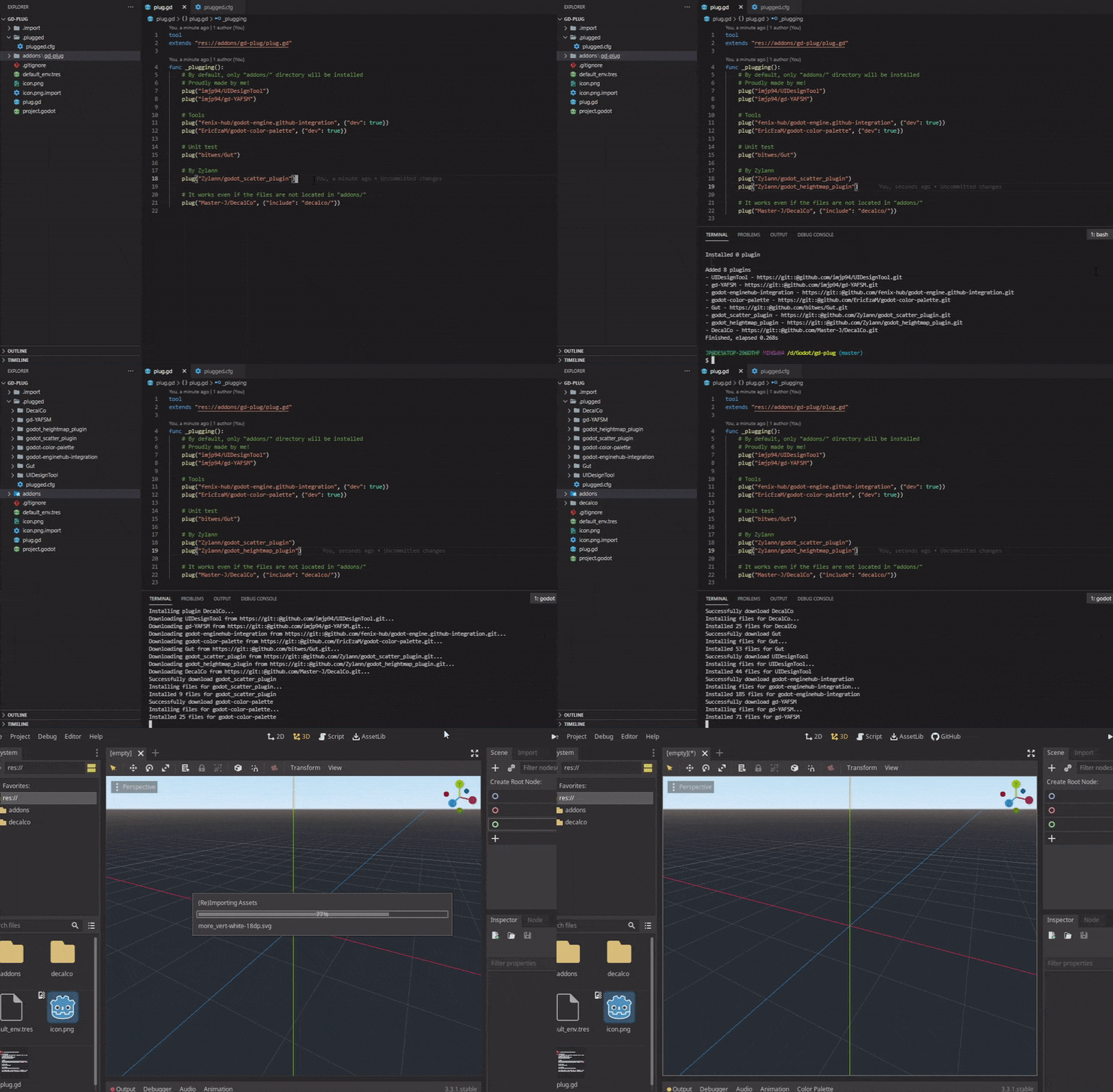
This version is only compatible with Godot 4.x, check out godot3 branch for older version
godot --headless -s plug.gd {action} {options...}
Actions:
| Action | Description |
|---|---|
init | Initialize current project by creating plug.gd at root |
status | Check the status of plugins(installed, added or removed), execute this command whenever in doubts |
install alias update | Install or update(to latest version if not freezed) "plugged" plugins based on plug.gd, or uninstall "unplugged" plugins |
uninstall | Uninstall all plugins, regardless of plug.gd |
clean | Clean unused files/folders from /.plugged |
upgrade | Upgrade addons/gd-plug/plug.gd to the latest version |
version | Print current version of gd-plug |
help | Show help |
Options:
| Option | Description |
|---|---|
production | Install only plugins not marked as dev, or uninstall already installed dev plugins |
test | Testing mode, no files will be installed/uninstalled while files to be installed/uninstalled will be printed, mainly used with install or uninstall |
force | Force gd-plug to overwrite destination files when running install command. By default, gd-plug will terminate installation of plugin when any of the file found to be overwriting user files. |
keep-import-file | Keep ".import" files generated by plugin, when run uninstall command |
keep-import-resource-file | Keep files located in /.import that generated by plugin, when run uninstall command |
debug alias d | Print debug message |
detail | Print with datetime and log level, "[{time}] [{level}] {msg}" |
quiet alias q, silent | Disable logging |
plug(src, args={})
Source:
or
[!NOTE] To install plugin from private repository, full Git SSH url must be used:
plug("[email protected]:username/repo.git"). See Generating new SSH key and Adding a new SSH key to your Github account
Arguments:
| Argument | Type | Description |
|---|---|---|
include | Array[String] | Files or directories to include, only addons/ will be included if omitted. (No expression like wildcard(*) supported yet.) |
exclude | Array[String] | Files or directories to exclude. (No expression like wildcard(*) supported yet.) |
branch | String | Name of branch to freeze to |
tag | String | Name of tag to freeze to |
commit | String | Commit hash string to freeze to, must be full length 40 digits commit-hash, for example, 7a642f90d3fb88976dd913051de994e58e838d1a. |
dev | bool | Toggle dev mode. dev plugins will not be installed when install with production option(dev plugins will be removed if already installed) |
on_updated | String | Post update hook, a function name declared in plug.gd that will be called whenever the plugin installed/updated. See Post Update Hook |
gd-plug
Install directly from Godot Asset Library
or
Download this repository, move addons to your {project_dir}
git
Download and install git
git must be set to environment variable
gd-plug-ui(optional)
User interface for gd-plug, not required when working with commandline
plug.gd at your project root, as below:extends "res://addons/gd-plug/plug.gd"
func _plugging():
# Declare your plugins in here with plug(src, args)
pass
[!TIP] Or run
initcommand:godot --headless -s addons/gd-plug/plug.gd init
plug.gd under _plugging(), for example:extends "res://addons/gd-plug/plug.gd"
func _plugging():
# Declare your plugins in here with plug(src, args)
# By default, only "addons/" directory will be installed
# Proudly made by me too!
plug("imjp94/UIDesignTool")
plug("imjp94/gd-YAFSM")
# Tools
plug("fenix-hub/godot-engine.github-integration")
plug("EricEzaM/godot-color-palette")
# Unit test
plug("bitwes/Gut")
# By Zylann
plug("Zylann/godot_scatter_plugin")
plug("Zylann/godot_heightmap_plugin")
install command in shell# --headless is optional to disable godot window
godot --headless -s plug.gd install
Post update hook can be connected in 3 ways:
plug(src, {"on_updated": "post_update"})update signal
connect("updated", self, "post_update")_on_updated function
func _on_updated(plugin)Post update hook always returned with one argument - dictionary that store information about the plugin
func post_update(plugin):
    print("%s updated" % plugin.name)
What can be ignored from version control system?
/.plugged: Plugins' git repo are cloned to this directory/addons: Based on preference, but now dependencies can be safely ignored since it will be managed by gd-plugWhat should be added to version control system?
plug.gd: Dependency config fileaddons/gd-plug/plug.gd: gd-plug's coreIt's recommended to add
.gitignoreto track/untrack files, see /.gitignore.
# gd-plug
.plugged/

# Godot addons - ignore most, but keep essential ones tracked
addons/*
!addons/gd-plug/
# Add your custom addons below to keep them in git
#!addons/my-custom-addon/
For most of the case, a plugin can be "plugged" without any extra configuration, as by default gd-plug will extract whatever located in plugin's /addons directory and install to current project's /addons directory.
However, some plugin's repository may be structured differently, thus, different configuration needed.
/addons directory, for example, Master-J/DecalCo
Explicitly include the directory to install:
plug("Master-J/DecalCo", {"include": ["decalco/"]})
install_root to destination directory and include all files:
plug("HungryProton/scatter", {"install_root": "addons/scatter", "include": ["."]})extends "res://addons/gd-plug/plug.gd"
func _plugging():
# Declare your plugins in here with plug(src, args)
# By default, only "addons/" directory will be installed
# Version freeze
plug("imjp94/UIDesignTool", {"branch": "demo"}) # Always pull update from "demo" branch
plug("imjp94/gd-YAFSM", {"tag": "1.0.0-stable"}) # Freeze to stable version
plug("imjp94/gd-plug", {"commit": "7a642f90d3fb88976dd913051de994e58e838d1a"}) # Must be full length 40 digits commit-hash
# Dev plugins, can be excluded or uninstalled with "production" command
plug("fenix-hub/godot-engine.github-integration", {"dev": true})
plug("EricEzaM/godot-color-palette", {"dev": true})
# Post update hook
plug("bitwes/Gut", {"on_updated": "_on_GUT_updated"})
# It works even if the files are not located in "addons/"
plug("Master-J/DecalCo", {"include": ["decalco/"]})
# Repo that contains only addon files
plug("HungryProton/scatter", {"install_root": "addons/scatter", "include": ["."]})
# Source other than github
plug("https://gitlab.com/Xecestel/sound-manager") # Gitlab
plug("file:///D/Godot/local-project/.git") # Local git repo
connect("updated", "_on_plugin_updated")
func _on_updated(plugin):
# Override to catch all updated plugins
match plugin.name:
"imjp94/gd-plug":
print("Use upgrade command!")
func _on_GUT_updated(plugin):
print("%s updated" % plugin.name)
print("Installed files: " + plugin.dest_files)
func _on_plugin_updated(plugin):
# Catch all updated plugins with signal
print("%s post update hook with signal" % plugin.name)
./plugged even with .gdignore (See #32)autoload script references in project setting are not cleared as plugin uninstalled.
autoload scripts from project settingclean command or manually remove plugin folder from /.plugged730 followers · starred May 2024
691 followers · starred Jul 2023
75 followers · starred Sep 2023
215 followers · starred Feb 2024
gd-plugMinimal plugin manager for Godot, inspired by vim-plug
This version is only compatible with Godot 4.x, check out godot3 branch for older version
godot --headless -s plug.gd {action} {options...}
Actions:
| Action | Description |
|---|---|
init | Initialize current project by creating plug.gd at root |
status | Check the status of plugins(installed, added or removed), execute this command whenever in doubts |
install alias update | Install or update(to latest version if not freezed) "plugged" plugins based on plug.gd, or uninstall "unplugged" plugins |
uninstall | Uninstall all plugins, regardless of plug.gd |
clean | Clean unused files/folders from /.plugged |
upgrade | Upgrade addons/gd-plug/plug.gd to the latest version |
version | Print current version of gd-plug |
help | Show help |
Options:
| Option | Description |
|---|---|
production | Install only plugins not marked as dev, or uninstall already installed dev plugins |
test | Testing mode, no files will be installed/uninstalled while files to be installed/uninstalled will be printed, mainly used with install or uninstall |
force | Force gd-plug to overwrite destination files when running install command. By default, gd-plug will terminate installation of plugin when any of the file found to be overwriting user files. |
keep-import-file | Keep ".import" files generated by plugin, when run uninstall command |
keep-import-resource-file | Keep files located in /.import that generated by plugin, when run uninstall command |
debug alias d | Print debug message |
detail | Print with datetime and log level, "[{time}] [{level}] {msg}" |
quiet alias q, silent | Disable logging |
plug(src, args={})
Source:
or
[!NOTE] To install plugin from private repository, full Git SSH url must be used:
plug("[email protected]:username/repo.git"). See Generating new SSH key and Adding a new SSH key to your Github account
Arguments:
| Argument | Type | Description |
|---|---|---|
include | Array[String] | Files or directories to include, only addons/ will be included if omitted. (No expression like wildcard(*) supported yet.) |
exclude | Array[String] | Files or directories to exclude. (No expression like wildcard(*) supported yet.) |
branch | String | Name of branch to freeze to |
tag | String | Name of tag to freeze to |
commit | String | Commit hash string to freeze to, must be full length 40 digits commit-hash, for example, 7a642f90d3fb88976dd913051de994e58e838d1a. |
dev | bool | Toggle dev mode. dev plugins will not be installed when install with production option(dev plugins will be removed if already installed) |
on_updated | String | Post update hook, a function name declared in plug.gd that will be called whenever the plugin installed/updated. See Post Update Hook |
gd-plug
Install directly from Godot Asset Library
or
Download this repository, move addons to your {project_dir}
git
Download and install git
git must be set to environment variable
gd-plug-ui(optional)
User interface for gd-plug, not required when working with commandline
plug.gd at your project root, as below:extends "res://addons/gd-plug/plug.gd"
func _plugging():
# Declare your plugins in here with plug(src, args)
pass
[!TIP] Or run
initcommand:godot --headless -s addons/gd-plug/plug.gd init
plug.gd under _plugging(), for example:extends "res://addons/gd-plug/plug.gd"
func _plugging():
# Declare your plugins in here with plug(src, args)
# By default, only "addons/" directory will be installed
# Proudly made by me too!
plug("imjp94/UIDesignTool")
plug("imjp94/gd-YAFSM")
# Tools
plug("fenix-hub/godot-engine.github-integration")
plug("EricEzaM/godot-color-palette")
# Unit test
plug("bitwes/Gut")
# By Zylann
plug("Zylann/godot_scatter_plugin")
plug("Zylann/godot_heightmap_plugin")
install command in shell# --headless is optional to disable godot window
godot --headless -s plug.gd install
Post update hook can be connected in 3 ways:
plug(src, {"on_updated": "post_update"})update signal
connect("updated", self, "post_update")_on_updated function
func _on_updated(plugin)Post update hook always returned with one argument - dictionary that store information about the plugin
func post_update(plugin):
    print("%s updated" % plugin.name)
What can be ignored from version control system?
/.plugged: Plugins' git repo are cloned to this directory/addons: Based on preference, but now dependencies can be safely ignored since it will be managed by gd-plugWhat should be added to version control system?
plug.gd: Dependency config fileaddons/gd-plug/plug.gd: gd-plug's coreIt's recommended to add
.gitignoreto track/untrack files, see /.gitignore.
# gd-plug
.plugged/

# Godot addons - ignore most, but keep essential ones tracked
addons/*
!addons/gd-plug/
# Add your custom addons below to keep them in git
#!addons/my-custom-addon/
For most of the case, a plugin can be "plugged" without any extra configuration, as by default gd-plug will extract whatever located in plugin's /addons directory and install to current project's /addons directory.
However, some plugin's repository may be structured differently, thus, different configuration needed.
/addons directory, for example, Master-J/DecalCo
Explicitly include the directory to install:
plug("Master-J/DecalCo", {"include": ["decalco/"]})
install_root to destination directory and include all files:
plug("HungryProton/scatter", {"install_root": "addons/scatter", "include": ["."]})extends "res://addons/gd-plug/plug.gd"
func _plugging():
# Declare your plugins in here with plug(src, args)
# By default, only "addons/" directory will be installed
# Version freeze
plug("imjp94/UIDesignTool", {"branch": "demo"}) # Always pull update from "demo" branch
plug("imjp94/gd-YAFSM", {"tag": "1.0.0-stable"}) # Freeze to stable version
plug("imjp94/gd-plug", {"commit": "7a642f90d3fb88976dd913051de994e58e838d1a"}) # Must be full length 40 digits commit-hash
# Dev plugins, can be excluded or uninstalled with "production" command
plug("fenix-hub/godot-engine.github-integration", {"dev": true})
plug("EricEzaM/godot-color-palette", {"dev": true})
# Post update hook
plug("bitwes/Gut", {"on_updated": "_on_GUT_updated"})
# It works even if the files are not located in "addons/"
plug("Master-J/DecalCo", {"include": ["decalco/"]})
# Repo that contains only addon files
plug("HungryProton/scatter", {"install_root": "addons/scatter", "include": ["."]})
# Source other than github
plug("https://gitlab.com/Xecestel/sound-manager") # Gitlab
plug("file:///D/Godot/local-project/.git") # Local git repo
connect("updated", "_on_plugin_updated")
func _on_updated(plugin):
# Override to catch all updated plugins
match plugin.name:
"imjp94/gd-plug":
print("Use upgrade command!")
func _on_GUT_updated(plugin):
print("%s updated" % plugin.name)
print("Installed files: " + plugin.dest_files)
func _on_plugin_updated(plugin):
# Catch all updated plugins with signal
print("%s post update hook with signal" % plugin.name)
./plugged even with .gdignore (See #32)autoload script references in project setting are not cleared as plugin uninstalled.
autoload scripts from project settingclean command or manually remove plugin folder from /.plugged730 followers · starred May 2024
691 followers · starred Jul 2023
75 followers · starred Sep 2023
215 followers · starred Feb 2024



