AI-powered GitHub stars manager with semantic search, auto-categorization, and release tracking
See the code
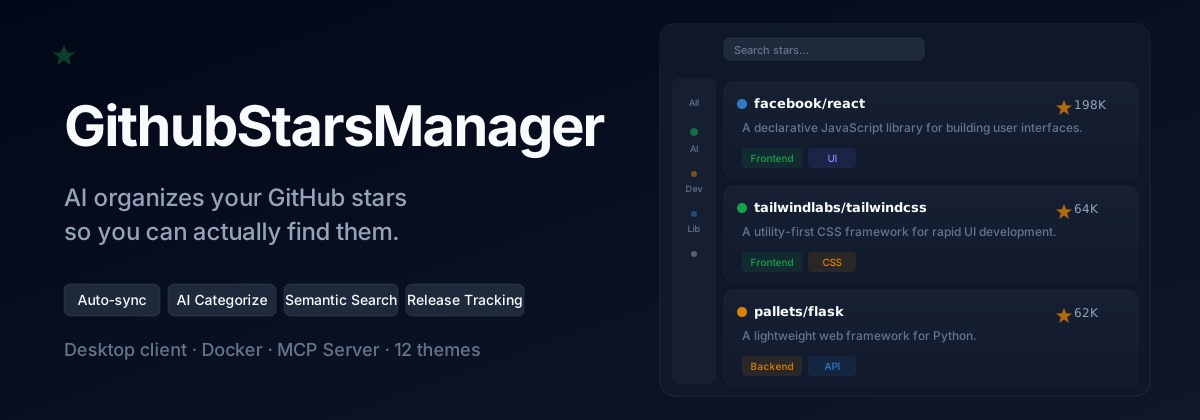







Tired of starring everything and finding nothing?
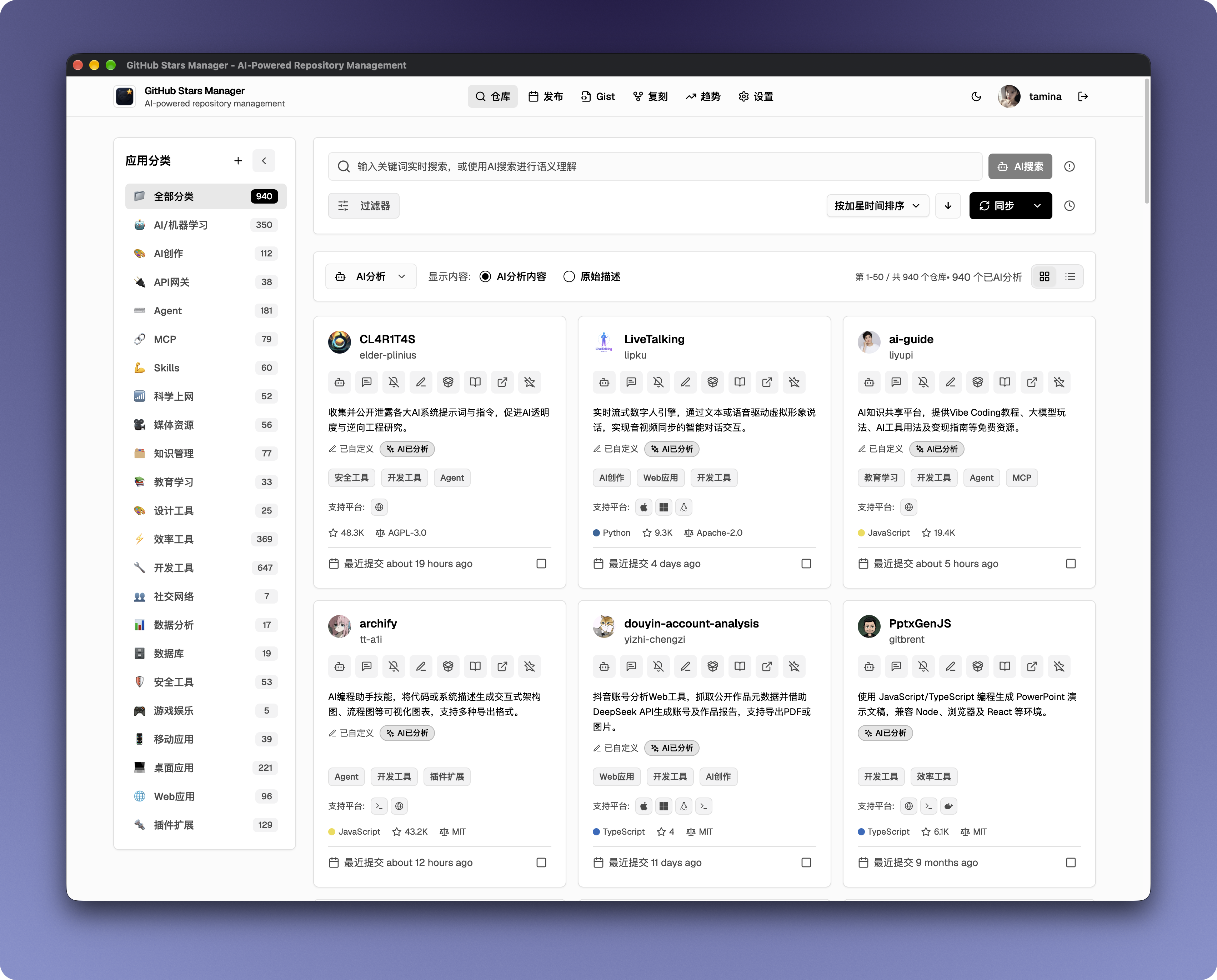
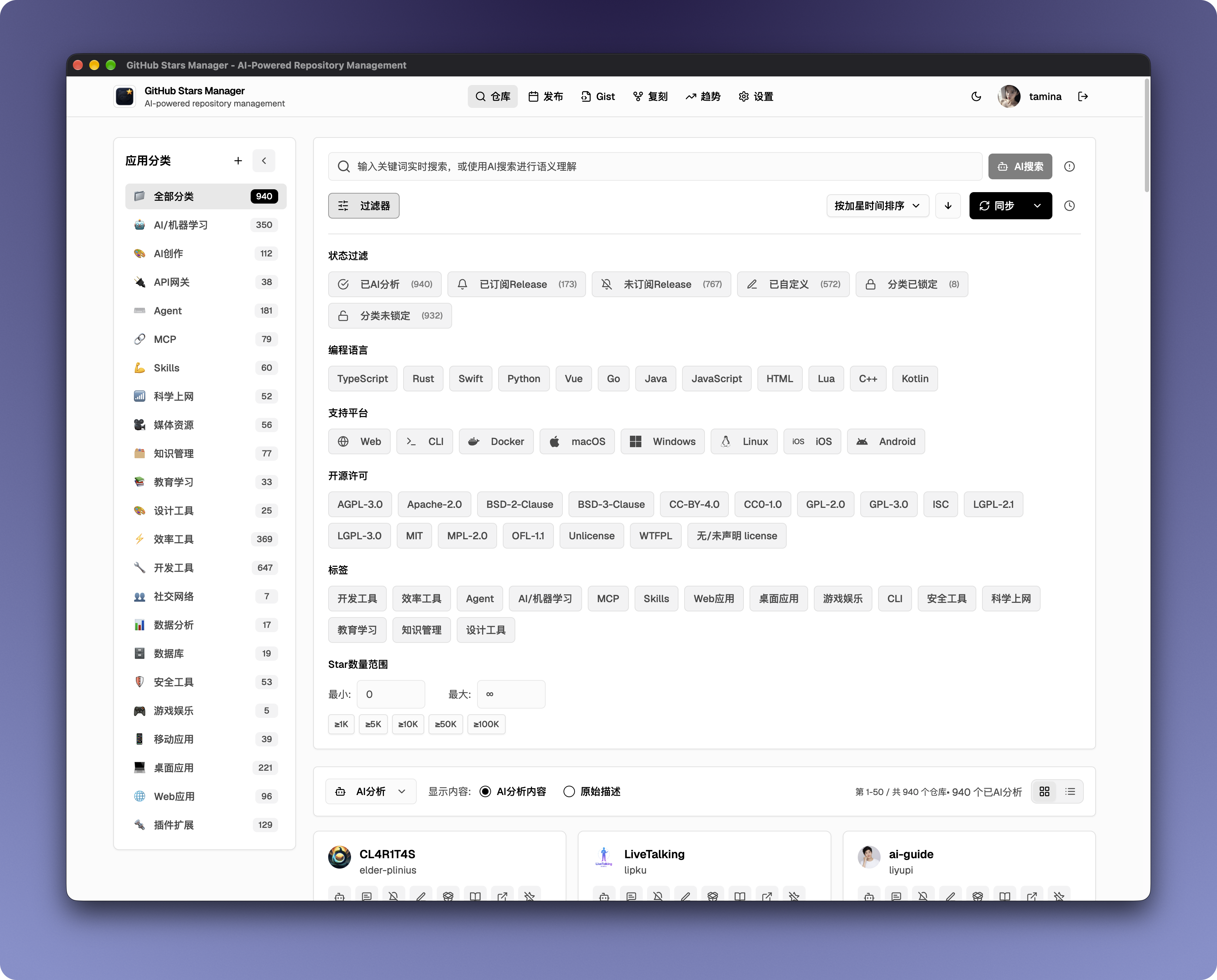
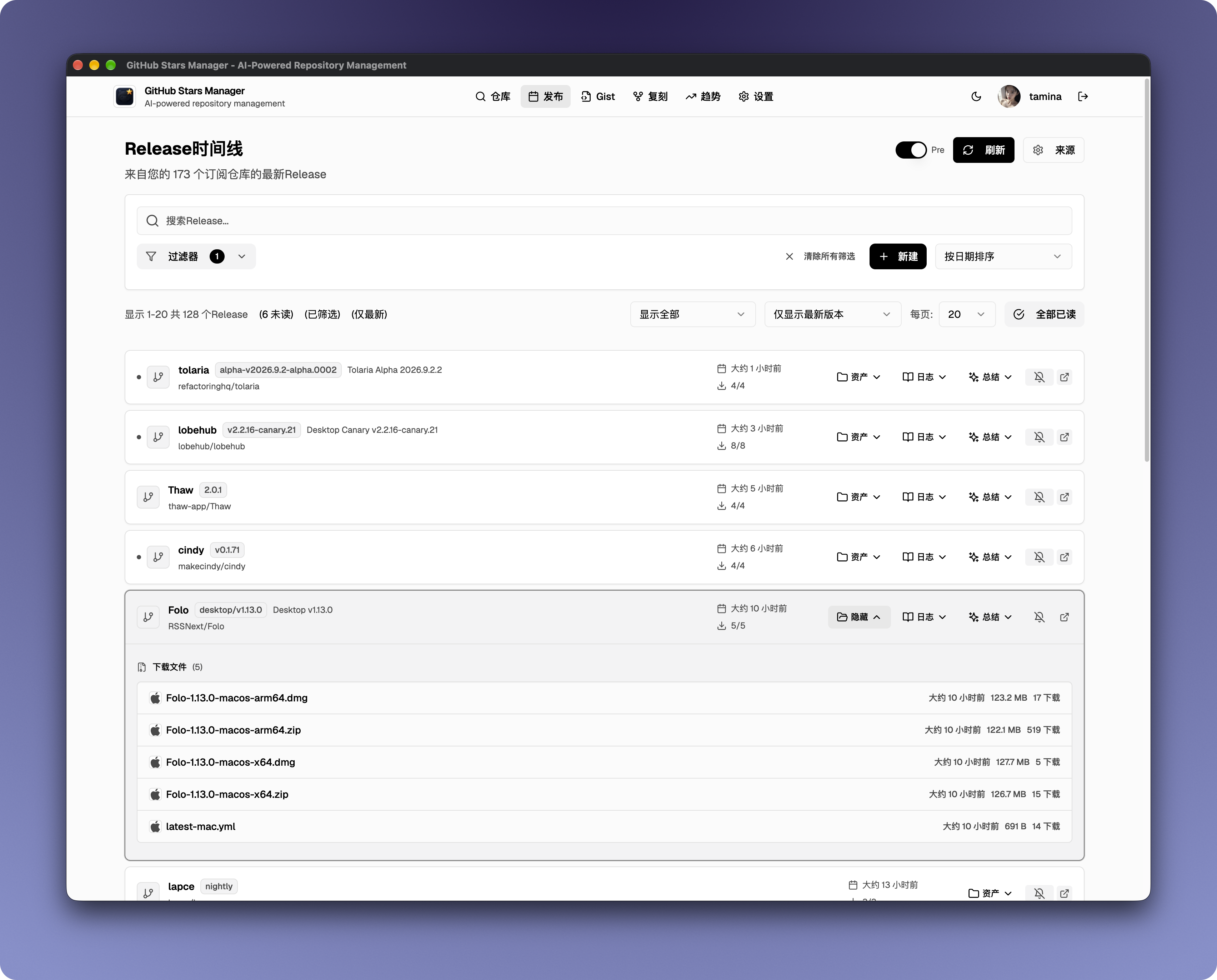
GitHub Stars Manager automatically syncs your starred repos, uses AI to summarize and categorize them, and lets you find anything with semantic search. Track releases, filter assets, and one-click download — smarter than manual tags, simpler than GitHub.


https://github.com/user-attachments/assets/2f7e44c9-7a7e-40dc-9601-269b27c1ec6e
 |  |
 |  |
| View | Screenshot |
|---|---|
| Discover / Trending | 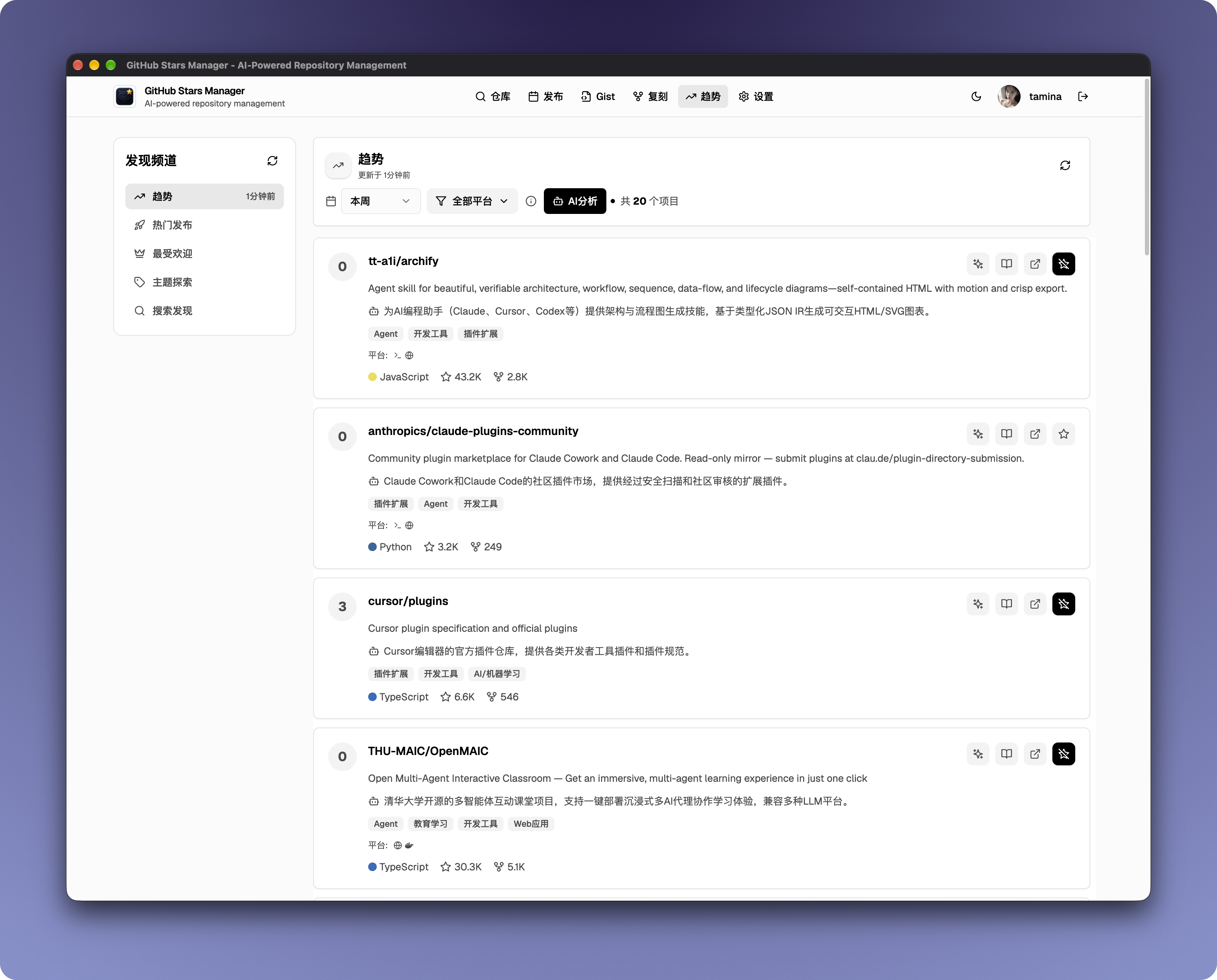 |
| Fork management | 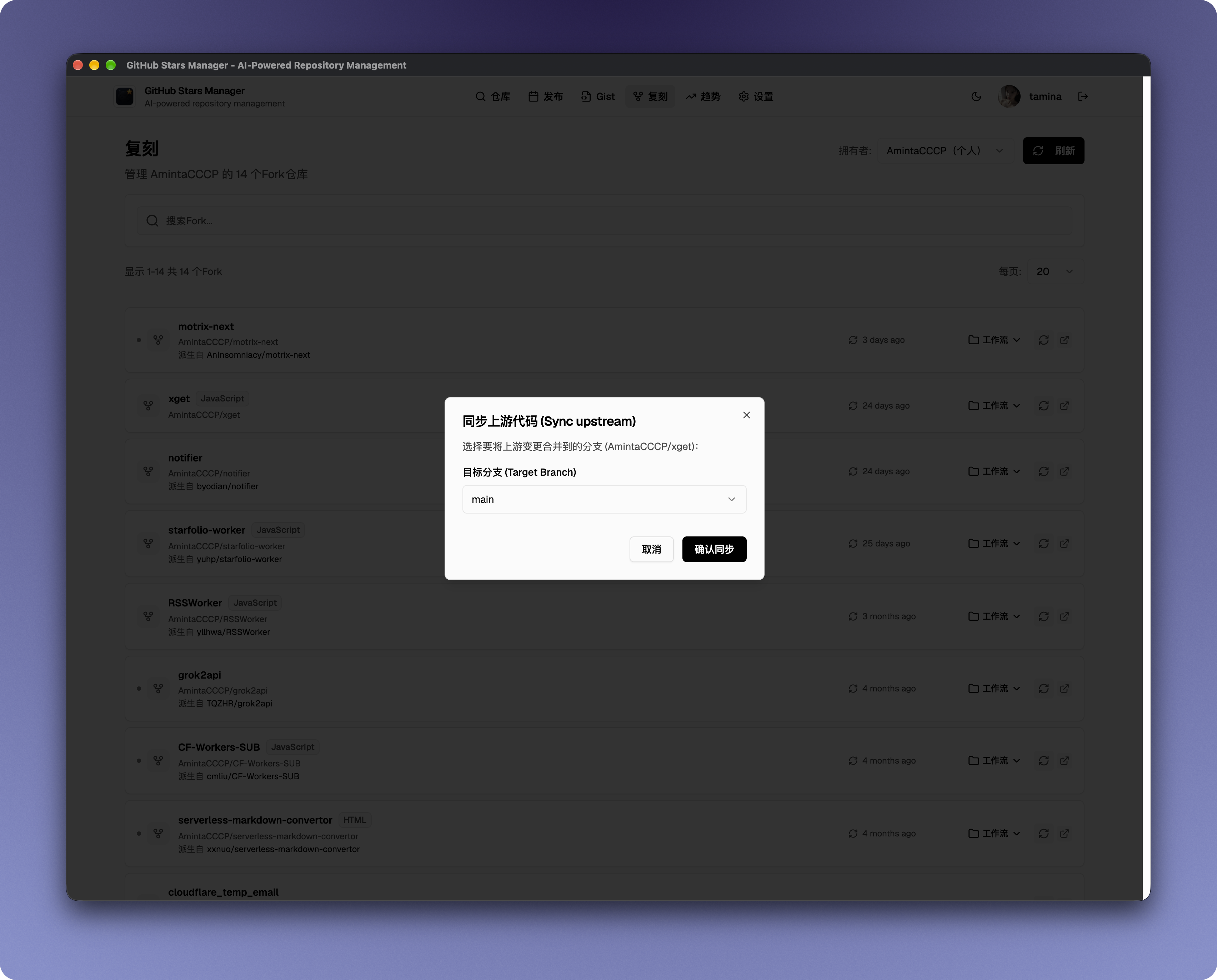 |
| Gist management | 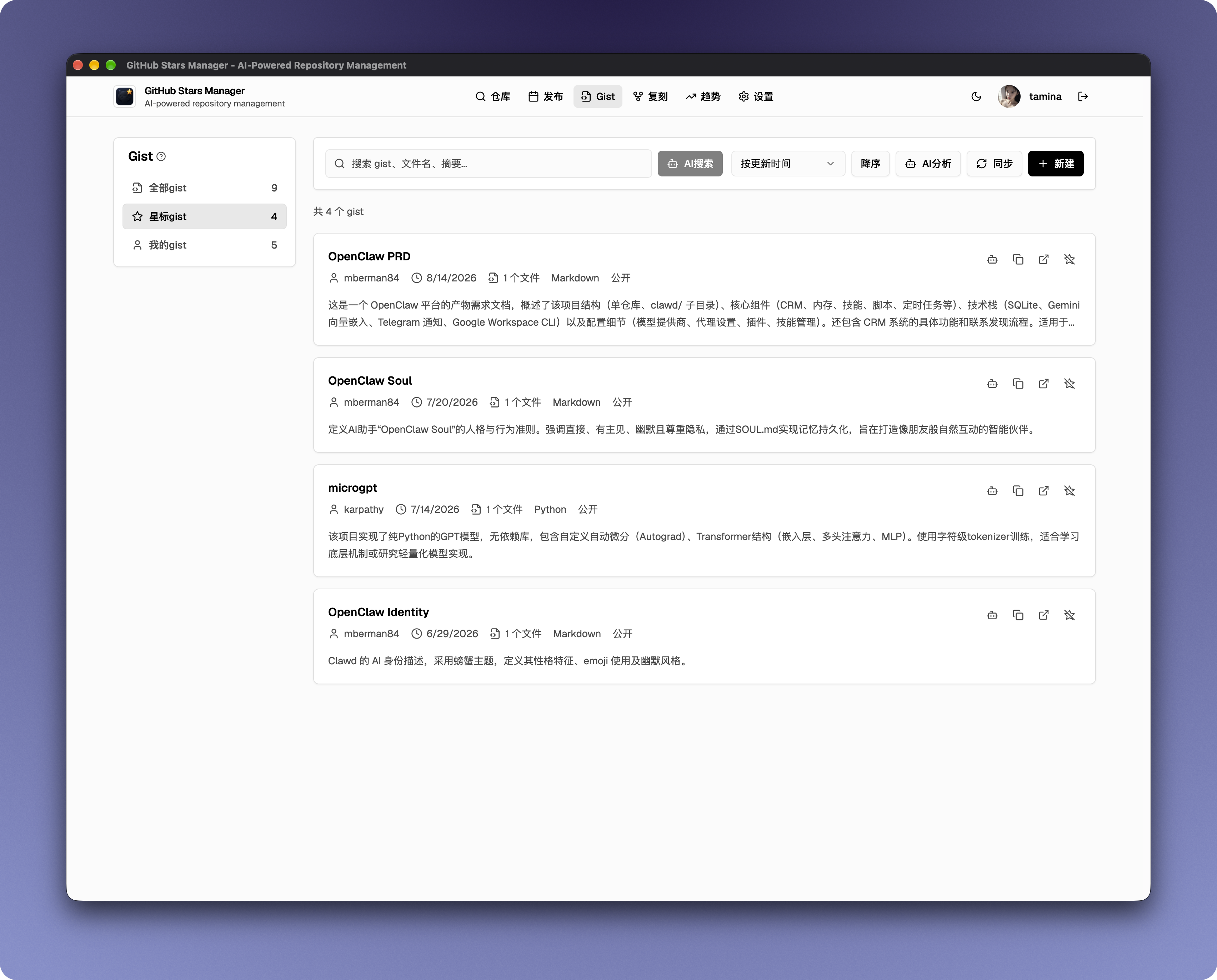 |
| Settings | 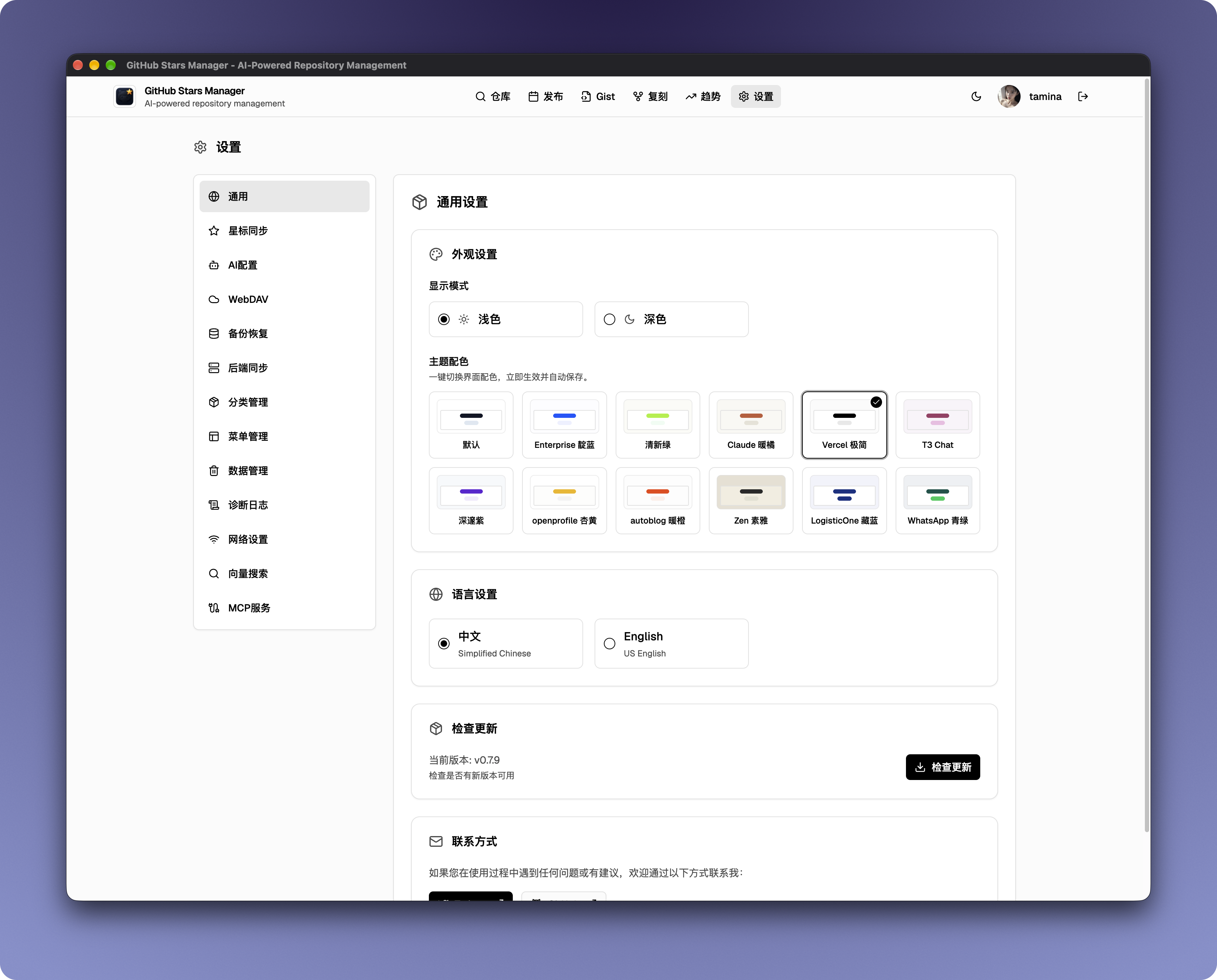 |
| AI models | 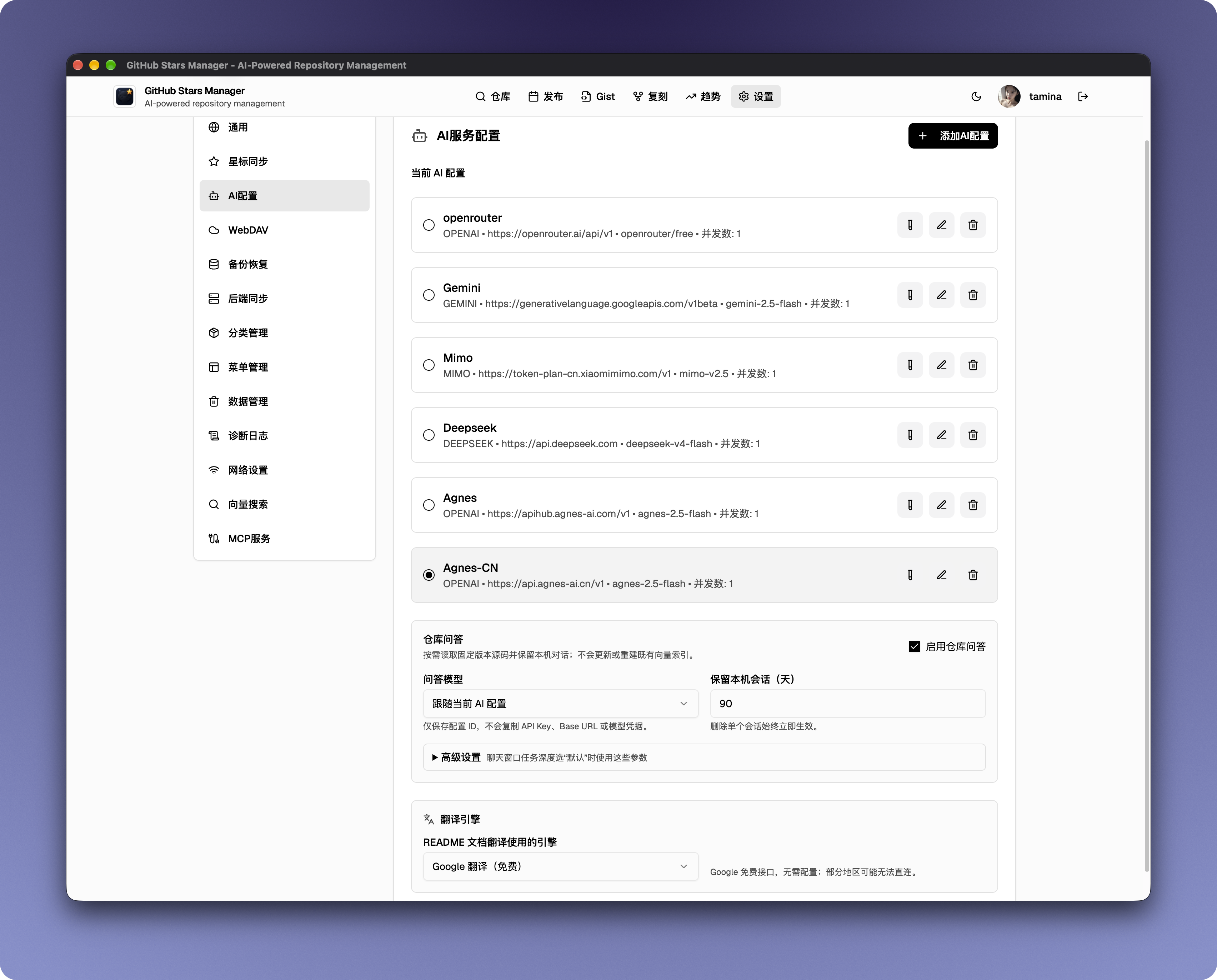 |
| Network proxy | 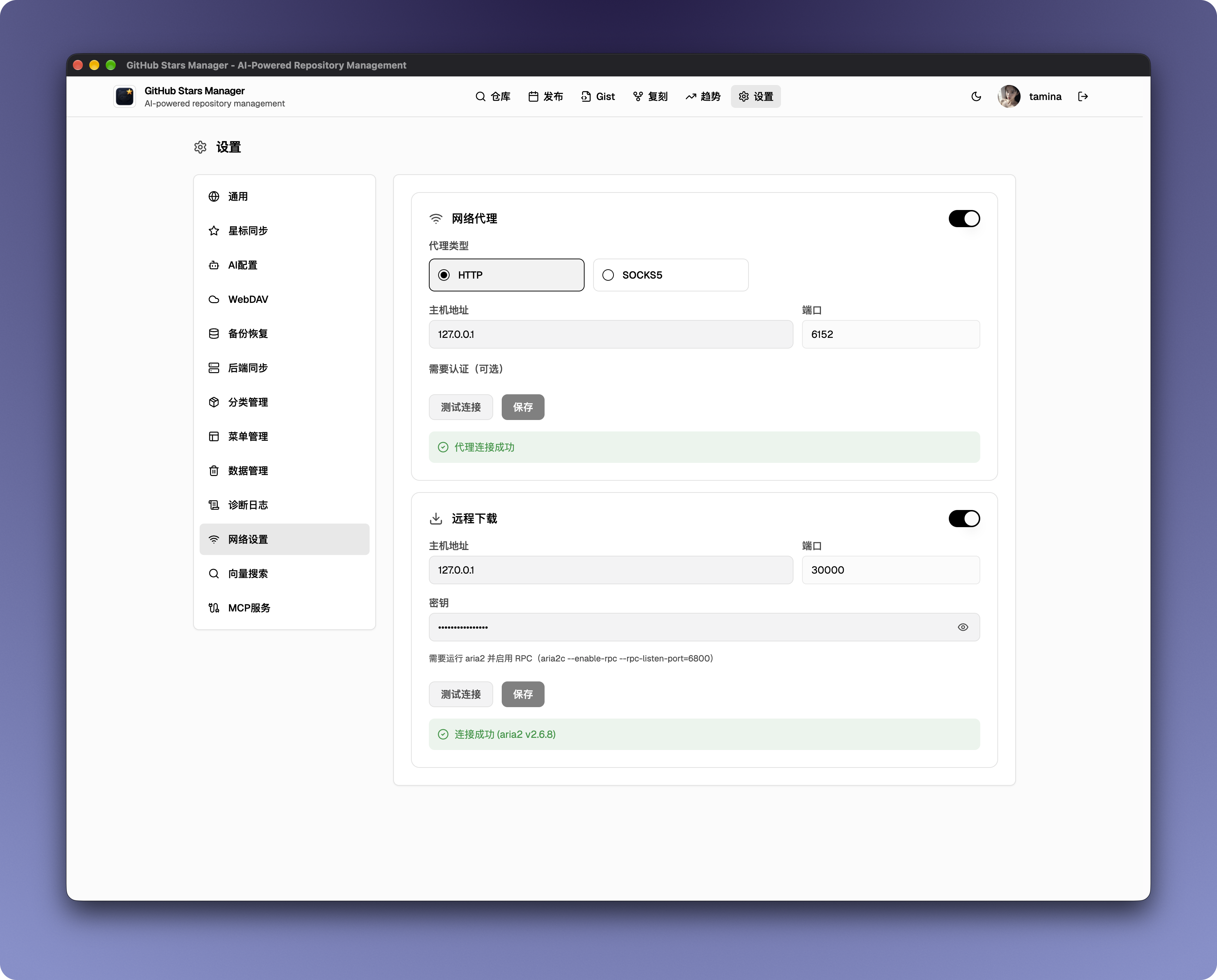 |
| Vector search | 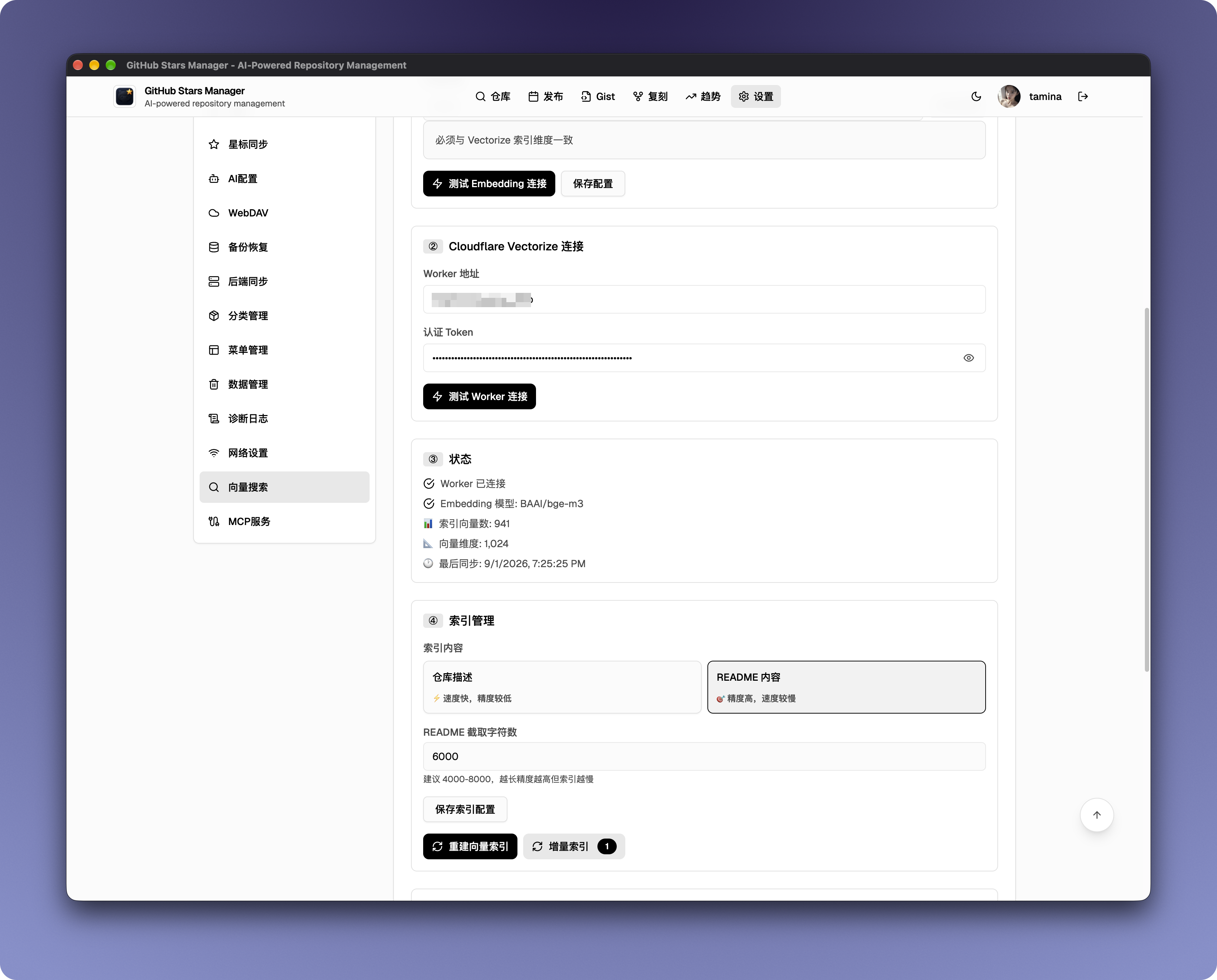 |
| MCP server | 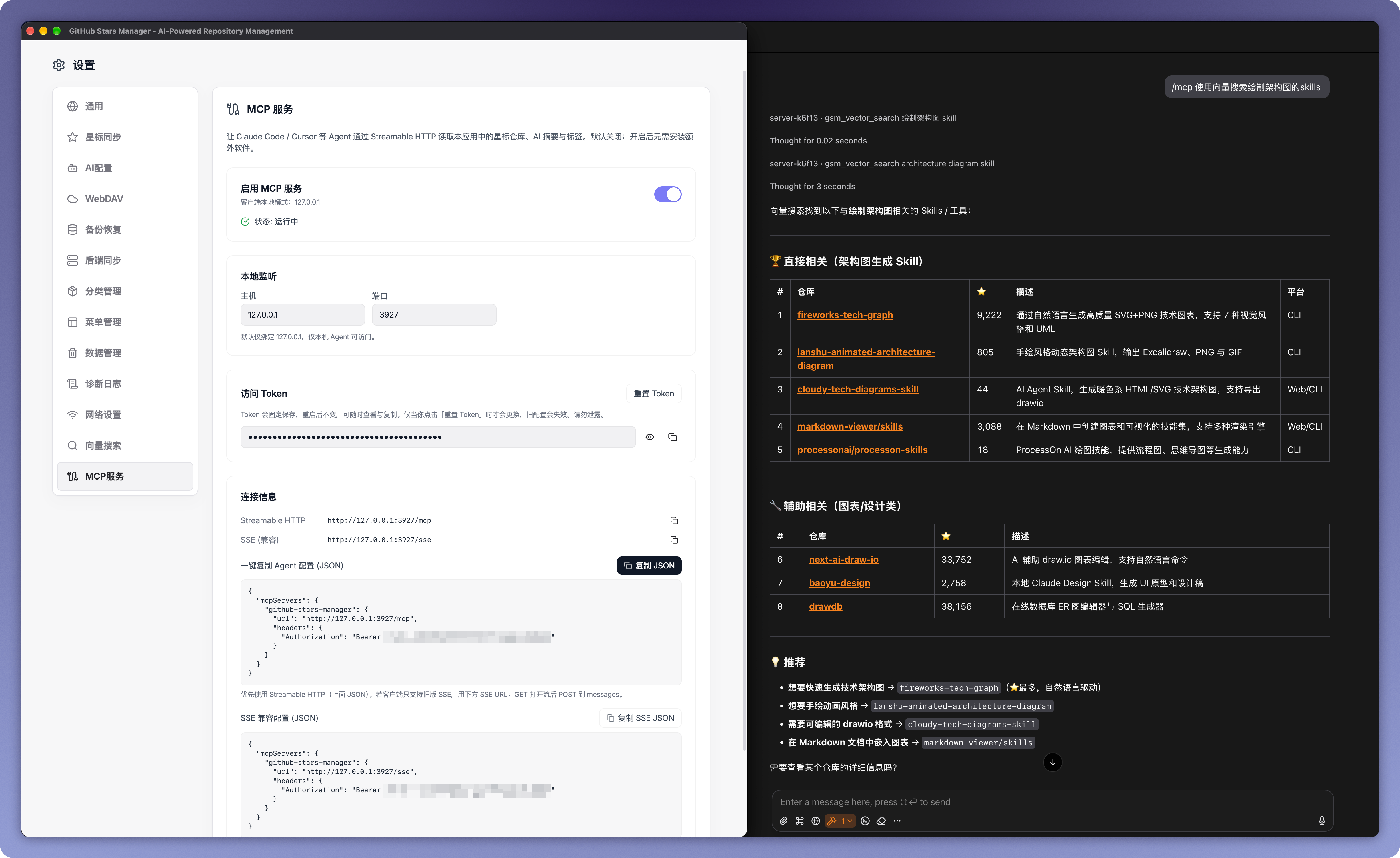 |


|
🤖 AI-managed repositories Your stars stop being a pile and become a library. The app syncs every starred repo, then AI writes summaries, tags, and categories for them — in bulk, with pause/resume, and with locked categories it will never overwrite. Search by intent instead of remembering exact names. |
🧠 Vector search — including "find similar repositories" Natural-language search over your stars, powered by Cloudflare Vectorize: repo descriptions (or full READMEs) are embedded and matched by semantic similarity, with optional AI reranking and automatic keyword fallback. And on any repo card, one click of Find similar repositories builds a semantic neighborhood around it — instantly surfacing the starred repos closest to it. |
|
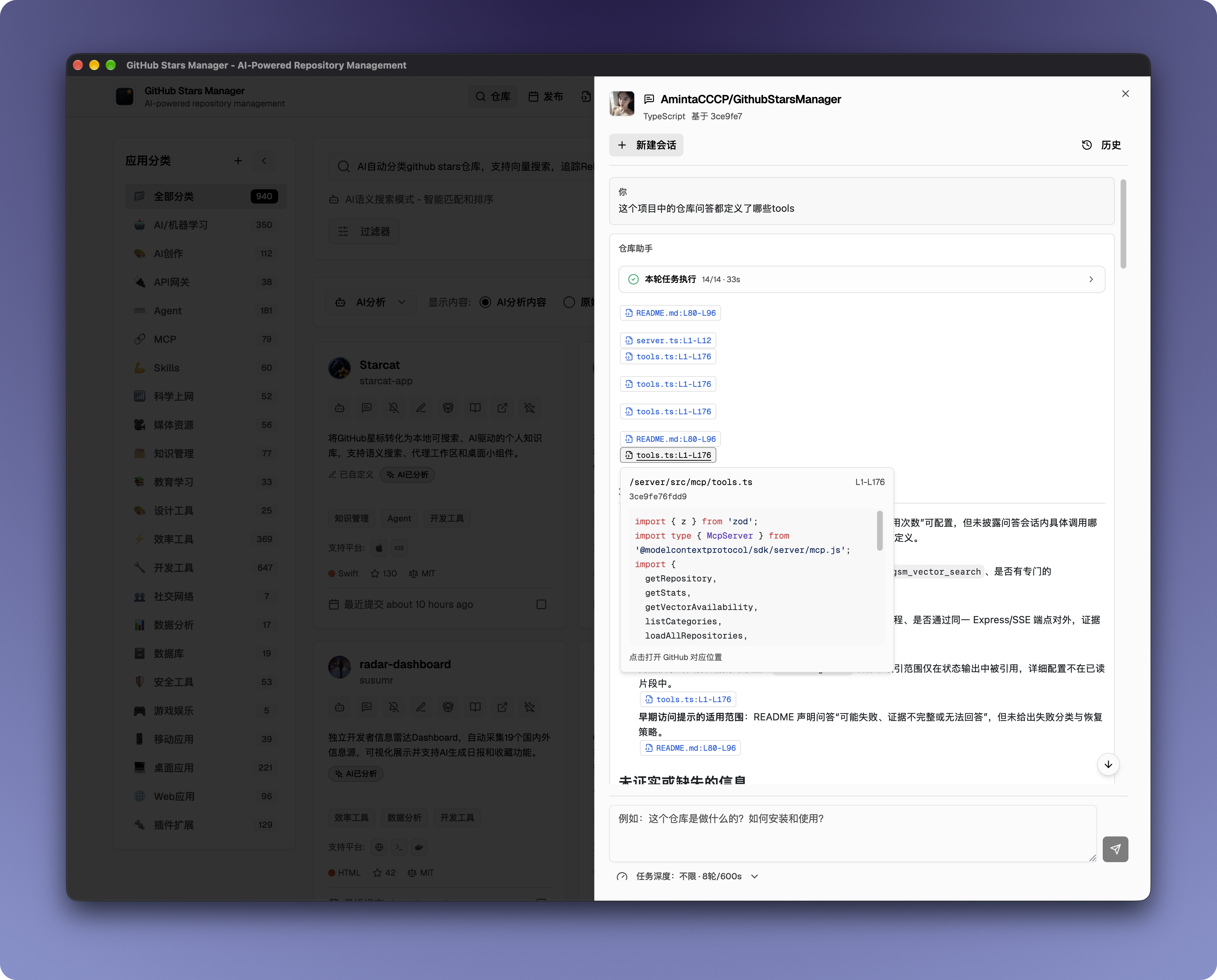
💬 Repository Q&A Assistant Ask simple, focused questions about a single repository right from its card. Every session is pinned to a specific commit, shows the read-only evidence behind each answer with traceable sources, and keeps its history locally. It doesn't index the whole repository — for deep code analysis, use a mature coding agent. |
🛰️ MCP Server Agents like Claude Code and Cursor can read and search your AI-enriched stars through the Model Context Protocol — Streamable HTTP or legacy SSE, Bearer-token auth, read-only tools, enabled from Settings with a copyable agent config. No extra install. |
|
📡 Release tracking Subscribe to repositories and watch every new version land in one unified timeline. Filter assets by platform and file type, save custom keyword rules, and download with one click — in the browser or straight into aria2. |
Also included Fork sync and GitHub Actions, Gist browse/edit with AI summaries, 12 theme presets, HTTP/SOCKS5 proxy, WebDAV backup, Discover (Trending / Hot Release / Most Popular), diagnostic logs, bilingual wiki jump, local plugins, and a packaged desktop client. |
| Feature | Description |
|---|---|
| Auto-sync Stars | Connect your GitHub token to automatically pull all starred repositories |
| GitHub Lists Sync | Bidirectional sync with native GitHub Lists: pull Lists into tags/categories with auto-lock, push local categories back as GitHub Lists |
| Semantic Search | Find repos by intent, not exact names |
| Repository Release Downloads | Open a repository's current releases from its card; browse paginated assets, release notes, source archives, and optional AI summaries, then download in the browser or through a configured RPC downloader |
| One-click Downloads | Expand release assets and download instantly |
| Smart Asset Filters | Match assets by keywords (dmg / mac / arm64 / aarch64) |
| Discovery Center | Browse GitHub Trending, hot releases, and most popular projects |
| Fork Management | View, sync upstream, and trigger GitHub Actions workflows on forked repos |
| Gist Management | Browse, create, edit, and delete Gists; AI-powered summaries and semantic search |
| 12 Theme Presets | Switch instantly between 12 built-in palettes, each with coordinated light and dark variants, from Settings with live previews |
| Network Proxy | HTTP / SOCKS5 proxy with protocol-level connection testing |
| Remote Download (aria2) | Send release assets to aria2 for download via JSON-RPC |
| Diagnostic Logs | Unified frontend/backend log viewer with debug capture mode |
| Bilingual Wiki Jump | Deepwiki (EN) or zread (ZH) based on repository language |
| Local plugins | Electron-only extensions: repository actions, exporters, release recommendations, and sandboxed plugin pages. Usage · Development |
| Packaged Client | No environment setup required — download and run |
Deploy an Express + SQLite backend for:
Stars View)Features:
Ask concise questions about a single repository directly from its card. Each conversation is tied to a specific commit and shows the evidence used to produce the answer.
Features:
Early-access notice: This feature is designed for simple repository questions and may fail, return incomplete evidence, or be unable to answer. It does not index every file in the queried repository. For complex, whole-codebase analysis, multi-file reasoning, debugging, or code changes, clone the repository locally and use a mature coding agent.
Releases View)Features:
Discover View)Features:
Trending data is sourced from GitHub's trending RSS feed, auto-updated every 30 minutes. Perfect for discovering emerging hot projects, tracking tech trends, and finding learning directions.
Forks View)Features:
Gist View)Features:
Features:
Settings Groups:
| Group | Features |
|---|---|
| General | Language toggle (ZH/EN), light/dark mode, and live-preview switching among 12 built-in theme presets |
| AI Config | Configure OpenAI / Anthropic / Ollama / compatible APIs; supports custom endpoints and keys |
| WebDAV | Backup config for Jianguoyun, Nextcloud, ownCloud, and standard WebDAV services |
| Backup | Backup history, manual backup/restore, incremental backup |
| Backend Server | Connect to self-hosted backend, API key authentication, sync status indicator |
| Network | HTTP/SOCKS5 proxy config with protocol-level testing; aria2 RPC remote download setup |
| Category | Category management, category sorting, default category override rules |
| Data Management | Data import/export, clear local data, reset all data |
| Vector Search | Configure Cloudflare Vectorize worker, embedding model, index mode (description / README), and manage index rebuild |
| MCP Server | Enable MCP so agents (Claude Code, Cursor, etc.) can search your AI-enriched stars via Streamable HTTP / SSE with Bearer-token auth |
| Plugins | Install local plugins, grant permissions, configure SearXNG for page search. Desktop only — see the plugin wiki |
Appearance: Select any of the 12 built-in theme presets in Settings → General → Appearance. Every preset includes coordinated light and dark palettes and applies immediately across the application.
Features:
The UI ships in 10 languages: 简体中文 · English · 日本語 · Español · Português (Brasil) · Русский · 繁體中文 · Français · Deutsch · 한국어.
src/locales).

You can download desktop client here: https://github.com/AmintaCCCP/GithubStarsManager/releases
npm install to install dependencies and npm run dev to build[!TIP] When running the project locally using
npm run dev, calls to AI services and WebDAV may fail due to CORS restrictions. To avoid this issue, use the prebuilt client application or build the client yourself. Alternatively, run the backend server (cd server && npm run dev) to proxy API calls and avoid CORS entirely.
Pre-built backend and frontend images are available on GHCR — no local build required. Existing Docker users should continue to use the unchanged two-service Compose deployment:
docker pull ghcr.io/amintacccp/github-stars-manager-server:latest
docker pull ghcr.io/amintacccp/github-stars-manager-frontend:latest
docker-compose up -d
An additional optional full-stack image (ghcr.io/amintacccp/github-stars-manager-fullstack) is available for users who prefer one container, one image tag, and one persistent data volume. It serves the same web UI, /api, and MCP endpoints from one origin. Set API_SECRET in a root .env file first; the full-stack Compose file refuses to start a new unauthenticated deployment:
API_SECRET=replace-with-a-long-random-secret
docker compose -f docker-compose.fullstack.yml up -d
This new option does not replace or modify the existing frontend image, backend image, docker-compose.yml, or desktop clients. The canonical role names are -frontend, -backend, and -fullstack; the existing -server backend image remains a compatibility alias for current deployments. Formal vX.Y.Z Docker tags must match the root package.json client version, while latest and sha-* remain development and traceability tags. See DOCKER.md for full-stack deployment, migration, backup, and rollback instructions.
[!NOTE] If the package is private, run
docker login ghcr.iofirst (use a PAT withread:packagesscope).
See DOCKER.md for detailed instructions. The Docker setup handles CORS properly and allows you to configure any AI or WebDAV service URLs directly in the application.
The app works fully without a backend (pure frontend, localStorage). An optional Express + SQLite backend adds:
docker-compose up -d
Frontend on port 8080, backend on port 3000. Data is persisted in a Docker volume. This existing split deployment remains the recommended option when you need to version, operate, or scale the frontend and backend independently; the optional single-container alternative is documented in DOCKER.md.
To customize, create a .env file:
API_SECRET=your-secret
ENCRYPTION_KEY=your-key
BACKEND_IMAGE_TAG=0.8.4   # pin backend image version (default: latest)
FRONTEND_IMAGE_TAG=0.8.4  # pin frontend image version (default: latest)
# Basic — no auth, port 3000
docker run -d --name github-stars-backend \
  -v github-stars-data:/app/data \
  -p 3000:3000 \
  ghcr.io/amintacccp/github-stars-manager-server:latest

# With custom secret and encryption key
docker run -d --name github-stars-backend \
  -v github-stars-data:/app/data \
  -p 3000:3000 \
  -e API_SECRET="your-secret" \
  -e ENCRYPTION_KEY="your-key" \
  ghcr.io/amintacccp/github-stars-manager-server:latest
cd server
npm install
npm run dev
| Variable | Required | Description |
|---|---|---|
API_SECRET | No | Bearer token for API authentication. If unset, auth is disabled. |
ENCRYPTION_KEY | No | AES-256 key for encrypting stored secrets. Auto-generated if unset. |
PORT | No | Server port (default: 3000) |
CSP_CONNECT_SRC | No | Comma-separated extra origins appended to the connect-src CSP directive, for custom AI provider / vector-search worker endpoints called directly from the browser (e.g. https://ai.example.com,https://worker.example.org). |
The app supports multiple AI providers. Configure yours in the Settings panel:
Steps: open Settings, add an AI config, enter your endpoint and key, pick a model, then test the connection.
The app supports routing all outbound requests through a proxy:
Configure in Settings → Network tab (available in Electron client or with backend server).
Send release download links directly to an aria2 daemon:
aria2c --enable-rpc --rpc-listen-port=6800Works in both backend-proxied mode and client-only mode (direct browser→aria2 connection).

Vector Semantic Search uses Cloudflare Vectorize to provide high-precision, natural-language search over your starred repositories. Instead of keyword matching, it embeds repo descriptions (or full README content) into vectors and searches by semantic similarity.
How it works:
Supported Embedding Providers:
| Provider | Models | Dimensions |
|---|---|---|
| OpenAI | text-embedding-3-small / large | 1536 / 3072 |
| Gemini | text-embedding-004 | 768 |
| Cohere | embed-multilingual-v3.0 | 1024 |
| Ollama | nomic-embed-text / bge-m3 | 768 / 1024 |
| SiliconFlow | BAAI/bge-large-zh-v1.5 | 1024 |
| OpenAI-compatible | (custom) | (custom) |
Quick setup:
[!WARNING] After changing the embedding model, you must rebuild the index — different models produce incompatible vector dimensions.
From any repo card, click Find similar (or Find similar repositories in the card menu) to see which of your stars are semantically closest to it:

Let agents (Claude Code, Cursor, etc.) read your AI-enriched starred repositories — summaries, tags, categories — and search them via the Model Context Protocol.
POST /mcp on the app origin (backend/Docker mode) or http://127.0.0.1:3927/mcp (desktop local mode)/mcp/sse + /mcp/sse/messages (backend), /sse + /messages (desktop) — for older clientsgsm_mcp_...): generated once when enabled, kept across restarts, only changes when you reset itEnable: Settings → MCP Server → toggle on. The panel shows the endpoint URLs, the token, and a one-click copyable agent config (JSON) for both Streamable HTTP and SSE. No extra install needed.
[!TIP] The MCP token is separate from the backend
API_SECRET. Pure frontend (no backend) hides the MCP settings page; it works with the desktop (Electron) client or a connected backend.
Exposed tools (read-only):
| Tool | Description |
|---|---|
gsm_status | Server status: repo count, vector availability, version |
gsm_search_repos | Keyword search over stars with filters (languages / tags / platforms / licenses / category / stars) and pagination |
gsm_get_repo | Fetch one repo by numeric id or owner/repo, with AI-processed fields |
gsm_get_repos | Fetch up to 50 repos in input order; preserves duplicates and reports partial not_found entries |
gsm_get_repo_evidence | Return deterministic local repository and latest release-cache evidence; missing values stay null |
gsm_list_categories | List custom categories |
gsm_list_repos_by_category | List repos in a category with pagination |
gsm_stats | Aggregate stats (languages, analysis, tags) |
gsm_find_similar_repos | Find similar starred repos with the existing vector index; excludes the source repo and is listed only when Vector Search is available |
gsm_vector_search | Semantic vector search — listed only when Vector Search is configured and enabled |
gsm_vector_search accepts optional languages, tags, platforms, licenses, category, minStars, maxStars, isAnalyzed, and isSubscribed filters. When a filter is supplied, the Worker returns at most 50 semantic candidates and GithubStarsManager applies the filter locally before truncating to topK; this is not an exact filtered topK over the complete vector corpus. With no filter, the existing query behavior is unchanged. Evidence reads the local repository database and cached releases only, never performs unbounded GitHub fan-out, and does not infer missing fields or return adoption decisions.
gsm_status also returns availableTools (the exact names registered for the current configuration) and conditionalTools (the vector-gated names, whether currently available or not). gsm_get_repo_evidence includes evidenceFreshness from stored repository updated_at, analysis timestamps, and cached release published_at; local repository-sync and release-cache update timestamps are returned as null because they are not stored.
Desktop (Electron) notes: binds loopback (127.0.0.1) only — local agents only; host/port adjustable in Settings (default port 3927).
The Electron app can load trusted local plugins from a directory. They stay disabled until you grant the permissions in their Manifest. Worker plugins run as isolated Node.js (not a security sandbox); page plugins run in a restricted iframe.
examples/plugins/Enable: Settings → Plugins → Install local plugin. Browser and Docker frontend builds do not include this host.
Native GitHub Lists (starred lists) sync both ways, in addition to the classic REST star sync:
[!NOTE] Scope is persistent: switch anytime between Starred repos only and Starred repos & lists in Settings → Star Sync.
Back up and sync your data via any standard WebDAV service:
Steps: open Settings, add a WebDAV config, enter the server URL, username, password, and path, test the connection, then enable auto-backup.

The build output is a static site, so it deploys anywhere static hosting is supported:
npm run build, publish directory distdist folder to a gh-pages branchnpm run build, output distdist folder with any HTTP server (nginx, Caddy, etc.)For Docker deployment see the Backend Server section above.
Contributions are welcome!
git checkout -b feature/AmazingFeature)git commit -m 'Add some AmazingFeature')git push origin feature/AmazingFeature)MIT — see LICENSE for details.
If you find this project useful, please give it a star!
For questions or suggestions, open an Issue or reach out to the author.
227 followers · starred Apr 2026
1,389 followers · starred Aug 2026
189 followers · starred May 2026
618 followers · starred Apr 2026
AI-powered GitHub stars manager with semantic search, auto-categorization, and release tracking
See the code
Tired of starring everything and finding nothing?
GitHub Stars Manager automatically syncs your starred repos, uses AI to summarize and categorize them, and lets you find anything with semantic search. Track releases, filter assets, and one-click download — smarter than manual tags, simpler than GitHub.
https://github.com/user-attachments/assets/2f7e44c9-7a7e-40dc-9601-269b27c1ec6e
| |
| |
| View | Screenshot |
|---|---|
| Discover / Trending | |
| Fork management | |
| Gist management | |
| Settings | |
| AI models | |
| Network proxy | |
| Vector search | |
| MCP server | |
|
🤖 AI-managed repositories Your stars stop being a pile and become a library. The app syncs every starred repo, then AI writes summaries, tags, and categories for them — in bulk, with pause/resume, and with locked categories it will never overwrite. Search by intent instead of remembering exact names. |
🧠 Vector search — including "find similar repositories" Natural-language search over your stars, powered by Cloudflare Vectorize: repo descriptions (or full READMEs) are embedded and matched by semantic similarity, with optional AI reranking and automatic keyword fallback. And on any repo card, one click of Find similar repositories builds a semantic neighborhood around it — instantly surfacing the starred repos closest to it. |
|
💬 Repository Q&A Assistant Ask simple, focused questions about a single repository right from its card. Every session is pinned to a specific commit, shows the read-only evidence behind each answer with traceable sources, and keeps its history locally. It doesn't index the whole repository — for deep code analysis, use a mature coding agent. |
🛰️ MCP Server Agents like Claude Code and Cursor can read and search your AI-enriched stars through the Model Context Protocol — Streamable HTTP or legacy SSE, Bearer-token auth, read-only tools, enabled from Settings with a copyable agent config. No extra install. |
|
📡 Release tracking Subscribe to repositories and watch every new version land in one unified timeline. Filter assets by platform and file type, save custom keyword rules, and download with one click — in the browser or straight into aria2. |
Also included Fork sync and GitHub Actions, Gist browse/edit with AI summaries, 12 theme presets, HTTP/SOCKS5 proxy, WebDAV backup, Discover (Trending / Hot Release / Most Popular), diagnostic logs, bilingual wiki jump, local plugins, and a packaged desktop client. |
| Feature | Description |
|---|---|
| Auto-sync Stars | Connect your GitHub token to automatically pull all starred repositories |
| GitHub Lists Sync | Bidirectional sync with native GitHub Lists: pull Lists into tags/categories with auto-lock, push local categories back as GitHub Lists |
| Semantic Search | Find repos by intent, not exact names |
| Repository Release Downloads | Open a repository's current releases from its card; browse paginated assets, release notes, source archives, and optional AI summaries, then download in the browser or through a configured RPC downloader |
| One-click Downloads | Expand release assets and download instantly |
| Smart Asset Filters | Match assets by keywords (dmg / mac / arm64 / aarch64) |
| Discovery Center | Browse GitHub Trending, hot releases, and most popular projects |
| Fork Management | View, sync upstream, and trigger GitHub Actions workflows on forked repos |
| Gist Management | Browse, create, edit, and delete Gists; AI-powered summaries and semantic search |
| 12 Theme Presets | Switch instantly between 12 built-in palettes, each with coordinated light and dark variants, from Settings with live previews |
| Network Proxy | HTTP / SOCKS5 proxy with protocol-level connection testing |
| Remote Download (aria2) | Send release assets to aria2 for download via JSON-RPC |
| Diagnostic Logs | Unified frontend/backend log viewer with debug capture mode |
| Bilingual Wiki Jump | Deepwiki (EN) or zread (ZH) based on repository language |
| Local plugins | Electron-only extensions: repository actions, exporters, release recommendations, and sandboxed plugin pages. Usage · Development |
| Packaged Client | No environment setup required — download and run |
Deploy an Express + SQLite backend for:
Stars View)Features:
Ask concise questions about a single repository directly from its card. Each conversation is tied to a specific commit and shows the evidence used to produce the answer.
Features:
Early-access notice: This feature is designed for simple repository questions and may fail, return incomplete evidence, or be unable to answer. It does not index every file in the queried repository. For complex, whole-codebase analysis, multi-file reasoning, debugging, or code changes, clone the repository locally and use a mature coding agent.
Releases View)Features:
Discover View)Features:
Trending data is sourced from GitHub's trending RSS feed, auto-updated every 30 minutes. Perfect for discovering emerging hot projects, tracking tech trends, and finding learning directions.
Forks View)Features:
Gist View)Features:
Features:
Settings Groups:
| Group | Features |
|---|---|
| General | Language toggle (ZH/EN), light/dark mode, and live-preview switching among 12 built-in theme presets |
| AI Config | Configure OpenAI / Anthropic / Ollama / compatible APIs; supports custom endpoints and keys |
| WebDAV | Backup config for Jianguoyun, Nextcloud, ownCloud, and standard WebDAV services |
| Backup | Backup history, manual backup/restore, incremental backup |
| Backend Server | Connect to self-hosted backend, API key authentication, sync status indicator |
| Network | HTTP/SOCKS5 proxy config with protocol-level testing; aria2 RPC remote download setup |
| Category | Category management, category sorting, default category override rules |
| Data Management | Data import/export, clear local data, reset all data |
| Vector Search | Configure Cloudflare Vectorize worker, embedding model, index mode (description / README), and manage index rebuild |
| MCP Server | Enable MCP so agents (Claude Code, Cursor, etc.) can search your AI-enriched stars via Streamable HTTP / SSE with Bearer-token auth |
| Plugins | Install local plugins, grant permissions, configure SearXNG for page search. Desktop only — see the plugin wiki |
Appearance: Select any of the 12 built-in theme presets in Settings → General → Appearance. Every preset includes coordinated light and dark palettes and applies immediately across the application.
Features:
The UI ships in 10 languages: 简体中文 · English · 日本語 · Español · Português (Brasil) · Русский · 繁體中文 · Français · Deutsch · 한국어.
src/locales).
You can download desktop client here: https://github.com/AmintaCCCP/GithubStarsManager/releases
npm install to install dependencies and npm run dev to build[!TIP] When running the project locally using
npm run dev, calls to AI services and WebDAV may fail due to CORS restrictions. To avoid this issue, use the prebuilt client application or build the client yourself. Alternatively, run the backend server (cd server && npm run dev) to proxy API calls and avoid CORS entirely.
Pre-built backend and frontend images are available on GHCR — no local build required. Existing Docker users should continue to use the unchanged two-service Compose deployment:
docker pull ghcr.io/amintacccp/github-stars-manager-server:latest
docker pull ghcr.io/amintacccp/github-stars-manager-frontend:latest
docker-compose up -d
An additional optional full-stack image (ghcr.io/amintacccp/github-stars-manager-fullstack) is available for users who prefer one container, one image tag, and one persistent data volume. It serves the same web UI, /api, and MCP endpoints from one origin. Set API_SECRET in a root .env file first; the full-stack Compose file refuses to start a new unauthenticated deployment:
API_SECRET=replace-with-a-long-random-secret
docker compose -f docker-compose.fullstack.yml up -d
This new option does not replace or modify the existing frontend image, backend image, docker-compose.yml, or desktop clients. The canonical role names are -frontend, -backend, and -fullstack; the existing -server backend image remains a compatibility alias for current deployments. Formal vX.Y.Z Docker tags must match the root package.json client version, while latest and sha-* remain development and traceability tags. See DOCKER.md for full-stack deployment, migration, backup, and rollback instructions.
[!NOTE] If the package is private, run
docker login ghcr.iofirst (use a PAT withread:packagesscope).
See DOCKER.md for detailed instructions. The Docker setup handles CORS properly and allows you to configure any AI or WebDAV service URLs directly in the application.
The app works fully without a backend (pure frontend, localStorage). An optional Express + SQLite backend adds:
docker-compose up -d
Frontend on port 8080, backend on port 3000. Data is persisted in a Docker volume. This existing split deployment remains the recommended option when you need to version, operate, or scale the frontend and backend independently; the optional single-container alternative is documented in DOCKER.md.
To customize, create a .env file:
API_SECRET=your-secret
ENCRYPTION_KEY=your-key
BACKEND_IMAGE_TAG=0.8.4   # pin backend image version (default: latest)
FRONTEND_IMAGE_TAG=0.8.4  # pin frontend image version (default: latest)
# Basic — no auth, port 3000
docker run -d --name github-stars-backend \
  -v github-stars-data:/app/data \
  -p 3000:3000 \
  ghcr.io/amintacccp/github-stars-manager-server:latest

# With custom secret and encryption key
docker run -d --name github-stars-backend \
  -v github-stars-data:/app/data \
  -p 3000:3000 \
  -e API_SECRET="your-secret" \
  -e ENCRYPTION_KEY="your-key" \
  ghcr.io/amintacccp/github-stars-manager-server:latest
cd server
npm install
npm run dev
| Variable | Required | Description |
|---|---|---|
API_SECRET | No | Bearer token for API authentication. If unset, auth is disabled. |
ENCRYPTION_KEY | No | AES-256 key for encrypting stored secrets. Auto-generated if unset. |
PORT | No | Server port (default: 3000) |
CSP_CONNECT_SRC | No | Comma-separated extra origins appended to the connect-src CSP directive, for custom AI provider / vector-search worker endpoints called directly from the browser (e.g. https://ai.example.com,https://worker.example.org). |
The app supports multiple AI providers. Configure yours in the Settings panel:
Steps: open Settings, add an AI config, enter your endpoint and key, pick a model, then test the connection.
The app supports routing all outbound requests through a proxy:
Configure in Settings → Network tab (available in Electron client or with backend server).
Send release download links directly to an aria2 daemon:
aria2c --enable-rpc --rpc-listen-port=6800Works in both backend-proxied mode and client-only mode (direct browser→aria2 connection).
Vector Semantic Search uses Cloudflare Vectorize to provide high-precision, natural-language search over your starred repositories. Instead of keyword matching, it embeds repo descriptions (or full README content) into vectors and searches by semantic similarity.
How it works:
Supported Embedding Providers:
| Provider | Models | Dimensions |
|---|---|---|
| OpenAI | text-embedding-3-small / large | 1536 / 3072 |
| Gemini | text-embedding-004 | 768 |
| Cohere | embed-multilingual-v3.0 | 1024 |
| Ollama | nomic-embed-text / bge-m3 | 768 / 1024 |
| SiliconFlow | BAAI/bge-large-zh-v1.5 | 1024 |
| OpenAI-compatible | (custom) | (custom) |
Quick setup:
[!WARNING] After changing the embedding model, you must rebuild the index — different models produce incompatible vector dimensions.
From any repo card, click Find similar (or Find similar repositories in the card menu) to see which of your stars are semantically closest to it:
Let agents (Claude Code, Cursor, etc.) read your AI-enriched starred repositories — summaries, tags, categories — and search them via the Model Context Protocol.
POST /mcp on the app origin (backend/Docker mode) or http://127.0.0.1:3927/mcp (desktop local mode)/mcp/sse + /mcp/sse/messages (backend), /sse + /messages (desktop) — for older clientsgsm_mcp_...): generated once when enabled, kept across restarts, only changes when you reset itEnable: Settings → MCP Server → toggle on. The panel shows the endpoint URLs, the token, and a one-click copyable agent config (JSON) for both Streamable HTTP and SSE. No extra install needed.
[!TIP] The MCP token is separate from the backend
API_SECRET. Pure frontend (no backend) hides the MCP settings page; it works with the desktop (Electron) client or a connected backend.
Exposed tools (read-only):
| Tool | Description |
|---|---|
gsm_status | Server status: repo count, vector availability, version |
gsm_search_repos | Keyword search over stars with filters (languages / tags / platforms / licenses / category / stars) and pagination |
gsm_get_repo | Fetch one repo by numeric id or owner/repo, with AI-processed fields |
gsm_get_repos | Fetch up to 50 repos in input order; preserves duplicates and reports partial not_found entries |
gsm_get_repo_evidence | Return deterministic local repository and latest release-cache evidence; missing values stay null |
gsm_list_categories | List custom categories |
gsm_list_repos_by_category | List repos in a category with pagination |
gsm_stats | Aggregate stats (languages, analysis, tags) |
gsm_find_similar_repos | Find similar starred repos with the existing vector index; excludes the source repo and is listed only when Vector Search is available |
gsm_vector_search | Semantic vector search — listed only when Vector Search is configured and enabled |
gsm_vector_search accepts optional languages, tags, platforms, licenses, category, minStars, maxStars, isAnalyzed, and isSubscribed filters. When a filter is supplied, the Worker returns at most 50 semantic candidates and GithubStarsManager applies the filter locally before truncating to topK; this is not an exact filtered topK over the complete vector corpus. With no filter, the existing query behavior is unchanged. Evidence reads the local repository database and cached releases only, never performs unbounded GitHub fan-out, and does not infer missing fields or return adoption decisions.
gsm_status also returns availableTools (the exact names registered for the current configuration) and conditionalTools (the vector-gated names, whether currently available or not). gsm_get_repo_evidence includes evidenceFreshness from stored repository updated_at, analysis timestamps, and cached release published_at; local repository-sync and release-cache update timestamps are returned as null because they are not stored.
Desktop (Electron) notes: binds loopback (127.0.0.1) only — local agents only; host/port adjustable in Settings (default port 3927).
The Electron app can load trusted local plugins from a directory. They stay disabled until you grant the permissions in their Manifest. Worker plugins run as isolated Node.js (not a security sandbox); page plugins run in a restricted iframe.
examples/plugins/Enable: Settings → Plugins → Install local plugin. Browser and Docker frontend builds do not include this host.
Native GitHub Lists (starred lists) sync both ways, in addition to the classic REST star sync:
[!NOTE] Scope is persistent: switch anytime between Starred repos only and Starred repos & lists in Settings → Star Sync.
Back up and sync your data via any standard WebDAV service:
Steps: open Settings, add a WebDAV config, enter the server URL, username, password, and path, test the connection, then enable auto-backup.
The build output is a static site, so it deploys anywhere static hosting is supported:
npm run build, publish directory distdist folder to a gh-pages branchnpm run build, output distdist folder with any HTTP server (nginx, Caddy, etc.)For Docker deployment see the Backend Server section above.
Contributions are welcome!
git checkout -b feature/AmazingFeature)git commit -m 'Add some AmazingFeature')git push origin feature/AmazingFeature)MIT — see LICENSE for details.
If you find this project useful, please give it a star!
For questions or suggestions, open an Issue or reach out to the author.
227 followers · starred Apr 2026
1,389 followers · starred Aug 2026
189 followers · starred May 2026
618 followers · starred Apr 2026