Open-source Grok App — desktop workbench (GUI) for the local Grok Build CLI: sessions, projects, media, automations. Tauri 2.
See the code

Modern Desktop Workbench for Local Grok Build CLI
Multi-Project Spaces · Real-time Agent Streaming · Integrated File & Code Loop · Omnichannel Remote IM · Desktop Companion & Personalization










[!NOTE] About Grok App: Grok App is an open-source desktop client and workbench for the local Grok Build CLI (
grok agent stdio). It is not an official xAI product. The application does not bundle proprietary model backends; all chat reasoning, tool execution, and permissions run directly through your installedgrokCLI.Full agent capabilities require an installed and signed-in Grok Build CLI. The first-run setup wizard can assist with CLI installation, and UI-only development can be run with
GROK_APP_ACP=mock.
grok agent stdio via the ACP protocol. Granular permission tiers (Ask, Allow Once, Allow for Session, and YOLO mode) with Grok 4.7 Extra High (xhigh) enabled by default. Grok 4.7 Fast is also selectable./attach-chat or drag-and-drop.Ctrl+Enter to steer the active turn; type-to-focus; prompt history; selection quotes and inline annotations./workflow)./p project switch, /r resume).GET /v1/sessions, POST /v1/sessions/{id}/turns) for scripting, CI, or third-party tool integrations.~/.grok configurations); one-click presets for OpenRouter, Requesty, DeepSeek, AI98PRO, etc.| 🖥️ Workbench & Sessions | 📊 Account & Quota Heatmap |
|---|---|
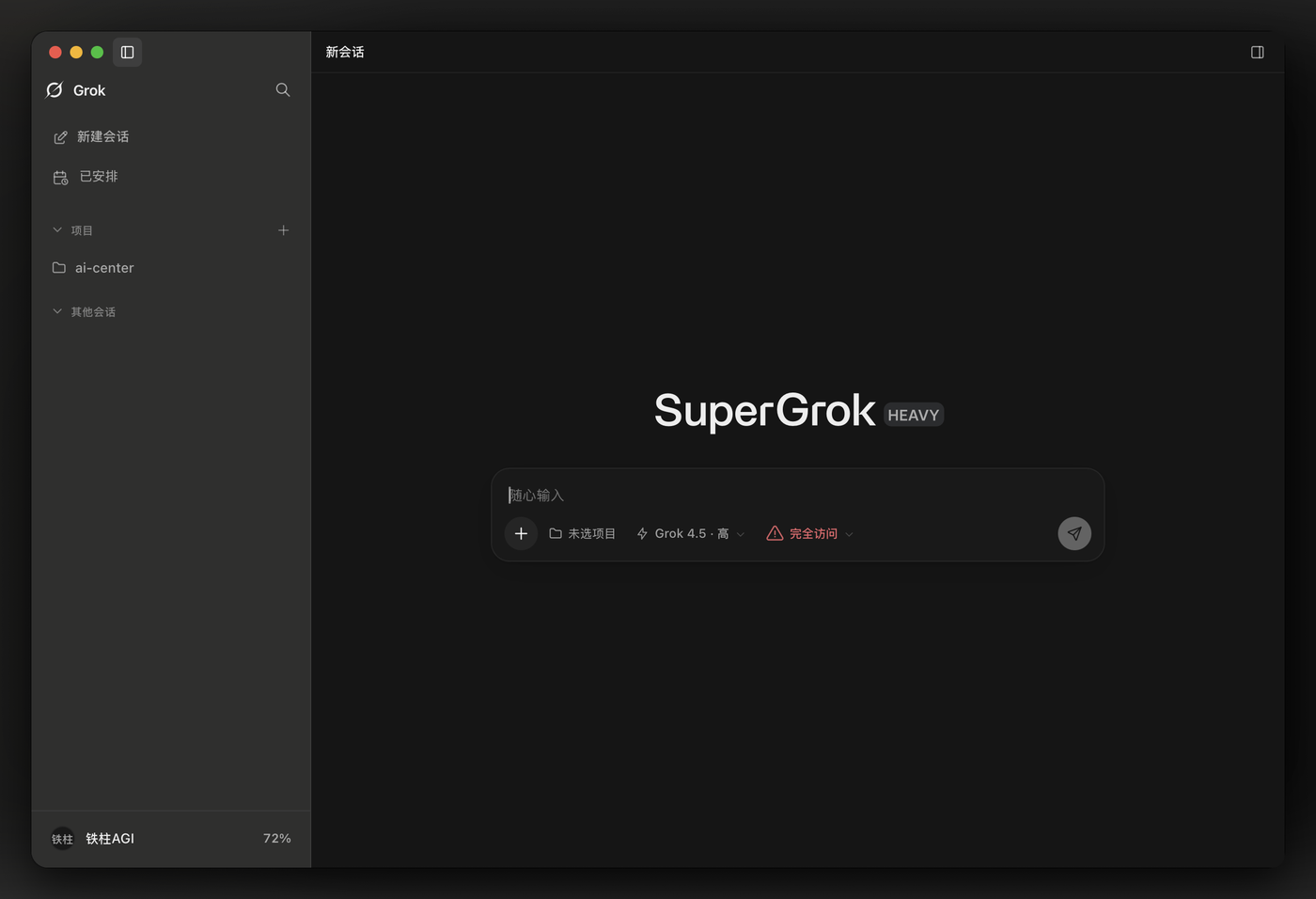 | 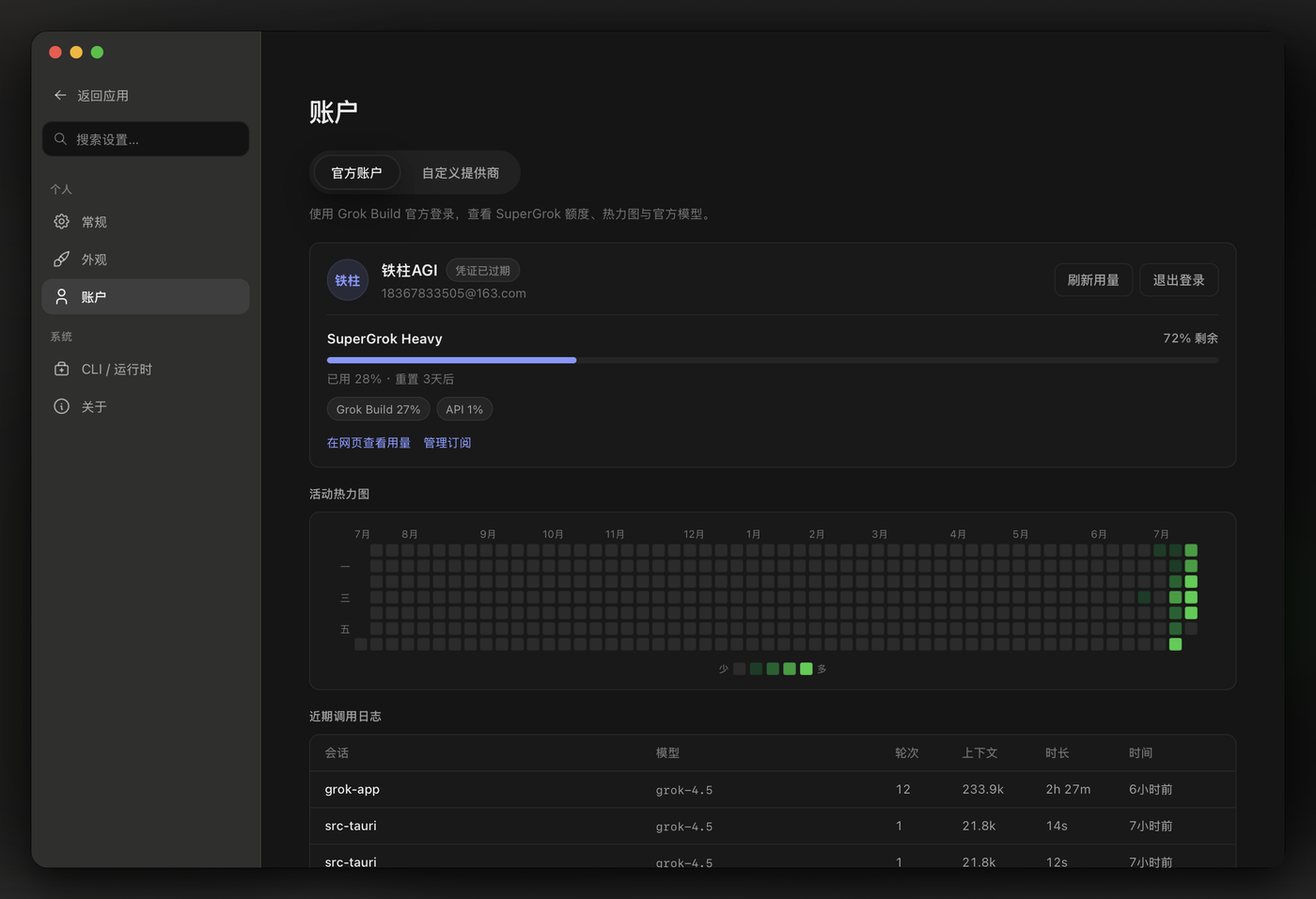 |
| ☀️ Light Theme Mode | 💬 Media Preview & Interaction |
|---|---|
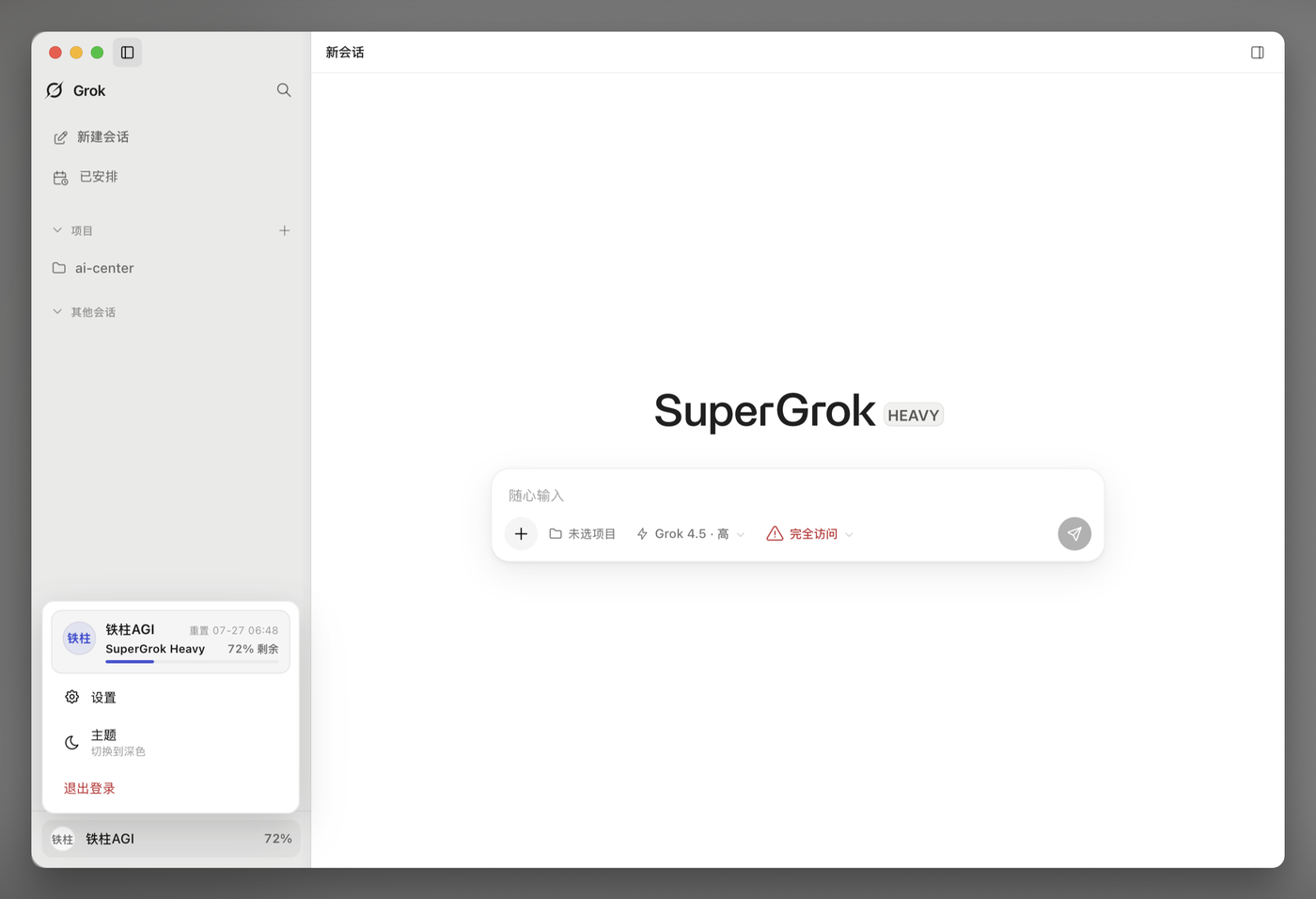 | 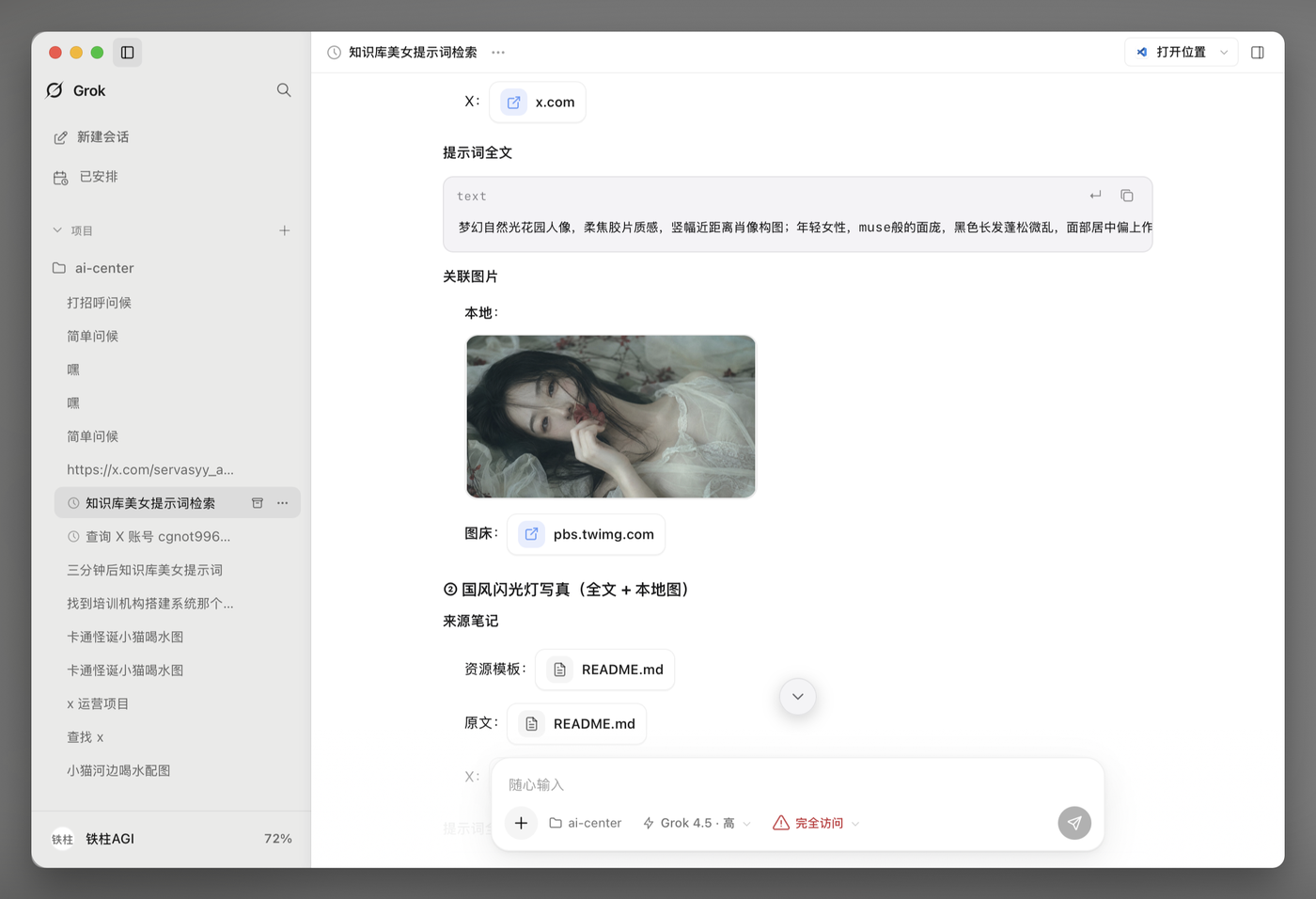 |
Download installers directly from the official website grok-app.com or GitHub Releases:
| Platform | Package Format | Details |
|---|---|---|
| macOS (Apple Silicon) | Grok_*_aarch64.dmg | Apple Silicon (M1/M2/M3/M4) Macs |
| macOS (Intel) | Grok_*_x64.dmg | Intel-based Macs |
| Windows (x64) | *-setup.exe / *-portable.zip | Setup installer and portable archive |
| Linux (x64) | AppImage / .deb / .rpm | Universal AppImage, Debian/Ubuntu, Fedora/RHEL |
💡 Note: The application bundle name is Grok. Prebuilt packages do not require Node.js, pnpm, or Rust installed on your system.
Each release includes a SHA256SUMS file. Verify your download with:
# macOS / Linux
shasum -a 256 -c SHA256SUMS --ignore-missing

# Windows (PowerShell)
Get-FileHash .\Grok_*_x64-setup.exe -Algorithm SHA256
grok CLI is already authenticated, simply choose Use existing CLI sign-in.grok) 0.2.112 or newer (run grok update in terminal to upgrade).libEGL.so.1 plus WebKitGTK 4.1 / Ayatana — see Linux runtime libraries.In restricted network environments where Grok services cannot be reached directly:
http://127.0.0.1:7890).auth.x.ai, grok.com, etc.). The proxy is automatically injected into all agent processes.Official releases starting from v0.2.19 are signed with an Apple Developer ID and Apple-notarized. If Gatekeeper blocks launching (e.g., on unsigned custom builds or due to quarantine metadata):
xattr -cr /Applications/Grok.app
open /Applications/Grok.app
Or go to System Settings → Privacy & Security and click Open Anyway.
For unsigned community packages, Windows SmartScreen may display a warning on initial launch. Click More info → Run anyway. You can verify the file hash against SHA256SUMS for integrity.
Third-party antivirus (Kaspersky and similar) may also flag the unsigned Tauri app and bundled CLI as a heuristic threat. That is a false positive on community builds. Verify the installer hash, then exclude the install folder and the app data directory (often under %LOCALAPPDATA%). Signing with Authenticode is the long-term fix; the app cannot whitelist itself inside the antivirus.
The official AppImage does not bundle host EGL / WebKit / tray libraries. On a clean Debian / Ubuntu install the binary can exit immediately:
error while loading shared libraries: libEGL.so.1: cannot open shared object file
Install the runtime packages the .deb already expects, plus EGL/GLES (confirmed on Debian 13 (trixie) x86_64 with official Grok_0.2.26_amd64.AppImage):
sudo apt-get install -y libegl1 libgles2 libwebkit2gtk-4.1-0 libayatana-appindicator3-1
Then chmod +x and run the AppImage (or the extracted usr/bin/grok-app). The .deb already lists libwebkit2gtk-4.1-0 and libgtk-3-0.
This is a missing shared library at process start. It is not the Wayland black-window / EGL_BAD_PARAMETER case in Linux Display Notes. See issue #899.
If the process never starts and you see libEGL.so.1: cannot open shared object file, that is a missing host library — see Linux runtime libraries.
On certain Wayland desktop setups (such as Hyprland with AMD GPUs), the universal AppImage may encounter rendering conflicts with the host Mesa/DRI stack:
.deb or .rpm packages which link against your distribution's native WebKitGTK.webkit2gtk-4.1 on Arch, libwebkit2gtk-4.1-0 on Debian/Ubuntu). That avoids the bundled-WebKit EGL_BAD_PARAMETER black window (#539) and SIGBUS in leftover WebKitNetworkProcess when the squashfs unmounts. Opt out with GROK_SKIP_SYSTEM_WEBKIT=1.WEBKIT_DISABLE_DMABUF_RENDERER=1 ./Grok_*.AppImage
--appimage-mount and then kill the mount while WebKit helpers are still running — that is the SIGBUS path. Prefer this script, which extracts to a real directory: scripts/run-linux-appimage-system-webkit.sh.Modern distributions such as Ubuntu 24.04+ restrict unprivileged user namespaces by default, which can prevent the bubblewrap agent sandbox from launching:
sudo sysctl -w kernel.apparmor_restrict_unprivileged_userns=0
echo 'kernel.apparmor_restrict_unprivileged_userns=0' | sudo tee /etc/sysctl.d/99-userns.conf
Default application data directory (override via the GROK_APP_HOME environment variable):
| Operating System | Default Path |
|---|---|
| macOS | ~/Library/Application Support/com.grokapp.grok-app/ |
| Windows | %APPDATA%\grokapp\grok-app\ |
| Linux | ~/.grok-app/ |
Data layout:
<app-data>/
  projects.json          # Project registry
  sessions_index.json    # Session metadata index
  settings.json          # Application preferences
  secrets.json           # Secure key metadata (OS keychain prioritized, 0600 fallback)
  automations.json       # Scheduled automations
  projects/              # Project-specific metadata
  sessions/              # Persistent session history
  logs/                  # Diagnostic logs
  agent-home/            # Independent mode GROK_HOME
To develop or build Grok App from source:
v22.0.0 or newerv9.0.0 or newer# 1. Install dependencies
pnpm install
# 2. Start desktop development app (Tauri + Vite HMR)
pnpm dev
# 3. Start web frontend only (UI iteration)
pnpm dev:ui
# 4. Start with mock ACP backend (no CLI required)
GROK_APP_ACP=mock pnpm dev
# 5. Type checking and tests
pnpm typecheck && pnpm test
cd src-tauri && cargo test
# 6. Build production package
pnpm build
pnpm dev merges src-tauri/tauri.dev.conf.json (identifier com.grokapp.desktop.dev, product Grok Dev) so it can run beside installed Grok. Sessions still share App data unless GROK_APP_HOME is set. Bare tauri dev without --config uses the official identifier and will steal the installed instance.
Windows (optional): double-click install-latest.cmd to fast-forward origin/main and silently install an unsigned side-by-side grok-app-latest (does not replace official Grok). Needs VS Build Tools + Rust MSVC; details in docs/BUILD.md.
For cross-compilation and packaging instructions, see docs/BUILD.md.
Contributions, bug reports, and suggestions are warmly welcomed!
| Guide | Description |
|---|---|
| 📖 Agent & Product Rules | docs/llm-wiki/ |
| 🛠️ Build & Packaging Guide | docs/BUILD.md |
| 📝 Changelog | CHANGELOG.md |
| 💡 Contributing Guide | CONTRIBUTING.md |
| 🛡️ Code of Conduct | CODE_OF_CONDUCT.md |
| 🔒 Security Policy | SECURITY.md |
Thanks to everyone who has contributed to Grok App. All human GitHub contributors (by commit count, updated 2026-10-11).





This project is licensed under the MIT License.
| Channel | Link |
|---|---|
| 𝕏 X (Twitter) | @cgnot996 (铁柱AGI) |
| 📢 WeChat Official Account | Search 「铁柱AGI」 or scan top-left QR |
| 💬 WeChat Community | Scan top-right QR code |
| 🐧 Linux.do Community | linux.do — Learn AI on L-Station |
⭐ If Grok App empowers your daily workflow, please consider starring the repository!
580 followers · starred Jul 2026
561 followers · starred Aug 2026
86 followers · starred Sep 2026
1,439 followers · starred Aug 2026
Open-source Grok App — desktop workbench (GUI) for the local Grok Build CLI: sessions, projects, media, automations. Tauri 2.
See the code
Modern Desktop Workbench for Local Grok Build CLI
Multi-Project Spaces · Real-time Agent Streaming · Integrated File & Code Loop · Omnichannel Remote IM · Desktop Companion & Personalization
[!NOTE] About Grok App: Grok App is an open-source desktop client and workbench for the local Grok Build CLI (
grok agent stdio). It is not an official xAI product. The application does not bundle proprietary model backends; all chat reasoning, tool execution, and permissions run directly through your installedgrokCLI.Full agent capabilities require an installed and signed-in Grok Build CLI. The first-run setup wizard can assist with CLI installation, and UI-only development can be run with
GROK_APP_ACP=mock.
grok agent stdio via the ACP protocol. Granular permission tiers (Ask, Allow Once, Allow for Session, and YOLO mode) with Grok 4.7 Extra High (xhigh) enabled by default. Grok 4.7 Fast is also selectable./attach-chat or drag-and-drop.Ctrl+Enter to steer the active turn; type-to-focus; prompt history; selection quotes and inline annotations./workflow)./p project switch, /r resume).GET /v1/sessions, POST /v1/sessions/{id}/turns) for scripting, CI, or third-party tool integrations.~/.grok configurations); one-click presets for OpenRouter, Requesty, DeepSeek, AI98PRO, etc.| 🖥️ Workbench & Sessions | 📊 Account & Quota Heatmap |
|---|---|
| |
| ☀️ Light Theme Mode | 💬 Media Preview & Interaction |
|---|---|
| |
Download installers directly from the official website grok-app.com or GitHub Releases:
| Platform | Package Format | Details |
|---|---|---|
| macOS (Apple Silicon) | Grok_*_aarch64.dmg | Apple Silicon (M1/M2/M3/M4) Macs |
| macOS (Intel) | Grok_*_x64.dmg | Intel-based Macs |
| Windows (x64) | *-setup.exe / *-portable.zip | Setup installer and portable archive |
| Linux (x64) | AppImage / .deb / .rpm | Universal AppImage, Debian/Ubuntu, Fedora/RHEL |
💡 Note: The application bundle name is Grok. Prebuilt packages do not require Node.js, pnpm, or Rust installed on your system.
Each release includes a SHA256SUMS file. Verify your download with:
# macOS / Linux
shasum -a 256 -c SHA256SUMS --ignore-missing

# Windows (PowerShell)
Get-FileHash .\Grok_*_x64-setup.exe -Algorithm SHA256
grok CLI is already authenticated, simply choose Use existing CLI sign-in.grok) 0.2.112 or newer (run grok update in terminal to upgrade).libEGL.so.1 plus WebKitGTK 4.1 / Ayatana — see Linux runtime libraries.In restricted network environments where Grok services cannot be reached directly:
http://127.0.0.1:7890).auth.x.ai, grok.com, etc.). The proxy is automatically injected into all agent processes.Official releases starting from v0.2.19 are signed with an Apple Developer ID and Apple-notarized. If Gatekeeper blocks launching (e.g., on unsigned custom builds or due to quarantine metadata):
xattr -cr /Applications/Grok.app
open /Applications/Grok.app
Or go to System Settings → Privacy & Security and click Open Anyway.
For unsigned community packages, Windows SmartScreen may display a warning on initial launch. Click More info → Run anyway. You can verify the file hash against SHA256SUMS for integrity.
Third-party antivirus (Kaspersky and similar) may also flag the unsigned Tauri app and bundled CLI as a heuristic threat. That is a false positive on community builds. Verify the installer hash, then exclude the install folder and the app data directory (often under %LOCALAPPDATA%). Signing with Authenticode is the long-term fix; the app cannot whitelist itself inside the antivirus.
The official AppImage does not bundle host EGL / WebKit / tray libraries. On a clean Debian / Ubuntu install the binary can exit immediately:
error while loading shared libraries: libEGL.so.1: cannot open shared object file
Install the runtime packages the .deb already expects, plus EGL/GLES (confirmed on Debian 13 (trixie) x86_64 with official Grok_0.2.26_amd64.AppImage):
sudo apt-get install -y libegl1 libgles2 libwebkit2gtk-4.1-0 libayatana-appindicator3-1
Then chmod +x and run the AppImage (or the extracted usr/bin/grok-app). The .deb already lists libwebkit2gtk-4.1-0 and libgtk-3-0.
This is a missing shared library at process start. It is not the Wayland black-window / EGL_BAD_PARAMETER case in Linux Display Notes. See issue #899.
If the process never starts and you see libEGL.so.1: cannot open shared object file, that is a missing host library — see Linux runtime libraries.
On certain Wayland desktop setups (such as Hyprland with AMD GPUs), the universal AppImage may encounter rendering conflicts with the host Mesa/DRI stack:
.deb or .rpm packages which link against your distribution's native WebKitGTK.webkit2gtk-4.1 on Arch, libwebkit2gtk-4.1-0 on Debian/Ubuntu). That avoids the bundled-WebKit EGL_BAD_PARAMETER black window (#539) and SIGBUS in leftover WebKitNetworkProcess when the squashfs unmounts. Opt out with GROK_SKIP_SYSTEM_WEBKIT=1.WEBKIT_DISABLE_DMABUF_RENDERER=1 ./Grok_*.AppImage
--appimage-mount and then kill the mount while WebKit helpers are still running — that is the SIGBUS path. Prefer this script, which extracts to a real directory: scripts/run-linux-appimage-system-webkit.sh.Modern distributions such as Ubuntu 24.04+ restrict unprivileged user namespaces by default, which can prevent the bubblewrap agent sandbox from launching:
sudo sysctl -w kernel.apparmor_restrict_unprivileged_userns=0
echo 'kernel.apparmor_restrict_unprivileged_userns=0' | sudo tee /etc/sysctl.d/99-userns.conf
Default application data directory (override via the GROK_APP_HOME environment variable):
| Operating System | Default Path |
|---|---|
| macOS | ~/Library/Application Support/com.grokapp.grok-app/ |
| Windows | %APPDATA%\grokapp\grok-app\ |
| Linux | ~/.grok-app/ |
Data layout:
<app-data>/
  projects.json          # Project registry
  sessions_index.json    # Session metadata index
  settings.json          # Application preferences
  secrets.json           # Secure key metadata (OS keychain prioritized, 0600 fallback)
  automations.json       # Scheduled automations
  projects/              # Project-specific metadata
  sessions/              # Persistent session history
  logs/                  # Diagnostic logs
  agent-home/            # Independent mode GROK_HOME
To develop or build Grok App from source:
v22.0.0 or newerv9.0.0 or newer# 1. Install dependencies
pnpm install
# 2. Start desktop development app (Tauri + Vite HMR)
pnpm dev
# 3. Start web frontend only (UI iteration)
pnpm dev:ui
# 4. Start with mock ACP backend (no CLI required)
GROK_APP_ACP=mock pnpm dev
# 5. Type checking and tests
pnpm typecheck && pnpm test
cd src-tauri && cargo test
# 6. Build production package
pnpm build
pnpm dev merges src-tauri/tauri.dev.conf.json (identifier com.grokapp.desktop.dev, product Grok Dev) so it can run beside installed Grok. Sessions still share App data unless GROK_APP_HOME is set. Bare tauri dev without --config uses the official identifier and will steal the installed instance.
Windows (optional): double-click install-latest.cmd to fast-forward origin/main and silently install an unsigned side-by-side grok-app-latest (does not replace official Grok). Needs VS Build Tools + Rust MSVC; details in docs/BUILD.md.
For cross-compilation and packaging instructions, see docs/BUILD.md.
Contributions, bug reports, and suggestions are warmly welcomed!
| Guide | Description |
|---|---|
| 📖 Agent & Product Rules | docs/llm-wiki/ |
| 🛠️ Build & Packaging Guide | docs/BUILD.md |
| 📝 Changelog | CHANGELOG.md |
| 💡 Contributing Guide | CONTRIBUTING.md |
| 🛡️ Code of Conduct | CODE_OF_CONDUCT.md |
| 🔒 Security Policy | SECURITY.md |
Thanks to everyone who has contributed to Grok App. All human GitHub contributors (by commit count, updated 2026-10-11).
This project is licensed under the MIT License.
| Channel | Link |
|---|---|
| 𝕏 X (Twitter) | @cgnot996 (铁柱AGI) |
| 📢 WeChat Official Account | Search 「铁柱AGI」 or scan top-left QR |
| 💬 WeChat Community | Scan top-right QR code |
| 🐧 Linux.do Community | linux.do — Learn AI on L-Station |
⭐ If Grok App empowers your daily workflow, please consider starring the repository!
580 followers · starred Jul 2026
561 followers · starred Aug 2026
86 followers · starred Sep 2026
1,439 followers · starred Aug 2026



