Keep Claude Code Remote Control and Cursor My Machines alive across crash/reboot: supervisor + desktop app with embedded terminal. Windows, Linux, macOS. C#.
See the code
Keep Claude Code Remote Control alive on your machine — many projects, one supervisor, and a desktop app to drive it all. Windows, Linux and macOS.




Product page · Download · Report a bug
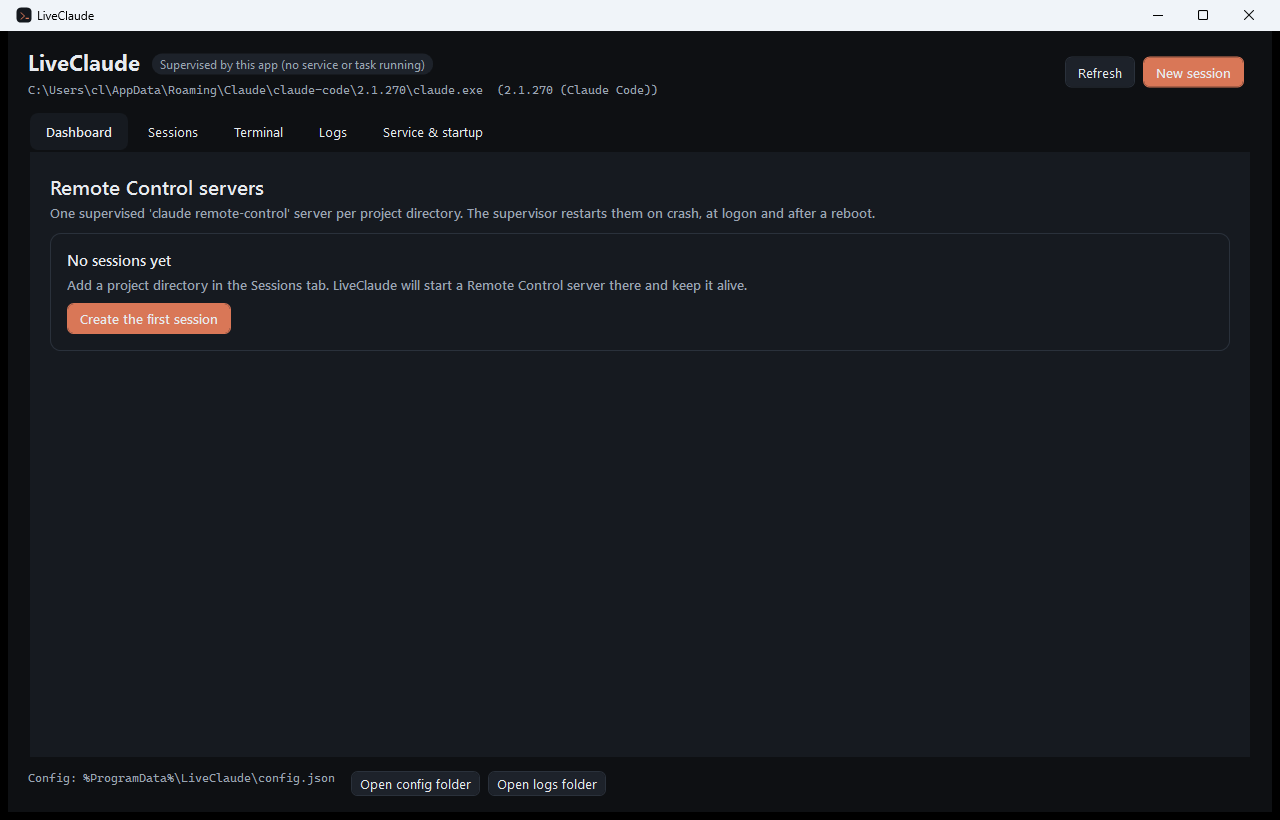
Claude Code Remote Control lets you drive a Claude Code session running on your own machine from claude.ai or the Claude mobile app. The catch: it is a foreground process in a terminal. Close the window, hit a crash, reboot the machine — and your phone loses the machine.
LiveClaude turns that into infrastructure:
--name / --worker-dir / auth).agent login) happen inside the app, and so you can attach to a running process and type into it.Everything is C#. No Node, no Python, no tmux, no browser control.
Everything that has to differ between operating systems — the pseudo terminal, autostart, elevation,
the IPC transport, where files live — sits behind one contract and lives in its own assembly, loaded
by name at run time. Agent products (LiveClaude.Product.Claude, LiveClaude.Product.Cursor) ship
the same way. LiveClaude.Core has no compile-time dependency on either.
winget install LeandroCannizzaro.LiveClaude
LiveClaude-win-x64.zip from the latest release.LiveClaude.exe.The -selfcontained zip has no prerequisites. The plain zip needs the .NET 10 Desktop Runtime.
Open LiveClaude.application — it installs for the current user and checks for updates on every launch. The manifests are unsigned, so SmartScreen asks once.
Already running 1.x? That channel is frozen at 1.0.15 and keeps working. 2.0 is published to a channel of its own, so a 1.0.15 install is never carried onto it by an update check — install 2.0 alongside, and remove 1.x once you are happy. They are different applications underneath: 1.x is the Windows-only WPF program, 2.x is the cross-platform one.
curl -fsSL https://leandrocannizzaro.github.io/LiveClaude/install.sh | sh
Picks the .deb, .rpm or tarball for your machine, installs to /opt/liveclaude, and puts
liveclaude and liveclaude-supervisor on your PATH with a desktop entry. x86_64 and arm64,
self-contained — no .NET runtime needed.
By hand, if you prefer:
sudo apt install ./liveclaude_<version>_amd64.deb      # Debian, Ubuntu
sudo dnf install ./liveclaude-<version>-1.x86_64.rpm   # Fedora, RHEL, openSUSE
tar -xzf LiveClaude-<version>-linux-x64.tar.gz -C ~/liveclaude
curl -fsSL https://leandrocannizzaro.github.io/LiveClaude/install-macos.sh | sh
Downloads the .dmg for your Mac, copies the app to /Applications and clears the quarantine flag.
Apple silicon and Intel.
Installing the .dmg by hand works too, but the app is not notarised yet: Gatekeeper refuses a
normal double-click, so right-click the app and choose Open the first time. Clearing that flag is
the only reason the script above is worth having.
git clone https://github.com/LeandroCannizzaro/LiveClaude.git
cd LiveClaude
dotnet build -c Release
dotnet run --project src/LiveClaude.App
Building a Windows package needs a Windows machine — LiveClaude.Platform.Windows targets
net10.0-windows — but the Linux and macOS packages cross-build from anywhere.
| OS | Windows 10 1809+ or Windows 11 (ConPTY) · Linux with systemd · macOS 12+ |
| Runtime | .NET 10 (bundled in the self-contained packages; the Linux and macOS packages never need it) |
| Claude Code | Signed in with a Pro, Max, Team or Enterprise account. API keys, Bedrock, Vertex and Foundry are not supported by Remote Control |
| CLI | A native install is recommended (claude install stable) — the copy bundled with the Claude desktop app lives in a versioned folder whose path changes on every update |
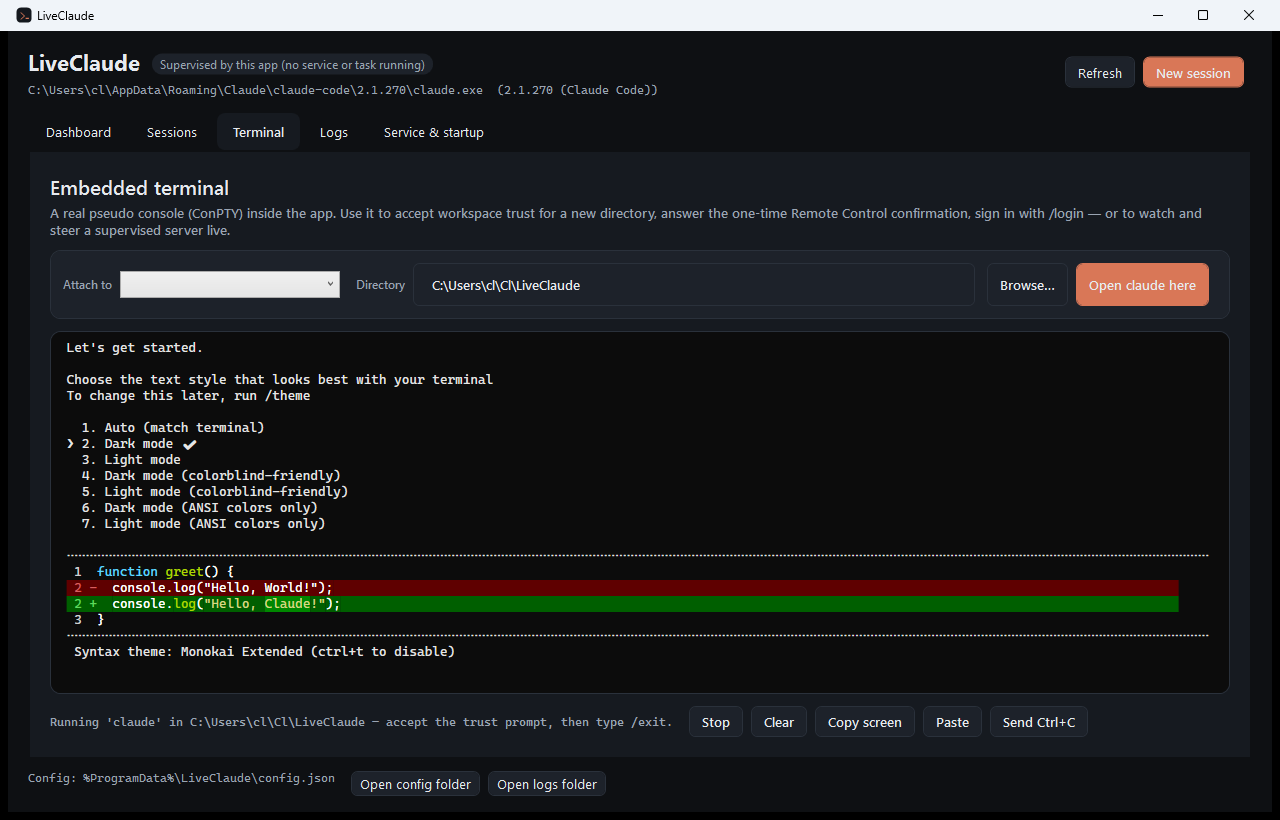
claude there so you can accept the one-time workspace-trust prompt, then type /exit.Enable Remote Control? (y/n).The server now shows up at claude.ai/code and in the Claude mobile app, and comes back on its own after a crash, a sign-out or a reboot.
Every system offers two places to register the supervisor, and LiveClaude uses both. The card on the left of Service & startup is always the recommended one.
| In your session (recommended) | Machine-wide | |
|---|---|---|
| Windows | Scheduled task — logon + 30 s after boot, restart every minute on failure | Windows service — sc.exe failure actions: 5 s, 10 s, then every 30 s |
| Linux | systemd user unit — Restart=always, RestartSec=5 | systemd system unit with User= |
| macOS | LaunchAgent — RunAtLoad, KeepAlive | LaunchDaemon with UserName |
| Runs as | you | the account you name (name your own) |
| Starts before sign-in | see below | yes |
| Elevation | only for the start-before-sign-in part | always |
| Claude credentials | always found | only when it runs as your account |
Starting before anyone signs in is the one thing that works differently everywhere, and each platform says so in the UI rather than quietly installing something that will not do it:
loginctl enable-linger <you>) so systemd runs your user manager
without a session. LiveClaude offers to enable it; decline and the unit still starts at login.Both scopes are installed from the app, or from the CLI:
LiveClaude.Service install-autostart                      # your session
LiveClaude.Service install-autostart --scope system --user you
LiveClaude.Service status
install-task and install-service are kept as aliases for --scope user and --scope system, so
the Windows documentation, the winget package and anyone's scripts keep working:
LiveClaude.Service.exe install-task
LiveClaude.Service.exe install-service --account "DOMAIN\you" --password "<windows password>"
Why installing may ask for elevation (Windows). Windows only lets an administrator register a task
that triggers at system startup: as a normal user, schtasks answers ERROR: Access is denied. The app
therefore asks for elevation through the supervisor executable — the app itself stays asInvoker, which
also means a ClickOnce install (which cannot be launched elevated) works fine. Decline the prompt and the
task is still installed with the logon trigger only: everything works except starting before anyone signs
in. The task is always registered for your account, even when UAC is answered with a different one.
Elsewhere the same prompt comes from pkexec (or sudo) on Linux and from the standard
authentication sheet on macOS, and declining has the same consequence.
What the Windows service needs. Installation is elevated (UAC, again through the supervisor
executable). Running it under your own account additionally needs the Log on as a service right —
sc create obj= does not grant it, and without it the service is created and then refuses to start
with error 1069. LiveClaude grants it during the elevated install. The account also needs a real
password: Windows never lets a user account log on as a service with a blank one.
Who actually runs. The zip and winget packages register LiveClaude.Service.exe. A ClickOnce
install ships that executable without its runtime configuration — .NET then refuses to start it — so
there LiveClaude registers itself instead (LiveClaude.exe --supervise), which hosts the same
supervisor windowlessly. Only one supervisor runs at a time: a second one stops with a note in
logs\supervisor.log rather than supervising the same directories twice.
Installs that move (Windows only). ClickOnce and winget put the app in a folder that is replaced on every update,
which would leave the task or service pointing at an executable that no longer exists. When LiveClaude
detects such a location it first copies the supervisor to %LOCALAPPDATA%\LiveClaude\supervisor and
registers that copy — one path, so the registration survives updates. Because the supervisor runs
from there and holds its own files open, everything running from that folder is stopped before the
copy is refreshed; without that, an update cannot replace the executable and the registration keeps
running the previous build. Linux and macOS install to paths that do not move — /opt/liveclaude and
the .app bundle — so nothing is copied there.
The app talks to whichever supervisor is running over the platform's own channel, so you can close the
window and the servers keep running — and reopen it later to find them. On Windows that is a named
pipe (\.\pipe\LiveClaude.v1), shared across the machine. On Linux and macOS it is a Unix domain
socket in a private per-user directory, created mode 0700 — which makes the "only one supervisor" rule
per-user there, the right answer on a machine two people share.
Every claude remote-control process registers a bridge environment on Anthropic's side, and the
registration outlives the process. Stop a server and start it again and you get a second entry for the
same directory; do it three times and the picker in Claude Desktop shows the project three times, one
live and the rest dead. Archiving conversations does not touch them — they are environments, not
sessions (claude-code#50884).
LiveClaude handles both ends of that:
doG, one alive".The API answers 409 Conflict when an environment still has session records attached:
Environment has 1 active sessions. Use force=true to delete anyway.
Those sessions are themselves leftovers of servers that were killed rather than stopped. LiveClaude
shows the reason on the row and in a panel above the list — with Anthropic's request-id — and offers
a Force delete button that retries with force=true, deleting the environment together with its
session records. Every call, successful or not, is appended to
%ProgramData%\LiveClaude\logs\environments.log; Open log in the toolbar goes straight there.
Not every entry in the picker is a bridge environment: the ones Claude Code on the web creates are
anthropic_cloud environments and are perfectly alive. Tick Show non-bridge environments to see
them.
The tab uses your own Claude Code sign-in (~/.claude/.credentials.json) against
api.anthropic.com/v1/environments with the environments-2025-11-01 beta header. That API is in
beta and undocumented: if Anthropic changes it, the tab reports the error and the rest of LiveClaude
keeps working.
To keep the count down without any cleanup, restart a server within Remote Control's four-hour window
so --continue reattaches instead of registering a fresh environment.
Each session maps one-to-one onto claude remote-control flags:
| Field | Flag | Notes |
|---|---|---|
| Name | --name | Title shown at claude.ai/code |
| Directory | working directory | Must be trusted once by Claude Code |
| Spawn mode | --spawn same-dir|worktree|session | worktree gives each remote session its own git worktree |
| Permission mode | --permission-mode | acceptEdits or auto keep things moving with nobody at the keyboard |
| Capacity | --capacity | Up to 32 concurrent sessions; ignored for session |
| Pre-create session | --[no-]create-session-in-dir | Off means the server archives its sessions on exit |
| Session name prefix | --remote-control-session-name-prefix | Defaults to the hostname |
| Reattach after restart | --continue | Applied automatically when the previous server stopped less than 4 hours ago |
| Fixed session id | --session-id | Wins over every spawn flag |
| Sandbox / Verbose | --sandbox / --verbose | |
| Extra arguments | appended verbatim | For anything not modelled above |
About the 4-hour window: claude remote-control --continue can only bring back the sessions a stopped server was serving for about four hours. LiveClaude records the stop time per instance and reattaches when it still can; past that it starts a fresh session. The conversations themselves are never lost — they stay resumable locally with claude --resume.
                        ┌─────────────────────────────┐
  claude.ai / mobile ───┤  Anthropic Remote Control   │
                        └──────────────┬──────────────┘
                                       │ outbound HTTPS only
┌────────────────────────────────────┼───────────────────────────────┐
│ your machine                         │                               │
│                                      ▼                               │
│   ┌──────────────┐  pipe / socket ┌─────────────────────────────┐  │
│   │ LiveClaude   │◄──────────────►│ LiveClaude.Service            │  │
│   │ desktop app  │  status,       │ (task · service · systemd ·   │  │
│   │  (Avalonia)  │  terminal I/O  │  LaunchAgent · LaunchDaemon)  │  │
│   │  Dashboard   │                │  Supervisor                   │  │
│   │  Sessions    │                │   ├── instance "LivePlatform" │  │
│   │  Terminal ───┼────────────────┼──►│   └── pty ─ claude        │  │
│   │  Logs        │                │   ├── instance "beELive"      │  │
│   │  Settings    │                │   │   └── pty ─ claude        │  │
│   └──────┬───────┘                └───────────┬─────────────────┘  │
│          │                                    │                      │
│          └──────────► LiveClaude.Platform.<OS> ◄────────────────────┤
│                       loaded by name at run time                     │
│                       pty · autostart · elevation · paths · IPC      │
└────────────────────────────────────────────────────────────────┘
| Project | What it is |
|---|---|
src/LiveClaude.Abstractions | IPlatform and the contracts hanging off it, plus the loader that finds the implementation. No dependencies |
src/LiveClaude.Core | Config store, CLI locator, argument builder, supervision engine, IPC protocol. Knows no operating system |
src/LiveClaude.Vt | VT/ANSI emulator: screen buffer, 256-colour and true-colour SGR, alternate buffer |
src/LiveClaude.Platform.Windows | ConPTY, Task Scheduler, sc.exe, LSA account rights, named-pipe ACL, UAC, the stable-copy deployment |
src/LiveClaude.Platform.Posix | Shared by Linux and macOS: the pty (posix_openpt + posix_spawn), the Unix domain socket, shell quoting |
src/LiveClaude.Platform.Linux | systemd user and system units, pkexec, XDG paths, xdg-open |
src/LiveClaude.Platform.MacOS | LaunchAgent and LaunchDaemon, osascript elevation, Keychain credentials, ~/Library paths |
src/LiveClaude.Terminal | The Avalonia terminal control: renders the VT screen, translates keystrokes |
src/LiveClaude.Service | Supervisor host and the install/uninstall/status CLI |
src/LiveClaude.App | Avalonia desktop app (dashboard, session editor, embedded terminal, logs, hosting) |
tests/LiveClaude.Tests | Runs everywhere: argument builder, backoff, output classification, config store, VT parser |
tests/LiveClaude.Tests.Platform | Runs everywhere against IPlatform: the pty, the IPC endpoint, unit files and property lists |
tests/LiveClaude.Tests.Windows | The Windows platform assembly's own internals: task XML, sc.exe command lines, deployment |
Nothing references a platform assembly at compile time. PlatformLoader probes for
LiveClaude.Platform.<OS>.dll next to the application and loads it by path — by path, because an
assembly nothing references is absent from deps.json and the default resolver would never find it
sitting right there. Delete that file from a published folder and the app stops with one sentence
naming it, which is the cheapest possible proof that the seam is real.
On Windows, a process that owns a console hands its console to every child it starts, and Windows then ignores the pseudo-console attribute — the child's output never reaches your pipes. That is why the supervisor and the app are both windowless executables there, and why the supervisor only borrows the caller's console for one-shot CLI commands. If you ever host the supervisor yourself from a console process, the dashboard will tell you: "this process owns a console…". POSIX has no such rule, so the supervisor is an ordinary console program on Linux and macOS.
On POSIX, the child is started with posix_spawn, never fork. Forking a multi-threaded .NET
process leaves the child holding locks that nothing will ever release, and any managed code running
before exec can deadlock. posix_spawn does the whole open/dup2/exec sequence inside libc. It also
sets a new session, and opening the pty slave without O_NOCTTY makes it the controlling terminal —
which is what turns the 0x03 byte into a real SIGINT. Without a controlling terminal it would be
just a byte, the server would have to be killed, and killing it is exactly what leaves dead bridge
environments in the session picker.
LiveClaude.Service status prints the paths for the machine you are on. In short:
| Windows | Linux | macOS | |
|---|---|---|---|
| Configuration | %ProgramData%\LiveClaude\config.json | ~/.config/liveclaude/config.json | ~/Library/Application Support/LiveClaude/config.json |
| Logs | %ProgramData%\LiveClaude\logs\ | ~/.local/state/liveclaude/logs/ | ~/Library/Logs/LiveClaude/ |
| Reattach state | %ProgramData%\LiveClaude\state\ | ~/.local/state/liveclaude/state/ | ~/Library/Application Support/LiveClaude/state/ |
| IPC endpoint | \\.\pipe\LiveClaude.v1 | $XDG_RUNTIME_DIR/liveclaude/ | /tmp/liveclaude-<uid>/ |
| App errors | %LOCALAPPDATA%\LiveClaude\app-errors.log | ~/.local/share/LiveClaude/app-errors.log | ~/.local/share/LiveClaude/app-errors.log |
Inside the log directory: <name>-<id>.log per instance, supervisor.log, and install.log —
which is what the elevated install commands printed, since they run in a window nobody sees.
Why the socket is not with everything else. A Unix domain socket path is limited to 104 bytes on
macOS and 108 on Linux, terminator included — and
/Users/<you>/Library/Application Support/LiveClaude/run/ spends more than half of that before the
file name. So the socket goes in a short per-user directory created 0700, the way tmux does it:
$XDG_RUNTIME_DIR/liveclaude/ on Linux when the session has one, /tmp/liveclaude-<uid>/ otherwise
and on macOS. A directory other users cannot traverse is what protects the socket.
Windows keeps one machine-wide root so a service running under another account reads the same
configuration the app writes. POSIX has no equivalent that both a daemon and a desktop user can
reach, so Linux and macOS are per-user. A system-scope daemon opts into a shared root through
LIVECLAUDE_ROOT, which every platform honours. The systemd system unit pins it to
/var/lib/liveclaude (created by StateDirectory=) only when it runs as root; with a named account
it uses that account's home, the same configuration the app writes.
"Needs attention" on a session. Claude Code is waiting for a human: workspace trust, the Remote Control confirmation, or a sign-in. Open the Terminal tab, attach to the instance and answer it — you are typing straight into the running server.
The server exits immediately. Read the instance log. The usual causes are an untrusted directory, a missing sign-in (claude /login in the embedded terminal, or claude setup-token), ANTHROPIC_BASE_URL pointing somewhere other than api.anthropic.com, or DISABLE_TELEMETRY / DO_NOT_TRACK switched on — Remote Control needs the feature-flag check those disable.
The machine-wide host is installed but nothing starts. It is almost certainly running as the
system account. Reinstall it naming your own (--user you) so it uses your profile, where the Claude
credentials live.
Linux: "Failed to connect to bus". systemctl --user needs a session bus, which does not exist
over ssh or in a container. Run loginctl enable-linger <you> so systemd keeps your user manager
running without an interactive session, or use the system unit instead.
macOS: the Environments tab says you are not signed in. Claude Code keeps its token in the login Keychain there. The first read shows an "allow access" prompt — if it was refused, allow LiveClaude in Keychain Access. A LaunchDaemon cannot read it at all before somebody signs in.
The machine sleeps and the sessions go offline. Remote Control needs the machine awake. Disable sleep — on Windows you can also enable Wake the computer to run this task on the scheduled task.
dotnet build                 # build everything for this machine
dotnet test                  # 117 tests, no network needed
dotnet run --project src/LiveClaude.App
dotnet run --project src/LiveClaude.Service -- status
The build picks the platform assembly for the machine you are on, or for the -r you pass:
dotnet publish -r linux-x64 from a Mac produces a Linux package. The one exception is a Windows
package, which needs a Windows machine — LiveClaude.Platform.Windows targets net10.0-windows, and
the build says so rather than producing something half-right.
LiveClaude --terminal <directory> opens the app straight into the embedded terminal for that folder
— the fastest route to a trust prompt.
Issue #1 is the build log: one comment per phase, from the first question to v1.0.15, including the bugs that reported success while doing nothing. Worth reading before changing the hosting, deployment or environment code — most of those decisions look arbitrary until you know what they are guarding against.
Issue #2 is the plan the cross-platform rework followed, including the traps it was written to avoid.
Issues and pull requests are welcome. Keep the C#-only rule: no Node, no web views, no native
dependencies beyond each platform's own libc or Win32. And keep the seam: new platform code belongs
in a platform assembly, and LiveClaude.Core stays free of operating-system conditionals.
MIT © Leandro Cannizzaro
LiveClaude is an independent project. It is not affiliated with, endorsed by, or sponsored by Anthropic.
Keep Claude Code Remote Control and Cursor My Machines alive across crash/reboot: supervisor + desktop app with embedded terminal. Windows, Linux, macOS. C#.
See the code
Keep Claude Code Remote Control alive on your machine — many projects, one supervisor, and a desktop app to drive it all. Windows, Linux and macOS.
Product page · Download · Report a bug
Claude Code Remote Control lets you drive a Claude Code session running on your own machine from claude.ai or the Claude mobile app. The catch: it is a foreground process in a terminal. Close the window, hit a crash, reboot the machine — and your phone loses the machine.
LiveClaude turns that into infrastructure:
--name / --worker-dir / auth).agent login) happen inside the app, and so you can attach to a running process and type into it.Everything is C#. No Node, no Python, no tmux, no browser control.
Everything that has to differ between operating systems — the pseudo terminal, autostart, elevation,
the IPC transport, where files live — sits behind one contract and lives in its own assembly, loaded
by name at run time. Agent products (LiveClaude.Product.Claude, LiveClaude.Product.Cursor) ship
the same way. LiveClaude.Core has no compile-time dependency on either.
winget install LeandroCannizzaro.LiveClaude
LiveClaude-win-x64.zip from the latest release.LiveClaude.exe.The -selfcontained zip has no prerequisites. The plain zip needs the .NET 10 Desktop Runtime.
Open LiveClaude.application — it installs for the current user and checks for updates on every launch. The manifests are unsigned, so SmartScreen asks once.
Already running 1.x? That channel is frozen at 1.0.15 and keeps working. 2.0 is published to a channel of its own, so a 1.0.15 install is never carried onto it by an update check — install 2.0 alongside, and remove 1.x once you are happy. They are different applications underneath: 1.x is the Windows-only WPF program, 2.x is the cross-platform one.
curl -fsSL https://leandrocannizzaro.github.io/LiveClaude/install.sh | sh
Picks the .deb, .rpm or tarball for your machine, installs to /opt/liveclaude, and puts
liveclaude and liveclaude-supervisor on your PATH with a desktop entry. x86_64 and arm64,
self-contained — no .NET runtime needed.
By hand, if you prefer:
sudo apt install ./liveclaude_<version>_amd64.deb      # Debian, Ubuntu
sudo dnf install ./liveclaude-<version>-1.x86_64.rpm   # Fedora, RHEL, openSUSE
tar -xzf LiveClaude-<version>-linux-x64.tar.gz -C ~/liveclaude
curl -fsSL https://leandrocannizzaro.github.io/LiveClaude/install-macos.sh | sh
Downloads the .dmg for your Mac, copies the app to /Applications and clears the quarantine flag.
Apple silicon and Intel.
Installing the .dmg by hand works too, but the app is not notarised yet: Gatekeeper refuses a
normal double-click, so right-click the app and choose Open the first time. Clearing that flag is
the only reason the script above is worth having.
git clone https://github.com/LeandroCannizzaro/LiveClaude.git
cd LiveClaude
dotnet build -c Release
dotnet run --project src/LiveClaude.App
Building a Windows package needs a Windows machine — LiveClaude.Platform.Windows targets
net10.0-windows — but the Linux and macOS packages cross-build from anywhere.
| OS | Windows 10 1809+ or Windows 11 (ConPTY) · Linux with systemd · macOS 12+ |
| Runtime | .NET 10 (bundled in the self-contained packages; the Linux and macOS packages never need it) |
| Claude Code | Signed in with a Pro, Max, Team or Enterprise account. API keys, Bedrock, Vertex and Foundry are not supported by Remote Control |
| CLI | A native install is recommended (claude install stable) — the copy bundled with the Claude desktop app lives in a versioned folder whose path changes on every update |
claude there so you can accept the one-time workspace-trust prompt, then type /exit.Enable Remote Control? (y/n).The server now shows up at claude.ai/code and in the Claude mobile app, and comes back on its own after a crash, a sign-out or a reboot.
Every system offers two places to register the supervisor, and LiveClaude uses both. The card on the left of Service & startup is always the recommended one.
| In your session (recommended) | Machine-wide | |
|---|---|---|
| Windows | Scheduled task — logon + 30 s after boot, restart every minute on failure | Windows service — sc.exe failure actions: 5 s, 10 s, then every 30 s |
| Linux | systemd user unit — Restart=always, RestartSec=5 | systemd system unit with User= |
| macOS | LaunchAgent — RunAtLoad, KeepAlive | LaunchDaemon with UserName |
| Runs as | you | the account you name (name your own) |
| Starts before sign-in | see below | yes |
| Elevation | only for the start-before-sign-in part | always |
| Claude credentials | always found | only when it runs as your account |
Starting before anyone signs in is the one thing that works differently everywhere, and each platform says so in the UI rather than quietly installing something that will not do it:
loginctl enable-linger <you>) so systemd runs your user manager
without a session. LiveClaude offers to enable it; decline and the unit still starts at login.Both scopes are installed from the app, or from the CLI:
LiveClaude.Service install-autostart                      # your session
LiveClaude.Service install-autostart --scope system --user you
LiveClaude.Service status
install-task and install-service are kept as aliases for --scope user and --scope system, so
the Windows documentation, the winget package and anyone's scripts keep working:
LiveClaude.Service.exe install-task
LiveClaude.Service.exe install-service --account "DOMAIN\you" --password "<windows password>"
Why installing may ask for elevation (Windows). Windows only lets an administrator register a task
that triggers at system startup: as a normal user, schtasks answers ERROR: Access is denied. The app
therefore asks for elevation through the supervisor executable — the app itself stays asInvoker, which
also means a ClickOnce install (which cannot be launched elevated) works fine. Decline the prompt and the
task is still installed with the logon trigger only: everything works except starting before anyone signs
in. The task is always registered for your account, even when UAC is answered with a different one.
Elsewhere the same prompt comes from pkexec (or sudo) on Linux and from the standard
authentication sheet on macOS, and declining has the same consequence.
What the Windows service needs. Installation is elevated (UAC, again through the supervisor
executable). Running it under your own account additionally needs the Log on as a service right —
sc create obj= does not grant it, and without it the service is created and then refuses to start
with error 1069. LiveClaude grants it during the elevated install. The account also needs a real
password: Windows never lets a user account log on as a service with a blank one.
Who actually runs. The zip and winget packages register LiveClaude.Service.exe. A ClickOnce
install ships that executable without its runtime configuration — .NET then refuses to start it — so
there LiveClaude registers itself instead (LiveClaude.exe --supervise), which hosts the same
supervisor windowlessly. Only one supervisor runs at a time: a second one stops with a note in
logs\supervisor.log rather than supervising the same directories twice.
Installs that move (Windows only). ClickOnce and winget put the app in a folder that is replaced on every update,
which would leave the task or service pointing at an executable that no longer exists. When LiveClaude
detects such a location it first copies the supervisor to %LOCALAPPDATA%\LiveClaude\supervisor and
registers that copy — one path, so the registration survives updates. Because the supervisor runs
from there and holds its own files open, everything running from that folder is stopped before the
copy is refreshed; without that, an update cannot replace the executable and the registration keeps
running the previous build. Linux and macOS install to paths that do not move — /opt/liveclaude and
the .app bundle — so nothing is copied there.
The app talks to whichever supervisor is running over the platform's own channel, so you can close the
window and the servers keep running — and reopen it later to find them. On Windows that is a named
pipe (\.\pipe\LiveClaude.v1), shared across the machine. On Linux and macOS it is a Unix domain
socket in a private per-user directory, created mode 0700 — which makes the "only one supervisor" rule
per-user there, the right answer on a machine two people share.
Every claude remote-control process registers a bridge environment on Anthropic's side, and the
registration outlives the process. Stop a server and start it again and you get a second entry for the
same directory; do it three times and the picker in Claude Desktop shows the project three times, one
live and the rest dead. Archiving conversations does not touch them — they are environments, not
sessions (claude-code#50884).
LiveClaude handles both ends of that:
doG, one alive".The API answers 409 Conflict when an environment still has session records attached:
Environment has 1 active sessions. Use force=true to delete anyway.
Those sessions are themselves leftovers of servers that were killed rather than stopped. LiveClaude
shows the reason on the row and in a panel above the list — with Anthropic's request-id — and offers
a Force delete button that retries with force=true, deleting the environment together with its
session records. Every call, successful or not, is appended to
%ProgramData%\LiveClaude\logs\environments.log; Open log in the toolbar goes straight there.
Not every entry in the picker is a bridge environment: the ones Claude Code on the web creates are
anthropic_cloud environments and are perfectly alive. Tick Show non-bridge environments to see
them.
The tab uses your own Claude Code sign-in (~/.claude/.credentials.json) against
api.anthropic.com/v1/environments with the environments-2025-11-01 beta header. That API is in
beta and undocumented: if Anthropic changes it, the tab reports the error and the rest of LiveClaude
keeps working.
To keep the count down without any cleanup, restart a server within Remote Control's four-hour window
so --continue reattaches instead of registering a fresh environment.
Each session maps one-to-one onto claude remote-control flags:
| Field | Flag | Notes |
|---|---|---|
| Name | --name | Title shown at claude.ai/code |
| Directory | working directory | Must be trusted once by Claude Code |
| Spawn mode | --spawn same-dir|worktree|session | worktree gives each remote session its own git worktree |
| Permission mode | --permission-mode | acceptEdits or auto keep things moving with nobody at the keyboard |
| Capacity | --capacity | Up to 32 concurrent sessions; ignored for session |
| Pre-create session | --[no-]create-session-in-dir | Off means the server archives its sessions on exit |
| Session name prefix | --remote-control-session-name-prefix | Defaults to the hostname |
| Reattach after restart | --continue | Applied automatically when the previous server stopped less than 4 hours ago |
| Fixed session id | --session-id | Wins over every spawn flag |
| Sandbox / Verbose | --sandbox / --verbose | |
| Extra arguments | appended verbatim | For anything not modelled above |
About the 4-hour window: claude remote-control --continue can only bring back the sessions a stopped server was serving for about four hours. LiveClaude records the stop time per instance and reattaches when it still can; past that it starts a fresh session. The conversations themselves are never lost — they stay resumable locally with claude --resume.
                        ┌─────────────────────────────┐
  claude.ai / mobile ───┤  Anthropic Remote Control   │
                        └──────────────┬──────────────┘
                                       │ outbound HTTPS only
┌────────────────────────────────────┼───────────────────────────────┐
│ your machine                         │                               │
│                                      ▼                               │
│   ┌──────────────┐  pipe / socket ┌─────────────────────────────┐  │
│   │ LiveClaude   │◄──────────────►│ LiveClaude.Service            │  │
│   │ desktop app  │  status,       │ (task · service · systemd ·   │  │
│   │  (Avalonia)  │  terminal I/O  │  LaunchAgent · LaunchDaemon)  │  │
│   │  Dashboard   │                │  Supervisor                   │  │
│   │  Sessions    │                │   ├── instance "LivePlatform" │  │
│   │  Terminal ───┼────────────────┼──►│   └── pty ─ claude        │  │
│   │  Logs        │                │   ├── instance "beELive"      │  │
│   │  Settings    │                │   │   └── pty ─ claude        │  │
│   └──────┬───────┘                └───────────┬─────────────────┘  │
│          │                                    │                      │
│          └──────────► LiveClaude.Platform.<OS> ◄────────────────────┤
│                       loaded by name at run time                     │
│                       pty · autostart · elevation · paths · IPC      │
└────────────────────────────────────────────────────────────────┘
| Project | What it is |
|---|---|
src/LiveClaude.Abstractions | IPlatform and the contracts hanging off it, plus the loader that finds the implementation. No dependencies |
src/LiveClaude.Core | Config store, CLI locator, argument builder, supervision engine, IPC protocol. Knows no operating system |
src/LiveClaude.Vt | VT/ANSI emulator: screen buffer, 256-colour and true-colour SGR, alternate buffer |
src/LiveClaude.Platform.Windows | ConPTY, Task Scheduler, sc.exe, LSA account rights, named-pipe ACL, UAC, the stable-copy deployment |
src/LiveClaude.Platform.Posix | Shared by Linux and macOS: the pty (posix_openpt + posix_spawn), the Unix domain socket, shell quoting |
src/LiveClaude.Platform.Linux | systemd user and system units, pkexec, XDG paths, xdg-open |
src/LiveClaude.Platform.MacOS | LaunchAgent and LaunchDaemon, osascript elevation, Keychain credentials, ~/Library paths |
src/LiveClaude.Terminal | The Avalonia terminal control: renders the VT screen, translates keystrokes |
src/LiveClaude.Service | Supervisor host and the install/uninstall/status CLI |
src/LiveClaude.App | Avalonia desktop app (dashboard, session editor, embedded terminal, logs, hosting) |
tests/LiveClaude.Tests | Runs everywhere: argument builder, backoff, output classification, config store, VT parser |
tests/LiveClaude.Tests.Platform | Runs everywhere against IPlatform: the pty, the IPC endpoint, unit files and property lists |
tests/LiveClaude.Tests.Windows | The Windows platform assembly's own internals: task XML, sc.exe command lines, deployment |
Nothing references a platform assembly at compile time. PlatformLoader probes for
LiveClaude.Platform.<OS>.dll next to the application and loads it by path — by path, because an
assembly nothing references is absent from deps.json and the default resolver would never find it
sitting right there. Delete that file from a published folder and the app stops with one sentence
naming it, which is the cheapest possible proof that the seam is real.
On Windows, a process that owns a console hands its console to every child it starts, and Windows then ignores the pseudo-console attribute — the child's output never reaches your pipes. That is why the supervisor and the app are both windowless executables there, and why the supervisor only borrows the caller's console for one-shot CLI commands. If you ever host the supervisor yourself from a console process, the dashboard will tell you: "this process owns a console…". POSIX has no such rule, so the supervisor is an ordinary console program on Linux and macOS.
On POSIX, the child is started with posix_spawn, never fork. Forking a multi-threaded .NET
process leaves the child holding locks that nothing will ever release, and any managed code running
before exec can deadlock. posix_spawn does the whole open/dup2/exec sequence inside libc. It also
sets a new session, and opening the pty slave without O_NOCTTY makes it the controlling terminal —
which is what turns the 0x03 byte into a real SIGINT. Without a controlling terminal it would be
just a byte, the server would have to be killed, and killing it is exactly what leaves dead bridge
environments in the session picker.
LiveClaude.Service status prints the paths for the machine you are on. In short:
| Windows | Linux | macOS | |
|---|---|---|---|
| Configuration | %ProgramData%\LiveClaude\config.json | ~/.config/liveclaude/config.json | ~/Library/Application Support/LiveClaude/config.json |
| Logs | %ProgramData%\LiveClaude\logs\ | ~/.local/state/liveclaude/logs/ | ~/Library/Logs/LiveClaude/ |
| Reattach state | %ProgramData%\LiveClaude\state\ | ~/.local/state/liveclaude/state/ | ~/Library/Application Support/LiveClaude/state/ |
| IPC endpoint | \\.\pipe\LiveClaude.v1 | $XDG_RUNTIME_DIR/liveclaude/ | /tmp/liveclaude-<uid>/ |
| App errors | %LOCALAPPDATA%\LiveClaude\app-errors.log | ~/.local/share/LiveClaude/app-errors.log | ~/.local/share/LiveClaude/app-errors.log |
Inside the log directory: <name>-<id>.log per instance, supervisor.log, and install.log —
which is what the elevated install commands printed, since they run in a window nobody sees.
Why the socket is not with everything else. A Unix domain socket path is limited to 104 bytes on
macOS and 108 on Linux, terminator included — and
/Users/<you>/Library/Application Support/LiveClaude/run/ spends more than half of that before the
file name. So the socket goes in a short per-user directory created 0700, the way tmux does it:
$XDG_RUNTIME_DIR/liveclaude/ on Linux when the session has one, /tmp/liveclaude-<uid>/ otherwise
and on macOS. A directory other users cannot traverse is what protects the socket.
Windows keeps one machine-wide root so a service running under another account reads the same
configuration the app writes. POSIX has no equivalent that both a daemon and a desktop user can
reach, so Linux and macOS are per-user. A system-scope daemon opts into a shared root through
LIVECLAUDE_ROOT, which every platform honours. The systemd system unit pins it to
/var/lib/liveclaude (created by StateDirectory=) only when it runs as root; with a named account
it uses that account's home, the same configuration the app writes.
"Needs attention" on a session. Claude Code is waiting for a human: workspace trust, the Remote Control confirmation, or a sign-in. Open the Terminal tab, attach to the instance and answer it — you are typing straight into the running server.
The server exits immediately. Read the instance log. The usual causes are an untrusted directory, a missing sign-in (claude /login in the embedded terminal, or claude setup-token), ANTHROPIC_BASE_URL pointing somewhere other than api.anthropic.com, or DISABLE_TELEMETRY / DO_NOT_TRACK switched on — Remote Control needs the feature-flag check those disable.
The machine-wide host is installed but nothing starts. It is almost certainly running as the
system account. Reinstall it naming your own (--user you) so it uses your profile, where the Claude
credentials live.
Linux: "Failed to connect to bus". systemctl --user needs a session bus, which does not exist
over ssh or in a container. Run loginctl enable-linger <you> so systemd keeps your user manager
running without an interactive session, or use the system unit instead.
macOS: the Environments tab says you are not signed in. Claude Code keeps its token in the login Keychain there. The first read shows an "allow access" prompt — if it was refused, allow LiveClaude in Keychain Access. A LaunchDaemon cannot read it at all before somebody signs in.
The machine sleeps and the sessions go offline. Remote Control needs the machine awake. Disable sleep — on Windows you can also enable Wake the computer to run this task on the scheduled task.
dotnet build                 # build everything for this machine
dotnet test                  # 117 tests, no network needed
dotnet run --project src/LiveClaude.App
dotnet run --project src/LiveClaude.Service -- status
The build picks the platform assembly for the machine you are on, or for the -r you pass:
dotnet publish -r linux-x64 from a Mac produces a Linux package. The one exception is a Windows
package, which needs a Windows machine — LiveClaude.Platform.Windows targets net10.0-windows, and
the build says so rather than producing something half-right.
LiveClaude --terminal <directory> opens the app straight into the embedded terminal for that folder
— the fastest route to a trust prompt.
Issue #1 is the build log: one comment per phase, from the first question to v1.0.15, including the bugs that reported success while doing nothing. Worth reading before changing the hosting, deployment or environment code — most of those decisions look arbitrary until you know what they are guarding against.
Issue #2 is the plan the cross-platform rework followed, including the traps it was written to avoid.
Issues and pull requests are welcome. Keep the C#-only rule: no Node, no web views, no native
dependencies beyond each platform's own libc or Win32. And keep the seam: new platform code belongs
in a platform assembly, and LiveClaude.Core stays free of operating-system conditionals.
MIT © Leandro Cannizzaro
LiveClaude is an independent project. It is not affiliated with, endorsed by, or sponsored by Anthropic.



