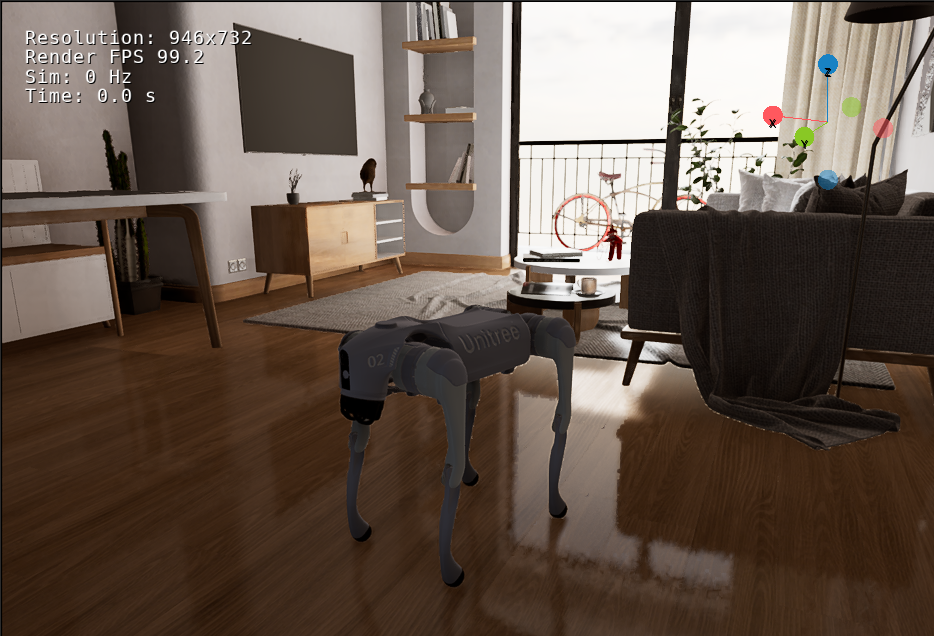
An agentic voice- and language-driven visual-navigation proof of concept for a Unitree Go2 in OrcaLab. A spoken query is transcribed by Modal-hosted FireRedASR2-AED, or a typed query is accepted directly; the Memory Guide uses Bedrock for semantic routing, with OpenAI GPT-5.6 Luna as the backup, then deterministically resolves inventory and map data into a small search plan. NaVILA uses eight ego-camera frames to choose the next movement, and the navigation runner executes that movement in MuJoCo/MJLab while mirroring the pose into OrcaLab.
query → Memory Guide plan → eight RGB frames → NaVILA action
      → Go2 locomotion → OrcaLab scene/camera → next observation
The stack has two runtime paths and three model stages. FireRedASR and the Bedrock/OpenAI router belong to the high-level voice/query path; NaVILA is the separate visual-control path:
| Layer | Technology | Responsibility |
|---|---|---|
| Voice input | ALSA arecord | Records one 16 kHz, mono WAV query. |
| Speech recognition | Modal-hosted FireRedASR2-AED HTTP service (NVIDIA T4) | Converts the WAV into plain text. It does not plan movement. |
| Query routing | Amazon Bedrock primary (amazon.nova-micro-v1:0); OpenAI Responses API backup (gpt-5.6-luna) | Classifies the request and extracts one target using the local item/place catalog. |
| Mission planning | Python Memory Guide | Deterministically resolves inventory and semantic-map data into search locations and waypoint instructions. |
| Visual navigation | NaVILA, optionally with the project LoRA adapter | Receives eight ego-camera RGB frames plus one waypoint and predicts the next movement action. |
| Model adaptation | Reviewed eight-frame decision samples + upstream NaVILA LoRA training | Adapts high-level visual actions without changing the Go2 locomotion policy. Training requires a GPU environment that owns the NaVILA checkpoint. |
| Locomotion | MJLab/MuJoCo Go2 policy | Converts the movement action into simulated Go2 control. |
| World and rendering | OrcaLab / OrcaGym | Runs the scene, mirrors robot pose, and supplies camera observations. |
The voice-to-navigation path is:
microphone
  → arecord (16 kHz mono WAV)
  → HTTP upload to Modal FireRedASR2-AED
  → transcript, for example "Where is my bread?"
  → Amazon Bedrock primary (strict JSON query route)
    or OpenAI `gpt-5.6-luna` backup when selected
  → Memory Guide + inventory + semantic map
  → waypoint instructions
  → eight camera frames
  → NaVILA TCP server
  → Go2 movement chunk
  → OrcaLab pose/camera update
The Bedrock/OpenAI model is deliberately a high-level query router here. Its
structured output contains intent, target_type, target_id, confidence,
and a logging-only rationale; it must not return coordinates, motor commands,
or waypoints. The local planner owns map resolution and waypoint generation.
NaVILA is the model that closes the visual navigation loop and chooses actions
from the eight-frame observation. A typed --query skips audio capture and
FireRedASR and starts at the transcript stage.
The repository's Bedrock adapter currently uses Amazon Nova Micro as its
primary router. gpt-5.6-luna is the OpenAI API backup; it is not silently
invoked unless OpenAI mode is selected. This keeps provider choice explicit and
avoids hiding an AWS credential, model-access, or billing failure during a
demo. To use a different Bedrock deployment, pass its model ID with
--bedrock-model-id.
FireRedASR is deployed separately as a small Modal HTTP service. Deploy it
once from the NaVILA-Orca directory after authenticating the Modal CLI:
conda activate modal-deploy
cd /path/to/Orca_VLN/NaVILA-Orca
modal deploy --stream-logs modal/firered_asr.py
The deployment uses an NVIDIA T4, keeps the FireRed weights in a persistent
Modal Volume, and exposes /health and /transcribe/wav. Set the resulting
base URL in the OrcaLab/planner environment. Keep AWS/OpenAI credentials and
the Modal URL in the shell environment or an untracked .env file; do not
commit them.
cd /path/to/Orca_VLN/NaVILA-Orca

export NAVILA_VOICE_BACKEND=http
export NAVILA_VOICE_ENDPOINT='https://<modal-host>/transcribe/wav'

export AWS_PROFILE='your-bedrock-profile'
export AWS_DEFAULT_REGION='ap-southeast-1'

./scripts/run_orcalab_memory_guide.sh \
  --voice \
  --voice-backend http \
  --voice-endpoint "$NAVILA_VOICE_ENDPOINT" \
  --llm-mode bedrock \
  --bedrock-profile "$AWS_PROFILE" \
  --bedrock-region "$AWS_DEFAULT_REGION" \
  --bedrock-model-id amazon.nova-micro-v1:0
--voice records for eight seconds on the OrcaLab host, then uploads the WAV
to Modal. Use --voice-file query.wav to send an existing recording instead.
The memory_guide_dev.sh run convenience wrapper currently accepts typed
--query input; use run_orcalab_memory_guide.sh directly for voice input.
Check the deployed service before running a query:
curl 'https://<modal-host>/health'
The response should report status: ok, backend fireredasr2-aed, and an
NVIDIA T4 GPU. The local --voice-backend firered path remains available for
development, but it requires FireRedASR2S and the AED weights installed in a
separate Python environment; it is not the deployed demo path.
Add --voice-translate when the spoken query is Mandarin or another
Han-character transcript and English planning text is required. This uses
Google Cloud Translation with Application Default Credentials only for Han
text; English transcripts bypass the translation request.
If Bedrock is unavailable, use the OpenAI backup explicitly:
export OPENAI_API_KEY='your-local-key'

./scripts/run_orcalab_memory_guide.sh \
  --voice \
  --voice-backend http \
  --voice-endpoint "$NAVILA_VOICE_ENDPOINT" \
  --llm-mode openai \
  --openai-model-id gpt-5.6-luna
For a typed query through the Bedrock primary:
./scripts/memory_guide_dev.sh run \
  --query "Where is my bread?" \
  --llm-mode bedrock \
  --bedrock-model-id amazon.nova-micro-v1:0
For a typed query through the OpenAI backup:
./scripts/memory_guide_dev.sh run \
  --query "Where is my bread?" \
  --llm-mode openai \
  --openai-model-id gpt-5.6-luna
nvidia-smi.VLN_Presentation and unitree_robots
assets.Model weights, OrcaLab subscriptions, credentials, and generated run outputs are intentionally not part of the repository.
From the repository root:
./NaVILA-Orca/scripts/setup_all.sh
./NaVILA-Orca/scripts/doctor.sh
The setup creates two project-local environments under .conda/envs/ and
downloads the reviewed NaVILA checkpoint. Launchers resolve these environments
themselves; shell activation is optional.
This is the simplest complete development loop. Run the first command in one terminal and keep it open:
cd /path/to/Orca_VLN/NaVILA-Orca

NAVILA_SERVER_MODE=local \
./scripts/memory_guide_dev.sh start
The supervisor starts OrcaLab, the external simulation, and the local NaVILA server. In a second terminal, run a query:
cd /path/to/Orca_VLN/NaVILA-Orca
./scripts/memory_guide_dev.sh run --query "Where are my glasses?"
Stop the stack with:
./scripts/memory_guide_dev.sh stop
OrcaLab must be running before the OrcaLab MCP connector is available. Once the
GUI has initialized and MCP is listening on port 12345, the connector can
inspect simulation state, actors, transforms, layouts, and viewport screenshots,
and can start or stop simulation. The supervisor waits for a successful MCP
handshake before starting the rest of the stack.
This MCP control path was important because the original OrcaLab startup was
highly manual: launch the GUI, choose the correct scene, open the matching
layout JSON, wait for the layout to compile, switch to external simulation,
and finally start the simulation. Missing or reordering one of those steps
could leave the wrong layout loaded, an unavailable MCP endpoint, or a scene
that was visible but not actually running. The supervisor now performs the
sequence programmatically: it launches OrcaLab with the scene and layout,
waits for the MCP handshake, queries the simulation state, calls the MCP/API
start_simulation operation with program_name=external, waits for OrcaGym
and the edit service, and only then starts NaVILA. Scene startup is therefore
repeatable and fully automated; the GUI remains the visualization and MCP host.
The automated development loop loads the SimpleMovement_DiningTable scene with
the dethread/kitchen2.json layout, starts external simulation mode, and
manages the NaVILA backend:
cd /home/kohming/Orca_VLN/NaVILA-Orca

./scripts/memory_guide_dev.sh start
./scripts/memory_guide_dev.sh run --query "Where are my glasses?"
./scripts/memory_guide_dev.sh status
./scripts/memory_guide_dev.sh inspect
./scripts/memory_guide_dev.sh stop
The default supervisor backend is the managed AWS SSM tunnel. Set
NAVILA_SERVER_MODE=local to use the local NaVILA server. Each run is stored
under outputs/memory_guide/runs/<run-id>/, with
outputs/memory_guide/latest-run pointing to the newest run.
When launching OrcaLab manually, MCP requires the GUI to be started with the scene and layout selected. The NVIDIA runtime used during development was:
VK_ICD_FILENAMES=/usr/share/vulkan/icd.d/nvidia_icd.json \
  ~/Orca_VLN/NaVILA-Orca/scripts/start_orcalab_gui.sh \
    --scene SimpleMovement_DiningTable \
    --layout /home/kohming/Orca_VLN/dethread/kitchen2.json
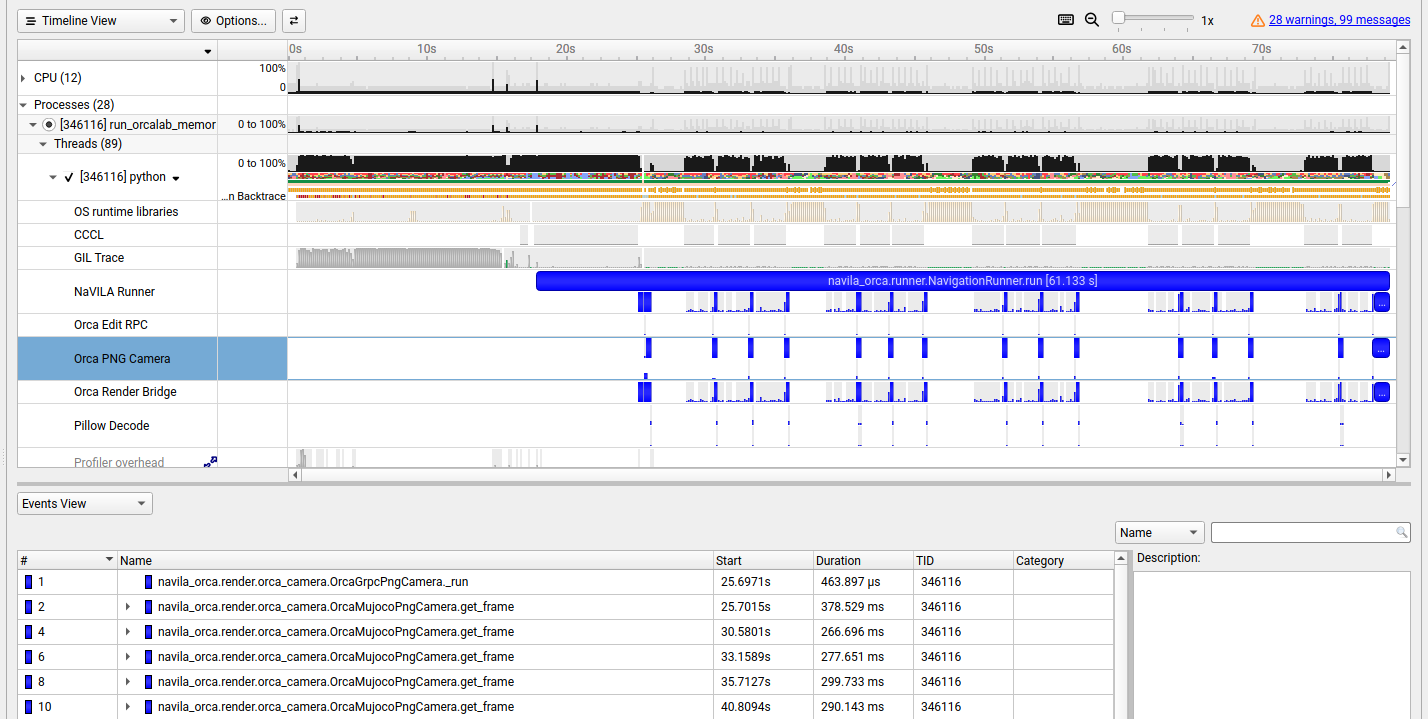
Profile the NaVILA camera path, including Python functions, GIL activity, and OS runtime waits:
nsys profile \
  --trace=nvtx,osrt,python-gil \
  --python-functions-trace=/home/kohming/Orca_VLN/dethread/profiling/python_camera_trace.json \
  --python-sampling=true \
  --python-sampling-frequency=1000 \
  --output=/home/kohming/Orca_VLN/report-camera \
  /home/kohming/Orca_VLN/NaVILA-Orca/scripts/run_orcalab_memory_guide.sh \
    --query "Where are my glasses?"
Profile OrcaLab startup and the viewport timeline:
VK_ICD_FILENAMES=/usr/share/vulkan/icd.d/radeon_icd.x86_64.json \
  nsys profile \
    --trace=nvtx \
    --python-backtrace \
    --stop-on-exit=true \
    --delay=15 \
    /home/kohming/Orca_VLN/NaVILA-Orca/scripts/start_orcalab_gui.sh \
      --scene SimpleMovement_DiningTable \
      --layout /home/kohming/Orca_VLN/dethread/kitchen2.json
Use the Vulkan ICD that matches the GPU on the profiling machine. The development runtime used the NVIDIA ICD; the second command preserves the Radeon ICD used for the viewport profiling capture.
LoRA changes only NaVILA's high-level visual decision model. The Go2 locomotion policy, action vocabulary, camera contract, and simulator remain unchanged. The practical data path is:
--collect-decisions rollout
  → review eight-frame samples and target actions
  → export navila_orca/train.jsonl
  → upstream NaVILA LoRA training on a separate GPU
  → adapter directory
  → local or self-managed remote NaVILA server
Collect and package reviewed data from the NaVILA-Orca environment:
./scripts/run_orcalab_scene_locomotion.sh \
  --waypoint-instruction-file outputs/memory_guide/latest_waypoints.txt \
  --output outputs/training_runs/example \
  --collect-decisions \
  --image-interval 0.2 \
  --max-decisions 8

python scripts/label_decision_samples.py \
  outputs/training_runs/example --interactive

python scripts/export_navila_lora_dataset.py \
  outputs/training_runs/example/decision_samples/manifest.jsonl \
  --output-dir outputs/training_records/navila_orca
Train outputs/training_records/navila_orca/train.jsonl with the selected
upstream NaVILA LoRA release, then copy the resulting adapter and matching
base checkpoint to the machine that runs NaVILA. The complete collection and
training guidance is in
NaVILA-Orca/docs/VLN_FINE_TUNING.md.
This checkout contains the trained LoRA checkpoint at:
/home/kohming/Orca_VLN/models/orca_navila_lora/
├── adapter_model.safetensors   (~40 MiB of LoRA weights)
├── adapter_config.json
├── config.json
├── non_lora_trainables.bin
└── trainer_state.json
It was trained from the matching base checkpoint at
/home/kohming/Orca_VLN/models/navila-llama3-8b-8f/ on a Vast.ai instance
using an NVIDIA H200 GPU. The adapter directory is included in this
repository; the much larger base checkpoint remains ignored. The local server
loads it with the matching base checkpoint and uses the merged model for
inference.
Important deployment boundary: the previous NAVILA_SERVER_MODE=aws flow is
the organizer-managed AWS SSM inference service. It does not expose its model
filesystem and cannot load your personal LoRA adapter, so it will continue to
run the organizer's baseline model. Test an adapted model with the local
server or a GPU server you control, using the local adapter command below and
NaVILA-Orca/docs/REMOTE_INFERENCE.md
for self-managed remote inference. This limitation is separate from the AWS
Bedrock query router: Bedrock may still classify the resident query while
NaVILA itself runs locally with your adapter.
The checkpoint is loaded with its matching base model before inference. For the model layout used in this project:
cd /path/to/Orca_VLN/NaVILA-Orca

NAVILA_SERVER_MODE=local \
NAVVLM_MODEL_PATH=/path/to/Orca_VLN/models/orca_navila_lora \
NAVVLM_MODEL_BASE=/path/to/Orca_VLN/models/navila-llama3-8b-8f \
./scripts/memory_guide_dev.sh start
If the local LoRA server reports a bitsandbytes CUDA 12.8 error, this
unquantized inference server does not need bitsandbytes:
/path/to/Orca_VLN/.conda/envs/navila/bin/python \
  -m pip uninstall -y bitsandbytes
For a remote GPU server, copy the adapter and base checkpoint to that server,
run scripts/start_navvlm_server.sh there with the same two model variables,
and forward its loopback port to the client. See
NaVILA-Orca/docs/REMOTE_INFERENCE.md.
To bypass the Memory Guide and give NaVILA one instruction directly:
cd /path/to/Orca_VLN/NaVILA-Orca
./scripts/run_orcalab_scene_locomotion.sh \
  --instruction "Walk to the dining table, inspect it, and stop."
The runner uses the existing OrcaLab layout, the Go2 policy checkpoint, the
mujococamera1080 RGB camera, and TCP NaVILA at 127.0.0.1:54321. It records
measurements, motion chunks, camera frames, and optional decision samples under
outputs/.
Record pose-tagged views for the semantic map with:
./scripts/memory_guide_dev.sh teleop --capture-interval 0.4
Use W/S to move, A/D to turn, Q/E to strafe, Space to brake, M to
label a view, and X or Esc to exit. Completed teleoperation data is read
from outputs/memory_guide/latest-teleop/teleop.json.
| Script | Purpose |
|---|---|
setup_all.sh | Install both pinned environments and the base model |
doctor.sh | Verify drivers, environments, packages, and model files |
memory_guide_dev.sh | Start/stop the complete stack, run queries, and teleoperate |
run_orcalab_memory_guide.sh | Build a query plan and launch waypoint locomotion |
run_orcalab_scene_locomotion.sh | Run direct closed-loop NaVILA navigation |
start_navvlm_server.sh | Start the local or remote NaVILA TCP service |
export_navila_lora_dataset.py | Package reviewed frames/actions for LoRA training |
label_decision_samples.py | Review and correct recorded NaVILA actions |
The default Memory Guide planner is deterministic and requires no API key.
When an LLM router is enabled, Bedrock is the documented primary and OpenAI
gpt-5.6-luna is the backup. Both read credentials from the shell environment
or a local untracked .env file, as do voice and managed AWS modes. Never
commit those values. The managed AWS access procedure is documented in
NaVILA-Orca/docs/ACCESS_GUIDE.md.
Run the installation check and unit tests with:
./NaVILA-Orca/scripts/doctor.sh
cd NaVILA-Orca
pytest -q
The main runtime boundary is src/navila_orca/runner.py; OrcaLab transport is
under src/navila_orca/render/, planning is under memory_guide.py, and the
shell scripts provide reproducible setup and launch commands. Evaluation and
demo results are written to outputs/, which is ignored by Git.
An agentic voice- and language-driven visual-navigation proof of concept for a Unitree Go2 in OrcaLab. A spoken query is transcribed by Modal-hosted FireRedASR2-AED, or a typed query is accepted directly; the Memory Guide uses Bedrock for semantic routing, with OpenAI GPT-5.6 Luna as the backup, then deterministically resolves inventory and map data into a small search plan. NaVILA uses eight ego-camera frames to choose the next movement, and the navigation runner executes that movement in MuJoCo/MJLab while mirroring the pose into OrcaLab.
query → Memory Guide plan → eight RGB frames → NaVILA action
      → Go2 locomotion → OrcaLab scene/camera → next observation
The stack has two runtime paths and three model stages. FireRedASR and the Bedrock/OpenAI router belong to the high-level voice/query path; NaVILA is the separate visual-control path:
| Layer | Technology | Responsibility |
|---|---|---|
| Voice input | ALSA arecord | Records one 16 kHz, mono WAV query. |
| Speech recognition | Modal-hosted FireRedASR2-AED HTTP service (NVIDIA T4) | Converts the WAV into plain text. It does not plan movement. |
| Query routing | Amazon Bedrock primary (amazon.nova-micro-v1:0); OpenAI Responses API backup (gpt-5.6-luna) | Classifies the request and extracts one target using the local item/place catalog. |
| Mission planning | Python Memory Guide | Deterministically resolves inventory and semantic-map data into search locations and waypoint instructions. |
| Visual navigation | NaVILA, optionally with the project LoRA adapter | Receives eight ego-camera RGB frames plus one waypoint and predicts the next movement action. |
| Model adaptation | Reviewed eight-frame decision samples + upstream NaVILA LoRA training | Adapts high-level visual actions without changing the Go2 locomotion policy. Training requires a GPU environment that owns the NaVILA checkpoint. |
| Locomotion | MJLab/MuJoCo Go2 policy | Converts the movement action into simulated Go2 control. |
| World and rendering | OrcaLab / OrcaGym | Runs the scene, mirrors robot pose, and supplies camera observations. |
The voice-to-navigation path is:
microphone
  → arecord (16 kHz mono WAV)
  → HTTP upload to Modal FireRedASR2-AED
  → transcript, for example "Where is my bread?"
  → Amazon Bedrock primary (strict JSON query route)
    or OpenAI `gpt-5.6-luna` backup when selected
  → Memory Guide + inventory + semantic map
  → waypoint instructions
  → eight camera frames
  → NaVILA TCP server
  → Go2 movement chunk
  → OrcaLab pose/camera update
The Bedrock/OpenAI model is deliberately a high-level query router here. Its
structured output contains intent, target_type, target_id, confidence,
and a logging-only rationale; it must not return coordinates, motor commands,
or waypoints. The local planner owns map resolution and waypoint generation.
NaVILA is the model that closes the visual navigation loop and chooses actions
from the eight-frame observation. A typed --query skips audio capture and
FireRedASR and starts at the transcript stage.
The repository's Bedrock adapter currently uses Amazon Nova Micro as its
primary router. gpt-5.6-luna is the OpenAI API backup; it is not silently
invoked unless OpenAI mode is selected. This keeps provider choice explicit and
avoids hiding an AWS credential, model-access, or billing failure during a
demo. To use a different Bedrock deployment, pass its model ID with
--bedrock-model-id.
FireRedASR is deployed separately as a small Modal HTTP service. Deploy it
once from the NaVILA-Orca directory after authenticating the Modal CLI:
conda activate modal-deploy
cd /path/to/Orca_VLN/NaVILA-Orca
modal deploy --stream-logs modal/firered_asr.py
The deployment uses an NVIDIA T4, keeps the FireRed weights in a persistent
Modal Volume, and exposes /health and /transcribe/wav. Set the resulting
base URL in the OrcaLab/planner environment. Keep AWS/OpenAI credentials and
the Modal URL in the shell environment or an untracked .env file; do not
commit them.
cd /path/to/Orca_VLN/NaVILA-Orca

export NAVILA_VOICE_BACKEND=http
export NAVILA_VOICE_ENDPOINT='https://<modal-host>/transcribe/wav'

export AWS_PROFILE='your-bedrock-profile'
export AWS_DEFAULT_REGION='ap-southeast-1'

./scripts/run_orcalab_memory_guide.sh \
  --voice \
  --voice-backend http \
  --voice-endpoint "$NAVILA_VOICE_ENDPOINT" \
  --llm-mode bedrock \
  --bedrock-profile "$AWS_PROFILE" \
  --bedrock-region "$AWS_DEFAULT_REGION" \
  --bedrock-model-id amazon.nova-micro-v1:0
--voice records for eight seconds on the OrcaLab host, then uploads the WAV
to Modal. Use --voice-file query.wav to send an existing recording instead.
The memory_guide_dev.sh run convenience wrapper currently accepts typed
--query input; use run_orcalab_memory_guide.sh directly for voice input.
Check the deployed service before running a query:
curl 'https://<modal-host>/health'
The response should report status: ok, backend fireredasr2-aed, and an
NVIDIA T4 GPU. The local --voice-backend firered path remains available for
development, but it requires FireRedASR2S and the AED weights installed in a
separate Python environment; it is not the deployed demo path.
Add --voice-translate when the spoken query is Mandarin or another
Han-character transcript and English planning text is required. This uses
Google Cloud Translation with Application Default Credentials only for Han
text; English transcripts bypass the translation request.
If Bedrock is unavailable, use the OpenAI backup explicitly:
export OPENAI_API_KEY='your-local-key'

./scripts/run_orcalab_memory_guide.sh \
  --voice \
  --voice-backend http \
  --voice-endpoint "$NAVILA_VOICE_ENDPOINT" \
  --llm-mode openai \
  --openai-model-id gpt-5.6-luna
For a typed query through the Bedrock primary:
./scripts/memory_guide_dev.sh run \
  --query "Where is my bread?" \
  --llm-mode bedrock \
  --bedrock-model-id amazon.nova-micro-v1:0
For a typed query through the OpenAI backup:
./scripts/memory_guide_dev.sh run \
  --query "Where is my bread?" \
  --llm-mode openai \
  --openai-model-id gpt-5.6-luna
nvidia-smi.VLN_Presentation and unitree_robots
assets.Model weights, OrcaLab subscriptions, credentials, and generated run outputs are intentionally not part of the repository.
From the repository root:
./NaVILA-Orca/scripts/setup_all.sh
./NaVILA-Orca/scripts/doctor.sh
The setup creates two project-local environments under .conda/envs/ and
downloads the reviewed NaVILA checkpoint. Launchers resolve these environments
themselves; shell activation is optional.
This is the simplest complete development loop. Run the first command in one terminal and keep it open:
cd /path/to/Orca_VLN/NaVILA-Orca

NAVILA_SERVER_MODE=local \
./scripts/memory_guide_dev.sh start
The supervisor starts OrcaLab, the external simulation, and the local NaVILA server. In a second terminal, run a query:
cd /path/to/Orca_VLN/NaVILA-Orca
./scripts/memory_guide_dev.sh run --query "Where are my glasses?"
Stop the stack with:
./scripts/memory_guide_dev.sh stop
OrcaLab must be running before the OrcaLab MCP connector is available. Once the
GUI has initialized and MCP is listening on port 12345, the connector can
inspect simulation state, actors, transforms, layouts, and viewport screenshots,
and can start or stop simulation. The supervisor waits for a successful MCP
handshake before starting the rest of the stack.
This MCP control path was important because the original OrcaLab startup was
highly manual: launch the GUI, choose the correct scene, open the matching
layout JSON, wait for the layout to compile, switch to external simulation,
and finally start the simulation. Missing or reordering one of those steps
could leave the wrong layout loaded, an unavailable MCP endpoint, or a scene
that was visible but not actually running. The supervisor now performs the
sequence programmatically: it launches OrcaLab with the scene and layout,
waits for the MCP handshake, queries the simulation state, calls the MCP/API
start_simulation operation with program_name=external, waits for OrcaGym
and the edit service, and only then starts NaVILA. Scene startup is therefore
repeatable and fully automated; the GUI remains the visualization and MCP host.
The automated development loop loads the SimpleMovement_DiningTable scene with
the dethread/kitchen2.json layout, starts external simulation mode, and
manages the NaVILA backend:
cd /home/kohming/Orca_VLN/NaVILA-Orca

./scripts/memory_guide_dev.sh start
./scripts/memory_guide_dev.sh run --query "Where are my glasses?"
./scripts/memory_guide_dev.sh status
./scripts/memory_guide_dev.sh inspect
./scripts/memory_guide_dev.sh stop
The default supervisor backend is the managed AWS SSM tunnel. Set
NAVILA_SERVER_MODE=local to use the local NaVILA server. Each run is stored
under outputs/memory_guide/runs/<run-id>/, with
outputs/memory_guide/latest-run pointing to the newest run.
When launching OrcaLab manually, MCP requires the GUI to be started with the scene and layout selected. The NVIDIA runtime used during development was:
VK_ICD_FILENAMES=/usr/share/vulkan/icd.d/nvidia_icd.json \
  ~/Orca_VLN/NaVILA-Orca/scripts/start_orcalab_gui.sh \
    --scene SimpleMovement_DiningTable \
    --layout /home/kohming/Orca_VLN/dethread/kitchen2.json
Profile the NaVILA camera path, including Python functions, GIL activity, and OS runtime waits:
nsys profile \
  --trace=nvtx,osrt,python-gil \
  --python-functions-trace=/home/kohming/Orca_VLN/dethread/profiling/python_camera_trace.json \
  --python-sampling=true \
  --python-sampling-frequency=1000 \
  --output=/home/kohming/Orca_VLN/report-camera \
  /home/kohming/Orca_VLN/NaVILA-Orca/scripts/run_orcalab_memory_guide.sh \
    --query "Where are my glasses?"
Profile OrcaLab startup and the viewport timeline:
VK_ICD_FILENAMES=/usr/share/vulkan/icd.d/radeon_icd.x86_64.json \
  nsys profile \
    --trace=nvtx \
    --python-backtrace \
    --stop-on-exit=true \
    --delay=15 \
    /home/kohming/Orca_VLN/NaVILA-Orca/scripts/start_orcalab_gui.sh \
      --scene SimpleMovement_DiningTable \
      --layout /home/kohming/Orca_VLN/dethread/kitchen2.json
Use the Vulkan ICD that matches the GPU on the profiling machine. The development runtime used the NVIDIA ICD; the second command preserves the Radeon ICD used for the viewport profiling capture.
LoRA changes only NaVILA's high-level visual decision model. The Go2 locomotion policy, action vocabulary, camera contract, and simulator remain unchanged. The practical data path is:
--collect-decisions rollout
  → review eight-frame samples and target actions
  → export navila_orca/train.jsonl
  → upstream NaVILA LoRA training on a separate GPU
  → adapter directory
  → local or self-managed remote NaVILA server
Collect and package reviewed data from the NaVILA-Orca environment:
./scripts/run_orcalab_scene_locomotion.sh \
  --waypoint-instruction-file outputs/memory_guide/latest_waypoints.txt \
  --output outputs/training_runs/example \
  --collect-decisions \
  --image-interval 0.2 \
  --max-decisions 8

python scripts/label_decision_samples.py \
  outputs/training_runs/example --interactive

python scripts/export_navila_lora_dataset.py \
  outputs/training_runs/example/decision_samples/manifest.jsonl \
  --output-dir outputs/training_records/navila_orca
Train outputs/training_records/navila_orca/train.jsonl with the selected
upstream NaVILA LoRA release, then copy the resulting adapter and matching
base checkpoint to the machine that runs NaVILA. The complete collection and
training guidance is in
NaVILA-Orca/docs/VLN_FINE_TUNING.md.
This checkout contains the trained LoRA checkpoint at:
/home/kohming/Orca_VLN/models/orca_navila_lora/
├── adapter_model.safetensors   (~40 MiB of LoRA weights)
├── adapter_config.json
├── config.json
├── non_lora_trainables.bin
└── trainer_state.json
It was trained from the matching base checkpoint at
/home/kohming/Orca_VLN/models/navila-llama3-8b-8f/ on a Vast.ai instance
using an NVIDIA H200 GPU. The adapter directory is included in this
repository; the much larger base checkpoint remains ignored. The local server
loads it with the matching base checkpoint and uses the merged model for
inference.
Important deployment boundary: the previous NAVILA_SERVER_MODE=aws flow is
the organizer-managed AWS SSM inference service. It does not expose its model
filesystem and cannot load your personal LoRA adapter, so it will continue to
run the organizer's baseline model. Test an adapted model with the local
server or a GPU server you control, using the local adapter command below and
NaVILA-Orca/docs/REMOTE_INFERENCE.md
for self-managed remote inference. This limitation is separate from the AWS
Bedrock query router: Bedrock may still classify the resident query while
NaVILA itself runs locally with your adapter.
The checkpoint is loaded with its matching base model before inference. For the model layout used in this project:
cd /path/to/Orca_VLN/NaVILA-Orca

NAVILA_SERVER_MODE=local \
NAVVLM_MODEL_PATH=/path/to/Orca_VLN/models/orca_navila_lora \
NAVVLM_MODEL_BASE=/path/to/Orca_VLN/models/navila-llama3-8b-8f \
./scripts/memory_guide_dev.sh start
If the local LoRA server reports a bitsandbytes CUDA 12.8 error, this
unquantized inference server does not need bitsandbytes:
/path/to/Orca_VLN/.conda/envs/navila/bin/python \
  -m pip uninstall -y bitsandbytes
For a remote GPU server, copy the adapter and base checkpoint to that server,
run scripts/start_navvlm_server.sh there with the same two model variables,
and forward its loopback port to the client. See
NaVILA-Orca/docs/REMOTE_INFERENCE.md.
To bypass the Memory Guide and give NaVILA one instruction directly:
cd /path/to/Orca_VLN/NaVILA-Orca
./scripts/run_orcalab_scene_locomotion.sh \
  --instruction "Walk to the dining table, inspect it, and stop."
The runner uses the existing OrcaLab layout, the Go2 policy checkpoint, the
mujococamera1080 RGB camera, and TCP NaVILA at 127.0.0.1:54321. It records
measurements, motion chunks, camera frames, and optional decision samples under
outputs/.
Record pose-tagged views for the semantic map with:
./scripts/memory_guide_dev.sh teleop --capture-interval 0.4
Use W/S to move, A/D to turn, Q/E to strafe, Space to brake, M to
label a view, and X or Esc to exit. Completed teleoperation data is read
from outputs/memory_guide/latest-teleop/teleop.json.
| Script | Purpose |
|---|---|
setup_all.sh | Install both pinned environments and the base model |
doctor.sh | Verify drivers, environments, packages, and model files |
memory_guide_dev.sh | Start/stop the complete stack, run queries, and teleoperate |
run_orcalab_memory_guide.sh | Build a query plan and launch waypoint locomotion |
run_orcalab_scene_locomotion.sh | Run direct closed-loop NaVILA navigation |
start_navvlm_server.sh | Start the local or remote NaVILA TCP service |
export_navila_lora_dataset.py | Package reviewed frames/actions for LoRA training |
label_decision_samples.py | Review and correct recorded NaVILA actions |
The default Memory Guide planner is deterministic and requires no API key.
When an LLM router is enabled, Bedrock is the documented primary and OpenAI
gpt-5.6-luna is the backup. Both read credentials from the shell environment
or a local untracked .env file, as do voice and managed AWS modes. Never
commit those values. The managed AWS access procedure is documented in
NaVILA-Orca/docs/ACCESS_GUIDE.md.
Run the installation check and unit tests with:
./NaVILA-Orca/scripts/doctor.sh
cd NaVILA-Orca
pytest -q
The main runtime boundary is src/navila_orca/runner.py; OrcaLab transport is
under src/navila_orca/render/, planning is under memory_guide.py, and the
shell scripts provide reproducible setup and launch commands. Evaluation and
demo results are written to outputs/, which is ignored by Git.



