
README
FARM: Find Anything using Relational Spatial Memory





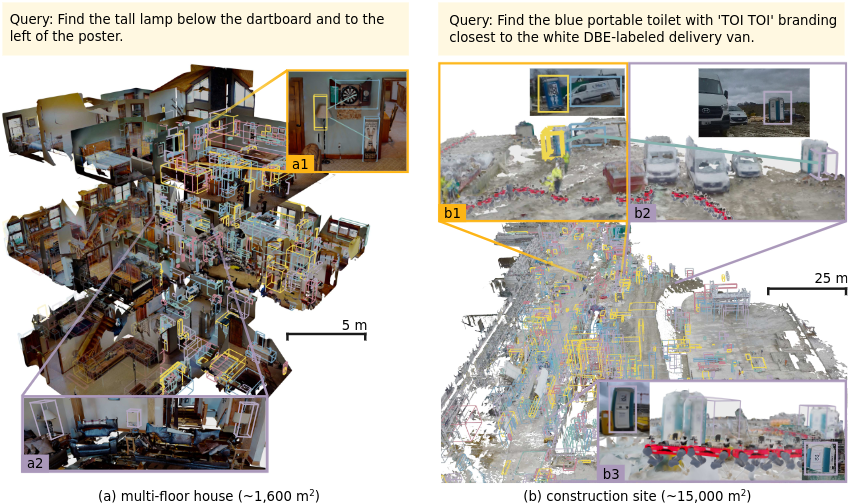
(1) Memory construction: RGBD streams are fused in real time into an object-level spatial memory — every box is a remembered object with 3D geometry, a caption, and multi-modal embeddings (left: multi-floor house; right: 15,000 m² construction site). (2) Retrieval: a natural referential expression is parsed into a target plus spatial relations and grounded against that memory to find the queried object (insets).
FARM is a robot memory system: it builds, in real time (5–10 Hz), a compact, open-vocabulary, object-level memory of a scene from RGBD streams — 3D Gaussian geometry, VLM captions, multi-modal embeddings, and viewpoint evidence per object — and then finds things in it from natural language, grounding spatial constraints ("the ladder left of the crates") through relational predicates over the memory.
This repository is the official implementation: the mapping pipeline
(offline datasets and live ROS 2 share the same algorithm code), the
interactive 3D viewer with language retrieval, and the retrieval stack used
in the paper. The library imports as scene_graph.
- Paper: arXiv:2606.15476
- Summary video: youtube.com/watch?v=0Ek-wPV9O1g
- Project page: goldengait.github.io/farm
- Dataset: FARM-Scenes — 7 large-scale real-robot scenes (47,300 m², 3 platforms) with GT annotations, referring expressions, and prebuilt scene graphs
Setup
Prerequisites: an NVIDIA GPU with CUDA 12.8+ drivers, Docker with the NVIDIA
container runtime, and docker compose. All runtime work happens inside the
container — there is no supported host-side pip install path; this keeps the
CUDA/ROS 2/PyTorch/YOLOE version matrix reproducible.
Compute. The full stack (mapping + LLM/embedding services + 3D viewer) uses about 50 GB of GPU memory in total (~65 GB on our largest scenes) and ~26 GB of disk. Tested on RTX 5090 and RTX PRO 6000 machines, and on NVIDIA Jetson Thor on-robot.
git clone --recursive https://github.com/GoldenGait/FARM-Project.git && cd FARM-Project
./bootstrap_models.sh      # YOLOE + MobileCLIP + SigLIP2 weights (public URLs, no account needed)
./run.sh build             # builds scene_graph:latest (CUDA 12.8 + ROS 2 Humble)
./run.sh shell /path/to/your/data    # container shell; the dir is mounted at /data
If you cloned without --recursive, run git submodule update --init --recursive
first — the Docker build installs third_party/yoloe editably and fails
without it. The DINOv3 merge backbone ships in-repo (models/dinov3-vits16),
so nothing else is required to run.
GitHub's autogenerated source archives do not include submodule contents. Use a recursive clone or the complete source archive attached to each release.
Optional: paper-grade DINOv3 backbone (gated)
The pipeline auto-prefers the gated ViT-S+/16 (dinov3-vits16plus) — the
backbone the paper used, which merges objects more tightly and more stably —
whenever a local copy exists, and otherwise falls back to the bundled
non-gated ViT-S/16 with a warning. The fallback fragments room-scale scenes
into ~2× more objects (large-scale scenes are insensitive); see
EVALUATION.md for measured impact. To enable the paper
backbone, accept the license at
facebook/dinov3-vits16plus-pretrain-lvd1689m, then:
huggingface-cli download facebook/dinov3-vits16plus-pretrain-lvd1689m --local-dir models/dinov3-vits16plus
Both variants are hidden_size=384, so nothing else changes — it is picked up
automatically once present.
Quickstart: FARM-Scenes warehouse
Three things you can run immediately after setup, on the warehouse scene of FARM-Scenes (a 4,000 m² Leica warehouse captured by an ANYmal quadruped). Download the scene + its prebuilt scene graph (host, ~350 MB):
pip install -U "huggingface_hub[cli]"
hf download GoldenGait/FARM-Scenes --repo-type dataset --include "scenes/grandtour/2024-11-25_warehouse/*" --include "scene_graphs/grandtour/2024-11-25_warehouse.pt" --local-dir /path/to/farm_scenes
./run.sh shell /path/to/farm_scenes    # mounts it at /data inside the container
scene_state.ptuses PyTorch pickle serialization. Only open scene graphs produced locally or downloaded from a source you trust.
1. Explore a prebuilt memory in 3D
Serve the shipped scene graph (1,276 objects, 1,132 captioned) in the browser — object boxes, per-object voxel evidence, captions on click — over the scene's accumulated point cloud:
python scripts/view_scene_state.py --pt /data/scene_graphs/grandtour/2024-11-25_warehouse.pt --cloud /data/scenes/grandtour/2024-11-25_warehouse/cloud.npz
Open http://localhost:8080 (the compose file uses host networking; if SSHed,
tunnel with ssh -L 8080:localhost:8080 <machine>). The viewer opens on a
framed overview of the whole scene; the first load streams a few million
points, so give the browser ~30–60 s to finish.
2. Ask it to find things
In the same viewer, open the Query panel and click Start vLLM retrieval
backend (first model load takes a few minutes; needs roughly two GPUs at
default settings — or point VLLM_BASE_URL / VLLM_EMBED_BASE_URL at servers
running elsewhere). If a server shows ❌ exited, the panel links its log — one
common cause right after the dataset download is HuggingFace's API rate limit,
which clears after a few minutes. Then type a query:
the ladder near the shelves
This runs the full relational pipeline — an LLM parses the query into spatial
predicates, candidates are retrieved by multi-modal embedding fusion, and
predicates are scored jointly against the 3D memory (the joint_v1 engine:
truncation-free anchor grounding, vectorized predicate tensors, pose-projected
view relations) — then color-codes the result (gold target, blue anchors,
purple distractors, amber relation edges) and flies the camera to the top
match. Reset view restores the full scene. Set
VISER_SPATIAL_METHOD=unified_soft_w50 to run the paper's locked protocol
instead; the evaluation harness always uses the locked protocol.
The same retrieval is scriptable (start servers with ./run.sh vllm first):
python scripts/query_scene_graph.py --pt /data/scene_graphs/grandtour/2024-11-25_warehouse.pt --query "a yellow forklift"
3. Rebuild the memory from raw RGBD
Reconstruct the warehouse yourself from its 2,553 posed RGBD frames (three HDR cameras, LiDAR-synthesized depth) and watch it build live (stop the step-1 viewer first — both serve on port 8080):
python -m scene_graph.offline.run --source frames-json --frames-json-dir /data/scenes/grandtour/2024-11-25_warehouse --save-path /data/out/warehouse.pt --covisibility --viser --keep-viser-after-run
Drop --viser for full speed (the live view costs ~6× throughput; see below),
add --caption for VLM captions (start ./run.sh vllm first), and reopen the
result later with scripts/view_scene_state.py --pt /data/out/warehouse.pt.
Bring your own data
Anything you can express as (rgb, metric depth, intrinsics, camera pose) per
frame can be mapped. Built-in sources for python -m scene_graph.offline.run:
| Source | --source | Input |
|---|---|---|
| FARM-Scenes / frames.json | frames-json | frames.json index + per-frame JPEG + depth (.npy float32 m or uint16 PNG with depth_encoding) |
| ScanNet | sens | one .sens archive per scene, no pre-extraction |
| NPZ chunks | npz | .npz with images/depths/camtoworlds/K (Habitat-sim renders, custom captures) |
| rosbag2 / mcap | rosbag | recorded RGBDFrame messages from the online pipeline |
| Replica & PNG-depth datasets | scripts/run_pipeline.py | RGB + depth-PNG sequences, YAML-configured |
DATA.md has the format contracts, download pointers, a
synthetic-NPZ smoke test that needs no external data, and the LiDAR-bag →
frames.json converter (scripts/lidar_bag_to_frames.py) for RGB+LiDAR rigs
without depth images.
Example — ScanNet:
python -m scene_graph.offline.run --source sens --sens-path /data/scans/scene0000_00/scene0000_00.sens --stride 5 --save-path /data/out/scene0000_00.pt --covisibility
⚠️
--visercosts throughput. The live view streams RGB and re-pushes the scene every frame, throttling mapping by roughly 6× (~11 fps → ~2 fps on an RTX 5090, ScanNet stride 5). Use it to watch a scene build; omit it for real-time or benchmarking runs. Async captioning, by contrast, barely affects mapping throughput.
Offline CLI flags
| Flag | Effect |
|---|---|
--source {sens,rosbag,npz,frames-json} | Required. Frame source type. |
--sens-path / --npz-dir / --bag-path / --frames-json-dir | Source location |
--stride N / --start N / --end N | Frame subsampling (sens, npz, frames-json) |
--camera NAME | Camera id to tag frames with (sens, npz) |
--frames-json-camera CAM | (frames-json) restrict to these cameras (repeatable) |
--cameras CAM... / --every-nth N | (rosbag) camera filter / downsampling |
--batch-size N | Frames per mapping-update call (default 1, matches online) |
--save-path PATH | Where to write scene_state.pt |
--caption | Async VLM captions (requires ./run.sh vllm) |
--viser | Live 3D view on port 8080 (~6× slower — see note) |
--keep-viser-after-run | Keep the viewer alive after the source is exhausted |
--covisibility | Co-visibility graph updates (helps proximity retrieval) |
--regions | Periodic region clustering/labeling (multi-room scenes) |
--image-saving | Copy frames into the HDF5 image store (default: references only) |
--target-fps N / --drop-when-late | Real-time pacing / frame-dropping simulation |
--debug-trace-path PATH | Per-frame JSONL pipeline trace (see scripts/inspect_pipeline_trace.py) |
--extra-param KEY:=VALUE | Any StreamingMapper ROS parameter (repeatable) |
Query a scene graph from Python
Any scene_state.pt is queryable once an embedding server is reachable
(./run.sh vllm, or set VLLM_EMBED_BASE_URL):
from scene_graph.llm_utils import EmbedInterface
from scene_graph.retrieval.scene_graph_retriever import SceneGraphRetriever

retriever = SceneGraphRetriever.from_scene_state("/data/out/warehouse.pt", embedder=EmbedInterface(verbose=False))
result = retriever.retrieve("a red toolbox on a workbench")
for cluster in result["clusters"]:
    print(cluster["cluster_score"], [c["object_id"] for c in cluster["candidate_objects"]])
For relational queries (spatial predicates, anchors, superlatives) use the
pipeline the paper evaluates — parse_query + execute_spatial_query from
scene_graph.retrieval.spatial_reasoning — which is exactly what the viser
Query panel and scripts/query_scene_graph.py run.
Run online (ROS 2, live topics)
The same StreamingMapper runs as a ROS 2 node; only the frame ingress
differs. Inside the container:
./run.sh ros2 caption_enabled:=true # vLLM servers + the full mapping launch
One frame_pub node per camera (topic wiring in
src/scene_graph/camera_config.py) feeds the single streaming_mapper;
mapping_five_cam.launch.py runs a 5-camera Spot rig this way, and both paths
are validated end-to-end on real robot logs. Sensors without a depth image
work too: for an Odin1 fisheye+LiDAR unit, odin1_depth_pub projects the
LiDAR cloud into the camera and republishes standard RGBD topics:
ros2 launch mapping mapping_odin1.launch.py caption_enabled:=true
To replay a recorded sensor bag through the online graph, see the rosbag
section of DATA.md.
run.sh commands & environment
| Command | Where | Description |
|---|---|---|
./run.sh build | host | Build scene_graph:latest from docker/Dockerfile |
./run.sh shell [<dir>] | host | Container shell; mounts <dir> (or $DATASET_DIR) at /data |
./run.sh vllm | host or container | Start the three vLLM servers in tmux: Qwen3.5-9B (captioning + query parsing, :8000), Qwen3-Embedding-0.6B (:8002), Qwen3-VL-Embedding-2B (:8006) |
./run.sh ros2 [args...] | container | vLLM + ros2 launch for online mapping |
./run.sh stop | host or container | Stop the vLLM tmux session |
| Variable | Default | Description |
|---|---|---|
SCENE_GRAPH_MODEL_DIR | ./models | Model checkpoints directory |
SCENE_GRAPH_MAPPING_DATA_DIR | ~/.ros/scene_graph/mapping | Default scene-state output directory |
GPU_VL8 / GPU_EMB / GPU_VL_EMB | 0 / 1 / 1 | GPU per vLLM server |
VLLM_BASE_URL / VLLM_EMBED_BASE_URL | http://localhost:8000/v1 / :8002/v1 | Point retrieval at remote servers |
How the pipeline works
Both entry points funnel into the same per-batch update:
- Stream an
(rgb, depth, intrinsics, pose)tuple per frame. - Segment + embed — YOLOE detects and masks objects (open-vocabulary); masked pixels unproject into a 3D Gaussian per detection; DINOv3 features for merging.
- Filter — border / degenerate / duplicate (IoU) detections dropped.
- Neighbor lookup — candidate matches by feature cosine similarity + Hellinger distance between Gaussians.
- Correspondence — union-find resolves which detections are the same object across frames.
- Update + co-visibility — matched detections fuse into the object's Gaussian and sparse voxel cloud; unmatched become new objects; co-visibility edges link objects seen together.
- Caption (async) — best-view crops go to a VLM; captions and their text/image embeddings are written back without blocking mapping.
- Prune — low-information objects (walls, floors, clutter) periodically deactivated.
- Snapshot — the memory serializes to
scene_state.ptfor retrieval.
See src/scene_graph/pipeline/steps.py for the pure-function implementation
shared by the ROS node and the dataset orchestrator.
Repository structure
FARM-Project/
├── src/scene_graph/          # Core library (pip package `scene_graph`, zero ROS imports)
│   ├── offline/               # Offline driver + frame sources (sens/rosbag/npz/frames-json)
│   ├── pipeline/              # PipelineOrchestrator + shared pure-function steps
│   ├── map_update/            # Gaussian fusion, co-visibility, correspondence, filtering, pruning
│   ├── segmentation/          # YOLOE detection + DINOv3 merge features
│   ├── captioning/            # Async VLM caption workers (vLLM)
│   ├── retrieval/             # SceneGraphRetriever + relational spatial_reasoning pipeline
│   ├── eval/                  # Benchmark harness: referit3d/, iref_vla/, largescale (FARM-Scenes),
│   │                          #   unified_scoring, visible-mask IoU, view selection
│   ├── regions/               # Multi-room region clustering + labeling
│   ├── storage/               # HDF5 + async image persistence
│   ├── datasets/              # Replica/ScanNet/NPZ loaders for the config-driven path
│   ├── visualization/         # viser 3D viewer (+ Query retrieval panel)
│   ├── debug/                 # Per-frame JSONL pipeline tracer
│   └── llm_utils/             # vLLM chat/embedding clients
├── ros/                       # ROS 2 layer: `mapping` (nodes + launch) and `mapping_msgs`
├── scripts/                   # CLI tools: view_scene_state, query_scene_graph, run_pipeline,
│                              #   lidar_bag_to_frames, inspect_pipeline_trace, download_siglip2,
│                              #   benchmark drivers (eval_farm_scenes, run_scene_graph_referit3d,
│                              #   eval_referit3d_spatial, eval_iref_vla, eval_predictions, ...)
├── benchmarks/                # Curated evaluation-subset uid lists
├── configs/                   # Pipeline YAMLs + YOLOE open-vocabulary list
├── models/                    # dinov3-vits16 (committed); bootstrap_models.sh fetches the rest
├── docker/                    # Dockerfile (CUDA 12.8 + ROS 2 Humble), compose, entrypoint
└── third_party/yoloe          # YOLOE fork (submodule, AGPL-3.0)
Benchmarks
This repository ships the complete evaluation harness for the paper's
grounding benchmarks — dataset loaders, the locked retrieval protocol, and
the canonical scorers. EVALUATION.md walks through
replicating each experiment end to end (reconstruct → predict → score →
expected numbers):
- FARM-Scenes — runs out of the box: the public dataset includes GT
and prebuilt scene graphs, and one command per split
(
scripts/eval_farm_scenes.py) reproduces the paper's numbers. - ReferIt3D (ScanNet) and IRef-VLA (HM3D) — fully scripted
(
run_scene_graph_*→eval_*→eval_predictions.py, including the paper's visible-mask IoU metric and the curated evaluation subsets inbenchmarks/curated_utterances/); you supply the ToS-gated ScanNet/HM3D data.
EVALUATION.md also records the parity check against the internal research
code and the DINOv3 mapping-backbone caveat.
Models & licenses
This repository's code is AGPL-3.0-or-later (see LICENSE) —
a consequence of building on Ultralytics/YOLOE, which is AGPL-3.0. Each
pretrained model is governed by its own license: YOLOE (AGPL-3.0),
MobileCLIP (Apple), DINOv3 (Meta's DINOv3 License, redistributed in-repo with
the agreement attached), SigLIP2 (Google). Details and sources in
THIRD_PARTY_NOTICES.md — review them before any
commercial use.
Citation
@misc{he2026farmusingrelationalspatial,
      title={FARM: Find Anything using Relational Spatial Memory},
      author={Siming He and Leo Huang and Adam Lilja and Fabio Huebel and Jonas Frey and Marco Pavone and S. Shankar Sastry and Jitendra Malik and Claire Tomlin},
      year={2026},
      eprint={2606.15476},
      archivePrefix={arXiv},
      primaryClass={cs.RO},
      url={https://arxiv.org/abs/2606.15476},
}
If you use the FARM-Scenes dataset, please also cite:
@misc{frey_tuna2026grandtour,
  title         = {GrandTour: A Legged Robotics Dataset in the Wild for Multi-Modal Perception and State Estimation},
  author        = {Jonas Frey and Turcan Tuna and Frank Fu and Katharine Patterson and Tianao Xu and Maurice Fallon and Cesar Cadena and Marco Hutter},
  year          = {2026},
  eprint        = {2602.18164},
  archivePrefix = {arXiv},
  primaryClass  = {cs.RO},
  url           = {https://arxiv.org/abs/2602.18164},
  note          = {\textsuperscript{*}Equal contribution (Turcan Tuna and Jonas Frey).}
}
Significant stargazers

91 followers · starred Aug 2026

108 followers · starred Jul 2026
Similar repos


Languages
Python
99.0%
README
FARM: Find Anything using Relational Spatial Memory
(1) Memory construction: RGBD streams are fused in real time into an object-level spatial memory — every box is a remembered object with 3D geometry, a caption, and multi-modal embeddings (left: multi-floor house; right: 15,000 m² construction site). (2) Retrieval: a natural referential expression is parsed into a target plus spatial relations and grounded against that memory to find the queried object (insets).
FARM is a robot memory system: it builds, in real time (5–10 Hz), a compact, open-vocabulary, object-level memory of a scene from RGBD streams — 3D Gaussian geometry, VLM captions, multi-modal embeddings, and viewpoint evidence per object — and then finds things in it from natural language, grounding spatial constraints ("the ladder left of the crates") through relational predicates over the memory.
This repository is the official implementation: the mapping pipeline
(offline datasets and live ROS 2 share the same algorithm code), the
interactive 3D viewer with language retrieval, and the retrieval stack used
in the paper. The library imports as scene_graph.
- Paper: arXiv:2606.15476
- Summary video: youtube.com/watch?v=0Ek-wPV9O1g
- Project page: goldengait.github.io/farm
- Dataset: FARM-Scenes — 7 large-scale real-robot scenes (47,300 m², 3 platforms) with GT annotations, referring expressions, and prebuilt scene graphs
Setup
Prerequisites: an NVIDIA GPU with CUDA 12.8+ drivers, Docker with the NVIDIA
container runtime, and docker compose. All runtime work happens inside the
container — there is no supported host-side pip install path; this keeps the
CUDA/ROS 2/PyTorch/YOLOE version matrix reproducible.
Compute. The full stack (mapping + LLM/embedding services + 3D viewer) uses about 50 GB of GPU memory in total (~65 GB on our largest scenes) and ~26 GB of disk. Tested on RTX 5090 and RTX PRO 6000 machines, and on NVIDIA Jetson Thor on-robot.
git clone --recursive https://github.com/GoldenGait/FARM-Project.git && cd FARM-Project
./bootstrap_models.sh      # YOLOE + MobileCLIP + SigLIP2 weights (public URLs, no account needed)
./run.sh build             # builds scene_graph:latest (CUDA 12.8 + ROS 2 Humble)
./run.sh shell /path/to/your/data    # container shell; the dir is mounted at /data
If you cloned without --recursive, run git submodule update --init --recursive
first — the Docker build installs third_party/yoloe editably and fails
without it. The DINOv3 merge backbone ships in-repo (models/dinov3-vits16),
so nothing else is required to run.
GitHub's autogenerated source archives do not include submodule contents. Use a recursive clone or the complete source archive attached to each release.
Optional: paper-grade DINOv3 backbone (gated)
The pipeline auto-prefers the gated ViT-S+/16 (dinov3-vits16plus) — the
backbone the paper used, which merges objects more tightly and more stably —
whenever a local copy exists, and otherwise falls back to the bundled
non-gated ViT-S/16 with a warning. The fallback fragments room-scale scenes
into ~2× more objects (large-scale scenes are insensitive); see
EVALUATION.md for measured impact. To enable the paper
backbone, accept the license at
facebook/dinov3-vits16plus-pretrain-lvd1689m, then:
huggingface-cli download facebook/dinov3-vits16plus-pretrain-lvd1689m --local-dir models/dinov3-vits16plus
Both variants are hidden_size=384, so nothing else changes — it is picked up
automatically once present.
Quickstart: FARM-Scenes warehouse
Three things you can run immediately after setup, on the warehouse scene of FARM-Scenes (a 4,000 m² Leica warehouse captured by an ANYmal quadruped). Download the scene + its prebuilt scene graph (host, ~350 MB):
pip install -U "huggingface_hub[cli]"
hf download GoldenGait/FARM-Scenes --repo-type dataset --include "scenes/grandtour/2024-11-25_warehouse/*" --include "scene_graphs/grandtour/2024-11-25_warehouse.pt" --local-dir /path/to/farm_scenes
./run.sh shell /path/to/farm_scenes    # mounts it at /data inside the container
scene_state.ptuses PyTorch pickle serialization. Only open scene graphs produced locally or downloaded from a source you trust.
1. Explore a prebuilt memory in 3D
Serve the shipped scene graph (1,276 objects, 1,132 captioned) in the browser — object boxes, per-object voxel evidence, captions on click — over the scene's accumulated point cloud:
python scripts/view_scene_state.py --pt /data/scene_graphs/grandtour/2024-11-25_warehouse.pt --cloud /data/scenes/grandtour/2024-11-25_warehouse/cloud.npz
Open http://localhost:8080 (the compose file uses host networking; if SSHed,
tunnel with ssh -L 8080:localhost:8080 <machine>). The viewer opens on a
framed overview of the whole scene; the first load streams a few million
points, so give the browser ~30–60 s to finish.
2. Ask it to find things
In the same viewer, open the Query panel and click Start vLLM retrieval
backend (first model load takes a few minutes; needs roughly two GPUs at
default settings — or point VLLM_BASE_URL / VLLM_EMBED_BASE_URL at servers
running elsewhere). If a server shows ❌ exited, the panel links its log — one
common cause right after the dataset download is HuggingFace's API rate limit,
which clears after a few minutes. Then type a query:
the ladder near the shelves
This runs the full relational pipeline — an LLM parses the query into spatial
predicates, candidates are retrieved by multi-modal embedding fusion, and
predicates are scored jointly against the 3D memory (the joint_v1 engine:
truncation-free anchor grounding, vectorized predicate tensors, pose-projected
view relations) — then color-codes the result (gold target, blue anchors,
purple distractors, amber relation edges) and flies the camera to the top
match. Reset view restores the full scene. Set
VISER_SPATIAL_METHOD=unified_soft_w50 to run the paper's locked protocol
instead; the evaluation harness always uses the locked protocol.
The same retrieval is scriptable (start servers with ./run.sh vllm first):
python scripts/query_scene_graph.py --pt /data/scene_graphs/grandtour/2024-11-25_warehouse.pt --query "a yellow forklift"
3. Rebuild the memory from raw RGBD
Reconstruct the warehouse yourself from its 2,553 posed RGBD frames (three HDR cameras, LiDAR-synthesized depth) and watch it build live (stop the step-1 viewer first — both serve on port 8080):
python -m scene_graph.offline.run --source frames-json --frames-json-dir /data/scenes/grandtour/2024-11-25_warehouse --save-path /data/out/warehouse.pt --covisibility --viser --keep-viser-after-run
Drop --viser for full speed (the live view costs ~6× throughput; see below),
add --caption for VLM captions (start ./run.sh vllm first), and reopen the
result later with scripts/view_scene_state.py --pt /data/out/warehouse.pt.
Bring your own data
Anything you can express as (rgb, metric depth, intrinsics, camera pose) per
frame can be mapped. Built-in sources for python -m scene_graph.offline.run:
| Source | --source | Input |
|---|---|---|
| FARM-Scenes / frames.json | frames-json | frames.json index + per-frame JPEG + depth (.npy float32 m or uint16 PNG with depth_encoding) |
| ScanNet | sens | one .sens archive per scene, no pre-extraction |
| NPZ chunks | npz | .npz with images/depths/camtoworlds/K (Habitat-sim renders, custom captures) |
| rosbag2 / mcap | rosbag | recorded RGBDFrame messages from the online pipeline |
| Replica & PNG-depth datasets | scripts/run_pipeline.py | RGB + depth-PNG sequences, YAML-configured |
DATA.md has the format contracts, download pointers, a
synthetic-NPZ smoke test that needs no external data, and the LiDAR-bag →
frames.json converter (scripts/lidar_bag_to_frames.py) for RGB+LiDAR rigs
without depth images.
Example — ScanNet:
python -m scene_graph.offline.run --source sens --sens-path /data/scans/scene0000_00/scene0000_00.sens --stride 5 --save-path /data/out/scene0000_00.pt --covisibility
⚠️
--visercosts throughput. The live view streams RGB and re-pushes the scene every frame, throttling mapping by roughly 6× (~11 fps → ~2 fps on an RTX 5090, ScanNet stride 5). Use it to watch a scene build; omit it for real-time or benchmarking runs. Async captioning, by contrast, barely affects mapping throughput.
Offline CLI flags
| Flag | Effect |
|---|---|
--source {sens,rosbag,npz,frames-json} | Required. Frame source type. |
--sens-path / --npz-dir / --bag-path / --frames-json-dir | Source location |
--stride N / --start N / --end N | Frame subsampling (sens, npz, frames-json) |
--camera NAME | Camera id to tag frames with (sens, npz) |
--frames-json-camera CAM | (frames-json) restrict to these cameras (repeatable) |
--cameras CAM... / --every-nth N | (rosbag) camera filter / downsampling |
--batch-size N | Frames per mapping-update call (default 1, matches online) |
--save-path PATH | Where to write scene_state.pt |
--caption | Async VLM captions (requires ./run.sh vllm) |
--viser | Live 3D view on port 8080 (~6× slower — see note) |
--keep-viser-after-run | Keep the viewer alive after the source is exhausted |
--covisibility | Co-visibility graph updates (helps proximity retrieval) |
--regions | Periodic region clustering/labeling (multi-room scenes) |
--image-saving | Copy frames into the HDF5 image store (default: references only) |
--target-fps N / --drop-when-late | Real-time pacing / frame-dropping simulation |
--debug-trace-path PATH | Per-frame JSONL pipeline trace (see scripts/inspect_pipeline_trace.py) |
--extra-param KEY:=VALUE | Any StreamingMapper ROS parameter (repeatable) |
Query a scene graph from Python
Any scene_state.pt is queryable once an embedding server is reachable
(./run.sh vllm, or set VLLM_EMBED_BASE_URL):
from scene_graph.llm_utils import EmbedInterface
from scene_graph.retrieval.scene_graph_retriever import SceneGraphRetriever

retriever = SceneGraphRetriever.from_scene_state("/data/out/warehouse.pt", embedder=EmbedInterface(verbose=False))
result = retriever.retrieve("a red toolbox on a workbench")
for cluster in result["clusters"]:
    print(cluster["cluster_score"], [c["object_id"] for c in cluster["candidate_objects"]])
For relational queries (spatial predicates, anchors, superlatives) use the
pipeline the paper evaluates — parse_query + execute_spatial_query from
scene_graph.retrieval.spatial_reasoning — which is exactly what the viser
Query panel and scripts/query_scene_graph.py run.
Run online (ROS 2, live topics)
The same StreamingMapper runs as a ROS 2 node; only the frame ingress
differs. Inside the container:
./run.sh ros2 caption_enabled:=true # vLLM servers + the full mapping launch
One frame_pub node per camera (topic wiring in
src/scene_graph/camera_config.py) feeds the single streaming_mapper;
mapping_five_cam.launch.py runs a 5-camera Spot rig this way, and both paths
are validated end-to-end on real robot logs. Sensors without a depth image
work too: for an Odin1 fisheye+LiDAR unit, odin1_depth_pub projects the
LiDAR cloud into the camera and republishes standard RGBD topics:
ros2 launch mapping mapping_odin1.launch.py caption_enabled:=true
To replay a recorded sensor bag through the online graph, see the rosbag
section of DATA.md.
run.sh commands & environment
| Command | Where | Description |
|---|---|---|
./run.sh build | host | Build scene_graph:latest from docker/Dockerfile |
./run.sh shell [<dir>] | host | Container shell; mounts <dir> (or $DATASET_DIR) at /data |
./run.sh vllm | host or container | Start the three vLLM servers in tmux: Qwen3.5-9B (captioning + query parsing, :8000), Qwen3-Embedding-0.6B (:8002), Qwen3-VL-Embedding-2B (:8006) |
./run.sh ros2 [args...] | container | vLLM + ros2 launch for online mapping |
./run.sh stop | host or container | Stop the vLLM tmux session |
| Variable | Default | Description |
|---|---|---|
SCENE_GRAPH_MODEL_DIR | ./models | Model checkpoints directory |
SCENE_GRAPH_MAPPING_DATA_DIR | ~/.ros/scene_graph/mapping | Default scene-state output directory |
GPU_VL8 / GPU_EMB / GPU_VL_EMB | 0 / 1 / 1 | GPU per vLLM server |
VLLM_BASE_URL / VLLM_EMBED_BASE_URL | http://localhost:8000/v1 / :8002/v1 | Point retrieval at remote servers |
How the pipeline works
Both entry points funnel into the same per-batch update:
- Stream an
(rgb, depth, intrinsics, pose)tuple per frame. - Segment + embed — YOLOE detects and masks objects (open-vocabulary); masked pixels unproject into a 3D Gaussian per detection; DINOv3 features for merging.
- Filter — border / degenerate / duplicate (IoU) detections dropped.
- Neighbor lookup — candidate matches by feature cosine similarity + Hellinger distance between Gaussians.
- Correspondence — union-find resolves which detections are the same object across frames.
- Update + co-visibility — matched detections fuse into the object's Gaussian and sparse voxel cloud; unmatched become new objects; co-visibility edges link objects seen together.
- Caption (async) — best-view crops go to a VLM; captions and their text/image embeddings are written back without blocking mapping.
- Prune — low-information objects (walls, floors, clutter) periodically deactivated.
- Snapshot — the memory serializes to
scene_state.ptfor retrieval.
See src/scene_graph/pipeline/steps.py for the pure-function implementation
shared by the ROS node and the dataset orchestrator.
Repository structure
FARM-Project/
├── src/scene_graph/          # Core library (pip package `scene_graph`, zero ROS imports)
│   ├── offline/               # Offline driver + frame sources (sens/rosbag/npz/frames-json)
│   ├── pipeline/              # PipelineOrchestrator + shared pure-function steps
│   ├── map_update/            # Gaussian fusion, co-visibility, correspondence, filtering, pruning
│   ├── segmentation/          # YOLOE detection + DINOv3 merge features
│   ├── captioning/            # Async VLM caption workers (vLLM)
│   ├── retrieval/             # SceneGraphRetriever + relational spatial_reasoning pipeline
│   ├── eval/                  # Benchmark harness: referit3d/, iref_vla/, largescale (FARM-Scenes),
│   │                          #   unified_scoring, visible-mask IoU, view selection
│   ├── regions/               # Multi-room region clustering + labeling
│   ├── storage/               # HDF5 + async image persistence
│   ├── datasets/              # Replica/ScanNet/NPZ loaders for the config-driven path
│   ├── visualization/         # viser 3D viewer (+ Query retrieval panel)
│   ├── debug/                 # Per-frame JSONL pipeline tracer
│   └── llm_utils/             # vLLM chat/embedding clients
├── ros/                       # ROS 2 layer: `mapping` (nodes + launch) and `mapping_msgs`
├── scripts/                   # CLI tools: view_scene_state, query_scene_graph, run_pipeline,
│                              #   lidar_bag_to_frames, inspect_pipeline_trace, download_siglip2,
│                              #   benchmark drivers (eval_farm_scenes, run_scene_graph_referit3d,
│                              #   eval_referit3d_spatial, eval_iref_vla, eval_predictions, ...)
├── benchmarks/                # Curated evaluation-subset uid lists
├── configs/                   # Pipeline YAMLs + YOLOE open-vocabulary list
├── models/                    # dinov3-vits16 (committed); bootstrap_models.sh fetches the rest
├── docker/                    # Dockerfile (CUDA 12.8 + ROS 2 Humble), compose, entrypoint
└── third_party/yoloe          # YOLOE fork (submodule, AGPL-3.0)
Benchmarks
This repository ships the complete evaluation harness for the paper's
grounding benchmarks — dataset loaders, the locked retrieval protocol, and
the canonical scorers. EVALUATION.md walks through
replicating each experiment end to end (reconstruct → predict → score →
expected numbers):
- FARM-Scenes — runs out of the box: the public dataset includes GT
and prebuilt scene graphs, and one command per split
(
scripts/eval_farm_scenes.py) reproduces the paper's numbers. - ReferIt3D (ScanNet) and IRef-VLA (HM3D) — fully scripted
(
run_scene_graph_*→eval_*→eval_predictions.py, including the paper's visible-mask IoU metric and the curated evaluation subsets inbenchmarks/curated_utterances/); you supply the ToS-gated ScanNet/HM3D data.
EVALUATION.md also records the parity check against the internal research
code and the DINOv3 mapping-backbone caveat.
Models & licenses
This repository's code is AGPL-3.0-or-later (see LICENSE) —
a consequence of building on Ultralytics/YOLOE, which is AGPL-3.0. Each
pretrained model is governed by its own license: YOLOE (AGPL-3.0),
MobileCLIP (Apple), DINOv3 (Meta's DINOv3 License, redistributed in-repo with
the agreement attached), SigLIP2 (Google). Details and sources in
THIRD_PARTY_NOTICES.md — review them before any
commercial use.
Citation
@misc{he2026farmusingrelationalspatial,
      title={FARM: Find Anything using Relational Spatial Memory},
      author={Siming He and Leo Huang and Adam Lilja and Fabio Huebel and Jonas Frey and Marco Pavone and S. Shankar Sastry and Jitendra Malik and Claire Tomlin},
      year={2026},
      eprint={2606.15476},
      archivePrefix={arXiv},
      primaryClass={cs.RO},
      url={https://arxiv.org/abs/2606.15476},
}
If you use the FARM-Scenes dataset, please also cite:
@misc{frey_tuna2026grandtour,
  title         = {GrandTour: A Legged Robotics Dataset in the Wild for Multi-Modal Perception and State Estimation},
  author        = {Jonas Frey and Turcan Tuna and Frank Fu and Katharine Patterson and Tianao Xu and Maurice Fallon and Cesar Cadena and Marco Hutter},
  year          = {2026},
  eprint        = {2602.18164},
  archivePrefix = {arXiv},
  primaryClass  = {cs.RO},
  url           = {https://arxiv.org/abs/2602.18164},
  note          = {\textsuperscript{*}Equal contribution (Turcan Tuna and Jonas Frey).}
}
Similar repos
Significant stargazers
91 followers · starred Aug 2026
108 followers · starred Jul 2026
Languages
Python
99.0%