
[NeurIPS 2025] Official implementation of "RoboRefer: Towards Spatial Referring with Reasoning in Vision-Language Models for Robotics"
See the codeREADME
RoboRefer: Towards Spatial Referring with Reasoning in Vision-Language Models for Robotics
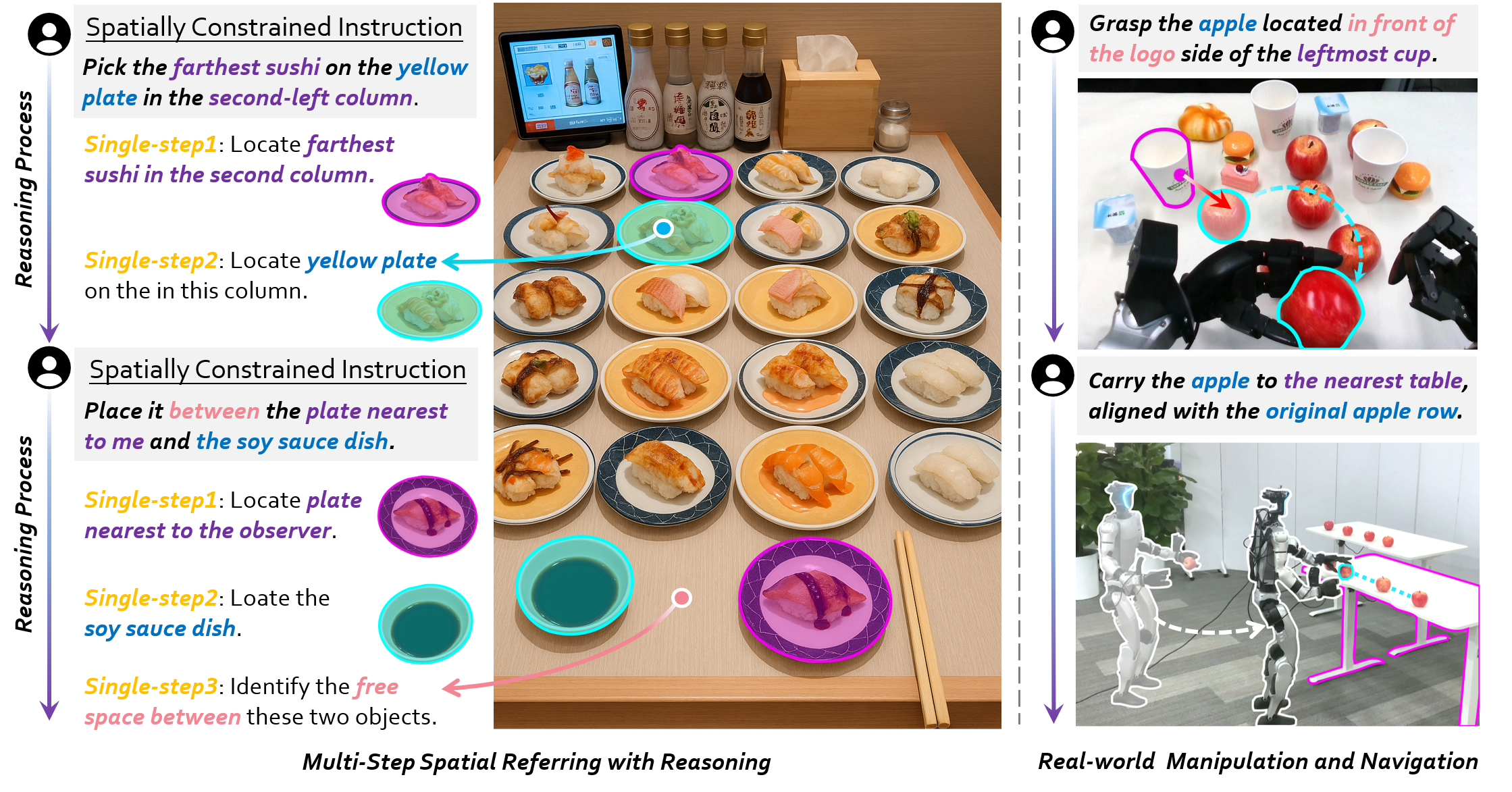
From words to exactly where you mean — with RoboRefer





🔥 Updates
[2025-12-16] 🔥🔥🔥 We’ve released RoboTracer, a more powerful version of RoboRefer, on arxiv and launched the project page. It retains all RoboRefer features while adding multi-step, metric-grounded spatial tracing with explicit reasoning. Come and try the newer dataset TraceSpatial and the more challenging benchmark TraceSpatial-Bench!
[2025-10-25] 🔥🔥🔥 RefSpatial-Expand-Bench is now released! Based on the original benchmark, the new version expands indoor scenes (e.g., factories, stores) and introduces previously unexplored outdoor scenarios (e.g., streets, parking lots), offering a more comprehensive evaluation of spatial referring tasks.
[2025-09-26] 🔥🔥🔥 RefSpatial-Bench is now used by Qwen3-VL and Gemini-Robotics-1.5 to evaluate spatial reasoning in complex embodied scenarios! Come on, test your model with RefSpatial-Bench!
| Qwen3-VL Results | Gemini-Robotics-1.5 Results |
|---|---|
[2025-09-18] 🔥🔥🔥 RoboRefer gets accepted to NeurIPS 2025! See you in Mexico City and San Diego, USA!
[2025-07-29] We release the SFT-trained 8B model and test examples of outdoor scenes.
[2025-07-01] We release the RefSpatial Dataset and SFT training code.
[2025-06-23] We release the SFT-trained 2B model and inference code with RefSpatial-Bench evaluation code.
[2025-06-06] RefSpatial-Bench is released on HF. Let's evaluate your model's spatial referring ability!
[2025-06-06] RoboRefer is released on arxiv and the project page is set up at here.
🤗 Model Zoo & Dataset & Benchmark
| Model/Dataset/Benchmark | Note |
|---|---|
| NVILA-2B-Depth | The base model with depth encoder initialized from the image encoder. |
| RoboRefer-2B-Align | The 1st SFT step of the 2B model for depth alignment. |
| RoboRefer-2B-SFT | The 2nd SFT step of the 2B model for spatial understanding and referring. |
| NVILA-8B-Depth | The base model with depth encoder initialized from the image encoder. |
| RoboRefer-8B-SFT | The 2nd SFT step of the 8B model for spatial understanding and referring. |
| RoboRefer-2B-RFT (Coming soon) | The RFT-trained 2B model for multi-step spatial referring with reasoning. |
| RefSpatial Dataset | The dataset for spatial understanding and referring with reasoning. |
| RefSpatial-Bench | The benchmark for spatial referring with reasoning. |
| RefSpatial-Expand-Bench | A more comprehensive benchmark for spatial referring with reasoning. |
🚀 Quick Start
- Install Anaconda Distribution.
- Install the necessary Python packages in the environment.
bash env_setup.sh roborefer - Activate a conda environment.
conda activate roborefer
💡 Inference
-
Download the model weights from the model zoo (e.g.,
RoboRefer-2B-SFT). -
Download the relative depth estimation model weights (e.g.,
Depth-Anything-V2-Large). -
Run the inference api server.
cd API python api.py \ --port 25547 \ --depth_model_path /your/custom/path/depth_anything_v2_vitl.pth \ --vlm_model_path /your/custom/path/to/roborefer -
Run the inference script with the API and check the results in the
assetsfolder.
[!NOTE] RoboRefer natively supports both RGB and RGB-D inputs. If you don't have depth data, it can be inferred from RGB using DepthAnything V2 by setting
enable_depth=1. Just setenable_depth=0for RGB-only input or1for RGB-D input in use_api.py. https://github.com/Zhoues/RoboRefer/blob/15f93d48c1e205d954eeb8de989cdae3cef7abbb/API/use_api.py#L61
  ```bash
  cd API

  ## Tabletop scenes
  python use_api.py \
  --image_path ../assets/tabletop.jpg \
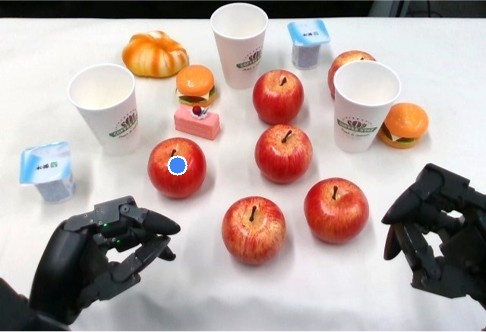
  --prompt "Pick the apple in front of the logo side of the leftmost cup." \
  --output_path ../assets/my_tabletop_result_1.jpg \
  --url http://127.0.0.1:25547

  python use_api.py \
  --image_path ../assets/tabletop.jpg \
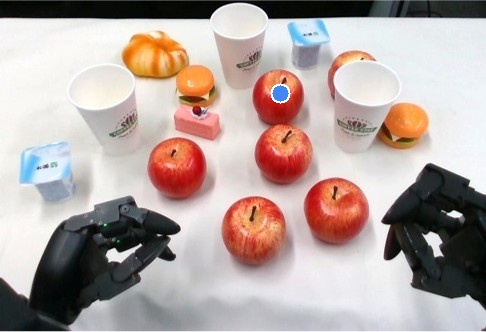
  --prompt "Point out the apple nearest to the second cup from left to right." \
  --output_path ../assets/my_tabletop_result_2.jpg \
  --url http://127.0.0.1:25547

  python use_api.py \
  --image_path ../assets/tabletop.jpg \
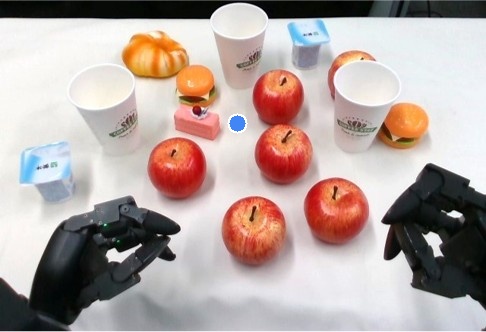
  --prompt "Point to the free area between the farthest apple and pink cake." \
  --output_path ../assets/my_tabletop_result_3.jpg \
  --url http://127.0.0.1:25547

  ## Outdoor scenes
  python use_api.py \
  --image_path ../assets/outdoor_1.jpg \
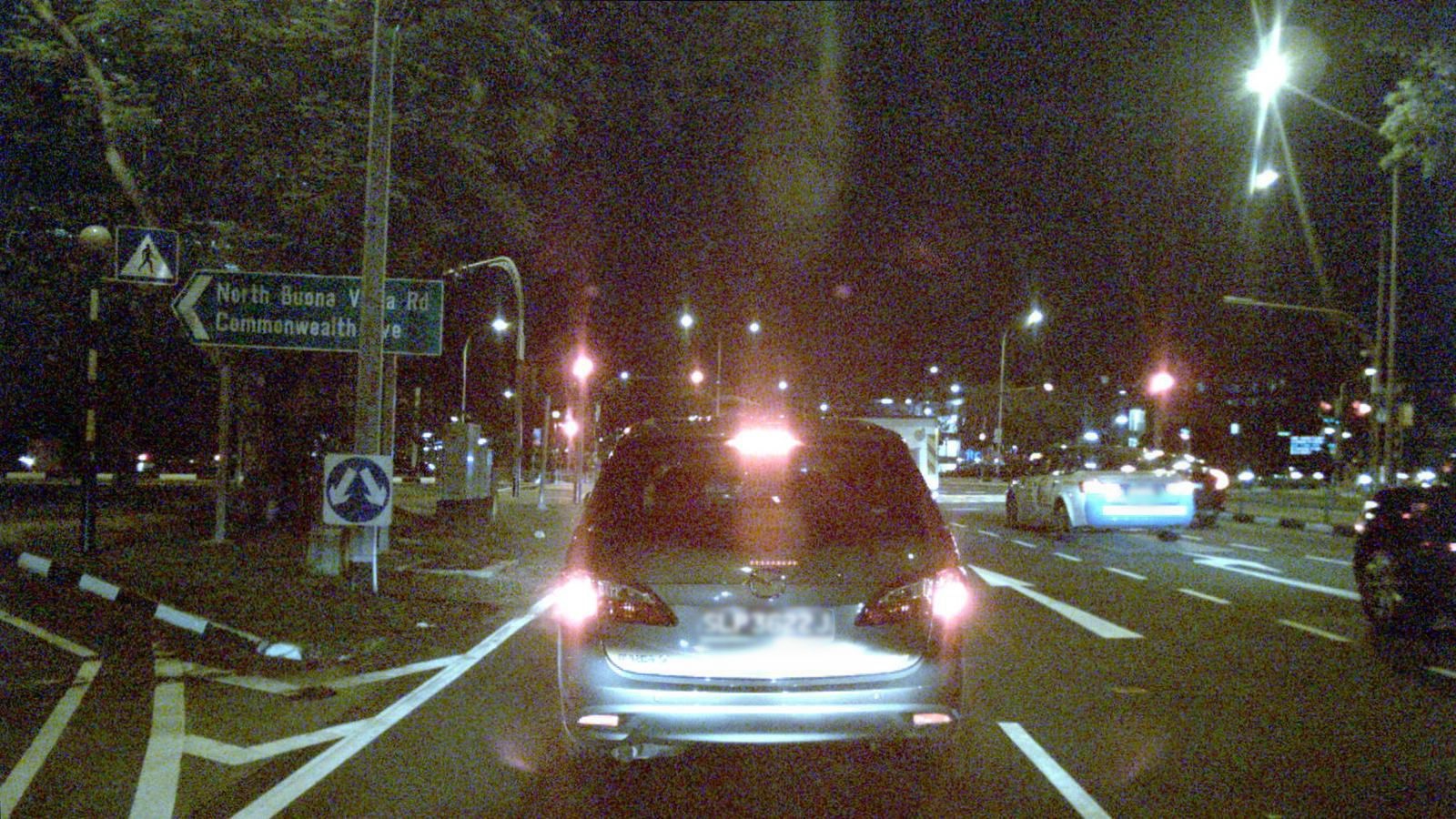
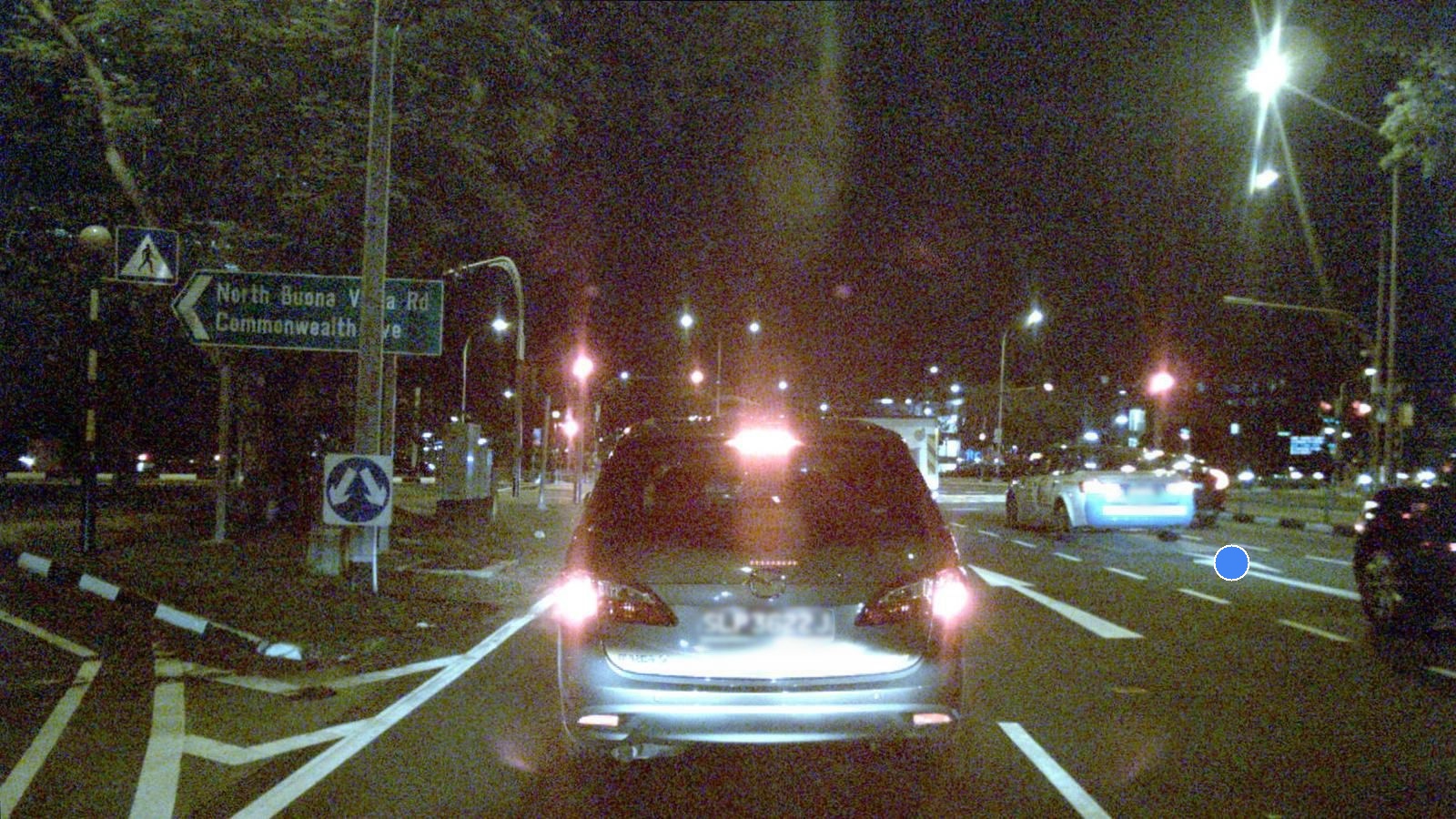
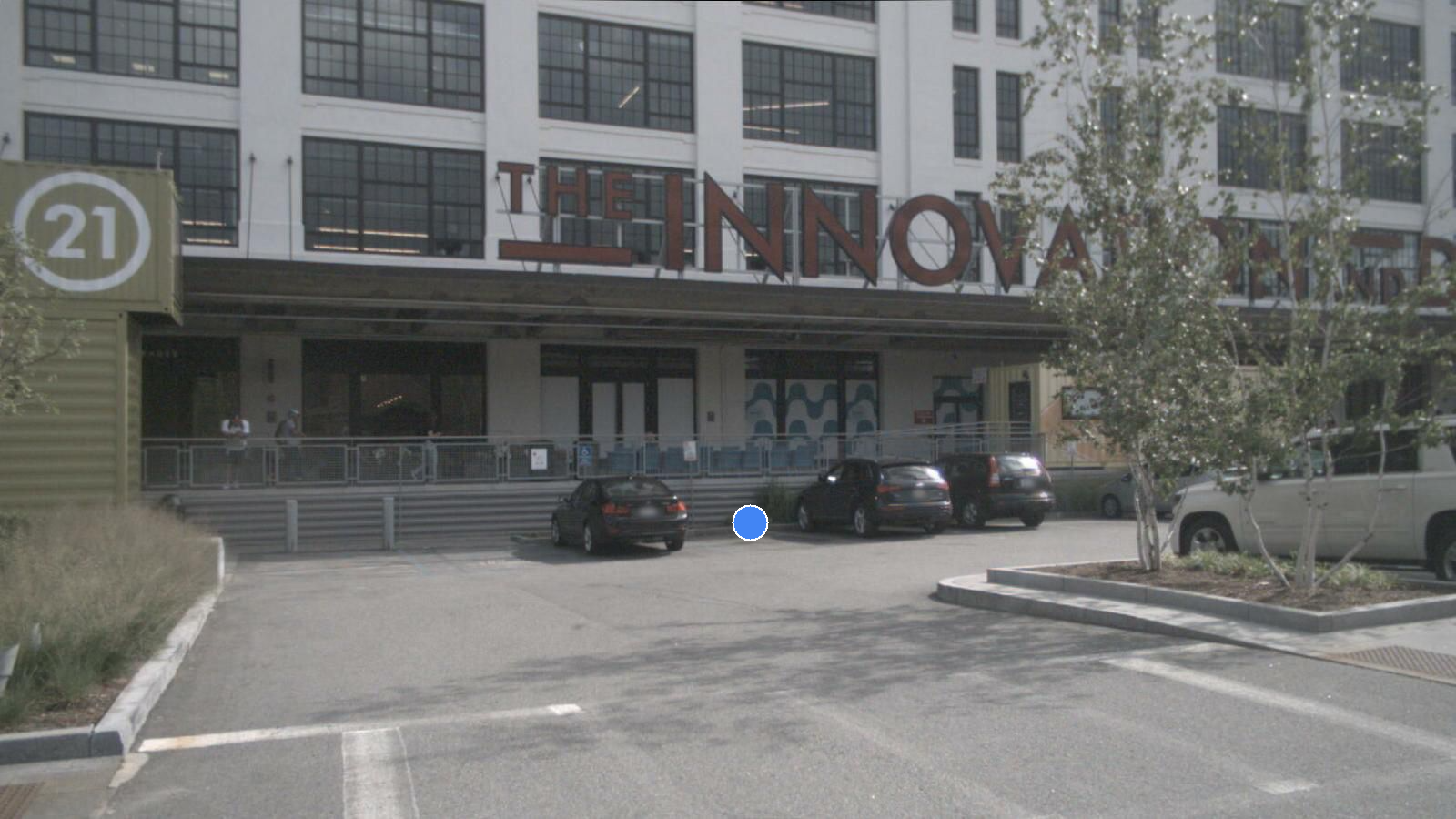
  --prompt "Point to the free area between the black vehicle on the right and the white sedan in front of it." \
  --output_path ../assets/my_outdoor_result_1.jpg \
  --url http://127.0.0.1:25547

  python use_api.py \
  --image_path ../assets/outdoor_2.png \
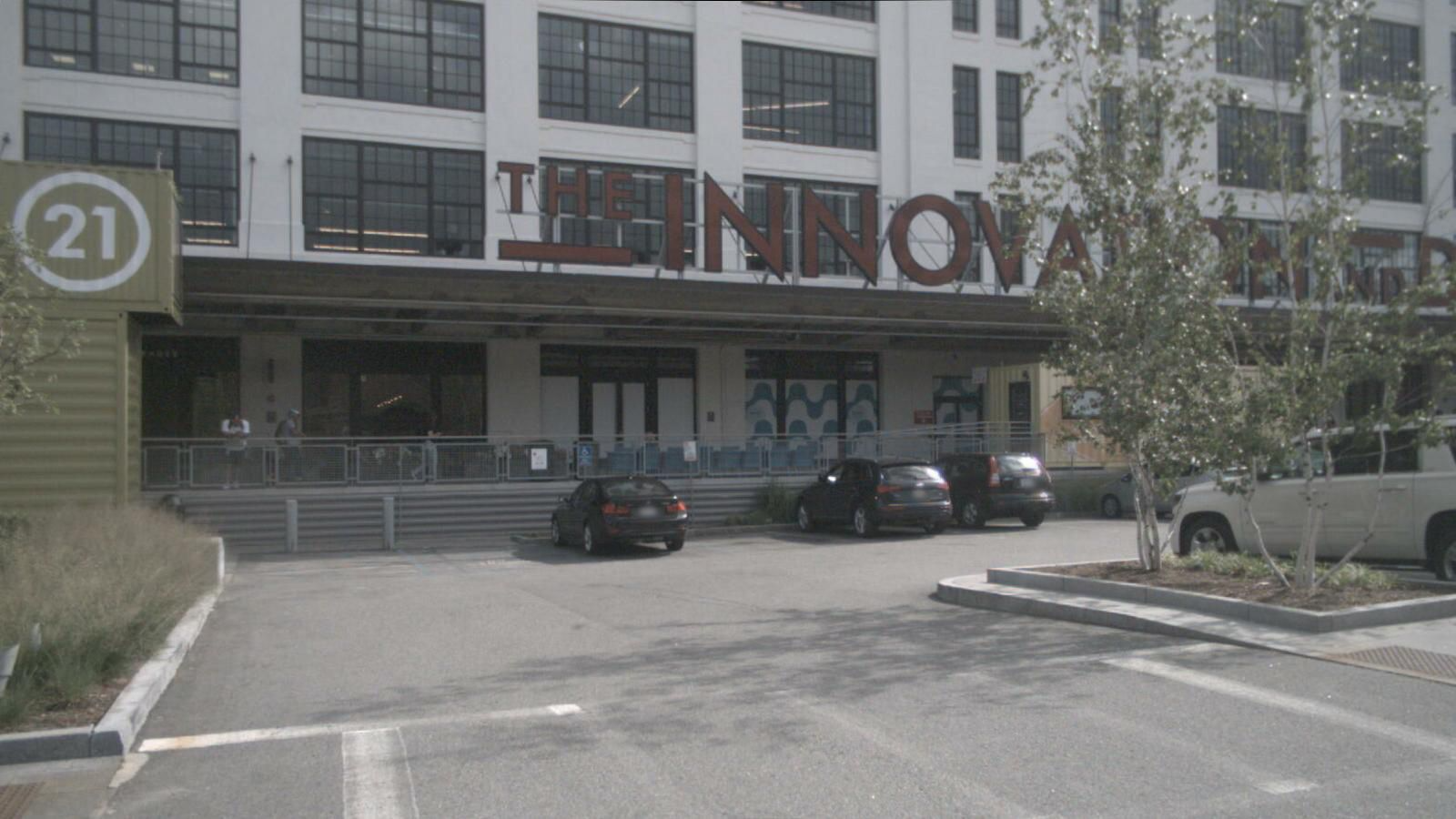
  --prompt "Point to the free area between the first black vehicle and the second black vehicle from left to right." \
  --output_path ../assets/my_outdoor_result_2.png \
  --url http://127.0.0.1:25547

  python use_api.py \
  --image_path ../assets/outdoor_3.png \
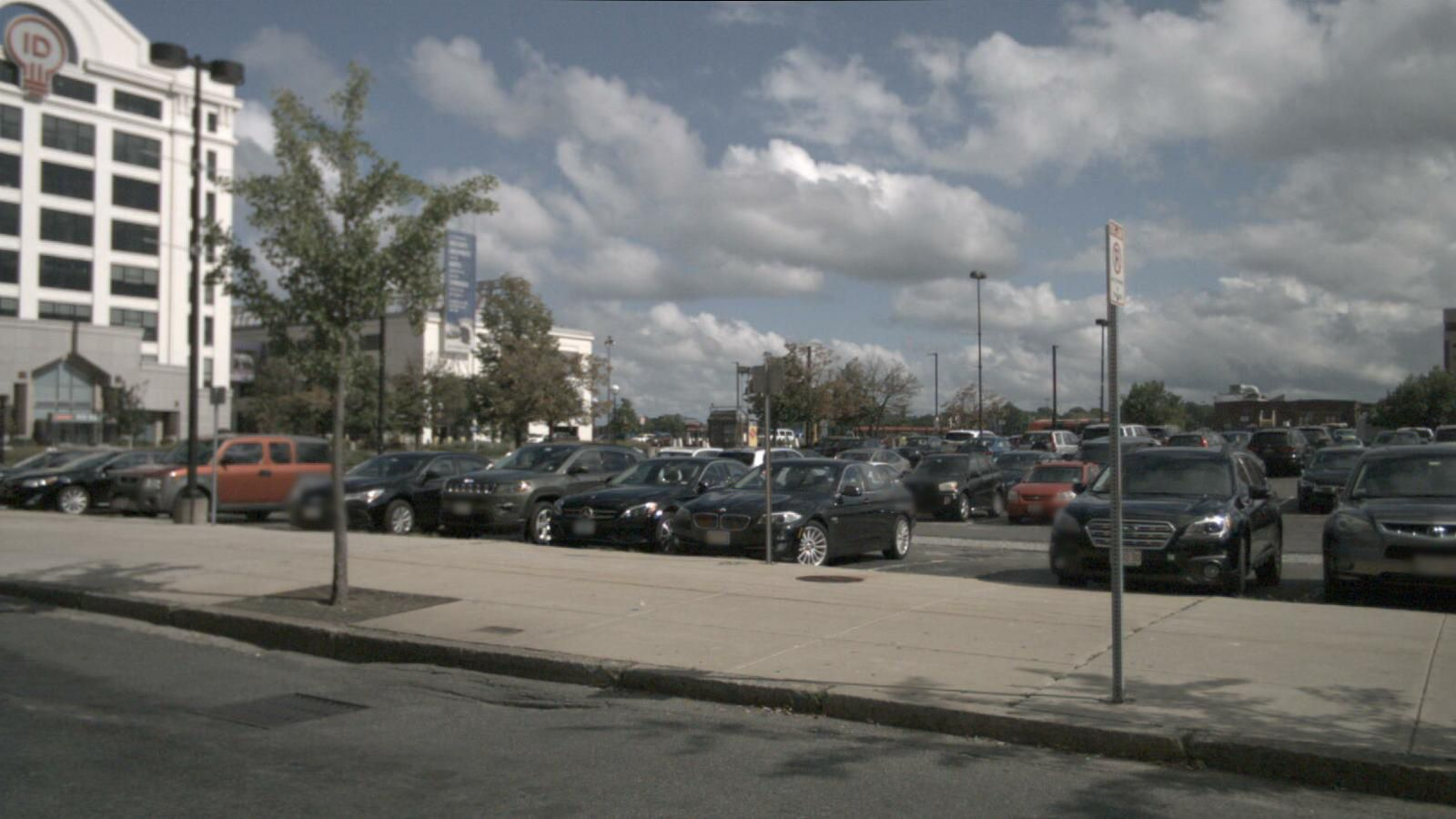
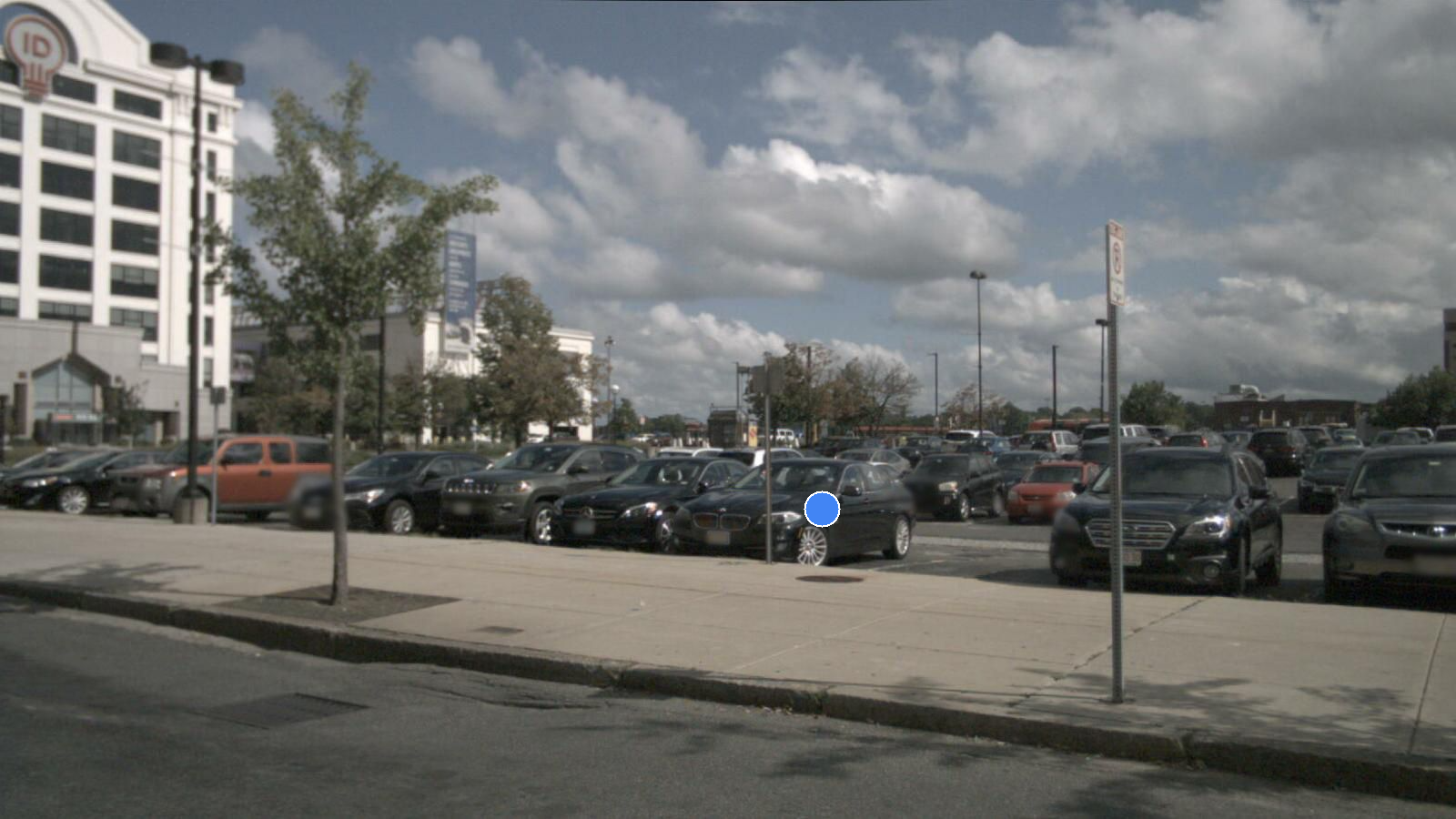
  --prompt "Point to the third car in the row closest to the viewer, from right to left" \
  --output_path ../assets/my_outdoor_result_3.png \
  --url http://127.0.0.1:25547

  python use_api.py \
  --image_path ../assets/outdoor_3.png \
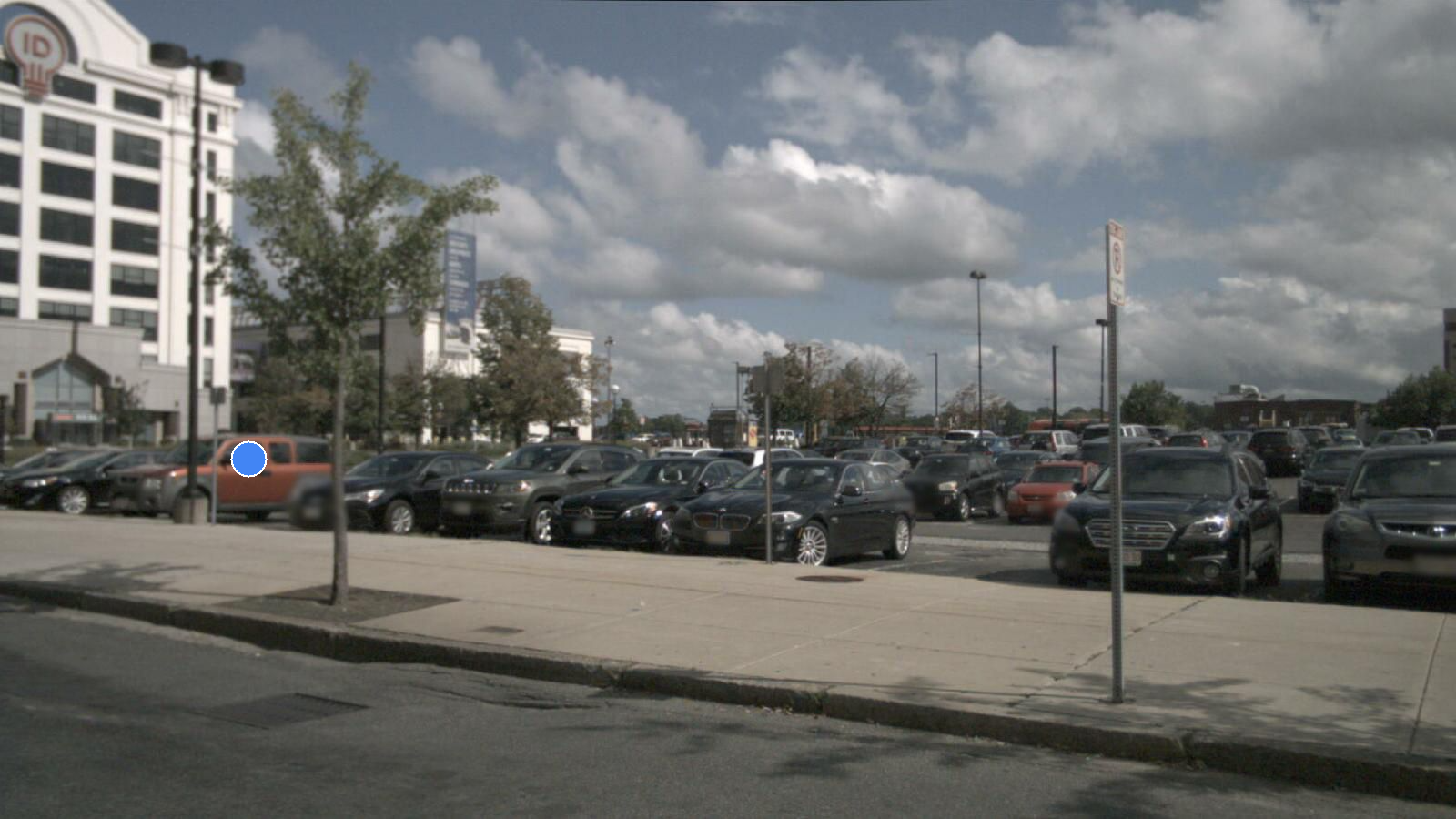
  --prompt "Point to the brown car in the row closest to the viewer" \
  --output_path ../assets/my_outdoor_result_4.png \
  --url http://127.0.0.1:25547
  ```
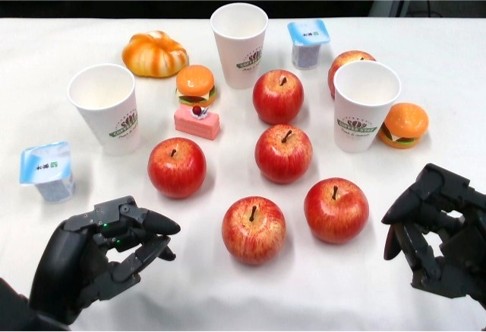
Below are the results of the inference as examples (tabletop scenes and outdoor scenes).
| Original Image | "Pick the apple in front of the logo side of the leftmost cup." | "Point out the apple nearest to the second cup from left to right." | "Point to the free area between the farthest apple and pink cake." |
|---|---|---|---|
 |  |  |  |
| Original Image | "Point to the free area between the black vehicle on the right and the white sedan in front of it." |
|---|---|
 |  |
| Original Image | "Point to the free area between the first black vehicle and the second black vehicle from left to right." |
|---|---|
 |  |
| Original Image | "Point to the third car in the row closest to the viewer, from right to left" | "Point to the brown car in the row closest to the viewer" |
|---|---|---|
 |  |  |
🔍 Evaluation for RefSpatial-Bench
-
Open the
Evaluationfolder and download the RefSpatial-Bench/RefSpatial-Expand-Bench from the model zoo.cd Evaluation git lfs install git clone https://huggingface.co/datasets/BAAI/RefSpatial-Bench # git clone https://huggingface.co/datasets/JingkunAn/RefSpatial-Expand-Bench -
Run the API server as the same as the third step in Inference.
cd API python api.py \ --port 25547 \ --depth_model_path /your/custom/path/depth_anything_v2_vitl.pth \ --vlm_model_path /your/custom/path/to/roborefer -
Run the evaluation script.
- If the
model_namehasDepthin the name, the depth model will be used. Therefore, you can chooseRoboRefer-2B-SFT,RoboRefer-2B-SFT-Depthas the model name for RGB/RGB-D inference, respectively. - The
task_namecan beLocation,Placement,Unseen, orallto evaluate on all tasks.
cd Evaluation python test_benchmark.py \ --model_name RoboRefer-2B-SFT-Depth \ --task_name Location \ --url http://127.0.0.1:25547 - If the
-
Summarize the results.
- The
model_namemust be the same as the one used in the evaluation script. - The
task_namecan beLocation/Placement/Unseento summarize the results for the corresponding task.
cd Evaluation python summarize_acc.py \ --model_name RoboRefer-2B-SFT-Depth \ --task_name Location - The
📚 Training
Step 1: Download RefSpatial Dataset.
Download the RefSpatial dataset from the model zoo and extract it by running the provided unzip_dataset.sh from the RefSpatial root directory to decompress all of the *.tar.gz files.
[!NOTE] The full raw dataset (~357GB) is in the same format as the LLaVA dataset.
cd RefSpatial
bash unzip_dataset.sh
This script will automatically perform the following actions:
- Merge Split Files: For files that are split into
.part_a,.part_b, etc., the script will use thecatcommand to combine them into a single, complete.tar.gzfile. For example,image.tar.gz.part_a,...will be merged intoimage.tar.gz. - Extract Archives: The script will then use the
tarcommand to extract all.tar.gzarchives into their current directories.
Step 2 (Optional): Clean up Archives.
To save disk space, delete all .tar.gz and .part_* files after successful decompression by running:
[!Warning] Please run this script only after confirming that all data has been successfully decompressed.
bash delete_tar_gz.sh
Step 3: Download base model weights.
Download the RoboRefer base model weights or depth aligned model weights from the model zoo.
Step 4: Train the model.
Step 4.1: Add custom datasets (e.g., RefSpatial Dataset)
Add your dataset to the register_datasets_mixtures() function in RoboRefer/llava/data/datasets_mixture.py. The flexible dataset_type named spatialdataset supports both RGB-only and RGB-D training. For RGB-D training, set the depth_path in the dataset config. For RGB-only, just leave out the depth_path.
Below is an example of how to register the RefSpatial dataset for both RGB-only and RGB-D training in the register_datasets_mixtures() function in RoboRefer/llava/data/datasets_mixture.py. The RefSpatial dataset has already been implemented in its corresponding module.
Example of Adding RefSpatial Dataset
def register_datasets_mixtures():### OpenImage (2D Dataset) 2D_choice_qa = Dataset( dataset_name="2D_choice_qa", dataset_type="spatialdataset", data_path="./RefSpatial/2D/choice_qa.json", image_path="./RefSpatial/2D/image", depth_path="./RefSpatial/2D/depth" ) add_dataset(2D_choice_qa) 2D_choice_qa_RGB = Dataset( dataset_name="2D_choice_qa_RGB", dataset_type="spatialdataset", data_path="./RefSpatial/2D/choice_qa.json", image_path="./RefSpatial/2D/image" ) add_dataset(2D_choice_qa_RGB) 2D_reasoning_template_qa = Dataset( dataset_name="2D_reasoning_template_qa", dataset_type="spatialdataset", data_path="./RefSpatial/2D/reasoning_template_qa.json", image_path="./RefSpatial/2D/image", depth_path="./RefSpatial/2D/depth" ) add_dataset(2D_reasoning_template_qa) 2D_reasoning_template_qa_RGB = Dataset( dataset_name="2D_reasoning_template_qa_RGB", dataset_type="spatialdataset", data_path="./RefSpatial/2D/reasoning_template_qa.json", image_path="./RefSpatial/2D/image" ) add_dataset(2D_reasoning_template_qa_RGB) ### CA-1M (3D Dataset) 3D_choice_qa = Dataset( dataset_name="3D_choice_qa", dataset_type="spatialdataset", data_path="./RefSpatial/3D/choice_qa.json", image_path="./RefSpatial/3D/image", depth_path="./RefSpatial/3D/depth" ) add_dataset(3D_choice_qa) 3D_choice_qa_RGB = Dataset( dataset_name="3D_choice_qa_RGB", dataset_type="spatialdataset", data_path="./RefSpatial/3D/choice_qa.json", image_path="./RefSpatial/3D/image" ) add_dataset(3D_choice_qa_RGB) 3D_reasoning_template_qa = Dataset( dataset_name="3D_reasoning_template_qa", dataset_type="spatialdataset", data_path="./RefSpatial/3D/reasoning_template_qa.json", image_path="./RefSpatial/3D/image", depth_path="./RefSpatial/3D/depth" ) add_dataset(3D_reasoning_template_qa) 3D_reasoning_template_qa_RGB = Dataset( dataset_name="3D_reasoning_template_qa_RGB", dataset_type="spatialdataset", data_path="./RefSpatial/3D/reasoning_template_qa.json", image_path="./RefSpatial/3D/image" ) add_dataset(3D_reasoning_template_qa_RGB) 3D_vacant_qa = Dataset( dataset_name="3D_vacant_qa", dataset_type="spatialdataset", data_path="./RefSpatial/3D/vacant_qa.json", image_path="./RefSpatial/3D/image", depth_path="./RefSpatial/3D/depth" ) add_dataset(3D_vacant_qa) 3D_vacant_qa_RGB = Dataset( dataset_name="3D_vacant_qa_RGB", dataset_type="spatialdataset", data_path="./RefSpatial/3D/vacant_qa.json", image_path="./RefSpatial/3D/image" ) add_dataset(3D_vacant_qa_RGB) 3D_multi_view_qa = Dataset( dataset_name="3D_multi_view_qa", dataset_type="spatialdataset", data_path="./RefSpatial/3D/multi_view_qa.json", image_path="./RefSpatial/3D/image_multi_view", depth_path="./RefSpatial/3D/depth_multi_view" ) add_dataset(3D_multi_view_qa) 3D_multi_view_qa_RGB = Dataset( dataset_name="3D_multi_view_qa_RGB", dataset_type="spatialdataset", data_path="./RefSpatial/3D/multi_view_qa.json", image_path="./RefSpatial/3D/image_multi_view" ) add_dataset(3D_multi_view_qa_RGB) 3D_visual_choice_qa = Dataset( dataset_name="3D_visual_choice_qa", dataset_type="spatialdataset", data_path="./RefSpatial/3D/visual_choice_qa.json", image_path="./RefSpatial/3D/image_visual_choice", depth_path="./RefSpatial/3D/depth" ) add_dataset(3D_visual_choice_qa) 3D_visual_choice_qa_RGB = Dataset( dataset_name="3D_visual_choice_qa_RGB", dataset_type="spatialdataset", data_path="./RefSpatial/3D/visual_choice_qa.json", image_path="./RefSpatial/3D/image_visual_choice" ) add_dataset(3D_visual_choice_qa_RGB) ### Simulator (Simulator Dataset) simulation_dataset = Dataset( dataset_name="simulation_dataset", dataset_type="spatialdataset", data_path="./RefSpatial/Simulator/metadata.json", image_path="./RefSpatial/Simulator/image", depth_path="./RefSpatial/Simulator/depth" ) add_dataset(simulation_dataset) simulation_dataset_RGB = Dataset( dataset_name="simulation_dataset_RGB", dataset_type="spatialdataset", data_path="./RefSpatial/Simulator/metadata.json", image_path="./RefSpatial/Simulator/image" ) add_dataset(simulation_dataset_RGB)
Step 4.2: Use scripts to start training
In scripts/RoboRefer, we provide scripts for depth alignment, SFT training, and RFT training (coming soon). You can run them using the commands below. Be sure to update the base model path and add your custom dataset(s) in the script. After registering your datasets in register_datasets_mixtures(), you can use + to include multiple datasets.
bash scripts/roborefer/depth_align_2B.sh # or bash scripts/roborefer/depth_align_2B_cluster.sh. If you use a cluster for training, you can run this script. 8B variant is the same.

bash scripts/roborefer/depth_sft_2B.sh # or bash scripts/roborefer/depth_sft_2B_cluster.sh. If you use a cluster for training, you can run this script. 8B variant is the same.
🕶️Overview
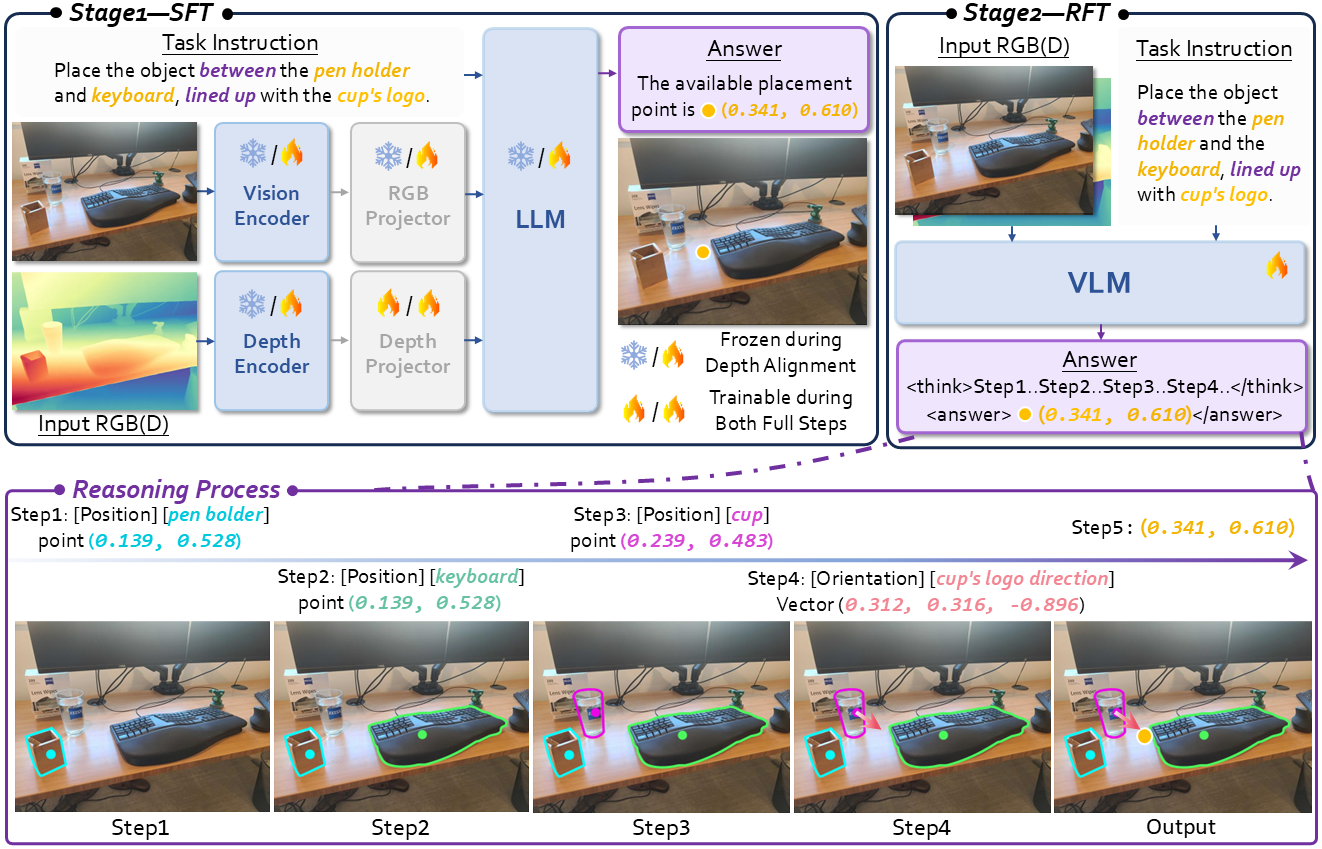
The Overview of RoboRefer
We introduce RoboRefer, the first 3D-aware reasoning VLM for multi-step spatial referring with explicit reasoning.
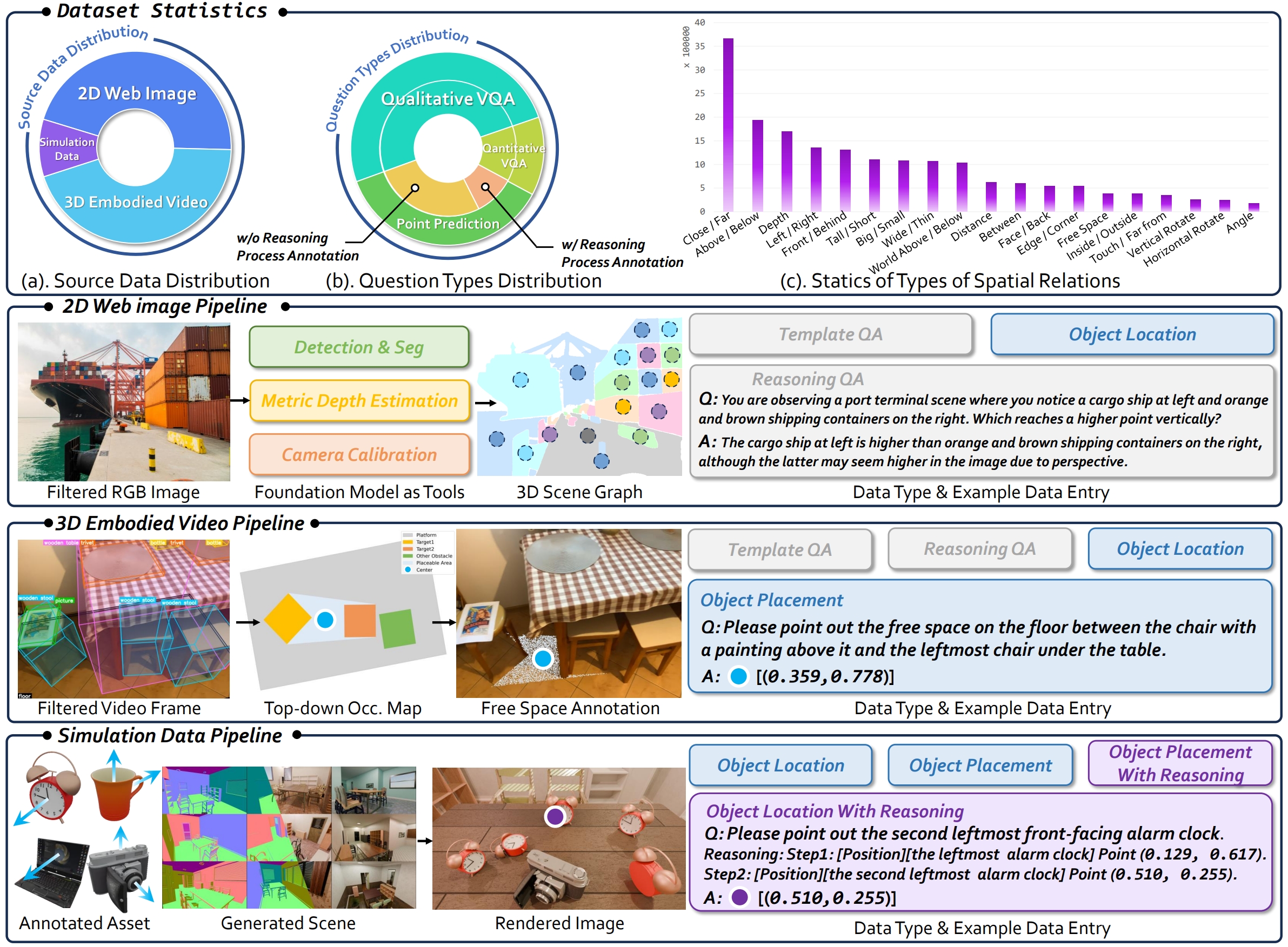
The Overview of the RefSpatial Dataset and its Generation Pipeline
We present RefSpatial, a dataset can enable general VLMs to adapt to spatial referring tasks, with 20M QA pairs (2x prior) and 31 spatial relations (vs. 15 prior) and complex reasoning processes (up to 5 steps).
TODO
- Release RefSpatial-Bench evaluation code (About 1 week).
- Release the SFT-trained 2B RoboRefer model and inference code (About 2 weeks).
- Release the SFT-trained 8B RoboRefer model (About 3 weeks).
- Release the RefSpatial Dataset and SFT training code (About 1 month).
- Release the RFT-trained RoboRefer model and training code (Maybe 2 months or more).
- Release the Dataset Generation Pipeline (Maybe 2 months or more).
Contact
If you have any questions about the code or the paper, feel free to email Enshen (zhouenshen@buaa.edu.cn) and Jingkun (anjingkun02@gmail.com).
Acknowledgment
-
This repository is built upon the codebase of NVILA, SpatialRGPT and R1-V.
-
We acknowledge OpenImage, CA-1M, Objaverse, and Infinigen for their data and assets.
📑 Citation
If you find RoboRefer, RefSpatial, and RefeSpatial-Bench useful for your research, please cite using this BibTeX:
@article{zhou2025roborefer,
  title={RoboRefer: Towards Spatial Referring with Reasoning in Vision-Language Models for Robotics},
  author={Zhou, Enshen and An, Jingkun and Chi, Cheng and Han, Yi and Rong, Shanyu and Zhang, Chi and Wang, Pengwei and Wang, Zhongyuan and Huang, Tiejun and Sheng, Lu and others},
  journal={arXiv preprint arXiv:2506.04308},
  year={2025}
}


Similar repos




Languages
Python
96.0%
Shell
2.0%
Cuda
1.8%
[NeurIPS 2025] Official implementation of "RoboRefer: Towards Spatial Referring with Reasoning in Vision-Language Models for Robotics"
See the codeREADME
RoboRefer: Towards Spatial Referring with Reasoning in Vision-Language Models for Robotics
From words to exactly where you mean — with RoboRefer
🔥 Updates
[2025-12-16] 🔥🔥🔥 We’ve released RoboTracer, a more powerful version of RoboRefer, on arxiv and launched the project page. It retains all RoboRefer features while adding multi-step, metric-grounded spatial tracing with explicit reasoning. Come and try the newer dataset TraceSpatial and the more challenging benchmark TraceSpatial-Bench!
[2025-10-25] 🔥🔥🔥 RefSpatial-Expand-Bench is now released! Based on the original benchmark, the new version expands indoor scenes (e.g., factories, stores) and introduces previously unexplored outdoor scenarios (e.g., streets, parking lots), offering a more comprehensive evaluation of spatial referring tasks.
[2025-09-26] 🔥🔥🔥 RefSpatial-Bench is now used by Qwen3-VL and Gemini-Robotics-1.5 to evaluate spatial reasoning in complex embodied scenarios! Come on, test your model with RefSpatial-Bench!
| Qwen3-VL Results | Gemini-Robotics-1.5 Results |
|---|---|
[2025-09-18] 🔥🔥🔥 RoboRefer gets accepted to NeurIPS 2025! See you in Mexico City and San Diego, USA!
[2025-07-29] We release the SFT-trained 8B model and test examples of outdoor scenes.
[2025-07-01] We release the RefSpatial Dataset and SFT training code.
[2025-06-23] We release the SFT-trained 2B model and inference code with RefSpatial-Bench evaluation code.
[2025-06-06] RefSpatial-Bench is released on HF. Let's evaluate your model's spatial referring ability!
[2025-06-06] RoboRefer is released on arxiv and the project page is set up at here.
🤗 Model Zoo & Dataset & Benchmark
| Model/Dataset/Benchmark | Note |
|---|---|
| NVILA-2B-Depth | The base model with depth encoder initialized from the image encoder. |
| RoboRefer-2B-Align | The 1st SFT step of the 2B model for depth alignment. |
| RoboRefer-2B-SFT | The 2nd SFT step of the 2B model for spatial understanding and referring. |
| NVILA-8B-Depth | The base model with depth encoder initialized from the image encoder. |
| RoboRefer-8B-SFT | The 2nd SFT step of the 8B model for spatial understanding and referring. |
| RoboRefer-2B-RFT (Coming soon) | The RFT-trained 2B model for multi-step spatial referring with reasoning. |
| RefSpatial Dataset | The dataset for spatial understanding and referring with reasoning. |
| RefSpatial-Bench | The benchmark for spatial referring with reasoning. |
| RefSpatial-Expand-Bench | A more comprehensive benchmark for spatial referring with reasoning. |
🚀 Quick Start
- Install Anaconda Distribution.
- Install the necessary Python packages in the environment.
bash env_setup.sh roborefer - Activate a conda environment.
conda activate roborefer
💡 Inference
-
Download the model weights from the model zoo (e.g.,
RoboRefer-2B-SFT). -
Download the relative depth estimation model weights (e.g.,
Depth-Anything-V2-Large). -
Run the inference api server.
cd API python api.py \ --port 25547 \ --depth_model_path /your/custom/path/depth_anything_v2_vitl.pth \ --vlm_model_path /your/custom/path/to/roborefer -
Run the inference script with the API and check the results in the
assetsfolder.
[!NOTE] RoboRefer natively supports both RGB and RGB-D inputs. If you don't have depth data, it can be inferred from RGB using DepthAnything V2 by setting
enable_depth=1. Just setenable_depth=0for RGB-only input or1for RGB-D input in use_api.py. https://github.com/Zhoues/RoboRefer/blob/15f93d48c1e205d954eeb8de989cdae3cef7abbb/API/use_api.py#L61
  ```bash
  cd API

  ## Tabletop scenes
  python use_api.py \
  --image_path ../assets/tabletop.jpg \
  --prompt "Pick the apple in front of the logo side of the leftmost cup." \
  --output_path ../assets/my_tabletop_result_1.jpg \
  --url http://127.0.0.1:25547

  python use_api.py \
  --image_path ../assets/tabletop.jpg \
  --prompt "Point out the apple nearest to the second cup from left to right." \
  --output_path ../assets/my_tabletop_result_2.jpg \
  --url http://127.0.0.1:25547

  python use_api.py \
  --image_path ../assets/tabletop.jpg \
  --prompt "Point to the free area between the farthest apple and pink cake." \
  --output_path ../assets/my_tabletop_result_3.jpg \
  --url http://127.0.0.1:25547

  ## Outdoor scenes
  python use_api.py \
  --image_path ../assets/outdoor_1.jpg \
  --prompt "Point to the free area between the black vehicle on the right and the white sedan in front of it." \
  --output_path ../assets/my_outdoor_result_1.jpg \
  --url http://127.0.0.1:25547

  python use_api.py \
  --image_path ../assets/outdoor_2.png \
  --prompt "Point to the free area between the first black vehicle and the second black vehicle from left to right." \
  --output_path ../assets/my_outdoor_result_2.png \
  --url http://127.0.0.1:25547

  python use_api.py \
  --image_path ../assets/outdoor_3.png \
  --prompt "Point to the third car in the row closest to the viewer, from right to left" \
  --output_path ../assets/my_outdoor_result_3.png \
  --url http://127.0.0.1:25547

  python use_api.py \
  --image_path ../assets/outdoor_3.png \
  --prompt "Point to the brown car in the row closest to the viewer" \
  --output_path ../assets/my_outdoor_result_4.png \
  --url http://127.0.0.1:25547
  ```
Below are the results of the inference as examples (tabletop scenes and outdoor scenes).
| Original Image | "Pick the apple in front of the logo side of the leftmost cup." | "Point out the apple nearest to the second cup from left to right." | "Point to the free area between the farthest apple and pink cake." |
|---|---|---|---|
| | | |
| Original Image | "Point to the free area between the black vehicle on the right and the white sedan in front of it." |
|---|---|
| |
| Original Image | "Point to the free area between the first black vehicle and the second black vehicle from left to right." |
|---|---|
| |
| Original Image | "Point to the third car in the row closest to the viewer, from right to left" | "Point to the brown car in the row closest to the viewer" |
|---|---|---|
| | |
🔍 Evaluation for RefSpatial-Bench
-
Open the
Evaluationfolder and download the RefSpatial-Bench/RefSpatial-Expand-Bench from the model zoo.cd Evaluation git lfs install git clone https://huggingface.co/datasets/BAAI/RefSpatial-Bench # git clone https://huggingface.co/datasets/JingkunAn/RefSpatial-Expand-Bench -
Run the API server as the same as the third step in Inference.
cd API python api.py \ --port 25547 \ --depth_model_path /your/custom/path/depth_anything_v2_vitl.pth \ --vlm_model_path /your/custom/path/to/roborefer -
Run the evaluation script.
- If the
model_namehasDepthin the name, the depth model will be used. Therefore, you can chooseRoboRefer-2B-SFT,RoboRefer-2B-SFT-Depthas the model name for RGB/RGB-D inference, respectively. - The
task_namecan beLocation,Placement,Unseen, orallto evaluate on all tasks.
cd Evaluation python test_benchmark.py \ --model_name RoboRefer-2B-SFT-Depth \ --task_name Location \ --url http://127.0.0.1:25547 - If the
-
Summarize the results.
- The
model_namemust be the same as the one used in the evaluation script. - The
task_namecan beLocation/Placement/Unseento summarize the results for the corresponding task.
cd Evaluation python summarize_acc.py \ --model_name RoboRefer-2B-SFT-Depth \ --task_name Location - The
📚 Training
Step 1: Download RefSpatial Dataset.
Download the RefSpatial dataset from the model zoo and extract it by running the provided unzip_dataset.sh from the RefSpatial root directory to decompress all of the *.tar.gz files.
[!NOTE] The full raw dataset (~357GB) is in the same format as the LLaVA dataset.
cd RefSpatial
bash unzip_dataset.sh
This script will automatically perform the following actions:
- Merge Split Files: For files that are split into
.part_a,.part_b, etc., the script will use thecatcommand to combine them into a single, complete.tar.gzfile. For example,image.tar.gz.part_a,...will be merged intoimage.tar.gz. - Extract Archives: The script will then use the
tarcommand to extract all.tar.gzarchives into their current directories.
Step 2 (Optional): Clean up Archives.
To save disk space, delete all .tar.gz and .part_* files after successful decompression by running:
[!Warning] Please run this script only after confirming that all data has been successfully decompressed.
bash delete_tar_gz.sh
Step 3: Download base model weights.
Download the RoboRefer base model weights or depth aligned model weights from the model zoo.
Step 4: Train the model.
Step 4.1: Add custom datasets (e.g., RefSpatial Dataset)
Add your dataset to the register_datasets_mixtures() function in RoboRefer/llava/data/datasets_mixture.py. The flexible dataset_type named spatialdataset supports both RGB-only and RGB-D training. For RGB-D training, set the depth_path in the dataset config. For RGB-only, just leave out the depth_path.
Below is an example of how to register the RefSpatial dataset for both RGB-only and RGB-D training in the register_datasets_mixtures() function in RoboRefer/llava/data/datasets_mixture.py. The RefSpatial dataset has already been implemented in its corresponding module.
Example of Adding RefSpatial Dataset
def register_datasets_mixtures():### OpenImage (2D Dataset) 2D_choice_qa = Dataset( dataset_name="2D_choice_qa", dataset_type="spatialdataset", data_path="./RefSpatial/2D/choice_qa.json", image_path="./RefSpatial/2D/image", depth_path="./RefSpatial/2D/depth" ) add_dataset(2D_choice_qa) 2D_choice_qa_RGB = Dataset( dataset_name="2D_choice_qa_RGB", dataset_type="spatialdataset", data_path="./RefSpatial/2D/choice_qa.json", image_path="./RefSpatial/2D/image" ) add_dataset(2D_choice_qa_RGB) 2D_reasoning_template_qa = Dataset( dataset_name="2D_reasoning_template_qa", dataset_type="spatialdataset", data_path="./RefSpatial/2D/reasoning_template_qa.json", image_path="./RefSpatial/2D/image", depth_path="./RefSpatial/2D/depth" ) add_dataset(2D_reasoning_template_qa) 2D_reasoning_template_qa_RGB = Dataset( dataset_name="2D_reasoning_template_qa_RGB", dataset_type="spatialdataset", data_path="./RefSpatial/2D/reasoning_template_qa.json", image_path="./RefSpatial/2D/image" ) add_dataset(2D_reasoning_template_qa_RGB) ### CA-1M (3D Dataset) 3D_choice_qa = Dataset( dataset_name="3D_choice_qa", dataset_type="spatialdataset", data_path="./RefSpatial/3D/choice_qa.json", image_path="./RefSpatial/3D/image", depth_path="./RefSpatial/3D/depth" ) add_dataset(3D_choice_qa) 3D_choice_qa_RGB = Dataset( dataset_name="3D_choice_qa_RGB", dataset_type="spatialdataset", data_path="./RefSpatial/3D/choice_qa.json", image_path="./RefSpatial/3D/image" ) add_dataset(3D_choice_qa_RGB) 3D_reasoning_template_qa = Dataset( dataset_name="3D_reasoning_template_qa", dataset_type="spatialdataset", data_path="./RefSpatial/3D/reasoning_template_qa.json", image_path="./RefSpatial/3D/image", depth_path="./RefSpatial/3D/depth" ) add_dataset(3D_reasoning_template_qa) 3D_reasoning_template_qa_RGB = Dataset( dataset_name="3D_reasoning_template_qa_RGB", dataset_type="spatialdataset", data_path="./RefSpatial/3D/reasoning_template_qa.json", image_path="./RefSpatial/3D/image" ) add_dataset(3D_reasoning_template_qa_RGB) 3D_vacant_qa = Dataset( dataset_name="3D_vacant_qa", dataset_type="spatialdataset", data_path="./RefSpatial/3D/vacant_qa.json", image_path="./RefSpatial/3D/image", depth_path="./RefSpatial/3D/depth" ) add_dataset(3D_vacant_qa) 3D_vacant_qa_RGB = Dataset( dataset_name="3D_vacant_qa_RGB", dataset_type="spatialdataset", data_path="./RefSpatial/3D/vacant_qa.json", image_path="./RefSpatial/3D/image" ) add_dataset(3D_vacant_qa_RGB) 3D_multi_view_qa = Dataset( dataset_name="3D_multi_view_qa", dataset_type="spatialdataset", data_path="./RefSpatial/3D/multi_view_qa.json", image_path="./RefSpatial/3D/image_multi_view", depth_path="./RefSpatial/3D/depth_multi_view" ) add_dataset(3D_multi_view_qa) 3D_multi_view_qa_RGB = Dataset( dataset_name="3D_multi_view_qa_RGB", dataset_type="spatialdataset", data_path="./RefSpatial/3D/multi_view_qa.json", image_path="./RefSpatial/3D/image_multi_view" ) add_dataset(3D_multi_view_qa_RGB) 3D_visual_choice_qa = Dataset( dataset_name="3D_visual_choice_qa", dataset_type="spatialdataset", data_path="./RefSpatial/3D/visual_choice_qa.json", image_path="./RefSpatial/3D/image_visual_choice", depth_path="./RefSpatial/3D/depth" ) add_dataset(3D_visual_choice_qa) 3D_visual_choice_qa_RGB = Dataset( dataset_name="3D_visual_choice_qa_RGB", dataset_type="spatialdataset", data_path="./RefSpatial/3D/visual_choice_qa.json", image_path="./RefSpatial/3D/image_visual_choice" ) add_dataset(3D_visual_choice_qa_RGB) ### Simulator (Simulator Dataset) simulation_dataset = Dataset( dataset_name="simulation_dataset", dataset_type="spatialdataset", data_path="./RefSpatial/Simulator/metadata.json", image_path="./RefSpatial/Simulator/image", depth_path="./RefSpatial/Simulator/depth" ) add_dataset(simulation_dataset) simulation_dataset_RGB = Dataset( dataset_name="simulation_dataset_RGB", dataset_type="spatialdataset", data_path="./RefSpatial/Simulator/metadata.json", image_path="./RefSpatial/Simulator/image" ) add_dataset(simulation_dataset_RGB)
Step 4.2: Use scripts to start training
In scripts/RoboRefer, we provide scripts for depth alignment, SFT training, and RFT training (coming soon). You can run them using the commands below. Be sure to update the base model path and add your custom dataset(s) in the script. After registering your datasets in register_datasets_mixtures(), you can use + to include multiple datasets.
bash scripts/roborefer/depth_align_2B.sh # or bash scripts/roborefer/depth_align_2B_cluster.sh. If you use a cluster for training, you can run this script. 8B variant is the same.

bash scripts/roborefer/depth_sft_2B.sh # or bash scripts/roborefer/depth_sft_2B_cluster.sh. If you use a cluster for training, you can run this script. 8B variant is the same.
🕶️Overview
The Overview of RoboRefer
We introduce RoboRefer, the first 3D-aware reasoning VLM for multi-step spatial referring with explicit reasoning.
The Overview of the RefSpatial Dataset and its Generation Pipeline
We present RefSpatial, a dataset can enable general VLMs to adapt to spatial referring tasks, with 20M QA pairs (2x prior) and 31 spatial relations (vs. 15 prior) and complex reasoning processes (up to 5 steps).
TODO
- Release RefSpatial-Bench evaluation code (About 1 week).
- Release the SFT-trained 2B RoboRefer model and inference code (About 2 weeks).
- Release the SFT-trained 8B RoboRefer model (About 3 weeks).
- Release the RefSpatial Dataset and SFT training code (About 1 month).
- Release the RFT-trained RoboRefer model and training code (Maybe 2 months or more).
- Release the Dataset Generation Pipeline (Maybe 2 months or more).
Contact
If you have any questions about the code or the paper, feel free to email Enshen (zhouenshen@buaa.edu.cn) and Jingkun (anjingkun02@gmail.com).
Acknowledgment
-
This repository is built upon the codebase of NVILA, SpatialRGPT and R1-V.
-
We acknowledge OpenImage, CA-1M, Objaverse, and Infinigen for their data and assets.
📑 Citation
If you find RoboRefer, RefSpatial, and RefeSpatial-Bench useful for your research, please cite using this BibTeX:
@article{zhou2025roborefer,
  title={RoboRefer: Towards Spatial Referring with Reasoning in Vision-Language Models for Robotics},
  author={Zhou, Enshen and An, Jingkun and Chi, Cheng and Han, Yi and Rong, Shanyu and Zhang, Chi and Wang, Pengwei and Wang, Zhongyuan and Huang, Tiejun and Sheng, Lu and others},
  journal={arXiv preprint arXiv:2506.04308},
  year={2025}
}
Similar repos
Languages
Python
96.0%
Shell
2.0%
Cuda
1.8%