A local AI companion with memory, emotion, voice, avatar control, and agentic features — built for real-time interaction on low VRAM.
Python
40
42 commits
updated Jul 1, 2026
🔔 Updates
v0.6 — Tool Calling + Moonshine ASR Update (Latest)
- Nova is now more alive and agentic than ever. She can perform real system actions based on your intent — powered by a dedicated tool-calling router.
- Speech-to-Text has been upgraded from Faster-Whisper to Moonshine ASR for a lighter, faster, and more memory-efficient transcription pipeline.
What's New
- LLM-Based Tool Calling — Nova now uses a dedicated
qwen3.5:0.8bmodel to intelligently decide when to trigger an action vs respond conversationally. No more rigid keyword matching.- Moonshine ASR — Replaced Faster-Whisper with Moonshine ASR for a more lightweight and responsive speech recognition pipeline, optimized for real-time local use.
- Expanded Tool Set — Nova can now perform a wider range of system actions:
- 🎵 Play songs
- 🌐 Open Google / YouTube
- 🔍 Search Google / YouTube
- 🗂️ Delete files
Technical Architecture
- Each user input is first routed through
qwen3.5:0.8b(tool-calling router) to determine intent- If a tool is triggered, it executes silently in the background while Nova responds in character
- If no tool is needed, input passes directly to Nova's main LLM for a conversational response
- The router model is unloaded immediately after each call to free VRAM for Nova's main model
v0.5 — Nova Web UI Update
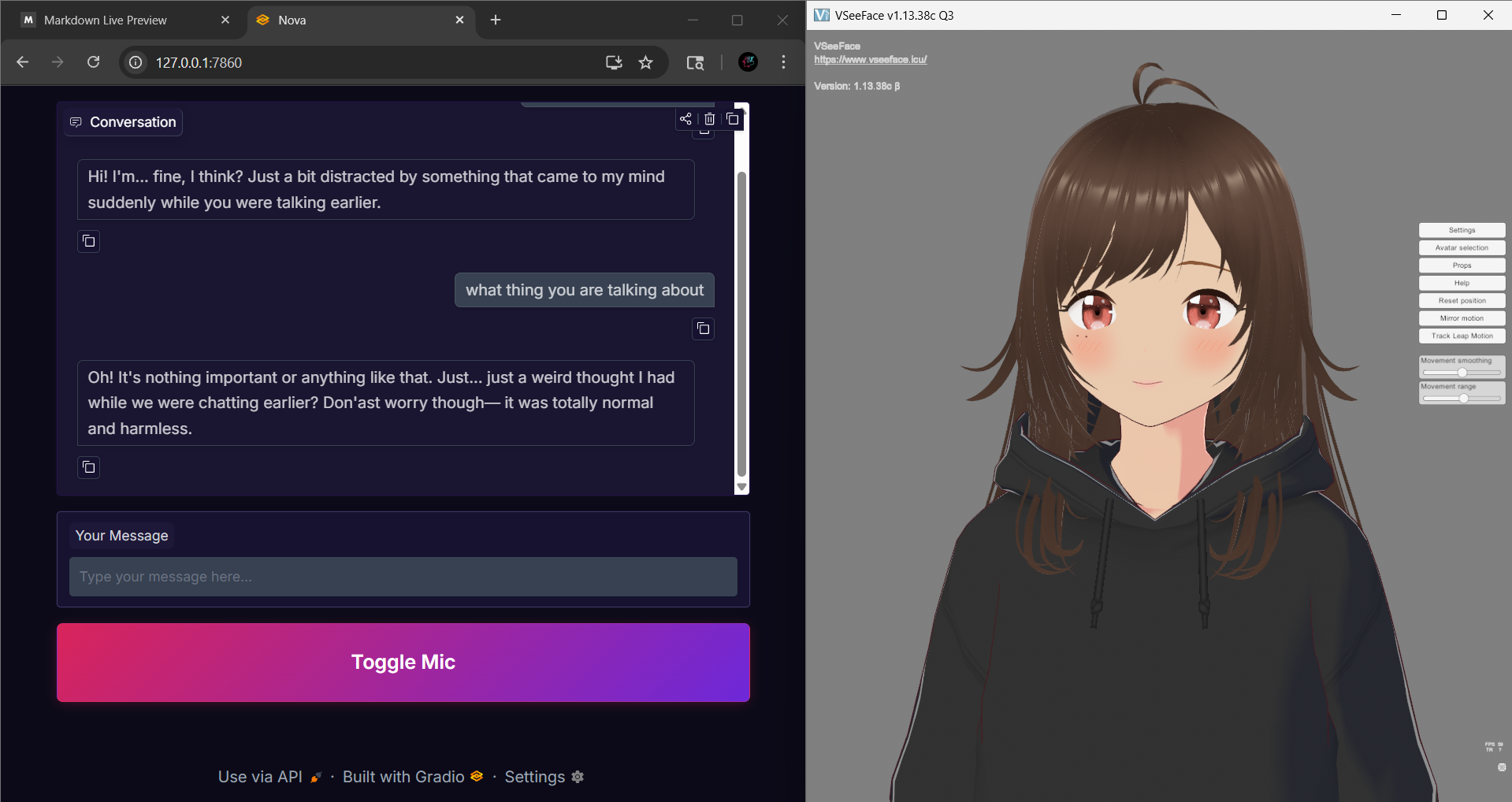
- A simple, clean web interface for Nova - your local AI companion.
Features
- Run web_ui.py if you want to use Web UI, otherwise run main.py if you want to use Nova via Terminal
- Text Chat - Type your messages
- Voice Input - Toggle mic button, speak naturally
- Real Time Responses - Nova replies with emotion and memory
Usage
- Type a message and press Enter
- Click the Mic button to speak (press again to stop)
- Nova responds - conversation continues
Tech Stack
- Gradio (Web UI)
- Python (backend Logic)
v0.4 — Nova Vision Update
- Nova's vision capabilities have been upgraded from simple webcam support to full Environment Awareness. She can now also see your screen.
- New Look Capabilities:
- Contextual Screen Capture: Nova doesn't waste resources by recording. Instead, she captures a snapshot only when you ask: "Nova, checkout my screen!" or "What's on my screen?".
- Dual-Source Input: Seamlessly switch between the Webcam (to see your face/emotions) and the Screen (to see your games, code, or art).
- Hardware Optimized: Designed to run alongside high-end games without causing FPS drops.
v0.3 — Nova V2
- Nova's model has been completely re-trained from the ground up to be more stable, expressive, and structurally sound.
- While V1 was successfully fine-tuned to respond in JSON format, it required a System Prompt to guide the model for that behavior. V2 has been deeply trained (455 steps, 0.39 loss) to make JSON and the personality its native language. It now understands the JSON structure at a foundational level, making it more 'alive' and 'emotionally expressive'.
- Download the new version from Huggingface - https://huggingface.co/Navpy/phi-3.5-AI-Vtuber-json
- For Ollama users use the Modelfile which is inside assistant_modelfile/ folder to get the best results out of the model (RECOMMENDED).
v0.2 — Multimodal Capabilities (Project Nova Vision)
- Project Nova is now a Multimodal AI Agent. Using a custom-engineered pipeline, Nova can "see" her environment and react in real-time while maintaining her 3D persona.
🛠️ Technical Architecture
To fit a vision-language model (VLM) alongside a fine-tuned LLM on a limited 4GB RTX 2050, I implemented a Sequential Model Offloading strategy:
- Intent Trigger: A keyword-based heuristic (e.g., "Look at this") triggers the vision sequence.
- Resource Swapping: To prevent OOM (Out of Memory) crashes, the system dynamically swaps models between System RAM and GPU VRAM.
- Visual Injection: The resulting image description is injected into Nova's context as Internal Sensory Data, allowing her to react naturally without breaking character.
Models Used
- Vision:
SmolVLM-256M(Quantized for edge-level performance).v0.1 — Discord Integration
- Added Discord bot support to chat with Nova remotely
- Uses the same LLM, memory, and personality system
- Secure token handling via
.env(not committed)- Can run alongside the local voice/avatar version
⚠️ Development Disclaimer
Project Nova was not created using "vibe coding" or fully AI-generated code.
The system architecture, core logic, threading model, memory design, agentic behavior, and debugging were designed, implemented, and validated manually.
Time Taken for development (approx 2 months)
AI tools were used only as a support resource for:
- Understanding unfamiliar concepts (e.g. Threading, RAG)
- Exploring alternative approaches (e.g. Chunking, Streaming TTS)
- Identifying potential issues
When automated suggestions failed or were incorrect, all debugging, fixes, and final decisions were performed manually.
This project reflects hands-on engineering, iterative testing, and deliberate system design — not prompt-to-project generation.
Memory is semantic, persistent, and local — no hard-coded state.
{
  "response": "text",
  "emotion": "emotion_name"
}
Nova uses a dedicated LLM-based tool-calling router powered by qwen3.5:0.8b to intelligently detect user intent and trigger real system actions — without breaking character.
Available Tools:
play_song — plays a song based on user inputopen_google — opens Google in the browseropen_youtube — opens YouTube in the browsersearch_google — searches Google for a given querysearch_youtube — searches YouTube for a given querydelete_files — deletes files from a specified folderHow it works:
qwen3.5:0.8b (tool router)Tool calling is fully local, intent-driven, and designed to feel natural — Nova responds as if she performed the action herself.
Nova's TTS system is designed for low latency, emotional expressiveness, and smooth playback — even on limited VRAM.
Output text is cleaned to remove patterns that commonly cause hallucinations or unstable TTS output:
Nova does not generate and play audio in a blocking way. Instead, she uses a producer–consumer threading architecture.
Each LLM response includes an emotion tag that controls:
User
 ↓
Speech-to-Text (Moonshine ASR)
 ↓
Tool Router (qwen3.5:0.8b)
 ↓               ↓
Tool Action    Phi-3.5 Fine-Tuned LLM (Ollama)
               ↓
          ┌───────────────┐
          │ Memory System │ ← ChromaDB (RAG)
          └───────────────┘
               ↓
          Structured JSON Output
               ↓
     ┌──────────┬────────────┬──────────┐
     │   TTS    │  Avatar    │ Agentic  │
     │ (Chunks) │ (VMC)      │ Actions  │
     └──────────┴────────────┴──────────┘
               ↓
     Audio → Virtual Audio Cable → VSeeFace
Project Nova was designed, developed, tested, and optimized on the following hardware:
This configuration represents the minimum recommended hardware to run Project Nova smoothly with:
All architectural decisions — including model selection, quantization, chunked TTS streaming, producer–consumer threading, and tool router VRAM management — were made specifically to ensure stable performance within a 4 GB VRAM constraint.
If the project runs reliably on this system, it is expected to scale better on higher-end GPUs.
git clone https://github.com/Navjot-Singh7/Project-Nova.git
cd Project-Nova
py -3.11 -m venv my_env

my_env\Scripts\activate
pip install -r requirements.txt
pip install torch==2.6.0 torchvision==0.21.0 torchaudio==2.6.0 --index-url https://download.pytorch.org/whl/cu126
https://huggingface.co/Navpy/phi-3.5-AI-Vtuber-json/tree/main
Note - Copy the path where your model is downloaded and paste it in the Modelfile which is inside assistant_modelfile/ folder
# make sure it is inside quotes
FROM "<YOUR_MODEL_FILE_PATH>"
# Make sure you have ollama installed in your computer
ollama create nova -f assistant_modelfile/Modelfile
Note - You'll see your model name in the terminal
ollama list
Nova uses qwen3.5:0.8b as a dedicated tool-calling router. Pull it via Ollama:
ollama pull qwen3.5:0.8b
ollama pull nomic-embed-text
python main.py
import os
# Set offline mode BEFORE any other imports
os.environ["HF_HUB_OFFLINE"] = "1"
os.environ["HF_DATASETS_OFFLINE"] = "1"
os.environ["TRANSFORMERS_OFFLINE"] = "1"
os.environ["HF_HUB_DISABLE_TELEMETRY"] = "1"
os.environ["HF_HUB_ENABLE_HF_TRANSFER"] = "0"
Stored locally in:
waifu_memories/
Project Nova can also be accessed via a Discord bot interface, allowing you to chat with Nova remotely while preserving her personality and memory system.
The Discord bot is an optional interface. Nova's core intelligence remains fully local.
Create a Discord application:
Create a .env file in the project root:
DISCORD_BOT_TOKEN="<your_bot_token_here>"
Invite the bot to your server using the OAuth2 URL from the Developer Portal.
Install Discord dependencies
pip install discord.py python-dotenv
python bot.py
Project Nova is an experimental AI companion project intended for:
Project Nova is designed to explore how far a fully local, persistent, emotionally-aware AI companion can go — without cloud dependence.
This project is licensed under the MIT License. You are free to use, modify, and distribute this project for personal or educational purposes.
A local AI companion with memory, emotion, voice, avatar control, and agentic features — built for real-time interaction on low VRAM.
Python
40
42 commits
updated Jul 1, 2026
🔔 Updates
v0.6 — Tool Calling + Moonshine ASR Update (Latest)
- Nova is now more alive and agentic than ever. She can perform real system actions based on your intent — powered by a dedicated tool-calling router.
- Speech-to-Text has been upgraded from Faster-Whisper to Moonshine ASR for a lighter, faster, and more memory-efficient transcription pipeline.
What's New
- LLM-Based Tool Calling — Nova now uses a dedicated
qwen3.5:0.8bmodel to intelligently decide when to trigger an action vs respond conversationally. No more rigid keyword matching.- Moonshine ASR — Replaced Faster-Whisper with Moonshine ASR for a more lightweight and responsive speech recognition pipeline, optimized for real-time local use.
- Expanded Tool Set — Nova can now perform a wider range of system actions:
- 🎵 Play songs
- 🌐 Open Google / YouTube
- 🔍 Search Google / YouTube
- 🗂️ Delete files
Technical Architecture
- Each user input is first routed through
qwen3.5:0.8b(tool-calling router) to determine intent- If a tool is triggered, it executes silently in the background while Nova responds in character
- If no tool is needed, input passes directly to Nova's main LLM for a conversational response
- The router model is unloaded immediately after each call to free VRAM for Nova's main model
v0.5 — Nova Web UI Update
- A simple, clean web interface for Nova - your local AI companion.
Features
- Run web_ui.py if you want to use Web UI, otherwise run main.py if you want to use Nova via Terminal
- Text Chat - Type your messages
- Voice Input - Toggle mic button, speak naturally
- Real Time Responses - Nova replies with emotion and memory
Usage
- Type a message and press Enter
- Click the Mic button to speak (press again to stop)
- Nova responds - conversation continues
Tech Stack
- Gradio (Web UI)
- Python (backend Logic)
v0.4 — Nova Vision Update
- Nova's vision capabilities have been upgraded from simple webcam support to full Environment Awareness. She can now also see your screen.
- New Look Capabilities:
- Contextual Screen Capture: Nova doesn't waste resources by recording. Instead, she captures a snapshot only when you ask: "Nova, checkout my screen!" or "What's on my screen?".
- Dual-Source Input: Seamlessly switch between the Webcam (to see your face/emotions) and the Screen (to see your games, code, or art).
- Hardware Optimized: Designed to run alongside high-end games without causing FPS drops.
v0.3 — Nova V2
- Nova's model has been completely re-trained from the ground up to be more stable, expressive, and structurally sound.
- While V1 was successfully fine-tuned to respond in JSON format, it required a System Prompt to guide the model for that behavior. V2 has been deeply trained (455 steps, 0.39 loss) to make JSON and the personality its native language. It now understands the JSON structure at a foundational level, making it more 'alive' and 'emotionally expressive'.
- Download the new version from Huggingface - https://huggingface.co/Navpy/phi-3.5-AI-Vtuber-json
- For Ollama users use the Modelfile which is inside assistant_modelfile/ folder to get the best results out of the model (RECOMMENDED).
v0.2 — Multimodal Capabilities (Project Nova Vision)
- Project Nova is now a Multimodal AI Agent. Using a custom-engineered pipeline, Nova can "see" her environment and react in real-time while maintaining her 3D persona.
🛠️ Technical Architecture
To fit a vision-language model (VLM) alongside a fine-tuned LLM on a limited 4GB RTX 2050, I implemented a Sequential Model Offloading strategy:
- Intent Trigger: A keyword-based heuristic (e.g., "Look at this") triggers the vision sequence.
- Resource Swapping: To prevent OOM (Out of Memory) crashes, the system dynamically swaps models between System RAM and GPU VRAM.
- Visual Injection: The resulting image description is injected into Nova's context as Internal Sensory Data, allowing her to react naturally without breaking character.
Models Used
- Vision:
SmolVLM-256M(Quantized for edge-level performance).v0.1 — Discord Integration
- Added Discord bot support to chat with Nova remotely
- Uses the same LLM, memory, and personality system
- Secure token handling via
.env(not committed)- Can run alongside the local voice/avatar version
⚠️ Development Disclaimer
Project Nova was not created using "vibe coding" or fully AI-generated code.
The system architecture, core logic, threading model, memory design, agentic behavior, and debugging were designed, implemented, and validated manually.
Time Taken for development (approx 2 months)
AI tools were used only as a support resource for:
- Understanding unfamiliar concepts (e.g. Threading, RAG)
- Exploring alternative approaches (e.g. Chunking, Streaming TTS)
- Identifying potential issues
When automated suggestions failed or were incorrect, all debugging, fixes, and final decisions were performed manually.
This project reflects hands-on engineering, iterative testing, and deliberate system design — not prompt-to-project generation.
Memory is semantic, persistent, and local — no hard-coded state.
{
  "response": "text",
  "emotion": "emotion_name"
}
Nova uses a dedicated LLM-based tool-calling router powered by qwen3.5:0.8b to intelligently detect user intent and trigger real system actions — without breaking character.
Available Tools:
play_song — plays a song based on user inputopen_google — opens Google in the browseropen_youtube — opens YouTube in the browsersearch_google — searches Google for a given querysearch_youtube — searches YouTube for a given querydelete_files — deletes files from a specified folderHow it works:
qwen3.5:0.8b (tool router)Tool calling is fully local, intent-driven, and designed to feel natural — Nova responds as if she performed the action herself.
Nova's TTS system is designed for low latency, emotional expressiveness, and smooth playback — even on limited VRAM.
Output text is cleaned to remove patterns that commonly cause hallucinations or unstable TTS output:
Nova does not generate and play audio in a blocking way. Instead, she uses a producer–consumer threading architecture.
Each LLM response includes an emotion tag that controls:
User
 ↓
Speech-to-Text (Moonshine ASR)
 ↓
Tool Router (qwen3.5:0.8b)
 ↓               ↓
Tool Action    Phi-3.5 Fine-Tuned LLM (Ollama)
               ↓
          ┌───────────────┐
          │ Memory System │ ← ChromaDB (RAG)
          └───────────────┘
               ↓
          Structured JSON Output
               ↓
     ┌──────────┬────────────┬──────────┐
     │   TTS    │  Avatar    │ Agentic  │
     │ (Chunks) │ (VMC)      │ Actions  │
     └──────────┴────────────┴──────────┘
               ↓
     Audio → Virtual Audio Cable → VSeeFace
Project Nova was designed, developed, tested, and optimized on the following hardware:
This configuration represents the minimum recommended hardware to run Project Nova smoothly with:
All architectural decisions — including model selection, quantization, chunked TTS streaming, producer–consumer threading, and tool router VRAM management — were made specifically to ensure stable performance within a 4 GB VRAM constraint.
If the project runs reliably on this system, it is expected to scale better on higher-end GPUs.
git clone https://github.com/Navjot-Singh7/Project-Nova.git
cd Project-Nova
py -3.11 -m venv my_env

my_env\Scripts\activate
pip install -r requirements.txt
pip install torch==2.6.0 torchvision==0.21.0 torchaudio==2.6.0 --index-url https://download.pytorch.org/whl/cu126
https://huggingface.co/Navpy/phi-3.5-AI-Vtuber-json/tree/main
Note - Copy the path where your model is downloaded and paste it in the Modelfile which is inside assistant_modelfile/ folder
# make sure it is inside quotes
FROM "<YOUR_MODEL_FILE_PATH>"
# Make sure you have ollama installed in your computer
ollama create nova -f assistant_modelfile/Modelfile
Note - You'll see your model name in the terminal
ollama list
Nova uses qwen3.5:0.8b as a dedicated tool-calling router. Pull it via Ollama:
ollama pull qwen3.5:0.8b
ollama pull nomic-embed-text
python main.py
import os
# Set offline mode BEFORE any other imports
os.environ["HF_HUB_OFFLINE"] = "1"
os.environ["HF_DATASETS_OFFLINE"] = "1"
os.environ["TRANSFORMERS_OFFLINE"] = "1"
os.environ["HF_HUB_DISABLE_TELEMETRY"] = "1"
os.environ["HF_HUB_ENABLE_HF_TRANSFER"] = "0"
Stored locally in:
waifu_memories/
Project Nova can also be accessed via a Discord bot interface, allowing you to chat with Nova remotely while preserving her personality and memory system.
The Discord bot is an optional interface. Nova's core intelligence remains fully local.
Create a Discord application:
Create a .env file in the project root:
DISCORD_BOT_TOKEN="<your_bot_token_here>"
Invite the bot to your server using the OAuth2 URL from the Developer Portal.
Install Discord dependencies
pip install discord.py python-dotenv
python bot.py
Project Nova is an experimental AI companion project intended for:
Project Nova is designed to explore how far a fully local, persistent, emotionally-aware AI companion can go — without cloud dependence.
This project is licensed under the MIT License. You are free to use, modify, and distribute this project for personal or educational purposes.



