A powerful open-source terminal-based AI coding assistant that runs in your terminal, Built on top of the deepagents library which provides the core agent architecture.
See the code


An open-source, terminal-based AI coding assistant built on LangGraph and the deepagents framework. NOVA runs entirely in your terminal with a Textual TUI, a headless non-interactive mode for scripting and CI, and remote bridges for Discord/Telegram — similar to Claude Code, but extensible and transparent.
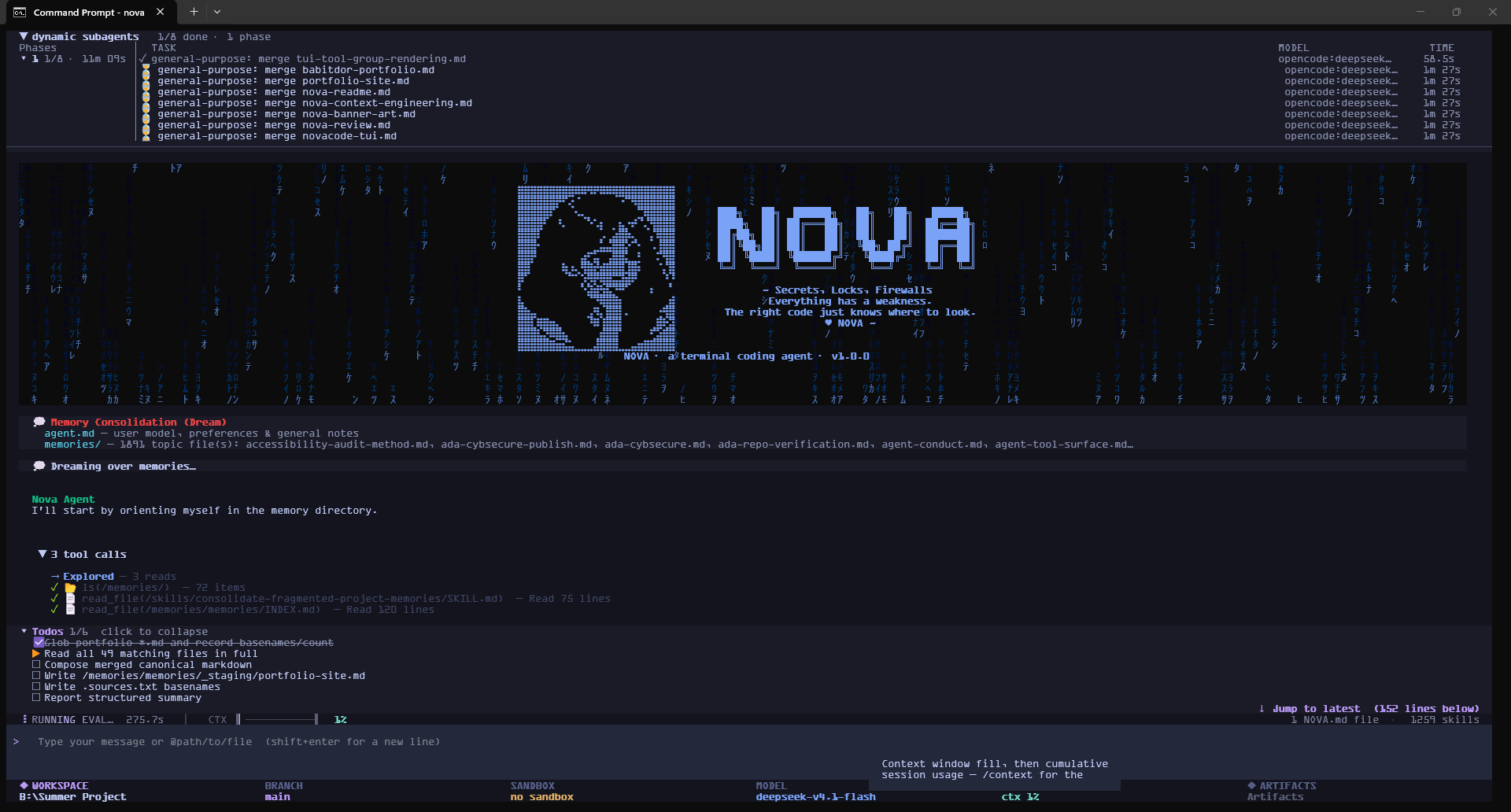
/model. Thinking models round-trip their reasoning_content, so multi-turn tool use works on providers that require itUSER.md/MEMORY.md) plus a LangGraph key/value store (remember/recall) for cross-session facts/cleared/ so the agent can read them back instead of losing them), then the conversation is compacted hierarchically, with a hard backstop that always keeps an 8k-token reserve. The pre-compaction transcript is archived to ~/.nova/sessions/<thread>/, and the context meter survives /resume/auth, or supply a custom System One endpoint and model. Cleared results are offloaded to /cleared/. Off by default; see System One Compaction/vision/council <task> has several agents propose plans independently, critique each other anonymously, and vote; a judge picks the top 3 and nothing is implemented until you approve one/research fans a question out to 7 research personas (web researcher, fact checker, literature reviewer, market analyst, financial analyst, technical researcher, synthesizer) and merges their findings.nova/plans/; a plan Nova approves on its own (auto-approve) goes to the global ~/.nova/plans/<project>/ archive.jinja template, A/B tests it against the current version using verifier pass/fail as the quality signal, and promotes or discards it. Packaged templates are never modified — all overrides live in ~/.nova/prompt_history//cron127.0.0.1 by default. Manage with /webhook/effort low|medium|high|off) — hot-swaps the model without restarting. Supports OpenAI o-series, Gemini 2.5/3, and Claude 3.7 Sonnet/evolution) — skills unlocked and levelled up at the completion of complex tasks, persisted in durable store/goal <text>) that is injected into every turn, with an optional acceptance rubric (/goal rubric <criteria>) graded by deepagents' RubricMiddleware. The agent runs autonomously toward the goal (capped at 5 turns by default) and stops when it declares GOAL ACHIEVED/btw <question>)/refine runs a refinement audit trail over the session's work, with history and rollback <id> subcommandsnova -p "...", or pipe the prompt on stdin) with text, json, or stream-json output — built for scripting and CI. --max-turns caps the run; --deny-tools auto-rejects tool approvals (fail-closed)~/.nova/logs/freeze.logshift+enter inserts a newline/session new, ctrl+n, alt+<n>) and switch between them@tab:<session-id> <message> or @<unique-title> <message>. Tab addresses appear in @ autocomplete. Requests queue while the recipient is busy; linked final replies appear in collapsed Markdown panels in both transcripts. Expand a panel to read it, use Attach to prompt to append it to your draft, or Open tab to navigate to the peer. Attachment never submits the draft or stops your current task. Agents can use list_sessions, send_session_message, read_session_messages, and reply_session_message. Each recipient keeps its own project and tool approvals. Only the explicit message is shared. Communication currently covers tabs in one Nova window; pending messages are held in memory. Use the explicit @tab: form when a title also names a file or subagent. Peer messages are agent prompts; slash-command text inside them is context rather than a CLI command.+/- marker colour, so added/removed lines stay visually distinct/chat — dark-themed, Claude-inspired, with Markdown rendering and code highlighting/cowork (alias /desktop) for a native window onto the same agentctrl+g) or hands-free always-listening (ctrl+l); code blocks are stripped before speaking. One-command install: uv tool install -e .[voice], or uv pip install -e '.[voice]' for uv run; manage with /voice. Swappable TTS/STT providers: cloud (ElevenLabs / Deepgram), Orpheus — an optional, very natural LLM-based local TTS (/voice settings tts orpheus; uv pip install -e '.[voice-orpheus]' + the CPU llama-cpp-python wheel; ~2GB model, slower than Piper), Parakeet — NVIDIA's local STT via sherpa-onnx (/voice settings stt parakeet; uv pip install -e '.[voice-parakeet]'), or Pocket TTS — Kyutai's lightweight local TTS (/voice settings tts pocket; uv pip install -e '.[voice-pocket]')tool_search, so they cost no context until neededcreate_artifact, update_artifact, list_artifacts) that persist across resume — browse them with /artifactslist_background_tasks, get_task_status, get_task_logs, terminate_task, restart_task, or the /tasks paneldaemon) — dev servers, watchers, and the likepython_kernel)oracle)code_search, find_related_code)/mcp to configure it..nova/wiki/ — ingest web clippings (/ingest), ask questions with wiki context (/ask), file conversation knowledge as wiki pages (/file), and browse the vault (/wiki).gitignore enforcement, command injection detection, URL sanitization, and input validation/restore or agent tools (list_trash, restore_file)/compact. Run several sessions in parallel panes (/session new) and resume a saved session for the current path with /resume <id>/voice STT provider and sent to the agent as an ordinary prompt (the transcript is echoed back so you can see what was heard). In a Telegram forum each session gets its own topic, and a question Nova asks you is deleted from the chat once you answer itgit clone https://github.com/Babitdor/NovaCode.git
cd NovaCode
uv sync
Run it:
uv run nova
Headless (non-interactive) — for scripting and CI:
# Run a single prompt and exit
uv run nova -p "summarize the changes in this repo"

# Machine-readable output, capped at 10 turns, no tool approvals
uv run nova -p "summarize the changes in this repo" --output-format json --max-turns 10 --timeout 120 --deny-tools

# Explicitly allow unattended tool approvals for an execution task
uv run nova -p "run the test suite and report failures" --auto-approve --output-format json --timeout 300

# Stream JSON lines, including provisional text updates
uv run nova -p "explain src/main.py" --output-format stream-json --include-partial-messages --timeout 120

# Or pipe the prompt on stdin
echo "explain src/main.py" | uv run nova -p
The one-shot -p mode accepts UTF-8 text (up to 1 MiB): close stdin and read the result on stdout. Diagnostics, native writes, and inherited subprocess output go to stderr. JSON records include schema_version: 1; the terminal result includes exit_code. Partial text events are provisional: a text_discard event invalidates the current preview, and committed assistant events remain authoritative.
--print does not enable auto-approve or silently trust a directory. Existing policy and session allowances still apply; actions requiring a human are rejected and reported with exit code 3. Pass --auto-approve explicitly when unattended execution is intended. --deny-tools rejects approval requests, but does not disable all tools or guarantee a read-only run. For an unapproved workspace, approve it interactively first or explicitly pass --trust-workspace to grant folder-only trust.
Exit codes: 0 success, 1 execution/startup/incomplete-stream error, 2 observed turn limit, 3 human input required, 124 timeout, 130 cancellation, 141 closed output pipe. Invalid CLI options use argparse's exit code 2. --max-turns counts observed main-agent rounds; it is not an exact API-call or spend limit. --timeout covers asynchronous startup and execution; cleanup gets a bounded grace period. A caller needing a strict wall-clock limit should also enforce a process timeout. This mode does not accept interactive replies or multiple JSON requests on stdin.
Persistent pipe mode — for the Nova Remote App:
nova --mode pipe
# Alias: nova --headless
Wait for the JSON ready event, then send JSON lines such as
{"type":"prompt","id":"mobile-1","content":"Investigate failing tests"}.
The process stays alive for multiple prompts and streams structured text, tool,
approval, and completion events. cancel stops work; shutdown exits cleanly.
Use an approved project as the child process's working directory, an absolute
binary, and shell: false. See the protocol and bridge guide
and Node process adapter.
For the Nova Remote App setup, pairing, project registry, relay, and multi-session
integration sequence, see the Remote App integration guide.
Optional — voice I/O adds STT, TTS, and VAD (~2 GB extra):
uv run nova
/voice test     # verify it works
ctrl+g          # push-to-talk
No need to install anything globally. uv run nova always runs the latest code from the repo — no stale snapshots, no PATH issues, no "which Python".
If you want a global nova command that works from any directory, add the repo's .venv to your PATH:
# Windows PowerShell:
$env:Path += ";$pwd\.venv\Scripts"
# Or add `B:\Summer Project 2026\Nova-Code\nova-code-cli\.venv\Scripts` to your system PATH
Then just type nova anywhere.
# 1. Clone the repository
git clone https://github.com/Babitdor/NovaCode.git
cd NovaCode

# 2. Create a virtual environment
python -m venv .venv

# 3. Activate the virtual environment
# On Windows (PowerShell):
.venv\Scripts\Activate.ps1
# On Windows (Command Prompt):
.venv\Scripts\activate.bat
# On macOS/Linux:
source .venv/bin/activate

# 4. Upgrade pip
pip install --upgrade pip

# 5. Install dependencies
pip install -e .
# Check if nova is installed
nova --version

# Run system diagnostics
nova doctor

# Start the CLI
nova
nova update --check  # check now without installing
nova update          # update the Nova installation running this command
The TUI checks in the background at startup and hourly. When an update is
available, a notification and a transcript notice tell you to exit and run
nova update, then restart. /update checks immediately from the TUI.
Set NOVA_DISABLE_UPDATE_CHECK=1 to disable background checks; manual checks
still work. Checks use a one-hour cache and stay quiet when offline.
Repo and Git installs compare commits against the tracked branch (Git package
installs use main), so pushing code can trigger a notification without changing
the package version. Package-index installs check the published package version.
For a stable release workflow, bump the version and publish the package for each
release; repo users can receive changes directly from Git.
Source checkouts must have no local changes and track the matching origin
branch. Updates fetch and merge with --ff-only, then refresh dependencies with
uv or pip. uv tool installations use uv tool upgrade; other package installs
use the running Python environment. Pinned Git refs, forks, and archive installs
remain managed through their original installer. Nova settings, sessions, MCPs,
and skills remain in their existing directories.
On Windows, uv-managed updates run in a separate process after nova update
and its launcher exit. Installer progress and the final result appear live in
the same terminal. When no update is needed, Nova displays
NovaCode is up to date. Close other Nova sessions before updating. If an older
updater reports
Failed to install entrypoint or Windows could not move Nova's launcher, run
this directly from PowerShell after closing Nova to install the corrected updater:
uv tool upgrade novacode-cli --reinstall
Configure your preferred LLM provider by setting environment variables:
# OpenAI (default)
export OPENAI_API_KEY="your-openai-api-key"

# Or Anthropic
export ANTHROPIC_API_KEY="your-anthropic-api-key"

# Or Google Gemini / NVIDIA / OpenRouter
export GOOGLE_API_KEY="your-google-api-key"
export NVIDIA_API_KEY="your-nvidia-api-key"
export OPENROUTER_API_KEY="your-openrouter-api-key"

# Optional: Web search (Tavily)
export TAVILY_API_KEY="your-tavily-api-key"
Create a .env file in your project root or home directory:
# .env file
OPENAI_API_KEY=your-openai-api-key
ANTHROPIC_API_KEY=your-anthropic-api-key
TAVILY_API_KEY=your-tavily-api-key
# Store keys securely via OS keychain
nova secrets set openai_api_key
nova secrets set anthropic_api_key
| Issue | Solution |
|---|---|
| Python version mismatch | python --version → specify version: uv venv --python 3.11 |
| Virtual env not activating (Windows) | Set-ExecutionPolicy -ExecutionPolicy RemoteSigned -Scope CurrentUser then retry |
| Package installation fails | uv cache clean && uv sync --reinstall |
| Missing dependencies | uv sync --all-extras |
| Import errors | uv pip install -e . --force-reinstall |
# Install development dependencies
uv sync --all-extras

# Run tests
pytest tests/

# Format and lint code
make format
make lint

# Type checking
mypy novacode_cli/
| Command | Description |
|---|---|
nova init | Initialize project or global configuration |
nova list | List all available agents |
nova help | Show help information |
nova reset --agent <name> | Reset an agent's memory/store |
nova skills | Manage agent skills (list, create, add, remove, find, update) |
nova mcp | Manage MCP servers (add, remove, list, install) |
nova config | View or edit configuration (show, set, get) |
nova secrets | Manage API keys securely (set, list, delete) |
nova doctor | Validate configuration and connections |
nova paths | Manage approved file system paths (list, revoke, clear) |
nova migrate | Migrate to new directory structure |
| Flag | Default | Description |
|---|---|---|
--agent | "nova-agent" | Agent identifier for separate memory stores |
--auto-approve | off | Auto-approve tool usage (disables HITL) |
--sandbox | os (Linux/macOS), none (Windows) | Sandbox provider: none, os, modal, daytona, runloop, docker, langsmith |
--no-sandbox | off | Run shell commands unconfined on the host (disables OS/Docker sandbox) |
--sandbox-id | None | Reuse an existing sandbox (skips create/cleanup) |
--sandbox-setup | None | Path to setup script to run in sandbox after creation |
--sandbox-vcpus | None | Number of virtual CPUs (LangSmith sandbox only) |
--sandbox-mem-bytes | None | Memory in bytes (LangSmith sandbox only, e.g. 8589934592 for 8GB) |
--sandbox-fs-capacity-bytes | None | Filesystem capacity in bytes (LangSmith sandbox only) |
--sandbox-snapshot | None | Snapshot name to boot from (LangSmith only) |
--sandbox-snapshot-id | None | Snapshot ID to boot from (LangSmith only) |
--ports | None | Port forwarding for Docker sandbox (format: PORT or HOST:CONTAINER, comma-separated) |
--no-splash | off | Disable the startup splash screen |
--continue / -c | off | Continue last session (optionally specify session ID) |
--resume / -r | off | Interactively select and resume a session |
--print / -p | off | Run a single prompt non-interactively and exit (pass the prompt as the value, or omit it to read from stdin) |
--output-format | text | Headless output format: text, json, or stream-json |
--max-turns | None | Headless only: cap the number of agent turns |
--deny-tools | off | Headless only: auto-reject tool approvals (fail-closed) instead of prompting |
--timeout | unlimited | Headless deadline in seconds, including asynchronous startup |
--include-partial-messages | off | Add provisional text events to stream-json output |
--trust-workspace | off | Headless only: explicitly grant current-folder trust |
--version | — | Show version number and exit |
Enter !command to stream output in the chat. Nova records the output and reports the result to the agent. Enter !!command to open an interactive terminal view for prompts, menus, and other commands that need keyboard input. Press Ctrl+G or Shift+Tab to return to chat while the command keeps running; use /tasks to inspect or stop it.
| Command | Description |
|---|---|
/help | Show interactive help |
/exit / /quit / /q | Exit the CLI |
/clear | Clear conversation history and reset session |
/tokens | Display token usage for the session |
/context | Display current context window status |
/cost | Show session token spend |
/verbose | Toggle verbose mode (show internal agent context) |
/steer | Set persistent steering instructions for the agent |
/goal | Set a persistent goal injected into every turn (/goal rubric <criteria> for an acceptance rubric; status / clear) |
/btw | Ask a side question on an ephemeral thread without touching the main conversation |
/save | Save current session |
/compact | Compact conversation history with optional focus |
/sessions | List, select, or delete saved sessions |
/ui | Inspect the optional UI panels; use patch, preview, commit, rollback, or reset |
/tabs | Session tabs: launch opens the approved project picker; resume picks a saved session to reopen as a tab; resume <id> accepts an exact ID or unique prefix. list / close manage tabs (ctrl+n, alt+<n>) |
/resume | Resume a saved session for this path (/resume <id>) |
/restore | Restore a previous file version from snapshots |
/files | Show file operation summary for the session |
/images | Manage tracked image references |
/artifacts | Open the artifacts list |
/tasks | Open the selected tab's background tasks panel (t: terminate, r: restart, l: logs) |
/log | Show workspace log files |
/servers | Show active server processes |
/tests | Run test suites |
/kill | Kill a process by PID |
/notifications | Review and manage notifications |
/remote | Manage remote sandbox connections |
/reindex | Rebuild semantic code search index |
/copy | Copy the last response (or the whole chat) |
/theme | Switch color theme |
| Command | Description |
|---|---|
/init | Generate/update project documentation and graph |
/mcp | Interactive MCP server management menu |
/model | Switch the model for the main agent, the subagents, the async agents or the dynamic agents |
/hooks | Manage lifecycle hooks (list, add, remove, enable, disable) |
/skills | Interactive skills manager |
/agents | Custom agent management (view, create, delete) |
/plugins / /plugin | Nova plugin management (list, enable, disable) |
/middleware | List active middleware (/reload-plugins to reload) |
/reload-plugins | Reload plugin registrations |
/plan | Invoke plan-mode agent for investigation & approval (approved plans are saved to .nova/plans/) |
/agent-server | Control the local LangGraph server for async agents — status, start, stop, restart, logs |
/trace | LangSmith tracing management (status, enable, projects) |
/ralph | Autonomous looping mode (background task execution) |
/council <task> | Plan a task with the council: agents propose independently, critique anonymously, vote, and a judge picks the top 3 for you to approve |
/council view [n] | Show the selected plans, or plan n in full |
/council approve <n> | Approve plan n and hand it to the coding agent (nothing is implemented before this) |
/council revise <notes> | Re-plan with your changes |
/council history | Past council runs (kept in .nova/council/) |
/chat | Launch local browser-based chat UI |
/cowork / /desktop | Launch the Nova Cowork desktop app (/cowork [task]) |
/trello | Browser-based task board server |
/research | Multi-agent research swarm (academic/market/stocks/technical/general) |
/dream | Run memory consolidation |
/browser-use | AI-powered browser automation |
/create | Launch the Skills & Agents web UI for browsing, editing, and creating skills/agents |
/skill:<name> | Directly invoke a skill by name (e.g., /skill:api-testing) |
/cron | Manage scheduled (heartbeat) tasks — list, add, remove, fire now |
/webhook | Manage webhook ingress server — start, stop, register sources, status |
/prompt | Manage evolving system-prompt templates — status, rollback, accept, reject |
/refine | Refinement audit trail (/refine history, /refine rollback <id>) |
/voice | Local voice I/O — status, on/off, mode ptt|listen, test (ctrl+g talk, ctrl+l listen) |
/effort | Set reasoning effort level — low, medium, high, or off (hot-swaps model) |
/vision | Configure image handling — status, set the auxiliary vision model, or force the main model multimodal/text-only |
/evolution | View the self-evolution log — skills unlocked (🧬) and levelled up (⬆️) |
/learning | Toggle Nova's autonomous learning loop (/learning on|off|status) |
/ingest | Ingest captured sources (Obsidian Web Clipper) into synthesized wiki pages |
/ask | Ask a question informed by wiki context — searches wiki and answers with relevant knowledge |
/file | File recent conversation knowledge as a wiki page under a topic path |
/wiki | List all synthesized pages in the project wiki vault |
In Telegram, send /tab to pick an approved project, then confirm the launch in
that topic. The new tab gets its own topic named NovaCode · <session name>;
chat there to work in that project. Existing topics adopt the session name on
reconnect, preserving their history. Names are synchronized when topics are
attached, with long names shortened to Telegram's 128-character limit.
Use /tab close to choose a tab to close. Telegram photos and image documents
are delivered to the session belonging to their topic.
In the main session's Telegram topic, slash commands use the normal TUI handlers,
including /skills, /model, /settings, and plugin commands. Interactive panels
show numbered choices: /choose N selects an action, /set N value fills a field,
/input N value submits it, /panel N changes pages, and /back closes the panel.
Only the requester in that topic can operate its controls. Commands received during
a task wait until it finishes. Invoke skills with /skill:name arguments or
/name arguments; skill invocation also works in child-session topics, using that
session's workspace. Child topics use the shared CLI handlers for other commands;
TUI-only management panels are available in the main topic.
Type / in Telegram to open its native command autocomplete menu. Nova publishes
commands and enabled skills for the configured chat on connection and refreshes
after skill management or plugin reload. Telegram allows up to 100 menu entries;
commands take priority, followed by skills. Names with hyphens appear with
underscores (for example /api_testing). Skills outside the menu remain available
with /skill:name. The menu is shared by all topics in that chat.
Each TUI tab shows its own Tasks footer. Open /tasks (or Ctrl+B with an empty
prompt) to select and terminate a background command. You can also ask Nova to
list or stop its background tasks; task IDs apply only within that session.
Nova saves an incoming prompt before model execution, checkpoints active sessions
every five seconds, and saves again when a turn ends. Atomic recovery snapshots
preserve the last complete conversation after a crash. Resume with nova --continue
or choose a session with /sessions. Abrupt termination can lose progress since
the last completed save and tokens the model has not yet committed to its history.
On restore, Nova rebuilds a continuation from saved history and session memory.
The loaded history is limited to approximately 30,000 tokens, including tool-call
arguments and retained reasoning; unpaired tool calls and results are excluded.
/context estimates the newly loaded context, including the continuation briefing,
current instructions, memory, and tool schemas. It does not reuse the previous
request's token total: provider usage becomes available after the next model call.
The local TUI supports optional notes, workspace files, and activity panels. Ask
Nova to customize them, or use /ui patch with a JSON object, then /ui preview
and /ui commit. Panel order follows the panels list. Layouts are saved per
workspace under ~/.nova/ui/. /ui rollback restores the saved layout. Use
/ui reset, Ctrl+Shift+Backspace, or start with nova --safe-ui for recovery.
Custom panel shortcuts use F6–F12; custom panel commands use /ui-<name>.
Conversation, input, approvals, and session controls stay protected. This first
version uses registered components; it does not load generated Python widgets.
Example: /ui patch {"panels":[{"id":"notes","type":"notes","title":"Notes","text":"Current task"}],"width":28}
External histories can be viewed or imported through /sessions, /import codex --last, or /import claude <id-or-file>. Switch the loaded reference with
/context imported full|compact|relevant [query]; compare histories using
/compare claude:<id> codex:<id>. Startup also supports nova --import claude --latest. See session import and adapter plugins.
The Active subagents panel shows running tasks with their model and elapsed time. It disappears when no tasks are active; Alt+S collapses or expands it.
| Tool | Description |
|---|---|
ls | List files and directories |
read_file | Read contents of a file |
write_file | Create or overwrite a file |
edit_file | Make targeted edits to existing files |
glob | Find files matching a pattern (e.g., **/*.py) |
grep | Search for text patterns across files |
shell | Execute shell commands (local mode) |
execute | Execute commands in remote sandbox (sandbox mode) |
task | Delegate work to subagents for parallel execution |
write_todos | Create and manage task lists for complex work |
think | Structured reasoning and reflection before acting |
web_search | Search the web using Tavily API |
duckduckgo_search | Web search using DuckDuckGo (no API key required) |
docs_search | Search official documentation sites |
fetch_url | Fetch and convert web pages to markdown (covers all HTTP methods) |
github_trending | Scrape GitHub trending repositories by language/time range |
hacker_news | Scrape Hacker News front page headlines |
linkedin_jobs | Search LinkedIn job listings (Playwright-based, no login) |
reddit_posts | Scrape Reddit posts by subreddit, user, or search query |
package_info | Get package version and dependency info (PyPI / npm) |
read_memory / write_memory | Read and write persistent markdown agent memories |
remember / recall | Store and fetch durable cross-session facts by key |
list_memories / forget | List and delete stored durable memory facts |
list_trash | List file snapshots available for recovery |
restore_file | Restore a deleted or overwritten file from snapshots |
create_artifact | Create a durable artifact (markdown, code, etc.) that persists across resume |
update_artifact | Update an existing artifact's title, type, or content |
list_artifacts | List all artifacts in the session |
list_background_tasks | List agent-launched background shell jobs |
get_task_status | Get a background task's status, runtime, and exit code |
get_task_logs | Read the recent output of a background task |
terminate_task | Stop a running background task |
restart_task | Restart a background task |
daemon | Start, stop, and tail long-lived background processes |
python_kernel | Run Python in a persistent kernel that keeps state between calls |
oracle | Ask several models the same question and have a judge synthesize the answer |
query_project_graph | Query the project graph for architectural information |
code_search | Semantic code search by description or symbol name |
find_related_code | Find code semantically similar to a known location |
start_async_task | Start a background task on a remote LangGraph server |
check_async_task | Check status and result of a background task |
update_async_task | Send updated instructions to a running background task |
cancel_async_task | Cancel a running background task |
list_async_tasks | List all tracked background tasks |
speak | Speak a short summary aloud via TTS |
skill_manage | Create, refine, or remove reusable skills |
wiki_read | Read a wiki page by path |
wiki_search | Search the project wiki for pages matching a query |
wiki_update_index | Add or update an entry in the wiki index |
wiki_write | Write or overwrite a wiki page |
enter_plan_mode | Switch to read-only investigation mode before coding |
exit_plan_mode | Present a plan for user approval and exit plan mode |
ask_user_question | Ask the user a multiple-choice question and wait for response |
Note: Potentially destructive operations require user approval. Use
--auto-approveto skip prompts.
NOVA includes a browser-based task board for managing and processing tasks visually. Start it with /trello.
/trello              Start the task board server and open browser
/trello stop         Stop the task board server
/trello status       Show current task board state
| Status | Description |
|---|---|
| Loaded | Task added, waiting to be processed |
| Processing | Agent is currently working on the task |
| Done | Task completed by the agent |
/remote once. The group must have Topics enabled, and the bot needs permission to manage topics./trello and turn on Telegram in the board header./add <task> in that topic. It becomes a card in Loaded. Use /status to see board counts.Only authorized Telegram users can add cards. Turning the toggle off pauses intake and keeps the topic and existing cards. Telegram task intake does not change your tool approval mode.
Move a card to Processing, or enable Auto-advance, to run it. In the TUI, execution waits until the board's owning tab is selected and idle. Keep Nova and the board running: cards are held in memory and are not restored after a restart. This topic accepts text tasks; use a session topic for images.
Launch a local browser-based chat interface with /chat:
/chat              Start the chat server and open browser
/chat stop         Stop the chat server
/chat status       Show chat server status
marked + highlight.jsBuilt-in tools that work with public data — no API keys required:
| Tool | Data Source |
|---|---|
github_trending | GitHub trending repositories |
hacker_news | Hacker News front page |
linkedin_jobs | LinkedIn job listings (Playwright) |
reddit_posts | Reddit posts by subreddit/user/search |
Standalone CLI scripts also available in scripts/scraper/.
NOVA includes Hermes, an autonomous learning system that runs in the background:
USER.md — User model: communication style, preferences, workflows, recurring frustrationsMEMORY.md — Cross-session memory: architecture decisions, reusable patterns, key factsskill_debate.py — Multi-perspective skill evaluation that compares new skills against existing ones, flags overlap, and suggests mergesskill_manager.py — Orchestrates skill creation from review feedback, failure-grounded refinement, and background curationtracker.py — Counts tool calls, maintains per-tool stats, and tracks skill invocations to drive refinement decisionsreview.py — Decides when to review (signal-based: failure bursts, substantive windows, hard cap) and runs out-of-band LLM reviewscurator.py — Archives unused skills and flags overlapping ones to keep the skill library leanevolution.py — Tracks skill unlocks and level-ups, persisted in durable store, viewable via /evolutionHermes has been extended with five self-improving subsystems, each closing a different feedback loop:
| Enhancement | Module | What It Does |
|---|---|---|
| 1. Inline Verification Loop | core/verification_loop.py, hermes/verifier.py | After each task, an out-of-band LLM call grades the output against a rubric. On a failing verdict, the agent is re-driven with feedback (up to 3 retries). Fail-open: any grading error yields a pass |
| 2. Prompt-Template Hill Climbing | hermes/prompt_evolution.py | When reviews repeatedly flag the same class of misunderstanding, proposes a targeted rewrite of the relevant .jinja template, A/B tests it using verifier pass/fail as the quality signal, and promotes or discards it. Packaged templates are never modified — overrides live in ~/.nova/prompt_history/ |
| 3. Cron / Heartbeat Scheduler | remote/scheduler.py, commands/cron_handler.py | Proactive scheduled tasks via standard 5-field cron expressions. Fired jobs go on the same queue as remote bridges, so they run like any prompt. Manage with /cron |
| 4. Threshold Auto-Tuner | hermes/tuner.py | Reads durable trace data and nudges review-trigger thresholds toward the observed working style. Damped convergence (0.2 weight) with hard floor/ceiling bounds — can never starve reviews or burn tokens |
| 5. Webhook Ingress Server | remote/webhook_server.py, remote/webhook_adapters.py, commands/webhook_handler.py | Let external systems (GitHub, Linear, or any signed sender) trigger a Nova run. Per-source HMAC-SHA256 secrets, timing-safe verification, binds to 127.0.0.1 by default. Manage with /webhook |
All enhancements share the same design principles:
hermes/config.py)asyncio tasks — no pause in agent operationhermes/config.pyEvery model call passes through this middleware chain (in order):
| Layer | Module | Purpose |
|---|---|---|
ModelRetryMiddleware | deepagents | Retry transient model failures (rate limits, 429) with exponential backoff |
VisionCaptionMiddleware | bootstrap/vision_router.py | Convert images to text for a text-only main model; pass-through when the main model is multimodal |
NovaLearningMiddleware | hermes/middleware.py | Hermes learning system — tool usage tracking, review cycles, memory tiers (opt-in) |
SecurityMiddleware | security/ | URL sanitization, unicode attack prevention |
BootstrapMiddleware | bootstrap/ | Environment snapshot injection |
SteeringMiddleware | bootstrap/steering.py | Injects persistent user instructions (mid-run steering) |
FileTrackerMiddleware | tracking/ | File-op tracking, result truncation |
LoopGuardMiddleware | tracking/loop_guard.py | Break stuck identical tool-call loops |
RubricMiddleware | deepagents | Rubric self-evaluation — dormant unless a rubric is set via /goal rubric |
VerdictScorer middleware | agents/tool_verdicts.py | Scores old tool results with the System One decision model so the next layer clears only the stale ones (inserted only when tool_verdicts_enabled is on) |
ContextEditingMiddleware | langchain.agents.middleware | Clear older tool-call outputs when the window-relative token trigger is reached; cleared results are offloaded to /cleared/ (agents/tool_offload.py) |
ShellMiddleware | shell.py | Shell tool + sandbox execution |
AgentMemoryMiddleware | memory/ | Agent memory loading (USER.md, MEMORY.md, project NOVA.md) |
TaskDisciplineMiddleware | agents/task_discipline.py | Todo recitation appended to the final system message |
MCPMiddleware | mcp/middleware.py | MCP tool provisioning (inserted dynamically when MCP servers configured) |
GraphContextMiddleware | bootstrap/graph_context.py | Injects project graph legend summary |
The project graph (.nova/project-graph.json, ~5000 nodes, ~13000 edges) is built by the /init pipeline. It provides:
Settings with 502 connections)query_project_graph("Settings") to find connected modules and community structureRefresh with /init (full rebuild) or /init --update (incremental).
Global Configuration (~/.nova/):
~/.nova/
├── agents/
│   └── default/
│       └── agent.md
├── skills/
│   └── web-research/
│       └── SKILL.md
├── hooks/
│   ├── pre_tool_call.py
│   └── post_tool_call.sh
└── trash/
    └── <session-id>/
        ├── manifest.json
        └── <snapshots>
Project Configuration (in your project root):
my-project/
├── AGENTS.md          # Optional concise instructions; Codex-compatible
├── .nova/
│   ├── NOVA.md        # Project-specific context and conventions
│   ├── config.json    # Project configuration
│   ├── hooks.json     # Project-specific hooks
│   └── skills/        # Project-specific skills
├── .claude/           # Also supported (Claude Code compatible)
└── .nova.config.json  # Project-level config (scoped)
~/.nova/agents/default/agent.md): Your personality, style, and universal preferencesNOVA.md, .nova/NOVA.md, CLAUDE.md, .claude/CLAUDE.md, or AGENTS.md): Project-specific instructions are combined when present. /init creates .nova/NOVA.md; project files never grant tool or path approvals.Keep the project guide short: what the project does, exact test/build commands, protected files, useful examples, and what counts as done. For a debugging request, give Nova the failing test or full error and the relevant file. For a style-sensitive change, point to an example file. For a decision, give the constraints and acceptance criteria. Nova should run the narrowest relevant check and report what it verified before calling the task complete.
Manage skills with:
# List all skills
nova skills list

# Create a new skill
nova skills create my-skill

# Create a project-specific skill
nova skills create my-skill --project

# View skill details
nova skills info web-research
nova skills add runs the official Skills CLI
(npx --yes skills@latest add) with your arguments unchanged. It requires Node.js
(current Skills CLI: Node 22.20+), npm/npx, and Git for repository sources. The first
run downloads the CLI; subsequent runs use npm's cache and check for updates.
It runs without Nova onboarding or an LLM API key.
# Discover skills and select which ones to install interactively
nova skills add vercel-labs/agent-skills

# List available skills without installing
nova skills add vercel-labs/agent-skills --list

# Select several skills; --skill selects existing names, it does not rename them
nova skills add owner/repo --skill first-skill second-skill

# Install to the shared directory that Nova reads (project scope is the default)
nova skills add owner/repo --agent universal --skill my-skill -y

# Install globally for all projects
nova skills add owner/repo --agent universal --skill my-skill -g -y

# Local folders, GitHub/GitLab URLs, SSH URLs, and owner/repo@skill are supported
nova skills add ./local-skills --agent universal --copy -y
nova skills add owner/repo@my-skill --agent universal -y

# Install every skill to every supported upstream agent
nova skills add owner/repo --all

# Alias
nova add skill owner/repo --list
The official installer controls selection, confirmation, copy/symlink behavior,
complete supporting files (including binary assets), errors, and lock files.
Nova reads shared skills from .agents/skills/ and ~/.agents/skills/ alongside
its existing .nova/skills/ and Claude skill directories. For Nova-only installs,
use --agent universal; other --agent choices target the upstream agents.
A source without valid skills produces the upstream result; add no longer
fabricates a skill from a README. Use nova skills create to author a new skill.
New installs use the upstream lock files and can be maintained with
npx skills check, npx skills update, and npx skills remove.
Nova's existing update command continues to manage older .nova lock entries.
The previous add-only --project flag is unnecessary (project is the default),
and --force is replaced by the upstream confirmation/--yes workflow.
The TUI's CTX meter uses the latest main-model input usage when available and
an estimated summary/tail breakdown after compaction or resume. Its percentage
uses the selected model's detected context window. SESSION accumulates main-model
input and output across tool-loop calls against a configured token budget (1M by
default); it is not a provider quota or billing estimate. Compaction preserves
SESSION usage, while /clear resets it. Subagents and auxiliary model calls are
not included, and historical usage is not restored from saved sessions.
By default the context pipeline clears every tool result older than the token trigger except the newest few. System One compaction replaces that age rule with a judgement: a small decision model is shown a skeleton of the conversation and asked, per result, whether it is still needed. Only results scored below the keep threshold are cleared, and an unjudged result is always kept (the feature fails open).
It is off by default. Open /model → Decisions to select Jev, Tev1, or Custom System One, edit the decision model and endpoint, and toggle Enable System One tool pruning. Save persists the settings and rebuilds the current agent while retaining your chat model and conversation. Cancel discards the changes.
To use hosted Jev, open /auth, select Jev (System One compaction), and save your TypeSafe API key. The Decisions tab's Manage API key button opens the same manager without discarding your draft. Keys use Nova's existing credential store as TYPESAFE_API_KEY. Saving a key does not change the decision model or enable pruning; those settings belong to the Decisions tab. Create keys in the TypeSafe console; the official API reference describes the request format.
For environment-based authentication, set TYPESAFE_API_KEY and configure:
{
  "tool_verdicts_enabled": true,
  "tool_verdict_endpoint": "https://api.typesafe.ai/v1/systemone",
  "tool_verdict_model": "jev-latest"
}
Local and custom models remain optional. Set their full System One endpoint and the model name accepted by that server in ~/.nova/Nova.config.json. There is no model allowlist: Kev1 and future compatible models work through the same interface. For example, the existing local Tev1 setup is:
{
  "tool_verdicts_enabled": true,
  "tool_verdict_endpoint": "http://localhost:11434/v1/systemone",
  "tool_verdict_model": "tev1:4b",
  "tool_verdict_keep_threshold": 0.5
}
| Key | Meaning | Default |
|---|---|---|
tool_verdicts_enabled | Master switch | false |
tool_verdict_endpoint | System One endpoint | http://localhost:11434/v1/systemone |
tool_verdict_model | Decision model (tev1:4b separates answers cleanly; the 0.8B size does not) | tev1:4b |
tool_verdict_keep_threshold | Minimum probability a result is still needed for it to survive | 0.5 |
If a custom endpoint requires authentication, use Custom System One (optional API key) in /auth, or set SYSTEM_ONE_API_KEY. Local endpoints can run without a real key. TypeSafe credentials are sent only to the exact official Jev endpoint; custom endpoints use the separate custom credential. Configure the endpoint/model and toggle pruning in Decisions. Hand-edited configuration applies after restarting Nova; set tool_verdicts_enabled to false to disable it.
This feature decides which tool outputs to offload during context management. /compact summary generation continues to use your active session model. Thresholds should be evaluated separately for each decision model.
Why it is opt-in: the current scorer budgets about 2,000 tokens and considers only the newest 12 results, including when Jev is selected. Measured on six real sessions with Tev1, the default age rule cleared more (70 results / 72,682 chars against 49 / 18,364) with fewer regretted clears (0.19 against 0.44 per 1k). These measurements do not establish Jev's performance. The flag stays so each model can be tried live and re-measured.
Nova keeps less-used tool schemas out of the model's prompt and loads them with
search_tools. Search covers every currently available tool, including core and
already loaded tools, plus specialist subagents. Use a capability description,
an exact name, a partial name, or a wildcard such as playwright_*.
search_tools(query="*", limit=20, offset=0) browses the catalog; increase
offset to retrieve later pages. Results load the tools for the next model call
and indicate whether a subagent uses task or start_async_task. Search covers
tools registered for the current session.
NOVA has two kinds of subagent. In-process specialists run inside the session, behind its approvals and sandbox, and answer in the same turn. Async agents run in the background and report back when they finish.
| Subagent | Description | Auto-loaded Skills |
|---|---|---|
general-purpose | Any delegated task; the default | — |
code-explorer | Navigate, understand, and query large codebases | codebase-explorer/, graphify/ |
refactoring-specialist-agent | Code smells, technical debt, design patterns | improve-codebase-architecture/ |
bug-fix-agent | Systematic bug diagnosis and fix | systematic-debugging/ |
browser-automation-agent | Web testing, forms, screenshots, data extraction; drives a real browser through the Playwright MCP tools, and the desktop through cua-driver | agent-browser/, browser-use/, web-research/ |
Their graphs are compiled on first use, so unused ones cost nothing at start-up.
Longer, self-contained jobs (review, documentation, tests, security audits, research) are async agents, below. Domain know-how such as frontend, backend or Docker work is a skill the main agent loads on demand.
Dispatched by /research; kept out of the everyday roster and loaded on demand.
| Subagent | Description |
|---|---|
web-researcher | Broad web search and source gathering |
fact-checker | Verifies claims against independent sources |
literature-reviewer | Academic papers and prior work |
market-analyst | Markets, competitors, and trends |
financial-analyst | Stocks and financial data |
technical-researcher | Libraries, APIs, and technical trade-offs |
research-synthesizer | Merges the findings into one report |
| Subagent | Description |
|---|---|
documentation-update-agent | Auto-synchronize project docs and changelogs with git commits |
code-review-agent | Review uncommitted/recent changes asynchronously |
test-generation-agent | Generate/maintain test suites in the background |
dependency-audit-agent | Audit dependencies for updates and security vulnerabilities |
refactoring-agent | Analyze and improve code quality in the background |
plan-scout-agent | Read-only directory scans dispatched during plan mode |
security-audit-agent | Full security audit (OWASP Top 10, secrets, auth flaws); read-only |
test-runner-agent | Run the test suite and report failures with likely causes; test-runner commands only |
research-agent | Web research with sourced findings |
Async agents read, search and report; the ones that write (documentation, tests, refactoring) do so unattended, so give them a self-contained task. Work that needs your approval along the way belongs with an in-process specialist, because approvals do not reach the server.
Start any with start_async_task(), check status with check_async_task().
When Nova has a local server planned or a usable external server, the async
tools stay visible to the model without a tool search. The local server starts
on the first dispatch. Otherwise Nova uses its in-process subagents.
The dynamic subagents panel shows only active tasks. Completed, failed and stopped rows disappear, and the panel hides when no tasks remain active. Background tasks remain visible across foreground turns while they are running.
Lifecycle hooks for customizing agent behavior:
| Hook | When It Fires | Use Case |
|---|---|---|
pre_tool_call | Before a tool is executed | Validate inputs, log, modify params |
post_tool_call | After a tool completes | Process results, log, trigger notifications |
on_message | When a message is received | Filter content, add context |
on_error | When an error occurs | Custom error handling, recovery |
# List all hooks
/hooks list

# Add a hook
/hooks add pre_tool_call my_hook --command "echo 'Tool called'"

# Add a hook from a file
/hooks add post_tool_call logger --file hooks/logger.py

# Enable/disable hooks
/hooks enable my_hook
/hooks disable my_hook
Hooks can be Python scripts (full access to internals), shell commands, or any executable.
Extend the agent with Model Context Protocol servers:
# Add from preset
nova mcp add google-drive --preset google-drive
nova mcp add gmail --preset gmail
nova mcp add google-docs --preset google-docs
nova mcp add playwright --preset playwright

# Custom HTTP transport
nova mcp add my-server --transport http --url https://example.com/mcp

# Custom stdio transport
nova mcp add my-server --transport stdio --command "python -m my_mcp_server"
Available Presets: google-drive, gmail, google-docs, playwright, serena, context7, apify, cua-driver, sequential-thinking, chrome-devtools, firecrawl, tavily, exa, perplexity
Google MCP setup: Open /mcp, select Google Drive, Gmail, or Google Docs, and install the preset. These use the community-maintained Google Workspace MCP server, launched through uvx workspace-mcp with only the selected service's core tools. uv must be installed.
Create a Google Cloud OAuth client using the upstream quick-start guide, enable the Drive, Gmail, and Docs APIs you intend to use, and download its client JSON. Register http://localhost:8001/oauth2callback for Drive, http://localhost:8002/oauth2callback for Gmail, and http://localhost:8003/oauth2callback for Docs. Supply the JSON file's full path when Nova prompts; the same file can serve all three presets. Google consent is completed through the server's authentication flow after restarting the session. Nova stores the file path in MCP configuration; the client secret remains in your JSON file. No Google account is connected merely by adding a catalog preset.
MCP Management:
nova mcp list              # List all configured servers
nova mcp remove my-server  # Remove a server
NOVA supports multiple sandbox providers for safe code execution:
# OS sandbox (default on Linux/macOS — host files, shell confined to workspace)
nova --sandbox os

# Docker (opt-in on Windows, with workspace binding)
nova --sandbox docker

# Modal (cloud)
nova --sandbox modal

# Runloop (cloud)
nova --sandbox runloop

# Daytona (cloud)
nova --sandbox daytona

# LangSmith Sandboxes (hardware-virtualized microVMs)
nova --sandbox langsmith

# Force unconfined local execution
nova --no-sandbox

# Reuse an existing sandbox
nova --sandbox-id <id>

# Port forwarding (Docker)
nova --sandbox docker --ports 8080:8080

# LangSmith sandbox resource config
nova --sandbox langsmith --sandbox-vcpus 2 --sandbox-mem-bytes 8589934592
The default sandbox image is python:3.11-slim.
NOVA supports Python entry-point based plugins that can register slash commands and add middleware at defined slots. Plugins are discovered via the nova.plugins entry point group and can contribute:
# List plugins
/plugins

# Enable/disable a plugin
/plugins enable my-plugin
/plugins disable my-plugin
NOVA automatically snapshots files before destructive operations:
rm shell commands — captured before deletionwrite_file — previous content savededit_file — pre-edit content saved# Interactive restore
/restore
# Restore by index
/restore 1
# Restore by path
/restore src/utils.py
Agent tools: list_trash() to see snapshots, restore_file("path") to restore.
Snapshots stored in ~/.nova/trash/<session-id>/. Files over 10 MB skipped.
NOVA includes Vixie, a background desktop companion server:
# Run unit tests
make test

# Run all tests (including integration)
make test_all

# Run with coverage
make test_cov

# Run specific test file
make test TEST_FILE=tests/unit_tests/test_specific.py

# Watch mode
make test_watch
Test suite includes:
| Directory | What it tests |
|---|---|
tests/test_hermes/ | Hermes learning system — middleware, memory, skill discovery, verifier, tuner, prompt evolution |
tests/test_tui_app.py | Textual TUI — animations, chat, modals, tool groups |
tests/test_workdir_grep.py | Sandbox-backed grep path-rebased execution |
tests/test_notifications.py | Notification system integration |
tests/test_context_breakdown_tokens.py | Token budget and context optimization |
tests/test_backends/ | Filesystem backend virtual-path operations |
tests/test_remote_cron.py | Cron scheduler — expression parsing, job lifecycle, tick loop |
tests/test_webhook_server.py | Webhook ingress — signature verification, adapter parsing, server lifecycle |
| Command | Description |
|---|---|
make test | Run unit tests (ignores shell/process/e2e tests) |
make test_integration | Run integration tests |
make test_all | Run all tests |
make test_watch | Watch mode with ptw |
make test_cov | Run tests with coverage (term-missing report) |
make run | Run uv run nova |
make sync | Sync dependencies (uv sync) |
make lock | Lock dependencies (uv lock) |
make tree | Show dependency tree (uv tree) |
make outdated | Show outdated packages (uv tree --outdated) |
make add PACKAGE=<name> | Add a dependency (uv add) |
make add-dev PACKAGE=<name> | Add a dev dependency |
make remove PACKAGE=<name> | Remove a dependency |
make reinstall | Full reinstall of novacode-cli + deepagents |
make run_reinstall | Reinstall then run nova |
make lint | Check formatting and linting |
make format | Auto-format code |
make clean | Clean caches |
User Input → CLI Entry (main.py) → Agent Loop (core/agent_loop.py) → UI Renderer
main.py → cli_main()) — parses args, initializes SessionState, runs optional onboarding, then enters the Textual TUI (or the headless runner with -p)core/agent_loop.py → iterate_agent_events()) — the single canonical async generator driving the LangGraph agent streamui_events.py) — dataclass instances decoupled from rendering; the TUI, the headless runner, and the remote bridges all consume the same event typesCore:
main.py — Entry point, CLI loop, argument parsingcli_session.py — Session management, auto-save, display helpersinput.py — prompt_toolkit input handling, completers, image paste, keybindingscore/agent_loop.py — Canonical async generator driving the LangGraph agent streamcore/verification_loop.py — Inline verification wrapper around iterate_agent_events (Enhancement 1)Agent:
agents/core_agent.py — Agent creation, configuration, middleware wiringagents/default_subagents/ — the in-process specialists, the research personas, and the client specs for the async agentsagents/async_agents/ — the nine async agent graphs and their langgraph.jsonagents/server_launcher.py — launches the async agents' server on demand, in the session's projectagents/plan_agent/ — Plan mode agent with planning middlewareCommands:
commands/ — 20+ CLI command handlers (commands/__init__.py aggregates via CommandRegistry)commands/chat_handler.py — /chat command — local web chat UIcommands/cron_handler.py — /cron command — scheduled task management (Enhancement 3)commands/webhook_handler.py — /webhook command — webhook ingress server management (Enhancement 5)commands/prompt_handler.py — /prompt command — evolving prompt template management (Enhancement 2)Configuration:
config/config.py — Settings hub (502 connections), color scheme, model factory, console initconfig/nova_config.py — Persistent JSON config (~/.nova/Nova.config.json)config/model_create.py — Model instantiation for all providersconfig/model_manager.py — Model provider managementContext & Memory:
context/ — Context budget tracking, eviction, optimization, growth monitoringmemory/store.py — Durable LangGraph key/value store with stdlib-fallbackprompts/ — Jinja2 template renderingLearning (Hermes):
hermes/middleware.py — NovaLearningMiddleware (thin orchestrator)hermes/tracker.py — ToolUsageTracker: counters, per-tool stats, skill invocation trackinghermes/review.py — ReviewRunner: signal-based review scheduling, out-of-band LLM reviewhermes/skill_manager.py — SkillManager: create-from-review, failure-grounded refinementhermes/skill_discovery.py — Skill spec parsing/writing, effectiveness checks, refinementhermes/curator.py — Archive unused skills, flag overlapping oneshermes/skill_debate.py — Multi-perspective skill evaluation and merge suggestionshermes/evolution.py — Skill unlock/level-up tracking, viewable via /evolutionhermes/memory_tiers.py — USER.md / MEMORY.md auto-maintenancehermes/config.py — Centralized thresholds, bounds, and store namespace constantshermes/verifier.py — Inline output verifier (Enhancement 1)hermes/prompt_evolution.py — Prompt-template hill climbing with A/B testing (Enhancement 2)hermes/tuner.py — Threshold auto-tuner via hill-climbing inward (Enhancement 4)UI (Rich console):
ui/ui_elements.py — Token tracking, help, diff rendering, todosui/execution.py — Tool execution orchestration and approval flowui/streaming.py — Real-time output streamingui/tool_processing.py — Tool call formatting and displayui/hitl_approval.py — Human-in-the-loop approval UIui/subagent_tracking.py — Subagent progress visualizationTUI (Textual):
tui/app.py — NovaApp: chat messages, modals, keyboard shortcuts, condensed tool groups, history, parallel session panestui/animations.py — Fade/slide/zoom, pulsing borders, shimmer, thinking dotsHeadless:
headless/runner.py — Non-interactive single-prompt runner (nova -p)headless/output.py — text / json / stream-json output formattingTools:
tools/ — HTTP fetch, search, web scraping, package info, git, LSP, browser, memory, reflection, project graph, code search, plan mode, artifacts, background jobs, daemons, Python kernel, oracleIntegrations:
integrations/ — Sandbox providers and workdir backendmcp/ — MCP client, config, middleware, presetsremote/ — Discord and Telegram bridges, cron scheduler, webhook ingress serverremote/scheduler.py — Cron / heartbeat scheduler (Enhancement 3)remote/webhook_server.py — Webhook ingress HTTP server (Enhancement 5)remote/webhook_adapters.py — Per-source payload adapters with timing-safe signature verificationInfrastructure:
session/ — Session persistence, restore, summarization, prompt buildingsessions/ — Parallel session supervisor, worker, lease, and worktree managementstates/slices/ — 6 state slices (UISettings, AgentRuntime, RemoteBridge, BackgroundTask, Notifications, Wiki)states/Session.py — SessionState composite dataclassartifacts/ — Durable artifact registry and servingdaemons/ — Long-lived background process registrycowork/ — Nova Cowork desktop app launcher, broker middleware, and policyserver/ — Local HTTP server, event adapter, and session manageraudio/ — Voice I/O: capture, VAD, STT/TTS providers, speakable-text extractionserver_runner/ — Dev server and test runner lifecycleprocess_manager.py — Subprocess lifecycle, health checks, cleanuptracking/ — File tracking, run logging, LangSmith, workspace anchoring, loop guardSafety & Recovery:
errors/ — Error taxonomy (14 categories) and recovery handlerssecurity/ — Unicode security and input validationgit_safety.py — Dangerous command detection and injection preventionfile_ops.py — File operation tracking, diff, approval previewsrecovery.py — File recovery snapshotspath_approval.py — Path-based operation approvalSpecialized:
bootstrap/ — Environment snapshots, project graph context, steering instructionsinit/ — Project initialization (detect → extract → generate → graph)skills/ — Skill loading, creation, locking, system prompt generationhitl/ — Human-in-the-loop interrupt configurationbootstrap/vision_router.py — Vision captioning middleware (converts images to text for a text-only main model; passes images straight through when the main model is multimodal — see config/model_capabilities.py and the /vision command)vixie/ — Desktop companion server (notifications, system tray)plugins/ — Plugin systemwiki/ — Persistent project wiki: ingest, ask, file, and vault managementhooks.py — Lifecycle hook dispatchcompaction.py — Hierarchical conversation summarization via LLM, with a pre-compaction transcript archiveagents/tool_offload.py — Offloads cleared tool results to /cleared/ so they stay readableagents/tool_verdicts.py — System One compaction: a Tev1 decision model picks which tool results are stale (opt-in)tui/gc_tuning.py — Garbage-collection tuning that keeps collection pauses out of the UIplans.py — Plan management and persistenceonboarding.py — Interactive first-run setupdoctor.py — System diagnosticsmigrate.py — Configuration migrationThe base install is kept lean. Heavier features are extras:
# Real-browser automation: /browser-use and the LinkedIn scraper (~330 MB)
pip install novacode-cli[browser]

# The local server the async agents run on
pip install novacode-cli[agents-server]

# Voice I/O (STT + TTS + VAD) — ~2 GB extra
pip install novacode-cli[voice]

# Orpheus TTS — very natural LLM-based local TTS
pip install novacode-cli[voice-orpheus]

# Parakeet STT — NVIDIA local speech-to-text via sherpa-onnx
pip install novacode-cli[voice-parakeet]

# Pocket TTS — lightweight local TTS
pip install novacode-cli[voice-pocket]
The nine async subagents (code review, test generation, documentation updates and
the rest) talk Agent Protocol to a LangGraph server, which NOVA launches itself.
Their graphs live in novacode_cli/agents/async_agents/. One optional extra
provides the server:
uv sync --extra agents-server # once: installs langgraph-cli, the dev server
With that extra installed, NOVA runs the server itself, with no Docker involved:
start_async_task (a few seconds)
and stops when NOVA exits. A session that never delegates never pays for it.A server you started yourself is used only if you declare the directory it works
in with NOVA_ASYNC_AGENT_ROOT=<its directory> and that is the current project;
otherwise NOVA launches its own. Without the extra, NOVA falls back to the
in-process subagents.
Control it from inside the TUI with /agent-server:
/agent-server status     is a server running, which port, which log
/agent-server start      launch one now (blocking, first run can take a minute)
/agent-server stop       stop this session's server
/agent-server restart    stop, then start on a fresh port
/agent-server logs       the last 20 lines of the server log
--no-agent-server turns the automatic launch off for a run, and
--agent-server-port N pins the port instead of picking a free one.
/model covers four roles. The list opens with a Roles section; the row marked
target is where the next model pick goes. Choosing a role row retargets the picker
instead of closing it, so the flow is: pick the role, then pick the model.
| Role | Covers | Takes effect |
|---|---|---|
| Main agent | the agent you talk to | immediately (hot-swapped) |
| Subagents | in-process delegation via the task tool | on the next dispatch |
| Async agents | the nine graphs on the LangGraph server | on the next dispatch |
| Dynamic agents | agents discovered in the agent directories, which is also what an /eval fan-out dispatches | on the next dispatch |
Dynamic describes where an agent definition comes from; Async describes execution on the agent server. These can overlap: a custom agent.md with async: true remains available in-process and can also be served as a background agent. The Dynamic model applies to its in-process dispatch; Async applies to the server dispatch. This agent server is separate from Telegram remote access.
Dynamic inherits Subagents → Main when unset, unless the agent's own model: overrides it. Async follows Async role → explicit server environment → Main. If an async per-run model cannot be built, the current server middleware logs a warning and falls back to its graph default; the role picker therefore shows the requested model, which can differ from the model actually used after a fallback.
Any role you leave unset keeps its previous behaviour, which is what every role did before
this existed, so an untouched setup behaves exactly as before: the subagents and the dynamic
agents inherit the main agent's model, and so do the async agents. A discovered
agent can also name its own model in agent.md frontmatter, and that wins over the
dynamic role:
---
name: custom-agent
model: anthropic:claude-sonnet-4-5-20250929
---
The roles live in ~/.nova/Nova.config.json, one key per role, and the panel above
the transcript reports each task's real model rather than assuming the session one.
Provider-agnostic: any provider NOVA supports can run them. In order of precedence:
/model;ASYNC_AGENT_PROVIDER / ASYNC_AGENT_MODEL in the environment;So with nothing configured, the async agents run on whatever the session runs on,
and a /model change applies to the next dispatch.
| Variable | Meaning |
|---|---|
ASYNC_AGENT_PROVIDER | ollama, openai, anthropic, google, openrouter, opencode, nvidia |
ASYNC_AGENT_MODEL | model id for that provider |
PLAN_SCOUT_MODEL | per-agent override, plan-scout only; wins over all of the above |
| the provider's key var | e.g. OPENAI_API_KEY, ANTHROPIC_API_KEY; read from the environment or the keychain |
This package depends on the deepagents library for core agent functionality, which is automatically installed as a dependency. Core dependencies include LangChain ecosystem (LangGraph, LangSmith), Rich, Textual, prompt-toolkit, and various integration libraries.
MIT License — see LICENSE file for details.
Contributions are welcome! Please feel free to submit a Pull Request.
git checkout -b feature/amazing-feature)git commit -m 'Add amazing feature')git push origin feature/amazing-feature)A powerful open-source terminal-based AI coding assistant that runs in your terminal, Built on top of the deepagents library which provides the core agent architecture.
See the code
An open-source, terminal-based AI coding assistant built on LangGraph and the deepagents framework. NOVA runs entirely in your terminal with a Textual TUI, a headless non-interactive mode for scripting and CI, and remote bridges for Discord/Telegram — similar to Claude Code, but extensible and transparent.
/model. Thinking models round-trip their reasoning_content, so multi-turn tool use works on providers that require itUSER.md/MEMORY.md) plus a LangGraph key/value store (remember/recall) for cross-session facts/cleared/ so the agent can read them back instead of losing them), then the conversation is compacted hierarchically, with a hard backstop that always keeps an 8k-token reserve. The pre-compaction transcript is archived to ~/.nova/sessions/<thread>/, and the context meter survives /resume/auth, or supply a custom System One endpoint and model. Cleared results are offloaded to /cleared/. Off by default; see System One Compaction/vision/council <task> has several agents propose plans independently, critique each other anonymously, and vote; a judge picks the top 3 and nothing is implemented until you approve one/research fans a question out to 7 research personas (web researcher, fact checker, literature reviewer, market analyst, financial analyst, technical researcher, synthesizer) and merges their findings.nova/plans/; a plan Nova approves on its own (auto-approve) goes to the global ~/.nova/plans/<project>/ archive.jinja template, A/B tests it against the current version using verifier pass/fail as the quality signal, and promotes or discards it. Packaged templates are never modified — all overrides live in ~/.nova/prompt_history//cron127.0.0.1 by default. Manage with /webhook/effort low|medium|high|off) — hot-swaps the model without restarting. Supports OpenAI o-series, Gemini 2.5/3, and Claude 3.7 Sonnet/evolution) — skills unlocked and levelled up at the completion of complex tasks, persisted in durable store/goal <text>) that is injected into every turn, with an optional acceptance rubric (/goal rubric <criteria>) graded by deepagents' RubricMiddleware. The agent runs autonomously toward the goal (capped at 5 turns by default) and stops when it declares GOAL ACHIEVED/btw <question>)/refine runs a refinement audit trail over the session's work, with history and rollback <id> subcommandsnova -p "...", or pipe the prompt on stdin) with text, json, or stream-json output — built for scripting and CI. --max-turns caps the run; --deny-tools auto-rejects tool approvals (fail-closed)~/.nova/logs/freeze.logshift+enter inserts a newline/session new, ctrl+n, alt+<n>) and switch between them@tab:<session-id> <message> or @<unique-title> <message>. Tab addresses appear in @ autocomplete. Requests queue while the recipient is busy; linked final replies appear in collapsed Markdown panels in both transcripts. Expand a panel to read it, use Attach to prompt to append it to your draft, or Open tab to navigate to the peer. Attachment never submits the draft or stops your current task. Agents can use list_sessions, send_session_message, read_session_messages, and reply_session_message. Each recipient keeps its own project and tool approvals. Only the explicit message is shared. Communication currently covers tabs in one Nova window; pending messages are held in memory. Use the explicit @tab: form when a title also names a file or subagent. Peer messages are agent prompts; slash-command text inside them is context rather than a CLI command.+/- marker colour, so added/removed lines stay visually distinct/chat — dark-themed, Claude-inspired, with Markdown rendering and code highlighting/cowork (alias /desktop) for a native window onto the same agentctrl+g) or hands-free always-listening (ctrl+l); code blocks are stripped before speaking. One-command install: uv tool install -e .[voice], or uv pip install -e '.[voice]' for uv run; manage with /voice. Swappable TTS/STT providers: cloud (ElevenLabs / Deepgram), Orpheus — an optional, very natural LLM-based local TTS (/voice settings tts orpheus; uv pip install -e '.[voice-orpheus]' + the CPU llama-cpp-python wheel; ~2GB model, slower than Piper), Parakeet — NVIDIA's local STT via sherpa-onnx (/voice settings stt parakeet; uv pip install -e '.[voice-parakeet]'), or Pocket TTS — Kyutai's lightweight local TTS (/voice settings tts pocket; uv pip install -e '.[voice-pocket]')tool_search, so they cost no context until neededcreate_artifact, update_artifact, list_artifacts) that persist across resume — browse them with /artifactslist_background_tasks, get_task_status, get_task_logs, terminate_task, restart_task, or the /tasks paneldaemon) — dev servers, watchers, and the likepython_kernel)oracle)code_search, find_related_code)/mcp to configure it..nova/wiki/ — ingest web clippings (/ingest), ask questions with wiki context (/ask), file conversation knowledge as wiki pages (/file), and browse the vault (/wiki).gitignore enforcement, command injection detection, URL sanitization, and input validation/restore or agent tools (list_trash, restore_file)/compact. Run several sessions in parallel panes (/session new) and resume a saved session for the current path with /resume <id>/voice STT provider and sent to the agent as an ordinary prompt (the transcript is echoed back so you can see what was heard). In a Telegram forum each session gets its own topic, and a question Nova asks you is deleted from the chat once you answer itgit clone https://github.com/Babitdor/NovaCode.git
cd NovaCode
uv sync
Run it:
uv run nova
Headless (non-interactive) — for scripting and CI:
# Run a single prompt and exit
uv run nova -p "summarize the changes in this repo"

# Machine-readable output, capped at 10 turns, no tool approvals
uv run nova -p "summarize the changes in this repo" --output-format json --max-turns 10 --timeout 120 --deny-tools

# Explicitly allow unattended tool approvals for an execution task
uv run nova -p "run the test suite and report failures" --auto-approve --output-format json --timeout 300

# Stream JSON lines, including provisional text updates
uv run nova -p "explain src/main.py" --output-format stream-json --include-partial-messages --timeout 120

# Or pipe the prompt on stdin
echo "explain src/main.py" | uv run nova -p
The one-shot -p mode accepts UTF-8 text (up to 1 MiB): close stdin and read the result on stdout. Diagnostics, native writes, and inherited subprocess output go to stderr. JSON records include schema_version: 1; the terminal result includes exit_code. Partial text events are provisional: a text_discard event invalidates the current preview, and committed assistant events remain authoritative.
--print does not enable auto-approve or silently trust a directory. Existing policy and session allowances still apply; actions requiring a human are rejected and reported with exit code 3. Pass --auto-approve explicitly when unattended execution is intended. --deny-tools rejects approval requests, but does not disable all tools or guarantee a read-only run. For an unapproved workspace, approve it interactively first or explicitly pass --trust-workspace to grant folder-only trust.
Exit codes: 0 success, 1 execution/startup/incomplete-stream error, 2 observed turn limit, 3 human input required, 124 timeout, 130 cancellation, 141 closed output pipe. Invalid CLI options use argparse's exit code 2. --max-turns counts observed main-agent rounds; it is not an exact API-call or spend limit. --timeout covers asynchronous startup and execution; cleanup gets a bounded grace period. A caller needing a strict wall-clock limit should also enforce a process timeout. This mode does not accept interactive replies or multiple JSON requests on stdin.
Persistent pipe mode — for the Nova Remote App:
nova --mode pipe
# Alias: nova --headless
Wait for the JSON ready event, then send JSON lines such as
{"type":"prompt","id":"mobile-1","content":"Investigate failing tests"}.
The process stays alive for multiple prompts and streams structured text, tool,
approval, and completion events. cancel stops work; shutdown exits cleanly.
Use an approved project as the child process's working directory, an absolute
binary, and shell: false. See the protocol and bridge guide
and Node process adapter.
For the Nova Remote App setup, pairing, project registry, relay, and multi-session
integration sequence, see the Remote App integration guide.
Optional — voice I/O adds STT, TTS, and VAD (~2 GB extra):
uv run nova
/voice test     # verify it works
ctrl+g          # push-to-talk
No need to install anything globally. uv run nova always runs the latest code from the repo — no stale snapshots, no PATH issues, no "which Python".
If you want a global nova command that works from any directory, add the repo's .venv to your PATH:
# Windows PowerShell:
$env:Path += ";$pwd\.venv\Scripts"
# Or add `B:\Summer Project 2026\Nova-Code\nova-code-cli\.venv\Scripts` to your system PATH
Then just type nova anywhere.
# 1. Clone the repository
git clone https://github.com/Babitdor/NovaCode.git
cd NovaCode

# 2. Create a virtual environment
python -m venv .venv

# 3. Activate the virtual environment
# On Windows (PowerShell):
.venv\Scripts\Activate.ps1
# On Windows (Command Prompt):
.venv\Scripts\activate.bat
# On macOS/Linux:
source .venv/bin/activate

# 4. Upgrade pip
pip install --upgrade pip

# 5. Install dependencies
pip install -e .
# Check if nova is installed
nova --version

# Run system diagnostics
nova doctor

# Start the CLI
nova
nova update --check  # check now without installing
nova update          # update the Nova installation running this command
The TUI checks in the background at startup and hourly. When an update is
available, a notification and a transcript notice tell you to exit and run
nova update, then restart. /update checks immediately from the TUI.
Set NOVA_DISABLE_UPDATE_CHECK=1 to disable background checks; manual checks
still work. Checks use a one-hour cache and stay quiet when offline.
Repo and Git installs compare commits against the tracked branch (Git package
installs use main), so pushing code can trigger a notification without changing
the package version. Package-index installs check the published package version.
For a stable release workflow, bump the version and publish the package for each
release; repo users can receive changes directly from Git.
Source checkouts must have no local changes and track the matching origin
branch. Updates fetch and merge with --ff-only, then refresh dependencies with
uv or pip. uv tool installations use uv tool upgrade; other package installs
use the running Python environment. Pinned Git refs, forks, and archive installs
remain managed through their original installer. Nova settings, sessions, MCPs,
and skills remain in their existing directories.
On Windows, uv-managed updates run in a separate process after nova update
and its launcher exit. Installer progress and the final result appear live in
the same terminal. When no update is needed, Nova displays
NovaCode is up to date. Close other Nova sessions before updating. If an older
updater reports
Failed to install entrypoint or Windows could not move Nova's launcher, run
this directly from PowerShell after closing Nova to install the corrected updater:
uv tool upgrade novacode-cli --reinstall
Configure your preferred LLM provider by setting environment variables:
# OpenAI (default)
export OPENAI_API_KEY="your-openai-api-key"

# Or Anthropic
export ANTHROPIC_API_KEY="your-anthropic-api-key"

# Or Google Gemini / NVIDIA / OpenRouter
export GOOGLE_API_KEY="your-google-api-key"
export NVIDIA_API_KEY="your-nvidia-api-key"
export OPENROUTER_API_KEY="your-openrouter-api-key"

# Optional: Web search (Tavily)
export TAVILY_API_KEY="your-tavily-api-key"
Create a .env file in your project root or home directory:
# .env file
OPENAI_API_KEY=your-openai-api-key
ANTHROPIC_API_KEY=your-anthropic-api-key
TAVILY_API_KEY=your-tavily-api-key
# Store keys securely via OS keychain
nova secrets set openai_api_key
nova secrets set anthropic_api_key
| Issue | Solution |
|---|---|
| Python version mismatch | python --version → specify version: uv venv --python 3.11 |
| Virtual env not activating (Windows) | Set-ExecutionPolicy -ExecutionPolicy RemoteSigned -Scope CurrentUser then retry |
| Package installation fails | uv cache clean && uv sync --reinstall |
| Missing dependencies | uv sync --all-extras |
| Import errors | uv pip install -e . --force-reinstall |
# Install development dependencies
uv sync --all-extras

# Run tests
pytest tests/

# Format and lint code
make format
make lint

# Type checking
mypy novacode_cli/
| Command | Description |
|---|---|
nova init | Initialize project or global configuration |
nova list | List all available agents |
nova help | Show help information |
nova reset --agent <name> | Reset an agent's memory/store |
nova skills | Manage agent skills (list, create, add, remove, find, update) |
nova mcp | Manage MCP servers (add, remove, list, install) |
nova config | View or edit configuration (show, set, get) |
nova secrets | Manage API keys securely (set, list, delete) |
nova doctor | Validate configuration and connections |
nova paths | Manage approved file system paths (list, revoke, clear) |
nova migrate | Migrate to new directory structure |
| Flag | Default | Description |
|---|---|---|
--agent | "nova-agent" | Agent identifier for separate memory stores |
--auto-approve | off | Auto-approve tool usage (disables HITL) |
--sandbox | os (Linux/macOS), none (Windows) | Sandbox provider: none, os, modal, daytona, runloop, docker, langsmith |
--no-sandbox | off | Run shell commands unconfined on the host (disables OS/Docker sandbox) |
--sandbox-id | None | Reuse an existing sandbox (skips create/cleanup) |
--sandbox-setup | None | Path to setup script to run in sandbox after creation |
--sandbox-vcpus | None | Number of virtual CPUs (LangSmith sandbox only) |
--sandbox-mem-bytes | None | Memory in bytes (LangSmith sandbox only, e.g. 8589934592 for 8GB) |
--sandbox-fs-capacity-bytes | None | Filesystem capacity in bytes (LangSmith sandbox only) |
--sandbox-snapshot | None | Snapshot name to boot from (LangSmith only) |
--sandbox-snapshot-id | None | Snapshot ID to boot from (LangSmith only) |
--ports | None | Port forwarding for Docker sandbox (format: PORT or HOST:CONTAINER, comma-separated) |
--no-splash | off | Disable the startup splash screen |
--continue / -c | off | Continue last session (optionally specify session ID) |
--resume / -r | off | Interactively select and resume a session |
--print / -p | off | Run a single prompt non-interactively and exit (pass the prompt as the value, or omit it to read from stdin) |
--output-format | text | Headless output format: text, json, or stream-json |
--max-turns | None | Headless only: cap the number of agent turns |
--deny-tools | off | Headless only: auto-reject tool approvals (fail-closed) instead of prompting |
--timeout | unlimited | Headless deadline in seconds, including asynchronous startup |
--include-partial-messages | off | Add provisional text events to stream-json output |
--trust-workspace | off | Headless only: explicitly grant current-folder trust |
--version | — | Show version number and exit |
Enter !command to stream output in the chat. Nova records the output and reports the result to the agent. Enter !!command to open an interactive terminal view for prompts, menus, and other commands that need keyboard input. Press Ctrl+G or Shift+Tab to return to chat while the command keeps running; use /tasks to inspect or stop it.
| Command | Description |
|---|---|
/help | Show interactive help |
/exit / /quit / /q | Exit the CLI |
/clear | Clear conversation history and reset session |
/tokens | Display token usage for the session |
/context | Display current context window status |
/cost | Show session token spend |
/verbose | Toggle verbose mode (show internal agent context) |
/steer | Set persistent steering instructions for the agent |
/goal | Set a persistent goal injected into every turn (/goal rubric <criteria> for an acceptance rubric; status / clear) |
/btw | Ask a side question on an ephemeral thread without touching the main conversation |
/save | Save current session |
/compact | Compact conversation history with optional focus |
/sessions | List, select, or delete saved sessions |
/ui | Inspect the optional UI panels; use patch, preview, commit, rollback, or reset |
/tabs | Session tabs: launch opens the approved project picker; resume picks a saved session to reopen as a tab; resume <id> accepts an exact ID or unique prefix. list / close manage tabs (ctrl+n, alt+<n>) |
/resume | Resume a saved session for this path (/resume <id>) |
/restore | Restore a previous file version from snapshots |
/files | Show file operation summary for the session |
/images | Manage tracked image references |
/artifacts | Open the artifacts list |
/tasks | Open the selected tab's background tasks panel (t: terminate, r: restart, l: logs) |
/log | Show workspace log files |
/servers | Show active server processes |
/tests | Run test suites |
/kill | Kill a process by PID |
/notifications | Review and manage notifications |
/remote | Manage remote sandbox connections |
/reindex | Rebuild semantic code search index |
/copy | Copy the last response (or the whole chat) |
/theme | Switch color theme |
| Command | Description |
|---|---|
/init | Generate/update project documentation and graph |
/mcp | Interactive MCP server management menu |
/model | Switch the model for the main agent, the subagents, the async agents or the dynamic agents |
/hooks | Manage lifecycle hooks (list, add, remove, enable, disable) |
/skills | Interactive skills manager |
/agents | Custom agent management (view, create, delete) |
/plugins / /plugin | Nova plugin management (list, enable, disable) |
/middleware | List active middleware (/reload-plugins to reload) |
/reload-plugins | Reload plugin registrations |
/plan | Invoke plan-mode agent for investigation & approval (approved plans are saved to .nova/plans/) |
/agent-server | Control the local LangGraph server for async agents — status, start, stop, restart, logs |
/trace | LangSmith tracing management (status, enable, projects) |
/ralph | Autonomous looping mode (background task execution) |
/council <task> | Plan a task with the council: agents propose independently, critique anonymously, vote, and a judge picks the top 3 for you to approve |
/council view [n] | Show the selected plans, or plan n in full |
/council approve <n> | Approve plan n and hand it to the coding agent (nothing is implemented before this) |
/council revise <notes> | Re-plan with your changes |
/council history | Past council runs (kept in .nova/council/) |
/chat | Launch local browser-based chat UI |
/cowork / /desktop | Launch the Nova Cowork desktop app (/cowork [task]) |
/trello | Browser-based task board server |
/research | Multi-agent research swarm (academic/market/stocks/technical/general) |
/dream | Run memory consolidation |
/browser-use | AI-powered browser automation |
/create | Launch the Skills & Agents web UI for browsing, editing, and creating skills/agents |
/skill:<name> | Directly invoke a skill by name (e.g., /skill:api-testing) |
/cron | Manage scheduled (heartbeat) tasks — list, add, remove, fire now |
/webhook | Manage webhook ingress server — start, stop, register sources, status |
/prompt | Manage evolving system-prompt templates — status, rollback, accept, reject |
/refine | Refinement audit trail (/refine history, /refine rollback <id>) |
/voice | Local voice I/O — status, on/off, mode ptt|listen, test (ctrl+g talk, ctrl+l listen) |
/effort | Set reasoning effort level — low, medium, high, or off (hot-swaps model) |
/vision | Configure image handling — status, set the auxiliary vision model, or force the main model multimodal/text-only |
/evolution | View the self-evolution log — skills unlocked (🧬) and levelled up (⬆️) |
/learning | Toggle Nova's autonomous learning loop (/learning on|off|status) |
/ingest | Ingest captured sources (Obsidian Web Clipper) into synthesized wiki pages |
/ask | Ask a question informed by wiki context — searches wiki and answers with relevant knowledge |
/file | File recent conversation knowledge as a wiki page under a topic path |
/wiki | List all synthesized pages in the project wiki vault |
In Telegram, send /tab to pick an approved project, then confirm the launch in
that topic. The new tab gets its own topic named NovaCode · <session name>;
chat there to work in that project. Existing topics adopt the session name on
reconnect, preserving their history. Names are synchronized when topics are
attached, with long names shortened to Telegram's 128-character limit.
Use /tab close to choose a tab to close. Telegram photos and image documents
are delivered to the session belonging to their topic.
In the main session's Telegram topic, slash commands use the normal TUI handlers,
including /skills, /model, /settings, and plugin commands. Interactive panels
show numbered choices: /choose N selects an action, /set N value fills a field,
/input N value submits it, /panel N changes pages, and /back closes the panel.
Only the requester in that topic can operate its controls. Commands received during
a task wait until it finishes. Invoke skills with /skill:name arguments or
/name arguments; skill invocation also works in child-session topics, using that
session's workspace. Child topics use the shared CLI handlers for other commands;
TUI-only management panels are available in the main topic.
Type / in Telegram to open its native command autocomplete menu. Nova publishes
commands and enabled skills for the configured chat on connection and refreshes
after skill management or plugin reload. Telegram allows up to 100 menu entries;
commands take priority, followed by skills. Names with hyphens appear with
underscores (for example /api_testing). Skills outside the menu remain available
with /skill:name. The menu is shared by all topics in that chat.
Each TUI tab shows its own Tasks footer. Open /tasks (or Ctrl+B with an empty
prompt) to select and terminate a background command. You can also ask Nova to
list or stop its background tasks; task IDs apply only within that session.
Nova saves an incoming prompt before model execution, checkpoints active sessions
every five seconds, and saves again when a turn ends. Atomic recovery snapshots
preserve the last complete conversation after a crash. Resume with nova --continue
or choose a session with /sessions. Abrupt termination can lose progress since
the last completed save and tokens the model has not yet committed to its history.
On restore, Nova rebuilds a continuation from saved history and session memory.
The loaded history is limited to approximately 30,000 tokens, including tool-call
arguments and retained reasoning; unpaired tool calls and results are excluded.
/context estimates the newly loaded context, including the continuation briefing,
current instructions, memory, and tool schemas. It does not reuse the previous
request's token total: provider usage becomes available after the next model call.
The local TUI supports optional notes, workspace files, and activity panels. Ask
Nova to customize them, or use /ui patch with a JSON object, then /ui preview
and /ui commit. Panel order follows the panels list. Layouts are saved per
workspace under ~/.nova/ui/. /ui rollback restores the saved layout. Use
/ui reset, Ctrl+Shift+Backspace, or start with nova --safe-ui for recovery.
Custom panel shortcuts use F6–F12; custom panel commands use /ui-<name>.
Conversation, input, approvals, and session controls stay protected. This first
version uses registered components; it does not load generated Python widgets.
Example: /ui patch {"panels":[{"id":"notes","type":"notes","title":"Notes","text":"Current task"}],"width":28}
External histories can be viewed or imported through /sessions, /import codex --last, or /import claude <id-or-file>. Switch the loaded reference with
/context imported full|compact|relevant [query]; compare histories using
/compare claude:<id> codex:<id>. Startup also supports nova --import claude --latest. See session import and adapter plugins.
The Active subagents panel shows running tasks with their model and elapsed time. It disappears when no tasks are active; Alt+S collapses or expands it.
| Tool | Description |
|---|---|
ls | List files and directories |
read_file | Read contents of a file |
write_file | Create or overwrite a file |
edit_file | Make targeted edits to existing files |
glob | Find files matching a pattern (e.g., **/*.py) |
grep | Search for text patterns across files |
shell | Execute shell commands (local mode) |
execute | Execute commands in remote sandbox (sandbox mode) |
task | Delegate work to subagents for parallel execution |
write_todos | Create and manage task lists for complex work |
think | Structured reasoning and reflection before acting |
web_search | Search the web using Tavily API |
duckduckgo_search | Web search using DuckDuckGo (no API key required) |
docs_search | Search official documentation sites |
fetch_url | Fetch and convert web pages to markdown (covers all HTTP methods) |
github_trending | Scrape GitHub trending repositories by language/time range |
hacker_news | Scrape Hacker News front page headlines |
linkedin_jobs | Search LinkedIn job listings (Playwright-based, no login) |
reddit_posts | Scrape Reddit posts by subreddit, user, or search query |
package_info | Get package version and dependency info (PyPI / npm) |
read_memory / write_memory | Read and write persistent markdown agent memories |
remember / recall | Store and fetch durable cross-session facts by key |
list_memories / forget | List and delete stored durable memory facts |
list_trash | List file snapshots available for recovery |
restore_file | Restore a deleted or overwritten file from snapshots |
create_artifact | Create a durable artifact (markdown, code, etc.) that persists across resume |
update_artifact | Update an existing artifact's title, type, or content |
list_artifacts | List all artifacts in the session |
list_background_tasks | List agent-launched background shell jobs |
get_task_status | Get a background task's status, runtime, and exit code |
get_task_logs | Read the recent output of a background task |
terminate_task | Stop a running background task |
restart_task | Restart a background task |
daemon | Start, stop, and tail long-lived background processes |
python_kernel | Run Python in a persistent kernel that keeps state between calls |
oracle | Ask several models the same question and have a judge synthesize the answer |
query_project_graph | Query the project graph for architectural information |
code_search | Semantic code search by description or symbol name |
find_related_code | Find code semantically similar to a known location |
start_async_task | Start a background task on a remote LangGraph server |
check_async_task | Check status and result of a background task |
update_async_task | Send updated instructions to a running background task |
cancel_async_task | Cancel a running background task |
list_async_tasks | List all tracked background tasks |
speak | Speak a short summary aloud via TTS |
skill_manage | Create, refine, or remove reusable skills |
wiki_read | Read a wiki page by path |
wiki_search | Search the project wiki for pages matching a query |
wiki_update_index | Add or update an entry in the wiki index |
wiki_write | Write or overwrite a wiki page |
enter_plan_mode | Switch to read-only investigation mode before coding |
exit_plan_mode | Present a plan for user approval and exit plan mode |
ask_user_question | Ask the user a multiple-choice question and wait for response |
Note: Potentially destructive operations require user approval. Use
--auto-approveto skip prompts.
NOVA includes a browser-based task board for managing and processing tasks visually. Start it with /trello.
/trello              Start the task board server and open browser
/trello stop         Stop the task board server
/trello status       Show current task board state
| Status | Description |
|---|---|
| Loaded | Task added, waiting to be processed |
| Processing | Agent is currently working on the task |
| Done | Task completed by the agent |
/remote once. The group must have Topics enabled, and the bot needs permission to manage topics./trello and turn on Telegram in the board header./add <task> in that topic. It becomes a card in Loaded. Use /status to see board counts.Only authorized Telegram users can add cards. Turning the toggle off pauses intake and keeps the topic and existing cards. Telegram task intake does not change your tool approval mode.
Move a card to Processing, or enable Auto-advance, to run it. In the TUI, execution waits until the board's owning tab is selected and idle. Keep Nova and the board running: cards are held in memory and are not restored after a restart. This topic accepts text tasks; use a session topic for images.
Launch a local browser-based chat interface with /chat:
/chat              Start the chat server and open browser
/chat stop         Stop the chat server
/chat status       Show chat server status
marked + highlight.jsBuilt-in tools that work with public data — no API keys required:
| Tool | Data Source |
|---|---|
github_trending | GitHub trending repositories |
hacker_news | Hacker News front page |
linkedin_jobs | LinkedIn job listings (Playwright) |
reddit_posts | Reddit posts by subreddit/user/search |
Standalone CLI scripts also available in scripts/scraper/.
NOVA includes Hermes, an autonomous learning system that runs in the background:
USER.md — User model: communication style, preferences, workflows, recurring frustrationsMEMORY.md — Cross-session memory: architecture decisions, reusable patterns, key factsskill_debate.py — Multi-perspective skill evaluation that compares new skills against existing ones, flags overlap, and suggests mergesskill_manager.py — Orchestrates skill creation from review feedback, failure-grounded refinement, and background curationtracker.py — Counts tool calls, maintains per-tool stats, and tracks skill invocations to drive refinement decisionsreview.py — Decides when to review (signal-based: failure bursts, substantive windows, hard cap) and runs out-of-band LLM reviewscurator.py — Archives unused skills and flags overlapping ones to keep the skill library leanevolution.py — Tracks skill unlocks and level-ups, persisted in durable store, viewable via /evolutionHermes has been extended with five self-improving subsystems, each closing a different feedback loop:
| Enhancement | Module | What It Does |
|---|---|---|
| 1. Inline Verification Loop | core/verification_loop.py, hermes/verifier.py | After each task, an out-of-band LLM call grades the output against a rubric. On a failing verdict, the agent is re-driven with feedback (up to 3 retries). Fail-open: any grading error yields a pass |
| 2. Prompt-Template Hill Climbing | hermes/prompt_evolution.py | When reviews repeatedly flag the same class of misunderstanding, proposes a targeted rewrite of the relevant .jinja template, A/B tests it using verifier pass/fail as the quality signal, and promotes or discards it. Packaged templates are never modified — overrides live in ~/.nova/prompt_history/ |
| 3. Cron / Heartbeat Scheduler | remote/scheduler.py, commands/cron_handler.py | Proactive scheduled tasks via standard 5-field cron expressions. Fired jobs go on the same queue as remote bridges, so they run like any prompt. Manage with /cron |
| 4. Threshold Auto-Tuner | hermes/tuner.py | Reads durable trace data and nudges review-trigger thresholds toward the observed working style. Damped convergence (0.2 weight) with hard floor/ceiling bounds — can never starve reviews or burn tokens |
| 5. Webhook Ingress Server | remote/webhook_server.py, remote/webhook_adapters.py, commands/webhook_handler.py | Let external systems (GitHub, Linear, or any signed sender) trigger a Nova run. Per-source HMAC-SHA256 secrets, timing-safe verification, binds to 127.0.0.1 by default. Manage with /webhook |
All enhancements share the same design principles:
hermes/config.py)asyncio tasks — no pause in agent operationhermes/config.pyEvery model call passes through this middleware chain (in order):
| Layer | Module | Purpose |
|---|---|---|
ModelRetryMiddleware | deepagents | Retry transient model failures (rate limits, 429) with exponential backoff |
VisionCaptionMiddleware | bootstrap/vision_router.py | Convert images to text for a text-only main model; pass-through when the main model is multimodal |
NovaLearningMiddleware | hermes/middleware.py | Hermes learning system — tool usage tracking, review cycles, memory tiers (opt-in) |
SecurityMiddleware | security/ | URL sanitization, unicode attack prevention |
BootstrapMiddleware | bootstrap/ | Environment snapshot injection |
SteeringMiddleware | bootstrap/steering.py | Injects persistent user instructions (mid-run steering) |
FileTrackerMiddleware | tracking/ | File-op tracking, result truncation |
LoopGuardMiddleware | tracking/loop_guard.py | Break stuck identical tool-call loops |
RubricMiddleware | deepagents | Rubric self-evaluation — dormant unless a rubric is set via /goal rubric |
VerdictScorer middleware | agents/tool_verdicts.py | Scores old tool results with the System One decision model so the next layer clears only the stale ones (inserted only when tool_verdicts_enabled is on) |
ContextEditingMiddleware | langchain.agents.middleware | Clear older tool-call outputs when the window-relative token trigger is reached; cleared results are offloaded to /cleared/ (agents/tool_offload.py) |
ShellMiddleware | shell.py | Shell tool + sandbox execution |
AgentMemoryMiddleware | memory/ | Agent memory loading (USER.md, MEMORY.md, project NOVA.md) |
TaskDisciplineMiddleware | agents/task_discipline.py | Todo recitation appended to the final system message |
MCPMiddleware | mcp/middleware.py | MCP tool provisioning (inserted dynamically when MCP servers configured) |
GraphContextMiddleware | bootstrap/graph_context.py | Injects project graph legend summary |
The project graph (.nova/project-graph.json, ~5000 nodes, ~13000 edges) is built by the /init pipeline. It provides:
Settings with 502 connections)query_project_graph("Settings") to find connected modules and community structureRefresh with /init (full rebuild) or /init --update (incremental).
Global Configuration (~/.nova/):
~/.nova/
├── agents/
│   └── default/
│       └── agent.md
├── skills/
│   └── web-research/
│       └── SKILL.md
├── hooks/
│   ├── pre_tool_call.py
│   └── post_tool_call.sh
└── trash/
    └── <session-id>/
        ├── manifest.json
        └── <snapshots>
Project Configuration (in your project root):
my-project/
├── AGENTS.md          # Optional concise instructions; Codex-compatible
├── .nova/
│   ├── NOVA.md        # Project-specific context and conventions
│   ├── config.json    # Project configuration
│   ├── hooks.json     # Project-specific hooks
│   └── skills/        # Project-specific skills
├── .claude/           # Also supported (Claude Code compatible)
└── .nova.config.json  # Project-level config (scoped)
~/.nova/agents/default/agent.md): Your personality, style, and universal preferencesNOVA.md, .nova/NOVA.md, CLAUDE.md, .claude/CLAUDE.md, or AGENTS.md): Project-specific instructions are combined when present. /init creates .nova/NOVA.md; project files never grant tool or path approvals.Keep the project guide short: what the project does, exact test/build commands, protected files, useful examples, and what counts as done. For a debugging request, give Nova the failing test or full error and the relevant file. For a style-sensitive change, point to an example file. For a decision, give the constraints and acceptance criteria. Nova should run the narrowest relevant check and report what it verified before calling the task complete.
Manage skills with:
# List all skills
nova skills list

# Create a new skill
nova skills create my-skill

# Create a project-specific skill
nova skills create my-skill --project

# View skill details
nova skills info web-research
nova skills add runs the official Skills CLI
(npx --yes skills@latest add) with your arguments unchanged. It requires Node.js
(current Skills CLI: Node 22.20+), npm/npx, and Git for repository sources. The first
run downloads the CLI; subsequent runs use npm's cache and check for updates.
It runs without Nova onboarding or an LLM API key.
# Discover skills and select which ones to install interactively
nova skills add vercel-labs/agent-skills

# List available skills without installing
nova skills add vercel-labs/agent-skills --list

# Select several skills; --skill selects existing names, it does not rename them
nova skills add owner/repo --skill first-skill second-skill

# Install to the shared directory that Nova reads (project scope is the default)
nova skills add owner/repo --agent universal --skill my-skill -y

# Install globally for all projects
nova skills add owner/repo --agent universal --skill my-skill -g -y

# Local folders, GitHub/GitLab URLs, SSH URLs, and owner/repo@skill are supported
nova skills add ./local-skills --agent universal --copy -y
nova skills add owner/repo@my-skill --agent universal -y

# Install every skill to every supported upstream agent
nova skills add owner/repo --all

# Alias
nova add skill owner/repo --list
The official installer controls selection, confirmation, copy/symlink behavior,
complete supporting files (including binary assets), errors, and lock files.
Nova reads shared skills from .agents/skills/ and ~/.agents/skills/ alongside
its existing .nova/skills/ and Claude skill directories. For Nova-only installs,
use --agent universal; other --agent choices target the upstream agents.
A source without valid skills produces the upstream result; add no longer
fabricates a skill from a README. Use nova skills create to author a new skill.
New installs use the upstream lock files and can be maintained with
npx skills check, npx skills update, and npx skills remove.
Nova's existing update command continues to manage older .nova lock entries.
The previous add-only --project flag is unnecessary (project is the default),
and --force is replaced by the upstream confirmation/--yes workflow.
The TUI's CTX meter uses the latest main-model input usage when available and
an estimated summary/tail breakdown after compaction or resume. Its percentage
uses the selected model's detected context window. SESSION accumulates main-model
input and output across tool-loop calls against a configured token budget (1M by
default); it is not a provider quota or billing estimate. Compaction preserves
SESSION usage, while /clear resets it. Subagents and auxiliary model calls are
not included, and historical usage is not restored from saved sessions.
By default the context pipeline clears every tool result older than the token trigger except the newest few. System One compaction replaces that age rule with a judgement: a small decision model is shown a skeleton of the conversation and asked, per result, whether it is still needed. Only results scored below the keep threshold are cleared, and an unjudged result is always kept (the feature fails open).
It is off by default. Open /model → Decisions to select Jev, Tev1, or Custom System One, edit the decision model and endpoint, and toggle Enable System One tool pruning. Save persists the settings and rebuilds the current agent while retaining your chat model and conversation. Cancel discards the changes.
To use hosted Jev, open /auth, select Jev (System One compaction), and save your TypeSafe API key. The Decisions tab's Manage API key button opens the same manager without discarding your draft. Keys use Nova's existing credential store as TYPESAFE_API_KEY. Saving a key does not change the decision model or enable pruning; those settings belong to the Decisions tab. Create keys in the TypeSafe console; the official API reference describes the request format.
For environment-based authentication, set TYPESAFE_API_KEY and configure:
{
  "tool_verdicts_enabled": true,
  "tool_verdict_endpoint": "https://api.typesafe.ai/v1/systemone",
  "tool_verdict_model": "jev-latest"
}
Local and custom models remain optional. Set their full System One endpoint and the model name accepted by that server in ~/.nova/Nova.config.json. There is no model allowlist: Kev1 and future compatible models work through the same interface. For example, the existing local Tev1 setup is:
{
  "tool_verdicts_enabled": true,
  "tool_verdict_endpoint": "http://localhost:11434/v1/systemone",
  "tool_verdict_model": "tev1:4b",
  "tool_verdict_keep_threshold": 0.5
}
| Key | Meaning | Default |
|---|---|---|
tool_verdicts_enabled | Master switch | false |
tool_verdict_endpoint | System One endpoint | http://localhost:11434/v1/systemone |
tool_verdict_model | Decision model (tev1:4b separates answers cleanly; the 0.8B size does not) | tev1:4b |
tool_verdict_keep_threshold | Minimum probability a result is still needed for it to survive | 0.5 |
If a custom endpoint requires authentication, use Custom System One (optional API key) in /auth, or set SYSTEM_ONE_API_KEY. Local endpoints can run without a real key. TypeSafe credentials are sent only to the exact official Jev endpoint; custom endpoints use the separate custom credential. Configure the endpoint/model and toggle pruning in Decisions. Hand-edited configuration applies after restarting Nova; set tool_verdicts_enabled to false to disable it.
This feature decides which tool outputs to offload during context management. /compact summary generation continues to use your active session model. Thresholds should be evaluated separately for each decision model.
Why it is opt-in: the current scorer budgets about 2,000 tokens and considers only the newest 12 results, including when Jev is selected. Measured on six real sessions with Tev1, the default age rule cleared more (70 results / 72,682 chars against 49 / 18,364) with fewer regretted clears (0.19 against 0.44 per 1k). These measurements do not establish Jev's performance. The flag stays so each model can be tried live and re-measured.
Nova keeps less-used tool schemas out of the model's prompt and loads them with
search_tools. Search covers every currently available tool, including core and
already loaded tools, plus specialist subagents. Use a capability description,
an exact name, a partial name, or a wildcard such as playwright_*.
search_tools(query="*", limit=20, offset=0) browses the catalog; increase
offset to retrieve later pages. Results load the tools for the next model call
and indicate whether a subagent uses task or start_async_task. Search covers
tools registered for the current session.
NOVA has two kinds of subagent. In-process specialists run inside the session, behind its approvals and sandbox, and answer in the same turn. Async agents run in the background and report back when they finish.
| Subagent | Description | Auto-loaded Skills |
|---|---|---|
general-purpose | Any delegated task; the default | — |
code-explorer | Navigate, understand, and query large codebases | codebase-explorer/, graphify/ |
refactoring-specialist-agent | Code smells, technical debt, design patterns | improve-codebase-architecture/ |
bug-fix-agent | Systematic bug diagnosis and fix | systematic-debugging/ |
browser-automation-agent | Web testing, forms, screenshots, data extraction; drives a real browser through the Playwright MCP tools, and the desktop through cua-driver | agent-browser/, browser-use/, web-research/ |
Their graphs are compiled on first use, so unused ones cost nothing at start-up.
Longer, self-contained jobs (review, documentation, tests, security audits, research) are async agents, below. Domain know-how such as frontend, backend or Docker work is a skill the main agent loads on demand.
Dispatched by /research; kept out of the everyday roster and loaded on demand.
| Subagent | Description |
|---|---|
web-researcher | Broad web search and source gathering |
fact-checker | Verifies claims against independent sources |
literature-reviewer | Academic papers and prior work |
market-analyst | Markets, competitors, and trends |
financial-analyst | Stocks and financial data |
technical-researcher | Libraries, APIs, and technical trade-offs |
research-synthesizer | Merges the findings into one report |
| Subagent | Description |
|---|---|
documentation-update-agent | Auto-synchronize project docs and changelogs with git commits |
code-review-agent | Review uncommitted/recent changes asynchronously |
test-generation-agent | Generate/maintain test suites in the background |
dependency-audit-agent | Audit dependencies for updates and security vulnerabilities |
refactoring-agent | Analyze and improve code quality in the background |
plan-scout-agent | Read-only directory scans dispatched during plan mode |
security-audit-agent | Full security audit (OWASP Top 10, secrets, auth flaws); read-only |
test-runner-agent | Run the test suite and report failures with likely causes; test-runner commands only |
research-agent | Web research with sourced findings |
Async agents read, search and report; the ones that write (documentation, tests, refactoring) do so unattended, so give them a self-contained task. Work that needs your approval along the way belongs with an in-process specialist, because approvals do not reach the server.
Start any with start_async_task(), check status with check_async_task().
When Nova has a local server planned or a usable external server, the async
tools stay visible to the model without a tool search. The local server starts
on the first dispatch. Otherwise Nova uses its in-process subagents.
The dynamic subagents panel shows only active tasks. Completed, failed and stopped rows disappear, and the panel hides when no tasks remain active. Background tasks remain visible across foreground turns while they are running.
Lifecycle hooks for customizing agent behavior:
| Hook | When It Fires | Use Case |
|---|---|---|
pre_tool_call | Before a tool is executed | Validate inputs, log, modify params |
post_tool_call | After a tool completes | Process results, log, trigger notifications |
on_message | When a message is received | Filter content, add context |
on_error | When an error occurs | Custom error handling, recovery |
# List all hooks
/hooks list

# Add a hook
/hooks add pre_tool_call my_hook --command "echo 'Tool called'"

# Add a hook from a file
/hooks add post_tool_call logger --file hooks/logger.py

# Enable/disable hooks
/hooks enable my_hook
/hooks disable my_hook
Hooks can be Python scripts (full access to internals), shell commands, or any executable.
Extend the agent with Model Context Protocol servers:
# Add from preset
nova mcp add google-drive --preset google-drive
nova mcp add gmail --preset gmail
nova mcp add google-docs --preset google-docs
nova mcp add playwright --preset playwright

# Custom HTTP transport
nova mcp add my-server --transport http --url https://example.com/mcp

# Custom stdio transport
nova mcp add my-server --transport stdio --command "python -m my_mcp_server"
Available Presets: google-drive, gmail, google-docs, playwright, serena, context7, apify, cua-driver, sequential-thinking, chrome-devtools, firecrawl, tavily, exa, perplexity
Google MCP setup: Open /mcp, select Google Drive, Gmail, or Google Docs, and install the preset. These use the community-maintained Google Workspace MCP server, launched through uvx workspace-mcp with only the selected service's core tools. uv must be installed.
Create a Google Cloud OAuth client using the upstream quick-start guide, enable the Drive, Gmail, and Docs APIs you intend to use, and download its client JSON. Register http://localhost:8001/oauth2callback for Drive, http://localhost:8002/oauth2callback for Gmail, and http://localhost:8003/oauth2callback for Docs. Supply the JSON file's full path when Nova prompts; the same file can serve all three presets. Google consent is completed through the server's authentication flow after restarting the session. Nova stores the file path in MCP configuration; the client secret remains in your JSON file. No Google account is connected merely by adding a catalog preset.
MCP Management:
nova mcp list              # List all configured servers
nova mcp remove my-server  # Remove a server
NOVA supports multiple sandbox providers for safe code execution:
# OS sandbox (default on Linux/macOS — host files, shell confined to workspace)
nova --sandbox os

# Docker (opt-in on Windows, with workspace binding)
nova --sandbox docker

# Modal (cloud)
nova --sandbox modal

# Runloop (cloud)
nova --sandbox runloop

# Daytona (cloud)
nova --sandbox daytona

# LangSmith Sandboxes (hardware-virtualized microVMs)
nova --sandbox langsmith

# Force unconfined local execution
nova --no-sandbox

# Reuse an existing sandbox
nova --sandbox-id <id>

# Port forwarding (Docker)
nova --sandbox docker --ports 8080:8080

# LangSmith sandbox resource config
nova --sandbox langsmith --sandbox-vcpus 2 --sandbox-mem-bytes 8589934592
The default sandbox image is python:3.11-slim.
NOVA supports Python entry-point based plugins that can register slash commands and add middleware at defined slots. Plugins are discovered via the nova.plugins entry point group and can contribute:
# List plugins
/plugins

# Enable/disable a plugin
/plugins enable my-plugin
/plugins disable my-plugin
NOVA automatically snapshots files before destructive operations:
rm shell commands — captured before deletionwrite_file — previous content savededit_file — pre-edit content saved# Interactive restore
/restore
# Restore by index
/restore 1
# Restore by path
/restore src/utils.py
Agent tools: list_trash() to see snapshots, restore_file("path") to restore.
Snapshots stored in ~/.nova/trash/<session-id>/. Files over 10 MB skipped.
NOVA includes Vixie, a background desktop companion server:
# Run unit tests
make test

# Run all tests (including integration)
make test_all

# Run with coverage
make test_cov

# Run specific test file
make test TEST_FILE=tests/unit_tests/test_specific.py

# Watch mode
make test_watch
Test suite includes:
| Directory | What it tests |
|---|---|
tests/test_hermes/ | Hermes learning system — middleware, memory, skill discovery, verifier, tuner, prompt evolution |
tests/test_tui_app.py | Textual TUI — animations, chat, modals, tool groups |
tests/test_workdir_grep.py | Sandbox-backed grep path-rebased execution |
tests/test_notifications.py | Notification system integration |
tests/test_context_breakdown_tokens.py | Token budget and context optimization |
tests/test_backends/ | Filesystem backend virtual-path operations |
tests/test_remote_cron.py | Cron scheduler — expression parsing, job lifecycle, tick loop |
tests/test_webhook_server.py | Webhook ingress — signature verification, adapter parsing, server lifecycle |
| Command | Description |
|---|---|
make test | Run unit tests (ignores shell/process/e2e tests) |
make test_integration | Run integration tests |
make test_all | Run all tests |
make test_watch | Watch mode with ptw |
make test_cov | Run tests with coverage (term-missing report) |
make run | Run uv run nova |
make sync | Sync dependencies (uv sync) |
make lock | Lock dependencies (uv lock) |
make tree | Show dependency tree (uv tree) |
make outdated | Show outdated packages (uv tree --outdated) |
make add PACKAGE=<name> | Add a dependency (uv add) |
make add-dev PACKAGE=<name> | Add a dev dependency |
make remove PACKAGE=<name> | Remove a dependency |
make reinstall | Full reinstall of novacode-cli + deepagents |
make run_reinstall | Reinstall then run nova |
make lint | Check formatting and linting |
make format | Auto-format code |
make clean | Clean caches |
User Input → CLI Entry (main.py) → Agent Loop (core/agent_loop.py) → UI Renderer
main.py → cli_main()) — parses args, initializes SessionState, runs optional onboarding, then enters the Textual TUI (or the headless runner with -p)core/agent_loop.py → iterate_agent_events()) — the single canonical async generator driving the LangGraph agent streamui_events.py) — dataclass instances decoupled from rendering; the TUI, the headless runner, and the remote bridges all consume the same event typesCore:
main.py — Entry point, CLI loop, argument parsingcli_session.py — Session management, auto-save, display helpersinput.py — prompt_toolkit input handling, completers, image paste, keybindingscore/agent_loop.py — Canonical async generator driving the LangGraph agent streamcore/verification_loop.py — Inline verification wrapper around iterate_agent_events (Enhancement 1)Agent:
agents/core_agent.py — Agent creation, configuration, middleware wiringagents/default_subagents/ — the in-process specialists, the research personas, and the client specs for the async agentsagents/async_agents/ — the nine async agent graphs and their langgraph.jsonagents/server_launcher.py — launches the async agents' server on demand, in the session's projectagents/plan_agent/ — Plan mode agent with planning middlewareCommands:
commands/ — 20+ CLI command handlers (commands/__init__.py aggregates via CommandRegistry)commands/chat_handler.py — /chat command — local web chat UIcommands/cron_handler.py — /cron command — scheduled task management (Enhancement 3)commands/webhook_handler.py — /webhook command — webhook ingress server management (Enhancement 5)commands/prompt_handler.py — /prompt command — evolving prompt template management (Enhancement 2)Configuration:
config/config.py — Settings hub (502 connections), color scheme, model factory, console initconfig/nova_config.py — Persistent JSON config (~/.nova/Nova.config.json)config/model_create.py — Model instantiation for all providersconfig/model_manager.py — Model provider managementContext & Memory:
context/ — Context budget tracking, eviction, optimization, growth monitoringmemory/store.py — Durable LangGraph key/value store with stdlib-fallbackprompts/ — Jinja2 template renderingLearning (Hermes):
hermes/middleware.py — NovaLearningMiddleware (thin orchestrator)hermes/tracker.py — ToolUsageTracker: counters, per-tool stats, skill invocation trackinghermes/review.py — ReviewRunner: signal-based review scheduling, out-of-band LLM reviewhermes/skill_manager.py — SkillManager: create-from-review, failure-grounded refinementhermes/skill_discovery.py — Skill spec parsing/writing, effectiveness checks, refinementhermes/curator.py — Archive unused skills, flag overlapping oneshermes/skill_debate.py — Multi-perspective skill evaluation and merge suggestionshermes/evolution.py — Skill unlock/level-up tracking, viewable via /evolutionhermes/memory_tiers.py — USER.md / MEMORY.md auto-maintenancehermes/config.py — Centralized thresholds, bounds, and store namespace constantshermes/verifier.py — Inline output verifier (Enhancement 1)hermes/prompt_evolution.py — Prompt-template hill climbing with A/B testing (Enhancement 2)hermes/tuner.py — Threshold auto-tuner via hill-climbing inward (Enhancement 4)UI (Rich console):
ui/ui_elements.py — Token tracking, help, diff rendering, todosui/execution.py — Tool execution orchestration and approval flowui/streaming.py — Real-time output streamingui/tool_processing.py — Tool call formatting and displayui/hitl_approval.py — Human-in-the-loop approval UIui/subagent_tracking.py — Subagent progress visualizationTUI (Textual):
tui/app.py — NovaApp: chat messages, modals, keyboard shortcuts, condensed tool groups, history, parallel session panestui/animations.py — Fade/slide/zoom, pulsing borders, shimmer, thinking dotsHeadless:
headless/runner.py — Non-interactive single-prompt runner (nova -p)headless/output.py — text / json / stream-json output formattingTools:
tools/ — HTTP fetch, search, web scraping, package info, git, LSP, browser, memory, reflection, project graph, code search, plan mode, artifacts, background jobs, daemons, Python kernel, oracleIntegrations:
integrations/ — Sandbox providers and workdir backendmcp/ — MCP client, config, middleware, presetsremote/ — Discord and Telegram bridges, cron scheduler, webhook ingress serverremote/scheduler.py — Cron / heartbeat scheduler (Enhancement 3)remote/webhook_server.py — Webhook ingress HTTP server (Enhancement 5)remote/webhook_adapters.py — Per-source payload adapters with timing-safe signature verificationInfrastructure:
session/ — Session persistence, restore, summarization, prompt buildingsessions/ — Parallel session supervisor, worker, lease, and worktree managementstates/slices/ — 6 state slices (UISettings, AgentRuntime, RemoteBridge, BackgroundTask, Notifications, Wiki)states/Session.py — SessionState composite dataclassartifacts/ — Durable artifact registry and servingdaemons/ — Long-lived background process registrycowork/ — Nova Cowork desktop app launcher, broker middleware, and policyserver/ — Local HTTP server, event adapter, and session manageraudio/ — Voice I/O: capture, VAD, STT/TTS providers, speakable-text extractionserver_runner/ — Dev server and test runner lifecycleprocess_manager.py — Subprocess lifecycle, health checks, cleanuptracking/ — File tracking, run logging, LangSmith, workspace anchoring, loop guardSafety & Recovery:
errors/ — Error taxonomy (14 categories) and recovery handlerssecurity/ — Unicode security and input validationgit_safety.py — Dangerous command detection and injection preventionfile_ops.py — File operation tracking, diff, approval previewsrecovery.py — File recovery snapshotspath_approval.py — Path-based operation approvalSpecialized:
bootstrap/ — Environment snapshots, project graph context, steering instructionsinit/ — Project initialization (detect → extract → generate → graph)skills/ — Skill loading, creation, locking, system prompt generationhitl/ — Human-in-the-loop interrupt configurationbootstrap/vision_router.py — Vision captioning middleware (converts images to text for a text-only main model; passes images straight through when the main model is multimodal — see config/model_capabilities.py and the /vision command)vixie/ — Desktop companion server (notifications, system tray)plugins/ — Plugin systemwiki/ — Persistent project wiki: ingest, ask, file, and vault managementhooks.py — Lifecycle hook dispatchcompaction.py — Hierarchical conversation summarization via LLM, with a pre-compaction transcript archiveagents/tool_offload.py — Offloads cleared tool results to /cleared/ so they stay readableagents/tool_verdicts.py — System One compaction: a Tev1 decision model picks which tool results are stale (opt-in)tui/gc_tuning.py — Garbage-collection tuning that keeps collection pauses out of the UIplans.py — Plan management and persistenceonboarding.py — Interactive first-run setupdoctor.py — System diagnosticsmigrate.py — Configuration migrationThe base install is kept lean. Heavier features are extras:
# Real-browser automation: /browser-use and the LinkedIn scraper (~330 MB)
pip install novacode-cli[browser]

# The local server the async agents run on
pip install novacode-cli[agents-server]

# Voice I/O (STT + TTS + VAD) — ~2 GB extra
pip install novacode-cli[voice]

# Orpheus TTS — very natural LLM-based local TTS
pip install novacode-cli[voice-orpheus]

# Parakeet STT — NVIDIA local speech-to-text via sherpa-onnx
pip install novacode-cli[voice-parakeet]

# Pocket TTS — lightweight local TTS
pip install novacode-cli[voice-pocket]
The nine async subagents (code review, test generation, documentation updates and
the rest) talk Agent Protocol to a LangGraph server, which NOVA launches itself.
Their graphs live in novacode_cli/agents/async_agents/. One optional extra
provides the server:
uv sync --extra agents-server # once: installs langgraph-cli, the dev server
With that extra installed, NOVA runs the server itself, with no Docker involved:
start_async_task (a few seconds)
and stops when NOVA exits. A session that never delegates never pays for it.A server you started yourself is used only if you declare the directory it works
in with NOVA_ASYNC_AGENT_ROOT=<its directory> and that is the current project;
otherwise NOVA launches its own. Without the extra, NOVA falls back to the
in-process subagents.
Control it from inside the TUI with /agent-server:
/agent-server status     is a server running, which port, which log
/agent-server start      launch one now (blocking, first run can take a minute)
/agent-server stop       stop this session's server
/agent-server restart    stop, then start on a fresh port
/agent-server logs       the last 20 lines of the server log
--no-agent-server turns the automatic launch off for a run, and
--agent-server-port N pins the port instead of picking a free one.
/model covers four roles. The list opens with a Roles section; the row marked
target is where the next model pick goes. Choosing a role row retargets the picker
instead of closing it, so the flow is: pick the role, then pick the model.
| Role | Covers | Takes effect |
|---|---|---|
| Main agent | the agent you talk to | immediately (hot-swapped) |
| Subagents | in-process delegation via the task tool | on the next dispatch |
| Async agents | the nine graphs on the LangGraph server | on the next dispatch |
| Dynamic agents | agents discovered in the agent directories, which is also what an /eval fan-out dispatches | on the next dispatch |
Dynamic describes where an agent definition comes from; Async describes execution on the agent server. These can overlap: a custom agent.md with async: true remains available in-process and can also be served as a background agent. The Dynamic model applies to its in-process dispatch; Async applies to the server dispatch. This agent server is separate from Telegram remote access.
Dynamic inherits Subagents → Main when unset, unless the agent's own model: overrides it. Async follows Async role → explicit server environment → Main. If an async per-run model cannot be built, the current server middleware logs a warning and falls back to its graph default; the role picker therefore shows the requested model, which can differ from the model actually used after a fallback.
Any role you leave unset keeps its previous behaviour, which is what every role did before
this existed, so an untouched setup behaves exactly as before: the subagents and the dynamic
agents inherit the main agent's model, and so do the async agents. A discovered
agent can also name its own model in agent.md frontmatter, and that wins over the
dynamic role:
---
name: custom-agent
model: anthropic:claude-sonnet-4-5-20250929
---
The roles live in ~/.nova/Nova.config.json, one key per role, and the panel above
the transcript reports each task's real model rather than assuming the session one.
Provider-agnostic: any provider NOVA supports can run them. In order of precedence:
/model;ASYNC_AGENT_PROVIDER / ASYNC_AGENT_MODEL in the environment;So with nothing configured, the async agents run on whatever the session runs on,
and a /model change applies to the next dispatch.
| Variable | Meaning |
|---|---|
ASYNC_AGENT_PROVIDER | ollama, openai, anthropic, google, openrouter, opencode, nvidia |
ASYNC_AGENT_MODEL | model id for that provider |
PLAN_SCOUT_MODEL | per-agent override, plan-scout only; wins over all of the above |
| the provider's key var | e.g. OPENAI_API_KEY, ANTHROPIC_API_KEY; read from the environment or the keychain |
This package depends on the deepagents library for core agent functionality, which is automatically installed as a dependency. Core dependencies include LangChain ecosystem (LangGraph, LangSmith), Rich, Textual, prompt-toolkit, and various integration libraries.
MIT License — see LICENSE file for details.
Contributions are welcome! Please feel free to submit a Pull Request.
git checkout -b feature/amazing-feature)git commit -m 'Add amazing feature')git push origin feature/amazing-feature)


