"DeepCode: Open Agentic Coding (Agent Harness & Loop Engineering & Multi-Agent Orchestration)"
See the code
|
    ██████╗ ███████╗███████╗██████╗  ██████╗ ██████╗ ██████╗ ███████╗
    ██╔══██╗██╔════╝██╔════╝██╔══██╗██╔════╝██╔═══██╗██╔══██╗██╔════╝
    ██║  ██║█████╗  █████╗  ██████╔╝██║     ██║   ██║██║  ██║█████╗
    ██║  ██║██╔══╝  ██╔══╝  ██╔═══╝ ██║     ██║   ██║██║  ██║██╔══╝
    ██████╔╝███████╗███████╗██║     ╚██████╗╚██████╔╝██████╔╝███████╗
    ╚═════╝ ╚══════╝╚══════╝╚═╝      ╚═════╝ ╚═════╝ ╚═════╝ ╚══════╝
|
 DeepCode: Open Agentic Coding







Work with DeepCode in a visual workspace for Sessions, goals, tool activity, code changes, and verification.
DeepCode provides TUI, Desktop, and Web clients over one shared local service.
They share Projects, Session history, models, Skills, permissions, Goals, and
Automations. Use deepcode, deepcode desktop, or deepcode web; see
Quick start for installation and your first task.
🎯 Watch our complete introduction - See how DeepCode transforms research papers and natural language into production-ready code

"Where AI Agents Transform Ideas into Production-Ready Code"
2026-09-28 · DeepCode v2.3.0: voice dictation, Opper and Bedrock, Desktop polish, and opt-in hardening
dictation block to your config and the
Desktop and Web composer gains a microphone. See
Voice dictation. (#240)providers.egress limits which hosts receive your
prompts, DEEPCODE_COMMAND_SCREEN=strict screens risky commands,
DEEPCODE_BASH_SCRUB_ENV=1 keeps provider keys out of shell commands, and
DEEPCODE_KEYRING=1 reads keys from the OS keychain. (#229, #230, #232,
#246)MEMORY.md can be a short index of
topic files, mcp list flags servers worth a second look, and the agent is
reminded when a call keeps returning the same result. (#233, #241, #247)2026-09-09 · TUI, Desktop, and Web share one local background service
deepcode for the TUI, deepcode desktop
for the native app, or deepcode web to open the workbench in your browser.
All three connect to the same local service; Web needs no DeepCode account.deepcode service commands to check status, read logs, or stop after current
work finishes. Create a runtime snapshot before upgrading and restore it when
needed; keep project files in your usual version control or backup.
See Upgrading DeepCode.Start with the updated Quick start and first coding task tutorial. (#212)
2026-09-06 · DeepCode v2.2.0: Session context-window caps, compaction that leaves a memory, and a fully localized Desktop
/context 64k in the TUI or the
preset next to the Desktop model picker narrows the model's published
window for future Turns; the cap is frozen into each accepted Turn and
feeds the compaction gate directly. /context auto follows the model
again. (#203)<untrusted-data> boundary whose closing tags are escaped, so a poisoned
note cannot forge instructions. (#204)2026-09-03 · Desktop catalog race, an honest command screen, GLM-5.2, and two dependency bumps
execute_bash screen matches on argv, not substrings.
rm -r -f, --recursive --force, chmod 0777 and a destructive stage
inside a pipeline are caught; touch rm-rf-notes.txt is not. It stays a
cheap first pass in front of the sandbox, which remains the boundary.
(#195)reasoning_effort high / max. (from #198)browserslist past GHSA-c83g-rgw3-j3cx in the Desktop
toolchain, and the App Server sidecar's pypdf to 6.16.1
(CVE-2026-84309/84310/84311).2026-08-28 · Community fixes: plugin credential warnings and a wider zh-CN Desktop
env and headers values in a Plugin's mcp.json that look like secrets
produce a redacted warning instead of loading silently, and the docs point
to runtime credential bindings instead. (#194, landed 2026-08-27)2026-08-25 · Command executors close two bypasses
mkdir/touch/rm/cp/mv fast path declines any operand
outside the working directory, so those commands run through the sandbox
like every other command instead of as in-process file operations. (#193)2026-08-23 · Five repaired contributions land together
deferLoading keeps a server off until
the agent calls activate_server; deferred servers stay reachable and
cancellation-safe. (#184)SessionEnd runs exactly once at
teardown and PreCompact can inject context before a compaction. (#172)2026-08-19 · Sessions that survive resume, compaction, and a second window
/compact used to refuse almost every real conversation; it works,
and the checkpoint speaks as the model's own history, so it stops being
discounted as someone else's report.2026-08-18 · The runtime learns dsh's context discipline, and the TUI gets a face
2026-08-17 · Fixes from a review pass over the new settings and TUI work
deepcode exec and goal runs behind
your back.2026-08-16 · The TUI answers every bare command with a selector
/model now opens the full model
directory — every configured connection's catalog (remote snapshot or
declared entries, near a thousand rows on OpenRouter) in one filterable
selector with the current route pinned first and each model's published
reasoning ladder on Shift+Tab; Enter commits model and effort together.
/preset, /effort, /permissions, /transcript and /skill join
/resume: a bare invocation opens a picker with the current choice
marked, while argument forms and piped runs keep their text paths.2026-08-15 · Settings grow up: a dsh-style dialog, declared models, and a safer config
deepcode chat reads like a terminal app, not a log. A restyled
transcript — brand-gradient banner, status-colored tool cards with result
elbows, block spacing, word-boundary wrapping — plus streaming that
survives the prompt redraw with real colors instead of ?[36m litter.manualModels entries can carry a
label, capacities, and the published reasoning ladder; declarations are
authoritative offline for execution profiles and every picker. Discovery
probes the editor form as shown — unsaved URL or key included — and
adopted picks land as accurate declaration rows. Config writes gained
optimistic concurrency (a changed file conflicts instead of being
clobbered) and a settings.changed push keeps an open dialog fresh./resume and /model open
an inline selector — type to filter by title, arrows move, Enter picks,
Tab flips directory scope, Shift+Tab cycles the route's published
reasoning effort — and resume replays the conversation tail. Bare model
names resolve their connection, typos no longer kill the REPL, and
/compact summarizes with the model you actually selected. New verbs:
/rename, /delete, /retry, with tab completion for session ids,
transcript modes, permission presets, and effort levels.2026-08-14 · Subagent runtime, compaction, and one-way persistence
spawn_agent gains
external backends that run the installed CLI with a scrubbed environment and
strict success criteria, while native subagents gain personas, validated
tool allowlists, JSON output schemas, follow-up conversation via
send_message, and full transcripts in the parent session./compact summarizes older turns in the resident
context; every refusal is a stable, readable reason (busy Turn, too little
history, a failed or non-shrinking summary) and canonical session data is
never touched..agents/skills.deepcode exec --preset code-reader, /preset
in the TUI, or the picker beside the Desktop model control — while the
model route and permissions stay independent knobs. A preset is one
markdown agent file in the .claude/agents/.agents dialect, so
definitions written for other harnesses load unchanged; the resolved
composition is snapshotted into the session record and locked once the
conversation starts, at which point the Desktop picker becomes a
read-only label of what the session runs.2026-08-13 · Desktop typography, themes, and native controls
color-scheme with it
so native controls stop rendering in the OS scheme.2026-08-12 · Reviewed upstream core Skills
2026-08-12 · Managed MCP catalog, OAuth, and real connection checks
npx, Docker, or a remote server.2026-08-10 · Generic MCP runtime and portable local Plugins
Connect standard MCP servers from every interface. User and trusted project configuration, App Server, CLI, and Desktop now share one generic stdio/SSE/Streamable HTTP client runtime with bounded discovery, stable tool identities, timeouts, cancellation, and session-owned cleanup.
Keep credentials and authority explicit. Executable config layers replace whole entries, child processes receive a minimal environment, provider keys stay in private DeepCode connections, and MCP policy can only narrow global trust, read-only, approval, and sandbox decisions.
Run Agent Plugins 1.0 MCP components without format forks. Valid
mcp.json servers join the same runtime only when an Agent Session starts,
receive isolated PLUGIN_ROOT / PLUGIN_DATA, and fail independently from
bundled Skills and other servers.
Connect OpenSpace as MCP plus two ordinary Skills. A reviewed recipe binds an OpenRouter connection without plaintext secrets, imports OpenSpace's host Skills into the standalone catalog, and keeps cloud/upload tools disabled by default.
Register trusted local Plugin folders. CLI and Desktop now share a user-level Plugin registry with add, inspect, enable, disable, and unregister operations; unregistering never deletes source files.
Keep one execution path. Enabled Plugins contribute authority-bound Skills through the existing Skill Provider host, so selection, dependencies, progressive reads, permissions, revisions, and audit metadata remain the same across CLI, TUI, headless execution, and Desktop.
Preserve standalone Skills. Project and user Skills remain independently installable and take precedence over a same-named Plugin Skill. Plugins are an optional packaging source, never a replacement Skill lifecycle.
Use one portable package contract. Local Plugins use the Agent Plugins
1.0.0 root manifest and fixed skills/ layout; experimental DeepCode
manifests are no longer accepted. Hooks, Apps, Marketplaces, downloads, and
updates remain inert.
2026-08-09 · Skills now have a real runtime contract
2026-08-07 · Thinking controls, more providers, and a Desktop you can tune
2026-08-04 · Skills that work wherever you do
2026-08-03 · 🎉 DeepCode v2.0 is here
DeepCode v2.0 introduces a new general-purpose Coding Agent framework for building, fixing, understanding, and improving real software projects.
DeepCode v2.0 is built to help you spend less time supervising every step and more time shipping software you are proud of. We cannot wait to see what you build! 🚀
AGENTS.md or DEEPCODE.md, and
persistent notes remain with the workspace.Most Coding Agents can generate code. The hard part is understanding a real project, making changes within the right boundaries, continuously correcting course from runtime results, and making it clear why the outcome can be trusted.
DeepCode is an open-source Coding Agent for real software engineering. Give it a simple change or a goal that takes dozens of steps. It can understand the project, work on the code, run tools, verify results, and continue after an interruption, restart, or model switch.
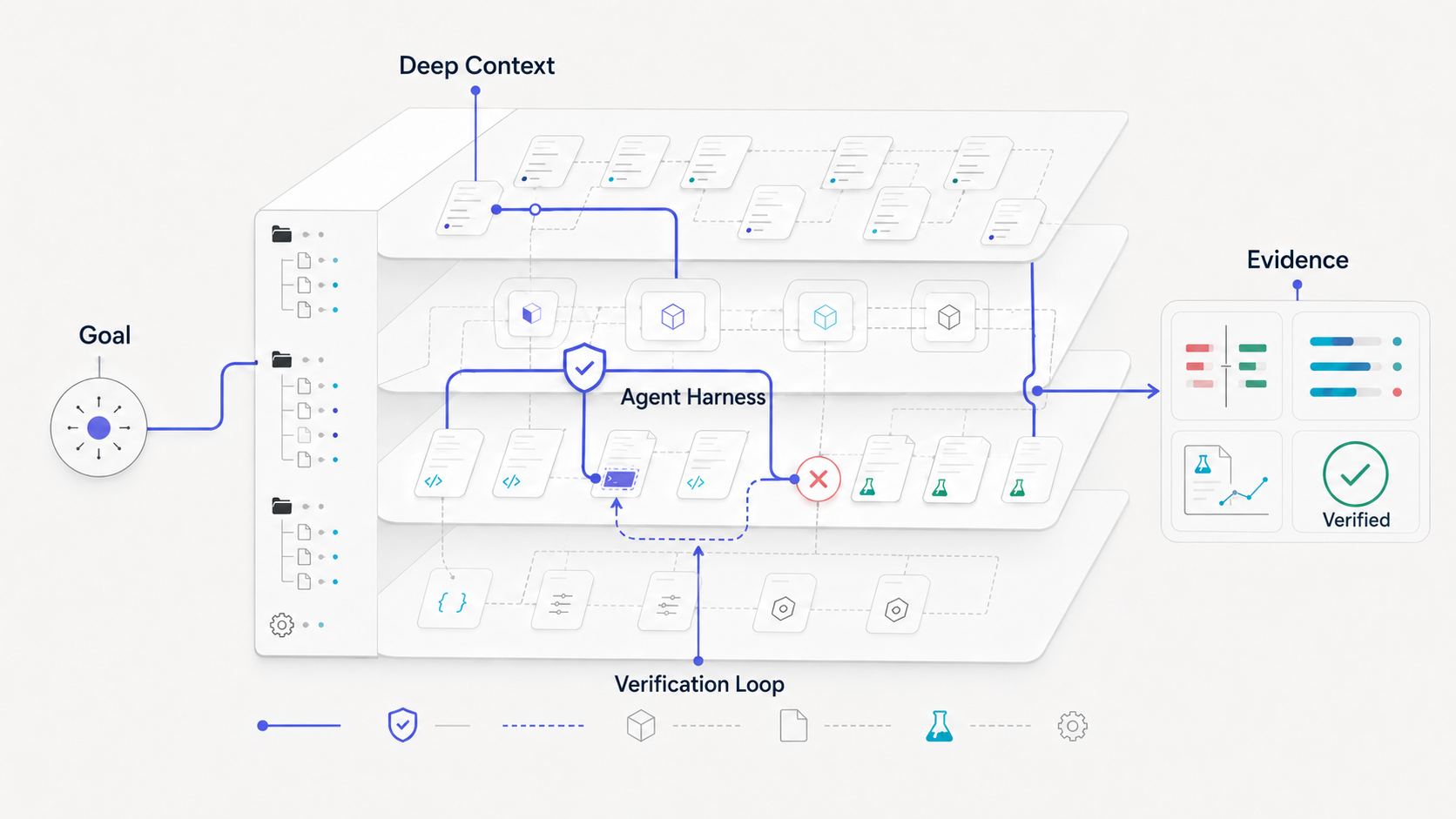
“Deep” represents four kinds of depth that remain with the task from start to finish:
| Depth | What it means for you |
|---|---|
| Deep Context | Understand the task through project structure, engineering rules, Skills, Session history, and long-term memory. |
| Deep Execution | Search, edit, run commands, and execute tests instead of stopping at suggestions—and show the work as it happens. |
| Deep Verification | Check results with tests, builds, diagnostics, Diffs, and task Artifacts rather than treating a plausible answer as done. |
| Deep Continuity | Preserve conversations, decisions, tool records, and evidence across time, directories, clients, and model changes. |
DeepCode stands out in three ways:
DeepCode is not designed to make an Agent look busier. It is designed to help you finish real software engineering work more reliably.
DeepCode provides a complete local Coding Agent workflow. TUI, Desktop, and Web use the same Agent, Sessions, models, Skills, permissions, and task state through the shared local service.
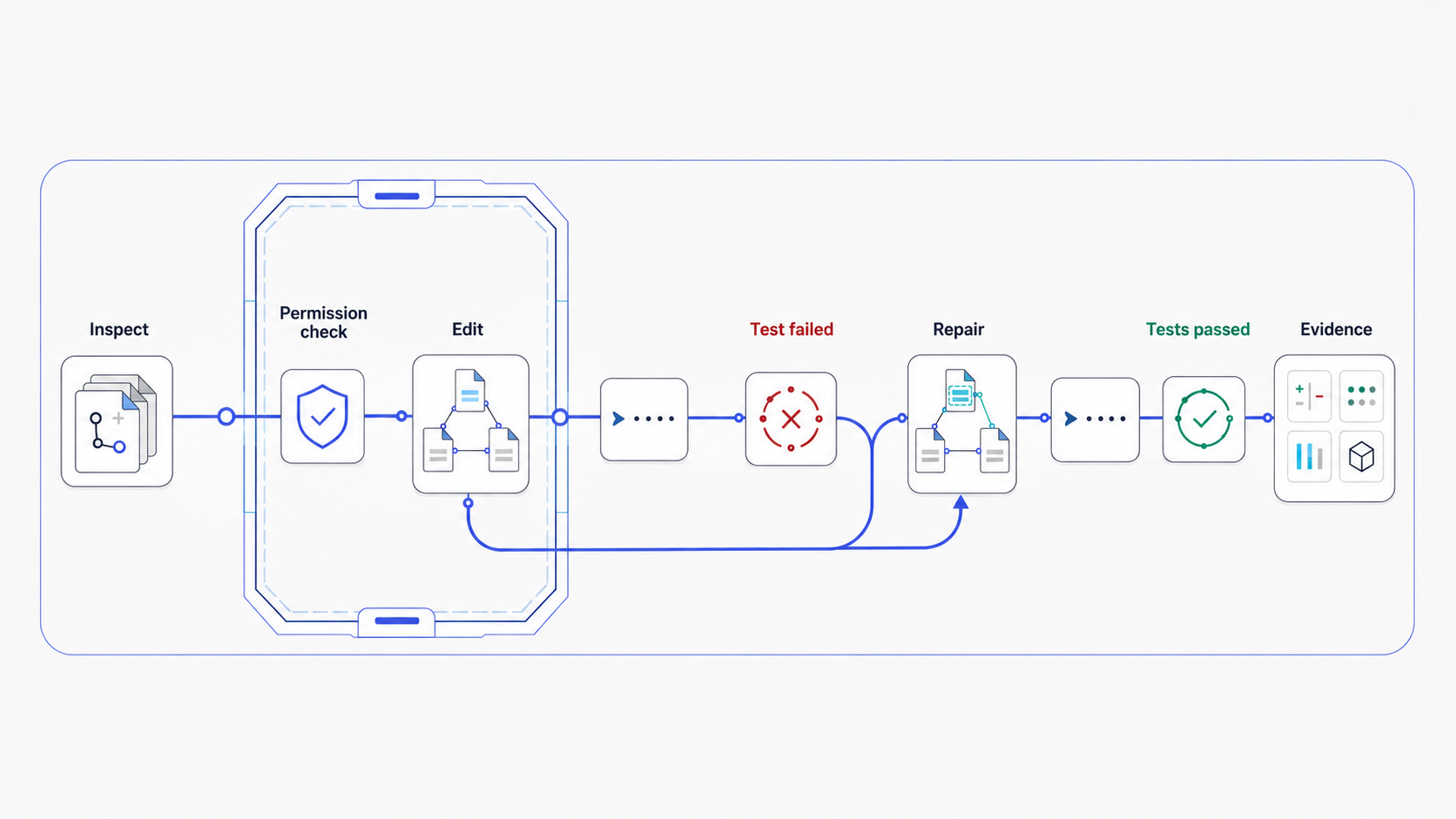
DeepCode can read and search code, edit files, apply patches, run commands and tests, and continue working from the results. Tool calls, execution progress, and file changes stay visible, so you can see what the Agent did and what changed in the project.
Use it to explain code, fix bugs, and add tests—or for cross-file refactors, feature development, and longer repository-level tasks.
When you provide a public HTTP or HTTPS URL, the shared web_fetch tool can
read the page without a search provider or an additional API key.
For work that cannot be completed in one response, give DeepCode a natural- language Goal. The Agent keeps analyzing, implementing, verifying, and fixing around that Goal without requiring you to push every step manually.
While it runs, you can still:
Automatic execution does not take away your control. You can always change what should happen next.
DeepCode does not use one hard-coded rule to judge every Coding task. It selects evidence that fits the task, such as test results, build output, static checks, diagnostics, file changes, Diffs, or generated Artifacts.
A failed verification is not presented as success. It becomes input to the next repair. When a task is complete—or genuinely blocked—the result, reason, and related evidence remain in the Session for review and reproduction.
Every Session is stored locally and linked to its original project. Start DeepCode from any directory, find earlier projects and Sessions, and continue the same work in CLI or Desktop.
A Session stores more than chat text: it keeps tool calls, permission decisions, Goals, model configuration, and verification records. Project rules, persistent memory, Skills, and long-conversation compaction help the Agent keep context throughout complex work.
DeepCode is not tied to one model provider. Connect OpenRouter, OpenAI, Anthropic, DeepSeek, Gemini, an OpenAI-compatible gateway, Ollama, vLLM, or another compatible endpoint with your own API Key.
Before use, a connection can check credentials, the model catalog, and a real inference request. Each Session can choose a model and Thinking Level. Changing models mid-Session affects future Turns only; it does not delete history or confuse where earlier work came from. When supported, DeepCode can also show a reasoning summary returned by the Provider.
Skills turn team conventions, domain knowledge, review methods, and repeated
workflows into reusable Agent capabilities. DeepCode includes pinned upstream
Skills for authoring, review, security, frontend, MCP, and web testing workflows.
Keep project Skills in .agents/skills, keep personal Skills in
~/.agents/skills, or use the bundled Skill Creator to build one
conversationally.
DeepCode also reads existing .deepcode/skills and Claude-style directories
without migrating them. A Skill can guide how the Agent works, but it cannot
bypass project trust, tool permissions, or safety boundaries.
Every project must be explicitly trusted before execution. Each Session can use one of three modes:
Individual tools also support allow, ask, and deny. CLI and Desktop share
the same permission state, and DeepCode does not silently replay operations
with side effects after a task is stopped or interrupted.
Complex work can be split across focused Agents—for example, separate Agents for code investigation, test analysis, and implementation review.
Parallel changes can run in isolated Git worktrees so Agents do not edit the same working directory at once. Results return to the main task for review and integration. Conflicts are shown explicitly instead of being silently overwritten, and the main Agent remains responsible for the final Goal.
Once a workflow is stable, save it as an Automation and run it manually or on a schedule. For example:
Automation does not launch a separate, reduced Agent. It uses the same Sessions, models, Skills, permissions, approvals, and recovery behavior, and keeps the history of every run.
Desktop, Web, TUI, exec, loop, and MCP task calls use the same local service.
Starting a client starts the service when needed. Closing a client leaves its
accepted tasks running; explicitly stop the service to shut down the runtime.
See Quick start for installation and launch commands.
Paper2Code was DeepCode's original research direction and remains its dedicated workflow for research reproduction.
It can start from a paper, technical document, URL, or reference repository; understand the research goal; find related implementations; organize a development plan; generate code; and verify the result through experiments and Artifacts. It reflects DeepCode's core idea: the goal is not to generate code that merely looks correct, but to turn complex knowledge into a system that can run, be inspected, and keep improving.
Use DeepCode to explore a repository, make changes, and run tests. Choose the terminal, desktop app, or browser—your projects and conversations are available in all three.
After installation, open the interface you prefer:
| Interface | Start command |
|---|---|
| TUI — work in your terminal | deepcode |
| Desktop — use a native app | deepcode desktop |
| Web — work in your browser | deepcode web |
DeepCode starts its local background service automatically. You can close an interface and return to your conversation later.
With uv installed, run:
uv tool install --python 3.12 deepcode-hku
deepcode init
On Windows, you can install uv with winget install --id astral-sh.uv --exact,
then open a new terminal. DeepCode requires Python 3.12 or later.
To use the native app, also install DeepCode Desktop from GitHub Releases. To try changes that have not been released yet, install from source below.
You will need Git, uv, and Node.js 22 or later. Run these commands in your terminal:
git clone https://github.com/HKUDS/DeepCode.git
cd DeepCode
npm --prefix desktop ci
npm --prefix desktop run build:web
uv tool install --python 3.12 --force .
deepcode init
If you already have the repository, start in its root directory and skip cloning.
You can now run deepcode from any directory. For source Desktop, also install
Rust and the platform dependencies described in the Desktop guide.
If your terminal cannot find deepcode, run uv tool update-shell and open a
new terminal.
Choose either the graphical setup or the terminal commands below.
In Desktop or Web: open Settings → AI providers, select Add provider, and enter your provider's API key. Click Save and check to load its models. Under Agent model, choose a model and click Save and verify model to try a short request. Then choose the connection and model in your conversation's message box.
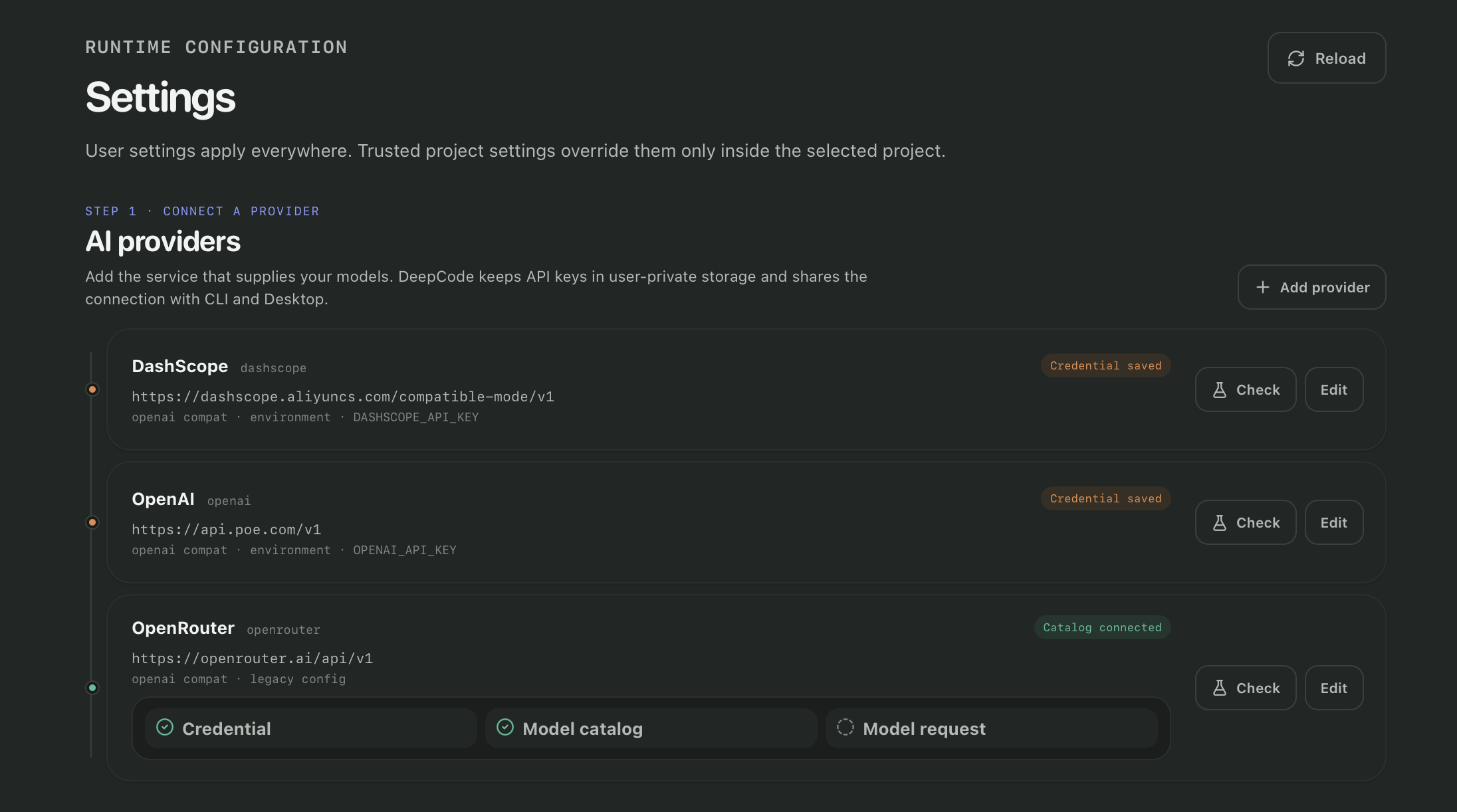
In your terminal: this example connects to OpenRouter. Enter your API key when prompted; it will not be displayed as you type.
deepcode provider set my-openrouter --template openrouter --api-key
deepcode provider models my-openrouter --refresh
Choose a model from the list. Replace MODEL_ID below with its exact ID and
send a short test request:
deepcode provider test my-openrouter --model MODEL_ID
You can use the same connection in all three interfaces. For other providers, local models, and tool-calling checks, see Models and providers.
Open a terminal in the project you want to work on. On your first visit, use
--trust to allow DeepCode to work in that folder. With the connection configured
above:
cd /path/to/your-project
deepcode --trust --connection my-openrouter --model MODEL_ID
Replace the path with your project directory; on Windows, for example,
C:\projects\my-app. For later visits, run deepcode in that directory and use
/model to choose your connection and model. Use /help to see available commands.
deepcode desktop
Add your project folder, confirm that you trust it, and click New thread. Choose a model in the message box, then describe what you want to do.
If you installed from source, this command opens the development app. Its first launch may take longer while dependencies are prepared; keep the terminal open while you use it. See the Desktop guide for platform setup and custom installation paths.
deepcode web
DeepCode opens a browser tab. Add your project folder on this computer, confirm that you trust it, and create a thread. Select a model and send your first message. No DeepCode account is needed.
To copy the access link and open it yourself, use deepcode web --no-open.
Open the link within 60 seconds. If it expires or the page asks you to sign in
again, run deepcode web to get a fresh link.
Start by asking DeepCode to help you understand your project:
Explain how this project is organized and how to run its tests.
Do not change any files yet.
Then ask for a small change, describing the behavior you want and how to check it:
Add tests for the configuration loader's handling of missing and invalid
values. Follow the existing test style, run the relevant tests, and summarize
the changes and results.
Adapt the task to your repository. Follow the tool activity as DeepCode works,
respond to any approval requests, and review the changed files and test output.
You can send a follow-up message to adjust the task, or use the stop button
(/stop in the TUI) to interrupt it.
Your conversation is saved automatically. In Desktop/Web, select it from the
project's thread list. In the TUI, use /resume to pick a saved conversation.
You can switch interfaces and continue the same task.
For a complete exercise in a new folder, follow Your first coding task. It takes you through creating a Python function, testing it, and returning to the conversation later.
Closing an interface leaves running tasks in the background. Pending approvals still need your response, and the computer must remain awake for work to continue.
Most days, you can just launch your preferred interface. When you need to inspect or stop the background service, use the command for that action:
| What you want to do | Command |
|---|---|
| Check whether DeepCode is running | deepcode service status |
| Read recent logs | deepcode service logs --lines 100 |
| Stop after current work finishes | deepcode service stop --drain --timeout 60 |
| Start automatically after signing into your computer | deepcode service install --at-login |
For updates and backups, follow Upgrading DeepCode. If something does not work, start with Troubleshooting.
Prefer a guided walkthrough? The teaching guides cover the same ground page by page — first session, the TUI, sessions, models, skills and memory, and headless automation — with worked examples.
Every task lives in a durable Session attached to its original Project. Open a
Project in Desktop or start deepcode from its directory, then create a new
Session or resume an existing one. The same history is available in TUI,
Desktop, and Web without export or conversion.
| What you want to do | Desktop / Web | Interactive CLI |
|---|---|---|
| Start a Session | New thread | /new [title] |
| Resume local history | Select it under the Project | /resume |
| Find history from every Project | Browse the project list | /resume all |
| Attach a file | Use the composer attachment | @path/to/file |
| Change the next Turn's model | Composer model picker | /model |
| Adjust Thinking effort | Composer effort picker | /effort |
| Cap the Session context window | Model picker context control | /context |
| Choose tool access | Composer access picker | /permissions |
| Load Skills for the next Turn | Composer Skills control | /skill <name> |
| Create a reusable Skill | Skills → Create Skill | $skill-creator |
| Set or revise a durable Goal | Goal panel | /goal |
| Queue the next instruction | Composer while a Turn runs | /queue <text> |
| Stop the active Turn | Use the stop control | /stop |
| Re-run the last Turn | Retry control on the Turn | /retry |
| Compact a long conversation | Automatic under pressure | /compact (also automatic) |
| Change transcript detail | — | /transcript or Ctrl+O |
| Rename or delete a Session | Session context menu | /rename <title> · /delete <id> |
Session history, tool activity, approvals, Goal state, and verification evidence remain together. TUI, Desktop, and Web can observe the same Session while the shared service serializes its execution. Normal input during a Turn steers the active work; explicit queueing requests a subsequent Turn. The interface reports how the input was accepted. Closing a client leaves accepted work running. Archiving hides a Session without deleting its history; permanent deletion removes the Session records but never repository files.
Desktop provides connection setup and verification under Settings → AI
providers. In the CLI, /model changes the connection and model for future
Turns, while /effort selects a Thinking level supported by that model.
Use the model picker's context control, or /context 64k in the TUI, to make
future Turns compact history sooner; /context auto restores the model's
published window.
Model changes never rewrite earlier history or alter an active Turn. Thinking effort controls the request sent to the provider; transcript detail controls only presentation. DeepCode shows provider-designated reasoning summaries when available and never merges raw chain-of-thought into the assistant answer.
Provider administration, environment-variable credentials, custom gateways, model discovery, and machine-readable checks are documented in the Headless and Automation guide.
Skills turn reusable engineering knowledge into instructions the Agent can load
for a task. Desktop provides a Skills workspace; the interactive CLI uses
/skills to discover them and /skill <name> to select one for the next Turn.
Choose Skills → Create Skill in Desktop or invoke $skill-creator in CLI to
create and validate one through a normal Agent Turn.
Project Skills in .agents/skills travel with a repository; user Skills in
~/.agents/skills remain available across Projects. Existing DeepCode and
Claude-compatible directories remain readable. A Skill can guide the Agent,
but it cannot grant permissions or bypass Project trust, approvals, or tool
policy. Import, enable, disable, and catalog commands live in the
advanced guide.
Plugins optionally package Skills behind a validated local manifest; standalone
project and user Skills continue to install and run without a Plugin. New
packages must use the Agent Plugins 1.0.0 manifest and fixed skills/ layout.
Add a trusted folder from the Desktop Plugins workspace or with deepcode plugin add <path>; its Skills then appear in the ordinary Skill catalog and
Composer. A standards-compliant mcp.json may also contribute MCP servers;
registration remains inert and those processes start only inside an Agent
Session. DeepCode does not execute Plugin hooks or Apps and does not download
from a Marketplace. See the
local Plugin contract.
Generic coding-agent MCP servers live in the top-level mcpServers section of
deepcode_config.json; the historical Paper2Code tools.mcpServers section is
kept separate. Configure servers in Desktop under MCP, or use the compact
deepcode mcp CLI. The bundled catalog is listed with deepcode mcp presets;
add <id> copies a disabled definition, test <name> performs a real
handshake, and login/logout <name> manages explicit browser OAuth. The TUI
offers the same actions under the single /mcp command. User and
trusted-project layers replace whole server entries rather than merging
executable fields. Provider secrets are referenced from private DeepCode
connections, and MCP tool policy can only narrow global trust, read-only,
approval, and sandbox decisions.
DeepCode supports stdio, SSE, and Streamable HTTP, session-owned startup and
shutdown, bounded discovery, stable mcp__server__tool identities, tool
annotations, allow/deny lists, per-tool approvals, timeouts, and cancellation.
For a concrete two-Skill plus MCP integration, see the
OpenSpace guide. Setup, preset, OAuth, and
connection-state details are in the MCP client guide.
DeepCode treats execution as a product boundary rather than a client-side confirmation:
allow, ask, or deny.Ordinary prompts can run a full multi-tool coding Turn. When work must continue
across several Turns or process restarts, attach a durable Goal to the Session.
Use the Goal panel in Desktop or /goal <objective> in the CLI.
While DeepCode works, new input can steer the active Turn. You can edit the Goal, stop the current Turn, queue a follow-up, pause the Goal, or resume it later. These actions preserve the same Session, history, permissions, Skills, and evidence instead of starting an isolated execution.
The working Agent requests complete or blocked from its full context.
DeepCode enforces ownership, lifecycle, permission, and budget boundaries, but
does not pretend a generic host-side rule can validate every coding task. A
normal semantic result is labelled Completed; tests, builds, diagnostics,
diffs, or independent review remain visible evidence. No provider, model, task
type, or test command is fixed by the Goal engine.
The Desktop Automation workspace turns a trusted Project instruction into a manual or interval run while keeping the normal Agent, Session, Goal, permissions, recovery, and Run history. Use it for repeatable work such as repository health checks, regression review, or scheduled maintenance.
Shell scripts and CI systems can use the same runtime without opening an
interface. The separate
Headless and Automation guide contains the
exec, loop, Automation, Provider, Skill, and Session administration
commands. They are advanced integration surfaces—not a second way ordinary
Desktop or CLI users must learn to talk to DeepCode.
Paper2Code is the research origin of DeepCode and remains its specialized workflow for scientific code reproduction. The general coding Agent extends the product; it does not replace or flatten the original Paper2Code design.
Its central idea is unchanged: reproducing a paper is not a one-shot generation task. A central orchestrator coordinates distinct responsibilities for understanding the source, planning the reproduction, finding and indexing useful references, implementing the system, and verifying the result.
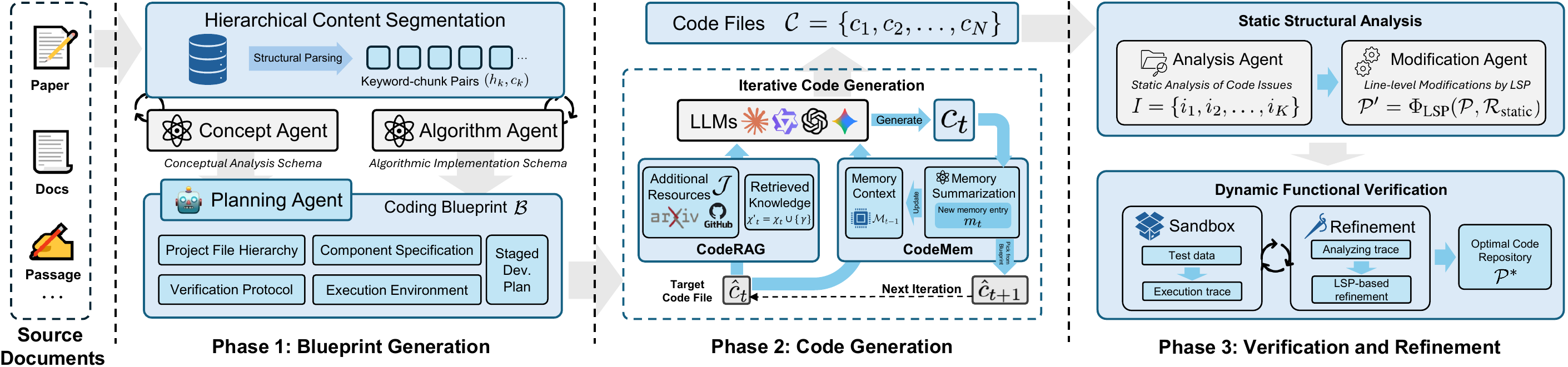
The specialist roles preserve the separation of concerns that made the original system effective:
| Role | Responsibility |
|---|---|
| Central Orchestrating Agent | Interprets progress, selects the next phase, coordinates specialists, and adapts the plan when evidence changes. |
| Intent Understanding Agent | Turns the user's objective into explicit functional requirements, technical constraints, and an actionable task decomposition. |
| Document Parsing Agent | Processes papers and technical documents, extracting algorithms, equations, methods, assumptions, and implementation requirements. |
| Code Planning Agent | Converts the understood method into an implementation roadmap, module boundaries, dependencies, interfaces, and verification goals. |
| Code Reference Mining Agent | Discovers relevant repositories, libraries, and implementation patterns, then evaluates their relevance and integration potential. |
| Code Indexing Agent | Builds a searchable semantic index and knowledge graph so useful components and relationships can be recovered during generation. |
| Code Generation Agent | Synthesizes the plan and evidence into executable code, tests, documentation, and the interfaces needed for a reproducible result. |
Four ideas connect those roles into one system:
The supporting tool layer follows the same division:
| Layer | Purpose |
|---|---|
| Document ingestion | Fetch and normalize papers, URLs, PDFs, DOCX, presentations, text, and HTML. |
| Document segmentation | Divide long technical material into coherent, recoverable sections for analysis. |
| Reference discovery | Find candidate repositories and supporting implementations. |
| Code reference indexing | Build searchable context over external and local code, including cross-file relationships. |
| Implementation execution | Read and write files, run shell or Python commands, inspect the project structure, and keep logs. |
| Verification and delivery | Run tests, record results, and deliver the codebase together with documentation and Artifacts. |
The modern product adds durable plans, explicit plan review, checkpoints, bounded retries, and interactive inspection around this workflow. Those additions make recovery and supervision stronger while preserving the Paper2Code architecture and its order of reasoning.
The original DeepCode study evaluates scientific code reproduction on PaperBench, which asks agents to reproduce 20 ICML 2024 papers across 8,316 gradable components.
|
75.9% Human expert subset +3.5 points |
84.8% Commercial-agent subset +26.1 points |
73.5% Scientific coding +22.4 points |
73.5% LLM-agent baseline +30.2 points |
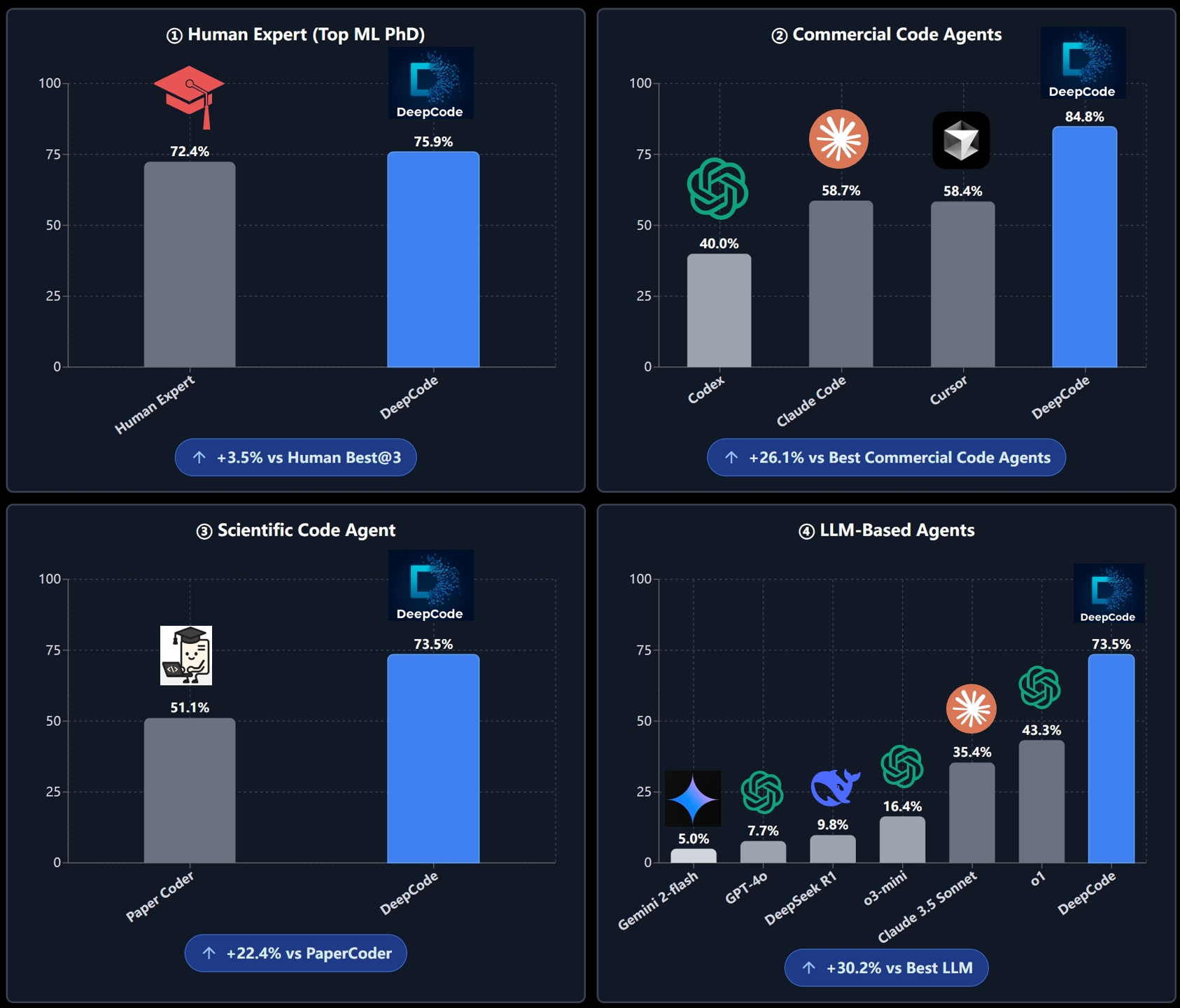
| Evaluation subset | DeepCode | Reported comparison | Difference |
|---|---|---|---|
| Human expert subset | 75.9% | Best reported human baseline: 72.4% | +3.5 points |
| Commercial-agent subset | 84.8% | Best reported commercial agent: 58.7% | +26.1 points |
| Scientific coding | 73.5% | PaperCoder: 51.1% | +22.4 points |
| LLM-agent baseline | 73.5% | Best reported LLM agent: 43.3% | +30.2 points |
These are PaperBench-specific results reported by the original study. They are not a general-purpose coding benchmark or a comparison against continuously updated products.
Read the paper for methodology, evaluation scope, models, and baseline details.
These recordings show projects produced by earlier DeepCode workflows. They are output demonstrations rather than screenshots of the current Desktop UI.
📄 Paper2CodeResearch to implementation 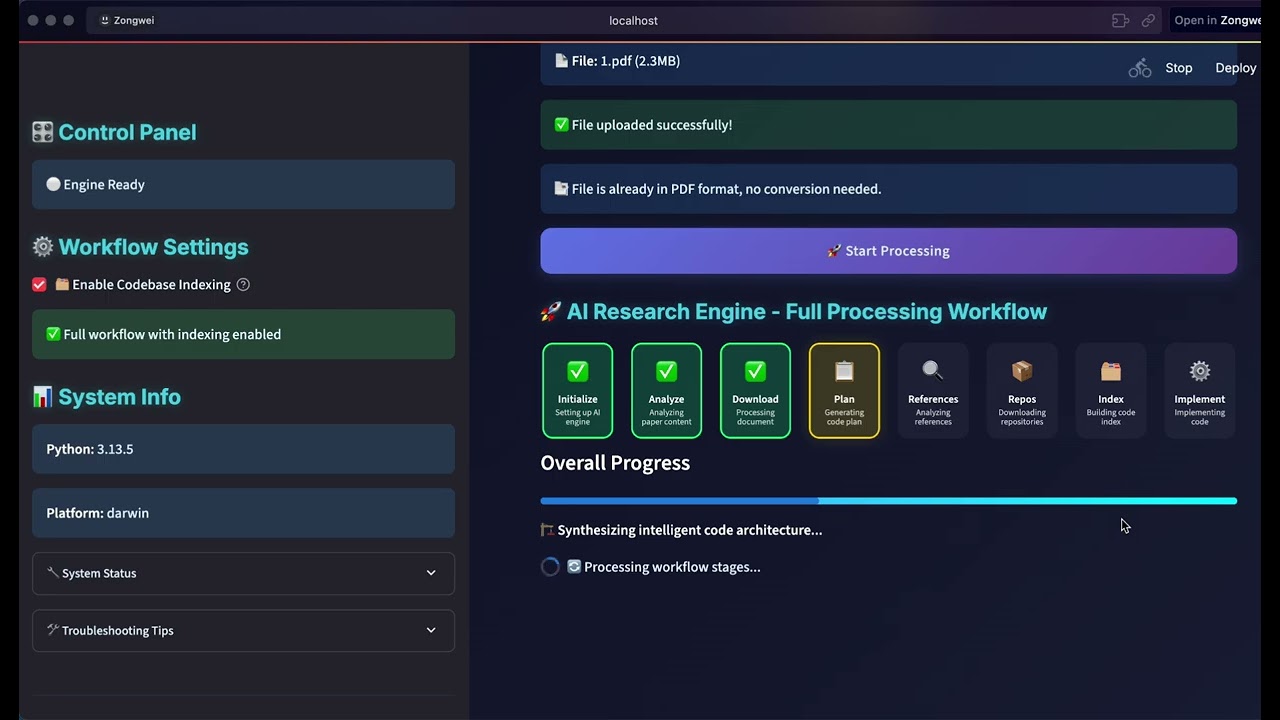
Reproduce a research paper as an executable project. |
🖼️ Generated vision projectImage workflow example 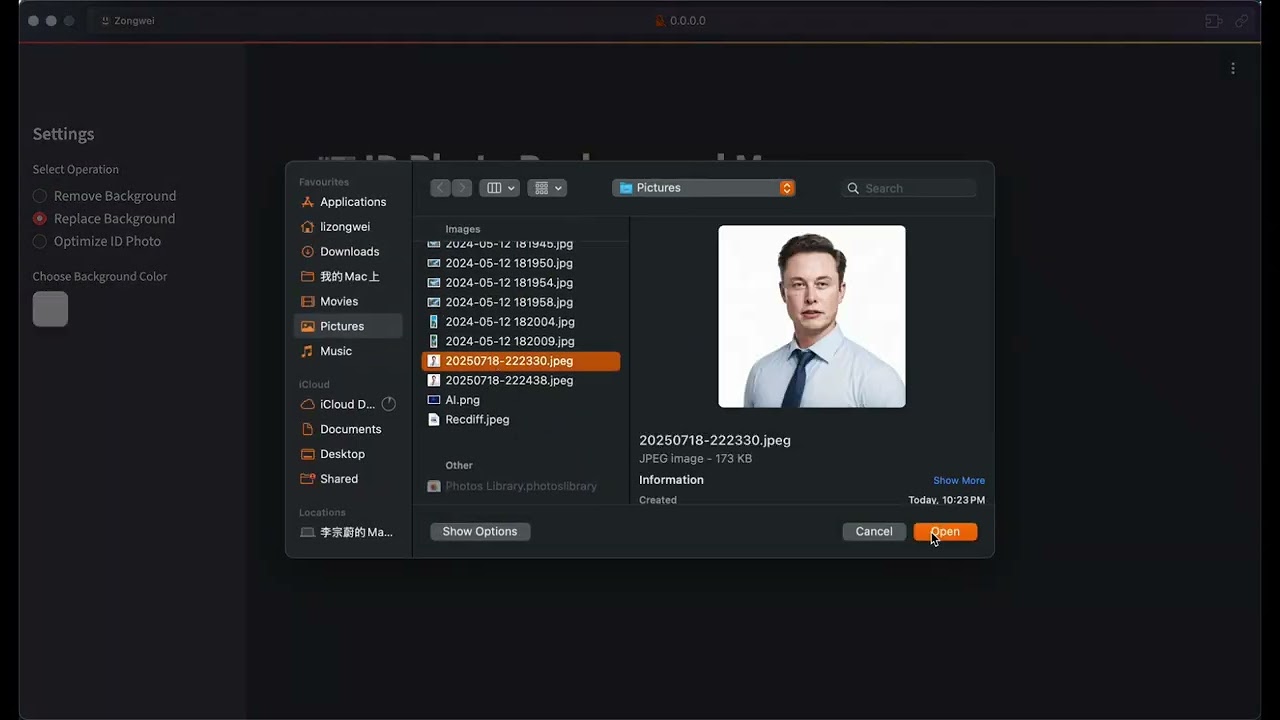
See an earlier generated image-processing workflow in use. |
🌐 Generated web projectFrontend implementation example 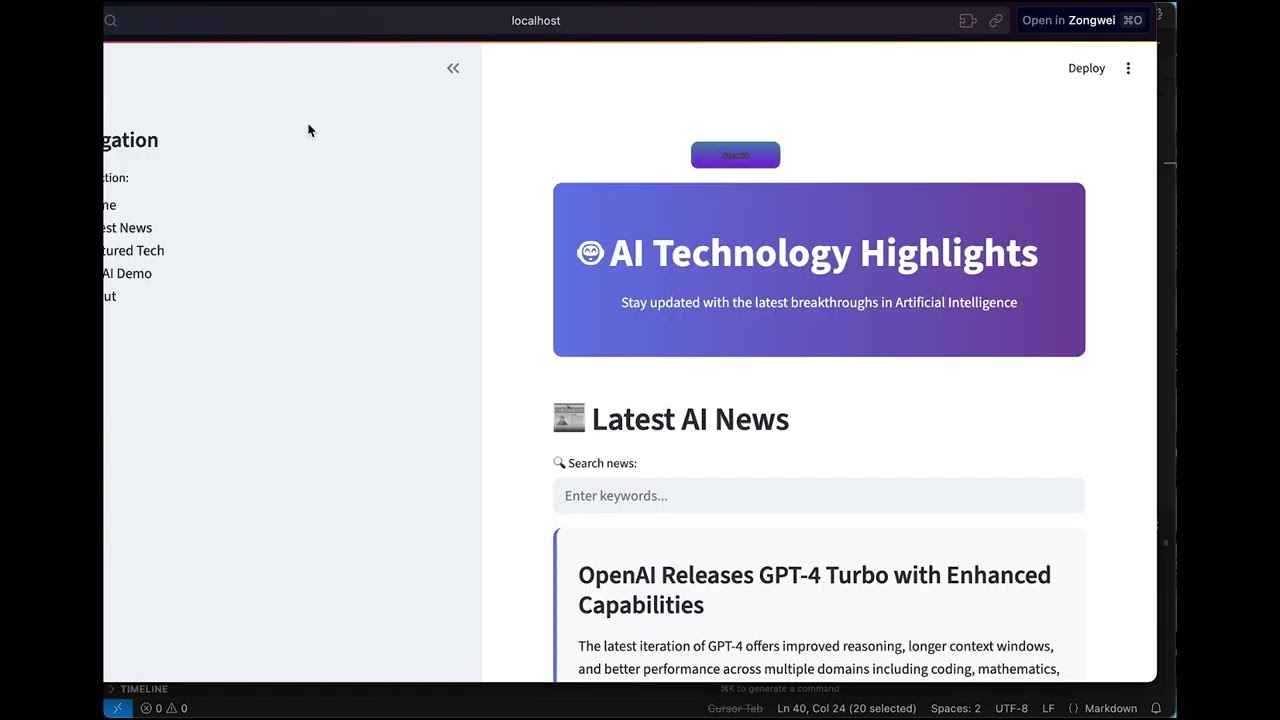
Follow a complete frontend implementation from idea to result. |
The project introduction remains available for a broader walkthrough.
git clone https://github.com/HKUDS/DeepCode.git
cd DeepCode

curl -LsSf https://astral.sh/uv/install.sh | sh
uv venv --python=3.13
source .venv/bin/activate
uv pip install -e .
On Windows PowerShell, activate with .\.venv\Scripts\Activate.ps1.
To reproduce CI's Python environment and understand each check, see the CI guide.
uvx pre-commit run --all-files
python -m compileall -q app_server cli core tools workflows
deepcode --version
deepcode-app-server --verify-runtime

cd desktop
npm run lint
npm test -- --run
npm run build
Desktop packaging, Rust checks, signing, and release procedures are documented
in desktop/README.md and the
Desktop release runbook.
| Topic | Document |
|---|---|
| Agent execution and approvals | P2 Agent execution |
| Desktop sidecar and lifecycle | P3 Desktop runtime |
| Git review, files, terminal, and tests | P4 Code workbench |
| Durable Paper2Code workflow | P5 Paper2Code |
| Canonical Sessions and cross-directory resume | P6 Session alignment |
| Skills identity, security, and persistence | Skills architecture |
| Generic MCP setup and connection lifecycle | MCP client guide |
| OpenSpace integration | OpenSpace integration |
| Automation scheduling and execution | Automation architecture |
| Desktop product and interaction model | Desktop UI specification |
| Privacy and diagnostics | Privacy contract |
The pre-restructure README is preserved in
docs/archive/README_LEGACY_2026-07-20.md.
The empty product-image slots have a shared
capture brief.
Community growth trajectory



Thanks to everyone in the open-source community — your stars, issues, pull requests and discussions shape where DeepCode goes next.
Everyone who has opened a pull request is listed in CONTRIBUTORS.md, including contributions that predate the v2.0 rebuild and so are not reflected in the graph above.
If DeepCode contributes to your research, cite:
@misc{li2025deepcodeopenagenticcoding,
  title         = {DeepCode: Open Agentic Coding},
  author        = {Zongwei Li and Zhonghang Li and Zirui Guo and Xubin Ren and Chao Huang},
  year          = {2025},
  eprint        = {2512.07921},
  archivePrefix = {arXiv},
  primaryClass  = {cs.SE},
  url           = {https://arxiv.org/abs/2512.07921}
}
DeepCode is available under the MIT License.
Copyright © 2025 Data Intelligence Lab at The University of Hong Kong.
(top 24 of 68)
2,394 followers · starred Dec 2025
4,065 followers · starred Feb 2026
1,108 followers · starred Nov 2025
479 followers · starred Aug 2025
"DeepCode: Open Agentic Coding (Agent Harness & Loop Engineering & Multi-Agent Orchestration)"
See the code|
|
    ██████╗ ███████╗███████╗██████╗  ██████╗ ██████╗ ██████╗ ███████╗
    ██╔══██╗██╔════╝██╔════╝██╔══██╗██╔════╝██╔═══██╗██╔══██╗██╔════╝
    ██║  ██║█████╗  █████╗  ██████╔╝██║     ██║   ██║██║  ██║█████╗
    ██║  ██║██╔══╝  ██╔══╝  ██╔═══╝ ██║     ██║   ██║██║  ██║██╔══╝
    ██████╔╝███████╗███████╗██║     ╚██████╗╚██████╔╝██████╔╝███████╗
    ╚═════╝ ╚══════╝╚══════╝╚═╝      ╚═════╝ ╚═════╝ ╚═════╝ ╚══════╝
|
DeepCode: Open Agentic Coding
Work with DeepCode in a visual workspace for Sessions, goals, tool activity, code changes, and verification.
DeepCode provides TUI, Desktop, and Web clients over one shared local service.
They share Projects, Session history, models, Skills, permissions, Goals, and
Automations. Use deepcode, deepcode desktop, or deepcode web; see
Quick start for installation and your first task.
🎯 Watch our complete introduction - See how DeepCode transforms research papers and natural language into production-ready code
"Where AI Agents Transform Ideas into Production-Ready Code"
2026-09-28 · DeepCode v2.3.0: voice dictation, Opper and Bedrock, Desktop polish, and opt-in hardening
dictation block to your config and the
Desktop and Web composer gains a microphone. See
Voice dictation. (#240)providers.egress limits which hosts receive your
prompts, DEEPCODE_COMMAND_SCREEN=strict screens risky commands,
DEEPCODE_BASH_SCRUB_ENV=1 keeps provider keys out of shell commands, and
DEEPCODE_KEYRING=1 reads keys from the OS keychain. (#229, #230, #232,
#246)MEMORY.md can be a short index of
topic files, mcp list flags servers worth a second look, and the agent is
reminded when a call keeps returning the same result. (#233, #241, #247)2026-09-09 · TUI, Desktop, and Web share one local background service
deepcode for the TUI, deepcode desktop
for the native app, or deepcode web to open the workbench in your browser.
All three connect to the same local service; Web needs no DeepCode account.deepcode service commands to check status, read logs, or stop after current
work finishes. Create a runtime snapshot before upgrading and restore it when
needed; keep project files in your usual version control or backup.
See Upgrading DeepCode.Start with the updated Quick start and first coding task tutorial. (#212)
2026-09-06 · DeepCode v2.2.0: Session context-window caps, compaction that leaves a memory, and a fully localized Desktop
/context 64k in the TUI or the
preset next to the Desktop model picker narrows the model's published
window for future Turns; the cap is frozen into each accepted Turn and
feeds the compaction gate directly. /context auto follows the model
again. (#203)<untrusted-data> boundary whose closing tags are escaped, so a poisoned
note cannot forge instructions. (#204)2026-09-03 · Desktop catalog race, an honest command screen, GLM-5.2, and two dependency bumps
execute_bash screen matches on argv, not substrings.
rm -r -f, --recursive --force, chmod 0777 and a destructive stage
inside a pipeline are caught; touch rm-rf-notes.txt is not. It stays a
cheap first pass in front of the sandbox, which remains the boundary.
(#195)reasoning_effort high / max. (from #198)browserslist past GHSA-c83g-rgw3-j3cx in the Desktop
toolchain, and the App Server sidecar's pypdf to 6.16.1
(CVE-2026-84309/84310/84311).2026-08-28 · Community fixes: plugin credential warnings and a wider zh-CN Desktop
env and headers values in a Plugin's mcp.json that look like secrets
produce a redacted warning instead of loading silently, and the docs point
to runtime credential bindings instead. (#194, landed 2026-08-27)2026-08-25 · Command executors close two bypasses
mkdir/touch/rm/cp/mv fast path declines any operand
outside the working directory, so those commands run through the sandbox
like every other command instead of as in-process file operations. (#193)2026-08-23 · Five repaired contributions land together
deferLoading keeps a server off until
the agent calls activate_server; deferred servers stay reachable and
cancellation-safe. (#184)SessionEnd runs exactly once at
teardown and PreCompact can inject context before a compaction. (#172)2026-08-19 · Sessions that survive resume, compaction, and a second window
/compact used to refuse almost every real conversation; it works,
and the checkpoint speaks as the model's own history, so it stops being
discounted as someone else's report.2026-08-18 · The runtime learns dsh's context discipline, and the TUI gets a face
2026-08-17 · Fixes from a review pass over the new settings and TUI work
deepcode exec and goal runs behind
your back.2026-08-16 · The TUI answers every bare command with a selector
/model now opens the full model
directory — every configured connection's catalog (remote snapshot or
declared entries, near a thousand rows on OpenRouter) in one filterable
selector with the current route pinned first and each model's published
reasoning ladder on Shift+Tab; Enter commits model and effort together.
/preset, /effort, /permissions, /transcript and /skill join
/resume: a bare invocation opens a picker with the current choice
marked, while argument forms and piped runs keep their text paths.2026-08-15 · Settings grow up: a dsh-style dialog, declared models, and a safer config
deepcode chat reads like a terminal app, not a log. A restyled
transcript — brand-gradient banner, status-colored tool cards with result
elbows, block spacing, word-boundary wrapping — plus streaming that
survives the prompt redraw with real colors instead of ?[36m litter.manualModels entries can carry a
label, capacities, and the published reasoning ladder; declarations are
authoritative offline for execution profiles and every picker. Discovery
probes the editor form as shown — unsaved URL or key included — and
adopted picks land as accurate declaration rows. Config writes gained
optimistic concurrency (a changed file conflicts instead of being
clobbered) and a settings.changed push keeps an open dialog fresh./resume and /model open
an inline selector — type to filter by title, arrows move, Enter picks,
Tab flips directory scope, Shift+Tab cycles the route's published
reasoning effort — and resume replays the conversation tail. Bare model
names resolve their connection, typos no longer kill the REPL, and
/compact summarizes with the model you actually selected. New verbs:
/rename, /delete, /retry, with tab completion for session ids,
transcript modes, permission presets, and effort levels.2026-08-14 · Subagent runtime, compaction, and one-way persistence
spawn_agent gains
external backends that run the installed CLI with a scrubbed environment and
strict success criteria, while native subagents gain personas, validated
tool allowlists, JSON output schemas, follow-up conversation via
send_message, and full transcripts in the parent session./compact summarizes older turns in the resident
context; every refusal is a stable, readable reason (busy Turn, too little
history, a failed or non-shrinking summary) and canonical session data is
never touched..agents/skills.deepcode exec --preset code-reader, /preset
in the TUI, or the picker beside the Desktop model control — while the
model route and permissions stay independent knobs. A preset is one
markdown agent file in the .claude/agents/.agents dialect, so
definitions written for other harnesses load unchanged; the resolved
composition is snapshotted into the session record and locked once the
conversation starts, at which point the Desktop picker becomes a
read-only label of what the session runs.2026-08-13 · Desktop typography, themes, and native controls
color-scheme with it
so native controls stop rendering in the OS scheme.2026-08-12 · Reviewed upstream core Skills
2026-08-12 · Managed MCP catalog, OAuth, and real connection checks
npx, Docker, or a remote server.2026-08-10 · Generic MCP runtime and portable local Plugins
Connect standard MCP servers from every interface. User and trusted project configuration, App Server, CLI, and Desktop now share one generic stdio/SSE/Streamable HTTP client runtime with bounded discovery, stable tool identities, timeouts, cancellation, and session-owned cleanup.
Keep credentials and authority explicit. Executable config layers replace whole entries, child processes receive a minimal environment, provider keys stay in private DeepCode connections, and MCP policy can only narrow global trust, read-only, approval, and sandbox decisions.
Run Agent Plugins 1.0 MCP components without format forks. Valid
mcp.json servers join the same runtime only when an Agent Session starts,
receive isolated PLUGIN_ROOT / PLUGIN_DATA, and fail independently from
bundled Skills and other servers.
Connect OpenSpace as MCP plus two ordinary Skills. A reviewed recipe binds an OpenRouter connection without plaintext secrets, imports OpenSpace's host Skills into the standalone catalog, and keeps cloud/upload tools disabled by default.
Register trusted local Plugin folders. CLI and Desktop now share a user-level Plugin registry with add, inspect, enable, disable, and unregister operations; unregistering never deletes source files.
Keep one execution path. Enabled Plugins contribute authority-bound Skills through the existing Skill Provider host, so selection, dependencies, progressive reads, permissions, revisions, and audit metadata remain the same across CLI, TUI, headless execution, and Desktop.
Preserve standalone Skills. Project and user Skills remain independently installable and take precedence over a same-named Plugin Skill. Plugins are an optional packaging source, never a replacement Skill lifecycle.
Use one portable package contract. Local Plugins use the Agent Plugins
1.0.0 root manifest and fixed skills/ layout; experimental DeepCode
manifests are no longer accepted. Hooks, Apps, Marketplaces, downloads, and
updates remain inert.
2026-08-09 · Skills now have a real runtime contract
2026-08-07 · Thinking controls, more providers, and a Desktop you can tune
2026-08-04 · Skills that work wherever you do
2026-08-03 · 🎉 DeepCode v2.0 is here
DeepCode v2.0 introduces a new general-purpose Coding Agent framework for building, fixing, understanding, and improving real software projects.
DeepCode v2.0 is built to help you spend less time supervising every step and more time shipping software you are proud of. We cannot wait to see what you build! 🚀
AGENTS.md or DEEPCODE.md, and
persistent notes remain with the workspace.Most Coding Agents can generate code. The hard part is understanding a real project, making changes within the right boundaries, continuously correcting course from runtime results, and making it clear why the outcome can be trusted.
DeepCode is an open-source Coding Agent for real software engineering. Give it a simple change or a goal that takes dozens of steps. It can understand the project, work on the code, run tools, verify results, and continue after an interruption, restart, or model switch.
“Deep” represents four kinds of depth that remain with the task from start to finish:
| Depth | What it means for you |
|---|---|
| Deep Context | Understand the task through project structure, engineering rules, Skills, Session history, and long-term memory. |
| Deep Execution | Search, edit, run commands, and execute tests instead of stopping at suggestions—and show the work as it happens. |
| Deep Verification | Check results with tests, builds, diagnostics, Diffs, and task Artifacts rather than treating a plausible answer as done. |
| Deep Continuity | Preserve conversations, decisions, tool records, and evidence across time, directories, clients, and model changes. |
DeepCode stands out in three ways:
DeepCode is not designed to make an Agent look busier. It is designed to help you finish real software engineering work more reliably.
DeepCode provides a complete local Coding Agent workflow. TUI, Desktop, and Web use the same Agent, Sessions, models, Skills, permissions, and task state through the shared local service.
DeepCode can read and search code, edit files, apply patches, run commands and tests, and continue working from the results. Tool calls, execution progress, and file changes stay visible, so you can see what the Agent did and what changed in the project.
Use it to explain code, fix bugs, and add tests—or for cross-file refactors, feature development, and longer repository-level tasks.
When you provide a public HTTP or HTTPS URL, the shared web_fetch tool can
read the page without a search provider or an additional API key.
For work that cannot be completed in one response, give DeepCode a natural- language Goal. The Agent keeps analyzing, implementing, verifying, and fixing around that Goal without requiring you to push every step manually.
While it runs, you can still:
Automatic execution does not take away your control. You can always change what should happen next.
DeepCode does not use one hard-coded rule to judge every Coding task. It selects evidence that fits the task, such as test results, build output, static checks, diagnostics, file changes, Diffs, or generated Artifacts.
A failed verification is not presented as success. It becomes input to the next repair. When a task is complete—or genuinely blocked—the result, reason, and related evidence remain in the Session for review and reproduction.
Every Session is stored locally and linked to its original project. Start DeepCode from any directory, find earlier projects and Sessions, and continue the same work in CLI or Desktop.
A Session stores more than chat text: it keeps tool calls, permission decisions, Goals, model configuration, and verification records. Project rules, persistent memory, Skills, and long-conversation compaction help the Agent keep context throughout complex work.
DeepCode is not tied to one model provider. Connect OpenRouter, OpenAI, Anthropic, DeepSeek, Gemini, an OpenAI-compatible gateway, Ollama, vLLM, or another compatible endpoint with your own API Key.
Before use, a connection can check credentials, the model catalog, and a real inference request. Each Session can choose a model and Thinking Level. Changing models mid-Session affects future Turns only; it does not delete history or confuse where earlier work came from. When supported, DeepCode can also show a reasoning summary returned by the Provider.
Skills turn team conventions, domain knowledge, review methods, and repeated
workflows into reusable Agent capabilities. DeepCode includes pinned upstream
Skills for authoring, review, security, frontend, MCP, and web testing workflows.
Keep project Skills in .agents/skills, keep personal Skills in
~/.agents/skills, or use the bundled Skill Creator to build one
conversationally.
DeepCode also reads existing .deepcode/skills and Claude-style directories
without migrating them. A Skill can guide how the Agent works, but it cannot
bypass project trust, tool permissions, or safety boundaries.
Every project must be explicitly trusted before execution. Each Session can use one of three modes:
Individual tools also support allow, ask, and deny. CLI and Desktop share
the same permission state, and DeepCode does not silently replay operations
with side effects after a task is stopped or interrupted.
Complex work can be split across focused Agents—for example, separate Agents for code investigation, test analysis, and implementation review.
Parallel changes can run in isolated Git worktrees so Agents do not edit the same working directory at once. Results return to the main task for review and integration. Conflicts are shown explicitly instead of being silently overwritten, and the main Agent remains responsible for the final Goal.
Once a workflow is stable, save it as an Automation and run it manually or on a schedule. For example:
Automation does not launch a separate, reduced Agent. It uses the same Sessions, models, Skills, permissions, approvals, and recovery behavior, and keeps the history of every run.
Desktop, Web, TUI, exec, loop, and MCP task calls use the same local service.
Starting a client starts the service when needed. Closing a client leaves its
accepted tasks running; explicitly stop the service to shut down the runtime.
See Quick start for installation and launch commands.
Paper2Code was DeepCode's original research direction and remains its dedicated workflow for research reproduction.
It can start from a paper, technical document, URL, or reference repository; understand the research goal; find related implementations; organize a development plan; generate code; and verify the result through experiments and Artifacts. It reflects DeepCode's core idea: the goal is not to generate code that merely looks correct, but to turn complex knowledge into a system that can run, be inspected, and keep improving.
Use DeepCode to explore a repository, make changes, and run tests. Choose the terminal, desktop app, or browser—your projects and conversations are available in all three.
After installation, open the interface you prefer:
| Interface | Start command |
|---|---|
| TUI — work in your terminal | deepcode |
| Desktop — use a native app | deepcode desktop |
| Web — work in your browser | deepcode web |
DeepCode starts its local background service automatically. You can close an interface and return to your conversation later.
With uv installed, run:
uv tool install --python 3.12 deepcode-hku
deepcode init
On Windows, you can install uv with winget install --id astral-sh.uv --exact,
then open a new terminal. DeepCode requires Python 3.12 or later.
To use the native app, also install DeepCode Desktop from GitHub Releases. To try changes that have not been released yet, install from source below.
You will need Git, uv, and Node.js 22 or later. Run these commands in your terminal:
git clone https://github.com/HKUDS/DeepCode.git
cd DeepCode
npm --prefix desktop ci
npm --prefix desktop run build:web
uv tool install --python 3.12 --force .
deepcode init
If you already have the repository, start in its root directory and skip cloning.
You can now run deepcode from any directory. For source Desktop, also install
Rust and the platform dependencies described in the Desktop guide.
If your terminal cannot find deepcode, run uv tool update-shell and open a
new terminal.
Choose either the graphical setup or the terminal commands below.
In Desktop or Web: open Settings → AI providers, select Add provider, and enter your provider's API key. Click Save and check to load its models. Under Agent model, choose a model and click Save and verify model to try a short request. Then choose the connection and model in your conversation's message box.
In your terminal: this example connects to OpenRouter. Enter your API key when prompted; it will not be displayed as you type.
deepcode provider set my-openrouter --template openrouter --api-key
deepcode provider models my-openrouter --refresh
Choose a model from the list. Replace MODEL_ID below with its exact ID and
send a short test request:
deepcode provider test my-openrouter --model MODEL_ID
You can use the same connection in all three interfaces. For other providers, local models, and tool-calling checks, see Models and providers.
Open a terminal in the project you want to work on. On your first visit, use
--trust to allow DeepCode to work in that folder. With the connection configured
above:
cd /path/to/your-project
deepcode --trust --connection my-openrouter --model MODEL_ID
Replace the path with your project directory; on Windows, for example,
C:\projects\my-app. For later visits, run deepcode in that directory and use
/model to choose your connection and model. Use /help to see available commands.
deepcode desktop
Add your project folder, confirm that you trust it, and click New thread. Choose a model in the message box, then describe what you want to do.
If you installed from source, this command opens the development app. Its first launch may take longer while dependencies are prepared; keep the terminal open while you use it. See the Desktop guide for platform setup and custom installation paths.
deepcode web
DeepCode opens a browser tab. Add your project folder on this computer, confirm that you trust it, and create a thread. Select a model and send your first message. No DeepCode account is needed.
To copy the access link and open it yourself, use deepcode web --no-open.
Open the link within 60 seconds. If it expires or the page asks you to sign in
again, run deepcode web to get a fresh link.
Start by asking DeepCode to help you understand your project:
Explain how this project is organized and how to run its tests.
Do not change any files yet.
Then ask for a small change, describing the behavior you want and how to check it:
Add tests for the configuration loader's handling of missing and invalid
values. Follow the existing test style, run the relevant tests, and summarize
the changes and results.
Adapt the task to your repository. Follow the tool activity as DeepCode works,
respond to any approval requests, and review the changed files and test output.
You can send a follow-up message to adjust the task, or use the stop button
(/stop in the TUI) to interrupt it.
Your conversation is saved automatically. In Desktop/Web, select it from the
project's thread list. In the TUI, use /resume to pick a saved conversation.
You can switch interfaces and continue the same task.
For a complete exercise in a new folder, follow Your first coding task. It takes you through creating a Python function, testing it, and returning to the conversation later.
Closing an interface leaves running tasks in the background. Pending approvals still need your response, and the computer must remain awake for work to continue.
Most days, you can just launch your preferred interface. When you need to inspect or stop the background service, use the command for that action:
| What you want to do | Command |
|---|---|
| Check whether DeepCode is running | deepcode service status |
| Read recent logs | deepcode service logs --lines 100 |
| Stop after current work finishes | deepcode service stop --drain --timeout 60 |
| Start automatically after signing into your computer | deepcode service install --at-login |
For updates and backups, follow Upgrading DeepCode. If something does not work, start with Troubleshooting.
Prefer a guided walkthrough? The teaching guides cover the same ground page by page — first session, the TUI, sessions, models, skills and memory, and headless automation — with worked examples.
Every task lives in a durable Session attached to its original Project. Open a
Project in Desktop or start deepcode from its directory, then create a new
Session or resume an existing one. The same history is available in TUI,
Desktop, and Web without export or conversion.
| What you want to do | Desktop / Web | Interactive CLI |
|---|---|---|
| Start a Session | New thread | /new [title] |
| Resume local history | Select it under the Project | /resume |
| Find history from every Project | Browse the project list | /resume all |
| Attach a file | Use the composer attachment | @path/to/file |
| Change the next Turn's model | Composer model picker | /model |
| Adjust Thinking effort | Composer effort picker | /effort |
| Cap the Session context window | Model picker context control | /context |
| Choose tool access | Composer access picker | /permissions |
| Load Skills for the next Turn | Composer Skills control | /skill <name> |
| Create a reusable Skill | Skills → Create Skill | $skill-creator |
| Set or revise a durable Goal | Goal panel | /goal |
| Queue the next instruction | Composer while a Turn runs | /queue <text> |
| Stop the active Turn | Use the stop control | /stop |
| Re-run the last Turn | Retry control on the Turn | /retry |
| Compact a long conversation | Automatic under pressure | /compact (also automatic) |
| Change transcript detail | — | /transcript or Ctrl+O |
| Rename or delete a Session | Session context menu | /rename <title> · /delete <id> |
Session history, tool activity, approvals, Goal state, and verification evidence remain together. TUI, Desktop, and Web can observe the same Session while the shared service serializes its execution. Normal input during a Turn steers the active work; explicit queueing requests a subsequent Turn. The interface reports how the input was accepted. Closing a client leaves accepted work running. Archiving hides a Session without deleting its history; permanent deletion removes the Session records but never repository files.
Desktop provides connection setup and verification under Settings → AI
providers. In the CLI, /model changes the connection and model for future
Turns, while /effort selects a Thinking level supported by that model.
Use the model picker's context control, or /context 64k in the TUI, to make
future Turns compact history sooner; /context auto restores the model's
published window.
Model changes never rewrite earlier history or alter an active Turn. Thinking effort controls the request sent to the provider; transcript detail controls only presentation. DeepCode shows provider-designated reasoning summaries when available and never merges raw chain-of-thought into the assistant answer.
Provider administration, environment-variable credentials, custom gateways, model discovery, and machine-readable checks are documented in the Headless and Automation guide.
Skills turn reusable engineering knowledge into instructions the Agent can load
for a task. Desktop provides a Skills workspace; the interactive CLI uses
/skills to discover them and /skill <name> to select one for the next Turn.
Choose Skills → Create Skill in Desktop or invoke $skill-creator in CLI to
create and validate one through a normal Agent Turn.
Project Skills in .agents/skills travel with a repository; user Skills in
~/.agents/skills remain available across Projects. Existing DeepCode and
Claude-compatible directories remain readable. A Skill can guide the Agent,
but it cannot grant permissions or bypass Project trust, approvals, or tool
policy. Import, enable, disable, and catalog commands live in the
advanced guide.
Plugins optionally package Skills behind a validated local manifest; standalone
project and user Skills continue to install and run without a Plugin. New
packages must use the Agent Plugins 1.0.0 manifest and fixed skills/ layout.
Add a trusted folder from the Desktop Plugins workspace or with deepcode plugin add <path>; its Skills then appear in the ordinary Skill catalog and
Composer. A standards-compliant mcp.json may also contribute MCP servers;
registration remains inert and those processes start only inside an Agent
Session. DeepCode does not execute Plugin hooks or Apps and does not download
from a Marketplace. See the
local Plugin contract.
Generic coding-agent MCP servers live in the top-level mcpServers section of
deepcode_config.json; the historical Paper2Code tools.mcpServers section is
kept separate. Configure servers in Desktop under MCP, or use the compact
deepcode mcp CLI. The bundled catalog is listed with deepcode mcp presets;
add <id> copies a disabled definition, test <name> performs a real
handshake, and login/logout <name> manages explicit browser OAuth. The TUI
offers the same actions under the single /mcp command. User and
trusted-project layers replace whole server entries rather than merging
executable fields. Provider secrets are referenced from private DeepCode
connections, and MCP tool policy can only narrow global trust, read-only,
approval, and sandbox decisions.
DeepCode supports stdio, SSE, and Streamable HTTP, session-owned startup and
shutdown, bounded discovery, stable mcp__server__tool identities, tool
annotations, allow/deny lists, per-tool approvals, timeouts, and cancellation.
For a concrete two-Skill plus MCP integration, see the
OpenSpace guide. Setup, preset, OAuth, and
connection-state details are in the MCP client guide.
DeepCode treats execution as a product boundary rather than a client-side confirmation:
allow, ask, or deny.Ordinary prompts can run a full multi-tool coding Turn. When work must continue
across several Turns or process restarts, attach a durable Goal to the Session.
Use the Goal panel in Desktop or /goal <objective> in the CLI.
While DeepCode works, new input can steer the active Turn. You can edit the Goal, stop the current Turn, queue a follow-up, pause the Goal, or resume it later. These actions preserve the same Session, history, permissions, Skills, and evidence instead of starting an isolated execution.
The working Agent requests complete or blocked from its full context.
DeepCode enforces ownership, lifecycle, permission, and budget boundaries, but
does not pretend a generic host-side rule can validate every coding task. A
normal semantic result is labelled Completed; tests, builds, diagnostics,
diffs, or independent review remain visible evidence. No provider, model, task
type, or test command is fixed by the Goal engine.
The Desktop Automation workspace turns a trusted Project instruction into a manual or interval run while keeping the normal Agent, Session, Goal, permissions, recovery, and Run history. Use it for repeatable work such as repository health checks, regression review, or scheduled maintenance.
Shell scripts and CI systems can use the same runtime without opening an
interface. The separate
Headless and Automation guide contains the
exec, loop, Automation, Provider, Skill, and Session administration
commands. They are advanced integration surfaces—not a second way ordinary
Desktop or CLI users must learn to talk to DeepCode.
Paper2Code is the research origin of DeepCode and remains its specialized workflow for scientific code reproduction. The general coding Agent extends the product; it does not replace or flatten the original Paper2Code design.
Its central idea is unchanged: reproducing a paper is not a one-shot generation task. A central orchestrator coordinates distinct responsibilities for understanding the source, planning the reproduction, finding and indexing useful references, implementing the system, and verifying the result.
The specialist roles preserve the separation of concerns that made the original system effective:
| Role | Responsibility |
|---|---|
| Central Orchestrating Agent | Interprets progress, selects the next phase, coordinates specialists, and adapts the plan when evidence changes. |
| Intent Understanding Agent | Turns the user's objective into explicit functional requirements, technical constraints, and an actionable task decomposition. |
| Document Parsing Agent | Processes papers and technical documents, extracting algorithms, equations, methods, assumptions, and implementation requirements. |
| Code Planning Agent | Converts the understood method into an implementation roadmap, module boundaries, dependencies, interfaces, and verification goals. |
| Code Reference Mining Agent | Discovers relevant repositories, libraries, and implementation patterns, then evaluates their relevance and integration potential. |
| Code Indexing Agent | Builds a searchable semantic index and knowledge graph so useful components and relationships can be recovered during generation. |
| Code Generation Agent | Synthesizes the plan and evidence into executable code, tests, documentation, and the interfaces needed for a reproducible result. |
Four ideas connect those roles into one system:
The supporting tool layer follows the same division:
| Layer | Purpose |
|---|---|
| Document ingestion | Fetch and normalize papers, URLs, PDFs, DOCX, presentations, text, and HTML. |
| Document segmentation | Divide long technical material into coherent, recoverable sections for analysis. |
| Reference discovery | Find candidate repositories and supporting implementations. |
| Code reference indexing | Build searchable context over external and local code, including cross-file relationships. |
| Implementation execution | Read and write files, run shell or Python commands, inspect the project structure, and keep logs. |
| Verification and delivery | Run tests, record results, and deliver the codebase together with documentation and Artifacts. |
The modern product adds durable plans, explicit plan review, checkpoints, bounded retries, and interactive inspection around this workflow. Those additions make recovery and supervision stronger while preserving the Paper2Code architecture and its order of reasoning.
The original DeepCode study evaluates scientific code reproduction on PaperBench, which asks agents to reproduce 20 ICML 2024 papers across 8,316 gradable components.
|
75.9% Human expert subset +3.5 points |
84.8% Commercial-agent subset +26.1 points |
73.5% Scientific coding +22.4 points |
73.5% LLM-agent baseline +30.2 points |
| Evaluation subset | DeepCode | Reported comparison | Difference |
|---|---|---|---|
| Human expert subset | 75.9% | Best reported human baseline: 72.4% | +3.5 points |
| Commercial-agent subset | 84.8% | Best reported commercial agent: 58.7% | +26.1 points |
| Scientific coding | 73.5% | PaperCoder: 51.1% | +22.4 points |
| LLM-agent baseline | 73.5% | Best reported LLM agent: 43.3% | +30.2 points |
These are PaperBench-specific results reported by the original study. They are not a general-purpose coding benchmark or a comparison against continuously updated products.
Read the paper for methodology, evaluation scope, models, and baseline details.
These recordings show projects produced by earlier DeepCode workflows. They are output demonstrations rather than screenshots of the current Desktop UI.
📄 Paper2CodeResearch to implementation
Reproduce a research paper as an executable project. |
🖼️ Generated vision projectImage workflow example
See an earlier generated image-processing workflow in use. |
🌐 Generated web projectFrontend implementation example
Follow a complete frontend implementation from idea to result. |
The project introduction remains available for a broader walkthrough.
git clone https://github.com/HKUDS/DeepCode.git
cd DeepCode

curl -LsSf https://astral.sh/uv/install.sh | sh
uv venv --python=3.13
source .venv/bin/activate
uv pip install -e .
On Windows PowerShell, activate with .\.venv\Scripts\Activate.ps1.
To reproduce CI's Python environment and understand each check, see the CI guide.
uvx pre-commit run --all-files
python -m compileall -q app_server cli core tools workflows
deepcode --version
deepcode-app-server --verify-runtime

cd desktop
npm run lint
npm test -- --run
npm run build
Desktop packaging, Rust checks, signing, and release procedures are documented
in desktop/README.md and the
Desktop release runbook.
| Topic | Document |
|---|---|
| Agent execution and approvals | P2 Agent execution |
| Desktop sidecar and lifecycle | P3 Desktop runtime |
| Git review, files, terminal, and tests | P4 Code workbench |
| Durable Paper2Code workflow | P5 Paper2Code |
| Canonical Sessions and cross-directory resume | P6 Session alignment |
| Skills identity, security, and persistence | Skills architecture |
| Generic MCP setup and connection lifecycle | MCP client guide |
| OpenSpace integration | OpenSpace integration |
| Automation scheduling and execution | Automation architecture |
| Desktop product and interaction model | Desktop UI specification |
| Privacy and diagnostics | Privacy contract |
The pre-restructure README is preserved in
docs/archive/README_LEGACY_2026-07-20.md.
The empty product-image slots have a shared
capture brief.
Community growth trajectory
Thanks to everyone in the open-source community — your stars, issues, pull requests and discussions shape where DeepCode goes next.
Everyone who has opened a pull request is listed in CONTRIBUTORS.md, including contributions that predate the v2.0 rebuild and so are not reflected in the graph above.
If DeepCode contributes to your research, cite:
@misc{li2025deepcodeopenagenticcoding,
  title         = {DeepCode: Open Agentic Coding},
  author        = {Zongwei Li and Zhonghang Li and Zirui Guo and Xubin Ren and Chao Huang},
  year          = {2025},
  eprint        = {2512.07921},
  archivePrefix = {arXiv},
  primaryClass  = {cs.SE},
  url           = {https://arxiv.org/abs/2512.07921}
}
DeepCode is available under the MIT License.
Copyright © 2025 Data Intelligence Lab at The University of Hong Kong.
(top 24 of 68)
2,394 followers · starred Dec 2025
4,065 followers · starred Feb 2026
1,108 followers · starred Nov 2025
479 followers · starred Aug 2025





