An agentic AI assistant for NVIDIA Isaac Sim that provides LLM-powered scene diagnostics, patch planning, and governance — surfaced through a dockable Omniverse UI panel backed by a local FastAPI service.
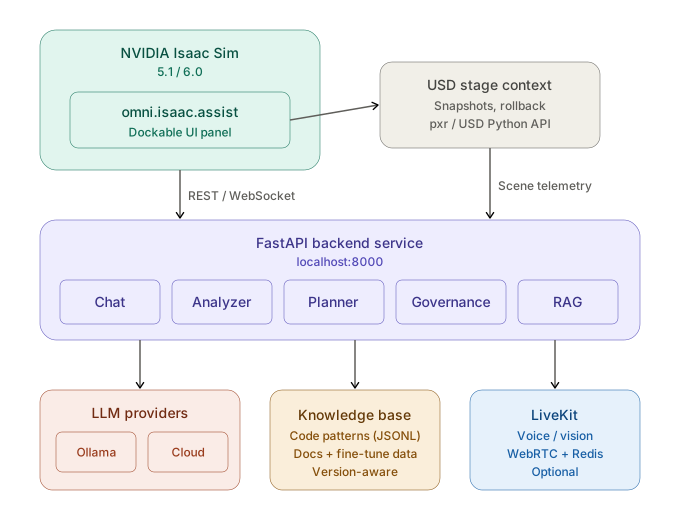
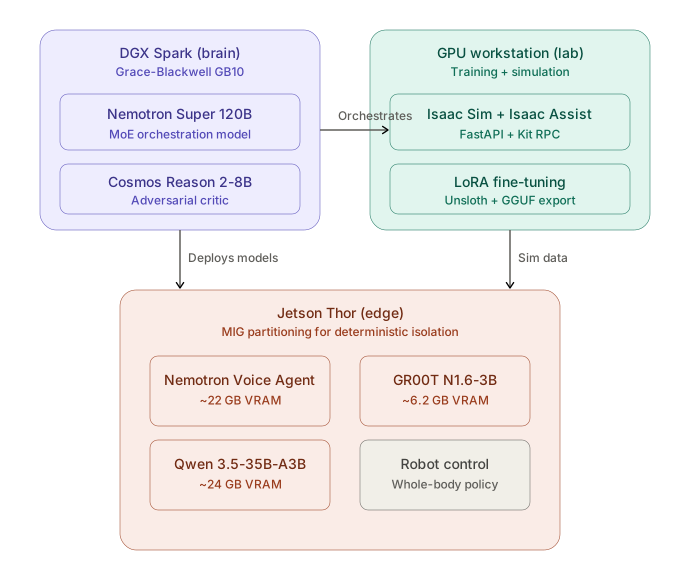
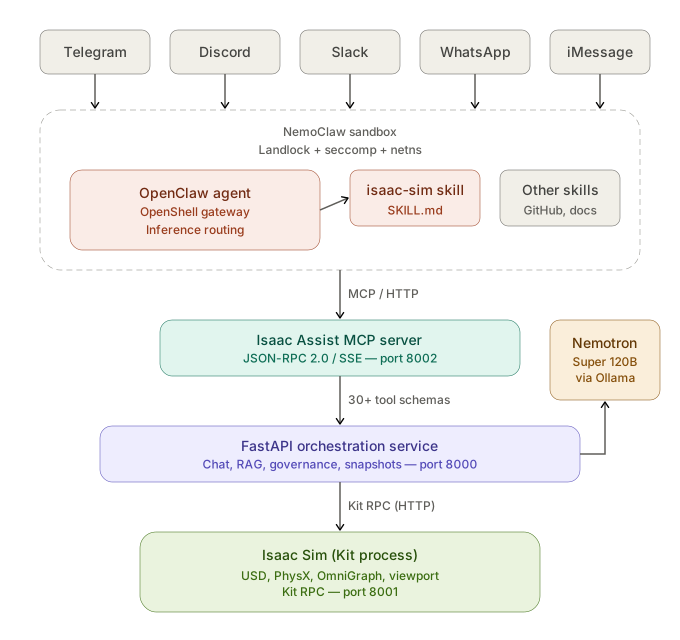
| Requirement | Version |
|---|---|
| NVIDIA Isaac Sim | 6.0 from source on DGX Spark; 5.1 still supported as a fallback |
| Python (system host) | 3.10+ |
| Docker + Docker Compose | Latest |
| Ollama (local LLM mode) | Latest |
| Git | Any |
GPU Note: Isaac Sim requires an NVIDIA RTX GPU. Ensure your drivers and CUDA toolkit are up to date before proceeding.
Omniverse_Nemotron_Ext/
├── exts/
│   ├── isaac_5.1/          # Omniverse Extension (Isaac Sim 5.1)
│   └── isaac_6.0/          # Omniverse Extension (Isaac Sim 6.0)
├── service/
│   └── isaac_assist_service/   # FastAPI backend service
│       ├── main.py             # App entry point
│       ├── .env.example        # Configuration template
│       └── ...                 # Feature modules (chat, analysis, planner, etc.)
├── web/
│   └── floor-plan-ui/      # React + Konva multimodal canvas GUI
├── infra/
│   └── livekit/            # Self-hosted LiveKit voice stack (Docker Compose)
├── scripts/                # Utility scripts (doc scraping, data curation)
├── launch_isaac.sh         # Recommended Isaac Sim launcher
├── launch_service.sh       # FastAPI service launcher (interactive mode picker)
└── requirements.txt        # Python backend dependencies
The FastAPI service must be running before you launch Isaac Sim. The extension UI communicates with it over localhost:8000.
cd /path/to/Omniverse_Nemotron_Ext
pip install -r requirements.txt
cp service/isaac_assist_service/.env.example service/isaac_assist_service/.env
# Open .env and set your preferred LLM mode and API keys
.env| Variable | Default | Description |
|---|---|---|
LLM_MODE | local | local (Ollama), anthropic (Claude), cloud (Gemini), openai, or grok (xAI) |
LOCAL_MODEL_NAME | qwen3.6:latest | Model name as shown in ollama list |
CLOUD_MODEL_NAME | claude-opus-4-6 | Cloud model identifier (used by all non-local modes) |
ANTHROPIC_API_KEY | (empty) | Required when LLM_MODE=anthropic |
API_KEY_GEMINI | (empty) | Required when LLM_MODE=cloud |
OPENAI_API_KEY | (empty) | Required when LLM_MODE=openai |
GROK_API_KEY | (empty) | Required when LLM_MODE=grok |
ROSBRIDGE_HOST | 127.0.0.1 | rosbridge WebSocket host (for live ROS2 tools) |
ROSBRIDGE_PORT | 9090 | rosbridge WebSocket port |
LIVEKIT_URL | ws://localhost:7880 | LiveKit server URL |
LLM_MODE=local)ollama pull qwen3.6:latest
Known-good local Ollama models on the development machine include:
| Model | Use |
|---|---|
qwen3.6:latest | Default local Isaac Assist chat model |
nemotron3:33b | NVIDIA-flavored local coding/reasoning fallback |
deepseek-r1:32b | Deliberate reasoning / audit fallback |
cd /path/to/Omniverse_Nemotron_Ext

# Interactive mode picker (recommended)
./launch_service.sh

# Or pass the LLM mode directly
./launch_service.sh anthropic   # Claude
./launch_service.sh local       # Ollama (local GPU)
./launch_service.sh google      # Gemini
./launch_service.sh openai      # OpenAI
./launch_service.sh grok        # xAI Grok
The service starts at http://localhost:8000.
Interactive API docs are available at http://localhost:8000/docs.
The launcher prefers a project .venv, then a complete system Python, and
finally Isaac Sim's bundled python.sh. Override discovery with
SERVICE_PYTHON=/path/to/python; override the loopback bind with
ISAAC_ASSIST_HOST or ISAAC_ASSIST_PORT when needed. Container startup
continues to bind 0.0.0.0 explicitly. Development hot reload is opt-in with
ISAAC_ASSIST_RELOAD=1 so the Isaac Python fallback does not spawn a divergent
child interpreter by default.
An optional adapter exposes NVIDIA's video-ingestion, depth-reconstruction, clip-retrieval, and robotic-grounding pipelines as dry-run-first tools. V2D is installed separately so its GPU/container dependencies do not enter the sidecar environment. See the V2D integration guide.
An isolated, dry-run-first adapter also exposes NVIDIA Isaac GR00T N1.7
status, inference, policy serving, and fine-tuning commands. See the
GR00T N1.7 integration guide.
Use ./launch_groot_robolab.sh replay for the bundled Isaac Sim visualization,
or ./launch_groot_robolab.sh live to connect RoboLab to a GR00T policy server.
Franka torque/contact collection and masked sensor-aware datasets are documented
in the force/contact data guide.
The separate Gemini Robotics ER 2 RoboLab workflow uses Gemini as a visual phase supervisor and bounded local IK to retarget the current DROID/Franka robot to live object and receptacle poses. Its RGB-D collision supervision guide covers detector box/mask plus depth fusion, swept robot-capsule clearance, and the real-camera calibration inputs required for local collision stops.
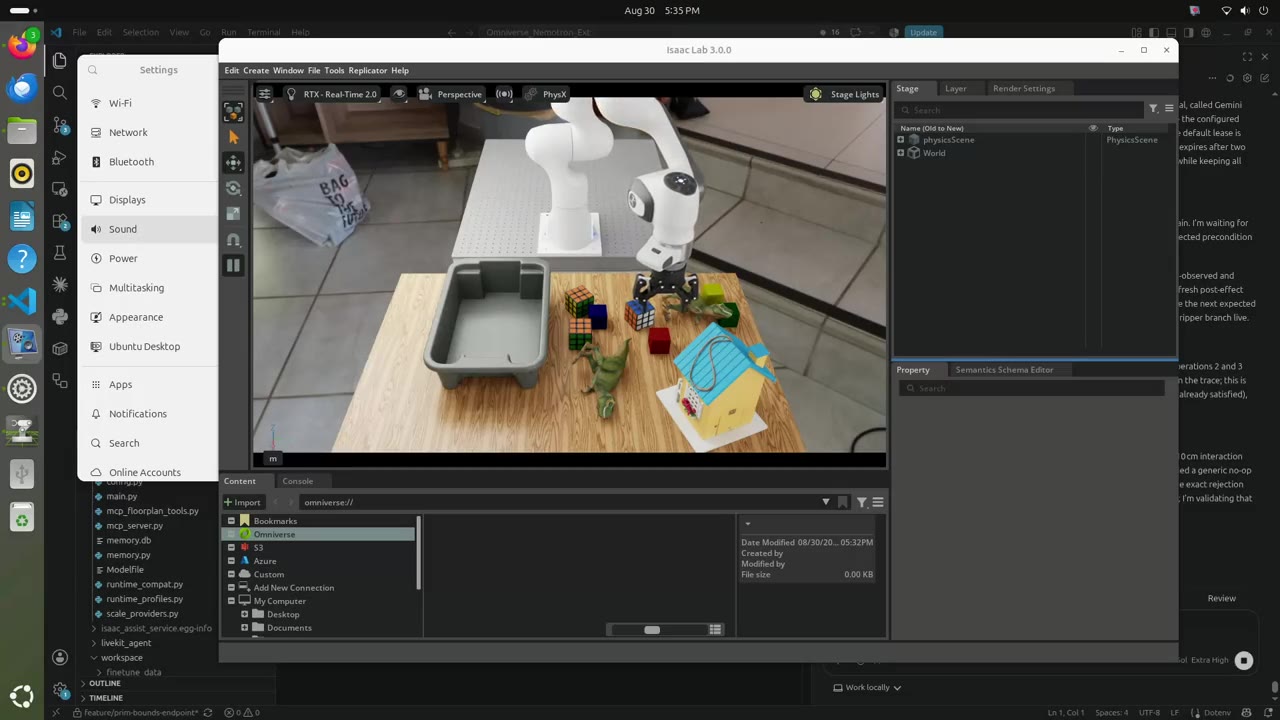
Gemini Robotics supervising a RoboLab manipulation run in Isaac Lab — click the preview to watch the 2×-speed demo.
The planner can also run on an OpenAI reasoning model, with a cap on model spend. Tasks other than the banana one need their scene roles bound:
# OPENAI_API_KEY is read from .env
./launch_gemini_robotics_robolab.sh --provider openai --model gpt-6-astra \
  --budget-usd 25 --task BlocksInBinTask \
  --movable-object-asset red_block --target-receptacle-asset grey_bin
On 2026-09-27 GPT-6 Astra completed BlocksInBinTask with all ten checks
passing: the block ended 2 mm from the bin centre, after 37 model calls
costing $7.28. Two runtime changes made that possible:
The launch section of the workflow guide covers interpreters, endpoints and the budget.
One success is an anecdote, so scripts/evaluate_planner.py measures a pass
rate. It runs seeded scene variations, one Isaac process each, and grades every
episode against the acceptance file
config/planner_eval/blocks_in_bin_astra_v1.json
rather than trusting the runner's own PASS. The common grade reads the final
state from the per-step recording: the block inside the bin's footprint (2 cm
inset), resting low, released and still. Episodes lost to infrastructure
faults, such as a dropped connection or an exhausted API quota, are reported
but left out of every rate, and failed runs keep their recording under
failed_evidence/.
ISAAC_PY=~/Documents/Github/isaacsim/_build/linux-aarch64/release/python.sh
CONFIG=config/planner_eval/blocks_in_bin_astra_v1.json

# Screen a model on the first three development seeds.
$ISAAC_PY -u scripts/evaluate_planner.py run $CONFIG --split development --limit 3 \
  --provider gemini --model gemini-robotics-er-2-preview --max-total-usd 10 \
  --output runs/dev-gemini
$ISAAC_PY scripts/evaluate_planner.py score runs/dev-gemini

# Baselines on the same scenes: a scripted oracle that reads true poses, and
# the free, open-weights pi0.5-DROID checkpoint served locally over OpenPI.
$ISAAC_PY -u scripts/evaluate_planner.py run $CONFIG --split development --limit 3 \
  --policy oracle --output runs/dev-oracle
./launch_openpi_server.sh &   # port 8000; first inference compiles for ~4 s
$ISAAC_PY -u scripts/evaluate_planner.py run $CONFIG --split development --limit 3 \
  --policy pi05 --output runs/dev-pi05
The qualification gates are fixed in the acceptance file before any run.
Screen needs 2 of the first 3 development seeds to earn a full development
run; development needs 7/10; final needs 24/30. The final split is
refused until the file is frozen (evaluate_planner.py freeze) and the tree is
clean, and each use of its seeds is logged, so reusing them shows in every
report.
Development seeds 0–2, as of 2026-09-30:
| Policy | Passes | Spend | Notes |
|---|---|---|---|
| Gemini Robotics-ER 2 | 2/3 | $2.07 | clears the screen gate; $1.03 per success |
| GPT-6 Astra | 1/3 | $9.74 | |
| GPT-6 Sol | 0/1 | 2 episodes excluded: network drop, quota exhausted | |
| Scripted oracle | 3/3 | free | privileged poses; the planner's clearance-aware grasp axis |
| π0.5-DROID | 0/3 | free | full 150 s from RoboLab's DROID camera; never carried the block |
The oracle passing every scene shows the scenes are solvable, so the models' failures are the planner's or the models' limits. The π0.5 baseline sees RoboLab's DROID-matched exterior camera; the planners keep their own view, which is aimed 13.7° further right.
Only one Isaac/Kit process may run at a time on the DGX Spark, because
concurrent Kit processes have wedged NVIDIA UVM. Both launchers queue on
/tmp/homehero_isaac_sim.lock (scripts/isaac_slot.sh), and the harness
interrupts a launch that logs nothing for 180 s. If Kit hangs on a stale
/dev/shm/sem.carbonite-sharedmemory, run scripts/clear_stale_kit_locks.sh,
which removes it only when no Kit process is alive. On the GB10 the OpenPI
launcher disables XLA's Triton GEMMs, which abort with "Unsupported conversion
from bf16 to f16" under JAX 0.5.3.
Gemini training campaigns can also be planned across task, scene, and robot embodiment combinations without silently substituting an unsupported runtime:
python3 scripts/run_gemini_training_matrix.py \
  --spec config/gemini_training_matrix.example.json \
  --output artifacts/gemini_training_matrix
The example matrix covers inside and directional object-placement goals across
Franka, vacuum, dual-arm, and Amber Revan/Psyonic configurations. Planning is
dry-run by default and reports unsupported cells with their missing runtime,
RGB-D evaluator, world-effect, or dataset adapter. Add --execute with an
explicit --campaign (or use --runnable-only) to collect only validated
cells. See the workflow guide's
task and embodiment training matrix
section for the supported campaigns and execution safeguards.
NVIDIA Cosmos 3 Edge is a 4B world-action model small enough to run on the robot's own compute. It serves 32-step action chunks over the OpenPI WebSocket protocol, and the composed execution stack can use it two ways: as a motion executor beside bounded DLS IK, and as a reversible-attachment actuator that owns a whole grasp — approach, align and close — in one rollout.
# Serve the policy locally (Blackwell/Thor-class device or workstation GPU).
python -m cosmos_framework.scripts.action_policy_server_robolab \
  --checkpoint-path nvidia/Cosmos3-Edge-Policy-DROID --port 8000 \
  --format-prompt-as-json True --guidance-interval 960 1001

# Plan with Gemini, act with the local policy.
./launch_gemini_robotics_robolab.sh --guarded-world-effect-execution \
  --cosmos3-edge-policy --task BlocksInBinTask
Every lease condition, invalidation monitor and attachment record applies to the learned policy exactly as it does to the analytic executors: a rollout that ends without an object retained between the gripper pads revokes its lease instead of reporting a completed operation.
Post-training needs far more demonstrations than a supervised campaign can collect. A privileged scripted oracle generates successful episodes unattended, with no model API in the loop — each one verified by RoboLab's own success detector:
# Generate demonstrations (RoboLab's Isaac Sim 5.1 environment).
# --seed-offset picks fresh scenes: each episode seeds its jitter from its
# index, so repeating a range reproduces the same demonstrations.
python scripts/generate_oracle_demos.py --task BananaOnPlate \
  --episodes 50 --xy-jitter 0.04 --seed-offset 0 \
  --output artifacts/banana_demos --headless

# Cluttered scenes need a clearance test so the arm only attempts grasps it can
# reach, and their success is judged from telemetry rather than the recorder's
# all-or-nothing attribute. Staging renumbers survivors contiguously, which the
# converter requires -- it pairs HDF5 and video by index.
python scripts/generate_oracle_demos.py --task BlocksInBin \
  --episodes 50 --min-clearance 0.08 --output artifacts/block_demos --headless
python scripts/stage_oracle_episodes.py --judge placement \
  --input artifacts/block_demos --output artifacts/block_demos_staged

# The recipe reads ONE dataset root, so merge the per-task exports into a
# single multi-task root rather than editing the dataloader on a rented GPU.
python scripts/merge_lerobot_v3_datasets.py \
  --input <banana-dataset> <blocks-dataset> ... --output <merged-root>

# Keep only the episodes worth training on, renumbered contiguously.
python scripts/stage_oracle_episodes.py \
  --input artifacts/banana_demos --output artifacts/banana_demos_staged

# Project them for post-training: LeRobot v3.0 for Cosmos 3, v2.1 for GR00T N1.7.
# The converter needs pyarrow and does NOT need Isaac, so run it from an
# environment that has one (RoboLab's Isaac Sim venv has no pyarrow).
python scripts/convert_robolab_demo_to_lerobot_v3.py \
  --input-dir artifacts/banana_demos_staged --output <dataset-dir> \
  --instruction "Pick up the banana and put it on the plate"
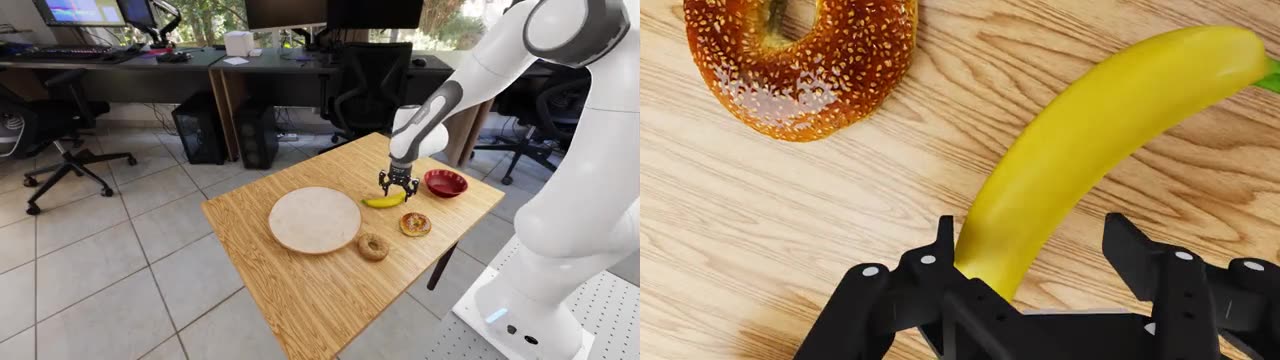
Four successful scripted demonstrations — exterior and wrist views, the two cameras recorded into every episode. Click the preview to watch at 2× speed.
A 50-episode run yields roughly 47 successful demonstrations in about 40
minutes, which convert to ~8,000 Cosmos training samples. The v3.0 writer emits
the chunked data/, videos/ and meta/episodes/ layout that
cosmos-framework's DROIDLeRobotDataset consumes; note that its feature
mapping is selected by the dataset directory name, and that a two-camera
recording supports viewpoint="wrist_view".
The container packages the core HTTP service. Live ROS2, Kit, and voice integrations still require their host-side services and explicit networking.
docker build -t isaac-assist:local .
docker run --rm -p 8000:8000 --env-file .env isaac-assist:local
curl http://localhost:8000/health
curl -X PUT http://localhost:8000/api/v1/settings/llm_mode \
  -H "Content-Type: application/json" -d '{"mode": "local"}'
Skip this section if you do not need voice/audio features.
cd infra/livekit
docker compose up -d
This starts:
7880 (WebSocket), 7881 (HTTP), 7882/udp (WebRTC)6379 (required by LiveKit)To stop:
docker compose down
The launch_isaac.sh script configures the correct ROS2 environment and registers the extension folder automatically. It selects the matching extension harness for the detected Isaac Sim runtime:
| Runtime | Extension path | Notes |
|---|---|---|
| Isaac Sim 5.1 | exts/isaac_5.1 | Legacy-compatible harness; KIT_RPC_PORT can override the default 8001 when co-running with another Kit instance. |
| Isaac Sim 6.0 | exts/isaac_6.0 | Current active harness for Isaac Sim 6.0 / Isaac Lab 3 workflows. |
# Launch Isaac Sim with an empty scene
./launch_isaac.sh

# Launch Isaac Sim and open a specific USD file
./launch_isaac.sh /path/to/scene.usd

# Launch Isaac Sim 6.0 with Isaac Assist via the desktop-friendly wrapper
./launch_isaac_assist_desktop.sh

# Launch one canvas/generated scene with Isaac Assist loaded
./launch_canvas_scene.sh /path/to/scene.usd
To point at a custom Isaac Sim installation, set ISAAC_SIM_PATH or ISAACSIM_PATH in your .env file or export it before launching:
export ISAACSIM_PATH=~/Documents/Github/isaacsim/_build/linux-aarch64/release
./launch_isaac.sh
The script auto-detects architecture (x86_64 or aarch64) and sets default paths accordingly. For DGX Spark/aarch64, the preferred path is the Isaac Sim 6.0 source-build release directory:
| Architecture | Default Path |
|---|---|
| x86_64 | ~/IsaacSim/_build/linux-x86_64/release, ~/Documents/Github/isaacsim/_build/linux-x86_64/release, then standalone 6.0/5.1 fallbacks |
| aarch64 (DGX Spark) | ~/IsaacSim/_build/linux-aarch64/release, then ~/Documents/Github/isaacsim/_build/linux-aarch64/release |
To rebuild Isaac Sim 6.0 from source on DGX Spark:
cd ~/Documents/Github/isaacsim
git fetch origin
git merge --ff-only origin/main
git lfs pull
./build.sh -r -u
export ISAACSIM_PATH=$PWD/_build/linux-aarch64/release
If you prefer to load the extension manually inside Isaac Sim:
exts/ folder:
<repo_root>/exts/isaac_5.1<repo_root>/exts/isaac_6.0omni.isaac.assist and toggle it ON.curl http://localhost:8000/health
# Expected: {"status":"ok","service":"isaac-assist-backend","llm_mode":"anthropic","model":"claude-opus-4-6"}
Once Isaac Sim is open and the extension is enabled, the Isaac Assist panel should appear as a dockable window. If it does not:
curl above).Use this after large merges to verify the visible experience, not just the unit-test layer.
cd web/floor-plan-ui
npm install
npm run dev -- --host 127.0.0.1
Open http://127.0.0.1:5173?session=default_session and confirm these major surfaces render:
Isaac Assist · Floor Plan and multimodal canvas v1.0For automated checks, run:
cd web/floor-plan-ui
npm run build
npm test
./launch_service.sh local../launch_isaac_assist_desktop.sh.qwen3.6:latest.The Isaac Sim GUI test requires a live Kit process and GPU. If Kit is not running, keep the verification to the floor-plan GUI plus the backend/unit gates.
Configuration is loaded in priority order (later files override earlier ones):
.env                  ← repo root defaults (git-ignored)
service/…/.env        ← service-level overrides (git-ignored)
.env.local            ← YOUR personal overrides — highest priority (git-ignored)
Quick start: Copy the example file and fill in your values:
cp .env.local.example .env.local
# Edit .env.local with your API keys and asset paths
See .env.local.example for the full annotated template.
| Variable | Example | Description |
|---|---|---|
LLM_MODE | anthropic | anthropic, openai, ollama, or gemini |
CLOUD_MODEL_NAME | claude-opus-4-6 | Model name for cloud providers |
ANTHROPIC_API_KEY | sk-ant-xxx | API key for your chosen provider |
ASSETS_ROOT_PATH | /home/user/assets | Path to Isaac Sim USD assets (local or Nucleus) |
ISAAC_ASSIST_ASSET_ROOTS | /home/user/Desktop/assets | One or more local USD asset roots for floor-plan build previews; separate multiple roots with : on Linux |
ASSETS_ROBOTS_SUBDIR | Collected_Robots | Subdirectory containing robot USD files |
LIVEKIT_URL | ws://localhost:7880 | LiveKit server (optional, for voice/vision) |
CONTRIBUTE_DATA | false | Log approved patches for fine-tuning |
Cosmos 3 is treated as a world-model proposal layer, not as a direct Isaac Sim mutator. A Cosmos Reasoner workflow can turn a photo, screenshot, render, or prompt into structured scene observations, then submit them to:
POST /api/v1/canvas/{session_id}/cosmos/observe
POST /api/v1/canvas/{session_id}/cosmos/observe_viewport
POST /api/v1/canvas/{session_id}/cosmos/propose
POST /api/v1/canvas/{session_id}/cosmos/generate
cosmos/observe calls a configured OpenAI-compatible Cosmos 3 Reasoner
endpoint. If GEMINI_ROBOTICS_ER_FALLBACK=true and GEMINI_API_KEY is set,
Gemini Robotics-ER can act as a cloud backup that returns the same
CosmosSceneObservation contract when the Cosmos endpoint is unavailable.
cosmos/observe_viewport first captures the active Isaac Sim viewport
through Kit RPC, then calls the same observation flow. cosmos/propose accepts
already-structured observations. The backend
converts the observation into a reviewable LayoutSpec proposal.
The floor-plan UI remains the correction/confirmation surface, and the final
build goes through POST /api/v1/canvas/{session_id}/build. Builds default to
dry_run=true, returning resolved assets and generated Kit code for review;
set dry_run=false only when ready to queue the patch into live Isaac Sim. See
Cosmos 3 to Floor-Plan Flow.
cosmos/generate calls a configured Cosmos 3 Generator endpoint and writes
durable artifacts under workspace/multimodal/cosmos3_generations/. It covers
the Cosmos 3 Omni modes that are useful for Isaac Assist review and robot data:
text_to_image, text_to_video, image_to_video, video_to_video,
*_with_sound, policy, inverse_dynamics, and forward_dynamics. The
default generation settings are intentionally light for DGX Spark/Nano smoke
tests: 320x192, 24 frames, 12 fps, and 35 denoising steps. Increase to
480p/720p and longer frame counts once endpoint latency and VRAM headroom look
good.
Floor-plan builds can also carry semantic spatial relations such as
on_top_of, inside, contains, and supports. The instantiator normalizes
those relations into approximate 3D placement, using support surfaces and
container/interior affordance hints to compute Z offsets. This is the first
step toward rebuilding scenes like "fruit in a bowl on a table" or "a plate in
a microwave on a counter" from a 2D review surface plus vision/Cosmos relation
proposals.
LayoutSpec also carries a scenario_variants contract for controlled
multi-scene generation. The floor-plan UI exposes this in the Scenario
Variants panel:
variant_count and seed control campaign size and repeatability.Today this is a declarative contract surfaced in Preview Build and saved with the canvas spec. The next execution layer can consume the same contract locally, through Isaac Automator, or on Brev/DGX to fan out one reviewed floor-plan into many tested Isaac/Cosmos scenes.
The backend can already expand the saved contract into a deterministic campaign plan:
POST /api/v1/canvas/{session_id}/campaign/plan
POST /api/v1/canvas/{session_id}/campaign/materialize
The response includes a campaign_id, per-variant seeds, lighting/camera/actor
and circumstance selections, validation requirements, planned USD paths, and a
launch_command for each variant. The floor-plan UI's Plan campaign button
flushes pending edits, calls this route, and shows the first launch command.
The Materialize campaign button writes the campaign manifest, the saved
LayoutSpec, one minimal .usda stage per variant, and one Isaac Sim setup
script per variant under workspace/scenario_campaigns/<campaign_id>/.
To automatically open one generated or saved USD scene with the extension already loaded, use:
./launch_canvas_scene.sh /path/to/scene.usd
For a materialized variant, use the launch command emitted in the campaign manifest. It includes the setup script that applies the generated Kit scene patch after the minimal stage opens:
SCENE_SETUP_SCRIPT=workspace/scenario_campaigns/<campaign>/<variant>_setup.py \
  ./launch_canvas_scene.sh workspace/scenario_campaigns/<campaign>/<variant>.usda
Or use the local runner, which selects a variant from campaign_plan.json,
writes <variant>_result.json, tails launcher output into
<variant>_launch.log, and starts Isaac Sim with the correct setup script:
./scripts/run_materialized_variant.sh workspace/scenario_campaigns/<campaign>/campaign_plan.json --index 1

# No Isaac launch; write/inspect the result artifact only
./scripts/run_materialized_variant.sh workspace/scenario_campaigns/<campaign>/campaign_plan.json --index 1 --dry-run
This wrapper starts the backend if needed through
launch_isaac_assist_desktop.sh, selects Isaac Sim 6.0 by default, registers
exts/isaac_6.0, enables omni.isaac.assist, and opens the USD through the
startup hook in launch_isaac.sh.
Cosmos 3 Reasoner belongs before this materialization step. Use
/cosmos/observe, /cosmos/observe_viewport, or /cosmos/propose to infer
objects, asset hints, and spatial relations from prompts, photos, renders, or
the live Isaac viewport. The floor-plan UI remains the review surface; once the
relations and asset choices are accepted, the campaign planner/materializer
turns that reviewed spec into deterministic variant jobs.
For scale-out, Isaac Assist treats DGX Spark, Brev, and isaac-sim/IsaacAutomator as remote capacity providers. See Remote Scale Providers for the planned extension/backend contract.
For Cosmos 3 Reasoner NIM, prefer a same-LAN DGX Spark when one is available. That keeps the local Isaac Sim GPU free for rendering and live stage mutation. The helper below starts the NIM endpoint on Spark or another GPU host:
export NGC_API_KEY=nvapi-...
COSMOS_NIM_CACHE=$HOME/nim-cache/cosmos3-reasoner \
  COSMOS_NIM_PORT=8081 \
  NIM_MAX_MODEL_LEN=32768 \
  ./scripts/start_cosmos3_reasoner_nim.sh
Then point Isaac Assist at the remote endpoint:
COSMOS3_REASONER_BASE_URL=http://<spark-host-or-ip>:8081/v1
COSMOS3_REASONER_MODEL=nvidia/cosmos3-nano-reasoner
For Cosmos 3 Generator video/image/action output, run vLLM-Omni on the host with the Nano weights and point Isaac Assist at that endpoint:
COSMOS_GENERATOR_PORT=8082 \
COSMOS_GENERATOR_MODEL=nvidia/Cosmos3-Nano \
  ./scripts/start_cosmos3_generator_vllm_omni.sh

COSMOS3_GENERATOR_BASE_URL=http://<spark-host-or-ip>:8082/v1
COSMOS3_GENERATOR_MODEL=nvidia/Cosmos3-Nano
Smoke-test text-to-video through Isaac Assist:
curl -sS -X POST http://127.0.0.1:8000/api/v1/canvas/demo/cosmos/generate \
  -H 'Content-Type: application/json' \
  -d '{
    "mode": "text_to_video",
    "prompt": "a gripper grabs a red cube and slowly lifts it",
    "size": "320x192",
    "num_frames": 24,
    "fps": 12
  }'
# Local filesystem (recommended — works offline)
ASSETS_ROOT_PATH=/home/user/Desktop/assets
ISAAC_ASSIST_ASSET_ROOTS=/home/user/Desktop/assets

# NVIDIA Omniverse Nucleus server
ASSETS_ROOT_PATH=omniverse://localhost/NVIDIA/Assets/Isaac/5.1

# NVIDIA S3 hosted (requires network access)
ASSETS_ROOT_PATH=https://omniverse-content-production.s3-us-west-2.amazonaws.com/Assets/Isaac/5.1
The floor-plan canvas becomes much more useful when the backend can resolve reviewed classes to real USD assets instead of primitive placeholder geometry. For local/offline work, gather Isaac Sim, SimReady, Warehouse, robot, and customer USD assets under a common folder such as:
/home/<user>/Desktop/assets/
Set ISAAC_ASSIST_ASSET_ROOTS to that folder before launching the service. The
asset resolver checks explicit user overrides first, then palette references,
then known local asset paths, and finally any asset_catalog.json files found
under the configured roots. This is what lets Preview Build turn floor-plan
objects such as conveyor_short, bin, and cube into real USD references.
Good asset packs to collect include:
Keep asset_catalog.json files next to downloaded asset packs when available.
They improve fallback matching when a class does not have a hard-coded local
override yet.
The FastAPI service exposes the following REST API modules, all prefixed under /api/v1/:
| Endpoint Prefix | Module | Description |
|---|---|---|
/chat | Chat Orchestration | Multi-turn LLM conversations with the stage context |
/fingerprint | Environment Fingerprint | Hardware, Omniverse version & active extension telemetry |
/snapshots | Snapshot Manager | USD stage serialization and rollback |
/retrieval | Source Registry RAG | Omniverse doc scraping + vector retrieval |
/analysis | Stage Analyzer | Scene constraint checks and validator packs |
/plans | Patch Planner | Repair plan generation and execution engine |
/governance | Approval Engine | Dry-run UI dialogs for user-governed USD edits |
/settings | Configuration Options | Model switching, Ollama pull triggers, API keys |
/settings/llm_mode | LLM Mode Switch | GET current mode, PUT to hot-switch provider |
/chat/pipeline/plan | Pipeline Planner | Template-based multi-phase autonomous scene builder |
/finetune | Fine-tuning Builder | Knowledge Base → training data pipeline |
/canvas/{session_id}/cosmos/propose | Cosmos 3 Adapter | Cosmos Reasoner scene observations → floor-plan LayoutSpec proposals |
/canvas/{session_id}/cosmos/observe | Cosmos 3 Runtime | Image/prompt → Cosmos observation → floor-plan LayoutSpec proposal |
/canvas/{session_id}/cosmos/observe_viewport | Cosmos 3 Runtime | Active Isaac viewport screenshot → floor-plan LayoutSpec proposal |
Full interactive documentation: http://localhost:8000/docs
External MCP chat clients can use the floor-plan as the semantic window into Isaac Sim instead of trying to infer the 3D stage directly. The MCP server advertises these scene-creation tools:
| MCP Tool | Purpose |
|---|---|
create_floor_plan_from_text | Convert a text scene description into a reviewable LayoutSpec. |
create_floor_plan_from_image | Use the configured image/reasoner path to create a floor-plan proposal from an image. |
create_franka_physics_pick_scene | Create a full-physics Franka tabletop pick scene with rigid workpieces, static supports, relation metadata, and a pick-place controller plan. |
create_ros2_scene_harness | Write a project-local ROS2 package plus scene contract, controller config, launch file, and active-stage preflight targets. |
preflight_isaac_stage_targets | Read the active Isaac stage identity and confirm caller-specified target prims before graph or robot-control tools run. |
search_local_assets | Search configured USD asset roots such as /home/kimate/Desktop/assets. |
set_object_asset | Pin a selected USD asset to a floor-plan object via metadata.reviewed_asset_ref. |
build_scene_from_floor_plan | Dry-run or build the current floor-plan into Isaac/Kit generated code. |
launch_scene_in_isaac | Materialize and launch one generated scene variant. Defaults to dry-run. |
verify_scene_relations | Normalize and validate support/containment relations before claiming success. |
Recommended external-client flow: create a floor-plan from text or image, search and pin real assets where needed, verify relations, dry-run the scene build, preflight the active Isaac stage and caller-specified target prims, then launch only after the generated code and relation diagnostics look right.
For a manipulation smoke scene, use create_franka_physics_pick_scene with
motion_backend="auto" or "curobo". That path creates the physics scene and
returns arguments for the existing setup_pick_place_controller live Isaac
tool. create_ros2_scene_harness records the expected live-stage prim paths in
config/scene_contract.json so agents can run preflight_isaac_stage_targets
before any live graph or robot-control action. motion_backend="cumotion"
records a MoveIt/cuMotion bridge contract and validated dry-run plan, while
live viewport pickup still routes through the existing pick-place controller
until the opus-runtime cuMotion execution bridge is connected.
The current master includes the PR 115-117 integration wave:
--validate-sandbox.A downloaded USDZ is not a simulation asset. It has no mass, no collision, no material, and often the wrong scale and up-axis. This pipeline takes raw downloads to physics-verified, machine-approved assets — and it judges its own work before a human ever sees it.
ingest  ->  classify  ->  make sim-ready  ->  render  ->  vision judges
              |                                              |
        class priors                                    rubric + verdict
        (50 classes)                                          |
                                            live PhysX drop + headless Newton
                                                              |
                                                    registry (66 assets)
How-to: Making an asset sim-ready walks a download from ingest to the registry. Its worked example is a door with a crash bar and latch: segmentation, joint drafting, coupled mechanisms, and headless joint animation with measured evidence.
Current state: 2377 assets ingested, 2326 with a recorded visual-QA verdict, 62 machine-approved, 66 promoted to the sim-ready registry, 32 of those independently re-verified in a second physics engine.
Every asset is rendered as four orbit views, because integrity cannot be judged from a single frame — a missing back face, a hollow interior, or an untextured patch hides from a front view.
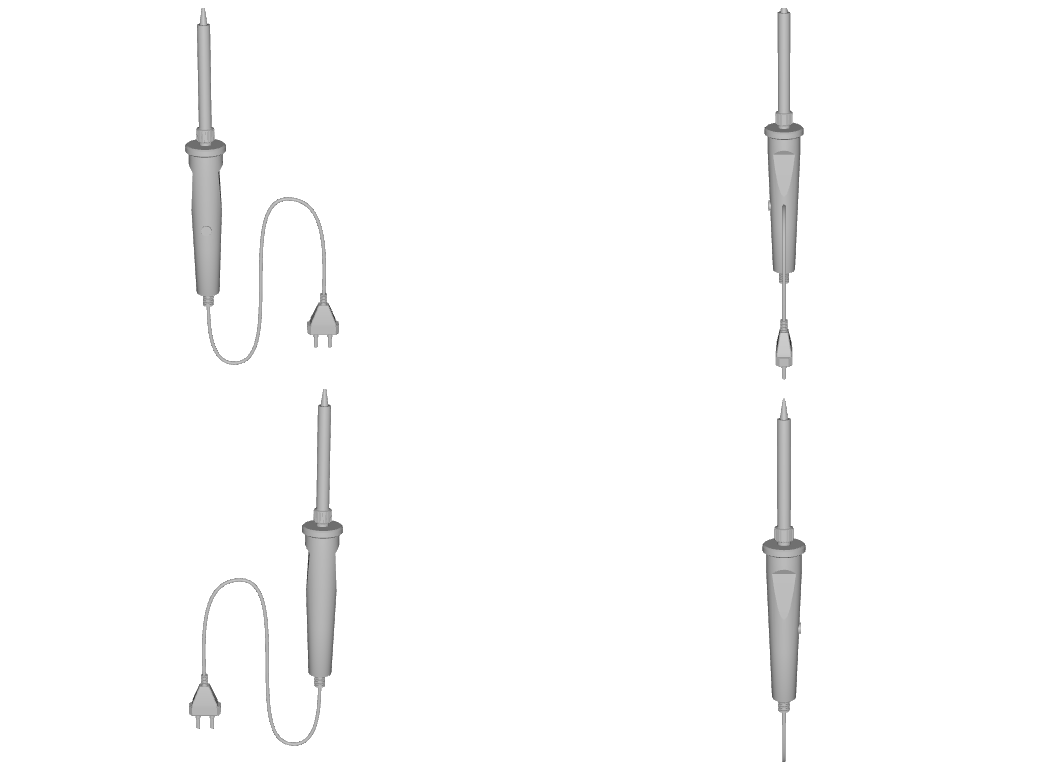
Those views go to an ensemble of vision judges — Cosmos-Reason2 (local vLLM), Gemma (local Ollama), and Claude with structured outputs — which are scored by a rubric rather than trusted directly:
| Check | What it rejects |
|---|---|
judges_healthy | A verdict from an ensemble that partly failed to answer. |
identity_agreement | Judges that disagree about what the object even is. |
integrity | Holes, missing faces, hollow shells, broken geometry. |
scale_in_prior | A 4 m coffee mug. Bounds must land in the class prior. |
physics_ready | Mass outside the class prior, or an implied density outside 15-3000 kg/m3. |
no_error_callouts | Any judge naming a concrete defect. |
prior_confirmed | A class the priors do not actually support. |
rigid_scope | A rigid sign-off on something that is not rigid. |
The rubric is deliberately harsh, and it is applied to the machine's own earlier decisions: an implied-density guard caused it to revoke three of its own approvals after class-midpoint masses produced a 1.26 kg computer mouse.
python scripts/visual_qa.py <asset_id> [...]        # judge specific assets
python scripts/visual_qa.py --all-pending --approve  # judge + sign off the queue
Deformables never take this path. Cloth, foam and gel sign-off stays human; the machine only records evidence.
The judges are also pointed at our own renders before anything is presented for review — the same models, asked what is wrong with the picture rather than what is in it. This exists because output was repeatedly shown to a human while visibly broken.
python scripts/critique_render.py <render.png> [...] --expect "a desk lamp with a cord"
It is also exposed as the critique_render chat tool.
Cords are where asset physics and articulation meet. A cord is authored either as a routed static cord — a Bezier path from the device's cord exit to the plug, with a single-sided slack bow, clamped to the surface only in its interior so the endpoints stay attached — or as a dynamic capsule chain with D6 joints.
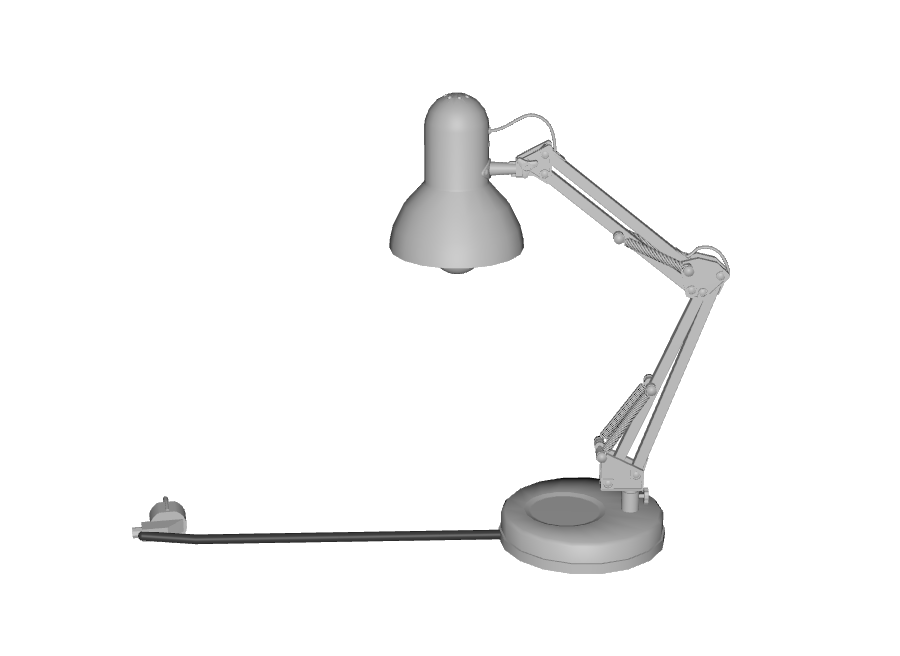
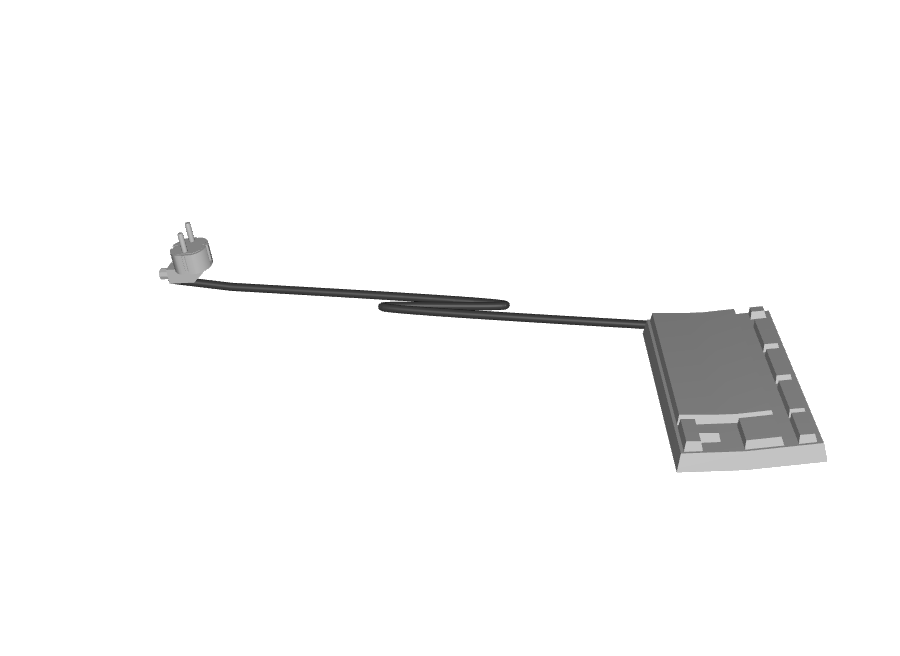
Cord-exit direction is knowledge, not geometry: it lives in the class priors per
device type. Where a human corrects an attachment in the viewport,
capture_attachment.py converts that correction into the asset's own space and
stores it permanently, so it is made once and reused forever. (The store is
created on first capture; until then make_cable.py falls back to its
geometric fat-end heuristic. Capture before reloading the layer — a forced
reload discards viewport edits.)
# a bare cord
python scripts/make_cable.py cable --length 1.2 --radius 0.004 --out cord.usda
# a device composed with its cord and plug
python scripts/make_cable.py compose --iron <iron.usd> --plug <plug.usd> \
    --length 1.5 --out lamp_corded.usda
# store a human's viewport correction permanently, in the asset's own space
python scripts/capture_attachment.py --asset power_plug_european \
    --prim /World/Kettle/Plug --cord /World/Kettle/Cord
Routed assemblies are fully static — an earlier version returned before the joint code ran, leaving the plug a free rigid body that flew off on play.
The laundry-fold grasp: two kinematic finger boxes pinch a garment corner with friction alone (no attachment constraint) and lift it 35 cm.

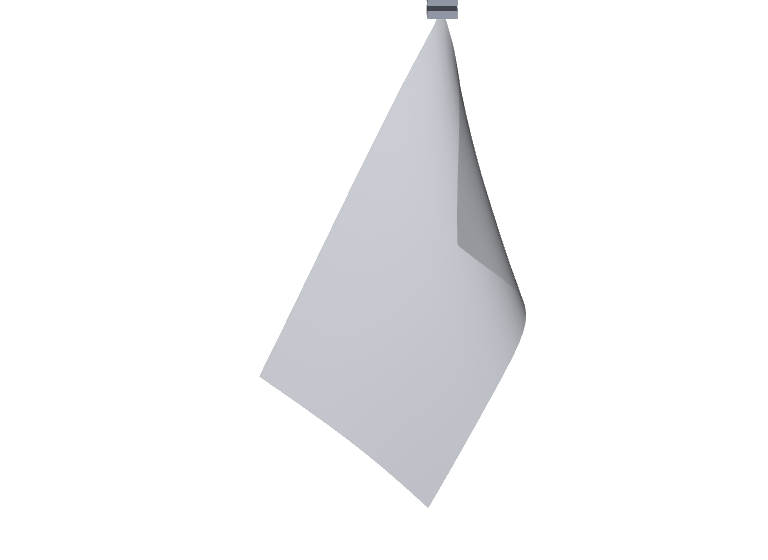
Both images are the actual solver state exported to USD and rendered — not mock-ups. The Newton 0.2 baseline passed 5/5 generated garments on CUDA in 90 s: 4 mm slip, the corner rose the full 35 cm, and the garment hung 117-146 cm and settled to under 0.7 cm of residual swing. Revalidated on 2026-08-14 with Newton 1.5.0 + Warp 1.16.0, the particle-contact path again passes 5/5; measured slip is now 13-37 mm. Versioned evidence records the new results without silently replacing the old baseline.
python3 -m venv .venv-newton
.venv-newton/bin/pip install -r requirements-newton.txt

.venv-newton/bin/python scripts/verify_asset_newton.py \
    cloth_grasp garment_towel
CLOTH_EXPORT_USD=out.usda ... cloth_grasp garment_tshirt   # export for render
# Newton 1.5 edge/face contact A/B (particle contact remains the default)
NEWTON_FULL_SURFACE_CONTACT=1 .venv-newton/bin/python \
    scripts/verify_asset_newton.py cloth_grasp garment_towel
Three things about this are easy to get wrong and fail silently:
SolverVBD ignores rigid shapes entirely unless constructed with
integrate_with_external_rigid_solver=True. Without it the cloth passes
through the fingers and falls 25 m, with no error.wp.array.numpy() is a view on CPU but a copy on CUDA. Pose-driving a
gripper by mutating it works on CPU and silently does nothing on GPU.Cloth actuation with abstract finger boxes is a physics result; a robot doing it is a task. A Franka FR3 takes a washcloth off a table, carries it, and puts it down.
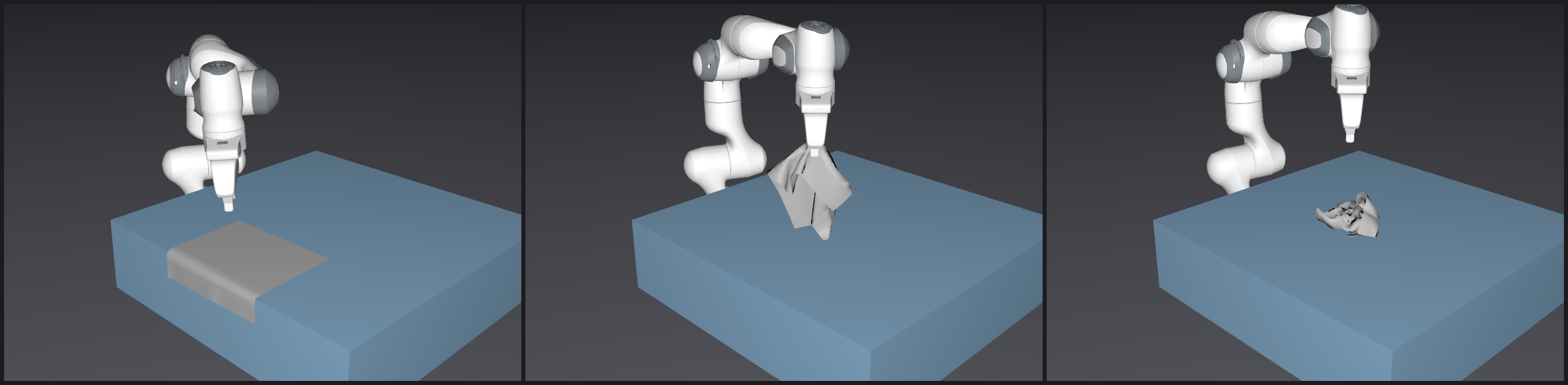
Approach (the flap overhangs the table edge) → carried clear of the surface → set down 30 cm away. Rendered from the recorded simulation, not staged.
.venv-newton/bin/python scripts/pick_place_cloth.py garment_washcloth
PICK_PLACE_RECORD_USD=scene.usd ... scripts/pick_place_cloth.py garment_napkin
The Newton 0.2 baseline measured 5 consecutive runs on the washcloth (18 g): 5/5 carried it 0.20–0.26 m of a commanded 0.30 m, intact, resting on the table, settled. It falls short of the full 0.30 m because the grasp takes a flap rather than the whole garment, so the cloth partly drags — which is what real fabric does.
The Newton 1.5 probe runs end to end and carries the washcloth 0.23 m, but it does not pass the final gate: after opening, particle contact leaves the cloth caught on the retreating hand instead of resting on the table. Full finger travel and a lateral-withdrawal experiment did not fix that behavior, so this is recorded as a release/contact regression rather than hidden by a weaker landing threshold.
It does not yet work on the napkin, and that is a real limit rather than a tuning detail. The napkin is 0.45 m square and 41 g — 2.3× the washcloth's mass on the same single-flap pinch — and it consistently slips: three runs carried it 0.11 m, 0.09 m and 0.09 m of the commanded 0.30 m. A friction grasp holds only what its contact patch and normal force can hold, so a one-flap pinch is mass-limited. Carrying heavier garments needs a bigger bite, a second grasp point, or both hands — which is also what a folding task needs, so it is the next piece of work rather than a workaround.
Why a standalone Newton path remains useful. NVIDIA's reference uses a
Franka under SolverFeatherstone coupled one-way to cloth under SolverVBD
(newton.examples cloth_franka), roughly 300× faster than GPU-IPC. Isaac Lab
3.0 Beta 2 now includes experimental VBD deformables and an
Isaac-Lift-Cloth-Franka-v0
task, so issue #5285 is no longer the right blocker. That release is still on
Newton 1.2.1, while these probes pin Newton 1.5.0 and Warp 1.16.0 in a separate
environment. We should port the task to Isaac Lab after its Newton dependency
catches up; until then, forcing 1.5 into Isaac's environment would invalidate
its tested dependency set. The local coupling remains deliberately one-way: a
30 g washcloth does not materially perturb a Franka.
Newton 1.5
also adds opt-in full-surface VBD contacts. Set
NEWTON_FULL_SURFACE_CONTACT=1 only to reproduce the A/B test: in the current
washcloth gate it ejects the cloth by tens of metres and fails. Particle
contact therefore remains the supported default. Cable thresholds were
revalidated after preserving 1.5's changed shear/twist slots: load/slack and
friction-grasp gates both pass.
Psyonic hands can use Newton 1.5 hydroelastic contact without changing the
canonical robot or Isaac Lab's pinned runtime. The generator references the
canonical USD, selects its generic Physics=physics variant, disables the 68
overlapping hand colliders only in the wrapper, and authors one closed SDF
collider for each of the 22 hand rigid bodies:
WARP_CACHE_PATH=/tmp/newton-warp-cache \
  .venv-newton/bin/python scripts/make_newton_hydro_hands.py \
  /path/to/amber_revan_psyonic_lsmall_rsmall.usda \
  /path/to/amber_revan_psyonic_lsmall_rsmall_newton_hydro.usda

# CUDA-only: build every mesh SDF and test one fingertip contact pair
WARP_CACHE_PATH=/tmp/newton-warp-cache \
  .venv-newton/bin/python scripts/smoke_newton_hydro_hands.py \
  /path/to/amber_revan_psyonic_lsmall_rsmall_newton_hydro.usda \
  --write-manifest
The generated companion preserves 52 bodies and 52 joints. On the GB10, all 22 SDFs build and the isolated left-index distal collider produces 64 reduced hydroelastic contacts against a temporary sphere at 2 mm penetration. Objects the robot grasps must also opt into SDF hydroelastic collision; this is rigid distributed-pressure contact, not deformable fingertip tissue.
The robot/Newton workflow is also exposed as the project-owned Agent Skill
.agents/skills/newton-hydroelastic-hands. NVIDIA's official CAD-to-SimReady,
USD performance-tuning, and realtime-viewer skills can be used alongside it.
The CPU-only nvidia_usd_validation Stage Analyzer pack and the disabled-by-
default Kit/USD/Isaac MCP endpoint template are documented in
Docs/13_NVIDIA_OMNIVERSE_AGENTS.md.
The finding that shaped the whole task: a parallel-jaw gripper cannot pick a flat sheet off a table. The fingers close beside zero-thickness fabric pressed against the surface. Dropping the garment first does not fix it either — a plain square sheet lands flat again (measured: 8 mm of loft, its own thickness). The reference example gets away with it only because a shirt has sleeves and a collar holding fabric off the table. So the task is staged the way it is really staged: part of the garment over the table edge, where the flap hangs in free air with something for each finger to close against. The grasp point is then chosen from the settled geometry, the way a perception stack would, rather than assumed up front.
The Franka pick scene is workpiece-agnostic. It used to hardcode 5 cm rigid cubes, which quietly decided two things it had no business deciding: that the workpiece has a rigid body, and how big it is.
create_franka_physics_pick_scene(session_id=..., workpiece="towel")
workpiece takes any pickable palette class — cube_small, cylinder_medium,
sphere, bolt, washcloth, napkin, hand_towel, towel, tshirt.
Anything that is not pickable is rejected by name rather than silently
mishandled ('franka_panda' is not a pickable workpiece (it is a robot)).
| Where | Change |
|---|---|
multimodal/object_palette.py | 5 deformable workpiece classes: washcloth, napkin, hand_towel, towel, tshirt. |
multimodal/instantiator.py | _DEFORMABLE_WORKPIECE_CLASSES beside the rigid set; emits _apply_cloth (PhysxDeformableSurfaceAPI + material preset) instead of RigidBodyAPI. |
mcp_floorplan_tools.py | _workpiece_profile() derives physics, footprint and spacing from the palette; require_rigid_body_api_for_workpieces is now conditional; grip_style is chosen from what is being picked. |
chat/tools/handlers/pick_place.py | _is_deformable() routes cloth to a friction grasp. |
Everything downstream follows from the class:
cube_small | towel | |
|---|---|---|
| workpiece physics | dynamic_rigid_body | deformable_surface |
| rigid-body API required | yes | no |
| grip style | fixed_joint | friction |
| of 3 requested, placed | 3 | 1 (2 reported dropped) |
That last row matters: spacing comes from the workpiece's own footprint, so a
large one spaces itself off the end of the table — three 1.4 m towels would be
placed at x = 0.38, 2.34 and 4.30 against a table that stops at 1.55, two of
them floating in mid-air. The count is fitted to the surface and the shortfall
is reported as object_count_dropped rather than silently truncated.
The grasp is still the real blocker. The rigid path holds an object by welding a
UsdPhysics.FixedJoint between the end effector and the workpiece. A
FixedJoint needs a rigid body at both ends and a deformable prim has none, so
on cloth it defines cleanly and holds nothing — the arm completes its whole
trajectory having picked up air. Cloth is therefore held the way a real gripper
holds fabric, and the way the Newton run above holds it: friction between fully
closed fingers and the cloth. A 4 mm gap that grips a cube lets a 0.4 mm sheet
slide straight out, so cloth closes to zero.
Two independent engines, because agreement between two is a far stronger sim2real claim than either alone.
| Command | What it proves |
|---|---|
verify_asset_live.py | Live PhysX drop test inside Isaac. |
verify_asset_newton.py rigid | The same USD re-dropped in Newton. Current registry: Newton 0.2 passed 32/32; Newton 1.5 passes 30/32. |
... drape / fold / squish | Deformable behaviour: cloth collapses, folds stay folded. |
... cable | A cord pulls straight under load and holds its bow when slack. |
... grasp / cloth_grasp | A gripper carries a cord, and a gripper carries a garment. |
Newton runs on CUDA by default (NEWTON_DEVICE overrides). VBD is a
GPU-parallel method — Newton disables its tiled solve entirely on CPU.
The two Newton 1.5 rigid failures are retained as versioned evidence:
frying_pan has not settled by 4 s, and planter_round_02_inst_base does not
make the expected 10 cm drop with its imported collision hull. The foam-brick
VBD compression gate also passes on 1.5 (0.10 restitution, 0.94 height ratio).
Known gap:
drapeis vacuous for the generated garments. They are authored as flat sheets, so initial z-extent is zero and "collapses to flat" cannot fail. It remains meaningful for scanned deformables.
Scenes need people. Rigged characters are detected via UsdSkel, bound to motion clips, and spawned as walking crowds.
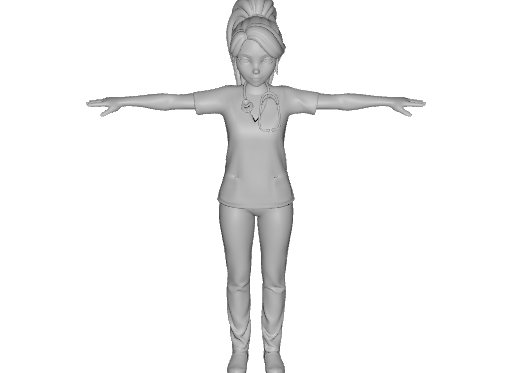
# Isaac must be running; clips: stand_walk_1..5,7 (+_mirror), Sit,
# LookAround, stand_idle_loop, stand_idle_wave_loop
python scripts/spawn_walking_person.py --clip stand_walk_1 --port 8001
python scripts/verify_character.py <asset_id> [...]   # skeleton, skin, motion
Scene blueprints accept a characters list, so chat requests like "spawn a
scene with people walking and sitting on furniture" resolve to clip-bound
characters on the live stage.
Some joints only work after another one has moved: a fire door does not open until its crash bar is pushed. The pipeline models that physically, not as a script. A latch bolt on the leaf is coupled to the crash bar by a PhysX mimic joint, and a keeper on the frame stops the door while the bolt is out. A robot, a person or a test therefore all meet the same constraint.

Measured in PhysX, not keyframed. Shoved with 80 N·m while the bar is at rest, the door stops at 0.9°. With the bar pushed, the bolt retracts 25 mm and the door swings to 90°. With the bar released, the closing door pushes the angled bolt in, and the door re-latches at 0.0°. Click the preview for the video.
The door arrived as a single fused mesh. The pipeline built it without hand edits:
animate_asset.py records a video of any articulated asset. It logs each
joint's measured position on every frame and checks every gate: a gated joint
is first pushed with its actuator at rest and must not move.
python3 scripts/ingest_asset.py ~/Downloads/door_door_metal.usdz --class-hint door
python3 scripts/segment_mesh.py door_door_metal
# hub: Draft articulation spec -> review -> Apply articulation -> Animate joints
# or animate from the shell, with Isaac's python, waiting for the Isaac slot:
ISAAC_PY=~/Documents/Github/isaacsim/_build/linux-aarch64/release/python.sh
( source scripts/isaac_slot.sh && $ISAAC_PY scripts/animate_asset.py door_door_metal )
The full walkthrough, including the spec to review and the failure modes, is in Making an asset sim-ready.
| Tool | Purpose |
|---|---|
ingest_asset_report | Ingest and classify an asset or a whole folder. |
make_sim_ready | Author mass, collision, material and scale onto a raw asset. |
create_corded_asset | Compose a device with a physically routed cord. |
create_deformable_mesh | Author cloth / sponge / rubber / gel deformables. |
critique_render | Ask the vision judges what is wrong with a render. |
| File | Contents |
|---|---|
workspace/knowledge/asset_class_priors.json | 50 classes: size, mass, density, deformable, cord_exit. |
workspace/knowledge/cord_attachments.json | Human-corrected attachment points, in asset space. Written by capture_attachment.py and preferred by make_cable.py over its geometric guess; created on first capture, so it is absent until a human corrects one. |
workspace/knowledge/product_specs.json | Looked-up real product dimensions and masses. |
workspace/knowledge/sim_ready_assets.json | The registry: 66 verified assets with evidence. |
Isaac Assist uses a version-aware knowledge base to ground the LLM in verified, working code patterns for each Isaac Sim release. Community contributions to this knowledge base directly improve the quality of generated code for everyone — and can ultimately feed into a fine-tuned model purpose-built for Isaac Sim development.
The knowledge base lives in workspace/knowledge/ and consists of:
| File | Purpose |
|---|---|
code_patterns_5.1.0.jsonl | Verified code snippets for Isaac Sim 5.1 |
code_patterns_6.0.0.jsonl | Verified code snippets for Isaac Sim 6.0 / Isaac Lab 3 |
knowledge_5.1.0.jsonl | Indexed documentation chunks |
When a user asks the LLM to perform an action, the system automatically retrieves relevant patterns for the active Isaac Sim version and injects them into the prompt. This means the LLM sees working, tested code rather than hallucinating outdated Kit commands.
Code patterns are stored as JSONL (one JSON object per line). Each entry has this format:
{
  "title": "Short descriptive title",
  "keywords": ["keyword1", "keyword2", "keyword3"],
  "code": "import omni.usd\nfrom pxr import UsdGeom\n\n# ... working code ...",
  "note": "Brief note about gotchas or why this approach is preferred."
}
To contribute a pattern:
workspace/knowledge/code_patterns_<version>.jsonlGood pattern contributions:
Important: All contributed patterns should use direct pxr/USD Python APIs rather than
omni.kit.commands.execute(...)— Kit commands are unreliable across Isaac Sim versions.
If you have Isaac Sim documentation, tutorials, or workflow notes, you can contribute them to the RAG index:
.md or .txt files to workspace/knowledge/Isaac Assist includes a built-in fine-tuning data pipeline. When the "Contribute Fine-Tuning Data" option is enabled in the extension settings, your chat interactions (prompts + approved code patches) are logged locally in workspace/finetune_exports/.
How this feeds into model training:
POST /api/v1/finetune/export) to generate training-ready JSONLscripts/tuning/ directory contains tooling for LoRA fine-tuning with Unsloth and GGUF export for local deployment via OllamaThe long-term goal is a community-trained model that understands Isaac Sim's full API surface — every contributed pattern and training pair brings that closer.
Spec Reference: See
Docs/00_INDEX.mdfor the full ecosystem specification, data models, and phase roadmap.
An agentic AI assistant for NVIDIA Isaac Sim that provides LLM-powered scene diagnostics, patch planning, and governance — surfaced through a dockable Omniverse UI panel backed by a local FastAPI service.
| Requirement | Version |
|---|---|
| NVIDIA Isaac Sim | 6.0 from source on DGX Spark; 5.1 still supported as a fallback |
| Python (system host) | 3.10+ |
| Docker + Docker Compose | Latest |
| Ollama (local LLM mode) | Latest |
| Git | Any |
GPU Note: Isaac Sim requires an NVIDIA RTX GPU. Ensure your drivers and CUDA toolkit are up to date before proceeding.
Omniverse_Nemotron_Ext/
├── exts/
│   ├── isaac_5.1/          # Omniverse Extension (Isaac Sim 5.1)
│   └── isaac_6.0/          # Omniverse Extension (Isaac Sim 6.0)
├── service/
│   └── isaac_assist_service/   # FastAPI backend service
│       ├── main.py             # App entry point
│       ├── .env.example        # Configuration template
│       └── ...                 # Feature modules (chat, analysis, planner, etc.)
├── web/
│   └── floor-plan-ui/      # React + Konva multimodal canvas GUI
├── infra/
│   └── livekit/            # Self-hosted LiveKit voice stack (Docker Compose)
├── scripts/                # Utility scripts (doc scraping, data curation)
├── launch_isaac.sh         # Recommended Isaac Sim launcher
├── launch_service.sh       # FastAPI service launcher (interactive mode picker)
└── requirements.txt        # Python backend dependencies
The FastAPI service must be running before you launch Isaac Sim. The extension UI communicates with it over localhost:8000.
cd /path/to/Omniverse_Nemotron_Ext
pip install -r requirements.txt
cp service/isaac_assist_service/.env.example service/isaac_assist_service/.env
# Open .env and set your preferred LLM mode and API keys
.env| Variable | Default | Description |
|---|---|---|
LLM_MODE | local | local (Ollama), anthropic (Claude), cloud (Gemini), openai, or grok (xAI) |
LOCAL_MODEL_NAME | qwen3.6:latest | Model name as shown in ollama list |
CLOUD_MODEL_NAME | claude-opus-4-6 | Cloud model identifier (used by all non-local modes) |
ANTHROPIC_API_KEY | (empty) | Required when LLM_MODE=anthropic |
API_KEY_GEMINI | (empty) | Required when LLM_MODE=cloud |
OPENAI_API_KEY | (empty) | Required when LLM_MODE=openai |
GROK_API_KEY | (empty) | Required when LLM_MODE=grok |
ROSBRIDGE_HOST | 127.0.0.1 | rosbridge WebSocket host (for live ROS2 tools) |
ROSBRIDGE_PORT | 9090 | rosbridge WebSocket port |
LIVEKIT_URL | ws://localhost:7880 | LiveKit server URL |
LLM_MODE=local)ollama pull qwen3.6:latest
Known-good local Ollama models on the development machine include:
| Model | Use |
|---|---|
qwen3.6:latest | Default local Isaac Assist chat model |
nemotron3:33b | NVIDIA-flavored local coding/reasoning fallback |
deepseek-r1:32b | Deliberate reasoning / audit fallback |
cd /path/to/Omniverse_Nemotron_Ext

# Interactive mode picker (recommended)
./launch_service.sh

# Or pass the LLM mode directly
./launch_service.sh anthropic   # Claude
./launch_service.sh local       # Ollama (local GPU)
./launch_service.sh google      # Gemini
./launch_service.sh openai      # OpenAI
./launch_service.sh grok        # xAI Grok
The service starts at http://localhost:8000.
Interactive API docs are available at http://localhost:8000/docs.
The launcher prefers a project .venv, then a complete system Python, and
finally Isaac Sim's bundled python.sh. Override discovery with
SERVICE_PYTHON=/path/to/python; override the loopback bind with
ISAAC_ASSIST_HOST or ISAAC_ASSIST_PORT when needed. Container startup
continues to bind 0.0.0.0 explicitly. Development hot reload is opt-in with
ISAAC_ASSIST_RELOAD=1 so the Isaac Python fallback does not spawn a divergent
child interpreter by default.
An optional adapter exposes NVIDIA's video-ingestion, depth-reconstruction, clip-retrieval, and robotic-grounding pipelines as dry-run-first tools. V2D is installed separately so its GPU/container dependencies do not enter the sidecar environment. See the V2D integration guide.
An isolated, dry-run-first adapter also exposes NVIDIA Isaac GR00T N1.7
status, inference, policy serving, and fine-tuning commands. See the
GR00T N1.7 integration guide.
Use ./launch_groot_robolab.sh replay for the bundled Isaac Sim visualization,
or ./launch_groot_robolab.sh live to connect RoboLab to a GR00T policy server.
Franka torque/contact collection and masked sensor-aware datasets are documented
in the force/contact data guide.
The separate Gemini Robotics ER 2 RoboLab workflow uses Gemini as a visual phase supervisor and bounded local IK to retarget the current DROID/Franka robot to live object and receptacle poses. Its RGB-D collision supervision guide covers detector box/mask plus depth fusion, swept robot-capsule clearance, and the real-camera calibration inputs required for local collision stops.
Gemini Robotics supervising a RoboLab manipulation run in Isaac Lab — click the preview to watch the 2×-speed demo.
The planner can also run on an OpenAI reasoning model, with a cap on model spend. Tasks other than the banana one need their scene roles bound:
# OPENAI_API_KEY is read from .env
./launch_gemini_robotics_robolab.sh --provider openai --model gpt-6-astra \
  --budget-usd 25 --task BlocksInBinTask \
  --movable-object-asset red_block --target-receptacle-asset grey_bin
On 2026-09-27 GPT-6 Astra completed BlocksInBinTask with all ten checks
passing: the block ended 2 mm from the bin centre, after 37 model calls
costing $7.28. Two runtime changes made that possible:
The launch section of the workflow guide covers interpreters, endpoints and the budget.
One success is an anecdote, so scripts/evaluate_planner.py measures a pass
rate. It runs seeded scene variations, one Isaac process each, and grades every
episode against the acceptance file
config/planner_eval/blocks_in_bin_astra_v1.json
rather than trusting the runner's own PASS. The common grade reads the final
state from the per-step recording: the block inside the bin's footprint (2 cm
inset), resting low, released and still. Episodes lost to infrastructure
faults, such as a dropped connection or an exhausted API quota, are reported
but left out of every rate, and failed runs keep their recording under
failed_evidence/.
ISAAC_PY=~/Documents/Github/isaacsim/_build/linux-aarch64/release/python.sh
CONFIG=config/planner_eval/blocks_in_bin_astra_v1.json

# Screen a model on the first three development seeds.
$ISAAC_PY -u scripts/evaluate_planner.py run $CONFIG --split development --limit 3 \
  --provider gemini --model gemini-robotics-er-2-preview --max-total-usd 10 \
  --output runs/dev-gemini
$ISAAC_PY scripts/evaluate_planner.py score runs/dev-gemini

# Baselines on the same scenes: a scripted oracle that reads true poses, and
# the free, open-weights pi0.5-DROID checkpoint served locally over OpenPI.
$ISAAC_PY -u scripts/evaluate_planner.py run $CONFIG --split development --limit 3 \
  --policy oracle --output runs/dev-oracle
./launch_openpi_server.sh &   # port 8000; first inference compiles for ~4 s
$ISAAC_PY -u scripts/evaluate_planner.py run $CONFIG --split development --limit 3 \
  --policy pi05 --output runs/dev-pi05
The qualification gates are fixed in the acceptance file before any run.
Screen needs 2 of the first 3 development seeds to earn a full development
run; development needs 7/10; final needs 24/30. The final split is
refused until the file is frozen (evaluate_planner.py freeze) and the tree is
clean, and each use of its seeds is logged, so reusing them shows in every
report.
Development seeds 0–2, as of 2026-09-30:
| Policy | Passes | Spend | Notes |
|---|---|---|---|
| Gemini Robotics-ER 2 | 2/3 | $2.07 | clears the screen gate; $1.03 per success |
| GPT-6 Astra | 1/3 | $9.74 | |
| GPT-6 Sol | 0/1 | 2 episodes excluded: network drop, quota exhausted | |
| Scripted oracle | 3/3 | free | privileged poses; the planner's clearance-aware grasp axis |
| π0.5-DROID | 0/3 | free | full 150 s from RoboLab's DROID camera; never carried the block |
The oracle passing every scene shows the scenes are solvable, so the models' failures are the planner's or the models' limits. The π0.5 baseline sees RoboLab's DROID-matched exterior camera; the planners keep their own view, which is aimed 13.7° further right.
Only one Isaac/Kit process may run at a time on the DGX Spark, because
concurrent Kit processes have wedged NVIDIA UVM. Both launchers queue on
/tmp/homehero_isaac_sim.lock (scripts/isaac_slot.sh), and the harness
interrupts a launch that logs nothing for 180 s. If Kit hangs on a stale
/dev/shm/sem.carbonite-sharedmemory, run scripts/clear_stale_kit_locks.sh,
which removes it only when no Kit process is alive. On the GB10 the OpenPI
launcher disables XLA's Triton GEMMs, which abort with "Unsupported conversion
from bf16 to f16" under JAX 0.5.3.
Gemini training campaigns can also be planned across task, scene, and robot embodiment combinations without silently substituting an unsupported runtime:
python3 scripts/run_gemini_training_matrix.py \
  --spec config/gemini_training_matrix.example.json \
  --output artifacts/gemini_training_matrix
The example matrix covers inside and directional object-placement goals across
Franka, vacuum, dual-arm, and Amber Revan/Psyonic configurations. Planning is
dry-run by default and reports unsupported cells with their missing runtime,
RGB-D evaluator, world-effect, or dataset adapter. Add --execute with an
explicit --campaign (or use --runnable-only) to collect only validated
cells. See the workflow guide's
task and embodiment training matrix
section for the supported campaigns and execution safeguards.
NVIDIA Cosmos 3 Edge is a 4B world-action model small enough to run on the robot's own compute. It serves 32-step action chunks over the OpenPI WebSocket protocol, and the composed execution stack can use it two ways: as a motion executor beside bounded DLS IK, and as a reversible-attachment actuator that owns a whole grasp — approach, align and close — in one rollout.
# Serve the policy locally (Blackwell/Thor-class device or workstation GPU).
python -m cosmos_framework.scripts.action_policy_server_robolab \
  --checkpoint-path nvidia/Cosmos3-Edge-Policy-DROID --port 8000 \
  --format-prompt-as-json True --guidance-interval 960 1001

# Plan with Gemini, act with the local policy.
./launch_gemini_robotics_robolab.sh --guarded-world-effect-execution \
  --cosmos3-edge-policy --task BlocksInBinTask
Every lease condition, invalidation monitor and attachment record applies to the learned policy exactly as it does to the analytic executors: a rollout that ends without an object retained between the gripper pads revokes its lease instead of reporting a completed operation.
Post-training needs far more demonstrations than a supervised campaign can collect. A privileged scripted oracle generates successful episodes unattended, with no model API in the loop — each one verified by RoboLab's own success detector:
# Generate demonstrations (RoboLab's Isaac Sim 5.1 environment).
# --seed-offset picks fresh scenes: each episode seeds its jitter from its
# index, so repeating a range reproduces the same demonstrations.
python scripts/generate_oracle_demos.py --task BananaOnPlate \
  --episodes 50 --xy-jitter 0.04 --seed-offset 0 \
  --output artifacts/banana_demos --headless

# Cluttered scenes need a clearance test so the arm only attempts grasps it can
# reach, and their success is judged from telemetry rather than the recorder's
# all-or-nothing attribute. Staging renumbers survivors contiguously, which the
# converter requires -- it pairs HDF5 and video by index.
python scripts/generate_oracle_demos.py --task BlocksInBin \
  --episodes 50 --min-clearance 0.08 --output artifacts/block_demos --headless
python scripts/stage_oracle_episodes.py --judge placement \
  --input artifacts/block_demos --output artifacts/block_demos_staged

# The recipe reads ONE dataset root, so merge the per-task exports into a
# single multi-task root rather than editing the dataloader on a rented GPU.
python scripts/merge_lerobot_v3_datasets.py \
  --input <banana-dataset> <blocks-dataset> ... --output <merged-root>

# Keep only the episodes worth training on, renumbered contiguously.
python scripts/stage_oracle_episodes.py \
  --input artifacts/banana_demos --output artifacts/banana_demos_staged

# Project them for post-training: LeRobot v3.0 for Cosmos 3, v2.1 for GR00T N1.7.
# The converter needs pyarrow and does NOT need Isaac, so run it from an
# environment that has one (RoboLab's Isaac Sim venv has no pyarrow).
python scripts/convert_robolab_demo_to_lerobot_v3.py \
  --input-dir artifacts/banana_demos_staged --output <dataset-dir> \
  --instruction "Pick up the banana and put it on the plate"
Four successful scripted demonstrations — exterior and wrist views, the two cameras recorded into every episode. Click the preview to watch at 2× speed.
A 50-episode run yields roughly 47 successful demonstrations in about 40
minutes, which convert to ~8,000 Cosmos training samples. The v3.0 writer emits
the chunked data/, videos/ and meta/episodes/ layout that
cosmos-framework's DROIDLeRobotDataset consumes; note that its feature
mapping is selected by the dataset directory name, and that a two-camera
recording supports viewpoint="wrist_view".
The container packages the core HTTP service. Live ROS2, Kit, and voice integrations still require their host-side services and explicit networking.
docker build -t isaac-assist:local .
docker run --rm -p 8000:8000 --env-file .env isaac-assist:local
curl http://localhost:8000/health
curl -X PUT http://localhost:8000/api/v1/settings/llm_mode \
  -H "Content-Type: application/json" -d '{"mode": "local"}'
Skip this section if you do not need voice/audio features.
cd infra/livekit
docker compose up -d
This starts:
7880 (WebSocket), 7881 (HTTP), 7882/udp (WebRTC)6379 (required by LiveKit)To stop:
docker compose down
The launch_isaac.sh script configures the correct ROS2 environment and registers the extension folder automatically. It selects the matching extension harness for the detected Isaac Sim runtime:
| Runtime | Extension path | Notes |
|---|---|---|
| Isaac Sim 5.1 | exts/isaac_5.1 | Legacy-compatible harness; KIT_RPC_PORT can override the default 8001 when co-running with another Kit instance. |
| Isaac Sim 6.0 | exts/isaac_6.0 | Current active harness for Isaac Sim 6.0 / Isaac Lab 3 workflows. |
# Launch Isaac Sim with an empty scene
./launch_isaac.sh

# Launch Isaac Sim and open a specific USD file
./launch_isaac.sh /path/to/scene.usd

# Launch Isaac Sim 6.0 with Isaac Assist via the desktop-friendly wrapper
./launch_isaac_assist_desktop.sh

# Launch one canvas/generated scene with Isaac Assist loaded
./launch_canvas_scene.sh /path/to/scene.usd
To point at a custom Isaac Sim installation, set ISAAC_SIM_PATH or ISAACSIM_PATH in your .env file or export it before launching:
export ISAACSIM_PATH=~/Documents/Github/isaacsim/_build/linux-aarch64/release
./launch_isaac.sh
The script auto-detects architecture (x86_64 or aarch64) and sets default paths accordingly. For DGX Spark/aarch64, the preferred path is the Isaac Sim 6.0 source-build release directory:
| Architecture | Default Path |
|---|---|
| x86_64 | ~/IsaacSim/_build/linux-x86_64/release, ~/Documents/Github/isaacsim/_build/linux-x86_64/release, then standalone 6.0/5.1 fallbacks |
| aarch64 (DGX Spark) | ~/IsaacSim/_build/linux-aarch64/release, then ~/Documents/Github/isaacsim/_build/linux-aarch64/release |
To rebuild Isaac Sim 6.0 from source on DGX Spark:
cd ~/Documents/Github/isaacsim
git fetch origin
git merge --ff-only origin/main
git lfs pull
./build.sh -r -u
export ISAACSIM_PATH=$PWD/_build/linux-aarch64/release
If you prefer to load the extension manually inside Isaac Sim:
exts/ folder:
<repo_root>/exts/isaac_5.1<repo_root>/exts/isaac_6.0omni.isaac.assist and toggle it ON.curl http://localhost:8000/health
# Expected: {"status":"ok","service":"isaac-assist-backend","llm_mode":"anthropic","model":"claude-opus-4-6"}
Once Isaac Sim is open and the extension is enabled, the Isaac Assist panel should appear as a dockable window. If it does not:
curl above).Use this after large merges to verify the visible experience, not just the unit-test layer.
cd web/floor-plan-ui
npm install
npm run dev -- --host 127.0.0.1
Open http://127.0.0.1:5173?session=default_session and confirm these major surfaces render:
Isaac Assist · Floor Plan and multimodal canvas v1.0For automated checks, run:
cd web/floor-plan-ui
npm run build
npm test
./launch_service.sh local../launch_isaac_assist_desktop.sh.qwen3.6:latest.The Isaac Sim GUI test requires a live Kit process and GPU. If Kit is not running, keep the verification to the floor-plan GUI plus the backend/unit gates.
Configuration is loaded in priority order (later files override earlier ones):
.env                  ← repo root defaults (git-ignored)
service/…/.env        ← service-level overrides (git-ignored)
.env.local            ← YOUR personal overrides — highest priority (git-ignored)
Quick start: Copy the example file and fill in your values:
cp .env.local.example .env.local
# Edit .env.local with your API keys and asset paths
See .env.local.example for the full annotated template.
| Variable | Example | Description |
|---|---|---|
LLM_MODE | anthropic | anthropic, openai, ollama, or gemini |
CLOUD_MODEL_NAME | claude-opus-4-6 | Model name for cloud providers |
ANTHROPIC_API_KEY | sk-ant-xxx | API key for your chosen provider |
ASSETS_ROOT_PATH | /home/user/assets | Path to Isaac Sim USD assets (local or Nucleus) |
ISAAC_ASSIST_ASSET_ROOTS | /home/user/Desktop/assets | One or more local USD asset roots for floor-plan build previews; separate multiple roots with : on Linux |
ASSETS_ROBOTS_SUBDIR | Collected_Robots | Subdirectory containing robot USD files |
LIVEKIT_URL | ws://localhost:7880 | LiveKit server (optional, for voice/vision) |
CONTRIBUTE_DATA | false | Log approved patches for fine-tuning |
Cosmos 3 is treated as a world-model proposal layer, not as a direct Isaac Sim mutator. A Cosmos Reasoner workflow can turn a photo, screenshot, render, or prompt into structured scene observations, then submit them to:
POST /api/v1/canvas/{session_id}/cosmos/observe
POST /api/v1/canvas/{session_id}/cosmos/observe_viewport
POST /api/v1/canvas/{session_id}/cosmos/propose
POST /api/v1/canvas/{session_id}/cosmos/generate
cosmos/observe calls a configured OpenAI-compatible Cosmos 3 Reasoner
endpoint. If GEMINI_ROBOTICS_ER_FALLBACK=true and GEMINI_API_KEY is set,
Gemini Robotics-ER can act as a cloud backup that returns the same
CosmosSceneObservation contract when the Cosmos endpoint is unavailable.
cosmos/observe_viewport first captures the active Isaac Sim viewport
through Kit RPC, then calls the same observation flow. cosmos/propose accepts
already-structured observations. The backend
converts the observation into a reviewable LayoutSpec proposal.
The floor-plan UI remains the correction/confirmation surface, and the final
build goes through POST /api/v1/canvas/{session_id}/build. Builds default to
dry_run=true, returning resolved assets and generated Kit code for review;
set dry_run=false only when ready to queue the patch into live Isaac Sim. See
Cosmos 3 to Floor-Plan Flow.
cosmos/generate calls a configured Cosmos 3 Generator endpoint and writes
durable artifacts under workspace/multimodal/cosmos3_generations/. It covers
the Cosmos 3 Omni modes that are useful for Isaac Assist review and robot data:
text_to_image, text_to_video, image_to_video, video_to_video,
*_with_sound, policy, inverse_dynamics, and forward_dynamics. The
default generation settings are intentionally light for DGX Spark/Nano smoke
tests: 320x192, 24 frames, 12 fps, and 35 denoising steps. Increase to
480p/720p and longer frame counts once endpoint latency and VRAM headroom look
good.
Floor-plan builds can also carry semantic spatial relations such as
on_top_of, inside, contains, and supports. The instantiator normalizes
those relations into approximate 3D placement, using support surfaces and
container/interior affordance hints to compute Z offsets. This is the first
step toward rebuilding scenes like "fruit in a bowl on a table" or "a plate in
a microwave on a counter" from a 2D review surface plus vision/Cosmos relation
proposals.
LayoutSpec also carries a scenario_variants contract for controlled
multi-scene generation. The floor-plan UI exposes this in the Scenario
Variants panel:
variant_count and seed control campaign size and repeatability.Today this is a declarative contract surfaced in Preview Build and saved with the canvas spec. The next execution layer can consume the same contract locally, through Isaac Automator, or on Brev/DGX to fan out one reviewed floor-plan into many tested Isaac/Cosmos scenes.
The backend can already expand the saved contract into a deterministic campaign plan:
POST /api/v1/canvas/{session_id}/campaign/plan
POST /api/v1/canvas/{session_id}/campaign/materialize
The response includes a campaign_id, per-variant seeds, lighting/camera/actor
and circumstance selections, validation requirements, planned USD paths, and a
launch_command for each variant. The floor-plan UI's Plan campaign button
flushes pending edits, calls this route, and shows the first launch command.
The Materialize campaign button writes the campaign manifest, the saved
LayoutSpec, one minimal .usda stage per variant, and one Isaac Sim setup
script per variant under workspace/scenario_campaigns/<campaign_id>/.
To automatically open one generated or saved USD scene with the extension already loaded, use:
./launch_canvas_scene.sh /path/to/scene.usd
For a materialized variant, use the launch command emitted in the campaign manifest. It includes the setup script that applies the generated Kit scene patch after the minimal stage opens:
SCENE_SETUP_SCRIPT=workspace/scenario_campaigns/<campaign>/<variant>_setup.py \
  ./launch_canvas_scene.sh workspace/scenario_campaigns/<campaign>/<variant>.usda
Or use the local runner, which selects a variant from campaign_plan.json,
writes <variant>_result.json, tails launcher output into
<variant>_launch.log, and starts Isaac Sim with the correct setup script:
./scripts/run_materialized_variant.sh workspace/scenario_campaigns/<campaign>/campaign_plan.json --index 1

# No Isaac launch; write/inspect the result artifact only
./scripts/run_materialized_variant.sh workspace/scenario_campaigns/<campaign>/campaign_plan.json --index 1 --dry-run
This wrapper starts the backend if needed through
launch_isaac_assist_desktop.sh, selects Isaac Sim 6.0 by default, registers
exts/isaac_6.0, enables omni.isaac.assist, and opens the USD through the
startup hook in launch_isaac.sh.
Cosmos 3 Reasoner belongs before this materialization step. Use
/cosmos/observe, /cosmos/observe_viewport, or /cosmos/propose to infer
objects, asset hints, and spatial relations from prompts, photos, renders, or
the live Isaac viewport. The floor-plan UI remains the review surface; once the
relations and asset choices are accepted, the campaign planner/materializer
turns that reviewed spec into deterministic variant jobs.
For scale-out, Isaac Assist treats DGX Spark, Brev, and isaac-sim/IsaacAutomator as remote capacity providers. See Remote Scale Providers for the planned extension/backend contract.
For Cosmos 3 Reasoner NIM, prefer a same-LAN DGX Spark when one is available. That keeps the local Isaac Sim GPU free for rendering and live stage mutation. The helper below starts the NIM endpoint on Spark or another GPU host:
export NGC_API_KEY=nvapi-...
COSMOS_NIM_CACHE=$HOME/nim-cache/cosmos3-reasoner \
  COSMOS_NIM_PORT=8081 \
  NIM_MAX_MODEL_LEN=32768 \
  ./scripts/start_cosmos3_reasoner_nim.sh
Then point Isaac Assist at the remote endpoint:
COSMOS3_REASONER_BASE_URL=http://<spark-host-or-ip>:8081/v1
COSMOS3_REASONER_MODEL=nvidia/cosmos3-nano-reasoner
For Cosmos 3 Generator video/image/action output, run vLLM-Omni on the host with the Nano weights and point Isaac Assist at that endpoint:
COSMOS_GENERATOR_PORT=8082 \
COSMOS_GENERATOR_MODEL=nvidia/Cosmos3-Nano \
  ./scripts/start_cosmos3_generator_vllm_omni.sh

COSMOS3_GENERATOR_BASE_URL=http://<spark-host-or-ip>:8082/v1
COSMOS3_GENERATOR_MODEL=nvidia/Cosmos3-Nano
Smoke-test text-to-video through Isaac Assist:
curl -sS -X POST http://127.0.0.1:8000/api/v1/canvas/demo/cosmos/generate \
  -H 'Content-Type: application/json' \
  -d '{
    "mode": "text_to_video",
    "prompt": "a gripper grabs a red cube and slowly lifts it",
    "size": "320x192",
    "num_frames": 24,
    "fps": 12
  }'
# Local filesystem (recommended — works offline)
ASSETS_ROOT_PATH=/home/user/Desktop/assets
ISAAC_ASSIST_ASSET_ROOTS=/home/user/Desktop/assets

# NVIDIA Omniverse Nucleus server
ASSETS_ROOT_PATH=omniverse://localhost/NVIDIA/Assets/Isaac/5.1

# NVIDIA S3 hosted (requires network access)
ASSETS_ROOT_PATH=https://omniverse-content-production.s3-us-west-2.amazonaws.com/Assets/Isaac/5.1
The floor-plan canvas becomes much more useful when the backend can resolve reviewed classes to real USD assets instead of primitive placeholder geometry. For local/offline work, gather Isaac Sim, SimReady, Warehouse, robot, and customer USD assets under a common folder such as:
/home/<user>/Desktop/assets/
Set ISAAC_ASSIST_ASSET_ROOTS to that folder before launching the service. The
asset resolver checks explicit user overrides first, then palette references,
then known local asset paths, and finally any asset_catalog.json files found
under the configured roots. This is what lets Preview Build turn floor-plan
objects such as conveyor_short, bin, and cube into real USD references.
Good asset packs to collect include:
Keep asset_catalog.json files next to downloaded asset packs when available.
They improve fallback matching when a class does not have a hard-coded local
override yet.
The FastAPI service exposes the following REST API modules, all prefixed under /api/v1/:
| Endpoint Prefix | Module | Description |
|---|---|---|
/chat | Chat Orchestration | Multi-turn LLM conversations with the stage context |
/fingerprint | Environment Fingerprint | Hardware, Omniverse version & active extension telemetry |
/snapshots | Snapshot Manager | USD stage serialization and rollback |
/retrieval | Source Registry RAG | Omniverse doc scraping + vector retrieval |
/analysis | Stage Analyzer | Scene constraint checks and validator packs |
/plans | Patch Planner | Repair plan generation and execution engine |
/governance | Approval Engine | Dry-run UI dialogs for user-governed USD edits |
/settings | Configuration Options | Model switching, Ollama pull triggers, API keys |
/settings/llm_mode | LLM Mode Switch | GET current mode, PUT to hot-switch provider |
/chat/pipeline/plan | Pipeline Planner | Template-based multi-phase autonomous scene builder |
/finetune | Fine-tuning Builder | Knowledge Base → training data pipeline |
/canvas/{session_id}/cosmos/propose | Cosmos 3 Adapter | Cosmos Reasoner scene observations → floor-plan LayoutSpec proposals |
/canvas/{session_id}/cosmos/observe | Cosmos 3 Runtime | Image/prompt → Cosmos observation → floor-plan LayoutSpec proposal |
/canvas/{session_id}/cosmos/observe_viewport | Cosmos 3 Runtime | Active Isaac viewport screenshot → floor-plan LayoutSpec proposal |
Full interactive documentation: http://localhost:8000/docs
External MCP chat clients can use the floor-plan as the semantic window into Isaac Sim instead of trying to infer the 3D stage directly. The MCP server advertises these scene-creation tools:
| MCP Tool | Purpose |
|---|---|
create_floor_plan_from_text | Convert a text scene description into a reviewable LayoutSpec. |
create_floor_plan_from_image | Use the configured image/reasoner path to create a floor-plan proposal from an image. |
create_franka_physics_pick_scene | Create a full-physics Franka tabletop pick scene with rigid workpieces, static supports, relation metadata, and a pick-place controller plan. |
create_ros2_scene_harness | Write a project-local ROS2 package plus scene contract, controller config, launch file, and active-stage preflight targets. |
preflight_isaac_stage_targets | Read the active Isaac stage identity and confirm caller-specified target prims before graph or robot-control tools run. |
search_local_assets | Search configured USD asset roots such as /home/kimate/Desktop/assets. |
set_object_asset | Pin a selected USD asset to a floor-plan object via metadata.reviewed_asset_ref. |
build_scene_from_floor_plan | Dry-run or build the current floor-plan into Isaac/Kit generated code. |
launch_scene_in_isaac | Materialize and launch one generated scene variant. Defaults to dry-run. |
verify_scene_relations | Normalize and validate support/containment relations before claiming success. |
Recommended external-client flow: create a floor-plan from text or image, search and pin real assets where needed, verify relations, dry-run the scene build, preflight the active Isaac stage and caller-specified target prims, then launch only after the generated code and relation diagnostics look right.
For a manipulation smoke scene, use create_franka_physics_pick_scene with
motion_backend="auto" or "curobo". That path creates the physics scene and
returns arguments for the existing setup_pick_place_controller live Isaac
tool. create_ros2_scene_harness records the expected live-stage prim paths in
config/scene_contract.json so agents can run preflight_isaac_stage_targets
before any live graph or robot-control action. motion_backend="cumotion"
records a MoveIt/cuMotion bridge contract and validated dry-run plan, while
live viewport pickup still routes through the existing pick-place controller
until the opus-runtime cuMotion execution bridge is connected.
The current master includes the PR 115-117 integration wave:
--validate-sandbox.A downloaded USDZ is not a simulation asset. It has no mass, no collision, no material, and often the wrong scale and up-axis. This pipeline takes raw downloads to physics-verified, machine-approved assets — and it judges its own work before a human ever sees it.
ingest  ->  classify  ->  make sim-ready  ->  render  ->  vision judges
              |                                              |
        class priors                                    rubric + verdict
        (50 classes)                                          |
                                            live PhysX drop + headless Newton
                                                              |
                                                    registry (66 assets)
How-to: Making an asset sim-ready walks a download from ingest to the registry. Its worked example is a door with a crash bar and latch: segmentation, joint drafting, coupled mechanisms, and headless joint animation with measured evidence.
Current state: 2377 assets ingested, 2326 with a recorded visual-QA verdict, 62 machine-approved, 66 promoted to the sim-ready registry, 32 of those independently re-verified in a second physics engine.
Every asset is rendered as four orbit views, because integrity cannot be judged from a single frame — a missing back face, a hollow interior, or an untextured patch hides from a front view.
Those views go to an ensemble of vision judges — Cosmos-Reason2 (local vLLM), Gemma (local Ollama), and Claude with structured outputs — which are scored by a rubric rather than trusted directly:
| Check | What it rejects |
|---|---|
judges_healthy | A verdict from an ensemble that partly failed to answer. |
identity_agreement | Judges that disagree about what the object even is. |
integrity | Holes, missing faces, hollow shells, broken geometry. |
scale_in_prior | A 4 m coffee mug. Bounds must land in the class prior. |
physics_ready | Mass outside the class prior, or an implied density outside 15-3000 kg/m3. |
no_error_callouts | Any judge naming a concrete defect. |
prior_confirmed | A class the priors do not actually support. |
rigid_scope | A rigid sign-off on something that is not rigid. |
The rubric is deliberately harsh, and it is applied to the machine's own earlier decisions: an implied-density guard caused it to revoke three of its own approvals after class-midpoint masses produced a 1.26 kg computer mouse.
python scripts/visual_qa.py <asset_id> [...]        # judge specific assets
python scripts/visual_qa.py --all-pending --approve  # judge + sign off the queue
Deformables never take this path. Cloth, foam and gel sign-off stays human; the machine only records evidence.
The judges are also pointed at our own renders before anything is presented for review — the same models, asked what is wrong with the picture rather than what is in it. This exists because output was repeatedly shown to a human while visibly broken.
python scripts/critique_render.py <render.png> [...] --expect "a desk lamp with a cord"
It is also exposed as the critique_render chat tool.
Cords are where asset physics and articulation meet. A cord is authored either as a routed static cord — a Bezier path from the device's cord exit to the plug, with a single-sided slack bow, clamped to the surface only in its interior so the endpoints stay attached — or as a dynamic capsule chain with D6 joints.
Cord-exit direction is knowledge, not geometry: it lives in the class priors per
device type. Where a human corrects an attachment in the viewport,
capture_attachment.py converts that correction into the asset's own space and
stores it permanently, so it is made once and reused forever. (The store is
created on first capture; until then make_cable.py falls back to its
geometric fat-end heuristic. Capture before reloading the layer — a forced
reload discards viewport edits.)
# a bare cord
python scripts/make_cable.py cable --length 1.2 --radius 0.004 --out cord.usda
# a device composed with its cord and plug
python scripts/make_cable.py compose --iron <iron.usd> --plug <plug.usd> \
    --length 1.5 --out lamp_corded.usda
# store a human's viewport correction permanently, in the asset's own space
python scripts/capture_attachment.py --asset power_plug_european \
    --prim /World/Kettle/Plug --cord /World/Kettle/Cord
Routed assemblies are fully static — an earlier version returned before the joint code ran, leaving the plug a free rigid body that flew off on play.
The laundry-fold grasp: two kinematic finger boxes pinch a garment corner with friction alone (no attachment constraint) and lift it 35 cm.
Both images are the actual solver state exported to USD and rendered — not mock-ups. The Newton 0.2 baseline passed 5/5 generated garments on CUDA in 90 s: 4 mm slip, the corner rose the full 35 cm, and the garment hung 117-146 cm and settled to under 0.7 cm of residual swing. Revalidated on 2026-08-14 with Newton 1.5.0 + Warp 1.16.0, the particle-contact path again passes 5/5; measured slip is now 13-37 mm. Versioned evidence records the new results without silently replacing the old baseline.
python3 -m venv .venv-newton
.venv-newton/bin/pip install -r requirements-newton.txt

.venv-newton/bin/python scripts/verify_asset_newton.py \
    cloth_grasp garment_towel
CLOTH_EXPORT_USD=out.usda ... cloth_grasp garment_tshirt   # export for render
# Newton 1.5 edge/face contact A/B (particle contact remains the default)
NEWTON_FULL_SURFACE_CONTACT=1 .venv-newton/bin/python \
    scripts/verify_asset_newton.py cloth_grasp garment_towel
Three things about this are easy to get wrong and fail silently:
SolverVBD ignores rigid shapes entirely unless constructed with
integrate_with_external_rigid_solver=True. Without it the cloth passes
through the fingers and falls 25 m, with no error.wp.array.numpy() is a view on CPU but a copy on CUDA. Pose-driving a
gripper by mutating it works on CPU and silently does nothing on GPU.Cloth actuation with abstract finger boxes is a physics result; a robot doing it is a task. A Franka FR3 takes a washcloth off a table, carries it, and puts it down.
Approach (the flap overhangs the table edge) → carried clear of the surface → set down 30 cm away. Rendered from the recorded simulation, not staged.
.venv-newton/bin/python scripts/pick_place_cloth.py garment_washcloth
PICK_PLACE_RECORD_USD=scene.usd ... scripts/pick_place_cloth.py garment_napkin
The Newton 0.2 baseline measured 5 consecutive runs on the washcloth (18 g): 5/5 carried it 0.20–0.26 m of a commanded 0.30 m, intact, resting on the table, settled. It falls short of the full 0.30 m because the grasp takes a flap rather than the whole garment, so the cloth partly drags — which is what real fabric does.
The Newton 1.5 probe runs end to end and carries the washcloth 0.23 m, but it does not pass the final gate: after opening, particle contact leaves the cloth caught on the retreating hand instead of resting on the table. Full finger travel and a lateral-withdrawal experiment did not fix that behavior, so this is recorded as a release/contact regression rather than hidden by a weaker landing threshold.
It does not yet work on the napkin, and that is a real limit rather than a tuning detail. The napkin is 0.45 m square and 41 g — 2.3× the washcloth's mass on the same single-flap pinch — and it consistently slips: three runs carried it 0.11 m, 0.09 m and 0.09 m of the commanded 0.30 m. A friction grasp holds only what its contact patch and normal force can hold, so a one-flap pinch is mass-limited. Carrying heavier garments needs a bigger bite, a second grasp point, or both hands — which is also what a folding task needs, so it is the next piece of work rather than a workaround.
Why a standalone Newton path remains useful. NVIDIA's reference uses a
Franka under SolverFeatherstone coupled one-way to cloth under SolverVBD
(newton.examples cloth_franka), roughly 300× faster than GPU-IPC. Isaac Lab
3.0 Beta 2 now includes experimental VBD deformables and an
Isaac-Lift-Cloth-Franka-v0
task, so issue #5285 is no longer the right blocker. That release is still on
Newton 1.2.1, while these probes pin Newton 1.5.0 and Warp 1.16.0 in a separate
environment. We should port the task to Isaac Lab after its Newton dependency
catches up; until then, forcing 1.5 into Isaac's environment would invalidate
its tested dependency set. The local coupling remains deliberately one-way: a
30 g washcloth does not materially perturb a Franka.
Newton 1.5
also adds opt-in full-surface VBD contacts. Set
NEWTON_FULL_SURFACE_CONTACT=1 only to reproduce the A/B test: in the current
washcloth gate it ejects the cloth by tens of metres and fails. Particle
contact therefore remains the supported default. Cable thresholds were
revalidated after preserving 1.5's changed shear/twist slots: load/slack and
friction-grasp gates both pass.
Psyonic hands can use Newton 1.5 hydroelastic contact without changing the
canonical robot or Isaac Lab's pinned runtime. The generator references the
canonical USD, selects its generic Physics=physics variant, disables the 68
overlapping hand colliders only in the wrapper, and authors one closed SDF
collider for each of the 22 hand rigid bodies:
WARP_CACHE_PATH=/tmp/newton-warp-cache \
  .venv-newton/bin/python scripts/make_newton_hydro_hands.py \
  /path/to/amber_revan_psyonic_lsmall_rsmall.usda \
  /path/to/amber_revan_psyonic_lsmall_rsmall_newton_hydro.usda

# CUDA-only: build every mesh SDF and test one fingertip contact pair
WARP_CACHE_PATH=/tmp/newton-warp-cache \
  .venv-newton/bin/python scripts/smoke_newton_hydro_hands.py \
  /path/to/amber_revan_psyonic_lsmall_rsmall_newton_hydro.usda \
  --write-manifest
The generated companion preserves 52 bodies and 52 joints. On the GB10, all 22 SDFs build and the isolated left-index distal collider produces 64 reduced hydroelastic contacts against a temporary sphere at 2 mm penetration. Objects the robot grasps must also opt into SDF hydroelastic collision; this is rigid distributed-pressure contact, not deformable fingertip tissue.
The robot/Newton workflow is also exposed as the project-owned Agent Skill
.agents/skills/newton-hydroelastic-hands. NVIDIA's official CAD-to-SimReady,
USD performance-tuning, and realtime-viewer skills can be used alongside it.
The CPU-only nvidia_usd_validation Stage Analyzer pack and the disabled-by-
default Kit/USD/Isaac MCP endpoint template are documented in
Docs/13_NVIDIA_OMNIVERSE_AGENTS.md.
The finding that shaped the whole task: a parallel-jaw gripper cannot pick a flat sheet off a table. The fingers close beside zero-thickness fabric pressed against the surface. Dropping the garment first does not fix it either — a plain square sheet lands flat again (measured: 8 mm of loft, its own thickness). The reference example gets away with it only because a shirt has sleeves and a collar holding fabric off the table. So the task is staged the way it is really staged: part of the garment over the table edge, where the flap hangs in free air with something for each finger to close against. The grasp point is then chosen from the settled geometry, the way a perception stack would, rather than assumed up front.
The Franka pick scene is workpiece-agnostic. It used to hardcode 5 cm rigid cubes, which quietly decided two things it had no business deciding: that the workpiece has a rigid body, and how big it is.
create_franka_physics_pick_scene(session_id=..., workpiece="towel")
workpiece takes any pickable palette class — cube_small, cylinder_medium,
sphere, bolt, washcloth, napkin, hand_towel, towel, tshirt.
Anything that is not pickable is rejected by name rather than silently
mishandled ('franka_panda' is not a pickable workpiece (it is a robot)).
| Where | Change |
|---|---|
multimodal/object_palette.py | 5 deformable workpiece classes: washcloth, napkin, hand_towel, towel, tshirt. |
multimodal/instantiator.py | _DEFORMABLE_WORKPIECE_CLASSES beside the rigid set; emits _apply_cloth (PhysxDeformableSurfaceAPI + material preset) instead of RigidBodyAPI. |
mcp_floorplan_tools.py | _workpiece_profile() derives physics, footprint and spacing from the palette; require_rigid_body_api_for_workpieces is now conditional; grip_style is chosen from what is being picked. |
chat/tools/handlers/pick_place.py | _is_deformable() routes cloth to a friction grasp. |
Everything downstream follows from the class:
cube_small | towel | |
|---|---|---|
| workpiece physics | dynamic_rigid_body | deformable_surface |
| rigid-body API required | yes | no |
| grip style | fixed_joint | friction |
| of 3 requested, placed | 3 | 1 (2 reported dropped) |
That last row matters: spacing comes from the workpiece's own footprint, so a
large one spaces itself off the end of the table — three 1.4 m towels would be
placed at x = 0.38, 2.34 and 4.30 against a table that stops at 1.55, two of
them floating in mid-air. The count is fitted to the surface and the shortfall
is reported as object_count_dropped rather than silently truncated.
The grasp is still the real blocker. The rigid path holds an object by welding a
UsdPhysics.FixedJoint between the end effector and the workpiece. A
FixedJoint needs a rigid body at both ends and a deformable prim has none, so
on cloth it defines cleanly and holds nothing — the arm completes its whole
trajectory having picked up air. Cloth is therefore held the way a real gripper
holds fabric, and the way the Newton run above holds it: friction between fully
closed fingers and the cloth. A 4 mm gap that grips a cube lets a 0.4 mm sheet
slide straight out, so cloth closes to zero.
Two independent engines, because agreement between two is a far stronger sim2real claim than either alone.
| Command | What it proves |
|---|---|
verify_asset_live.py | Live PhysX drop test inside Isaac. |
verify_asset_newton.py rigid | The same USD re-dropped in Newton. Current registry: Newton 0.2 passed 32/32; Newton 1.5 passes 30/32. |
... drape / fold / squish | Deformable behaviour: cloth collapses, folds stay folded. |
... cable | A cord pulls straight under load and holds its bow when slack. |
... grasp / cloth_grasp | A gripper carries a cord, and a gripper carries a garment. |
Newton runs on CUDA by default (NEWTON_DEVICE overrides). VBD is a
GPU-parallel method — Newton disables its tiled solve entirely on CPU.
The two Newton 1.5 rigid failures are retained as versioned evidence:
frying_pan has not settled by 4 s, and planter_round_02_inst_base does not
make the expected 10 cm drop with its imported collision hull. The foam-brick
VBD compression gate also passes on 1.5 (0.10 restitution, 0.94 height ratio).
Known gap:
drapeis vacuous for the generated garments. They are authored as flat sheets, so initial z-extent is zero and "collapses to flat" cannot fail. It remains meaningful for scanned deformables.
Scenes need people. Rigged characters are detected via UsdSkel, bound to motion clips, and spawned as walking crowds.
# Isaac must be running; clips: stand_walk_1..5,7 (+_mirror), Sit,
# LookAround, stand_idle_loop, stand_idle_wave_loop
python scripts/spawn_walking_person.py --clip stand_walk_1 --port 8001
python scripts/verify_character.py <asset_id> [...]   # skeleton, skin, motion
Scene blueprints accept a characters list, so chat requests like "spawn a
scene with people walking and sitting on furniture" resolve to clip-bound
characters on the live stage.
Some joints only work after another one has moved: a fire door does not open until its crash bar is pushed. The pipeline models that physically, not as a script. A latch bolt on the leaf is coupled to the crash bar by a PhysX mimic joint, and a keeper on the frame stops the door while the bolt is out. A robot, a person or a test therefore all meet the same constraint.
Measured in PhysX, not keyframed. Shoved with 80 N·m while the bar is at rest, the door stops at 0.9°. With the bar pushed, the bolt retracts 25 mm and the door swings to 90°. With the bar released, the closing door pushes the angled bolt in, and the door re-latches at 0.0°. Click the preview for the video.
The door arrived as a single fused mesh. The pipeline built it without hand edits:
animate_asset.py records a video of any articulated asset. It logs each
joint's measured position on every frame and checks every gate: a gated joint
is first pushed with its actuator at rest and must not move.
python3 scripts/ingest_asset.py ~/Downloads/door_door_metal.usdz --class-hint door
python3 scripts/segment_mesh.py door_door_metal
# hub: Draft articulation spec -> review -> Apply articulation -> Animate joints
# or animate from the shell, with Isaac's python, waiting for the Isaac slot:
ISAAC_PY=~/Documents/Github/isaacsim/_build/linux-aarch64/release/python.sh
( source scripts/isaac_slot.sh && $ISAAC_PY scripts/animate_asset.py door_door_metal )
The full walkthrough, including the spec to review and the failure modes, is in Making an asset sim-ready.
| Tool | Purpose |
|---|---|
ingest_asset_report | Ingest and classify an asset or a whole folder. |
make_sim_ready | Author mass, collision, material and scale onto a raw asset. |
create_corded_asset | Compose a device with a physically routed cord. |
create_deformable_mesh | Author cloth / sponge / rubber / gel deformables. |
critique_render | Ask the vision judges what is wrong with a render. |
| File | Contents |
|---|---|
workspace/knowledge/asset_class_priors.json | 50 classes: size, mass, density, deformable, cord_exit. |
workspace/knowledge/cord_attachments.json | Human-corrected attachment points, in asset space. Written by capture_attachment.py and preferred by make_cable.py over its geometric guess; created on first capture, so it is absent until a human corrects one. |
workspace/knowledge/product_specs.json | Looked-up real product dimensions and masses. |
workspace/knowledge/sim_ready_assets.json | The registry: 66 verified assets with evidence. |
Isaac Assist uses a version-aware knowledge base to ground the LLM in verified, working code patterns for each Isaac Sim release. Community contributions to this knowledge base directly improve the quality of generated code for everyone — and can ultimately feed into a fine-tuned model purpose-built for Isaac Sim development.
The knowledge base lives in workspace/knowledge/ and consists of:
| File | Purpose |
|---|---|
code_patterns_5.1.0.jsonl | Verified code snippets for Isaac Sim 5.1 |
code_patterns_6.0.0.jsonl | Verified code snippets for Isaac Sim 6.0 / Isaac Lab 3 |
knowledge_5.1.0.jsonl | Indexed documentation chunks |
When a user asks the LLM to perform an action, the system automatically retrieves relevant patterns for the active Isaac Sim version and injects them into the prompt. This means the LLM sees working, tested code rather than hallucinating outdated Kit commands.
Code patterns are stored as JSONL (one JSON object per line). Each entry has this format:
{
  "title": "Short descriptive title",
  "keywords": ["keyword1", "keyword2", "keyword3"],
  "code": "import omni.usd\nfrom pxr import UsdGeom\n\n# ... working code ...",
  "note": "Brief note about gotchas or why this approach is preferred."
}
To contribute a pattern:
workspace/knowledge/code_patterns_<version>.jsonlGood pattern contributions:
Important: All contributed patterns should use direct pxr/USD Python APIs rather than
omni.kit.commands.execute(...)— Kit commands are unreliable across Isaac Sim versions.
If you have Isaac Sim documentation, tutorials, or workflow notes, you can contribute them to the RAG index:
.md or .txt files to workspace/knowledge/Isaac Assist includes a built-in fine-tuning data pipeline. When the "Contribute Fine-Tuning Data" option is enabled in the extension settings, your chat interactions (prompts + approved code patches) are logged locally in workspace/finetune_exports/.
How this feeds into model training:
POST /api/v1/finetune/export) to generate training-ready JSONLscripts/tuning/ directory contains tooling for LoRA fine-tuning with Unsloth and GGUF export for local deployment via OllamaThe long-term goal is a community-trained model that understands Isaac Sim's full API surface — every contributed pattern and training pair brings that closer.
Spec Reference: See
Docs/00_INDEX.mdfor the full ecosystem specification, data models, and phase roadmap.



