
A chalkboard and an avatar for any terminal agent: it shows its plan, its progress and its questions while it works.
TypeScript
1
25 commits
updated Oct 4, 2026
See what people are saying
README
More Space
A chalkboard and an avatar for any terminal agent.
It shows its plan, its progress and its questions while it works.
What it is
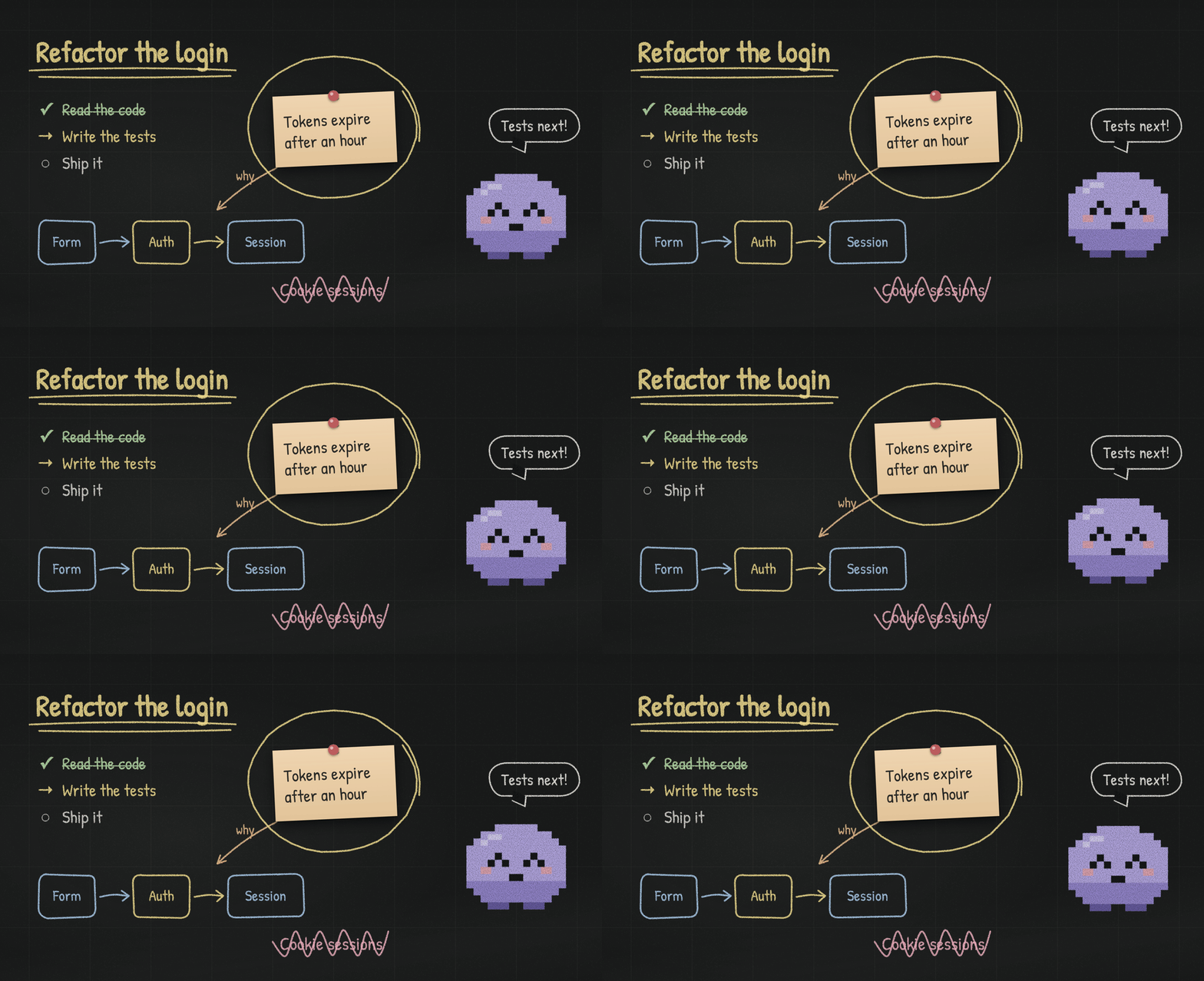
More Space is a desktop app with a real terminal floating over an endless chalkboard. Run any agent in that terminal (Claude Code, Codex, or anything else that can run shell commands) and it finds a command there that lets it:
- write and draw on the board: text, checklists, flow diagrams, pinned notes and photos, chalk links between them, circles, underlines and scribbles;
- be someone: an avatar you choose from a cast of characters, each with its own moods, look and voice;
- ask you things: choices, several answers, written answers or a scale, right on the board, and wait for your click;
- steer what you see: frame what it is explaining, or the whole board.
The command exists only inside the app's terminals and talks only to the window that opened them. Nothing is installed in your system, and nothing is written into your project.
https://github.com/user-attachments/assets/36bce0e3-f336-479c-83f5-6182043d699f
Getting started
- Download the app for your system from Releases
(macOS:
.dmgfor Apple silicon or Intel; Windows: theSetup.exe; Linux:.AppImageor.deb). - Open it and choose a project folder.
- The empty board shows a short instruction with a Copy button. Paste it to your agent in the terminal below; it will start by learning the board.
Unsigned builds
Builds are not signed yet. The first time:
- macOS: open it once; when macOS says it is from an unidentified developer, go to
System Settings → Privacy & Security and choose Open Anyway (on older macOS, right-click
the app and choose Open). Or run
xattr -dr com.apple.quarantine "/Applications/More Space.app". The 0.1.0 build says "damaged" instead: it was not signed at all; the command above opens it. - Windows: SmartScreen may warn about an unknown publisher; choose More info, then Run anyway.
What the agent can do
Everything starts from the command with no arguments; each level explains the next, and
more-space --all lists everything at once. more-space guide explains the board in one screen.
| Group | Commands |
|---|---|
board | info, items, write, steps, flow, pin (image path or URL), note, link, mark (circle, underline, cross), move, erase, wash |
avatar | info (who it is and its moods), move, mood, say |
ask | a question with one choice, --multi, --other, --text or --scale N; ask wait <id> |
view | fit (the whole board, kept in view), show (frame items or cells), auto on|off |
Several commands can go in one call, one per line: more-space - <<'EOF' … EOF in a Unix shell,
or @' … '@ | more-space - in PowerShell.
Every write answers with the cells it really covers, and warns when it lands on something else.
The avatar also lives along by itself:
- the terminal: busy while the program keeps printing, "Done" when it goes quiet, and calling you when the program rings the bell or sends a notification;
- the branch: it notices files changing as git sees them (an edit, a new or deleted file, an undone edit, a commit) and reacts in its own moods. Ignored files, like dependencies and builds, never count.
Characters, sound and handwriting
- Characters: Mochi (the default, a plump pixel spirit), Chalky, Penguin, Owl, Robot, Cat, Cowboy,
Samurai, Viking, Astronomer and Anime Hero. Each has its own moods (the agent reads them with
avatar info), drawing and voice. - Sound: chalk on slate as it writes, a bell for questions. The character's own voice speaks only when it needs you ("Done", "Your turn in the terminal"); "Speak on every mood", in the character gallery, makes it speak on every mood the agent gives it too. One button turns all sound off.
- Handwriting: six chalk-like fonts; Patrick Hand by default.
When an agent says the command is not found
Some tools keep one background process alive and run commands through it: tmux, screen, or Codex's
shared app-server. That process keeps the environment of the terminal it was first started from.
If it was started outside More Space, it cannot see the command: restart it once from a More Space
terminal (for Codex: codex app-server daemon restart, or run codex --no-daemon). Started from any
More Space terminal, it keeps working afterwards, even across windows and restarts: the command
lives in a fixed folder and finds the window open on the project it runs in.
Your data
Boards are kept per project folder in the app's own data folder (on macOS,
~/Library/Application Support/more-space/boards/), never in the project. Pinned images are copied
there. Nothing leaves your computer, except an image the agent pins from a URL, which the app downloads.
Platforms
macOS, Windows and Linux. The terminal runs your login shell on macOS and Linux, and PowerShell on Windows (PowerShell 7 when installed, otherwise Windows PowerShell). Git must be installed for the branch in the title and for the avatar's reactions to file changes.
Development
Needs Bun.
bun install
bun start                              # build and open (asks for a project)
bun start -- --cwd=/path/to/project    # open straight on a project
bun run check                          # typecheck, tests, build
bun run package                        # installable app for this system, in release/
bun run icon                           # regenerate icon files from assets/icon/icon.svg
The project name is defined once, in package.json; the window title, the command, the socket
variable, the data folder and the packaged app's name all derive from it.
| Path | What lives there |
|---|---|
source/main.ts | Electron entry: starts the instance and opens the window |
source/core/ | The instance: board state, commands and their socket, shells and their activity, characters, settings |
source/cli/ | The in-terminal command: a thin client of the instance socket |
source/view/desktop/ | Window, preload and IPC |
source/view/renderer/ | The page: board stage, chalk items, characters, terminal, sounds |
tests/ | Unit tests (bun test) |
agent/ | The project's working notes: vision, tasks, a dated timeline, lab scripts |
See CONTRIBUTING.md for how to work on it, and how releases are made.
License
Similar repos


Languages
TypeScript
89.5%
CSS
9.0%
JavaScript
1.1%
A chalkboard and an avatar for any terminal agent: it shows its plan, its progress and its questions while it works.
TypeScript
1
25 commits
updated Oct 4, 2026
See what people are saying
README
More Space
A chalkboard and an avatar for any terminal agent.
It shows its plan, its progress and its questions while it works.
What it is
More Space is a desktop app with a real terminal floating over an endless chalkboard. Run any agent in that terminal (Claude Code, Codex, or anything else that can run shell commands) and it finds a command there that lets it:
- write and draw on the board: text, checklists, flow diagrams, pinned notes and photos, chalk links between them, circles, underlines and scribbles;
- be someone: an avatar you choose from a cast of characters, each with its own moods, look and voice;
- ask you things: choices, several answers, written answers or a scale, right on the board, and wait for your click;
- steer what you see: frame what it is explaining, or the whole board.
The command exists only inside the app's terminals and talks only to the window that opened them. Nothing is installed in your system, and nothing is written into your project.
https://github.com/user-attachments/assets/36bce0e3-f336-479c-83f5-6182043d699f
Getting started
- Download the app for your system from Releases
(macOS:
.dmgfor Apple silicon or Intel; Windows: theSetup.exe; Linux:.AppImageor.deb). - Open it and choose a project folder.
- The empty board shows a short instruction with a Copy button. Paste it to your agent in the terminal below; it will start by learning the board.
Unsigned builds
Builds are not signed yet. The first time:
- macOS: open it once; when macOS says it is from an unidentified developer, go to
System Settings → Privacy & Security and choose Open Anyway (on older macOS, right-click
the app and choose Open). Or run
xattr -dr com.apple.quarantine "/Applications/More Space.app". The 0.1.0 build says "damaged" instead: it was not signed at all; the command above opens it. - Windows: SmartScreen may warn about an unknown publisher; choose More info, then Run anyway.
What the agent can do
Everything starts from the command with no arguments; each level explains the next, and
more-space --all lists everything at once. more-space guide explains the board in one screen.
| Group | Commands |
|---|---|
board | info, items, write, steps, flow, pin (image path or URL), note, link, mark (circle, underline, cross), move, erase, wash |
avatar | info (who it is and its moods), move, mood, say |
ask | a question with one choice, --multi, --other, --text or --scale N; ask wait <id> |
view | fit (the whole board, kept in view), show (frame items or cells), auto on|off |
Several commands can go in one call, one per line: more-space - <<'EOF' … EOF in a Unix shell,
or @' … '@ | more-space - in PowerShell.
Every write answers with the cells it really covers, and warns when it lands on something else.
The avatar also lives along by itself:
- the terminal: busy while the program keeps printing, "Done" when it goes quiet, and calling you when the program rings the bell or sends a notification;
- the branch: it notices files changing as git sees them (an edit, a new or deleted file, an undone edit, a commit) and reacts in its own moods. Ignored files, like dependencies and builds, never count.
Characters, sound and handwriting
- Characters: Mochi (the default, a plump pixel spirit), Chalky, Penguin, Owl, Robot, Cat, Cowboy,
Samurai, Viking, Astronomer and Anime Hero. Each has its own moods (the agent reads them with
avatar info), drawing and voice. - Sound: chalk on slate as it writes, a bell for questions. The character's own voice speaks only when it needs you ("Done", "Your turn in the terminal"); "Speak on every mood", in the character gallery, makes it speak on every mood the agent gives it too. One button turns all sound off.
- Handwriting: six chalk-like fonts; Patrick Hand by default.
When an agent says the command is not found
Some tools keep one background process alive and run commands through it: tmux, screen, or Codex's
shared app-server. That process keeps the environment of the terminal it was first started from.
If it was started outside More Space, it cannot see the command: restart it once from a More Space
terminal (for Codex: codex app-server daemon restart, or run codex --no-daemon). Started from any
More Space terminal, it keeps working afterwards, even across windows and restarts: the command
lives in a fixed folder and finds the window open on the project it runs in.
Your data
Boards are kept per project folder in the app's own data folder (on macOS,
~/Library/Application Support/more-space/boards/), never in the project. Pinned images are copied
there. Nothing leaves your computer, except an image the agent pins from a URL, which the app downloads.
Platforms
macOS, Windows and Linux. The terminal runs your login shell on macOS and Linux, and PowerShell on Windows (PowerShell 7 when installed, otherwise Windows PowerShell). Git must be installed for the branch in the title and for the avatar's reactions to file changes.
Development
Needs Bun.
bun install
bun start                              # build and open (asks for a project)
bun start -- --cwd=/path/to/project    # open straight on a project
bun run check                          # typecheck, tests, build
bun run package                        # installable app for this system, in release/
bun run icon                           # regenerate icon files from assets/icon/icon.svg
The project name is defined once, in package.json; the window title, the command, the socket
variable, the data folder and the packaged app's name all derive from it.
| Path | What lives there |
|---|---|
source/main.ts | Electron entry: starts the instance and opens the window |
source/core/ | The instance: board state, commands and their socket, shells and their activity, characters, settings |
source/cli/ | The in-terminal command: a thin client of the instance socket |
source/view/desktop/ | Window, preload and IPC |
source/view/renderer/ | The page: board stage, chalk items, characters, terminal, sounds |
tests/ | Unit tests (bun test) |
agent/ | The project's working notes: vision, tasks, a dated timeline, lab scripts |
See CONTRIBUTING.md for how to work on it, and how releases are made.
License
Similar repos
Languages
TypeScript
89.5%
CSS
9.0%
JavaScript
1.1%