
A security-first database IDE: role-based access, dangerous-SQL guards and a full audit trail — from a terminal UI, a browser, or Neovim, plus a PostgreSQL-wire front door so existing tools reach production without anyone holding the credentials.
Go
1
915 commits
updated Sep 28, 2026
See what people are saying
README
autodb
Not another SQL TUI.
A security-first SQL editor that doubles as the gate in front of your production database.




brew install yongjohnlee80/tap/autodb

autodb is a keyboard-driven SQL editor for your terminal, your browser and Neovim, and it never keeps a DSN in plain text: every connection is encrypted under your passphrase. It is also a PostgreSQL-wire proxy. Put it in front of production and nobody needs the database password again: developers, contractors and AI agents each get their own account, a role, and a personal access token for the one connection they are allowed to use. Every statement they run is checked and written to an audit log with their name on it.
Features
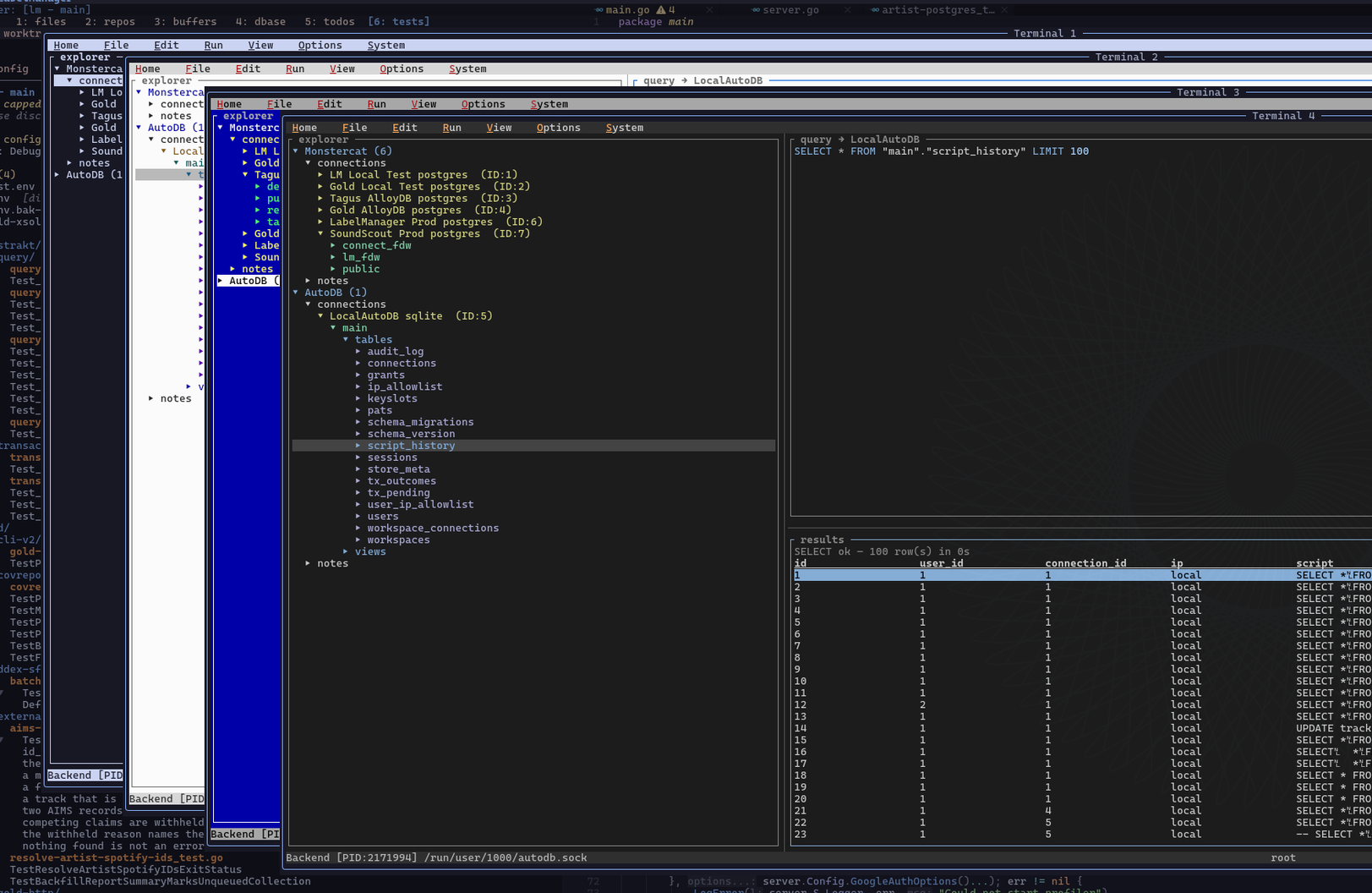
One binary, three frontends: a terminal UI (autodb --ui), the same UI in a browser (autodb --web-ui), and a Neovim plugin
A production front door: psql, DataGrip, your app or an AI agent connects to autodb with an ordinary PostgreSQL DSN; production only has to trust one host
Personal access tokens, not passwords: one per person, laptop, app or agent, each with its own expiry and IP allowlist, revoked instantly
Role-based access: reader, editor and admin, plus a grant per connection, so access is decided per database, not per shared login
Read-only means read-only: readers run inside transactions PostgreSQL itself keeps read-only, so a write hidden in a function still fails
Guards against the classic accidents: UPDATE or DELETE with no WHERE is blocked, and so is a second statement smuggled after a ;
An audit trail you can query: who ran what, against which connection, how long it took, how many rows, and why it was refused
Secrets stay sealed: connection passwords are encrypted at rest (AES-256-GCM, argon2id-derived key) and never leave the server
Vim-style editing: modal editor, vim motions everywhere, a Space leader menu, and ? for the keys that work right here
Themes: Dark, Light, Mono and Retro
Databases: PostgreSQL, MySQL and SQLite
Motivation
I live in Neovim and in terminal apps for my dev work, and I could never find a
database tool that stored my credentials safely. Every option ended with a
plain-text DSN tucked away in a dotfile, a .env or an editor config. So I
started my own small project: a SQL editor that encrypts every connection under
a master passphrase, never writes a DSN in the clear, and runs natively inside
Neovim as well as in the terminal.
The front door came next, and it changed how I work with AI agents. Instead of
handing an agent a password, I mint it a personal access token (kept in
pass), and the agent can do only what that
token's account is allowed to do, on the one connection it was given, with
every statement audited under its name. The same holds for co-workers: each
gets their own account and token, and nobody holds the production password.
I built it for myself first. I hope it helps someone in my shoes.
Installation
autodb is a single static binary with no runtime dependencies.
| Platform | Install |
|---|---|
| macOS, Linux | Homebrew: brew install yongjohnlee80/tap/autodb |
| Linux, macOS | mise: mise use -g github:yongjohnlee80/autodb |
| Linux, macOS | The install script, below |
| Linux, macOS | A release archive (amd64 and arm64, with SHA-256 checksums) |
| Windows | Use WSL2 and any Linux method. A native Windows build is not published yet. |
| Any, with Go 1.25+ | Build from source, below |
Install script. It downloads the release for your platform, checks its
SHA-256, and falls back to building from source when there is no prebuilt
binary. It never uses sudo, and it installs to ~/.local/bin by default.
curl -fsSL https://raw.githubusercontent.com/yongjohnlee80/autodb/main/install.sh | sh
Read install.sh first if you prefer; it is short. It takes
--prefix <dir>, --version <tag>, --source and --binary.
From source.
git clone https://github.com/yongjohnlee80/autodb && cd autodb && make build # → bin/autodb
Use make build rather than go install: the Makefile stamps the version,
which autodb uses to notice when a running server is older than the client.
In Neovim
The plugin drives the same autodb binary. With
lazy.nvim:
{
  "yongjohnlee80/autodb",
  dependencies = {
    "yongjohnlee80/auto-core.nvim",          -- required
    -- "yongjohnlee80/auto-finder.nvim",     -- optional: hosts the database drawer in its panel
  },
  build = "make build",                      -- optional: compile a binary matched to the plugin (needs Go)
  opts = {},
}
Without build, the plugin uses the autodb on your PATH from any method
above. Restart Neovim, then:
:checkhealth autodb
It reports which binary it found and where, the endpoint, and whether you are
signed in. Nothing starts until you use it: <leader>Dl signs in (the first
time, it creates your root user and passphrase), <leader>Dc picks a
connection, and <leader>Dr runs the SQL buffer. :AutodbDrawer opens the
database explorer. The rest is in docs/neovim.md.
Quick start
autodb --ui
That is the whole setup. The first run creates the root user and your master
passphrase. There is no config file to write: the server listens on a
per-user unix socket (mode 0600) and keeps its own data in SQLite under
$XDG_DATA_HOME/autodb/. Nothing listens on a TCP port until you ask it to.
Then:
SPC c→ato add a connection. The DSN is encrypted as soon as you save it.- Write SQL in the editor and press
SPC rto run it. SPC Hshows the history: everything run, by whom, and how it went.
autodb --serve                # just the server (the UI starts one for you if needed)
autodb --web-ui --port=7010   # the same UI in a browser, on 127.0.0.1
autodb --version
The front door: production behind one gate
This is what autodb is for in an organisation. autodb speaks the PostgreSQL wire protocol, so an unmodified client connects through it:
postgres://<user>:<personal-access-token>@autodb.example.com:5432/<database>?sslmode=verify-full&sslrootcert=ca.pem
Close production's firewall to everything except the autodb host. Your tools keep working, and the only way in knows who you are.
- Developers use
psql, DataGrip or DBeaver with their own token. A laptop that changes IP never touches the certificate, only the allowlist. - Applications and CI get an
editoraccount and token of their own, so the app's traffic is audited under its own name. - AI agents get a
readeraccount and a token for one connection. Any PostgreSQL client or MCP server works, and the database itself refuses a write. - Contractors get a token that expires when their engagement does (up to 365 days), limited to their IP, and revocable at any moment.
Minting a token (SPC T → c) opens a connection card: a ready DSN and
JDBC URL, the host, port and database, the sslmode and CA file to pin, and
the limits that apply, ready to paste into a client or hand to a colleague.
SPC k shows the CA certificate itself. The token is shown once; the server
keeps only its hash.
Walk through the whole setup in the front door tutorial. The commands, for quick access:
# Download the scripts. Read them before you run them: they run as root,
# install a systemd unit and write TLS material.
base=https://raw.githubusercontent.com/yongjohnlee80/autodb/main
curl -fsSL -O "$base/provision_vm.sh" -O "$base/install_frontdoor.sh" -O "$base/update_frontdoor.sh" -O "$base/uninstall.sh"

sh provision_vm.sh --check --host 127.0.0.1                  # see the plan; changes nothing
sudo sh provision_vm.sh --apply --host 127.0.0.1             # provision THIS machine
sh provision_vm.sh --apply --user root --host 203.0.113.10   # provision a fresh VM over SSH

sudo sh update_frontdoor.sh      # update to the newest release (rolls back if it does not start)
sudo sh uninstall.sh --apply     # remove it (archives the meta store first)
Every script takes --check, which changes nothing, and --help. The
operator reference explains what each one does
and why.
Keys
Space opens the leader menu, which lists every command with its key. ?
shows the keys that work in the panel or dialog you are in.
| Key | Does |
|---|---|
Ctrl-h/j/k/l | move between panes |
SPC r / SPC R | run the buffer / run the selection |
SPC C | choose the connection the query runs against |
SPC c · SPC w · SPC u | connections · workspaces · users and grants |
SPC H | script history |
SPC T · SPC i | your access tokens · your allowed IPs |
SPC k | the front door's CA certificate, as text you can copy |
SPC n · SPC s | new note · save note (per-workspace .sql files) |
/ · n · N | search the focused panel |
SPC z | zoom the focused pane |
y · Y | copy a selection · copy everything, in any read-only view |
SPC A | about: version, backend, and where state lives |
Ctrl-q | quit (the server keeps running for your other frontends) |
The editor is vim-modal (jk escapes). Copying uses OSC 52, so it reaches
your system clipboard over SSH and inside tmux.
Documentation
| Front door tutorial | Put a production database behind autodb, step by step |
| Front door operator reference | Sizing, the meta store, TLS, updates, removal, and what to watch for |
| Security model | The gates, the audit trail, secrets at rest, and the planned AI review |
| Neovim | Plugin setup, keymaps, auto-finder integration, the Lua API |
| Browser frontend | --web-ui, access over SSH, and how it differs from the terminal |
| Configuration | The config file, and who can reach the server |
config.example.toml | Every setting, its default, and why |
| RPC protocol | The msgpack-RPC surface the frontends use |
| Security policy | How to report a vulnerability, privately |
Roadmap
| Work | State |
|---|---|
| Terminal UI, browser UI, Neovim plugin | shipped |
| PostgreSQL-wire front door, personal access tokens, connection cards | shipped |
| AI review of SQL before it runs: your own model or keys, and it reads statements, never rows | designed |
| BigQuery as a target | planned |
| Native Windows builds, more package managers | planned |
License
Apache-2.0. See NOTICE.
Similar repos


Languages
Go
91.6%
Lua
4.3%
Shell
3.2%
A security-first database IDE: role-based access, dangerous-SQL guards and a full audit trail — from a terminal UI, a browser, or Neovim, plus a PostgreSQL-wire front door so existing tools reach production without anyone holding the credentials.
Go
1
915 commits
updated Sep 28, 2026
See what people are saying
README
autodb
Not another SQL TUI.
A security-first SQL editor that doubles as the gate in front of your production database.
brew install yongjohnlee80/tap/autodb
autodb is a keyboard-driven SQL editor for your terminal, your browser and Neovim, and it never keeps a DSN in plain text: every connection is encrypted under your passphrase. It is also a PostgreSQL-wire proxy. Put it in front of production and nobody needs the database password again: developers, contractors and AI agents each get their own account, a role, and a personal access token for the one connection they are allowed to use. Every statement they run is checked and written to an audit log with their name on it.
Features
One binary, three frontends: a terminal UI (autodb --ui), the same UI in a browser (autodb --web-ui), and a Neovim plugin
A production front door: psql, DataGrip, your app or an AI agent connects to autodb with an ordinary PostgreSQL DSN; production only has to trust one host
Personal access tokens, not passwords: one per person, laptop, app or agent, each with its own expiry and IP allowlist, revoked instantly
Role-based access: reader, editor and admin, plus a grant per connection, so access is decided per database, not per shared login
Read-only means read-only: readers run inside transactions PostgreSQL itself keeps read-only, so a write hidden in a function still fails
Guards against the classic accidents: UPDATE or DELETE with no WHERE is blocked, and so is a second statement smuggled after a ;
An audit trail you can query: who ran what, against which connection, how long it took, how many rows, and why it was refused
Secrets stay sealed: connection passwords are encrypted at rest (AES-256-GCM, argon2id-derived key) and never leave the server
Vim-style editing: modal editor, vim motions everywhere, a Space leader menu, and ? for the keys that work right here
Themes: Dark, Light, Mono and Retro
Databases: PostgreSQL, MySQL and SQLite
Motivation
I live in Neovim and in terminal apps for my dev work, and I could never find a
database tool that stored my credentials safely. Every option ended with a
plain-text DSN tucked away in a dotfile, a .env or an editor config. So I
started my own small project: a SQL editor that encrypts every connection under
a master passphrase, never writes a DSN in the clear, and runs natively inside
Neovim as well as in the terminal.
The front door came next, and it changed how I work with AI agents. Instead of
handing an agent a password, I mint it a personal access token (kept in
pass), and the agent can do only what that
token's account is allowed to do, on the one connection it was given, with
every statement audited under its name. The same holds for co-workers: each
gets their own account and token, and nobody holds the production password.
I built it for myself first. I hope it helps someone in my shoes.
Installation
autodb is a single static binary with no runtime dependencies.
| Platform | Install |
|---|---|
| macOS, Linux | Homebrew: brew install yongjohnlee80/tap/autodb |
| Linux, macOS | mise: mise use -g github:yongjohnlee80/autodb |
| Linux, macOS | The install script, below |
| Linux, macOS | A release archive (amd64 and arm64, with SHA-256 checksums) |
| Windows | Use WSL2 and any Linux method. A native Windows build is not published yet. |
| Any, with Go 1.25+ | Build from source, below |
Install script. It downloads the release for your platform, checks its
SHA-256, and falls back to building from source when there is no prebuilt
binary. It never uses sudo, and it installs to ~/.local/bin by default.
curl -fsSL https://raw.githubusercontent.com/yongjohnlee80/autodb/main/install.sh | sh
Read install.sh first if you prefer; it is short. It takes
--prefix <dir>, --version <tag>, --source and --binary.
From source.
git clone https://github.com/yongjohnlee80/autodb && cd autodb && make build # → bin/autodb
Use make build rather than go install: the Makefile stamps the version,
which autodb uses to notice when a running server is older than the client.
In Neovim
The plugin drives the same autodb binary. With
lazy.nvim:
{
  "yongjohnlee80/autodb",
  dependencies = {
    "yongjohnlee80/auto-core.nvim",          -- required
    -- "yongjohnlee80/auto-finder.nvim",     -- optional: hosts the database drawer in its panel
  },
  build = "make build",                      -- optional: compile a binary matched to the plugin (needs Go)
  opts = {},
}
Without build, the plugin uses the autodb on your PATH from any method
above. Restart Neovim, then:
:checkhealth autodb
It reports which binary it found and where, the endpoint, and whether you are
signed in. Nothing starts until you use it: <leader>Dl signs in (the first
time, it creates your root user and passphrase), <leader>Dc picks a
connection, and <leader>Dr runs the SQL buffer. :AutodbDrawer opens the
database explorer. The rest is in docs/neovim.md.
Quick start
autodb --ui
That is the whole setup. The first run creates the root user and your master
passphrase. There is no config file to write: the server listens on a
per-user unix socket (mode 0600) and keeps its own data in SQLite under
$XDG_DATA_HOME/autodb/. Nothing listens on a TCP port until you ask it to.
Then:
SPC c→ato add a connection. The DSN is encrypted as soon as you save it.- Write SQL in the editor and press
SPC rto run it. SPC Hshows the history: everything run, by whom, and how it went.
autodb --serve                # just the server (the UI starts one for you if needed)
autodb --web-ui --port=7010   # the same UI in a browser, on 127.0.0.1
autodb --version
The front door: production behind one gate
This is what autodb is for in an organisation. autodb speaks the PostgreSQL wire protocol, so an unmodified client connects through it:
postgres://<user>:<personal-access-token>@autodb.example.com:5432/<database>?sslmode=verify-full&sslrootcert=ca.pem
Close production's firewall to everything except the autodb host. Your tools keep working, and the only way in knows who you are.
- Developers use
psql, DataGrip or DBeaver with their own token. A laptop that changes IP never touches the certificate, only the allowlist. - Applications and CI get an
editoraccount and token of their own, so the app's traffic is audited under its own name. - AI agents get a
readeraccount and a token for one connection. Any PostgreSQL client or MCP server works, and the database itself refuses a write. - Contractors get a token that expires when their engagement does (up to 365 days), limited to their IP, and revocable at any moment.
Minting a token (SPC T → c) opens a connection card: a ready DSN and
JDBC URL, the host, port and database, the sslmode and CA file to pin, and
the limits that apply, ready to paste into a client or hand to a colleague.
SPC k shows the CA certificate itself. The token is shown once; the server
keeps only its hash.
Walk through the whole setup in the front door tutorial. The commands, for quick access:
# Download the scripts. Read them before you run them: they run as root,
# install a systemd unit and write TLS material.
base=https://raw.githubusercontent.com/yongjohnlee80/autodb/main
curl -fsSL -O "$base/provision_vm.sh" -O "$base/install_frontdoor.sh" -O "$base/update_frontdoor.sh" -O "$base/uninstall.sh"

sh provision_vm.sh --check --host 127.0.0.1                  # see the plan; changes nothing
sudo sh provision_vm.sh --apply --host 127.0.0.1             # provision THIS machine
sh provision_vm.sh --apply --user root --host 203.0.113.10   # provision a fresh VM over SSH

sudo sh update_frontdoor.sh      # update to the newest release (rolls back if it does not start)
sudo sh uninstall.sh --apply     # remove it (archives the meta store first)
Every script takes --check, which changes nothing, and --help. The
operator reference explains what each one does
and why.
Keys
Space opens the leader menu, which lists every command with its key. ?
shows the keys that work in the panel or dialog you are in.
| Key | Does |
|---|---|
Ctrl-h/j/k/l | move between panes |
SPC r / SPC R | run the buffer / run the selection |
SPC C | choose the connection the query runs against |
SPC c · SPC w · SPC u | connections · workspaces · users and grants |
SPC H | script history |
SPC T · SPC i | your access tokens · your allowed IPs |
SPC k | the front door's CA certificate, as text you can copy |
SPC n · SPC s | new note · save note (per-workspace .sql files) |
/ · n · N | search the focused panel |
SPC z | zoom the focused pane |
y · Y | copy a selection · copy everything, in any read-only view |
SPC A | about: version, backend, and where state lives |
Ctrl-q | quit (the server keeps running for your other frontends) |
The editor is vim-modal (jk escapes). Copying uses OSC 52, so it reaches
your system clipboard over SSH and inside tmux.
Documentation
| Front door tutorial | Put a production database behind autodb, step by step |
| Front door operator reference | Sizing, the meta store, TLS, updates, removal, and what to watch for |
| Security model | The gates, the audit trail, secrets at rest, and the planned AI review |
| Neovim | Plugin setup, keymaps, auto-finder integration, the Lua API |
| Browser frontend | --web-ui, access over SSH, and how it differs from the terminal |
| Configuration | The config file, and who can reach the server |
config.example.toml | Every setting, its default, and why |
| RPC protocol | The msgpack-RPC surface the frontends use |
| Security policy | How to report a vulnerability, privately |
Roadmap
| Work | State |
|---|---|
| Terminal UI, browser UI, Neovim plugin | shipped |
| PostgreSQL-wire front door, personal access tokens, connection cards | shipped |
| AI review of SQL before it runs: your own model or keys, and it reads statements, never rows | designed |
| BigQuery as a target | planned |
| Native Windows builds, more package managers | planned |
License
Apache-2.0. See NOTICE.
Similar repos
Languages
Go
91.6%
Lua
4.3%
Shell
3.2%