
Fast and lightweight DB Client made in Rust and GPUI.
Rust
129
231 commits
updated Sep 24, 2026
See what people are saying
README
DBDelve
A modern, performant, cross-platform database client for Postgres, MySQL and SQLite, on macOS, Linux and Windows. Written in Rust with GPUI. Buttery smooth, small memory footprint, fast navigation and stays performant on large datasets.
Early days. Everything listed below works today.
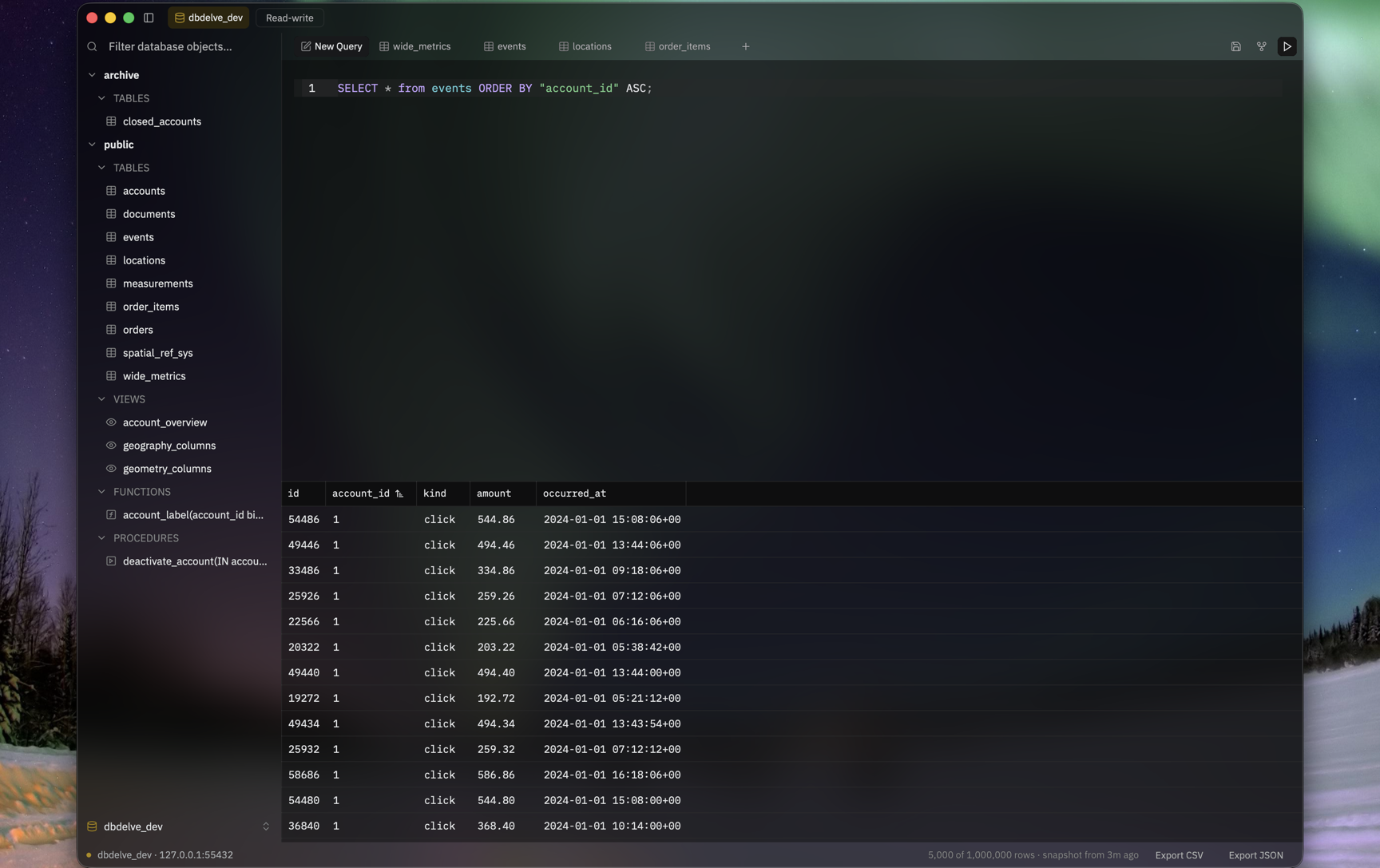
A table of a million rows, scrolling at speed with quick tab switches.
https://github.com/user-attachments/assets/c24c98d9-6ab8-45c4-974b-96822b5a3042
Why
I wanted something which is performant, modern and consumes little ram. The existing DB clients are either filled with bloat (Electron and JVM) or paid. This is an alternative to them. No feature is ever going behind a paywall and with time we will have complete parity on features with those too.
Supported databases
Postgres, MySQL and SQLite. More once these three are solid.
What it does
- Separate connections that stay separate. Each one keeps its own tabs, schema tree and query history, so a buffer you wrote against staging can't quietly end up pointed at production. Passwords go in the Keychain, never into a config file.
- Read-only, read-write and full access, per connection. DBDelve won't send a statement your current mode doesn't allow, and it asks before anything destructive. Read-only also asks Postgres and MySQL to refuse writes on their end, as a second line. Neither replaces connecting as a role without write grants, which is the only real boundary.
- In-line editing. Arrow to a cell, Enter to edit it. Applying writes the
UPDATEinto the editor first, so you read it before it runs. A cell is only editable when DBDelve can identify its row by primary key; joins, views and keyless tables stay read-only and tell you why. - Sorting and filtering. Clicking a header splices
ORDER BYinto the SQL you're looking at. Filter bars build theWHEREfor you when you'd rather not type it. - Completion from your own schema. The tables, columns, views and routines
the connection actually has, not a generic keyword list. After
FROMit offers relations; after a table or alias and a dot, that table's columns. - Export whatever's in the grid to CSV or JSON. It writes what the tab already holds, no second query.
- Keyboard-first. Most actions ship with a chord and can be rebound in Settings. A handful of contextual ones, mainly sorting and filters, are still mouse-only.
Installing
macOS
Apple Silicon, macOS 12 or later — that's what it's built and tested on. Intel and older macOS aren't blocked by anything in the code, they're just untested.
Homebrew is the recommended way. It handles installing and upgrading, and
brew upgrade is the only thing that will ever tell you a new version exists:
brew install --cask ShayanAbbas1/dbdelve/dbdelve
macOS will refuse to open it the first time. DBDelve is signed ad-hoc: there's no Developer ID behind it and nothing is notarized, so Gatekeeper declines. Clearing the quarantine flag fixes this:
xattr -dr com.apple.quarantine /Applications/DBDelve.app
Once per install, not once per launch — but an update is a new install, so you'll run it again after each one. Your connections and query history are kept outside the app and survive. macOS will ask once more for the saved passwords in your Keychain, because each release carries a different ad-hoc signature. I'll pay for a Developer ID if enough people end up using this, which removes all of the above.
Failing Homebrew, take the .dmg from the latest release and drag
DBDelve to Applications. Same quarantine step and you have to update manually.
To build it yourself instead, DBDELVE_CHANNEL=release dev/bundle.sh produces
target/DBDelve.app with the release build, icon and signature. Drag that to
Applications; the quarantine step doesn't apply here.
Linux
Install from the AUR:
yay -S dbdelve-bin
It's maintained by @0PandaDEV, not by this project. Thanks for packaging it!
A tarball or an AppImage, x86_64 or aarch64, built on Ubuntu 22.04 — that is the oldest glibc either will run against, so anything at least that new is fine. X11 and Wayland both work, and you need a Vulkan or OpenGL driver, a Secret Service keyring (gnome-keyring or KWallet) for saved passwords, and xdg-desktop-portal for the export dialog.
Take dbdelve-<version>-linux-<arch>.tar.gz from the latest release
and run the install.sh inside it:
tar xzf dbdelve-*-linux-*.tar.gz
cd dbdelve-*-linux-*/
./install.sh
Everything goes under ~/.local, so no root: the binary to ~/.local/bin, the
icons and the desktop entry where your desktop looks for them, which is what
puts DBDelve in the app menu. Make sure ~/.local/bin is on your PATH —
install.sh says so if it isn't. Updating means unpacking the next release and
running it again; ./install.sh --uninstall reverses it and leaves your
connections and query history alone.
Or take dbdelve-<version>-<arch>.AppImage from the same release, which is one
file that runs where it lands:
chmod +x dbdelve-*.AppImage
./dbdelve-*.AppImage
It carries the libraries that are safe to carry and takes the graphics drivers
from your machine, so it runs on distributions either side of the one it was
built on. Running any AppImage needs FUSE 2, which Ubuntu 22.04 and later no
longer install — sudo apt install libfuse2, or libfuse2t64 on 24.04 and
later, is usually the only thing missing. Failing that,
./dbdelve-*.AppImage --appimage-extract unpacks it and squashfs-root/AppRun
runs it with no FUSE at all.
What it does not do is put DBDelve in the app menu: an AppImage on its own is just a file you run, so there is no desktop entry and no icon until you integrate it — Gear Lever and AppImageLauncher both do that, or you copy the entry out by hand. The tarball does it for you, which is still the reason to prefer it. Updating either way is downloading the next one.
To build it yourself instead, on Debian or Ubuntu the build needs:
sudo apt install build-essential pkg-config cmake libfontconfig-dev \
  libxkbcommon-dev libxkbcommon-x11-dev libwayland-dev libdbus-1-dev
cargo build --release
The binary lands at target/release/dbdelve and runs from anywhere;
dev/package-linux.sh wraps that same build into the tarball above and
dev/package-appimage.sh into the AppImage. Connections and query history go
to $XDG_DATA_HOME/dbdelve, or ~/.local/share/dbdelve.
Chords are the same as macOS with Ctrl in place of Cmd. A profiles.toml
carried over from a Mac keeps its cmd- overrides, which mean Super on Linux —
rebind them in Settings.
Windows
A zip, x86_64, from the latest release. Unzip it and run
dbdelve.exe. Nothing is installed. There is no installer.
To build it yourself instead, the build needs the MSVC toolchain and the Windows SDK, which is what compiles the bundled SQLite and GPUI's shaders:
cargo build --release
The binary is target\release\dbdelve.exe. Connections and query history go
to %APPDATA%\dbdelve. Passwords go in Credential Manager. The window draws
its own title bar, buttons included. Chords are the same as macOS with Ctrl in
place of Cmd.
For discussions and ideas join the DBDelve discord server: https://discord.gg/upKpusAnS
Updating
brew upgrade --cask dbdelve, if you installed it that way. Otherwise watch
the releases page
License
MIT. See NOTICES.md for third-party font licenses.
Contributors


Similar repos


Languages
Rust
96.9%
PLpgSQL
1.3%
Shell
1.3%
Fast and lightweight DB Client made in Rust and GPUI.
Rust
129
231 commits
updated Sep 24, 2026
See what people are saying
README
DBDelve
A modern, performant, cross-platform database client for Postgres, MySQL and SQLite, on macOS, Linux and Windows. Written in Rust with GPUI. Buttery smooth, small memory footprint, fast navigation and stays performant on large datasets.
Early days. Everything listed below works today.
A table of a million rows, scrolling at speed with quick tab switches.
https://github.com/user-attachments/assets/c24c98d9-6ab8-45c4-974b-96822b5a3042
Why
I wanted something which is performant, modern and consumes little ram. The existing DB clients are either filled with bloat (Electron and JVM) or paid. This is an alternative to them. No feature is ever going behind a paywall and with time we will have complete parity on features with those too.
Supported databases
Postgres, MySQL and SQLite. More once these three are solid.
What it does
- Separate connections that stay separate. Each one keeps its own tabs, schema tree and query history, so a buffer you wrote against staging can't quietly end up pointed at production. Passwords go in the Keychain, never into a config file.
- Read-only, read-write and full access, per connection. DBDelve won't send a statement your current mode doesn't allow, and it asks before anything destructive. Read-only also asks Postgres and MySQL to refuse writes on their end, as a second line. Neither replaces connecting as a role without write grants, which is the only real boundary.
- In-line editing. Arrow to a cell, Enter to edit it. Applying writes the
UPDATEinto the editor first, so you read it before it runs. A cell is only editable when DBDelve can identify its row by primary key; joins, views and keyless tables stay read-only and tell you why. - Sorting and filtering. Clicking a header splices
ORDER BYinto the SQL you're looking at. Filter bars build theWHEREfor you when you'd rather not type it. - Completion from your own schema. The tables, columns, views and routines
the connection actually has, not a generic keyword list. After
FROMit offers relations; after a table or alias and a dot, that table's columns. - Export whatever's in the grid to CSV or JSON. It writes what the tab already holds, no second query.
- Keyboard-first. Most actions ship with a chord and can be rebound in Settings. A handful of contextual ones, mainly sorting and filters, are still mouse-only.
Installing
macOS
Apple Silicon, macOS 12 or later — that's what it's built and tested on. Intel and older macOS aren't blocked by anything in the code, they're just untested.
Homebrew is the recommended way. It handles installing and upgrading, and
brew upgrade is the only thing that will ever tell you a new version exists:
brew install --cask ShayanAbbas1/dbdelve/dbdelve
macOS will refuse to open it the first time. DBDelve is signed ad-hoc: there's no Developer ID behind it and nothing is notarized, so Gatekeeper declines. Clearing the quarantine flag fixes this:
xattr -dr com.apple.quarantine /Applications/DBDelve.app
Once per install, not once per launch — but an update is a new install, so you'll run it again after each one. Your connections and query history are kept outside the app and survive. macOS will ask once more for the saved passwords in your Keychain, because each release carries a different ad-hoc signature. I'll pay for a Developer ID if enough people end up using this, which removes all of the above.
Failing Homebrew, take the .dmg from the latest release and drag
DBDelve to Applications. Same quarantine step and you have to update manually.
To build it yourself instead, DBDELVE_CHANNEL=release dev/bundle.sh produces
target/DBDelve.app with the release build, icon and signature. Drag that to
Applications; the quarantine step doesn't apply here.
Linux
Install from the AUR:
yay -S dbdelve-bin
It's maintained by @0PandaDEV, not by this project. Thanks for packaging it!
A tarball or an AppImage, x86_64 or aarch64, built on Ubuntu 22.04 — that is the oldest glibc either will run against, so anything at least that new is fine. X11 and Wayland both work, and you need a Vulkan or OpenGL driver, a Secret Service keyring (gnome-keyring or KWallet) for saved passwords, and xdg-desktop-portal for the export dialog.
Take dbdelve-<version>-linux-<arch>.tar.gz from the latest release
and run the install.sh inside it:
tar xzf dbdelve-*-linux-*.tar.gz
cd dbdelve-*-linux-*/
./install.sh
Everything goes under ~/.local, so no root: the binary to ~/.local/bin, the
icons and the desktop entry where your desktop looks for them, which is what
puts DBDelve in the app menu. Make sure ~/.local/bin is on your PATH —
install.sh says so if it isn't. Updating means unpacking the next release and
running it again; ./install.sh --uninstall reverses it and leaves your
connections and query history alone.
Or take dbdelve-<version>-<arch>.AppImage from the same release, which is one
file that runs where it lands:
chmod +x dbdelve-*.AppImage
./dbdelve-*.AppImage
It carries the libraries that are safe to carry and takes the graphics drivers
from your machine, so it runs on distributions either side of the one it was
built on. Running any AppImage needs FUSE 2, which Ubuntu 22.04 and later no
longer install — sudo apt install libfuse2, or libfuse2t64 on 24.04 and
later, is usually the only thing missing. Failing that,
./dbdelve-*.AppImage --appimage-extract unpacks it and squashfs-root/AppRun
runs it with no FUSE at all.
What it does not do is put DBDelve in the app menu: an AppImage on its own is just a file you run, so there is no desktop entry and no icon until you integrate it — Gear Lever and AppImageLauncher both do that, or you copy the entry out by hand. The tarball does it for you, which is still the reason to prefer it. Updating either way is downloading the next one.
To build it yourself instead, on Debian or Ubuntu the build needs:
sudo apt install build-essential pkg-config cmake libfontconfig-dev \
  libxkbcommon-dev libxkbcommon-x11-dev libwayland-dev libdbus-1-dev
cargo build --release
The binary lands at target/release/dbdelve and runs from anywhere;
dev/package-linux.sh wraps that same build into the tarball above and
dev/package-appimage.sh into the AppImage. Connections and query history go
to $XDG_DATA_HOME/dbdelve, or ~/.local/share/dbdelve.
Chords are the same as macOS with Ctrl in place of Cmd. A profiles.toml
carried over from a Mac keeps its cmd- overrides, which mean Super on Linux —
rebind them in Settings.
Windows
A zip, x86_64, from the latest release. Unzip it and run
dbdelve.exe. Nothing is installed. There is no installer.
To build it yourself instead, the build needs the MSVC toolchain and the Windows SDK, which is what compiles the bundled SQLite and GPUI's shaders:
cargo build --release
The binary is target\release\dbdelve.exe. Connections and query history go
to %APPDATA%\dbdelve. Passwords go in Credential Manager. The window draws
its own title bar, buttons included. Chords are the same as macOS with Ctrl in
place of Cmd.
For discussions and ideas join the DBDelve discord server: https://discord.gg/upKpusAnS
Updating
brew upgrade --cask dbdelve, if you installed it that way. Otherwise watch
the releases page
License
MIT. See NOTICES.md for third-party font licenses.
Similar repos
Contributors
Languages
Rust
96.9%
PLpgSQL
1.3%
Shell
1.3%