
A relaxing, randomized vision-board slideshow for manifestation. Images from your folders rotate every 15 seconds with calm music, pause/next/shuffle controls, and fullscreen. Works offline as plain HTML, or online via a Python http.server or nginx for your phone and TV.
HTML
0
3 commits
updated Oct 6, 2026
See what people are saying
README
manifest-loop
A calm, endlessly shuffling vision-board slideshow for manifestation. Images from your folders rotate every 15 seconds with soft transitions and relaxing music. It works offline as plain HTML, or online so you can watch it on your phone or TV.
Demo
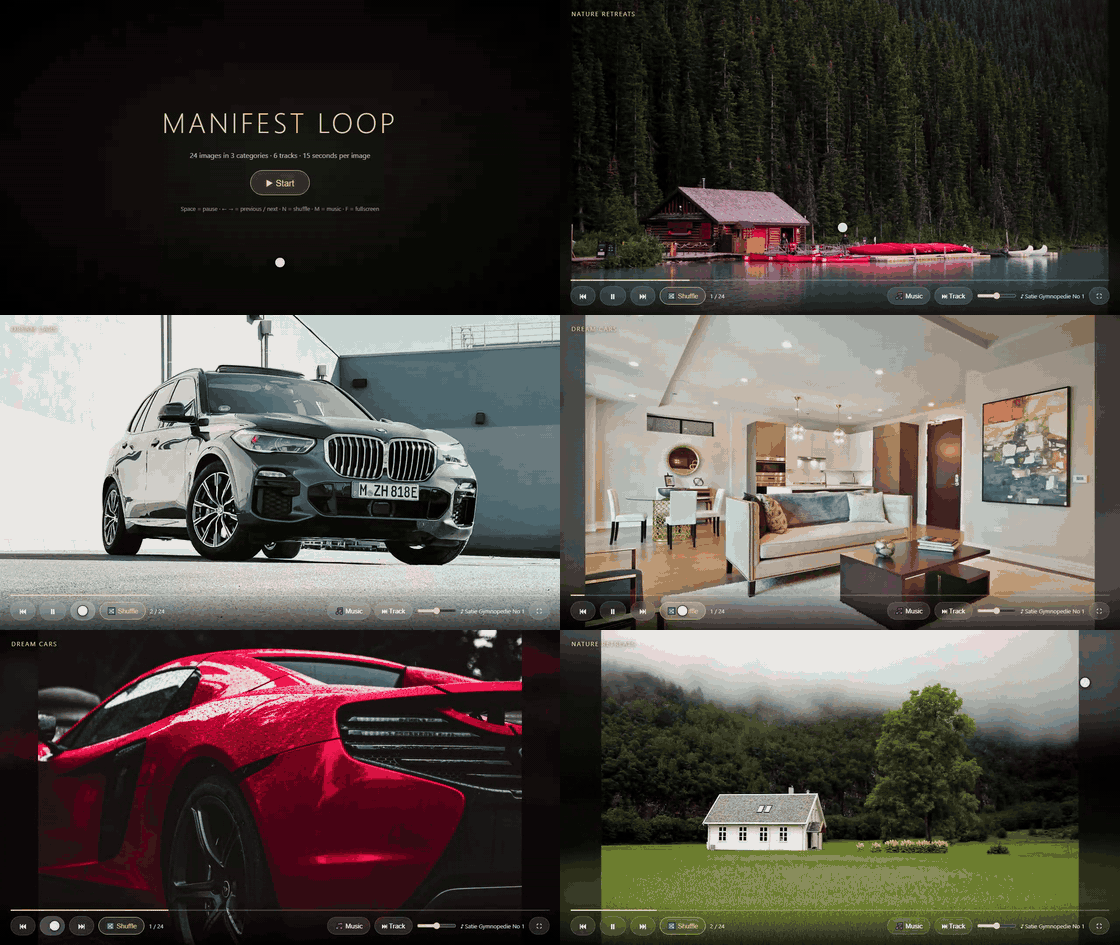
▶ Watch the 30-second demo with music (MP4)
The demo shows the start screen, images crossfading with a slow zoom, the category label in the top-left corner, the Next, Shuffle and Pause controls, and the controls fading away when the mouse stops moving. The music is Erik Satie's Gymnopédie No. 1, one of the bundled tracks.
What it is for
Manifestation is the practice of focusing your attention on what you want in life: the home, the car, the places, the feelings. manifest-loop helps with that by keeping your goals in front of you. It quietly cycles through images of the things you want while calm music plays, so you spend a few minutes a day seeing the life you are working towards.
The idea is simple:
- Visualize your goals. Seeing the same goals again and again keeps them clear and present in your mind, and many people find that it strengthens their sense of direction and motivation.
- Crowd out negative thoughts. While your attention rests on calm, positive images and music, there is less room for worry and negative self-talk. Many people use it as a short daily reset or a gentle background while they work, relax or meditate.
- Feel good. The slow pace, soft zoom and quiet music are designed to be relaxing, so the experience itself is pleasant, whatever you believe about manifestation.
Please read: no guarantees
manifest-loop is a visualization and relaxation tool, nothing more. Manifestation has not been scientifically proven to make things happen, and this project makes no claim that it will. There is no guarantee that anything you look at here will come true. Any positive effect is personal and may simply come from a calmer mind and clearer goals. Real results still come from your own decisions and work. If you are struggling with persistent negative thoughts, please talk to someone you trust or a mental health professional.
Features
- Random order that avoids showing two images from the same category in a row
- 15 seconds per image, with crossfades, a slow zoom and a progress bar
- Pause, previous / next, and a Shuffle button for a fresh random order
- Background music with on / off, next track and volume
- Fullscreen mode, and controls that hide when you stop moving the mouse
- Keyboard shortcuts for everything
- Category labels from folder names (
inside_apartmentis shown as "Inside apartment") - No build step, no dependencies, no internet connection needed
Quick start
Offline mode (no server, just open the file)
No installation, no internet and no server are needed. Open index.html in any modern
browser (Chrome, Edge, Firefox, Safari) in one of these ways:
- Double-click
index.htmlin File Explorer (Windows), Finder (macOS) or your file manager (Linux). - Drag and drop
index.htmlonto an open browser window. - From the browser: press
Ctrl+O(Cmd+Oon macOS), find themanifest-loopfolder and selectindex.html. - Type the path into the address bar, for example
file:///C:/Users/<you>/Desktop/manifest-loop/index.htmlon Windows orfile:///home/<you>/manifest-loop/index.htmlon Linux.
Then click Start. The sample images and music are already in the playlist.
Tip: press F for fullscreen, and add the page to your bookmarks so it is one click away.
Online mode (phone, tablet, TV on your home network)
Requires Python 3.
Windows: double-click start.bat
Linux / macOS:
chmod +x start.sh scripts/generate-playlist.sh
./start.sh
The script refreshes the playlist, starts Python's built-in http.server on port 8765,
and prints two addresses:
http://localhost:8765for this computerhttp://<your-ip>:8765for your phone or TV (same Wi-Fi network)
Use a different port with PORT=9000 ./start.sh (Linux / macOS) or set PORT=9000 before
running start.bat (Windows).
Phone can't connect? Your firewall is probably blocking the port. On Windows, make sure your network is set to Private (not Public) and allow Python through the firewall.
Permanent setup with nginx
For a home server or Raspberry Pi, see the example config in
nginx/manifest-loop.conf. It serves the slideshow on port 8080,
caches images and music, and blocks access to the helper scripts.
Adding your own images
Your vision board works best with pictures of your goals. Every folder inside images/
becomes one category, and its name is shown in the top-left corner during the slideshow.
1. Create a folder for each goal
Use short English names, lowercase, with underscores instead of spaces. Start the name with
my_ to keep it private (see Keeping your images private).
For example: my_dream_home, my_inside_apartment, my_travel_destinations, my_healthy_body.
The my_ prefix is hidden in the slideshow, so my_dream_home is shown as "Dream home".
-
Windows: open the
manifest-loop\imagesfolder in File Explorer, right-click an empty area, choose New → Folder, type the name and press Enter. -
macOS: open
manifest-loop/imagesin Finder, pressShift+Cmd+N, type the name. -
Linux: right-click in your file manager and choose New Folder, or in a terminal:
mkdir -p images/my_dream_home
2. Add images to the folder
- Copy your own photos into the folder, or
- Save pictures from the internet: right-click an image in your browser, choose Save image as…, and save it into the folder you created.
Supported formats: .jpg, .jpeg, .png, .webp, .gif, .avif. Large, sharp, landscape
images look best. Around 10–30 images per folder is a good start.
3. Rebuild the playlist
The browser cannot list folders on its own, so playlist.js tells the page which files exist.
Rebuild it every time you add, remove or rename images or folders:
- Windows: double-click
update-playlist.bat - Linux / macOS: run
bash scripts/generate-playlist.sh - Online mode:
start.batandstart.shrebuild it automatically every time they start.
4. Reload the page
Press F5 (or Cmd+R on macOS) in the browser and click Start. Your new category appears
on the start screen count and in the slideshow.
To remove a category, delete its folder and rebuild the playlist. You can also delete the sample
folders (dream_cars, inside_apartment, nature_retreats) once you have your own.
Adding your own music
Put relaxing tracks into the music/ folder (.mp3, .ogg, .opus, .wav, .m4a, .flac),
then rebuild the playlist as above. Tracks play in random order. A number prefix such as
07_ only controls the file order and is hidden in the player, and underscores are shown as
spaces (07_calm_piano.mp3 is shown as "Calm Piano"). Start the file name with my_ to keep
it private.
Using images from the internet: personal use only
You are free to download any images you like from the internet for your own vision board, as long as:
- they stay on your own computer or devices (and your home network in online mode),
- they are used only for your personal, private purposes, and
- they are not used commercially: do not sell them, use them in ads or products, or publish them on a public website, social media or a public repository.
Most pictures on the internet are protected by copyright. Keeping a private copy for personal use at home is generally tolerated, but sharing or publishing them usually is not. This is general information, not legal advice, and the rules differ from country to country.
The sample images and music that come with this project are different: they are free to share under their licenses (see CREDITS.md).
Keeping your images private
If you use git or fork this project, anything starting with my_ inside images/ or music/
is listed in .gitignore, so it is never committed or pushed by accident.
playlist.js is ignored too, because it would list your private file names. Until you
generate it, the page uses playlist.sample.js, which lists only the bundled samples.
Your personal vision board stays on your computer.
Controls
| Button | Key | Action |
|---|---|---|
| ⏮ / ⏭ | ← / → | Previous / next image |
| ⏸ / ▶ | Space | Pause / resume |
| 🔀 Shuffle | N | New random order |
| 🎵 Music | M | Music on / off |
| ⏭ Track | Next track | |
| Slider | Volume | |
| ⛶ | F | Fullscreen |
Project structure
manifest-loop/
├── index.html                  # The slideshow (works offline)
├── playlist.js                 # Generated list of your images and music (not committed)
├── playlist.sample.js          # List of the bundled samples, used until playlist.js exists
├── images/
│   ├── dream_cars/
│   ├── inside_apartment/
│   └── nature_retreats/
├── music/                      # Relaxing tracks
├── scripts/
│   ├── generate-playlist.ps1   # Playlist builder for Windows
│   └── generate-playlist.sh    # Playlist builder for Linux / macOS
├── start.bat                   # Online mode for Windows (Python http.server)
├── start.sh                    # Online mode for Linux / macOS (Python http.server)
├── update-playlist.bat         # Offline helper for Windows
├── nginx/manifest-loop.conf    # Example nginx site
├── docs/demo.mp4, demo.gif     # Demo video (with music) and animated preview
├── .gitignore                  # Keeps my_* images, my_* music and playlist.js private
└── CREDITS.md                  # Photographers, musicians and licenses
Credits
The sample photos are from Unsplash and the sample music is from Wikimedia Commons (public domain and Creative Commons). See CREDITS.md for every photographer, performer and license.
If you add your own images, keep in mind that photos you download from the internet are usually copyrighted. That is fine for private use at home, but do not publish or share them unless the license allows it.
Similar repos


A relaxing, randomized vision-board slideshow for manifestation. Images from your folders rotate every 15 seconds with calm music, pause/next/shuffle controls, and fullscreen. Works offline as plain HTML, or online via a Python http.server or nginx for your phone and TV.
HTML
0
3 commits
updated Oct 6, 2026
See what people are saying
README
manifest-loop
A calm, endlessly shuffling vision-board slideshow for manifestation. Images from your folders rotate every 15 seconds with soft transitions and relaxing music. It works offline as plain HTML, or online so you can watch it on your phone or TV.
Demo
▶ Watch the 30-second demo with music (MP4)
The demo shows the start screen, images crossfading with a slow zoom, the category label in the top-left corner, the Next, Shuffle and Pause controls, and the controls fading away when the mouse stops moving. The music is Erik Satie's Gymnopédie No. 1, one of the bundled tracks.
What it is for
Manifestation is the practice of focusing your attention on what you want in life: the home, the car, the places, the feelings. manifest-loop helps with that by keeping your goals in front of you. It quietly cycles through images of the things you want while calm music plays, so you spend a few minutes a day seeing the life you are working towards.
The idea is simple:
- Visualize your goals. Seeing the same goals again and again keeps them clear and present in your mind, and many people find that it strengthens their sense of direction and motivation.
- Crowd out negative thoughts. While your attention rests on calm, positive images and music, there is less room for worry and negative self-talk. Many people use it as a short daily reset or a gentle background while they work, relax or meditate.
- Feel good. The slow pace, soft zoom and quiet music are designed to be relaxing, so the experience itself is pleasant, whatever you believe about manifestation.
Please read: no guarantees
manifest-loop is a visualization and relaxation tool, nothing more. Manifestation has not been scientifically proven to make things happen, and this project makes no claim that it will. There is no guarantee that anything you look at here will come true. Any positive effect is personal and may simply come from a calmer mind and clearer goals. Real results still come from your own decisions and work. If you are struggling with persistent negative thoughts, please talk to someone you trust or a mental health professional.
Features
- Random order that avoids showing two images from the same category in a row
- 15 seconds per image, with crossfades, a slow zoom and a progress bar
- Pause, previous / next, and a Shuffle button for a fresh random order
- Background music with on / off, next track and volume
- Fullscreen mode, and controls that hide when you stop moving the mouse
- Keyboard shortcuts for everything
- Category labels from folder names (
inside_apartmentis shown as "Inside apartment") - No build step, no dependencies, no internet connection needed
Quick start
Offline mode (no server, just open the file)
No installation, no internet and no server are needed. Open index.html in any modern
browser (Chrome, Edge, Firefox, Safari) in one of these ways:
- Double-click
index.htmlin File Explorer (Windows), Finder (macOS) or your file manager (Linux). - Drag and drop
index.htmlonto an open browser window. - From the browser: press
Ctrl+O(Cmd+Oon macOS), find themanifest-loopfolder and selectindex.html. - Type the path into the address bar, for example
file:///C:/Users/<you>/Desktop/manifest-loop/index.htmlon Windows orfile:///home/<you>/manifest-loop/index.htmlon Linux.
Then click Start. The sample images and music are already in the playlist.
Tip: press F for fullscreen, and add the page to your bookmarks so it is one click away.
Online mode (phone, tablet, TV on your home network)
Requires Python 3.
Windows: double-click start.bat
Linux / macOS:
chmod +x start.sh scripts/generate-playlist.sh
./start.sh
The script refreshes the playlist, starts Python's built-in http.server on port 8765,
and prints two addresses:
http://localhost:8765for this computerhttp://<your-ip>:8765for your phone or TV (same Wi-Fi network)
Use a different port with PORT=9000 ./start.sh (Linux / macOS) or set PORT=9000 before
running start.bat (Windows).
Phone can't connect? Your firewall is probably blocking the port. On Windows, make sure your network is set to Private (not Public) and allow Python through the firewall.
Permanent setup with nginx
For a home server or Raspberry Pi, see the example config in
nginx/manifest-loop.conf. It serves the slideshow on port 8080,
caches images and music, and blocks access to the helper scripts.
Adding your own images
Your vision board works best with pictures of your goals. Every folder inside images/
becomes one category, and its name is shown in the top-left corner during the slideshow.
1. Create a folder for each goal
Use short English names, lowercase, with underscores instead of spaces. Start the name with
my_ to keep it private (see Keeping your images private).
For example: my_dream_home, my_inside_apartment, my_travel_destinations, my_healthy_body.
The my_ prefix is hidden in the slideshow, so my_dream_home is shown as "Dream home".
-
Windows: open the
manifest-loop\imagesfolder in File Explorer, right-click an empty area, choose New → Folder, type the name and press Enter. -
macOS: open
manifest-loop/imagesin Finder, pressShift+Cmd+N, type the name. -
Linux: right-click in your file manager and choose New Folder, or in a terminal:
mkdir -p images/my_dream_home
2. Add images to the folder
- Copy your own photos into the folder, or
- Save pictures from the internet: right-click an image in your browser, choose Save image as…, and save it into the folder you created.
Supported formats: .jpg, .jpeg, .png, .webp, .gif, .avif. Large, sharp, landscape
images look best. Around 10–30 images per folder is a good start.
3. Rebuild the playlist
The browser cannot list folders on its own, so playlist.js tells the page which files exist.
Rebuild it every time you add, remove or rename images or folders:
- Windows: double-click
update-playlist.bat - Linux / macOS: run
bash scripts/generate-playlist.sh - Online mode:
start.batandstart.shrebuild it automatically every time they start.
4. Reload the page
Press F5 (or Cmd+R on macOS) in the browser and click Start. Your new category appears
on the start screen count and in the slideshow.
To remove a category, delete its folder and rebuild the playlist. You can also delete the sample
folders (dream_cars, inside_apartment, nature_retreats) once you have your own.
Adding your own music
Put relaxing tracks into the music/ folder (.mp3, .ogg, .opus, .wav, .m4a, .flac),
then rebuild the playlist as above. Tracks play in random order. A number prefix such as
07_ only controls the file order and is hidden in the player, and underscores are shown as
spaces (07_calm_piano.mp3 is shown as "Calm Piano"). Start the file name with my_ to keep
it private.
Using images from the internet: personal use only
You are free to download any images you like from the internet for your own vision board, as long as:
- they stay on your own computer or devices (and your home network in online mode),
- they are used only for your personal, private purposes, and
- they are not used commercially: do not sell them, use them in ads or products, or publish them on a public website, social media or a public repository.
Most pictures on the internet are protected by copyright. Keeping a private copy for personal use at home is generally tolerated, but sharing or publishing them usually is not. This is general information, not legal advice, and the rules differ from country to country.
The sample images and music that come with this project are different: they are free to share under their licenses (see CREDITS.md).
Keeping your images private
If you use git or fork this project, anything starting with my_ inside images/ or music/
is listed in .gitignore, so it is never committed or pushed by accident.
playlist.js is ignored too, because it would list your private file names. Until you
generate it, the page uses playlist.sample.js, which lists only the bundled samples.
Your personal vision board stays on your computer.
Controls
| Button | Key | Action |
|---|---|---|
| ⏮ / ⏭ | ← / → | Previous / next image |
| ⏸ / ▶ | Space | Pause / resume |
| 🔀 Shuffle | N | New random order |
| 🎵 Music | M | Music on / off |
| ⏭ Track | Next track | |
| Slider | Volume | |
| ⛶ | F | Fullscreen |
Project structure
manifest-loop/
├── index.html                  # The slideshow (works offline)
├── playlist.js                 # Generated list of your images and music (not committed)
├── playlist.sample.js          # List of the bundled samples, used until playlist.js exists
├── images/
│   ├── dream_cars/
│   ├── inside_apartment/
│   └── nature_retreats/
├── music/                      # Relaxing tracks
├── scripts/
│   ├── generate-playlist.ps1   # Playlist builder for Windows
│   └── generate-playlist.sh    # Playlist builder for Linux / macOS
├── start.bat                   # Online mode for Windows (Python http.server)
├── start.sh                    # Online mode for Linux / macOS (Python http.server)
├── update-playlist.bat         # Offline helper for Windows
├── nginx/manifest-loop.conf    # Example nginx site
├── docs/demo.mp4, demo.gif     # Demo video (with music) and animated preview
├── .gitignore                  # Keeps my_* images, my_* music and playlist.js private
└── CREDITS.md                  # Photographers, musicians and licenses
Credits
The sample photos are from Unsplash and the sample music is from Wikimedia Commons (public domain and Creative Commons). See CREDITS.md for every photographer, performer and license.
If you add your own images, keep in mind that photos you download from the internet are usually copyrighted. That is fine for private use at home, but do not publish or share them unless the license allows it.