
Beautiful self-hosted photo galleries. No subscriptions, no lock-in, deploys in minutes.
171
stars
372
commits
Go
primary language
Sep 12, 2026
updated
README
DD Photos - Static Photo Album Site Generator





Overview
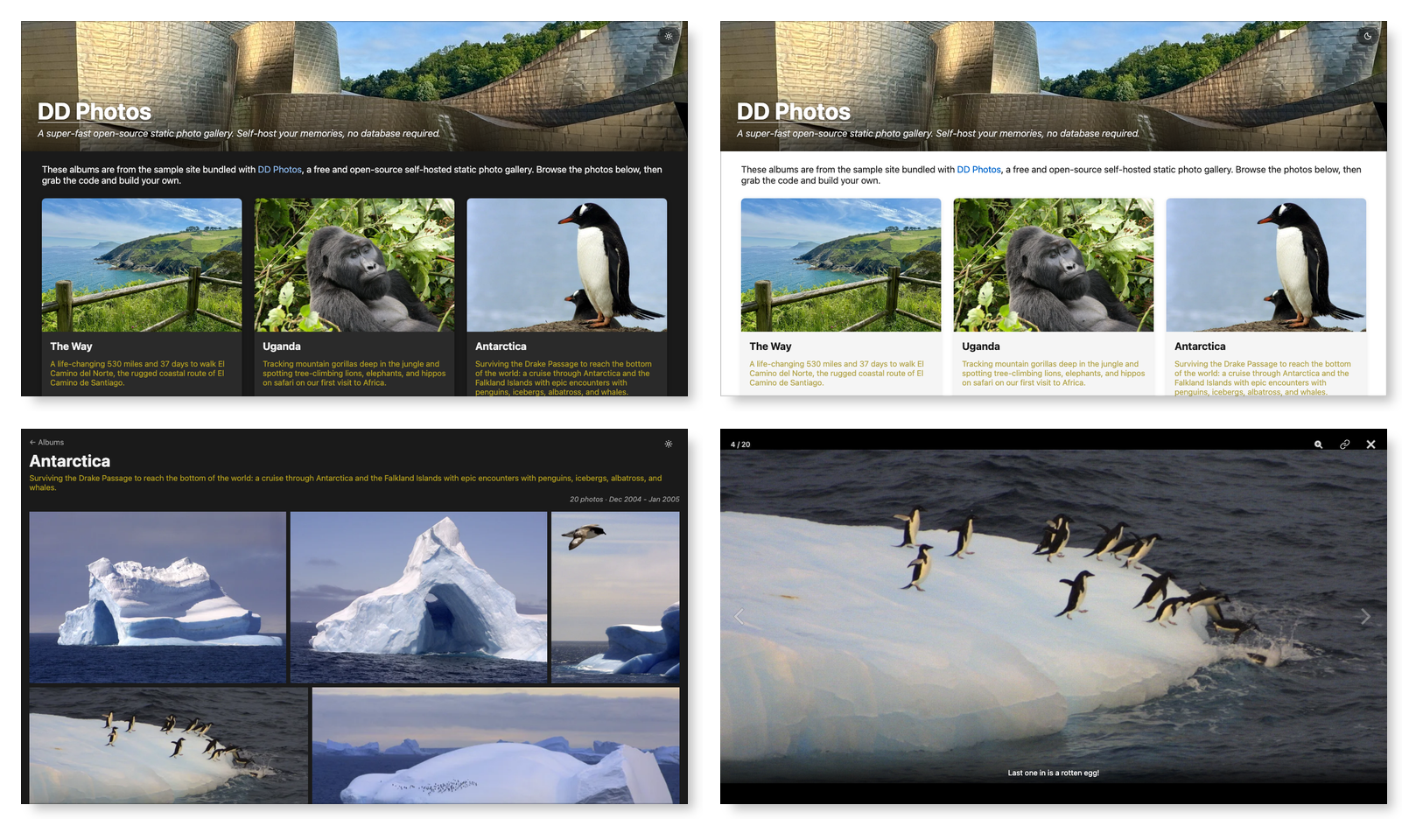
DD Photos is an easy way for you to share your photo/video albums. A DD Photos site↗ has a home page, with all of your albums, and their description. You can easily switch between dark and light themes. Click/touch an album, and you see a grid of all photos/videos. Click/touch a photo/video to see the full size version and a caption, if it has one. You can easily swipe between photos/video (or use arrow keys on a laptop). It works great on mobile, tablet, and desktop.
Videos sit in the same grid as your photos, marked with a play badge and their length, and play right where the full size photo would appear.
Here's what it looks like on a big display (see Screenshots for larger versions):
DD Photos App
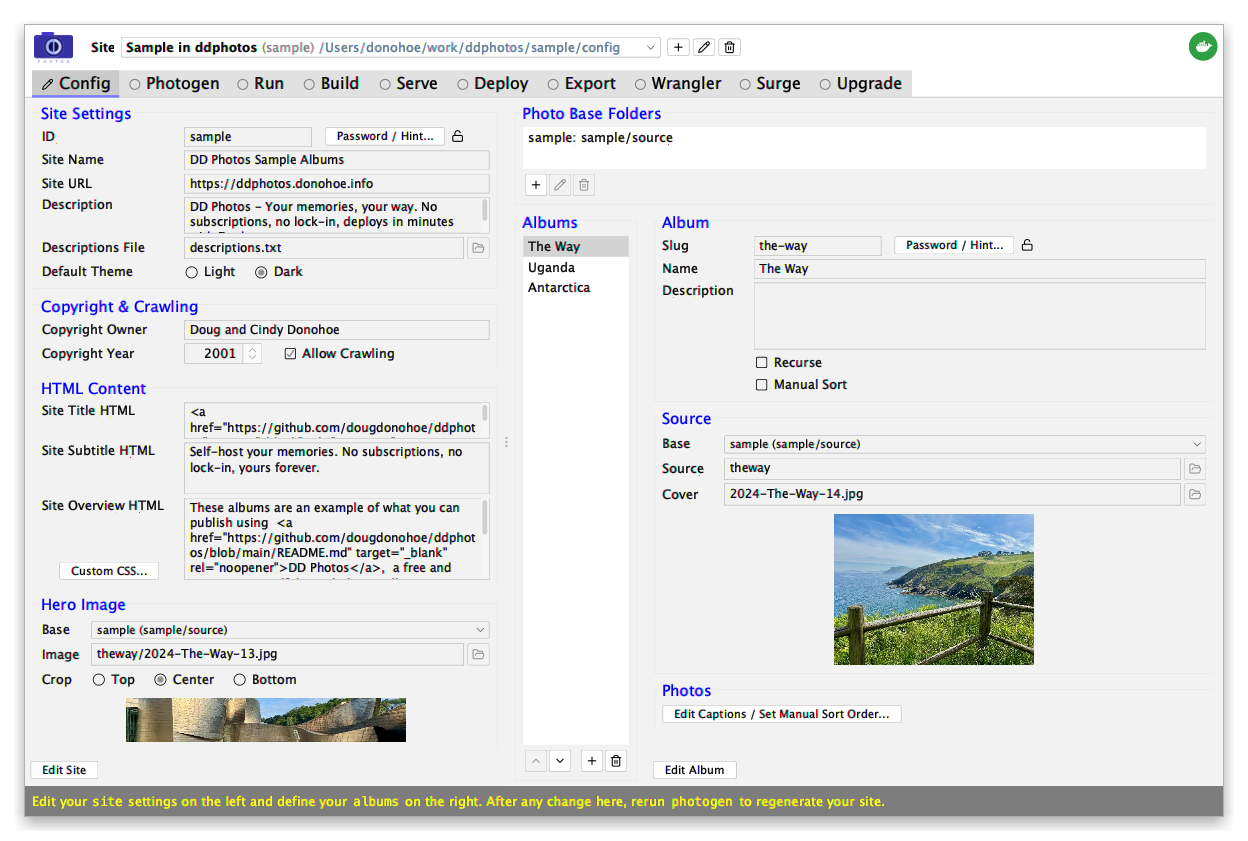
The easiest way to run DD Photos is via the open-source companion DD Photos desktop app↗. It requires the least technical jujitsu! We highly recommend starting there.
Docker Quick Start
The second-easiest way to run DD Photos is via Docker↗ - no developer tooling required. Try the starter site:
mkdir ~/my-ddphotos
docker run --rm -v ~/my-ddphotos:/ddphotos dougdonohoe/ddphotos init
cd ~/my-ddphotos
./ddphotos photogen   # resize images and create index files
./ddphotos run        # run dev server at http://localhost:5173
./ddphotos build      # build static site
./ddphotos serve      # serve static site via Apache at http://localhost:8000
The starter site's photos are installed in sample-photos/ next to config/. Edit
config/albums.yaml to define your own albums and repeat, then delete sample-photos/.
Deploy in seconds (free, no server required) via Cloudflare Pages↗ (unlimited bandwidth) or Surge↗:
./ddphotos export --cloudflare
./ddphotos wrangler pages deploy --project-name my-unique-site export/my-photos

./ddphotos export --copy
./ddphotos surge --domain my-unique-site.surge.sh export/my-photos
See the Docker Mode page for full details including deploying via rsync or to S3.
Bare Metal
The third way to run DD Photos is directly from this repo. See Developer Setup for details.
Motivation
I was dissatisfied with photo sharing sites, especially Apple's iCloud shared albums, which typically take 20+ seconds to load. Other sites for sharing have their own irritations like cumbersome UIs, advertising, hawking of photo paraphernalia and social media distractions.
I just want to share my photos with friends and family. I want it fast, easy, mobile friendly, and distraction free. Focus on the photos. So I built DD Photos, and it is what is behind photos.donohoe.info↗. It's actually pretty good, wicked fast, and meets my needs. Maybe it will meet yours too, which is why I've open-sourced it.
P.S. I wrote about building DD Photos in this Medium article↗.
How it Works
The idea is that you already use something else to curate and filter your photos. Maybe it is Adobe Lightroom Classic (my tool). Or maybe it is Apple Photos or Google Photos. It doesn't matter, but once you get a selection of photos that comprise an album, you export the photos into a folder. All the photos (and videos) in a folder make up an album. It's that simple.
You can create an optional photogen.txt file in each album folder to
define captions for each photo/video. This file can also be used to define the
album's sort order, if order-by-date isn't sufficient.
With DD Photos, you define where your albums live in an albums.yaml file.
You can specify a name, description, and choose your cover photo. Here, you also define
details about your site, like name, description, optional HTML text and the
hero image.
Once you have defined where your photos/videos live, you run the photogen tool,
which resizes the photos for web viewing, converts any videos to a format every
browser can play, and generates index files that the web app uses.
That's it. You can now view your photo/video albums on your machine using the dev server.
Finally, there is a build step which creates a static site that can easily be deployed to a machine that has a web server (like Apache or nginx), to AWS S3, or exported to any static hosting service. No code runs on a server. No database is needed. It's just HTML, CSS, JavaScript and your (resized) photos.
Key Features
Website features:
- Concise album cards with description, number of photos/videos, date range and your choice of cover photo.
- An album's page has a nicely justified photo grid layout with PhotoSwipe lightbox that adjusts well to any screen size.
- Keyboard support: arrow keys navigate in lightbox, ESC key exits lightbox and returns to home page from album page.
- Optional per-photo/video descriptions via
photogen.txt: used as imagealttext, grid mouse-hover caption (desktop), always-visible caption (mobile), and lightbox caption. - Video support (
.mov,.mp4,.m4v): clips appear in the grid with a play badge and their duration, and play in the lightbox with the browser's own controls. Space toggles play/pause, and captions work exactly as they do for photos. - Each album has a human-readable URL (e.g.,
/albums/antarctica). - Each photo has a shareable permalink (e.g.,
/albums/patagonia/5) accessible via a copy-to-clipboard button. - Optional hero image: a full-width banner at the top of the home page, specified in
albums.yamlwith a configurable crop position (top/center/bottom). - Optional
HTMLtitle, subtitle, and site overview. Photo captions accept inlineHTMLtoo, including links (clickable in the lightbox). - Optional password protection: encrypt individual albums or the entire site. Passwords are never stored server-side, decryption happens in-browser using the Web Crypto API. Optional hints can be shown in the password dialog. A logout button clears stored passwords on encrypted sites.
- Dark/light theme toggle.
- Custom CSS override: specify a CSS file in
albums.yamlto restyle the site without modifying the source code (see Custom CSS). - OpenGraph tags for rich link previews when sharing album or photo URLs on social media or messaging apps. The hero image (if configured) or an album cover JPEG is used as the preview image.
- Privacy page (
/privacy) documents what is stored in browser local storage (theme preference, site ID, and passwords/covers on encrypted sites). Append?clearto any URL to wipe all stored data.
Backend features:
- Two efficient WebP image sizes created:
grid(600px) andfull(1600px). - Videos are re-encoded to H.264/AAC MP4 (1280px long edge), which is the only combination every browser plays: phone clips are usually HEVC, which Chrome and Firefox refuse. A poster frame is extracted and run through the same two WebP sizes as a photo, so the grid treats videos and stills identically.
ffmpegis downloaded on demand the first time a video is seen, and cached. Photo-only sites never download it and gain no new dependency.- EXIF metadata extraction (dimensions, date) stored in JSON.
- All image metadata stripped from WebP output (smaller files, no GPS leak).
- Concurrent image resizing via goroutines (buffered channel, WaitGroup).
- Dry-run mode by default (use
-doitto write files). - Optionally use
photogen.txtto override sort order (default is by capture date). - Recursive album support: set
recurse: trueto collect photos from subdirectories, with automatic filename prefixing to avoid collisions. - WebP and MP4 filenames for encrypted albums are HMAC-derived, preventing filename guessing even if the original source filename is known.
Tech Details
The photogen Go program (cmd/photogen/photogen.go) resizes your photos to WebP
format and generates the JSON index files (albums.json, per-album index.json)
that are consumed by the frontend. It also generates a sitemap.xml file that
identifies each album. Videos are transcoded with ffmpeg, which photogen fetches
the first time it meets one; nothing is downloaded for a site without video.
The site (in web, a Node.js app) is built with SvelteKit and statically generated.
The HTML shell and assets are pre-built files served directly by a web server, with photo data
fetched client-side from the static JSON indexes generated by photogen.
There are many ways to deploy a static site like this. The quickest options are
Cloudflare Pages↗ or Surge↗ —
one command and your site is live at a public URL, free.
For production, DD Photos provides two options out of the box: Apache via rsync, and
S3+CloudFront using aws s3 sync. See Deployment for setup details.
Documentation
These documents are primarily meant for users of DD Photos:
| Document | Description |
|---|---|
| Docker Mode | Docker workflow: init, photogen, run, build, serve, deploy, upgrade |
| Configuration | albums.yaml, customization.yaml, site.env, and how config reaches the frontend |
| Photogen | photogen CLI: flags, photo descriptions, video, recursive albums |
| Custom CSS | Restyling the site: custom properties, class names, specificity, examples |
| Rebuilding a Site | Turn a deployed site back into a config directory you can build |
| Deployment | Deployment via rsync and S3+CloudFront |
| Web Server Configuration | Apache, nginx, CloudFront, and Cloudflare Pages routing rules |
| Environment Variables | Deployment variables |
These documents are primarily meant for developers of DD Photos:
| Document | Description |
|---|---|
| Developer Setup | Prerequisites, sample app, commands (developer mode) |
| Development Notes | SvelteKit details, LAN access, debugging |
| Testing | Manual testing, Playwright e2e tests, CI |
| Makefile Targets | All make targets |
| Environment Variables | Deploy and album location variables |
Contributing
Contributions are welcome! Please see CONTRIBUTING.md for details.
License
This project is licensed under the GNU Affero General Public License v3.0 (AGPL v3).
If you'd like to use this project under different terms, contact doug [at] donohoe [dot] info.
Contributors


See what people are saying
Similar repos


Languages
Go
36.8%
Shell
23.9%
TypeScript
15.7%
Svelte
11.4%
Python
5.7%
Makefile
2.3%
JavaScript
2.2%
Dockerfile
1.5%
Beautiful self-hosted photo galleries. No subscriptions, no lock-in, deploys in minutes.
171
stars
372
commits
Go
primary language
Sep 12, 2026
updated
README
DD Photos - Static Photo Album Site Generator
Overview
DD Photos is an easy way for you to share your photo/video albums. A DD Photos site↗ has a home page, with all of your albums, and their description. You can easily switch between dark and light themes. Click/touch an album, and you see a grid of all photos/videos. Click/touch a photo/video to see the full size version and a caption, if it has one. You can easily swipe between photos/video (or use arrow keys on a laptop). It works great on mobile, tablet, and desktop.
Videos sit in the same grid as your photos, marked with a play badge and their length, and play right where the full size photo would appear.
Here's what it looks like on a big display (see Screenshots for larger versions):
DD Photos App
The easiest way to run DD Photos is via the open-source companion DD Photos desktop app↗. It requires the least technical jujitsu! We highly recommend starting there.
Docker Quick Start
The second-easiest way to run DD Photos is via Docker↗ - no developer tooling required. Try the starter site:
mkdir ~/my-ddphotos
docker run --rm -v ~/my-ddphotos:/ddphotos dougdonohoe/ddphotos init
cd ~/my-ddphotos
./ddphotos photogen   # resize images and create index files
./ddphotos run        # run dev server at http://localhost:5173
./ddphotos build      # build static site
./ddphotos serve      # serve static site via Apache at http://localhost:8000
The starter site's photos are installed in sample-photos/ next to config/. Edit
config/albums.yaml to define your own albums and repeat, then delete sample-photos/.
Deploy in seconds (free, no server required) via Cloudflare Pages↗ (unlimited bandwidth) or Surge↗:
./ddphotos export --cloudflare
./ddphotos wrangler pages deploy --project-name my-unique-site export/my-photos

./ddphotos export --copy
./ddphotos surge --domain my-unique-site.surge.sh export/my-photos
See the Docker Mode page for full details including deploying via rsync or to S3.
Bare Metal
The third way to run DD Photos is directly from this repo. See Developer Setup for details.
Motivation
I was dissatisfied with photo sharing sites, especially Apple's iCloud shared albums, which typically take 20+ seconds to load. Other sites for sharing have their own irritations like cumbersome UIs, advertising, hawking of photo paraphernalia and social media distractions.
I just want to share my photos with friends and family. I want it fast, easy, mobile friendly, and distraction free. Focus on the photos. So I built DD Photos, and it is what is behind photos.donohoe.info↗. It's actually pretty good, wicked fast, and meets my needs. Maybe it will meet yours too, which is why I've open-sourced it.
P.S. I wrote about building DD Photos in this Medium article↗.
How it Works
The idea is that you already use something else to curate and filter your photos. Maybe it is Adobe Lightroom Classic (my tool). Or maybe it is Apple Photos or Google Photos. It doesn't matter, but once you get a selection of photos that comprise an album, you export the photos into a folder. All the photos (and videos) in a folder make up an album. It's that simple.
You can create an optional photogen.txt file in each album folder to
define captions for each photo/video. This file can also be used to define the
album's sort order, if order-by-date isn't sufficient.
With DD Photos, you define where your albums live in an albums.yaml file.
You can specify a name, description, and choose your cover photo. Here, you also define
details about your site, like name, description, optional HTML text and the
hero image.
Once you have defined where your photos/videos live, you run the photogen tool,
which resizes the photos for web viewing, converts any videos to a format every
browser can play, and generates index files that the web app uses.
That's it. You can now view your photo/video albums on your machine using the dev server.
Finally, there is a build step which creates a static site that can easily be deployed to a machine that has a web server (like Apache or nginx), to AWS S3, or exported to any static hosting service. No code runs on a server. No database is needed. It's just HTML, CSS, JavaScript and your (resized) photos.
Key Features
Website features:
- Concise album cards with description, number of photos/videos, date range and your choice of cover photo.
- An album's page has a nicely justified photo grid layout with PhotoSwipe lightbox that adjusts well to any screen size.
- Keyboard support: arrow keys navigate in lightbox, ESC key exits lightbox and returns to home page from album page.
- Optional per-photo/video descriptions via
photogen.txt: used as imagealttext, grid mouse-hover caption (desktop), always-visible caption (mobile), and lightbox caption. - Video support (
.mov,.mp4,.m4v): clips appear in the grid with a play badge and their duration, and play in the lightbox with the browser's own controls. Space toggles play/pause, and captions work exactly as they do for photos. - Each album has a human-readable URL (e.g.,
/albums/antarctica). - Each photo has a shareable permalink (e.g.,
/albums/patagonia/5) accessible via a copy-to-clipboard button. - Optional hero image: a full-width banner at the top of the home page, specified in
albums.yamlwith a configurable crop position (top/center/bottom). - Optional
HTMLtitle, subtitle, and site overview. Photo captions accept inlineHTMLtoo, including links (clickable in the lightbox). - Optional password protection: encrypt individual albums or the entire site. Passwords are never stored server-side, decryption happens in-browser using the Web Crypto API. Optional hints can be shown in the password dialog. A logout button clears stored passwords on encrypted sites.
- Dark/light theme toggle.
- Custom CSS override: specify a CSS file in
albums.yamlto restyle the site without modifying the source code (see Custom CSS). - OpenGraph tags for rich link previews when sharing album or photo URLs on social media or messaging apps. The hero image (if configured) or an album cover JPEG is used as the preview image.
- Privacy page (
/privacy) documents what is stored in browser local storage (theme preference, site ID, and passwords/covers on encrypted sites). Append?clearto any URL to wipe all stored data.
Backend features:
- Two efficient WebP image sizes created:
grid(600px) andfull(1600px). - Videos are re-encoded to H.264/AAC MP4 (1280px long edge), which is the only combination every browser plays: phone clips are usually HEVC, which Chrome and Firefox refuse. A poster frame is extracted and run through the same two WebP sizes as a photo, so the grid treats videos and stills identically.
ffmpegis downloaded on demand the first time a video is seen, and cached. Photo-only sites never download it and gain no new dependency.- EXIF metadata extraction (dimensions, date) stored in JSON.
- All image metadata stripped from WebP output (smaller files, no GPS leak).
- Concurrent image resizing via goroutines (buffered channel, WaitGroup).
- Dry-run mode by default (use
-doitto write files). - Optionally use
photogen.txtto override sort order (default is by capture date). - Recursive album support: set
recurse: trueto collect photos from subdirectories, with automatic filename prefixing to avoid collisions. - WebP and MP4 filenames for encrypted albums are HMAC-derived, preventing filename guessing even if the original source filename is known.
Tech Details
The photogen Go program (cmd/photogen/photogen.go) resizes your photos to WebP
format and generates the JSON index files (albums.json, per-album index.json)
that are consumed by the frontend. It also generates a sitemap.xml file that
identifies each album. Videos are transcoded with ffmpeg, which photogen fetches
the first time it meets one; nothing is downloaded for a site without video.
The site (in web, a Node.js app) is built with SvelteKit and statically generated.
The HTML shell and assets are pre-built files served directly by a web server, with photo data
fetched client-side from the static JSON indexes generated by photogen.
There are many ways to deploy a static site like this. The quickest options are
Cloudflare Pages↗ or Surge↗ —
one command and your site is live at a public URL, free.
For production, DD Photos provides two options out of the box: Apache via rsync, and
S3+CloudFront using aws s3 sync. See Deployment for setup details.
Documentation
These documents are primarily meant for users of DD Photos:
| Document | Description |
|---|---|
| Docker Mode | Docker workflow: init, photogen, run, build, serve, deploy, upgrade |
| Configuration | albums.yaml, customization.yaml, site.env, and how config reaches the frontend |
| Photogen | photogen CLI: flags, photo descriptions, video, recursive albums |
| Custom CSS | Restyling the site: custom properties, class names, specificity, examples |
| Rebuilding a Site | Turn a deployed site back into a config directory you can build |
| Deployment | Deployment via rsync and S3+CloudFront |
| Web Server Configuration | Apache, nginx, CloudFront, and Cloudflare Pages routing rules |
| Environment Variables | Deployment variables |
These documents are primarily meant for developers of DD Photos:
| Document | Description |
|---|---|
| Developer Setup | Prerequisites, sample app, commands (developer mode) |
| Development Notes | SvelteKit details, LAN access, debugging |
| Testing | Manual testing, Playwright e2e tests, CI |
| Makefile Targets | All make targets |
| Environment Variables | Deploy and album location variables |
Contributing
Contributions are welcome! Please see CONTRIBUTING.md for details.
License
This project is licensed under the GNU Affero General Public License v3.0 (AGPL v3).
If you'd like to use this project under different terms, contact doug [at] donohoe [dot] info.
See what people are saying
Similar repos
Contributors
Languages
Go
36.8%
Shell
23.9%
TypeScript
15.7%
Svelte
11.4%
Python
5.7%
Makefile
2.3%
JavaScript
2.2%
Dockerfile
1.5%