
Free offline ambient sound mixer for Windows · 53 sounds, seamless loops, saved mixes, audio import · English / 中文 · 静野
See the codeREADME
Quiet Field · 静野
Find your quiet. A free, offline ambient sound mixer for Windows, with 53 built-in sounds and mixes you can make your own.
English · 简体中文
Download for Windows · Listen & explore · Sound library · Feedback


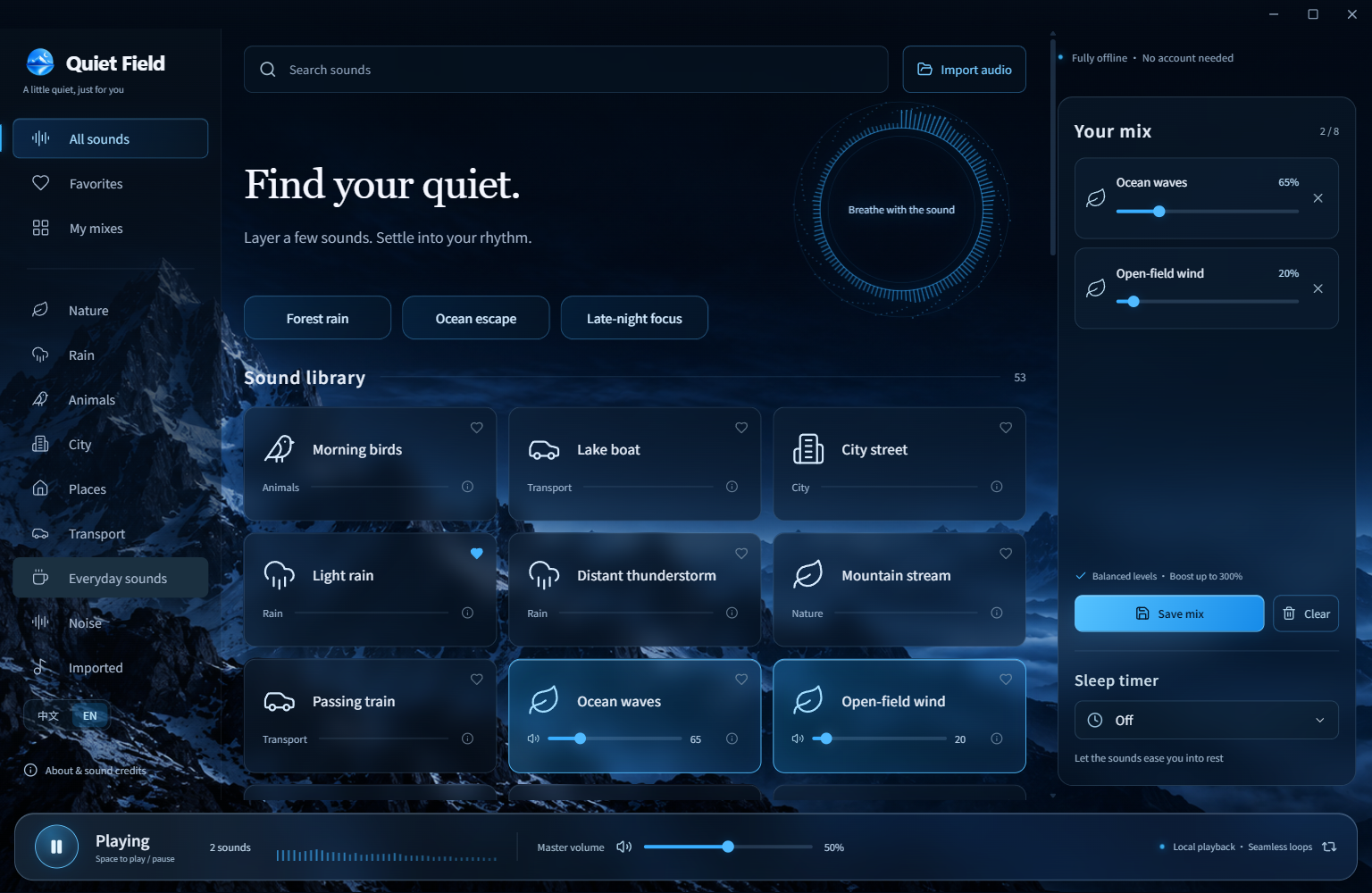
A little quiet, on your terms
- 53 sounds, ready offline. Rain, ocean waves, forests, cat purring, wind chimes, trains and more, plus white, pink and brown noise. All recordings come in the download.
- Your own soundscape. Layer up to 8 sounds, adjust each level, favorite your picks and save named mixes locally.
- Natural transitions. Edge-silence trimming, crossfading and continuous audio-buffer looping reduce abrupt restarts. Distinct events can still sound repetitive.
- Balanced levels. Automatic baseline loudness adjustment, individual controls up to 300%, and output peak protection.
- Bring your own audio. Import supported MP3, WAV, OGG and FLAC files: up to 40 MB, 5 minutes and 2 channels per file. Files stay on your computer.
- A softer finish. A sleep timer fades out during its final 15 seconds.
- English & 简体中文. Follows your system language on first launch; switch any time without interrupting playback. Search in either language.
- No accounts, ads or telemetry. No subscription. No cloud upload. Free and open source.
The library includes 32 original PCM WAV recordings from BigSoundBank, including 17 at 24-bit / 48 kHz. Browse all 53 sounds and recording notes.
Download & start listening
- Download QuietField-1.5.0-Windows-x64-public.zip (about 832 MB).
- Extract the whole ZIP into a folder.
- Open
QuietField-win32-x64/静野.exe(静野 is the app’s Chinese name).
No Node.js, Python, installation wizard or account is needed. Keep the executable with its accompanying files. Checksums are on the release page. GitHub’s source archives contain code, not the bundled audio.
Platform: Windows x64. macOS, Linux and Windows ARM64 builds are not available yet. The app is unsigned, so Windows may show a reputation warning; use this repository’s official releases. Local desktop tests and Windows CI are not a substitute for testing on every PC.
Upgrading: extract the new version into a new folder. Public-edition preferences and imports live separately under %APPDATA%/QuietField-Public. Keep that data folder to retain them. Language switching preserves existing sound IDs and user-written mix names.
Questions
Why is the download large? All 50 recordings ship with the app so it works offline. Many are original, uncompressed WAV files. The other 3 sounds are generated noise.
Can I use it offline? Yes. The desktop app blocks external HTTP/HTTPS requests. Fonts, artwork and audio are bundled. Optional website previews need a connection and use GitHub Pages hosting; there is no added analytics script.
Where are my mixes? Favorites and mixes are in local preferences; imports are in a local database. To move to another PC, close the app and back up the entire data folder. There is no standalone mix export or cloud sync yet.
What about displays and performance? The window adapts to the system’s scaled work area; the layout responds to its width. “About & sound credits” includes a reduced-effects mode. Cached and playing PCM has an admission budget, not a cap on total process memory. Real mixed-DPI hot-plugging, Bluetooth switching and overnight playback still need wider field testing.
Does a download count mean a user? No. GitHub counts release-asset downloads, including repeats. We do not track active users in the app.
Build from source
Requires Node.js 22 and npm. Installing dependencies and the first audio download require a connection.
npm ci
npm run fetch:audio
npm test
npm run build
npm start
npm run package
Packages go to releases/1.5.0-public/. Downloads and builds verify the per-file SHA-256 manifest; changed upstream files stop the build for review. BigSoundBank downloads follow its official form and anonymous waiting period.
Desktop checks require a desktop session and use isolated test data:
npm run verify:desktop
npm run verify:window
node scripts/verify-i18n.mjs
node scripts/verify-release.mjs
node scripts/verify-devices.mjs
node scripts/audit-audio.mjs
Help shape the next version
Report a bug or suggest a sound, improve a translation, or share a recording with a clear redistribution license. English and Chinese feedback are welcome. See CONTRIBUTING. If it helps you, sharing it with someone who might use it is welcome.
License & credits
Code: MIT. Audio has its own per-recording license, not the code license. Authors, sources, upstream edits, licenses and hashes are in THIRD_PARTY_NOTICES and src/catalog.public.json. The public library uses documented CC0, Public Domain and CC BY recordings.
Thanks to the recordists, BigSoundBank, Freesound, SoundBible and Blanket’s audio collection. Icons are from Lucide; bundled Chinese fonts are Noto Sans SC and Noto Serif SC. The app icon and mountain background were made with an image-generation tool. Full licenses ship with the app.
Contributors

2 commits
See what people are saying
Similar repos


Languages
HTML
62.8%
JavaScript
37.2%
Free offline ambient sound mixer for Windows · 53 sounds, seamless loops, saved mixes, audio import · English / 中文 · 静野
See the codeREADME
Quiet Field · 静野
Find your quiet. A free, offline ambient sound mixer for Windows, with 53 built-in sounds and mixes you can make your own.
English · 简体中文
Download for Windows · Listen & explore · Sound library · Feedback
A little quiet, on your terms
- 53 sounds, ready offline. Rain, ocean waves, forests, cat purring, wind chimes, trains and more, plus white, pink and brown noise. All recordings come in the download.
- Your own soundscape. Layer up to 8 sounds, adjust each level, favorite your picks and save named mixes locally.
- Natural transitions. Edge-silence trimming, crossfading and continuous audio-buffer looping reduce abrupt restarts. Distinct events can still sound repetitive.
- Balanced levels. Automatic baseline loudness adjustment, individual controls up to 300%, and output peak protection.
- Bring your own audio. Import supported MP3, WAV, OGG and FLAC files: up to 40 MB, 5 minutes and 2 channels per file. Files stay on your computer.
- A softer finish. A sleep timer fades out during its final 15 seconds.
- English & 简体中文. Follows your system language on first launch; switch any time without interrupting playback. Search in either language.
- No accounts, ads or telemetry. No subscription. No cloud upload. Free and open source.
The library includes 32 original PCM WAV recordings from BigSoundBank, including 17 at 24-bit / 48 kHz. Browse all 53 sounds and recording notes.
Download & start listening
- Download QuietField-1.5.0-Windows-x64-public.zip (about 832 MB).
- Extract the whole ZIP into a folder.
- Open
QuietField-win32-x64/静野.exe(静野 is the app’s Chinese name).
No Node.js, Python, installation wizard or account is needed. Keep the executable with its accompanying files. Checksums are on the release page. GitHub’s source archives contain code, not the bundled audio.
Platform: Windows x64. macOS, Linux and Windows ARM64 builds are not available yet. The app is unsigned, so Windows may show a reputation warning; use this repository’s official releases. Local desktop tests and Windows CI are not a substitute for testing on every PC.
Upgrading: extract the new version into a new folder. Public-edition preferences and imports live separately under %APPDATA%/QuietField-Public. Keep that data folder to retain them. Language switching preserves existing sound IDs and user-written mix names.
Questions
Why is the download large? All 50 recordings ship with the app so it works offline. Many are original, uncompressed WAV files. The other 3 sounds are generated noise.
Can I use it offline? Yes. The desktop app blocks external HTTP/HTTPS requests. Fonts, artwork and audio are bundled. Optional website previews need a connection and use GitHub Pages hosting; there is no added analytics script.
Where are my mixes? Favorites and mixes are in local preferences; imports are in a local database. To move to another PC, close the app and back up the entire data folder. There is no standalone mix export or cloud sync yet.
What about displays and performance? The window adapts to the system’s scaled work area; the layout responds to its width. “About & sound credits” includes a reduced-effects mode. Cached and playing PCM has an admission budget, not a cap on total process memory. Real mixed-DPI hot-plugging, Bluetooth switching and overnight playback still need wider field testing.
Does a download count mean a user? No. GitHub counts release-asset downloads, including repeats. We do not track active users in the app.
Build from source
Requires Node.js 22 and npm. Installing dependencies and the first audio download require a connection.
npm ci
npm run fetch:audio
npm test
npm run build
npm start
npm run package
Packages go to releases/1.5.0-public/. Downloads and builds verify the per-file SHA-256 manifest; changed upstream files stop the build for review. BigSoundBank downloads follow its official form and anonymous waiting period.
Desktop checks require a desktop session and use isolated test data:
npm run verify:desktop
npm run verify:window
node scripts/verify-i18n.mjs
node scripts/verify-release.mjs
node scripts/verify-devices.mjs
node scripts/audit-audio.mjs
Help shape the next version
Report a bug or suggest a sound, improve a translation, or share a recording with a clear redistribution license. English and Chinese feedback are welcome. See CONTRIBUTING. If it helps you, sharing it with someone who might use it is welcome.
License & credits
Code: MIT. Audio has its own per-recording license, not the code license. Authors, sources, upstream edits, licenses and hashes are in THIRD_PARTY_NOTICES and src/catalog.public.json. The public library uses documented CC0, Public Domain and CC BY recordings.
Thanks to the recordists, BigSoundBank, Freesound, SoundBible and Blanket’s audio collection. Icons are from Lucide; bundled Chinese fonts are Noto Sans SC and Noto Serif SC. The app icon and mountain background were made with an image-generation tool. Full licenses ship with the app.
See what people are saying
Similar repos
Contributors
2 commits
Languages
HTML
62.8%
JavaScript
37.2%