Wireflow - user flow chart real-time collaborative tool
See the code
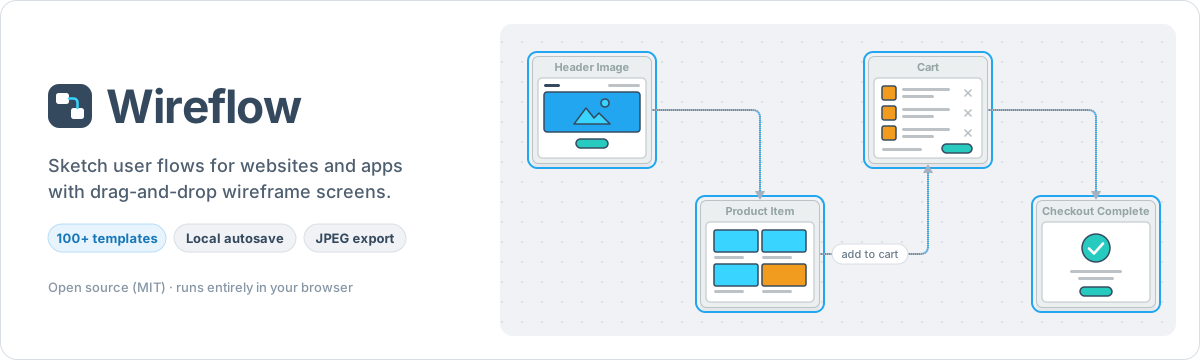


Wireflow is a free, open-source tool for sketching user flows. Drag wireframe screens onto a canvas, connect them, and export the result as an image or save it to a file you can open again. The editor runs in the browser: no account, and your diagram never leaves your machine unless you use the optional AI assistant.
This repository is the app behind wireflow.co: a landing page at / and the editor at /app, built with Next.js and React Flow. It is a Next.js project bootstrapped with create-next-app (the starter notes are at the end).
Made by The Vanila Team and Automatio AI.
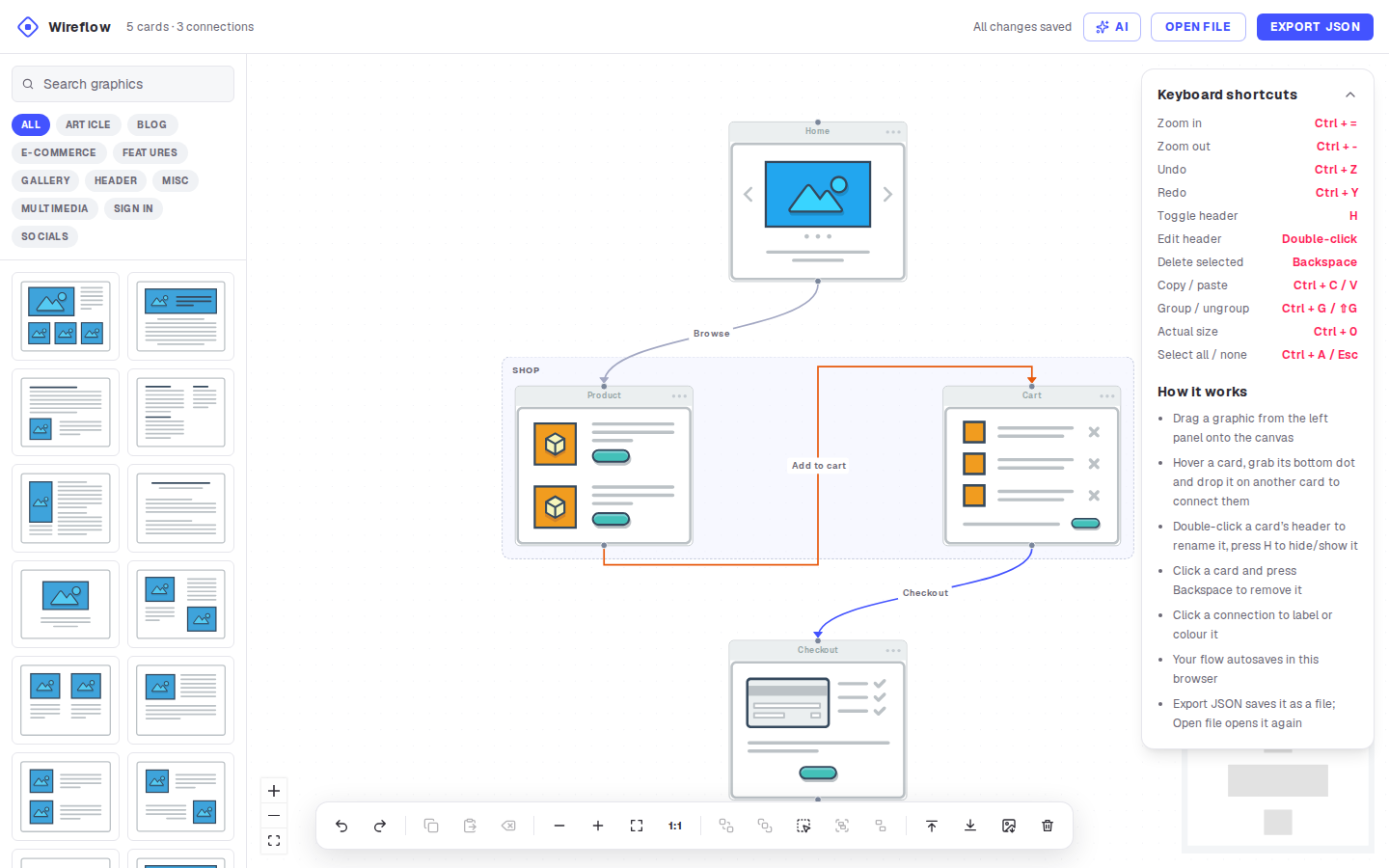
wireflow-estimate.csv.wireflow.json and open it again later, here or in another browser. Files from the earlier gg-editor app open too, with their groups.localStorage.
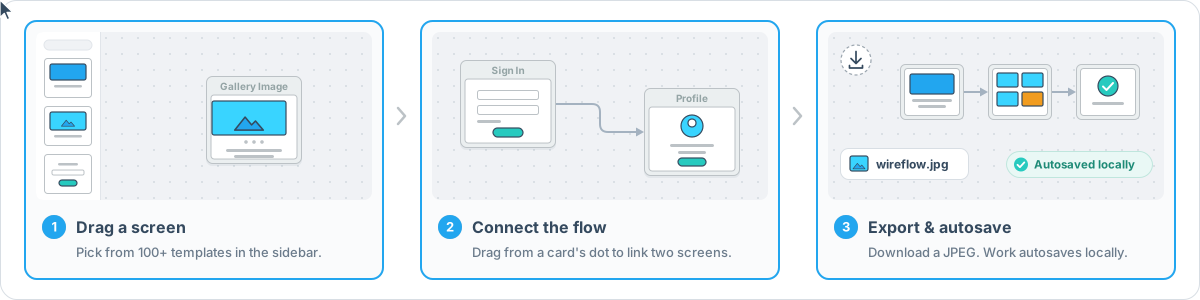
On screens narrower than 1400 px, the toolbar's less common commands (copy, paste, delete, actual size, arrange, multi-select, group, export image) are under More tools. On a phone, AI, Open file and the estimate are under the More button in the header, the toolbar scrolls sideways, and the panel for a selected card, note, group or connection is a sheet above the toolbar. The Keyboard shortcuts panel collapses from its heading and remembers that choice; in windows shorter than 941 px, where it would cover the minimap, it starts collapsed.
| Shortcut | Action |
|---|---|
| Ctrl + = / Ctrl + - | Zoom in / out |
| Ctrl + 0 | Actual size (1:1) |
| Ctrl + Z | Undo |
| Ctrl + Y or Ctrl + Shift + Z | Redo |
| Ctrl + C / Ctrl + V | Copy / paste the selected cards |
| Delete / Backspace | Delete the selection |
| Ctrl + A / Esc | Select everything / nothing (Esc also leaves multi-select mode) |
| Ctrl + G / Ctrl + Shift + G | Group the selection / ungroup the selected group |
| H | Hide or show the header of the selected cards |
| Ctrl + H / Ctrl + K | Hide / show the header of the selected cards |
| Double-click | Rename a card's header or a group |
| Shift + drag | Select with a box |
On a Mac, Cmd works wherever Ctrl is listed (except Ctrl + H / K). Shortcuts that would do nothing (Ctrl+G, H, Ctrl+H/K without a selection) are left to the browser.
After one online visit to /app, the editor works offline. To get a window of its own, install it from the browser (in Chrome or Edge, the install icon in the address bar).
scripts/build-sw.mjs writes public/sw.js after next build (from scripts/sw-template.js): it controls /app only (never /, /blog/*, /uploads/* or other origins), precaches the build and the graphics, and refuses to cache an HTML page served for a script URL. A new deploy waits until the user clicks Reload in "A new version of Wireflow is available"; that reloads every open editor tab.
Rollback: build and deploy with NEXT_PUBLIC_OFFLINE=off. /sw.js then becomes a worker that deletes Wireflow's caches, unregisters itself and reloads open editor tabs. Keep serving that /sw.js for a while; deleting the file instead would leave installed browsers on their cached editor.
localStorage["wireflow-flow-v1"], the key wireflow.co's editor has always used. Diagrams saved before these changes open unchanged. Saves add "version": 4 (2 added groups and connection styles; 3 adds notes, your own images, estimates and the hourly rate; 4 adds project stages). An editor that knows an earlier version shows a newer diagram as far as it can but never saves over it; wireflow.co's current editor ignores the version.lib/diagram/store.ts → lib/diagram/rules.ts): connections need two existing cards, a card's group must exist and groups can't contain themselves, ids are unique strings, only known fields are kept (no __proto__), template image URLs come from the catalog, and your own images are only kept as JPEG, PNG or WebP data, never as links. If loading has to leave something out, or the stored data can't be read, the original is first copied to wireflow-flow-v1.backup (later copies get a time suffix). A diagram saved by a newer version is shown but never overwritten. Two open tabs follow each other's saves.sessionStorage["wireflow-history-v1"], so it survives a reload of that tab.api.anthropic.com with your messages and a compact copy of the diagram (screen labels, template ids, positions, connections, groups, note text, estimates and the hourly rate; not your own images); Wireflow has no server in between and never sees them, and Anthropic's terms and your organization's data settings apply. Use a dedicated key with an expiry and a spend limit. Each reply shows its cost. Model output is shown as plain text.
wireflow-ai): AES-GCM with a fresh IV each time, under a device key that WebCrypto creates as non-extractable, so its bytes can't be read or copied out, only used. That keeps the key out of plain sight in the browser's storage (devtools, storage exports, a copy of the storage files). It does not protect it from code running on the page, browser extensions or someone using this browser profile: they can have the browser decrypt it. Forget key deletes both records. A key an earlier version remembered in plain text (in localStorage["wireflow-ai"]) is encrypted the first time the panel opens, and the plain text deleted. Where the browser keeps no site data (or on plain http other than localhost, where WebCrypto is off), the key can't be remembered and the panel says so.localStorage["wireflow-ai"] keeps only the provider, the model and whether to keep the chat.{
"format": "wireflow",
"version": 4,
"diagram": {
"nodes": [
{ "id": "g1", "type": "group", "position": { "x": -16, "y": -36 }, "width": 572, "height": 270,
"data": { "label": "Checkout" } },
{ "id": "…", "type": "flow", "parentId": "g1", "position": { "x": 16, "y": 36 },
"data": { "graphicId": "e-commerce-cart", "label": "Cart", "headerText": "My cart", "showHeader": true,
"estimate": 6 } },
{ "id": "…", "type": "flow", "position": { "x": 620, "y": 0 },
"data": { "graphicId": "own-image", "src": "data:image/jpeg;base64,…", "ratio": 2.16, "label": "Phone home" } },
{ "id": "…", "type": "note", "position": { "x": 620, "y": 520 }, "width": 220, "height": 120,
"data": { "text": "Coupon field: optional" } }
],
"edges": [{ "id": "…", "source": "…", "target": "…", "type": "smoothstep", "markerEnd": { "type": "arrowclosed" },
"label": "Checkout", "style": { "stroke": "#e8590c", "strokeWidth": 3 } }],
"settings": { "hourlyRate": 90, "currency": "EUR",
"stages": [{ "label": "Design", "percent": 20 }, { "label": "QA", "hours": 6 }] }
}
}
lib/graphics.json; image URLs are not stored and always come from this build. A card's size follows from its template (Mobile templates make 124 px wide portrait cards, the others 220 px), so it isn't stored either. A card with your own image ("graphicId": "own-image") keeps the picture itself, scaled to at most 1280 px a side, and its height-to-width ratio."type": "note") keep their text (up to 2000 characters) and size. A card's estimate is in hours; settings holds the hourly rate, its currency and the project's stages (at most 50; each a name and either hours or a percent of the cards' hours).position is relative to its group (parentId), and a group's frame always wraps its members. Connections join cards and notes.type is its line shape (step: polyline, smoothstep: rounded polyline; none: smooth) and style.strokeWidth its width (1 to 10; none: 2 px). A connection without a style.stroke is drawn #a3a8c3. The defaults are not stored.{nodes, edges}), the earlier gg-editor app's {"format": "wireflow", "version": 1} files with Category/Name template keys, and its plain G6 {nodes, edges, groups} (lib/legacy-templates.json maps all 102 old keys; layouts scale from 96 to 220 px cards; groups, line shapes and widths are kept).Requirements: Node.js 20.9 or later (Node 24 LTS recommended; .nvmrc and the Docker image use 24) and npm.
git clone https://github.com/vanila-io/wireflow.git
cd wireflow
npm ci
npm run dev            # http://localhost:3000
npm run lint
npm run typecheck
npm test               # Vitest unit tests (tests/unit)
npx playwright install chromium        # first run only
npm run test:e2e       # Playwright (e2e/): builds, then runs against next start on port 4410
E2E_SERVER=preview npm run test:e2e   # the same suite against the OpenNext Worker in workerd
npm run preview        # OpenNext build + local Cloudflare Workers runtime (wrangler dev)
| Command | What it does |
|---|---|
npm run dev | Next.js dev server at http://localhost:3000 |
npm run build | Production build (next build, then the offline worker public/sw.js) |
npm start | Serve the production build (next start) |
npm run preview | OpenNext build, served by the Workers runtime locally |
npm run deploy:staging | OpenNext build, deployed to the wireflow-staging Worker |
npm run lint / npm run typecheck | ESLint / TypeScript |
npm test / npm run test:e2e | Vitest / Playwright |
E2E_PORT picks another port; E2E_SKIP_BUILD=1 reuses the last build; E2E_BASE_URL=http://host:port runs the suite against a server that is already running (for example an older commit, to see a test fail without its fix).AI_LIVE=1 npx vitest run tests/unit/ai-live.test.ts. It reads ANTHROPIC_API_KEY from the environment or .env (AI_ENV_FILE names another file) and never prints it.npm run lint && npm run typecheck && npm test, then npx playwright test (against next start) and E2E_SERVER=preview npx playwright test (against the OpenNext build in workerd, which is what production runs; a framework upgrade can pass the first and fail this one). For Docker changes, also docker compose up --build and open http://localhost:8083.All optional; .env.example lists them, with the analytics values wireflow.co used. They are read at build time (the pages are prerendered), so set them in the build environment (or as Docker build args), not only as Worker vars.
| Variable | What it does |
|---|---|
NEXT_PUBLIC_GA_ID | Google Analytics 4 measurement id (G-…). Unset: no GA script. |
NEXT_PUBLIC_RYBBIT_SRC | URL of the self-hosted Rybbit script (https://…/api/script.js). Unset: no Rybbit script. |
NEXT_PUBLIC_RYBBIT_SITE_ID | Rybbit site id; required with NEXT_PUBLIC_RYBBIT_SRC. |
CLOUDFLARE_WEB_ANALYTICS | 1 if the Cloudflare zone injects its Web Analytics beacon, so the CSP allows it. |
BLOG_ORIGIN | Origin of the Ghost blog. Set only if this app should proxy /blog and /blog/* there; production routes /blog/* to Ghost outside the app. |
NEXT_PUBLIC_OFFLINE | off builds a worker that removes the offline editor from browsers that installed it (rollback, see Offline). |
A malformed analytics value fails the build instead of reaching the page. Rybbit's API key (data-api-key) is deliberately not supported: Rybbit documents it for tracking from localhost only, to be removed before deploying.
There are two ways to run Wireflow in production; both build the same app from the same next.config.ts.
npm run preview builds with @opennextjs/cloudflare and serves the Worker locally (bindings simulated).npm run deploy:staging deploys the Worker wireflow-staging. The top level of wrangler.jsonc is staging too, so a plain wrangler deploy can't replace production.ASSETS (static assets), NEXT_INC_CACHE_R2_BUCKET (R2 incremental cache: / revalidates hourly) and WORKER_SELF_REFERENCE (a service binding to the Worker itself, for the revalidation queue). Uploads (lib/storage.js, /uploads/*) need an R2 binding STORAGE and optionally a SITE_PREFIX var; not bound, as nothing in the app uploads today, so /uploads/* answers 404.env.production in wrangler.jsonc (the Worker's name, routes, cache bucket; STORAGE if uploads are used) from the Cloudflare dashboard; its placeholders are invalid on purpose, so a deploy fails until then; deploy only with an explicit opennextjs-cloudflare deploy --env production;wrangler r2 bucket create wireflow-staging-opennext-cache;/blog/* route to Ghost, or set BLOG_ORIGIN.docker compose up -d --build # http://localhost:8083
docker compose down
The image builds the app with Node 24 (npm ci && npm run build, which also writes the offline worker public/sw.js) and runs the Next.js production server from the standalone output (output: "standalone" in next.config.ts) as an unprivileged user on port 3000. Compose maps that port to 8083, as before.
Settings read at build time are build args: NEXT_PUBLIC_GA_ID, NEXT_PUBLIC_RYBBIT_SRC, NEXT_PUBLIC_RYBBIT_SITE_ID, CLOUDFLARE_WEB_ANALYTICS, BLOG_ORIGIN and NEXT_PUBLIC_OFFLINE. Compose takes them from your shell or a .env file, for example NEXT_PUBLIC_GA_ID=G-… docker compose up -d --build. Without them the site loads no analytics.
Everything the editor needs works in the container: /, /app, the offline worker, the templates and the security headers. Differences from the Cloudflare deploy:
/ shows the GitHub star count and the Open Collective sponsors, fetched during docker build and refreshed hourly. The cached page is kept on the container's disk (not in R2), so it starts again from the image's copy when the container is recreated. If GitHub or Open Collective can't be reached during the build, the page leaves the star count out or shows no sponsors until the next refresh; a refresh that can't reach them keeps the last page (lib/remote-data.ts).lib/storage.js supports Cloudflare R2 (the STORAGE binding) or a sandbox proxy only, and @opennextjs/cloudflare is not in the image, so /uploads/* answers 404 in Docker, as it does on a Worker without that binding. Nothing in the app uploads files today./blog is served by Ghost outside this app. Set BLOG_ORIGIN at build time if this server should proxy it.output: "standalone" is what OpenNext's Cloudflare build sets by itself (NEXT_PRIVATE_STANDALONE), so it changes nothing there, and npm start still works.
Next.js 16 · React 19 · React Flow (@xyflow/react) · Tailwind CSS 4 · Radix UI · Lucide · html-to-image · Anthropic SDK · OpenNext for Cloudflare · Vitest · Playwright · ESLint
.
├── app/                  Next.js routes: landing page (/), editor (/app), manifest, /uploads
├── components/
│   ├── landing/          landing page sections
│   ├── editor/           the editor: canvas, cards, groups, sidebar, toolbar, panels, export
│   └── ai/               AI assistant panel
├── lib/
│   ├── diagram/          the diagram store, rules, groups, history, storage, file format, old-file converter
│   ├── ai/               AI assistant: catalog, diagram edits and layout checks, agent loop, providers
│   └── graphics.json     the screen templates (images in public/graphics/)
├── public/               static files (icons, robots.txt, graphics)
├── scripts/              build helpers (offline worker, icons, graphic sizes)
├── tests/unit/           Vitest tests
├── e2e/                  Playwright tests
├── docs/                 README images
├── Dockerfile            Node 24 build + Next.js standalone server
├── docker-compose.yml    serves the app on port 8083
├── wrangler.jsonc        Cloudflare Worker (OpenNext): staging, and production to fill in
└── open-next.config.ts   OpenNext settings (R2 incremental cache)
Contributions are welcome. Bug reports and ideas go in GitHub issues.
Fork the repository and create a branch for your change.
Install dependencies with npm ci and make your change.
Run the checks locally:
npm run lint && npm run typecheck && npm test && npm run test:e2e
Open a pull request that explains what changed and why. Include a screenshot for UI changes.
This project exists thanks to everyone who contributes.

Thank you to all our backers! Become a backer

Support this project by becoming a sponsor. Your logo will show up here with a link to your website. Become a sponsor



The notes create-next-app wrote for this project, kept as they were.
First, run the development server:
npm run dev
# or
yarn dev
# or
pnpm dev
# or
bun dev
Open http://localhost:3000 with your browser to see the result.
You can start editing the page by modifying app/page.tsx. The page auto-updates as you edit the file.
This project uses next/font to automatically optimize and load Geist, a new font family for Vercel.
To learn more about Next.js, take a look at the following resources:
You can check out the Next.js GitHub repository - your feedback and contributions are welcome!
The easiest way to deploy your Next.js app is to use the Vercel Platform from the creators of Next.js.
Check out our Next.js deployment documentation for more details.
1,185 followers · starred Sep 2020
480 followers · starred Oct 2020
91 followers · starred Oct 2020
133 followers · starred Sep 2020
Wireflow - user flow chart real-time collaborative tool
See the code
Wireflow is a free, open-source tool for sketching user flows. Drag wireframe screens onto a canvas, connect them, and export the result as an image or save it to a file you can open again. The editor runs in the browser: no account, and your diagram never leaves your machine unless you use the optional AI assistant.
This repository is the app behind wireflow.co: a landing page at / and the editor at /app, built with Next.js and React Flow. It is a Next.js project bootstrapped with create-next-app (the starter notes are at the end).
Made by The Vanila Team and Automatio AI.
wireflow-estimate.csv.wireflow.json and open it again later, here or in another browser. Files from the earlier gg-editor app open too, with their groups.localStorage.
On screens narrower than 1400 px, the toolbar's less common commands (copy, paste, delete, actual size, arrange, multi-select, group, export image) are under More tools. On a phone, AI, Open file and the estimate are under the More button in the header, the toolbar scrolls sideways, and the panel for a selected card, note, group or connection is a sheet above the toolbar. The Keyboard shortcuts panel collapses from its heading and remembers that choice; in windows shorter than 941 px, where it would cover the minimap, it starts collapsed.
| Shortcut | Action |
|---|---|
| Ctrl + = / Ctrl + - | Zoom in / out |
| Ctrl + 0 | Actual size (1:1) |
| Ctrl + Z | Undo |
| Ctrl + Y or Ctrl + Shift + Z | Redo |
| Ctrl + C / Ctrl + V | Copy / paste the selected cards |
| Delete / Backspace | Delete the selection |
| Ctrl + A / Esc | Select everything / nothing (Esc also leaves multi-select mode) |
| Ctrl + G / Ctrl + Shift + G | Group the selection / ungroup the selected group |
| H | Hide or show the header of the selected cards |
| Ctrl + H / Ctrl + K | Hide / show the header of the selected cards |
| Double-click | Rename a card's header or a group |
| Shift + drag | Select with a box |
On a Mac, Cmd works wherever Ctrl is listed (except Ctrl + H / K). Shortcuts that would do nothing (Ctrl+G, H, Ctrl+H/K without a selection) are left to the browser.
After one online visit to /app, the editor works offline. To get a window of its own, install it from the browser (in Chrome or Edge, the install icon in the address bar).
scripts/build-sw.mjs writes public/sw.js after next build (from scripts/sw-template.js): it controls /app only (never /, /blog/*, /uploads/* or other origins), precaches the build and the graphics, and refuses to cache an HTML page served for a script URL. A new deploy waits until the user clicks Reload in "A new version of Wireflow is available"; that reloads every open editor tab.
Rollback: build and deploy with NEXT_PUBLIC_OFFLINE=off. /sw.js then becomes a worker that deletes Wireflow's caches, unregisters itself and reloads open editor tabs. Keep serving that /sw.js for a while; deleting the file instead would leave installed browsers on their cached editor.
localStorage["wireflow-flow-v1"], the key wireflow.co's editor has always used. Diagrams saved before these changes open unchanged. Saves add "version": 4 (2 added groups and connection styles; 3 adds notes, your own images, estimates and the hourly rate; 4 adds project stages). An editor that knows an earlier version shows a newer diagram as far as it can but never saves over it; wireflow.co's current editor ignores the version.lib/diagram/store.ts → lib/diagram/rules.ts): connections need two existing cards, a card's group must exist and groups can't contain themselves, ids are unique strings, only known fields are kept (no __proto__), template image URLs come from the catalog, and your own images are only kept as JPEG, PNG or WebP data, never as links. If loading has to leave something out, or the stored data can't be read, the original is first copied to wireflow-flow-v1.backup (later copies get a time suffix). A diagram saved by a newer version is shown but never overwritten. Two open tabs follow each other's saves.sessionStorage["wireflow-history-v1"], so it survives a reload of that tab.api.anthropic.com with your messages and a compact copy of the diagram (screen labels, template ids, positions, connections, groups, note text, estimates and the hourly rate; not your own images); Wireflow has no server in between and never sees them, and Anthropic's terms and your organization's data settings apply. Use a dedicated key with an expiry and a spend limit. Each reply shows its cost. Model output is shown as plain text.
wireflow-ai): AES-GCM with a fresh IV each time, under a device key that WebCrypto creates as non-extractable, so its bytes can't be read or copied out, only used. That keeps the key out of plain sight in the browser's storage (devtools, storage exports, a copy of the storage files). It does not protect it from code running on the page, browser extensions or someone using this browser profile: they can have the browser decrypt it. Forget key deletes both records. A key an earlier version remembered in plain text (in localStorage["wireflow-ai"]) is encrypted the first time the panel opens, and the plain text deleted. Where the browser keeps no site data (or on plain http other than localhost, where WebCrypto is off), the key can't be remembered and the panel says so.localStorage["wireflow-ai"] keeps only the provider, the model and whether to keep the chat.{
"format": "wireflow",
"version": 4,
"diagram": {
"nodes": [
{ "id": "g1", "type": "group", "position": { "x": -16, "y": -36 }, "width": 572, "height": 270,
"data": { "label": "Checkout" } },
{ "id": "…", "type": "flow", "parentId": "g1", "position": { "x": 16, "y": 36 },
"data": { "graphicId": "e-commerce-cart", "label": "Cart", "headerText": "My cart", "showHeader": true,
"estimate": 6 } },
{ "id": "…", "type": "flow", "position": { "x": 620, "y": 0 },
"data": { "graphicId": "own-image", "src": "data:image/jpeg;base64,…", "ratio": 2.16, "label": "Phone home" } },
{ "id": "…", "type": "note", "position": { "x": 620, "y": 520 }, "width": 220, "height": 120,
"data": { "text": "Coupon field: optional" } }
],
"edges": [{ "id": "…", "source": "…", "target": "…", "type": "smoothstep", "markerEnd": { "type": "arrowclosed" },
"label": "Checkout", "style": { "stroke": "#e8590c", "strokeWidth": 3 } }],
"settings": { "hourlyRate": 90, "currency": "EUR",
"stages": [{ "label": "Design", "percent": 20 }, { "label": "QA", "hours": 6 }] }
}
}
lib/graphics.json; image URLs are not stored and always come from this build. A card's size follows from its template (Mobile templates make 124 px wide portrait cards, the others 220 px), so it isn't stored either. A card with your own image ("graphicId": "own-image") keeps the picture itself, scaled to at most 1280 px a side, and its height-to-width ratio."type": "note") keep their text (up to 2000 characters) and size. A card's estimate is in hours; settings holds the hourly rate, its currency and the project's stages (at most 50; each a name and either hours or a percent of the cards' hours).position is relative to its group (parentId), and a group's frame always wraps its members. Connections join cards and notes.type is its line shape (step: polyline, smoothstep: rounded polyline; none: smooth) and style.strokeWidth its width (1 to 10; none: 2 px). A connection without a style.stroke is drawn #a3a8c3. The defaults are not stored.{nodes, edges}), the earlier gg-editor app's {"format": "wireflow", "version": 1} files with Category/Name template keys, and its plain G6 {nodes, edges, groups} (lib/legacy-templates.json maps all 102 old keys; layouts scale from 96 to 220 px cards; groups, line shapes and widths are kept).Requirements: Node.js 20.9 or later (Node 24 LTS recommended; .nvmrc and the Docker image use 24) and npm.
git clone https://github.com/vanila-io/wireflow.git
cd wireflow
npm ci
npm run dev            # http://localhost:3000
npm run lint
npm run typecheck
npm test               # Vitest unit tests (tests/unit)
npx playwright install chromium        # first run only
npm run test:e2e       # Playwright (e2e/): builds, then runs against next start on port 4410
E2E_SERVER=preview npm run test:e2e   # the same suite against the OpenNext Worker in workerd
npm run preview        # OpenNext build + local Cloudflare Workers runtime (wrangler dev)
| Command | What it does |
|---|---|
npm run dev | Next.js dev server at http://localhost:3000 |
npm run build | Production build (next build, then the offline worker public/sw.js) |
npm start | Serve the production build (next start) |
npm run preview | OpenNext build, served by the Workers runtime locally |
npm run deploy:staging | OpenNext build, deployed to the wireflow-staging Worker |
npm run lint / npm run typecheck | ESLint / TypeScript |
npm test / npm run test:e2e | Vitest / Playwright |
E2E_PORT picks another port; E2E_SKIP_BUILD=1 reuses the last build; E2E_BASE_URL=http://host:port runs the suite against a server that is already running (for example an older commit, to see a test fail without its fix).AI_LIVE=1 npx vitest run tests/unit/ai-live.test.ts. It reads ANTHROPIC_API_KEY from the environment or .env (AI_ENV_FILE names another file) and never prints it.npm run lint && npm run typecheck && npm test, then npx playwright test (against next start) and E2E_SERVER=preview npx playwright test (against the OpenNext build in workerd, which is what production runs; a framework upgrade can pass the first and fail this one). For Docker changes, also docker compose up --build and open http://localhost:8083.All optional; .env.example lists them, with the analytics values wireflow.co used. They are read at build time (the pages are prerendered), so set them in the build environment (or as Docker build args), not only as Worker vars.
| Variable | What it does |
|---|---|
NEXT_PUBLIC_GA_ID | Google Analytics 4 measurement id (G-…). Unset: no GA script. |
NEXT_PUBLIC_RYBBIT_SRC | URL of the self-hosted Rybbit script (https://…/api/script.js). Unset: no Rybbit script. |
NEXT_PUBLIC_RYBBIT_SITE_ID | Rybbit site id; required with NEXT_PUBLIC_RYBBIT_SRC. |
CLOUDFLARE_WEB_ANALYTICS | 1 if the Cloudflare zone injects its Web Analytics beacon, so the CSP allows it. |
BLOG_ORIGIN | Origin of the Ghost blog. Set only if this app should proxy /blog and /blog/* there; production routes /blog/* to Ghost outside the app. |
NEXT_PUBLIC_OFFLINE | off builds a worker that removes the offline editor from browsers that installed it (rollback, see Offline). |
A malformed analytics value fails the build instead of reaching the page. Rybbit's API key (data-api-key) is deliberately not supported: Rybbit documents it for tracking from localhost only, to be removed before deploying.
There are two ways to run Wireflow in production; both build the same app from the same next.config.ts.
npm run preview builds with @opennextjs/cloudflare and serves the Worker locally (bindings simulated).npm run deploy:staging deploys the Worker wireflow-staging. The top level of wrangler.jsonc is staging too, so a plain wrangler deploy can't replace production.ASSETS (static assets), NEXT_INC_CACHE_R2_BUCKET (R2 incremental cache: / revalidates hourly) and WORKER_SELF_REFERENCE (a service binding to the Worker itself, for the revalidation queue). Uploads (lib/storage.js, /uploads/*) need an R2 binding STORAGE and optionally a SITE_PREFIX var; not bound, as nothing in the app uploads today, so /uploads/* answers 404.env.production in wrangler.jsonc (the Worker's name, routes, cache bucket; STORAGE if uploads are used) from the Cloudflare dashboard; its placeholders are invalid on purpose, so a deploy fails until then; deploy only with an explicit opennextjs-cloudflare deploy --env production;wrangler r2 bucket create wireflow-staging-opennext-cache;/blog/* route to Ghost, or set BLOG_ORIGIN.docker compose up -d --build # http://localhost:8083
docker compose down
The image builds the app with Node 24 (npm ci && npm run build, which also writes the offline worker public/sw.js) and runs the Next.js production server from the standalone output (output: "standalone" in next.config.ts) as an unprivileged user on port 3000. Compose maps that port to 8083, as before.
Settings read at build time are build args: NEXT_PUBLIC_GA_ID, NEXT_PUBLIC_RYBBIT_SRC, NEXT_PUBLIC_RYBBIT_SITE_ID, CLOUDFLARE_WEB_ANALYTICS, BLOG_ORIGIN and NEXT_PUBLIC_OFFLINE. Compose takes them from your shell or a .env file, for example NEXT_PUBLIC_GA_ID=G-… docker compose up -d --build. Without them the site loads no analytics.
Everything the editor needs works in the container: /, /app, the offline worker, the templates and the security headers. Differences from the Cloudflare deploy:
/ shows the GitHub star count and the Open Collective sponsors, fetched during docker build and refreshed hourly. The cached page is kept on the container's disk (not in R2), so it starts again from the image's copy when the container is recreated. If GitHub or Open Collective can't be reached during the build, the page leaves the star count out or shows no sponsors until the next refresh; a refresh that can't reach them keeps the last page (lib/remote-data.ts).lib/storage.js supports Cloudflare R2 (the STORAGE binding) or a sandbox proxy only, and @opennextjs/cloudflare is not in the image, so /uploads/* answers 404 in Docker, as it does on a Worker without that binding. Nothing in the app uploads files today./blog is served by Ghost outside this app. Set BLOG_ORIGIN at build time if this server should proxy it.output: "standalone" is what OpenNext's Cloudflare build sets by itself (NEXT_PRIVATE_STANDALONE), so it changes nothing there, and npm start still works.
Next.js 16 · React 19 · React Flow (@xyflow/react) · Tailwind CSS 4 · Radix UI · Lucide · html-to-image · Anthropic SDK · OpenNext for Cloudflare · Vitest · Playwright · ESLint
.
├── app/                  Next.js routes: landing page (/), editor (/app), manifest, /uploads
├── components/
│   ├── landing/          landing page sections
│   ├── editor/           the editor: canvas, cards, groups, sidebar, toolbar, panels, export
│   └── ai/               AI assistant panel
├── lib/
│   ├── diagram/          the diagram store, rules, groups, history, storage, file format, old-file converter
│   ├── ai/               AI assistant: catalog, diagram edits and layout checks, agent loop, providers
│   └── graphics.json     the screen templates (images in public/graphics/)
├── public/               static files (icons, robots.txt, graphics)
├── scripts/              build helpers (offline worker, icons, graphic sizes)
├── tests/unit/           Vitest tests
├── e2e/                  Playwright tests
├── docs/                 README images
├── Dockerfile            Node 24 build + Next.js standalone server
├── docker-compose.yml    serves the app on port 8083
├── wrangler.jsonc        Cloudflare Worker (OpenNext): staging, and production to fill in
└── open-next.config.ts   OpenNext settings (R2 incremental cache)
Contributions are welcome. Bug reports and ideas go in GitHub issues.
Fork the repository and create a branch for your change.
Install dependencies with npm ci and make your change.
Run the checks locally:
npm run lint && npm run typecheck && npm test && npm run test:e2e
Open a pull request that explains what changed and why. Include a screenshot for UI changes.
This project exists thanks to everyone who contributes.
Thank you to all our backers! Become a backer
Support this project by becoming a sponsor. Your logo will show up here with a link to your website. Become a sponsor
The notes create-next-app wrote for this project, kept as they were.
First, run the development server:
npm run dev
# or
yarn dev
# or
pnpm dev
# or
bun dev
Open http://localhost:3000 with your browser to see the result.
You can start editing the page by modifying app/page.tsx. The page auto-updates as you edit the file.
This project uses next/font to automatically optimize and load Geist, a new font family for Vercel.
To learn more about Next.js, take a look at the following resources:
You can check out the Next.js GitHub repository - your feedback and contributions are welcome!
The easiest way to deploy your Next.js app is to use the Vercel Platform from the creators of Next.js.
Check out our Next.js deployment documentation for more details.
1,185 followers · starred Sep 2020
480 followers · starred Oct 2020
91 followers · starred Oct 2020
133 followers · starred Sep 2020