Sketch Material 3 Expressive screens in the browser and turn them into vibe-coding prompts.
See the code

Sketch Material 3 Expressive screens in the browser, link them, tap through them, and copy a prompt for your AI coding tool.




-2E6A45)
日本語 · 中文 · 한국어 · Open the app

Sketch a recipes app, retheme it, copy the prompt, hand it to an AI coding tool, and run the result on Android. (mp4)
Works with any AI coding tool that takes a prompt, such as Claude Code, Codex, Gemini CLI or Cursor: copy the prompt, paste it into the tool, and ask for the app.
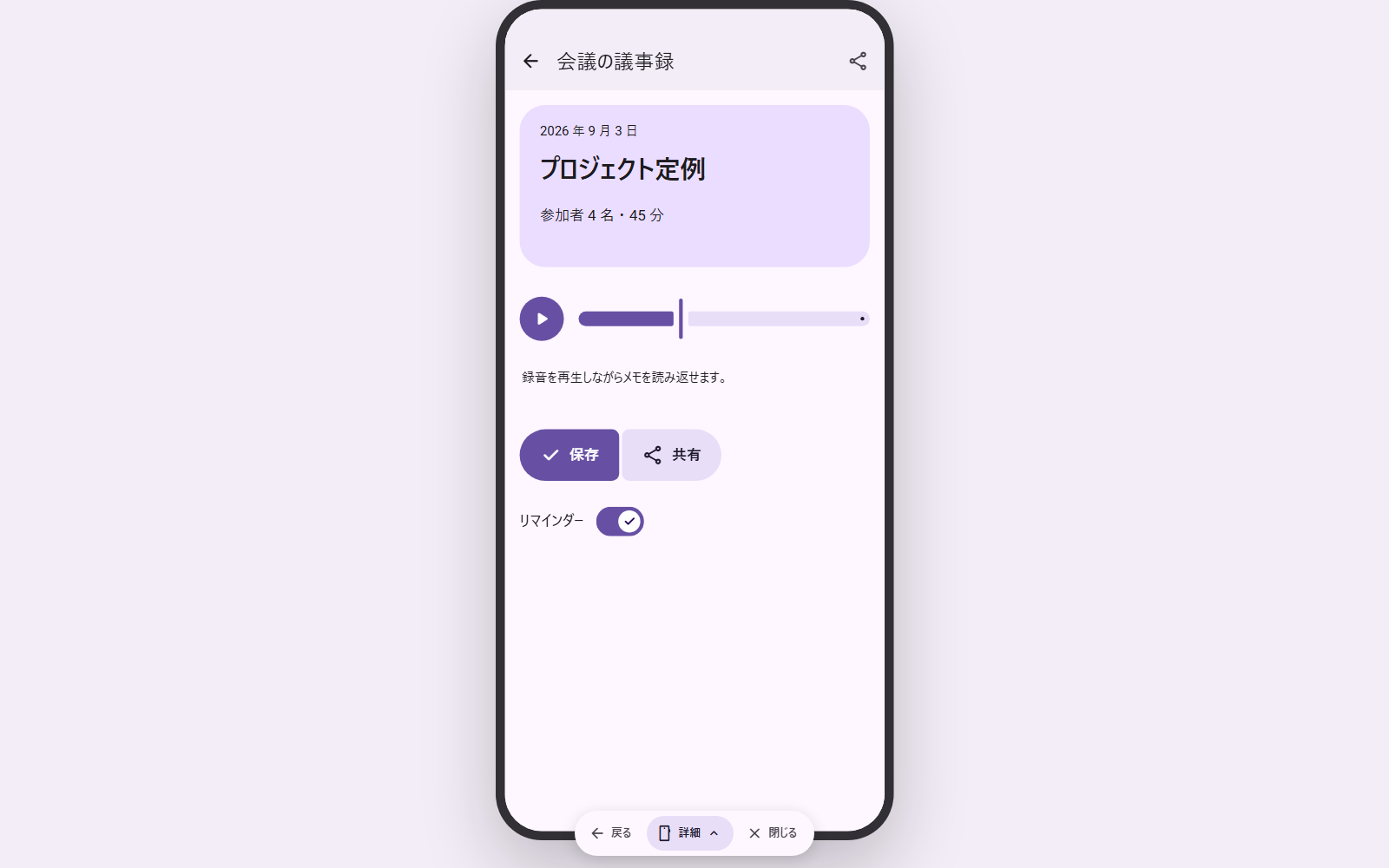 Preview: tap a part and the linked screen slides in. | 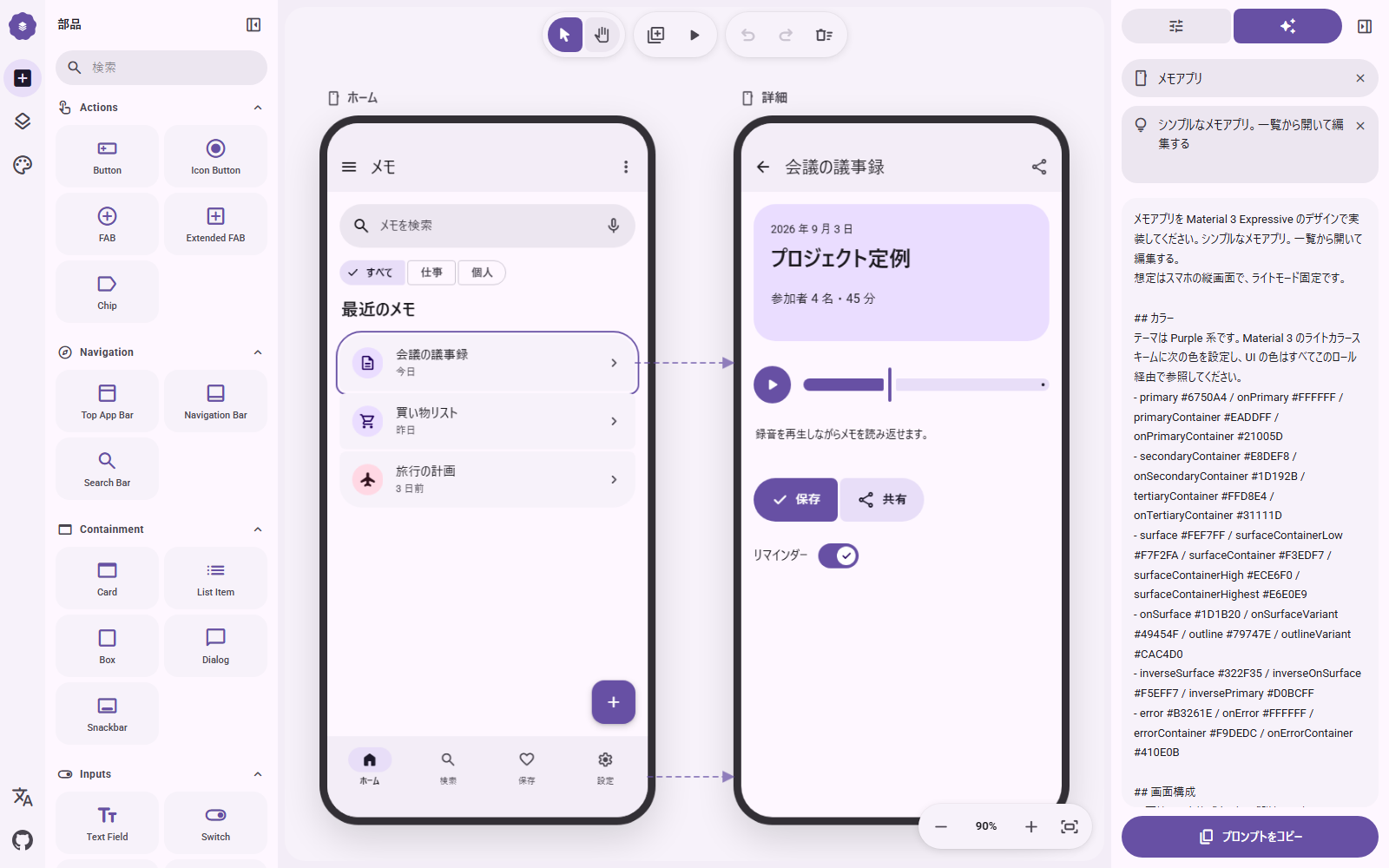 Prompt: the design as a concise brief in the selected language. |
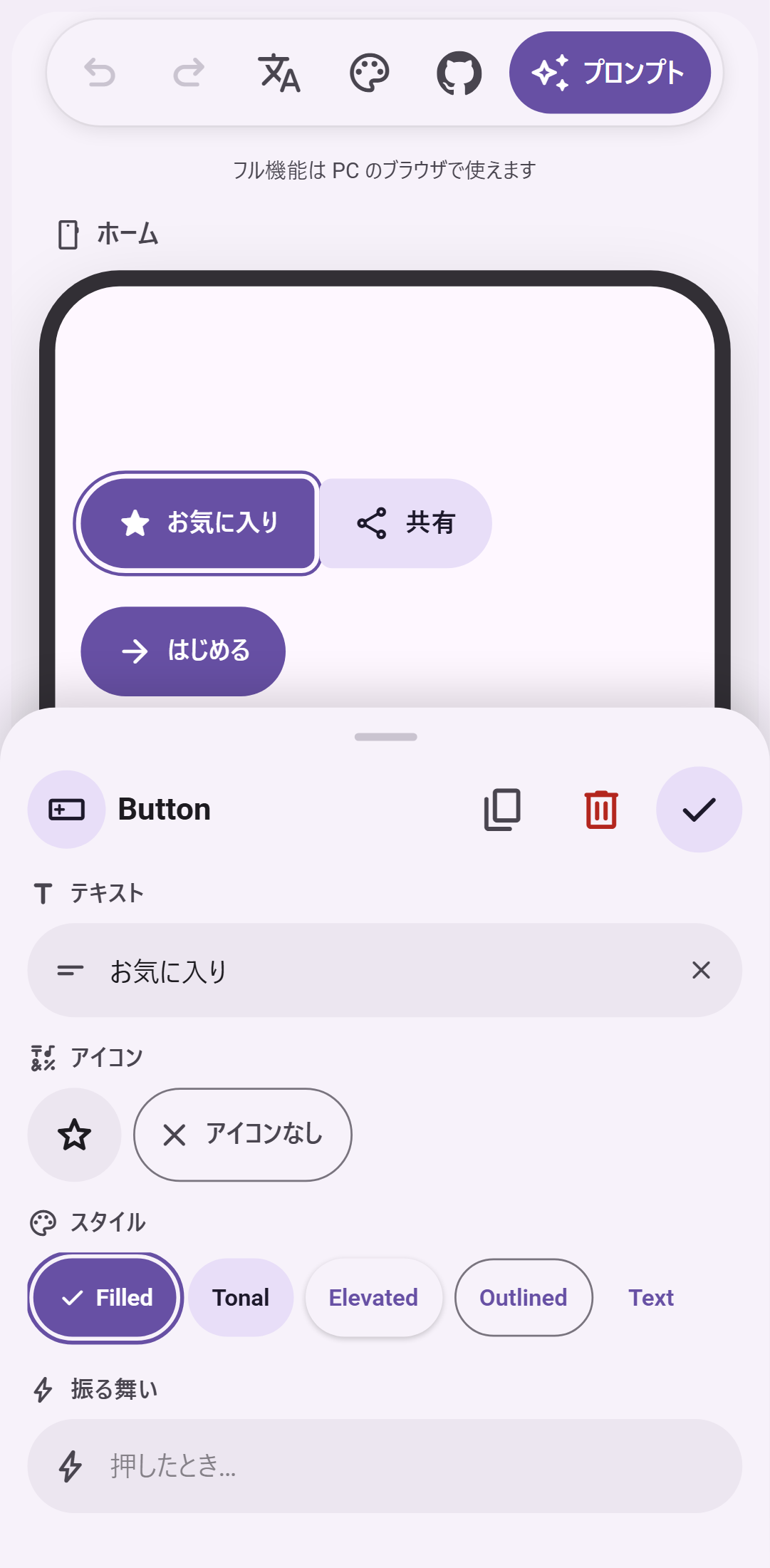
Phone: one screen, buttons only, edited in a bottom sheet.
| Key | Action |
|---|---|
V / H | Select / hand tool (hold Space to pan) |
Wheel, Ctrl + wheel | Pan, zoom |
+ - 0 | Zoom in, zoom out, fit |
Ctrl+Z / Ctrl+Shift+Z | Undo / redo |
Ctrl+D | Duplicate |
Arrows (Shift = 8dp) | Nudge |
Ctrl + drag | Move without snapping (no guides, no 4dp grid) |
Delete | Delete part or screen |
P | Preview |
npm install
npm run dev        # http://localhost:3000
npm run build      # static export to ./out
The app is a static Next.js export. To host it under a sub-path (for example a GitHub Pages project site), set NEXT_PUBLIC_BASE_PATH=/your-repo at build time. .github/workflows/deploy.yml does this automatically and publishes out/ to GitHub Pages on every push to main.
Bug reports, part requests and pull requests are welcome. CONTRIBUTING.md explains the setup, the conventions (English comments, four languages for every string) and where each kind of change lives. Questions go to Discussions.
M3E Canvas is free and MIT-licensed, and stays that way. If it saves you time, you can sponsor the work on GitHub; it pays for the hours that go into new parts, the prompt, and reviewing contributions. No feature is behind sponsorship.
Thanks to the sponsors who keep this going:
NOTICE.MIT © lnkiai
Material 3 Expressive の画面をブラウザで組み立てて、画面同士をつなぎ、タップして確かめ、そのまま AI コーディング用のプロンプトにするツールです。
公開版: https://lnkiai.github.io/m3e-canvas/
レシピアプリを組み、テーマを変え、プロンプトをコピーして AI コーディングツールに渡し、できたアプリを Android で動かすまで。(mp4)
Claude Code、Codex、Gemini CLI、Cursor など、プロンプトを受け取れる AI コーディングツールならどれでも使えます。プロンプトをコピーしてツールに貼り、アプリを作ってと頼むだけです。
npm install
npm run dev        # http://localhost:3000
npm run build      # ./out に静的書き出し
静的サイトとして書き出す構成です。サブパス(GitHub Pages のプロジェクトサイトなど)で配信するときはビルド時に NEXT_PUBLIC_BASE_PATH=/リポジトリ名 を指定してください。.github/workflows/deploy.yml が main への push ごとにこれを行い、GitHub Pages に公開します。
バグ報告、部品のリクエスト、PR を歓迎します。手順と約束事は CONTRIBUTING.md にまとめています。質問は Discussions へどうぞ。
M3E Canvas は無料で MIT ライセンスのまま続けます。時間の節約になったら、GitHub Sponsors で開発を支えてもらえると助かります。新しい部品、プロンプトの調整、貢献のレビューにかかる時間に充てます。支援の有無で使える機能は変わりません。
開発を支えてくださっているスポンサーの方々に感謝します。
MIT © lnkiai
在浏览器中拼装 Material 3 Expressive 界面,把屏幕连起来、点一点试试,然后直接变成给 AI 编程工具的提示词。
在线版本:https://lnkiai.github.io/m3e-canvas/
拼装一个食谱应用、更换主题、复制提示词、交给 AI 编程工具,然后在 Android 上运行成品。(mp4)
可配合任何接受提示词的 AI 编程工具使用,例如 Claude Code、Codex、Gemini CLI 或 Cursor:复制提示词,粘贴到工具里,让它把应用做出来。
npm install
npm run dev        # http://localhost:3000
npm run build      # 静态导出到 ./out
项目以静态站点方式导出。若要部署在子路径下(例如 GitHub Pages 的项目站点),请在构建时设置 NEXT_PUBLIC_BASE_PATH=/仓库名。.github/workflows/deploy.yml 会在每次推送到 main 时自动完成这一步并发布到 GitHub Pages。
欢迎 Bug 报告、组件请求和 PR。步骤和约定见 CONTRIBUTING.md。提问请到 Discussions。
M3E Canvas 免费且采用 MIT 许可证,今后也不会改变。如果它为你节省了时间,欢迎在 GitHub Sponsors 上支持开发;这些支持将用于新组件、提示词的打磨和审阅贡献所花的时间。没有任何功能因赞助而受限。
感谢支持本项目的赞助者:
MIT © lnkiai
Material 3 Expressive 화면을 브라우저에서 스케치하고, 화면끼리 연결하고, 탭해 보며, 그대로 AI 코딩 도구용 프롬프트로 만드는 도구입니다.
공개 버전: https://lnkiai.github.io/m3e-canvas/
레시피 앱을 만들고, 테마를 바꾸고, 프롬프트를 복사해 AI 코딩 도구에 전달하고, 완성된 앱을 Android에서 실행하기까지. (mp4)
Claude Code, Codex, Gemini CLI, Cursor 등 프롬프트를 받을 수 있는 AI 코딩 도구라면 무엇이든 사용할 수 있습니다. 프롬프트를 복사해 도구에 붙여 넣고 앱을 만들어 달라고 하면 됩니다.
npm install
npm run dev        # http://localhost:3000
npm run build      # ./out 에 정적 내보내기
정적 사이트로 내보내는 구성입니다. 하위 경로(GitHub Pages 프로젝트 사이트 등)에서 제공하려면 빌드 시 NEXT_PUBLIC_BASE_PATH=/저장소이름을 지정하세요. .github/workflows/deploy.yml이 main에 push할 때마다 이를 수행해 GitHub Pages에 공개합니다.
버그 보고, 부품 요청, PR을 환영합니다. 절차와 약속은 CONTRIBUTING.md에 정리되어 있습니다. 질문은 Discussions로 보내 주세요.
M3E Canvas는 무료이며 MIT 라이선스로 계속 유지됩니다. 시간을 아끼는 데 도움이 되었다면 GitHub Sponsors에서 개발을 후원해 주세요. 새 부품, 프롬프트 다듬기, 기여 검토에 드는 시간에 쓰입니다. 후원 여부로 기능이 달라지지 않습니다.
개발을 이어갈 수 있게 후원해 주신 분들께 감사드립니다.
MIT © lnkiai
(top 24 of 27)
1,075 followers · starred Sep 2026
593 followers · starred Sep 2026
2,296 followers · starred Sep 2026
8,083 followers · starred Sep 2026
Sketch Material 3 Expressive screens in the browser and turn them into vibe-coding prompts.
See the code
Sketch Material 3 Expressive screens in the browser, link them, tap through them, and copy a prompt for your AI coding tool.
日本語 · 中文 · 한국어 · Open the app
Sketch a recipes app, retheme it, copy the prompt, hand it to an AI coding tool, and run the result on Android. (mp4)
Works with any AI coding tool that takes a prompt, such as Claude Code, Codex, Gemini CLI or Cursor: copy the prompt, paste it into the tool, and ask for the app.
Preview: tap a part and the linked screen slides in. | Prompt: the design as a concise brief in the selected language. |
Phone: one screen, buttons only, edited in a bottom sheet.
| Key | Action |
|---|---|
V / H | Select / hand tool (hold Space to pan) |
Wheel, Ctrl + wheel | Pan, zoom |
+ - 0 | Zoom in, zoom out, fit |
Ctrl+Z / Ctrl+Shift+Z | Undo / redo |
Ctrl+D | Duplicate |
Arrows (Shift = 8dp) | Nudge |
Ctrl + drag | Move without snapping (no guides, no 4dp grid) |
Delete | Delete part or screen |
P | Preview |
npm install
npm run dev        # http://localhost:3000
npm run build      # static export to ./out
The app is a static Next.js export. To host it under a sub-path (for example a GitHub Pages project site), set NEXT_PUBLIC_BASE_PATH=/your-repo at build time. .github/workflows/deploy.yml does this automatically and publishes out/ to GitHub Pages on every push to main.
Bug reports, part requests and pull requests are welcome. CONTRIBUTING.md explains the setup, the conventions (English comments, four languages for every string) and where each kind of change lives. Questions go to Discussions.
M3E Canvas is free and MIT-licensed, and stays that way. If it saves you time, you can sponsor the work on GitHub; it pays for the hours that go into new parts, the prompt, and reviewing contributions. No feature is behind sponsorship.
Thanks to the sponsors who keep this going:
NOTICE.MIT © lnkiai
Material 3 Expressive の画面をブラウザで組み立てて、画面同士をつなぎ、タップして確かめ、そのまま AI コーディング用のプロンプトにするツールです。
公開版: https://lnkiai.github.io/m3e-canvas/
レシピアプリを組み、テーマを変え、プロンプトをコピーして AI コーディングツールに渡し、できたアプリを Android で動かすまで。(mp4)
Claude Code、Codex、Gemini CLI、Cursor など、プロンプトを受け取れる AI コーディングツールならどれでも使えます。プロンプトをコピーしてツールに貼り、アプリを作ってと頼むだけです。
npm install
npm run dev        # http://localhost:3000
npm run build      # ./out に静的書き出し
静的サイトとして書き出す構成です。サブパス(GitHub Pages のプロジェクトサイトなど)で配信するときはビルド時に NEXT_PUBLIC_BASE_PATH=/リポジトリ名 を指定してください。.github/workflows/deploy.yml が main への push ごとにこれを行い、GitHub Pages に公開します。
バグ報告、部品のリクエスト、PR を歓迎します。手順と約束事は CONTRIBUTING.md にまとめています。質問は Discussions へどうぞ。
M3E Canvas は無料で MIT ライセンスのまま続けます。時間の節約になったら、GitHub Sponsors で開発を支えてもらえると助かります。新しい部品、プロンプトの調整、貢献のレビューにかかる時間に充てます。支援の有無で使える機能は変わりません。
開発を支えてくださっているスポンサーの方々に感謝します。
MIT © lnkiai
在浏览器中拼装 Material 3 Expressive 界面,把屏幕连起来、点一点试试,然后直接变成给 AI 编程工具的提示词。
在线版本:https://lnkiai.github.io/m3e-canvas/
拼装一个食谱应用、更换主题、复制提示词、交给 AI 编程工具,然后在 Android 上运行成品。(mp4)
可配合任何接受提示词的 AI 编程工具使用,例如 Claude Code、Codex、Gemini CLI 或 Cursor:复制提示词,粘贴到工具里,让它把应用做出来。
npm install
npm run dev        # http://localhost:3000
npm run build      # 静态导出到 ./out
项目以静态站点方式导出。若要部署在子路径下(例如 GitHub Pages 的项目站点),请在构建时设置 NEXT_PUBLIC_BASE_PATH=/仓库名。.github/workflows/deploy.yml 会在每次推送到 main 时自动完成这一步并发布到 GitHub Pages。
欢迎 Bug 报告、组件请求和 PR。步骤和约定见 CONTRIBUTING.md。提问请到 Discussions。
M3E Canvas 免费且采用 MIT 许可证,今后也不会改变。如果它为你节省了时间,欢迎在 GitHub Sponsors 上支持开发;这些支持将用于新组件、提示词的打磨和审阅贡献所花的时间。没有任何功能因赞助而受限。
感谢支持本项目的赞助者:
MIT © lnkiai
Material 3 Expressive 화면을 브라우저에서 스케치하고, 화면끼리 연결하고, 탭해 보며, 그대로 AI 코딩 도구용 프롬프트로 만드는 도구입니다.
공개 버전: https://lnkiai.github.io/m3e-canvas/
레시피 앱을 만들고, 테마를 바꾸고, 프롬프트를 복사해 AI 코딩 도구에 전달하고, 완성된 앱을 Android에서 실행하기까지. (mp4)
Claude Code, Codex, Gemini CLI, Cursor 등 프롬프트를 받을 수 있는 AI 코딩 도구라면 무엇이든 사용할 수 있습니다. 프롬프트를 복사해 도구에 붙여 넣고 앱을 만들어 달라고 하면 됩니다.
npm install
npm run dev        # http://localhost:3000
npm run build      # ./out 에 정적 내보내기
정적 사이트로 내보내는 구성입니다. 하위 경로(GitHub Pages 프로젝트 사이트 등)에서 제공하려면 빌드 시 NEXT_PUBLIC_BASE_PATH=/저장소이름을 지정하세요. .github/workflows/deploy.yml이 main에 push할 때마다 이를 수행해 GitHub Pages에 공개합니다.
버그 보고, 부품 요청, PR을 환영합니다. 절차와 약속은 CONTRIBUTING.md에 정리되어 있습니다. 질문은 Discussions로 보내 주세요.
M3E Canvas는 무료이며 MIT 라이선스로 계속 유지됩니다. 시간을 아끼는 데 도움이 되었다면 GitHub Sponsors에서 개발을 후원해 주세요. 새 부품, 프롬프트 다듬기, 기여 검토에 드는 시간에 쓰입니다. 후원 여부로 기능이 달라지지 않습니다.
개발을 이어갈 수 있게 후원해 주신 분들께 감사드립니다.
MIT © lnkiai
(top 24 of 27)
1,075 followers · starred Sep 2026
593 followers · starred Sep 2026
2,296 followers · starred Sep 2026
8,083 followers · starred Sep 2026