
An opinionated diagramming tool for devs to sketch fast when a meeting suddenly needs a diagram
See the codeSee what people are saying
README
Draft Canvas
You're in a meeting explaining a system. Someone needs to see it drawn.
So you start diagramming. Then you're adjusting connectors, moving things around, working out how to represent what you're talking about. Before long, you're spending more time making the diagram than explaining the idea.
Draft Canvas is built to reduce that friction.
It gives you architecture-aware shapes, familiar technical relationships, and small assists where they help: enough to spend less time wrestling with the diagram and more time explaining the system.




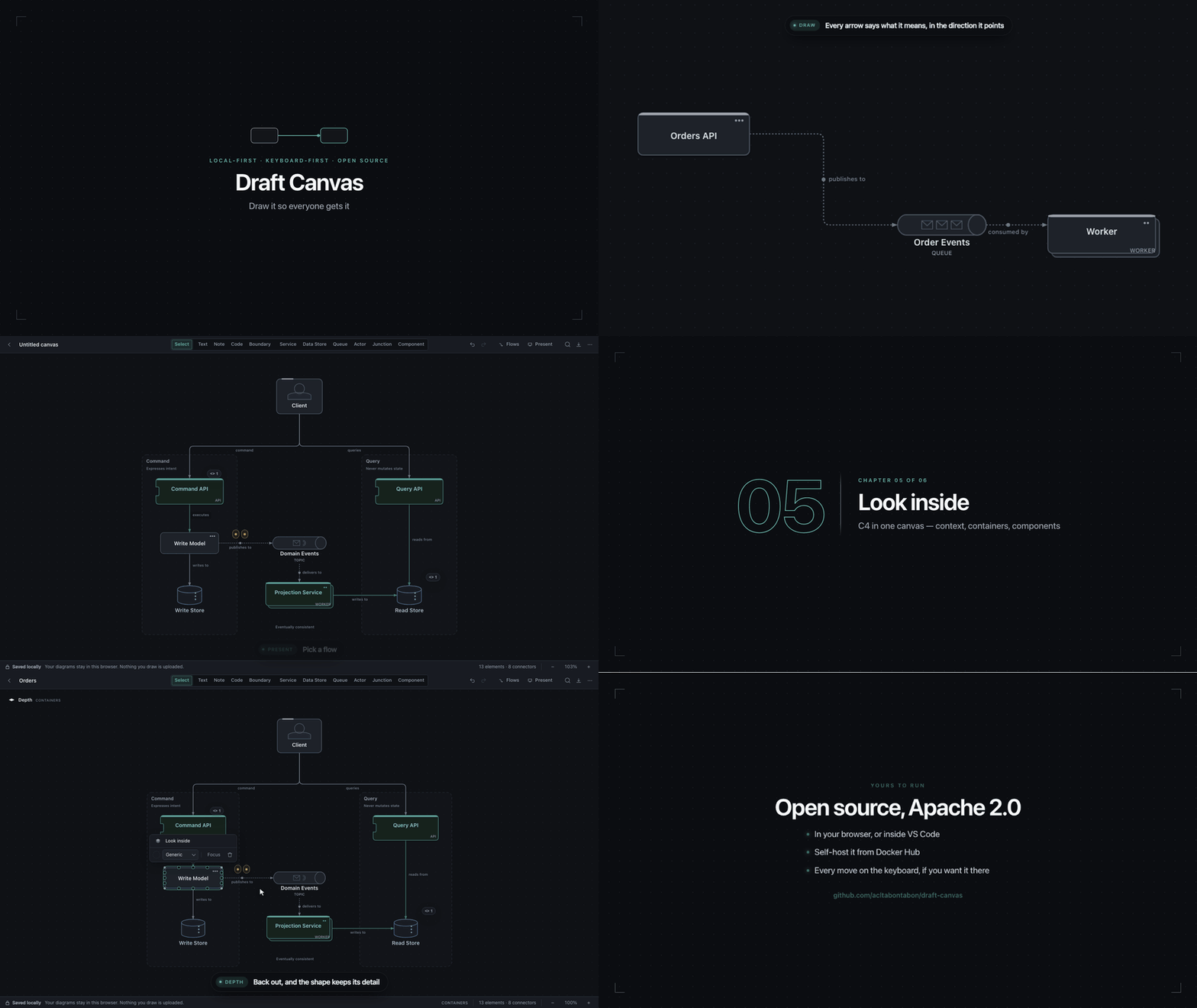
Try it → Nothing you draw leaves your browser. There's a landing page too, if you'd rather read about it first.
Also lives on your desktop, in a window of its own with your diagrams as files, and in Docker, on your own server.
Documentation: Getting started · All guides · Keyboard shortcuts · Saving and sharing · Contributing
What it does
- Architecture-aware shapes: Service, Data Store, Queue/Topic/Stream, Actor and Boundary know what they mean, so connectors label themselves in the arrow's direction (reads / writes, sends command to, consumed by) and the app can suggest a sensible next shape
- C4-aware depth: look inside a Service or Component to draw what runs there, and explain a system at different levels
- Flows and presentations: group connectors into a flow and present it one step at a time, moving between flows without leaving the presentation; export a flow as a Mermaid or PlantUML sequence diagram
- Keyboard-first: press a letter to drop a shape and type its name,
Tabto accept a suggestion,⌘Kfor everything else,⌥Ofor an Outline a screen reader can follow - Starters: begin from a composed architecture — Monolith, Microservices, Event-Driven, Hexagonal or CQRS up front, eight more by name in the command palette
- Local by default: diagrams are saved in your browser (IndexedDB); no backend and no account. It works offline once loaded, and a test in the suite fails on any network API in the editor's source (what's stored, and where)
- In and out: paste or drop a Mermaid flowchart to start from one; export editable
.draftcanvasJSON, passphrase-encrypted.dcenc, PNG and SVG (which can carry the diagram inside), Mermaid and PlantUML sequence diagrams, and the architecture as a Mermaid flowchart, C4-PlantUML, Structurizr or draw.io — or copy any of them straight to the clipboard - Share without a server: a read-only link carries the whole diagram in the address; nothing is uploaded
- Back up and restore every diagram in a browser as one zip
Diagrams live in one browser on one device. Export anything you'd mind losing.
Where it runs
One editor, two places to use it — the browser and the desktop — and a Docker image of the web app for your own server. All three share a version and ship together in each release.
| Runs on | Saves to | Status | |
|---|---|---|---|
| Web app | A modern browser | The browser (IndexedDB) | Stable |
| Docker | Your own server, behind HTTPS | The visitor's browser, as above | Stable |
| Desktop | macOS (Apple Silicon, Intel), Windows x64 | .draftcanvas files and folders | Stable, with unsigned installers; desktop-v…-alpha/-beta tags are previews that never replace a stable install |
There's no Linux desktop build. Nothing is synced between them; a .draftcanvas file is how a
diagram moves. Ideas and planned work are in Issues.
Try it
The quickest way is the hosted app. Press New canvas, then S to drop a service under your cursor. Getting started takes you from there to a presented, exported diagram.
Or run it from source:
git clone https://github.com/acltabontabon/draft-canvas.git
cd draft-canvas
npm install
npm run dev        # http://localhost:5180
Draft Canvas for VS Code has been retired
The extension that opened .draftcanvas files in a VS Code tab is retired; 0.2.0 is its last release
and only says so. Your files are plain JSON and open as they are in the desktop app or,
through Import, in the web app. How to move a diagram.
Desktop
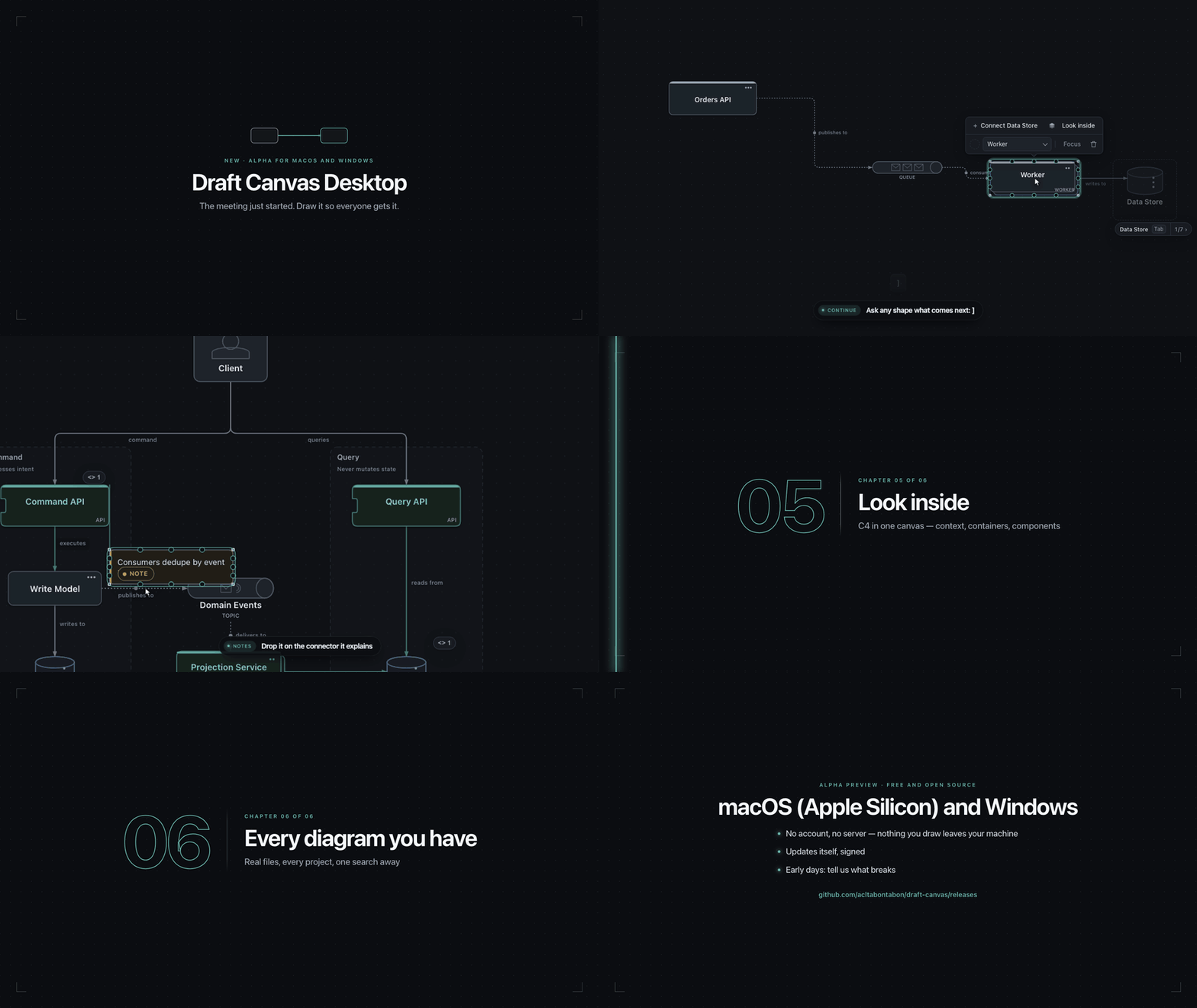
The same editor in a window of its own: a click away in your menu bar or system tray, with your diagrams
as ordinary .draftcanvas files on disk — one file per diagram, folders of them as projects, no account
and no server.
Download it from Releases — a .dmg for
macOS (Apple Silicon or Intel) or an installer for Windows (x64). The installers aren't signed yet, so the OS will warn
the first time; the Desktop guide says what to do about that, and covers everything
else it can do.
Running it yourself
The same static app as the hosted version, served by nginx. No backend, nothing to configure.
docker run -d --name draft-canvas -p 8080:8080 acltabontabon/draft-canvas
Then open http://localhost:8080. latest follows stable releases; pin a
version tag (X.Y.Z, or X.Y for its
patches) to stay put.
Serving it to other machines? Put it behind HTTPS if you want the offline cache: browsers install a
service worker only on HTTPS or localhost. Saving works either way.
Accessibility
- Screen readers. Every shape is named ("Orders API, service") and every connector is read as a
sentence in the arrow's direction ("Orders API writes to Orders"), the same words the canvas
captions it with. Selecting announces what was selected once the selection settles.
⌥Oopens the Outline, the current view as a navigable tree beside the canvas, kept in step with the selection both ways. - Keyboard. Everything reachable without a mouse: a letter drops a shape,
⌥+arrows move the selection between shapes and along connectors,⌘Knames every action,Shift+F10opens the context menu,?lists the rest. See Keyboard shortcuts and the command palette. - Touch and pen. Tap to select, hold for the context menu, two fingers to zoom; handles grow to finger size on a touch screen.
- Contrast. Shape outlines and connectors hold at least 3:1 against the canvas in both themes
(
tests/theme-contrast.test.tscomputes it from the colour tokens), and small chrome text 4.5:1. - In CI.
e2e/a11y.spec.tsruns axe over the Library, the editor, the export dialog, the command palette and the Outline, and fails on any serious or critical violation.
Performance
On a typical architecture diagram (~90 nodes — services, databases, queues, boundaries), Draft Canvas loads in about 429 ms and settles at about 17 MiB of memory. A larger, more detailed diagram (~225 nodes) loads in about 502 ms and uses about 33 MiB.
| Diagram | Size | Load time | Memory (JS heap) |
|---|---|---|---|
| Typical | 90 nodes / 73 connections | 429 ms | 17 MiB |
| Large | 225 nodes / 182 connections | 502 ms | 33 MiB |
Measured on: Apple M2 Pro, macOS 27.0.0, Chromium 153.0.8010.12, Draft Canvas 1.12.0. Reference-machine numbers on real architecture diagrams, not a guarantee for every device.
Frame times while you pan, zoom and drag in diagrams of up to 1,000 shapes, how long big diagrams take to open, and how to reproduce all of it: docs/reference/performance.md.
Contributing
Draft Canvas is small and opinionated. CONTRIBUTING.md covers setup, a map of
the repository, the checks to run for each part of it, and what kinds of change fit;
docs/reference/architecture.md explains why it is built the way it
is. Found a bug or have an idea? Open an issue.
Security concerns go privately, as SECURITY.md describes. Release notes:
CHANGELOG.md.
Draft Canvas is licensed under Apache 2.0.
Similar repos


Languages
TypeScript
84.3%
Rust
7.8%
CSS
5.1%
JavaScript
1.6%
HTML
1.1%
An opinionated diagramming tool for devs to sketch fast when a meeting suddenly needs a diagram
See the codeSee what people are saying
README
Draft Canvas
You're in a meeting explaining a system. Someone needs to see it drawn.
So you start diagramming. Then you're adjusting connectors, moving things around, working out how to represent what you're talking about. Before long, you're spending more time making the diagram than explaining the idea.
Draft Canvas is built to reduce that friction.
It gives you architecture-aware shapes, familiar technical relationships, and small assists where they help: enough to spend less time wrestling with the diagram and more time explaining the system.
Try it → Nothing you draw leaves your browser. There's a landing page too, if you'd rather read about it first.
Also lives on your desktop, in a window of its own with your diagrams as files, and in Docker, on your own server.
Documentation: Getting started · All guides · Keyboard shortcuts · Saving and sharing · Contributing
What it does
- Architecture-aware shapes: Service, Data Store, Queue/Topic/Stream, Actor and Boundary know what they mean, so connectors label themselves in the arrow's direction (reads / writes, sends command to, consumed by) and the app can suggest a sensible next shape
- C4-aware depth: look inside a Service or Component to draw what runs there, and explain a system at different levels
- Flows and presentations: group connectors into a flow and present it one step at a time, moving between flows without leaving the presentation; export a flow as a Mermaid or PlantUML sequence diagram
- Keyboard-first: press a letter to drop a shape and type its name,
Tabto accept a suggestion,⌘Kfor everything else,⌥Ofor an Outline a screen reader can follow - Starters: begin from a composed architecture — Monolith, Microservices, Event-Driven, Hexagonal or CQRS up front, eight more by name in the command palette
- Local by default: diagrams are saved in your browser (IndexedDB); no backend and no account. It works offline once loaded, and a test in the suite fails on any network API in the editor's source (what's stored, and where)
- In and out: paste or drop a Mermaid flowchart to start from one; export editable
.draftcanvasJSON, passphrase-encrypted.dcenc, PNG and SVG (which can carry the diagram inside), Mermaid and PlantUML sequence diagrams, and the architecture as a Mermaid flowchart, C4-PlantUML, Structurizr or draw.io — or copy any of them straight to the clipboard - Share without a server: a read-only link carries the whole diagram in the address; nothing is uploaded
- Back up and restore every diagram in a browser as one zip
Diagrams live in one browser on one device. Export anything you'd mind losing.
Where it runs
One editor, two places to use it — the browser and the desktop — and a Docker image of the web app for your own server. All three share a version and ship together in each release.
| Runs on | Saves to | Status | |
|---|---|---|---|
| Web app | A modern browser | The browser (IndexedDB) | Stable |
| Docker | Your own server, behind HTTPS | The visitor's browser, as above | Stable |
| Desktop | macOS (Apple Silicon, Intel), Windows x64 | .draftcanvas files and folders | Stable, with unsigned installers; desktop-v…-alpha/-beta tags are previews that never replace a stable install |
There's no Linux desktop build. Nothing is synced between them; a .draftcanvas file is how a
diagram moves. Ideas and planned work are in Issues.
Try it
The quickest way is the hosted app. Press New canvas, then S to drop a service under your cursor. Getting started takes you from there to a presented, exported diagram.
Or run it from source:
git clone https://github.com/acltabontabon/draft-canvas.git
cd draft-canvas
npm install
npm run dev        # http://localhost:5180
Draft Canvas for VS Code has been retired
The extension that opened .draftcanvas files in a VS Code tab is retired; 0.2.0 is its last release
and only says so. Your files are plain JSON and open as they are in the desktop app or,
through Import, in the web app. How to move a diagram.
Desktop
The same editor in a window of its own: a click away in your menu bar or system tray, with your diagrams
as ordinary .draftcanvas files on disk — one file per diagram, folders of them as projects, no account
and no server.
Download it from Releases — a .dmg for
macOS (Apple Silicon or Intel) or an installer for Windows (x64). The installers aren't signed yet, so the OS will warn
the first time; the Desktop guide says what to do about that, and covers everything
else it can do.
Running it yourself
The same static app as the hosted version, served by nginx. No backend, nothing to configure.
docker run -d --name draft-canvas -p 8080:8080 acltabontabon/draft-canvas
Then open http://localhost:8080. latest follows stable releases; pin a
version tag (X.Y.Z, or X.Y for its
patches) to stay put.
Serving it to other machines? Put it behind HTTPS if you want the offline cache: browsers install a
service worker only on HTTPS or localhost. Saving works either way.
Accessibility
- Screen readers. Every shape is named ("Orders API, service") and every connector is read as a
sentence in the arrow's direction ("Orders API writes to Orders"), the same words the canvas
captions it with. Selecting announces what was selected once the selection settles.
⌥Oopens the Outline, the current view as a navigable tree beside the canvas, kept in step with the selection both ways. - Keyboard. Everything reachable without a mouse: a letter drops a shape,
⌥+arrows move the selection between shapes and along connectors,⌘Knames every action,Shift+F10opens the context menu,?lists the rest. See Keyboard shortcuts and the command palette. - Touch and pen. Tap to select, hold for the context menu, two fingers to zoom; handles grow to finger size on a touch screen.
- Contrast. Shape outlines and connectors hold at least 3:1 against the canvas in both themes
(
tests/theme-contrast.test.tscomputes it from the colour tokens), and small chrome text 4.5:1. - In CI.
e2e/a11y.spec.tsruns axe over the Library, the editor, the export dialog, the command palette and the Outline, and fails on any serious or critical violation.
Performance
On a typical architecture diagram (~90 nodes — services, databases, queues, boundaries), Draft Canvas loads in about 429 ms and settles at about 17 MiB of memory. A larger, more detailed diagram (~225 nodes) loads in about 502 ms and uses about 33 MiB.
| Diagram | Size | Load time | Memory (JS heap) |
|---|---|---|---|
| Typical | 90 nodes / 73 connections | 429 ms | 17 MiB |
| Large | 225 nodes / 182 connections | 502 ms | 33 MiB |
Measured on: Apple M2 Pro, macOS 27.0.0, Chromium 153.0.8010.12, Draft Canvas 1.12.0. Reference-machine numbers on real architecture diagrams, not a guarantee for every device.
Frame times while you pan, zoom and drag in diagrams of up to 1,000 shapes, how long big diagrams take to open, and how to reproduce all of it: docs/reference/performance.md.
Contributing
Draft Canvas is small and opinionated. CONTRIBUTING.md covers setup, a map of
the repository, the checks to run for each part of it, and what kinds of change fit;
docs/reference/architecture.md explains why it is built the way it
is. Found a bug or have an idea? Open an issue.
Security concerns go privately, as SECURITY.md describes. Release notes:
CHANGELOG.md.
Draft Canvas is licensed under Apache 2.0.
Similar repos
Languages
TypeScript
84.3%
Rust
7.8%
CSS
5.1%
JavaScript
1.6%
HTML
1.1%