An experimental modern web browser for the Sony PSP: on device with no proxy with video decoded entirely on device
See the codeAn experimental web browser for the Sony PSP (333 MHz, 64 MB): a from-scratch layout engine, JavaScript, and hardware-assisted video, all running on the handheld itself.
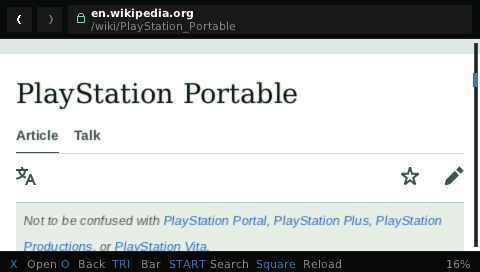
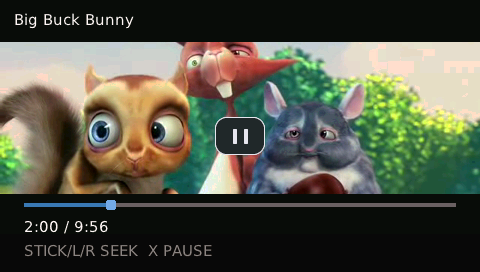
| Wikipedia at PSP resolution | 360p video playback |
|---|---|
 |  |
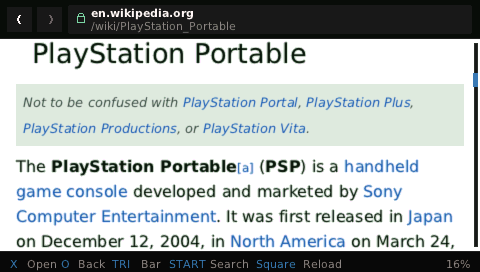
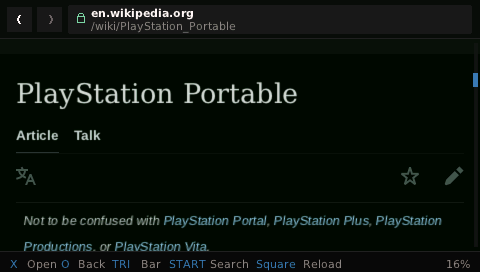
| Reader mode | Dark mode |
|---|---|
 |  |
| WebGL games | Danzeff text entry |
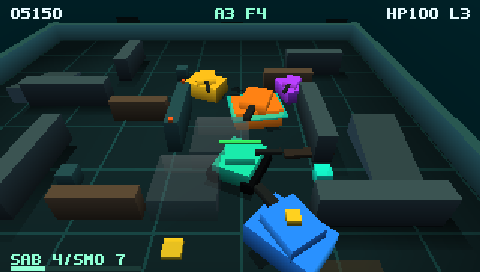 | 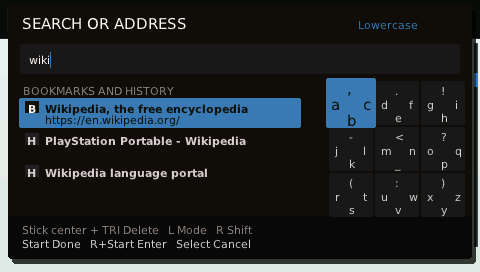 |
I picked up my PSP for the first time in about a decade and wanted an excuse to find out three things: how far the machine could be pushed, how much of the modern web could run in a setting this constrained, and what today's coding agents are capable of. A web browser tests all three.
| Feature | Support |
|---|---|
| Web browsing | Real HTTPS pages with JavaScript, bounded WebAssembly and WebSockets, cookies, images, mobile layout, and TrueType text. No proxy or companion computer is involved. |
| Native media | YouTube (through its lightweight provider) and compatible HTML <video>/<audio> elements open in one native player. Official builds use the PSP's firmware decoder for 240p/360p Baseline/Main MP4 and 240p HLS with AAC-LC, including YouTube live streams and premieres. Seeking, buffering status, preferred audio and subtitle languages, track selection, resumable downloads, and audio-only playback are built in. An optional, separately built decoder adds 240p H.264 High. |
| Tabs and navigation | Five tabs, bookmarks, history, address and search suggestions, find in page, optional session restore, and optional one-tab hibernation. |
| Ad blocking | Conservative request blocking and cosmetic hiding are on by default. Custom uBlock/EasyList-style rules and per-site exceptions are supported. |
| Cookie notices | Common consent banners are hidden without clicking Accept or creating consent cookies; individual sites can be exempted. |
| Reader, Basic view and offline | Reader mode reflows articles; Basic view rescues pages whose scripts fail, keeping their links, tables and simple search forms. Save articles, and install small manifest-backed web apps for offline use with their icon and the same-origin resources already loaded, then update, reinstall, or remove them. |
| Text entry | The PSP system keyboard or the faster Danzeff radial keyboard, with completion from local bookmarks and history. |
| Games | Bounded Canvas 2D and WebGL 1 for charts and modest games, with ImageBitmap asset preparation, user-started PCM game audio, page fullscreen, and the standard Gamepad API mapped to the PSP's controls. The included Treadline Arena is a 3D WebGL tank game with a campaign, bot battles, a Practice Range and adaptive music. |
| Appearance | Automatic or forced page dark mode, dark and light browser chrome, downloadable color themes, page text scaling, translated browser menus, bounded mixed right-to-left and left-to-right layout with Arabic-family shaping, and optional Japanese, Chinese, Korean, Cyrillic, Extended Latin, Arabic, Hebrew, Hindi, and color-emoji glyph packs. |
| Native PSP interface | An immediate home screen, Collections, clock, battery and Wi-Fi status, contextual controls, PNG screenshots, and diagnostics shown as photographable QR codes. |
| Optional XMB redirect | With ARK-4, Sony's Internet Browser icon can launch Tilefinch; holding L opens the original browser instead. |
| Updates | Signed in-app updates with A/B slots, a trial boot, automatic rollback, explicit approval, and an optional picker for signed earlier versions. |
| Experimental voice search | An optional downloadable model and on-demand speech engine. Off by default; currently slow and inaccurate. |
| Hardware target | PSP-3000: 333 MHz MIPS, 64 MiB RAM (about 43 MiB of measured heap, with pages and voice sharing a 32 MiB envelope), 480×272 display using RGB565 surfaces for pages and chrome and 32-bit scanout for fullscreen video |
| Execution model | Networking, HTML, CSS, JavaScript, layout, and rendering all run on the PSP |
| Browser engine | Lexbor HTML parser, Tilefinch's own style, layout, and rendering, QuickJS runtime |
| Presentation | Incremental retained display list with a bounded RGB565 tile cache |
| Networking | HTTPS with certificate and hostname verification, cookies, redirects, caching, and an isolated Wi-Fi sign-in flow for captive portals |
| License | MIT, with separately licensed third-party components |
| Area | What makes it interesting |
|---|---|
| A browser, not a port | The style, layout, paint, policy, media, and native interface layers are original C11. Lexbor, QuickJS, curl, Mbed TLS, nghttp2, and FreeType are vendored and hash-pinned (notices). It is enough of a browser that chatgpt.com's logged-out chat, with over a hundred JavaScript modules, client-side hydration, and a streamed answer, has run end to end on a PSP-3000, helped by a validating preparser, scoped style invalidation, and a profile-optimized JavaScript engine (architecture). |
| One strict memory ledger | DOM, JavaScript, CSS, resources, layout, and tiles share one 24 MiB page budget. Every table and loop is bounded, and a refused allocation is a tested, recoverable path rather than an exception. |
| Useful pixels before the download ends | Streaming HTML and CSS, preload discovery, resumable layout, priority for visible resources, lazily loaded bootstrap modules, and bounded caches of compiled styles and scripts all aim at first paint on a 333 MHz in-order core. |
| Deterministic rendering | Host and PSP share the same layout and rasterizer, down to ordered RGB565 dithering. Fidelity floors measured against Chrome references may only move upward (fidelity workflow). |
| Firmware video acceleration | A raw-NAL bridge and a bounded H.264 recovery-point rewriter feed the PSP's Media Engine, and two guarded decode surfaces overlap color conversion with presentation (media state machine). |
| Optional two-core video | A user-built add-on decodes 240p H.264 High by giving CABAC, deblocking, audio, and color conversion to the Media Engine while the CPU reconstructs rows. Official binaries deliberately leave it out. |
| 360p on a 480×272 screen | 640×360 frames pass through EDRAM as two guarded strips, and the GE scales them bilinearly with no per-pixel CPU pass (device envelope). |
| Explicit lifecycle ownership | Media and networking use pure reducers, epoch-tokened services, consumer leases, pumped teardown, and quarantine, so memory is never freed beneath live firmware or worker activity (architecture). |
| Security without pretending to sandbox | HTTPS-first navigation, CORS, CSP, SRI, private-network protection, partition-aware resource authority, cookie controls, and signed A/B updates are enforced within a documented shared-process model (security model). |
| Hardware-aware gates | The optimized host suite is backed by sanitizer, hostile-input, WPT, fidelity, and PSP cross-build gates, plus ratchets on executable size and hot-function size (engineering guide). |
Detailed performance and memory experiment ledgers are kept locally and in the private development archive, not in this public repository. Public engineering documentation describes the current contracts and reproducible checks.
.zip from the
latest Tilefinch release.TILEFINCH folder to PSP/GAME/ on the
Memory Stick. The launcher should end up at
PSP/GAME/TILEFINCH/EBOOT.PBP, with slot-a, slot-b, data, and
NOTICES beside it.The .tfum and .tfup files on the release page are for Tilefinch's signed
in-app updater, not for manual installation. Optional language, emoji, and
voice components are installed from their Settings screens.
ARK-4 users can make Network → Internet Browser open Tilefinch. This is
an optional VSH plugin: it does not modify the PSP firmware or flash0, polls
nothing in the background, and writes nothing to the Memory Stick.
PSP/GAME/TILEFINCH/.TILEFINCH/OPTIONAL/tilefinch_xmb.prx from the install archive to
ms0:/SEPLUGINS/tilefinch_xmb.prx.The equivalent manual line in ARK's PLUGINS.TXT is:
vsh, ms0:/SEPLUGINS/tilefinch_xmb.prx, on
On a PSP Go using internal storage, use ef0: in both paths.
Tilefinch still runs as an ordinary homebrew application, not as code inside
VSH, so leaving it reloads the XMB and may show the usual Sony or ARK startup
screen. After replacing the plugin file itself, power the PSP off completely
and cold-boot it: Restart VSH can keep the previous NO_STOP handler in
memory. The redirect starts Tilefinch's stable root launcher, so signed
updates, trial boots, and automatic rollback work as usual. ARK-4's
plugin documentation
describes its Plugin Manager and PLUGINS.TXT formats.
Official releases do not redistribute the custom H.264 and AAC decoder.
Compatible Baseline/Main MP4 and HLS, live streams included, keep using the
PSP's firmware. To add the 240p High-profile path, build the add-on from its
pinned upstream source by following
Optional PSP software decoder,
then copy its three files to PSP/GAME/TILEFINCH/components/swdec/.
That directory sits outside both app slots, so signed updates keep the add-on. Update metadata records the decoder ABI: if a future update changes it, the update screen says Decoder rebuild needed. When a page needs the add-on and it is missing or incompatible, the player points to these build instructions rather than reporting a generic video failure.
| Button | Action |
|---|---|
| D-pad | Move focus between links and controls (hold to repeat) |
| Analog stick | Move the page cursor; hold it against the top or bottom edge to scroll (Settings can switch to direct scrolling) |
| X | Activate the focused item, or click under the cursor |
| Circle | Back, or cancel the current load |
| Square | Reload (starts voice input on a text field when Experimental Voice is on) |
| Triangle | Show or hide the browser chrome |
| Start | Address and search bar |
| Select | Menu: Home, Tabs, Page tools, Library, Settings, Help & diagnostics, Exit to XMB |
| Start + Select (hold together) | Give the controls to the page's JavaScript; hold again to take them back |
| L / R | Page up / page down |
| L held at boot | Safe start: boot the previous version (once an update has been installed) |
Type a URL in the address bar to go there, or anything else to search.
The user guide covers everyday use in detail:
Open Settings → Appearance → Language & emoji → Interface language. Choose with Left/Right, press X to install, then restart Tilefinch to apply. English is built in; downloadable translations are available for Spanish, French, German, Japanese, Russian, Ukrainian, Simplified Chinese, Korean, Hindi and Arabic. Choosing a language also downloads its required glyph pack if it is not already installed. Advanced messages not yet translated remain in English, and English stays available if a download fails.
This changes Tilefinch's menus—not the text of websites, games, or subtitles. Preferred video, audio and subtitle languages are separate settings.
The built-in fonts cover Latin text, with compact fallbacks for some Chinese, Japanese, Korean and emoji characters. Settings → Appearance → Language & emoji offers additional page-text packs: Japanese, Simplified Chinese, Traditional Chinese, Korean, Cyrillic (including Russian and Ukrainian), Extended Latin, Arabic, Hebrew and Devanagari (Hindi), plus a color emoji pack. A page using a missing pack can also offer to install it while you browse.
Confirm the corresponding pack download and restart to use it. Square removes an installed pack. Packs add glyph coverage; they do not translate page text. Arabic and Hebrew have right-to-left layout support. Hindi covers common syllables and interface clusters; unusual conjuncts may still use fallback cells.
Translations and signed packs are hosted in tilefinch-models, which lists the available downloads. Tilefinch verifies them before installation and keeps installed downloads on the Memory Stick for offline use. See the language-pack guide for installation, removal and missing-text notices.
Check for updates from Settings → Updates. An optional background check looks for new release information at most once a week and can be turned off; Tilefinch never downloads or installs an update unless you ask.
docs/SECURE_UPDATES.md and SECURITY.md have the details.
localStorage, sessionStorage, and the origin-private file
system) lives in RAM and is not written to the Memory Stick unless you
choose. When a site outgrows RAM, Tilefinch asks before keeping that site's
data on the Memory Stick, for this session or always, and shows how much
it needs. Permissions & controls → Site storage sets the choice per
site, and Site data & storage sets it for any listed site.data/tls-sessions.bin. They act
as credentials, so they stay on your Memory Stick, are sent only back to
the site that issued them, and are erased by Site data & storage → Clear
HTTP caches. Settings → Privacy & security → TLS ticket saving stops
keeping them between boots without disabling connection reuse within a
session.connectivitycheck.gstatic.com, only when you ask for it or
accept a sign-in suggestion. A detected sign-in page opens with temporary
cookies and storage that are deleted when it closes.The security model documents Tilefinch's security defaults, compatibility controls, threat model, and known isolation limits.
[Z].If something misbehaves, start with TROUBLESHOOTING.md. A useful bug report includes:
PSP/GAME/TILEFINCH/data/tilefinch-crash.txt from the
Memory Stick (a 512-byte file of zeros means no crash was recorded).Without easy Memory Stick access, Help & diagnostics → Diagnostic QR shows the same bounded logs as QR pages you can photograph. For suspected security problems, SECURITY.md explains what the project protects and how to report.
The desktop lab builds and tests the same engine on your computer, at PSP screen sizes and memory profiles. The first configure downloads hash-pinned dependencies; host builds need libcurl development headers and zlib.
cmake --preset release
cmake --build build-preset-release
ctest --test-dir build-preset-release
docs/DEVELOPMENT.md has the full workflow; read CONTRIBUTING.md before sending changes.
One engine runs everywhere. Parsing, styling, layout, scripting, and tile-based rendering are bounded and charged to a memory budget, and are designed so that a refused allocation, a malformed page, or a cancellation is a normal event rather than a crash. docs/ARCHITECTURE.md has the system diagrams, memory contracts, and lifecycle boundaries, and docs/README.md maps all of the documentation, including the engineering manuals in docs/engineering/.
Evaluating the engineering? Read in this order:
Issues and pull requests are welcome. Tilefinch is a spare-time project, so responses and reviews may take a while. CONTRIBUTING.md describes the build and test expectations.
Tilefinch is MIT licensed; see LICENSE. Third-party components keep their own licenses and notices, listed in THIRD_PARTY_NOTICES.md. The security policy and vulnerability reporting are in SECURITY.md.
The browser download contains no acoustic model or speech dictionary. If you request the optional voice component in the app, its signed package carries the Alpha Cephei and CMUdict license files alongside the model; the browser bundle itself carries the PocketSphinx license that its linked decoder requires.
The optional Japanese, Chinese, Korean, Cyrillic, Extended Latin, Arabic, Hebrew, Devanagari (Hindi), and color-emoji packs are likewise not part of the download. They are generated from Noto fonts, carry the complete SIL Open Font License notice and a digest of the source font, and are fetched only when you ask for one. Tilefinch does not read the PSP's proprietary firmware fonts.
Tilefinch is an independent, unofficial homebrew project. It is not affiliated with, sponsored by, or endorsed by Sony Interactive Entertainment. PlayStation, PSP, and related marks belong to their respective owners. The project contains no proprietary Sony SDK material, firmware, artwork, or branding.
The Wikipedia screenshots show the English article "PlayStation Portable". Wikipedia text is licensed CC BY-SA 4.0. Wikipedia and its marks are trademarks of the Wikimedia Foundation, shown only to identify browser compatibility; Tilefinch is not affiliated with the Wikimedia Foundation.
The video screenshot shows a frame from Big Buck Bunny, copyright 2008 Blender Foundation, licensed CC BY 3.0. The film and its credits are available from the Blender open-movie project.
An experimental modern web browser for the Sony PSP: on device with no proxy with video decoded entirely on device
See the codeAn experimental web browser for the Sony PSP (333 MHz, 64 MB): a from-scratch layout engine, JavaScript, and hardware-assisted video, all running on the handheld itself.
| Wikipedia at PSP resolution | 360p video playback |
|---|---|
| |
| Reader mode | Dark mode |
|---|---|
| |
| WebGL games | Danzeff text entry |
| |
I picked up my PSP for the first time in about a decade and wanted an excuse to find out three things: how far the machine could be pushed, how much of the modern web could run in a setting this constrained, and what today's coding agents are capable of. A web browser tests all three.
| Feature | Support |
|---|---|
| Web browsing | Real HTTPS pages with JavaScript, bounded WebAssembly and WebSockets, cookies, images, mobile layout, and TrueType text. No proxy or companion computer is involved. |
| Native media | YouTube (through its lightweight provider) and compatible HTML <video>/<audio> elements open in one native player. Official builds use the PSP's firmware decoder for 240p/360p Baseline/Main MP4 and 240p HLS with AAC-LC, including YouTube live streams and premieres. Seeking, buffering status, preferred audio and subtitle languages, track selection, resumable downloads, and audio-only playback are built in. An optional, separately built decoder adds 240p H.264 High. |
| Tabs and navigation | Five tabs, bookmarks, history, address and search suggestions, find in page, optional session restore, and optional one-tab hibernation. |
| Ad blocking | Conservative request blocking and cosmetic hiding are on by default. Custom uBlock/EasyList-style rules and per-site exceptions are supported. |
| Cookie notices | Common consent banners are hidden without clicking Accept or creating consent cookies; individual sites can be exempted. |
| Reader, Basic view and offline | Reader mode reflows articles; Basic view rescues pages whose scripts fail, keeping their links, tables and simple search forms. Save articles, and install small manifest-backed web apps for offline use with their icon and the same-origin resources already loaded, then update, reinstall, or remove them. |
| Text entry | The PSP system keyboard or the faster Danzeff radial keyboard, with completion from local bookmarks and history. |
| Games | Bounded Canvas 2D and WebGL 1 for charts and modest games, with ImageBitmap asset preparation, user-started PCM game audio, page fullscreen, and the standard Gamepad API mapped to the PSP's controls. The included Treadline Arena is a 3D WebGL tank game with a campaign, bot battles, a Practice Range and adaptive music. |
| Appearance | Automatic or forced page dark mode, dark and light browser chrome, downloadable color themes, page text scaling, translated browser menus, bounded mixed right-to-left and left-to-right layout with Arabic-family shaping, and optional Japanese, Chinese, Korean, Cyrillic, Extended Latin, Arabic, Hebrew, Hindi, and color-emoji glyph packs. |
| Native PSP interface | An immediate home screen, Collections, clock, battery and Wi-Fi status, contextual controls, PNG screenshots, and diagnostics shown as photographable QR codes. |
| Optional XMB redirect | With ARK-4, Sony's Internet Browser icon can launch Tilefinch; holding L opens the original browser instead. |
| Updates | Signed in-app updates with A/B slots, a trial boot, automatic rollback, explicit approval, and an optional picker for signed earlier versions. |
| Experimental voice search | An optional downloadable model and on-demand speech engine. Off by default; currently slow and inaccurate. |
| Hardware target | PSP-3000: 333 MHz MIPS, 64 MiB RAM (about 43 MiB of measured heap, with pages and voice sharing a 32 MiB envelope), 480×272 display using RGB565 surfaces for pages and chrome and 32-bit scanout for fullscreen video |
| Execution model | Networking, HTML, CSS, JavaScript, layout, and rendering all run on the PSP |
| Browser engine | Lexbor HTML parser, Tilefinch's own style, layout, and rendering, QuickJS runtime |
| Presentation | Incremental retained display list with a bounded RGB565 tile cache |
| Networking | HTTPS with certificate and hostname verification, cookies, redirects, caching, and an isolated Wi-Fi sign-in flow for captive portals |
| License | MIT, with separately licensed third-party components |
| Area | What makes it interesting |
|---|---|
| A browser, not a port | The style, layout, paint, policy, media, and native interface layers are original C11. Lexbor, QuickJS, curl, Mbed TLS, nghttp2, and FreeType are vendored and hash-pinned (notices). It is enough of a browser that chatgpt.com's logged-out chat, with over a hundred JavaScript modules, client-side hydration, and a streamed answer, has run end to end on a PSP-3000, helped by a validating preparser, scoped style invalidation, and a profile-optimized JavaScript engine (architecture). |
| One strict memory ledger | DOM, JavaScript, CSS, resources, layout, and tiles share one 24 MiB page budget. Every table and loop is bounded, and a refused allocation is a tested, recoverable path rather than an exception. |
| Useful pixels before the download ends | Streaming HTML and CSS, preload discovery, resumable layout, priority for visible resources, lazily loaded bootstrap modules, and bounded caches of compiled styles and scripts all aim at first paint on a 333 MHz in-order core. |
| Deterministic rendering | Host and PSP share the same layout and rasterizer, down to ordered RGB565 dithering. Fidelity floors measured against Chrome references may only move upward (fidelity workflow). |
| Firmware video acceleration | A raw-NAL bridge and a bounded H.264 recovery-point rewriter feed the PSP's Media Engine, and two guarded decode surfaces overlap color conversion with presentation (media state machine). |
| Optional two-core video | A user-built add-on decodes 240p H.264 High by giving CABAC, deblocking, audio, and color conversion to the Media Engine while the CPU reconstructs rows. Official binaries deliberately leave it out. |
| 360p on a 480×272 screen | 640×360 frames pass through EDRAM as two guarded strips, and the GE scales them bilinearly with no per-pixel CPU pass (device envelope). |
| Explicit lifecycle ownership | Media and networking use pure reducers, epoch-tokened services, consumer leases, pumped teardown, and quarantine, so memory is never freed beneath live firmware or worker activity (architecture). |
| Security without pretending to sandbox | HTTPS-first navigation, CORS, CSP, SRI, private-network protection, partition-aware resource authority, cookie controls, and signed A/B updates are enforced within a documented shared-process model (security model). |
| Hardware-aware gates | The optimized host suite is backed by sanitizer, hostile-input, WPT, fidelity, and PSP cross-build gates, plus ratchets on executable size and hot-function size (engineering guide). |
Detailed performance and memory experiment ledgers are kept locally and in the private development archive, not in this public repository. Public engineering documentation describes the current contracts and reproducible checks.
.zip from the
latest Tilefinch release.TILEFINCH folder to PSP/GAME/ on the
Memory Stick. The launcher should end up at
PSP/GAME/TILEFINCH/EBOOT.PBP, with slot-a, slot-b, data, and
NOTICES beside it.The .tfum and .tfup files on the release page are for Tilefinch's signed
in-app updater, not for manual installation. Optional language, emoji, and
voice components are installed from their Settings screens.
ARK-4 users can make Network → Internet Browser open Tilefinch. This is
an optional VSH plugin: it does not modify the PSP firmware or flash0, polls
nothing in the background, and writes nothing to the Memory Stick.
PSP/GAME/TILEFINCH/.TILEFINCH/OPTIONAL/tilefinch_xmb.prx from the install archive to
ms0:/SEPLUGINS/tilefinch_xmb.prx.The equivalent manual line in ARK's PLUGINS.TXT is:
vsh, ms0:/SEPLUGINS/tilefinch_xmb.prx, on
On a PSP Go using internal storage, use ef0: in both paths.
Tilefinch still runs as an ordinary homebrew application, not as code inside
VSH, so leaving it reloads the XMB and may show the usual Sony or ARK startup
screen. After replacing the plugin file itself, power the PSP off completely
and cold-boot it: Restart VSH can keep the previous NO_STOP handler in
memory. The redirect starts Tilefinch's stable root launcher, so signed
updates, trial boots, and automatic rollback work as usual. ARK-4's
plugin documentation
describes its Plugin Manager and PLUGINS.TXT formats.
Official releases do not redistribute the custom H.264 and AAC decoder.
Compatible Baseline/Main MP4 and HLS, live streams included, keep using the
PSP's firmware. To add the 240p High-profile path, build the add-on from its
pinned upstream source by following
Optional PSP software decoder,
then copy its three files to PSP/GAME/TILEFINCH/components/swdec/.
That directory sits outside both app slots, so signed updates keep the add-on. Update metadata records the decoder ABI: if a future update changes it, the update screen says Decoder rebuild needed. When a page needs the add-on and it is missing or incompatible, the player points to these build instructions rather than reporting a generic video failure.
| Button | Action |
|---|---|
| D-pad | Move focus between links and controls (hold to repeat) |
| Analog stick | Move the page cursor; hold it against the top or bottom edge to scroll (Settings can switch to direct scrolling) |
| X | Activate the focused item, or click under the cursor |
| Circle | Back, or cancel the current load |
| Square | Reload (starts voice input on a text field when Experimental Voice is on) |
| Triangle | Show or hide the browser chrome |
| Start | Address and search bar |
| Select | Menu: Home, Tabs, Page tools, Library, Settings, Help & diagnostics, Exit to XMB |
| Start + Select (hold together) | Give the controls to the page's JavaScript; hold again to take them back |
| L / R | Page up / page down |
| L held at boot | Safe start: boot the previous version (once an update has been installed) |
Type a URL in the address bar to go there, or anything else to search.
The user guide covers everyday use in detail:
Open Settings → Appearance → Language & emoji → Interface language. Choose with Left/Right, press X to install, then restart Tilefinch to apply. English is built in; downloadable translations are available for Spanish, French, German, Japanese, Russian, Ukrainian, Simplified Chinese, Korean, Hindi and Arabic. Choosing a language also downloads its required glyph pack if it is not already installed. Advanced messages not yet translated remain in English, and English stays available if a download fails.
This changes Tilefinch's menus—not the text of websites, games, or subtitles. Preferred video, audio and subtitle languages are separate settings.
The built-in fonts cover Latin text, with compact fallbacks for some Chinese, Japanese, Korean and emoji characters. Settings → Appearance → Language & emoji offers additional page-text packs: Japanese, Simplified Chinese, Traditional Chinese, Korean, Cyrillic (including Russian and Ukrainian), Extended Latin, Arabic, Hebrew and Devanagari (Hindi), plus a color emoji pack. A page using a missing pack can also offer to install it while you browse.
Confirm the corresponding pack download and restart to use it. Square removes an installed pack. Packs add glyph coverage; they do not translate page text. Arabic and Hebrew have right-to-left layout support. Hindi covers common syllables and interface clusters; unusual conjuncts may still use fallback cells.
Translations and signed packs are hosted in tilefinch-models, which lists the available downloads. Tilefinch verifies them before installation and keeps installed downloads on the Memory Stick for offline use. See the language-pack guide for installation, removal and missing-text notices.
Check for updates from Settings → Updates. An optional background check looks for new release information at most once a week and can be turned off; Tilefinch never downloads or installs an update unless you ask.
docs/SECURE_UPDATES.md and SECURITY.md have the details.
localStorage, sessionStorage, and the origin-private file
system) lives in RAM and is not written to the Memory Stick unless you
choose. When a site outgrows RAM, Tilefinch asks before keeping that site's
data on the Memory Stick, for this session or always, and shows how much
it needs. Permissions & controls → Site storage sets the choice per
site, and Site data & storage sets it for any listed site.data/tls-sessions.bin. They act
as credentials, so they stay on your Memory Stick, are sent only back to
the site that issued them, and are erased by Site data & storage → Clear
HTTP caches. Settings → Privacy & security → TLS ticket saving stops
keeping them between boots without disabling connection reuse within a
session.connectivitycheck.gstatic.com, only when you ask for it or
accept a sign-in suggestion. A detected sign-in page opens with temporary
cookies and storage that are deleted when it closes.The security model documents Tilefinch's security defaults, compatibility controls, threat model, and known isolation limits.
[Z].If something misbehaves, start with TROUBLESHOOTING.md. A useful bug report includes:
PSP/GAME/TILEFINCH/data/tilefinch-crash.txt from the
Memory Stick (a 512-byte file of zeros means no crash was recorded).Without easy Memory Stick access, Help & diagnostics → Diagnostic QR shows the same bounded logs as QR pages you can photograph. For suspected security problems, SECURITY.md explains what the project protects and how to report.
The desktop lab builds and tests the same engine on your computer, at PSP screen sizes and memory profiles. The first configure downloads hash-pinned dependencies; host builds need libcurl development headers and zlib.
cmake --preset release
cmake --build build-preset-release
ctest --test-dir build-preset-release
docs/DEVELOPMENT.md has the full workflow; read CONTRIBUTING.md before sending changes.
One engine runs everywhere. Parsing, styling, layout, scripting, and tile-based rendering are bounded and charged to a memory budget, and are designed so that a refused allocation, a malformed page, or a cancellation is a normal event rather than a crash. docs/ARCHITECTURE.md has the system diagrams, memory contracts, and lifecycle boundaries, and docs/README.md maps all of the documentation, including the engineering manuals in docs/engineering/.
Evaluating the engineering? Read in this order:
Issues and pull requests are welcome. Tilefinch is a spare-time project, so responses and reviews may take a while. CONTRIBUTING.md describes the build and test expectations.
Tilefinch is MIT licensed; see LICENSE. Third-party components keep their own licenses and notices, listed in THIRD_PARTY_NOTICES.md. The security policy and vulnerability reporting are in SECURITY.md.
The browser download contains no acoustic model or speech dictionary. If you request the optional voice component in the app, its signed package carries the Alpha Cephei and CMUdict license files alongside the model; the browser bundle itself carries the PocketSphinx license that its linked decoder requires.
The optional Japanese, Chinese, Korean, Cyrillic, Extended Latin, Arabic, Hebrew, Devanagari (Hindi), and color-emoji packs are likewise not part of the download. They are generated from Noto fonts, carry the complete SIL Open Font License notice and a digest of the source font, and are fetched only when you ask for one. Tilefinch does not read the PSP's proprietary firmware fonts.
Tilefinch is an independent, unofficial homebrew project. It is not affiliated with, sponsored by, or endorsed by Sony Interactive Entertainment. PlayStation, PSP, and related marks belong to their respective owners. The project contains no proprietary Sony SDK material, firmware, artwork, or branding.
The Wikipedia screenshots show the English article "PlayStation Portable". Wikipedia text is licensed CC BY-SA 4.0. Wikipedia and its marks are trademarks of the Wikimedia Foundation, shown only to identify browser compatibility; Tilefinch is not affiliated with the Wikimedia Foundation.
The video screenshot shows a frame from Big Buck Bunny, copyright 2008 Blender Foundation, licensed CC BY 3.0. The film and its credits are available from the Blender open-movie project.



