
Clone of the classic arcade game Battle City (NES, 1985), built with Go.
See the codeSee what people are saying
README
tnk9x
A modern remake and tribute to the classic arcade game Battle City (NES, 1985), built with Go and Ebiten. This project combines a passion for the original game with learning Go, Clean Architecture principles, and game development.
Play online: https://shpaker.github.io/tnk9x/
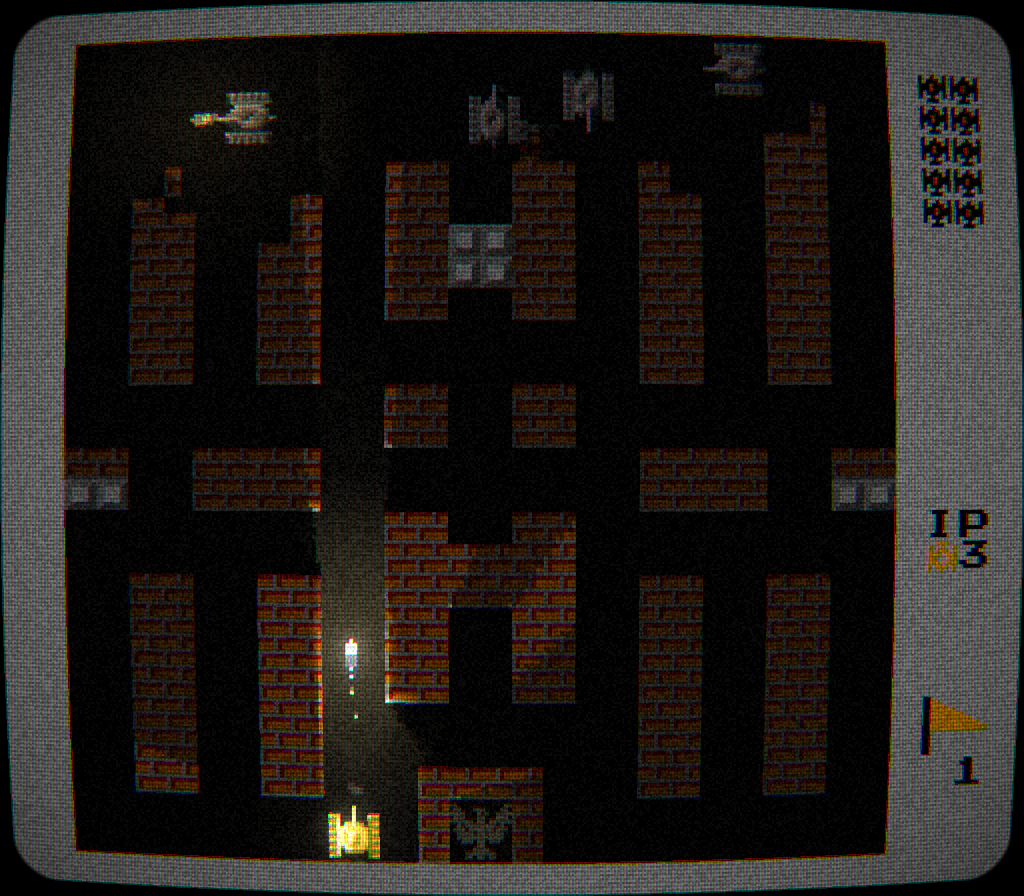
Stage 1 with normal graphics: headlights, bullet tracers, lit bricks and steel, tube TV filter.
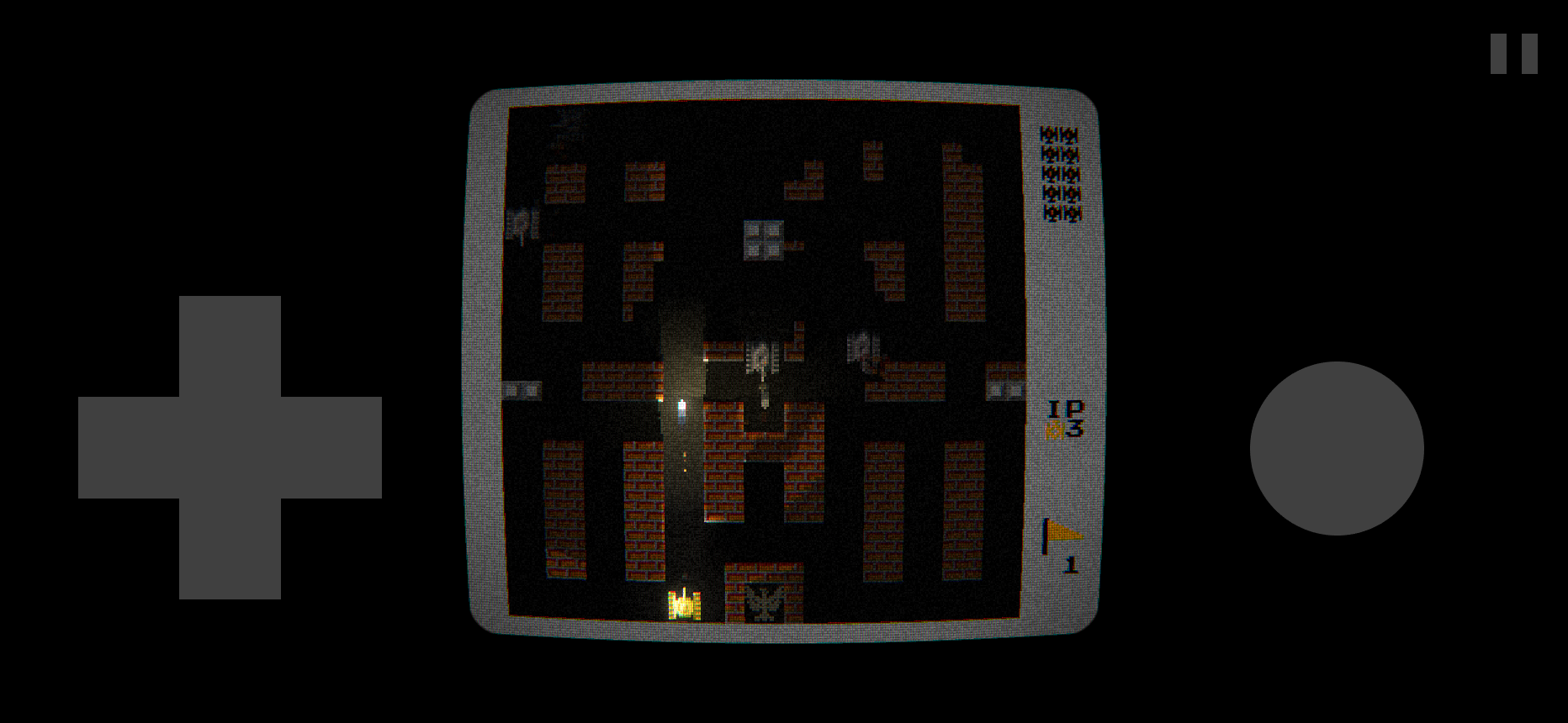
WebAssembly build in a mobile browser — touch controls are auto-detected.
Development Status
Playable now:
- Full game loop with HQ and a results screen: stars, time, lives lost; next stage, retry or back to stage select
- Two-player keyboard controls
- Touch controls for mobile browsers: auto-detected virtual D-pad, fire and pause in the letterbox area on every screen; menus are driven by the same controls (D-pad to move, fire to select, pause to go back)
- Tank movement with braking and grid snap
- Bullets and destructible terrain with incremental brick chipping: each hit shaves a half-tile slab, reinforced bullets break tiles whole
- All five surface types (brick, steel, forest, water, ice) with ice sliding and water blocking (a tank with a boat sails over it)
- Lua-scripted enemies of four types; each map file sets its enemy waves (tank order, pause, start condition: now, left<=N, clear), bonus carriers and on-field limit, see assets/levels/README.md
- The armored tank flashes between its normal and a tinted sprite as in the NES original; the tint shows the armor left (red, yellow, green)
- Weighted enemy spawn point choice: blocked points are skipped, the last used point and points near a player are picked less often
- Enemy AI with per-type personalities and difficulty scaling by stage:
- NES-style targeting: roam, then hunt the player, then head for the HQ
- Aimed fire with reaction delay: turns to a player on the line of fire, breaches walls towards the HQ, never wastes shots on allies or steel
- Pathfinding around steel and water (across water with a boat), shooting through bricks, recovery when stuck
- Active demolition: fire at walls ahead on the move and carve passages through side walls
- Bullet dodging and counter-fire for fast tanks on later stages
- Player lives, levels and damage
- Reload pause between shots on top of the bullets-in-flight limit: 0.33-0.2 s for the player by level, 0.3-0.5 s for enemies by type, so point-blank fire is not every frame (
game.shot_cooldown) - All eight bonuses: grenade, tank, star, helmet shield, enemy-freezing timer, HQ-fortifying shovel, and two from Tank 1990:
- Boat: the tank sails over water and the boat takes one hit instead of the tank; a tank that loses its boat on water can still reach the shore
- Pistol: the tank gets the top level at once, so it survives three hits
- Enemies pick up bonuses too, as in Tank 1990 (
game.enemy_bonus_pickup, on by default): the enemy nearest to a dropped bonus races for it; helmet and boat go to the enemy itself, star and pistol make it stronger, grenade blows up the players, timer freezes them, shovel strips the HQ walls, tank adds an enemy to the reserve - Campaign of 35 stages in 7 packs (
assets/levels/main.bccamp): stage select screen with a minimap preview, enemy composition and 3-star time; stages open one after another, packs open for collected stars - Stars per stage: win, no lives lost, within the time limit; best results are saved (OS config folder on desktop, localStorage in the browser)
- Continue after a win: carry lives (at least 3) and tank level to the next stage, capped at 2 stars; offered only when it gives an edge
- Two-player mode, graphics mode and fullscreen start set in
config.yml(app.players,app.effects,app.fullscreen) - Pause menu on Esc/P/touch (continue, graphics, exit to stage select)
- Desktop starts fullscreen by default (
app.fullscreen); toggle with F (desktop and browser) - Sound effects and music
- NES-style sidebar HUD (enemy reserve, player lives, stage flag) on an authentic 256x224 screen
- Normal graphics with effects, on by default (
config.yml): 2D ray-traced lighting and shadows from tanks, bullets, explosions and bonuses, bloom, water/ice/steel glints, tube TV filter; switch to classic graphics without effects with F2 or the GRAPHICS item of the pause menu (keyboard and touch)- No fog of war: the whole field is visible, lights only brighten it
- Headlights on every tank: a cone along the barrel that turns smoothly with the tank; the player's is long and bright with a soft aura around the tank, enemies' is shorter and reddish; walls are buildings, so light falls on their facades and they cast shadows
- Bullets glow like tracers and light up the corridor they fly through
- Materials: steel facades have a metallic sheen that blooms under bright light, brick is matte
- The stage starts with the player tank already on the map; respawns after death keep the spawn animation
- Invulnerability after spawning, as in the original: an animated force field over the tank in both graphics modes, pulsing with a flickering glow in normal graphics (also for the helmet bonus)
- Tube TV look on every screen, menus included: a curved screen with rounded corners and faintly glowing glass that stays visible on dark menus, aperture grille, scanlines that widen on bright pixels, phosphor afterglow, R/B convergence drift towards the edges, light film grain, flicker, a rolling bar, and line tearing on strong hits
- Bullet tracers: sparks trail behind a flying bullet, denser for fast bullets, blue-white for steel-piercing ones, which also glow blue-white
- Muzzle flashes: a short light cone along the barrel with a smoke puff
- Muzzle flashes with recoil, wall debris in the colors of the destroyed cells, steel and shield sparks, sparks and a flash when bullets collide, explosion embers and smoke, track dust, screen shake on hits and explosions (stronger for the player)
- Runs natively and in the browser (WebAssembly, deployed to GitHub Pages on release tags)
Under the hood:
- Clean Architecture with depguard-enforced layer boundaries
- Constructor-only DI from a composition root, repository pattern
- Scripting behind a domain-typed engine interface: the Lua script owns all enemy behavior, Go passes a world snapshot and executes decisions
- Navigation service (Dijkstra pathfinding, line-of-fire ray casting) exposed to scripts as query functions
- App-lifetime GPU sprite cache with startup preload, fail-fast sprite/animation validation on startup
- Kage shader pipeline: lighting pass with omni and cone lights on the logical screen, bloom, phosphor afterglow and CRT in the final-screen pass; shaders loaded via repository and compiled fail-fast on startup
- Visual effects driven by a per-frame event queue from gameplay use cases; particles, flashes and shake live in a per-stage repository
- Section-based text formats for maps and campaigns, parsed and validated fail-fast on startup
- User storage behind a repository interface (file on desktop, localStorage in WASM), ready for a platform save backend
- Unit tests with a >=70% use-cases coverage gate
- CI/CD (fmt, lint, test, build, release)
Roadmap
- HQ: defeat screen, protection mechanics
- UI: score, settings
- Yandex Games: SDK, cloud saves, ads
- Test coverage >80% total, performance profiling
Installation and Running
Requirements: Go 1.24+, optionally — Just.
git clone https://github.com/shpaker/tnk9x.git
cd tnk9x
just deps         # Install dependencies (or go mod download)

# Run the game
just run          # or go run cmd/main.go

# Build binary
just build        # binary will be in ./tnk9x

# Checks
just fmt
just lint
just test
Architecture
The project follows Clean Architecture principles with clear separation of concerns. Dependencies point inward: outer layers depend on inner layers through interfaces. The composition root (internal/app) is the only place that assembles the object graph — all dependencies are injected via constructors, layer boundaries are enforced by depguard.
Dependency Flow
┌─────────────────────────────────────────────────────────┐
│  Composition Root (internal/app)                        │
│  game loop · state transitions · object graph assembly  │
└───────────────────┬─────────────────────────────────────┘
                    │ (builds & wires)
┌───────────────────▼─────────────────────────────────────┐
│  Presentation Layer                                     │
│  ┌──────────────┐  ┌──────────────────────┐             │
│  │   States     │  │      Adapters        │             │
│  │              │  │                      │             │
│  │ StageState   │  │ Renderer             │             │
│  │ StageSelect  │  │ Input                │             │
│  │              │  │ Sound                │             │
│  │              │  │ Scripting (Lua)      │             │
│  └──────┬───────┘  └───────┬──────────────┘             │
│         └─────────┬────────┘                            │
│                   │ (depends on)                        │
└───────────────────▼─────────────────────────────────────┘
                    │
┌───────────────────▼─────────────────────────────────────┐
│  Application Layer                                      │
│  ┌──────────────┐  ┌──────────────┐                     │
│  │  Use Cases   │  │   Services   │                     │
│  │              │  │              │                     │
│  │ TankActions  │  │ Collision    │                     │
│  │ Collision    │  │ Animation    │                     │
│  │ Sound        │  │ Braking      │                     │
│  └──────┬───────┘  └──────┬───────┘                     │
│         └─────────┬───────┘                             │
│                   │ (manipulates)                       │
└───────────────────▼─────────────────────────────────────┘
                    │
┌───────────────────▼─────────────────────────────────────┐
│  Domain Layer                                           │
│  ┌───────────────────────────────────────────────────┐  │
│  │  Entities (Tank, Bullet, Block, HQ, etc.)         │  │
│  │  Value Objects (Position, Size, Direction)        │  │
│  │  Session Entities (GameSession, StageSession)     │  │
│  └───────────────────────────────────────────────────┘  │
│                   ▲                                     │
└───────────────────┼─────────────────────────────────────┘
                    │ (reads/writes)
┌───────────────────▼─────────────────────────────────────┐
│  Infrastructure Layer                                   │
│  ┌──────────────┐  ┌──────────────┐                     │
│  │ Repositories │  │   Raw Files  │                     │
│  │              │  │              │                     │
│  │ Game         │  │ FileSystem   │                     │
│  │ Processed    │  │              │                     │
│  └──────────────┘  └──────────────┘                     │
└─────────────────────────────────────────────────────────┘
License
This project is licensed under the MIT License - see the LICENSE file for details.
Significant stargazers

288 followers · starred Aug 2026

83 followers · starred Aug 2026
Similar repos


Languages
Go
96.2%
Lua
2.6%
Clone of the classic arcade game Battle City (NES, 1985), built with Go.
See the codeSee what people are saying
README
tnk9x
A modern remake and tribute to the classic arcade game Battle City (NES, 1985), built with Go and Ebiten. This project combines a passion for the original game with learning Go, Clean Architecture principles, and game development.
Play online: https://shpaker.github.io/tnk9x/
Stage 1 with normal graphics: headlights, bullet tracers, lit bricks and steel, tube TV filter.
WebAssembly build in a mobile browser — touch controls are auto-detected.
Development Status
Playable now:
- Full game loop with HQ and a results screen: stars, time, lives lost; next stage, retry or back to stage select
- Two-player keyboard controls
- Touch controls for mobile browsers: auto-detected virtual D-pad, fire and pause in the letterbox area on every screen; menus are driven by the same controls (D-pad to move, fire to select, pause to go back)
- Tank movement with braking and grid snap
- Bullets and destructible terrain with incremental brick chipping: each hit shaves a half-tile slab, reinforced bullets break tiles whole
- All five surface types (brick, steel, forest, water, ice) with ice sliding and water blocking (a tank with a boat sails over it)
- Lua-scripted enemies of four types; each map file sets its enemy waves (tank order, pause, start condition: now, left<=N, clear), bonus carriers and on-field limit, see assets/levels/README.md
- The armored tank flashes between its normal and a tinted sprite as in the NES original; the tint shows the armor left (red, yellow, green)
- Weighted enemy spawn point choice: blocked points are skipped, the last used point and points near a player are picked less often
- Enemy AI with per-type personalities and difficulty scaling by stage:
- NES-style targeting: roam, then hunt the player, then head for the HQ
- Aimed fire with reaction delay: turns to a player on the line of fire, breaches walls towards the HQ, never wastes shots on allies or steel
- Pathfinding around steel and water (across water with a boat), shooting through bricks, recovery when stuck
- Active demolition: fire at walls ahead on the move and carve passages through side walls
- Bullet dodging and counter-fire for fast tanks on later stages
- Player lives, levels and damage
- Reload pause between shots on top of the bullets-in-flight limit: 0.33-0.2 s for the player by level, 0.3-0.5 s for enemies by type, so point-blank fire is not every frame (
game.shot_cooldown) - All eight bonuses: grenade, tank, star, helmet shield, enemy-freezing timer, HQ-fortifying shovel, and two from Tank 1990:
- Boat: the tank sails over water and the boat takes one hit instead of the tank; a tank that loses its boat on water can still reach the shore
- Pistol: the tank gets the top level at once, so it survives three hits
- Enemies pick up bonuses too, as in Tank 1990 (
game.enemy_bonus_pickup, on by default): the enemy nearest to a dropped bonus races for it; helmet and boat go to the enemy itself, star and pistol make it stronger, grenade blows up the players, timer freezes them, shovel strips the HQ walls, tank adds an enemy to the reserve - Campaign of 35 stages in 7 packs (
assets/levels/main.bccamp): stage select screen with a minimap preview, enemy composition and 3-star time; stages open one after another, packs open for collected stars - Stars per stage: win, no lives lost, within the time limit; best results are saved (OS config folder on desktop, localStorage in the browser)
- Continue after a win: carry lives (at least 3) and tank level to the next stage, capped at 2 stars; offered only when it gives an edge
- Two-player mode, graphics mode and fullscreen start set in
config.yml(app.players,app.effects,app.fullscreen) - Pause menu on Esc/P/touch (continue, graphics, exit to stage select)
- Desktop starts fullscreen by default (
app.fullscreen); toggle with F (desktop and browser) - Sound effects and music
- NES-style sidebar HUD (enemy reserve, player lives, stage flag) on an authentic 256x224 screen
- Normal graphics with effects, on by default (
config.yml): 2D ray-traced lighting and shadows from tanks, bullets, explosions and bonuses, bloom, water/ice/steel glints, tube TV filter; switch to classic graphics without effects with F2 or the GRAPHICS item of the pause menu (keyboard and touch)- No fog of war: the whole field is visible, lights only brighten it
- Headlights on every tank: a cone along the barrel that turns smoothly with the tank; the player's is long and bright with a soft aura around the tank, enemies' is shorter and reddish; walls are buildings, so light falls on their facades and they cast shadows
- Bullets glow like tracers and light up the corridor they fly through
- Materials: steel facades have a metallic sheen that blooms under bright light, brick is matte
- The stage starts with the player tank already on the map; respawns after death keep the spawn animation
- Invulnerability after spawning, as in the original: an animated force field over the tank in both graphics modes, pulsing with a flickering glow in normal graphics (also for the helmet bonus)
- Tube TV look on every screen, menus included: a curved screen with rounded corners and faintly glowing glass that stays visible on dark menus, aperture grille, scanlines that widen on bright pixels, phosphor afterglow, R/B convergence drift towards the edges, light film grain, flicker, a rolling bar, and line tearing on strong hits
- Bullet tracers: sparks trail behind a flying bullet, denser for fast bullets, blue-white for steel-piercing ones, which also glow blue-white
- Muzzle flashes: a short light cone along the barrel with a smoke puff
- Muzzle flashes with recoil, wall debris in the colors of the destroyed cells, steel and shield sparks, sparks and a flash when bullets collide, explosion embers and smoke, track dust, screen shake on hits and explosions (stronger for the player)
- Runs natively and in the browser (WebAssembly, deployed to GitHub Pages on release tags)
Under the hood:
- Clean Architecture with depguard-enforced layer boundaries
- Constructor-only DI from a composition root, repository pattern
- Scripting behind a domain-typed engine interface: the Lua script owns all enemy behavior, Go passes a world snapshot and executes decisions
- Navigation service (Dijkstra pathfinding, line-of-fire ray casting) exposed to scripts as query functions
- App-lifetime GPU sprite cache with startup preload, fail-fast sprite/animation validation on startup
- Kage shader pipeline: lighting pass with omni and cone lights on the logical screen, bloom, phosphor afterglow and CRT in the final-screen pass; shaders loaded via repository and compiled fail-fast on startup
- Visual effects driven by a per-frame event queue from gameplay use cases; particles, flashes and shake live in a per-stage repository
- Section-based text formats for maps and campaigns, parsed and validated fail-fast on startup
- User storage behind a repository interface (file on desktop, localStorage in WASM), ready for a platform save backend
- Unit tests with a >=70% use-cases coverage gate
- CI/CD (fmt, lint, test, build, release)
Roadmap
- HQ: defeat screen, protection mechanics
- UI: score, settings
- Yandex Games: SDK, cloud saves, ads
- Test coverage >80% total, performance profiling
Installation and Running
Requirements: Go 1.24+, optionally — Just.
git clone https://github.com/shpaker/tnk9x.git
cd tnk9x
just deps         # Install dependencies (or go mod download)

# Run the game
just run          # or go run cmd/main.go

# Build binary
just build        # binary will be in ./tnk9x

# Checks
just fmt
just lint
just test
Architecture
The project follows Clean Architecture principles with clear separation of concerns. Dependencies point inward: outer layers depend on inner layers through interfaces. The composition root (internal/app) is the only place that assembles the object graph — all dependencies are injected via constructors, layer boundaries are enforced by depguard.
Dependency Flow
┌─────────────────────────────────────────────────────────┐
│  Composition Root (internal/app)                        │
│  game loop · state transitions · object graph assembly  │
└───────────────────┬─────────────────────────────────────┘
                    │ (builds & wires)
┌───────────────────▼─────────────────────────────────────┐
│  Presentation Layer                                     │
│  ┌──────────────┐  ┌──────────────────────┐             │
│  │   States     │  │      Adapters        │             │
│  │              │  │                      │             │
│  │ StageState   │  │ Renderer             │             │
│  │ StageSelect  │  │ Input                │             │
│  │              │  │ Sound                │             │
│  │              │  │ Scripting (Lua)      │             │
│  └──────┬───────┘  └───────┬──────────────┘             │
│         └─────────┬────────┘                            │
│                   │ (depends on)                        │
└───────────────────▼─────────────────────────────────────┘
                    │
┌───────────────────▼─────────────────────────────────────┐
│  Application Layer                                      │
│  ┌──────────────┐  ┌──────────────┐                     │
│  │  Use Cases   │  │   Services   │                     │
│  │              │  │              │                     │
│  │ TankActions  │  │ Collision    │                     │
│  │ Collision    │  │ Animation    │                     │
│  │ Sound        │  │ Braking      │                     │
│  └──────┬───────┘  └──────┬───────┘                     │
│         └─────────┬───────┘                             │
│                   │ (manipulates)                       │
└───────────────────▼─────────────────────────────────────┘
                    │
┌───────────────────▼─────────────────────────────────────┐
│  Domain Layer                                           │
│  ┌───────────────────────────────────────────────────┐  │
│  │  Entities (Tank, Bullet, Block, HQ, etc.)         │  │
│  │  Value Objects (Position, Size, Direction)        │  │
│  │  Session Entities (GameSession, StageSession)     │  │
│  └───────────────────────────────────────────────────┘  │
│                   ▲                                     │
└───────────────────┼─────────────────────────────────────┘
                    │ (reads/writes)
┌───────────────────▼─────────────────────────────────────┐
│  Infrastructure Layer                                   │
│  ┌──────────────┐  ┌──────────────┐                     │
│  │ Repositories │  │   Raw Files  │                     │
│  │              │  │              │                     │
│  │ Game         │  │ FileSystem   │                     │
│  │ Processed    │  │              │                     │
│  └──────────────┘  └──────────────┘                     │
└─────────────────────────────────────────────────────────┘
License
This project is licensed under the MIT License - see the LICENSE file for details.
Similar repos
Significant stargazers
288 followers · starred Aug 2026
83 followers · starred Aug 2026
Languages
Go
96.2%
Lua
2.6%