📚 Linux Electron Onenote - A Linux compatible version of OneNote
See the code




🌌 Bugs are evident™ - MATRIX️
🚧 This project is under active development!
📢 We welcome your feedback and contributions.
v24.16.0
A Linux compatible version of OneNote.
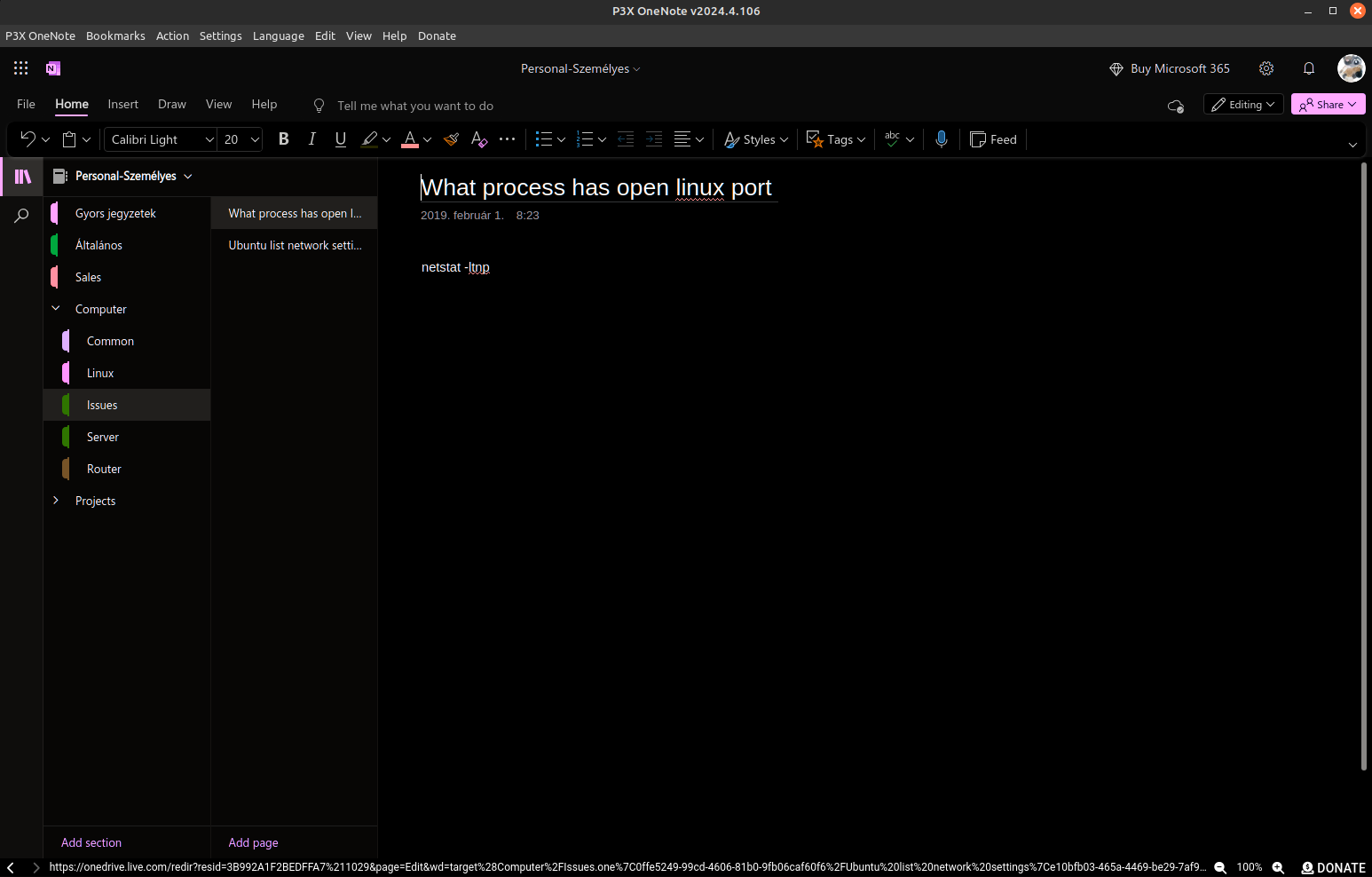
P3X OneNote Linux is an independent browser window for the online OneNote, so you can use it without cluttering your browser.
Core highlights:
User interface:
ALT to access the menu+ to add a Personal or Corporate tab. Each tab shows the logged-in account email.--minimized argumentNavigation and clipboard:
Settings (Menu > Settings):
Other:
/ separator (e.g. Work/Projects). Folders appear as submenus with 📁 icons in the Bookmarks menu.Corporate home menu item — note: without a corporate login, debugging this feature is not possible. If issues arise, providing login details may help with troubleshooting.Right-click any tab to access:
| Option | Description |
|---|---|
| Rename tab | Set a custom label for the tab |
| Clear custom name | Revert to default label (account type + email) |
| Pin tab | Prevent accidental closure |
| Unpin tab | Allow closing again |
| Duplicate tab | Create a new tab with the same URL and account type |
| Close tab | Close the tab (with confirmation for non-pinned tabs) |
All releases are available on the GitHub Releases page.
Available for amd64 and arm64 architectures.

Download from the releases page and install:
wget https://github.com/patrikx3/onenote/releases/download/v${VERSION}/P3X-OneNote-${VERSION}-x86_64.flatpak
flatpak install ./P3X-OneNote-${VERSION}-x86_64.flatpak
flatpak run com.patrikx3.onenote
The menu entry is integrated automatically.
AppImage, deb, and rpm packages auto-update themselves.
Setting up AppImage:
mkdir -p $HOME/opt
mv ~/Downloads/p3x-onenote-a.b.c-x86_64.AppImage $HOME/opt/
chmod +x $HOME/opt/p3x-onenote-a.b.c-x86_64.AppImage
# Then you can run it
$HOME/opt/p3x-onenote-a.b.c-x86_64.AppImage &
The app can also be found on ElectronJs Apps — search for P3X.
Windows builds are available. See Issue #168 for background.
Builds are available for both Intel and Apple Silicon architectures.
Removing quarantine on downloaded files:
If you download the zip file for the arm64 version, run the following command on the unzipped app to remove the macOS quarantine attribute:
sudo xattr -rd com.apple.quarantine P3X-OneNote.app
This allows the application to run without security interruptions from macOS.
.editorconfig settings in your IDErpm on Ubuntu: sudo apt-get install rpmelectron from devDependencies to dependencies (the default setup is designed for AppImage distribution, not NPM)p3x github mirrorDon't want to install anything? Try the hosted version at meeting.corifeus.com — full meeting workflow built for European businesses, no setup, no API key, no command line.
What the hosted version offers:
Try the live demo (1 minute free, no signup) or browse the public sample meeting at meeting.corifeus.com/sample.
AI-powered network & email toolkit — free, no signup.
Web · network.corifeus.com MCP · npm i -g p3x-network-mcp
claude mcp add p3x-network -- npx p3x-network-mcpIf you appreciate our work, consider ⭐ starring this repository or 💰 making a donation to support server maintenance and ongoing development. Your support means the world to us—thank you!
All my domains, including patrikx3.com, corifeus.eu, and corifeus.com, are developed in my spare time. While you may encounter minor errors, the sites are generally stable and fully functional.
Version Structure: We follow a Major.Minor.Patch versioning scheme:
🚨 Important Changes: Any breaking changes are prominently noted in the readme to keep you informed.
P3X-ONENOTE Build v2026.4.150

4,158 followers · starred Jun 2019
44 followers · starred Sep 2018
14 followers · starred Mar 2020
124 followers · starred Jan 2018
📚 Linux Electron Onenote - A Linux compatible version of OneNote
See the code
🌌 Bugs are evident™ - MATRIX️
🚧 This project is under active development!
📢 We welcome your feedback and contributions.
v24.16.0
A Linux compatible version of OneNote.
P3X OneNote Linux is an independent browser window for the online OneNote, so you can use it without cluttering your browser.
Core highlights:
User interface:
ALT to access the menu+ to add a Personal or Corporate tab. Each tab shows the logged-in account email.--minimized argumentNavigation and clipboard:
Settings (Menu > Settings):
Other:
/ separator (e.g. Work/Projects). Folders appear as submenus with 📁 icons in the Bookmarks menu.Corporate home menu item — note: without a corporate login, debugging this feature is not possible. If issues arise, providing login details may help with troubleshooting.Right-click any tab to access:
| Option | Description |
|---|---|
| Rename tab | Set a custom label for the tab |
| Clear custom name | Revert to default label (account type + email) |
| Pin tab | Prevent accidental closure |
| Unpin tab | Allow closing again |
| Duplicate tab | Create a new tab with the same URL and account type |
| Close tab | Close the tab (with confirmation for non-pinned tabs) |
All releases are available on the GitHub Releases page.
Available for amd64 and arm64 architectures.
Download from the releases page and install:
wget https://github.com/patrikx3/onenote/releases/download/v${VERSION}/P3X-OneNote-${VERSION}-x86_64.flatpak
flatpak install ./P3X-OneNote-${VERSION}-x86_64.flatpak
flatpak run com.patrikx3.onenote
The menu entry is integrated automatically.
AppImage, deb, and rpm packages auto-update themselves.
Setting up AppImage:
mkdir -p $HOME/opt
mv ~/Downloads/p3x-onenote-a.b.c-x86_64.AppImage $HOME/opt/
chmod +x $HOME/opt/p3x-onenote-a.b.c-x86_64.AppImage
# Then you can run it
$HOME/opt/p3x-onenote-a.b.c-x86_64.AppImage &
The app can also be found on ElectronJs Apps — search for P3X.
Windows builds are available. See Issue #168 for background.
Builds are available for both Intel and Apple Silicon architectures.
Removing quarantine on downloaded files:
If you download the zip file for the arm64 version, run the following command on the unzipped app to remove the macOS quarantine attribute:
sudo xattr -rd com.apple.quarantine P3X-OneNote.app
This allows the application to run without security interruptions from macOS.
.editorconfig settings in your IDErpm on Ubuntu: sudo apt-get install rpmelectron from devDependencies to dependencies (the default setup is designed for AppImage distribution, not NPM)p3x github mirrorDon't want to install anything? Try the hosted version at meeting.corifeus.com — full meeting workflow built for European businesses, no setup, no API key, no command line.
What the hosted version offers:
Try the live demo (1 minute free, no signup) or browse the public sample meeting at meeting.corifeus.com/sample.
AI-powered network & email toolkit — free, no signup.
Web · network.corifeus.com MCP · npm i -g p3x-network-mcp
claude mcp add p3x-network -- npx p3x-network-mcpIf you appreciate our work, consider ⭐ starring this repository or 💰 making a donation to support server maintenance and ongoing development. Your support means the world to us—thank you!
All my domains, including patrikx3.com, corifeus.eu, and corifeus.com, are developed in my spare time. While you may encounter minor errors, the sites are generally stable and fully functional.
Version Structure: We follow a Major.Minor.Patch versioning scheme:
🚨 Important Changes: Any breaking changes are prominently noted in the readme to keep you informed.
P3X-ONENOTE Build v2026.4.150
4,158 followers · starred Jun 2019
44 followers · starred Sep 2018
14 followers · starred Mar 2020
124 followers · starred Jan 2018