
A Rust-powered desktop music player for your own files: album-art theming, synced lyrics, gapless playback.
TypeScript
1
7 commits
updated Oct 2, 2026
See what people are saying
README
Reson
A desktop music player for the files you own.
Rust plays the audio, React draws the interface, and the whole app recolors itself from the album art of whatever you're listening to.






No account, no server, no streaming. Point Reson at a folder of FLACs or MP3s and it builds your library: covers, colors, lyrics and all.
Screenshots
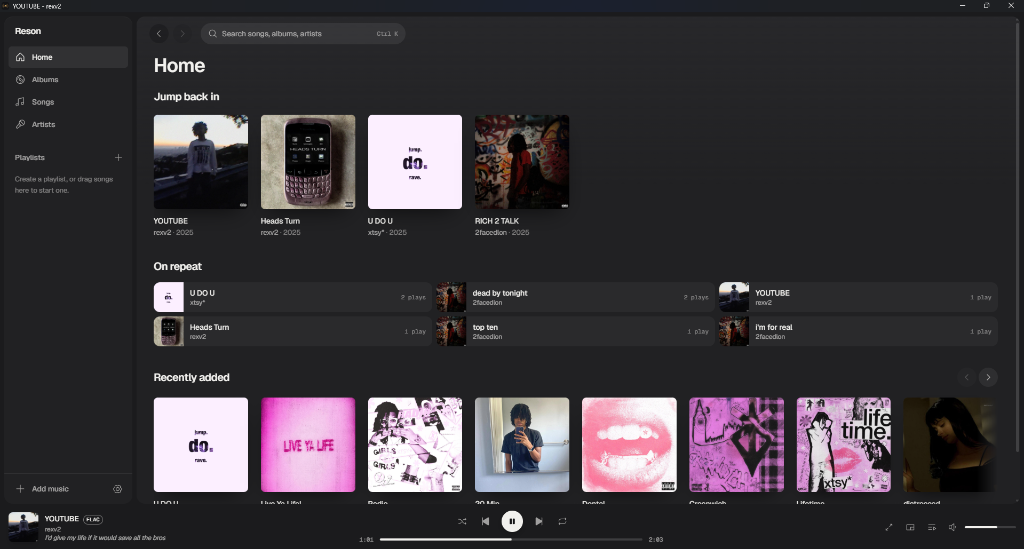 | 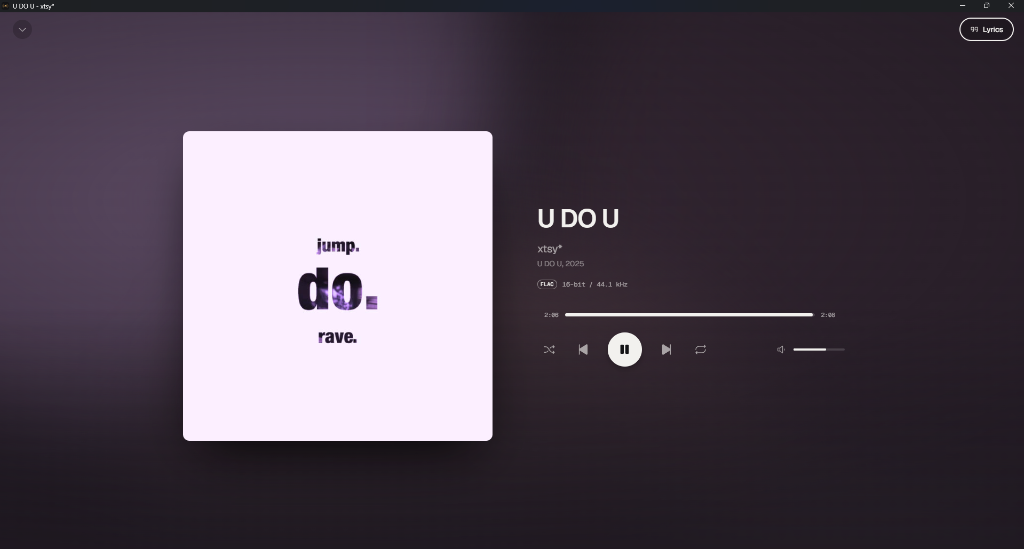 |
| Home: jump back in, on repeat, recently added | Now Playing takes its colors from the cover |
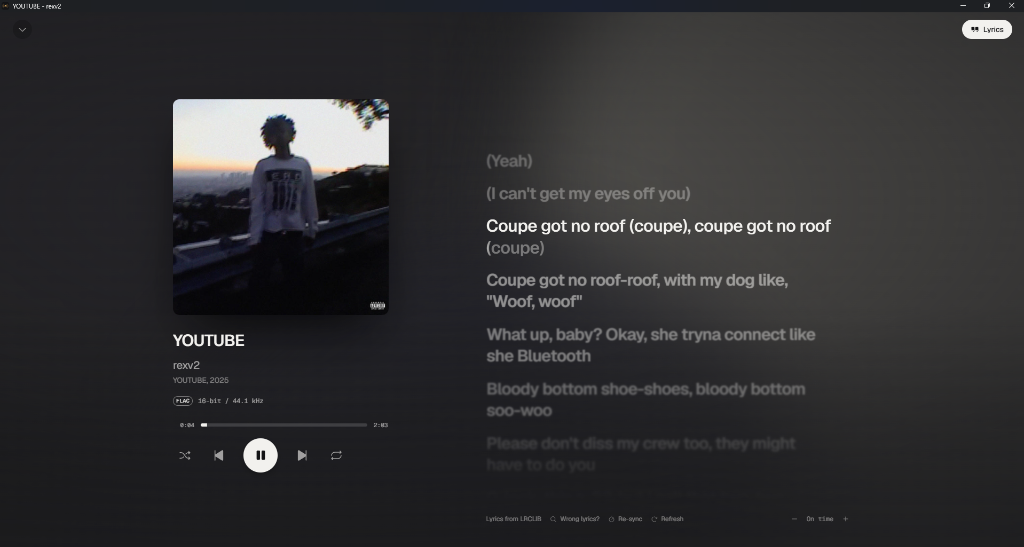 | 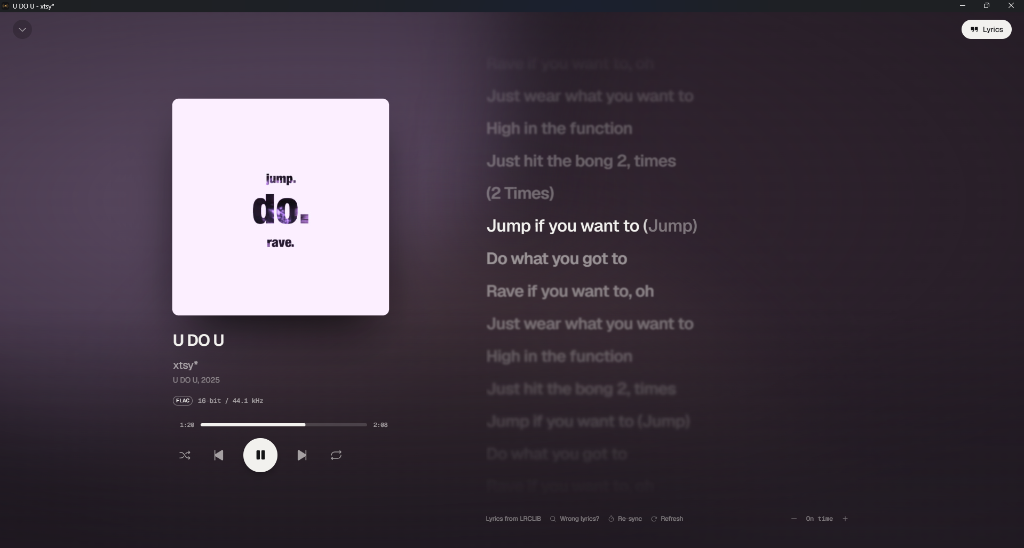 |
| Synced lyrics from LRCLIB, with karaoke fill on the current line | Lines away from the current one soften with depth blur |
Why Reson
- It looks like your music. Reson pulls a palette from each cover and fades the whole interface to it, with contrast checks so text stays readable on any artwork.
- Lyrics that keep time. Synced lyrics arrive on their own, the current word fills as it's sung, and you can click any line to jump there.
- It tells you what your files really are. Reson reads the audio inside the file, so an AAC renamed to
.mp3shows up as AAC, and a 24-bit/96 kHz FLAC says so. - It sounds right. Gapless playback, optional crossfade, loudness normalization, and no clicks when you pause or seek.
Features
Playback
- Gapless playback and optional crossfade (0 to 12 seconds)
- Loudness normalization from ReplayGain tags, or measured in the background when a file has none
- Short fades on pause, resume and seek, so you never hear a pop
- Queue with drag-to-reorder, shuffle, repeat one or all, and play history
- Windows media overlay and hardware media keys
- Mini player that stays on top, plus a tray icon
Lyrics
- Sources in order: a
.lrcfile next to the song, lyrics in the file's tags, then LRCLIB - Duration matching, so a remix or live version doesn't get the wrong lyrics
- Word-by-word karaoke fill and Apple-style depth blur
- Scroll freely; a "Sync lyrics" button takes you back to the current line
- Per-song timing offset when lyrics run early or late
- Manual LRCLIB search when the automatic match misses
- Tap-to-sync editor for songs with plain lyrics, with optional publishing back to LRCLIB
- Current line in the player bar while you browse
Library
- Import folders or files, or drop them on the window
- Watched folders pick up new downloads
- Content-based format detection with bit depth, sample rate, bitrate and channels in Song info
- Embedded cover art, or
cover.jpg/folder.jpgnext to the files - Move your files and Reson relinks them, keeping history, playlists and lyric timing
- Albums, artists, songs, playlists, search (
Ctrl+K) and a Home screen
Look and feel
- Now Playing backdrop built from the cover's palette, with an optional beat pulse and spectrum bars
- Cover morph between the album grid and the album page
- Smooth per-frame progress, so the seek bar and lyrics never step
- Respects your system's reduced-motion setting
Formats: FLAC, ALAC, MP3, AAC/M4A, OGG Vorbis and WAV.
Download
Grab Reson_x.y.z_x64-setup.exe from the latest release (Windows 10 and 11, 64-bit). It installs for your user account, no admin needed.
The installer isn't code-signed yet, so Windows SmartScreen may warn you. Click More info, then Run anyway. The release notes list SHA-256 hashes if you want to check the file.
Then click Add music in the sidebar, or drag a folder onto the window.
Building from source
You need:
- Rust (stable)
- Node.js 20 or newer
- The Tauri prerequisites for your OS (Windows 10 and 11 already ship WebView2)
git clone https://github.com/osfv/Reson.git
cd Reson
npm install
npm run tauri dev     # run with hot reload
npm run tauri build   # release build and installer in src-tauri/target/release/bundle
Keyboard shortcuts
| Key | Action |
|---|---|
Space | Play / pause |
Ctrl ← / → | Previous / next track |
Alt ← / → | Back / forward |
Ctrl K | Search |
L | Toggle lyrics in Now Playing |
Esc | Close Now Playing, menus and dialogs |
Privacy
Reson only uses the network to fetch lyrics, and only for songs you open the lyrics view on (or play, if the player bar lyric is on). It sends LRCLIB the song's title, artist, album and length. Publishing lyrics is opt-in and public. Your library stays in a local SQLite database.
Platform support
Reson is developed and tested on Windows. Tauri also runs on macOS and Linux, but nobody has tried Reson there yet. Reports and fixes are welcome.
Contributing
Issues and pull requests are welcome. Before opening a PR, run:
npm run typecheck
cd src-tauri && cargo test
AGENTS.md explains how the app fits together: the audio engine, library import, lyrics lookup and theming.
Built with
Tauri 2 · rodio and Symphonia · lofty · rusqlite · React 19 · Tailwind CSS 4 · Motion · Phosphor Icons · lyrics from LRCLIB
License
Similar repos


Languages
TypeScript
58.8%
Rust
39.5%
CSS
1.6%
A Rust-powered desktop music player for your own files: album-art theming, synced lyrics, gapless playback.
TypeScript
1
7 commits
updated Oct 2, 2026
See what people are saying
README
Reson
A desktop music player for the files you own.
Rust plays the audio, React draws the interface, and the whole app recolors itself from the album art of whatever you're listening to.
No account, no server, no streaming. Point Reson at a folder of FLACs or MP3s and it builds your library: covers, colors, lyrics and all.
Screenshots
| |
| Home: jump back in, on repeat, recently added | Now Playing takes its colors from the cover |
| |
| Synced lyrics from LRCLIB, with karaoke fill on the current line | Lines away from the current one soften with depth blur |
Why Reson
- It looks like your music. Reson pulls a palette from each cover and fades the whole interface to it, with contrast checks so text stays readable on any artwork.
- Lyrics that keep time. Synced lyrics arrive on their own, the current word fills as it's sung, and you can click any line to jump there.
- It tells you what your files really are. Reson reads the audio inside the file, so an AAC renamed to
.mp3shows up as AAC, and a 24-bit/96 kHz FLAC says so. - It sounds right. Gapless playback, optional crossfade, loudness normalization, and no clicks when you pause or seek.
Features
Playback
- Gapless playback and optional crossfade (0 to 12 seconds)
- Loudness normalization from ReplayGain tags, or measured in the background when a file has none
- Short fades on pause, resume and seek, so you never hear a pop
- Queue with drag-to-reorder, shuffle, repeat one or all, and play history
- Windows media overlay and hardware media keys
- Mini player that stays on top, plus a tray icon
Lyrics
- Sources in order: a
.lrcfile next to the song, lyrics in the file's tags, then LRCLIB - Duration matching, so a remix or live version doesn't get the wrong lyrics
- Word-by-word karaoke fill and Apple-style depth blur
- Scroll freely; a "Sync lyrics" button takes you back to the current line
- Per-song timing offset when lyrics run early or late
- Manual LRCLIB search when the automatic match misses
- Tap-to-sync editor for songs with plain lyrics, with optional publishing back to LRCLIB
- Current line in the player bar while you browse
Library
- Import folders or files, or drop them on the window
- Watched folders pick up new downloads
- Content-based format detection with bit depth, sample rate, bitrate and channels in Song info
- Embedded cover art, or
cover.jpg/folder.jpgnext to the files - Move your files and Reson relinks them, keeping history, playlists and lyric timing
- Albums, artists, songs, playlists, search (
Ctrl+K) and a Home screen
Look and feel
- Now Playing backdrop built from the cover's palette, with an optional beat pulse and spectrum bars
- Cover morph between the album grid and the album page
- Smooth per-frame progress, so the seek bar and lyrics never step
- Respects your system's reduced-motion setting
Formats: FLAC, ALAC, MP3, AAC/M4A, OGG Vorbis and WAV.
Download
Grab Reson_x.y.z_x64-setup.exe from the latest release (Windows 10 and 11, 64-bit). It installs for your user account, no admin needed.
The installer isn't code-signed yet, so Windows SmartScreen may warn you. Click More info, then Run anyway. The release notes list SHA-256 hashes if you want to check the file.
Then click Add music in the sidebar, or drag a folder onto the window.
Building from source
You need:
- Rust (stable)
- Node.js 20 or newer
- The Tauri prerequisites for your OS (Windows 10 and 11 already ship WebView2)
git clone https://github.com/osfv/Reson.git
cd Reson
npm install
npm run tauri dev     # run with hot reload
npm run tauri build   # release build and installer in src-tauri/target/release/bundle
Keyboard shortcuts
| Key | Action |
|---|---|
Space | Play / pause |
Ctrl ← / → | Previous / next track |
Alt ← / → | Back / forward |
Ctrl K | Search |
L | Toggle lyrics in Now Playing |
Esc | Close Now Playing, menus and dialogs |
Privacy
Reson only uses the network to fetch lyrics, and only for songs you open the lyrics view on (or play, if the player bar lyric is on). It sends LRCLIB the song's title, artist, album and length. Publishing lyrics is opt-in and public. Your library stays in a local SQLite database.
Platform support
Reson is developed and tested on Windows. Tauri also runs on macOS and Linux, but nobody has tried Reson there yet. Reports and fixes are welcome.
Contributing
Issues and pull requests are welcome. Before opening a PR, run:
npm run typecheck
cd src-tauri && cargo test
AGENTS.md explains how the app fits together: the audio engine, library import, lyrics lookup and theming.
Built with
Tauri 2 · rodio and Symphonia · lofty · rusqlite · React 19 · Tailwind CSS 4 · Motion · Phosphor Icons · lyrics from LRCLIB
License
Similar repos
Languages
TypeScript
58.8%
Rust
39.5%
CSS
1.6%