
A modern highly-customizable Subsonic TUI client built in Rust.
Rust
75
42 commits
updated Sep 10, 2026
See what people are saying (1)
README
Ratune
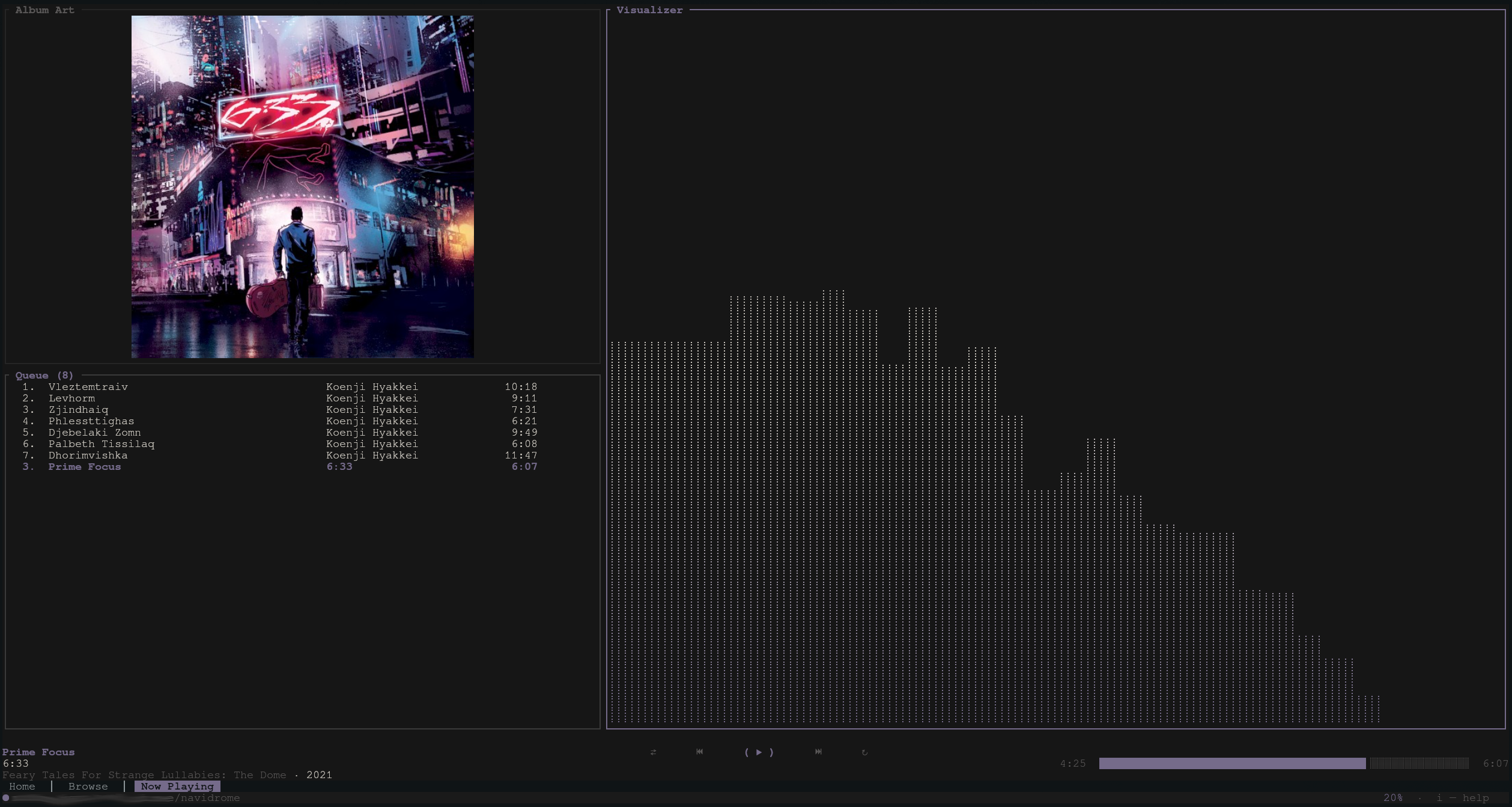
A terminal music player for Subsonic-compatible servers. Built in Rust with Ratatui, featuring album art graphics (including in tmux), gapless playback, internet radio, fuzzy finder support, and a highly configurable UI.
Why Ratune?
Ratune was built to bring together a combination of features often missing from Subsonic players: fuzzy navigation, a visually rich UI with album art, deep customization, and a fully terminal-based workflow. Many players excel at a few of these. Ratune aims to cover them all.
Table of contents
- Highlights
- Screenshots
- Requirements
- Installation
- Configuration
- Default keybinds
- Mouse support
- tmux
- Project layout
- Data on disk
- Credits
- Acknowledgements
- License
Highlights
- Playback: Gapless queue, seek, shuffle/unshuffle, and playlist management.
- Internet radio: Stations from your server
- Album Art: Display using Kitty graphics and ratatui-image (see link for compatible terminals)
- Lyrics: Synced lyrics via LRCLib (default), NetEase Cloud Music, or your Subsonic server. Optional on-disk cache for offline use
- Offline mode: Starts without a server when needed; plays cached tracks, browse from library index, and detects reconnect automatically
- Visualizer: FFT spectrum analyzer.
- Fuzzy finder: Optional library index + external picker (fzf/skim) for fast track selection.
- Folder navigation: Optional Browse layout that follows server music folders for servers that provide it.
- Customization: Keybinds, theme, layout, now-playing lines, queue row template inspired by ncmpcpp.
- Mouse support: Click tabs, transport controls, the seek bar, queue rows, and browse/home lists.
- Integration: Linux MPRIS (media keys,
playerctl). - Scrobbling: Last.fm and Libre.fm (Audioscrobbler), plus optional Subsonic
/scrobblefor Navidrome play counts.
Requirements
Runtime (prebuilt binary or any install)
These apply whenever you run Ratune, including GitHub Releases assets.
- Server: A Subsonic-compatible music server (Navidrome is a good default).
- Linux audio: ALSA userspace library at runtime — e.g. Debian/Ubuntu
libasound2, Fedoraalsa-lib, Archalsa-lib. (You do not need-dev/*-develpackages just to run a prebuilt binary.) - Linux D-Bus:
libdbus-1at runtime — e.g. Debian/Ubuntulibdbus-1-3, Fedoradbus-libs, Archdbus. Required by the Linux binary (scrobble keyring, etc.); usually already installed on desktop Linux. - macOS audio: Uses Core Audio via the system toolchain; no separate audio library install for typical use.
- Optional:
fzforskonPATHif you use the library fuzzy picker (see[library]in the sample config).
Prebuilt archives on Releases: Linux x86_64 (x86_64-unknown-linux-gnu), macOS Apple Silicon (aarch64-apple-darwin), and macOS Intel (x86_64-apple-darwin). Other targets need a local build (or your own packaging).
Build from source
Everything under Runtime, plus:
- Rust: Stable toolchain (
rustupdefault stable is fine). - Linux build deps: ALSA and D-Bus headers plus
pkg-config— e.g. Debian/Ubuntulibasound2-dev+libdbus-1-dev+pkg-config, Fedoraalsa-lib-devel+dbus-devel, Archalsa-lib+dbus.
Installation
Current options are:
Binaries AUR crates.io Homebrew Nix From source.
Binary Releases (Linux x86_64, macOS)
Download the .tar.gz for your platform from Releases.
Extract and put ratune on your PATH.
Arch Linux (AUR)
Install the -bin package with an AUR helper, e.g.:
yay -S ratune-bin
# or: paru -S ratune-bin
ratune-bin on AUR ships the same Linux binary as GitHub Releases.
crates.io
cargo install ratune
This builds from the published crate. You need a Rust toolchain; on Linux, install ALSA and D-Bus development packages first (same as Build from source).
macOS (Homebrew)
brew tap acmagn/ratune
brew trust --formula acmagn/ratune/ratune
brew install ratune
Nix
nix profile install github:acmagn/ratune
That puts ratune on your PATH. To try it without installing: nix run github:acmagn/ratune.
Home Manager (package only; config stays at ~/.config/ratune/config.toml):
{
  imports = [ inputs.ratune.homeManagerModules.default ];
  programs.ratune.enable = true;
}
Build from source
Use this when you want the latest git checkout, you’re on an OS/arch without a prebuilt, or you’re developing Ratune.
Linux: install ALSA and D-Bus headers and pkg-config before the first build:
# Debian / Ubuntu
sudo apt install libasound2-dev libdbus-1-dev pkg-config

# Fedora / RHEL
sudo dnf install alsa-lib-devel dbus-devel pkg-config

# Arch
sudo pacman -S alsa-lib dbus
Clone and build:
git clone https://github.com/acmagn/ratune.git
cd ratune
cargo build --release
The binary is target/release/ratune. Check the build with ratune --version (or -V).
Git hooks (optional): Lefthook runs cargo fmt before each commit when Rust files are staged. Install lefthook once (e.g. Arch: pacman -S lefthook, Homebrew: brew install lefthook, or a standalone binary), then from the repo root:
lefthook install
Album art in the terminal: from a source checkout you can run a small ratatui-image harness (same capability query as the real UI) to verify your terminal or tmux passthrough. Use any JPEG/PNG (etc.) on disk:
# Cargo workspace root (this repo layout)
cargo run -p ratune --example art_image_test -- /path/to/cover.jpg

# Or from the ratune/ crate directory only
cargo run --example art_image_test -- /path/to/cover.jpg
Press q or Esc to exit.
Configuration
On first start, ratune creates a short default file at ~/.config/ratune/config.toml (server fields plus common UI defaults). For every key with comments, use the sample file and copy the sections you need: docs/sample-config.toml.
Connecting
Set Subsonic url and username, then choose how to supply the secret (most secure first):
- OS keyring (default) — leave
password = ""or remove field entirely. On Linux choose the backend withpassword_keyring(see below). password_command— run a shell command; stdout is the secret (e.g.secret-tool,pass, KeePassXC CLI).- Plaintext —
password = "..."in the file, or env vars (convenient for scripts; avoid in shared configs).
Keyring
Leave password empty. Ratune uses keyring-core with a platform store: on Linux you pick keyutils (kernel keyring, default) or secret-service (gnome-keyring / KWallet); Keychain on macOS; Credential Manager on Windows. On first run you are prompted once (inquire); the secret is stored under service ratune and user {url}|{username} — not in config.toml.
password_keyring = "keyutils"(default) — kernel keyutils. Lightweight and fine for a server password you can re-enter after reboot; keys may not survive reboot (persistence).password_keyring = "secret-service"— Secret Service via libsecret (same wallet assecret-tool, browser password managers, etc.). Better when you want the password to persist across reboots like other desktop secrets.
If the chosen store is unavailable (e.g. headless container) you get a one-time session prompt, use password_command or SUBSONIC_PASS instead.
[server]
url = "https://your-navidrome.example.com"
username = "you"
password = "" # or remove entirely
# password_keyring = "keyutils"       # default on Linux
# password_keyring = "secret-service" # gnome-keyring / KWallet
External secret store (password_command)
When you already use a wallet (e.g. secret-tool, pass, KeePassXC):
[server]
url = "https://your-navidrome.example.com"
username = "you"
password_command = "secret-tool lookup --label=ratune service subsonic user you"
The command runs under /bin/sh -c on Unix (or cmd /C on Windows); only trimmed stdout is used. Plaintext password or SUBSONIC_PASS take precedence if set.
Plaintext
password = "your_password"
Subsonic auth uses a random salt per request and MD5(secret + salt) (Navidrome / Subsonic API).
Environment overrides (optional)
Overrides the config file when set:
export SUBSONIC_URL="https://your-server.example.com"
export SUBSONIC_USER="admin"
export SUBSONIC_PASS="your_password"
TERMUSIC_SUBSONIC_* variants are also accepted (see sample config).
Snippets: player, cache, theme, fzf
[player]
default_volume = 70
max_bit_rate = 0
queue_loop = true

[cache]
enabled = true
max_size_gb = 2
# cache_starred = false         # prefetch favorite tracks while online (Subsonic star API); default: false
# cache_starred_parallelism = 2 # concurrent favorite-track downloads when cache_starred is true

[ui]
# Only `album_art_backend` lives here; NP strip/queue/toggles → `[ui.nptab]`, `[ui.row_now_playing]`, …

[theme]
preset = "dynamic"

[library]
# enabled, index path, fzf binary, fzf args, …  → see sample-config.toml

[radio]
enabled = true
# fetch_station_icons = true   # homepage favicons when no server logo
Remapping is done in [keybinds]; colors in [theme]; now-playing strip vs queue are different keys — see the sample and in-app help (i).
Favorites
Ratune syncs favorites with your server through the Subsonic star / unstar / getStarred2 API. Favorited items show a ★ in browse lists and the Now Playing queue.
- Toggle favorite:
fon the focused song, album, artist, or queue row (toggle_favoritein[keybinds]) - Browse favorites:
Fon the Browse tab — songs, albums, and artists fromgetStarred2 - Queue from favorites: same keys as Browse (
Enterto play,a/Ato append, etc.) - Albums and artists can be favorited too (Navidrome supports all three via the star API)
- Offline: the favorites list is cached at
~/.cache/ratune/favorites.json; openFwithout a connection to browse the last sync and play tracks already in the audio cache [cache].cache_starred = true: while online, prefetch favorite songs into the offline cache (samemax_size_gbpool as play-time caching)
Ratings
Ratune can sync per-user song ratings with your server through the Subsonic setRating API (1–5 stars, or 0 to clear). Ratings are off by default, enable them in config if you want the UI, keybinds, and MPRIS export.
[ratings]
enabled = true
# star_filled = "★"
# star_empty = "☆"
# Optional: change or remove brackets around the rating ("" = none)
# bracket_open = "["
# bracket_close = "]"
When enabled, press Shift+1 … Shift+5 to rate (most US terminals deliver these as ! @ # $ %; Shift+0 / ) clears).
- Display: rated items show
[⭑⭑⭑⭒⭒]via{rating}in the queue template (after duration by default). Browse lists append the rating after the title. - Rate:
Shift+1…Shift+5on the focused song, album, or artist (rate_song_1… in[keybinds]) - Clear rating:
Shift+0/)(rate_song_clear) - MPRIS (Linux): current track rating as
xesam:userRating(0.0–1.0) - Requires an online server connection (like favorites)
Unrated tracks show nothing until you rate them.
Internet radio
Ratune plays internet radio stations configured on your Subsonic-compatible server — no separate stream proxy; the client connects directly to each station URL.
- Enable / disable:
[radio] enabled = true(default) indocs/sample-config.toml; setfalseto disable radio entirely - Station picker: default keybinding
Shift+Rto browse, play, add, edit, and delete stations (toggle_radioin[keybinds]) - Live playback: progress shows ● LIVE and elapsed listen time; n / N change stations while tuned in
- Formats: direct Icecast/SHOUTcast URLs (MP3, AAC, and Ogg Vorbis).
- Station art: Navidrome-uploaded logos, or optional homepage favicon fetch (
[radio] fetch_station_icons)
Folder navigation (Browse)
When enabled, the Browse tab can switch between the usual artist / album / track columns and a folder layout that mirrors how your server organizes files on disk (or per-library roots). This uses the Subsonic APIs getMusicFolders, getIndexes, and getMusicDirectory (tested with Navidrome and gonic).
Enable in config ([ui.browsetab] in docs/sample-config.toml):
[ui.browsetab]
folder_navigation = true
# mode = "artists"   # default on startup (default)
# mode = "files"     # start in folder view when folder_navigation is true
Toggle at runtime: default Ctrl+b (toggle_folder_browse in [keybinds]). Switches between folder view and artist browsing and jumps to the Browse tab. If you start in files mode, the first toggle to artists loads the artist list if it was not fetched yet.
Scrobbling
Ratune can scrobble listens to Last.fm or Libre.fm and optionally notify your Subsonic server so Navidrome records play counts.
Full reference: [scrobble] in the sample config.
Enable
Register an API account at Last.fm (or Libre.fm equivalent), then add a [scrobble] block.
[scrobble]
enabled = true
service = "lastfm"   # or "librefm"
api_key = "your_application_key"
scrobble_to_server = true   # Subsonic /scrobble (default: true; works without Last.fm)
Same options for secret handling as Subsonic password are provided.
keyring or secret commands
To not store secrets in the file (synced dotfiles, shared machines, etc.), leave api_secret / session_key empty and use either command in config or ratune functions to save to the keyring.
| Secret | Resolution order |
|---|---|
api_secret | config → api_secret_command → OS keyring (lastfm|api_secret) |
session_key | config → session_key_command → OS keyring (lastfm|session) |
Keyring entries use service ratune. On Linux, scrobble secrets always use Secret Service (gnome-keyring / KWallet). Env vars (LASTFM_API_SECRET, LASTFM_SESSION_KEY, …) override the file, same as Subsonic.
ratune scrobble-api-secret --save-keyring
ratune scrobble-auth --save-keyring
Without --save-keyring, each command prints the value to paste into config instead.
If you previously saved scrobble secrets with an older build (kernel keyutils), re-run the commands above once and they will land in your desktop wallet instead.
plaintext
You can optionally store either/both of these as plaintext instead.
[scrobble]
enabled = true
service = "lastfm"   # or "librefm"
api_key = "your_application_key"
api_secret = "your_shared_secret"
session_key = "your_session_key"   # from `ratune scrobble-auth`
scrobble_to_server = true   # Subsonic /scrobble (default: true; works without Last.fm)
Get session_key once with ratune scrobble-auth (prints the key for config unless you pass --save-keyring).
Behaviour
- Now playing is sent when a track starts.
- Scrobble fires at min(
min_percent% of track length,max_listen_seconds). Defaults for Last.fm: 50%, 4 minutes. Tracks ≤min_track_seconds(default 30 s) are skipped. - Subsonic scrobble (if enabled) uses a separate local threshold (default: 50%, 30 s cap).
- Both sets of thresholds are optional under
[scrobble.thresholds.local]and[scrobble.thresholds.audioscrobbler]— see the sample config. Audioscrobbler defaults follow Last.fm’s scrobbling rules; deviating may cause ignored scrobbles. - Failed Last.fm submissions are queued in
~/.local/share/ratune/scrobble-queue.jsonand retried on the next launch (entries older than 14 days are dropped). - The status bar shows the service name when scrobbling is enabled; a ✓ appears briefly after a successful submit. Pending queue items show as
Last.fm (N).
Default keybinds
These are defaults; everything is overridable in config.toml. Press i in the app for the list that matches your file.
| Key | Action |
|---|---|
1 / 2 / 3 | Home / Browse / Now playing |
Tab | Next tab (wrap) |
j / k | Move selection |
h / l | Columns / home album strip |
Enter | Open / play |
a / A | Add track / add all |
Ctrl+r | Replace queue |
p / Space | Play / pause |
n / N | Next / previous |
f / F | Toggle favorite / toggle favorites panel (Browse) |
x / z | Shuffle / unshuffle |
Q | Toggle queue loop |
Shift+R | Internet radio station picker |
Ctrl+g | Now Playing: radio pane ↔ library queue |
+ / - | Volume |
← / → | Seek (Now playing) |
/ | Search |
L | Lyrics |
V | Visualizer |
P | Playlist overlay (Browse): r rename, c create, X delete |
> | Add to playlist (Browse) |
Ctrl+f | Library fzf picker (if configured) |
Ctrl+b | Toggle folder / artist browse (if [ui.browsetab] folder_navigation = true) |
t | Toggle dynamic theme |
i | Help |
q | Quit |
Mouse support
Ratune captures pointer input when your terminal supports it. Keyboard navigation remains fully available; mouse clicks dispatch the same actions as the equivalent keys where that makes sense.
| Area | Click |
|---|---|
| Tab bar | Switch Home / Browse / Now playing |
| Transport row | Shuffle (⇄), previous, play/pause, next, queue loop (↻) |
| Progress bar | Seek to position |
| Browse | Select artist, album, or track; folder mode: directory or preview row |
| Home | Recent albums (including art strip), recent tracks, rediscover rows |
| Now playing | Queue row to select; double-click same row to play; radio pane row to select station |
Scroll the mouse wheel over Browse lists to move the selection ([ui.browsetab] mouse_wheel_scroll_lines in the sample config).
Screenshots
Main UI
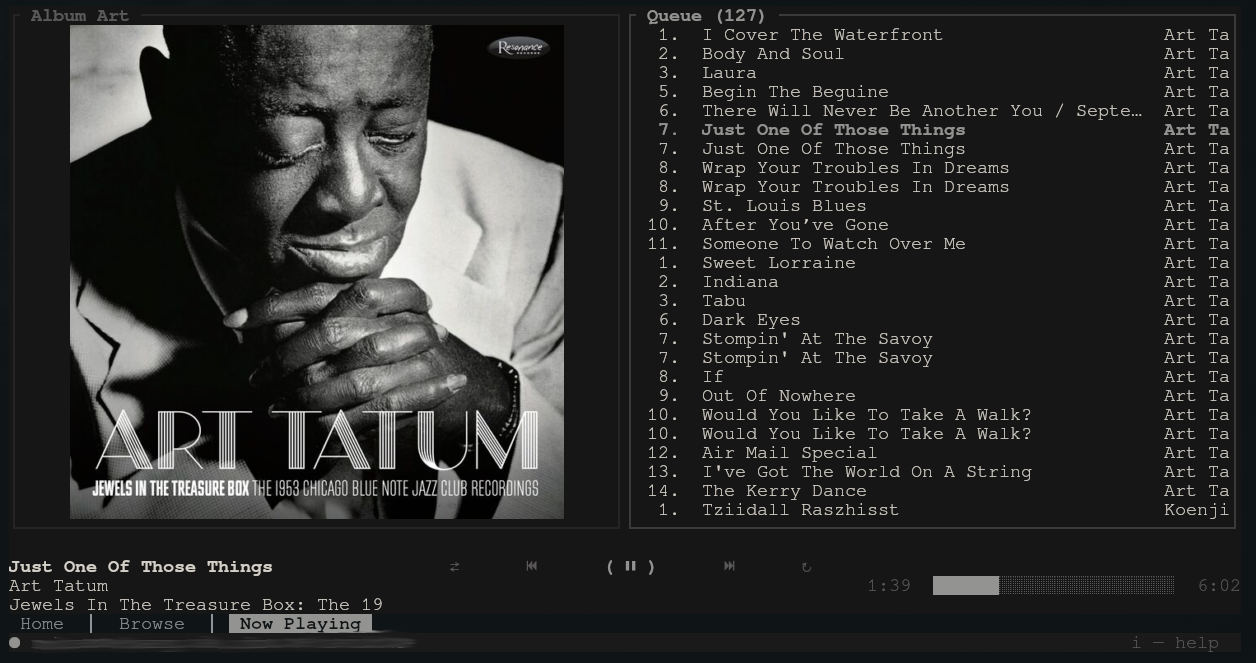
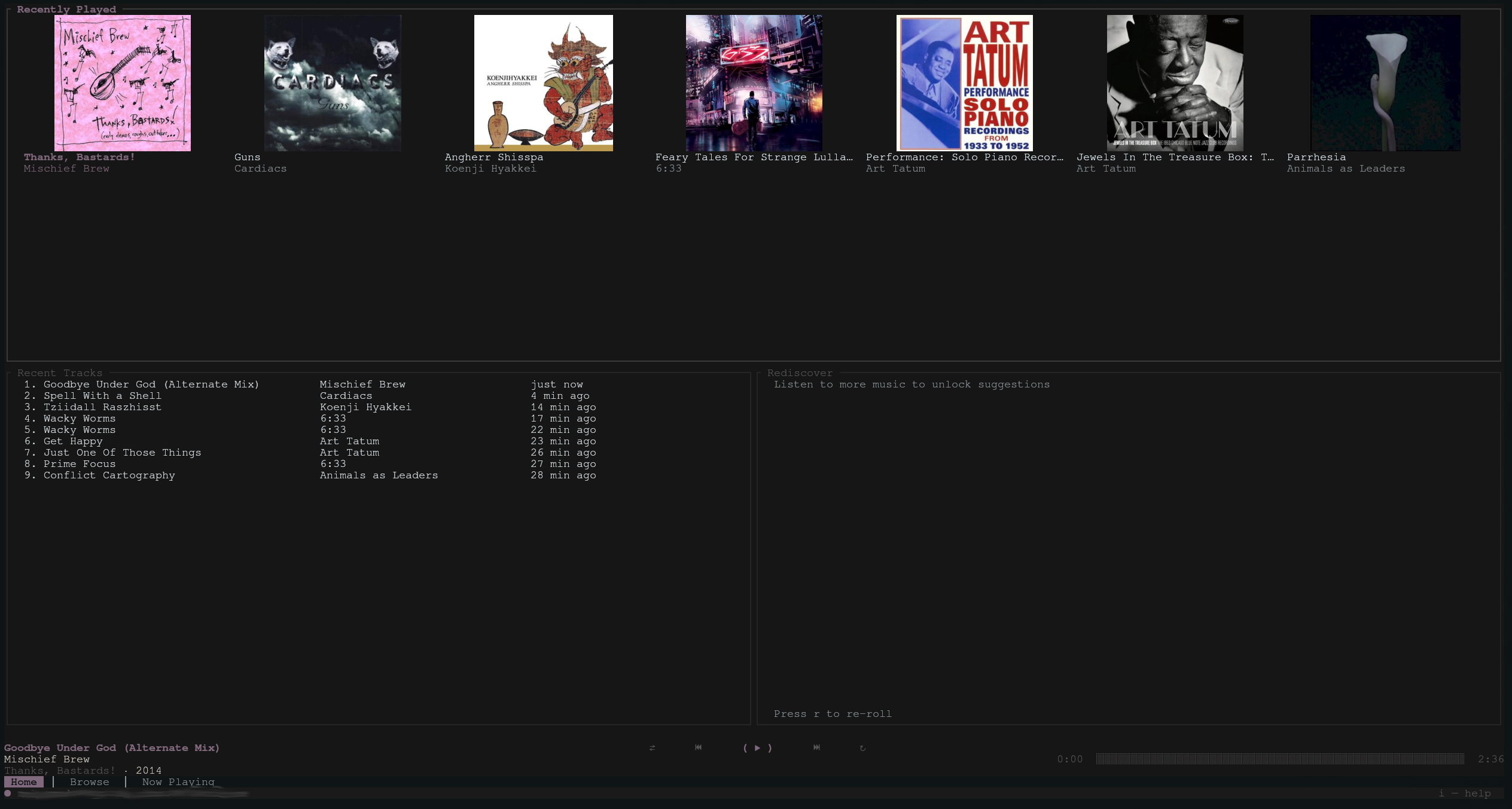
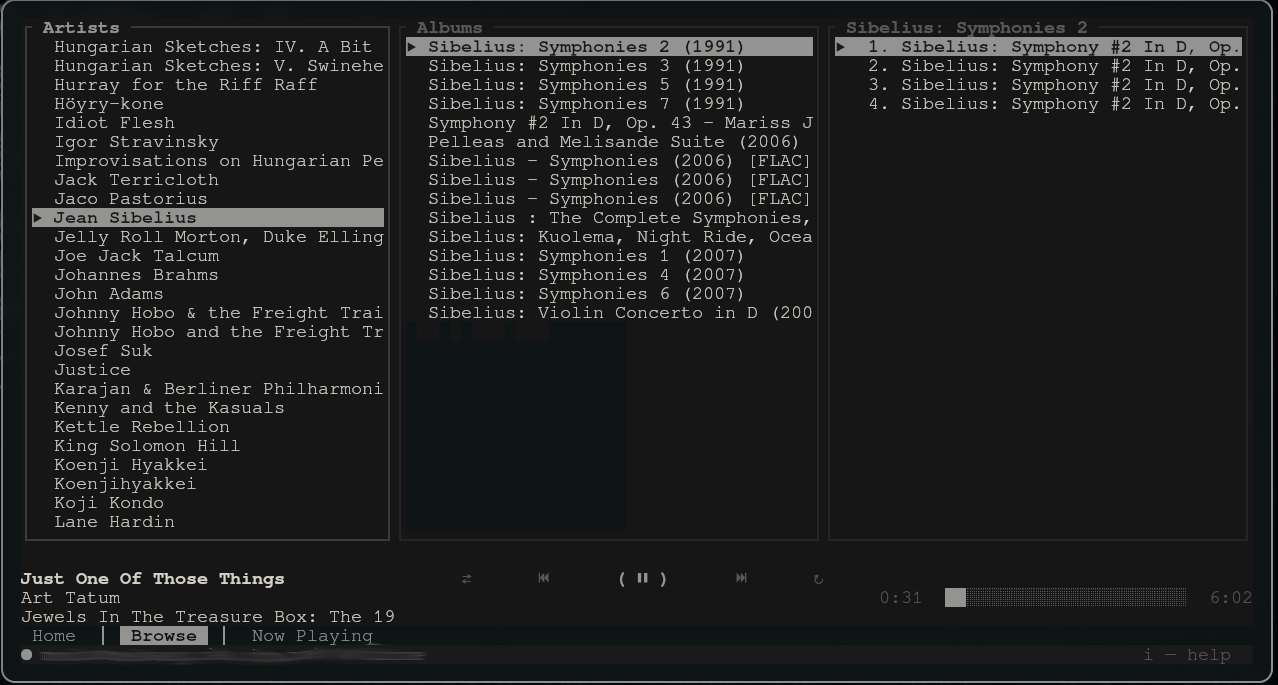
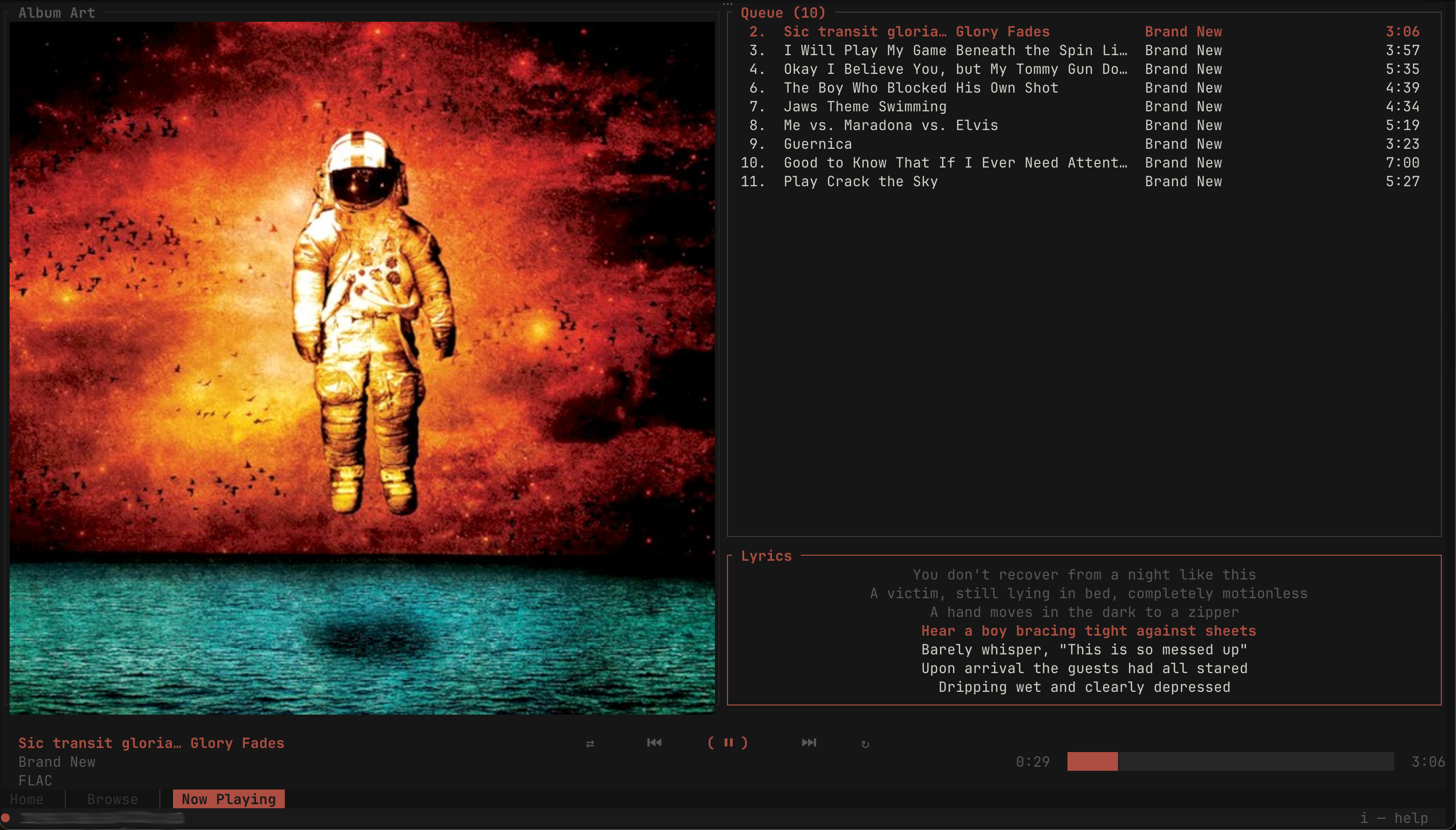
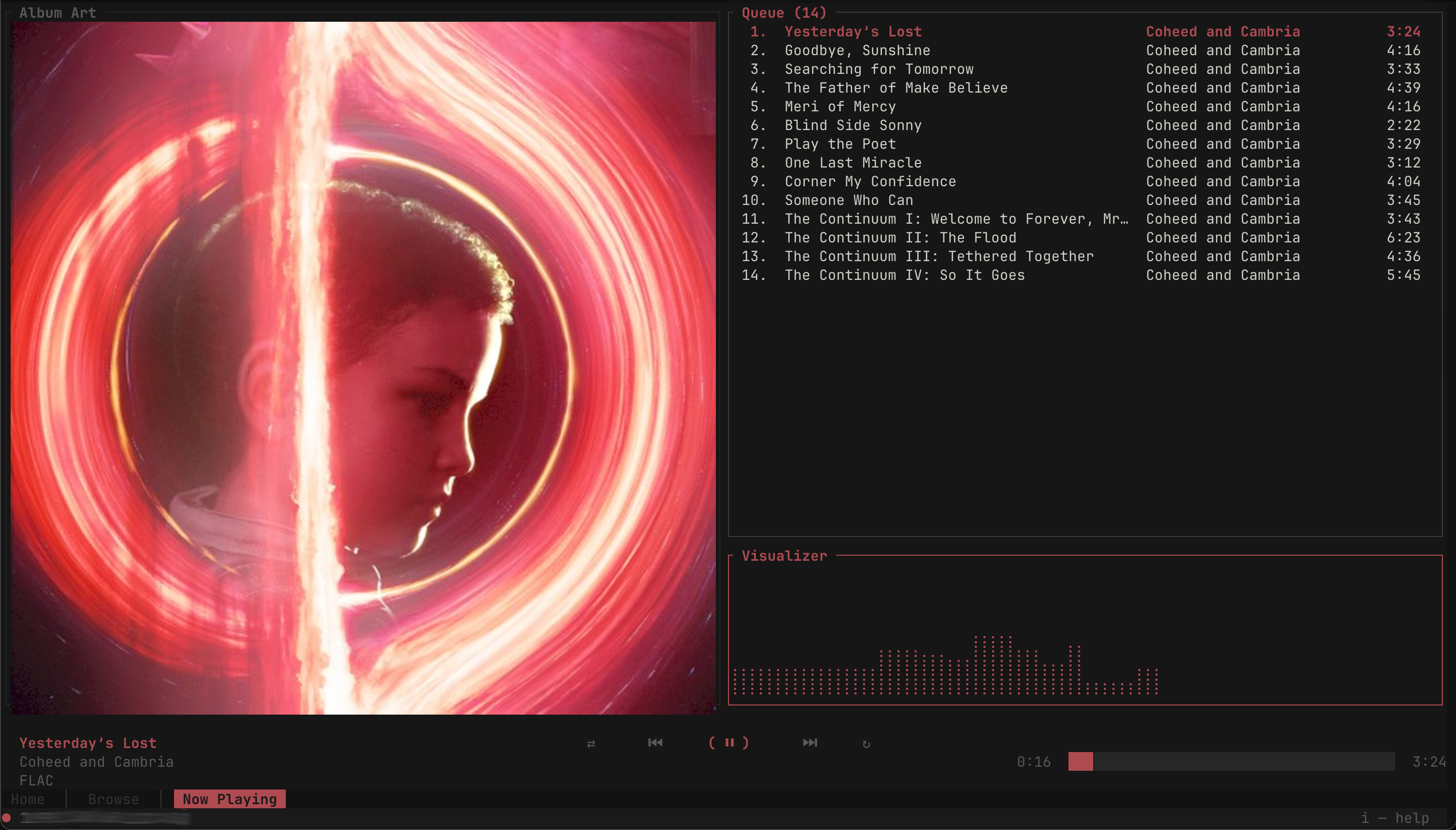
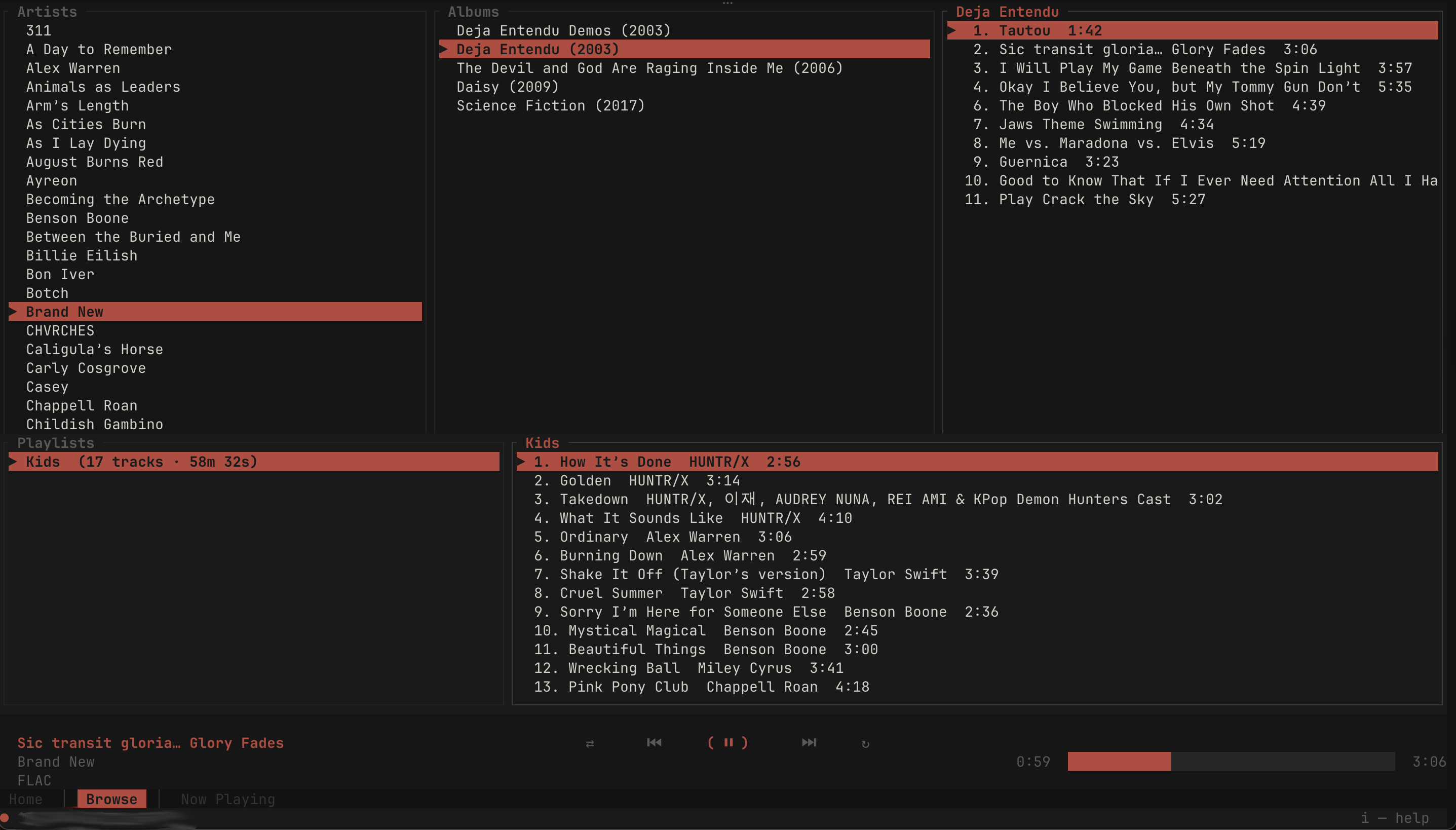
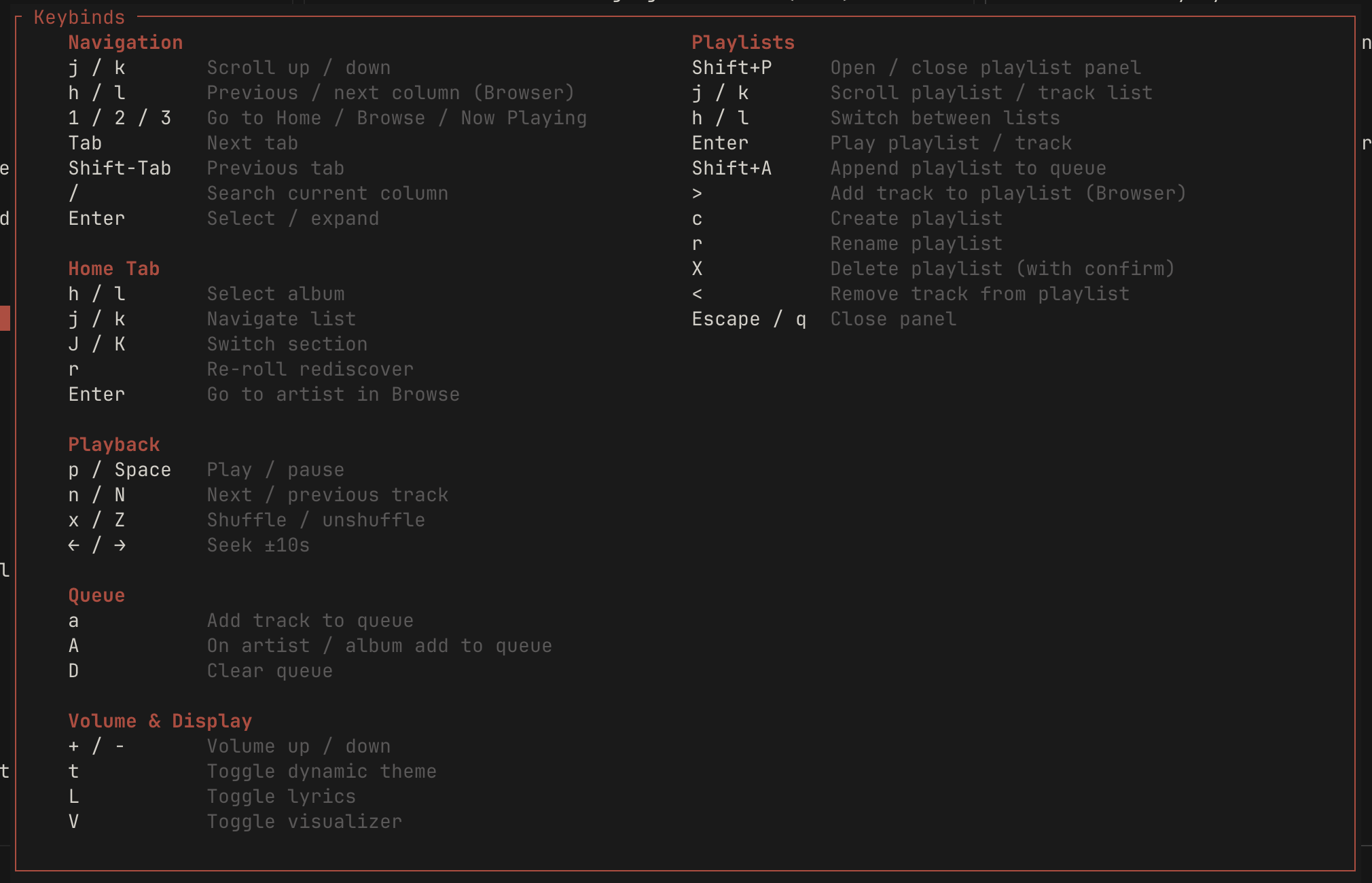
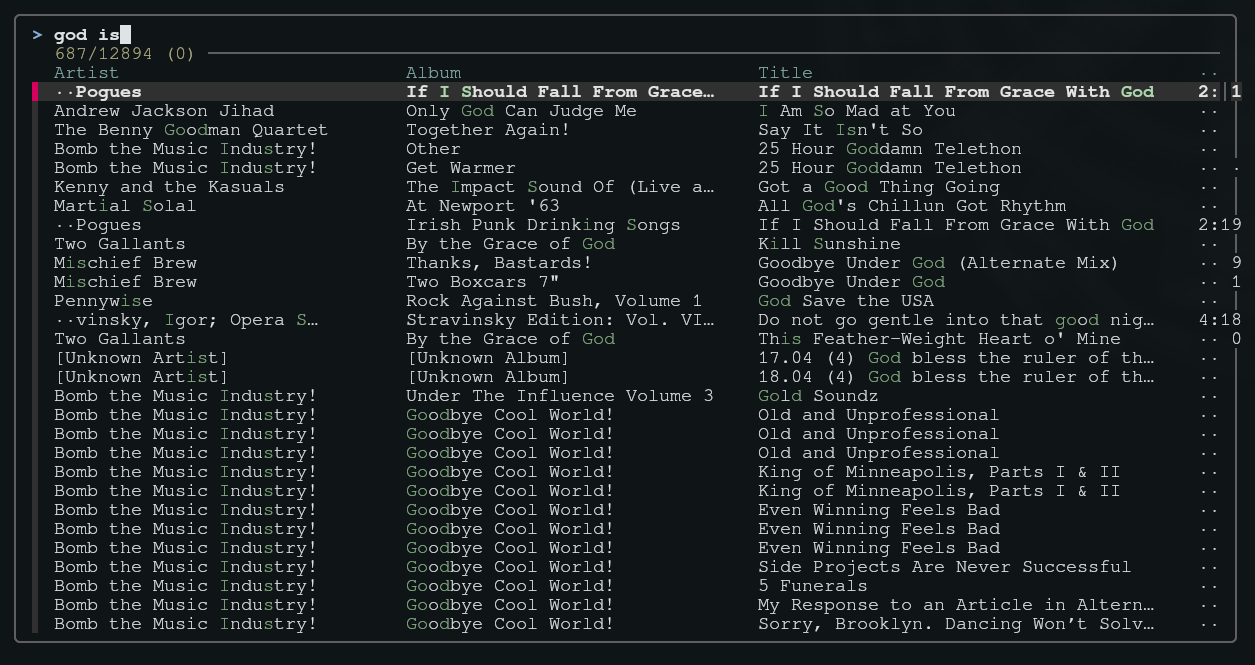
Fuzzy finder
Full-library fzf (or sk) flow.
Library metadata required for fuzzy finding to work properly. Enable it and configure refresh/arguments under [library] in docs/sample-config.toml. Ratune will then fill the library metadata. It can take a few minutes and fuzzy finding will be unavailble during that time, please be patient!
Customization
Theme, layout, now-playing lines, queue row template, tab bar, and more are configured in config.toml (see the sample config).
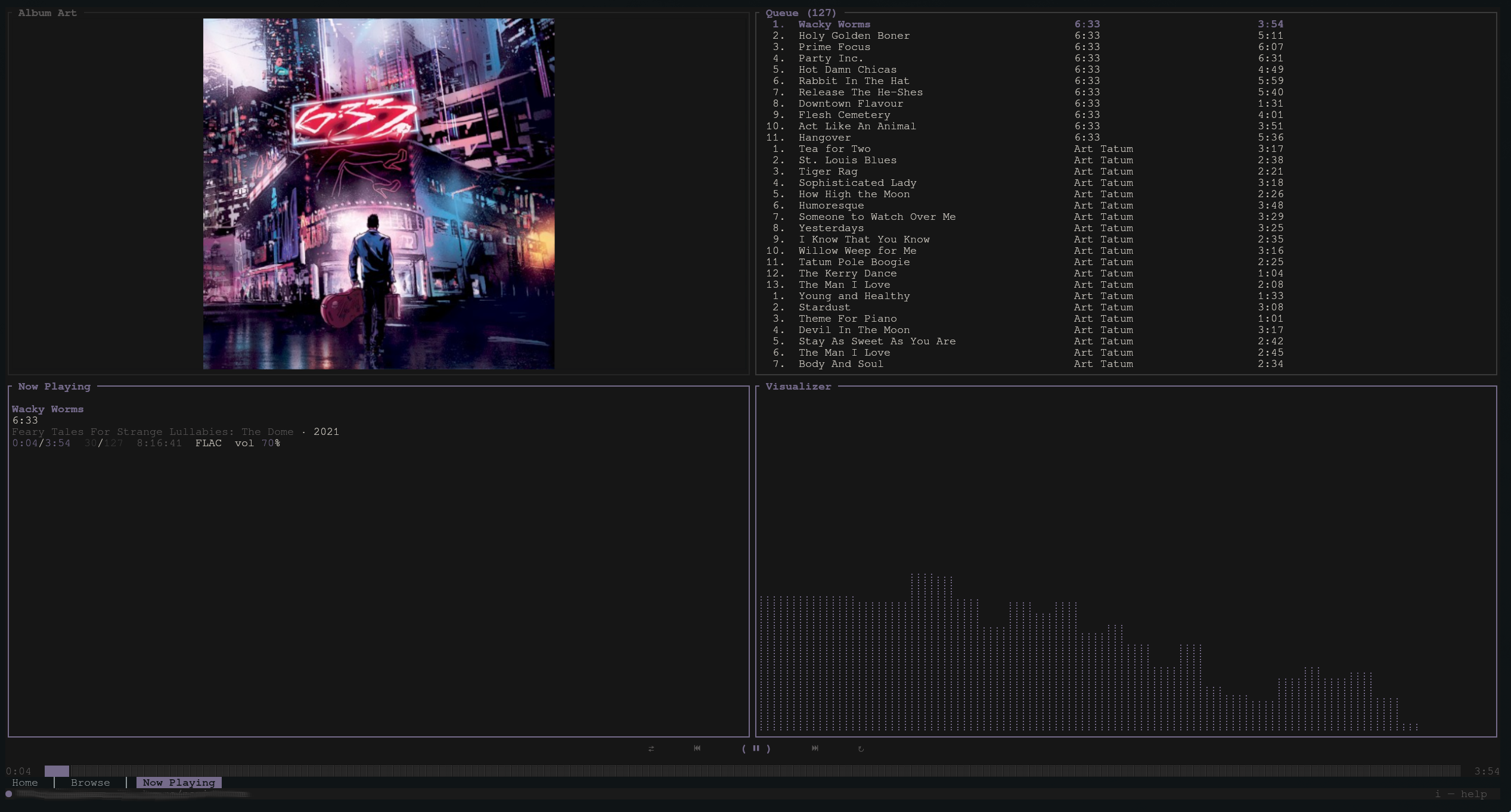
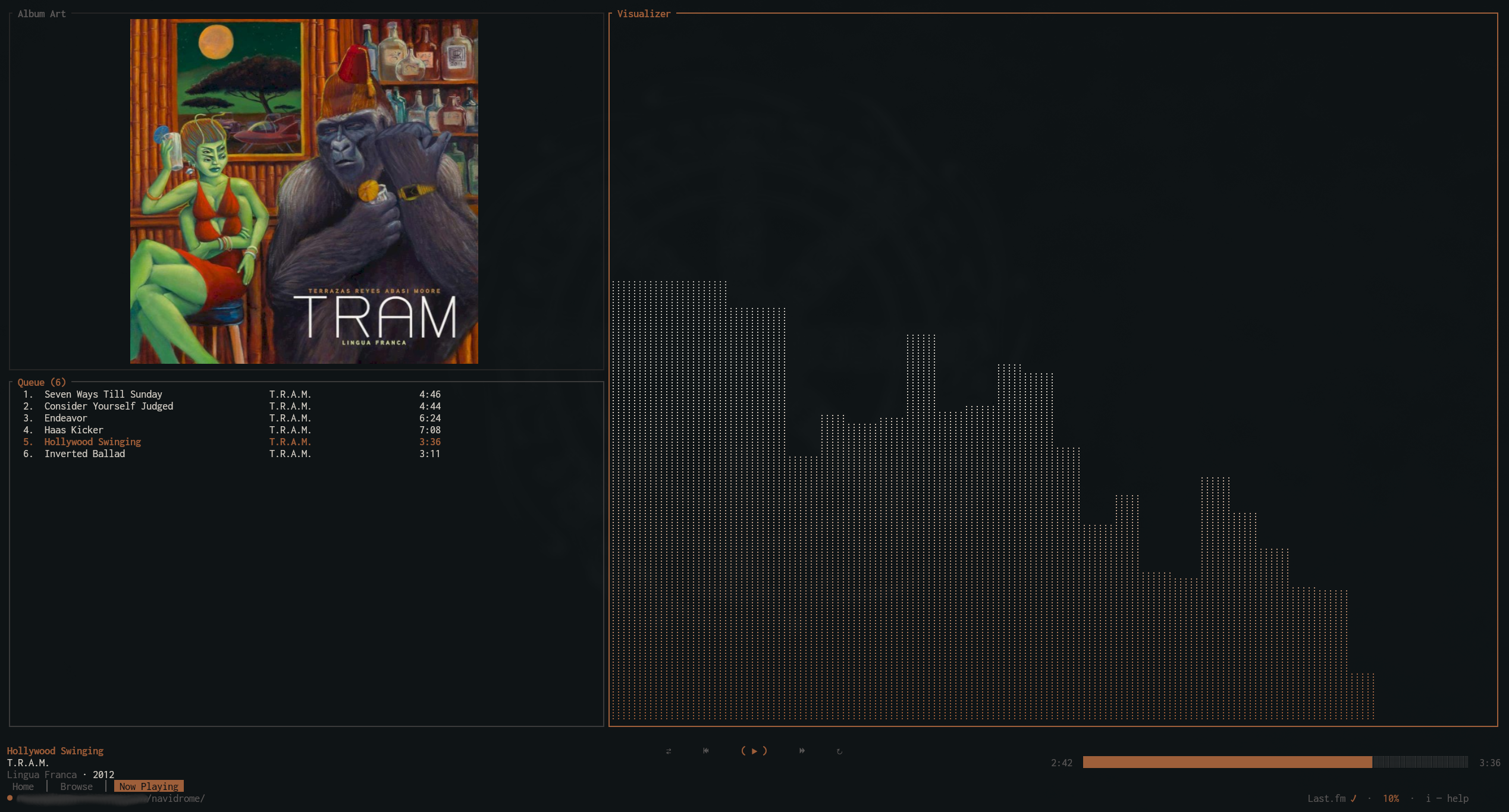
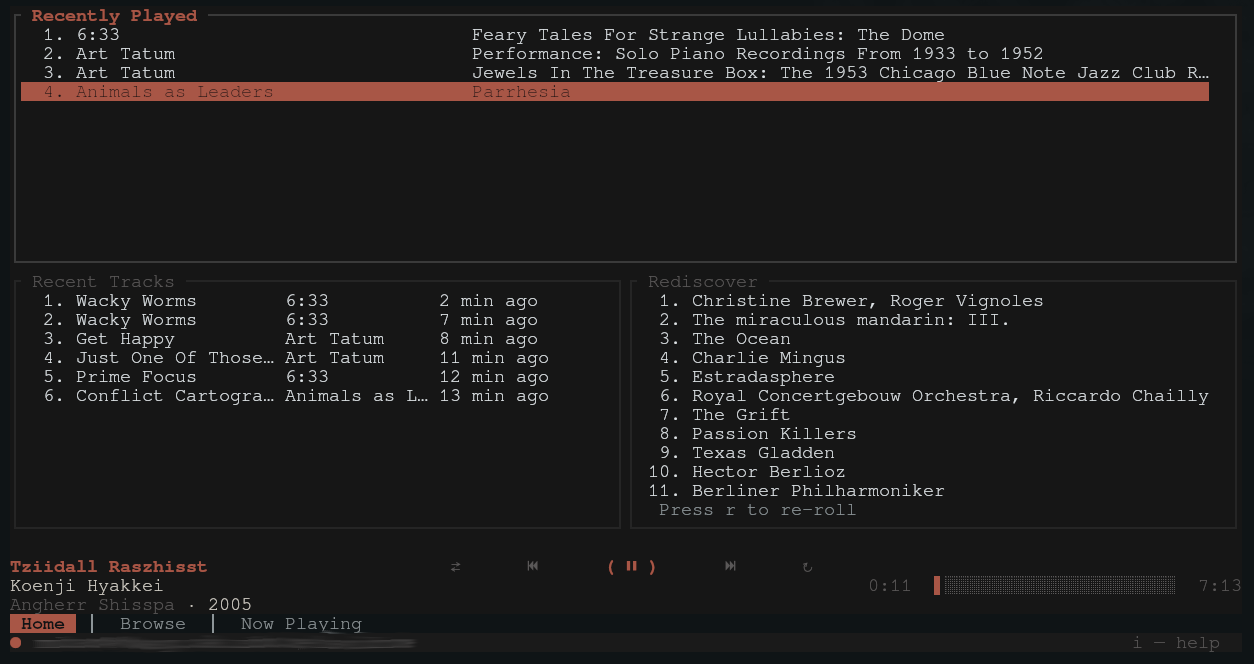
Colors can be based on terminal/os, dynamic based on the album art, or override to whatever you prefer. Transparency for background is also supported.
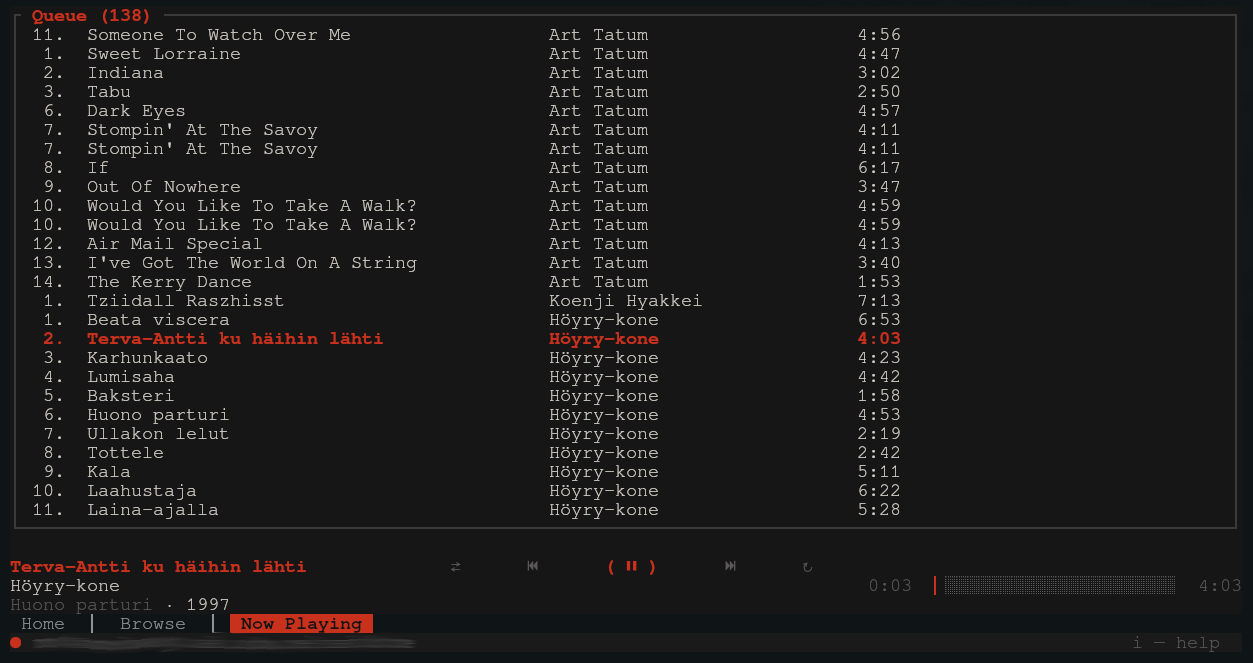
Album art, fzf, and visualizer features can be disabled for those desiring a minimalist experience:
tmux
For album art and focus events inside tmux:
set -g allow-passthrough on
set -g focus-events on
Project layout
This repository is a Cargo workspace with four crates:
| Crate | Role |
|---|---|
ratune | TUI, event loop, state, art, fzf, MPRIS, scrobbling |
ratune-subsonic | Subsonic HTTP client and models |
ratune-scrobble | Last.fm / Libre.fm Audioscrobbler client and play thresholds |
ratune-player | Audio (rodio), gapless, sample tap for the visualizer |
Details: docs/ARCHITECTURE.md.
Data on disk
| Path | Purpose |
|---|---|
~/.config/ratune/config.toml | Config |
~/.config/ratune/state.json | UI state, queue, browser position, Now Playing pane focus |
~/.local/share/ratune/history.json | Play history |
~/.local/share/ratune/scrobble-queue.json | Pending Last.fm scrobbles (offline retry) |
~/.cache/ratune/ | Track cache, library index JSON, etc. |
Credits
Ratune is based on playterm by awriterandtheword-rgb (MIT). The original project is licensed under MIT and served as the foundation for this work. Ratune has since diverged significantly with new features, performance improvements, and UI changes.
Acknowledgements
- ratatui — TUI
- rodio — playback
- Navidrome — test target server
- LRCLib — default lyrics source
- rmpc — ideas for navigation and art
License
Contributors


Similar repos


Languages
Rust
99.8%
A modern highly-customizable Subsonic TUI client built in Rust.
Rust
75
42 commits
updated Sep 10, 2026
See what people are saying (1)
README
Ratune
A terminal music player for Subsonic-compatible servers. Built in Rust with Ratatui, featuring album art graphics (including in tmux), gapless playback, internet radio, fuzzy finder support, and a highly configurable UI.
Why Ratune?
Ratune was built to bring together a combination of features often missing from Subsonic players: fuzzy navigation, a visually rich UI with album art, deep customization, and a fully terminal-based workflow. Many players excel at a few of these. Ratune aims to cover them all.
Table of contents
- Highlights
- Screenshots
- Requirements
- Installation
- Configuration
- Default keybinds
- Mouse support
- tmux
- Project layout
- Data on disk
- Credits
- Acknowledgements
- License
Highlights
- Playback: Gapless queue, seek, shuffle/unshuffle, and playlist management.
- Internet radio: Stations from your server
- Album Art: Display using Kitty graphics and ratatui-image (see link for compatible terminals)
- Lyrics: Synced lyrics via LRCLib (default), NetEase Cloud Music, or your Subsonic server. Optional on-disk cache for offline use
- Offline mode: Starts without a server when needed; plays cached tracks, browse from library index, and detects reconnect automatically
- Visualizer: FFT spectrum analyzer.
- Fuzzy finder: Optional library index + external picker (fzf/skim) for fast track selection.
- Folder navigation: Optional Browse layout that follows server music folders for servers that provide it.
- Customization: Keybinds, theme, layout, now-playing lines, queue row template inspired by ncmpcpp.
- Mouse support: Click tabs, transport controls, the seek bar, queue rows, and browse/home lists.
- Integration: Linux MPRIS (media keys,
playerctl). - Scrobbling: Last.fm and Libre.fm (Audioscrobbler), plus optional Subsonic
/scrobblefor Navidrome play counts.
Requirements
Runtime (prebuilt binary or any install)
These apply whenever you run Ratune, including GitHub Releases assets.
- Server: A Subsonic-compatible music server (Navidrome is a good default).
- Linux audio: ALSA userspace library at runtime — e.g. Debian/Ubuntu
libasound2, Fedoraalsa-lib, Archalsa-lib. (You do not need-dev/*-develpackages just to run a prebuilt binary.) - Linux D-Bus:
libdbus-1at runtime — e.g. Debian/Ubuntulibdbus-1-3, Fedoradbus-libs, Archdbus. Required by the Linux binary (scrobble keyring, etc.); usually already installed on desktop Linux. - macOS audio: Uses Core Audio via the system toolchain; no separate audio library install for typical use.
- Optional:
fzforskonPATHif you use the library fuzzy picker (see[library]in the sample config).
Prebuilt archives on Releases: Linux x86_64 (x86_64-unknown-linux-gnu), macOS Apple Silicon (aarch64-apple-darwin), and macOS Intel (x86_64-apple-darwin). Other targets need a local build (or your own packaging).
Build from source
Everything under Runtime, plus:
- Rust: Stable toolchain (
rustupdefault stable is fine). - Linux build deps: ALSA and D-Bus headers plus
pkg-config— e.g. Debian/Ubuntulibasound2-dev+libdbus-1-dev+pkg-config, Fedoraalsa-lib-devel+dbus-devel, Archalsa-lib+dbus.
Installation
Current options are:
Binaries AUR crates.io Homebrew Nix From source.
Binary Releases (Linux x86_64, macOS)
Download the .tar.gz for your platform from Releases.
Extract and put ratune on your PATH.
Arch Linux (AUR)
Install the -bin package with an AUR helper, e.g.:
yay -S ratune-bin
# or: paru -S ratune-bin
ratune-bin on AUR ships the same Linux binary as GitHub Releases.
crates.io
cargo install ratune
This builds from the published crate. You need a Rust toolchain; on Linux, install ALSA and D-Bus development packages first (same as Build from source).
macOS (Homebrew)
brew tap acmagn/ratune
brew trust --formula acmagn/ratune/ratune
brew install ratune
Nix
nix profile install github:acmagn/ratune
That puts ratune on your PATH. To try it without installing: nix run github:acmagn/ratune.
Home Manager (package only; config stays at ~/.config/ratune/config.toml):
{
  imports = [ inputs.ratune.homeManagerModules.default ];
  programs.ratune.enable = true;
}
Build from source
Use this when you want the latest git checkout, you’re on an OS/arch without a prebuilt, or you’re developing Ratune.
Linux: install ALSA and D-Bus headers and pkg-config before the first build:
# Debian / Ubuntu
sudo apt install libasound2-dev libdbus-1-dev pkg-config

# Fedora / RHEL
sudo dnf install alsa-lib-devel dbus-devel pkg-config

# Arch
sudo pacman -S alsa-lib dbus
Clone and build:
git clone https://github.com/acmagn/ratune.git
cd ratune
cargo build --release
The binary is target/release/ratune. Check the build with ratune --version (or -V).
Git hooks (optional): Lefthook runs cargo fmt before each commit when Rust files are staged. Install lefthook once (e.g. Arch: pacman -S lefthook, Homebrew: brew install lefthook, or a standalone binary), then from the repo root:
lefthook install
Album art in the terminal: from a source checkout you can run a small ratatui-image harness (same capability query as the real UI) to verify your terminal or tmux passthrough. Use any JPEG/PNG (etc.) on disk:
# Cargo workspace root (this repo layout)
cargo run -p ratune --example art_image_test -- /path/to/cover.jpg

# Or from the ratune/ crate directory only
cargo run --example art_image_test -- /path/to/cover.jpg
Press q or Esc to exit.
Configuration
On first start, ratune creates a short default file at ~/.config/ratune/config.toml (server fields plus common UI defaults). For every key with comments, use the sample file and copy the sections you need: docs/sample-config.toml.
Connecting
Set Subsonic url and username, then choose how to supply the secret (most secure first):
- OS keyring (default) — leave
password = ""or remove field entirely. On Linux choose the backend withpassword_keyring(see below). password_command— run a shell command; stdout is the secret (e.g.secret-tool,pass, KeePassXC CLI).- Plaintext —
password = "..."in the file, or env vars (convenient for scripts; avoid in shared configs).
Keyring
Leave password empty. Ratune uses keyring-core with a platform store: on Linux you pick keyutils (kernel keyring, default) or secret-service (gnome-keyring / KWallet); Keychain on macOS; Credential Manager on Windows. On first run you are prompted once (inquire); the secret is stored under service ratune and user {url}|{username} — not in config.toml.
password_keyring = "keyutils"(default) — kernel keyutils. Lightweight and fine for a server password you can re-enter after reboot; keys may not survive reboot (persistence).password_keyring = "secret-service"— Secret Service via libsecret (same wallet assecret-tool, browser password managers, etc.). Better when you want the password to persist across reboots like other desktop secrets.
If the chosen store is unavailable (e.g. headless container) you get a one-time session prompt, use password_command or SUBSONIC_PASS instead.
[server]
url = "https://your-navidrome.example.com"
username = "you"
password = "" # or remove entirely
# password_keyring = "keyutils"       # default on Linux
# password_keyring = "secret-service" # gnome-keyring / KWallet
External secret store (password_command)
When you already use a wallet (e.g. secret-tool, pass, KeePassXC):
[server]
url = "https://your-navidrome.example.com"
username = "you"
password_command = "secret-tool lookup --label=ratune service subsonic user you"
The command runs under /bin/sh -c on Unix (or cmd /C on Windows); only trimmed stdout is used. Plaintext password or SUBSONIC_PASS take precedence if set.
Plaintext
password = "your_password"
Subsonic auth uses a random salt per request and MD5(secret + salt) (Navidrome / Subsonic API).
Environment overrides (optional)
Overrides the config file when set:
export SUBSONIC_URL="https://your-server.example.com"
export SUBSONIC_USER="admin"
export SUBSONIC_PASS="your_password"
TERMUSIC_SUBSONIC_* variants are also accepted (see sample config).
Snippets: player, cache, theme, fzf
[player]
default_volume = 70
max_bit_rate = 0
queue_loop = true

[cache]
enabled = true
max_size_gb = 2
# cache_starred = false         # prefetch favorite tracks while online (Subsonic star API); default: false
# cache_starred_parallelism = 2 # concurrent favorite-track downloads when cache_starred is true

[ui]
# Only `album_art_backend` lives here; NP strip/queue/toggles → `[ui.nptab]`, `[ui.row_now_playing]`, …

[theme]
preset = "dynamic"

[library]
# enabled, index path, fzf binary, fzf args, …  → see sample-config.toml

[radio]
enabled = true
# fetch_station_icons = true   # homepage favicons when no server logo
Remapping is done in [keybinds]; colors in [theme]; now-playing strip vs queue are different keys — see the sample and in-app help (i).
Favorites
Ratune syncs favorites with your server through the Subsonic star / unstar / getStarred2 API. Favorited items show a ★ in browse lists and the Now Playing queue.
- Toggle favorite:
fon the focused song, album, artist, or queue row (toggle_favoritein[keybinds]) - Browse favorites:
Fon the Browse tab — songs, albums, and artists fromgetStarred2 - Queue from favorites: same keys as Browse (
Enterto play,a/Ato append, etc.) - Albums and artists can be favorited too (Navidrome supports all three via the star API)
- Offline: the favorites list is cached at
~/.cache/ratune/favorites.json; openFwithout a connection to browse the last sync and play tracks already in the audio cache [cache].cache_starred = true: while online, prefetch favorite songs into the offline cache (samemax_size_gbpool as play-time caching)
Ratings
Ratune can sync per-user song ratings with your server through the Subsonic setRating API (1–5 stars, or 0 to clear). Ratings are off by default, enable them in config if you want the UI, keybinds, and MPRIS export.
[ratings]
enabled = true
# star_filled = "★"
# star_empty = "☆"
# Optional: change or remove brackets around the rating ("" = none)
# bracket_open = "["
# bracket_close = "]"
When enabled, press Shift+1 … Shift+5 to rate (most US terminals deliver these as ! @ # $ %; Shift+0 / ) clears).
- Display: rated items show
[⭑⭑⭑⭒⭒]via{rating}in the queue template (after duration by default). Browse lists append the rating after the title. - Rate:
Shift+1…Shift+5on the focused song, album, or artist (rate_song_1… in[keybinds]) - Clear rating:
Shift+0/)(rate_song_clear) - MPRIS (Linux): current track rating as
xesam:userRating(0.0–1.0) - Requires an online server connection (like favorites)
Unrated tracks show nothing until you rate them.
Internet radio
Ratune plays internet radio stations configured on your Subsonic-compatible server — no separate stream proxy; the client connects directly to each station URL.
- Enable / disable:
[radio] enabled = true(default) indocs/sample-config.toml; setfalseto disable radio entirely - Station picker: default keybinding
Shift+Rto browse, play, add, edit, and delete stations (toggle_radioin[keybinds]) - Live playback: progress shows ● LIVE and elapsed listen time; n / N change stations while tuned in
- Formats: direct Icecast/SHOUTcast URLs (MP3, AAC, and Ogg Vorbis).
- Station art: Navidrome-uploaded logos, or optional homepage favicon fetch (
[radio] fetch_station_icons)
Folder navigation (Browse)
When enabled, the Browse tab can switch between the usual artist / album / track columns and a folder layout that mirrors how your server organizes files on disk (or per-library roots). This uses the Subsonic APIs getMusicFolders, getIndexes, and getMusicDirectory (tested with Navidrome and gonic).
Enable in config ([ui.browsetab] in docs/sample-config.toml):
[ui.browsetab]
folder_navigation = true
# mode = "artists"   # default on startup (default)
# mode = "files"     # start in folder view when folder_navigation is true
Toggle at runtime: default Ctrl+b (toggle_folder_browse in [keybinds]). Switches between folder view and artist browsing and jumps to the Browse tab. If you start in files mode, the first toggle to artists loads the artist list if it was not fetched yet.
Scrobbling
Ratune can scrobble listens to Last.fm or Libre.fm and optionally notify your Subsonic server so Navidrome records play counts.
Full reference: [scrobble] in the sample config.
Enable
Register an API account at Last.fm (or Libre.fm equivalent), then add a [scrobble] block.
[scrobble]
enabled = true
service = "lastfm"   # or "librefm"
api_key = "your_application_key"
scrobble_to_server = true   # Subsonic /scrobble (default: true; works without Last.fm)
Same options for secret handling as Subsonic password are provided.
keyring or secret commands
To not store secrets in the file (synced dotfiles, shared machines, etc.), leave api_secret / session_key empty and use either command in config or ratune functions to save to the keyring.
| Secret | Resolution order |
|---|---|
api_secret | config → api_secret_command → OS keyring (lastfm|api_secret) |
session_key | config → session_key_command → OS keyring (lastfm|session) |
Keyring entries use service ratune. On Linux, scrobble secrets always use Secret Service (gnome-keyring / KWallet). Env vars (LASTFM_API_SECRET, LASTFM_SESSION_KEY, …) override the file, same as Subsonic.
ratune scrobble-api-secret --save-keyring
ratune scrobble-auth --save-keyring
Without --save-keyring, each command prints the value to paste into config instead.
If you previously saved scrobble secrets with an older build (kernel keyutils), re-run the commands above once and they will land in your desktop wallet instead.
plaintext
You can optionally store either/both of these as plaintext instead.
[scrobble]
enabled = true
service = "lastfm"   # or "librefm"
api_key = "your_application_key"
api_secret = "your_shared_secret"
session_key = "your_session_key"   # from `ratune scrobble-auth`
scrobble_to_server = true   # Subsonic /scrobble (default: true; works without Last.fm)
Get session_key once with ratune scrobble-auth (prints the key for config unless you pass --save-keyring).
Behaviour
- Now playing is sent when a track starts.
- Scrobble fires at min(
min_percent% of track length,max_listen_seconds). Defaults for Last.fm: 50%, 4 minutes. Tracks ≤min_track_seconds(default 30 s) are skipped. - Subsonic scrobble (if enabled) uses a separate local threshold (default: 50%, 30 s cap).
- Both sets of thresholds are optional under
[scrobble.thresholds.local]and[scrobble.thresholds.audioscrobbler]— see the sample config. Audioscrobbler defaults follow Last.fm’s scrobbling rules; deviating may cause ignored scrobbles. - Failed Last.fm submissions are queued in
~/.local/share/ratune/scrobble-queue.jsonand retried on the next launch (entries older than 14 days are dropped). - The status bar shows the service name when scrobbling is enabled; a ✓ appears briefly after a successful submit. Pending queue items show as
Last.fm (N).
Default keybinds
These are defaults; everything is overridable in config.toml. Press i in the app for the list that matches your file.
| Key | Action |
|---|---|
1 / 2 / 3 | Home / Browse / Now playing |
Tab | Next tab (wrap) |
j / k | Move selection |
h / l | Columns / home album strip |
Enter | Open / play |
a / A | Add track / add all |
Ctrl+r | Replace queue |
p / Space | Play / pause |
n / N | Next / previous |
f / F | Toggle favorite / toggle favorites panel (Browse) |
x / z | Shuffle / unshuffle |
Q | Toggle queue loop |
Shift+R | Internet radio station picker |
Ctrl+g | Now Playing: radio pane ↔ library queue |
+ / - | Volume |
← / → | Seek (Now playing) |
/ | Search |
L | Lyrics |
V | Visualizer |
P | Playlist overlay (Browse): r rename, c create, X delete |
> | Add to playlist (Browse) |
Ctrl+f | Library fzf picker (if configured) |
Ctrl+b | Toggle folder / artist browse (if [ui.browsetab] folder_navigation = true) |
t | Toggle dynamic theme |
i | Help |
q | Quit |
Mouse support
Ratune captures pointer input when your terminal supports it. Keyboard navigation remains fully available; mouse clicks dispatch the same actions as the equivalent keys where that makes sense.
| Area | Click |
|---|---|
| Tab bar | Switch Home / Browse / Now playing |
| Transport row | Shuffle (⇄), previous, play/pause, next, queue loop (↻) |
| Progress bar | Seek to position |
| Browse | Select artist, album, or track; folder mode: directory or preview row |
| Home | Recent albums (including art strip), recent tracks, rediscover rows |
| Now playing | Queue row to select; double-click same row to play; radio pane row to select station |
Scroll the mouse wheel over Browse lists to move the selection ([ui.browsetab] mouse_wheel_scroll_lines in the sample config).
Screenshots
Main UI
Fuzzy finder
Full-library fzf (or sk) flow.
Library metadata required for fuzzy finding to work properly. Enable it and configure refresh/arguments under [library] in docs/sample-config.toml. Ratune will then fill the library metadata. It can take a few minutes and fuzzy finding will be unavailble during that time, please be patient!
Customization
Theme, layout, now-playing lines, queue row template, tab bar, and more are configured in config.toml (see the sample config).
Colors can be based on terminal/os, dynamic based on the album art, or override to whatever you prefer. Transparency for background is also supported.
Album art, fzf, and visualizer features can be disabled for those desiring a minimalist experience:
tmux
For album art and focus events inside tmux:
set -g allow-passthrough on
set -g focus-events on
Project layout
This repository is a Cargo workspace with four crates:
| Crate | Role |
|---|---|
ratune | TUI, event loop, state, art, fzf, MPRIS, scrobbling |
ratune-subsonic | Subsonic HTTP client and models |
ratune-scrobble | Last.fm / Libre.fm Audioscrobbler client and play thresholds |
ratune-player | Audio (rodio), gapless, sample tap for the visualizer |
Details: docs/ARCHITECTURE.md.
Data on disk
| Path | Purpose |
|---|---|
~/.config/ratune/config.toml | Config |
~/.config/ratune/state.json | UI state, queue, browser position, Now Playing pane focus |
~/.local/share/ratune/history.json | Play history |
~/.local/share/ratune/scrobble-queue.json | Pending Last.fm scrobbles (offline retry) |
~/.cache/ratune/ | Track cache, library index JSON, etc. |
Credits
Ratune is based on playterm by awriterandtheword-rgb (MIT). The original project is licensed under MIT and served as the foundation for this work. Ratune has since diverged significantly with new features, performance improvements, and UI changes.
Acknowledgements
- ratatui — TUI
- rodio — playback
- Navidrome — test target server
- LRCLib — default lyrics source
- rmpc — ideas for navigation and art
License
Similar repos
Contributors
Languages
Rust
99.8%