OfficeDex is the first Al-Native VibeOfficing platform for documents, slides, and spreadsheets
See the code
VibeCoding writes code. VibeOfficing writes documents. Powered by OfficeDex.








Developers already VibeCode — describe intent, AI writes the program. VibeOfficing is the same paradigm for documents.
Say what you need → OfficeDex produces native
.docx/.pptx/.xlsxdirectly.
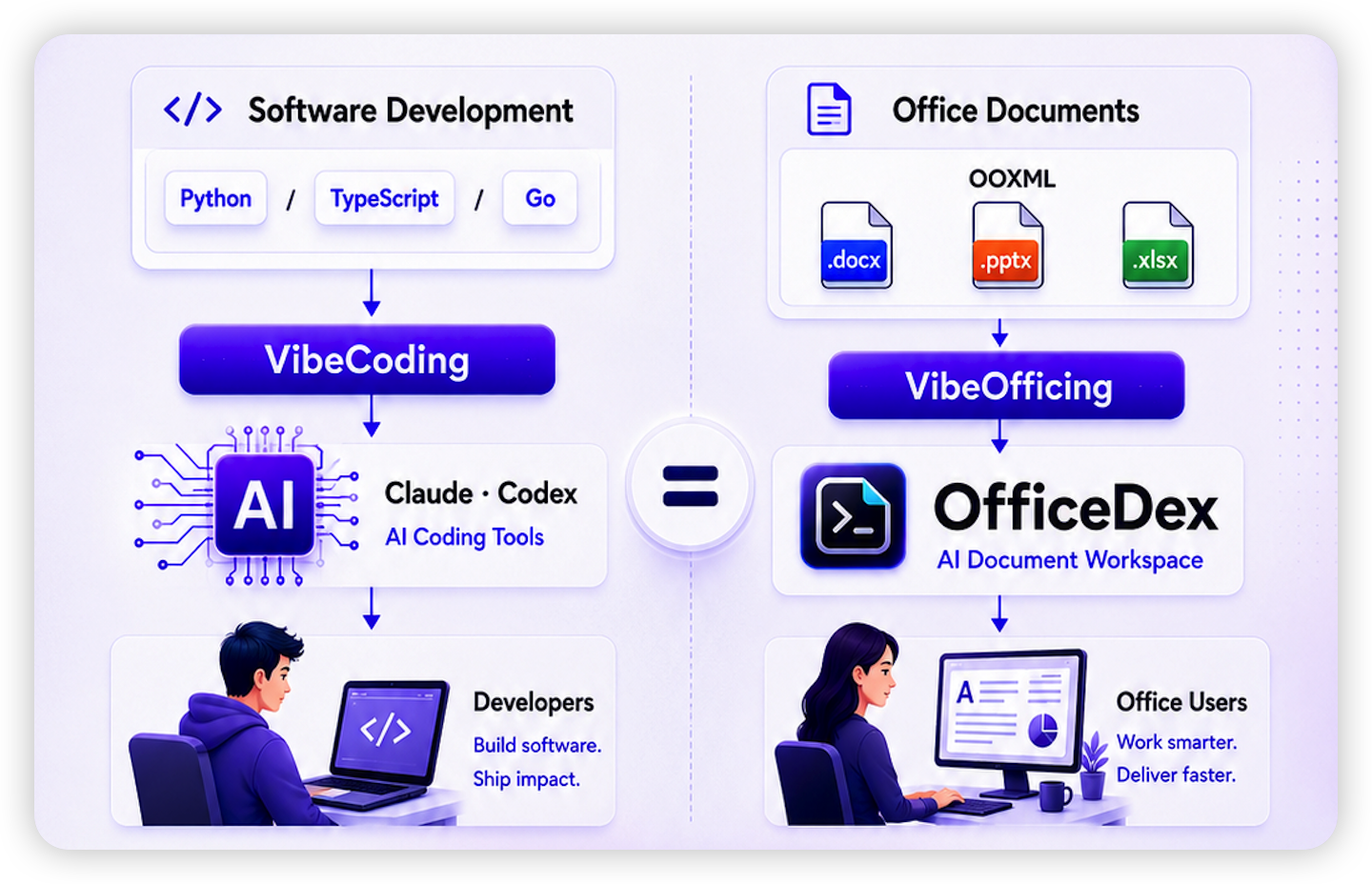
| Coding World | Office World | What AI Learns |
|---|---|---|
| Languages (Python / Go / TS) | Formats (OOXML: .docx / .pptx / .xlsx) | Syntax |
| Frameworks (React / Django / Spring) | Templates (quarterly reports, pitch decks, competitive analysis) | Structure |
| Design patterns (MVC / Observer) | Layout habits (heading hierarchy, color schemes, chart styles) | Style conventions |
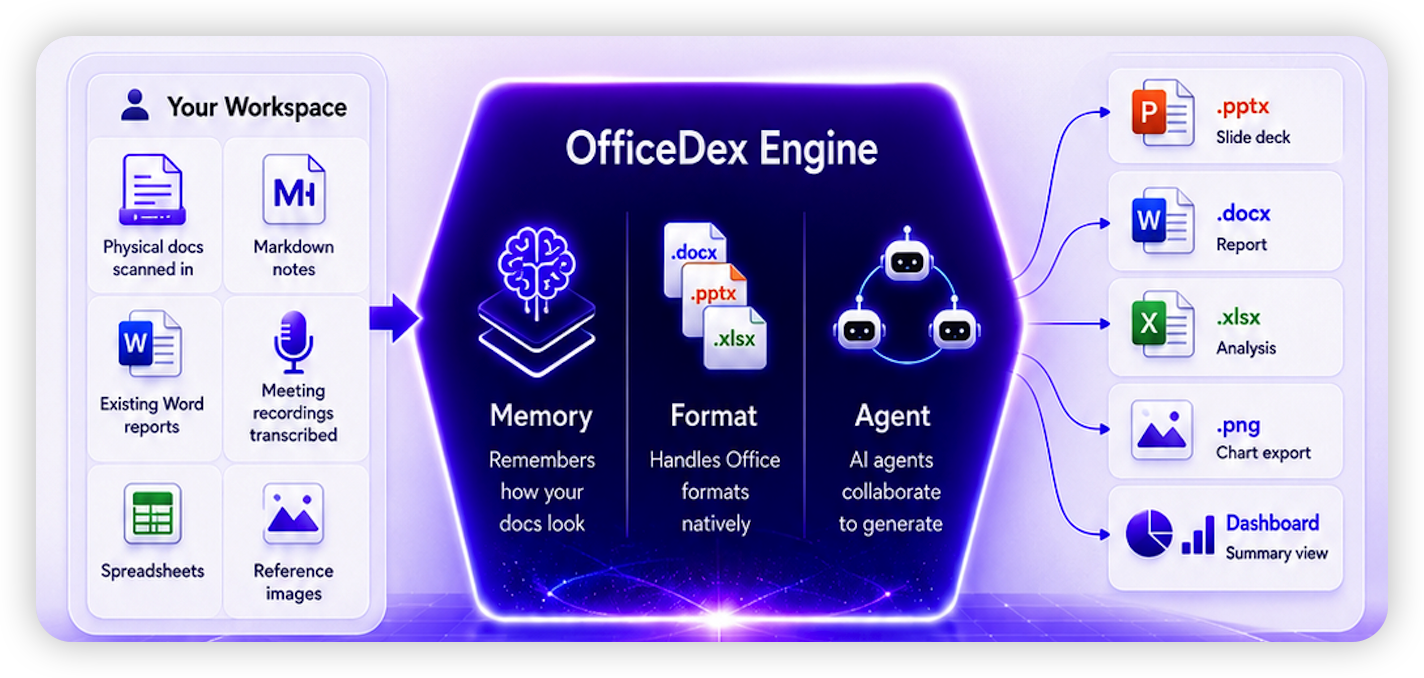
OfficeDex is not just "one prompt → one file." It's a document workspace with memory.
OfficeDex remembers how your documents look — not just what they say. Digitize your style into OfficeDex — never start from scratch again.
|
Input
|
Output 📄 |
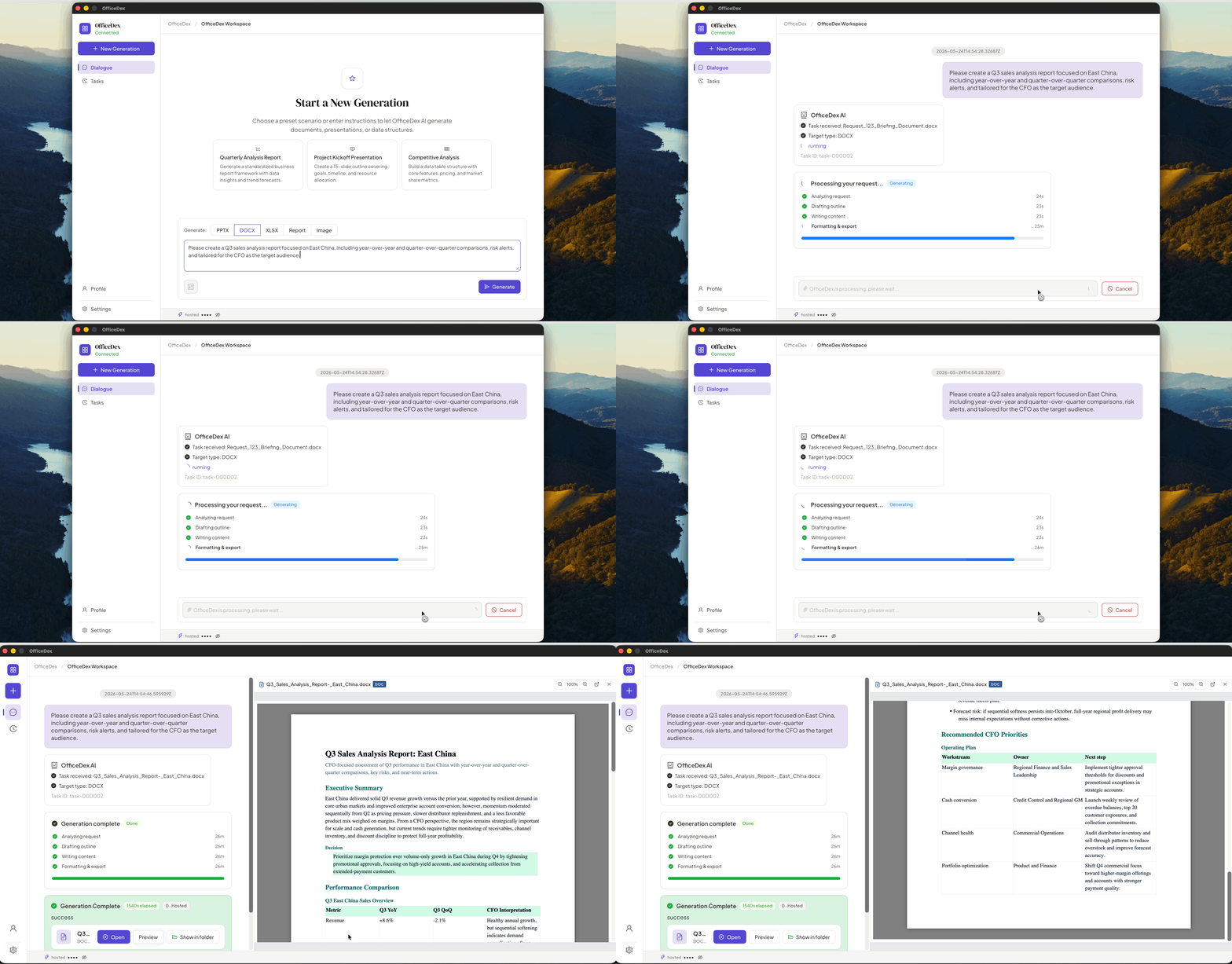
↑ From one sentence to a finished Word doc in under a minute.
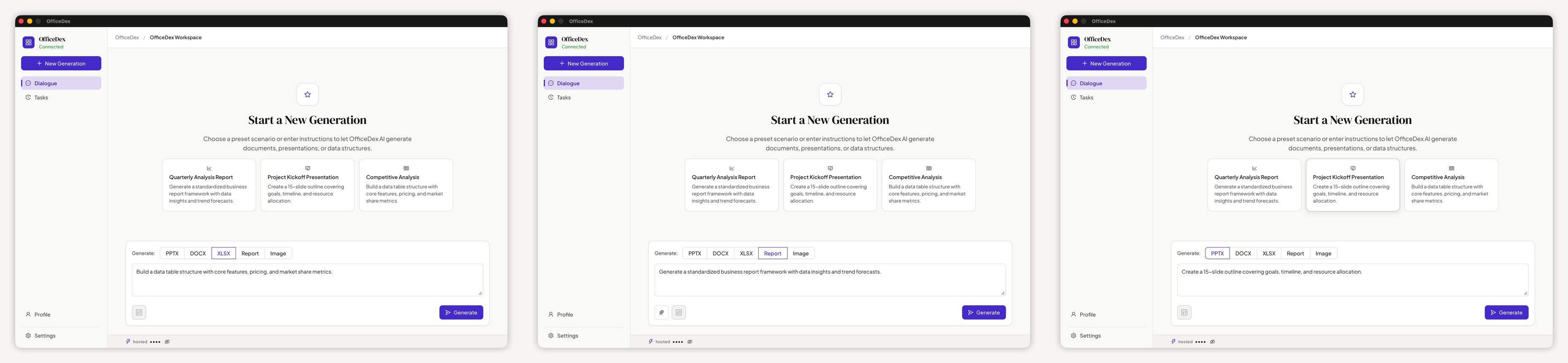
In one sentence: Tell it what you want — it generates Word / PPT / Excel for you.
| Dimension | Web AI assistants | CLI tools | OfficeDex |
|---|---|---|---|
| 🖥 Native desktop feel | In-browser | Terminal | ✅ Wails native window |
| 📂 Local-first files | Manual download | ✅ Direct save | ✅ Direct save + one-click open |
| 👀 Inline preview | Open Office needed | None | ✅ DOCX/PPTX/XLSX rendered inline |
| 🔌 Custom LLM | Vendor-locked | ✅ Any | ✅ Any + GUI config |
| 🎨 UI & interaction | Generic | Plain text | ✅ Purpose-built interaction prototype |
| 🔒 Data sovereignty | Cloud-first | ✅ Local | ✅ Local (hosted optional) |
| 💬 Mid-task interaction | Single-turn chat | None | ✅ AI asks back in real time, streaming status |
In a phrase: Stop formatting. Start VibeOfficing.
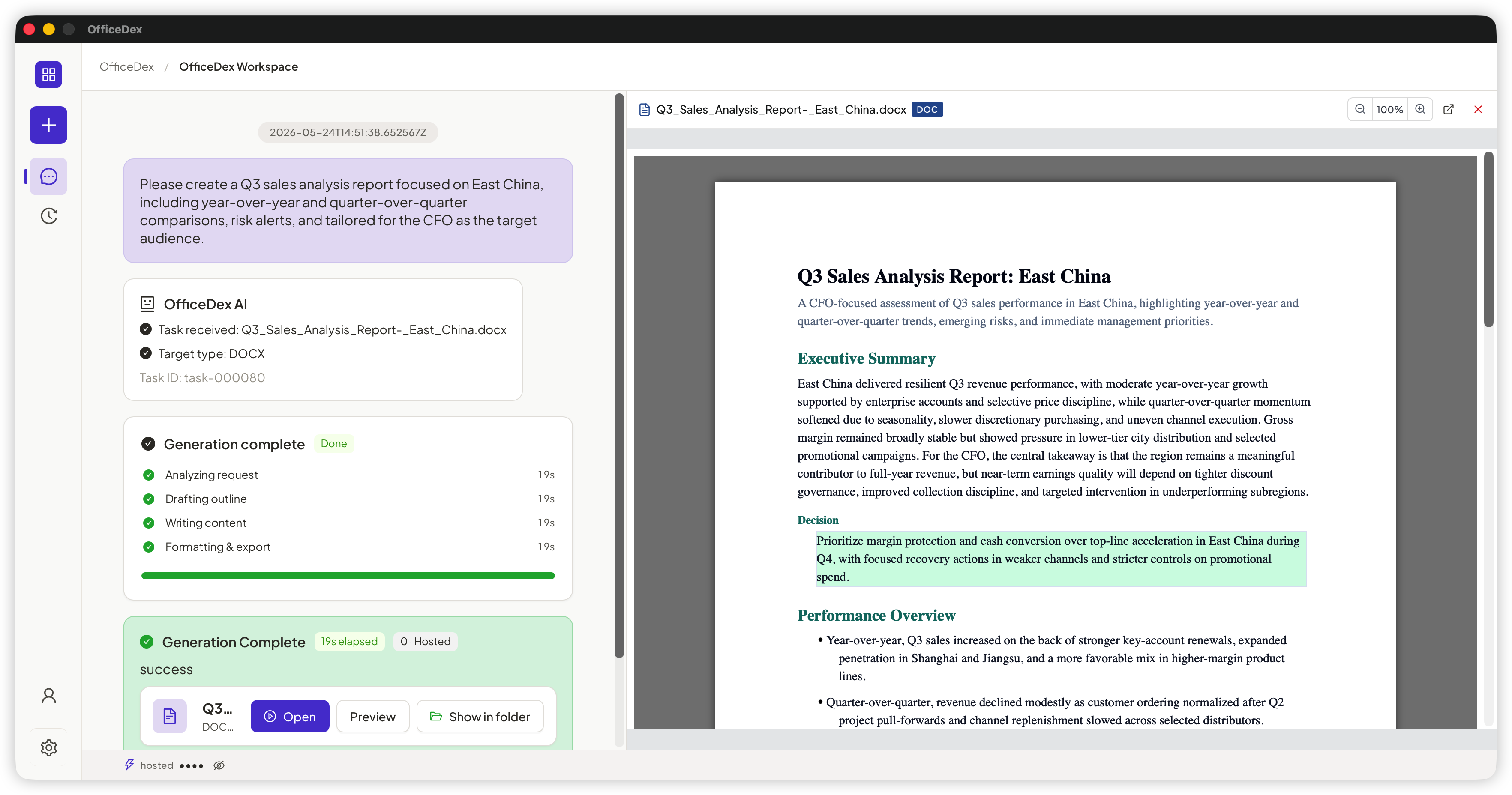 | 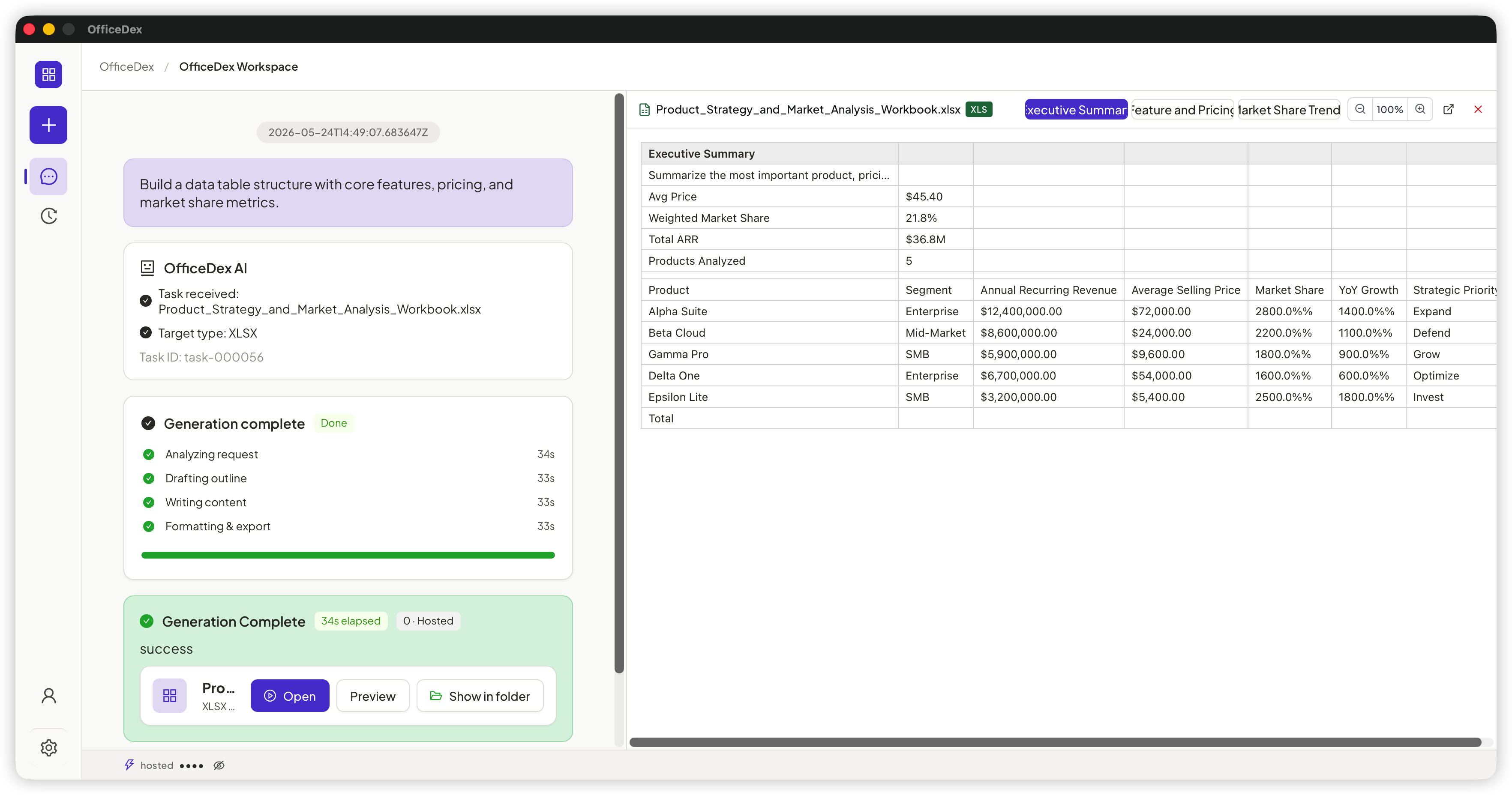 |
| Word document | Spreadsheet |
Powered by docx-preview / pdfjs-dist / xlsx for inline rendering. DOCX / PPTX / XLSX / PDF all preview-able — no Office install required.
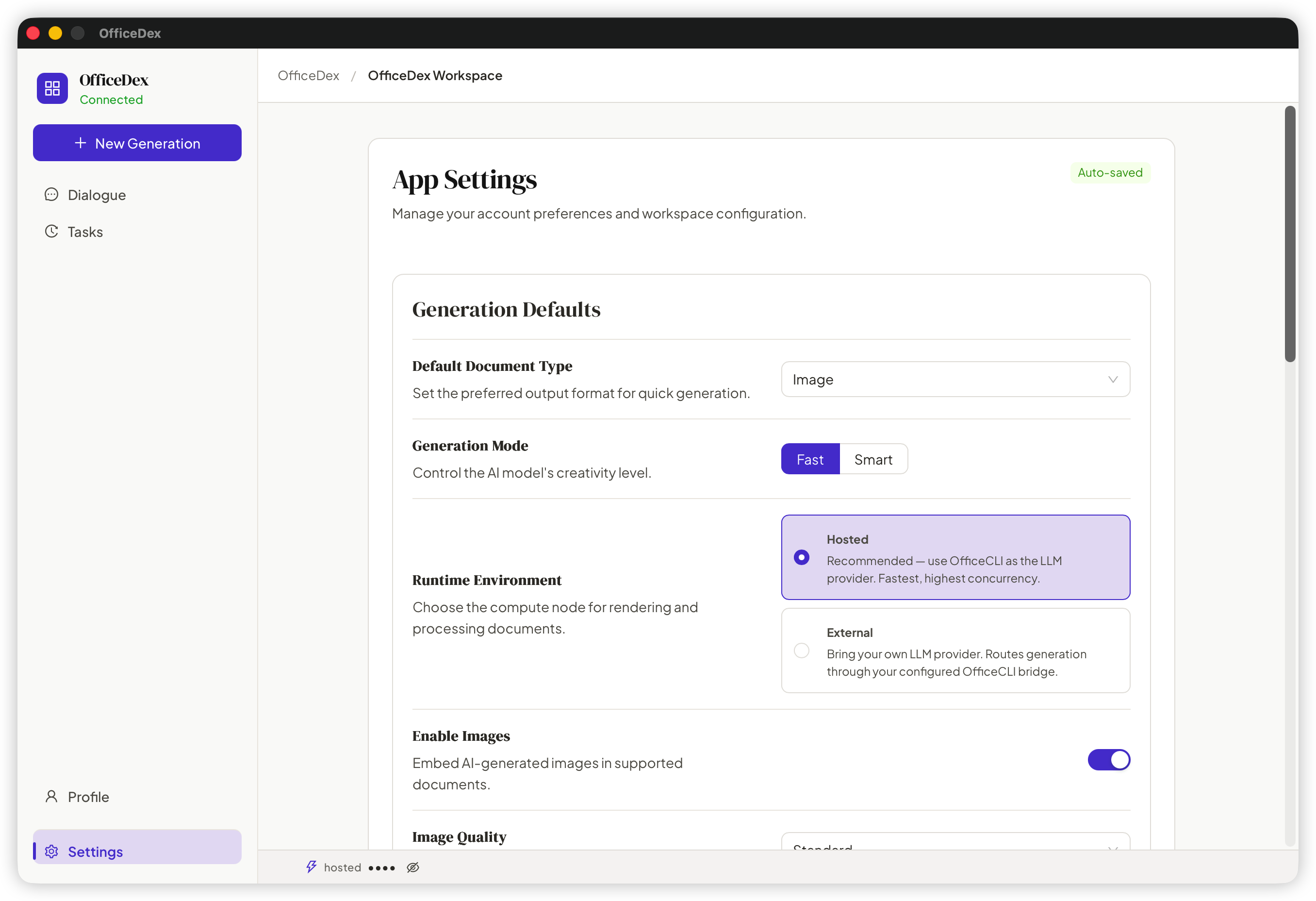
| Platform | Installer | Notes |
|---|---|---|
| 🍎 macOS (Apple Silicon / Intel) | OfficeDex-x.y.z-arm64.dmg / -x64.dmg | Double-click .dmg → drag to Applications |
| 🪟 Windows 10/11 | OfficeDex-Setup-x.y.z.exe | Double-click to install. First launch auto-downloads the OfficeCLI runtime. |
Latest Release: github.com/officecli/officedex/releases/latest
[!IMPORTANT]
🍎 macOS users — "OfficeDex.app" cannot be opened?
Because the app is not yet Apple-notarized, Gatekeeper will block the first launch with a "Apple could not verify..." dialog.
Fix: run the following command once in Terminal to strip the quarantine attribute, then you can double-click to open as usual:
xattr -dr com.apple.quarantine /Applications/OfficeDex.appIf the app lives elsewhere (e.g.
~/Downloads/OfficeDex.app), substitute the actual path. This is a one-time operation and won't recur.
# 1. Clone & install
git clone <your-repo-url>
cd officedex
npm install

# 2. Start the desktop app or browser renderer
npm run dev

# 3. Type-check / unit tests / E2E
npm run lint
npx vitest run
npm run test:e2e
To test the renderer in a local browser while using the real Go/OfficeCLI
bridge, run npm run dev:browser in one terminal and use the browser URL shown
by Vite. The real E2E runner starts and cleans up its own bridge host and Vite
processes with npm run test:e2e.
In dev mode, OfficeDex resolves the CLI in this order:
OFFICECLI_DESKTOP_BINARY env varofficecli on your PATHofficecli/officecli)npm run dist:mac # macOS (auto-codesigns bundled officecli)
npm run dist:win # Windows
Build artifacts land in build/bin/. CI (.github/workflows/release.yml) produces .dmg / .zip / .exe and publishes a GitHub Release on every v* tag.
┌───────────────────────────────────────────────────┐
│  OfficeDex (this repo)                            │
│  ┌──────────────────┐    ┌────────────────────┐   │
│  │  React 19 + Antd │ ←→ │  Wails Go runtime  │   │
│  │  Notion-styled   │    │  (main.go/app.go)  │   │
│  └──────────────────┘    └─────────┬──────────┘   │
└─────────────────────────────────────┼─────────────┘
                                      │ JSON-RPC stdio
                                      ▼
                          ┌────────────────────────┐
                          │  officecli agent-bridge│
                          │  (Go binary, sep. repo)│
                          └────────────────────────┘
src/shell/tokens.css)officecli subprocess, communicating via JSON-RPCdocx-preview / pdfjs-dist / xlsx inline rendering — no Office install requiredThe single source of truth is the approved interaction prototype,
OfficeDex-Final-Light-Preview-2026-09-17.html. Its tokens are projected into
src/shell/tokens.css — read that file before any UI work.
#41464b · Chrome #f5f6f8 · Accent #596f86"PingFang SC" first; 12px body--shell-radius-* (5 / 6 / 10 / 14 / 20px); no pillscubic-bezier(.22, 1, .36, 1)On first launch, OfficeDex pulls the matching officecli binary from GitHub Releases:
officecli/officecli (override via OFFICECLI_RELEASE_REPO)~/Library/Application Support/OfficeDex/runtime/ (macOS)officecli-{darwin|win32|linux}-{arm64|x64}{.exe}From Settings → OfficeCLI Runtime you can: check for updates / switch versions / specify a local binary / revert to auto-downloaded.
What's on the way (in priority order):
| Status | Capability | Notes |
|---|---|---|
| ✅ Shipped | Document / PPT / Excel generation | Three core formats |
| ✅ Shipped | Inline preview panel | DOCX / PPTX / XLSX / PDF |
| ✅ Shipped | Image input (visual understanding) | Paste or upload reference images |
| ✅ Shipped | Notion-style UI | Customizable design tokens |
| 🚧 In progress | Multilingual UI (EN / 日本語) | Translation in preparation |
| 🚧 In progress | Template marketplace | Community-shared prompts and styles |
| 🔜 Planned | Collaborative mode | Multi-user editing on the same task |
| 🔜 Planned | Plugin system | Third-party generators |
| 🔜 Planned | Official Linux installers | AppImage / deb |
| 💭 Exploring | Mobile companion app | iOS / Android: view and trigger |
OfficeCLI is the underlying command-line tool (a separate Go repo) that handles actual document generation, LLM calls, and file output. OfficeDex is its desktop GUI shell: a React UI wrapped in Wails, talking to the officecli agent-bridge subprocess via JSON-RPC. They release in lockstep: OfficeDex auto-downloads and manages a matching OfficeCLI binary at startup.
By default, fully local:
~/Library/Application Support/OfficeDex/workspace; optionally choose another folder in Settings)If you opt into "Hosted Runtime" (Hosted Runtime = OfficeCLI's official hosted proxy, so you don't have to configure your own LLM key), some calls route through the official proxy — the app displays a clear notice in that case.
Yes. In Settings → LLM Provider, fill in baseUrl / apiKey / model. Supported:
npm run devDefault workspace:
~/Library/Application Support/OfficeDex/workspace%APPDATA%/OfficeDex/workspaceLeave the workspace setting empty to use the default app-data workspace, or choose another folder via Settings → Workspace. After each generation, click "Show in Folder" to jump straight there.
| Input | Output | Preview |
|---|---|---|
| Natural-language prompt | .docx / .pptx / .xlsx / .pdf | ✅ All inline-previewable |
Upload .docx / .pdf / .md as source material | Same | ✅ |
| Paste / upload images as reference | Same | ✅ |
The desktop shell and preview panel are fully offline. Document generation needs an LLM, so:
baseUrl at e.g. http://localhost:11434/v1The OfficeCLI runtime also supports a manually specified local path — no downloads required.
In the app, click "Report Issue" in the top-right corner. It automatically collects:
Copy the generated markdown and paste it into a GitHub Issue.
src/shell/tokens.css — Design tokens, projected from the approved interaction prototypeCLAUDE.md — Project conventions & collaboration guidelinesdocs/README.zh-CN.md — 简体中文版docs/aippt-jssdk-design-method.md — AI PPT JSSDK design, free composition, and layout acceptance methoddocs/aippt-jssdk-visual-gap-report.md — Visual gap analysis against Cheso examples and next-step roadmapdocs/aippt-chart-authoring-plan.md — Chart authoring API, OfficeDex data contract, and regression planMade with 💜 by the OfficeDex team · Runs natively on macOS / Windows
842 followers · starred May 2026
121 followers · starred Aug 2026
412 followers · starred May 2026
115 followers · starred Jun 2026
OfficeDex is the first Al-Native VibeOfficing platform for documents, slides, and spreadsheets
See the code
VibeCoding writes code. VibeOfficing writes documents. Powered by OfficeDex.
Developers already VibeCode — describe intent, AI writes the program. VibeOfficing is the same paradigm for documents.
Say what you need → OfficeDex produces native
.docx/.pptx/.xlsxdirectly.
| Coding World | Office World | What AI Learns |
|---|---|---|
| Languages (Python / Go / TS) | Formats (OOXML: .docx / .pptx / .xlsx) | Syntax |
| Frameworks (React / Django / Spring) | Templates (quarterly reports, pitch decks, competitive analysis) | Structure |
| Design patterns (MVC / Observer) | Layout habits (heading hierarchy, color schemes, chart styles) | Style conventions |
OfficeDex is not just "one prompt → one file." It's a document workspace with memory.
OfficeDex remembers how your documents look — not just what they say. Digitize your style into OfficeDex — never start from scratch again.
|
Input
|
Output 📄 |
↑ From one sentence to a finished Word doc in under a minute.
In one sentence: Tell it what you want — it generates Word / PPT / Excel for you.
| Dimension | Web AI assistants | CLI tools | OfficeDex |
|---|---|---|---|
| 🖥 Native desktop feel | In-browser | Terminal | ✅ Wails native window |
| 📂 Local-first files | Manual download | ✅ Direct save | ✅ Direct save + one-click open |
| 👀 Inline preview | Open Office needed | None | ✅ DOCX/PPTX/XLSX rendered inline |
| 🔌 Custom LLM | Vendor-locked | ✅ Any | ✅ Any + GUI config |
| 🎨 UI & interaction | Generic | Plain text | ✅ Purpose-built interaction prototype |
| 🔒 Data sovereignty | Cloud-first | ✅ Local | ✅ Local (hosted optional) |
| 💬 Mid-task interaction | Single-turn chat | None | ✅ AI asks back in real time, streaming status |
In a phrase: Stop formatting. Start VibeOfficing.
| |
| Word document | Spreadsheet |
Powered by docx-preview / pdfjs-dist / xlsx for inline rendering. DOCX / PPTX / XLSX / PDF all preview-able — no Office install required.
| Platform | Installer | Notes |
|---|---|---|
| 🍎 macOS (Apple Silicon / Intel) | OfficeDex-x.y.z-arm64.dmg / -x64.dmg | Double-click .dmg → drag to Applications |
| 🪟 Windows 10/11 | OfficeDex-Setup-x.y.z.exe | Double-click to install. First launch auto-downloads the OfficeCLI runtime. |
Latest Release: github.com/officecli/officedex/releases/latest
[!IMPORTANT]
🍎 macOS users — "OfficeDex.app" cannot be opened?
Because the app is not yet Apple-notarized, Gatekeeper will block the first launch with a "Apple could not verify..." dialog.
Fix: run the following command once in Terminal to strip the quarantine attribute, then you can double-click to open as usual:
xattr -dr com.apple.quarantine /Applications/OfficeDex.appIf the app lives elsewhere (e.g.
~/Downloads/OfficeDex.app), substitute the actual path. This is a one-time operation and won't recur.
# 1. Clone & install
git clone <your-repo-url>
cd officedex
npm install

# 2. Start the desktop app or browser renderer
npm run dev

# 3. Type-check / unit tests / E2E
npm run lint
npx vitest run
npm run test:e2e
To test the renderer in a local browser while using the real Go/OfficeCLI
bridge, run npm run dev:browser in one terminal and use the browser URL shown
by Vite. The real E2E runner starts and cleans up its own bridge host and Vite
processes with npm run test:e2e.
In dev mode, OfficeDex resolves the CLI in this order:
OFFICECLI_DESKTOP_BINARY env varofficecli on your PATHofficecli/officecli)npm run dist:mac # macOS (auto-codesigns bundled officecli)
npm run dist:win # Windows
Build artifacts land in build/bin/. CI (.github/workflows/release.yml) produces .dmg / .zip / .exe and publishes a GitHub Release on every v* tag.
┌───────────────────────────────────────────────────┐
│  OfficeDex (this repo)                            │
│  ┌──────────────────┐    ┌────────────────────┐   │
│  │  React 19 + Antd │ ←→ │  Wails Go runtime  │   │
│  │  Notion-styled   │    │  (main.go/app.go)  │   │
│  └──────────────────┘    └─────────┬──────────┘   │
└─────────────────────────────────────┼─────────────┘
                                      │ JSON-RPC stdio
                                      ▼
                          ┌────────────────────────┐
                          │  officecli agent-bridge│
                          │  (Go binary, sep. repo)│
                          └────────────────────────┘
src/shell/tokens.css)officecli subprocess, communicating via JSON-RPCdocx-preview / pdfjs-dist / xlsx inline rendering — no Office install requiredThe single source of truth is the approved interaction prototype,
OfficeDex-Final-Light-Preview-2026-09-17.html. Its tokens are projected into
src/shell/tokens.css — read that file before any UI work.
#41464b · Chrome #f5f6f8 · Accent #596f86"PingFang SC" first; 12px body--shell-radius-* (5 / 6 / 10 / 14 / 20px); no pillscubic-bezier(.22, 1, .36, 1)On first launch, OfficeDex pulls the matching officecli binary from GitHub Releases:
officecli/officecli (override via OFFICECLI_RELEASE_REPO)~/Library/Application Support/OfficeDex/runtime/ (macOS)officecli-{darwin|win32|linux}-{arm64|x64}{.exe}From Settings → OfficeCLI Runtime you can: check for updates / switch versions / specify a local binary / revert to auto-downloaded.
What's on the way (in priority order):
| Status | Capability | Notes |
|---|---|---|
| ✅ Shipped | Document / PPT / Excel generation | Three core formats |
| ✅ Shipped | Inline preview panel | DOCX / PPTX / XLSX / PDF |
| ✅ Shipped | Image input (visual understanding) | Paste or upload reference images |
| ✅ Shipped | Notion-style UI | Customizable design tokens |
| 🚧 In progress | Multilingual UI (EN / 日本語) | Translation in preparation |
| 🚧 In progress | Template marketplace | Community-shared prompts and styles |
| 🔜 Planned | Collaborative mode | Multi-user editing on the same task |
| 🔜 Planned | Plugin system | Third-party generators |
| 🔜 Planned | Official Linux installers | AppImage / deb |
| 💭 Exploring | Mobile companion app | iOS / Android: view and trigger |
OfficeCLI is the underlying command-line tool (a separate Go repo) that handles actual document generation, LLM calls, and file output. OfficeDex is its desktop GUI shell: a React UI wrapped in Wails, talking to the officecli agent-bridge subprocess via JSON-RPC. They release in lockstep: OfficeDex auto-downloads and manages a matching OfficeCLI binary at startup.
By default, fully local:
~/Library/Application Support/OfficeDex/workspace; optionally choose another folder in Settings)If you opt into "Hosted Runtime" (Hosted Runtime = OfficeCLI's official hosted proxy, so you don't have to configure your own LLM key), some calls route through the official proxy — the app displays a clear notice in that case.
Yes. In Settings → LLM Provider, fill in baseUrl / apiKey / model. Supported:
npm run devDefault workspace:
~/Library/Application Support/OfficeDex/workspace%APPDATA%/OfficeDex/workspaceLeave the workspace setting empty to use the default app-data workspace, or choose another folder via Settings → Workspace. After each generation, click "Show in Folder" to jump straight there.
| Input | Output | Preview |
|---|---|---|
| Natural-language prompt | .docx / .pptx / .xlsx / .pdf | ✅ All inline-previewable |
Upload .docx / .pdf / .md as source material | Same | ✅ |
| Paste / upload images as reference | Same | ✅ |
The desktop shell and preview panel are fully offline. Document generation needs an LLM, so:
baseUrl at e.g. http://localhost:11434/v1The OfficeCLI runtime also supports a manually specified local path — no downloads required.
In the app, click "Report Issue" in the top-right corner. It automatically collects:
Copy the generated markdown and paste it into a GitHub Issue.
src/shell/tokens.css — Design tokens, projected from the approved interaction prototypeCLAUDE.md — Project conventions & collaboration guidelinesdocs/README.zh-CN.md — 简体中文版docs/aippt-jssdk-design-method.md — AI PPT JSSDK design, free composition, and layout acceptance methoddocs/aippt-jssdk-visual-gap-report.md — Visual gap analysis against Cheso examples and next-step roadmapdocs/aippt-chart-authoring-plan.md — Chart authoring API, OfficeDex data contract, and regression planMade with 💜 by the OfficeDex team · Runs natively on macOS / Windows
842 followers · starred May 2026
121 followers · starred Aug 2026
412 followers · starred May 2026
115 followers · starred Jun 2026



