Local-first browser editor for Word, Excel, PowerPoint and PDF, with an experimental AI assistant. No Office installation or account required.
See the code




English | 简体中文 | 日本語 | 한국어 | Deutsch | Español | Português | فارسی
An open source document workspace for you and your AI agents.
Open, edit, convert and save Word, Excel and PowerPoint files, and annotate PDFs in your browser. Core document processing runs locally, with no account or Office installation required.
Use optional AI assistance (Experimental Beta), let browser agents call document tools through WebMCP, or install it as a PWA. Cached editor resources work offline; you can also self-host or embed the editor in your app.
Try it online: edit.chaxus.com
New document · New spreadsheet · New presentation
Or run your own copy:
docker run -d --name document -p 8080:80 ghcr.io/ranuts/document:latest
| Kind | Edit | Also opens |
|---|---|---|
| Documents | .docx | .doc .odt .rtf .txt |
| Spreadsheets | .xlsx .csv | .xls .ods |
| Presentations | .pptx | .ppt .odp |
| annotate, fill, export | .pdf |
Export supported documents to PDF.
Multilingual interfaces, light and dark themes, and read-only preview are also supported.
Recovery copies stay in this browser for 7 days after the last edit or open. Delete them in Saved documents. Export anything you want to keep; recovery is not a backup.
Optional AI services receive the content needed for your request. On-device models keep it local. Browser dictation may use an online speech service; embedded exports are handled by the host app.
Your chosen browser AI agent controls how it handles content returned by document tools.
User guide · Self-hosting, URLs and integration · Embedding API · Fonts
Offline use needs cached editor assets; uncached resources and remote files still need a network.
Draft and refine text, work with spreadsheet data, create slides or ask about the current PDF page. Review changes before applying and use Undo when needed.
Choose an on-device model or connect your own AI service. Dictate prompts where the browser supports speech input.
Experimental Beta. Off by default. Answers and edits can be wrong; check important results.
| Word | Excel |
|---|---|
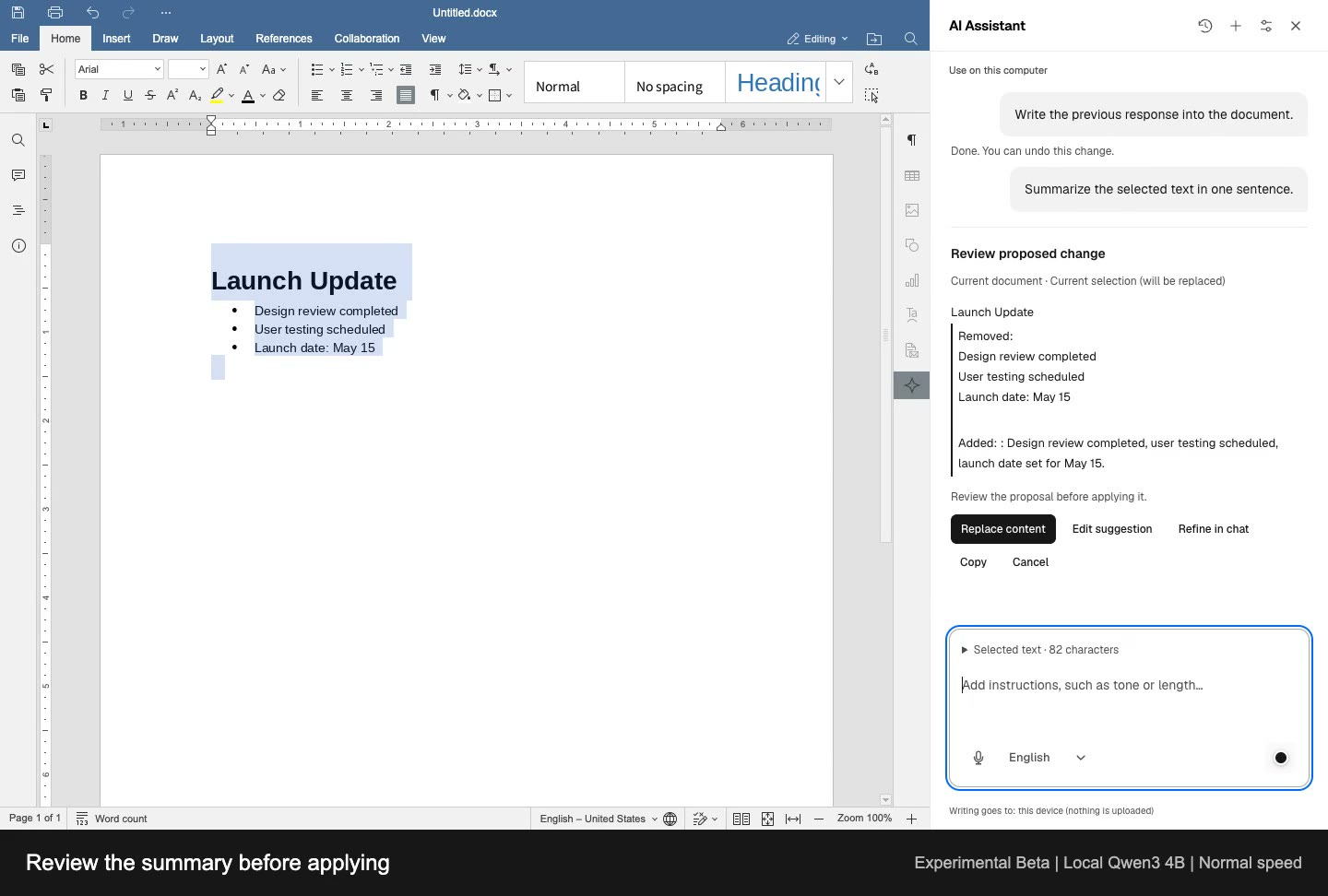 | 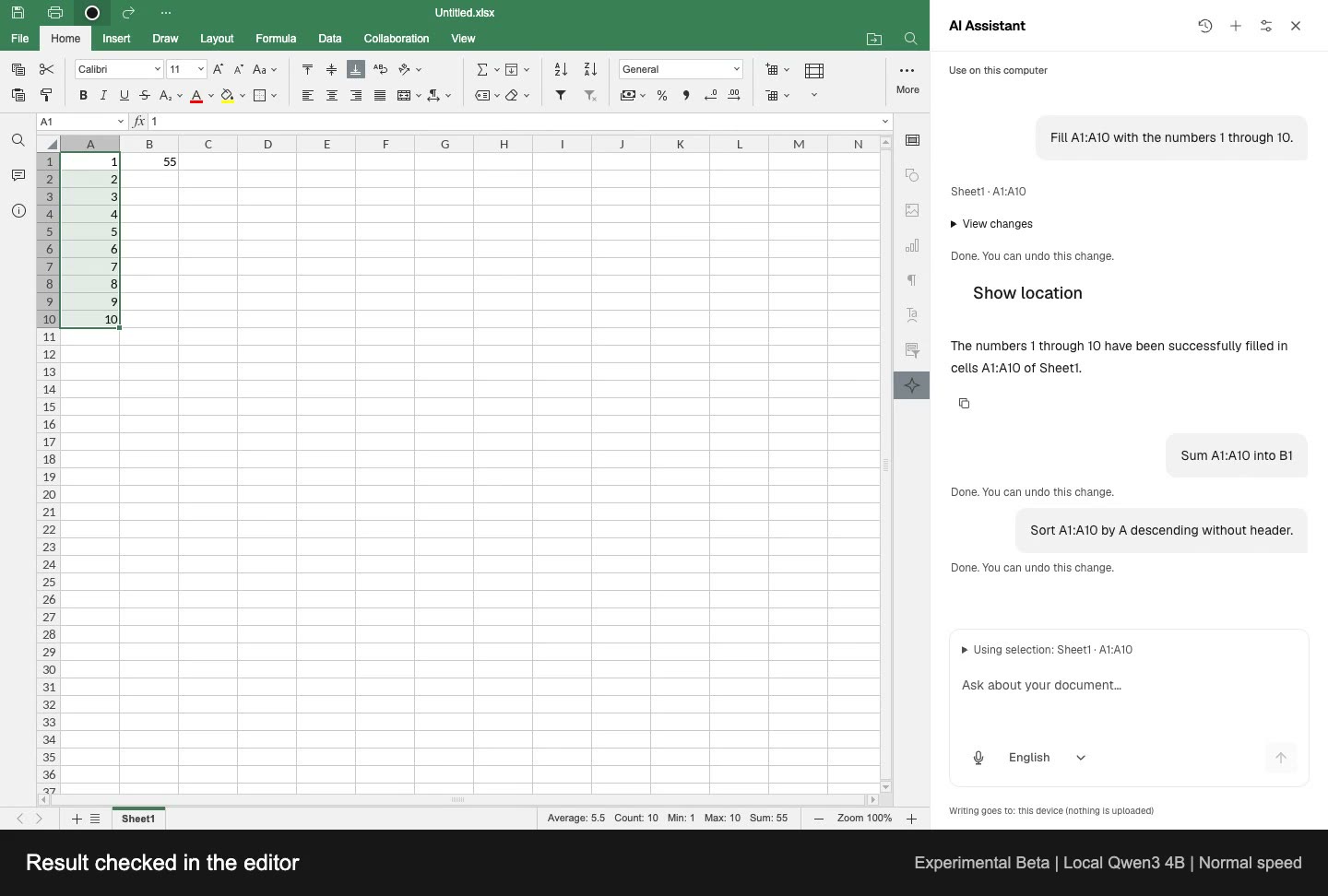 |
| Draft, write, summarize and undo | Fill, calculate, sort and undo |
| PowerPoint | |
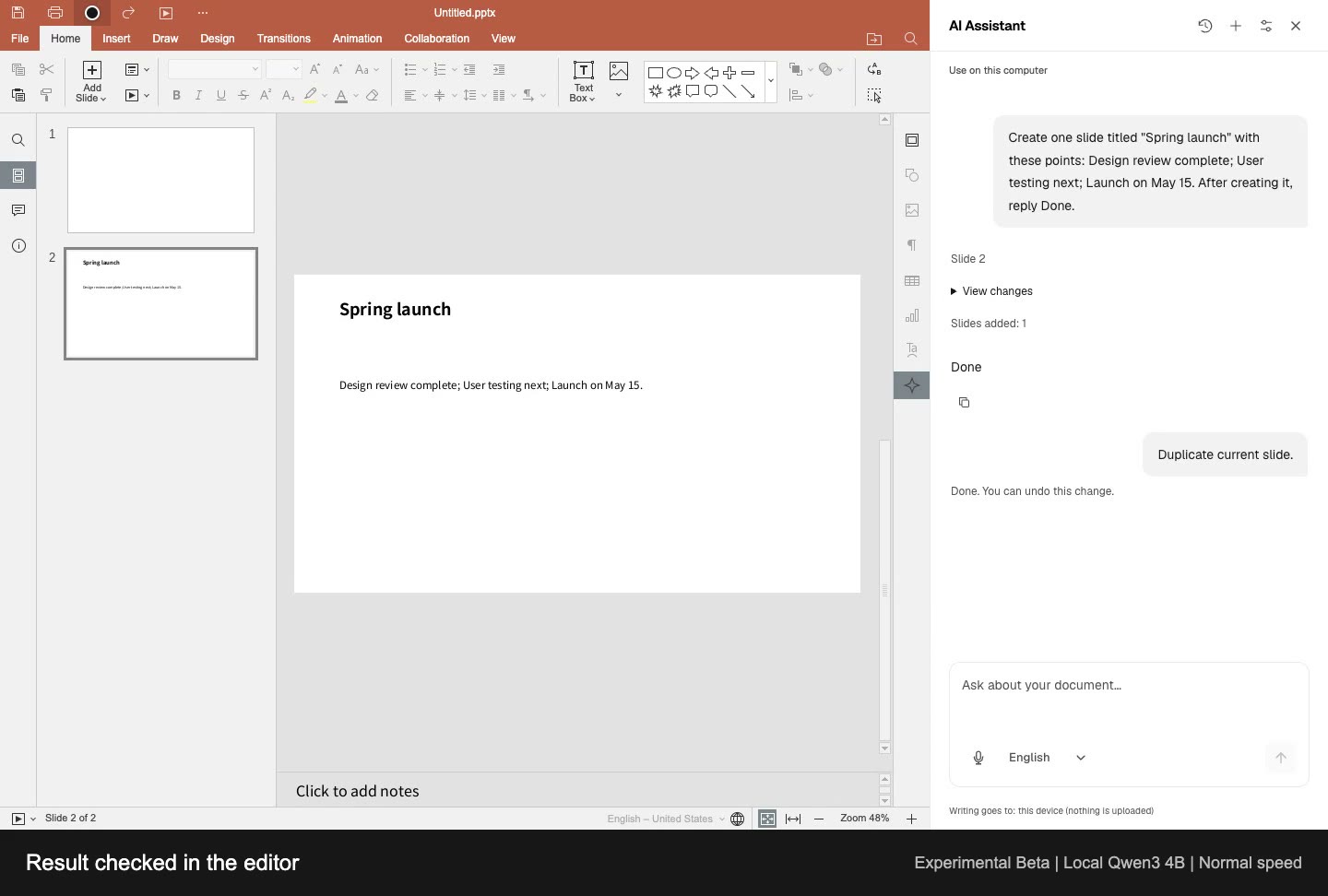 | 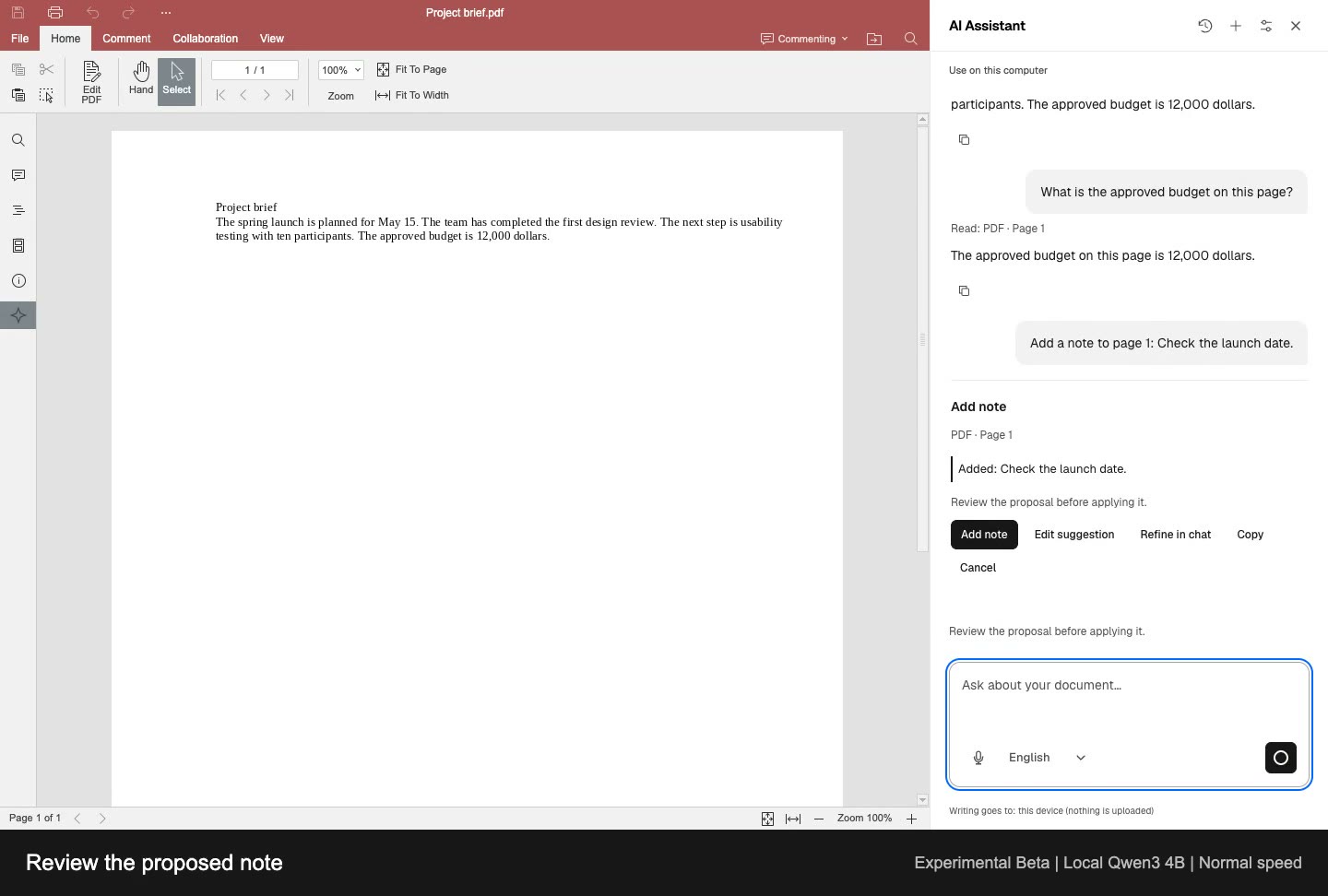 |
| Create, duplicate and undo | Read, ask questions and review notes |
Complete workflows at normal speed, recorded in English with a loaded local Qwen3 4B model. Response times vary by model and device.
Videos, captions and text descriptions
PDF assistance covers selectable text and page notes, not scanned-image text or rewriting PDF body text.
Run from source:
git clone https://github.com/ranuts/document.git
cd document
pnpm install --frozen-lockfile
pnpm run dev
Feedback and contributions are welcome: Issues · Pull requests
This project is a modified version of the ONLYOFFICE editors (sdkjs and web-apps, copyright Ascensio System SIA). Its interface uses neutral descriptions without product logos or promotional branding. Copyright, license, modification and source information remain available in the editor's About pane and in NOTICE. Third-party GUI assets and fonts retain their respective licenses; removing product marks does not change those licenses.
The decision to omit product logos follows the FSF's published interpretation of AGPLv3 Section 7. It is not described as a court ruling or a guarantee of legal compliance; the upstream position and the rationale are recorded in NOTICE.
ONLYOFFICE is a trademark of Ascensio System SIA. This project is not an official ONLYOFFICE product and is not affiliated with, sponsored by or endorsed by Ascensio System SIA. Names in legal notices and source references identify the upstream technology, not this project's brand.
PWA installation and browser tabs use an independently drawn, neutral document icon. It contains no upstream logo, trademark or project initials.
4,398 followers · starred Jul 2025
1,485 followers · starred Jun 2025
129 followers · starred Jul 2025
25 followers · starred Jul 2025
Local-first browser editor for Word, Excel, PowerPoint and PDF, with an experimental AI assistant. No Office installation or account required.
See the code
English | 简体中文 | 日本語 | 한국어 | Deutsch | Español | Português | فارسی
An open source document workspace for you and your AI agents.
Open, edit, convert and save Word, Excel and PowerPoint files, and annotate PDFs in your browser. Core document processing runs locally, with no account or Office installation required.
Use optional AI assistance (Experimental Beta), let browser agents call document tools through WebMCP, or install it as a PWA. Cached editor resources work offline; you can also self-host or embed the editor in your app.
Try it online: edit.chaxus.com
New document · New spreadsheet · New presentation
Or run your own copy:
docker run -d --name document -p 8080:80 ghcr.io/ranuts/document:latest
| Kind | Edit | Also opens |
|---|---|---|
| Documents | .docx | .doc .odt .rtf .txt |
| Spreadsheets | .xlsx .csv | .xls .ods |
| Presentations | .pptx | .ppt .odp |
| annotate, fill, export | .pdf |
Export supported documents to PDF.
Multilingual interfaces, light and dark themes, and read-only preview are also supported.
Recovery copies stay in this browser for 7 days after the last edit or open. Delete them in Saved documents. Export anything you want to keep; recovery is not a backup.
Optional AI services receive the content needed for your request. On-device models keep it local. Browser dictation may use an online speech service; embedded exports are handled by the host app.
Your chosen browser AI agent controls how it handles content returned by document tools.
User guide · Self-hosting, URLs and integration · Embedding API · Fonts
Offline use needs cached editor assets; uncached resources and remote files still need a network.
Draft and refine text, work with spreadsheet data, create slides or ask about the current PDF page. Review changes before applying and use Undo when needed.
Choose an on-device model or connect your own AI service. Dictate prompts where the browser supports speech input.
Experimental Beta. Off by default. Answers and edits can be wrong; check important results.
| Word | Excel |
|---|---|
| |
| Draft, write, summarize and undo | Fill, calculate, sort and undo |
| PowerPoint | |
| |
| Create, duplicate and undo | Read, ask questions and review notes |
Complete workflows at normal speed, recorded in English with a loaded local Qwen3 4B model. Response times vary by model and device.
Videos, captions and text descriptions
PDF assistance covers selectable text and page notes, not scanned-image text or rewriting PDF body text.
Run from source:
git clone https://github.com/ranuts/document.git
cd document
pnpm install --frozen-lockfile
pnpm run dev
Feedback and contributions are welcome: Issues · Pull requests
This project is a modified version of the ONLYOFFICE editors (sdkjs and web-apps, copyright Ascensio System SIA). Its interface uses neutral descriptions without product logos or promotional branding. Copyright, license, modification and source information remain available in the editor's About pane and in NOTICE. Third-party GUI assets and fonts retain their respective licenses; removing product marks does not change those licenses.
The decision to omit product logos follows the FSF's published interpretation of AGPLv3 Section 7. It is not described as a court ruling or a guarantee of legal compliance; the upstream position and the rationale are recorded in NOTICE.
ONLYOFFICE is a trademark of Ascensio System SIA. This project is not an official ONLYOFFICE product and is not affiliated with, sponsored by or endorsed by Ascensio System SIA. Names in legal notices and source references identify the upstream technology, not this project's brand.
PWA installation and browser tabs use an independently drawn, neutral document icon. It contains no upstream logo, trademark or project initials.
4,398 followers · starred Jul 2025
1,485 followers · starred Jun 2025
129 followers · starred Jul 2025
25 followers · starred Jul 2025






