
README
Klydis Beta
A high-performance, self-contained LLM inference engine & agentic chat platform for Windows.
Klydis is a modern, dark-first WPF desktop application engineered for zero-latency, private
Large Language Model (LLM) execution directly on local Windows hardware. Powered by .NET 10
and a vendored fork of LLamaSharp (see patches/README.md), Klydis
operates with an in-process inference engine — eliminating the overhead, network leaks, and
IPC latency of external local servers (like Ollama or LM Studio).
Klydis is not just a chat UI around a model: it is an agentic execution system that uses the model as its decision engine. It classifies every user message, maintains durable task state (plan, runs, steps, tool activity, artifacts, execution events) in SQLite, supervises the model's progress against that state, and projects everything onto a live workbench (plan / files / changes / preview / terminal). The harness — not the model — decides what counts as progress and what counts as completion.
Contents
- Highlights
- Feature inventory
- Quick start
- Where things live (data & config)
- Architecture
- The interaction model: Conversation / Task / Autonomous
- The chat loop
- The autonomous task loop (Planner → Executor → Supervisor)
- Progress = state change (the no-action gate)
- Goal mode (GoalOrchestrator)
- Context & memory orchestration
- Inference engine
- Protocol, templating & grammar layers
- Orchestration & routing layer
- Capabilities & epistemic subsystem
- Cloud / remote providers
- Durable execution state (SQLite)
- Tool protocol & risk model
- The workbench
- Web tools (stealth browser)
- RAG: local retrieval-augmented generation
- Skill library
- Model library & management
- Hardware awareness
- Performance engineering
- Benchmarking
- Adaptive learning
- Processes & terminal sessions
- Updates & diagnostics
- Theming
- Settings reference
- The UI surface
- Repository layout
- Testing
- Building & publishing
- Contributing
Highlights
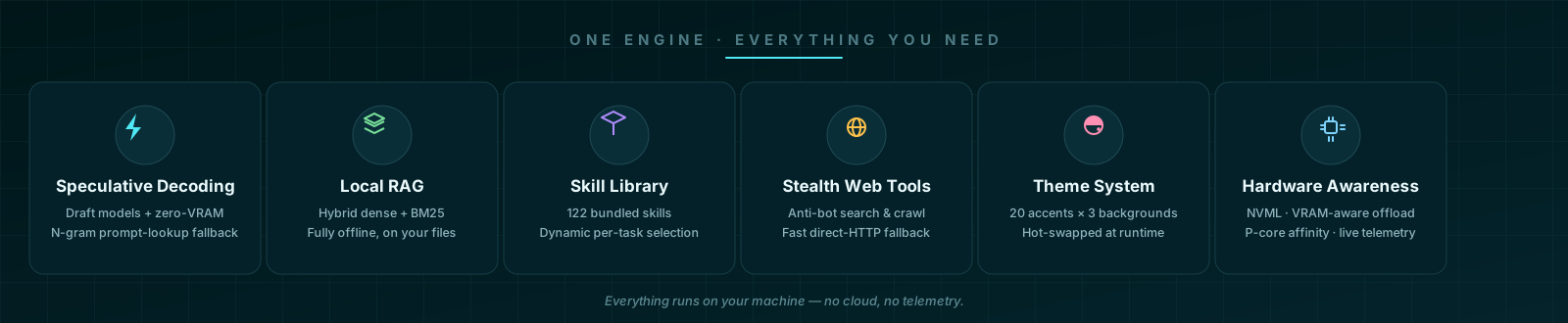
- ⚡ In-process inference engine — loads and runs
.ggufmodels directly inside the application process using a vendored LLamaSharp fork; no external server, no IPC. - 🤖 Three interaction modes —
Conversation,Task, andAutonomousare selected deterministically per message, so a greeting never spins up the agent runtime and a build request never degrades into chit-chat. - 🗂 Durable agentic execution state — sessions, messages, tasks, runs, turns, generations, typed steps, an action ledger, evidence, plan checklists, tool activity, artifacts, file diffs, and execution events all persist to SQLite (19 tables) and survive restarts.
- 🧠 Supervisor-owned completion — the model proposes; the harness disposes. Completion claims are verified against the plan checklist; text with no state change is not progress.
- 🔧 42 built-in tools — file read/write/edit/patch, PowerShell, background process management, system diagnostics, web search/crawl, RAG search, memory, skills, message queue, custom tool creation, plan maintenance, and more.
- 💾 Context orchestration — rolling compression, world-state summaries, prompt budgeting, and KV-cache-aware sizing keep long-horizon tasks inside the model's window (up to 1M tokens).
- 🏎️ Speculative decoding — draft-model speculation with a zero-VRAM N-gram prompt-lookup fallback, dynamic candidate windows, and acceptance-rate tracking.
- 🖥️ Hardware awareness — NVIDIA NVML GPU profiling, VRAM-aware layer offloading, P-core CPU affinity, and a system profiler that adapts the engine to the machine.
- 📚 Local RAG — index local folders (PDF, TXT, Markdown, code) into a SQLite vector store with hybrid dense + BM25 retrieval, fully offline.
- 🛠️ Skill library — 122 bundled skills (UI/UX, web, Windows automation, engineering practices) plus a custom skill creator and dynamic skill selection.
- 🧠 Cross-session learning — lessons learned during tasks are persisted and re-injected into future sessions for the same model.
- 🌐 Stealth web tools —
search_web/crawl_urlthrough a stealth Chromium that evades bot detection, with a fast direct-HTTP fallback. - 🎨 Theme system — 20 accent themes × 3 background identities, Dark/Light/System modes, custom colors, and full typography control, hot-swappable at runtime.
- 🛡️ Safety & forensic tooling — three tool-risk levels with per-call approval gates, workspace-boundary validation, crash forensics, and rotating logs.
Feature inventory
| Area | Capability |
|---|---|
| Inference | In-process GGUF execution (LLamaSharp fork), KV-cache quantization (F16 → 3-bit), prefix caching, speculative decoding with N-gram fallback, grammar-constrained tool calls |
| Model management | GGUF discovery with hot-reload, Hugging Face browse/search/download (resumable), metadata reading, in-place 4-bit quantization, multi-model pool |
| Agentic runtime | Conversation/Task/Autonomous classification, durable tasks/runs/turns/generations, typed steps, plan engine, supervisor decisions, evidence & verification, recovery state machine |
| Context | Token budgeting, rolling compression to world state, chunked summarization, sparse memory index, Obsidian vault integration, execution-state contract |
| Tools | 42 built-in tools across files, shell, web, system, RAG, skills, memory, queue, task lifecycle; custom PowerShell/Python/C# tools |
| Persistence | SQLite WAL: 19 tables + FTS5 message index; every projection (plan/files/changes/preview/terminal) is durable state |
| Web | Stealth Chromium (fingerprint evasion, optional Camoufox) with fast direct-HTTP fallback |
| RAG | Folder ingestion (PDF/TXT/MD/code), local embeddings, hybrid dense+BM25 retrieval |
| Skills | 122 bundled skills + submodule extras, dynamic relevance-based selection, custom skill creation |
| UI | Multi-session chat, streaming with thinking blocks, attachments (files/images/audio/text/screenshots), 7-tab workbench, hardware monitor, settings |
| Theming | 20 accents × 3 backgrounds × 3 modes, custom colors, fonts, instant hot-swap, persistence |
| Observability | Live tokens/s, VRAM, context gauges, benchmark runner, crash forensics, rotating app log |
| Updates | Auto-updating native llama.cpp engine (daily-throttled), NuGet dependency update checker |
Quick start
Prerequisites
- OS: Windows 10 / 11 (64-bit)
- SDK: .NET 10.0 SDK or higher
- GPU (optional): NVIDIA GPU with CUDA 12 drivers — automatic CPU fallback via AVX2/AVX-512.
CUDA runtime DLLs are discovered on
PATH, in the NVIDIA toolkit install, the NVIDIA App G-Assist folder, and the legacy NVIDIA CEF folder.
Run
.\Start-Klydis.bat          # recommended: dev env + diagnostic logging
dotnet run --project src/Klydis.App/Klydis.App.csproj
Or open KlydisBeta.sln in Visual Studio 2022+ / Rider and run Klydis.App.
Start-Klydis.bat sets DOTNET_ENVIRONMENT=Development, default log level Debug, and
Microsoft-namespace logs at Information.
First model
- Download a GGUF model (e.g. Qwen, Llama 3, Mistral, DeepSeek distills) from Hugging Face — either through the in-app Model Library tab or manually.
- Place
.gguffiles in%USERPROFILE%\.klydis\models(the app hot-reloads this folder via a file watcher). - Open the Models tab → Refresh → Load Model (or pick it from the status-bar model selector in the Chat tab).
- Tune GPU offloading and context in Settings (auto-offload and auto context are available) and monitor live VRAM in the bottom-right status bar.
Publish a release build
powershell -ExecutionPolicy Bypass -File .\build.ps1
# Output: src\Klydis.App\bin\Release\net10.0-windows\win-x64\publish\
The build script publishes win-x64 self-contained and prunes non-Windows native binaries
that leak in from the LLamaSharp backend packages (Cloudflare edge-caches objects only up to
512 MB). It deliberately does not use PublishSingleFile, because the app loads native
DLLs (llama.dll / ggml*.dll) at runtime and single-file extraction breaks that lookup.
Where things live (data & config)
| Path | Purpose |
|---|---|
%USERPROFILE%\.klydis\models | GGUF model files (watched for hot-reload) |
%USERPROFILE%\.klydis\data\ | SQLite database (MessageStore): sessions, messages, tasks, runs, tools, artifacts, … (WAL mode) |
%USERPROFILE%\.klydis\native\ | Auto-updated native llama.cpp engine (llama.dll, ggml*.dll), deployed/overridden here and synced into the app output |
%USERPROFILE%\.klydis\skills\ | User-writable skill library (seeded from bundled skills on first run) |
%USERPROFILE%\.klydis\ | Optional klydis local system prompt.md and UserStyle_Modes.md overrides (also loaded from the working dir and app dir) |
%LOCALAPPDATA%\Klydis\ui-settings.json | Persisted UI/model settings (theme, fonts, context limit, speculation, personality) |
%LOCALAPPDATA%\Klydis\logs\ | fatal_error.txt (crash forensics), app.log (rotating ILogger mirror), llama_native.log (rotating native engine log) |
.klydis\models (project dir) | Alternative model folder (also scanned) |
The native engine auto-update runs behind the splash screen on startup, is daily-throttled, and is guarded by a 90-second watchdog: if the sync/update cannot finish in time, Klydis starts with the current engine and retries on the next launch.
Architecture
Layer diagram
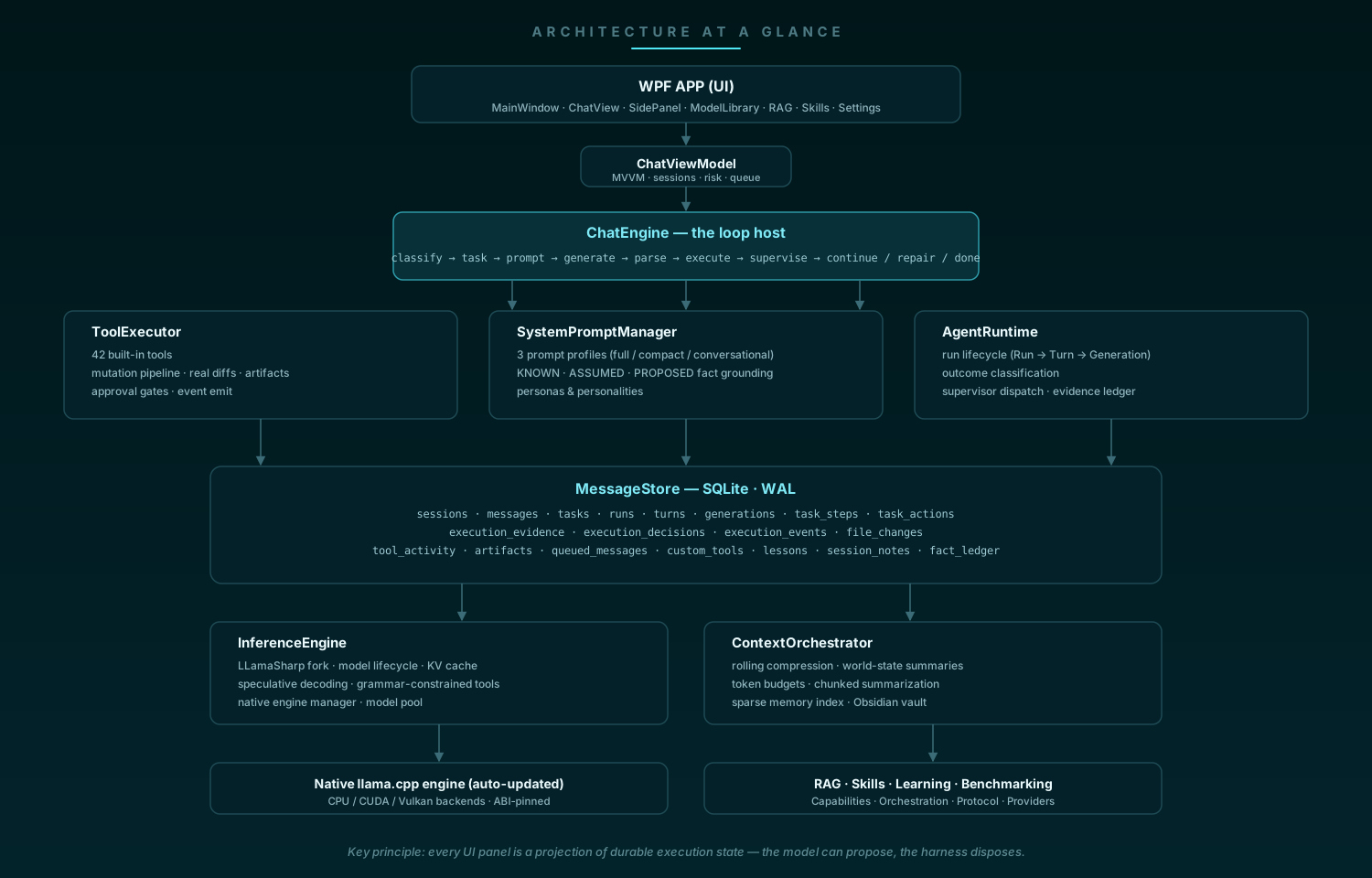
Key principle: every UI panel is a projection of durable execution state. The Plan tab
is the persisted checklist; the Files/Changes/Preview/Terminal tabs are projections of
tool_activity, file_changes, artifacts, and execution_events. Nothing in the UI
invents state from narration.
Core components
| Component | File | Responsibility |
|---|---|---|
ChatEngine | src/Klydis.Core/Chat/ChatEngine.cs | Loop host: mode classification, task resolution, prompt assembly, inference dispatch, streaming, tool execution, continuation/repair, persistence. The while (iterationCount < maxIterations) loop is the single place the next autonomous iteration starts. |
ToolExecutor | src/Klydis.Core/Chat/ToolExecutor.cs | 42 built-in tools, approval gates, validation, the file-mutation pipeline (snapshot → diff → artifact → events), tool-output disk offloading. |
SystemPromptManager | src/Klydis.Core/Chat/SystemPromptManager.cs | Prompt construction: full / compact / conversational profiles, KNOWN/ASSUMED/PROPOSED fact grounding, persona & personality injection, tool schema. |
AgentRuntime | src/Klydis.Core/Tasks/AgentRuntime.cs | Run lifecycle (Task → Run → Turn → Generation), outcome classification, durable action ledger, evidence ledger, supervisor dispatch. |
AgentSupervisor | src/Klydis.Core/Tasks/AgentSupervisor.cs | Pure, deterministic decision layer: completion gate (EvaluateCompletion — plan checklist must be empty), eligibility, DecideAfterTurn. |
TaskManager | src/Klydis.Core/Tasks/TaskManager.cs | Task resolution (new / steer / reopen), creation, persistence, plan management. |
InteractionClassifier | src/Klydis.Core/Tasks/InteractionClassifier.cs | Deterministic, tiered message → mode classification. |
TaskStateMachine | src/Klydis.Core/Tasks/TaskStateMachine.cs | Task/Run state enums and legal transition enforcement. |
AgentLoopStateMachine | src/Klydis.Core/Tasks/AgentLoopStateMachine.cs | OODA-VR phase transitions (Observe → Orient → Decide → Act → Verify → Reflect). |
ActionGate | src/Klydis.Core/Tasks/ActionGate.cs | Pre-execution validation: tool existence, step restriction, schema, replay protection, workspace boundary. |
StepClassifier / TaskStep | src/Klydis.Core/Tasks/ | First-class typed steps with StepActionKind, AllowedTools, VerificationCriteria. |
ExecutionEvidenceLedger | src/Klydis.Core/Tasks/ExecutionEvidenceLedger.cs | Run-scoped, versioned verification evidence with durable persistence and stale invalidation. |
RecoveryStateMachine | src/Klydis.Core/Tasks/RecoveryStateMachine.cs | Self-healing: bounded tool/schema/model repair attempts, same-action retry suppression. |
InferenceEngine | src/Klydis.Core/Inference/InferenceEngine.cs | LLamaSharp wrapper: model lifecycle, KV cache, speculative decoding, telemetry, grammar-constrained sampling. |
ContextOrchestrator | src/Klydis.Core/Memory/ContextOrchestrator.cs | Token budgeting, rolling compression, world state, chunked summarization, memory index. |
MessageStore | src/Klydis.Core/Memory/MessageStore.cs | SQLite persistence layer (WAL), 19 tables, FTS5 message index. |
DynamicSkillSelector | src/Klydis.Core/Skills/DynamicSkillSelector.cs | Brain-index generation, relevance scoring, per-task skill activation. |
ProcessManager | src/Klydis.Core/Processes/ProcessManager.cs | Background process management with bounded ring buffers. |
TerminalSessionManager | src/Klydis.Core/Processes/TerminalSessionManager.cs | Persistent terminal sessions across turns. |
NativeEngineManager | src/Klydis.Core/Inference/NativeEngineManager.cs | Native llama.cpp engine deployment, daily-throttled auto-update, CUDA runtime syncing. |
State ownership & persistence
The database is always the authority. In-memory collections in ToolExecutor,
AgentRuntime, and ExecutionEvidenceLedger are caches, not authorities.
| State | In-memory owner | Persistence table |
|---|---|---|
| Sessions / messages | ChatEngine | sessions, messages (+ FTS5) |
| Tasks / plans | TaskManager / ToolExecutor | tasks (plan_json) |
| Runs / turns / generations | AgentRuntime | runs, turns, generations |
| Typed steps | TaskStepBuilder | task_steps |
| Actions (replay ledger) | AgentRuntime | task_actions (replay_key) |
| Evidence / decisions | ExecutionEvidenceLedger | execution_evidence, execution_decisions |
| Events / diffs / tool activity / artifacts | ToolExecutor | execution_events, file_changes, tool_activity, artifacts |
| Queue / custom tools / lessons / notes | ModelMessageQueue / ToolExecutor / AdaptiveLearningService | queued_messages, custom_tools, lessons, session_notes |
| World state | ContextOrchestrator | sessions.world_state |
| Facts (epistemic) | FactLedger | fact_ledger |
Dependency injection & startup
Klydis.App/App.xaml.cs registers everything in a single ServiceCollection:
- Engine chain —
InferenceEngine(withSpeculativeDecodingService,NativeResourceDisposer) →ChatEngine(withPromptTemplateEngine,ToolExecutor,MessageStore,ContextOrchestrator,ModelMessageQueue,AdaptiveLearningService,TaskManager,AgentRuntime). - Agentic services —
TaskManager,AgentRuntime(+IAgentRuntime),TaskEventBus,WorkspaceVersionManager,TaskWorkspaceManager(canonicalized workspace root from the process working directory),ICompletionEngine,IActionExecutor(ActionExecutorAdapter),IContextAssemblyPipeline,IStateDeltaStagnationTracker. - Skills —
SkillLibraryManager,SkillIndex,SkillReranker,SkillLeaseManager,DynamicSkillSelector(alsoISkillRouter). - RAG —
LLamaVectorEmbedder(384-dim),VectorStore,DocumentIngestionEngine,HybridRetriever. - Capabilities & epistemic —
CapabilityRegistry,CapabilityGraph,FactLedger,MachineWorldModel,CapabilityPolicyGate(AuthorityMode.LocalFullControl),CapabilityToolBridge. - Hardware / web / learning —
GpuProfiler,SystemProfiler,OffloadStrategy,CamoufoxManager,StealthBrowserService,AdaptiveLearningService,ModelPool,GoalBudget,GoalOrchestrator.
Startup runs behind a splash window in six phases (each failure-tolerant, heavy work on
the thread pool): (1) native engine sync/auto-update, (2) model library scan, (3) message
store init (+ repair of broken custom tools), (4) RAG vector store init, (5) skill library
seed, (6) finalize. Global exception handlers (AppDomain, TaskScheduler.UnobservedTaskException,
DispatcherUnhandledException) write a forensic dump to
%LOCALAPPDATA%\Klydis\logs\fatal_error.txt before the process dies.
The interaction model: Conversation / Task / Autonomous
Every user message is classified before task resolution and prompt construction by
InteractionClassifier. The mode decides
what the runtime exposes:
| Mode | Runtime surface | Typical input |
|---|---|---|
| Conversation | Minimal prompt, no tools, no task, no plan | "good evening", "explain X", "what's the weather" (explanation tier) |
| Task | Tools + task contract, bounded inspection/analysis/research | "analyze this repository", "research Y" |
| Autonomous | Full runtime: plan, skills, artifacts, verification, continuation | "build a landing page", "fix this project" |
The classifier is deterministic and tiered (priority order):
- Greetings / gratitude / farewell → Conversation.
- Live-data markers (
weather,stock price,score, …) → Task (they require web tools). - Explanation markers (
explain,what is,how do, …) → Conversation even when they contain action verbs. - Command markers (
begin,start,proceed,continue,go ahead) → tool-using mode, and the task resolver continues the current task —"i want you to begin building the project"keeps the same task and plan instead of spawning a new one. - Strong build/fix verbs (
build,implement,fix,refactor,migrate, …) → Autonomous. - Analysis/research verbs → Task.
- Short messages → Conversation fallback.
Task resolution (TaskManager)
Once the mode is Task/Autonomous, TaskManager
resolves the message against the session's current task:
- New — action verb + substantial request → a new durable
AgentTaskis created with a harness-generated plan (InitialPlanGenerator: requirements → inspect → design → implement → verify → summarize). - Steer — relational markers (
also,instead,change,continue,begin, …) → the message joins the current task; the plan is preserved. - Reopen — a task that was completed/abandoned is resumed.
This guarantees a new task in the same chat never inherits an old task's checklist, and a steer never loses the current one. Tasks are the execution unit; sessions remain conversations.
The chat loop
ChatEngine is the host of the generation loop. Per
turn it:
- Classifies the message (mode) and resolves/creates the task.
- Builds the prompt — system prompt + world state + queue notice + RAG context + skill header + lessons + conversation history, budgeted to the model's context.
- Streams generation through
InferenceEngine, parsing the stream (ChatStreamParser) into visible tokens, thinking tokens (<think>blocks for reasoning models), tool calls, and tool results. - Executes tool calls via
ToolExecutor, feeding results back into the loop. - Classifies the generation outcome (
AgentRuntime.ClassifyGeneration) — completed / hit max tokens / cut short / cancelled / context exhausted / degenerate loop / no action produced. - Asks the supervisor what to do next and executes the decision (continue, repair protocol, verify, replan, pause, complete).
- Persists messages, tasks, runs, turns, generations, tool activity, artifacts, and events.
Loop budget: up to 1000 iterations in Autonomous/goal mode, 100 otherwise, with
MaxContinuationsPerTurn = 16, MaxConsecutiveEosDeclines = 2, MaxSelfCorrectionsPerTurn = 3, and MaxNoActionRepairs = 3 per turn.
Continuation & self-healing
The loop detects structural failures and repairs them without user intervention:
- Output cap / mid-stream cut → auto-continue with a continuation marker.
- Empty response → empty-response correction demanding an actual answer (bounded, so a model that produces nothing cannot burn unlimited re-prefills).
- Stuck in
<think>→ a thinking model that never closed its think block produced reasoning only; route straight to the correction instead of re-opening the same block. - Context window full → rolling compression, then retry once; if still full, terminate with an actionable error.
- Degenerate loops —
GenerationLoopDetectorwatches the live token stream for n-gram stutter/repetition attractors (MoE models especially) and cuts the generation, recording a lesson for the session. - Model alternation cancellation — an empty stream caused by model switch/unload is not treated as degenerate output (no correction storm).
- Recovery state machine — bounded, structured repair attempts for tool schema errors, model behavior errors, and same-action retries, so failures cannot loop forever.
System prompt construction (SystemPromptManager)
Three prompt profiles, chosen by model and mode:
- Full combined prompt — persona + runtime execution directives + tool schema + world state + skills + lessons + personality, with fact grounding (KNOWN / ASSUMED / PROPOSED separation — the model must not present assumptions as user facts).
- Compact prompt — for MoE / thinking models that destabilize under the full prompt.
- Conversational prompt — minimal, no tools, used in Conversation mode.
The persona comes from klydis local system prompt.md (searched in working dir, app dir,
~/.klydis; a built-in fallback persona is used when absent). User style modes come from
UserStyle_Modes.md and can be switched in real time from the UI.
The autonomous task loop (Planner → Executor → Supervisor)
User: "build a landing page for my laser engraving company"
        │
        ▼
InteractionClassifier ──► Autonomous
        │
        ▼
TaskManager ──► Task created (durable) + plan seeded (6-step scaffold)
        │
        ▼
AgentRuntime.EnsureRunAsync ──► Run opened (Task → Run → Turn → Generation)
        │
        ▼
SystemPromptManager ──► prompt: CURRENT TASK STATE, CURRENT STEP,
                        action contract ("execute the next action now"),
                        KNOWN facts (only "user owns a laser engraving company")
        │
        ▼
InferenceEngine ──► tokens / <think> / tool calls
        │
        ▼
ChatStreamParser + ToolActionParser ──► action (tool call | plan | task_complete)
        │
        ▼
ActionGate.Validate ──► tool exists? step allows it? schema OK? replay? workspace?
        │
        ▼
ToolExecutor ──► executes ► file mutation pipeline ► StateDelta
        │
        ▼
AgentRuntime.ClassifyGeneration ──► outcome (CompletedTurn | NoActionProduced | …)
        │
        ▼
AgentSupervisor.DecideAfterTurn ──► decision:
        ├── ContinueStep      (open steps remain — keep working)
        ├── RepairProtocol    (text-only with open steps — inject action-required repair)
        ├── Replan            (stagnation detected: 6+ turns, no plan progress)
        ├── Pause             (3+ rejected completion claims)
        ├── Verify            (all items checked — direct the model to seal completion)
        └── CompleteTask      (completion claim accepted: plan empty → task Completed)
The supervisor is pure and deterministic. AgentSupervisor
owns the only path to task completion: a task_complete claim is accepted only when the
plan checklist is empty (EvaluateCompletion). Every other outcome is mapped to a decision
by DecideAfterTurn, and the loop implements that decision. The model can propose (plan,
task_complete) but never seals state by itself.
Stagnation guards:
- No-action repair — bounded, max 3 repairs per turn; the injected repair names the current step and demands an executable action.
- Completion-claim rejection — after 3 rejected claims the task pauses.
- Stall detection — 6 consecutive tool turns with no plan progress → reassess/replan
(
StateDeltaStagnationTrackermeasures plan-progress deltas, not turn counts).
Evidence-backed verification — ExecutionEvidenceLedger stores typed, workspace-versioned
evidence per run (VerificationCriterion matches kind + subject + exit code + workspace
version). TestRunnerService runs dotnet test in the workspace and converts results into
evidence, and IVerificationEngine / ICompletionEngine consume it — so "did the build pass"
is a fact, not a claim.
Progress = state change (the no-action gate)
The central invariant of the autonomous loop:
Autonomous progress is measured by durable state change, not by how convincing the model's text looks.
In Autonomous mode, a text-only response with open plan steps is classified
NoActionProduced and repaired — regardless of length, Markdown structure, or code
fences. Length ≥ 400 chars, headers, bullets, and code blocks are not evidence of
progress: the observed failure was a model answering a build request with a long
wireframe/design essay while changing zero task state. Only these count as progress:
- a tool executed (persisted to
tool_activity) - a file created/modified (persisted to
file_changes+artifactswith a real diff) - the plan mutated
- an execution event recorded
A model saying "I have created the landing page" is irrelevant unless the state shows it.
Goal mode (GoalOrchestrator)
A secondary execution path (GoalOrchestrator + GoalBudget) drives long-horizon goal
runs with hard budgets instead of the supervisor loop:
| Budget | Default |
|---|---|
| Max turns | 100 |
| Max total tokens | 500,000 |
| Max wall time | 2 hours |
| Max consecutive empty turns | 5 |
| Max completion rejections | 3 |
| Max stalled turns | 6 |
| Infinite mode | off (opt-in) |
The orchestrator wraps ChatEngine.StreamResponseAsync per turn, tracks stagnation, and
builds a continuation contract between turns so the model always knows where it is.
Context & memory orchestration
ContextOrchestrator manages the context
window:
- Token budgeting — estimates every message's token count (content-keyed cache), and fits prompt + history + system prompt into the model's window with a guaranteed floor for the current user message.
- Rolling compression — when the budget is exceeded, older messages are summarized into the persistent WorldState (bounded, KV-cache-aware cap ~35% of context, max 8K chars) and archived; the full pre-compaction history is indexed into the RAG memory collection so nothing is lost to retrieval.
- Consolidation —
consolidatemerges history into durable world state on demand. - Chunked summarization — very large inputs (e.g. pasted documents) are chunked and summarized before entering the window.
- Sparse memory index — a lightweight in-memory retrieval index over past messages, with an enhanced search path that uses a fast embedding model.
- Obsidian vault integration — optional vault as a memory store.
The ExecutionStateContract is a structured block (objective, status, completed steps,
open steps, next required action) rebuilt every turn from durable sources — never from a
model-written narrative — so a compacted window never loses "what am I doing and what's
next". The context assembly itself is pluggable (IContextAssemblyPipeline).
Inference engine
InferenceEngine wraps the vendored
LLamaSharp fork (see patches/README.md for the patch surface: native
ABI alignment, MTMD multimodal bindings, batched conversation). Responsibilities:
- Model lifecycle — load/unload GGUF weights with a hardware offload plan; thread-safe
generation with cancellation; async native disposal (
NativeResourceDisposer) so model switching never freezes the UI. - KV cache — quantization control (default Q4_0; options F16, Q8_0, Q4_0, Q4_1, and
TurboQuant3Bit ≈ 0.375 bytes/element), memory estimation (
KvCacheCalculator), and native state save/load (SaveStateAsync/LoadStateAsync). - Speculative decoding —
SpeculativeEngineruns a draft model (or the zero-VRAM N-gram prompt-lookup fallback viaNGramLookupEngine), batched target verification, dynamic candidate window K from the rolling acceptance rate, and KV rewind on rejection. Speculation is disabled for the session if the verification path throws a decode error. - Grammar-constrained tool calls —
ToolCallGrammarbuilds a GBNF grammar for the qwen-native tool-call template;ToolCallConstrainedSamplingPipelineconstrains sampling from the moment the model opens<tool_call>, so malformed/abandoned calls cannot reach the regex parser. - Loop protection —
GenerationLoopDetector(n-gram stutter detection), token-speed tracking (TokenSpeedTracker),GenerationWatchdog, telemetry (InferenceTelemetry,SpeculativeTelemetry,SkillSelectionTelemetry) surfaced live in the UI. - Model pool —
ModelPoolkeeps multiple loaded models with active-use tracking for fast switching.
The native engine manager (NativeEngineManager) deploys and auto-updates the
llama.dll/ggml runtime into ~/.klydis/native, loads backend plugins (CPU/CUDA/Vulkan)
explicitly, pins the ABI to the managed fork, and re-syncs CUDA runtime DLLs into the app
directory when they are missing.
Protocol, templating & grammar layers
Beneath the engine sits a model-agnostic protocol stack (src/Klydis.Core/Protocol):
IModelProtocoladapters — one adapter per model family: Llama 3.x, DeepSeek-R1/V3, Mistral/Codestral, Gemma 2/3, Phi-3/4, Command-R+, Qwen, plus Generic-JSON, Anthropic XML (AntmlProtocolAdapter), and OpenAI-style adapters. Each adapter builds prompts, parses its dialect's tool calls (JSON, XML,<function>tags), extracts reasoning blocks, and formats tool results — bound dynamically to the model profile viaProtocolRegistryandModelProfileFactory.FluidChatTemplateEngine— renders GGUFtokenizer.chat_templateJinja2-style templates at runtime with tools, generation prompts, thinking tags, and overrides.DynamicGbnfGenerator— synthesizes GBNF grammars for arbitrary JSON schemas and Anthropic XML tool calls, with underscore-free rule-name sanitization and fail-open recovery, so native llama.cpp sampling is constrained to valid tool calls.- Canonicalization —
ActionDialectParser,CanonicalAction, andCanonicalModelResponsenormalize every dialect's output into one internal shape before the tool parser sees it.
Orchestration & routing layer
src/Klydis.Core/Orchestration routes work and intent without hardcoding model names:
ModelRouter— decides which engine/provider handles a request based onModelCapabilityProfileand liveModelExecutionMetrics.ModelCapabilityEstimator— estimates what a model can do from its profile.ExecutionTelemetryAnalyzer— turns run telemetry into routing signals.
Capabilities & epistemic subsystem
src/Klydis.Core/Capabilities + src/Klydis.Core/Epistemic give the runtime a model of
what the machine can do and what is known to be true:
CapabilityRegistry— a bootstrapped registry of machine capabilities (GPU, CPU, tools, network, …) with aCapabilityGraphof dependencies; capability descriptors are surfaced as tools throughCapabilityToolBridge.CapabilityPolicyGate— policy enforcement over capability use (AuthorityMode.LocalFullControlby default).FactLedger— durable, dated facts with confidence, persisted tofact_ledger.MachineWorldModel— the model's world-state interface, grounded in the ledger (anti-simulation: the model cannot answer system questions from internal inference; it must use tools or state UNKNOWN).
Cloud / remote providers
src/Klydis.Core/Inference/Providers generalizes inference beyond in-process GGUF through
IInferenceProvider:
OpenAiProvider(OpenAI-compatible endpoints) andHttpInferenceProviderBasefor streaming HTTP providers (the design supports OpenAI, Anthropic, DeepSeek, Gemini, Ollama, vLLM, SGLang).ProviderCredentialsManagermanages API keys/endpoints.ProviderModelsmodels the provider capability surface.
The in-process engine and remote providers are dispatched behind the same
IInferenceEngine facade, so the chat loop is provider-agnostic.
Durable execution state (SQLite)
MessageStore is the persistence layer (WAL
mode, 19 tables). The schema is the execution-state backbone:
| Table | Purpose |
|---|---|
sessions | Chat sessions, titles, world state, plan JSON, pin state |
messages | Full conversation history + FTS5 full-text index |
tasks | Durable agentic work units (objective, status, plan, summary) |
runs | One continuous execution attempt per task (Task → Run → Turn → Generation) |
turns | Turn records within a run |
generations | Generation records within a turn |
task_steps | Typed step metadata (status, expected action kind, verification criteria) |
task_actions | Durable action ledger with replay_key (replay protection) |
execution_evidence | Typed verification evidence (kind, subject, exit code, workspace version) |
execution_decisions | Supervisor decision audit trail |
execution_events | The factual event stream (task/step/tool/file/artifact lifecycle) |
file_changes | Factual diffs around file mutations (before/after hash + unified diff) |
tool_activity | Every tool invocation (session/task/run/tool/args/success/preview) |
artifacts | Files the agent produced (type, hash, previewable, is_current revisioning) |
queued_messages | Durable steering/direct-send queue (idempotent, leased delivery) |
custom_tools | User-created tools (PowerShell/Python/C# scripts) |
lessons | Cross-session learning store |
session_notes | User notes pinned per session, injected into every prompt |
fact_ledger | Epistemic fact store (dated facts with confidence) |
The in-memory collections in ToolExecutor are caches of these tables, not authorities.
Every file mutation flows through one pipeline: snapshot before → mutate → snapshot after →
compute real diff → persist FileChange → emit event → register/update artifact → emit
event. The workbench is a projection of this state, so Files/Changes/Preview/Terminal
survive app restarts and model switches.
Tool protocol & risk model
ToolExecutor defines 42 built-in tools:
| Category | Tools |
|---|---|
| Files | read_file, write_file, edit_file (exact-once text replacement with whitespace-tolerant fallback and ambiguity detection), apply_patch (unified diff hunks), replace_lines (1-indexed line-range replacement), list_directory, search_files |
| Shell | run_command (PowerShell, working dir + timeout), get_system_info |
| System diagnostics | system_report, system_cpu_metrics, system_gpu_metrics, system_memory_metrics, system_disk_metrics, system_os_info, system_processes |
| Desktop | desktop_launch (apps/URLs with target monitor placement) |
| Processes | manage_process (start/status/input/kill/list/remove long-running background processes) |
| Web | search_web, crawl_url |
| Memory & context | store_memory, retrieve_memory, summarize_context |
| Queue | check_message_queue, incorporate_queued_message |
| Custom tools | create_custom_tool, delete_custom_tool |
| Skills | list_skills, search_skills, get_skill_details, activate_skill, learn_skill, delete_skill |
| RAG | search_rag, list_rag_collections, index_folder_rag |
| Learning | learn_lesson, recall_lessons |
| Task lifecycle | task_complete (supervisor-gated), task_progress, plan (create/add/patch/complete/remove/show/clear) |
Risk levels (per-chat, in the UI):
| Level | Behavior |
|---|---|
| Safe | Every tool call requires explicit user approval |
| Standard (default) | Approval only for risky requests (dangerous paths, destructive commands, sensitive data) |
| AutoPilot | No approval prompts; risky requests are denied automatically |
Tool calls also get per-call timeouts so a hung tool never blocks the turn, a
validation layer catches malformed arguments before execution, and ActionGate rejects
replays, out-of-step tools, and workspace-boundary violations. Tool output above ~12K chars
is offloaded to disk with a preview retained in the prompt.
File mutations (write_file, edit_file, apply_patch, replace_lines) run the
shared pipeline (CaptureFileMutationAsync): real before/after diff via DiffService
(line-based LCS with a whole-file fallback for huge files), durable FileChange record,
artifact registration with is_current revisioning, and execution events — so the
Changes/Preview panels always show factual evidence.
The workbench
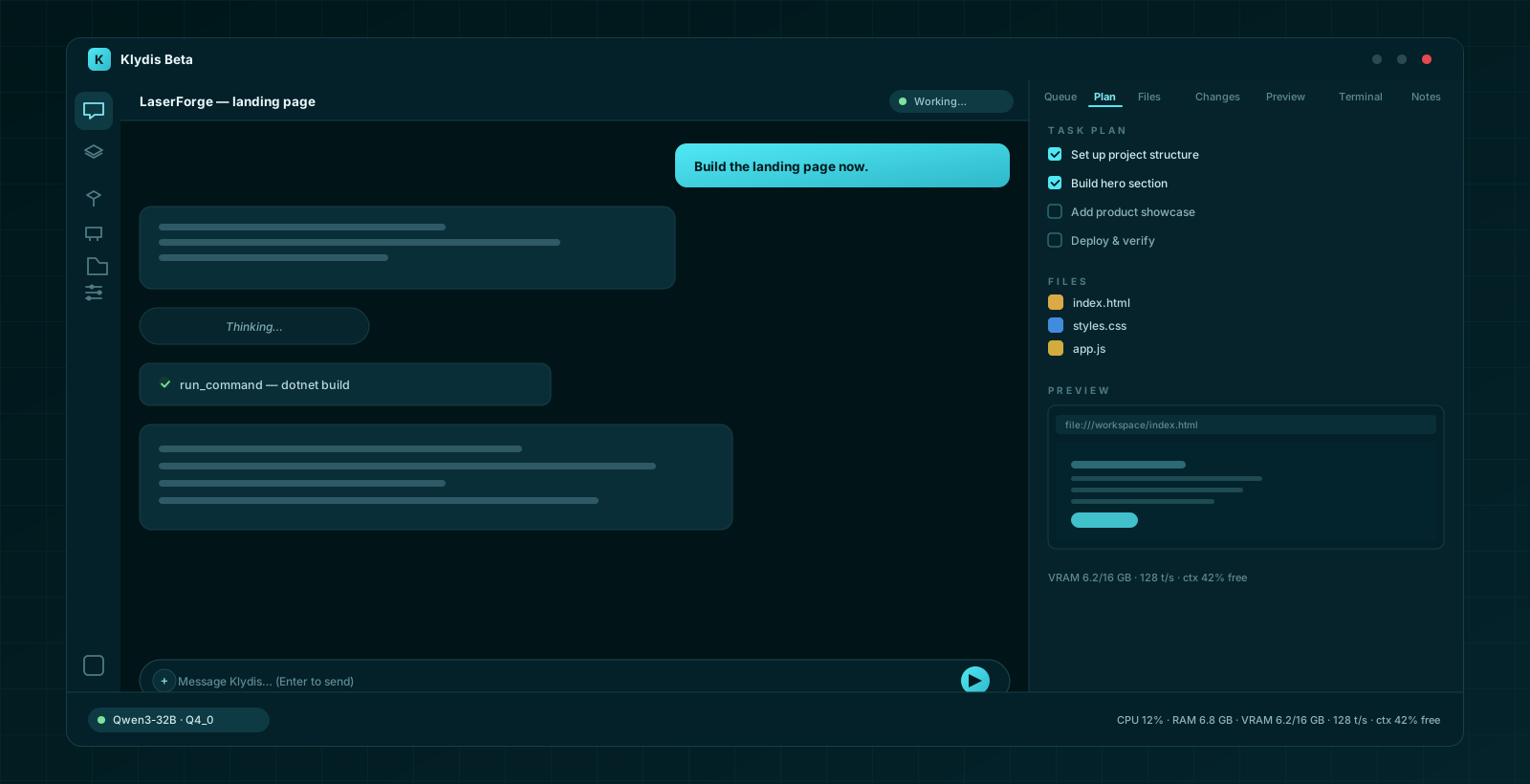
The right-side chat panel (ChatSidePanelView) is a projection of execution state with
seven tabs:
- Queue — the durable steering/direct-send message queue (survives restarts; Steer mode lets the user redirect the model mid-task without breaking its loop). Drag-and-drop reordering plus five presentation sorts (Manual, Oldest first, Newest first, Direct send first, A→Z).
- Plan — the persisted task checklist with completion state (the supervisor's gate), refreshed live while visible.
- Files — every file the agent touched, derived from
tool_activity+ workspace scans, task-scoped. - Changes — real diffs from
file_changeswith add/delete counts and diff text. - Preview — the artifact registry: HTML rendered in an embedded browser, Markdown via MdXaml, any text file as plain text.
- Terminal — the exact commands the model asked the shell to run and their results.
- Notes — user-authored notes pinned per session, injected into the model's prompt on every generation.
The side panel refreshes from the durable stores on a 2-second tick and on tab switches, so it reflects what the agent actually did — never filesystem scans pretending to be agent activity.
Web tools (stealth browser)
search_web and crawl_url are backed by a stealth browsing stack
(StealthBrowserService + CamoufoxManager + ManagedCode Playwright stealth patches):
- Fast path — direct HTTP fetch with clean main-content extraction as Markdown.
- Stealth path — a headless Chromium with anti-bot evasion (canvas/WebGL/UA fingerprinting patches, stealth init scripts, optional Camoufox) for JavaScript-heavy pages, with a managed fallback when the stealth binary is absent.
- Output discipline — the system prompt directs the model to synthesize 3–5 sentence answers from search/crawl results rather than dumping raw Title/Link/Snippet blocks.
RAG: local retrieval-augmented generation
- Indexing —
DocumentIngestionEngineindexes folders (PDF, TXT, Markdown, code) into overlapping ~512-token chunks. - Embeddings —
LLamaVectorEmbedder(384-dim, or a fallback hashing embedder), fully local, with SQLite-backed vector storage (VectorStore, cosine similarity). - Hybrid retrieval —
HybridRetrieverfuses dense vector similarity with sparse BM25-style keyword scoring. - Tools —
index_folder_rag,list_rag_collections,search_rag; memory consolidation also archives compressed history into the RAG collection. The RAG tab manages collections and indexing interactively.
Skill library
- Bundled skills —
assets/skills/customships 122 skills (agentic workflows, UI/UX, web, Windows automation, engineering practices, and more), seeded into the user-writable copy (~/.klydis/skills) on first run. Theawesome-llm-skillsandnvidia-skillssubmodules are optional extras loaded when present. - Dynamic selection —
DynamicSkillSelectorbuilds a Brain index (SkillIndex+SkillReranker+SkillLeaseManager) and reasons over the prompt to activate the most relevant skills per task, injecting only those into context (never the whole library). - Custom skills — the
learn_skilltool and the Skills UI create persistent custom skills for future tasks. - Governance — skills have leases (context budget per activation) and the library is browsable/searchable in the Skills tab.
Model library & management
- Discovery —
ModelDiscoveryServicescans configured folders (.gguffiles) with a file watcher for hot-reload;ModelRegistrypersists the catalog with roles and last-used tracking. - Hugging Face integration —
HuggingFaceClient: search, model cards, file listing, parameter-size extraction, ranking (popular/newest/highest-rated), and resumable downloads with live progress. - Metadata —
GgufMetadataReaderreads architecture, context size, and chat template from GGUF headers;GgufCompatibilityAdapterhandles pre-tokenizer quirks. - Quantization —
ModelQuantizerServicecan quantize models to 4-bit in place. - Offload planning — VRAM-aware layer offload computed per model + GPU
(
OffloadStrategy), including MoE-specific planning and hybrid-SSM-aware context ceilings (Mamba/RWKV/Jamba/Qwen3-Next up to 256K, transformers up to 131K). - Model pool — several models can stay loaded; the app tracks active use for fast switching.
Hardware awareness
- GPU — NVML-backed
GpuProfiler: utilization, VRAM, temperature, compute capability, driver version. - System —
SystemProfileraggregates CPU/RAM/disk/GPU into aHardwareProfileused by the offload planner. - CPU affinity —
CpuAffinityHelperpins inference to performance cores on hybrid (P/E-core) CPUs. - Telemetry UI — live tokens/sec, VRAM, model memory, token usage, CPU, GPU, RAM, and context-usage in the bottom-right status bar, with per-metric severity coloring (warning/critical) and rich hover tooltips.
Performance engineering
- Speculative decoding — draft model or N-gram prompt-lookup, batched verification, dynamic candidate window (2–32), acceptance-rate tracking, auto-bypass on low acceptance or decode failures.
- Prefix caching — native KV-cache prefix reuse (exact + partial) and fast in-place
context resets (
llama_kv_cache_seq_rm) for multi-turn speed. - KV quantization — configurable cache precision (F16 → 3-bit) to fit larger contexts in VRAM.
- Content-keyed token cache — prompt building never re-tokenizes the same content repeatedly.
- Output offloading — huge tool outputs go to disk, keeping the prompt lean.
- Graceful degradation — MoE models get a compact prompt + stricter sampling; models that destabilize under speculation get it disabled for the session.
- Streaming UI batching — per-token dispatcher hops and string concatenation are batched into chunk flushes to keep the UI thread fast during long generations.
Benchmarking
The Benchmarking namespace runs comparative, evidence-based performance validation:
InferenceBenchmarkRunnerruns a configurable suite of prompt workloads and measures tokens/sec, first-token latency, and generation latency.MetricDistributionaggregates runs into percentiles (p50/p90/…).ComparativeBenchmarkResult/BenchmarkReportFormatterproduce JSON/Markdown reports for comparing models, quantization levels, and hardware configurations.BenchmarkAssertionFrameworkenforces performance criteria (e.g. the 60 tok/s GPU target) inside the test suite — hardware-dependent benchmarks skip automatically when no suitable GPU/model is present.
Adaptive learning
- Lessons — the
learn_lessontool persists what the model discovered (workflows that worked, tool quirks, pitfalls);recall_lessonsre-injects them into future sessions for the same model. The runtime also records its own lessons (window-full repairs, degenerate loops, speculation failures) automatically. - Personalities —
UserStyle_Modes.mddefines personality modes switchable in real time; the persona block adapts per mode and is suppressed in Autonomous mode (the model executes work, it doesn't banter).
Processes & terminal sessions
ProcessManager— runs and supervises background processes with bounded ring buffers (captured stdout/stderr never grow unbounded), powering themanage_processtool.TerminalSessionManager— persistent terminal sessions that survive across turns, so a long-running dev server or interactive process keeps its state while the agent works.
Updates & diagnostics
- Native engine updater —
NativeEngineManagerchecks for new llama.cpp builds (daily-throttled), downloads and extracts them into~/.klydis/native, syncs them into the app output, and restarts the app to activate when needed — all behind the splash screen with a 90-second watchdog. - Dependency updater —
DependencyUpdateChecker/DependencyUpdatercompare installed NuGet package versions against the latest; a warning chip appears in the status bar and opens theDependencyUpdateWindowfor review/apply. - Crash forensics —
CrashLogwrites session banners and full forensic dumps (exception chain + stack traces + native log tail) to%LOCALAPPDATA%\Klydis\logs\fatal_error.txt; global handlers capture UI-thread, non-UI-thread, and unobserved-task failures. A clean shutdown writes a marker so crashes are distinguishable. - Logging —
KlydisLogFileLoggerProvidermirrors allILoggeroutput (Debug and up) into a rotatingapp.log;KlydisLogkeeps a native log tail for diagnostics. - Test runner —
TestRunnerServicerunsdotnet testin the workspace and converts results into typed evidence for the verification engine.
Theming
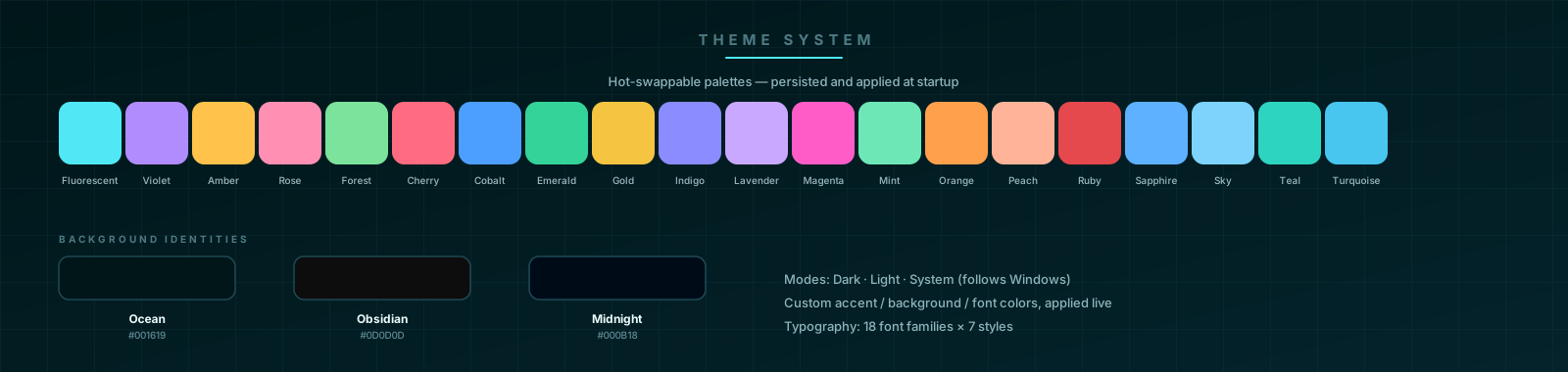
A layered XAML resource system (ThemeService) composes the palette from hot-swappable
ResourceDictionaries:
- Modes — Dark, Light, or System (follows Windows; re-resolves live when the OS theme changes).
- Backgrounds — Ocean, Obsidian, Midnight.
- Accents — 20 identities: Fluorescent, Violet, Amber, Rose, Forest, Cherry, Cobalt, Emerald, Gold, Indigo, Lavender, Magenta, Mint, Orange, Peach, Ruby, Sapphire, Sky, Teal, Turquoise. Five have hand-tuned XAML dictionaries; the rest are derived programmatically from the same palette table.
- Custom colors — user-picked accent, background, and font/text colors override the theme, with derived surface/border/secondary shades recomputed automatically and one-click resets.
- Typography — 18 font families × 7 styles (Regular → Bold Italic), applied globally via a typography dictionary, with a live preview.
- Shared
ThemeStyles.xamlandMarkdownStyles.xaml(tables, code blocks, headings, quotes for every MdXaml viewer).
Everything persists to %LOCALAPPDATA%\Klydis\ui-settings.json and is applied before the
main window shows, so there is no flash of the default palette.
Settings reference
The Settings tab
Three sections: Appearance, Model Settings, About.
Appearance
| Setting | Options | Notes |
|---|---|---|
| Mode | Dark / Light / System | System follows the Windows theme live |
| Background | Ocean / Obsidian / Midnight | Gallery tiles, hot-swap |
| Theme (accent) | 20 accents | Gallery tiles, hot-swap; derived shades auto-computed |
| Custom accent color | Color picker + reset | Overrides the theme accent (buttons, highlights, links) |
| Custom background color | Color picker + reset | Recomputes surfaces, borders, sidebars from the base color |
| Custom font/text color | Color picker + reset | Primary text color; secondary/muted shades derived |
| Font family | 18 Windows fonts (Segoe UI Variable default) | Applied app-wide |
| Font style | Regular / Medium / Semi Bold / Bold / Light / Italic / Bold Italic | Global weight/style |
Model Settings
| Setting | Options | Notes |
|---|---|---|
| Personality | Default + modes from UserStyle_Modes.md | Live directive preview; Reload re-reads the file from disk; applies to the next generation |
| Context window limit | Auto (smart hardware allocation), 1K → 1M tokens (12 buckets) | Re-applies model parameters live; Auto lets the offload planner pick |
| Batch size | Auto, 512, 1K, 2K, 4K, 8K | Prefill throughput; live re-apply |
| U-batch size | Auto, 128, 256, 512, 1K, 2K | Micro-batch (tensor-core); live re-apply |
| Speculative decoding | On/Off | Default On |
| Draft count | 4–32 (default 24) | Candidate window K |
| Draft model | Auto (smallest model) or any registered model | Attached in the background; failures never break main-model loading |
About
App version and description.
Per-chat settings (chat header menu)
The inline menu in the chat header shows a live summary — e.g. Standard · Steer · Default:
| Setting | Options | Notes |
|---|---|---|
| Tool risk | Safe / Standard / AutoPilot | Standard is the default (approval only for risky actions); Safe requires approval for every tool call; AutoPilot denies risky requests without prompting |
| Message mode | Steer / Direct Send | Steer: messages enter the durable queue and the model calls check_message_queue / incorporate_queued_message when it chooses; Direct Send: the next queued message auto-advances when the current turn ends |
| Personality | Default + style modes | Quick switch; same store as Settings → Model Settings |
Other persisted settings
| Setting | Location / mechanism |
|---|---|
| Theme, fonts, context, batch, speculation, personality | %LOCALAPPDATA%\Klydis\ui-settings.json |
| Model roles & last-used | ModelRegistry (SQLite) |
| Risk level | Per app session (resets to Standard on restart) |
| Queue sort order | Per-view (Manual drag order mirrors the durable queue) |
The UI surface
- Activity bar (left) — Chat, Models, Skills, RAG, Settings. The Models icon shows an inline download progress bar when Hugging Face downloads are active.
- Chat tab — session list (pin / rename / delete, per-session working indicator),
streaming transcript with thinking blocks (collapsible
<think>bubbles), tool-call bubbles, typing indicator, attachments tray (files/code, images, audio, text snippets, screenshots — capture button and paste support), input with Send (Enter), Force send (Ctrl+Enter) which interrupts the current generation with a real lifecycle barrier, and + Queue to enqueue without interrupting. - Models tab — local GGUF files (load/unload), Hugging Face browse (popular / newest / highest rated), model cards, resumable downloads, in-place 4-bit quantization.
- Skills tab — browse/search the skill library, view details, activate, create custom skills.
- RAG tab — collections, folder indexing, hybrid search.
- Settings tab — see Settings reference.
- Status bar — model selector, Unload, loading/ready indicator, dependency-update notification, and real-time stats formation (CPU, GPU, RAM, VRAM, model memory, tokens/s, token usage, context-free %).
- Workbench (right panel) — see The workbench.
- Model-aware guardrails — a "working elsewhere" banner explains when the model is busy in another chat instead of silently queueing input.
Repository layout
KlydisBeta/
├── KlydisBeta.sln
├── build.ps1                    # win-x64 self-contained publish + native binary pruning
├── Start-Klydis.bat             # dev launcher (dev env + Debug logging)
├── klydis local system prompt.md   # runtime persona (loaded & shipped)
├── UserStyle_Modes.md           # personality modes (loaded & shipped)
├── PROJECT.md                   # milestone/roadmap design doc
├── TEST_INFRA.md                # E2E test strategy
├── docs/architecture/           # architecture deep-dive docs (current-state, dependency-map,
│                                # execution-path, state-ownership)
├── patches/README.md            # vendored LLamaSharp fork documentation
├── src/
│   ├── Klydis.Core/             # engine, agent loop, state, tools (no UI)
│   │   ├── Chat/                # ChatEngine, ToolExecutor, SystemPromptManager, parsers,
│   │   │                        # stealth browser, message queue, goal orchestrator
│   │   ├── Tasks/               # InteractionClassifier, TaskManager, AgentRuntime,
│   │   │                        # AgentSupervisor, state machines, action gate, evidence,
│   │   │                        # completion/verification engines, recovery
│   │   ├── Inference/           # InferenceEngine, SpeculativeEngine, KV cache, grammar,
│   │   │                        # native engine manager, model pool, telemetry
│   │   │   ├── Providers/       # IInferenceProvider, OpenAI provider, credentials
│   │   │   └── Telemetry/       # inference/speculative/skill-selection telemetry
│   │   ├── Memory/              # MessageStore (SQLite), ContextOrchestrator, persistence,
│   │   │                        # context assembly pipeline, Obsidian vault
│   │   ├── RAG/                 # VectorStore, HybridRetriever, ingestion, embedders
│   │   ├── Skills/              # SkillLibraryManager, DynamicSkillSelector, index/rerank
│   │   ├── Hardware/            # GpuProfiler (NVML), SystemProfiler, OffloadStrategy, CPU affinity
│   │   ├── Models/              # ModelRegistry, HuggingFaceClient, GGUF reader, quantizer
│   │   ├── Protocol/            # IModelProtocol adapters, Fluid chat templates, registry
│   │   ├── Orchestration/       # ModelRouter, intent resolver, capability estimator, telemetry
│   │   ├── Capabilities/        # capability registry/graph, policy gate, tool bridge
│   │   ├── Epistemic/           # FactLedger, MachineWorldModel
│   │   ├── Processes/           # ProcessManager, TerminalSessionManager
│   │   ├── Benchmarking/        # benchmark runner, reports, assertion framework
│   │   ├── Workbench/           # DiffService, FileChange, UnifiedDiff
│   │   ├── Learning/            # AdaptiveLearningService
│   │   ├── Updates/             # dependency update checker/updater
│   │   └── Diagnostics/         # crash log, KlydisLog, test runner service, fire-and-forget
│   └── Klydis.App/              # WPF UI (MVVM, CommunityToolkit)
│       ├── ViewModels/          # Chat, SidePanel, ModelLibrary, RAG, Skills, Settings,
│       │                        # SystemMonitor, downloads…
│       ├── Views/               # ChatView, ChatSidePanelView, ModelLibraryView,
│       │                        # RagView, SkillsView, SettingsView,
│       │                        # SplashWindow, DependencyUpdateWindow, TextContextWindow
│       ├── Themes/              # backgrounds, accents, typography, markdown styles
│       ├── Controls/            # ColorPickerControl
│       ├── Converters/          # EnumToBoolean, BoolToColor, view converters
│       ├── Helpers/             # MarkdownViewerStyler, RelayCommand
│       ├── Services/            # StartupSequence, ThemeService
│       └── Assets/              # icon, bundled skill assets
├── tests/
│   └── Klydis.Core.Tests/       # 133 files, 1028 tests (unit + empirical stress)├── assets/skills/custom/        # 122 bundled skills (ships with the app)
├── assets/skills/awesome-llm-skills/   # optional skill submodule
├── assets/skills/nvidia-skills/        # optional skill submodule
├── assets/branding/            # README artwork: banner, feature strip, architecture,
│                               # workbench mockup, theme gallery (SVG)
└── third_party/LLamaSharp/    # vendored patched fork (build dependency)
Testing
dotnet test tests/Klydis.Core.Tests/Klydis.Core.Tests.csproj
The suite (133 test files, 1028 tests, NUnit 4.6.1) covers:
- Classifier & task lifecycle —
InteractionModeTests,RunLifecycleTests,SessionHandlingTests,LongHorizonAgenticLoopTests,TaskExecutionStateTests,CrashRecoveryTests - Loop integrity —
OutputCapContinuationTests,ProtocolReliabilityTests,OutputStabilityTests,GenerationLoopDetector*,ChatCompactionTests,ThinkContextInjectionTests,ThinkingOnlyStorageTests,ThinkTagAndToolCallTest - Supervision & state machines —
AgentLoopStateMachineTests,AgentRuntimeExecutionTests,ExecutionDispatcherTests,CompletionEligibilityTests,CompletionEngineTests,EvidenceEngineTests,TypedEvidenceVerifierTests,RecoveryStateMachineTests,StateDeltaStagnationTrackerTests,PlanEngineTests,PlanValidatorTests,PlanQualityValidatorTests,PromptInvariantEngineTests,RuntimeInvariantValidatorTests - Action integrity —
ActionGateTests,ActionLifecycleTests,ActionReplayEngineTests,WorkspaceBoundarySecurityTests,SecuritySandboxHardeningTests,ToolAccessTests,ToolCallingRobustnessTests,ToolCallResilienceTests - Inference & hardware —
InferenceEngineStressTests,SpeculativeEngineLogicTests,OffloadStrategyTests,HybridModelLoadTest,NativeDisposalOffloadTests,M2_GpuInferencePerformanceStressTests,Milestone3_UnlimitedContextAndKvCacheTests,InferencePerformanceSettingsTest,TokenSpeedTrackerTests,BudgetManagerTests,PromptBudgetRegressionTests - State durability —
ExecutionStateDurabilityTests,ChatSessionContextTests,ContextOrchestratorCompressionTests,ModelMessageQueueTests,QueueIsolationTests,ExecutionHierarchyPersistenceTests,RuntimeChannelPersistenceTests,SchemaMigrationTests,P18ExecutionContractTests,DurableExecutionLedgerTests - Protocol & formats —
ProtocolAdapterMatrixTests,UniversalProtocolAdaptersTests,FluidChatTemplateEngineTests,DynamicGbnfGeneratorTests,ToolCallGrammarTests,GgufStructuralIntegrityTests,GgufCompatibilityPreTokenizerTests,GgufStopTokenExtractionTests,QwenNativeToolFormatTests,QwenMultiTurnSessionTests,ModelFamilyAutoDetectionTests,CanonicalModelResponseTests - Web & updates —
CrawlUrlFallbackTests,StealthBrowserRevisionTests,DependencyUpdate*Tests,HuggingFaceClientTests - RAG, skills, memory —
VectorRagTests,SkillActivationPipelineTests,SkillRoutingTests,AdaptiveLearningMemoryTests,LearningLoopTests - Processes & workspace —
ProcessManagerTests,TerminalSessionManagerTests,TaskWorkspaceManagerTests,WorkspaceVersionManagerTests,WorkbenchTests,WorkbenchTaskScopeTests - Robustness —
ChaosFailureInjectionTests,LongRunningStabilityTests,LongHorizonStressTests,FullSystemIntegrationTests,StartupDiAndMigrationTests - Benchmarks —
EmpiricalInferenceBenchmarkTest(skips without a GPU/model),PerformanceAndThroughputTests,M2_GpuInferencePerformanceStressTests
Hardware-dependent benchmarks skip automatically when no suitable GPU or model is present.
Building & publishing
dotnet build KlydisBeta.sln— full solution build (Core + App + Tests).powershell -ExecutionPolicy Bypass -File .\build.ps1— win-x64 self-contained publish with non-Windows native pruning.dotnet test tests/Klydis.Core.Tests/Klydis.Core.Tests.csproj— the test suite.
Contributing
Contributions, bug reports, and feature requests are welcome:
- Open an issue on the GitHub Issues page.
- Keep the invariant: agentic progress must be measured by durable state change — any new feature that lets narration count as progress is a regression.
- Keep the vendored LLamaSharp ABI in sync with the auto-updated native engine (see
patches/README.md). PROJECT.mdanddocs/architecture/track the roadmap and design intent; update them when behavior changes materially.
Official Website: klydis.co
Similar repos


Languages
C#
99.8%
README
Klydis Beta
A high-performance, self-contained LLM inference engine & agentic chat platform for Windows.
Klydis is a modern, dark-first WPF desktop application engineered for zero-latency, private
Large Language Model (LLM) execution directly on local Windows hardware. Powered by .NET 10
and a vendored fork of LLamaSharp (see patches/README.md), Klydis
operates with an in-process inference engine — eliminating the overhead, network leaks, and
IPC latency of external local servers (like Ollama or LM Studio).
Klydis is not just a chat UI around a model: it is an agentic execution system that uses the model as its decision engine. It classifies every user message, maintains durable task state (plan, runs, steps, tool activity, artifacts, execution events) in SQLite, supervises the model's progress against that state, and projects everything onto a live workbench (plan / files / changes / preview / terminal). The harness — not the model — decides what counts as progress and what counts as completion.
Contents
- Highlights
- Feature inventory
- Quick start
- Where things live (data & config)
- Architecture
- The interaction model: Conversation / Task / Autonomous
- The chat loop
- The autonomous task loop (Planner → Executor → Supervisor)
- Progress = state change (the no-action gate)
- Goal mode (GoalOrchestrator)
- Context & memory orchestration
- Inference engine
- Protocol, templating & grammar layers
- Orchestration & routing layer
- Capabilities & epistemic subsystem
- Cloud / remote providers
- Durable execution state (SQLite)
- Tool protocol & risk model
- The workbench
- Web tools (stealth browser)
- RAG: local retrieval-augmented generation
- Skill library
- Model library & management
- Hardware awareness
- Performance engineering
- Benchmarking
- Adaptive learning
- Processes & terminal sessions
- Updates & diagnostics
- Theming
- Settings reference
- The UI surface
- Repository layout
- Testing
- Building & publishing
- Contributing
Highlights
- ⚡ In-process inference engine — loads and runs
.ggufmodels directly inside the application process using a vendored LLamaSharp fork; no external server, no IPC. - 🤖 Three interaction modes —
Conversation,Task, andAutonomousare selected deterministically per message, so a greeting never spins up the agent runtime and a build request never degrades into chit-chat. - 🗂 Durable agentic execution state — sessions, messages, tasks, runs, turns, generations, typed steps, an action ledger, evidence, plan checklists, tool activity, artifacts, file diffs, and execution events all persist to SQLite (19 tables) and survive restarts.
- 🧠 Supervisor-owned completion — the model proposes; the harness disposes. Completion claims are verified against the plan checklist; text with no state change is not progress.
- 🔧 42 built-in tools — file read/write/edit/patch, PowerShell, background process management, system diagnostics, web search/crawl, RAG search, memory, skills, message queue, custom tool creation, plan maintenance, and more.
- 💾 Context orchestration — rolling compression, world-state summaries, prompt budgeting, and KV-cache-aware sizing keep long-horizon tasks inside the model's window (up to 1M tokens).
- 🏎️ Speculative decoding — draft-model speculation with a zero-VRAM N-gram prompt-lookup fallback, dynamic candidate windows, and acceptance-rate tracking.
- 🖥️ Hardware awareness — NVIDIA NVML GPU profiling, VRAM-aware layer offloading, P-core CPU affinity, and a system profiler that adapts the engine to the machine.
- 📚 Local RAG — index local folders (PDF, TXT, Markdown, code) into a SQLite vector store with hybrid dense + BM25 retrieval, fully offline.
- 🛠️ Skill library — 122 bundled skills (UI/UX, web, Windows automation, engineering practices) plus a custom skill creator and dynamic skill selection.
- 🧠 Cross-session learning — lessons learned during tasks are persisted and re-injected into future sessions for the same model.
- 🌐 Stealth web tools —
search_web/crawl_urlthrough a stealth Chromium that evades bot detection, with a fast direct-HTTP fallback. - 🎨 Theme system — 20 accent themes × 3 background identities, Dark/Light/System modes, custom colors, and full typography control, hot-swappable at runtime.
- 🛡️ Safety & forensic tooling — three tool-risk levels with per-call approval gates, workspace-boundary validation, crash forensics, and rotating logs.
Feature inventory
| Area | Capability |
|---|---|
| Inference | In-process GGUF execution (LLamaSharp fork), KV-cache quantization (F16 → 3-bit), prefix caching, speculative decoding with N-gram fallback, grammar-constrained tool calls |
| Model management | GGUF discovery with hot-reload, Hugging Face browse/search/download (resumable), metadata reading, in-place 4-bit quantization, multi-model pool |
| Agentic runtime | Conversation/Task/Autonomous classification, durable tasks/runs/turns/generations, typed steps, plan engine, supervisor decisions, evidence & verification, recovery state machine |
| Context | Token budgeting, rolling compression to world state, chunked summarization, sparse memory index, Obsidian vault integration, execution-state contract |
| Tools | 42 built-in tools across files, shell, web, system, RAG, skills, memory, queue, task lifecycle; custom PowerShell/Python/C# tools |
| Persistence | SQLite WAL: 19 tables + FTS5 message index; every projection (plan/files/changes/preview/terminal) is durable state |
| Web | Stealth Chromium (fingerprint evasion, optional Camoufox) with fast direct-HTTP fallback |
| RAG | Folder ingestion (PDF/TXT/MD/code), local embeddings, hybrid dense+BM25 retrieval |
| Skills | 122 bundled skills + submodule extras, dynamic relevance-based selection, custom skill creation |
| UI | Multi-session chat, streaming with thinking blocks, attachments (files/images/audio/text/screenshots), 7-tab workbench, hardware monitor, settings |
| Theming | 20 accents × 3 backgrounds × 3 modes, custom colors, fonts, instant hot-swap, persistence |
| Observability | Live tokens/s, VRAM, context gauges, benchmark runner, crash forensics, rotating app log |
| Updates | Auto-updating native llama.cpp engine (daily-throttled), NuGet dependency update checker |
Quick start
Prerequisites
- OS: Windows 10 / 11 (64-bit)
- SDK: .NET 10.0 SDK or higher
- GPU (optional): NVIDIA GPU with CUDA 12 drivers — automatic CPU fallback via AVX2/AVX-512.
CUDA runtime DLLs are discovered on
PATH, in the NVIDIA toolkit install, the NVIDIA App G-Assist folder, and the legacy NVIDIA CEF folder.
Run
.\Start-Klydis.bat          # recommended: dev env + diagnostic logging
dotnet run --project src/Klydis.App/Klydis.App.csproj
Or open KlydisBeta.sln in Visual Studio 2022+ / Rider and run Klydis.App.
Start-Klydis.bat sets DOTNET_ENVIRONMENT=Development, default log level Debug, and
Microsoft-namespace logs at Information.
First model
- Download a GGUF model (e.g. Qwen, Llama 3, Mistral, DeepSeek distills) from Hugging Face — either through the in-app Model Library tab or manually.
- Place
.gguffiles in%USERPROFILE%\.klydis\models(the app hot-reloads this folder via a file watcher). - Open the Models tab → Refresh → Load Model (or pick it from the status-bar model selector in the Chat tab).
- Tune GPU offloading and context in Settings (auto-offload and auto context are available) and monitor live VRAM in the bottom-right status bar.
Publish a release build
powershell -ExecutionPolicy Bypass -File .\build.ps1
# Output: src\Klydis.App\bin\Release\net10.0-windows\win-x64\publish\
The build script publishes win-x64 self-contained and prunes non-Windows native binaries
that leak in from the LLamaSharp backend packages (Cloudflare edge-caches objects only up to
512 MB). It deliberately does not use PublishSingleFile, because the app loads native
DLLs (llama.dll / ggml*.dll) at runtime and single-file extraction breaks that lookup.
Where things live (data & config)
| Path | Purpose |
|---|---|
%USERPROFILE%\.klydis\models | GGUF model files (watched for hot-reload) |
%USERPROFILE%\.klydis\data\ | SQLite database (MessageStore): sessions, messages, tasks, runs, tools, artifacts, … (WAL mode) |
%USERPROFILE%\.klydis\native\ | Auto-updated native llama.cpp engine (llama.dll, ggml*.dll), deployed/overridden here and synced into the app output |
%USERPROFILE%\.klydis\skills\ | User-writable skill library (seeded from bundled skills on first run) |
%USERPROFILE%\.klydis\ | Optional klydis local system prompt.md and UserStyle_Modes.md overrides (also loaded from the working dir and app dir) |
%LOCALAPPDATA%\Klydis\ui-settings.json | Persisted UI/model settings (theme, fonts, context limit, speculation, personality) |
%LOCALAPPDATA%\Klydis\logs\ | fatal_error.txt (crash forensics), app.log (rotating ILogger mirror), llama_native.log (rotating native engine log) |
.klydis\models (project dir) | Alternative model folder (also scanned) |
The native engine auto-update runs behind the splash screen on startup, is daily-throttled, and is guarded by a 90-second watchdog: if the sync/update cannot finish in time, Klydis starts with the current engine and retries on the next launch.
Architecture
Layer diagram
Key principle: every UI panel is a projection of durable execution state. The Plan tab
is the persisted checklist; the Files/Changes/Preview/Terminal tabs are projections of
tool_activity, file_changes, artifacts, and execution_events. Nothing in the UI
invents state from narration.
Core components
| Component | File | Responsibility |
|---|---|---|
ChatEngine | src/Klydis.Core/Chat/ChatEngine.cs | Loop host: mode classification, task resolution, prompt assembly, inference dispatch, streaming, tool execution, continuation/repair, persistence. The while (iterationCount < maxIterations) loop is the single place the next autonomous iteration starts. |
ToolExecutor | src/Klydis.Core/Chat/ToolExecutor.cs | 42 built-in tools, approval gates, validation, the file-mutation pipeline (snapshot → diff → artifact → events), tool-output disk offloading. |
SystemPromptManager | src/Klydis.Core/Chat/SystemPromptManager.cs | Prompt construction: full / compact / conversational profiles, KNOWN/ASSUMED/PROPOSED fact grounding, persona & personality injection, tool schema. |
AgentRuntime | src/Klydis.Core/Tasks/AgentRuntime.cs | Run lifecycle (Task → Run → Turn → Generation), outcome classification, durable action ledger, evidence ledger, supervisor dispatch. |
AgentSupervisor | src/Klydis.Core/Tasks/AgentSupervisor.cs | Pure, deterministic decision layer: completion gate (EvaluateCompletion — plan checklist must be empty), eligibility, DecideAfterTurn. |
TaskManager | src/Klydis.Core/Tasks/TaskManager.cs | Task resolution (new / steer / reopen), creation, persistence, plan management. |
InteractionClassifier | src/Klydis.Core/Tasks/InteractionClassifier.cs | Deterministic, tiered message → mode classification. |
TaskStateMachine | src/Klydis.Core/Tasks/TaskStateMachine.cs | Task/Run state enums and legal transition enforcement. |
AgentLoopStateMachine | src/Klydis.Core/Tasks/AgentLoopStateMachine.cs | OODA-VR phase transitions (Observe → Orient → Decide → Act → Verify → Reflect). |
ActionGate | src/Klydis.Core/Tasks/ActionGate.cs | Pre-execution validation: tool existence, step restriction, schema, replay protection, workspace boundary. |
StepClassifier / TaskStep | src/Klydis.Core/Tasks/ | First-class typed steps with StepActionKind, AllowedTools, VerificationCriteria. |
ExecutionEvidenceLedger | src/Klydis.Core/Tasks/ExecutionEvidenceLedger.cs | Run-scoped, versioned verification evidence with durable persistence and stale invalidation. |
RecoveryStateMachine | src/Klydis.Core/Tasks/RecoveryStateMachine.cs | Self-healing: bounded tool/schema/model repair attempts, same-action retry suppression. |
InferenceEngine | src/Klydis.Core/Inference/InferenceEngine.cs | LLamaSharp wrapper: model lifecycle, KV cache, speculative decoding, telemetry, grammar-constrained sampling. |
ContextOrchestrator | src/Klydis.Core/Memory/ContextOrchestrator.cs | Token budgeting, rolling compression, world state, chunked summarization, memory index. |
MessageStore | src/Klydis.Core/Memory/MessageStore.cs | SQLite persistence layer (WAL), 19 tables, FTS5 message index. |
DynamicSkillSelector | src/Klydis.Core/Skills/DynamicSkillSelector.cs | Brain-index generation, relevance scoring, per-task skill activation. |
ProcessManager | src/Klydis.Core/Processes/ProcessManager.cs | Background process management with bounded ring buffers. |
TerminalSessionManager | src/Klydis.Core/Processes/TerminalSessionManager.cs | Persistent terminal sessions across turns. |
NativeEngineManager | src/Klydis.Core/Inference/NativeEngineManager.cs | Native llama.cpp engine deployment, daily-throttled auto-update, CUDA runtime syncing. |
State ownership & persistence
The database is always the authority. In-memory collections in ToolExecutor,
AgentRuntime, and ExecutionEvidenceLedger are caches, not authorities.
| State | In-memory owner | Persistence table |
|---|---|---|
| Sessions / messages | ChatEngine | sessions, messages (+ FTS5) |
| Tasks / plans | TaskManager / ToolExecutor | tasks (plan_json) |
| Runs / turns / generations | AgentRuntime | runs, turns, generations |
| Typed steps | TaskStepBuilder | task_steps |
| Actions (replay ledger) | AgentRuntime | task_actions (replay_key) |
| Evidence / decisions | ExecutionEvidenceLedger | execution_evidence, execution_decisions |
| Events / diffs / tool activity / artifacts | ToolExecutor | execution_events, file_changes, tool_activity, artifacts |
| Queue / custom tools / lessons / notes | ModelMessageQueue / ToolExecutor / AdaptiveLearningService | queued_messages, custom_tools, lessons, session_notes |
| World state | ContextOrchestrator | sessions.world_state |
| Facts (epistemic) | FactLedger | fact_ledger |
Dependency injection & startup
Klydis.App/App.xaml.cs registers everything in a single ServiceCollection:
- Engine chain —
InferenceEngine(withSpeculativeDecodingService,NativeResourceDisposer) →ChatEngine(withPromptTemplateEngine,ToolExecutor,MessageStore,ContextOrchestrator,ModelMessageQueue,AdaptiveLearningService,TaskManager,AgentRuntime). - Agentic services —
TaskManager,AgentRuntime(+IAgentRuntime),TaskEventBus,WorkspaceVersionManager,TaskWorkspaceManager(canonicalized workspace root from the process working directory),ICompletionEngine,IActionExecutor(ActionExecutorAdapter),IContextAssemblyPipeline,IStateDeltaStagnationTracker. - Skills —
SkillLibraryManager,SkillIndex,SkillReranker,SkillLeaseManager,DynamicSkillSelector(alsoISkillRouter). - RAG —
LLamaVectorEmbedder(384-dim),VectorStore,DocumentIngestionEngine,HybridRetriever. - Capabilities & epistemic —
CapabilityRegistry,CapabilityGraph,FactLedger,MachineWorldModel,CapabilityPolicyGate(AuthorityMode.LocalFullControl),CapabilityToolBridge. - Hardware / web / learning —
GpuProfiler,SystemProfiler,OffloadStrategy,CamoufoxManager,StealthBrowserService,AdaptiveLearningService,ModelPool,GoalBudget,GoalOrchestrator.
Startup runs behind a splash window in six phases (each failure-tolerant, heavy work on
the thread pool): (1) native engine sync/auto-update, (2) model library scan, (3) message
store init (+ repair of broken custom tools), (4) RAG vector store init, (5) skill library
seed, (6) finalize. Global exception handlers (AppDomain, TaskScheduler.UnobservedTaskException,
DispatcherUnhandledException) write a forensic dump to
%LOCALAPPDATA%\Klydis\logs\fatal_error.txt before the process dies.
The interaction model: Conversation / Task / Autonomous
Every user message is classified before task resolution and prompt construction by
InteractionClassifier. The mode decides
what the runtime exposes:
| Mode | Runtime surface | Typical input |
|---|---|---|
| Conversation | Minimal prompt, no tools, no task, no plan | "good evening", "explain X", "what's the weather" (explanation tier) |
| Task | Tools + task contract, bounded inspection/analysis/research | "analyze this repository", "research Y" |
| Autonomous | Full runtime: plan, skills, artifacts, verification, continuation | "build a landing page", "fix this project" |
The classifier is deterministic and tiered (priority order):
- Greetings / gratitude / farewell → Conversation.
- Live-data markers (
weather,stock price,score, …) → Task (they require web tools). - Explanation markers (
explain,what is,how do, …) → Conversation even when they contain action verbs. - Command markers (
begin,start,proceed,continue,go ahead) → tool-using mode, and the task resolver continues the current task —"i want you to begin building the project"keeps the same task and plan instead of spawning a new one. - Strong build/fix verbs (
build,implement,fix,refactor,migrate, …) → Autonomous. - Analysis/research verbs → Task.
- Short messages → Conversation fallback.
Task resolution (TaskManager)
Once the mode is Task/Autonomous, TaskManager
resolves the message against the session's current task:
- New — action verb + substantial request → a new durable
AgentTaskis created with a harness-generated plan (InitialPlanGenerator: requirements → inspect → design → implement → verify → summarize). - Steer — relational markers (
also,instead,change,continue,begin, …) → the message joins the current task; the plan is preserved. - Reopen — a task that was completed/abandoned is resumed.
This guarantees a new task in the same chat never inherits an old task's checklist, and a steer never loses the current one. Tasks are the execution unit; sessions remain conversations.
The chat loop
ChatEngine is the host of the generation loop. Per
turn it:
- Classifies the message (mode) and resolves/creates the task.
- Builds the prompt — system prompt + world state + queue notice + RAG context + skill header + lessons + conversation history, budgeted to the model's context.
- Streams generation through
InferenceEngine, parsing the stream (ChatStreamParser) into visible tokens, thinking tokens (<think>blocks for reasoning models), tool calls, and tool results. - Executes tool calls via
ToolExecutor, feeding results back into the loop. - Classifies the generation outcome (
AgentRuntime.ClassifyGeneration) — completed / hit max tokens / cut short / cancelled / context exhausted / degenerate loop / no action produced. - Asks the supervisor what to do next and executes the decision (continue, repair protocol, verify, replan, pause, complete).
- Persists messages, tasks, runs, turns, generations, tool activity, artifacts, and events.
Loop budget: up to 1000 iterations in Autonomous/goal mode, 100 otherwise, with
MaxContinuationsPerTurn = 16, MaxConsecutiveEosDeclines = 2, MaxSelfCorrectionsPerTurn = 3, and MaxNoActionRepairs = 3 per turn.
Continuation & self-healing
The loop detects structural failures and repairs them without user intervention:
- Output cap / mid-stream cut → auto-continue with a continuation marker.
- Empty response → empty-response correction demanding an actual answer (bounded, so a model that produces nothing cannot burn unlimited re-prefills).
- Stuck in
<think>→ a thinking model that never closed its think block produced reasoning only; route straight to the correction instead of re-opening the same block. - Context window full → rolling compression, then retry once; if still full, terminate with an actionable error.
- Degenerate loops —
GenerationLoopDetectorwatches the live token stream for n-gram stutter/repetition attractors (MoE models especially) and cuts the generation, recording a lesson for the session. - Model alternation cancellation — an empty stream caused by model switch/unload is not treated as degenerate output (no correction storm).
- Recovery state machine — bounded, structured repair attempts for tool schema errors, model behavior errors, and same-action retries, so failures cannot loop forever.
System prompt construction (SystemPromptManager)
Three prompt profiles, chosen by model and mode:
- Full combined prompt — persona + runtime execution directives + tool schema + world state + skills + lessons + personality, with fact grounding (KNOWN / ASSUMED / PROPOSED separation — the model must not present assumptions as user facts).
- Compact prompt — for MoE / thinking models that destabilize under the full prompt.
- Conversational prompt — minimal, no tools, used in Conversation mode.
The persona comes from klydis local system prompt.md (searched in working dir, app dir,
~/.klydis; a built-in fallback persona is used when absent). User style modes come from
UserStyle_Modes.md and can be switched in real time from the UI.
The autonomous task loop (Planner → Executor → Supervisor)
User: "build a landing page for my laser engraving company"
        │
        ▼
InteractionClassifier ──► Autonomous
        │
        ▼
TaskManager ──► Task created (durable) + plan seeded (6-step scaffold)
        │
        ▼
AgentRuntime.EnsureRunAsync ──► Run opened (Task → Run → Turn → Generation)
        │
        ▼
SystemPromptManager ──► prompt: CURRENT TASK STATE, CURRENT STEP,
                        action contract ("execute the next action now"),
                        KNOWN facts (only "user owns a laser engraving company")
        │
        ▼
InferenceEngine ──► tokens / <think> / tool calls
        │
        ▼
ChatStreamParser + ToolActionParser ──► action (tool call | plan | task_complete)
        │
        ▼
ActionGate.Validate ──► tool exists? step allows it? schema OK? replay? workspace?
        │
        ▼
ToolExecutor ──► executes ► file mutation pipeline ► StateDelta
        │
        ▼
AgentRuntime.ClassifyGeneration ──► outcome (CompletedTurn | NoActionProduced | …)
        │
        ▼
AgentSupervisor.DecideAfterTurn ──► decision:
        ├── ContinueStep      (open steps remain — keep working)
        ├── RepairProtocol    (text-only with open steps — inject action-required repair)
        ├── Replan            (stagnation detected: 6+ turns, no plan progress)
        ├── Pause             (3+ rejected completion claims)
        ├── Verify            (all items checked — direct the model to seal completion)
        └── CompleteTask      (completion claim accepted: plan empty → task Completed)
The supervisor is pure and deterministic. AgentSupervisor
owns the only path to task completion: a task_complete claim is accepted only when the
plan checklist is empty (EvaluateCompletion). Every other outcome is mapped to a decision
by DecideAfterTurn, and the loop implements that decision. The model can propose (plan,
task_complete) but never seals state by itself.
Stagnation guards:
- No-action repair — bounded, max 3 repairs per turn; the injected repair names the current step and demands an executable action.
- Completion-claim rejection — after 3 rejected claims the task pauses.
- Stall detection — 6 consecutive tool turns with no plan progress → reassess/replan
(
StateDeltaStagnationTrackermeasures plan-progress deltas, not turn counts).
Evidence-backed verification — ExecutionEvidenceLedger stores typed, workspace-versioned
evidence per run (VerificationCriterion matches kind + subject + exit code + workspace
version). TestRunnerService runs dotnet test in the workspace and converts results into
evidence, and IVerificationEngine / ICompletionEngine consume it — so "did the build pass"
is a fact, not a claim.
Progress = state change (the no-action gate)
The central invariant of the autonomous loop:
Autonomous progress is measured by durable state change, not by how convincing the model's text looks.
In Autonomous mode, a text-only response with open plan steps is classified
NoActionProduced and repaired — regardless of length, Markdown structure, or code
fences. Length ≥ 400 chars, headers, bullets, and code blocks are not evidence of
progress: the observed failure was a model answering a build request with a long
wireframe/design essay while changing zero task state. Only these count as progress:
- a tool executed (persisted to
tool_activity) - a file created/modified (persisted to
file_changes+artifactswith a real diff) - the plan mutated
- an execution event recorded
A model saying "I have created the landing page" is irrelevant unless the state shows it.
Goal mode (GoalOrchestrator)
A secondary execution path (GoalOrchestrator + GoalBudget) drives long-horizon goal
runs with hard budgets instead of the supervisor loop:
| Budget | Default |
|---|---|
| Max turns | 100 |
| Max total tokens | 500,000 |
| Max wall time | 2 hours |
| Max consecutive empty turns | 5 |
| Max completion rejections | 3 |
| Max stalled turns | 6 |
| Infinite mode | off (opt-in) |
The orchestrator wraps ChatEngine.StreamResponseAsync per turn, tracks stagnation, and
builds a continuation contract between turns so the model always knows where it is.
Context & memory orchestration
ContextOrchestrator manages the context
window:
- Token budgeting — estimates every message's token count (content-keyed cache), and fits prompt + history + system prompt into the model's window with a guaranteed floor for the current user message.
- Rolling compression — when the budget is exceeded, older messages are summarized into the persistent WorldState (bounded, KV-cache-aware cap ~35% of context, max 8K chars) and archived; the full pre-compaction history is indexed into the RAG memory collection so nothing is lost to retrieval.
- Consolidation —
consolidatemerges history into durable world state on demand. - Chunked summarization — very large inputs (e.g. pasted documents) are chunked and summarized before entering the window.
- Sparse memory index — a lightweight in-memory retrieval index over past messages, with an enhanced search path that uses a fast embedding model.
- Obsidian vault integration — optional vault as a memory store.
The ExecutionStateContract is a structured block (objective, status, completed steps,
open steps, next required action) rebuilt every turn from durable sources — never from a
model-written narrative — so a compacted window never loses "what am I doing and what's
next". The context assembly itself is pluggable (IContextAssemblyPipeline).
Inference engine
InferenceEngine wraps the vendored
LLamaSharp fork (see patches/README.md for the patch surface: native
ABI alignment, MTMD multimodal bindings, batched conversation). Responsibilities:
- Model lifecycle — load/unload GGUF weights with a hardware offload plan; thread-safe
generation with cancellation; async native disposal (
NativeResourceDisposer) so model switching never freezes the UI. - KV cache — quantization control (default Q4_0; options F16, Q8_0, Q4_0, Q4_1, and
TurboQuant3Bit ≈ 0.375 bytes/element), memory estimation (
KvCacheCalculator), and native state save/load (SaveStateAsync/LoadStateAsync). - Speculative decoding —
SpeculativeEngineruns a draft model (or the zero-VRAM N-gram prompt-lookup fallback viaNGramLookupEngine), batched target verification, dynamic candidate window K from the rolling acceptance rate, and KV rewind on rejection. Speculation is disabled for the session if the verification path throws a decode error. - Grammar-constrained tool calls —
ToolCallGrammarbuilds a GBNF grammar for the qwen-native tool-call template;ToolCallConstrainedSamplingPipelineconstrains sampling from the moment the model opens<tool_call>, so malformed/abandoned calls cannot reach the regex parser. - Loop protection —
GenerationLoopDetector(n-gram stutter detection), token-speed tracking (TokenSpeedTracker),GenerationWatchdog, telemetry (InferenceTelemetry,SpeculativeTelemetry,SkillSelectionTelemetry) surfaced live in the UI. - Model pool —
ModelPoolkeeps multiple loaded models with active-use tracking for fast switching.
The native engine manager (NativeEngineManager) deploys and auto-updates the
llama.dll/ggml runtime into ~/.klydis/native, loads backend plugins (CPU/CUDA/Vulkan)
explicitly, pins the ABI to the managed fork, and re-syncs CUDA runtime DLLs into the app
directory when they are missing.
Protocol, templating & grammar layers
Beneath the engine sits a model-agnostic protocol stack (src/Klydis.Core/Protocol):
IModelProtocoladapters — one adapter per model family: Llama 3.x, DeepSeek-R1/V3, Mistral/Codestral, Gemma 2/3, Phi-3/4, Command-R+, Qwen, plus Generic-JSON, Anthropic XML (AntmlProtocolAdapter), and OpenAI-style adapters. Each adapter builds prompts, parses its dialect's tool calls (JSON, XML,<function>tags), extracts reasoning blocks, and formats tool results — bound dynamically to the model profile viaProtocolRegistryandModelProfileFactory.FluidChatTemplateEngine— renders GGUFtokenizer.chat_templateJinja2-style templates at runtime with tools, generation prompts, thinking tags, and overrides.DynamicGbnfGenerator— synthesizes GBNF grammars for arbitrary JSON schemas and Anthropic XML tool calls, with underscore-free rule-name sanitization and fail-open recovery, so native llama.cpp sampling is constrained to valid tool calls.- Canonicalization —
ActionDialectParser,CanonicalAction, andCanonicalModelResponsenormalize every dialect's output into one internal shape before the tool parser sees it.
Orchestration & routing layer
src/Klydis.Core/Orchestration routes work and intent without hardcoding model names:
ModelRouter— decides which engine/provider handles a request based onModelCapabilityProfileand liveModelExecutionMetrics.ModelCapabilityEstimator— estimates what a model can do from its profile.ExecutionTelemetryAnalyzer— turns run telemetry into routing signals.
Capabilities & epistemic subsystem
src/Klydis.Core/Capabilities + src/Klydis.Core/Epistemic give the runtime a model of
what the machine can do and what is known to be true:
CapabilityRegistry— a bootstrapped registry of machine capabilities (GPU, CPU, tools, network, …) with aCapabilityGraphof dependencies; capability descriptors are surfaced as tools throughCapabilityToolBridge.CapabilityPolicyGate— policy enforcement over capability use (AuthorityMode.LocalFullControlby default).FactLedger— durable, dated facts with confidence, persisted tofact_ledger.MachineWorldModel— the model's world-state interface, grounded in the ledger (anti-simulation: the model cannot answer system questions from internal inference; it must use tools or state UNKNOWN).
Cloud / remote providers
src/Klydis.Core/Inference/Providers generalizes inference beyond in-process GGUF through
IInferenceProvider:
OpenAiProvider(OpenAI-compatible endpoints) andHttpInferenceProviderBasefor streaming HTTP providers (the design supports OpenAI, Anthropic, DeepSeek, Gemini, Ollama, vLLM, SGLang).ProviderCredentialsManagermanages API keys/endpoints.ProviderModelsmodels the provider capability surface.
The in-process engine and remote providers are dispatched behind the same
IInferenceEngine facade, so the chat loop is provider-agnostic.
Durable execution state (SQLite)
MessageStore is the persistence layer (WAL
mode, 19 tables). The schema is the execution-state backbone:
| Table | Purpose |
|---|---|
sessions | Chat sessions, titles, world state, plan JSON, pin state |
messages | Full conversation history + FTS5 full-text index |
tasks | Durable agentic work units (objective, status, plan, summary) |
runs | One continuous execution attempt per task (Task → Run → Turn → Generation) |
turns | Turn records within a run |
generations | Generation records within a turn |
task_steps | Typed step metadata (status, expected action kind, verification criteria) |
task_actions | Durable action ledger with replay_key (replay protection) |
execution_evidence | Typed verification evidence (kind, subject, exit code, workspace version) |
execution_decisions | Supervisor decision audit trail |
execution_events | The factual event stream (task/step/tool/file/artifact lifecycle) |
file_changes | Factual diffs around file mutations (before/after hash + unified diff) |
tool_activity | Every tool invocation (session/task/run/tool/args/success/preview) |
artifacts | Files the agent produced (type, hash, previewable, is_current revisioning) |
queued_messages | Durable steering/direct-send queue (idempotent, leased delivery) |
custom_tools | User-created tools (PowerShell/Python/C# scripts) |
lessons | Cross-session learning store |
session_notes | User notes pinned per session, injected into every prompt |
fact_ledger | Epistemic fact store (dated facts with confidence) |
The in-memory collections in ToolExecutor are caches of these tables, not authorities.
Every file mutation flows through one pipeline: snapshot before → mutate → snapshot after →
compute real diff → persist FileChange → emit event → register/update artifact → emit
event. The workbench is a projection of this state, so Files/Changes/Preview/Terminal
survive app restarts and model switches.
Tool protocol & risk model
ToolExecutor defines 42 built-in tools:
| Category | Tools |
|---|---|
| Files | read_file, write_file, edit_file (exact-once text replacement with whitespace-tolerant fallback and ambiguity detection), apply_patch (unified diff hunks), replace_lines (1-indexed line-range replacement), list_directory, search_files |
| Shell | run_command (PowerShell, working dir + timeout), get_system_info |
| System diagnostics | system_report, system_cpu_metrics, system_gpu_metrics, system_memory_metrics, system_disk_metrics, system_os_info, system_processes |
| Desktop | desktop_launch (apps/URLs with target monitor placement) |
| Processes | manage_process (start/status/input/kill/list/remove long-running background processes) |
| Web | search_web, crawl_url |
| Memory & context | store_memory, retrieve_memory, summarize_context |
| Queue | check_message_queue, incorporate_queued_message |
| Custom tools | create_custom_tool, delete_custom_tool |
| Skills | list_skills, search_skills, get_skill_details, activate_skill, learn_skill, delete_skill |
| RAG | search_rag, list_rag_collections, index_folder_rag |
| Learning | learn_lesson, recall_lessons |
| Task lifecycle | task_complete (supervisor-gated), task_progress, plan (create/add/patch/complete/remove/show/clear) |
Risk levels (per-chat, in the UI):
| Level | Behavior |
|---|---|
| Safe | Every tool call requires explicit user approval |
| Standard (default) | Approval only for risky requests (dangerous paths, destructive commands, sensitive data) |
| AutoPilot | No approval prompts; risky requests are denied automatically |
Tool calls also get per-call timeouts so a hung tool never blocks the turn, a
validation layer catches malformed arguments before execution, and ActionGate rejects
replays, out-of-step tools, and workspace-boundary violations. Tool output above ~12K chars
is offloaded to disk with a preview retained in the prompt.
File mutations (write_file, edit_file, apply_patch, replace_lines) run the
shared pipeline (CaptureFileMutationAsync): real before/after diff via DiffService
(line-based LCS with a whole-file fallback for huge files), durable FileChange record,
artifact registration with is_current revisioning, and execution events — so the
Changes/Preview panels always show factual evidence.
The workbench
The right-side chat panel (ChatSidePanelView) is a projection of execution state with
seven tabs:
- Queue — the durable steering/direct-send message queue (survives restarts; Steer mode lets the user redirect the model mid-task without breaking its loop). Drag-and-drop reordering plus five presentation sorts (Manual, Oldest first, Newest first, Direct send first, A→Z).
- Plan — the persisted task checklist with completion state (the supervisor's gate), refreshed live while visible.
- Files — every file the agent touched, derived from
tool_activity+ workspace scans, task-scoped. - Changes — real diffs from
file_changeswith add/delete counts and diff text. - Preview — the artifact registry: HTML rendered in an embedded browser, Markdown via MdXaml, any text file as plain text.
- Terminal — the exact commands the model asked the shell to run and their results.
- Notes — user-authored notes pinned per session, injected into the model's prompt on every generation.
The side panel refreshes from the durable stores on a 2-second tick and on tab switches, so it reflects what the agent actually did — never filesystem scans pretending to be agent activity.
Web tools (stealth browser)
search_web and crawl_url are backed by a stealth browsing stack
(StealthBrowserService + CamoufoxManager + ManagedCode Playwright stealth patches):
- Fast path — direct HTTP fetch with clean main-content extraction as Markdown.
- Stealth path — a headless Chromium with anti-bot evasion (canvas/WebGL/UA fingerprinting patches, stealth init scripts, optional Camoufox) for JavaScript-heavy pages, with a managed fallback when the stealth binary is absent.
- Output discipline — the system prompt directs the model to synthesize 3–5 sentence answers from search/crawl results rather than dumping raw Title/Link/Snippet blocks.
RAG: local retrieval-augmented generation
- Indexing —
DocumentIngestionEngineindexes folders (PDF, TXT, Markdown, code) into overlapping ~512-token chunks. - Embeddings —
LLamaVectorEmbedder(384-dim, or a fallback hashing embedder), fully local, with SQLite-backed vector storage (VectorStore, cosine similarity). - Hybrid retrieval —
HybridRetrieverfuses dense vector similarity with sparse BM25-style keyword scoring. - Tools —
index_folder_rag,list_rag_collections,search_rag; memory consolidation also archives compressed history into the RAG collection. The RAG tab manages collections and indexing interactively.
Skill library
- Bundled skills —
assets/skills/customships 122 skills (agentic workflows, UI/UX, web, Windows automation, engineering practices, and more), seeded into the user-writable copy (~/.klydis/skills) on first run. Theawesome-llm-skillsandnvidia-skillssubmodules are optional extras loaded when present. - Dynamic selection —
DynamicSkillSelectorbuilds a Brain index (SkillIndex+SkillReranker+SkillLeaseManager) and reasons over the prompt to activate the most relevant skills per task, injecting only those into context (never the whole library). - Custom skills — the
learn_skilltool and the Skills UI create persistent custom skills for future tasks. - Governance — skills have leases (context budget per activation) and the library is browsable/searchable in the Skills tab.
Model library & management
- Discovery —
ModelDiscoveryServicescans configured folders (.gguffiles) with a file watcher for hot-reload;ModelRegistrypersists the catalog with roles and last-used tracking. - Hugging Face integration —
HuggingFaceClient: search, model cards, file listing, parameter-size extraction, ranking (popular/newest/highest-rated), and resumable downloads with live progress. - Metadata —
GgufMetadataReaderreads architecture, context size, and chat template from GGUF headers;GgufCompatibilityAdapterhandles pre-tokenizer quirks. - Quantization —
ModelQuantizerServicecan quantize models to 4-bit in place. - Offload planning — VRAM-aware layer offload computed per model + GPU
(
OffloadStrategy), including MoE-specific planning and hybrid-SSM-aware context ceilings (Mamba/RWKV/Jamba/Qwen3-Next up to 256K, transformers up to 131K). - Model pool — several models can stay loaded; the app tracks active use for fast switching.
Hardware awareness
- GPU — NVML-backed
GpuProfiler: utilization, VRAM, temperature, compute capability, driver version. - System —
SystemProfileraggregates CPU/RAM/disk/GPU into aHardwareProfileused by the offload planner. - CPU affinity —
CpuAffinityHelperpins inference to performance cores on hybrid (P/E-core) CPUs. - Telemetry UI — live tokens/sec, VRAM, model memory, token usage, CPU, GPU, RAM, and context-usage in the bottom-right status bar, with per-metric severity coloring (warning/critical) and rich hover tooltips.
Performance engineering
- Speculative decoding — draft model or N-gram prompt-lookup, batched verification, dynamic candidate window (2–32), acceptance-rate tracking, auto-bypass on low acceptance or decode failures.
- Prefix caching — native KV-cache prefix reuse (exact + partial) and fast in-place
context resets (
llama_kv_cache_seq_rm) for multi-turn speed. - KV quantization — configurable cache precision (F16 → 3-bit) to fit larger contexts in VRAM.
- Content-keyed token cache — prompt building never re-tokenizes the same content repeatedly.
- Output offloading — huge tool outputs go to disk, keeping the prompt lean.
- Graceful degradation — MoE models get a compact prompt + stricter sampling; models that destabilize under speculation get it disabled for the session.
- Streaming UI batching — per-token dispatcher hops and string concatenation are batched into chunk flushes to keep the UI thread fast during long generations.
Benchmarking
The Benchmarking namespace runs comparative, evidence-based performance validation:
InferenceBenchmarkRunnerruns a configurable suite of prompt workloads and measures tokens/sec, first-token latency, and generation latency.MetricDistributionaggregates runs into percentiles (p50/p90/…).ComparativeBenchmarkResult/BenchmarkReportFormatterproduce JSON/Markdown reports for comparing models, quantization levels, and hardware configurations.BenchmarkAssertionFrameworkenforces performance criteria (e.g. the 60 tok/s GPU target) inside the test suite — hardware-dependent benchmarks skip automatically when no suitable GPU/model is present.
Adaptive learning
- Lessons — the
learn_lessontool persists what the model discovered (workflows that worked, tool quirks, pitfalls);recall_lessonsre-injects them into future sessions for the same model. The runtime also records its own lessons (window-full repairs, degenerate loops, speculation failures) automatically. - Personalities —
UserStyle_Modes.mddefines personality modes switchable in real time; the persona block adapts per mode and is suppressed in Autonomous mode (the model executes work, it doesn't banter).
Processes & terminal sessions
ProcessManager— runs and supervises background processes with bounded ring buffers (captured stdout/stderr never grow unbounded), powering themanage_processtool.TerminalSessionManager— persistent terminal sessions that survive across turns, so a long-running dev server or interactive process keeps its state while the agent works.
Updates & diagnostics
- Native engine updater —
NativeEngineManagerchecks for new llama.cpp builds (daily-throttled), downloads and extracts them into~/.klydis/native, syncs them into the app output, and restarts the app to activate when needed — all behind the splash screen with a 90-second watchdog. - Dependency updater —
DependencyUpdateChecker/DependencyUpdatercompare installed NuGet package versions against the latest; a warning chip appears in the status bar and opens theDependencyUpdateWindowfor review/apply. - Crash forensics —
CrashLogwrites session banners and full forensic dumps (exception chain + stack traces + native log tail) to%LOCALAPPDATA%\Klydis\logs\fatal_error.txt; global handlers capture UI-thread, non-UI-thread, and unobserved-task failures. A clean shutdown writes a marker so crashes are distinguishable. - Logging —
KlydisLogFileLoggerProvidermirrors allILoggeroutput (Debug and up) into a rotatingapp.log;KlydisLogkeeps a native log tail for diagnostics. - Test runner —
TestRunnerServicerunsdotnet testin the workspace and converts results into typed evidence for the verification engine.
Theming
A layered XAML resource system (ThemeService) composes the palette from hot-swappable
ResourceDictionaries:
- Modes — Dark, Light, or System (follows Windows; re-resolves live when the OS theme changes).
- Backgrounds — Ocean, Obsidian, Midnight.
- Accents — 20 identities: Fluorescent, Violet, Amber, Rose, Forest, Cherry, Cobalt, Emerald, Gold, Indigo, Lavender, Magenta, Mint, Orange, Peach, Ruby, Sapphire, Sky, Teal, Turquoise. Five have hand-tuned XAML dictionaries; the rest are derived programmatically from the same palette table.
- Custom colors — user-picked accent, background, and font/text colors override the theme, with derived surface/border/secondary shades recomputed automatically and one-click resets.
- Typography — 18 font families × 7 styles (Regular → Bold Italic), applied globally via a typography dictionary, with a live preview.
- Shared
ThemeStyles.xamlandMarkdownStyles.xaml(tables, code blocks, headings, quotes for every MdXaml viewer).
Everything persists to %LOCALAPPDATA%\Klydis\ui-settings.json and is applied before the
main window shows, so there is no flash of the default palette.
Settings reference
The Settings tab
Three sections: Appearance, Model Settings, About.
Appearance
| Setting | Options | Notes |
|---|---|---|
| Mode | Dark / Light / System | System follows the Windows theme live |
| Background | Ocean / Obsidian / Midnight | Gallery tiles, hot-swap |
| Theme (accent) | 20 accents | Gallery tiles, hot-swap; derived shades auto-computed |
| Custom accent color | Color picker + reset | Overrides the theme accent (buttons, highlights, links) |
| Custom background color | Color picker + reset | Recomputes surfaces, borders, sidebars from the base color |
| Custom font/text color | Color picker + reset | Primary text color; secondary/muted shades derived |
| Font family | 18 Windows fonts (Segoe UI Variable default) | Applied app-wide |
| Font style | Regular / Medium / Semi Bold / Bold / Light / Italic / Bold Italic | Global weight/style |
Model Settings
| Setting | Options | Notes |
|---|---|---|
| Personality | Default + modes from UserStyle_Modes.md | Live directive preview; Reload re-reads the file from disk; applies to the next generation |
| Context window limit | Auto (smart hardware allocation), 1K → 1M tokens (12 buckets) | Re-applies model parameters live; Auto lets the offload planner pick |
| Batch size | Auto, 512, 1K, 2K, 4K, 8K | Prefill throughput; live re-apply |
| U-batch size | Auto, 128, 256, 512, 1K, 2K | Micro-batch (tensor-core); live re-apply |
| Speculative decoding | On/Off | Default On |
| Draft count | 4–32 (default 24) | Candidate window K |
| Draft model | Auto (smallest model) or any registered model | Attached in the background; failures never break main-model loading |
About
App version and description.
Per-chat settings (chat header menu)
The inline menu in the chat header shows a live summary — e.g. Standard · Steer · Default:
| Setting | Options | Notes |
|---|---|---|
| Tool risk | Safe / Standard / AutoPilot | Standard is the default (approval only for risky actions); Safe requires approval for every tool call; AutoPilot denies risky requests without prompting |
| Message mode | Steer / Direct Send | Steer: messages enter the durable queue and the model calls check_message_queue / incorporate_queued_message when it chooses; Direct Send: the next queued message auto-advances when the current turn ends |
| Personality | Default + style modes | Quick switch; same store as Settings → Model Settings |
Other persisted settings
| Setting | Location / mechanism |
|---|---|
| Theme, fonts, context, batch, speculation, personality | %LOCALAPPDATA%\Klydis\ui-settings.json |
| Model roles & last-used | ModelRegistry (SQLite) |
| Risk level | Per app session (resets to Standard on restart) |
| Queue sort order | Per-view (Manual drag order mirrors the durable queue) |
The UI surface
- Activity bar (left) — Chat, Models, Skills, RAG, Settings. The Models icon shows an inline download progress bar when Hugging Face downloads are active.
- Chat tab — session list (pin / rename / delete, per-session working indicator),
streaming transcript with thinking blocks (collapsible
<think>bubbles), tool-call bubbles, typing indicator, attachments tray (files/code, images, audio, text snippets, screenshots — capture button and paste support), input with Send (Enter), Force send (Ctrl+Enter) which interrupts the current generation with a real lifecycle barrier, and + Queue to enqueue without interrupting. - Models tab — local GGUF files (load/unload), Hugging Face browse (popular / newest / highest rated), model cards, resumable downloads, in-place 4-bit quantization.
- Skills tab — browse/search the skill library, view details, activate, create custom skills.
- RAG tab — collections, folder indexing, hybrid search.
- Settings tab — see Settings reference.
- Status bar — model selector, Unload, loading/ready indicator, dependency-update notification, and real-time stats formation (CPU, GPU, RAM, VRAM, model memory, tokens/s, token usage, context-free %).
- Workbench (right panel) — see The workbench.
- Model-aware guardrails — a "working elsewhere" banner explains when the model is busy in another chat instead of silently queueing input.
Repository layout
KlydisBeta/
├── KlydisBeta.sln
├── build.ps1                    # win-x64 self-contained publish + native binary pruning
├── Start-Klydis.bat             # dev launcher (dev env + Debug logging)
├── klydis local system prompt.md   # runtime persona (loaded & shipped)
├── UserStyle_Modes.md           # personality modes (loaded & shipped)
├── PROJECT.md                   # milestone/roadmap design doc
├── TEST_INFRA.md                # E2E test strategy
├── docs/architecture/           # architecture deep-dive docs (current-state, dependency-map,
│                                # execution-path, state-ownership)
├── patches/README.md            # vendored LLamaSharp fork documentation
├── src/
│   ├── Klydis.Core/             # engine, agent loop, state, tools (no UI)
│   │   ├── Chat/                # ChatEngine, ToolExecutor, SystemPromptManager, parsers,
│   │   │                        # stealth browser, message queue, goal orchestrator
│   │   ├── Tasks/               # InteractionClassifier, TaskManager, AgentRuntime,
│   │   │                        # AgentSupervisor, state machines, action gate, evidence,
│   │   │                        # completion/verification engines, recovery
│   │   ├── Inference/           # InferenceEngine, SpeculativeEngine, KV cache, grammar,
│   │   │                        # native engine manager, model pool, telemetry
│   │   │   ├── Providers/       # IInferenceProvider, OpenAI provider, credentials
│   │   │   └── Telemetry/       # inference/speculative/skill-selection telemetry
│   │   ├── Memory/              # MessageStore (SQLite), ContextOrchestrator, persistence,
│   │   │                        # context assembly pipeline, Obsidian vault
│   │   ├── RAG/                 # VectorStore, HybridRetriever, ingestion, embedders
│   │   ├── Skills/              # SkillLibraryManager, DynamicSkillSelector, index/rerank
│   │   ├── Hardware/            # GpuProfiler (NVML), SystemProfiler, OffloadStrategy, CPU affinity
│   │   ├── Models/              # ModelRegistry, HuggingFaceClient, GGUF reader, quantizer
│   │   ├── Protocol/            # IModelProtocol adapters, Fluid chat templates, registry
│   │   ├── Orchestration/       # ModelRouter, intent resolver, capability estimator, telemetry
│   │   ├── Capabilities/        # capability registry/graph, policy gate, tool bridge
│   │   ├── Epistemic/           # FactLedger, MachineWorldModel
│   │   ├── Processes/           # ProcessManager, TerminalSessionManager
│   │   ├── Benchmarking/        # benchmark runner, reports, assertion framework
│   │   ├── Workbench/           # DiffService, FileChange, UnifiedDiff
│   │   ├── Learning/            # AdaptiveLearningService
│   │   ├── Updates/             # dependency update checker/updater
│   │   └── Diagnostics/         # crash log, KlydisLog, test runner service, fire-and-forget
│   └── Klydis.App/              # WPF UI (MVVM, CommunityToolkit)
│       ├── ViewModels/          # Chat, SidePanel, ModelLibrary, RAG, Skills, Settings,
│       │                        # SystemMonitor, downloads…
│       ├── Views/               # ChatView, ChatSidePanelView, ModelLibraryView,
│       │                        # RagView, SkillsView, SettingsView,
│       │                        # SplashWindow, DependencyUpdateWindow, TextContextWindow
│       ├── Themes/              # backgrounds, accents, typography, markdown styles
│       ├── Controls/            # ColorPickerControl
│       ├── Converters/          # EnumToBoolean, BoolToColor, view converters
│       ├── Helpers/             # MarkdownViewerStyler, RelayCommand
│       ├── Services/            # StartupSequence, ThemeService
│       └── Assets/              # icon, bundled skill assets
├── tests/
│   └── Klydis.Core.Tests/       # 133 files, 1028 tests (unit + empirical stress)├── assets/skills/custom/        # 122 bundled skills (ships with the app)
├── assets/skills/awesome-llm-skills/   # optional skill submodule
├── assets/skills/nvidia-skills/        # optional skill submodule
├── assets/branding/            # README artwork: banner, feature strip, architecture,
│                               # workbench mockup, theme gallery (SVG)
└── third_party/LLamaSharp/    # vendored patched fork (build dependency)
Testing
dotnet test tests/Klydis.Core.Tests/Klydis.Core.Tests.csproj
The suite (133 test files, 1028 tests, NUnit 4.6.1) covers:
- Classifier & task lifecycle —
InteractionModeTests,RunLifecycleTests,SessionHandlingTests,LongHorizonAgenticLoopTests,TaskExecutionStateTests,CrashRecoveryTests - Loop integrity —
OutputCapContinuationTests,ProtocolReliabilityTests,OutputStabilityTests,GenerationLoopDetector*,ChatCompactionTests,ThinkContextInjectionTests,ThinkingOnlyStorageTests,ThinkTagAndToolCallTest - Supervision & state machines —
AgentLoopStateMachineTests,AgentRuntimeExecutionTests,ExecutionDispatcherTests,CompletionEligibilityTests,CompletionEngineTests,EvidenceEngineTests,TypedEvidenceVerifierTests,RecoveryStateMachineTests,StateDeltaStagnationTrackerTests,PlanEngineTests,PlanValidatorTests,PlanQualityValidatorTests,PromptInvariantEngineTests,RuntimeInvariantValidatorTests - Action integrity —
ActionGateTests,ActionLifecycleTests,ActionReplayEngineTests,WorkspaceBoundarySecurityTests,SecuritySandboxHardeningTests,ToolAccessTests,ToolCallingRobustnessTests,ToolCallResilienceTests - Inference & hardware —
InferenceEngineStressTests,SpeculativeEngineLogicTests,OffloadStrategyTests,HybridModelLoadTest,NativeDisposalOffloadTests,M2_GpuInferencePerformanceStressTests,Milestone3_UnlimitedContextAndKvCacheTests,InferencePerformanceSettingsTest,TokenSpeedTrackerTests,BudgetManagerTests,PromptBudgetRegressionTests - State durability —
ExecutionStateDurabilityTests,ChatSessionContextTests,ContextOrchestratorCompressionTests,ModelMessageQueueTests,QueueIsolationTests,ExecutionHierarchyPersistenceTests,RuntimeChannelPersistenceTests,SchemaMigrationTests,P18ExecutionContractTests,DurableExecutionLedgerTests - Protocol & formats —
ProtocolAdapterMatrixTests,UniversalProtocolAdaptersTests,FluidChatTemplateEngineTests,DynamicGbnfGeneratorTests,ToolCallGrammarTests,GgufStructuralIntegrityTests,GgufCompatibilityPreTokenizerTests,GgufStopTokenExtractionTests,QwenNativeToolFormatTests,QwenMultiTurnSessionTests,ModelFamilyAutoDetectionTests,CanonicalModelResponseTests - Web & updates —
CrawlUrlFallbackTests,StealthBrowserRevisionTests,DependencyUpdate*Tests,HuggingFaceClientTests - RAG, skills, memory —
VectorRagTests,SkillActivationPipelineTests,SkillRoutingTests,AdaptiveLearningMemoryTests,LearningLoopTests - Processes & workspace —
ProcessManagerTests,TerminalSessionManagerTests,TaskWorkspaceManagerTests,WorkspaceVersionManagerTests,WorkbenchTests,WorkbenchTaskScopeTests - Robustness —
ChaosFailureInjectionTests,LongRunningStabilityTests,LongHorizonStressTests,FullSystemIntegrationTests,StartupDiAndMigrationTests - Benchmarks —
EmpiricalInferenceBenchmarkTest(skips without a GPU/model),PerformanceAndThroughputTests,M2_GpuInferencePerformanceStressTests
Hardware-dependent benchmarks skip automatically when no suitable GPU or model is present.
Building & publishing
dotnet build KlydisBeta.sln— full solution build (Core + App + Tests).powershell -ExecutionPolicy Bypass -File .\build.ps1— win-x64 self-contained publish with non-Windows native pruning.dotnet test tests/Klydis.Core.Tests/Klydis.Core.Tests.csproj— the test suite.
Contributing
Contributions, bug reports, and feature requests are welcome:
- Open an issue on the GitHub Issues page.
- Keep the invariant: agentic progress must be measured by durable state change — any new feature that lets narration count as progress is a regression.
- Keep the vendored LLamaSharp ABI in sync with the auto-updated native engine (see
patches/README.md). PROJECT.mdanddocs/architecture/track the roadmap and design intent; update them when behavior changes materially.
Official Website: klydis.co
Similar repos
Languages
C#
99.8%