
KaiROS AI— Intelligence, Precisely When It Matters.
See the codeREADME
KaiROS AI

A powerful local AI assistant for Windows & Android
Run LLMs locally on your device • No cloud required • Privacy-first







⚠️ Note: The active, maintained desktop version is KaiROS.AI.WinUI (WinUI 3 / Windows App SDK). The legacy WPF project (
KaiROS.AI) is no longer actively developed. All new features and bug fixes target the WinUI version.
📥 Download




- Microsoft Store - Get it now (recommended, auto-updates)
- Download Latest Release - Windows MSIX & Android APK
- Play Store - 🔜 Coming Soon!
- No .NET installation required (self-contained)
- Supports Windows 10/11 (x64) & Android 7.0+
🆚 Feature Comparison
| Feature | Windows (WinUI 3) | Android (MAUI) |
|---|---|---|
| Local LLM Inference | ✅ | ✅ |
| Model Catalog (40+ models) | ✅ | ✅ |
| Chat Interface | ✅ | ✅ |
| Chat History & Sessions | ✅ | ✅ |
| System Prompt Editing | ✅ | ✅ |
| Custom Model Import | ✅ | ✅ |
| Markdown Rendering | ✅ | ✅ |
| Vision Models (Multimodal) | ✅ | ✅ |
| RAG (Document Chat) | ✅ | ✅ |
| RAG-as-a-Service (RaaS) | ✅ | ❌ |
| Web Search Integration | ✅ | ❌ |
| Local REST API (OpenAI-compat) | ✅ | ❌ |
| CUDA 12 GPU Acceleration | ✅ | ❌ |
| Dynamic Context Sizing | ✅ | ✅ |
| Pre-flight RAM Check | ✅ | ✅ |
| Export (Markdown/JSON/Text) | ✅ | ❌ |
| Dark/Light Theme | ✅ | ✅ |
🖥️ Desktop Version (WinUI 3)
The Desktop version is the full-featured powerhouse built with WinUI 3 / Windows App SDK, packaged as MSIX and distributed via the Microsoft Store.
Key Features
- 40+ Model Catalog — Pre-configured models from Qwen, Google, Meta, Microsoft, Mistral including latest Qwen 3.5 and Gemma 4 series
- Vision / Multimodal — Chat with images using vision-capable models (Gemma 4, Qwen 3.5, LLaVA)
- RAG (Retrieval Augmented Generation) — Chat with PDF, DOCX, TXT, CSV, JSON files locally with smart chunking and keyword retrieval
- RAG-as-a-Service (RaaS) — Create dedicated RAG endpoints with custom data sources (files + web URLs), each with its own port and system prompt
- Web Search — Toggle real-time web search to augment responses with current information
- Local REST API — OpenAI-compatible
/chatendpoint for integration with VS Code (Continue), LM Studio, or custom apps - Smart Hardware Detection — Auto-detects CUDA GPU, available RAM, and dynamically sizes context window
- Pre-flight RAM Check — Validates sufficient memory before loading a model; auto-retries with CPU-friendly alternatives
- CUDA 12 GPU Acceleration — Automatic GPU layer offloading for NVIDIA GPUs
- Session Management — Multiple chat sessions with search, clear, and export
- Export — Save conversations as Markdown, JSON, or plain text
- Knowledge Base Selector — Switch between None, Global (loaded docs), or any RaaS service per-message
- Modern WinUI 3 UI — Fluent Design with dark/light themes, keyboard shortcuts (Ctrl+Enter, Ctrl+N, Ctrl+L, Ctrl+F)
Desktop Screenshots
| Model Catalog | Chat Interface |
|---|---|
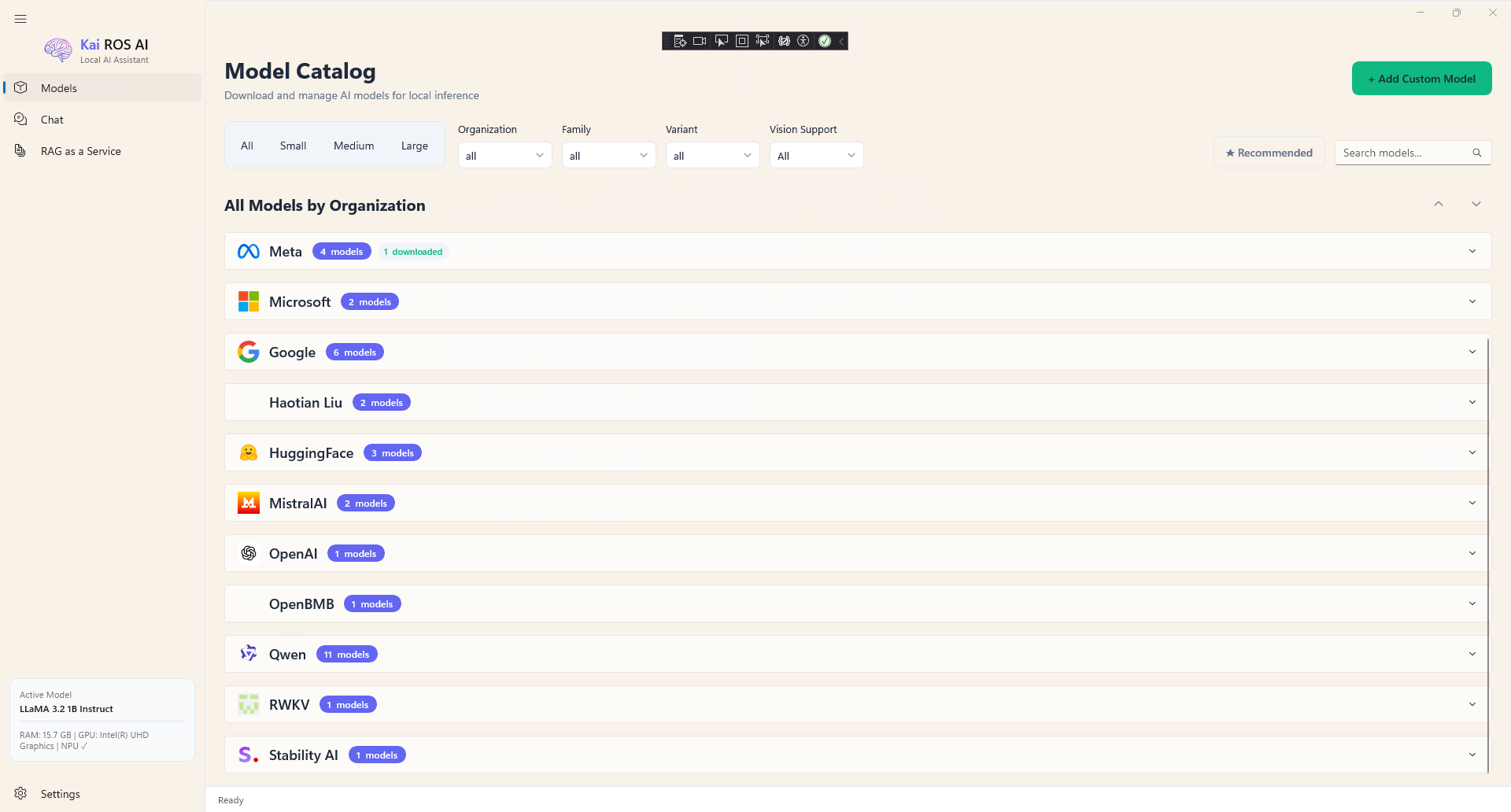 | 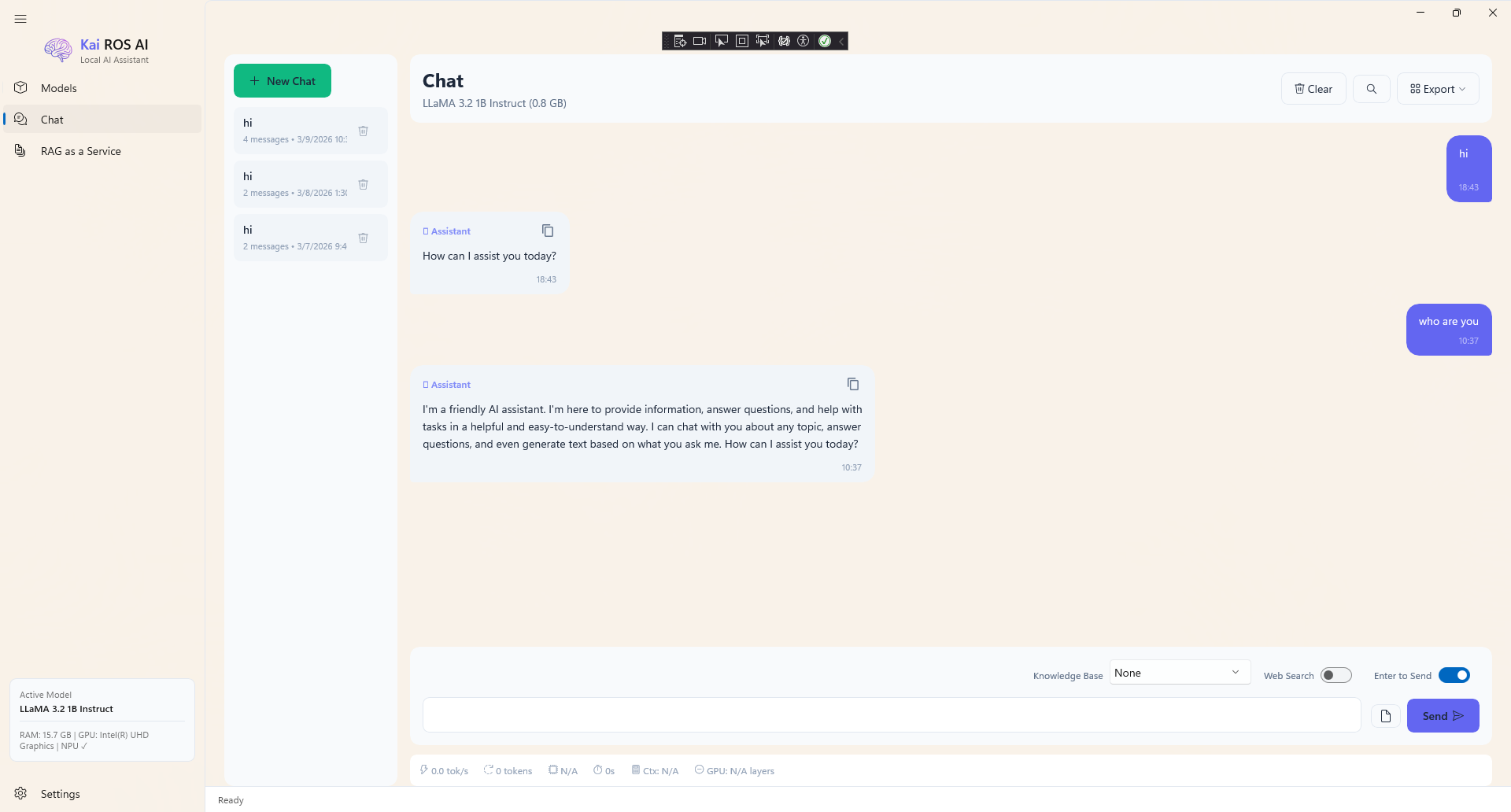 |
| RAG as a Service | Settings |
|---|---|
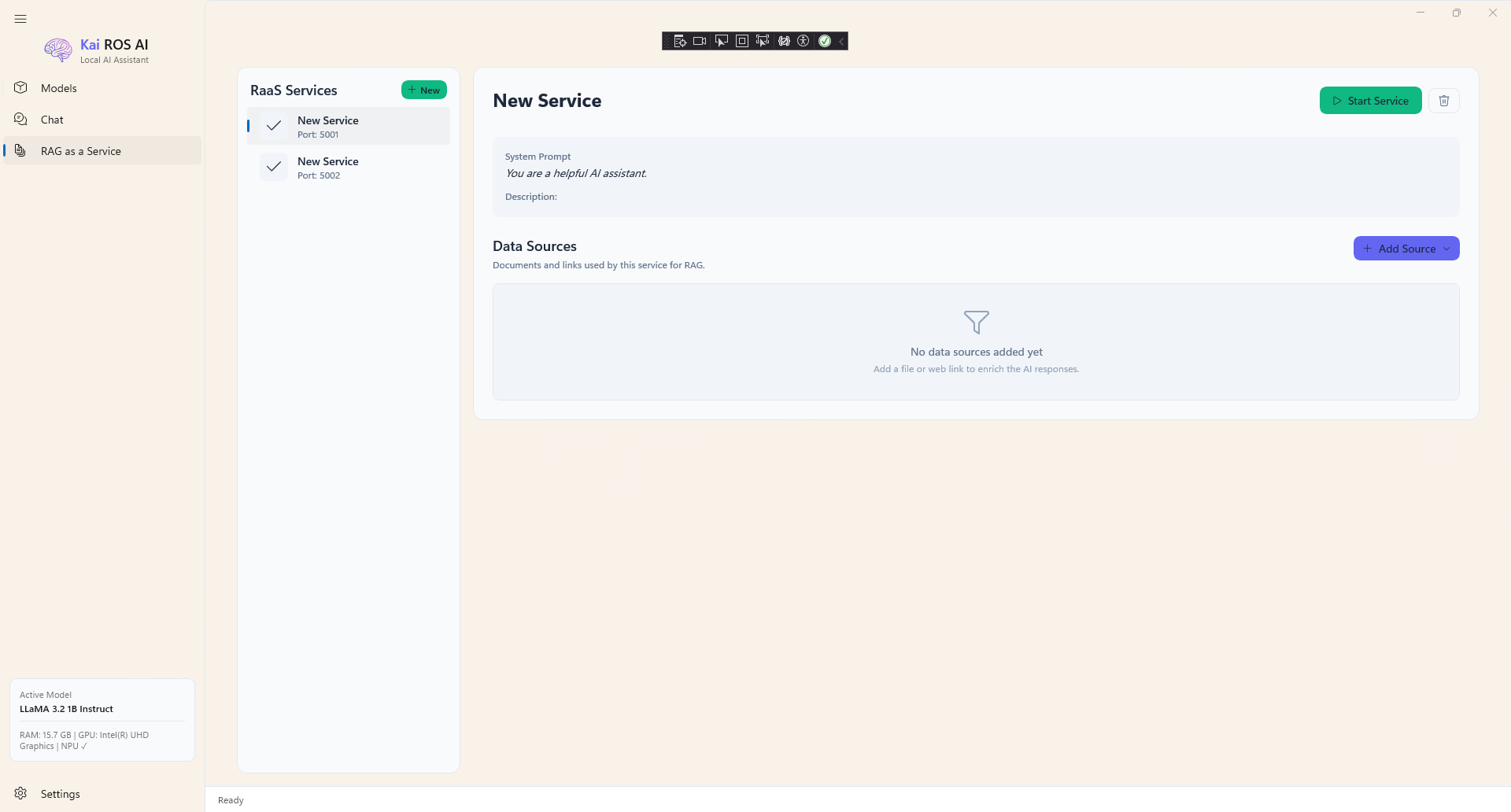 |  |
📱 Mobile Version (Android - .NET MAUI)
The Mobile version brings the power of local AI to your pocket. Optimized for touch and on-the-go usage.
Key Features
- Offline Capable: Run LLMs anywhere, even without an internet connection (after model download).
- Battery Efficient: Optimized for mobile processors.
- Clean UI: A simplified interface focused on chat and quick interactions.
- Chat History: Save and resume your conversations anytime.
Mobile Screenshots
| Chat Interface | Model Selection |
|---|---|
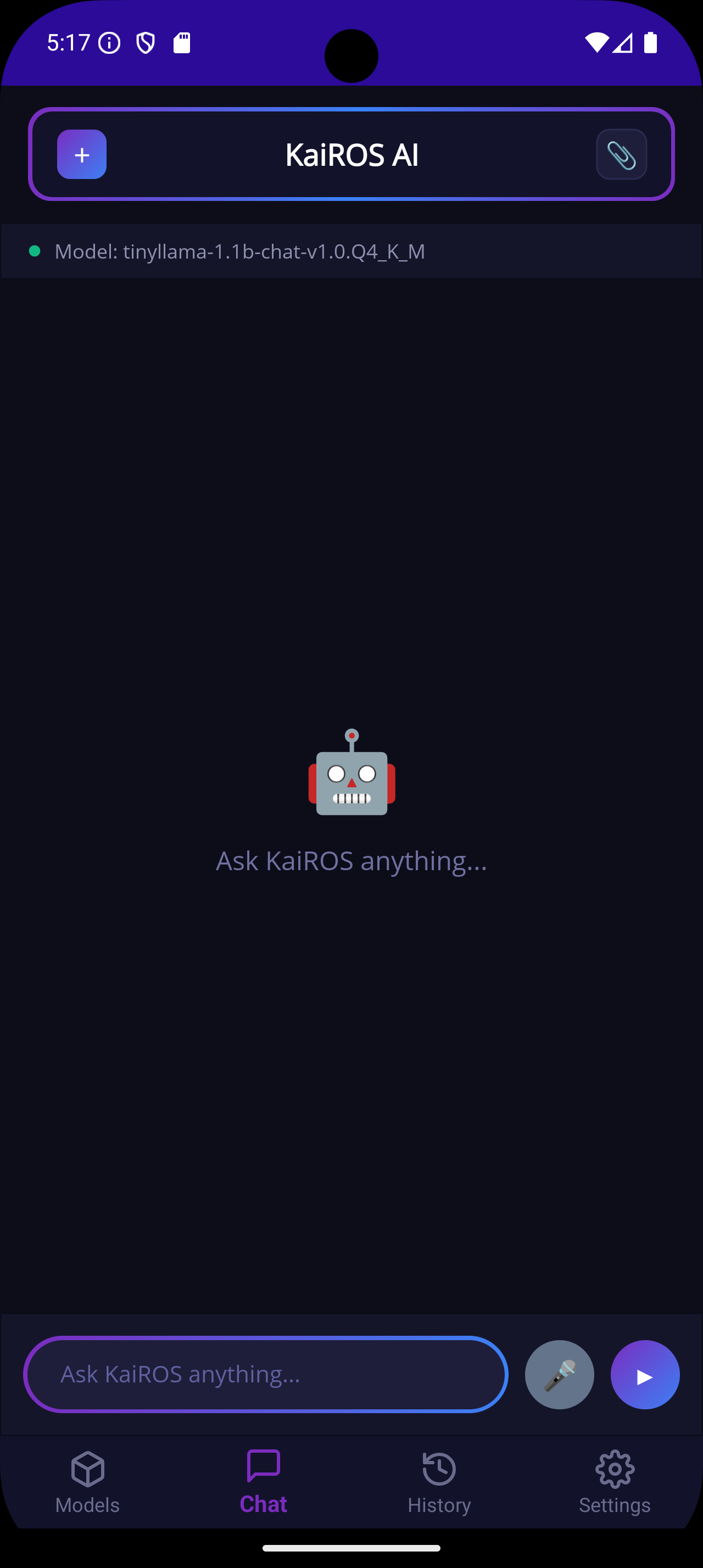 | 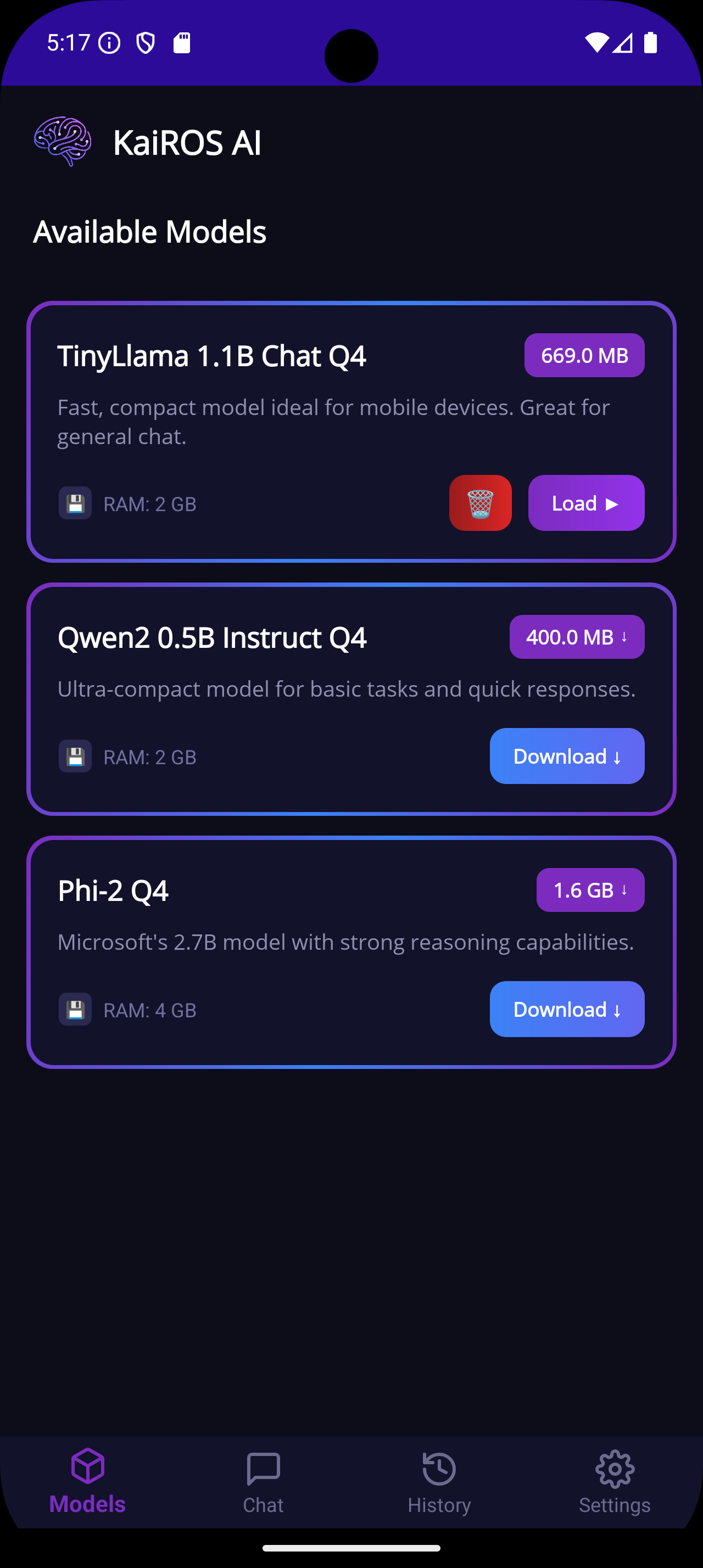 |
| Chat History | System Prompt |
|---|---|
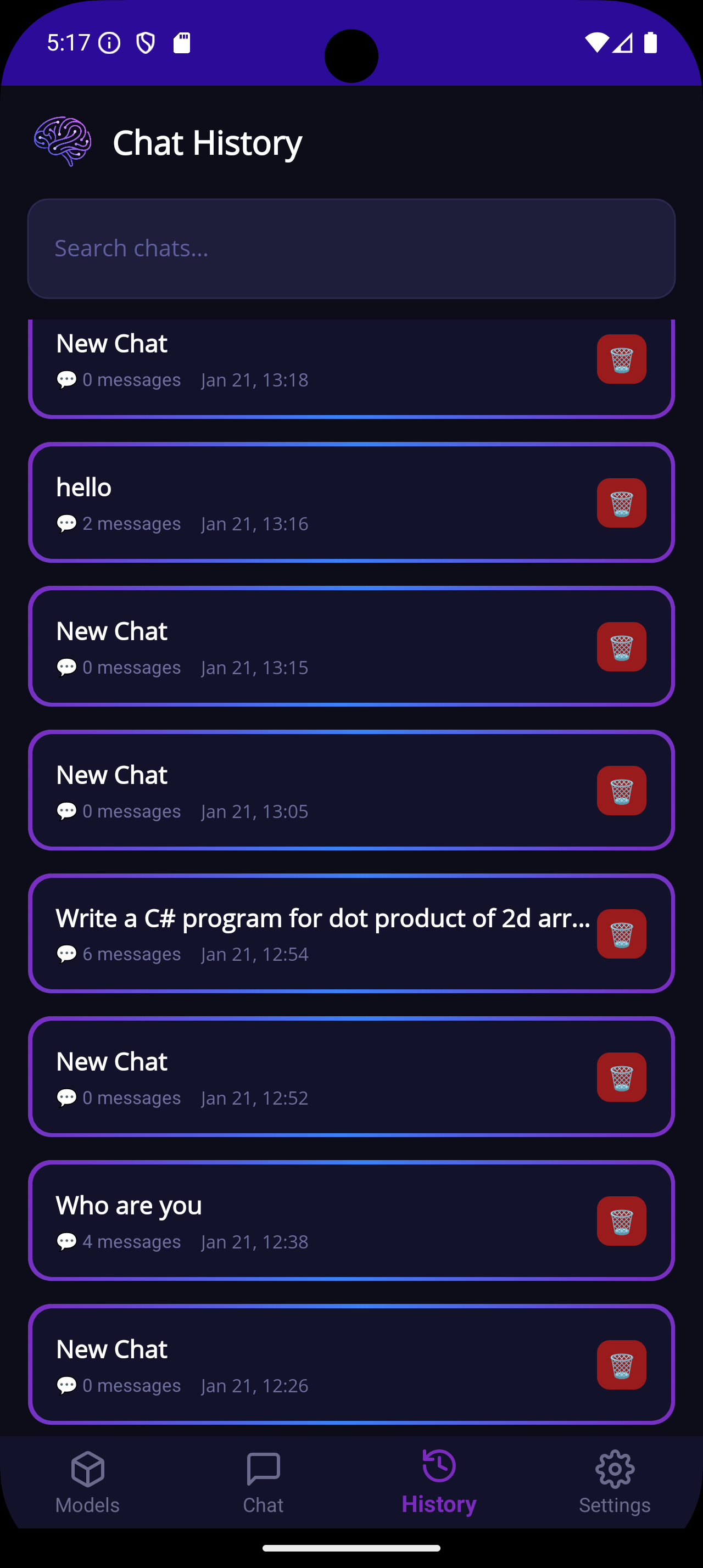 | 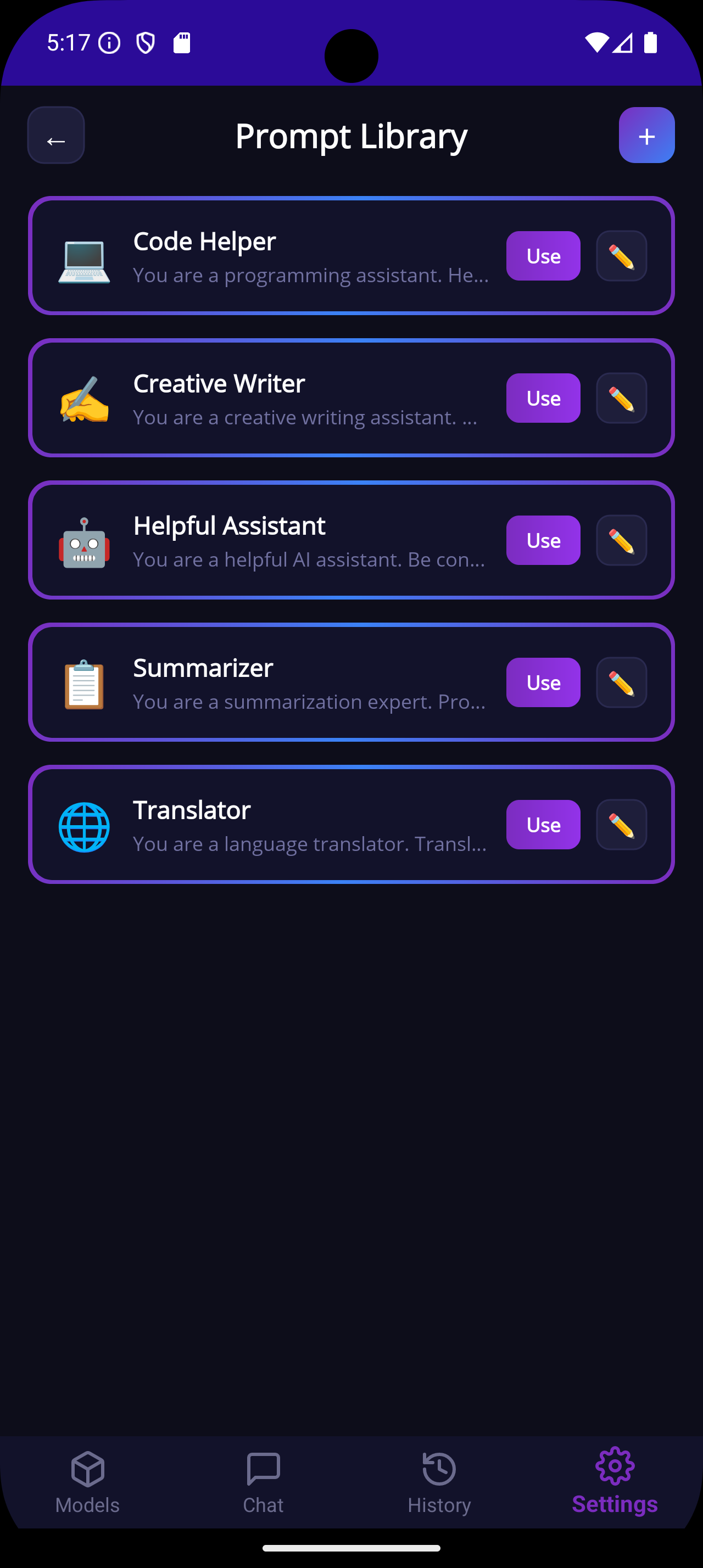 |
| Settings | |
|---|---|
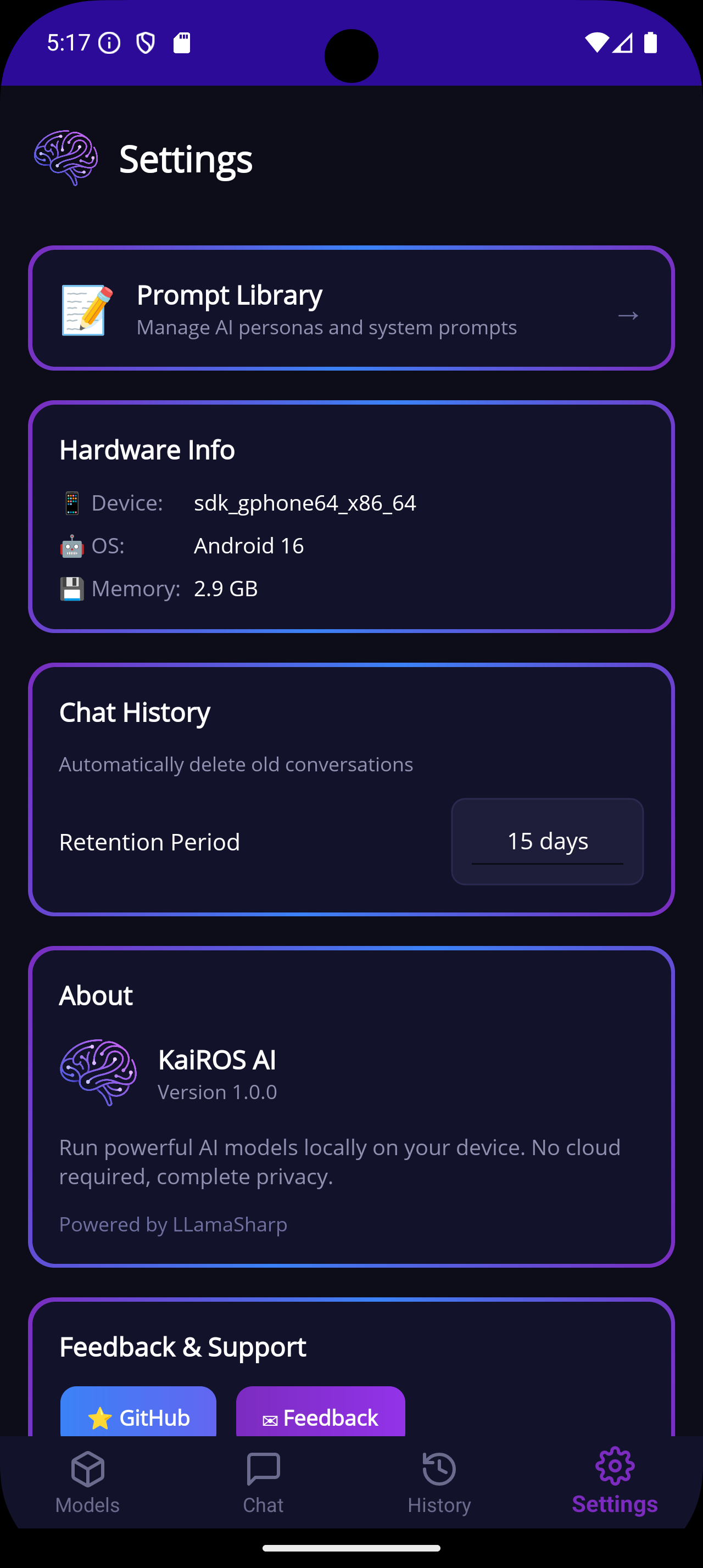 |
✨ Shared Features
Core Capabilities
- 🤖 Run LLMs Locally — No internet required after model download
- 👁️ Vision Models — Multimodal support (Gemma 4, Qwen 3.5, LLaVA) to chat about images
- 📦 40+ Model Catalog — Pre-configured models from 9+ organizations (Qwen, Google, Meta, Microsoft, Mistral, etc.)
- ⬇️ Download Manager — Resume-capable downloads with progress tracking and scaled timeouts
- 💬 Streaming Responses — Real-time token-by-token text generation
- 📊 Performance Stats — Tokens/sec, total tokens, memory usage, context window, GPU layers
- 🧠 Smart Context — Dynamic context sizing based on available RAM
Model Catalog
- 🏢 Organization Sections — Collapsible groups for Qwen, Google, Meta, Microsoft, Mistral, and more
- 🔍 Advanced Filtering — Filter by Organization, Family, Category (small/medium/large/xlarge), Variant (CPU-Only, GPU-Recommended)
- 🏷️ Visual Badges — Category, family, variant, vision capability, and download status indicators
- ⭐ Recommended Models — Highlighted picks for each use case
- ➕ Custom Models — Add your own GGUF models from local files or URLs
Latest Models (v2.0.12+)
| Model | Size | RAM | Vision | Notes |
|---|---|---|---|---|
| Qwen 3.5 4B | 2.6 GB | 6 GB | ✅ | Fast multilingual |
| Qwen 3.5 9B ⭐ | 5.4 GB | 10 GB | ✅ | Recommended balanced |
| Gemma 4 E2B | 3.0 GB | 6 GB | ✅ | Google edge model |
| Gemma 4 E4B | 4.6 GB | 8 GB | ✅ | Google edge model |
| Gemma 4 26B (MoE) | 16 GB | 20 GB | ✅ | 26B total, 4B active |
| Gemma 4 31B | 17 GB | 32 GB | ✅ | Google flagship |
Advanced
- 🎨 Dark/Light Theme — Fluent Design with theme persistence
- 🔤 Markdown Rendering — Full markdown + code block support in responses
- ⌨️ Keyboard Shortcuts — Ctrl+Enter (send), Ctrl+N (new chat), Ctrl+L (clear), Ctrl+F (search)
- 💬 Feedback Hub — Send feedback directly from Settings
🔌 Local REST API (Desktop Only)
Build AI-powered applications without cloud dependencies!
KaiROS AI includes a fully local OpenAI-compatible REST API server — perfect for developers who want to integrate local LLMs into their applications.
Quick Start
# Check health
curl http://localhost:5000/health

# List models
curl http://localhost:5000/api/models

# Chat (non-streaming)
curl -X POST http://localhost:5000/api/chat \
  -H "Content-Type: application/json" \
  -d '{"messages":[{"role":"user","content":"Hello!"}]}'

# Chat (streaming)
curl -X POST http://localhost:5000/api/chat \
  -H "Content-Type: application/json" \
  -d '{"messages":[{"role":"user","content":"Hello!"}],"stream":true}'
Enable in Settings → API Server → Toggle On
� RAG-as-a-Service (RaaS) — Developer Guide
Turn your local documents into an AI-powered knowledge base API in seconds.
KaiROS RaaS lets you create dedicated endpoints that combine your documents (PDF, DOCX, TXT, CSV, web URLs) with local LLM inference. Each service runs on its own port and can be consumed from any language or tool.
How It Works
- Create a service in the app (RAG as a Service → + New)
- Add data sources — local files or web URLs
- Start the service — it launches on
http://localhost:{port} - Query it from your code — the model answers using your documents as context
API Endpoints
| Method | Endpoint | Description |
|---|---|---|
GET | / | Service dashboard (HTML) |
GET | /health | Health check |
POST | /chat | Chat with RAG context (non-streaming) |
POST | /chat/stream | Chat with RAG context (Server-Sent Events) |
Request Format
{
  "messages": [
    { "role": "system", "content": "Optional system prompt override" },
    { "role": "user", "content": "What does the invoice say about payment terms?" }
  ]
}
Response Format (/chat)
{
  "model": "kairos-raas",
  "content": "Based on the document, the payment terms are Net 30...",
  "token_count": 42
}
Streaming Response (/chat/stream)
Server-Sent Events (SSE) format:
data: {"content": "Based"}
data: {"content": " on"}
data: {"content": " the"}
...
data: [DONE]
🐍 Python
import requests

BASE_URL = "http://localhost:5001"

# Non-streaming
response = requests.post(f"{BASE_URL}/chat", json={
    "messages": [
        {"role": "user", "content": "Summarize the uploaded document"}
    ]
})

data = response.json()
print(data["content"])
Python — Streaming (SSE)
import requests

response = requests.post(
    "http://localhost:5001/chat/stream",
    json={"messages": [{"role": "user", "content": "What are the key findings?"}]},
    stream=True
)

for line in response.iter_lines():
    if line:
        text = line.decode("utf-8")
        if text.startswith("data: ") and text != "data: [DONE]":
            import json
            chunk = json.loads(text[6:])
            print(chunk["content"], end="", flush=True)
Python — With openai SDK (compatible)
import httpx

# Using httpx directly (no openai SDK needed)
with httpx.Client(base_url="http://localhost:5001") as client:
    r = client.post("/chat", json={
        "messages": [{"role": "user", "content": "List all action items from the document"}]
    })
    print(r.json()["content"])
🟦 C# / .NET
using System.Net.Http.Json;

var client = new HttpClient { BaseAddress = new Uri("http://localhost:5001") };

// Non-streaming
var request = new
{
    messages = new[]
    {
        new { role = "user", content = "What is the total amount on this invoice?" }
    }
};

var response = await client.PostAsJsonAsync("/chat", request);
var result = await response.Content.ReadFromJsonAsync<ChatResponse>();
Console.WriteLine(result?.Content);

// Response model
record ChatResponse(string Model, string Content, int TokenCount);
C# — Streaming (SSE)
using System.Net.Http.Json;

var client = new HttpClient { BaseAddress = new Uri("http://localhost:5001") };

var request = new
{
    messages = new[] { new { role = "user", content = "Explain the contract terms" } }
};

var httpRequest = new HttpRequestMessage(HttpMethod.Post, "/chat/stream")
{
    Content = JsonContent.Create(request)
};

var response = await client.SendAsync(httpRequest, HttpCompletionOption.ResponseHeadersRead);
using var stream = await response.Content.ReadAsStreamAsync();
using var reader = new StreamReader(stream);

while (!reader.EndOfStream)
{
    var line = await reader.ReadLineAsync();
    if (string.IsNullOrEmpty(line)) continue;
    if (line == "data: [DONE]") break;
    if (line.StartsWith("data: "))
    {
        var json = line[6..];
        var chunk = JsonSerializer.Deserialize<JsonElement>(json);
        Console.Write(chunk.GetProperty("content").GetString());
    }
}
☕ Java
import java.net.URI;
import java.net.http.*;
import com.google.gson.JsonParser;

public class KairosRaasClient {
    private static final String BASE_URL = "http://localhost:5001";

    public static void main(String[] args) throws Exception {
        HttpClient client = HttpClient.newHttpClient();

        String body = """
            {
                "messages": [
                    {"role": "user", "content": "What are the payment terms?"}
                ]
            }
            """;

        HttpRequest request = HttpRequest.newBuilder()
            .uri(URI.create(BASE_URL + "/chat"))
            .header("Content-Type", "application/json")
            .POST(HttpRequest.BodyPublishers.ofString(body))
            .build();

        HttpResponse<String> response = client.send(request,
            HttpResponse.BodyHandlers.ofString());

        var json = JsonParser.parseString(response.body()).getAsJsonObject();
        System.out.println(json.get("content").getAsString());
    }
}
Java — Streaming (SSE)
import java.net.URI;
import java.net.http.*;
import java.util.stream.Stream;
import com.google.gson.JsonParser;

HttpClient client = HttpClient.newHttpClient();

String body = """
    {"messages": [{"role": "user", "content": "Summarize the report"}]}
    """;

HttpRequest request = HttpRequest.newBuilder()
    .uri(URI.create("http://localhost:5001/chat/stream"))
    .header("Content-Type", "application/json")
    .POST(HttpRequest.BodyPublishers.ofString(body))
    .build();

HttpResponse<Stream<String>> response = client.send(request,
    HttpResponse.BodyHandlers.ofLines());

response.body().forEach(line -> {
    if (line.startsWith("data: ") && !line.equals("data: [DONE]")) {
        var json = JsonParser.parseString(line.substring(6)).getAsJsonObject();
        System.out.print(json.get("content").getAsString());
    }
});
🌐 JavaScript / TypeScript (Node.js & Browser)
// Node.js / Browser (fetch API)
const response = await fetch("http://localhost:5001/chat", {
  method: "POST",
  headers: { "Content-Type": "application/json" },
  body: JSON.stringify({
    messages: [{ role: "user", content: "What does this document say about deadlines?" }]
  })
});

const data = await response.json();
console.log(data.content);
JavaScript — Streaming (SSE)
const response = await fetch("http://localhost:5001/chat/stream", {
  method: "POST",
  headers: { "Content-Type": "application/json" },
  body: JSON.stringify({
    messages: [{ role: "user", content: "List the key points" }]
  })
});

const reader = response.body.getReader();
const decoder = new TextDecoder();

while (true) {
  const { done, value } = await reader.read();
  if (done) break;

  const text = decoder.decode(value);
  for (const line of text.split("\n")) {
    if (line.startsWith("data: ") && line !== "data: [DONE]") {
      const chunk = JSON.parse(line.slice(6));
      process.stdout.write(chunk.content);
    }
  }
}
🦀 Rust
use reqwest::Client;
use serde_json::{json, Value};

#[tokio::main]
async fn main() -> Result<(), Box<dyn std::error::Error>> {
    let client = Client::new();

    let response = client
        .post("http://localhost:5001/chat")
        .json(&json!({
            "messages": [
                {"role": "user", "content": "What is the summary?"}
            ]
        }))
        .send()
        .await?;

    let data: Value = response.json().await?;
    println!("{}", data["content"].as_str().unwrap_or_default());

    Ok(())
}
🐚 cURL (Shell)
# Health check
curl http://localhost:5001/health

# Non-streaming chat
curl -X POST http://localhost:5001/chat \
  -H "Content-Type: application/json" \
  -d '{
    "messages": [
      {"role": "user", "content": "Summarize the uploaded document"}
    ]
  }'

# Streaming chat (SSE)
curl -N -X POST http://localhost:5001/chat/stream \
  -H "Content-Type: application/json" \
  -d '{
    "messages": [
      {"role": "user", "content": "What are the key findings?"}
    ]
  }'
💡 PowerShell
# Non-streaming
$body = @{
    messages = @(
        @{ role = "user"; content = "What does the document say about pricing?" }
    )
} | ConvertTo-Json -Depth 3

$response = Invoke-RestMethod -Uri "http://localhost:5001/chat" `
    -Method Post -ContentType "application/json" -Body $body

Write-Host $response.content
📝 Multi-turn Conversation
All endpoints support multi-turn conversations. Pass the full message history:
{
  "messages": [
    { "role": "system", "content": "You are a legal assistant. Answer based only on the provided documents." },
    { "role": "user", "content": "What is the contract duration?" },
    { "role": "assistant", "content": "The contract duration is 12 months from the signing date." },
    { "role": "user", "content": "What happens if either party wants to terminate early?" }
  ]
}
⚠️ Error Handling
| HTTP Code | Meaning |
|---|---|
200 | Success |
400 | Bad request (missing/empty messages array) |
404 | Unknown endpoint |
500 | Server error (model not loaded, internal failure) |
�🚀 Getting Started
Prerequisites
- Windows 10 version 1903+ / Windows 11 (x64)
- Android 7.0+ (API 24+)
- .NET 9 SDK — Download (for building from source)
- CUDA Toolkit 12 (optional, for NVIDIA GPU acceleration) — Download
Building from Source
-
Clone the repository
git clone https://github.com/avikeid2007/KaiROS-AI.git cd KaiROS-AI -
Build the WinUI 3 Desktop app
cd KaiROS.AI.WinUI dotnet restore dotnet build -c Release -
Run
dotnet run -c Release -
Build Android (MAUI)
cd ../KaiROS.Mobile
dotnet build -c Release -f net9.0-android
📦 Model Catalog Overview
Supported Organizations
| Organization | Highlights |
|---|---|
| Qwen | Qwen 2.5/3.5 series (0.5B–14B) — Excellent multilingual + vision |
| Gemma 3/4 series (E2B–31B) — High quality, natively multimodal | |
| Meta | LLaMA 3.1/3.2 + TinyLlama |
| Microsoft | Phi-2, Phi-3, BitNet b1.58 |
| MistralAI | Mistral 7B, Mistral Small 24B |
| Open Source | GPT-oss 20B ⚠️ Experimental |
Recommended Models ⭐
- Qwen 3.5 9B — Best balanced choice with vision (10 GB RAM)
- Gemma 4 E4B — Great edge model with vision (8 GB RAM)
- Qwen 2.5 3B — Excellent for low-RAM systems (4 GB RAM)
- Mistral 7B — Complex reasoning tasks (8 GB RAM)
🛠️ Tech Stack
| Component | Technology |
|---|---|
| Desktop Framework | WinUI 3 / Windows App SDK 1.7 |
| Mobile Framework | .NET MAUI |
| Runtime | .NET 9 (net9.0-windows10.0.19041.0) |
| LLM Engine | LLamaSharp 0.27.0 |
| GPU Backend | CUDA 12 (via LLamaSharp.Backend.Cuda12.Windows) |
| CPU Backend | LLamaSharp.Backend.Cpu |
| MVVM | CommunityToolkit.Mvvm 8.4 |
| Model Format | GGUF (llama.cpp compatible, Q4_K_M quantization) |
| Database | SQLite (sessions, custom models, RaaS configs) |
| Packaging | MSIX (Microsoft Store certified) |
📁 Project Structure
KaiROS-AI/
├── KaiROS.AI.WinUI/          # ⭐ Active Desktop app (WinUI 3)
│   ├── Assets/                # App icons and images
│   ├── Controls/              # Custom controls (CodeBlock)
│   ├── Converters/            # XAML value converters
│   ├── Models/                # Data models
│   ├── Services/              # Business logic (Chat, RAG, API, Download, etc.)
│   ├── Themes/                # Dark/Light theme resources
│   ├── ViewModels/            # MVVM ViewModels
│   ├── Views/                 # XAML views
│   └── appsettings.json       # Model catalog (40+ models)
├── KaiROS.Mobile/             # Android app (.NET MAUI)
├── KaiROS.AI/                 # ⚠️ Legacy WPF version (no longer maintained)
├── docs/                      # Documentation website
└── installer/                 # InnoSetup installer (legacy)
🤝 Contributing & License
Contributions are welcome! Please feel free to submit a Pull Request. This project is licensed under the MIT License - see the LICENSE file for details.
🙏 Acknowledgments
- LLamaSharp - Excellent .NET bindings for llama.cpp - This project wouldn't be possible without LLamaSharp!
- llama.cpp - High-performance LLM inference in C/C++
- Hugging Face - Model hosting and community
Made with ❤️ for local AI enthusiasts
Similar repos


Languages
C#
93.9%
PowerShell
5.8%
KaiROS AI— Intelligence, Precisely When It Matters.
See the codeREADME
KaiROS AI
A powerful local AI assistant for Windows & Android
Run LLMs locally on your device • No cloud required • Privacy-first
⚠️ Note: The active, maintained desktop version is KaiROS.AI.WinUI (WinUI 3 / Windows App SDK). The legacy WPF project (
KaiROS.AI) is no longer actively developed. All new features and bug fixes target the WinUI version.
📥 Download
- Microsoft Store - Get it now (recommended, auto-updates)
- Download Latest Release - Windows MSIX & Android APK
- Play Store - 🔜 Coming Soon!
- No .NET installation required (self-contained)
- Supports Windows 10/11 (x64) & Android 7.0+
🆚 Feature Comparison
| Feature | Windows (WinUI 3) | Android (MAUI) |
|---|---|---|
| Local LLM Inference | ✅ | ✅ |
| Model Catalog (40+ models) | ✅ | ✅ |
| Chat Interface | ✅ | ✅ |
| Chat History & Sessions | ✅ | ✅ |
| System Prompt Editing | ✅ | ✅ |
| Custom Model Import | ✅ | ✅ |
| Markdown Rendering | ✅ | ✅ |
| Vision Models (Multimodal) | ✅ | ✅ |
| RAG (Document Chat) | ✅ | ✅ |
| RAG-as-a-Service (RaaS) | ✅ | ❌ |
| Web Search Integration | ✅ | ❌ |
| Local REST API (OpenAI-compat) | ✅ | ❌ |
| CUDA 12 GPU Acceleration | ✅ | ❌ |
| Dynamic Context Sizing | ✅ | ✅ |
| Pre-flight RAM Check | ✅ | ✅ |
| Export (Markdown/JSON/Text) | ✅ | ❌ |
| Dark/Light Theme | ✅ | ✅ |
🖥️ Desktop Version (WinUI 3)
The Desktop version is the full-featured powerhouse built with WinUI 3 / Windows App SDK, packaged as MSIX and distributed via the Microsoft Store.
Key Features
- 40+ Model Catalog — Pre-configured models from Qwen, Google, Meta, Microsoft, Mistral including latest Qwen 3.5 and Gemma 4 series
- Vision / Multimodal — Chat with images using vision-capable models (Gemma 4, Qwen 3.5, LLaVA)
- RAG (Retrieval Augmented Generation) — Chat with PDF, DOCX, TXT, CSV, JSON files locally with smart chunking and keyword retrieval
- RAG-as-a-Service (RaaS) — Create dedicated RAG endpoints with custom data sources (files + web URLs), each with its own port and system prompt
- Web Search — Toggle real-time web search to augment responses with current information
- Local REST API — OpenAI-compatible
/chatendpoint for integration with VS Code (Continue), LM Studio, or custom apps - Smart Hardware Detection — Auto-detects CUDA GPU, available RAM, and dynamically sizes context window
- Pre-flight RAM Check — Validates sufficient memory before loading a model; auto-retries with CPU-friendly alternatives
- CUDA 12 GPU Acceleration — Automatic GPU layer offloading for NVIDIA GPUs
- Session Management — Multiple chat sessions with search, clear, and export
- Export — Save conversations as Markdown, JSON, or plain text
- Knowledge Base Selector — Switch between None, Global (loaded docs), or any RaaS service per-message
- Modern WinUI 3 UI — Fluent Design with dark/light themes, keyboard shortcuts (Ctrl+Enter, Ctrl+N, Ctrl+L, Ctrl+F)
Desktop Screenshots
| Model Catalog | Chat Interface |
|---|---|
| |
| RAG as a Service | Settings |
|---|---|
| |
📱 Mobile Version (Android - .NET MAUI)
The Mobile version brings the power of local AI to your pocket. Optimized for touch and on-the-go usage.
Key Features
- Offline Capable: Run LLMs anywhere, even without an internet connection (after model download).
- Battery Efficient: Optimized for mobile processors.
- Clean UI: A simplified interface focused on chat and quick interactions.
- Chat History: Save and resume your conversations anytime.
Mobile Screenshots
| Chat Interface | Model Selection |
|---|---|
| |
| Chat History | System Prompt |
|---|---|
| |
| Settings | |
|---|---|
|
✨ Shared Features
Core Capabilities
- 🤖 Run LLMs Locally — No internet required after model download
- 👁️ Vision Models — Multimodal support (Gemma 4, Qwen 3.5, LLaVA) to chat about images
- 📦 40+ Model Catalog — Pre-configured models from 9+ organizations (Qwen, Google, Meta, Microsoft, Mistral, etc.)
- ⬇️ Download Manager — Resume-capable downloads with progress tracking and scaled timeouts
- 💬 Streaming Responses — Real-time token-by-token text generation
- 📊 Performance Stats — Tokens/sec, total tokens, memory usage, context window, GPU layers
- 🧠 Smart Context — Dynamic context sizing based on available RAM
Model Catalog
- 🏢 Organization Sections — Collapsible groups for Qwen, Google, Meta, Microsoft, Mistral, and more
- 🔍 Advanced Filtering — Filter by Organization, Family, Category (small/medium/large/xlarge), Variant (CPU-Only, GPU-Recommended)
- 🏷️ Visual Badges — Category, family, variant, vision capability, and download status indicators
- ⭐ Recommended Models — Highlighted picks for each use case
- ➕ Custom Models — Add your own GGUF models from local files or URLs
Latest Models (v2.0.12+)
| Model | Size | RAM | Vision | Notes |
|---|---|---|---|---|
| Qwen 3.5 4B | 2.6 GB | 6 GB | ✅ | Fast multilingual |
| Qwen 3.5 9B ⭐ | 5.4 GB | 10 GB | ✅ | Recommended balanced |
| Gemma 4 E2B | 3.0 GB | 6 GB | ✅ | Google edge model |
| Gemma 4 E4B | 4.6 GB | 8 GB | ✅ | Google edge model |
| Gemma 4 26B (MoE) | 16 GB | 20 GB | ✅ | 26B total, 4B active |
| Gemma 4 31B | 17 GB | 32 GB | ✅ | Google flagship |
Advanced
- 🎨 Dark/Light Theme — Fluent Design with theme persistence
- 🔤 Markdown Rendering — Full markdown + code block support in responses
- ⌨️ Keyboard Shortcuts — Ctrl+Enter (send), Ctrl+N (new chat), Ctrl+L (clear), Ctrl+F (search)
- 💬 Feedback Hub — Send feedback directly from Settings
🔌 Local REST API (Desktop Only)
Build AI-powered applications without cloud dependencies!
KaiROS AI includes a fully local OpenAI-compatible REST API server — perfect for developers who want to integrate local LLMs into their applications.
Quick Start
# Check health
curl http://localhost:5000/health

# List models
curl http://localhost:5000/api/models

# Chat (non-streaming)
curl -X POST http://localhost:5000/api/chat \
  -H "Content-Type: application/json" \
  -d '{"messages":[{"role":"user","content":"Hello!"}]}'

# Chat (streaming)
curl -X POST http://localhost:5000/api/chat \
  -H "Content-Type: application/json" \
  -d '{"messages":[{"role":"user","content":"Hello!"}],"stream":true}'
Enable in Settings → API Server → Toggle On
� RAG-as-a-Service (RaaS) — Developer Guide
Turn your local documents into an AI-powered knowledge base API in seconds.
KaiROS RaaS lets you create dedicated endpoints that combine your documents (PDF, DOCX, TXT, CSV, web URLs) with local LLM inference. Each service runs on its own port and can be consumed from any language or tool.
How It Works
- Create a service in the app (RAG as a Service → + New)
- Add data sources — local files or web URLs
- Start the service — it launches on
http://localhost:{port} - Query it from your code — the model answers using your documents as context
API Endpoints
| Method | Endpoint | Description |
|---|---|---|
GET | / | Service dashboard (HTML) |
GET | /health | Health check |
POST | /chat | Chat with RAG context (non-streaming) |
POST | /chat/stream | Chat with RAG context (Server-Sent Events) |
Request Format
{
  "messages": [
    { "role": "system", "content": "Optional system prompt override" },
    { "role": "user", "content": "What does the invoice say about payment terms?" }
  ]
}
Response Format (/chat)
{
  "model": "kairos-raas",
  "content": "Based on the document, the payment terms are Net 30...",
  "token_count": 42
}
Streaming Response (/chat/stream)
Server-Sent Events (SSE) format:
data: {"content": "Based"}
data: {"content": " on"}
data: {"content": " the"}
...
data: [DONE]
🐍 Python
import requests

BASE_URL = "http://localhost:5001"

# Non-streaming
response = requests.post(f"{BASE_URL}/chat", json={
    "messages": [
        {"role": "user", "content": "Summarize the uploaded document"}
    ]
})

data = response.json()
print(data["content"])
Python — Streaming (SSE)
import requests

response = requests.post(
    "http://localhost:5001/chat/stream",
    json={"messages": [{"role": "user", "content": "What are the key findings?"}]},
    stream=True
)

for line in response.iter_lines():
    if line:
        text = line.decode("utf-8")
        if text.startswith("data: ") and text != "data: [DONE]":
            import json
            chunk = json.loads(text[6:])
            print(chunk["content"], end="", flush=True)
Python — With openai SDK (compatible)
import httpx

# Using httpx directly (no openai SDK needed)
with httpx.Client(base_url="http://localhost:5001") as client:
    r = client.post("/chat", json={
        "messages": [{"role": "user", "content": "List all action items from the document"}]
    })
    print(r.json()["content"])
🟦 C# / .NET
using System.Net.Http.Json;

var client = new HttpClient { BaseAddress = new Uri("http://localhost:5001") };

// Non-streaming
var request = new
{
    messages = new[]
    {
        new { role = "user", content = "What is the total amount on this invoice?" }
    }
};

var response = await client.PostAsJsonAsync("/chat", request);
var result = await response.Content.ReadFromJsonAsync<ChatResponse>();
Console.WriteLine(result?.Content);

// Response model
record ChatResponse(string Model, string Content, int TokenCount);
C# — Streaming (SSE)
using System.Net.Http.Json;

var client = new HttpClient { BaseAddress = new Uri("http://localhost:5001") };

var request = new
{
    messages = new[] { new { role = "user", content = "Explain the contract terms" } }
};

var httpRequest = new HttpRequestMessage(HttpMethod.Post, "/chat/stream")
{
    Content = JsonContent.Create(request)
};

var response = await client.SendAsync(httpRequest, HttpCompletionOption.ResponseHeadersRead);
using var stream = await response.Content.ReadAsStreamAsync();
using var reader = new StreamReader(stream);

while (!reader.EndOfStream)
{
    var line = await reader.ReadLineAsync();
    if (string.IsNullOrEmpty(line)) continue;
    if (line == "data: [DONE]") break;
    if (line.StartsWith("data: "))
    {
        var json = line[6..];
        var chunk = JsonSerializer.Deserialize<JsonElement>(json);
        Console.Write(chunk.GetProperty("content").GetString());
    }
}
☕ Java
import java.net.URI;
import java.net.http.*;
import com.google.gson.JsonParser;

public class KairosRaasClient {
    private static final String BASE_URL = "http://localhost:5001";

    public static void main(String[] args) throws Exception {
        HttpClient client = HttpClient.newHttpClient();

        String body = """
            {
                "messages": [
                    {"role": "user", "content": "What are the payment terms?"}
                ]
            }
            """;

        HttpRequest request = HttpRequest.newBuilder()
            .uri(URI.create(BASE_URL + "/chat"))
            .header("Content-Type", "application/json")
            .POST(HttpRequest.BodyPublishers.ofString(body))
            .build();

        HttpResponse<String> response = client.send(request,
            HttpResponse.BodyHandlers.ofString());

        var json = JsonParser.parseString(response.body()).getAsJsonObject();
        System.out.println(json.get("content").getAsString());
    }
}
Java — Streaming (SSE)
import java.net.URI;
import java.net.http.*;
import java.util.stream.Stream;
import com.google.gson.JsonParser;

HttpClient client = HttpClient.newHttpClient();

String body = """
    {"messages": [{"role": "user", "content": "Summarize the report"}]}
    """;

HttpRequest request = HttpRequest.newBuilder()
    .uri(URI.create("http://localhost:5001/chat/stream"))
    .header("Content-Type", "application/json")
    .POST(HttpRequest.BodyPublishers.ofString(body))
    .build();

HttpResponse<Stream<String>> response = client.send(request,
    HttpResponse.BodyHandlers.ofLines());

response.body().forEach(line -> {
    if (line.startsWith("data: ") && !line.equals("data: [DONE]")) {
        var json = JsonParser.parseString(line.substring(6)).getAsJsonObject();
        System.out.print(json.get("content").getAsString());
    }
});
🌐 JavaScript / TypeScript (Node.js & Browser)
// Node.js / Browser (fetch API)
const response = await fetch("http://localhost:5001/chat", {
  method: "POST",
  headers: { "Content-Type": "application/json" },
  body: JSON.stringify({
    messages: [{ role: "user", content: "What does this document say about deadlines?" }]
  })
});

const data = await response.json();
console.log(data.content);
JavaScript — Streaming (SSE)
const response = await fetch("http://localhost:5001/chat/stream", {
  method: "POST",
  headers: { "Content-Type": "application/json" },
  body: JSON.stringify({
    messages: [{ role: "user", content: "List the key points" }]
  })
});

const reader = response.body.getReader();
const decoder = new TextDecoder();

while (true) {
  const { done, value } = await reader.read();
  if (done) break;

  const text = decoder.decode(value);
  for (const line of text.split("\n")) {
    if (line.startsWith("data: ") && line !== "data: [DONE]") {
      const chunk = JSON.parse(line.slice(6));
      process.stdout.write(chunk.content);
    }
  }
}
🦀 Rust
use reqwest::Client;
use serde_json::{json, Value};

#[tokio::main]
async fn main() -> Result<(), Box<dyn std::error::Error>> {
    let client = Client::new();

    let response = client
        .post("http://localhost:5001/chat")
        .json(&json!({
            "messages": [
                {"role": "user", "content": "What is the summary?"}
            ]
        }))
        .send()
        .await?;

    let data: Value = response.json().await?;
    println!("{}", data["content"].as_str().unwrap_or_default());

    Ok(())
}
🐚 cURL (Shell)
# Health check
curl http://localhost:5001/health

# Non-streaming chat
curl -X POST http://localhost:5001/chat \
  -H "Content-Type: application/json" \
  -d '{
    "messages": [
      {"role": "user", "content": "Summarize the uploaded document"}
    ]
  }'

# Streaming chat (SSE)
curl -N -X POST http://localhost:5001/chat/stream \
  -H "Content-Type: application/json" \
  -d '{
    "messages": [
      {"role": "user", "content": "What are the key findings?"}
    ]
  }'
💡 PowerShell
# Non-streaming
$body = @{
    messages = @(
        @{ role = "user"; content = "What does the document say about pricing?" }
    )
} | ConvertTo-Json -Depth 3

$response = Invoke-RestMethod -Uri "http://localhost:5001/chat" `
    -Method Post -ContentType "application/json" -Body $body

Write-Host $response.content
📝 Multi-turn Conversation
All endpoints support multi-turn conversations. Pass the full message history:
{
  "messages": [
    { "role": "system", "content": "You are a legal assistant. Answer based only on the provided documents." },
    { "role": "user", "content": "What is the contract duration?" },
    { "role": "assistant", "content": "The contract duration is 12 months from the signing date." },
    { "role": "user", "content": "What happens if either party wants to terminate early?" }
  ]
}
⚠️ Error Handling
| HTTP Code | Meaning |
|---|---|
200 | Success |
400 | Bad request (missing/empty messages array) |
404 | Unknown endpoint |
500 | Server error (model not loaded, internal failure) |
�🚀 Getting Started
Prerequisites
- Windows 10 version 1903+ / Windows 11 (x64)
- Android 7.0+ (API 24+)
- .NET 9 SDK — Download (for building from source)
- CUDA Toolkit 12 (optional, for NVIDIA GPU acceleration) — Download
Building from Source
-
Clone the repository
git clone https://github.com/avikeid2007/KaiROS-AI.git cd KaiROS-AI -
Build the WinUI 3 Desktop app
cd KaiROS.AI.WinUI dotnet restore dotnet build -c Release -
Run
dotnet run -c Release -
Build Android (MAUI)
cd ../KaiROS.Mobile
dotnet build -c Release -f net9.0-android
📦 Model Catalog Overview
Supported Organizations
| Organization | Highlights |
|---|---|
| Qwen | Qwen 2.5/3.5 series (0.5B–14B) — Excellent multilingual + vision |
| Gemma 3/4 series (E2B–31B) — High quality, natively multimodal | |
| Meta | LLaMA 3.1/3.2 + TinyLlama |
| Microsoft | Phi-2, Phi-3, BitNet b1.58 |
| MistralAI | Mistral 7B, Mistral Small 24B |
| Open Source | GPT-oss 20B ⚠️ Experimental |
Recommended Models ⭐
- Qwen 3.5 9B — Best balanced choice with vision (10 GB RAM)
- Gemma 4 E4B — Great edge model with vision (8 GB RAM)
- Qwen 2.5 3B — Excellent for low-RAM systems (4 GB RAM)
- Mistral 7B — Complex reasoning tasks (8 GB RAM)
🛠️ Tech Stack
| Component | Technology |
|---|---|
| Desktop Framework | WinUI 3 / Windows App SDK 1.7 |
| Mobile Framework | .NET MAUI |
| Runtime | .NET 9 (net9.0-windows10.0.19041.0) |
| LLM Engine | LLamaSharp 0.27.0 |
| GPU Backend | CUDA 12 (via LLamaSharp.Backend.Cuda12.Windows) |
| CPU Backend | LLamaSharp.Backend.Cpu |
| MVVM | CommunityToolkit.Mvvm 8.4 |
| Model Format | GGUF (llama.cpp compatible, Q4_K_M quantization) |
| Database | SQLite (sessions, custom models, RaaS configs) |
| Packaging | MSIX (Microsoft Store certified) |
📁 Project Structure
KaiROS-AI/
├── KaiROS.AI.WinUI/          # ⭐ Active Desktop app (WinUI 3)
│   ├── Assets/                # App icons and images
│   ├── Controls/              # Custom controls (CodeBlock)
│   ├── Converters/            # XAML value converters
│   ├── Models/                # Data models
│   ├── Services/              # Business logic (Chat, RAG, API, Download, etc.)
│   ├── Themes/                # Dark/Light theme resources
│   ├── ViewModels/            # MVVM ViewModels
│   ├── Views/                 # XAML views
│   └── appsettings.json       # Model catalog (40+ models)
├── KaiROS.Mobile/             # Android app (.NET MAUI)
├── KaiROS.AI/                 # ⚠️ Legacy WPF version (no longer maintained)
├── docs/                      # Documentation website
└── installer/                 # InnoSetup installer (legacy)
🤝 Contributing & License
Contributions are welcome! Please feel free to submit a Pull Request. This project is licensed under the MIT License - see the LICENSE file for details.
🙏 Acknowledgments
- LLamaSharp - Excellent .NET bindings for llama.cpp - This project wouldn't be possible without LLamaSharp!
- llama.cpp - High-performance LLM inference in C/C++
- Hugging Face - Model hosting and community
Made with ❤️ for local AI enthusiasts
Similar repos
Languages
C#
93.9%
PowerShell
5.8%