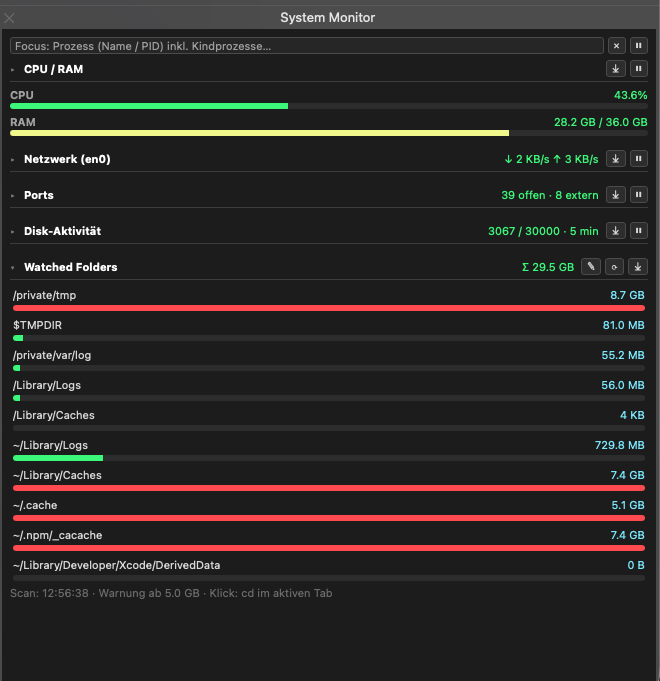
A lightweight macOS system monitor that runs as an iTerm2 web panel.
sysmon.py and watched_folders.json to:
~/Library/Application Support/iTerm2/Scripts/AutoLaunch/No separate Python installation or package setup is required.
Edit watched_folders.json or add and remove folders in the panel. Set the scan interval to 1–60 minutes, hours, or days. The last scan time and sizes are saved, so restarting iTerm2 does not trigger an unnecessary scan. Default paths avoid nested duplicate scans. The monitor never deletes files; folders over 5 GB are highlighted.
Set process-traffic sampling to 1–60 seconds or minutes in the Network panel. The default is 10 seconds.
File activity works without administrator access. Process names for file activity require an optional sudoers rule for fs_usage.
A lightweight macOS system monitor that runs as an iTerm2 web panel.
sysmon.py and watched_folders.json to:
~/Library/Application Support/iTerm2/Scripts/AutoLaunch/No separate Python installation or package setup is required.
Edit watched_folders.json or add and remove folders in the panel. Set the scan interval to 1–60 minutes, hours, or days. The last scan time and sizes are saved, so restarting iTerm2 does not trigger an unnecessary scan. Default paths avoid nested duplicate scans. The monitor never deletes files; folders over 5 GB are highlighted.
Set process-traffic sampling to 1–60 seconds or minutes in the Network panel. The default is 10 seconds.
File activity works without administrator access. Process names for file activity require an optional sudoers rule for fs_usage.



