Android App that enables Phone Projection via the Carlinkit CPC200-CCPA Adapter.
Kotlin
94
108 commits
updated Oct 14, 2026
A native Kotlin reimplementation of the original Flutter-based app. Built for personal use and shared so others can use it. Please don't expect or demand support — I'll help where I can.
XDA Developer Forums thread · Report issues on GitHub or the forum.
Work in progress — something is always changing. Updates that ship without code changes are usually new documentation or corrections.
Target and only hardware-tested platform: a 2024 Silverado gminfo3.7 Intel AAOS radio, with an iPhone as the primary device (CarPlay is the most tuned). Some simulated testing was also done on a GM emulator running GM AAOS 14 (VCUUM platform, build 470.3). Everything else is untested. See Testing scope.
How you install depends on whether your head unit gives you ADB access.
GM's shipping radios expose no ADB and run only apps delivered through Google Play. There is no public Play listing for this app, so each user installs it through their own Google Play Developer Account:
ownerApplicationId in app/build.gradle.kts
(a fork must not reuse zeno.carlink), then build the play bundle (AAB).The build is signed with your upload key/certificate, not the author's — that is expected and required. If you are new to the Play Console, search for a current "upload an app to an Internal Testing track" tutorial; the process is standard Android publishing and not specific to this app.
If your platform exposes ADB, install the APK with the installer attributed to the Play Store:
adb install -i com.android.vending app-sideload-release.apk
The -i com.android.vending flag records Google Play as the installing package. AAOS considers
the install source when deciding what may run while driving, so attributing the install to Play
makes the system honor the app's Distraction Optimization declarations — showing and running
it normally — instead of treating a plain sideload as non-optimized and restricting it. A signed
sideload APK is attached to each GitHub Release, or you can build one yourself.
[!IMPORTANT] The APK in Releases is only for people who can freely sideload via ADB. It is already signed with the author's key and uses the
zeno.carlinkpackage name, so it cannot be uploaded to your own Google Play account — Play requires a package name you own and your own signing key/certificate. GM vehicles without ADB (see above) must build their own bundle with their own package name and key; the Release APK will not work for that path.
Full explanations in app notes:
Optional. Adapter-side binaries were patched to (1) forward the full iAP2 navigation data Carlinkit otherwise strips, and (2) fix Android Auto's incorrect parsing of forwarded vehicle GPS NMEA. Not required, but gives a closer-to-stock experience. Firmware lives in CPC200-CCPA_resources. See notes.
If audio misbehaves, first disconnect and forget the phone/vehicle from each other's Bluetooth and grant the app microphone access — the adapter routes audio through itself by default. Steering-wheel voice/call control is a system feature this app can't provide; for it, set in-app adapter routing to Bluetooth instead. See audio routing.
From the Android emulator with USB passthrough for the CPC200-CCPA.
| CarPlay (iPhone) | Android Auto (Pixel 10) | Dashboard |
|---|---|---|
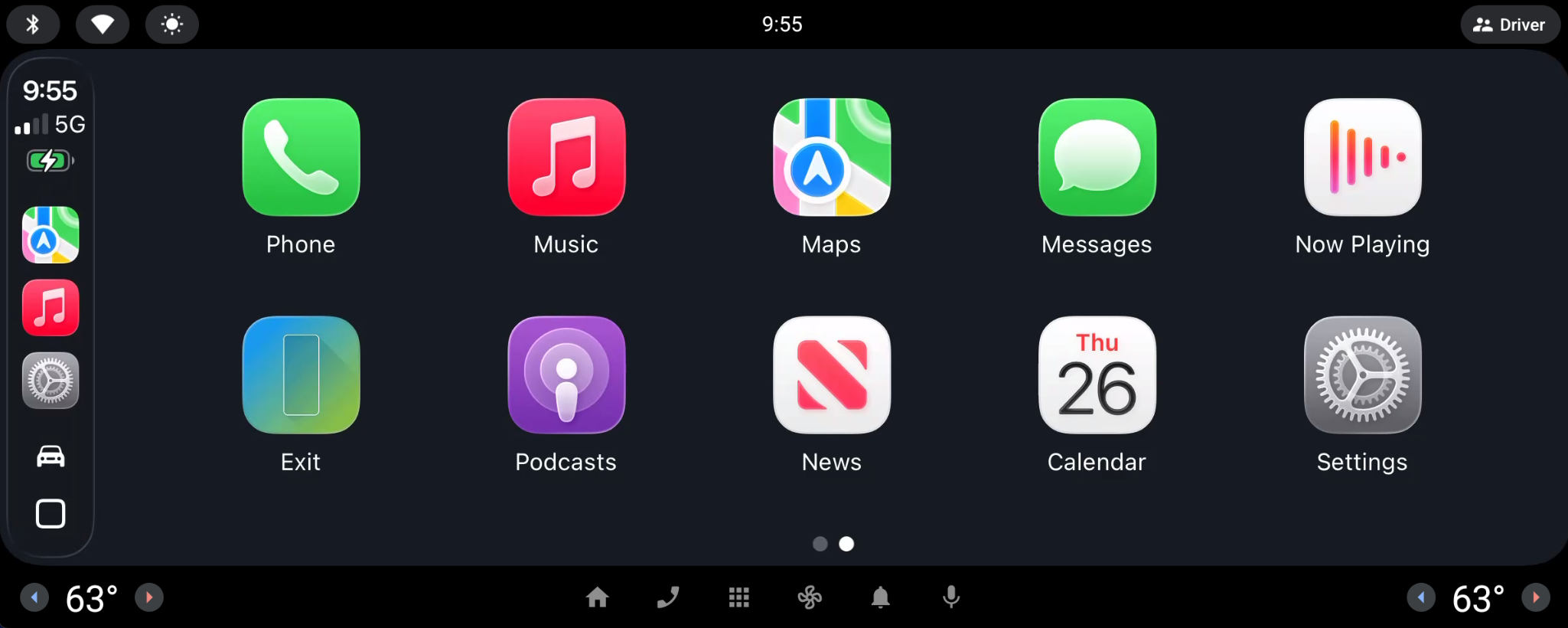 | 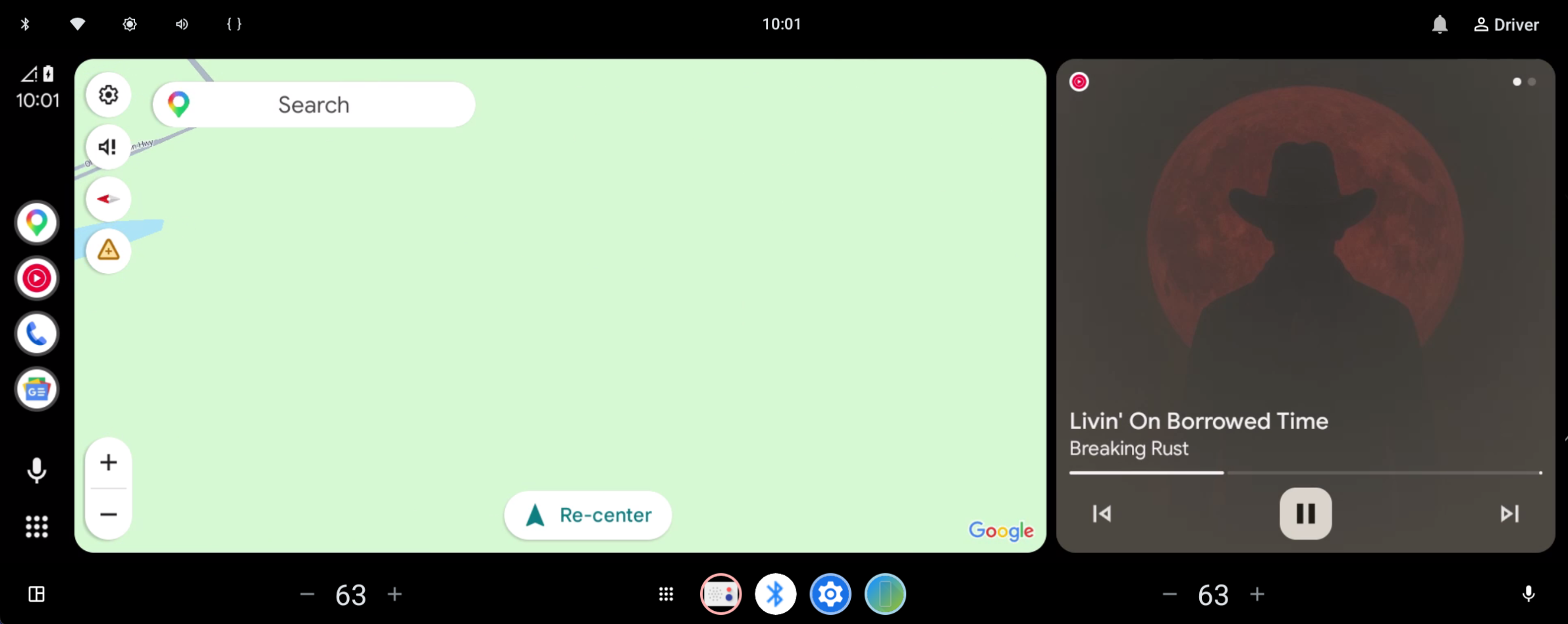 | 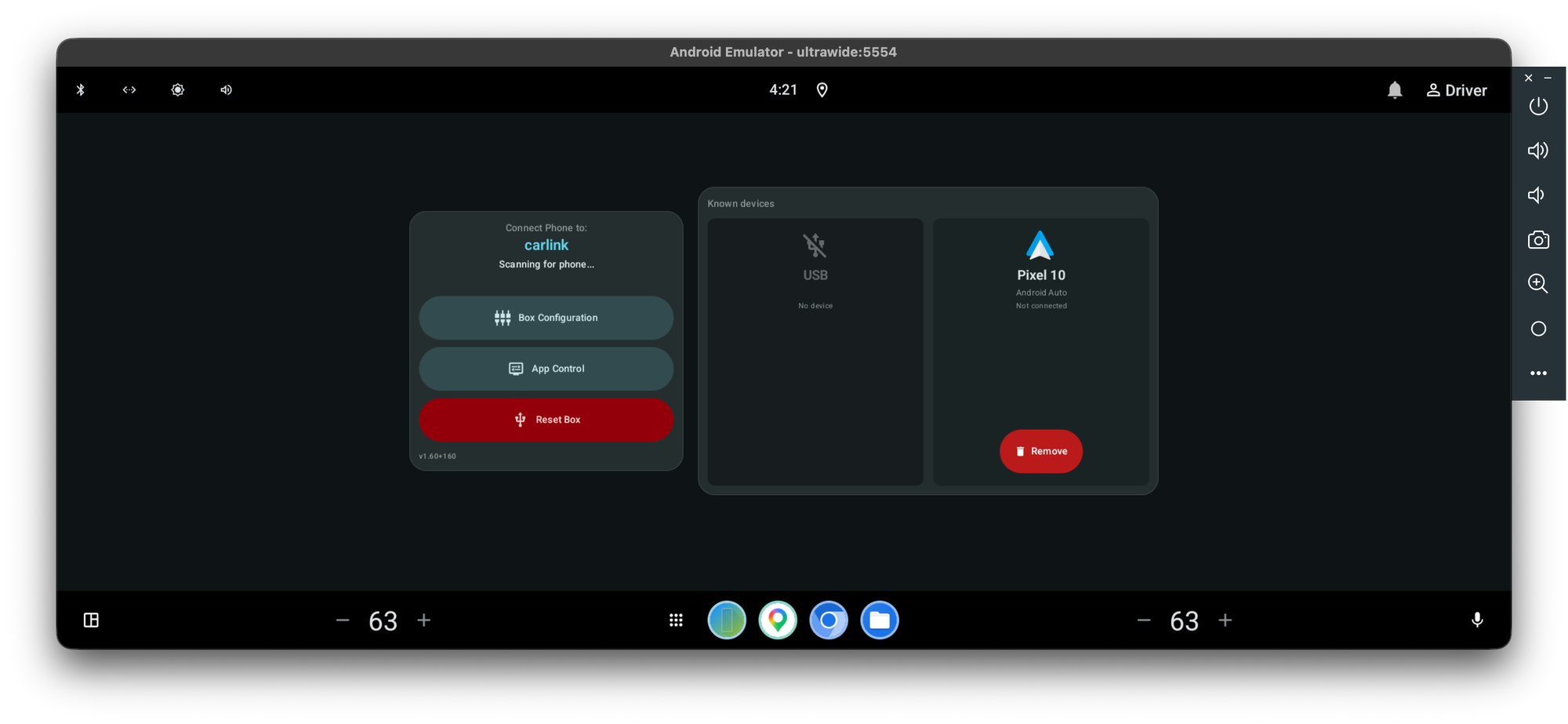 |
Dashboard — the app's always-visible base screen; shows the box's advertised name and live connection phase, and sits behind the video while a session is streaming:
| Idle, no phone connected | Over an active Android Auto session |
|---|---|
| 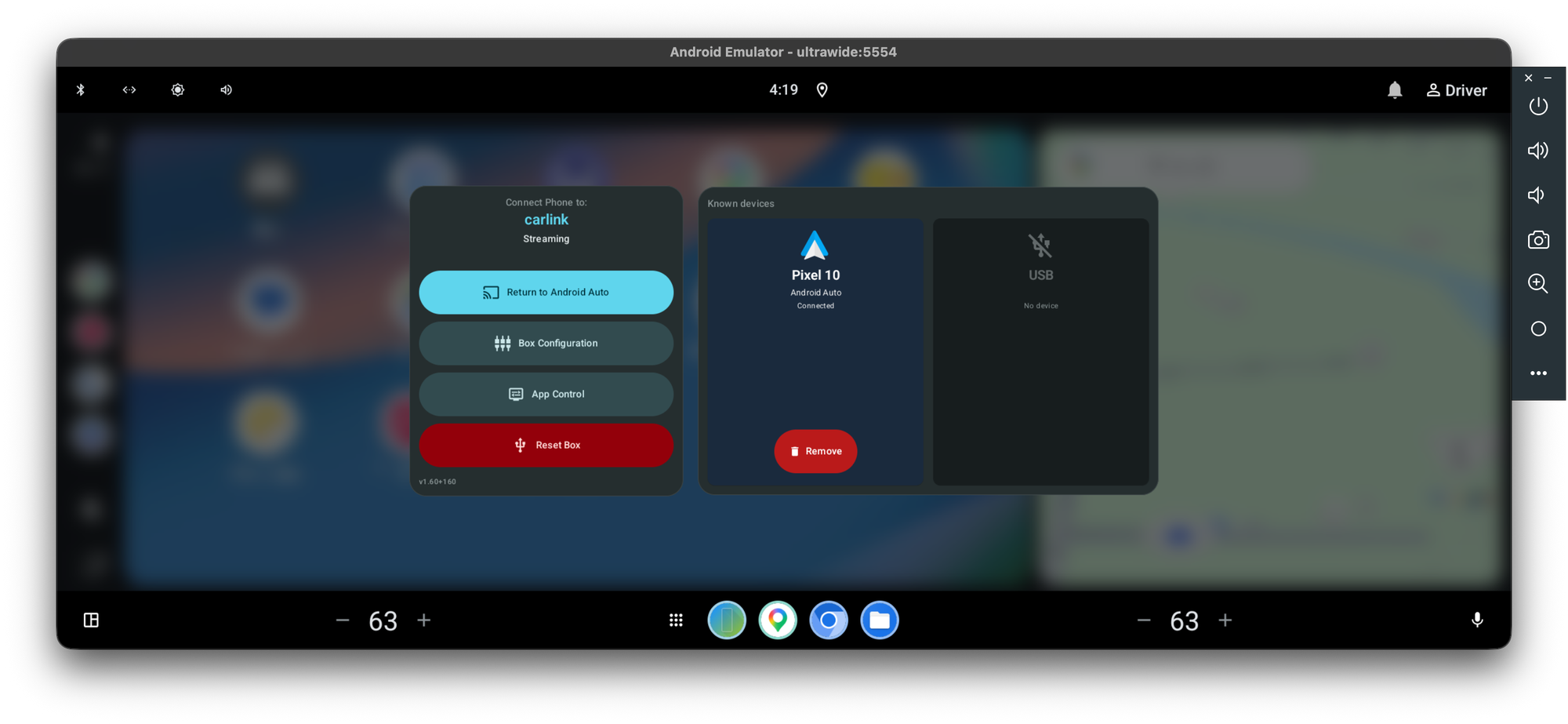 |
CarPlay dark mode — the app tells the box to switch CarPlay's own UI dark automatically, independent of the app's (always-dark) rendering:
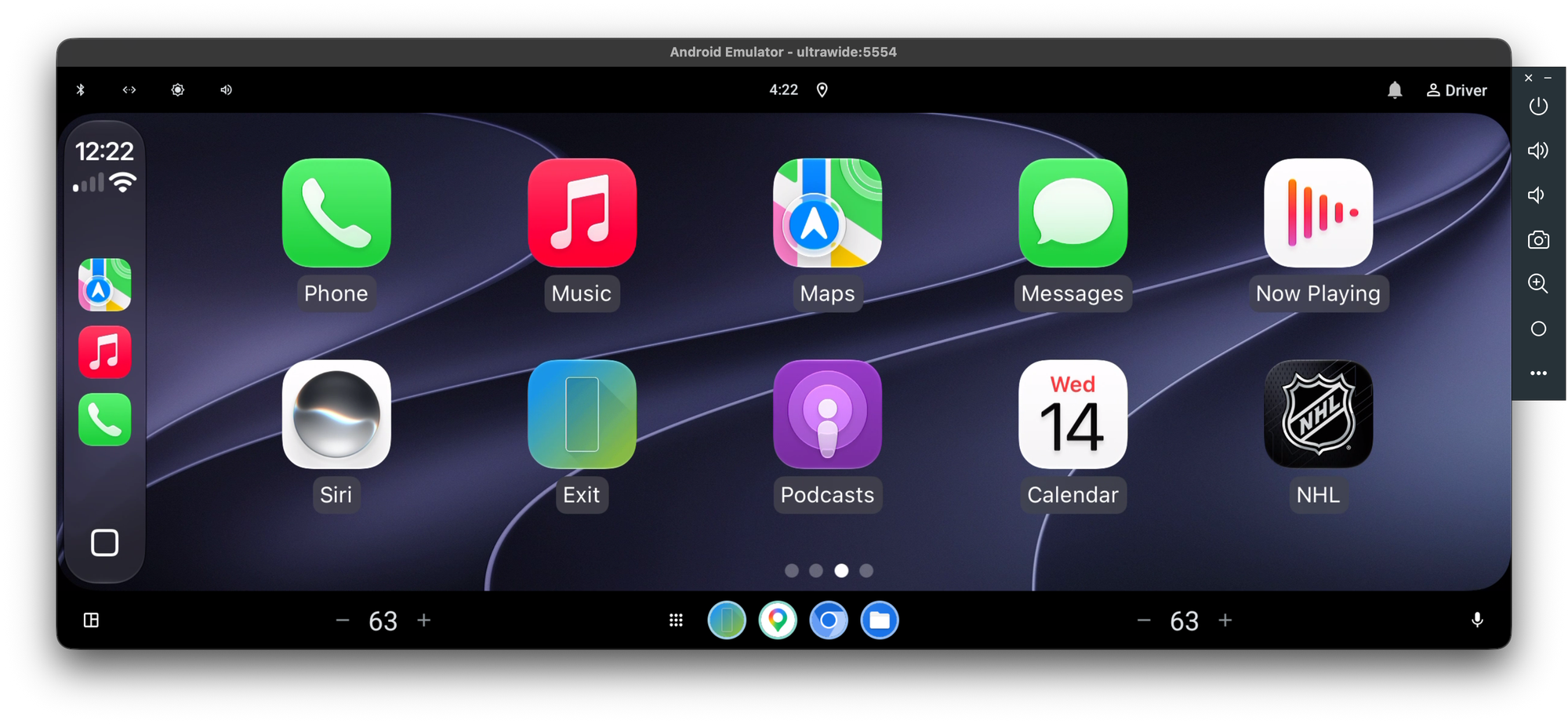
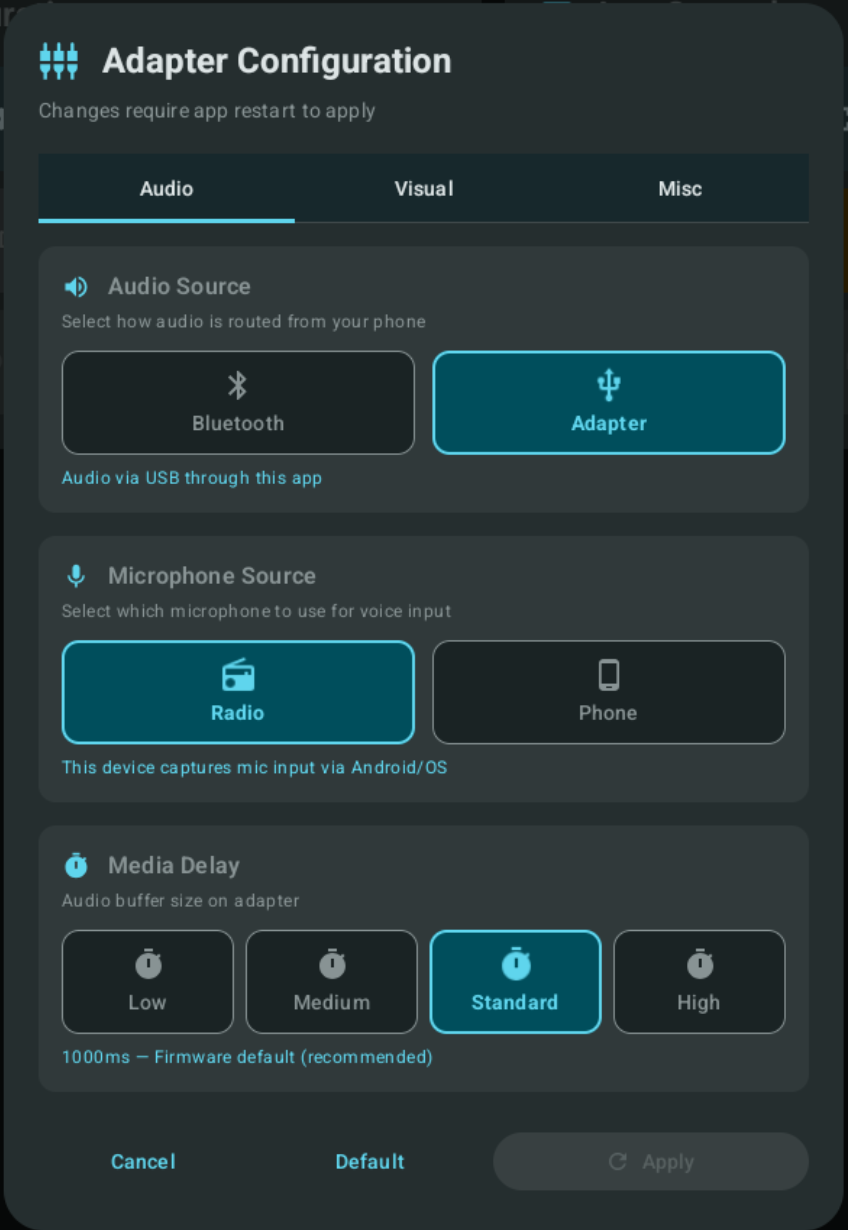
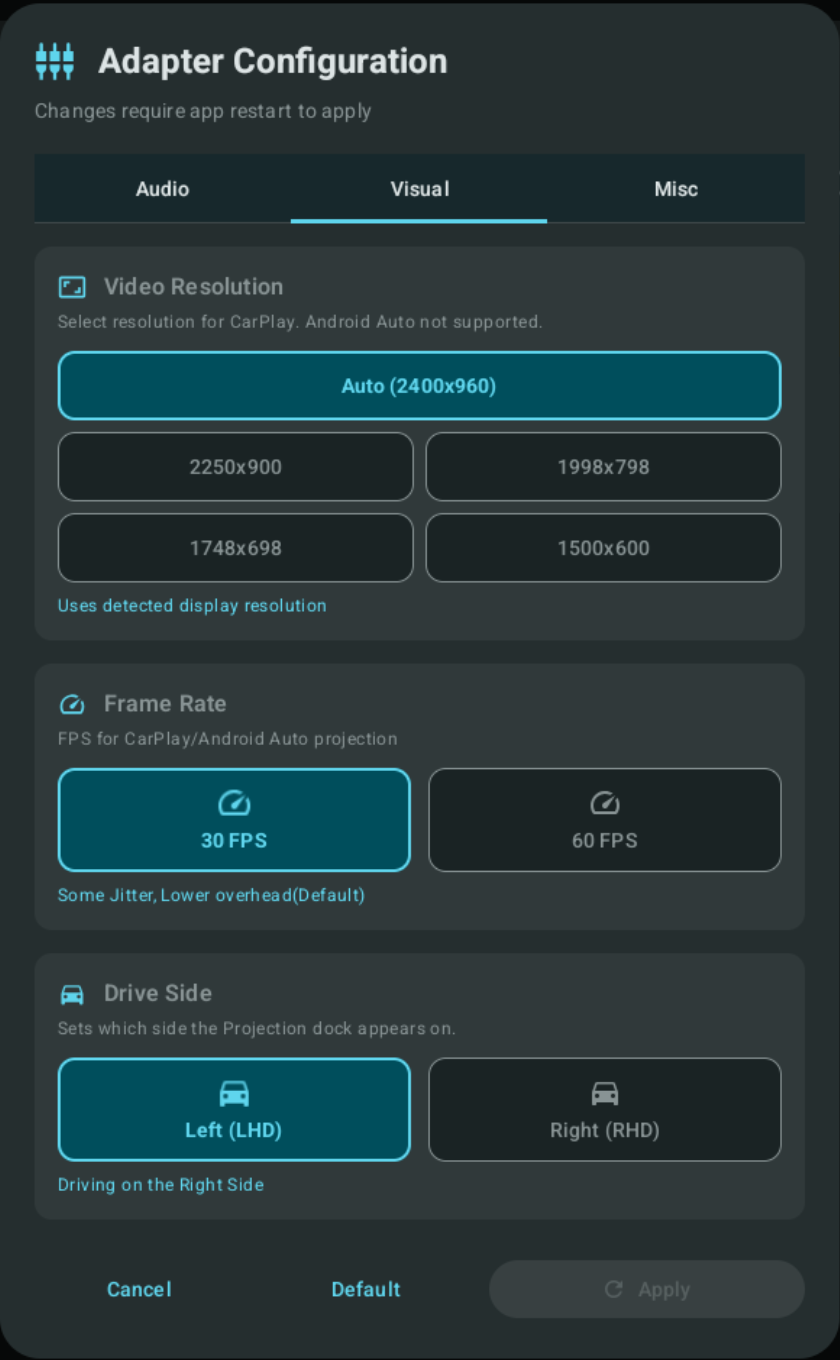
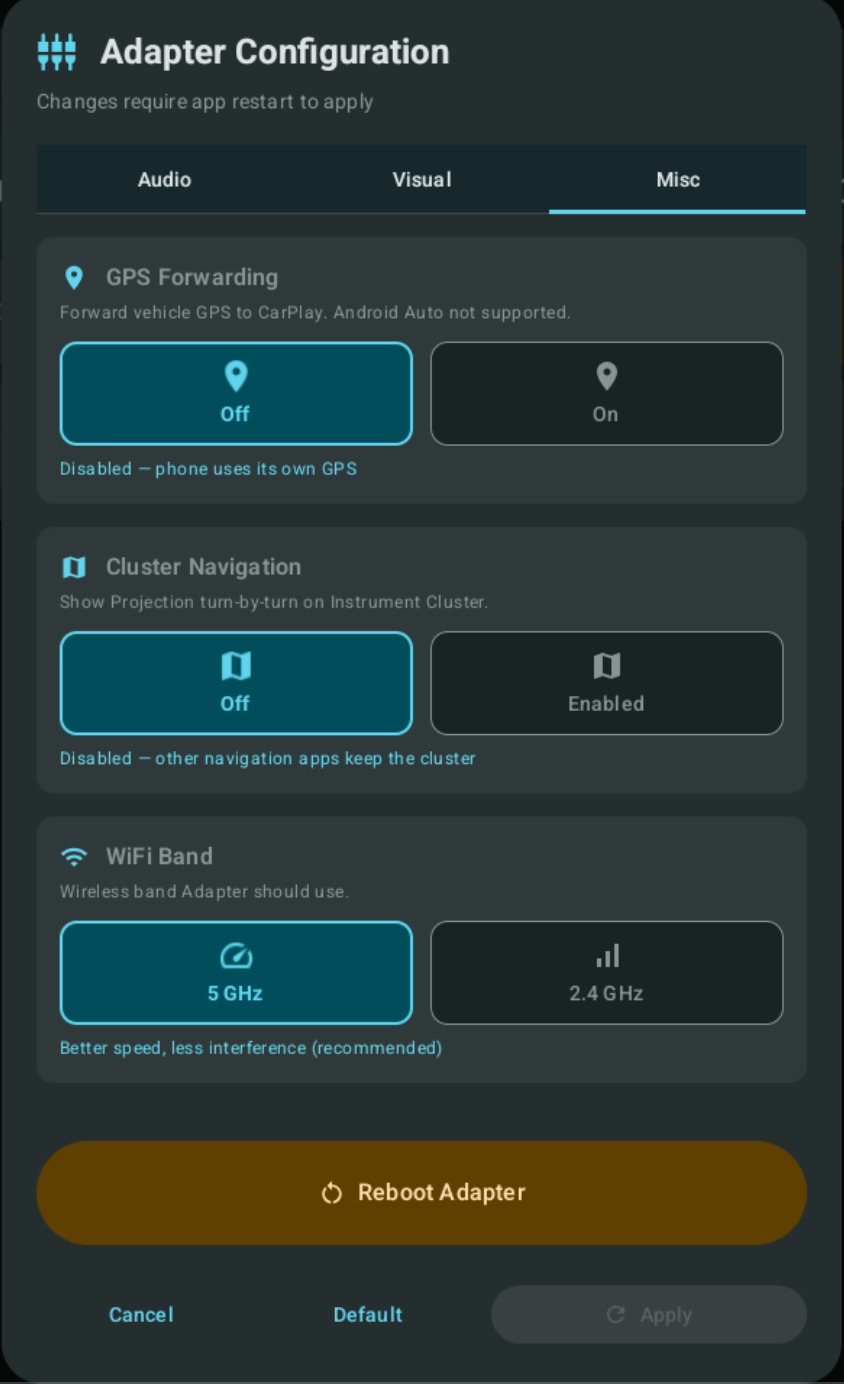
Adapter configuration — applied on reboot via Apply & Restart:
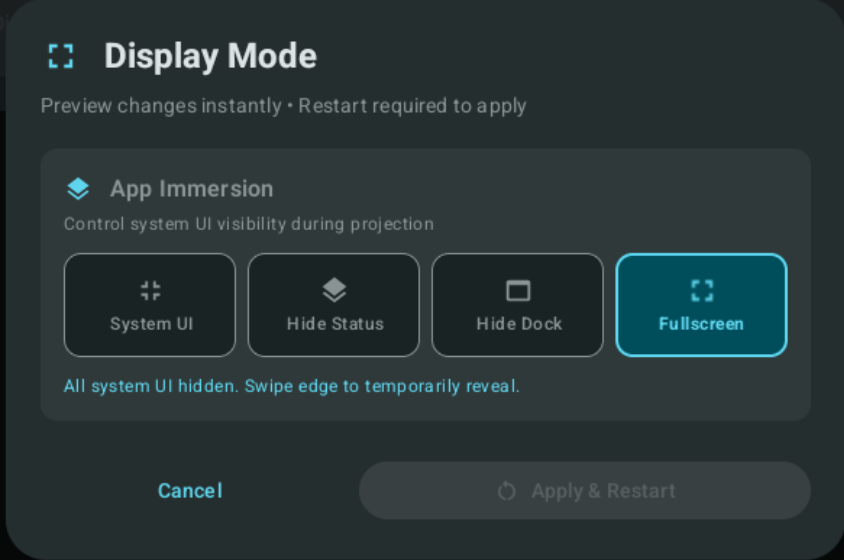
App settings — control what is hidden/shown to give the projection stream more room:
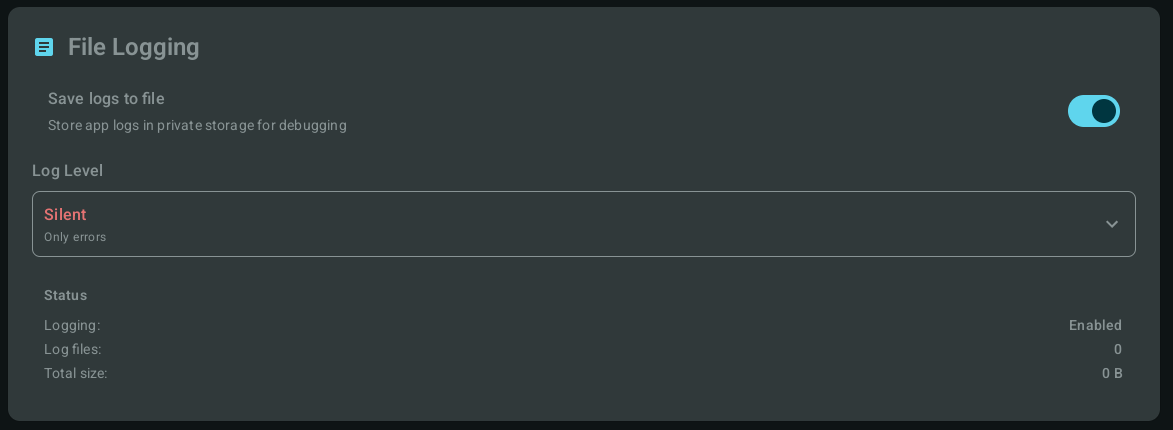
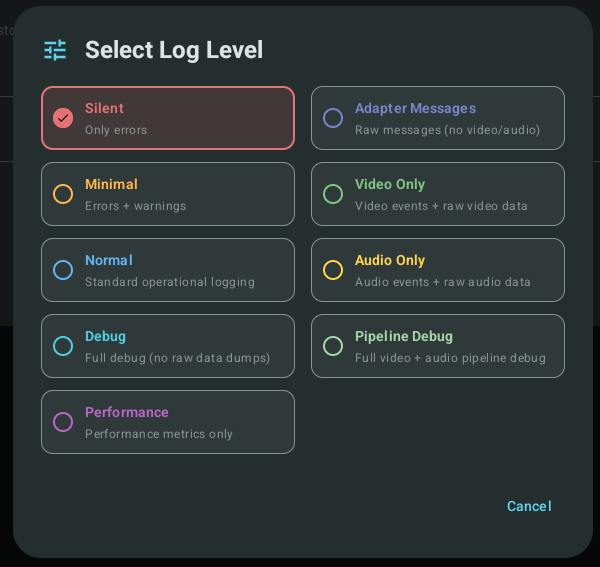
Log export & levels — export logs to a file via the Android documents picker (no extra folder permissions needed; can save to attached USB, subject to OS restrictions). Multiple log levels narrow troubleshooting to the area you need:
The app is self-contained — this repo builds and runs on its own. The docs in this repo are the primary reference:
| Topic | Where | What it is |
|---|---|---|
| App behavior, limitations & design notes | documents/reference/app-notes.md | The detail behind this README |
| Reference docs index | documents/reference/ | Emulator, cluster, and platform notes |
Accuracy isn't guaranteed, but it's the most detailed, centralized source short of the adapter/GM source itself. If you have direct adapter/GM-radio source, there's a site that will gladly publish it anonymously.
Separate repos — not dependencies of this app — that back the research behind it or provide background:
| Repo | What it is |
|---|---|
| CPC200-CCPA_resources | Work on the Carlinkit CPC200-CCPA adapter (firmware, reverse engineering) |
| gminfo_resources | GM head-unit / gminfo3.7 AAOS platform reference |
| carlink_flutter | The original Flutter app this one reimplements |
| XDA Forums thread | Discussion and support; report issues here or on GitHub |
Projects that started this and provided insight, inspiration, and a lot of help:
Android App that enables Phone Projection via the Carlinkit CPC200-CCPA Adapter.
Kotlin
94
108 commits
updated Oct 14, 2026
A native Kotlin reimplementation of the original Flutter-based app. Built for personal use and shared so others can use it. Please don't expect or demand support — I'll help where I can.
XDA Developer Forums thread · Report issues on GitHub or the forum.
Work in progress — something is always changing. Updates that ship without code changes are usually new documentation or corrections.
Target and only hardware-tested platform: a 2024 Silverado gminfo3.7 Intel AAOS radio, with an iPhone as the primary device (CarPlay is the most tuned). Some simulated testing was also done on a GM emulator running GM AAOS 14 (VCUUM platform, build 470.3). Everything else is untested. See Testing scope.
How you install depends on whether your head unit gives you ADB access.
GM's shipping radios expose no ADB and run only apps delivered through Google Play. There is no public Play listing for this app, so each user installs it through their own Google Play Developer Account:
ownerApplicationId in app/build.gradle.kts
(a fork must not reuse zeno.carlink), then build the play bundle (AAB).The build is signed with your upload key/certificate, not the author's — that is expected and required. If you are new to the Play Console, search for a current "upload an app to an Internal Testing track" tutorial; the process is standard Android publishing and not specific to this app.
If your platform exposes ADB, install the APK with the installer attributed to the Play Store:
adb install -i com.android.vending app-sideload-release.apk
The -i com.android.vending flag records Google Play as the installing package. AAOS considers
the install source when deciding what may run while driving, so attributing the install to Play
makes the system honor the app's Distraction Optimization declarations — showing and running
it normally — instead of treating a plain sideload as non-optimized and restricting it. A signed
sideload APK is attached to each GitHub Release, or you can build one yourself.
[!IMPORTANT] The APK in Releases is only for people who can freely sideload via ADB. It is already signed with the author's key and uses the
zeno.carlinkpackage name, so it cannot be uploaded to your own Google Play account — Play requires a package name you own and your own signing key/certificate. GM vehicles without ADB (see above) must build their own bundle with their own package name and key; the Release APK will not work for that path.
Full explanations in app notes:
Optional. Adapter-side binaries were patched to (1) forward the full iAP2 navigation data Carlinkit otherwise strips, and (2) fix Android Auto's incorrect parsing of forwarded vehicle GPS NMEA. Not required, but gives a closer-to-stock experience. Firmware lives in CPC200-CCPA_resources. See notes.
If audio misbehaves, first disconnect and forget the phone/vehicle from each other's Bluetooth and grant the app microphone access — the adapter routes audio through itself by default. Steering-wheel voice/call control is a system feature this app can't provide; for it, set in-app adapter routing to Bluetooth instead. See audio routing.
From the Android emulator with USB passthrough for the CPC200-CCPA.
| CarPlay (iPhone) | Android Auto (Pixel 10) | Dashboard |
|---|---|---|
| | |
Dashboard — the app's always-visible base screen; shows the box's advertised name and live connection phase, and sits behind the video while a session is streaming:
| Idle, no phone connected | Over an active Android Auto session |
|---|---|
| |
CarPlay dark mode — the app tells the box to switch CarPlay's own UI dark automatically, independent of the app's (always-dark) rendering:
Adapter configuration — applied on reboot via Apply & Restart:
App settings — control what is hidden/shown to give the projection stream more room:
Log export & levels — export logs to a file via the Android documents picker (no extra folder permissions needed; can save to attached USB, subject to OS restrictions). Multiple log levels narrow troubleshooting to the area you need:
The app is self-contained — this repo builds and runs on its own. The docs in this repo are the primary reference:
| Topic | Where | What it is |
|---|---|---|
| App behavior, limitations & design notes | documents/reference/app-notes.md | The detail behind this README |
| Reference docs index | documents/reference/ | Emulator, cluster, and platform notes |
Accuracy isn't guaranteed, but it's the most detailed, centralized source short of the adapter/GM source itself. If you have direct adapter/GM-radio source, there's a site that will gladly publish it anonymously.
Separate repos — not dependencies of this app — that back the research behind it or provide background:
| Repo | What it is |
|---|---|
| CPC200-CCPA_resources | Work on the Carlinkit CPC200-CCPA adapter (firmware, reverse engineering) |
| gminfo_resources | GM head-unit / gminfo3.7 AAOS platform reference |
| carlink_flutter | The original Flutter app this one reimplements |
| XDA Forums thread | Discussion and support; report issues here or on GitHub |
Projects that started this and provided insight, inspiration, and a lot of help:



