
Tesla Android Auto mirror app - Stream Android Auto to Tesla's browser
See the codeREADME
Castla
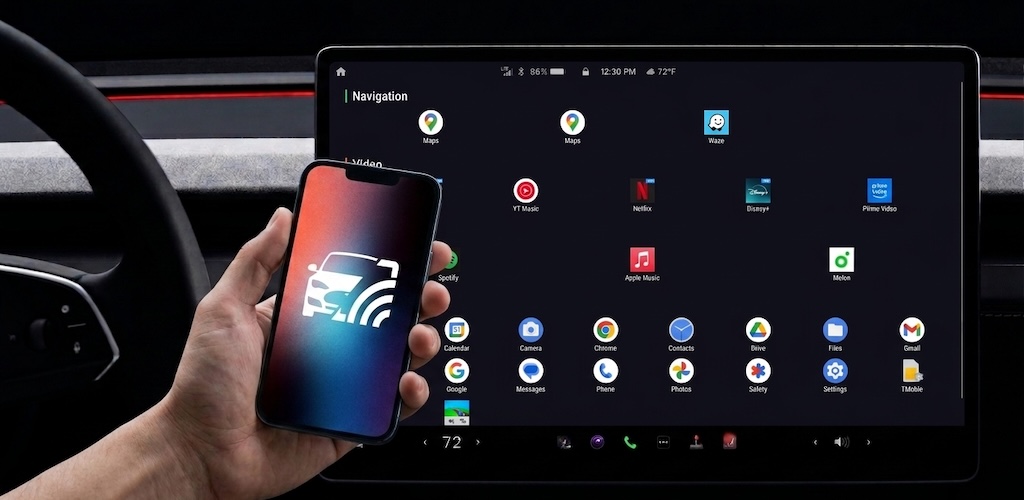
The ultimate Android Auto alternative for Tesla. Mirror Waze, Google Maps, and your phone screen directly to Tesla's browser.



한국어 · 日本語 · 中文 · Deutsch · Español · Français
What is Castla?
Missing Android Auto in your Tesla? Want to run Waze or Google Maps on the big screen?
Castla is a free, open-source solution that streams your Android phone's screen directly to Tesla's built-in web browser over your local WiFi network. No internet connection, no expensive dongles, no cloud servers, and no subscriptions — everything stays fast, secure, and entirely between your phone and your car.
Key highlights:
- The Android Auto Experience — Bring your favorite navigation and music apps to the Tesla display.
- Real-time mirroring — H.264 hardware encoding + WebSocket streaming for ultra-low latency.
- Full Touch control — Tap, swipe, and interact with your phone directly from the Tesla screen (via Shizuku).
- Audio streaming — Stream your device's audio directly to Tesla's speakers (Android 10+).
- 100% local & private — All data stays on your WiFi/hotspot. Zero data is sent to the internet.
- Completely free — No ads, no paywalls. Open-source under Apache-2.0.
Features
| Feature | Details |
|---|---|
| Navigation on Big Screen | Run Waze, Google Maps, or any app smoothly up to 1080p @ 60fps. |
| Touch Input | Full touch injection via Shizuku. Control your phone from the car screen. |
| Split View | Dual-panel multitasking. Navigation (Waze) on the left, YouTube on the right! |
| Virtual Display | Run apps independently on Tesla without keeping your phone screen turned on. |
| Audio | System audio capture (Android 10+, experimental). |
| Tesla Auto-Detect | BLE + hotspot client detection for automatic, seamless connection. |
| Auto Hotspot | Automatically toggle hotspot on/off when mirroring starts/stops. |
| OTT Browser | Built-in browser for DRM content (YouTube, Netflix, etc.). |
| Thermal Protection | Auto quality reduction when device overheats to protect your battery. |
| 9 Languages | EN, KO, DE, ES, FR, JA, NL, NO, ZH. |
Requirements
- Android 8.0+ (API 26)
- Shizuku for touch control and advanced features
- Tesla vehicle with a web browser
- Phone and Tesla on the same WiFi network (or phone hotspot)
Installation
Download APK
- Go to Releases
- Download the latest
.apkfile - Install on your Android device
Build from Source
git clone https://github.com/Suprhimp/castla.git
cd castla
./gradlew assembleDebug
The APK will be at app/build/outputs/apk/debug/app-debug.apk.
Quick Start
- Install Shizuku — Open Castla, tap "Install Shizuku" and follow the setup guide
- Start Shizuku — Enable Developer Options → Wireless Debugging → Open Shizuku → "Start via Wireless Debugging"
- Grant permission — Allow Castla to use Shizuku when prompted
- Connect — Make sure your phone and Tesla are on the same WiFi (or use phone hotspot)
- Start mirroring — Tap "Start Mirroring" in Castla
- Open in Tesla — Enter the displayed URL in Tesla's browser
Architecture
+---------------+     WebSocket      +--------------------+
|  Android      | <=================> |  Tesla Browser     |
|               |                     |                    |
|  MediaCodec   |  H.264 frames      |  WebCodecs API     |
|  (H.264 enc)  | =================> |  (H.264 dec)       |
|               |                     |                    |
|  AudioCapture |  AAC stream         |  AudioContext       |
|               | =================> |                    |
|               |                     |                    |
|  Shizuku      |  Touch events       |  Canvas + Touch    |
|  (InputMgr)   | <================= |  event listeners   |
+---------------+                     +--------------------+
        |
        |  Local Network Only (WiFi / Hotspot)
        |  No internet required
- Server: NanoHTTPD WebSocket server (port 8192)
- Video: MediaCodec H.264 hardware encoder → binary WebSocket → WebCodecs decoder → Canvas
- Audio: AudioPlaybackCapture → AAC encoder → WebSocket
- Touch: Tesla browser touch events → JSON WebSocket → Shizuku InputManager injection
- Shizuku: PrivilegedService for virtual display, input injection, hotspot control
Shizuku Setup
Shizuku is required for touch control, virtual display, and auto-hotspot features. Without it, only basic screen mirroring (view only) is available.
See the Shizuku Installation Guide for detailed setup instructions.
Contributing
We welcome contributions! Please read the Contributing Guide for details on:
- Bug reports and feature requests
- Development environment setup
- Pull request process
- Adding new translations
Privacy
Castla collects zero data. No analytics, no crash reporting, no telemetry. All communication happens over your local network. See Privacy Policy for details.
Support an Indie Developer
I built Castla because I was frustrated by the lack of Android Auto in my Tesla. I decided to make it 100% free and open-source so everyone can enjoy a better driving experience.
If Castla made your road trips better and helped you navigate with Waze on the big screen, consider buying me a coffee! Your support helps cover development costs and keeps the updates coming.

Built with
Castla stands on the shoulders of great open-source projects:
- Shizuku — privileged API access without root
- NanoHTTPD — embedded HTTP + WebSocket server
- ZXing — QR code generation
- AndroidX / Jetpack Compose — modern Android UI toolkit
- Kotlin Coroutines — async streaming pipeline
Some privileged-mode techniques were inspired by scrcpy (Apache-2.0), specifically:
- Physical display panel on/off via
SurfaceControlfor screen-off mirroring - The
fillAppInfo/FakeContextpattern for spoofingAttributionSourcewhen capturing system audio from a shell-UID service
No scrcpy source code is included — Castla reimplements these approaches for its own architecture.
See NOTICE for the full list of third-party attributions.
License
This project is licensed under the Apache License 2.0.
Copyright 2024 Castla

Licensed under the Apache License, Version 2.0 (the "License");
you may not use this file except in compliance with the License.
You may obtain a copy of the License at

    http://www.apache.org/licenses/LICENSE-2.0
Contributors

101 commits
See what people are saying
Similar repos


Languages
Kotlin
71.6%
JavaScript
12.8%
TypeScript
6.5%
Astro
2.9%
HTML
2.8%
Shell
1.7%
CSS
1.1%
Tesla Android Auto mirror app - Stream Android Auto to Tesla's browser
See the codeREADME
Castla
The ultimate Android Auto alternative for Tesla. Mirror Waze, Google Maps, and your phone screen directly to Tesla's browser.
한국어 · 日本語 · 中文 · Deutsch · Español · Français
What is Castla?
Missing Android Auto in your Tesla? Want to run Waze or Google Maps on the big screen?
Castla is a free, open-source solution that streams your Android phone's screen directly to Tesla's built-in web browser over your local WiFi network. No internet connection, no expensive dongles, no cloud servers, and no subscriptions — everything stays fast, secure, and entirely between your phone and your car.
Key highlights:
- The Android Auto Experience — Bring your favorite navigation and music apps to the Tesla display.
- Real-time mirroring — H.264 hardware encoding + WebSocket streaming for ultra-low latency.
- Full Touch control — Tap, swipe, and interact with your phone directly from the Tesla screen (via Shizuku).
- Audio streaming — Stream your device's audio directly to Tesla's speakers (Android 10+).
- 100% local & private — All data stays on your WiFi/hotspot. Zero data is sent to the internet.
- Completely free — No ads, no paywalls. Open-source under Apache-2.0.
Features
| Feature | Details |
|---|---|
| Navigation on Big Screen | Run Waze, Google Maps, or any app smoothly up to 1080p @ 60fps. |
| Touch Input | Full touch injection via Shizuku. Control your phone from the car screen. |
| Split View | Dual-panel multitasking. Navigation (Waze) on the left, YouTube on the right! |
| Virtual Display | Run apps independently on Tesla without keeping your phone screen turned on. |
| Audio | System audio capture (Android 10+, experimental). |
| Tesla Auto-Detect | BLE + hotspot client detection for automatic, seamless connection. |
| Auto Hotspot | Automatically toggle hotspot on/off when mirroring starts/stops. |
| OTT Browser | Built-in browser for DRM content (YouTube, Netflix, etc.). |
| Thermal Protection | Auto quality reduction when device overheats to protect your battery. |
| 9 Languages | EN, KO, DE, ES, FR, JA, NL, NO, ZH. |
Requirements
- Android 8.0+ (API 26)
- Shizuku for touch control and advanced features
- Tesla vehicle with a web browser
- Phone and Tesla on the same WiFi network (or phone hotspot)
Installation
Download APK
- Go to Releases
- Download the latest
.apkfile - Install on your Android device
Build from Source
git clone https://github.com/Suprhimp/castla.git
cd castla
./gradlew assembleDebug
The APK will be at app/build/outputs/apk/debug/app-debug.apk.
Quick Start
- Install Shizuku — Open Castla, tap "Install Shizuku" and follow the setup guide
- Start Shizuku — Enable Developer Options → Wireless Debugging → Open Shizuku → "Start via Wireless Debugging"
- Grant permission — Allow Castla to use Shizuku when prompted
- Connect — Make sure your phone and Tesla are on the same WiFi (or use phone hotspot)
- Start mirroring — Tap "Start Mirroring" in Castla
- Open in Tesla — Enter the displayed URL in Tesla's browser
Architecture
+---------------+     WebSocket      +--------------------+
|  Android      | <=================> |  Tesla Browser     |
|               |                     |                    |
|  MediaCodec   |  H.264 frames      |  WebCodecs API     |
|  (H.264 enc)  | =================> |  (H.264 dec)       |
|               |                     |                    |
|  AudioCapture |  AAC stream         |  AudioContext       |
|               | =================> |                    |
|               |                     |                    |
|  Shizuku      |  Touch events       |  Canvas + Touch    |
|  (InputMgr)   | <================= |  event listeners   |
+---------------+                     +--------------------+
        |
        |  Local Network Only (WiFi / Hotspot)
        |  No internet required
- Server: NanoHTTPD WebSocket server (port 8192)
- Video: MediaCodec H.264 hardware encoder → binary WebSocket → WebCodecs decoder → Canvas
- Audio: AudioPlaybackCapture → AAC encoder → WebSocket
- Touch: Tesla browser touch events → JSON WebSocket → Shizuku InputManager injection
- Shizuku: PrivilegedService for virtual display, input injection, hotspot control
Shizuku Setup
Shizuku is required for touch control, virtual display, and auto-hotspot features. Without it, only basic screen mirroring (view only) is available.
See the Shizuku Installation Guide for detailed setup instructions.
Contributing
We welcome contributions! Please read the Contributing Guide for details on:
- Bug reports and feature requests
- Development environment setup
- Pull request process
- Adding new translations
Privacy
Castla collects zero data. No analytics, no crash reporting, no telemetry. All communication happens over your local network. See Privacy Policy for details.
Support an Indie Developer
I built Castla because I was frustrated by the lack of Android Auto in my Tesla. I decided to make it 100% free and open-source so everyone can enjoy a better driving experience.
If Castla made your road trips better and helped you navigate with Waze on the big screen, consider buying me a coffee! Your support helps cover development costs and keeps the updates coming.
Built with
Castla stands on the shoulders of great open-source projects:
- Shizuku — privileged API access without root
- NanoHTTPD — embedded HTTP + WebSocket server
- ZXing — QR code generation
- AndroidX / Jetpack Compose — modern Android UI toolkit
- Kotlin Coroutines — async streaming pipeline
Some privileged-mode techniques were inspired by scrcpy (Apache-2.0), specifically:
- Physical display panel on/off via
SurfaceControlfor screen-off mirroring - The
fillAppInfo/FakeContextpattern for spoofingAttributionSourcewhen capturing system audio from a shell-UID service
No scrcpy source code is included — Castla reimplements these approaches for its own architecture.
See NOTICE for the full list of third-party attributions.
License
This project is licensed under the Apache License 2.0.
Copyright 2024 Castla

Licensed under the Apache License, Version 2.0 (the "License");
you may not use this file except in compliance with the License.
You may obtain a copy of the License at

    http://www.apache.org/licenses/LICENSE-2.0
See what people are saying
Similar repos
Contributors
101 commits
Languages
Kotlin
71.6%
JavaScript
12.8%
TypeScript
6.5%
Astro
2.9%
HTML
2.8%
Shell
1.7%
CSS
1.1%