Local, private home workout planner and tracker based on Bryan Johnson’s public exercise protocol, with 3D exercise animations and an optional add-ons. Adjusted for home workout equipment (not big gym equipment).
JavaScript
1
62 commits
updated Oct 18, 2026
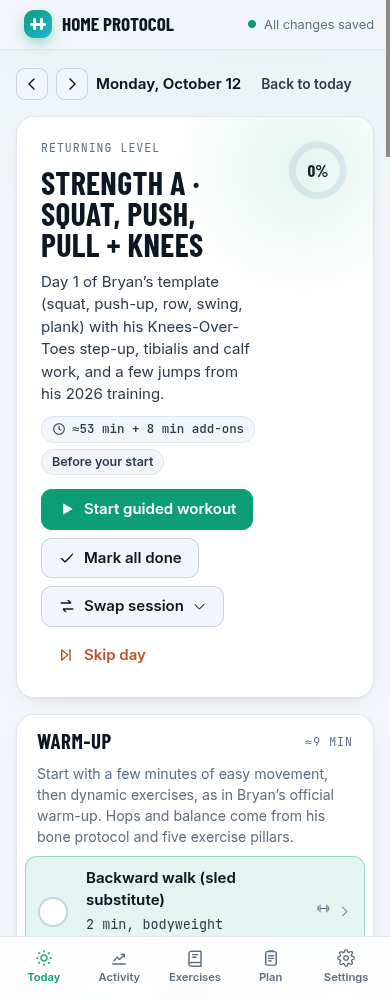
A local web app that plans and tracks a six-day home workout built from Bryan Johnson's public exercise protocol (his October 2026 weekly template), rebuilt for bodyweight, adjustable dumbbells, a pull-up bar and resistance bands.
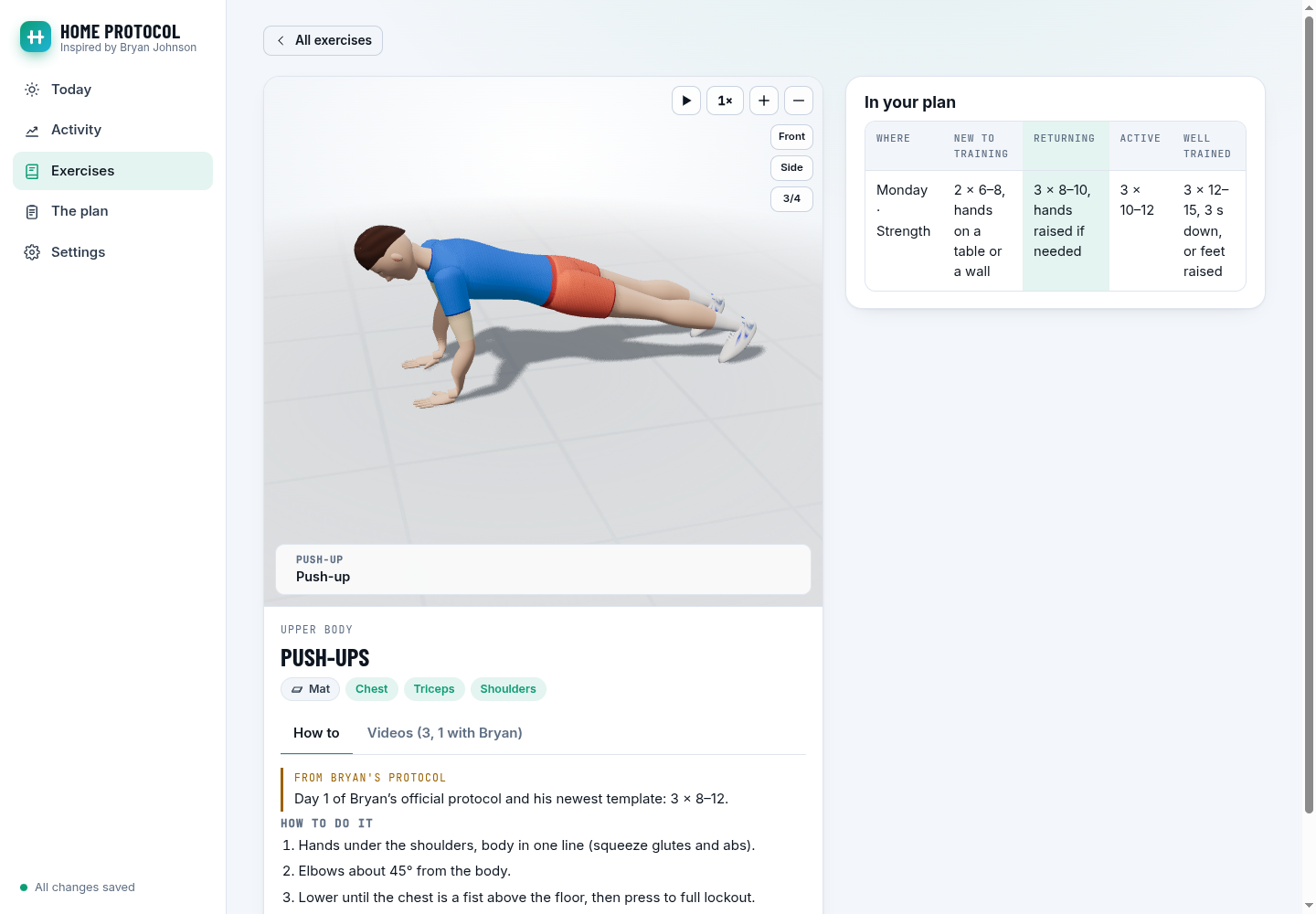
min X sec Y timestamp guide above the player and per-movement video sets that switch automatically with multi-movement animations.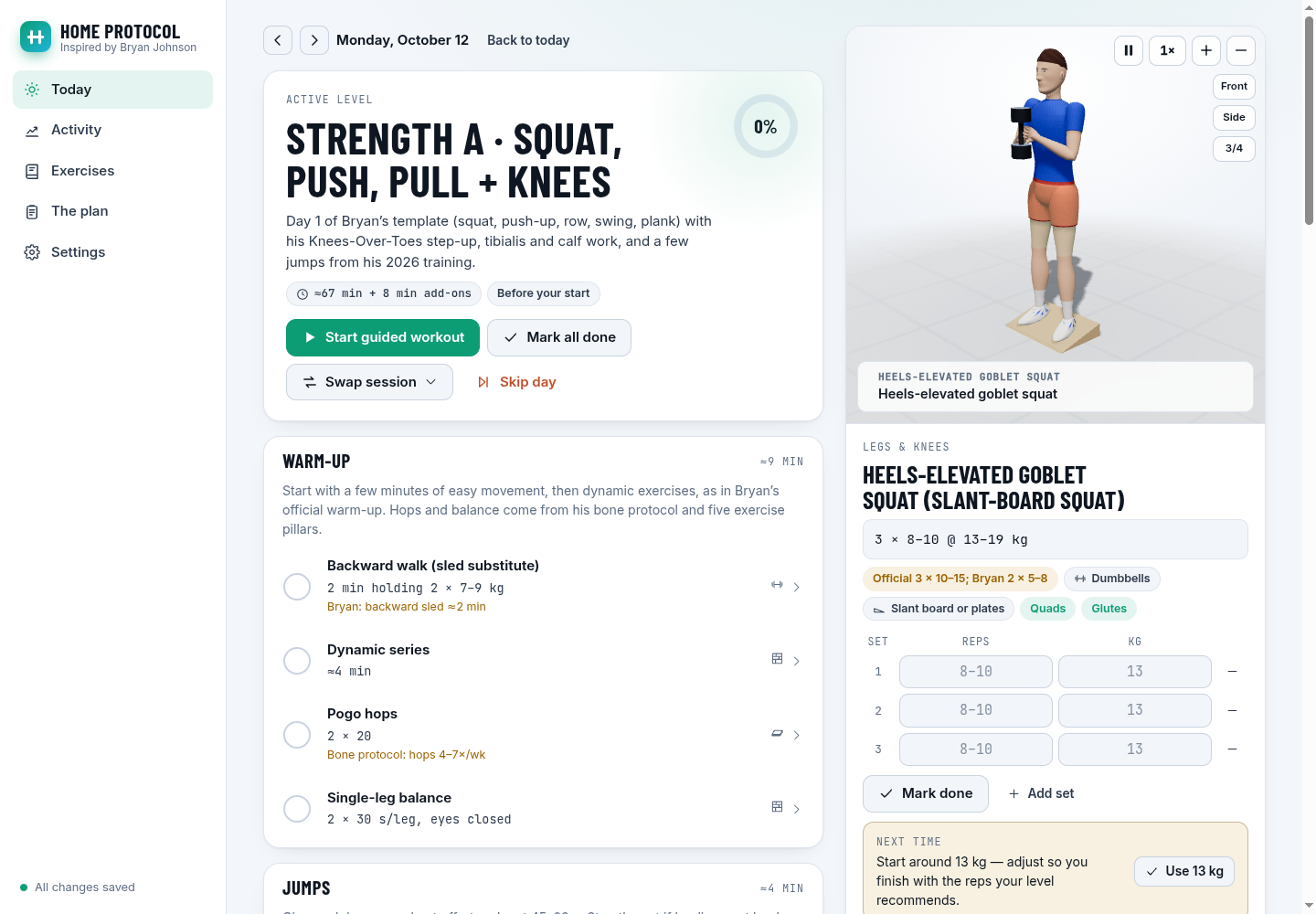

Unofficial and not affiliated with or endorsed by Bryan Johnson or Blueprint. It's a training plan, not medical advice. If you have been inactive for a while, are over 50 or have a heart condition, check with a doctor before hard intervals.
You need Node.js 18 or newer.
With Git installed, open a terminal (PowerShell on Windows) and run:
git clone https://github.com/liviux/Bryan-Johnson-workout-website.git
cd Bryan-Johnson-workout-website
npm install
npm start
Open http://localhost:3030. The first visit opens a short setup where you enter your details, pick your training level, record the equipment you own with names and links (the main accessories also have 3D examples) and pick add-ons.
Keep the terminal window open while you use the app. To stop it, press Ctrl+C in that window. Next time, open a terminal in the project folder and run npm start again.
PORT=8080 npm startHOST=0.0.0.0 npm start, then open http://<your-computer's-IP>:3030. There is no login, so only do this on a network you trust.DATA_DIR=/path/to/folder npm start$env:PORT=8080; npm startThe included systemd unit starts the app after each boot. It expects the repository at ~/Bryan-Johnson-workout-website and Node at /usr/bin/node; edit those paths in the unit if yours are different.
sudo cp deploy/[email protected] /etc/systemd/system/
sudo systemctl daemon-reload
sudo systemctl enable --now "bryan-workout@$(id -un)"
To open it over Tailscale with HTTPS, keep the app bound to localhost and run:
sudo tailscale serve --bg --https=10000 http://127.0.0.1:3030
Then open https://<device>.<tailnet>.ts.net:10000 on a Tailscale device. This stays within your tailnet. The app has no login, so do not expose it with Tailscale Funnel or a public port forward.
npm install only downloads three.js and three web fonts; the server itself uses nothing but Node.
To update later: stop the app, run git pull, then npm install in the project folder, and start it again with npm start. Your saved workouts stay in place.
Your details and workouts save automatically on your computer. They are not uploaded to GitHub.
Open Settings → Latest changes for the newest 20 releases, with a link to the full changelog beside the title. The version label refreshes when Settings opens, including after an update. A red Plan changed badge marks updates to exercises or workout doses, with the details highlighted in that release.
By default, files are stored in the data/ folder. This folder is excluded from Git, so normal commits do not include your personal data:
data/
  profile.json          your details, settings, equipment and chosen add-ons
  days/2026-10-14.json  one file per day: sets, reps, notes, skip reason…
data/ folder. See Advanced settings under Run it locally to change its location.npm start to get files, 3D and fonts.Enter your details during setup and change them any time in Settings. If you are new to exercise, choose New to training. You can switch levels whenever you need an easier or harder workout.
| Setting | What it changes |
|---|---|
| Age, or a measured max heart rate | Your suggested heart-rate ranges during cardio |
| Weight, sex, age, training level | Suggested starting dumbbell weights |
| Equipment | Your optional inventory: names, links, equivalents and extra accessories. Exercises keep their generic labels. |
| Heaviest dumbbell | Suggested weights are capped at it |
| Units | kg/cm or lb/in throughout |
| Training level | Which exercises you do, how many sets and reps, and how long the cardio lasts. Your level only changes when you choose it; past logs keep their original level. |
| Start date | Day one of your program |
| Add-ons | Which optional blocks appear after the main session |
| Theme, light or dark | How the app looks (see Themes); changes nothing in the plan |
| Animation style | How the exercise animations are drawn (see Animation styles); changes nothing in the plan |
Suggested weights are starting points. Use a weight that lets you finish with good form and still have the number of good reps left that your level recommends.
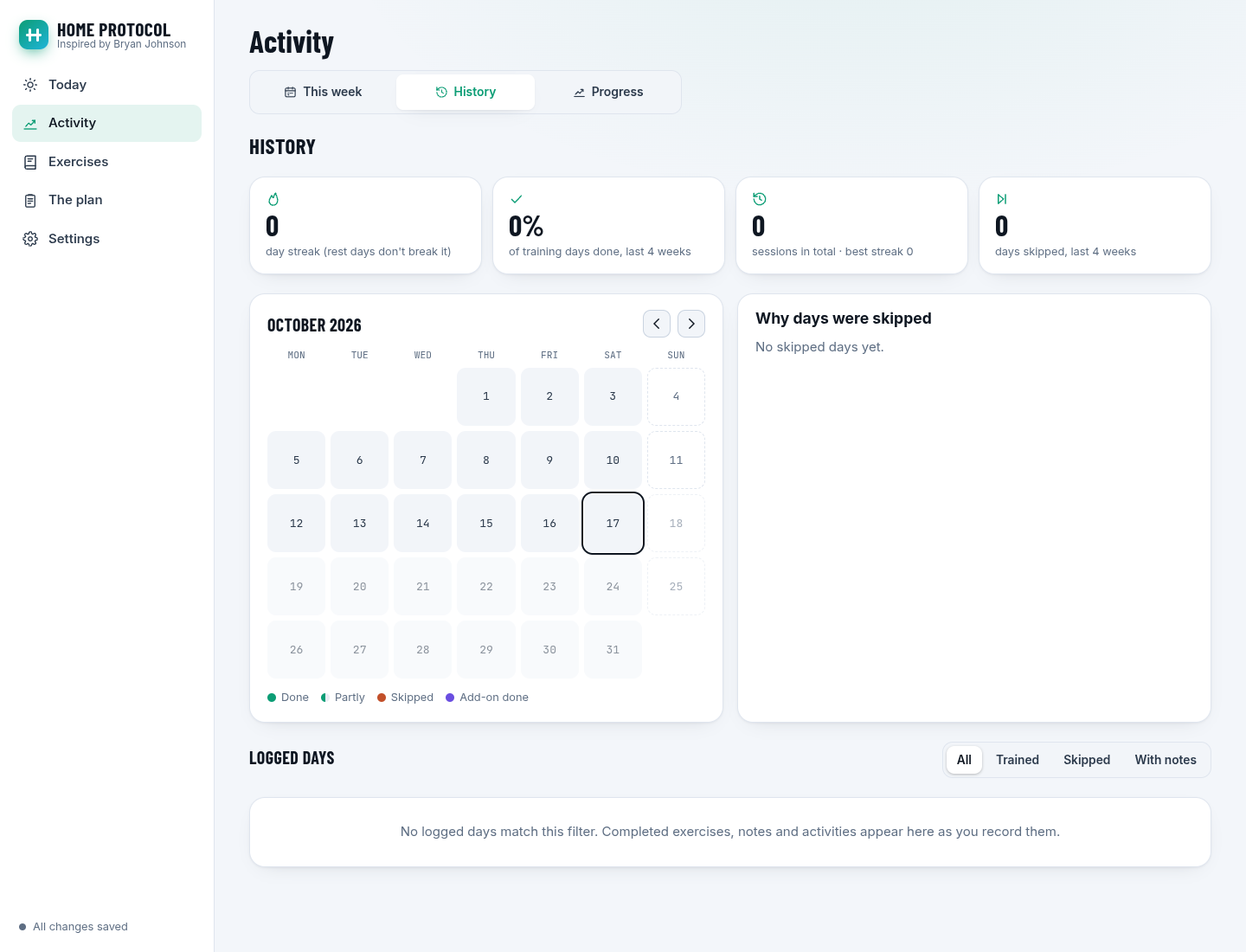
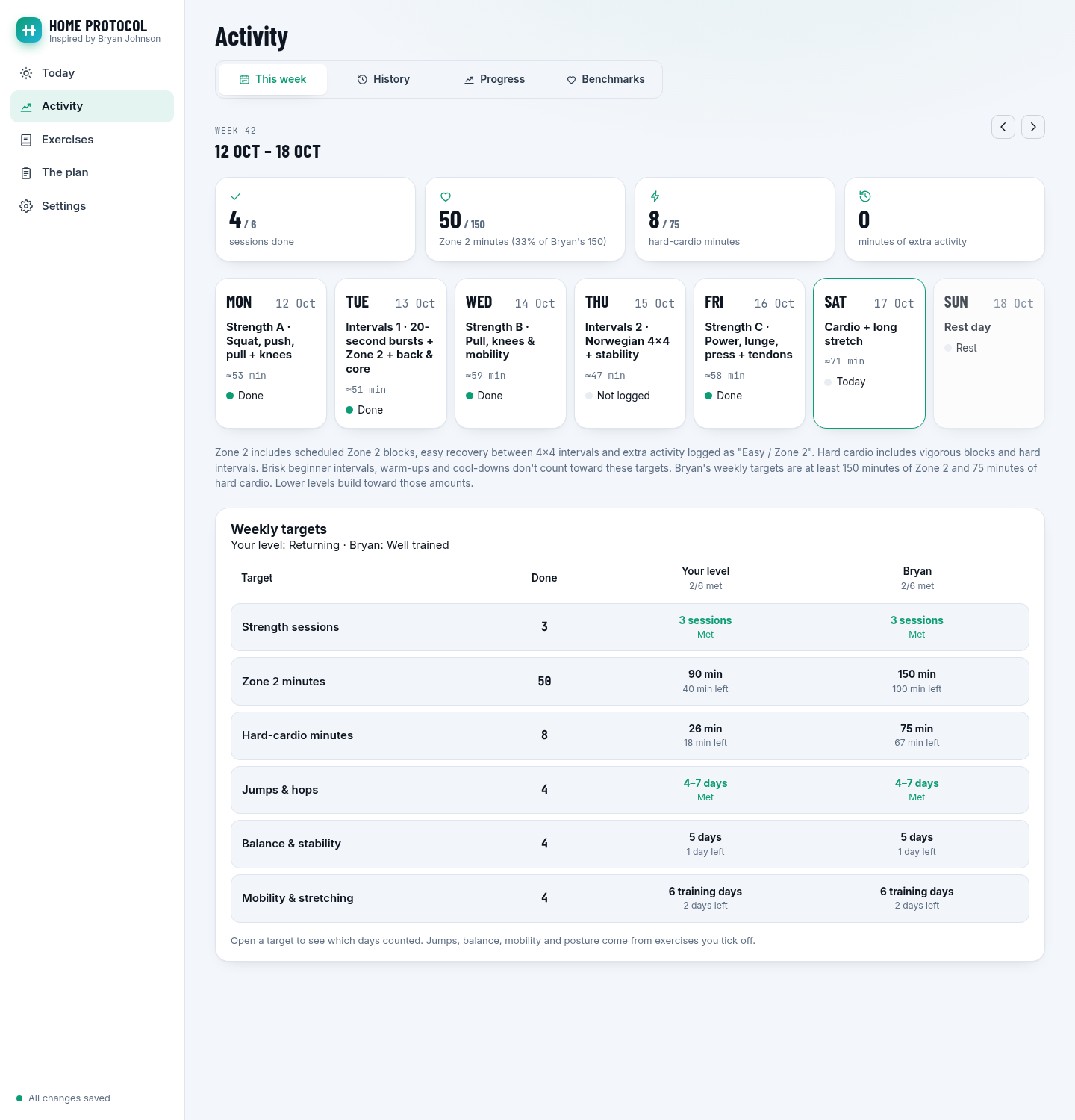
208 − 0.7 × age, unless you enter a measured maximum.data/profile.json.Open Activity for four views: This week, History, Progress and Benchmarks. The main navigation stays compact on desktop and mobile. Existing bookmarks to the old pages still open the right tab.
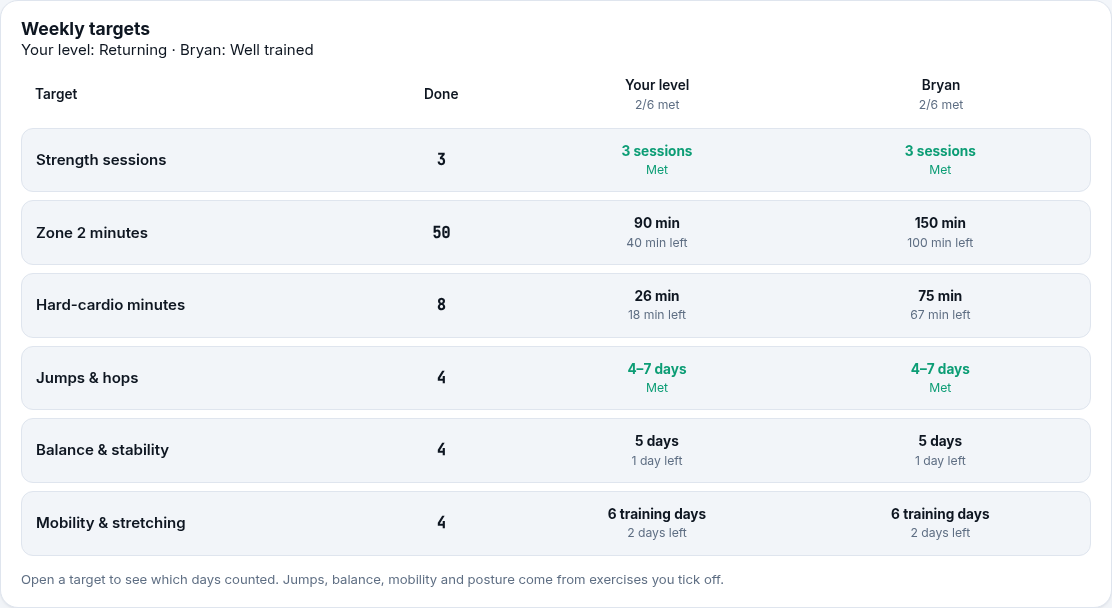
This week ends with one weekly target card. Each row shows your completed work, the target for your level and Bryan's full Well trained target (150 Zone 2 and 75 hard-cardio minutes). It covers strength sessions, Zone 2 and hard-cardio minutes, jump days, balance and stability days, mobility days and posture days. Each row opens to show which days counted and what is still left.
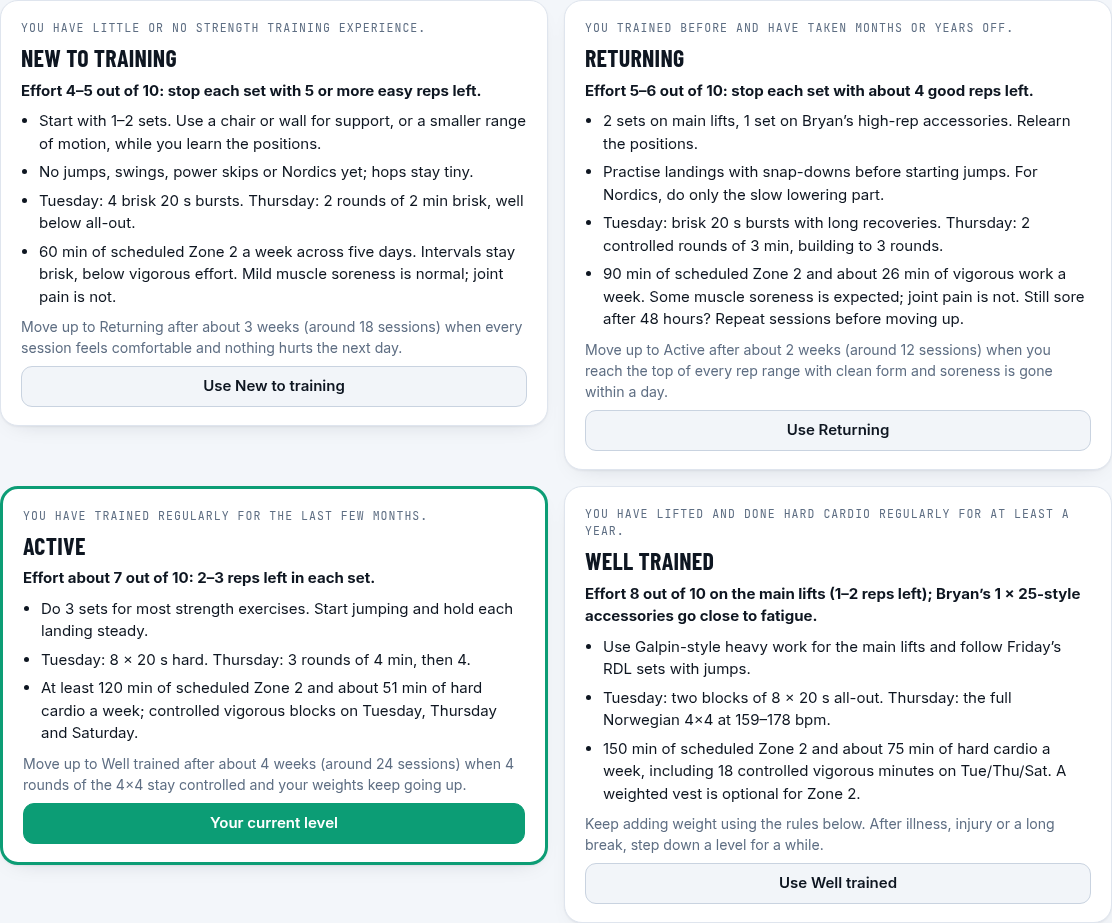
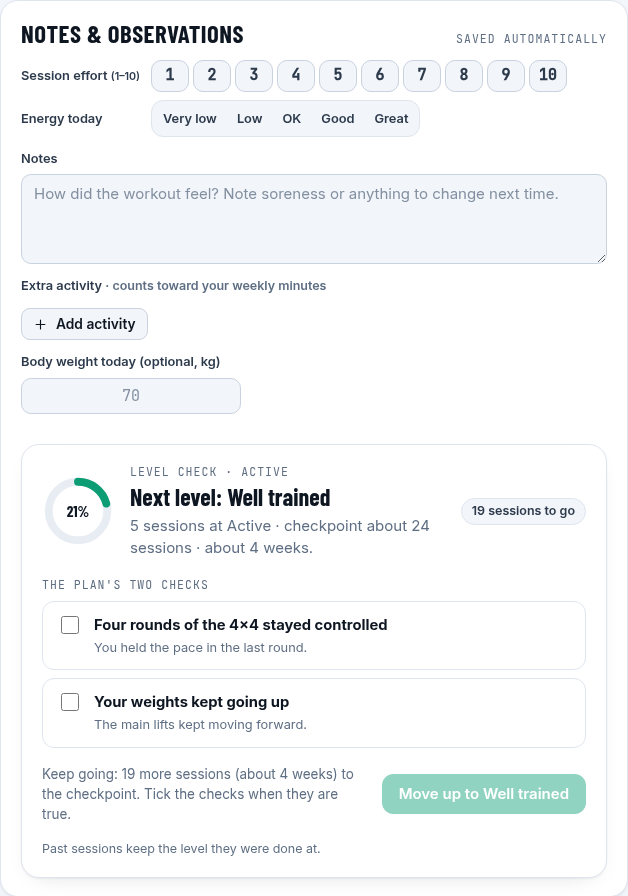
The level check is in Today's Notes & observations and again at the end of a guided workout: the plan's session count for your current level, its two move-up questions and the button to change level when you are ready. In Settings → Training level, the manual picker comes first and stays open. The level check below it starts collapsed. Both checks follow your theme. You can also change levels directly on The plan, where a thick border marks your current level.
Benchmark score fields use the full card width, with the unit shown above the field and Save on the right.
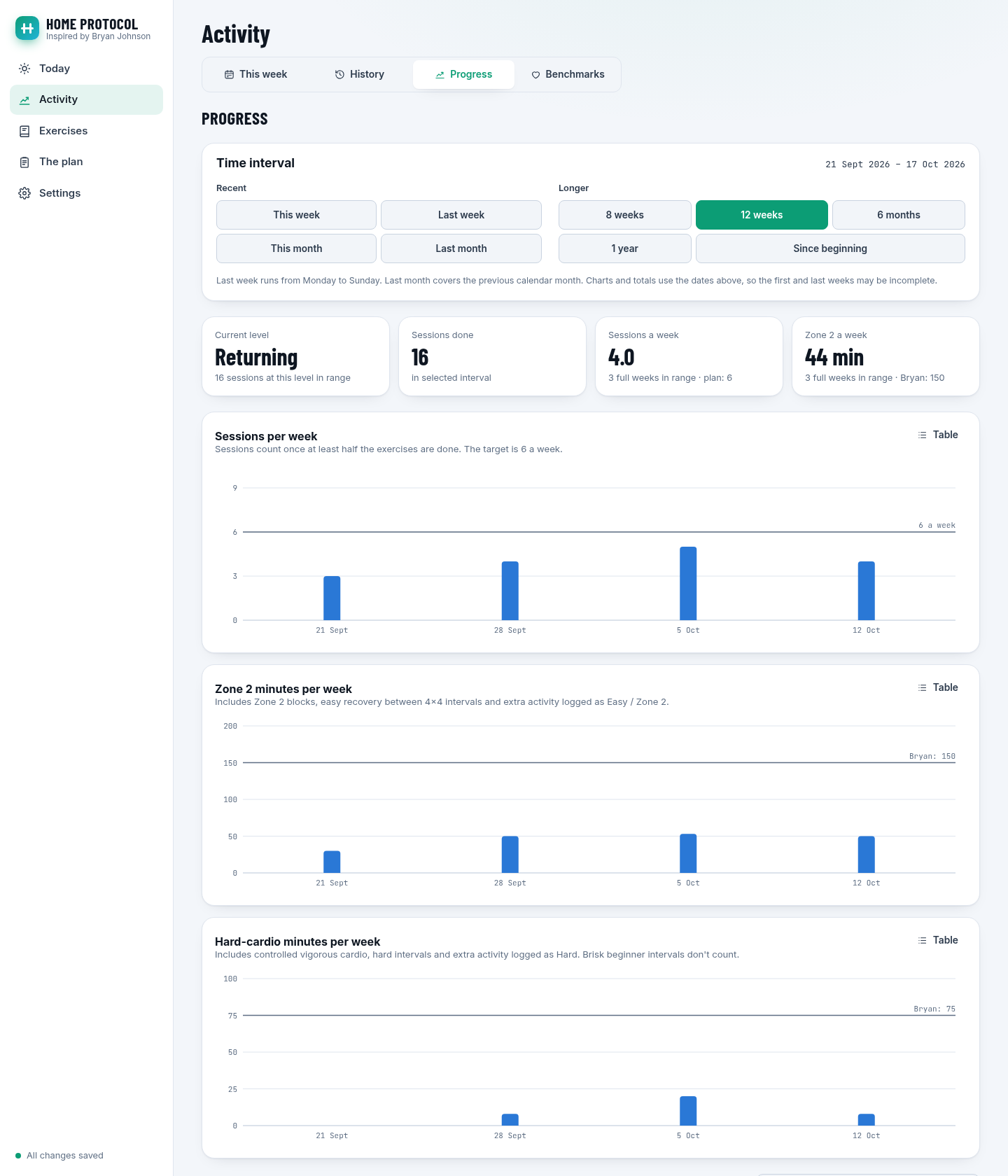
In Progress, the sessions, Zone 2 and hard-cardio charts sit one below another. Choose a time interval from two groups:
Last week means the previous Monday–Sunday; Last month means the previous calendar month. The exact dates are shown above the choices. All charts, tables and totals use the same interval, including strength, body weight and posture. Weekly averages use full weeks when available. Since beginning includes older imported logs, even if they predate your current program start.
Activity and Progress with the Returning plan, using sample logs:
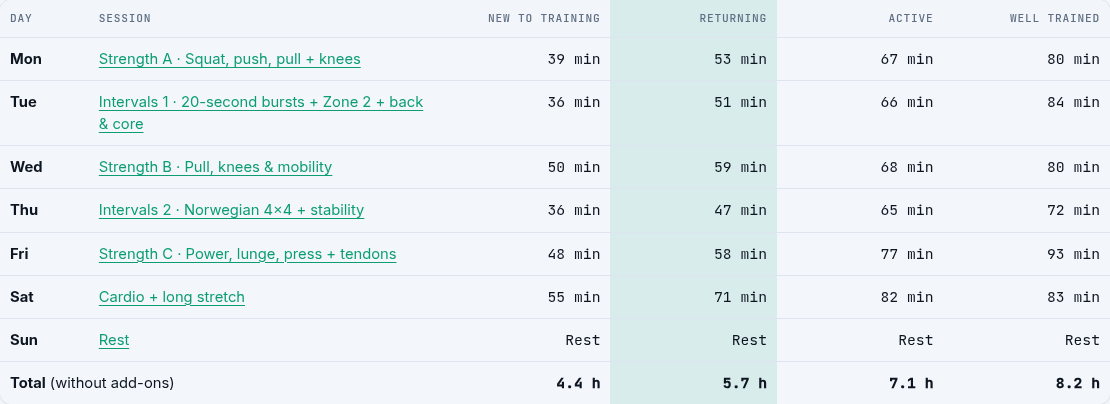
| Day | Session |
|---|---|
| Mon | Strength A: squat, push, pull + knees |
| Tue | Intervals 1: 20-second bursts + Zone 2 + back & core |
| Wed | Strength B: pull, knees & mobility |
| Thu | Intervals 2: Norwegian 4×4 + stability |
| Fri | Strength C: power, lunge, press + tendons |
| Sat | Controlled vigorous cardio + Zone 2 + long stretch (outdoor swaps optional) |
| Sun | Rest |
About 36–55 minutes a session at New to training, 47–71 at Returning, 65–82 at Active and 72–93 at Well trained, plus 8–10 minutes for the posture add-on.
All cardio is scheduled inside the workouts: 60 / 90 / at least 120 / 150 minutes of dedicated Zone 2 per week, and about 0 / 26 / 51 / 75 minutes of hard cardio. New to training keeps intervals below vigorous effort. The 4×4 recoveries can add Zone 2 minutes; warm-ups and cool-downs are excluded. These home-plan additions meet Bryan’s published weekly targets at Well trained without relying on extra walks. Keeping all strength and mobility work takes about 8.2 hours a week at that level, beyond the original 60–70-minute session budget; recovery breaks may add time.
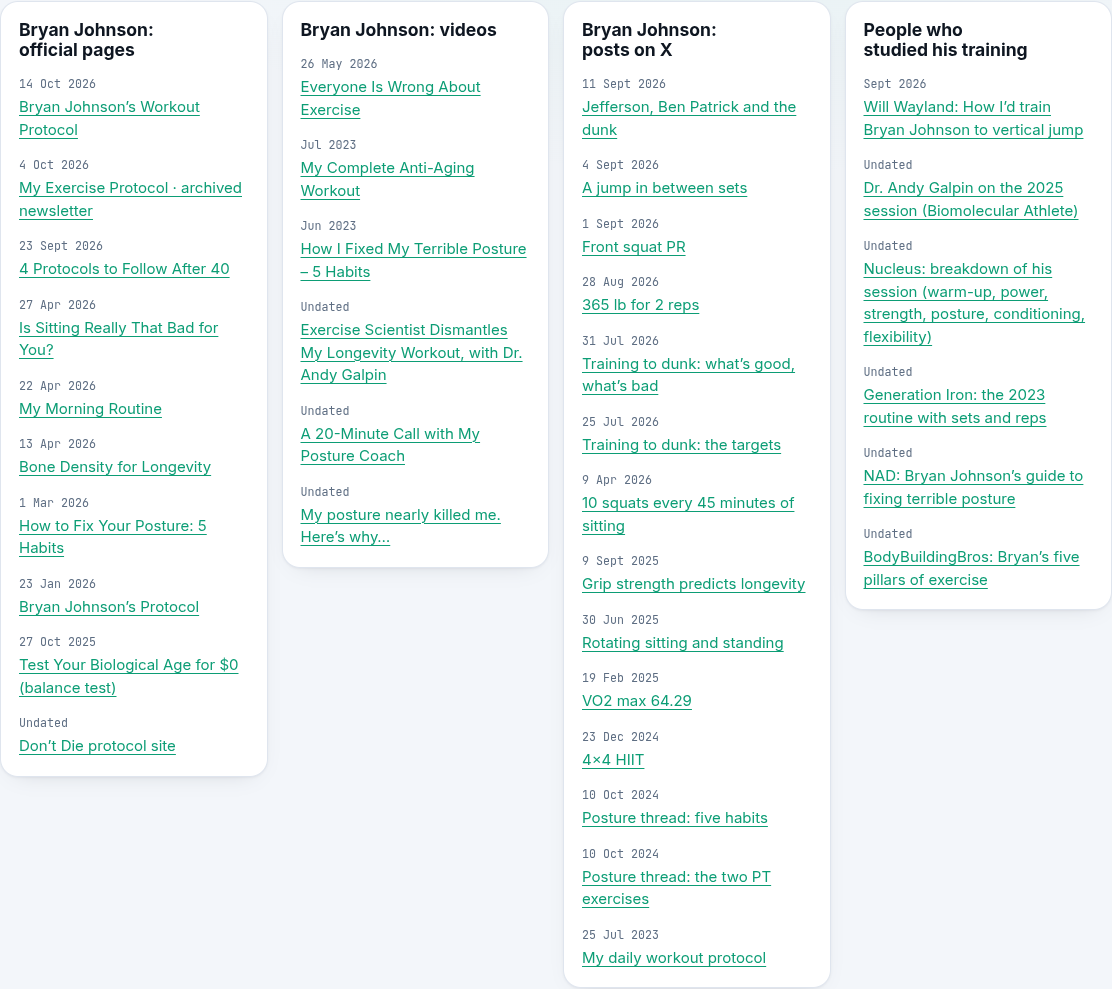
The plan page in the app explains the levels, rules, heart-rate zones, how the week compares with Bryan's targets, what Bryan does now, equipment swaps and all sources. The week fits within the page, with numeric totals for every level. Timeline entries and sources link to the supporting material, newest first where dates are known; unknown dates stay labelled Undated.
A readable snapshot of the whole plan is in docs/PLAN.md.
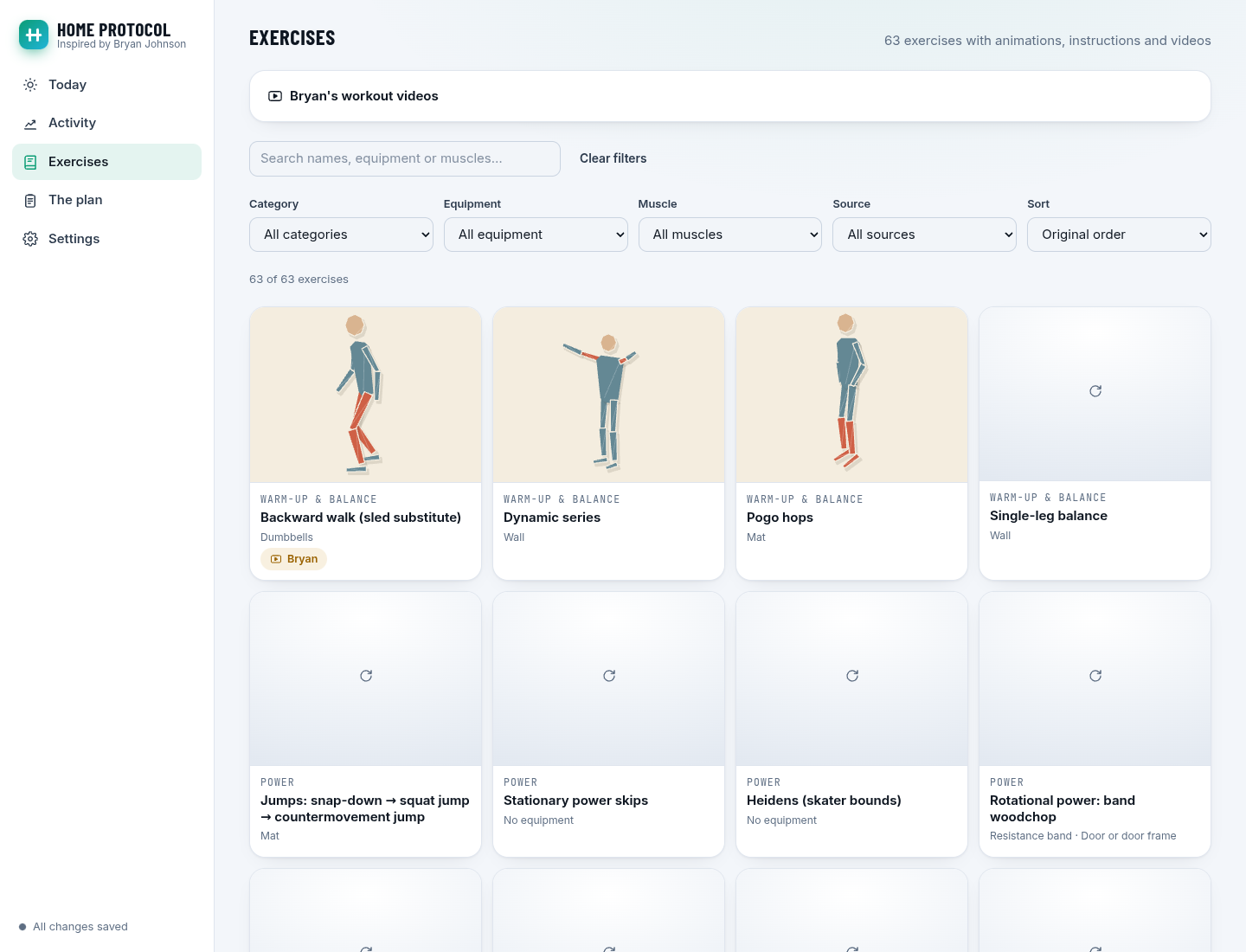
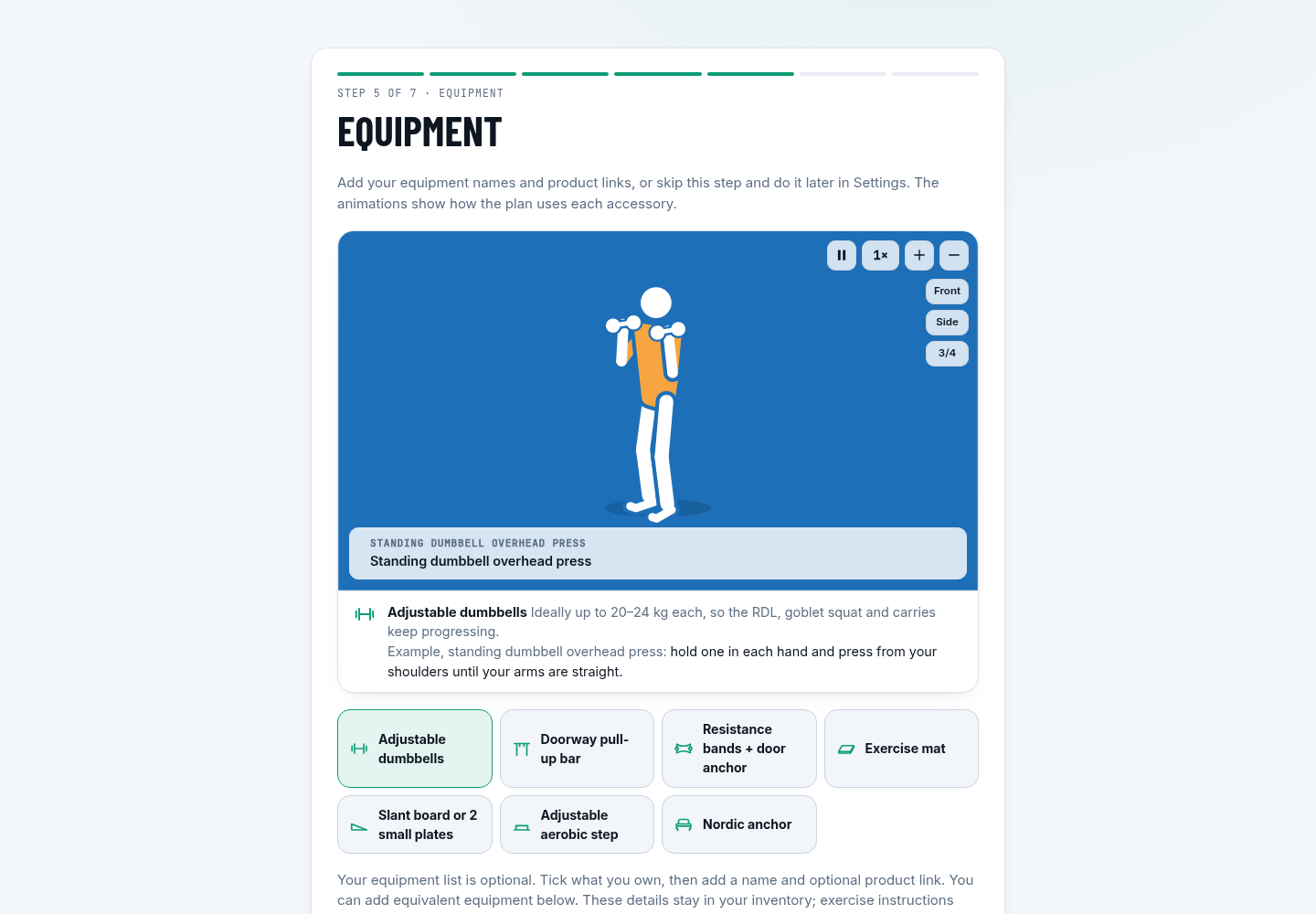
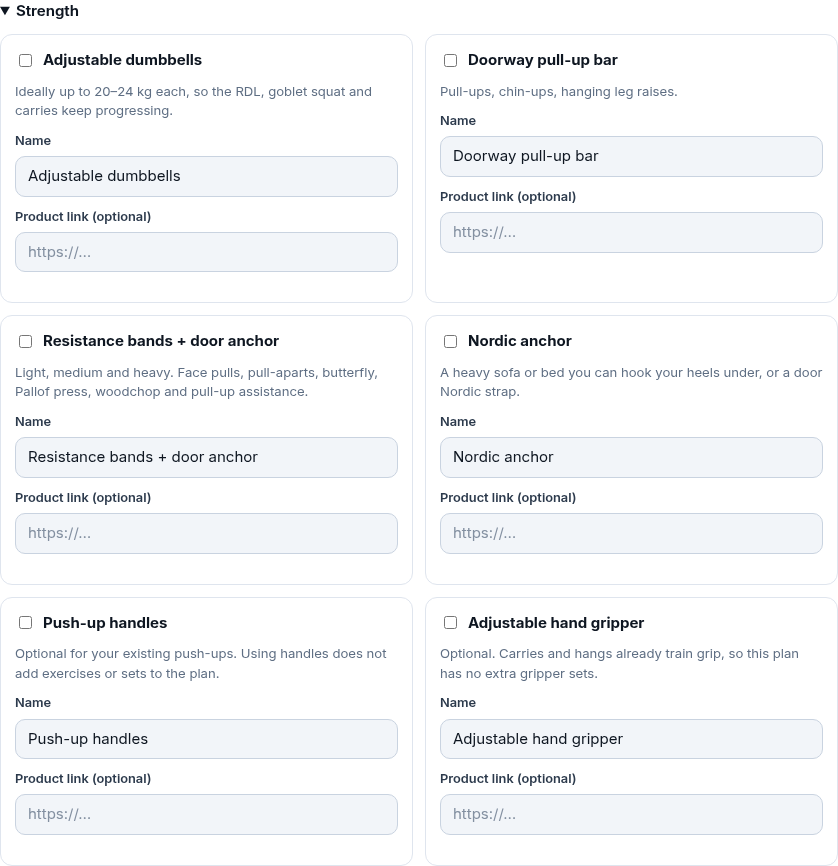
Equipment entry is optional: choose Skip for now during setup to continue without adding anything. Manage your inventory later in Settings → Your equipment, or return directly to the Equipment step from The plan → Set up your equipment. Setup saves when you finish it; Settings saves edits automatically. Tick what you own and enter a name and optional http/https product link. Use Add equipment for extras or equivalents, choosing a category and entering a name and link.
The home recommendations cover adjustable dumbbells, a doorway bar, bands and a door anchor, a mat, a slant board, a low aerobic step and a secure Nordic anchor. Friday's step-ups use the low step rather than a knee-height chair. Poliquin heel taps start with the slant board on the floor. Names and links stay in the inventory, save with your profile and are included in backups. Exercises keep generic equipment labels and show no product links.
A rope, push-up handles and a gripper can be kept in the inventory without adding exercises or sets. Massage devices have their own optional category; they are outside Bryan's workout prescription. A chest strap can help you read heart rate in its compatible app and enter it here; there is no automatic Bluetooth or ANT+ connection.
The inventory is collapsed by default in Settings. Open Your equipment when you want to edit it.
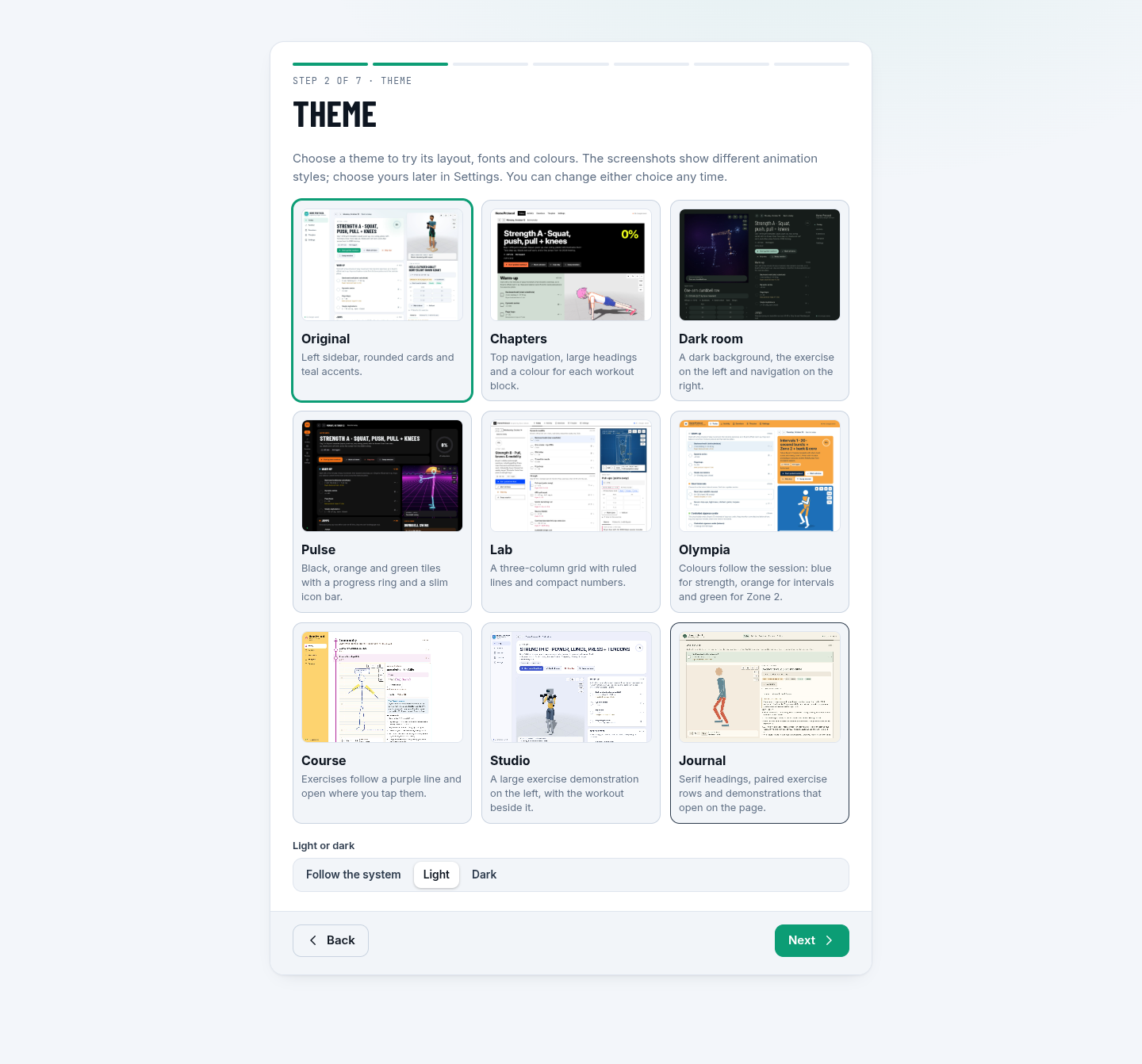
Choose one of nine themes during setup or in Settings → Appearance. Use Try themes live to compare them while using the app. Changing the theme keeps your workouts and data the same.
Theme cards show real Today screenshots, each with a different exercise and animation style. Pick a theme from the screenshots, then choose any animation style you like.
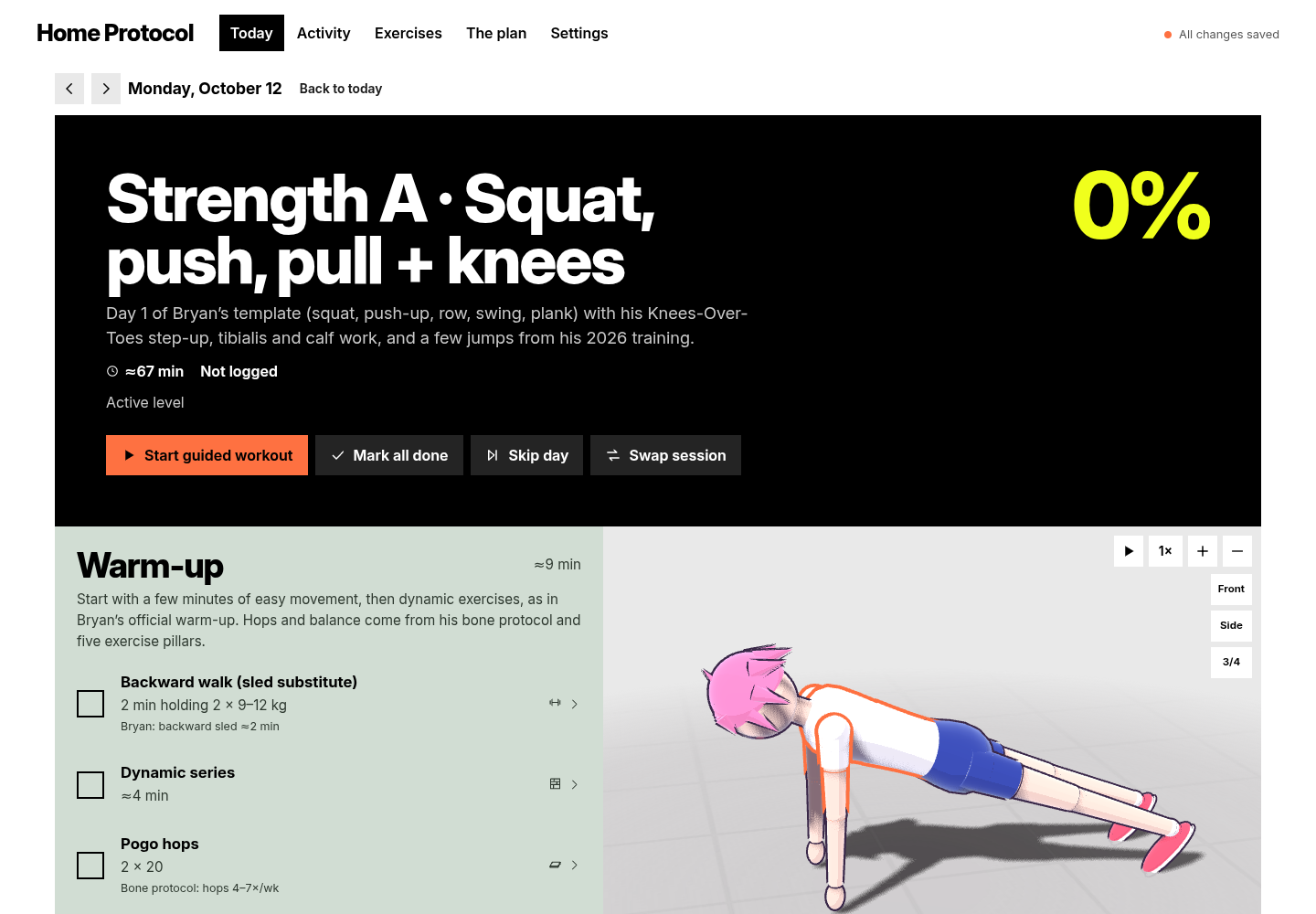
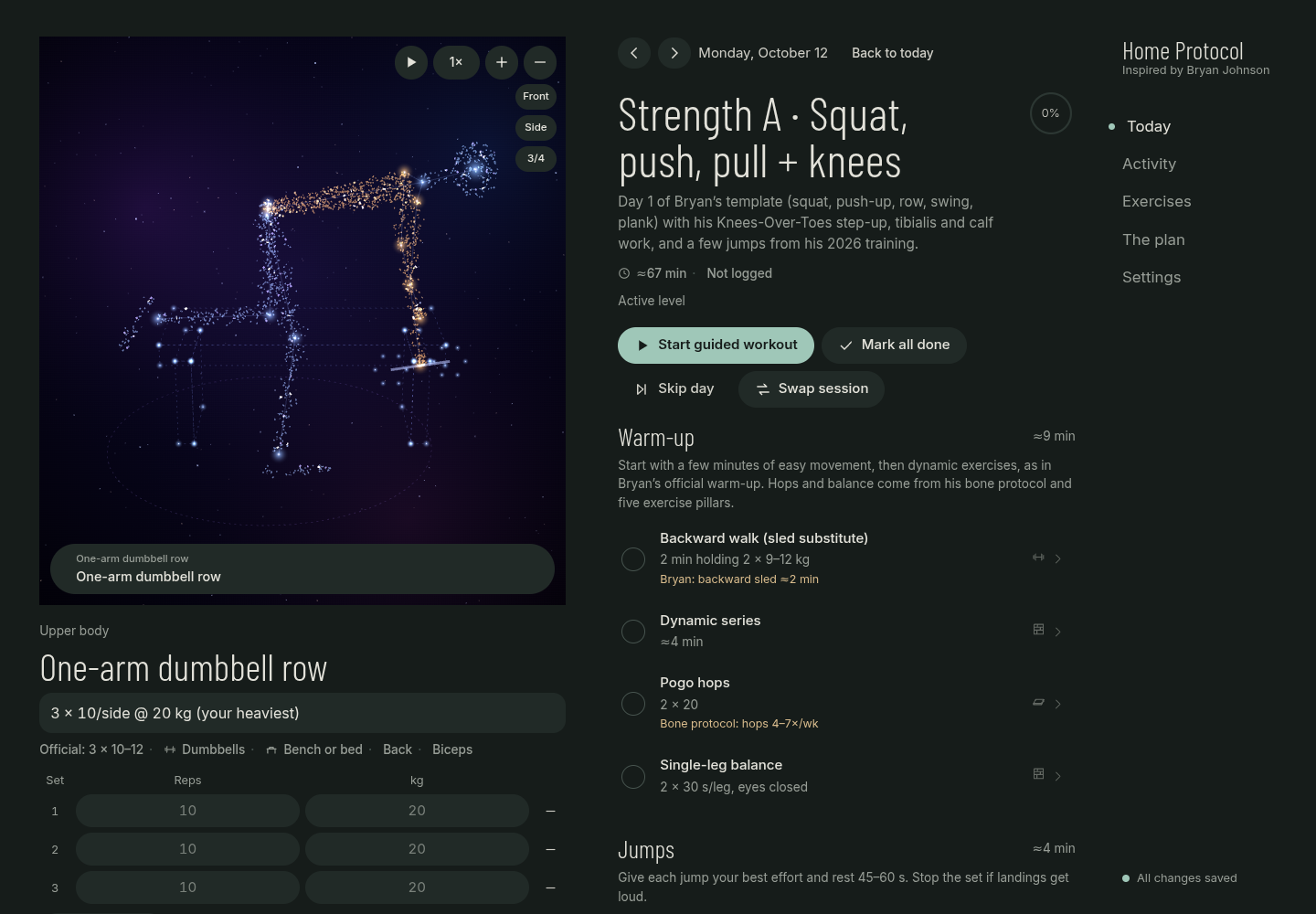
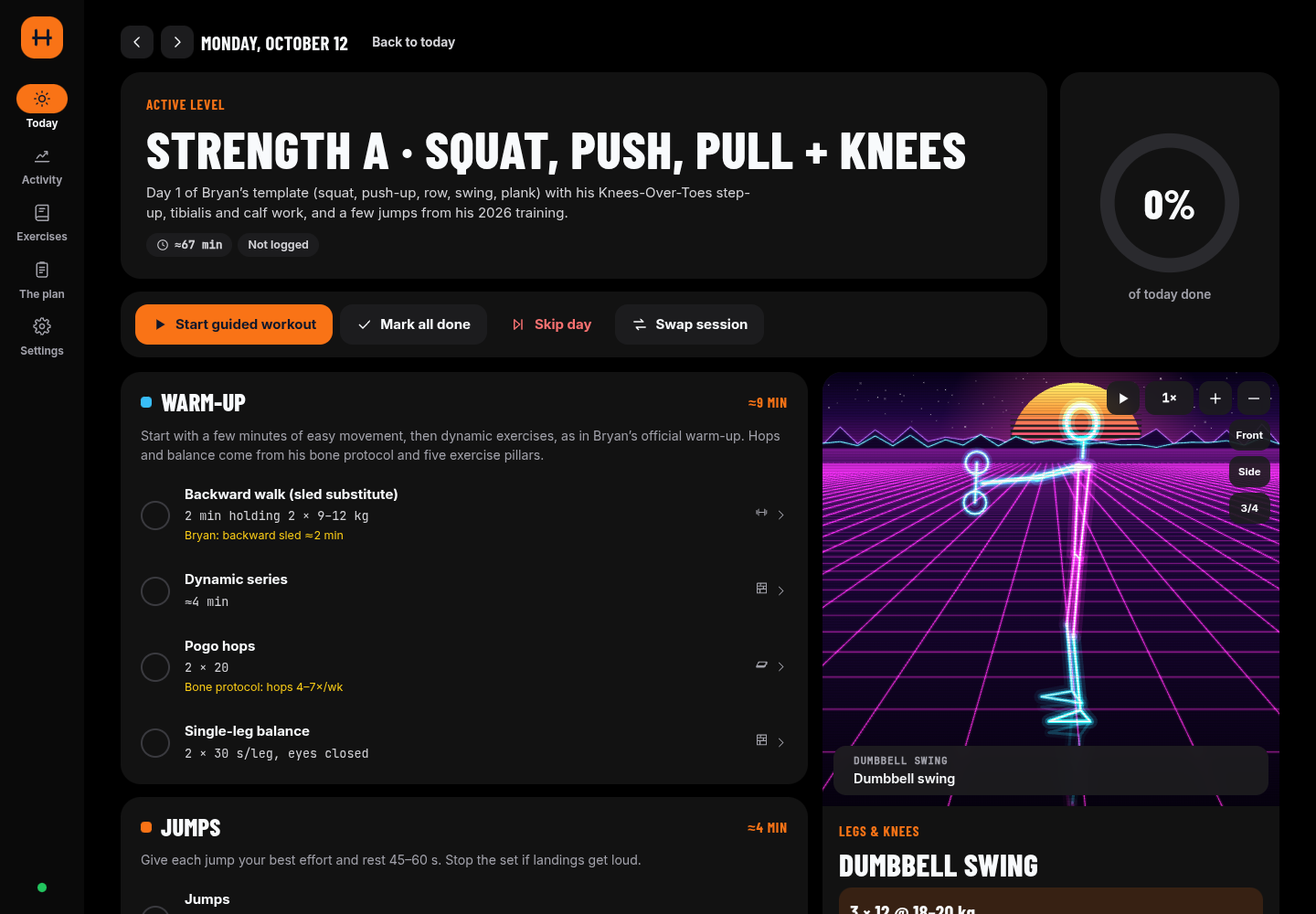
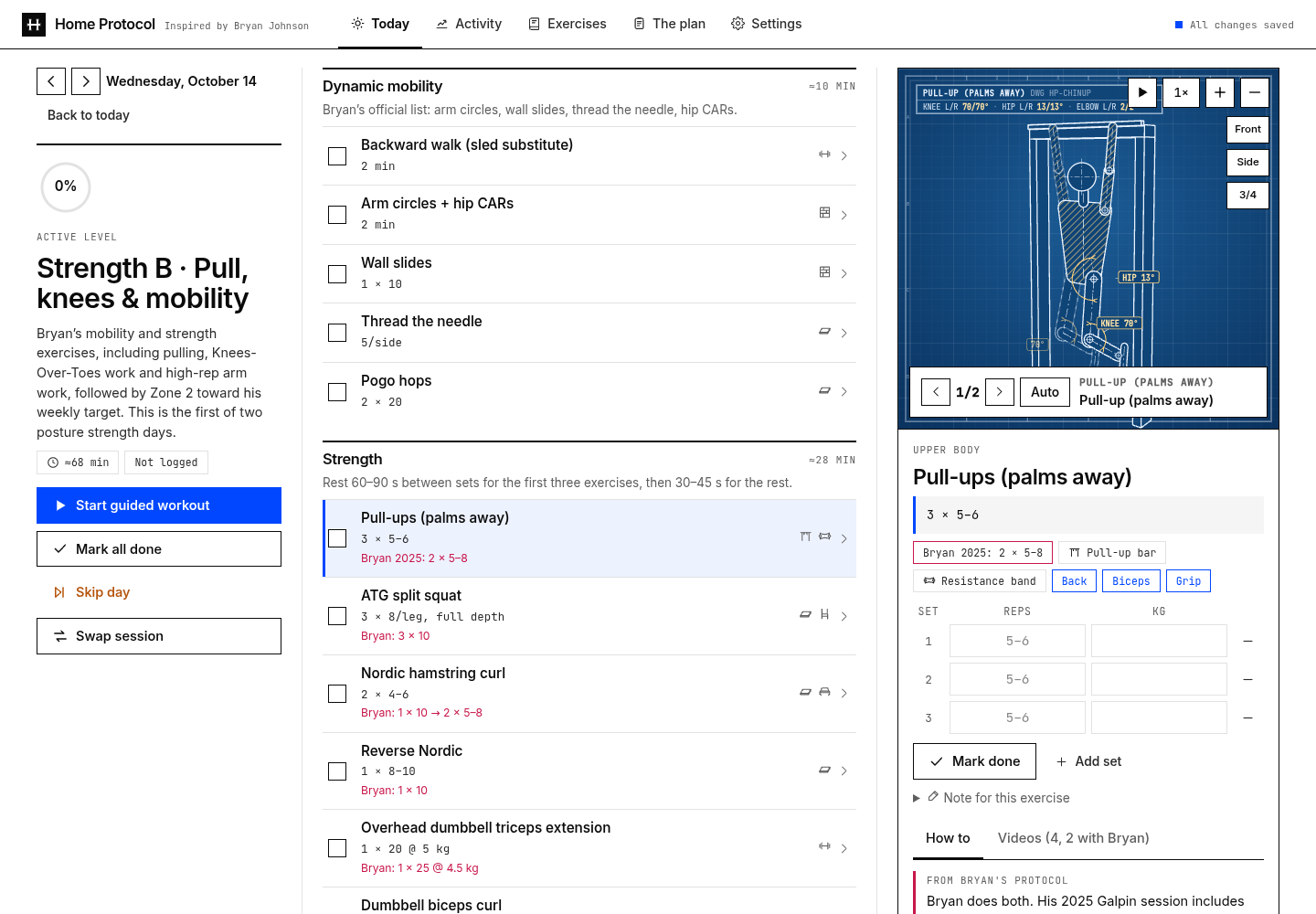
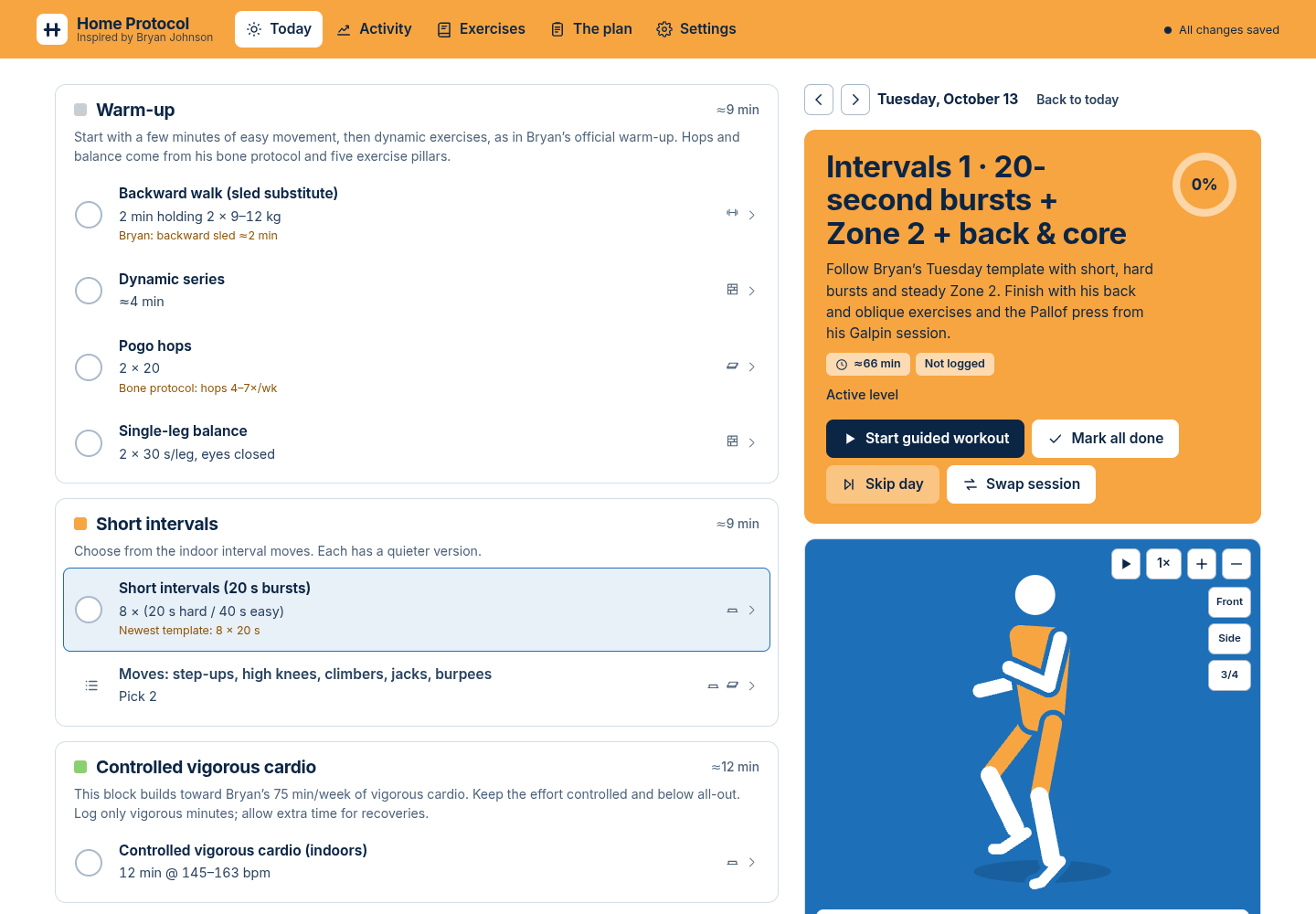
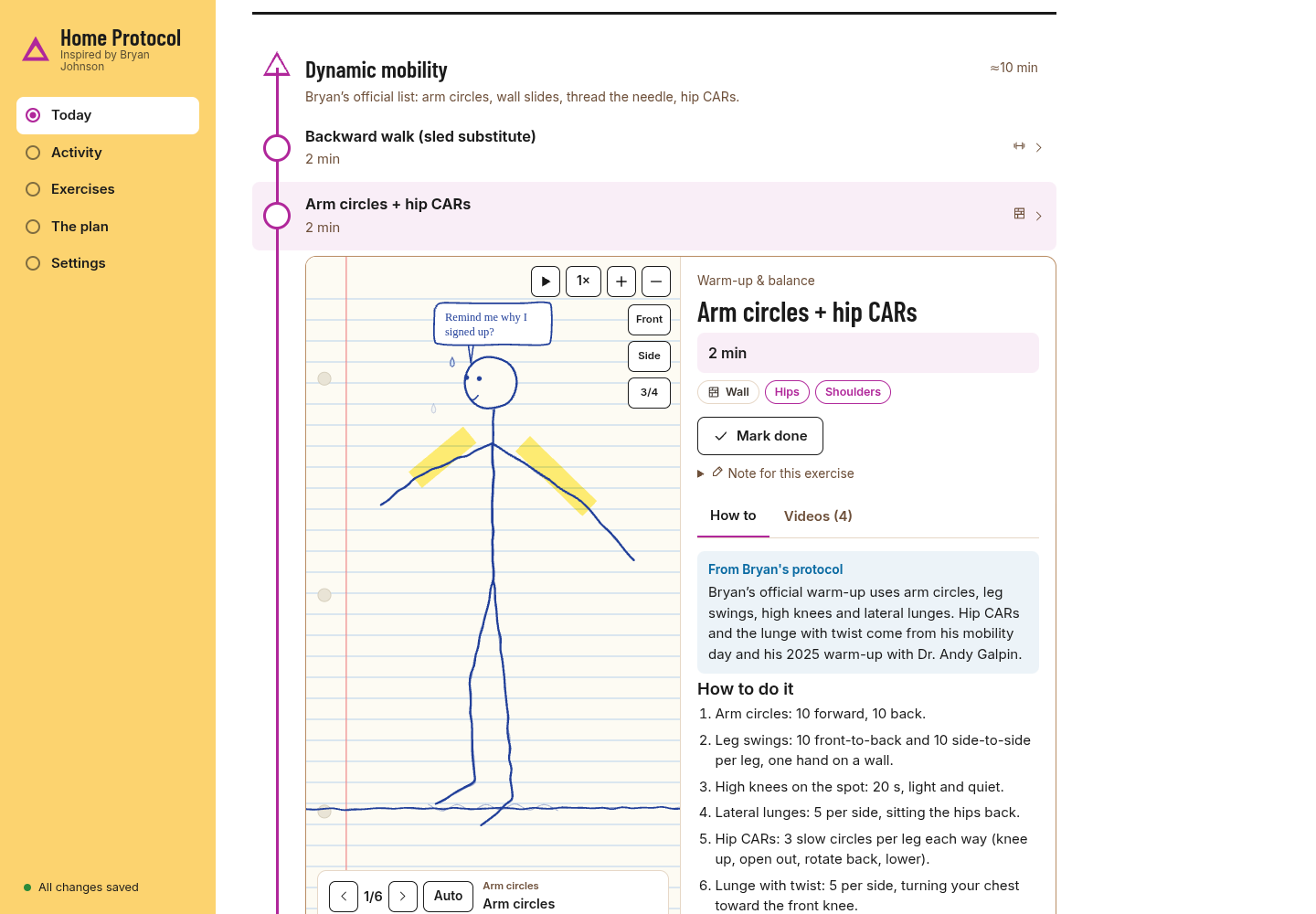
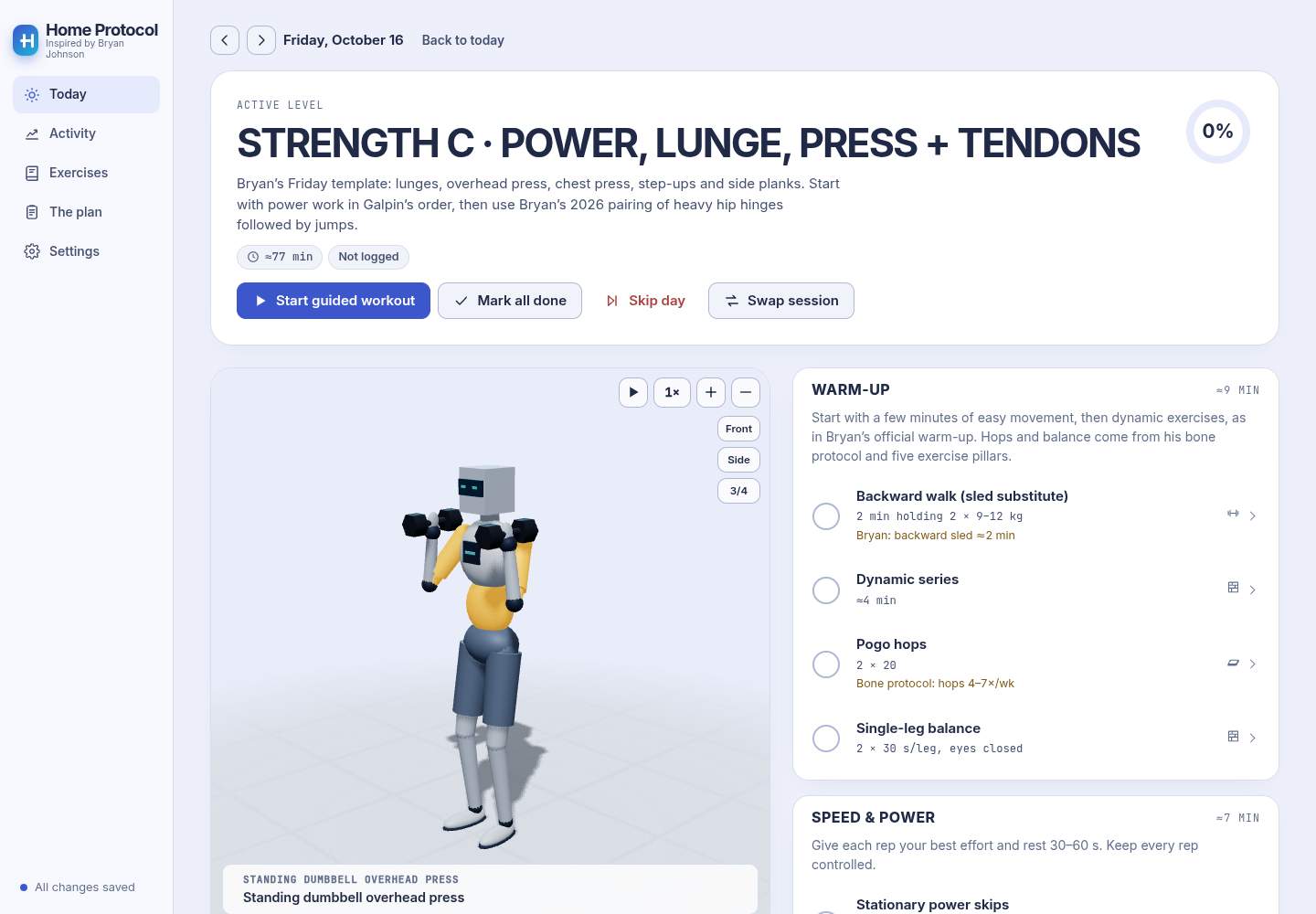
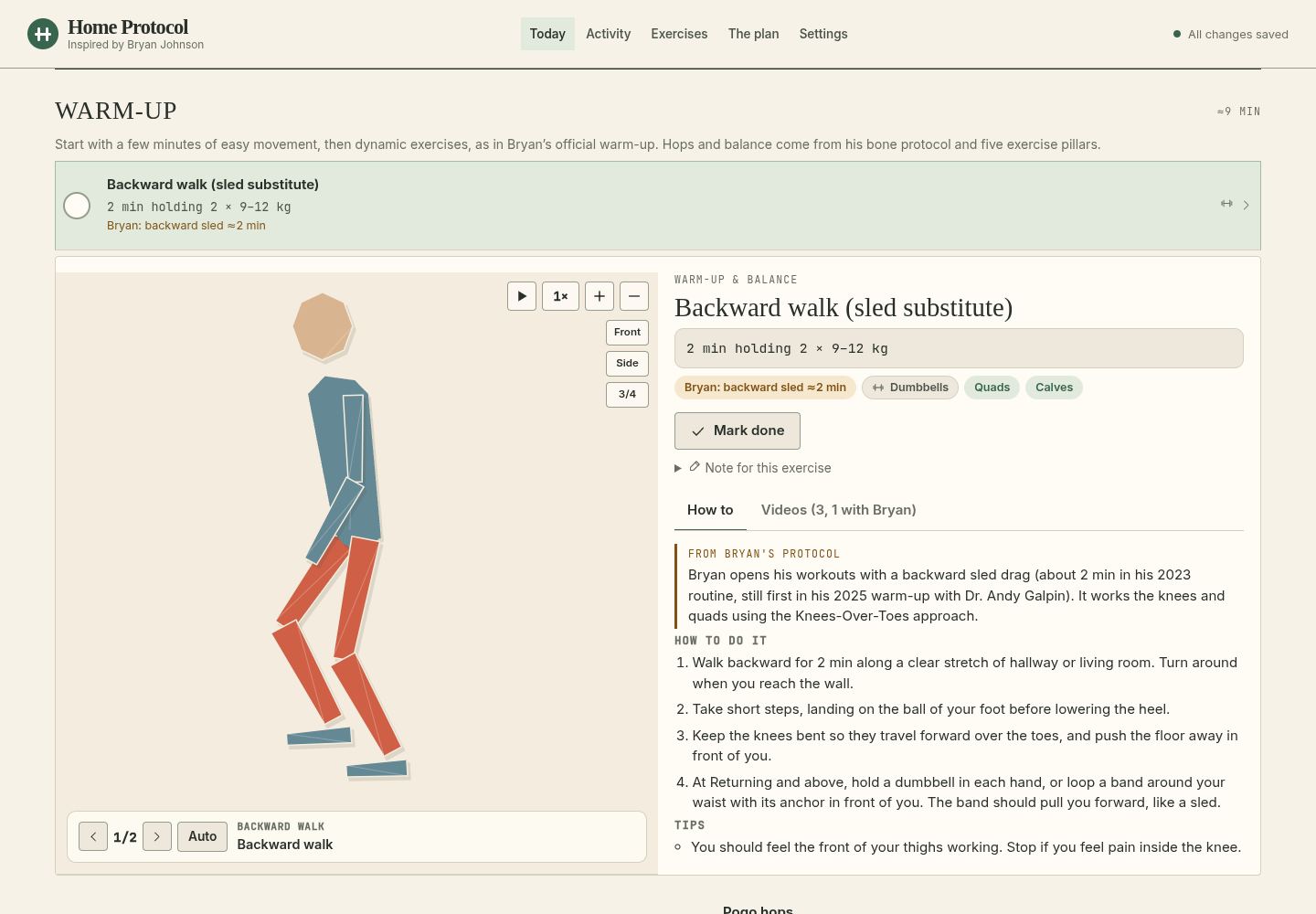
Each screenshot uses a different animation style: Chapters with Anime, Dark room with Stardust, Pulse with Synthwave, Lab with Blueprint, Olympia with Pictogram, Course with Doodle, Studio with Robot, and Journal with Paper cutouts. Themes and animation styles can be mixed freely.
Pick a theme in the first-run setup (it changes as you click) or later in Settings → Appearance. To compare them on your own pages, use Try themes live there: a small switcher floats at the top of the screen with one letter per theme (hover for the name) while you move around the app; close it with ×. Each one moves things around as well as recolouring them: where the navigation sits, how Today is laid out, the type, the shapes, even the colours of the 3D scene. Your data and settings stay the same whichever you use. Every theme except Dark room also follows your light/dark choice.
Six themes follow public design guides, two each: taste-skill, ui-ux-pro-max and impeccable.
| Theme | Guide | What's different |
|---|---|---|
| Original | — | The first look: sidebar on the left, rounded cards, teal accent. |
| Chapters | taste-skill | Navigation across the top, a full-width hero in huge type, and every block of the day as its own flat colour field (sage warm-up, acid power, orange strength, black Zone 2). Square corners, one typeface, no lines or shadows. |
| Dark room | taste-skill | Always dark. The 3D figure is the lit exhibit on the left, the session in the middle, navigation as a short list on the right. Light condensed type, round buttons. |
| Pulse | ui-ux-pro-max | Its fitness-app recipe: black (or light) with orange and green, a slim icon rail, bento tiles and a big animated progress ring. Finished exercises turn green. |
| Lab | ui-ux-pro-max | Its longevity-app recipe: a Swiss grid with ruled lines and no rounded corners, figures in mono, a tabbed masthead, and three columns on wide screens (session, list, exercise). |
| Olympia | impeccable | A colour for each kind of session, after the 1972 Munich Games signage: blue strength, orange intervals, green Zone 2, silver rest. The header, the hero and the 3D floor take the colour of the day you're looking at. The list leads on the left. |
| Course | impeccable | The session drawn as an orienteering course: a start triangle, a purple control circle per exercise, a finish double circle. One column; an exercise opens in place under its row instead of in a side panel. |
| Studio | — | A compact navigation column, a large exercise demonstration on the left and the session on the right. Rounded gallery cards, indigo accents, light and dark modes. |
| Journal | — | A masthead with top navigation, serif headlines and exercises in paired rows. The selected demonstration opens across the page under its row. Warm paper or dark forest colours. |
How the themes are built, and how to add your own: docs/THEMES.md.
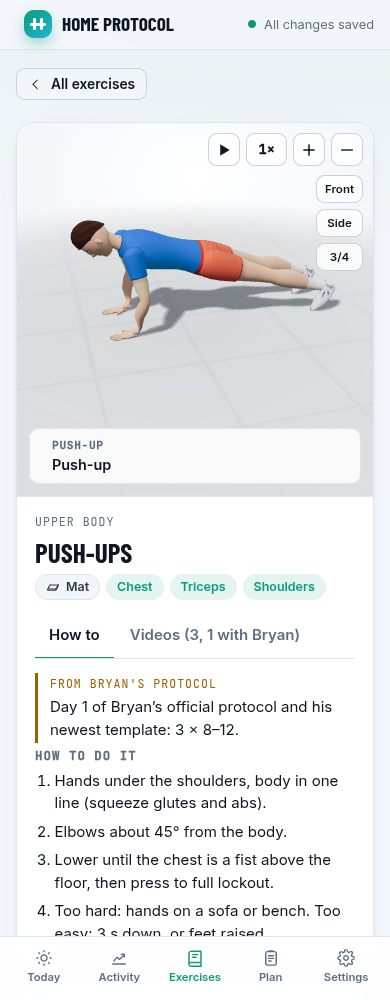
Every exercise has an animated demonstration. Choose from 21 styles in Settings → Animation style.
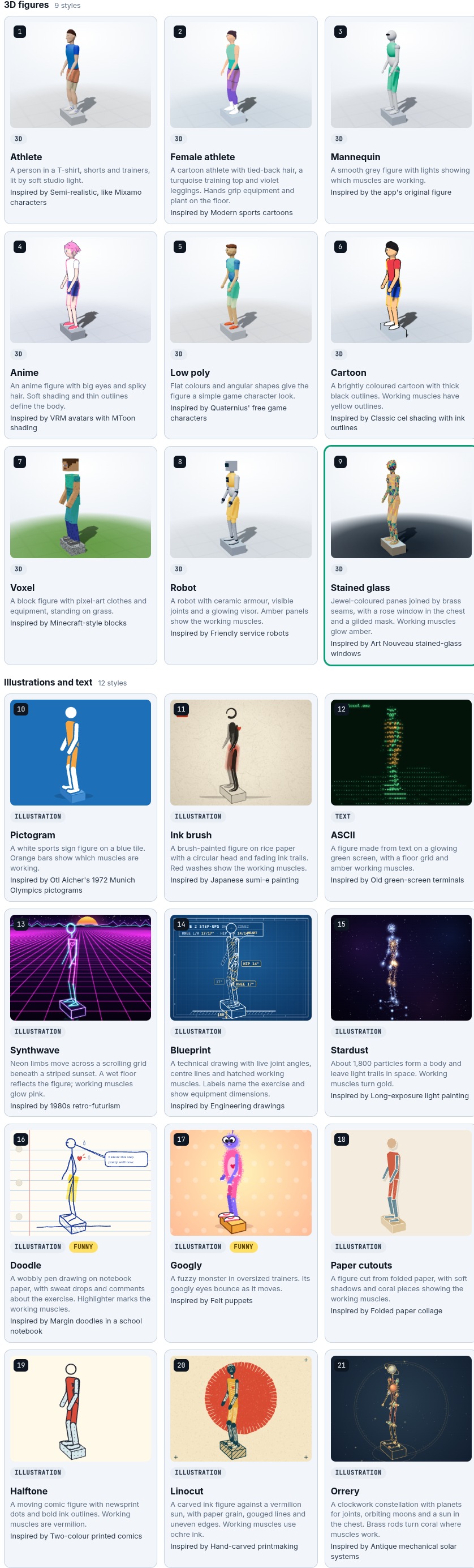
Athlete is the default. In Settings, choose an exercise to preview each style, or use Try styles live during a session.
All styles use the same movements and camera controls. Drag to rotate, use the zoom controls to move closer, and change playback speed up to 2×. For exercises with several movements, use the arrows to select one and choose Fixed to keep showing it.
| Style | Look |
|---|---|
| Athlete | A realistic figure in training clothes. |
| Female athlete | A cartoon athlete in a turquoise top and violet leggings. |
| Mannequin | A smooth grey figure. |
| Anime | Soft shading, outlines and pink hair. |
| Low poly | Angular shapes and flat colours. |
| Cartoon | Bold colours and thick outlines. |
| Voxel | Block shapes and pixel textures. |
| Robot | Armour, mechanical joints and a glowing visor. |
| Stained glass | Jewel panes and brass seams. |
| Pictogram | A white sign figure on blue. |
| Ink brush | Brush strokes on textured paper. |
| ASCII | A figure drawn with text characters. |
| Synthwave | Neon limbs against a retro grid. |
| Blueprint | An engineering drawing with joint angles. |
| Stardust | A figure made of glowing particles. |
| Doodle | A notebook stick figure with comments and sweat. |
| Googly | A fuzzy purple monster with googly eyes. |
| Paper cutouts | Folded paper limbs and shadows. |
| Halftone | Printed dots and comic outlines. |
| Linocut | A carved print against a vermilion sun. |
| Orrery | Planet joints joined by brass rods. |
For developers: the animation system and adding styles.
Add-ons are optional blocks shown after the main session, picked on first run (and in Settings). They are tracked exactly like the main session: tick-offs, sets, notes, plus their own daily metrics.
Posture correction (included): 8–10 minutes a day from Bryan's posture guide (string cue, wall slides, band pull-aparts, face pulls, external rotation, gentle neck work) with his two physical-therapist exercises to fatigue on Wednesday and Saturday, plus chin tucks and a doorway stretch marked as "classic, not Bryan's". It also tracks neck stiffness (0–10) and reminds you every two weeks to take a side photo and do a wall check.
Desk breaks (separate add-on, off until you turn it on): two gentle countdowns from Bryan's posture habits — stand and move 2–3 minutes every 30 minutes, and 10 squats every 45 minutes. Its card sits after the other add-ons on Today and stays available before, during and after the workout. Tap Done to log a break, or Not now, 5 min to keep the log honest and be reminded again shortly. The countdowns pause while a workout is under way and resume afterwards. Today shows your daily count and streak; it is separate from the workout and adds no training volume. In Settings → During workouts you can turn on optional browser notifications so a due break reaches you while the app is in another window (off by default; the browser asks for permission).
Bone density protocol (separate add-on, off until enabled): 3–4 minutes of targeted high-impact mechanical shock to trigger bone remodeling and mineral deposition, from Bryan's April 2026 bone health protocol. Includes heel drops & stomp drills (osteogenic shockwaves), pogo hops and snap-down jump landing drills. It also reminds you periodically about DEXA scan benchmarking and bone-supporting nutrition.
Dead hang & grip (separate add-on, off until enabled): 2–3 minutes of spinal decompression and grip endurance. Features passive dead hangs to hydrate intervertebral discs and open the shoulders, active hangs for scapular stabilization, and heavy dumbbell farmer's holds. Bryan tracks grip strength as a primary biological age biomarker (~60 kg, top 5%).
Make your own: copy public/js/data/addons/posture.js, change the items (any exercise id from public/js/data/exercises.js), the schedule and the metrics, then add it to ADDONS in public/js/data/addons/index.js. Logging, auto-save, history and the setup screen pick it up automatically.
CHANGELOG.md with a **Plan change:** prefix on each relevant bullet. Settings → Latest changes shows the newest 20 releases with a Read more button to browse older changes, marks workout updates with a red Plan changed badge and highlights the details. The Plan page shows the current routine and its sources.public/js/data/program.js — the days, blocks and doses per training level, what each level means, rules, sources.public/js/data/exercises.js — every exercise: how-to steps, Bryan's notes, videos (with timestamps into his videos), equipment, what it's logged as.public/js/data/addons/ — optional blocks.public/js/anim/clips/ — the 3D animations. See docs/ANIMATIONS.md for how to write or tweak one, and open /dev/animations.html?ids=pushup to see every keyframe side by side.Text in the data can use tokens that adapt to each user: {hr:60-70} becomes the user's heart-rate range, {kg:10-14} a weight scaled to them in their units, {cm:30} a length in their units.
server.js                 tiny Node server: serves the app, reads/writes data/ (no dependencies)
public/
  index.html, css/app.css  the app and the Original look
  css/themes.css          the other six themes
  js/themes.js            the theme list, switching, and the theme picker
  js/anim-styles.js       the animation style list, which exercises take them, and the style picker
  js/main.js              routing and app shell
  js/store.js             state + auto-save (server, with a browser-storage fallback)
  js/plan.js              program logic: sessions, levels and doses, status, stats
  js/personalize.js       heart-rate zones, weight scaling, units, training levels
  js/views/               today, guided workout, week, history, progress, exercises, plan, settings, setup
  js/components/          exercise panel, logger, timers, videos, charts, 3D viewer, dialogs, live theme and style switchers
  js/anim/                three.js mannequin, inverse kinematics, props, exercise clips
  js/anim/styles/         the animation styles (three.js, SVG, 2D canvas, and text)
  js/data/                the plan, exercises, videos, add-ons
docs/ANIMATIONS.md        guide to the animation system
docs/THEMES.md            how the themes work and how to add one
data/                     your data (created on first run, git-ignored)
MIT — see LICENSE.
The plan and this app were built with Claude Code from the prompts below, quoted as written (attachment paths removed). A couple of short status messages in between ("you should have access to the repo", "how much work is left?") are left out.
1. The plan
check online all resources from Bryan Johnson or from someone who studied his workouts. (especially everything he posted on social media and his official websites). i want you to know everything, BUT i want you to help me using his latest suggestions, as i know he often changes things to better results. (so rememebr i'm interested only in what Bryan Johnson suggest/is doing, not anybody else).
now i want to make a personalised workout plan for me 6 days out of 7, only sunday i rest. it should last max 60-70 minutes and be with my bodyweight and small equipment (even adjustable dumbells, pull up bar, etc), workout accesories, i dont want to buy big things that i dont have space to place them - so replace his gym equipment with similar routines with bodyweight or small workout accesories. also i will have a simple treradmill below my desk to walk/run from time to time, but thats extra, just for your information, i will use it from time to time when im working from my computer, separate from your workout.
also each day i want to correct my posture, so add another EXTRA 5-10 minutes so i can coorect my posture as i often stay in a bad position at the computer (tech neck, shoulders too in front, upper body in principle) - until i consider im ok.
you shuold both explain me what to do each day, each exercies and if you can give me a link to where he is doing or another video to see how to correctlly do it. (in my first weeks i will do a lighter version of course, until i can get fit again and comfortable)
as you can see this is a important thing for me so i want you DO TO A LOT OF RESEARCH UNTIL YOU GIVE ME THE REUSLT!
some details about me, not sure if needed, but might help ( male, 38 years old, 1.88, 75kg, i did a lot of fitness in the past, but for last 4 years almost nothing so i want to start over again + no joint pain or past injuries in body) - answer me in metric system (kg, cm) as i live in Romania.
you do not need to give me anythig else beside what i requested (like meds, rest, sleep, nutrition). i have a heart rate device already, so no interested in sucha device.
2. Comparing other AI results
[attached: an archive with 13 plans made by other AI models] i got the follwoing different results, can you check them and adjust your version if you missed anything or if its better explained/better path somewhere else, basically read them to optimise/adjust/correct your version. if you are not sure which is better or if you need any other guidance ask me so i pick what i like better. then give me a final version
Claude asked three questions; the answers:
3. The web app
after you defined your guide create a beautifull website where i can see what to do each day, track them, repetitions and other observations per day, links to where i can find them, even embedings of videeo workouts (multiple, easy to change between them). it should have some sort of persistence, it will be hosted locally. there might be days when i skip for different reasons so take that in mind also (and i could write why i skipped). i want auto-save so user doesnt need to click on a save button. i would even prefer code animations and/or graphics with each exercise what is needed to be done (use javascript, three.js or whateer you want to do the best animations around and graphics and such) i will open source it on github so other can use it too, so make a small readme with instructions how to install it locally and run it (and local data to be gitignored of course). and where users should write their data so the exercises are adjusted per their weight, age, fit level. and the extra thing that i wanted, correcting the posture should be an optional eleemnt at the end, but same tracking mechanism (or slightlly different if tis the case) maybe i will add other extra/option/additional elements in the future (user should pick at configurating time (fist time opening the webapp) if they are interested in this addiiotnal elemtn or not. while i did start this project in this repo, which is irelevant to what i want, i want you to move everything inside https://github.com/liviux/Bryan-Johnson-workout-website which you should have access inside or if dont give me a zip and i will move there. i even want you to add in the readme at the end, collapsed by default, the prompts used to make this webapp and the other models that were used for you to adjust your final result (just the name that you get from the file names)
Other models whose plans were compared (names from the file names): copilot, deepseek, ernie, gemini, glm, grok, longact, luna-max, minimax, mistral, muse, perpl, sol-max
Local, private home workout planner and tracker based on Bryan Johnson’s public exercise protocol, with 3D exercise animations and an optional add-ons. Adjusted for home workout equipment (not big gym equipment).
JavaScript
1
62 commits
updated Oct 18, 2026
A local web app that plans and tracks a six-day home workout built from Bryan Johnson's public exercise protocol (his October 2026 weekly template), rebuilt for bodyweight, adjustable dumbbells, a pull-up bar and resistance bands.
min X sec Y timestamp guide above the player and per-movement video sets that switch automatically with multi-movement animations.
Unofficial and not affiliated with or endorsed by Bryan Johnson or Blueprint. It's a training plan, not medical advice. If you have been inactive for a while, are over 50 or have a heart condition, check with a doctor before hard intervals.
You need Node.js 18 or newer.
With Git installed, open a terminal (PowerShell on Windows) and run:
git clone https://github.com/liviux/Bryan-Johnson-workout-website.git
cd Bryan-Johnson-workout-website
npm install
npm start
Open http://localhost:3030. The first visit opens a short setup where you enter your details, pick your training level, record the equipment you own with names and links (the main accessories also have 3D examples) and pick add-ons.
Keep the terminal window open while you use the app. To stop it, press Ctrl+C in that window. Next time, open a terminal in the project folder and run npm start again.
PORT=8080 npm startHOST=0.0.0.0 npm start, then open http://<your-computer's-IP>:3030. There is no login, so only do this on a network you trust.DATA_DIR=/path/to/folder npm start$env:PORT=8080; npm startThe included systemd unit starts the app after each boot. It expects the repository at ~/Bryan-Johnson-workout-website and Node at /usr/bin/node; edit those paths in the unit if yours are different.
sudo cp deploy/[email protected] /etc/systemd/system/
sudo systemctl daemon-reload
sudo systemctl enable --now "bryan-workout@$(id -un)"
To open it over Tailscale with HTTPS, keep the app bound to localhost and run:
sudo tailscale serve --bg --https=10000 http://127.0.0.1:3030
Then open https://<device>.<tailnet>.ts.net:10000 on a Tailscale device. This stays within your tailnet. The app has no login, so do not expose it with Tailscale Funnel or a public port forward.
npm install only downloads three.js and three web fonts; the server itself uses nothing but Node.
To update later: stop the app, run git pull, then npm install in the project folder, and start it again with npm start. Your saved workouts stay in place.
Your details and workouts save automatically on your computer. They are not uploaded to GitHub.
Open Settings → Latest changes for the newest 20 releases, with a link to the full changelog beside the title. The version label refreshes when Settings opens, including after an update. A red Plan changed badge marks updates to exercises or workout doses, with the details highlighted in that release.
By default, files are stored in the data/ folder. This folder is excluded from Git, so normal commits do not include your personal data:
data/
  profile.json          your details, settings, equipment and chosen add-ons
  days/2026-10-14.json  one file per day: sets, reps, notes, skip reason…
data/ folder. See Advanced settings under Run it locally to change its location.npm start to get files, 3D and fonts.Enter your details during setup and change them any time in Settings. If you are new to exercise, choose New to training. You can switch levels whenever you need an easier or harder workout.
| Setting | What it changes |
|---|---|
| Age, or a measured max heart rate | Your suggested heart-rate ranges during cardio |
| Weight, sex, age, training level | Suggested starting dumbbell weights |
| Equipment | Your optional inventory: names, links, equivalents and extra accessories. Exercises keep their generic labels. |
| Heaviest dumbbell | Suggested weights are capped at it |
| Units | kg/cm or lb/in throughout |
| Training level | Which exercises you do, how many sets and reps, and how long the cardio lasts. Your level only changes when you choose it; past logs keep their original level. |
| Start date | Day one of your program |
| Add-ons | Which optional blocks appear after the main session |
| Theme, light or dark | How the app looks (see Themes); changes nothing in the plan |
| Animation style | How the exercise animations are drawn (see Animation styles); changes nothing in the plan |
Suggested weights are starting points. Use a weight that lets you finish with good form and still have the number of good reps left that your level recommends.
208 − 0.7 × age, unless you enter a measured maximum.data/profile.json.Open Activity for four views: This week, History, Progress and Benchmarks. The main navigation stays compact on desktop and mobile. Existing bookmarks to the old pages still open the right tab.
This week ends with one weekly target card. Each row shows your completed work, the target for your level and Bryan's full Well trained target (150 Zone 2 and 75 hard-cardio minutes). It covers strength sessions, Zone 2 and hard-cardio minutes, jump days, balance and stability days, mobility days and posture days. Each row opens to show which days counted and what is still left.
The level check is in Today's Notes & observations and again at the end of a guided workout: the plan's session count for your current level, its two move-up questions and the button to change level when you are ready. In Settings → Training level, the manual picker comes first and stays open. The level check below it starts collapsed. Both checks follow your theme. You can also change levels directly on The plan, where a thick border marks your current level.
Benchmark score fields use the full card width, with the unit shown above the field and Save on the right.
In Progress, the sessions, Zone 2 and hard-cardio charts sit one below another. Choose a time interval from two groups:
Last week means the previous Monday–Sunday; Last month means the previous calendar month. The exact dates are shown above the choices. All charts, tables and totals use the same interval, including strength, body weight and posture. Weekly averages use full weeks when available. Since beginning includes older imported logs, even if they predate your current program start.
Activity and Progress with the Returning plan, using sample logs:
| Day | Session |
|---|---|
| Mon | Strength A: squat, push, pull + knees |
| Tue | Intervals 1: 20-second bursts + Zone 2 + back & core |
| Wed | Strength B: pull, knees & mobility |
| Thu | Intervals 2: Norwegian 4×4 + stability |
| Fri | Strength C: power, lunge, press + tendons |
| Sat | Controlled vigorous cardio + Zone 2 + long stretch (outdoor swaps optional) |
| Sun | Rest |
About 36–55 minutes a session at New to training, 47–71 at Returning, 65–82 at Active and 72–93 at Well trained, plus 8–10 minutes for the posture add-on.
All cardio is scheduled inside the workouts: 60 / 90 / at least 120 / 150 minutes of dedicated Zone 2 per week, and about 0 / 26 / 51 / 75 minutes of hard cardio. New to training keeps intervals below vigorous effort. The 4×4 recoveries can add Zone 2 minutes; warm-ups and cool-downs are excluded. These home-plan additions meet Bryan’s published weekly targets at Well trained without relying on extra walks. Keeping all strength and mobility work takes about 8.2 hours a week at that level, beyond the original 60–70-minute session budget; recovery breaks may add time.
The plan page in the app explains the levels, rules, heart-rate zones, how the week compares with Bryan's targets, what Bryan does now, equipment swaps and all sources. The week fits within the page, with numeric totals for every level. Timeline entries and sources link to the supporting material, newest first where dates are known; unknown dates stay labelled Undated.
A readable snapshot of the whole plan is in docs/PLAN.md.
Equipment entry is optional: choose Skip for now during setup to continue without adding anything. Manage your inventory later in Settings → Your equipment, or return directly to the Equipment step from The plan → Set up your equipment. Setup saves when you finish it; Settings saves edits automatically. Tick what you own and enter a name and optional http/https product link. Use Add equipment for extras or equivalents, choosing a category and entering a name and link.
The home recommendations cover adjustable dumbbells, a doorway bar, bands and a door anchor, a mat, a slant board, a low aerobic step and a secure Nordic anchor. Friday's step-ups use the low step rather than a knee-height chair. Poliquin heel taps start with the slant board on the floor. Names and links stay in the inventory, save with your profile and are included in backups. Exercises keep generic equipment labels and show no product links.
A rope, push-up handles and a gripper can be kept in the inventory without adding exercises or sets. Massage devices have their own optional category; they are outside Bryan's workout prescription. A chest strap can help you read heart rate in its compatible app and enter it here; there is no automatic Bluetooth or ANT+ connection.
The inventory is collapsed by default in Settings. Open Your equipment when you want to edit it.
Choose one of nine themes during setup or in Settings → Appearance. Use Try themes live to compare them while using the app. Changing the theme keeps your workouts and data the same.
Theme cards show real Today screenshots, each with a different exercise and animation style. Pick a theme from the screenshots, then choose any animation style you like.
Each screenshot uses a different animation style: Chapters with Anime, Dark room with Stardust, Pulse with Synthwave, Lab with Blueprint, Olympia with Pictogram, Course with Doodle, Studio with Robot, and Journal with Paper cutouts. Themes and animation styles can be mixed freely.
Pick a theme in the first-run setup (it changes as you click) or later in Settings → Appearance. To compare them on your own pages, use Try themes live there: a small switcher floats at the top of the screen with one letter per theme (hover for the name) while you move around the app; close it with ×. Each one moves things around as well as recolouring them: where the navigation sits, how Today is laid out, the type, the shapes, even the colours of the 3D scene. Your data and settings stay the same whichever you use. Every theme except Dark room also follows your light/dark choice.
Six themes follow public design guides, two each: taste-skill, ui-ux-pro-max and impeccable.
| Theme | Guide | What's different |
|---|---|---|
| Original | — | The first look: sidebar on the left, rounded cards, teal accent. |
| Chapters | taste-skill | Navigation across the top, a full-width hero in huge type, and every block of the day as its own flat colour field (sage warm-up, acid power, orange strength, black Zone 2). Square corners, one typeface, no lines or shadows. |
| Dark room | taste-skill | Always dark. The 3D figure is the lit exhibit on the left, the session in the middle, navigation as a short list on the right. Light condensed type, round buttons. |
| Pulse | ui-ux-pro-max | Its fitness-app recipe: black (or light) with orange and green, a slim icon rail, bento tiles and a big animated progress ring. Finished exercises turn green. |
| Lab | ui-ux-pro-max | Its longevity-app recipe: a Swiss grid with ruled lines and no rounded corners, figures in mono, a tabbed masthead, and three columns on wide screens (session, list, exercise). |
| Olympia | impeccable | A colour for each kind of session, after the 1972 Munich Games signage: blue strength, orange intervals, green Zone 2, silver rest. The header, the hero and the 3D floor take the colour of the day you're looking at. The list leads on the left. |
| Course | impeccable | The session drawn as an orienteering course: a start triangle, a purple control circle per exercise, a finish double circle. One column; an exercise opens in place under its row instead of in a side panel. |
| Studio | — | A compact navigation column, a large exercise demonstration on the left and the session on the right. Rounded gallery cards, indigo accents, light and dark modes. |
| Journal | — | A masthead with top navigation, serif headlines and exercises in paired rows. The selected demonstration opens across the page under its row. Warm paper or dark forest colours. |
How the themes are built, and how to add your own: docs/THEMES.md.
Every exercise has an animated demonstration. Choose from 21 styles in Settings → Animation style.
Athlete is the default. In Settings, choose an exercise to preview each style, or use Try styles live during a session.
All styles use the same movements and camera controls. Drag to rotate, use the zoom controls to move closer, and change playback speed up to 2×. For exercises with several movements, use the arrows to select one and choose Fixed to keep showing it.
| Style | Look |
|---|---|
| Athlete | A realistic figure in training clothes. |
| Female athlete | A cartoon athlete in a turquoise top and violet leggings. |
| Mannequin | A smooth grey figure. |
| Anime | Soft shading, outlines and pink hair. |
| Low poly | Angular shapes and flat colours. |
| Cartoon | Bold colours and thick outlines. |
| Voxel | Block shapes and pixel textures. |
| Robot | Armour, mechanical joints and a glowing visor. |
| Stained glass | Jewel panes and brass seams. |
| Pictogram | A white sign figure on blue. |
| Ink brush | Brush strokes on textured paper. |
| ASCII | A figure drawn with text characters. |
| Synthwave | Neon limbs against a retro grid. |
| Blueprint | An engineering drawing with joint angles. |
| Stardust | A figure made of glowing particles. |
| Doodle | A notebook stick figure with comments and sweat. |
| Googly | A fuzzy purple monster with googly eyes. |
| Paper cutouts | Folded paper limbs and shadows. |
| Halftone | Printed dots and comic outlines. |
| Linocut | A carved print against a vermilion sun. |
| Orrery | Planet joints joined by brass rods. |
For developers: the animation system and adding styles.
Add-ons are optional blocks shown after the main session, picked on first run (and in Settings). They are tracked exactly like the main session: tick-offs, sets, notes, plus their own daily metrics.
Posture correction (included): 8–10 minutes a day from Bryan's posture guide (string cue, wall slides, band pull-aparts, face pulls, external rotation, gentle neck work) with his two physical-therapist exercises to fatigue on Wednesday and Saturday, plus chin tucks and a doorway stretch marked as "classic, not Bryan's". It also tracks neck stiffness (0–10) and reminds you every two weeks to take a side photo and do a wall check.
Desk breaks (separate add-on, off until you turn it on): two gentle countdowns from Bryan's posture habits — stand and move 2–3 minutes every 30 minutes, and 10 squats every 45 minutes. Its card sits after the other add-ons on Today and stays available before, during and after the workout. Tap Done to log a break, or Not now, 5 min to keep the log honest and be reminded again shortly. The countdowns pause while a workout is under way and resume afterwards. Today shows your daily count and streak; it is separate from the workout and adds no training volume. In Settings → During workouts you can turn on optional browser notifications so a due break reaches you while the app is in another window (off by default; the browser asks for permission).
Bone density protocol (separate add-on, off until enabled): 3–4 minutes of targeted high-impact mechanical shock to trigger bone remodeling and mineral deposition, from Bryan's April 2026 bone health protocol. Includes heel drops & stomp drills (osteogenic shockwaves), pogo hops and snap-down jump landing drills. It also reminds you periodically about DEXA scan benchmarking and bone-supporting nutrition.
Dead hang & grip (separate add-on, off until enabled): 2–3 minutes of spinal decompression and grip endurance. Features passive dead hangs to hydrate intervertebral discs and open the shoulders, active hangs for scapular stabilization, and heavy dumbbell farmer's holds. Bryan tracks grip strength as a primary biological age biomarker (~60 kg, top 5%).
Make your own: copy public/js/data/addons/posture.js, change the items (any exercise id from public/js/data/exercises.js), the schedule and the metrics, then add it to ADDONS in public/js/data/addons/index.js. Logging, auto-save, history and the setup screen pick it up automatically.
CHANGELOG.md with a **Plan change:** prefix on each relevant bullet. Settings → Latest changes shows the newest 20 releases with a Read more button to browse older changes, marks workout updates with a red Plan changed badge and highlights the details. The Plan page shows the current routine and its sources.public/js/data/program.js — the days, blocks and doses per training level, what each level means, rules, sources.public/js/data/exercises.js — every exercise: how-to steps, Bryan's notes, videos (with timestamps into his videos), equipment, what it's logged as.public/js/data/addons/ — optional blocks.public/js/anim/clips/ — the 3D animations. See docs/ANIMATIONS.md for how to write or tweak one, and open /dev/animations.html?ids=pushup to see every keyframe side by side.Text in the data can use tokens that adapt to each user: {hr:60-70} becomes the user's heart-rate range, {kg:10-14} a weight scaled to them in their units, {cm:30} a length in their units.
server.js                 tiny Node server: serves the app, reads/writes data/ (no dependencies)
public/
  index.html, css/app.css  the app and the Original look
  css/themes.css          the other six themes
  js/themes.js            the theme list, switching, and the theme picker
  js/anim-styles.js       the animation style list, which exercises take them, and the style picker
  js/main.js              routing and app shell
  js/store.js             state + auto-save (server, with a browser-storage fallback)
  js/plan.js              program logic: sessions, levels and doses, status, stats
  js/personalize.js       heart-rate zones, weight scaling, units, training levels
  js/views/               today, guided workout, week, history, progress, exercises, plan, settings, setup
  js/components/          exercise panel, logger, timers, videos, charts, 3D viewer, dialogs, live theme and style switchers
  js/anim/                three.js mannequin, inverse kinematics, props, exercise clips
  js/anim/styles/         the animation styles (three.js, SVG, 2D canvas, and text)
  js/data/                the plan, exercises, videos, add-ons
docs/ANIMATIONS.md        guide to the animation system
docs/THEMES.md            how the themes work and how to add one
data/                     your data (created on first run, git-ignored)
MIT — see LICENSE.
The plan and this app were built with Claude Code from the prompts below, quoted as written (attachment paths removed). A couple of short status messages in between ("you should have access to the repo", "how much work is left?") are left out.
1. The plan
check online all resources from Bryan Johnson or from someone who studied his workouts. (especially everything he posted on social media and his official websites). i want you to know everything, BUT i want you to help me using his latest suggestions, as i know he often changes things to better results. (so rememebr i'm interested only in what Bryan Johnson suggest/is doing, not anybody else).
now i want to make a personalised workout plan for me 6 days out of 7, only sunday i rest. it should last max 60-70 minutes and be with my bodyweight and small equipment (even adjustable dumbells, pull up bar, etc), workout accesories, i dont want to buy big things that i dont have space to place them - so replace his gym equipment with similar routines with bodyweight or small workout accesories. also i will have a simple treradmill below my desk to walk/run from time to time, but thats extra, just for your information, i will use it from time to time when im working from my computer, separate from your workout.
also each day i want to correct my posture, so add another EXTRA 5-10 minutes so i can coorect my posture as i often stay in a bad position at the computer (tech neck, shoulders too in front, upper body in principle) - until i consider im ok.
you shuold both explain me what to do each day, each exercies and if you can give me a link to where he is doing or another video to see how to correctlly do it. (in my first weeks i will do a lighter version of course, until i can get fit again and comfortable)
as you can see this is a important thing for me so i want you DO TO A LOT OF RESEARCH UNTIL YOU GIVE ME THE REUSLT!
some details about me, not sure if needed, but might help ( male, 38 years old, 1.88, 75kg, i did a lot of fitness in the past, but for last 4 years almost nothing so i want to start over again + no joint pain or past injuries in body) - answer me in metric system (kg, cm) as i live in Romania.
you do not need to give me anythig else beside what i requested (like meds, rest, sleep, nutrition). i have a heart rate device already, so no interested in sucha device.
2. Comparing other AI results
[attached: an archive with 13 plans made by other AI models] i got the follwoing different results, can you check them and adjust your version if you missed anything or if its better explained/better path somewhere else, basically read them to optimise/adjust/correct your version. if you are not sure which is better or if you need any other guidance ask me so i pick what i like better. then give me a final version
Claude asked three questions; the answers:
3. The web app
after you defined your guide create a beautifull website where i can see what to do each day, track them, repetitions and other observations per day, links to where i can find them, even embedings of videeo workouts (multiple, easy to change between them). it should have some sort of persistence, it will be hosted locally. there might be days when i skip for different reasons so take that in mind also (and i could write why i skipped). i want auto-save so user doesnt need to click on a save button. i would even prefer code animations and/or graphics with each exercise what is needed to be done (use javascript, three.js or whateer you want to do the best animations around and graphics and such) i will open source it on github so other can use it too, so make a small readme with instructions how to install it locally and run it (and local data to be gitignored of course). and where users should write their data so the exercises are adjusted per their weight, age, fit level. and the extra thing that i wanted, correcting the posture should be an optional eleemnt at the end, but same tracking mechanism (or slightlly different if tis the case) maybe i will add other extra/option/additional elements in the future (user should pick at configurating time (fist time opening the webapp) if they are interested in this addiiotnal elemtn or not. while i did start this project in this repo, which is irelevant to what i want, i want you to move everything inside https://github.com/liviux/Bryan-Johnson-workout-website which you should have access inside or if dont give me a zip and i will move there. i even want you to add in the readme at the end, collapsed by default, the prompts used to make this webapp and the other models that were used for you to adjust your final result (just the name that you get from the file names)
Other models whose plans were compared (names from the file names): copilot, deepseek, ernie, gemini, glm, grok, longact, luna-max, minimax, mistral, muse, perpl, sol-max



