Open-source local AI audio & music studio for macOS & Windows. TTS, voice cloning, songs with lyrics, and multi-track scores — 100% offline, zero API fees.
See the code
Give your words a voice. Compose your ideas into songs.





English · 简体中文
Website · CLI & Agent Skill · API / MCP Deployment · Development
yovoice is an open-source, local-first audio and music creation studio for macOS and Windows.
Turn text into expressive speech, natural cloned voices, complete vocal songs, and multi-track scores right on your machine. Featuring zero-shot voice cloning, emotional performance controls, AI music generation with lyrics, and General MIDI score arranging—all running 100% locally with zero cloud API calls, zero per-character fees, and zero Python environment headaches.
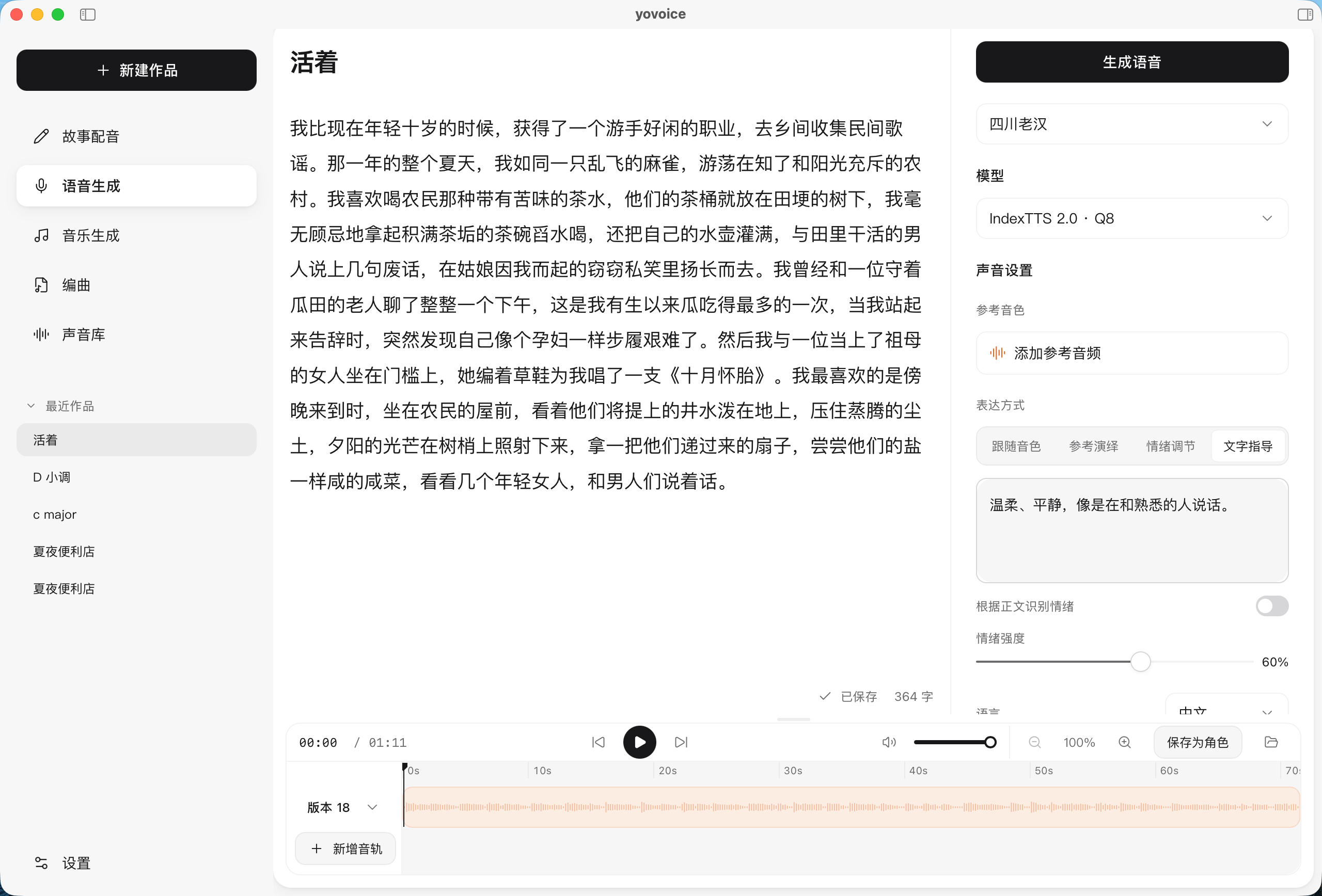
| Use | Models |
|---|---|
| Voice cloning and emotion | IndexTTS 2.0 / 2.5, Qwen3-TTS Base |
| Voice design and cloning | VoxCPM2, OmniVoice, Qwen3-TTS VoiceDesign, Breeze TTS 2 |
| Built-in voices | Kokoro-82M, Qwen3-TTS CustomVoice |
| Songs and instrumentals | ACE-Step 1.5 Turbo / XL Turbo, YuE2 3B |
All models are downloaded inside the App or with the CLI. See model selection for file sizes, hardware requirements, inputs and examples. OmniVoice, YuE2 and Breeze TTS 2 weights are restricted to non-commercial use.
Choose the package for your platform from the repository’s Releases tab or visit the official website.
| Platform | Package | Install |
|---|---|---|
| macOS 14+ · Apple Silicon | .dmg | Open the disk image and drag yovoice to Applications |
| Windows 10/11 · x64 | -setup.exe | Run the installer, then open yovoice from the Start menu |
| Windows 10/11 · x64 · NVIDIA GPU | -cuda12.4-setup.exe | Bundles the CUDA 12.4 runtime; works with older GPUs and drivers and uses the GPU from first launch |
| Windows 10/11 · x64 · NVIDIA GPU | -cuda13.3-setup.exe | Bundles the CUDA 13.3 runtime; needs a newer driver, smaller download |
The Windows installer downloads and installs WebView2 Runtime if needed. Models are downloaded inside the app; uninstalling preserves user data in ~/.yovoice.
Check for updates from the app menu on macOS or Windows. Updates are also checked and downloaded in the background; restart to install when ready. Windows updates download only the app (-update.exe) and keep the installed runtime; when a release recommends a newer runtime you can upgrade it in Settings → Inference engine.
Give your agent the yovoice Skill link and ask it to install the Skill and set up the local CLI, engine, and model:
Install this Skill and set up yovoice for local speech generation: https://github.com/leemysw/yovoice/tree/main/skills/yovoice
Then describe what you want:
Read narration.txt using voice.wav as the reference voice, with a calm delivery, and save it as narration.wav.
The agent runs the standalone CLI without opening the desktop app. See the CLI guide for details.
Run yovoice serve to provide an authenticated HTTP API and MCP inference service for other machines. See the API / MCP deployment guide for deployment and client examples.
make install
make app-run
See the development guide for prerequisites. It also covers browser preview, tests, and project structure.
Scan the QR code with WeChat to join the yovoice user group. If the code has expired, open an issue and we will post a new one.

Bug reports, feature suggestions, and pull requests are welcome. Include your platform, model, and steps to reproduce when reporting a problem. Run make check before submitting code changes.
Apache-2.0. Dependencies retain their original licenses; IndexTTS models are covered separately by their model license.
401 followers · starred Oct 2026
5,155 followers · starred Oct 2026
109 followers · starred Oct 2026
Open-source local AI audio & music studio for macOS & Windows. TTS, voice cloning, songs with lyrics, and multi-track scores — 100% offline, zero API fees.
See the code
Give your words a voice. Compose your ideas into songs.
English · 简体中文
Website · CLI & Agent Skill · API / MCP Deployment · Development
yovoice is an open-source, local-first audio and music creation studio for macOS and Windows.
Turn text into expressive speech, natural cloned voices, complete vocal songs, and multi-track scores right on your machine. Featuring zero-shot voice cloning, emotional performance controls, AI music generation with lyrics, and General MIDI score arranging—all running 100% locally with zero cloud API calls, zero per-character fees, and zero Python environment headaches.
| Use | Models |
|---|---|
| Voice cloning and emotion | IndexTTS 2.0 / 2.5, Qwen3-TTS Base |
| Voice design and cloning | VoxCPM2, OmniVoice, Qwen3-TTS VoiceDesign, Breeze TTS 2 |
| Built-in voices | Kokoro-82M, Qwen3-TTS CustomVoice |
| Songs and instrumentals | ACE-Step 1.5 Turbo / XL Turbo, YuE2 3B |
All models are downloaded inside the App or with the CLI. See model selection for file sizes, hardware requirements, inputs and examples. OmniVoice, YuE2 and Breeze TTS 2 weights are restricted to non-commercial use.
Choose the package for your platform from the repository’s Releases tab or visit the official website.
| Platform | Package | Install |
|---|---|---|
| macOS 14+ · Apple Silicon | .dmg | Open the disk image and drag yovoice to Applications |
| Windows 10/11 · x64 | -setup.exe | Run the installer, then open yovoice from the Start menu |
| Windows 10/11 · x64 · NVIDIA GPU | -cuda12.4-setup.exe | Bundles the CUDA 12.4 runtime; works with older GPUs and drivers and uses the GPU from first launch |
| Windows 10/11 · x64 · NVIDIA GPU | -cuda13.3-setup.exe | Bundles the CUDA 13.3 runtime; needs a newer driver, smaller download |
The Windows installer downloads and installs WebView2 Runtime if needed. Models are downloaded inside the app; uninstalling preserves user data in ~/.yovoice.
Check for updates from the app menu on macOS or Windows. Updates are also checked and downloaded in the background; restart to install when ready. Windows updates download only the app (-update.exe) and keep the installed runtime; when a release recommends a newer runtime you can upgrade it in Settings → Inference engine.
Give your agent the yovoice Skill link and ask it to install the Skill and set up the local CLI, engine, and model:
Install this Skill and set up yovoice for local speech generation: https://github.com/leemysw/yovoice/tree/main/skills/yovoice
Then describe what you want:
Read narration.txt using voice.wav as the reference voice, with a calm delivery, and save it as narration.wav.
The agent runs the standalone CLI without opening the desktop app. See the CLI guide for details.
Run yovoice serve to provide an authenticated HTTP API and MCP inference service for other machines. See the API / MCP deployment guide for deployment and client examples.
make install
make app-run
See the development guide for prerequisites. It also covers browser preview, tests, and project structure.
Scan the QR code with WeChat to join the yovoice user group. If the code has expired, open an issue and we will post a new one.
Bug reports, feature suggestions, and pull requests are welcome. Include your platform, model, and steps to reproduce when reporting a problem. Run make check before submitting code changes.
Apache-2.0. Dependencies retain their original licenses; IndexTTS models are covered separately by their model license.
401 followers · starred Oct 2026
5,155 followers · starred Oct 2026
109 followers · starred Oct 2026



