Portable offline AI audio studio with web UI & local API – XTTS, Fish Speech, Kokoro, Stable Audio, ACE-Step, voice cloning, music gen (no install)
See the code


Current release: v1.1 - One-Click Installer
The ultimate portable, offline all-in-one audio studio Text-to-Speech · Transcription - Subtitles - Music Generation · Sound Effects · Video Production · AI Chatbot
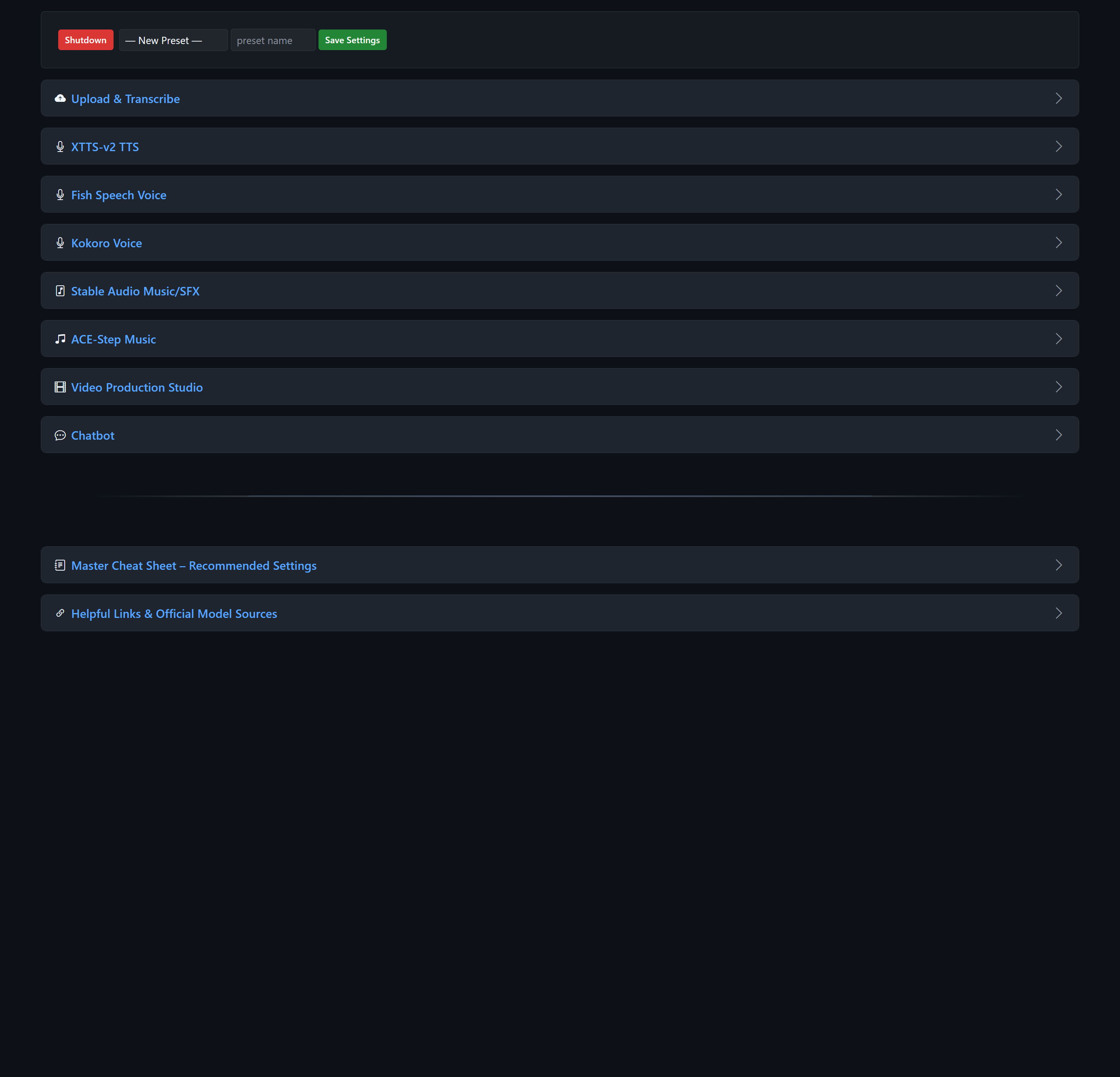
LocalSoundsAPI gives you both a full-featured browser-based web interface and a complete local REST API — use it interactively or call it from scripts, other apps, or automation tools.
Everything runs locally from one folder — no installation, no internet needed after setup.
Professional post-processing on every engine
De-reverb, de-essing, loudness normalization (-23 LUFS), intelligent silence trimming, peak limiting, and optional Whisper verification with automatic retries.
Full project system
Save jobs with progress tracking, automatic recovery (##recover##), and persistent job.json files.
Powerful built-in Chatbot
Helps you write perfect prompts, lyrics, stories, or entire scripts. Responses can be sent directly to any TTS or music engine with one click.
Per-model device selection
Every model (XTTS, Fish, Kokoro, Stable Audio, ACE-Step, Whisper, local LLM) can be loaded on CPU or any available GPU independently — perfect for mixing heavy and light models.
Run multiple instances
Use (portable) LocalSoundsAPI-Multi.bat or the Launcher GUI to launch several copies on different ports — great for parallel generation or different model setups.
GUI Launcher
A tkinter desktop app (launcher.bat) that auto-detects GPUs, manages multiple instances, downloads models and tools, and consolidates all server logs into one window — no more separate cmd windows.
Video production tool
Turn any audio + transcription into a subtitled video (horizontal/vertical, solid color, transparent, or image/video background).
Settings presets – Save and load all your favorite parameters instantly.
Download the repository code
Use git clone https://github.com/aivrar/LocalSoundsAPI.git, or choose Code → Download ZIP on GitHub and extract it anywhere you like.
Run the one-click setup
Double-click install.bat. It downloads the required portable Python environment and audio tools from the newest compatible dependency bundle on GitHub Releases, verifies their SHA-256 hashes, extracts them into the correct folders, and opens the launcher. No administrator rights or system Python are needed. The initial download is about 2.1 GB.
You can also double-click launcher.bat immediately after cloning; if the required files are missing, it starts install.bat automatically.
Manual fallback: Download portable-python-env-v1.7z and bin.zip from the v1.0 dependency bundle. Extract both archives into the LocalSoundsAPI project root. They create python/ and populate bin/ respectively.
Launch the app
Launcher GUI (recommended):
Double-click launcher.bat
→ Opens a desktop app where you can select GPUs, add instances on any port, start/stop them, view all logs in one place, and download models or tools.
Single instance (simple):
Double-click (portable) LocalSoundsAPI-Single.bat
→ Starts on port 5006 and opens http://127.0.0.1:5006 in your browser.
Multiple instances (command-line):
Double-click (portable) LocalSoundsAPI-Multi.bat
→ Asks how many instances and starting port, then opens separate cmd windows for each.
First use of each engine: Its AI model downloads on demand (about 8–12 GB for all models). You can also pre-download selected models from the launcher's Models & Tools tab. Downloads can take 10–40 minutes depending on your connection.
That's it – completely offline and portable after the first run!
models/ – Place or auto-download TTS/music models herevoices/ – Your reference voice samples for cloningprojects_output/ – All saved jobs and final outputsbrain/ – Chatbot history, archives, and system promptssettings/ – Your saved parameter presetsbin/ – Bundled ffmpeg, rubberband, eSpeak-ngpython/ – Complete portable Python environmentproject-root/
├── ACE-Step/ # Bundled ACE-Step repo (music generation)
├── bin/ # Portable tools
│ ├── ffmpeg/
│ ├── rubberband/
│ └── espeak-ng/
├── brain/ # Chatbot memory
│ ├── context_history/ # Current + archived chats
│ └── system_prompt.json
├── fish-speech/ # Bundled Fish Speech repo
├── models/ # All models (auto-downloaded or placed here)
│ ├── XTTS-v2/
│ ├── fish-speech-1.5/
│ ├── kokoro-82m/
│ ├── stable-audio-open-1.0/
│ ├── ace_step/
│ └── clap-htsat-unfused/
├── projects_output/ # Saved jobs and final outputs
├── voices/ # Your reference voice samples
├── settings/ # Saved parameter presets
├── static/ # Web UI (CSS, JS, icons)
├── templates/ # HTML pages
├── routes/ # All Flask endpoints
├── python/ # Portable Python environment (from the 7z)
├── scripts/install.ps1 # Download, verification, and extraction logic
├── install.bat # One-click first-time setup
├── launcher.py # GUI launcher (instance manager, model downloads)
├── launcher.bat # Runs the launcher with portable Python
├── (portable) LocalSoundsAPI-Single.bat
├── (portable) LocalSoundsAPI-Multi.bat
├── main.py
├── config.py
└── requirements.txt
LocalSoundsAPI-Multi.bat — one for TTS, one for music, one for the chatbot, etc.projects_output/. Temporary generations disappear when you close the app (unless saved).Enjoy a clean, powerful, completely local creative workflow — no cloud, no subscriptions, no compromises! 🎧✨
Portable offline AI audio studio with web UI & local API – XTTS, Fish Speech, Kokoro, Stable Audio, ACE-Step, voice cloning, music gen (no install)
See the code
Current release: v1.1 - One-Click Installer
The ultimate portable, offline all-in-one audio studio Text-to-Speech · Transcription - Subtitles - Music Generation · Sound Effects · Video Production · AI Chatbot
LocalSoundsAPI gives you both a full-featured browser-based web interface and a complete local REST API — use it interactively or call it from scripts, other apps, or automation tools.
Everything runs locally from one folder — no installation, no internet needed after setup.
Professional post-processing on every engine
De-reverb, de-essing, loudness normalization (-23 LUFS), intelligent silence trimming, peak limiting, and optional Whisper verification with automatic retries.
Full project system
Save jobs with progress tracking, automatic recovery (##recover##), and persistent job.json files.
Powerful built-in Chatbot
Helps you write perfect prompts, lyrics, stories, or entire scripts. Responses can be sent directly to any TTS or music engine with one click.
Per-model device selection
Every model (XTTS, Fish, Kokoro, Stable Audio, ACE-Step, Whisper, local LLM) can be loaded on CPU or any available GPU independently — perfect for mixing heavy and light models.
Run multiple instances
Use (portable) LocalSoundsAPI-Multi.bat or the Launcher GUI to launch several copies on different ports — great for parallel generation or different model setups.
GUI Launcher
A tkinter desktop app (launcher.bat) that auto-detects GPUs, manages multiple instances, downloads models and tools, and consolidates all server logs into one window — no more separate cmd windows.
Video production tool
Turn any audio + transcription into a subtitled video (horizontal/vertical, solid color, transparent, or image/video background).
Settings presets – Save and load all your favorite parameters instantly.
Download the repository code
Use git clone https://github.com/aivrar/LocalSoundsAPI.git, or choose Code → Download ZIP on GitHub and extract it anywhere you like.
Run the one-click setup
Double-click install.bat. It downloads the required portable Python environment and audio tools from the newest compatible dependency bundle on GitHub Releases, verifies their SHA-256 hashes, extracts them into the correct folders, and opens the launcher. No administrator rights or system Python are needed. The initial download is about 2.1 GB.
You can also double-click launcher.bat immediately after cloning; if the required files are missing, it starts install.bat automatically.
Manual fallback: Download portable-python-env-v1.7z and bin.zip from the v1.0 dependency bundle. Extract both archives into the LocalSoundsAPI project root. They create python/ and populate bin/ respectively.
Launch the app
Launcher GUI (recommended):
Double-click launcher.bat
→ Opens a desktop app where you can select GPUs, add instances on any port, start/stop them, view all logs in one place, and download models or tools.
Single instance (simple):
Double-click (portable) LocalSoundsAPI-Single.bat
→ Starts on port 5006 and opens http://127.0.0.1:5006 in your browser.
Multiple instances (command-line):
Double-click (portable) LocalSoundsAPI-Multi.bat
→ Asks how many instances and starting port, then opens separate cmd windows for each.
First use of each engine: Its AI model downloads on demand (about 8–12 GB for all models). You can also pre-download selected models from the launcher's Models & Tools tab. Downloads can take 10–40 minutes depending on your connection.
That's it – completely offline and portable after the first run!
models/ – Place or auto-download TTS/music models herevoices/ – Your reference voice samples for cloningprojects_output/ – All saved jobs and final outputsbrain/ – Chatbot history, archives, and system promptssettings/ – Your saved parameter presetsbin/ – Bundled ffmpeg, rubberband, eSpeak-ngpython/ – Complete portable Python environmentproject-root/
├── ACE-Step/ # Bundled ACE-Step repo (music generation)
├── bin/ # Portable tools
│ ├── ffmpeg/
│ ├── rubberband/
│ └── espeak-ng/
├── brain/ # Chatbot memory
│ ├── context_history/ # Current + archived chats
│ └── system_prompt.json
├── fish-speech/ # Bundled Fish Speech repo
├── models/ # All models (auto-downloaded or placed here)
│ ├── XTTS-v2/
│ ├── fish-speech-1.5/
│ ├── kokoro-82m/
│ ├── stable-audio-open-1.0/
│ ├── ace_step/
│ └── clap-htsat-unfused/
├── projects_output/ # Saved jobs and final outputs
├── voices/ # Your reference voice samples
├── settings/ # Saved parameter presets
├── static/ # Web UI (CSS, JS, icons)
├── templates/ # HTML pages
├── routes/ # All Flask endpoints
├── python/ # Portable Python environment (from the 7z)
├── scripts/install.ps1 # Download, verification, and extraction logic
├── install.bat # One-click first-time setup
├── launcher.py # GUI launcher (instance manager, model downloads)
├── launcher.bat # Runs the launcher with portable Python
├── (portable) LocalSoundsAPI-Single.bat
├── (portable) LocalSoundsAPI-Multi.bat
├── main.py
├── config.py
└── requirements.txt
LocalSoundsAPI-Multi.bat — one for TTS, one for music, one for the chatbot, etc.projects_output/. Temporary generations disappear when you close the app (unless saved).Enjoy a clean, powerful, completely local creative workflow — no cloud, no subscriptions, no compromises! 🎧✨



