
A 2-deck mixer, sample pads, sequencer— all from any Unix terminal.
Rust
236
27 commits
updated Aug 14, 2026
README
termixer
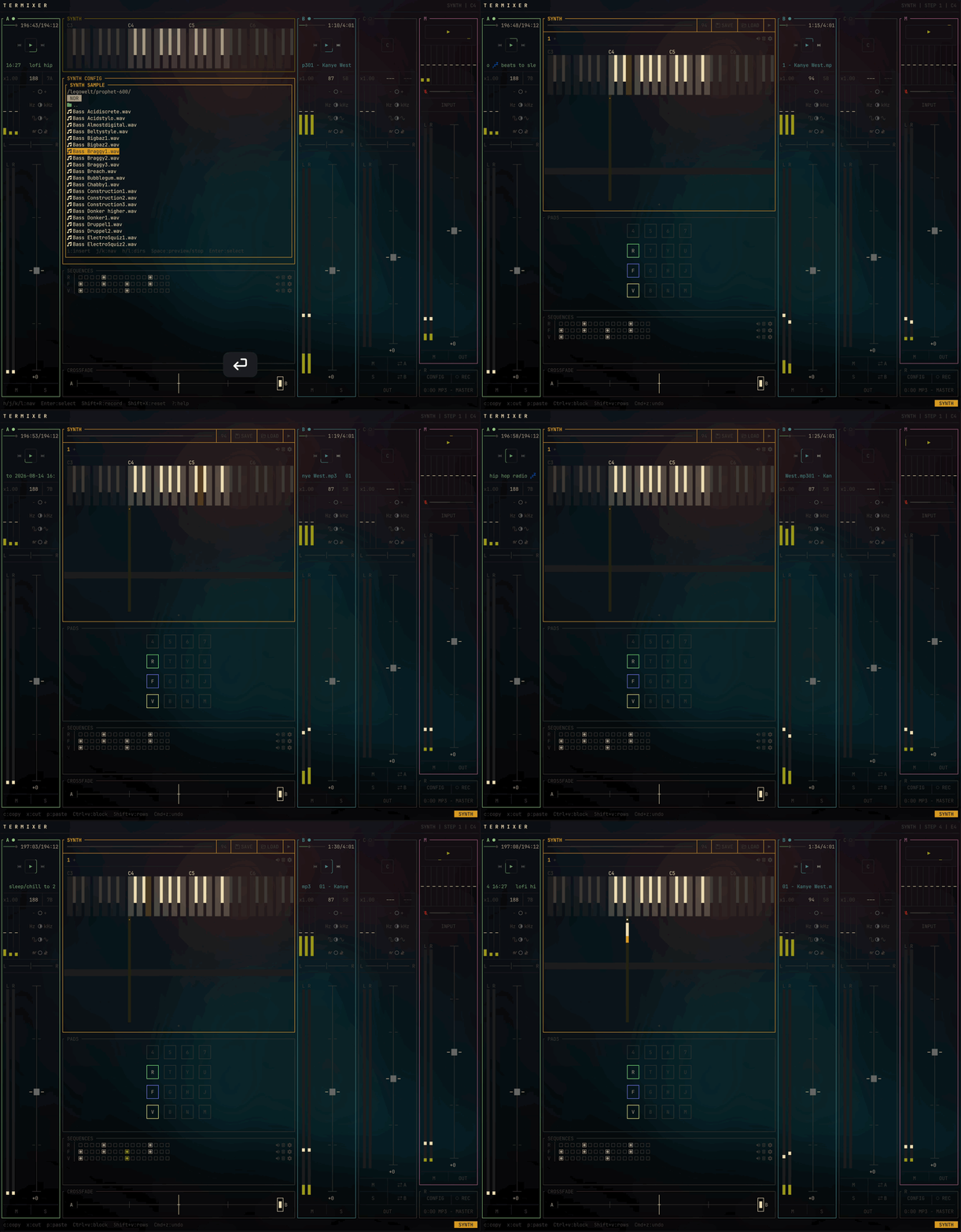
A terminal-based DJ mixer for live performance with TidalCycles. Built in Rust with ratatui, it provides real-time EQ, filtering, crossfading, and sample pads for mixing audio from MPV and SuperCollider.
Features
| Dual-deck mixer | A-B channel faders, pan, 3-band EQ, LPF/HPF |
| Crossfader | mix different decks, cue-in Deck C with unique output (headphone/booth) |
| Microphone input | selectable device, gain, and mute toggle |
| Sample pads | 4x4 grid with sequencer, save/load configs |
| Recording | capture decks, master, mic, synth, or pads to MP3/WAV/FLAC/OGG |
| Synth | splay out a sample across the keys, or use the default sine synth |
| SuperCollider integration | custom SynthDefs for processing SuperCollider output |
| Vim navigation | hjkl throughout, multi-modal nav system |
Prerequisites
| Rust | cargo package manager and Rust language compiler |
| Nerd Fonts | required for icons (rewind, fast-forward, etc.) |
| MPV | media playback with IPC socket support |
| FFmpeg | recording encoder for MP3/WAV/FLAC/OGG |
| SuperCollider (optional) | for TidalCycles integration |
Installation
From crates.io
cargo install termixer
From GitHub release archive
This will take the latest release binary and install it to ~/.cargo/bin/termixer (same as cargo).
curl -sL https://raw.githubusercontent.com/l00sed/termixer/master/install.sh | bash
From source
git clone https://github.com/l00sed/termixer.git
cd termixer
cargo install --path .
Build
cargo build              # debug
cargo build --release    # optimized with LTO
Usage
# Auto-discover audio sources
cargo run

# Specify MPV sources explicitly
cargo run -- -s "Deck A" /tmp/mpv-a.sock -s "Deck B" /tmp/mpv-b.sock

# With music and samples directories
cargo run -- -m ~/Music -S ~/Samples
Starting MPV with IPC
mpv --input-ipc-server=/tmp/mpv-music.sock music.mp3
There's also an mpv wrapper script included that you can use to automatically enable the necessary flags just by setting the TM environment variable:
TM=1 mpv music.mp3
Termixer should automatically install this wrapper script to ~/.local/bin/mpv. When TM=1, it will add the socket and pcm flags. Without it, mpv runs normally.
To manage your own mpv config and disable automatic seeding of ~/.config/mpv/scripts/ and ~/.config/mpv/mpv.conf, use export TM_NO_CONFIG=1 in your shell profile.
Pads/Samples/Sequences
NOTE: Termixer uses the default SuperDirt samples installation directory by default. It's a great, free library to grab some starter samples.
macOS — ~/Library/Application Support/SuperCollider/downloaded-quarks/Dirt-Samples
Linux — ~/.local/share/SuperCollider/downloaded-quarks/Dirt-Samples
Pad and sequence configurations can be exported to .json files and imported later to restore all saved samples, pad settings, and sequences. The default save/load directory is ~/Documents.
- Change the sample directory with
termixer -S PATH. - Change the sequences/samples ("sessions") directory with
termixer -L PATH.
CLI Options
| Flag | Description |
|---|---|
-s, --source NAME SOCKET | Add an audio source (MPV IPC socket) |
-m, --music-dir PATH | Directory for audio file browser |
-S, --samples-dir PATH | Directory for sample pad files |
-L, --session-dir PATH | Directory for session save/load (default: ~/Documents) |
-d, --discover | Auto-discover audio sources (default) |
-h, --help | Show help |
Keyboard Controls
Navigation
| Key | Action |
|---|---|
Tab / h / l | Switch between panes (Deck A, DJ, Deck B, Master) |
Enter | Enter control select mode |
Esc | Go back one level |
? | Toggle help overlay |
q | Quit |
Controls
| Key | Action |
|---|---|
j / k | Navigate controls up/down |
h / l | Adjust value / toggle EQ kill switch |
J / K | Coarse adjustment (0.2) |
+ / - | Fine adjustment (0.05) |
m / s | Toggle mute / solo |
c | Center pan or crossfader |
0 | Reset control to default |
Source & Sample Pads
| Key | Action |
|---|---|
A | Open source picker for Deck A |
B | Open source picker for Deck B |
P | Toggle sample pads mode |
Synth
For some great synth samples, I recommend downloading legowelt's sample packages.
| Key | Action |
|---|---|
q 2 w 3 e r 5 t 6 y 7 u i 9 o 0 p [ = ] | Play the active C-to-G range |
h / l or arrows | Move the waterfall cursor by semitone |
H / L or Shift+arrows | Move the waterfall cursor by octave |
Enter | Open waterfall controls/editor |
j / k | Select a waterfall step |
J / K | Move down/up one waterfall measure |
Enter / Space | Cycle cell through Off, Play, Hold |
Shift+Space | Place a Hold cell directly |
c | Toggle SYNTH sample/config pane |
Ctrl+v | Start/end rectangular visual selection |
c / x | Copy/cut visual selection (bring up config when not on an active cell) |
p | Paste at the waterfall cursor |
Ctrl+z / Shift+Ctrl+z | Undo/redo waterfall edits |
The SYNTH tab row creates up to eight simultaneous synth tracks. Each track has an independent waterfall length, mute state, BPM, sample, and sample configuration. The SYNTH control-row play/pause toggles every synth, while master play/pause pauses all decks, sequences, and synths and resumes only those that were active. Synth presets save every tab and restore the complete pane from one synth.json; legacy single-synth presets remain loadable.
Development
Check changes and run the test suite before opening a pull request:
cargo check
cargo test
cargo clippy -- -D warnings
Run Termixer with DEBUG=1 while developing behavior, state synchronization, or audio routing:
DEBUG=1 cargo run
Debug mode enables the in-app debug pane and preserves diagnostic logging that is otherwise redirected to prevent stderr from corrupting the TUI. Clippy is run with warnings treated as errors to keep new code lint-clean.
License
MIT
Contributors

27 commits
Similar repos


Languages
Rust
99.2%
A 2-deck mixer, sample pads, sequencer— all from any Unix terminal.
Rust
236
27 commits
updated Aug 14, 2026
README
termixer
A terminal-based DJ mixer for live performance with TidalCycles. Built in Rust with ratatui, it provides real-time EQ, filtering, crossfading, and sample pads for mixing audio from MPV and SuperCollider.
Features
| Dual-deck mixer | A-B channel faders, pan, 3-band EQ, LPF/HPF |
| Crossfader | mix different decks, cue-in Deck C with unique output (headphone/booth) |
| Microphone input | selectable device, gain, and mute toggle |
| Sample pads | 4x4 grid with sequencer, save/load configs |
| Recording | capture decks, master, mic, synth, or pads to MP3/WAV/FLAC/OGG |
| Synth | splay out a sample across the keys, or use the default sine synth |
| SuperCollider integration | custom SynthDefs for processing SuperCollider output |
| Vim navigation | hjkl throughout, multi-modal nav system |
Prerequisites
| Rust | cargo package manager and Rust language compiler |
| Nerd Fonts | required for icons (rewind, fast-forward, etc.) |
| MPV | media playback with IPC socket support |
| FFmpeg | recording encoder for MP3/WAV/FLAC/OGG |
| SuperCollider (optional) | for TidalCycles integration |
Installation
From crates.io
cargo install termixer
From GitHub release archive
This will take the latest release binary and install it to ~/.cargo/bin/termixer (same as cargo).
curl -sL https://raw.githubusercontent.com/l00sed/termixer/master/install.sh | bash
From source
git clone https://github.com/l00sed/termixer.git
cd termixer
cargo install --path .
Build
cargo build              # debug
cargo build --release    # optimized with LTO
Usage
# Auto-discover audio sources
cargo run

# Specify MPV sources explicitly
cargo run -- -s "Deck A" /tmp/mpv-a.sock -s "Deck B" /tmp/mpv-b.sock

# With music and samples directories
cargo run -- -m ~/Music -S ~/Samples
Starting MPV with IPC
mpv --input-ipc-server=/tmp/mpv-music.sock music.mp3
There's also an mpv wrapper script included that you can use to automatically enable the necessary flags just by setting the TM environment variable:
TM=1 mpv music.mp3
Termixer should automatically install this wrapper script to ~/.local/bin/mpv. When TM=1, it will add the socket and pcm flags. Without it, mpv runs normally.
To manage your own mpv config and disable automatic seeding of ~/.config/mpv/scripts/ and ~/.config/mpv/mpv.conf, use export TM_NO_CONFIG=1 in your shell profile.
Pads/Samples/Sequences
NOTE: Termixer uses the default SuperDirt samples installation directory by default. It's a great, free library to grab some starter samples.
macOS — ~/Library/Application Support/SuperCollider/downloaded-quarks/Dirt-Samples
Linux — ~/.local/share/SuperCollider/downloaded-quarks/Dirt-Samples
Pad and sequence configurations can be exported to .json files and imported later to restore all saved samples, pad settings, and sequences. The default save/load directory is ~/Documents.
- Change the sample directory with
termixer -S PATH. - Change the sequences/samples ("sessions") directory with
termixer -L PATH.
CLI Options
| Flag | Description |
|---|---|
-s, --source NAME SOCKET | Add an audio source (MPV IPC socket) |
-m, --music-dir PATH | Directory for audio file browser |
-S, --samples-dir PATH | Directory for sample pad files |
-L, --session-dir PATH | Directory for session save/load (default: ~/Documents) |
-d, --discover | Auto-discover audio sources (default) |
-h, --help | Show help |
Keyboard Controls
Navigation
| Key | Action |
|---|---|
Tab / h / l | Switch between panes (Deck A, DJ, Deck B, Master) |
Enter | Enter control select mode |
Esc | Go back one level |
? | Toggle help overlay |
q | Quit |
Controls
| Key | Action |
|---|---|
j / k | Navigate controls up/down |
h / l | Adjust value / toggle EQ kill switch |
J / K | Coarse adjustment (0.2) |
+ / - | Fine adjustment (0.05) |
m / s | Toggle mute / solo |
c | Center pan or crossfader |
0 | Reset control to default |
Source & Sample Pads
| Key | Action |
|---|---|
A | Open source picker for Deck A |
B | Open source picker for Deck B |
P | Toggle sample pads mode |
Synth
For some great synth samples, I recommend downloading legowelt's sample packages.
| Key | Action |
|---|---|
q 2 w 3 e r 5 t 6 y 7 u i 9 o 0 p [ = ] | Play the active C-to-G range |
h / l or arrows | Move the waterfall cursor by semitone |
H / L or Shift+arrows | Move the waterfall cursor by octave |
Enter | Open waterfall controls/editor |
j / k | Select a waterfall step |
J / K | Move down/up one waterfall measure |
Enter / Space | Cycle cell through Off, Play, Hold |
Shift+Space | Place a Hold cell directly |
c | Toggle SYNTH sample/config pane |
Ctrl+v | Start/end rectangular visual selection |
c / x | Copy/cut visual selection (bring up config when not on an active cell) |
p | Paste at the waterfall cursor |
Ctrl+z / Shift+Ctrl+z | Undo/redo waterfall edits |
The SYNTH tab row creates up to eight simultaneous synth tracks. Each track has an independent waterfall length, mute state, BPM, sample, and sample configuration. The SYNTH control-row play/pause toggles every synth, while master play/pause pauses all decks, sequences, and synths and resumes only those that were active. Synth presets save every tab and restore the complete pane from one synth.json; legacy single-synth presets remain loadable.
Development
Check changes and run the test suite before opening a pull request:
cargo check
cargo test
cargo clippy -- -D warnings
Run Termixer with DEBUG=1 while developing behavior, state synchronization, or audio routing:
DEBUG=1 cargo run
Debug mode enables the in-app debug pane and preserves diagnostic logging that is otherwise redirected to prevent stderr from corrupting the TUI. Clippy is run with warnings treated as errors to keep new code lint-clean.
License
MIT
Similar repos
Contributors
27 commits
Languages
Rust
99.2%