
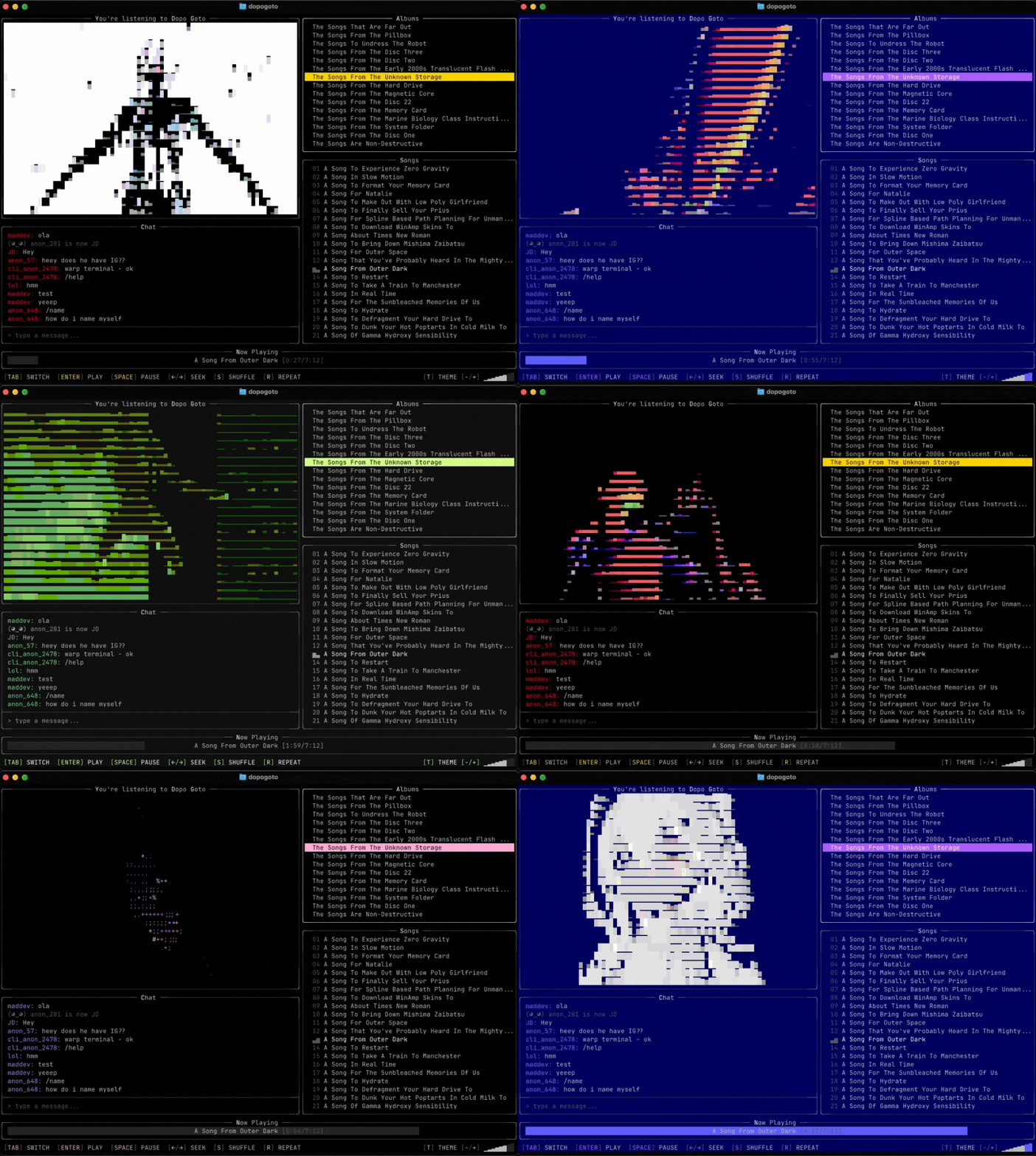
Terminal-native music and video player: 15 albums. 30+ hours of music. Live chat. All in your command line.
See the codeREADME
Dopo Goto
Terminal-native player.
15 albums. 30+ hours of music. Live chat.
All in your command line.
Welcome to A Brand New World!
Installation
Already installed? See Updating.
Ask AI
Paste this into Claude Code, Codex, Cursor, or any AI agent with terminal access:
Install dopogoto terminal music player from github.com/dangerous-person/dopogoto-terminal-player
macOS
- Open Terminal.
- Paste this command and press Enter:
curl -fsSL https://raw.githubusercontent.com/dangerous-person/dopogoto-terminal-player/main/install.sh | sh
- If prompted, type your Mac password to allow install to
/usr/local/bin.
(No characters appear while typing. This is normal.) - Start the app:
dopogoto
If Terminal says command not found, close Terminal, reopen it, and try dopogoto again.
macOS (manual install, if the command above doesn't work)
- Go to Releases and download the latest macOS file:
dopogoto_*_darwin_universal.tar.gz(darwinmeans macOS,universalmeans it works on both Intel and Apple Silicon Macs). - Open Downloads in Finder and double-click the
.tar.gzfile. This creates a folder likedopogoto_0.1.8_darwin_universalcontaining thedopogotoapp. - Open Terminal and run:
sudo mv ~/Downloads/dopogoto_*_darwin_universal/dopogoto /usr/local/bin/dopogoto
sudo chmod +x /usr/local/bin/dopogoto
xattr -d com.apple.quarantine /usr/local/bin/dopogoto 2>/dev/null || true
dopogoto
Keep * exactly as shown — it automatically matches the version folder name.
If you have multiple dopogoto_*_darwin_universal folders in Downloads, use the newest one, for example:
sudo mv ~/Downloads/dopogoto_0.1.8_darwin_universal/dopogoto /usr/local/bin/dopogoto
Windows
- Download
dopogoto_*_windows_amd64.zipfrom Releases - Extract, and run
dopogoto.exe.
Linux
- Download
dopogoto_*_linux_amd64.tar.gzfrom Releases - Extract and install:
tar xzf dopogoto_*_linux_amd64.tar.gz
sudo mv dopogoto /usr/local/bin/dopogoto
sudo chmod +x /usr/local/bin/dopogoto
-
Install ALSA if you don't have it (required for audio):
- Debian/Ubuntu:
sudo apt install libasound2-dev - Fedora:
sudo dnf install alsa-lib-devel - Arch:
sudo pacman -S alsa-lib
- Debian/Ubuntu:
-
Run
dopogoto
Or use the one-liner:
curl -fsSL https://raw.githubusercontent.com/dangerous-person/dopogoto-terminal-player/main/install.sh | sh
Build from source
Requires Go 1.25+ (Linux also needs ALSA headers, see Requirements):
git clone https://github.com/dangerous-person/dopogoto-terminal-player
cd dopogoto-terminal-player
go build -o dopogoto .
Requirements
- A 256-color terminal (Ghostty, Terminal.app, iTerm2, Windows Terminal, etc.)
- Terminal size 120x40 or larger
- Audio output device
Linux: ALSA is required for audio playback.
- Debian/Ubuntu:
sudo apt install libasound2-dev - Fedora:
sudo dnf install alsa-lib-devel - Arch:
sudo pacman -S alsa-lib
Updating
The app checks for updates on launch and shows a notification in chat when a new version is available.
macOS
- Quit dopogoto.
- Open Terminal (Command+Space, type Terminal, press Enter).
- Paste this command and press Enter (you can run it from any folder):
curl -fsSL https://raw.githubusercontent.com/dangerous-person/dopogoto-terminal-player/main/install.sh | sh
- If prompted, type your Mac password and press Enter. No characters appear while typing — that's normal.
- Then type
dopogotoand press Enter.
Windows
- Close dopogoto.
- Delete your old
dopogoto.exefile. - Go to Releases and download the latest
dopogoto_*_windows_amd64.zip. - Extract the ZIP and run the new
dopogoto.exe.
Linux
Quit dopogoto, then run:
curl -fsSL https://raw.githubusercontent.com/dangerous-person/dopogoto-terminal-player/main/install.sh | sh
Then run dopogoto again.
If the version still looks old
Check your version:
dopogoto --version
On macOS / Linux, check if you have duplicate copies:
which -a dopogoto
If more than one path appears, delete the old one and restart your terminal.
Controls
| Key | Action |
|---|---|
TAB | Cycle focus: Albums / Tracks / Chat |
↑ / ↓ | Navigate lists |
ENTER | Play track or send chat message |
SPACE | Pause / resume |
N / P | Next / previous track |
+ / - | Volume up / down |
S | Shuffle |
R | Repeat |
T | Change theme |
←/→ | Seek -/+ 10s |
Q | Quit |
Chat
Type a message and press Enter.
/nick name-- set your nickname (saved locally)/reset-- go anonymous
Telemetry
Anonymous usage stats on launch and quit (version, OS, session duration, terminal size). No personal info. No IP tracking.
To opt out: export DOPOGOTO_NO_TELEMETRY=1
Licensing
- Source code is licensed under MIT (see
LICENSE). - Media/assets are licensed separately (see ASSETS_LICENSE.md) and are not covered by MIT.
Links
Contributors

35 commits
Similar repos


Languages
Go
98.0%
Shell
2.0%
Terminal-native music and video player: 15 albums. 30+ hours of music. Live chat. All in your command line.
See the codeREADME
Dopo Goto
Terminal-native player.
15 albums. 30+ hours of music. Live chat.
All in your command line.
Welcome to A Brand New World!
Installation
Already installed? See Updating.
Ask AI
Paste this into Claude Code, Codex, Cursor, or any AI agent with terminal access:
Install dopogoto terminal music player from github.com/dangerous-person/dopogoto-terminal-player
macOS
- Open Terminal.
- Paste this command and press Enter:
curl -fsSL https://raw.githubusercontent.com/dangerous-person/dopogoto-terminal-player/main/install.sh | sh
- If prompted, type your Mac password to allow install to
/usr/local/bin.
(No characters appear while typing. This is normal.) - Start the app:
dopogoto
If Terminal says command not found, close Terminal, reopen it, and try dopogoto again.
macOS (manual install, if the command above doesn't work)
- Go to Releases and download the latest macOS file:
dopogoto_*_darwin_universal.tar.gz(darwinmeans macOS,universalmeans it works on both Intel and Apple Silicon Macs). - Open Downloads in Finder and double-click the
.tar.gzfile. This creates a folder likedopogoto_0.1.8_darwin_universalcontaining thedopogotoapp. - Open Terminal and run:
sudo mv ~/Downloads/dopogoto_*_darwin_universal/dopogoto /usr/local/bin/dopogoto
sudo chmod +x /usr/local/bin/dopogoto
xattr -d com.apple.quarantine /usr/local/bin/dopogoto 2>/dev/null || true
dopogoto
Keep * exactly as shown — it automatically matches the version folder name.
If you have multiple dopogoto_*_darwin_universal folders in Downloads, use the newest one, for example:
sudo mv ~/Downloads/dopogoto_0.1.8_darwin_universal/dopogoto /usr/local/bin/dopogoto
Windows
- Download
dopogoto_*_windows_amd64.zipfrom Releases - Extract, and run
dopogoto.exe.
Linux
- Download
dopogoto_*_linux_amd64.tar.gzfrom Releases - Extract and install:
tar xzf dopogoto_*_linux_amd64.tar.gz
sudo mv dopogoto /usr/local/bin/dopogoto
sudo chmod +x /usr/local/bin/dopogoto
-
Install ALSA if you don't have it (required for audio):
- Debian/Ubuntu:
sudo apt install libasound2-dev - Fedora:
sudo dnf install alsa-lib-devel - Arch:
sudo pacman -S alsa-lib
- Debian/Ubuntu:
-
Run
dopogoto
Or use the one-liner:
curl -fsSL https://raw.githubusercontent.com/dangerous-person/dopogoto-terminal-player/main/install.sh | sh
Build from source
Requires Go 1.25+ (Linux also needs ALSA headers, see Requirements):
git clone https://github.com/dangerous-person/dopogoto-terminal-player
cd dopogoto-terminal-player
go build -o dopogoto .
Requirements
- A 256-color terminal (Ghostty, Terminal.app, iTerm2, Windows Terminal, etc.)
- Terminal size 120x40 or larger
- Audio output device
Linux: ALSA is required for audio playback.
- Debian/Ubuntu:
sudo apt install libasound2-dev - Fedora:
sudo dnf install alsa-lib-devel - Arch:
sudo pacman -S alsa-lib
Updating
The app checks for updates on launch and shows a notification in chat when a new version is available.
macOS
- Quit dopogoto.
- Open Terminal (Command+Space, type Terminal, press Enter).
- Paste this command and press Enter (you can run it from any folder):
curl -fsSL https://raw.githubusercontent.com/dangerous-person/dopogoto-terminal-player/main/install.sh | sh
- If prompted, type your Mac password and press Enter. No characters appear while typing — that's normal.
- Then type
dopogotoand press Enter.
Windows
- Close dopogoto.
- Delete your old
dopogoto.exefile. - Go to Releases and download the latest
dopogoto_*_windows_amd64.zip. - Extract the ZIP and run the new
dopogoto.exe.
Linux
Quit dopogoto, then run:
curl -fsSL https://raw.githubusercontent.com/dangerous-person/dopogoto-terminal-player/main/install.sh | sh
Then run dopogoto again.
If the version still looks old
Check your version:
dopogoto --version
On macOS / Linux, check if you have duplicate copies:
which -a dopogoto
If more than one path appears, delete the old one and restart your terminal.
Controls
| Key | Action |
|---|---|
TAB | Cycle focus: Albums / Tracks / Chat |
↑ / ↓ | Navigate lists |
ENTER | Play track or send chat message |
SPACE | Pause / resume |
N / P | Next / previous track |
+ / - | Volume up / down |
S | Shuffle |
R | Repeat |
T | Change theme |
←/→ | Seek -/+ 10s |
Q | Quit |
Chat
Type a message and press Enter.
/nick name-- set your nickname (saved locally)/reset-- go anonymous
Telemetry
Anonymous usage stats on launch and quit (version, OS, session duration, terminal size). No personal info. No IP tracking.
To opt out: export DOPOGOTO_NO_TELEMETRY=1
Licensing
- Source code is licensed under MIT (see
LICENSE). - Media/assets are licensed separately (see ASSETS_LICENSE.md) and are not covered by MIT.
Links
Similar repos
Contributors
35 commits
Languages
Go
98.0%
Shell
2.0%