
A control panel for FreeToken, in a terminal or a browser: models, conversion, serving, tuning, and telemetry
Rust
0
69 commits
updated Sep 18, 2026
README
paddock



A control panel for FreeToken — in your terminal or your browser, from the same binary.
Browse and download checkpoints from Hugging Face, convert them to FreeToken's FTW format,
configure every ft serve knob, launch and supervise the engine, retune its cache pools
without a restart, and watch throughput, requests and logs.
FreeToken's engine resolves almost everything automatically, which is the right default and also means the knobs that matter are invisible until you need them. paddock puts that whole surface in one place — and tells you when a default has quietly cost you something.
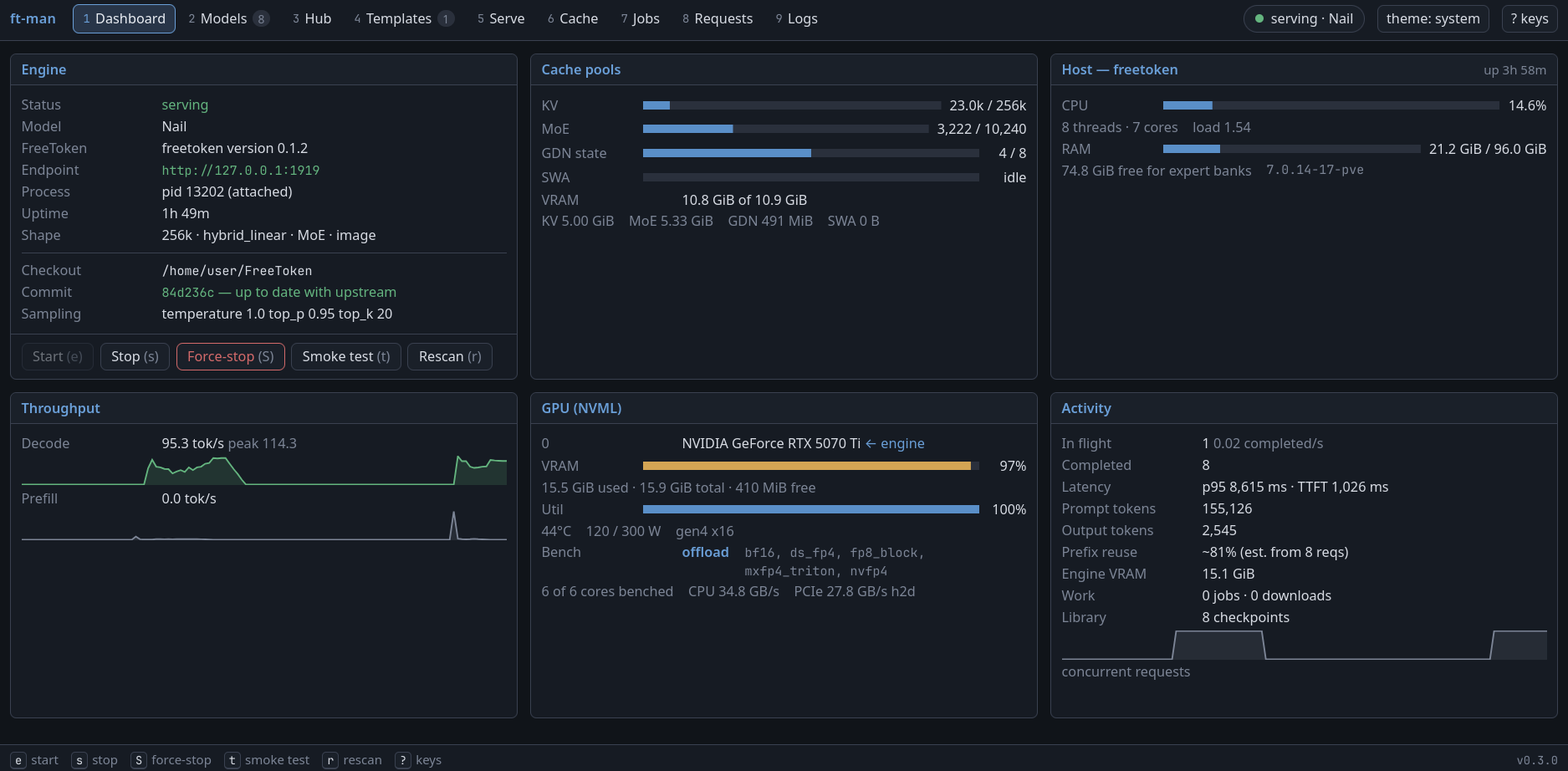
Two front ends, one program
paddock          # the terminal UI
paddock web      # the same thing in a browser, on 0.0.0.0:7979
The same dashboard in a terminal:
 paddock  1 Dashboard  2 Models  3 Hub  4 Templates  5 Serve  6 Cache  7 Jobs  8 Requests  9 Logs   ● serving · Qwen3.6-35B
╭ Engine ───────────────────────────────────╮╭ GPU (NVML) ───────────────────────────────╮
│Status            ● serving                ││0 NVIDIA GeForce RTX 5090   ← engine       │
│Model             Qwen3.6-35B-A3B          ││  VRAM    ▕██████████████████▉··▏  87%     │
│Endpoint          http://127.0.0.1:1919    ││  Util    ▕███████████████████▊·▏  96%     │
│Process           pid 48211                ││  71°C   498 / 575 W   gen5 x16            │
│Uptime            1h 10m                   ││                                           │
│Shape             256k ctx · hybrid_linear ││bench: nvfp4→hybrid                        │
╰───────────────────────────────────────────╯╰───────────────────────────────────────────╯
╭ Throughput ───────────────────────────────╮╭ Activity ─────────────────────────────────╮
│Decode            48.7 tok/s   peak 61.2   ││In flight         2    0.31 completed/s    │
│  ▂▃▅▆▇█▇▆▅▄▃▄▅▆▇█▇▆▅▃▂▃▄▅▆▇▆▅▄▃▂▃▄▅▆▇█▇▆  ││Completed         1,487                    │
│Prefill        3,120.5 tok/s               ││Latency           p95 8,340 ms  TTFT 412 ms│
╰───────────────────────────────────────────╯╰───────────────────────────────────────────╯
Both run the same App: the same telemetry poller, engine supervisor, job runner and
download tracker, with every screen, action and confirmation identical on each. The browser
version is a long-lived daemon — the natural way to drive a headless box, kick off a
two-hour conversion, and check on it from a terminal later.
A TUI and the web daemon can run at once and drive the same engine: either can start it, both poll it, either can stop it.
What you can do
| Screen | What it is for |
|---|---|
| Dashboard | Engine state, throughput, cache pools, GPU and host telemetry. The screen you leave open. |
| Models | Your local checkpoint library. Recognizes HF, FTW and GGUF, pairs a checkpoint with its FTW build, and sets the chat template and sampling defaults it serves with. |
| Hub | Search Hugging Face, check a repo against FreeToken before downloading it, pick a quantization, download. Lands in the standard Hugging Face cache. |
| Templates | Override a checkpoint's chat template with one fetched from a Hugging Face repo, and put the original back. |
| Serve | Every ft serve flag, grouped, with its domain and help text. Plan the launch against your hardware. Save configurations as named profiles. |
| Cache | Resize the MoE, KV, GDN and SWA pools on the running engine, with the VRAM cost of each change shown before you apply it. |
| Jobs | FTW conversions, bandwidth benchmarks and downloads, with real progress bars and live output. |
| Requests | The engine's request ring: status, latency, TTFT and token counts per call. |
| Logs | The engine's output, filterable, with an errors-only toggle and a detachable tail. |
In the TUI, press ? for the full key map.
Requirements
- Linux x86_64 (developed against Debian 13), NVIDIA GPU
- A current FreeToken install — see its install guide.
Its virtualenv also supplies the
hfCLI that Hub downloads are delegated to.
paddock drives FreeToken's own CLI and HTTP API; it does not link against or vendor any of it. It tracks the CLI as it stands rather than supporting several versions at once, so pair it with a FreeToken you keep current.
Install
A prebuilt Linux x86_64 binary is attached to each release. It needs glibc 2.34 or newer — RHEL 9, Ubuntu 22.04, Debian 12 and anything later — and no toolchain:
tar xzf paddock-<version>-x86_64-unknown-linux-gnu.tar.gz
install -Dm755 paddock-*/paddock ~/.local/bin/paddock
Or build it. The browser UI is embedded into the binary by build.rs, which never runs
npm itself, so the frontend is a separate step that goes first (needs Rust 1.88+ and
Node 24):
git clone https://github.com/jlbyh2o/paddock && cd paddock
cd web && npm ci && npm run build && cd ..
cargo build --release
install -Dm755 target/release/paddock ~/.local/bin/paddock
scripts/build-release.sh does both steps inside rust:1.98.0-slim-bookworm, which is how
the published binary is built — it targets an older glibc than most development machines
have.
Quick start
paddock --doctor      # what it found: the ft binary, your GPUs, your checkpoints
paddock               # the UI
FreeToken normally lives in a virtualenv, so ft is usually not on your PATH. --doctor
says whether it was found. If it was not, point at it once with
paddock --venv ~/FreeToken/.venv, then paddock --init-config to write that into
~/.config/paddock/config.toml.
From there, a first run is six steps:
- Hub →
/→ search a model → Enter. Pick a quantization if the repo ships several, thendto download. It lands in the Hugging Face cache, so every other tool on the machine can already see it. - Models → select it →
cto convert to FTW. Watch it on Jobs. - Jobs →
b. Runsft bench bwonce for this machine, so--moe-strategy autocan choose hybrid over offload when your RAM bandwidth justifies it. - Models → select the checkpoint → Enter, which loads the FTW build into Serve.
- Serve → adjust anything;
aplans the launch against your hardware,pshows the exact command line,gstarts it. - Cache → once it is serving, trade KV capacity against resident experts and apply without a restart.
The web interface
paddock web                            # serve on [web] listen, default 0.0.0.0:7979
paddock web --listen 127.0.0.1:8000
paddock web --token secret             # every /api request must carry it
[!WARNING]
ft servehas no authentication of any kind, andpaddock webfollows the same default: with no[web] tokenset, anything that can reach the port can start or stop the engine, delete checkpoints, and read everything the UI shows. That is fine on a machine only you can reach. The moment the box is reachable from an untrusted network, either bind--listen 127.0.0.1:...and reach it over an SSH tunnel, or set--token.
To run it as a service, install the provided unit — edit User= (and HF_HOME, if your
cache lives somewhere unusual) first:
sudo install -m644 contrib/paddock-web.service /etc/systemd/system/
sudo systemctl daemon-reload
sudo systemctl enable --now paddock-web
What the two front ends do not share is jobs: a conversion, benchmark or download started in one is a child process of that process, though its result shows up in the other's library once it finishes.
Highlights
A few things paddock does that are not obvious. The reasoning behind each, and a dozen more, is in docs/design-notes.md.
- It owns the engine, and it lets go. A serve survives quitting paddock, and a later run re-attaches to it. Only a stop you asked for stops it.
- It notices when you are serving a fraction of your context. A 256k model can be answering with 8k because the KV pool got what the expert cache left it, and nothing in the engine says so. The Dashboard puts both numbers on one line.
- And it can plan the fix.
aon the Serve tab prices the cache split from what the engine measured and works out the--kv-reserve-tokensthat buys the context back, with the arithmetic attached. - It says whether a repo can run here before you download it. One
config.jsonfetch, checked against FreeToken's own architecture registry and this machine's VRAM, RAM and disk — and against the KV cache, which is the wall weights offload past and the cache cannot. A model whose weights fit can still hold a tenth of the context it advertises, and the Hub tab says so half an hour before the transfer would have. - You pick a quantization, not sixty files. A GGUF repo is a shelf of builds; the Hub
tab asks
UD-IQ3_XXSorQ8_0and selects the right shards, tokenizer and projector. - The library is the Hugging Face cache, not a directory of its own — so anything
pulled by
hf,from_pretrainedor another engine is already in the list, and what paddock derives stays out of that tree. - Progress is real, not a spinner. Conversions and benchmarks are parsed from FreeToken's machine-readable output, and downloads are measured in bytes off the cache.
- A doomed conversion fails in seconds, not minutes, by resolving the checkpoint
through FreeToken's own
EngineConfigbefore writing 21 GiB.
Configuration
~/.config/paddock/config.toml, written on first run. PADDOCK_CONFIG_DIR and
PADDOCK_STATE_DIR relocate it, which is how you run more than one independent setup on a
machine.
[freetoken]
venv = "/home/you/FreeToken/.venv"   # or binary = "/opt/freetoken/.venv/bin/ft"

[server]
host = "0.0.0.0"       # also the default `ft serve --host`
port = 1919            # also the default `ft serve --port`

[library]
# The Hugging Face cache is always scanned; these are additional roots.
roots = ["/home/you/models"]
ftw_dir = "/home/you/models"         # where FTW builds go. Never inside the cache.

[hub]
# token = "hf_..."     # or set HF_TOKEN; the `hf` CLI's cached token is also read
concurrency = 4        # passed to `hf download --max-workers`

[ui]
theme = "auto"                # auto | dark | light | mono
confirm_destructive = true

[web]
listen = "0.0.0.0:7979"       # also the default `paddock web --listen`
# token = "secret"            # unset means no auth
That is an excerpt. paddock --init-config writes the file out with every key at the
default in force; the optional ones — venv, [hub] token, [web] token — are absent
until you add them. Profiles live beside it in profiles.toml and record only the knobs
you set, so "leave the MoE backend on auto" survives a FreeToken upgrade that changes what
auto means.
Command line
paddock [--host HOST] [--port PORT] [--venv DIR] [--ft-binary PATH]
       [--models DIR]... [--theme NAME] [--tab TAB] [--doctor] [--init-config]
       [web [--listen ADDR] [--token TOKEN]]
Every global flag applies to paddock web too. CLI flags override the config file for that
run and are not written back.
Documentation
- docs/design-notes.md — why paddock behaves the way it does: cache planning, prefix-cache estimation, the GDN state pool, naming, and the rest.
- docs/guides.md — overriding a chat template, and setting the sampling defaults a checkpoint serves with.
- docs/web-ui.md — the browser UI's architecture.
- docs/web-api.md — the HTTP API it speaks.
- docs/freetoken-compressed-tensors-moe.md — why FreeToken cannot load compressed-tensors NVFP4 MoE checkpoints today.
Development
cargo test                    # Rust: TUI, web layer, and everything under them
cd web && npm run check       # frontend: tsc --noEmit, then vitest
cargo clippy --all-targets -- -D warnings
cargo fmt
cargo test covers the render and input sweeps — every view drawn at 40×12 through 200×60,
in every theme, empty and populated, with each overlay open, plus every printable and
navigation key pressed on every tab, because a TUI that panics mid-draw corrupts the
terminal — and, for the web layer, snapshot construction and every route exercised against
an App with no FreeToken, which is the state CI runs in.
Rust 1.88 is the floor the dependency tree imposes and CI proves it still holds. Day-to-day
work uses the exact toolchain CI runs, pinned in mise.toml: with
mise installed, mise install gets you the same compiler, so a
clean cargo clippy --all-targets -- -D warnings locally means a green CI.
License
Apache-2.0, matching FreeToken.
Contributors

69 commits
Similar repos


Languages
Rust
72.1%
TypeScript
24.0%
Shell
1.5%
CSS
1.3%
A control panel for FreeToken, in a terminal or a browser: models, conversion, serving, tuning, and telemetry
Rust
0
69 commits
updated Sep 18, 2026
README
paddock
A control panel for FreeToken — in your terminal or your browser, from the same binary.
Browse and download checkpoints from Hugging Face, convert them to FreeToken's FTW format,
configure every ft serve knob, launch and supervise the engine, retune its cache pools
without a restart, and watch throughput, requests and logs.
FreeToken's engine resolves almost everything automatically, which is the right default and also means the knobs that matter are invisible until you need them. paddock puts that whole surface in one place — and tells you when a default has quietly cost you something.
Two front ends, one program
paddock          # the terminal UI
paddock web      # the same thing in a browser, on 0.0.0.0:7979
The same dashboard in a terminal:
 paddock  1 Dashboard  2 Models  3 Hub  4 Templates  5 Serve  6 Cache  7 Jobs  8 Requests  9 Logs   ● serving · Qwen3.6-35B
╭ Engine ───────────────────────────────────╮╭ GPU (NVML) ───────────────────────────────╮
│Status            ● serving                ││0 NVIDIA GeForce RTX 5090   ← engine       │
│Model             Qwen3.6-35B-A3B          ││  VRAM    ▕██████████████████▉··▏  87%     │
│Endpoint          http://127.0.0.1:1919    ││  Util    ▕███████████████████▊·▏  96%     │
│Process           pid 48211                ││  71°C   498 / 575 W   gen5 x16            │
│Uptime            1h 10m                   ││                                           │
│Shape             256k ctx · hybrid_linear ││bench: nvfp4→hybrid                        │
╰───────────────────────────────────────────╯╰───────────────────────────────────────────╯
╭ Throughput ───────────────────────────────╮╭ Activity ─────────────────────────────────╮
│Decode            48.7 tok/s   peak 61.2   ││In flight         2    0.31 completed/s    │
│  ▂▃▅▆▇█▇▆▅▄▃▄▅▆▇█▇▆▅▃▂▃▄▅▆▇▆▅▄▃▂▃▄▅▆▇█▇▆  ││Completed         1,487                    │
│Prefill        3,120.5 tok/s               ││Latency           p95 8,340 ms  TTFT 412 ms│
╰───────────────────────────────────────────╯╰───────────────────────────────────────────╯
Both run the same App: the same telemetry poller, engine supervisor, job runner and
download tracker, with every screen, action and confirmation identical on each. The browser
version is a long-lived daemon — the natural way to drive a headless box, kick off a
two-hour conversion, and check on it from a terminal later.
A TUI and the web daemon can run at once and drive the same engine: either can start it, both poll it, either can stop it.
What you can do
| Screen | What it is for |
|---|---|
| Dashboard | Engine state, throughput, cache pools, GPU and host telemetry. The screen you leave open. |
| Models | Your local checkpoint library. Recognizes HF, FTW and GGUF, pairs a checkpoint with its FTW build, and sets the chat template and sampling defaults it serves with. |
| Hub | Search Hugging Face, check a repo against FreeToken before downloading it, pick a quantization, download. Lands in the standard Hugging Face cache. |
| Templates | Override a checkpoint's chat template with one fetched from a Hugging Face repo, and put the original back. |
| Serve | Every ft serve flag, grouped, with its domain and help text. Plan the launch against your hardware. Save configurations as named profiles. |
| Cache | Resize the MoE, KV, GDN and SWA pools on the running engine, with the VRAM cost of each change shown before you apply it. |
| Jobs | FTW conversions, bandwidth benchmarks and downloads, with real progress bars and live output. |
| Requests | The engine's request ring: status, latency, TTFT and token counts per call. |
| Logs | The engine's output, filterable, with an errors-only toggle and a detachable tail. |
In the TUI, press ? for the full key map.
Requirements
- Linux x86_64 (developed against Debian 13), NVIDIA GPU
- A current FreeToken install — see its install guide.
Its virtualenv also supplies the
hfCLI that Hub downloads are delegated to.
paddock drives FreeToken's own CLI and HTTP API; it does not link against or vendor any of it. It tracks the CLI as it stands rather than supporting several versions at once, so pair it with a FreeToken you keep current.
Install
A prebuilt Linux x86_64 binary is attached to each release. It needs glibc 2.34 or newer — RHEL 9, Ubuntu 22.04, Debian 12 and anything later — and no toolchain:
tar xzf paddock-<version>-x86_64-unknown-linux-gnu.tar.gz
install -Dm755 paddock-*/paddock ~/.local/bin/paddock
Or build it. The browser UI is embedded into the binary by build.rs, which never runs
npm itself, so the frontend is a separate step that goes first (needs Rust 1.88+ and
Node 24):
git clone https://github.com/jlbyh2o/paddock && cd paddock
cd web && npm ci && npm run build && cd ..
cargo build --release
install -Dm755 target/release/paddock ~/.local/bin/paddock
scripts/build-release.sh does both steps inside rust:1.98.0-slim-bookworm, which is how
the published binary is built — it targets an older glibc than most development machines
have.
Quick start
paddock --doctor      # what it found: the ft binary, your GPUs, your checkpoints
paddock               # the UI
FreeToken normally lives in a virtualenv, so ft is usually not on your PATH. --doctor
says whether it was found. If it was not, point at it once with
paddock --venv ~/FreeToken/.venv, then paddock --init-config to write that into
~/.config/paddock/config.toml.
From there, a first run is six steps:
- Hub →
/→ search a model → Enter. Pick a quantization if the repo ships several, thendto download. It lands in the Hugging Face cache, so every other tool on the machine can already see it. - Models → select it →
cto convert to FTW. Watch it on Jobs. - Jobs →
b. Runsft bench bwonce for this machine, so--moe-strategy autocan choose hybrid over offload when your RAM bandwidth justifies it. - Models → select the checkpoint → Enter, which loads the FTW build into Serve.
- Serve → adjust anything;
aplans the launch against your hardware,pshows the exact command line,gstarts it. - Cache → once it is serving, trade KV capacity against resident experts and apply without a restart.
The web interface
paddock web                            # serve on [web] listen, default 0.0.0.0:7979
paddock web --listen 127.0.0.1:8000
paddock web --token secret             # every /api request must carry it
[!WARNING]
ft servehas no authentication of any kind, andpaddock webfollows the same default: with no[web] tokenset, anything that can reach the port can start or stop the engine, delete checkpoints, and read everything the UI shows. That is fine on a machine only you can reach. The moment the box is reachable from an untrusted network, either bind--listen 127.0.0.1:...and reach it over an SSH tunnel, or set--token.
To run it as a service, install the provided unit — edit User= (and HF_HOME, if your
cache lives somewhere unusual) first:
sudo install -m644 contrib/paddock-web.service /etc/systemd/system/
sudo systemctl daemon-reload
sudo systemctl enable --now paddock-web
What the two front ends do not share is jobs: a conversion, benchmark or download started in one is a child process of that process, though its result shows up in the other's library once it finishes.
Highlights
A few things paddock does that are not obvious. The reasoning behind each, and a dozen more, is in docs/design-notes.md.
- It owns the engine, and it lets go. A serve survives quitting paddock, and a later run re-attaches to it. Only a stop you asked for stops it.
- It notices when you are serving a fraction of your context. A 256k model can be answering with 8k because the KV pool got what the expert cache left it, and nothing in the engine says so. The Dashboard puts both numbers on one line.
- And it can plan the fix.
aon the Serve tab prices the cache split from what the engine measured and works out the--kv-reserve-tokensthat buys the context back, with the arithmetic attached. - It says whether a repo can run here before you download it. One
config.jsonfetch, checked against FreeToken's own architecture registry and this machine's VRAM, RAM and disk — and against the KV cache, which is the wall weights offload past and the cache cannot. A model whose weights fit can still hold a tenth of the context it advertises, and the Hub tab says so half an hour before the transfer would have. - You pick a quantization, not sixty files. A GGUF repo is a shelf of builds; the Hub
tab asks
UD-IQ3_XXSorQ8_0and selects the right shards, tokenizer and projector. - The library is the Hugging Face cache, not a directory of its own — so anything
pulled by
hf,from_pretrainedor another engine is already in the list, and what paddock derives stays out of that tree. - Progress is real, not a spinner. Conversions and benchmarks are parsed from FreeToken's machine-readable output, and downloads are measured in bytes off the cache.
- A doomed conversion fails in seconds, not minutes, by resolving the checkpoint
through FreeToken's own
EngineConfigbefore writing 21 GiB.
Configuration
~/.config/paddock/config.toml, written on first run. PADDOCK_CONFIG_DIR and
PADDOCK_STATE_DIR relocate it, which is how you run more than one independent setup on a
machine.
[freetoken]
venv = "/home/you/FreeToken/.venv"   # or binary = "/opt/freetoken/.venv/bin/ft"

[server]
host = "0.0.0.0"       # also the default `ft serve --host`
port = 1919            # also the default `ft serve --port`

[library]
# The Hugging Face cache is always scanned; these are additional roots.
roots = ["/home/you/models"]
ftw_dir = "/home/you/models"         # where FTW builds go. Never inside the cache.

[hub]
# token = "hf_..."     # or set HF_TOKEN; the `hf` CLI's cached token is also read
concurrency = 4        # passed to `hf download --max-workers`

[ui]
theme = "auto"                # auto | dark | light | mono
confirm_destructive = true

[web]
listen = "0.0.0.0:7979"       # also the default `paddock web --listen`
# token = "secret"            # unset means no auth
That is an excerpt. paddock --init-config writes the file out with every key at the
default in force; the optional ones — venv, [hub] token, [web] token — are absent
until you add them. Profiles live beside it in profiles.toml and record only the knobs
you set, so "leave the MoE backend on auto" survives a FreeToken upgrade that changes what
auto means.
Command line
paddock [--host HOST] [--port PORT] [--venv DIR] [--ft-binary PATH]
       [--models DIR]... [--theme NAME] [--tab TAB] [--doctor] [--init-config]
       [web [--listen ADDR] [--token TOKEN]]
Every global flag applies to paddock web too. CLI flags override the config file for that
run and are not written back.
Documentation
- docs/design-notes.md — why paddock behaves the way it does: cache planning, prefix-cache estimation, the GDN state pool, naming, and the rest.
- docs/guides.md — overriding a chat template, and setting the sampling defaults a checkpoint serves with.
- docs/web-ui.md — the browser UI's architecture.
- docs/web-api.md — the HTTP API it speaks.
- docs/freetoken-compressed-tensors-moe.md — why FreeToken cannot load compressed-tensors NVFP4 MoE checkpoints today.
Development
cargo test                    # Rust: TUI, web layer, and everything under them
cd web && npm run check       # frontend: tsc --noEmit, then vitest
cargo clippy --all-targets -- -D warnings
cargo fmt
cargo test covers the render and input sweeps — every view drawn at 40×12 through 200×60,
in every theme, empty and populated, with each overlay open, plus every printable and
navigation key pressed on every tab, because a TUI that panics mid-draw corrupts the
terminal — and, for the web layer, snapshot construction and every route exercised against
an App with no FreeToken, which is the state CI runs in.
Rust 1.88 is the floor the dependency tree imposes and CI proves it still holds. Day-to-day
work uses the exact toolchain CI runs, pinned in mise.toml: with
mise installed, mise install gets you the same compiler, so a
clean cargo clippy --all-targets -- -D warnings locally means a green CI.
License
Apache-2.0, matching FreeToken.
Similar repos
Contributors
69 commits
Languages
Rust
72.1%
TypeScript
24.0%
Shell
1.5%
CSS
1.3%