
.NET library for on-demand local AI model inference — zero bundled models, lazy loading, hardware-aware GPU/CPU selection, 10 task types including embeddings, generation, vision, and audio.
C#
12
667 commits
updated Oct 3, 2026
README
LMSupply
Local Model Supply for .NET — on-demand AI inference


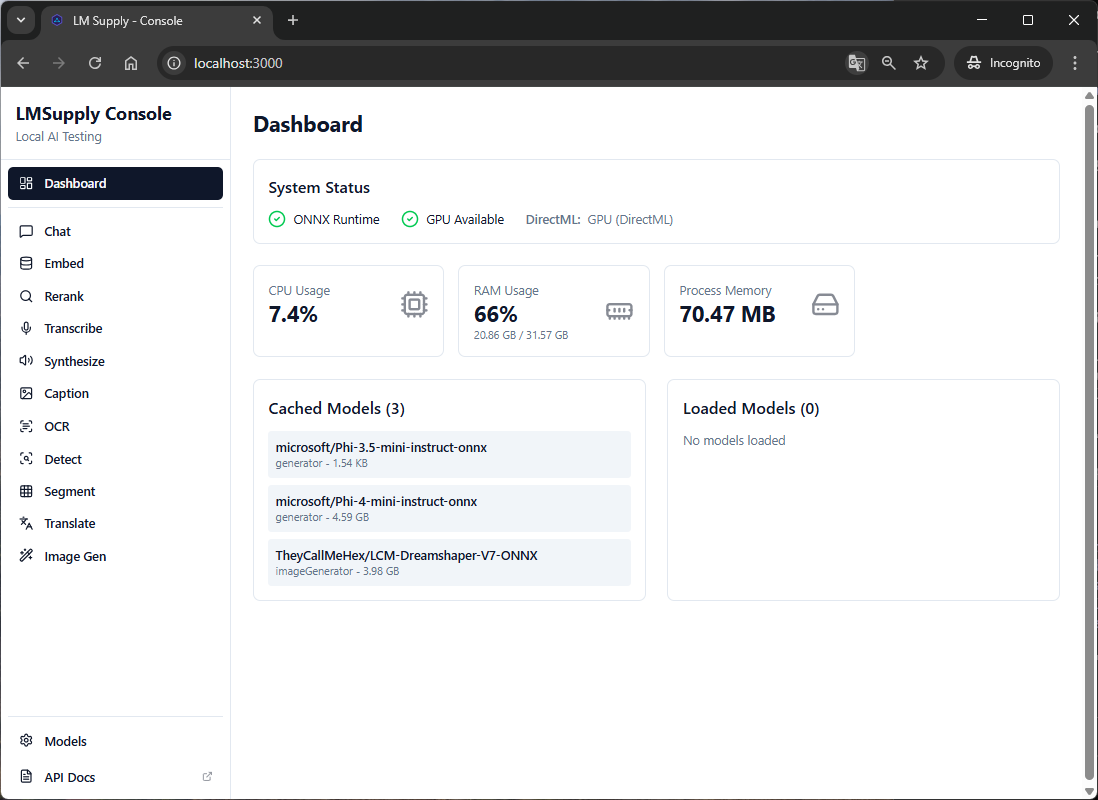
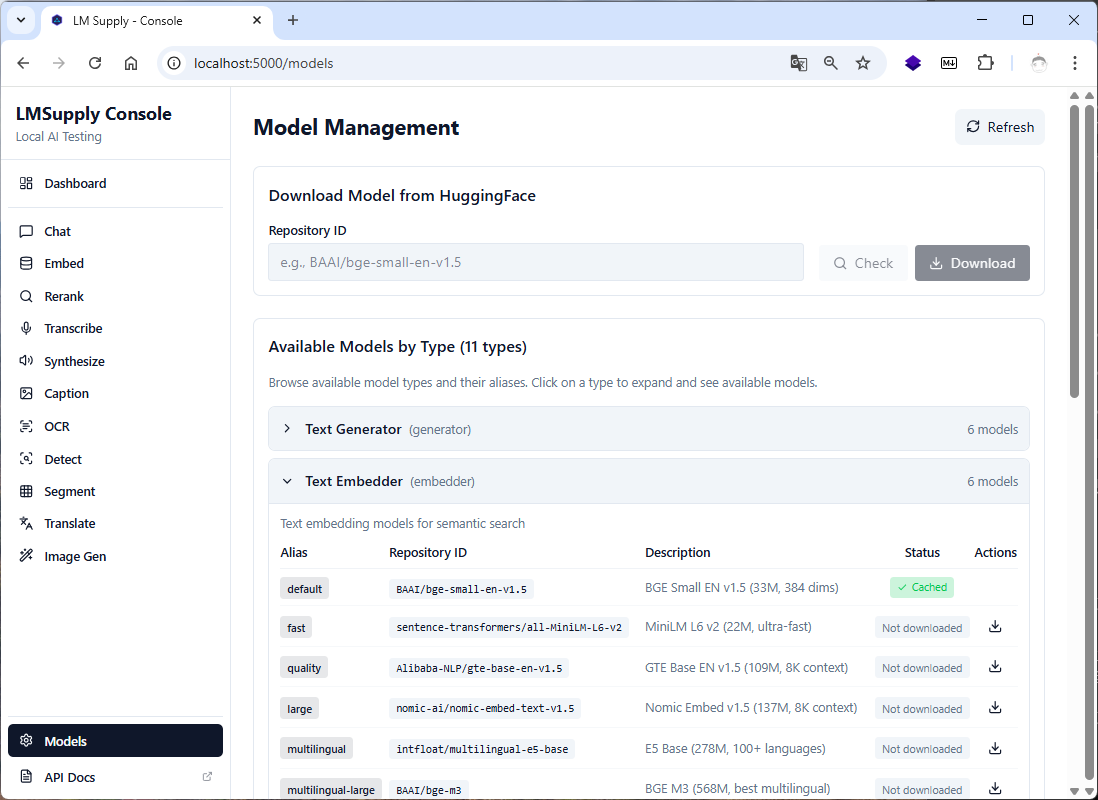
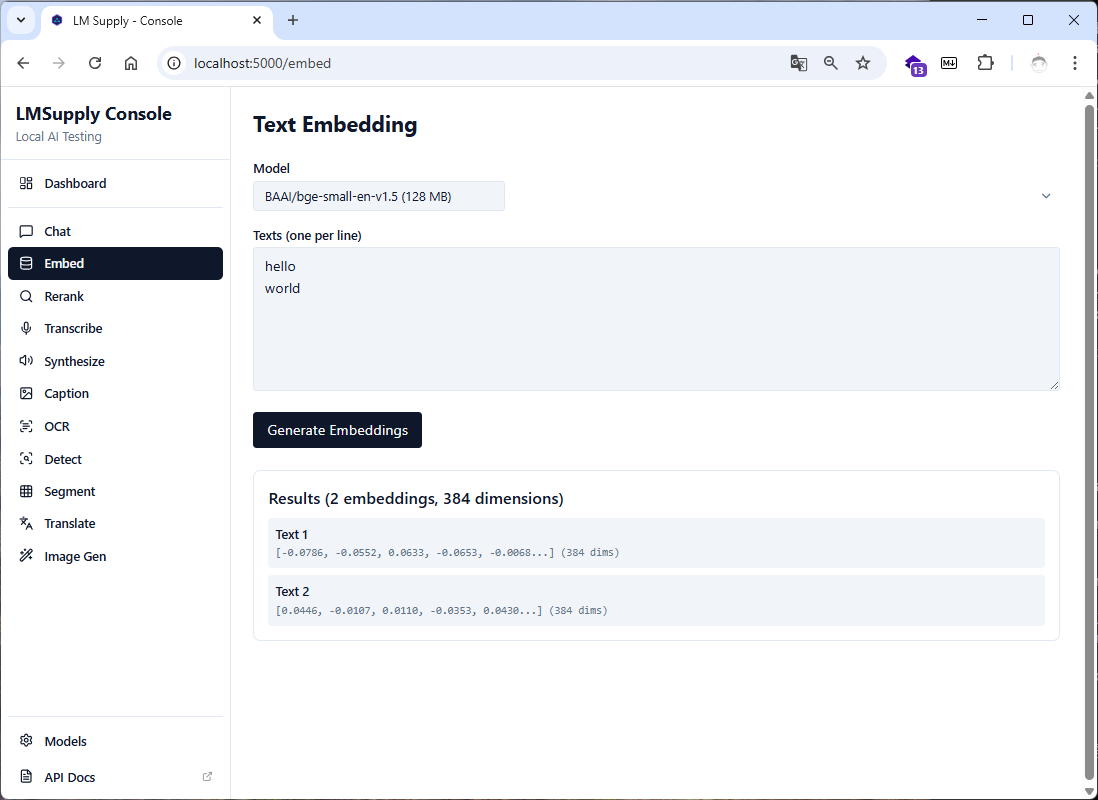
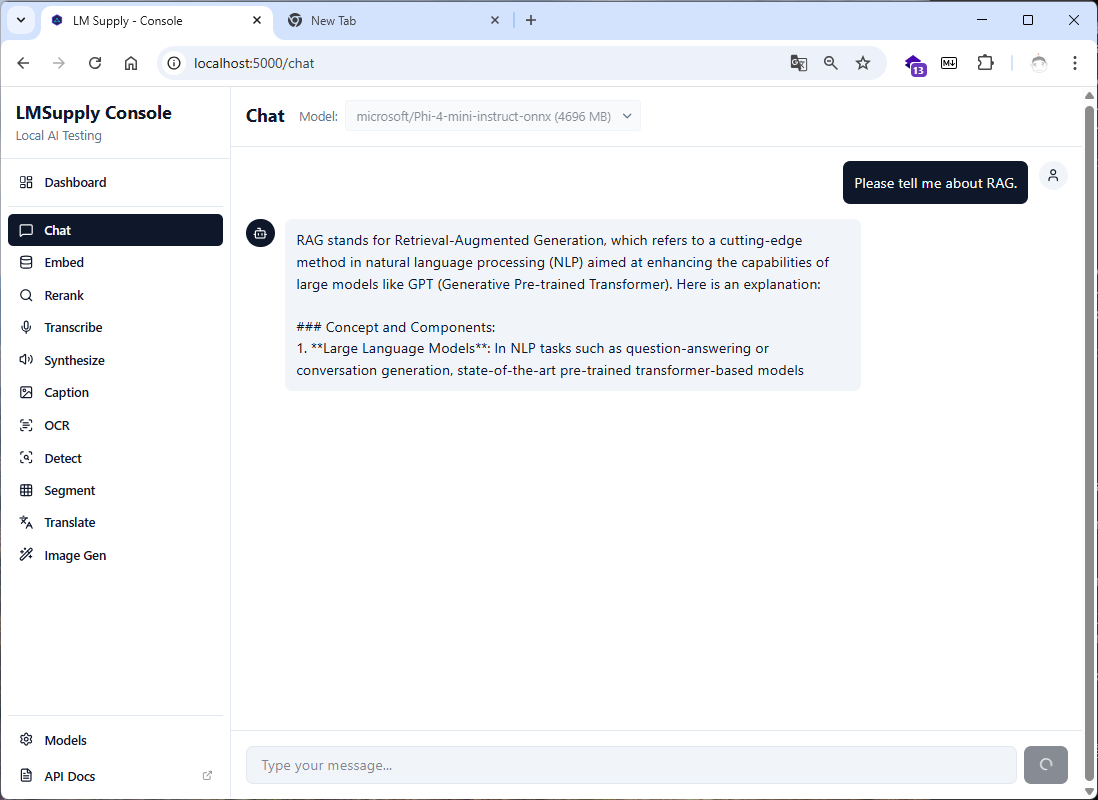
Start small. Download what you need. Run locally.
// This is all you need. No setup. No configuration. No API keys.
await using var model = await LocalEmbedder.LoadAsync("auto");  // Hardware-optimized selection
float[] embedding = await model.EmbedAsync("Hello, world!");
LMSupply is designed around three core principles:
🪶 Minimal Footprint
Your application ships with zero bundled models. The base package is tiny. Models, tokenizers, and runtime components are downloaded only when first requested and cached for reuse.
⚡ Lazy Everything
First run:  LoadAsync("default") → Downloads model → Caches → Runs inference
Next runs:  LoadAsync("default") → Uses cached model → Runs inference instantly
No pre-download scripts. No model management. Just use it.
🎯 Zero Boilerplate
Traditional approach (pseudocode):
// ❌ Without LMSupply: 50+ lines of setup
var tokenizer = LoadTokenizer(modelPath);
var session = new InferenceSession(modelPath, sessionOptions);
var inputIds = tokenizer.Encode(text);
var attentionMask = CreateAttentionMask(inputIds);
var inputs = new List<NamedOnnxValue> { ... };
var outputs = session.Run(inputs);
var embeddings = PostProcess(outputs);
// ... error handling, pooling, normalization, cleanup ...
// ✅ With LMSupply: 2 lines
await using var model = await LocalEmbedder.LoadAsync("default");
float[] embedding = await model.EmbedAsync("Hello, world!");
Packages
| Package | Description | Status |
|---|---|---|
| LMSupply.Embedder | Text → Vector embeddings (ONNX + GGUF; Describe — name, backend and licence of what an id loads) |  |
| LMSupply.Reranker | Semantic reranking for search (GetDownloadSizeBytesAsync; Describe — name, backend and licence of what an id loads, GGUF aliases included) |  |
| LMSupply.Generator | Text generation & chat (ONNX + GGUF) |  |
| LMSupply.Captioner | Image → Text captioning (default/quality Florence-2 with brief/detailed/paragraph captions · fast ViT-GPT2; GetDownloadSizeBytesAsync) |  |
| LMSupply.Ocr | Document OCR (GetDownloadSizeBytesAsync per language) |  |
| LMSupply.Detector | Object detection |  |
| LMSupply.Segmenter | Image segmentation |  |
| LMSupply.Translator | Neural machine translation |  |
| LMSupply.Transcriber | Speech → Text (Whisper) |  |
| LMSupply.Synthesizer | Text → Speech (Piper) |  |
| LMSupply.Llama | Shared llama-server management for GGUF |  |
| LMSupply.Generator.Onnx | Optional ONNX Runtime GenAI backend for LMSupply.Generator (ONNX models such as Phi, CUDA). Not needed for GGUF. Enable with OnnxGeneratorBackend.Register() once at startup |  |
| LMSupply.ImageGenerator | Text → Image (Latent Consistency Models, 2–4 steps; CUDA / CoreML). Entry point: LocalImageGenerator.LoadAsync("default") |  |
Shared infrastructure, pulled in by the packages above — you do not reference these directly: LMSupply.Core (HuggingFace download, cache, GPU execution providers), LMSupply.Text.Core (tokenization and vocabularies) and LMSupply.Vision.Core (image loading and preprocessing for the captioner and OCR).
Quick Start
Text Embeddings
using LMSupply.Embedder;
using LMSupply.Embedder.Utils; // EmbedderModelRegistry

// Use "auto" for hardware-optimized model selection
await using var model = await LocalEmbedder.LoadAsync("auto");

// Single text
float[] embedding = await model.EmbedAsync("Hello, world!");

// Batch processing
float[][] embeddings = await model.EmbedAsync(new[]
{
    "First document",
    "Second document",
    "Third document"
});

// Similarity
float similarity = LocalEmbedder.CosineSimilarity(embeddings[0], embeddings[1]);

// Store this next to the vectors: it changes when, and only when, a release changes
// the vectors this model id produces (then re-embed) — see docs/embedder.md
string revision = model.VectorSpaceRevision!;
// ...or before loading, from the cached files alone (null when that is not enough to know)
string? early = await LocalEmbedder.GetVectorSpaceRevisionAsync("default");

// GGUF models (via llama-server) - Auto-detected by repo name pattern
await using var ggufModel = await LocalEmbedder.LoadAsync("nomic-ai/nomic-embed-text-v1.5-GGUF");
float[] ggufEmbedding = await ggufModel.EmbedAsync("Hello from GGUF!");
// "<org>/<model>-GGUF" takes the base model's query/passage prefixes from the catalog (0.72.1+)
float[] ggufQuery = await ggufModel.EmbedQueryAsync("what is GGUF?");   // "search_query: what is GGUF?"

// Before the first download: what a first load would fetch, for a consent screen (0 for a local path)
long bytes = await LocalEmbedder.GetDownloadSizeBytesAsync("default");
bool cached = LocalEmbedder.IsModelDownloaded("default");
string? license = EmbedderModelRegistry.Default.Resolve("default").License;   // "MIT"
Every built-in Embedder, Reranker, Captioner and OCR model carries the licence of its weights on its registry entry
(ModelInfo.License; OcrModelInfo.License for a detection + recognition pair). For an ONNX conversion it is the licence
of the model it converts, which the conversion's own card often leaves out.
A loaded model is also a Microsoft.Extensions.AI IEmbeddingGenerator<string, Embedding<float>>, so a library that takes
the standard contract needs no adapter. The generator does not own the model. For models trained with query/passage
prefixes (E5), use one generator per side:
using LMSupply.Embedder;
using Microsoft.Extensions.AI;

await using var e5 = await LocalEmbedder.LoadAsync("multilingual-e5-small");
IEmbeddingGenerator<string, Embedding<float>> documents = e5.AsEmbeddingGenerator(EmbeddingTextKind.Passage);
IEmbeddingGenerator<string, Embedding<float>> queries = e5.AsEmbeddingGenerator(EmbeddingTextKind.Query);

var stored = await documents.GenerateAsync(["First document", "Second document"]);
var probe = await queries.GenerateAsync(["which document is first?"], new EmbeddingGenerationOptions { Dimensions = 256 });
Semantic Reranking
using LMSupply.Reranker;

await using var reranker = await LocalReranker.LoadAsync("default");

var results = await reranker.RerankAsync(
    query: "What is machine learning?",
    documents: new[]
    {
        "Machine learning is a subset of artificial intelligence...",
        "The weather today is sunny and warm...",
        "Deep learning uses neural networks..."
    },
    topK: 2
);

foreach (var result in results)
{
    Console.WriteLine($"[{result.Score:F4}] {result.Document}");
}
Text Generation
using LMSupply.Generator;
using LMSupply.Generator.Models;   // ChatMessage, GenerationOptions
using LMSupply.Llama.Server;       // LlamaServerPool

// GGUF models — native tool calling support via llama-server
await using var model = await LocalGenerator.LoadAsync("gguf:auto");  // Hardware-optimized (Qwen3 pool)

await foreach (var token in model.GenerateAsync("Hello, my name is"))
{
    Console.Write(token);
}

// Chat with tool calling support (--jinja enabled)
var messages = new[]
{
    ChatMessage.System("You are a helpful assistant."),
    ChatMessage.User("Explain quantum computing simply.")
};

await foreach (var token in model.GenerateChatAsync(messages))
{
    Console.Write(token);
}

// Why it ended, what it cost and how fast the server ran it (llama-server; reasoning tokens included)
var result = await model.GenerateChatCompleteResultAsync(messages);
Console.WriteLine($"{result.FinishReason} · {result.Usage.CompletionTokens} tokens · {result.Timings?.CompletionTokensPerSecond:F1} tok/s");

// Builder form
var generator = await TextGeneratorBuilder.Create()
    .WithDefaultModel()  // Hardware-aware: a GGUF model sized to the host (CUDA / Metal / Vulkan / CPU)
    .BuildAsync();

string response = await generator.GenerateCompleteAsync("What is machine learning?");

// Fallback chain — try candidates in order, load first that succeeds
await using var robust = await LocalGenerator.LoadWithFallbackChainAsync(
    ["gguf:phi-4-mini", "gguf:qwen3-default"],
    onFailure: (id, ex) => Console.WriteLine($"Skipped {id}: {ex.Message}"));

// Quality floor — prefer a specific model in 'auto' selection, fall back if unavailable
var options = new GeneratorOptions { PreferredAutoModelId = "gguf:phi-4-mini" };
await using var preferred = await LocalGenerator.LoadAsync("auto", options);

// Interactive use — when nothing fits VRAM, take the smallest model instead of the largest the RAM holds
await using var responsive = await LocalGenerator.LoadAsync(
    "auto", new GeneratorOptions { AutoSelectionGoal = AutoSelectionGoal.Responsive });

// Consent gate — true only when the load with the same id and options downloads nothing;
// GetDownloadSizeBytesAsync is what that load fetches on this host ("auto" resolved like the load)
if (!LocalGenerator.IsModelDownloaded("auto", options)
    && !AskUserToDownload(await LocalGenerator.GetDownloadSizeBytesAsync("auto", options)))
    return;

// Switching GGUF models on one GPU — stop the servers no model uses (dispose the old model first)
await LlamaServerPool.Instance.ReleaseIdleAsync();
A GGUF model whose llama-server exits (killed, crashed, out of memory) gets a new server on its next call. The call that saw it die throws InferenceBackendExitedException, which carries the server's ExitCode and RecentLog (its last output lines). LlamaServerProcess.RecentLog is readable directly too.
Each llama-server LMSupply launches requires its own random key, so other processes and users on the same machine cannot call it; LMSupply's own requests carry it. A host that starts LlamaServerProcess itself and calls Info.BaseUrl sends Authorization: Bearer <LlamaServerProcess.ApiKey> (or sets LlamaServerConfig.RequireApiKey = false).
Translation
using LMSupply.Translator;

await using var translator = await LocalTranslator.LoadAsync("ko-en");

// Translate Korean to English
var result = await translator.TranslateAsync("안녕하세요, 세계!");
Console.WriteLine(result.TranslatedText); // "Hello, world!"

// Batch translation
var results = await translator.TranslateBatchAsync(new[]
{
    "첫 번째 문장입니다.",
    "두 번째 문장입니다."
});
foreach (var r in results)
    Console.WriteLine(r.TranslatedText);
Speech Recognition (Transcriber)
using LMSupply.Transcriber;

await using var transcriber = await LocalTranscriber.LoadAsync("default");

// Transcribe audio file
var result = await transcriber.TranscribeAsync("audio.wav");
Console.WriteLine(result.Text);
Console.WriteLine($"Language: {result.Language}");

// Who said what: speaker labels per segment (local diarization)
var meeting = await transcriber.TranscribeAsync("meeting.wav", new TranscribeOptions { Diarize = true, MaxSpeakers = 5 });
foreach (var segment in meeting.Segments)
    Console.WriteLine($"{segment.Speaker}: {segment.Text}");
// MaxSpeakers bounds the estimate (attendees); NumSpeakers forces an exact count and splits a voice to reach it.
// The diarization models download on first use; to fetch them at an install step instead, load with
// new TranscriberOptions { PreloadDiarization = true }. LocalTranscriber.IsDiarizationDownloadedAsync() checks the cache.
// For a consent screen: LocalTranscriber.GetDownloadSizeBytesAsync(options) is what that load downloads (the quantization it
// picks, plus the pair when PreloadDiarization is set) — TranscriberModelInfo.SizeBytes is the full-precision export's size —
// and LocalTranscriber.IsModelDownloadedAsync(options) whether the model's files are already on disk.

// Streaming transcription
await foreach (var segment in transcriber.TranscribeStreamingAsync("audio.wav"))
{
    Console.WriteLine($"[{segment.Start:F2}s] {segment.Text}");
}
Text-to-Speech (Synthesizer)
Known issue — the output is not yet intelligible speech. The synthesizer has no text-to-phoneme step: it maps letters to fixed ids instead of the phoneme ids the Piper voices were trained on, so what comes out is voice-like noise (a Whisper transcript of "The weather is beautiful today." read back "tube of warrior practitioner"), and text in non-Latin scripts comes out as near-silence. Loading, voice selection and the audio API work; the speech itself does not yet. Every use of
LocalSynthesizer/ISynthesizerModelreportsLMSUPPLY001([Experimental], an error by default) until it does; suppress that one id to use the package anyway.
using LMSupply.Synthesizer;

#pragma warning disable LMSUPPLY001 // the known issue above — opt in knowingly
await using var synthesizer = await LocalSynthesizer.LoadAsync("default");

// Synthesize and save to file
await synthesizer.SynthesizeToFileAsync("Hello, world!", "output.wav");

// Get audio samples
var result = await synthesizer.SynthesizeAsync("Hello!");
Console.WriteLine($"Duration: {result.DurationSeconds:F2}s");
Console.WriteLine($"Real-time factor: {result.RealTimeFactor:F1}x");
Available Models
Updated: 2026-03 based on MTEB leaderboard and community benchmarks
Embedder (ONNX)
| Alias | Model | Dims | Params | Context | Best For |
|---|---|---|---|---|---|
default | bge-m3 | 1024 | 568M | 8192 | SOTA multilingual, 100+ languages (v0.34+) |
quality | bge-m3 | 1024 | 568M | 8192 | Same as default; for pipelines that pin quality tier |
fast | multilingual-e5-small | 384 | 118M | 512 | Lightweight multilingual, low latency |
large | multilingual-e5-large | 1024 | 560M | 512 | Highest dense quality, 100+ languages |
Embedder (GGUF via llama-server)
GGUF models are auto-detected by -GGUF or _gguf in repo name, or .gguf file extension.
| Model Repository | Dims | Context | Best For |
|---|---|---|---|
nomic-ai/nomic-embed-text-v1.5-GGUF | 768 | 8K | Long context, matryoshka |
BAAI/bge-small-en-v1.5-GGUF | 384 | 512 | Compact and fast |
BAAI/bge-base-en-v1.5-GGUF | 768 | 512 | Quality balance |
| Any HuggingFace GGUF embedding repo | varies | varies | Custom models |
Reranker (ONNX)
| Alias | Model | Params | Context | Best For |
|---|---|---|---|---|
default | ms-marco-MiniLM-L-6-v2 | 22M | 512 | Balanced speed/quality |
fast | ms-marco-TinyBERT-L-2-v2 | 4.4M | 512 | Ultra-low latency |
quality | bge-reranker-base | 278M | 512 | Higher accuracy |
large | bge-reranker-large | 560M | 512 | Best accuracy |
multilingual | bge-reranker-v2-m3 | 568M | 8192 | Long docs, 100+ languages |
quality and large were trained on English and Chinese; for other languages use multilingual or multilingual-fast.
Reranker (GGUF via llama-server)
The alias multilingual-fast loads bge-reranker-v2-m3 as a Q4_K_M GGUF (~440MB instead of ~2.3GB, and a fraction of the CPU latency).
GGUF reranker models are auto-detected by -GGUF or _gguf in repo name.
| Model Repository | Context | Best For |
|---|---|---|
gpustack/bge-reranker-v2-m3-GGUF | 8K | Multilingual, long docs (Q4_K_M: 438 MB) |
Scores are on the same 0..1 scale as the ONNX route, and LocalReranker.IsModelDownloaded /
DownloadModelAsync accept the same GGUF ids LoadAsync does. See the Reranker Guide.
Generator
Platform-based defaults (default and auto delegate to this matrix):
| Platform | Selected backend | Selected model |
|---|---|---|
| Windows + NVIDIA | GGUF (llama.cpp CUDA) | Qwen3 via gguf:auto (VRAM-aware) |
| Windows + AMD/Intel GPU (Arc, Radeon) | GGUF (llama.cpp Vulkan) | Qwen3 via gguf:auto (VRAM-aware) |
| Windows / Linux CPU-only / integrated GPU (Iris Xe, APU) | GGUF (llama.cpp CPU) | Qwen3 via gguf:auto (RAM-aware) |
| Linux + discrete GPU | GGUF (llama.cpp; CUDA on NVIDIA, CPU/ROCm on AMD) | Qwen3 via gguf:auto |
| macOS (Apple Silicon) | GGUF (llama.cpp Metal) | Qwen3 via gguf:auto |
LoadAsync("default")andLoadAsync("auto")both route through this matrix. For explicit selection, usegguf:*aliases, ONNX aliases, or a direct HuggingFace repo ID.
ONNX aliases (explicit only — auto/default never select ONNX; CUDA or CPU). These need a reference to
LMSupply.Generator.Onnx and a one-time OnnxGeneratorBackend.Register() call (namespace LMSupply.Generator.Onnx)
before the first ONNX load:
| Alias | Model | Params | Context | License | Notes |
|---|---|---|---|---|---|
phi-4-mini | Phi-4-mini-instruct | 3.8B | 16K | MIT | Smallest FC-capable ONNX model |
fast | Phi-4-mini-instruct | 3.8B | 16K | MIT | Same as phi-4-mini |
quality | phi-4 | 14B | 16K | MIT | Best reasoning |
phi-3.5-mini | Phi-3.5-mini-instruct | 3.8B | 128K | MIT | Long context (legacy) |
GGUF aliases (via llama-server):
Gemma 4와 Qwen3 시리즈 중심 레지스트리. gguf:auto(와 "default"/"auto" — 같은 규칙)는 qwen3 auto-pool (qwen3-fast/default/balanced/quality)에서 VRAM에 맞는 가장 큰 모델을, VRAM이 부족하면 시스템 RAM 예산(시스템 RAM − 4 GB, 최대 절반)에 맞는 가장 큰 모델을 자동 선택합니다(GeneratorOptions.AutoSelectionGoal = Responsive 면 그 경로에서 가장 작은 모델). 선택은 요청한 MaxContextLength 기준입니다. Provider = ExecutionProvider.Cpu 를 명시하면 시스템 RAM만 보고 GPU를 탐지하지 않습니다. Gemma 4 aliases는 명시적으로 지정하거나 하드코딩된 워크로드에 사용하세요.
Gemma 4 aliases (Apache 2.0, 멀티모달, 네이티브 function calling; llama.cpp b8672+ 필요):
| Alias | Model | Params | Quant | Size | VRAM Target |
|---|---|---|---|---|---|
gguf:gemma4-fast | Gemma 4 E2B Instruct | 2.3B | Q4_K_M | ~3.1 GB | <4GB iGPU/mobile |
gguf:gemma4-default | Gemma 4 E4B Instruct | 4.5B | Q4_0 | ~4.6 GB | 4-8GB |
gguf:gemma4-balanced | Gemma 4 E4B Instruct | 4.5B | Q8_0 | ~7.5 GB | 8-16GB (RTX 3060 12GB 등) |
gguf:gemma4-quality | Gemma 4 26B A4B (MoE) | 26B (4B active) | Q4_0 | ~13.6 GB | 16-20GB |
gguf:gemma4-large | Gemma 4 31B Instruct | 31B | Q4_0 | ~16.8 GB | 20-48GB |
Qwen3/3.5/3.6 aliases (Apache 2.0, ChatML, thinking mode; gguf:auto pool):
| Alias | Model | Params | Quant | Size | VRAM Target | Notes |
|---|---|---|---|---|---|---|
gguf:auto | Hardware-optimized (qwen3 pool) | varies | varies | varies | Auto-select | |
gguf:qwen3-fast | Qwen 3.5 2B Instruct | 2B | Q4_K_M | ~1.5 GB | <3GB | |
gguf:qwen3-default | Qwen 3.5 4B Instruct | 4B | Q4_K_M | ~3.0 GB | 4-6GB | thinking ON by default |
gguf:qwen3-balanced | Qwen3 8B Instruct | 8B | Q4_K_M | ~5.0 GB | 6-10GB | |
gguf:qwen3-quality | Qwen 3.6 35B A3B Instruct (IQ4_XS, MoE) | 35B (3B active) | IQ4_XS | ~17.7 GB | 20-24GB | thinking ON by default |
gguf:qwen3-large | Qwen 3.6 35B A3B Instruct (Q4_K_M, MoE) | 35B (3B active) | Q4_K_M | ~22.1 GB | 24GB+ | thinking ON; auto-pool excluded |
Other aliases:
| Alias | Model | Params | Quant | Size | VRAM Target |
|---|---|---|---|---|---|
gguf:phi-4-mini | Phi-4 Mini Instruct | 3.8B | Q4_K_M | ~2.4 GB | <4GB |
gguf:qwen2.5-7b | Qwen 2.5 7B Instruct | 7.6B | Q4_K_M | ~4.7 GB | 6-8GB |
gguf:xlarge | Qwen 3.5 122B A10B (MoE, split) | 122B (10B active) | Q4_K_M | ~76.5 GB (3 shards) | 48GB+ server |
Translator
| Alias | Direction | Model | Best For |
|---|---|---|---|
default | Korean → English | OPUS-MT | Same as ko-en |
ko-en | Korean → English | OPUS-MT | Korean translation |
ja-en | Japanese → English | OPUS-MT | Japanese translation |
zh-en | Chinese → English | OPUS-MT | Chinese translation |
Transcriber (Whisper, Parakeet)
| Alias | Model | Params | Size | WER | Best For |
|---|---|---|---|---|---|
fast | Whisper Tiny | 39M | ~150MB | 7.6% | Ultra-fast transcription |
default | Whisper Base | 74M | ~290MB | 5.0% | Balanced speed/quality |
quality | Whisper Small | 244M | ~970MB | 3.4% | Higher accuracy |
medium | Whisper Medium.en | 769M | ~3GB | 2.9% | English, word-level timestamps |
large | Whisper Large V3 | 1.5B | ~6GB | 2.5% | Best accuracy |
turbo | Whisper Large V3 Turbo | 809M | ~3.2GB | 2.7% | Near-V3 quality, much faster |
distil | Distil-Whisper Large V3 | 756M | ~3GB | 2.8% | Fast distilled model, English |
large-ko | Whisper Large V3 Turbo (Korean fine-tune) | 809M | ~3.2GB | — | Korean speech |
english | Whisper Base.en | 74M | ~290MB | 4.3% | English-optimized |
parakeet-tdt | NVIDIA Parakeet TDT 0.6B v3 (int8, not Whisper) | 600M | ~670MB | — | Fast CPU transcription, 25 European languages; no translation |
Synthesizer (Piper TTS)
| Alias | Voice | Language | Sample Rate | Voice license |
|---|---|---|---|---|
default | LJSpeech | en-US | 22050 Hz | Public domain |
lessac | Lessac | en-US | 22050 Hz | Blizzard 2013 research (non-commercial) |
fast | Ryan | en-US | 16000 Hz | CC BY-NC-SA 4.0 |
quality | Amy | en-US | 22050 Hz | Unspecified |
british | Semaine | en-GB | 22050 Hz | CC BY-NC-SA 4.0 |
korean | KSS | ko-KR | 22050 Hz | CC BY-NC-SA 4.0 |
chinese | Huayan | zh-CN | 22050 Hz | Unknown |
Piper's code is MIT; each voice carries the license of its recordings (SynthesizerModelInfo.License), and most are
non-commercial. default is the one voice an application may ship without a license review.
Adaptive Model Selection ("auto" mode)
Use "auto" to let LMSupply select the optimal model based on your hardware:
// Hardware-optimized model selection
await using var embedder = await LocalEmbedder.LoadAsync("auto");
await using var generator = await LocalGenerator.LoadAsync("auto");      // GGUF on every host (same rule as "gguf:auto")
await using var reranker = await LocalReranker.LoadAsync("auto");
LMSupply detects your hardware and selects models accordingly:
Embedder, Reranker and Generator
- Embedder — not tier-based:
LocalEmbedder.LoadAsync("auto")selects the largest model whose estimated size fits the VRAM budget. Candidates (largest first): BGE-M3 (568M), multilingual-e5-large (560M), nomic-embed-text-v1.5 (137M), multilingual-e5-small (118M). Falls back to multilingual-e5-small when nothing fits. - Generator —
auto/defaultnever pick an ONNX model; they use the GGUFgguf:autorule (see GGUF Models below). - Reranker — by hardware tier:
| Performance Tier | Hardware | Reranker (auto) |
|---|---|---|
| Low | CPU only or GPU <4GB | ms-marco-MiniLM-L-6-v2 (22M) |
| Medium | GPU 4-8GB, or CPU with 16GB+ RAM | bge-reranker-base (278M) — or multilingual-fast (GGUF bge-reranker-v2-m3) when a llama-server binary is already cached (auto never downloads one) |
| High | GPU 8-16GB | bge-reranker-v2-m3 (568M) |
| Ultra | GPU 16GB+ | bge-reranker-v2-m3 (568M) |
GGUF Models (via gguf:auto)
gguf:auto selects from the Qwen3 auto-pool (qwen3-fast, qwen3-default, qwen3-balanced, qwen3-quality) based on VRAM. Models with thinking-enabled-by-default generate reasoning before the answer. Two independent controls:
Thinking = ThinkingMode.Off— tells the model not to think at all (forwardsenable_thinking=falseto the chat template), so it answers directly and spends no tokens on reasoning. Best for latency/cost.ThinkingMode.Auto(default) keeps the model's own default;ThinkingMode.Onforces it on.FilterReasoningTokens = true— lets the model think but strips the<think>...</think>block from the returned text (reasoning is still generated). Use when you want the reasoning to happen but not surface.
// Direct answer, no reasoning tokens (chat path):
var opts = new GenerationOptions { Thinking = ThinkingMode.Off };
Low-end/quantized models (the FallbackToSmallest tier below) are prone to degenerate run-on. GenerationOptions exposes standard anti-repetition samplers (DryMultiplier, RepeatLastN, NoRepeatNgramSize) and AdaptiveSamplingPolicy restores a safe repetition-penalty floor for presets that ship it disabled (Qwen3/Gemma4 use RepetitionPenalty=1.0). MaxTokens is a hard output cap enforced on both backends. See docs/generator.md.
| Performance Tier | Free VRAM | Selected Model | Notes |
|---|---|---|---|
| Low | CPU or <3GB | gguf:qwen3-fast (Qwen 3.5 2B) | FallbackToSmallest |
| Medium | 4-6GB | gguf:qwen3-default (Qwen 3.5 4B) | thinking ON |
| High | 6-10GB | gguf:qwen3-balanced (Qwen3 8B) | |
| Ultra | 20-24GB | gguf:qwen3-quality (Qwen 3.6 35B MoE) | thinking ON |
Platform-based routing:
LoadAsync("default")andLoadAsync("auto")both select the model for the current host on the GGUF/llama.cpp backend — CUDA on NVIDIA, Metal on Apple Silicon, Vulkan on AMD/Intel GPUs, CPU otherwise (v0.67.0: the ONNX/DirectML branch for Windows discrete AMD/Intel GPUs is gone with the DirectML provider; those GPUs use Vulkan). Usegguf:*aliases or ONNX aliases for explicit control.
Key benefits:
- Zero configuration - Just use
"auto", no hardware research needed - Optimal performance - Larger models on capable hardware
- Graceful degradation - Smaller models on limited hardware
- Backward compatible - Existing aliases (
"default","fast","quality") still work
GPU Acceleration
GPU acceleration is automatic for GGUF models — LMSupply detects your hardware and downloads the
matching llama-server build and its CUDA runtime on first use, so a machine with only the NVIDIA driver
installed gets the GPU for generation, GGUF embedders and GGUF rerankers.
ONNX sessions (the default embedder, reranker, OCR, Whisper transcriber, captioner, …) are different:
LMSupply provisions the ONNX Runtime binaries, but the CUDA execution provider also needs the CUDA 12
runtime and cuDNN 9 installed on the machine (CUDA_PATH), which LMSupply does not download. Without them
ExecutionProvider.Auto runs those sessions on CPU and says so once per process in Trace
(CUDA skipped (missing: …) / Active=CPUExecutionProvider). A driver-only NVIDIA laptop is the common
case — check Trace before assuming the GPU is in use.
Detection priority (ONNX sessions): CUDA (if the CUDA runtime is installed) → CoreML → CPU
Detection priority (GGUF/llama-server): CUDA → Metal → Vulkan → CPU, runtime bundled
DirectML removed (0.67.0). ONNX Runtime 1.25+ ships no DirectML execution provider and the
Microsoft.ML.OnnxRuntime.DirectMLpackage line ends at 1.24.4, so no build of LMSupply on the current runtime (1.30.0) can provision it.ExecutionProvider.DirectMLis obsolete: an explicit request throwsNotSupportedExceptionon every path (ONNX session, GenAI, llama-server), andAutono longer tries it — on a Windows machine without CUDA, ONNX sessions run on CPU and the library says so once per process inTrace. GGUF/llama-server paths still use the GPU through Vulkan (LlamaBackendSelector). A machine that had cached the 1.24.4 native from an older release was running a managed 1.30.0 runtime against a 1.24.4 provider binary, which is not a supported combination; it moves to CPU for ONNX sessions on upgrade.
// Auto-detect (default) - uses GPU if available, falls back to CPU
var auto = new EmbedderOptions { Provider = ExecutionProvider.Auto };

// Force specific provider
var cuda = new EmbedderOptions { Provider = ExecutionProvider.Cuda };     // NVIDIA
var coreMl = new EmbedderOptions { Provider = ExecutionProvider.CoreML }; // macOS
var cpu = new EmbedderOptions { Provider = ExecutionProvider.Cpu };       // CPU only
ExecutionProvider.Cpu also keeps the GPU out of the process: the hardware probe (NVML, which loads the CUDA driver
library with it) runs only for a GPU or Auto choice, so a CPU load leaves the NVIDIA driver libraries unloaded.
HardwareProfile.For(provider) is the profile a load with that provider works with — for Cpu, system memory and a
CPU tier without a GPU probe. ModelPreferences.ForProvider(provider) ranks ONNX quantizations from that profile.
Verify GPU Detection
using LMSupply.Runtime;

// Quick summary (returns formatted string)
Console.WriteLine(EnvironmentDetector.GetEnvironmentSummary());

// Or access individual properties
var gpu = EnvironmentDetector.DetectGpu();
var provider = EnvironmentDetector.GetRecommendedProvider();

Console.WriteLine($"Provider: {provider}");
Console.WriteLine($"CUDA Available: {gpu.Vendor == GpuVendor.Nvidia && gpu.CudaDriverVersionMajor >= 11}");
Console.WriteLine($"Direct3D 12 GPU: {gpu.DirectMLSupported}"); // hardware only — drives Vulkan for llama-server, not an ONNX provider
Troubleshooting GPU Issues
Do NOT install ONNX Runtime packages manually. LMSupply handles runtime binary management automatically via lazy downloading.
If you have conflicting packages installed, remove them:
dotnet remove package Microsoft.ML.OnnxRuntime
dotnet remove package Microsoft.ML.OnnxRuntime.Gpu
dotnet remove package Microsoft.ML.OnnxRuntime.DirectML
For NVIDIA CUDA support, ensure you have:
- NVIDIA GPU drivers installed (enough for GGUF models — the llama-server CUDA runtime is downloaded for you)
- For ONNX sessions: the CUDA 12 runtime and cuDNN 9 installed on the machine (see GPU Acceleration); LMSupply provisions the ONNX Runtime GPU build, tried first as
cuda12when the driver reports CUDA 12
If inference behaves as though a different provider/version is active than the one you last
requested, check RuntimeManager.Instance.ActuallyLoadedRuntimePath — a native runtime binary
only ever loads once per process for a given library name, so a provider/version switch
requested after something else already loaded that library can silently not take effect. This
differs from RuntimeManager.Instance.ActiveProvider/CurrentVersion, which report what was
last requested, not necessarily what is actually resident.
To fail loudly on that conflict instead of silently keeping the resident binary, set
RuntimeManagerOptions.FailOnRuntimeConflict = true: EnsureRuntimeAsync/
CheckAndApplyUpdateAsync then throw NativeLibraryConflictException for the specific call that
would have conflicted, naming the requested and resident paths. This is opt-in and off by default
— it never unloads or replaces the already-loaded binary (native libraries are never unloaded
mid-process), it only decides whether the conflicting request fails instead of no-op'ing.
using LMSupply.Runtime;

var manager = new RuntimeManager(new RuntimeManagerOptions { FailOnRuntimeConflict = true });
// Throws NativeLibraryConflictException if a prior EnsureRuntimeAsync call (in this process)
// already loaded a different binary under the same native library name.
await manager.EnsureRuntimeAsync("onnxruntime", provider: "cuda12");
In Auto mode (provider: null, the zero-config default), a conflict stops the provider
fallback chain immediately instead of being treated as "this provider failed, try the next
one" — every provider in the chain shares the same native library name, so it would conflict
identically on each attempt, and silently falling through could otherwise mask the very
conflict FailOnRuntimeConflict exists to surface.
Logging & Diagnostics
LMSupply emits operational logs (model auto-selection, GPU layer offload decisions, VRAM warnings, runtime download progress) via System.Diagnostics.Trace.TraceInformation / TraceWarning. These do not automatically surface in Microsoft.Extensions.Logging (ILogger) pipelines — Trace.* writes to Trace.Listeners, which is a separate channel.
To surface LMSupply diagnostics in an ILogger sink (Serilog, Console logging, Application Insights, etc.), attach LMSupplyTraceListener at host startup:
using System.Diagnostics;          // TraceEventType
using LMSupply.Diagnostics;
using Microsoft.Extensions.Logging;

var logger = loggerFactory.CreateLogger("LMSupply");
LMSupplyTraceListener.Attach((message, severity) =>
    logger.Log(severity switch
    {
        TraceEventType.Warning => LogLevel.Warning,
        TraceEventType.Error   => LogLevel.Error,
        _                      => LogLevel.Information
    }, message));
After attaching, the following diagnostic events become visible in your standard logging pipeline:
- Auto model selection (
[EmbedderModelRegistry] Auto-selecting model for VRAM: ...) - Llama-server GPU layer decisions (
[LlamaServerGeneratorModel] Auto partial offload: 18/32 layers on GPUorCPU-only fallback: 0/32 layers ...) - Runtime binary download progress
- VRAM budget warnings (when
LMSUPPLY_VRAM_BUDGET_MBoverrides take effect)
VRAM Budget Override
LMSupply caps GPU model loading using min(total × (1 - margin), free × 0.95). To override the computed budget with an absolute value (megabytes), set the environment variable LMSUPPLY_VRAM_BUDGET_MB before process start:
# Force 8 GB budget regardless of GPU free/total
LMSUPPLY_VRAM_BUDGET_MB=8000
When set to a positive integer, the override is applied before any safety margin and feeds into all VRAM-aware decisions: model auto-selection, GGUF quantization variant selection, llama-server GPU layer count, and context length capping. If the override results in 0 GPU layers (full CPU fallback), LlamaOffloadTraceHelper emits a Trace.TraceWarning with the VRAM figures and the override hint — attach LMSupplyTraceListener per the section above to surface it.
Model auto-selection (VRAM- and RAM-aware)
gguf:auto picks the largest registered model that fits the available budget. Selection considers the GPU VRAM budget first; when no model fits VRAM it falls back to the system RAM budget (min(total RAM − 4 GB, total RAM × 0.5)) so a low-VRAM, high-RAM machine runs the largest model that fits RAM on CPU instead of dropping to the smallest. Only if neither budget fits does it fall back to the smallest model. GeneratorOptions.AutoSelectionGoal = AutoSelectionGoal.Responsive takes the smallest model on the RAM path instead (for interactive use on a host whose GPU cannot hold the model); a candidate that fits VRAM is chosen the same way under either goal. The chosen path is reported by ModelSelectionResult.Reason (Fits → VRAM, FitsInSystemRam → CPU/RAM, FallbackToSmallest). Example: an integrated-GPU laptop with 32 GB RAM selects an ~8B+ model on CPU rather than a 2B fallback.
Quantization-aware downscale (low-spec). After the model family is chosen, the download step picks the quantization file that fits the backend-consistent memory budget (VRAM on a GPU backend, RAM on a CPU/integrated-GPU backend), with the model's KV cache for the requested MaxContextLength (each registered alias records its cache layout, GgufModelInfo.KvCacheBytesPerToken). A capable host keeps the registry's default quant (e.g. Q4_K_M); a tight-memory host downscales to a smaller quant (Q4 → Q3 → Q2) so it loads instead of OOMing on the default. If no quant fits, the smallest is used with a Trace.TraceWarning (OOM risk surfaced, not silent). An explicit GPU pin or preferredQuantization is honored as-is. A cached quant is reused only when it fits the budget.
Which file was loaded. GetModelInfo() describes the file the load opened, not the alias's default: ModelId names the loaded quantization (gguf:gemma4-balanced loaded as Q4_0 reports Gemma 4 E4B Instruct (Q4_0)), RequestedModelId is the id you passed, RequestedFile / LoadedFile are the alias's default and the file opened, and IsQuantizationSubstituted says a smaller quant stood in — so a UI can show what runs and why.
Simulating a low-spec / RAM-limited host. Set LMSUPPLY_SYSTEM_RAM_MB to force the RAM budget below physical RAM (mirrors LMSUPPLY_VRAM_BUDGET_MB for VRAM). Use it to match a container/cgroup memory limit, or to exercise the downscale path on a high-RAM dev box:
LMSUPPLY_SYSTEM_RAM_MB=6000 # treat the host as having 6 GB RAM for model/quant selection
Integrated-GPU / low-VRAM auto backend demotion
Under ExecutionProvider.Auto the llama-server backend is chosen by LlamaBackendSelector (shared by the generator, embedder, and reranker, so all three agree). Vendor decides the GPU backend (NVIDIA→CUDA, Apple→Metal, AMD→ROCm/Vulkan, modern Intel iGPU→Vulkan), but a dedicated-VRAM backend is demoted to CPU when the VRAM budget is below LlamaBackendSelector.MinVramForGpuOffloadBytes (2 GB) — at that point zero model layers would offload, so spinning up a GPU llama-server binary only pays initialization cost for no acceleration. This is the common case on integrated GPUs (e.g. Intel Iris Xe, where DXGI reports ~128 MB of dedicated VRAM for a shared-memory adapter): Auto now picks CPU directly instead of downloading/initializing Vulkan for a 0-layer offload. Metal is exempt (Apple Silicon uses unified memory). Set LMSUPPLY_VRAM_BUDGET_MB to override the budget and keep the GPU backend; an explicit GPU pin (Cuda/CoreML) is never demoted.
Unusable-context CPU fallback (GGUF generator)
On a low-VRAM box the llama-server context can be clamped down to the 512-token floor — too small to be usable, which downstream consumers reject (chat bricks). How the generator handles this depends on GeneratorOptions.Provider:
ExecutionProvider.Auto(default) — Auto promises a working provider, so when the GPU backend can only offer the floored context it transparently falls back to CPU (RAM-bound, no VRAM clamp), re-acquiring the CPUllama-serverbinary and keeping the full requested context. The switch emits aTrace.TraceWarningand is visible on the model (IsGpuActive == false). This matches the embedder's existing CUDA→CPU fallback chain.- Explicit GPU pin (
Cuda/CoreML) — no silent provider swap: the load fails fast with anInvalidOperationExceptionnaming the floored context and VRAM cause, so the unusable configuration surfaces honestly instead of bricking later. PinExecutionProvider.Cpuor free VRAM to proceed.
How the context is sized — a requested MaxContextLength is kept when the weights (the GGUF file size + 10%), a 512 MB
buffer and the KV cache for that context fit in the VRAM budget; otherwise the context is reduced to what fits and
AdjustedContextLength reports it. The KV cache is sized from the file's attention metadata the way llama.cpp sizes it:
only layers that keep a cache count (hybrid models' recurrent layers and layers that share an earlier layer's cache do
not), each with its KV head count (grouped-query attention keeps far fewer KV heads than attention heads) and K/V head
dimensions, at the --cache-type-k/-v the server runs with; sliding-window layers add a fixed window instead of a
per-token cost. A file without that metadata falls back to a file-size estimate.
Counting a request's prompt — CountTokensAsync(messages, options) counts the prompt a chat request renders to,
with options.Tools, the tool choice and the thinking setting, as generation with the same options sends it. Tool
definitions often outweigh the messages (13 tools ≈ 1,600–2,100 tokens), so a request's fit against MaxContextLength
or an output budget is checked with this overload; CountTokensAsync(messages) counts the messages only. On GGUF the
server's own chat template renders the prompt (/apply-template) and the count equals the prompt_tokens the server
reports; on ONNX it is the prompt with the tool definitions generation injects. Generation trims old turns to fit the
context by the same count.
VRAM-budget telemetry — GetModelInfo() exposes the figures behind the decision so a consumer can classify why the context was floored (accurately-small VRAM vs an under-reported budget) without scraping log magic numbers:
GeneratorModelInfo field | Meaning |
|---|---|
AdjustedContextLength | The context sent to llama-server when the VRAM budget reduced it below the requested MaxContextLength; null when the request was kept. |
ContextFlooredByVram | true when the VRAM-derived estimate fell below the 512 floor (VRAM insufficient for a usable context) — a discrete signal, distinct from a legitimately small 512-token request. Set even when Auto then fell back to CPU. |
VramBudgetBytes | VramBudget.GetAvailableBytes result (after the LMSUPPLY_VRAM_BUDGET_MB override + safety margin). Null on the CPU path, and when the load shared a running server (below). |
VramFreeBytes / VramTotalBytes | GPU-reported free / total VRAM. Free memory is read when the load sizes its server (NVIDIA; other GPUs report the process-start reading), so a model in use is not counted as free. Null as for VramBudgetBytes. |
A running server of the same model is shared. Loading a model whose llama-server is still running (in use, or idle in
the pool after its last model was disposed) with a context it already holds shares that server — no new server, no
sizing. An idle server of the model with a smaller context is stopped before the new one is sized. Sizing a reload
against memory its own pooled server holds would give it a smaller context, or the CPU.
Thread Safety & Batch Processing
All LMSupply models are thread-safe for concurrent inference. ONNX Runtime's InferenceSession.Run() is thread-safe by design.
// Safe: Concurrent inference on the same model instance
await using var embedder = await LocalEmbedder.LoadAsync("default");

await Parallel.ForEachAsync(documents, async (doc, ct) =>
{
    var embedding = await embedder.EmbedAsync(doc, ct);
    // Process embedding...
});

// Or embed the whole batch in one call (EmbedAsync(IReadOnlyList<string>))
float[][] embeddings = await embedder.EmbedAsync(documents);
Performance tips:
- GPU inference: 2-4 concurrent operations typically optimal
- CPU inference: Match
MaxDegreeOfParallelismto core count - Prefer the batch overload
EmbedAsync(IReadOnlyList<string>)over one call per text for better throughput
Loading Models
LMSupply supports three ways to specify models:
1. Aliases (Recommended for beginners)
Use predefined aliases for quick access to popular models:
await using var embedder = await LocalEmbedder.LoadAsync("default");       // bge-m3 (multilingual SOTA)
await using var fitted = await LocalGenerator.LoadAsync("gguf:auto");        // Hardware-optimized
await using var qwen = await LocalGenerator.LoadAsync("gguf:qwen3-balanced"); // Qwen3 8B
2. HuggingFace Repository ID (Full control)
Use any HuggingFace repository directly with owner/repo-name format:
using LMSupply.Captioner;
using LMSupply.Detector;

// ONNX models - auto-discovers onnx/ subfolder
await using var embedder = await LocalEmbedder.LoadAsync("BAAI/bge-large-en-v1.5");
await using var reranker = await LocalReranker.LoadAsync("onnx-community/bge-reranker-v2-m3-ONNX");

// GGUF models - auto-detected by repo name pattern (-GGUF, _gguf)
await using var llama = await LocalGenerator.LoadAsync("bartowski/Llama-3.2-3B-Instruct-GGUF");
await using var coder = await LocalGenerator.LoadAsync("bartowski/Qwen2.5-Coder-7B-Instruct-GGUF");

// Vision models
await using var captioner = await LocalCaptioner.LoadAsync("Xenova/vit-gpt2-image-captioning"); // = "fast"; ViT-GPT2 and Florence-2 ("default") layouts are supported
await using var detector = await LocalDetector.LoadAsync("onnx-community/yolov8s");
The system automatically:
- Discovers ONNX files via HuggingFace API
- Detects subfolder structure (
onnx/,cpu/,cuda/) - Selects appropriate quantization variants (Q4_K_M for GGUF)
- Downloads required tokenizer and config files
3. Local Path
Use locally stored models:
// ONNX model directory
await using var embedder = await LocalEmbedder.LoadAsync("/path/to/model-directory");

// GGUF file directly
await using var generator = await LocalGenerator.LoadAsync("/path/to/model.gguf");
For private HuggingFace repositories, set the HF_TOKEN environment variable.
Custom Model Aliases
Every built-in alias table below can be extended with your own aliases — either from a config file (zero code) or programmatically.
Config file — ~/.lmsupply/aliases.json (relocate with the LMSUPPLY_ALIASES_FILE
environment variable). Top-level keys are per-module domains; loading is fail-soft
(a typo or a conflict with a system alias is skipped with a Trace warning, never a crash):
{
  "generator": { "my-writer": "gguf:qwen3-quality" },
  "embedder":  { "my-embed": "BAAI/bge-m3" }
}
Domains: generator, embedder, reranker, captioner, transcriber, translator,
synthesizer, segmenter, detector, imagegenerator, ocr-detection, ocr-recognition.
// Zero consumer code needed after the file exists:
await using var generator = await LocalGenerator.LoadAsync("my-writer");
Programmatic — each module exposes its registry; runtime registrations override
file entries (last write wins). Alias names may not shadow system aliases
(default, auto, ...) and may not contain : (reserved for variant qualifiers):
LocalGenerator.Registry.RegisterAlias("my-writer", "gguf:qwen3-quality");
LocalEmbedder.Registry.RegisterAlias("my-embed", "BAAI/bge-m3");
Model Caching
Models are cached following HuggingFace Hub conventions:
-
Default:
~/.cache/huggingface/hub -
Environment variables:
HF_HUB_CACHE,HF_HOME, orXDG_CACHE_HOME -
Manual override:
new EmbedderOptions { CacheDirectory = "/path/to/cache" } -
One copy per machine: leave
CacheDirectoryunset to share models — every app on the machine (and every other Hugging Face tool) then reads and writes the same cache, so a model is downloaded once. A per-appCacheDirectorygives that app its own copy of every model it uses; setHF_HUB_CACHEonce instead when the shared location itself must move. -
Shared with other Hugging Face tools: the cache uses the hub layout, not just its location, so a model downloaded by LMSupply is found by
huggingface_huband the other way round:models--{org}--{name}/ blobs/{id} file content; id = the SHA-256 of an LFS file, else its Git blob id (RepoFile.BlobId) refs/main the commit "main" resolved to (no trailing newline) snapshots/{commit}/{path} relative link to ../../blobs/{id} .lmsupply/manifests/ LMSupply's own download records ({commit}.json, {commit}__{subfolder}.json)A download resolves the revision to a commit (
/api/models/{repo}/revision/{revision}; skipped when the revision already is a commit id) and fetches each file at that commit intoblobs/, then links it intosnapshots/{commit}/. Where links cannot be created (Windows without developer mode) the blob is moved into the snapshot instead — one copy on disk — and a blob that was already in the cache (another tool's) is reused without a request, and copied rather than moved. When the commit cannot be obtained (offline, an error,DisableAutoDownload), the download writes plain files tosnapshots/{revision}/exactly as earlier versions did. GGUF models (Generator, Embedder, Reranker) are written the same way; the private trees earlier versions used for Embedder and Reranker GGUF files (gguf-embeddings/,gguf-rerankers/) and existingsnapshots/main/directories are still read, and nothing is moved out of them.IsModelDownloaded, the loaders andCacheManager.ModelFileExistslook in every one of these places;CacheManager.GetSnapshotDirectoriesreturns the snapshot directories looked in, in order. -
Other tools' files are never modified. A snapshot is LMSupply's own when LMSupply recorded a download into it (a manifest) or when it is named after a revision (
snapshots/main/, which only LMSupply writes); any other snapshot is read only.CacheManager.DeleteModel(cacheDir, repoId)deletes only what LMSupply owns: its snapshots (in a commit snapshot shared with another tool, only the files its manifests list), the blobs that no remaining snapshot links to, the refs naming a removed snapshot, and.lmsupply/. The repository directory is removed only when it ends up empty.CacheManager.GetTotalCacheSizecounts a linked blob once.
Reclaiming space. A release that changes where a model's files are read from can leave the old copy
next to the new one (0.63.0 did — see the changelog). CacheManager.FindReclaimable(cacheDir) lists the
root copies whose byte-identical twin in a subfolder is what the loader reads; nothing else is ever
listed — never a link, and never a file in another tool's snapshot. CacheManager.Reclaim(cacheDir, list) deletes
them and returns the bytes freed:
var cacheDir = CacheManager.GetDefaultCacheDirectory();
var duplicates = CacheManager.FindReclaimable(cacheDir);          // dry run: RepoId, Path, Size, TwinPath, Reason
long freed = CacheManager.Reclaim(cacheDir, duplicates);           // re-checks each entry before deleting
Offline / air-gapped use
Set DisableAutoDownload = true on a package's options to serve models from the cache only: a model
that is not cached throws ModelNotFoundException, and no network request is made — including for a
model cached long ago, whose repository file list is read from the cache rather than fetched again.
The same mode is available directly as new HuggingFaceDownloader(cacheDir, localFilesOnly: true) and
new ModelPathResolver(cacheDir, localFilesOnly: true) (the local_files_only mode of huggingface_hub).
Populate the cache once on a connected machine (e.g. LocalReranker.DownloadModelAsync) and copy it over.
DisableAutoDownload on a model's options covers model files only. ONNX models (Embedder, Reranker, Transcriber,
OCR, …) also need the native ONNX Runtime, which LMSupply provisions from nuget.org into its runtime cache on first
use. The package reference deliberately leaves the native files out, so they are not in your build output. To keep the
runtime off the network too, configure the process-wide runtime manager once, before the first model load:
using LMSupply.Runtime;

RuntimeManager.Configure(new RuntimeManagerOptions
{
    // Ship the runtime with the app: the files of the Microsoft.ML.OnnxRuntime package's runtimes/<rid>/native folder.
    RuntimeDirectory = Path.Combine(AppContext.BaseDirectory, "ort-native"),

    // Or: use the runtime cache only, and throw on a cache miss instead of downloading.
    // DisableAutoDownload = true,

    // Optional: an exact version. It is never resolved from nuget.org and never auto-updated.
    // PinnedVersion = "1.30.0",
});
RuntimeDirectory: the runtime is loaded from there, and nothing is looked up, downloaded or updated. The directory must hold every library the provider needs. A CPU-only bundle serves CPU, the Auto provider chain moves past GPU providers it cannot serve, and an explicit GPU request fails with the missing file named. Take the files from theMicrosoft.ML.OnnxRuntimepackage (same version as the managed assembly LMSupply references) for each RID you ship.DisableAutoDownload: the runtime comes from the runtime cache (see Non-HF Artifacts below). A miss throwsModelLoadException, and no version lookup or background update check is made. Without a pin, an older cached version stands in when the expected one is absent (with a warning). WithPinnedVersion, only that version is accepted.PinnedVersion: fixes the version even when the managed assembly's version cannot be read (trimming, Native AOT), which would otherwise fall back to the latest version on nuget.org.
Configure throws once the runtime manager exists, which happens at the first model load. Call it at startup.
Behind a proxy
Every download LMSupply makes — models, ONNX runtime packages, llama-server builds — uses the .NET default proxy, so the standard settings apply to all of them at once:
- Environment:
HTTPS_PROXY/HTTP_PROXY(e.g.http://user:password@proxy.internal:8080) andNO_PROXY. On Windows the system proxy is used when these are unset. - In code, before the first load:
using System.Net;

HttpClient.DefaultProxy = new WebProxy("http://proxy.internal:8080")
{
    Credentials = new NetworkCredential("user", "password")
};
Model and ONNX runtime downloads retry transient failures (timeouts, 5xx, dropped connections) and resume an interrupted file where it stopped.
Non-HF Artifacts (runtimes, llama-server builds)
Non-model artifacts — ONNX runtime packages and llama-server builds — are deliberately kept outside the HuggingFace hub, under a single LMSupply root:
- Default:
%LOCALAPPDATA%/LMSupply/cache(platform equivalent elsewhere) - Relocate everything: set the
LMSUPPLY_CACHE_DIRenvironment variable (read at first use — set it before the first model load) - Programmatic (llama-server):
new LlamaServerUpdateOptions { CacheDirectory = "..." }when constructingLlamaServerUpdateServicedirectly
Superseded llama-server builds are reclaimed automatically: after a successful update only the
active build plus MaxVersionsToKeep rollback candidates are kept, and orphaned build
directories from older LMSupply versions are swept by the background update check. If
AutoDownloadUpdates is disabled, the sweep runs on update activation only.
Requirements
Software
- .NET 10.0+
- Windows 10+, Linux, or macOS 11+
Hardware (Recommended)
| Use Case | RAM | GPU VRAM | Notes |
|---|---|---|---|
| Embeddings | 4GB+ | Optional | CPU works fine for small models |
| Reranking | 8GB+ | 4GB+ | GPU recommended for large models |
| Text Generation | 16GB+ | 8GB+ | VRAM strongly recommended |
| Speech (Whisper) | 8GB+ | 4GB+ | GPU significantly faster |
| Vision (Detection/Captioning) | 8GB+ | 4GB+ | GPU recommended |
Minimum for "auto" mode:
- Any modern CPU with 8GB RAM
- For best experience: NVIDIA GPU with 8GB+ VRAM
Documentation
Getting Started
- Model Lifecycle - Loading, using, and disposing models
- GPU Providers - GPU acceleration and provider selection
- Memory Requirements - Model memory requirements and OOM prevention
- Troubleshooting - Common issues and solutions
Text & Language
- Embedder Guide - Text → Vector embeddings
- Reranker Guide - Semantic reranking
- Generator Guide - Text generation & chat
- Translator Guide - Neural machine translation
Vision
- Captioner Guide - Image → Text captioning
- OCR Guide - Document text recognition
- Detector Guide - Object detection
- Segmenter Guide - Image segmentation
Audio
- Transcriber Guide - Speech → Text (Whisper)
- Synthesizer Guide - Text → Speech (Piper)
License
MIT License - see LICENSE for details.
Similar repos


Languages
C#
88.5%
TypeScript
11.0%
.NET library for on-demand local AI model inference — zero bundled models, lazy loading, hardware-aware GPU/CPU selection, 10 task types including embeddings, generation, vision, and audio.
C#
12
667 commits
updated Oct 3, 2026
README
LMSupply
Local Model Supply for .NET — on-demand AI inference
Start small. Download what you need. Run locally.
// This is all you need. No setup. No configuration. No API keys.
await using var model = await LocalEmbedder.LoadAsync("auto");  // Hardware-optimized selection
float[] embedding = await model.EmbedAsync("Hello, world!");
LMSupply is designed around three core principles:
🪶 Minimal Footprint
Your application ships with zero bundled models. The base package is tiny. Models, tokenizers, and runtime components are downloaded only when first requested and cached for reuse.
⚡ Lazy Everything
First run:  LoadAsync("default") → Downloads model → Caches → Runs inference
Next runs:  LoadAsync("default") → Uses cached model → Runs inference instantly
No pre-download scripts. No model management. Just use it.
🎯 Zero Boilerplate
Traditional approach (pseudocode):
// ❌ Without LMSupply: 50+ lines of setup
var tokenizer = LoadTokenizer(modelPath);
var session = new InferenceSession(modelPath, sessionOptions);
var inputIds = tokenizer.Encode(text);
var attentionMask = CreateAttentionMask(inputIds);
var inputs = new List<NamedOnnxValue> { ... };
var outputs = session.Run(inputs);
var embeddings = PostProcess(outputs);
// ... error handling, pooling, normalization, cleanup ...
// ✅ With LMSupply: 2 lines
await using var model = await LocalEmbedder.LoadAsync("default");
float[] embedding = await model.EmbedAsync("Hello, world!");
Packages
| Package | Description | Status |
|---|---|---|
| LMSupply.Embedder | Text → Vector embeddings (ONNX + GGUF; Describe — name, backend and licence of what an id loads) | |
| LMSupply.Reranker | Semantic reranking for search (GetDownloadSizeBytesAsync; Describe — name, backend and licence of what an id loads, GGUF aliases included) | |
| LMSupply.Generator | Text generation & chat (ONNX + GGUF) | |
| LMSupply.Captioner | Image → Text captioning (default/quality Florence-2 with brief/detailed/paragraph captions · fast ViT-GPT2; GetDownloadSizeBytesAsync) | |
| LMSupply.Ocr | Document OCR (GetDownloadSizeBytesAsync per language) | |
| LMSupply.Detector | Object detection | |
| LMSupply.Segmenter | Image segmentation | |
| LMSupply.Translator | Neural machine translation | |
| LMSupply.Transcriber | Speech → Text (Whisper) | |
| LMSupply.Synthesizer | Text → Speech (Piper) | |
| LMSupply.Llama | Shared llama-server management for GGUF | |
| LMSupply.Generator.Onnx | Optional ONNX Runtime GenAI backend for LMSupply.Generator (ONNX models such as Phi, CUDA). Not needed for GGUF. Enable with OnnxGeneratorBackend.Register() once at startup | |
| LMSupply.ImageGenerator | Text → Image (Latent Consistency Models, 2–4 steps; CUDA / CoreML). Entry point: LocalImageGenerator.LoadAsync("default") | |
Shared infrastructure, pulled in by the packages above — you do not reference these directly: LMSupply.Core (HuggingFace download, cache, GPU execution providers), LMSupply.Text.Core (tokenization and vocabularies) and LMSupply.Vision.Core (image loading and preprocessing for the captioner and OCR).
Quick Start
Text Embeddings
using LMSupply.Embedder;
using LMSupply.Embedder.Utils; // EmbedderModelRegistry

// Use "auto" for hardware-optimized model selection
await using var model = await LocalEmbedder.LoadAsync("auto");

// Single text
float[] embedding = await model.EmbedAsync("Hello, world!");

// Batch processing
float[][] embeddings = await model.EmbedAsync(new[]
{
    "First document",
    "Second document",
    "Third document"
});

// Similarity
float similarity = LocalEmbedder.CosineSimilarity(embeddings[0], embeddings[1]);

// Store this next to the vectors: it changes when, and only when, a release changes
// the vectors this model id produces (then re-embed) — see docs/embedder.md
string revision = model.VectorSpaceRevision!;
// ...or before loading, from the cached files alone (null when that is not enough to know)
string? early = await LocalEmbedder.GetVectorSpaceRevisionAsync("default");

// GGUF models (via llama-server) - Auto-detected by repo name pattern
await using var ggufModel = await LocalEmbedder.LoadAsync("nomic-ai/nomic-embed-text-v1.5-GGUF");
float[] ggufEmbedding = await ggufModel.EmbedAsync("Hello from GGUF!");
// "<org>/<model>-GGUF" takes the base model's query/passage prefixes from the catalog (0.72.1+)
float[] ggufQuery = await ggufModel.EmbedQueryAsync("what is GGUF?");   // "search_query: what is GGUF?"

// Before the first download: what a first load would fetch, for a consent screen (0 for a local path)
long bytes = await LocalEmbedder.GetDownloadSizeBytesAsync("default");
bool cached = LocalEmbedder.IsModelDownloaded("default");
string? license = EmbedderModelRegistry.Default.Resolve("default").License;   // "MIT"
Every built-in Embedder, Reranker, Captioner and OCR model carries the licence of its weights on its registry entry
(ModelInfo.License; OcrModelInfo.License for a detection + recognition pair). For an ONNX conversion it is the licence
of the model it converts, which the conversion's own card often leaves out.
A loaded model is also a Microsoft.Extensions.AI IEmbeddingGenerator<string, Embedding<float>>, so a library that takes
the standard contract needs no adapter. The generator does not own the model. For models trained with query/passage
prefixes (E5), use one generator per side:
using LMSupply.Embedder;
using Microsoft.Extensions.AI;

await using var e5 = await LocalEmbedder.LoadAsync("multilingual-e5-small");
IEmbeddingGenerator<string, Embedding<float>> documents = e5.AsEmbeddingGenerator(EmbeddingTextKind.Passage);
IEmbeddingGenerator<string, Embedding<float>> queries = e5.AsEmbeddingGenerator(EmbeddingTextKind.Query);

var stored = await documents.GenerateAsync(["First document", "Second document"]);
var probe = await queries.GenerateAsync(["which document is first?"], new EmbeddingGenerationOptions { Dimensions = 256 });
Semantic Reranking
using LMSupply.Reranker;

await using var reranker = await LocalReranker.LoadAsync("default");

var results = await reranker.RerankAsync(
    query: "What is machine learning?",
    documents: new[]
    {
        "Machine learning is a subset of artificial intelligence...",
        "The weather today is sunny and warm...",
        "Deep learning uses neural networks..."
    },
    topK: 2
);

foreach (var result in results)
{
    Console.WriteLine($"[{result.Score:F4}] {result.Document}");
}
Text Generation
using LMSupply.Generator;
using LMSupply.Generator.Models;   // ChatMessage, GenerationOptions
using LMSupply.Llama.Server;       // LlamaServerPool

// GGUF models — native tool calling support via llama-server
await using var model = await LocalGenerator.LoadAsync("gguf:auto");  // Hardware-optimized (Qwen3 pool)

await foreach (var token in model.GenerateAsync("Hello, my name is"))
{
    Console.Write(token);
}

// Chat with tool calling support (--jinja enabled)
var messages = new[]
{
    ChatMessage.System("You are a helpful assistant."),
    ChatMessage.User("Explain quantum computing simply.")
};

await foreach (var token in model.GenerateChatAsync(messages))
{
    Console.Write(token);
}

// Why it ended, what it cost and how fast the server ran it (llama-server; reasoning tokens included)
var result = await model.GenerateChatCompleteResultAsync(messages);
Console.WriteLine($"{result.FinishReason} · {result.Usage.CompletionTokens} tokens · {result.Timings?.CompletionTokensPerSecond:F1} tok/s");

// Builder form
var generator = await TextGeneratorBuilder.Create()
    .WithDefaultModel()  // Hardware-aware: a GGUF model sized to the host (CUDA / Metal / Vulkan / CPU)
    .BuildAsync();

string response = await generator.GenerateCompleteAsync("What is machine learning?");

// Fallback chain — try candidates in order, load first that succeeds
await using var robust = await LocalGenerator.LoadWithFallbackChainAsync(
    ["gguf:phi-4-mini", "gguf:qwen3-default"],
    onFailure: (id, ex) => Console.WriteLine($"Skipped {id}: {ex.Message}"));

// Quality floor — prefer a specific model in 'auto' selection, fall back if unavailable
var options = new GeneratorOptions { PreferredAutoModelId = "gguf:phi-4-mini" };
await using var preferred = await LocalGenerator.LoadAsync("auto", options);

// Interactive use — when nothing fits VRAM, take the smallest model instead of the largest the RAM holds
await using var responsive = await LocalGenerator.LoadAsync(
    "auto", new GeneratorOptions { AutoSelectionGoal = AutoSelectionGoal.Responsive });

// Consent gate — true only when the load with the same id and options downloads nothing;
// GetDownloadSizeBytesAsync is what that load fetches on this host ("auto" resolved like the load)
if (!LocalGenerator.IsModelDownloaded("auto", options)
    && !AskUserToDownload(await LocalGenerator.GetDownloadSizeBytesAsync("auto", options)))
    return;

// Switching GGUF models on one GPU — stop the servers no model uses (dispose the old model first)
await LlamaServerPool.Instance.ReleaseIdleAsync();
A GGUF model whose llama-server exits (killed, crashed, out of memory) gets a new server on its next call. The call that saw it die throws InferenceBackendExitedException, which carries the server's ExitCode and RecentLog (its last output lines). LlamaServerProcess.RecentLog is readable directly too.
Each llama-server LMSupply launches requires its own random key, so other processes and users on the same machine cannot call it; LMSupply's own requests carry it. A host that starts LlamaServerProcess itself and calls Info.BaseUrl sends Authorization: Bearer <LlamaServerProcess.ApiKey> (or sets LlamaServerConfig.RequireApiKey = false).
Translation
using LMSupply.Translator;

await using var translator = await LocalTranslator.LoadAsync("ko-en");

// Translate Korean to English
var result = await translator.TranslateAsync("안녕하세요, 세계!");
Console.WriteLine(result.TranslatedText); // "Hello, world!"

// Batch translation
var results = await translator.TranslateBatchAsync(new[]
{
    "첫 번째 문장입니다.",
    "두 번째 문장입니다."
});
foreach (var r in results)
    Console.WriteLine(r.TranslatedText);
Speech Recognition (Transcriber)
using LMSupply.Transcriber;

await using var transcriber = await LocalTranscriber.LoadAsync("default");

// Transcribe audio file
var result = await transcriber.TranscribeAsync("audio.wav");
Console.WriteLine(result.Text);
Console.WriteLine($"Language: {result.Language}");

// Who said what: speaker labels per segment (local diarization)
var meeting = await transcriber.TranscribeAsync("meeting.wav", new TranscribeOptions { Diarize = true, MaxSpeakers = 5 });
foreach (var segment in meeting.Segments)
    Console.WriteLine($"{segment.Speaker}: {segment.Text}");
// MaxSpeakers bounds the estimate (attendees); NumSpeakers forces an exact count and splits a voice to reach it.
// The diarization models download on first use; to fetch them at an install step instead, load with
// new TranscriberOptions { PreloadDiarization = true }. LocalTranscriber.IsDiarizationDownloadedAsync() checks the cache.
// For a consent screen: LocalTranscriber.GetDownloadSizeBytesAsync(options) is what that load downloads (the quantization it
// picks, plus the pair when PreloadDiarization is set) — TranscriberModelInfo.SizeBytes is the full-precision export's size —
// and LocalTranscriber.IsModelDownloadedAsync(options) whether the model's files are already on disk.

// Streaming transcription
await foreach (var segment in transcriber.TranscribeStreamingAsync("audio.wav"))
{
    Console.WriteLine($"[{segment.Start:F2}s] {segment.Text}");
}
Text-to-Speech (Synthesizer)
Known issue — the output is not yet intelligible speech. The synthesizer has no text-to-phoneme step: it maps letters to fixed ids instead of the phoneme ids the Piper voices were trained on, so what comes out is voice-like noise (a Whisper transcript of "The weather is beautiful today." read back "tube of warrior practitioner"), and text in non-Latin scripts comes out as near-silence. Loading, voice selection and the audio API work; the speech itself does not yet. Every use of
LocalSynthesizer/ISynthesizerModelreportsLMSUPPLY001([Experimental], an error by default) until it does; suppress that one id to use the package anyway.
using LMSupply.Synthesizer;

#pragma warning disable LMSUPPLY001 // the known issue above — opt in knowingly
await using var synthesizer = await LocalSynthesizer.LoadAsync("default");

// Synthesize and save to file
await synthesizer.SynthesizeToFileAsync("Hello, world!", "output.wav");

// Get audio samples
var result = await synthesizer.SynthesizeAsync("Hello!");
Console.WriteLine($"Duration: {result.DurationSeconds:F2}s");
Console.WriteLine($"Real-time factor: {result.RealTimeFactor:F1}x");
Available Models
Updated: 2026-03 based on MTEB leaderboard and community benchmarks
Embedder (ONNX)
| Alias | Model | Dims | Params | Context | Best For |
|---|---|---|---|---|---|
default | bge-m3 | 1024 | 568M | 8192 | SOTA multilingual, 100+ languages (v0.34+) |
quality | bge-m3 | 1024 | 568M | 8192 | Same as default; for pipelines that pin quality tier |
fast | multilingual-e5-small | 384 | 118M | 512 | Lightweight multilingual, low latency |
large | multilingual-e5-large | 1024 | 560M | 512 | Highest dense quality, 100+ languages |
Embedder (GGUF via llama-server)
GGUF models are auto-detected by -GGUF or _gguf in repo name, or .gguf file extension.
| Model Repository | Dims | Context | Best For |
|---|---|---|---|
nomic-ai/nomic-embed-text-v1.5-GGUF | 768 | 8K | Long context, matryoshka |
BAAI/bge-small-en-v1.5-GGUF | 384 | 512 | Compact and fast |
BAAI/bge-base-en-v1.5-GGUF | 768 | 512 | Quality balance |
| Any HuggingFace GGUF embedding repo | varies | varies | Custom models |
Reranker (ONNX)
| Alias | Model | Params | Context | Best For |
|---|---|---|---|---|
default | ms-marco-MiniLM-L-6-v2 | 22M | 512 | Balanced speed/quality |
fast | ms-marco-TinyBERT-L-2-v2 | 4.4M | 512 | Ultra-low latency |
quality | bge-reranker-base | 278M | 512 | Higher accuracy |
large | bge-reranker-large | 560M | 512 | Best accuracy |
multilingual | bge-reranker-v2-m3 | 568M | 8192 | Long docs, 100+ languages |
quality and large were trained on English and Chinese; for other languages use multilingual or multilingual-fast.
Reranker (GGUF via llama-server)
The alias multilingual-fast loads bge-reranker-v2-m3 as a Q4_K_M GGUF (~440MB instead of ~2.3GB, and a fraction of the CPU latency).
GGUF reranker models are auto-detected by -GGUF or _gguf in repo name.
| Model Repository | Context | Best For |
|---|---|---|
gpustack/bge-reranker-v2-m3-GGUF | 8K | Multilingual, long docs (Q4_K_M: 438 MB) |
Scores are on the same 0..1 scale as the ONNX route, and LocalReranker.IsModelDownloaded /
DownloadModelAsync accept the same GGUF ids LoadAsync does. See the Reranker Guide.
Generator
Platform-based defaults (default and auto delegate to this matrix):
| Platform | Selected backend | Selected model |
|---|---|---|
| Windows + NVIDIA | GGUF (llama.cpp CUDA) | Qwen3 via gguf:auto (VRAM-aware) |
| Windows + AMD/Intel GPU (Arc, Radeon) | GGUF (llama.cpp Vulkan) | Qwen3 via gguf:auto (VRAM-aware) |
| Windows / Linux CPU-only / integrated GPU (Iris Xe, APU) | GGUF (llama.cpp CPU) | Qwen3 via gguf:auto (RAM-aware) |
| Linux + discrete GPU | GGUF (llama.cpp; CUDA on NVIDIA, CPU/ROCm on AMD) | Qwen3 via gguf:auto |
| macOS (Apple Silicon) | GGUF (llama.cpp Metal) | Qwen3 via gguf:auto |
LoadAsync("default")andLoadAsync("auto")both route through this matrix. For explicit selection, usegguf:*aliases, ONNX aliases, or a direct HuggingFace repo ID.
ONNX aliases (explicit only — auto/default never select ONNX; CUDA or CPU). These need a reference to
LMSupply.Generator.Onnx and a one-time OnnxGeneratorBackend.Register() call (namespace LMSupply.Generator.Onnx)
before the first ONNX load:
| Alias | Model | Params | Context | License | Notes |
|---|---|---|---|---|---|
phi-4-mini | Phi-4-mini-instruct | 3.8B | 16K | MIT | Smallest FC-capable ONNX model |
fast | Phi-4-mini-instruct | 3.8B | 16K | MIT | Same as phi-4-mini |
quality | phi-4 | 14B | 16K | MIT | Best reasoning |
phi-3.5-mini | Phi-3.5-mini-instruct | 3.8B | 128K | MIT | Long context (legacy) |
GGUF aliases (via llama-server):
Gemma 4와 Qwen3 시리즈 중심 레지스트리. gguf:auto(와 "default"/"auto" — 같은 규칙)는 qwen3 auto-pool (qwen3-fast/default/balanced/quality)에서 VRAM에 맞는 가장 큰 모델을, VRAM이 부족하면 시스템 RAM 예산(시스템 RAM − 4 GB, 최대 절반)에 맞는 가장 큰 모델을 자동 선택합니다(GeneratorOptions.AutoSelectionGoal = Responsive 면 그 경로에서 가장 작은 모델). 선택은 요청한 MaxContextLength 기준입니다. Provider = ExecutionProvider.Cpu 를 명시하면 시스템 RAM만 보고 GPU를 탐지하지 않습니다. Gemma 4 aliases는 명시적으로 지정하거나 하드코딩된 워크로드에 사용하세요.
Gemma 4 aliases (Apache 2.0, 멀티모달, 네이티브 function calling; llama.cpp b8672+ 필요):
| Alias | Model | Params | Quant | Size | VRAM Target |
|---|---|---|---|---|---|
gguf:gemma4-fast | Gemma 4 E2B Instruct | 2.3B | Q4_K_M | ~3.1 GB | <4GB iGPU/mobile |
gguf:gemma4-default | Gemma 4 E4B Instruct | 4.5B | Q4_0 | ~4.6 GB | 4-8GB |
gguf:gemma4-balanced | Gemma 4 E4B Instruct | 4.5B | Q8_0 | ~7.5 GB | 8-16GB (RTX 3060 12GB 등) |
gguf:gemma4-quality | Gemma 4 26B A4B (MoE) | 26B (4B active) | Q4_0 | ~13.6 GB | 16-20GB |
gguf:gemma4-large | Gemma 4 31B Instruct | 31B | Q4_0 | ~16.8 GB | 20-48GB |
Qwen3/3.5/3.6 aliases (Apache 2.0, ChatML, thinking mode; gguf:auto pool):
| Alias | Model | Params | Quant | Size | VRAM Target | Notes |
|---|---|---|---|---|---|---|
gguf:auto | Hardware-optimized (qwen3 pool) | varies | varies | varies | Auto-select | |
gguf:qwen3-fast | Qwen 3.5 2B Instruct | 2B | Q4_K_M | ~1.5 GB | <3GB | |
gguf:qwen3-default | Qwen 3.5 4B Instruct | 4B | Q4_K_M | ~3.0 GB | 4-6GB | thinking ON by default |
gguf:qwen3-balanced | Qwen3 8B Instruct | 8B | Q4_K_M | ~5.0 GB | 6-10GB | |
gguf:qwen3-quality | Qwen 3.6 35B A3B Instruct (IQ4_XS, MoE) | 35B (3B active) | IQ4_XS | ~17.7 GB | 20-24GB | thinking ON by default |
gguf:qwen3-large | Qwen 3.6 35B A3B Instruct (Q4_K_M, MoE) | 35B (3B active) | Q4_K_M | ~22.1 GB | 24GB+ | thinking ON; auto-pool excluded |
Other aliases:
| Alias | Model | Params | Quant | Size | VRAM Target |
|---|---|---|---|---|---|
gguf:phi-4-mini | Phi-4 Mini Instruct | 3.8B | Q4_K_M | ~2.4 GB | <4GB |
gguf:qwen2.5-7b | Qwen 2.5 7B Instruct | 7.6B | Q4_K_M | ~4.7 GB | 6-8GB |
gguf:xlarge | Qwen 3.5 122B A10B (MoE, split) | 122B (10B active) | Q4_K_M | ~76.5 GB (3 shards) | 48GB+ server |
Translator
| Alias | Direction | Model | Best For |
|---|---|---|---|
default | Korean → English | OPUS-MT | Same as ko-en |
ko-en | Korean → English | OPUS-MT | Korean translation |
ja-en | Japanese → English | OPUS-MT | Japanese translation |
zh-en | Chinese → English | OPUS-MT | Chinese translation |
Transcriber (Whisper, Parakeet)
| Alias | Model | Params | Size | WER | Best For |
|---|---|---|---|---|---|
fast | Whisper Tiny | 39M | ~150MB | 7.6% | Ultra-fast transcription |
default | Whisper Base | 74M | ~290MB | 5.0% | Balanced speed/quality |
quality | Whisper Small | 244M | ~970MB | 3.4% | Higher accuracy |
medium | Whisper Medium.en | 769M | ~3GB | 2.9% | English, word-level timestamps |
large | Whisper Large V3 | 1.5B | ~6GB | 2.5% | Best accuracy |
turbo | Whisper Large V3 Turbo | 809M | ~3.2GB | 2.7% | Near-V3 quality, much faster |
distil | Distil-Whisper Large V3 | 756M | ~3GB | 2.8% | Fast distilled model, English |
large-ko | Whisper Large V3 Turbo (Korean fine-tune) | 809M | ~3.2GB | — | Korean speech |
english | Whisper Base.en | 74M | ~290MB | 4.3% | English-optimized |
parakeet-tdt | NVIDIA Parakeet TDT 0.6B v3 (int8, not Whisper) | 600M | ~670MB | — | Fast CPU transcription, 25 European languages; no translation |
Synthesizer (Piper TTS)
| Alias | Voice | Language | Sample Rate | Voice license |
|---|---|---|---|---|
default | LJSpeech | en-US | 22050 Hz | Public domain |
lessac | Lessac | en-US | 22050 Hz | Blizzard 2013 research (non-commercial) |
fast | Ryan | en-US | 16000 Hz | CC BY-NC-SA 4.0 |
quality | Amy | en-US | 22050 Hz | Unspecified |
british | Semaine | en-GB | 22050 Hz | CC BY-NC-SA 4.0 |
korean | KSS | ko-KR | 22050 Hz | CC BY-NC-SA 4.0 |
chinese | Huayan | zh-CN | 22050 Hz | Unknown |
Piper's code is MIT; each voice carries the license of its recordings (SynthesizerModelInfo.License), and most are
non-commercial. default is the one voice an application may ship without a license review.
Adaptive Model Selection ("auto" mode)
Use "auto" to let LMSupply select the optimal model based on your hardware:
// Hardware-optimized model selection
await using var embedder = await LocalEmbedder.LoadAsync("auto");
await using var generator = await LocalGenerator.LoadAsync("auto");      // GGUF on every host (same rule as "gguf:auto")
await using var reranker = await LocalReranker.LoadAsync("auto");
LMSupply detects your hardware and selects models accordingly:
Embedder, Reranker and Generator
- Embedder — not tier-based:
LocalEmbedder.LoadAsync("auto")selects the largest model whose estimated size fits the VRAM budget. Candidates (largest first): BGE-M3 (568M), multilingual-e5-large (560M), nomic-embed-text-v1.5 (137M), multilingual-e5-small (118M). Falls back to multilingual-e5-small when nothing fits. - Generator —
auto/defaultnever pick an ONNX model; they use the GGUFgguf:autorule (see GGUF Models below). - Reranker — by hardware tier:
| Performance Tier | Hardware | Reranker (auto) |
|---|---|---|
| Low | CPU only or GPU <4GB | ms-marco-MiniLM-L-6-v2 (22M) |
| Medium | GPU 4-8GB, or CPU with 16GB+ RAM | bge-reranker-base (278M) — or multilingual-fast (GGUF bge-reranker-v2-m3) when a llama-server binary is already cached (auto never downloads one) |
| High | GPU 8-16GB | bge-reranker-v2-m3 (568M) |
| Ultra | GPU 16GB+ | bge-reranker-v2-m3 (568M) |
GGUF Models (via gguf:auto)
gguf:auto selects from the Qwen3 auto-pool (qwen3-fast, qwen3-default, qwen3-balanced, qwen3-quality) based on VRAM. Models with thinking-enabled-by-default generate reasoning before the answer. Two independent controls:
Thinking = ThinkingMode.Off— tells the model not to think at all (forwardsenable_thinking=falseto the chat template), so it answers directly and spends no tokens on reasoning. Best for latency/cost.ThinkingMode.Auto(default) keeps the model's own default;ThinkingMode.Onforces it on.FilterReasoningTokens = true— lets the model think but strips the<think>...</think>block from the returned text (reasoning is still generated). Use when you want the reasoning to happen but not surface.
// Direct answer, no reasoning tokens (chat path):
var opts = new GenerationOptions { Thinking = ThinkingMode.Off };
Low-end/quantized models (the FallbackToSmallest tier below) are prone to degenerate run-on. GenerationOptions exposes standard anti-repetition samplers (DryMultiplier, RepeatLastN, NoRepeatNgramSize) and AdaptiveSamplingPolicy restores a safe repetition-penalty floor for presets that ship it disabled (Qwen3/Gemma4 use RepetitionPenalty=1.0). MaxTokens is a hard output cap enforced on both backends. See docs/generator.md.
| Performance Tier | Free VRAM | Selected Model | Notes |
|---|---|---|---|
| Low | CPU or <3GB | gguf:qwen3-fast (Qwen 3.5 2B) | FallbackToSmallest |
| Medium | 4-6GB | gguf:qwen3-default (Qwen 3.5 4B) | thinking ON |
| High | 6-10GB | gguf:qwen3-balanced (Qwen3 8B) | |
| Ultra | 20-24GB | gguf:qwen3-quality (Qwen 3.6 35B MoE) | thinking ON |
Platform-based routing:
LoadAsync("default")andLoadAsync("auto")both select the model for the current host on the GGUF/llama.cpp backend — CUDA on NVIDIA, Metal on Apple Silicon, Vulkan on AMD/Intel GPUs, CPU otherwise (v0.67.0: the ONNX/DirectML branch for Windows discrete AMD/Intel GPUs is gone with the DirectML provider; those GPUs use Vulkan). Usegguf:*aliases or ONNX aliases for explicit control.
Key benefits:
- Zero configuration - Just use
"auto", no hardware research needed - Optimal performance - Larger models on capable hardware
- Graceful degradation - Smaller models on limited hardware
- Backward compatible - Existing aliases (
"default","fast","quality") still work
GPU Acceleration
GPU acceleration is automatic for GGUF models — LMSupply detects your hardware and downloads the
matching llama-server build and its CUDA runtime on first use, so a machine with only the NVIDIA driver
installed gets the GPU for generation, GGUF embedders and GGUF rerankers.
ONNX sessions (the default embedder, reranker, OCR, Whisper transcriber, captioner, …) are different:
LMSupply provisions the ONNX Runtime binaries, but the CUDA execution provider also needs the CUDA 12
runtime and cuDNN 9 installed on the machine (CUDA_PATH), which LMSupply does not download. Without them
ExecutionProvider.Auto runs those sessions on CPU and says so once per process in Trace
(CUDA skipped (missing: …) / Active=CPUExecutionProvider). A driver-only NVIDIA laptop is the common
case — check Trace before assuming the GPU is in use.
Detection priority (ONNX sessions): CUDA (if the CUDA runtime is installed) → CoreML → CPU
Detection priority (GGUF/llama-server): CUDA → Metal → Vulkan → CPU, runtime bundled
DirectML removed (0.67.0). ONNX Runtime 1.25+ ships no DirectML execution provider and the
Microsoft.ML.OnnxRuntime.DirectMLpackage line ends at 1.24.4, so no build of LMSupply on the current runtime (1.30.0) can provision it.ExecutionProvider.DirectMLis obsolete: an explicit request throwsNotSupportedExceptionon every path (ONNX session, GenAI, llama-server), andAutono longer tries it — on a Windows machine without CUDA, ONNX sessions run on CPU and the library says so once per process inTrace. GGUF/llama-server paths still use the GPU through Vulkan (LlamaBackendSelector). A machine that had cached the 1.24.4 native from an older release was running a managed 1.30.0 runtime against a 1.24.4 provider binary, which is not a supported combination; it moves to CPU for ONNX sessions on upgrade.
// Auto-detect (default) - uses GPU if available, falls back to CPU
var auto = new EmbedderOptions { Provider = ExecutionProvider.Auto };

// Force specific provider
var cuda = new EmbedderOptions { Provider = ExecutionProvider.Cuda };     // NVIDIA
var coreMl = new EmbedderOptions { Provider = ExecutionProvider.CoreML }; // macOS
var cpu = new EmbedderOptions { Provider = ExecutionProvider.Cpu };       // CPU only
ExecutionProvider.Cpu also keeps the GPU out of the process: the hardware probe (NVML, which loads the CUDA driver
library with it) runs only for a GPU or Auto choice, so a CPU load leaves the NVIDIA driver libraries unloaded.
HardwareProfile.For(provider) is the profile a load with that provider works with — for Cpu, system memory and a
CPU tier without a GPU probe. ModelPreferences.ForProvider(provider) ranks ONNX quantizations from that profile.
Verify GPU Detection
using LMSupply.Runtime;

// Quick summary (returns formatted string)
Console.WriteLine(EnvironmentDetector.GetEnvironmentSummary());

// Or access individual properties
var gpu = EnvironmentDetector.DetectGpu();
var provider = EnvironmentDetector.GetRecommendedProvider();

Console.WriteLine($"Provider: {provider}");
Console.WriteLine($"CUDA Available: {gpu.Vendor == GpuVendor.Nvidia && gpu.CudaDriverVersionMajor >= 11}");
Console.WriteLine($"Direct3D 12 GPU: {gpu.DirectMLSupported}"); // hardware only — drives Vulkan for llama-server, not an ONNX provider
Troubleshooting GPU Issues
Do NOT install ONNX Runtime packages manually. LMSupply handles runtime binary management automatically via lazy downloading.
If you have conflicting packages installed, remove them:
dotnet remove package Microsoft.ML.OnnxRuntime
dotnet remove package Microsoft.ML.OnnxRuntime.Gpu
dotnet remove package Microsoft.ML.OnnxRuntime.DirectML
For NVIDIA CUDA support, ensure you have:
- NVIDIA GPU drivers installed (enough for GGUF models — the llama-server CUDA runtime is downloaded for you)
- For ONNX sessions: the CUDA 12 runtime and cuDNN 9 installed on the machine (see GPU Acceleration); LMSupply provisions the ONNX Runtime GPU build, tried first as
cuda12when the driver reports CUDA 12
If inference behaves as though a different provider/version is active than the one you last
requested, check RuntimeManager.Instance.ActuallyLoadedRuntimePath — a native runtime binary
only ever loads once per process for a given library name, so a provider/version switch
requested after something else already loaded that library can silently not take effect. This
differs from RuntimeManager.Instance.ActiveProvider/CurrentVersion, which report what was
last requested, not necessarily what is actually resident.
To fail loudly on that conflict instead of silently keeping the resident binary, set
RuntimeManagerOptions.FailOnRuntimeConflict = true: EnsureRuntimeAsync/
CheckAndApplyUpdateAsync then throw NativeLibraryConflictException for the specific call that
would have conflicted, naming the requested and resident paths. This is opt-in and off by default
— it never unloads or replaces the already-loaded binary (native libraries are never unloaded
mid-process), it only decides whether the conflicting request fails instead of no-op'ing.
using LMSupply.Runtime;

var manager = new RuntimeManager(new RuntimeManagerOptions { FailOnRuntimeConflict = true });
// Throws NativeLibraryConflictException if a prior EnsureRuntimeAsync call (in this process)
// already loaded a different binary under the same native library name.
await manager.EnsureRuntimeAsync("onnxruntime", provider: "cuda12");
In Auto mode (provider: null, the zero-config default), a conflict stops the provider
fallback chain immediately instead of being treated as "this provider failed, try the next
one" — every provider in the chain shares the same native library name, so it would conflict
identically on each attempt, and silently falling through could otherwise mask the very
conflict FailOnRuntimeConflict exists to surface.
Logging & Diagnostics
LMSupply emits operational logs (model auto-selection, GPU layer offload decisions, VRAM warnings, runtime download progress) via System.Diagnostics.Trace.TraceInformation / TraceWarning. These do not automatically surface in Microsoft.Extensions.Logging (ILogger) pipelines — Trace.* writes to Trace.Listeners, which is a separate channel.
To surface LMSupply diagnostics in an ILogger sink (Serilog, Console logging, Application Insights, etc.), attach LMSupplyTraceListener at host startup:
using System.Diagnostics;          // TraceEventType
using LMSupply.Diagnostics;
using Microsoft.Extensions.Logging;

var logger = loggerFactory.CreateLogger("LMSupply");
LMSupplyTraceListener.Attach((message, severity) =>
    logger.Log(severity switch
    {
        TraceEventType.Warning => LogLevel.Warning,
        TraceEventType.Error   => LogLevel.Error,
        _                      => LogLevel.Information
    }, message));
After attaching, the following diagnostic events become visible in your standard logging pipeline:
- Auto model selection (
[EmbedderModelRegistry] Auto-selecting model for VRAM: ...) - Llama-server GPU layer decisions (
[LlamaServerGeneratorModel] Auto partial offload: 18/32 layers on GPUorCPU-only fallback: 0/32 layers ...) - Runtime binary download progress
- VRAM budget warnings (when
LMSUPPLY_VRAM_BUDGET_MBoverrides take effect)
VRAM Budget Override
LMSupply caps GPU model loading using min(total × (1 - margin), free × 0.95). To override the computed budget with an absolute value (megabytes), set the environment variable LMSUPPLY_VRAM_BUDGET_MB before process start:
# Force 8 GB budget regardless of GPU free/total
LMSUPPLY_VRAM_BUDGET_MB=8000
When set to a positive integer, the override is applied before any safety margin and feeds into all VRAM-aware decisions: model auto-selection, GGUF quantization variant selection, llama-server GPU layer count, and context length capping. If the override results in 0 GPU layers (full CPU fallback), LlamaOffloadTraceHelper emits a Trace.TraceWarning with the VRAM figures and the override hint — attach LMSupplyTraceListener per the section above to surface it.
Model auto-selection (VRAM- and RAM-aware)
gguf:auto picks the largest registered model that fits the available budget. Selection considers the GPU VRAM budget first; when no model fits VRAM it falls back to the system RAM budget (min(total RAM − 4 GB, total RAM × 0.5)) so a low-VRAM, high-RAM machine runs the largest model that fits RAM on CPU instead of dropping to the smallest. Only if neither budget fits does it fall back to the smallest model. GeneratorOptions.AutoSelectionGoal = AutoSelectionGoal.Responsive takes the smallest model on the RAM path instead (for interactive use on a host whose GPU cannot hold the model); a candidate that fits VRAM is chosen the same way under either goal. The chosen path is reported by ModelSelectionResult.Reason (Fits → VRAM, FitsInSystemRam → CPU/RAM, FallbackToSmallest). Example: an integrated-GPU laptop with 32 GB RAM selects an ~8B+ model on CPU rather than a 2B fallback.
Quantization-aware downscale (low-spec). After the model family is chosen, the download step picks the quantization file that fits the backend-consistent memory budget (VRAM on a GPU backend, RAM on a CPU/integrated-GPU backend), with the model's KV cache for the requested MaxContextLength (each registered alias records its cache layout, GgufModelInfo.KvCacheBytesPerToken). A capable host keeps the registry's default quant (e.g. Q4_K_M); a tight-memory host downscales to a smaller quant (Q4 → Q3 → Q2) so it loads instead of OOMing on the default. If no quant fits, the smallest is used with a Trace.TraceWarning (OOM risk surfaced, not silent). An explicit GPU pin or preferredQuantization is honored as-is. A cached quant is reused only when it fits the budget.
Which file was loaded. GetModelInfo() describes the file the load opened, not the alias's default: ModelId names the loaded quantization (gguf:gemma4-balanced loaded as Q4_0 reports Gemma 4 E4B Instruct (Q4_0)), RequestedModelId is the id you passed, RequestedFile / LoadedFile are the alias's default and the file opened, and IsQuantizationSubstituted says a smaller quant stood in — so a UI can show what runs and why.
Simulating a low-spec / RAM-limited host. Set LMSUPPLY_SYSTEM_RAM_MB to force the RAM budget below physical RAM (mirrors LMSUPPLY_VRAM_BUDGET_MB for VRAM). Use it to match a container/cgroup memory limit, or to exercise the downscale path on a high-RAM dev box:
LMSUPPLY_SYSTEM_RAM_MB=6000 # treat the host as having 6 GB RAM for model/quant selection
Integrated-GPU / low-VRAM auto backend demotion
Under ExecutionProvider.Auto the llama-server backend is chosen by LlamaBackendSelector (shared by the generator, embedder, and reranker, so all three agree). Vendor decides the GPU backend (NVIDIA→CUDA, Apple→Metal, AMD→ROCm/Vulkan, modern Intel iGPU→Vulkan), but a dedicated-VRAM backend is demoted to CPU when the VRAM budget is below LlamaBackendSelector.MinVramForGpuOffloadBytes (2 GB) — at that point zero model layers would offload, so spinning up a GPU llama-server binary only pays initialization cost for no acceleration. This is the common case on integrated GPUs (e.g. Intel Iris Xe, where DXGI reports ~128 MB of dedicated VRAM for a shared-memory adapter): Auto now picks CPU directly instead of downloading/initializing Vulkan for a 0-layer offload. Metal is exempt (Apple Silicon uses unified memory). Set LMSUPPLY_VRAM_BUDGET_MB to override the budget and keep the GPU backend; an explicit GPU pin (Cuda/CoreML) is never demoted.
Unusable-context CPU fallback (GGUF generator)
On a low-VRAM box the llama-server context can be clamped down to the 512-token floor — too small to be usable, which downstream consumers reject (chat bricks). How the generator handles this depends on GeneratorOptions.Provider:
ExecutionProvider.Auto(default) — Auto promises a working provider, so when the GPU backend can only offer the floored context it transparently falls back to CPU (RAM-bound, no VRAM clamp), re-acquiring the CPUllama-serverbinary and keeping the full requested context. The switch emits aTrace.TraceWarningand is visible on the model (IsGpuActive == false). This matches the embedder's existing CUDA→CPU fallback chain.- Explicit GPU pin (
Cuda/CoreML) — no silent provider swap: the load fails fast with anInvalidOperationExceptionnaming the floored context and VRAM cause, so the unusable configuration surfaces honestly instead of bricking later. PinExecutionProvider.Cpuor free VRAM to proceed.
How the context is sized — a requested MaxContextLength is kept when the weights (the GGUF file size + 10%), a 512 MB
buffer and the KV cache for that context fit in the VRAM budget; otherwise the context is reduced to what fits and
AdjustedContextLength reports it. The KV cache is sized from the file's attention metadata the way llama.cpp sizes it:
only layers that keep a cache count (hybrid models' recurrent layers and layers that share an earlier layer's cache do
not), each with its KV head count (grouped-query attention keeps far fewer KV heads than attention heads) and K/V head
dimensions, at the --cache-type-k/-v the server runs with; sliding-window layers add a fixed window instead of a
per-token cost. A file without that metadata falls back to a file-size estimate.
Counting a request's prompt — CountTokensAsync(messages, options) counts the prompt a chat request renders to,
with options.Tools, the tool choice and the thinking setting, as generation with the same options sends it. Tool
definitions often outweigh the messages (13 tools ≈ 1,600–2,100 tokens), so a request's fit against MaxContextLength
or an output budget is checked with this overload; CountTokensAsync(messages) counts the messages only. On GGUF the
server's own chat template renders the prompt (/apply-template) and the count equals the prompt_tokens the server
reports; on ONNX it is the prompt with the tool definitions generation injects. Generation trims old turns to fit the
context by the same count.
VRAM-budget telemetry — GetModelInfo() exposes the figures behind the decision so a consumer can classify why the context was floored (accurately-small VRAM vs an under-reported budget) without scraping log magic numbers:
GeneratorModelInfo field | Meaning |
|---|---|
AdjustedContextLength | The context sent to llama-server when the VRAM budget reduced it below the requested MaxContextLength; null when the request was kept. |
ContextFlooredByVram | true when the VRAM-derived estimate fell below the 512 floor (VRAM insufficient for a usable context) — a discrete signal, distinct from a legitimately small 512-token request. Set even when Auto then fell back to CPU. |
VramBudgetBytes | VramBudget.GetAvailableBytes result (after the LMSUPPLY_VRAM_BUDGET_MB override + safety margin). Null on the CPU path, and when the load shared a running server (below). |
VramFreeBytes / VramTotalBytes | GPU-reported free / total VRAM. Free memory is read when the load sizes its server (NVIDIA; other GPUs report the process-start reading), so a model in use is not counted as free. Null as for VramBudgetBytes. |
A running server of the same model is shared. Loading a model whose llama-server is still running (in use, or idle in
the pool after its last model was disposed) with a context it already holds shares that server — no new server, no
sizing. An idle server of the model with a smaller context is stopped before the new one is sized. Sizing a reload
against memory its own pooled server holds would give it a smaller context, or the CPU.
Thread Safety & Batch Processing
All LMSupply models are thread-safe for concurrent inference. ONNX Runtime's InferenceSession.Run() is thread-safe by design.
// Safe: Concurrent inference on the same model instance
await using var embedder = await LocalEmbedder.LoadAsync("default");

await Parallel.ForEachAsync(documents, async (doc, ct) =>
{
    var embedding = await embedder.EmbedAsync(doc, ct);
    // Process embedding...
});

// Or embed the whole batch in one call (EmbedAsync(IReadOnlyList<string>))
float[][] embeddings = await embedder.EmbedAsync(documents);
Performance tips:
- GPU inference: 2-4 concurrent operations typically optimal
- CPU inference: Match
MaxDegreeOfParallelismto core count - Prefer the batch overload
EmbedAsync(IReadOnlyList<string>)over one call per text for better throughput
Loading Models
LMSupply supports three ways to specify models:
1. Aliases (Recommended for beginners)
Use predefined aliases for quick access to popular models:
await using var embedder = await LocalEmbedder.LoadAsync("default");       // bge-m3 (multilingual SOTA)
await using var fitted = await LocalGenerator.LoadAsync("gguf:auto");        // Hardware-optimized
await using var qwen = await LocalGenerator.LoadAsync("gguf:qwen3-balanced"); // Qwen3 8B
2. HuggingFace Repository ID (Full control)
Use any HuggingFace repository directly with owner/repo-name format:
using LMSupply.Captioner;
using LMSupply.Detector;

// ONNX models - auto-discovers onnx/ subfolder
await using var embedder = await LocalEmbedder.LoadAsync("BAAI/bge-large-en-v1.5");
await using var reranker = await LocalReranker.LoadAsync("onnx-community/bge-reranker-v2-m3-ONNX");

// GGUF models - auto-detected by repo name pattern (-GGUF, _gguf)
await using var llama = await LocalGenerator.LoadAsync("bartowski/Llama-3.2-3B-Instruct-GGUF");
await using var coder = await LocalGenerator.LoadAsync("bartowski/Qwen2.5-Coder-7B-Instruct-GGUF");

// Vision models
await using var captioner = await LocalCaptioner.LoadAsync("Xenova/vit-gpt2-image-captioning"); // = "fast"; ViT-GPT2 and Florence-2 ("default") layouts are supported
await using var detector = await LocalDetector.LoadAsync("onnx-community/yolov8s");
The system automatically:
- Discovers ONNX files via HuggingFace API
- Detects subfolder structure (
onnx/,cpu/,cuda/) - Selects appropriate quantization variants (Q4_K_M for GGUF)
- Downloads required tokenizer and config files
3. Local Path
Use locally stored models:
// ONNX model directory
await using var embedder = await LocalEmbedder.LoadAsync("/path/to/model-directory");

// GGUF file directly
await using var generator = await LocalGenerator.LoadAsync("/path/to/model.gguf");
For private HuggingFace repositories, set the HF_TOKEN environment variable.
Custom Model Aliases
Every built-in alias table below can be extended with your own aliases — either from a config file (zero code) or programmatically.
Config file — ~/.lmsupply/aliases.json (relocate with the LMSUPPLY_ALIASES_FILE
environment variable). Top-level keys are per-module domains; loading is fail-soft
(a typo or a conflict with a system alias is skipped with a Trace warning, never a crash):
{
  "generator": { "my-writer": "gguf:qwen3-quality" },
  "embedder":  { "my-embed": "BAAI/bge-m3" }
}
Domains: generator, embedder, reranker, captioner, transcriber, translator,
synthesizer, segmenter, detector, imagegenerator, ocr-detection, ocr-recognition.
// Zero consumer code needed after the file exists:
await using var generator = await LocalGenerator.LoadAsync("my-writer");
Programmatic — each module exposes its registry; runtime registrations override
file entries (last write wins). Alias names may not shadow system aliases
(default, auto, ...) and may not contain : (reserved for variant qualifiers):
LocalGenerator.Registry.RegisterAlias("my-writer", "gguf:qwen3-quality");
LocalEmbedder.Registry.RegisterAlias("my-embed", "BAAI/bge-m3");
Model Caching
Models are cached following HuggingFace Hub conventions:
-
Default:
~/.cache/huggingface/hub -
Environment variables:
HF_HUB_CACHE,HF_HOME, orXDG_CACHE_HOME -
Manual override:
new EmbedderOptions { CacheDirectory = "/path/to/cache" } -
One copy per machine: leave
CacheDirectoryunset to share models — every app on the machine (and every other Hugging Face tool) then reads and writes the same cache, so a model is downloaded once. A per-appCacheDirectorygives that app its own copy of every model it uses; setHF_HUB_CACHEonce instead when the shared location itself must move. -
Shared with other Hugging Face tools: the cache uses the hub layout, not just its location, so a model downloaded by LMSupply is found by
huggingface_huband the other way round:models--{org}--{name}/ blobs/{id} file content; id = the SHA-256 of an LFS file, else its Git blob id (RepoFile.BlobId) refs/main the commit "main" resolved to (no trailing newline) snapshots/{commit}/{path} relative link to ../../blobs/{id} .lmsupply/manifests/ LMSupply's own download records ({commit}.json, {commit}__{subfolder}.json)A download resolves the revision to a commit (
/api/models/{repo}/revision/{revision}; skipped when the revision already is a commit id) and fetches each file at that commit intoblobs/, then links it intosnapshots/{commit}/. Where links cannot be created (Windows without developer mode) the blob is moved into the snapshot instead — one copy on disk — and a blob that was already in the cache (another tool's) is reused without a request, and copied rather than moved. When the commit cannot be obtained (offline, an error,DisableAutoDownload), the download writes plain files tosnapshots/{revision}/exactly as earlier versions did. GGUF models (Generator, Embedder, Reranker) are written the same way; the private trees earlier versions used for Embedder and Reranker GGUF files (gguf-embeddings/,gguf-rerankers/) and existingsnapshots/main/directories are still read, and nothing is moved out of them.IsModelDownloaded, the loaders andCacheManager.ModelFileExistslook in every one of these places;CacheManager.GetSnapshotDirectoriesreturns the snapshot directories looked in, in order. -
Other tools' files are never modified. A snapshot is LMSupply's own when LMSupply recorded a download into it (a manifest) or when it is named after a revision (
snapshots/main/, which only LMSupply writes); any other snapshot is read only.CacheManager.DeleteModel(cacheDir, repoId)deletes only what LMSupply owns: its snapshots (in a commit snapshot shared with another tool, only the files its manifests list), the blobs that no remaining snapshot links to, the refs naming a removed snapshot, and.lmsupply/. The repository directory is removed only when it ends up empty.CacheManager.GetTotalCacheSizecounts a linked blob once.
Reclaiming space. A release that changes where a model's files are read from can leave the old copy
next to the new one (0.63.0 did — see the changelog). CacheManager.FindReclaimable(cacheDir) lists the
root copies whose byte-identical twin in a subfolder is what the loader reads; nothing else is ever
listed — never a link, and never a file in another tool's snapshot. CacheManager.Reclaim(cacheDir, list) deletes
them and returns the bytes freed:
var cacheDir = CacheManager.GetDefaultCacheDirectory();
var duplicates = CacheManager.FindReclaimable(cacheDir);          // dry run: RepoId, Path, Size, TwinPath, Reason
long freed = CacheManager.Reclaim(cacheDir, duplicates);           // re-checks each entry before deleting
Offline / air-gapped use
Set DisableAutoDownload = true on a package's options to serve models from the cache only: a model
that is not cached throws ModelNotFoundException, and no network request is made — including for a
model cached long ago, whose repository file list is read from the cache rather than fetched again.
The same mode is available directly as new HuggingFaceDownloader(cacheDir, localFilesOnly: true) and
new ModelPathResolver(cacheDir, localFilesOnly: true) (the local_files_only mode of huggingface_hub).
Populate the cache once on a connected machine (e.g. LocalReranker.DownloadModelAsync) and copy it over.
DisableAutoDownload on a model's options covers model files only. ONNX models (Embedder, Reranker, Transcriber,
OCR, …) also need the native ONNX Runtime, which LMSupply provisions from nuget.org into its runtime cache on first
use. The package reference deliberately leaves the native files out, so they are not in your build output. To keep the
runtime off the network too, configure the process-wide runtime manager once, before the first model load:
using LMSupply.Runtime;

RuntimeManager.Configure(new RuntimeManagerOptions
{
    // Ship the runtime with the app: the files of the Microsoft.ML.OnnxRuntime package's runtimes/<rid>/native folder.
    RuntimeDirectory = Path.Combine(AppContext.BaseDirectory, "ort-native"),

    // Or: use the runtime cache only, and throw on a cache miss instead of downloading.
    // DisableAutoDownload = true,

    // Optional: an exact version. It is never resolved from nuget.org and never auto-updated.
    // PinnedVersion = "1.30.0",
});
RuntimeDirectory: the runtime is loaded from there, and nothing is looked up, downloaded or updated. The directory must hold every library the provider needs. A CPU-only bundle serves CPU, the Auto provider chain moves past GPU providers it cannot serve, and an explicit GPU request fails with the missing file named. Take the files from theMicrosoft.ML.OnnxRuntimepackage (same version as the managed assembly LMSupply references) for each RID you ship.DisableAutoDownload: the runtime comes from the runtime cache (see Non-HF Artifacts below). A miss throwsModelLoadException, and no version lookup or background update check is made. Without a pin, an older cached version stands in when the expected one is absent (with a warning). WithPinnedVersion, only that version is accepted.PinnedVersion: fixes the version even when the managed assembly's version cannot be read (trimming, Native AOT), which would otherwise fall back to the latest version on nuget.org.
Configure throws once the runtime manager exists, which happens at the first model load. Call it at startup.
Behind a proxy
Every download LMSupply makes — models, ONNX runtime packages, llama-server builds — uses the .NET default proxy, so the standard settings apply to all of them at once:
- Environment:
HTTPS_PROXY/HTTP_PROXY(e.g.http://user:password@proxy.internal:8080) andNO_PROXY. On Windows the system proxy is used when these are unset. - In code, before the first load:
using System.Net;

HttpClient.DefaultProxy = new WebProxy("http://proxy.internal:8080")
{
    Credentials = new NetworkCredential("user", "password")
};
Model and ONNX runtime downloads retry transient failures (timeouts, 5xx, dropped connections) and resume an interrupted file where it stopped.
Non-HF Artifacts (runtimes, llama-server builds)
Non-model artifacts — ONNX runtime packages and llama-server builds — are deliberately kept outside the HuggingFace hub, under a single LMSupply root:
- Default:
%LOCALAPPDATA%/LMSupply/cache(platform equivalent elsewhere) - Relocate everything: set the
LMSUPPLY_CACHE_DIRenvironment variable (read at first use — set it before the first model load) - Programmatic (llama-server):
new LlamaServerUpdateOptions { CacheDirectory = "..." }when constructingLlamaServerUpdateServicedirectly
Superseded llama-server builds are reclaimed automatically: after a successful update only the
active build plus MaxVersionsToKeep rollback candidates are kept, and orphaned build
directories from older LMSupply versions are swept by the background update check. If
AutoDownloadUpdates is disabled, the sweep runs on update activation only.
Requirements
Software
- .NET 10.0+
- Windows 10+, Linux, or macOS 11+
Hardware (Recommended)
| Use Case | RAM | GPU VRAM | Notes |
|---|---|---|---|
| Embeddings | 4GB+ | Optional | CPU works fine for small models |
| Reranking | 8GB+ | 4GB+ | GPU recommended for large models |
| Text Generation | 16GB+ | 8GB+ | VRAM strongly recommended |
| Speech (Whisper) | 8GB+ | 4GB+ | GPU significantly faster |
| Vision (Detection/Captioning) | 8GB+ | 4GB+ | GPU recommended |
Minimum for "auto" mode:
- Any modern CPU with 8GB RAM
- For best experience: NVIDIA GPU with 8GB+ VRAM
Documentation
Getting Started
- Model Lifecycle - Loading, using, and disposing models
- GPU Providers - GPU acceleration and provider selection
- Memory Requirements - Model memory requirements and OOM prevention
- Troubleshooting - Common issues and solutions
Text & Language
- Embedder Guide - Text → Vector embeddings
- Reranker Guide - Semantic reranking
- Generator Guide - Text generation & chat
- Translator Guide - Neural machine translation
Vision
- Captioner Guide - Image → Text captioning
- OCR Guide - Document text recognition
- Detector Guide - Object detection
- Segmenter Guide - Image segmentation
Audio
- Transcriber Guide - Speech → Text (Whisper)
- Synthesizer Guide - Text → Speech (Piper)
License
MIT License - see LICENSE for details.
Similar repos
Languages
C#
88.5%
TypeScript
11.0%