
C# / .NET management service and API for orchestrating local LLM backends, model routing, and GPU resource allocation.
See the codeREADME
Local LLM Server Manager
v4.0.0 — The unified orchestrator for local AI. Manage Large Language Models (Ollama), Image Generation (Stable Diffusion Forge & ComfyUI), 3D Mesh Generation, Video Generation, and Audio & Speech Synthesis (Kokoro TTS) from a single desktop dashboard, background daemon, and Model Context Protocol (MCP) server.
Designed with the
L³M²Matte Carbon design system, real-time GPU VRAM telemetry, automated memory management, and magnetic multi-window support on Windows and Linux.


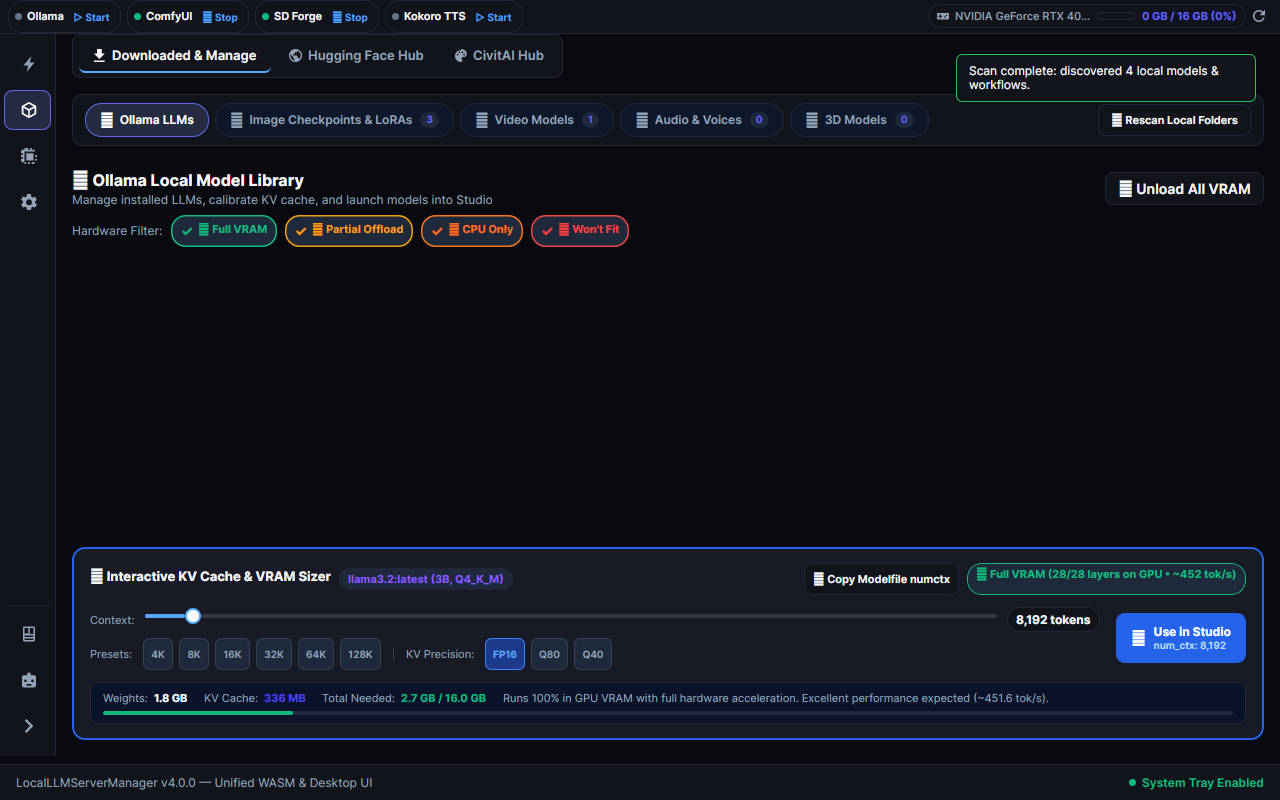
🖥️ User Interface Layout & Dashboard Structure
The application features a dark Fluent Avalonia UI theme (#0F172A) organized into modular workspaces:
| UI Workspace | Target Capabilities | Active Controls |
|---|---|---|
| Activity Rail & Titlebar Ribbon | Navigation & Hardware Telemetry | Collapsible 56px / 200px rail with domain switching (Studio, Models, Hardware Fit, Settings) and 34px titlebar ribbon showing engine status dots and VRAM telemetry. |
| Sticker Studio (Dual-Stage) | Die-Cut Vinyl & Vector Stickers | 380px Input Deck with reference image drop zone, 6 curated style presets, auto-cutout toggle, border dilation slider (0–24px), and alpha checkerboard output canvas. |
| Multimodal Studio (Dual-Stage) | Creative Generation Suite | Dedicated workspaces for Images, Video, Audio, 3D Mesh, and the one-click Real Engine Test Flight runner. |
| Installed Models (Full-Bleed) | Local Model Management | Ollama model cards, family capability tags (Coding, Chat), and interactive KV Cache Context Calculator. |
| Hugging Face Hub (Full-Bleed) | Multimodal GGUF Discovery | Search repositories, inspect branch quantization trees (Q4_K_M, Q8_0), and stream downloads. |
| CivitAI Models (Full-Bleed) | Diffusion Checkpoints & LoRAs | Filter by model type, inspect preview thumbnails, and download directly to disk. |
| Hardware Fit (Full-Bleed) | Memory Sizing Calculator | Real-time GPU detection, memory allocation bars, layer offloading calculator, and throughput estimation. |
| AI Assistant | In-App Conversational Copilot | Multimodal screenshot diagnostics, dynamic LiteLLM capability badges, and detachable companion window. |
| Settings & Tools (Full-Bleed) | Configuration & Auto-Discovery | Multi-drive tool auto-detection, path status badges (Valid, Missing), and LAN IP endpoint summaries. |
| Companion Windows | Multi-Window Workspaces | Detachable Documentation and AI Assist windows with magnetic flank docking and lockstep dragging. |
🌟 Core Highlights
Local LLM Server Manager brings together local AI runtimes into a unified, high-performance desktop environment and automated background service.
1. Unified Local AI Orchestration & Telemetry
- Single Hub for AI Engines: Transparently routes Ollama, Stable Diffusion / Forge, ComfyUI, and Kokoro TTS through port
5246with unified health probing. - Dynamic VRAM Orchestrator: Automatically tracks real-time GPU VRAM (via NVML CUDA) and unloads idle LLMs before heavy diffusion, video, or 3D mesh generation to eliminate out-of-memory crashes.
- Interactive Context Calculator: Visually inspect KV cache footprints against available GPU memory up to 32K tokens before loading models.
2. Creative Multimodal Studio
- Sticker Studio: End-to-end vector and die-cut vinyl sticker pipeline with reference image drop zone, 6 curated style presets (Die-Cut Vinyl, Holographic, Chibi Anime, 80s Retro, Pop Art, Watercolor), auto-cutout subject isolation, adjustable border width (0–24px), and 32-bit transparent PNG clipboard export.
- 3D Mesh Generation: Interactive WebGL 3D canvas (
<model-viewer>) with orbital controls, wireframe toggles, and direct GLB/GLTF export powered by TRELLIS V2 and Hunyuan3D v2. - Video Generation Studio: Turnkey ComfyUI workflow presets for Wan 2.2, LTX-2.5, and HunyuanVideo 1.5 with an integrated desktop video player.
- Audio & Speech Synthesis: Managed Kokoro TTS engine with OpenAI-compatible
POST /v1/audio/speech, waveform visualizer, and music synthesis via Stable Audio Open 3.0 & YuE.
3. Model Context Protocol (MCP) AI Integration
- Stateless HTTP/SSE Endpoint (
/mcp): Official specification implementation connecting Claude Desktop, Cursor, Antigravity, and autonomous agents directly to local hardware. - 14 Native AI Tools: Telemetry (
get_gpu_vram), service health (check_health), model management (list_models,pull_model,unload_vram), process management (start_engine,stop_engine), tool auto-discovery (detect_tools), multimodal generation (generate_video,synthesize_speech,generate_audio), hub search (search_huggingface,search_civitai), and cross-modal studio pipeline execution (run_studio_workflow).
4. Seamless Model Discovery
- Hugging Face Hub Discovery: Search GGUF LLMs, Text-to-Video, Image-to-Video, TTS, and Audio models with instant category filtering and progress-streamed downloads.
- CivitAI Integration: Search diffusion checkpoints, LoRAs, and embeddings with preview cards, star ratings, and direct-to-disk streaming.
5. Fluent Avalonia UI & Ergonomic Multi-Window
- Monochromatic Matte Design: High-contrast Matte Carbon, OLED Black, and Clean Light themes with
L³M²branding. - Magnetic Companion Windows: Detachable Documentation and AI Assistant panels with magnetic flank snapping and lockstep dragging (
WindowSnapManager). - Real Engine Test Flight: One-click verification runner that tests engine connectivity and GPU buffer allocation across all modalities before rendering.
6. Production-Ready Cross-Platform Architecture
- Dual-Session Operation: Headless background service (Windows Service / Linux
systemd) paired with an auto-attaching System Tray client. - Modular Feature Packs: Install Video and Audio extensions on demand (
--with-video,--with-audio) to preserve disk space. - Full Web & Remote Access: Pure Avalonia WebAssembly (WASM) browser client with seamless SSH port forwarding support.
Detailed Capability Breakdown (Click to expand)
- Desktop & Background Services: Native Avalonia UI window, background tray monitor, headless Windows Service / Linux
systemddaemon, in-place zero-downtime upgrades. - LLM Runtimes: Ollama library quick-pull, Hugging Face GGUF quantization trees, custom tag pull, indefinite VRAM holds (
keep_alive: -1), model capability family tagging (Coding, Math, Reasoning, Chat). - Computer Vision & 3D: Direct ComfyUI proxy over WebSockets, WebGL 360° orbital preview, GLB downloads, Forge LoRA/checkpoint management.
- Audio & Voice: OpenAI
/v1/audio/speechcompatibility, real-time waveform visualizer, Kokoro-FastAPI supervisor. - Developer & Agent Tooling: Model Context Protocol streamable endpoint (
/mcp), LAN IP discovery, automated multi-drive tool path scanner with live badge validation.
🏛️ System Architecture
flowchart TD
    subgraph ExternalClients["AI Assistants & External Clients"]
        Claude["Claude Desktop / Antigravity / Cursor / Agents"]
        WebClients["Browser & Mobile Clients (:5246)"]
    end

    subgraph DesktopSession["Desktop Session (User Logon - Win/Linux)"]
        Tray["Avalonia UI System Tray Icon"]
        DesktopApp["Native Avalonia Dark Dashboard Window"]
        CompanionWins["Magnetic Companion Windows (AI Assist & Docs)"]
    end

    subgraph ServerHost["Local HTTP Server & Reverse Proxy Host (:5246)"]
        ProgramHost["ASP.NET Core Web API + YARP Reverse Proxy"]
        McpServer["Model Context Protocol (MCP) Server (/mcp)"]
        VramOrch["VRAM Orchestrator & Telemetry Provider"]
        TestFlight["Real Engine Test Flight Runner"]
        WasmStatic["Avalonia WebAssembly & WebGL 3D Studio"]
    end

    subgraph Engines["Managed Local AI Engines"]
        Ollama["Ollama Engine (:11434)\nLLMs & Text Generation"]
        Forge["Stable Diffusion Forge (:7860)\nCheckpoints & LoRAs"]
        Comfy["ComfyUI Engine (:8188)\n3D Mesh, Video & Workflows"]
        Audio["Kokoro TTS Engine (:8880)\nSpeech Synthesis & OpenAI API"]
    end

    Claude -->|JSON-RPC 2.0 /mcp| McpServer
    WebClients -->|HTTP / WebSocket| ProgramHost
    DesktopApp <-->|Magnetic Snap & Lockstep| CompanionWins
    DesktopApp -->|Local REST & IPC| ProgramHost
    Tray -->|Tray IPC| ProgramHost

    ProgramHost --> VramOrch
    ProgramHost --> TestFlight
    ProgramHost --> WasmStatic

    VramOrch -.->|Unload VRAM: keep_alive: 0| Ollama
    ProgramHost -->|YARP Proxy| Ollama
    ProgramHost -->|YARP Proxy| Forge
    ProgramHost -->|YARP Proxy| Comfy
    ProgramHost -->|YARP Proxy| Audio
Dual-Session Lifecycle
- Headless Background Service Mode: Machine boots ->
LocalLLMServerManager --servicestarts automatically before user logon (Windows Service or Linuxsystemddaemon). Hosts Web API, YARP proxy, and VRAM orchestrator headlessly onhttp://127.0.0.1:5246. - User Desktop Session: User signs in ->
LocalLLMServerManagerdesktop app starts, probes:5246/health, and automatically attaches to the running background service instance.
🤖 Model Context Protocol (MCP) AI Integration
LocalLLMServerManager includes a native Model Context Protocol (MCP) server enabling AI coding assistants and autonomous agents (Claude Desktop, Cursor, Antigravity, Open WebUI) to monitor and control local LLMs, image generation engines, and GPU hardware.
Endpoints
/mcp(Streamable HTTP / SSE): Standard JSON-RPC 2.0 endpoint implementing the official Model Context Protocol (2026-07-28 specification) viaModelContextProtocol.AspNetCore. Supports stateless JSON-RPC requests with_metametadata,tools/list, andtools/call.
Available MCP Tools (11 Tools)
| Tool Name | Parameters | Description | Backend Delegation |
|---|---|---|---|
get_gpu_vram | none | Retrieves real-time GPU VRAM allocation, total/used/free memory in MB, utilization percentage, and hardware name. | IGpuTelemetryProvider (NVML CUDA) |
check_health | none | Probes real-time connectivity and latency for Ollama (:11434), SD Forge (:7860), ComfyUI (:8188), and Audio Engine (:8880). | HTTP Health Checks |
list_models | none | Lists all installed Ollama LLM models with family classification, disk footprint, and parameter tags. | IOllamaModelService |
pull_model | modelName (string, required) | Initiates an asynchronous download of a model from Ollama Library or Hugging Face. | IOllamaModelService |
unload_vram | none | Releases all loaded LLM models from GPU VRAM (keep_alive: 0) to free memory for diffusion, video, or 3D generation. | VramOrchestrator / Ollama |
start_engine | engine ('forge' | 'comfyui' | 'audio') | Spawns and supervises an AI backend engine process. | IAiEngineManager (Win32 Job / Process) |
stop_engine | engine ('forge' | 'comfyui' | 'audio') | Gracefully terminates an AI backend engine process. | IAiEngineManager |
detect_tools | none | Scans system drives, environment variables, and default paths for Ollama, ComfyUI, SD Forge, and TTS Audio Engines. | IToolDiscoveryService |
generate_video | prompt (string), workflow (string, default 'wan2.2_t2v'), width (int), height (int), frames (int), fps (int), seed (long) | Queues and orchestrates video generation with ComfyUI presets (Wan 2.2, LTX-2.5, HunyuanVideo). | POST /api/video/generate |
synthesize_speech | text (string), voice (string, default 'af_heart'), speed (float), format (string) | Synthesizes speech from text using local Kokoro TTS engine with OpenAI-compatible backend. | POST /v1/audio/speech |
generate_audio | prompt (string), workflow (string, default 'stable_audio_open_sfx'), duration_seconds (int), seed (long) | Generates music or audio sound effects with ComfyUI audio presets (Stable Audio Open 3.0, YuE). | POST /api/audio/generate |
Connecting AI Assistants to LocalLLMServerManager
Claude Desktop Configuration (claude_desktop_config.json)
{
  "mcpServers": {
    "localllm": {
      "command": "npx",
      "args": ["-y", "mcp-proxy", "http://127.0.0.1:5246/mcp"]
    }
  }
}
Cursor / Antigravity Custom MCP Server
Add an HTTP MCP server pointing to:
http://127.0.0.1:5246/mcp
🎭 Playwright Automated E2E Browser Testing
LocalLLMServerManager includes automated end-to-end (E2E) browser testing built on Microsoft.Playwright and xUnit. The test suite spins up an in-memory ASP.NET Core server (AppTestServerFixture) and launches headless Chromium with WebAssembly and WebGL flags (--use-gl=angle --use-angle=swiftshader --enable-webgl) to validate application behavior in real browser engines.
Key Capabilities
- WASM Bundle & Static File Validation: Listens for HTTP responses to verify zero
404 Not Founderrors when serving Avalonia WASM.dll,.dat,.wasm, and.boot.jsonassets. - Console Error Trap: Monitors browser console output to ensure zero uncaught JavaScript errors occur during WASM startup and canvas rendering.
- WebGL 3D Canvas Initialization: Confirms the
<canvas id="out">element is initialized and rendered with non-zero dimensions. - Automated Screenshot Generation:
PlaywrightScreenshotGeneratornavigates the dark Fluent UI dashboard and captures real 1280x800 PNG screenshots stored indocs/images/.
Running Playwright Tests
# Install Playwright browser drivers (Chromium)
pwsh LocalLLMServerManager.Tests/bin/Release/net10.0/playwright.ps1 install chromium

# Run all Playwright WASM E2E tests
dotnet test LocalLLMServerManager.Tests/LocalLLMServerManager.Tests.csproj --filter "FullyQualifiedName~PlaywrightWasmE2ETests" -c Release

# Run automated screenshot generator
dotnet test LocalLLMServerManager.Tests/LocalLLMServerManager.Tests.csproj --filter "FullyQualifiedName~PlaywrightScreenshotGenerator" -c Release
🐳 Docker & Container Deployment
LocalLLMServerManager can be containerized using Docker for seamless deployment on server infrastructure or home lab setups.
Multi-Stage Dockerfile
# Build Stage
FROM mcr.microsoft.com/dotnet/sdk:10.0 AS build
WORKDIR /src
COPY ["LocalLLMServerManager.csproj", "./"]
COPY ["LocalLLMServerManager.Shared/LocalLLMServerManager.Shared.csproj", "LocalLLMServerManager.Shared/"]
COPY ["LocalLLMServerManager.Web/LocalLLMServerManager.Web.csproj", "LocalLLMServerManager.Web/"]
RUN dotnet restore "LocalLLMServerManager.csproj"
COPY . .
RUN dotnet publish "LocalLLMServerManager.csproj" -c Release -o /app/publish

# Runtime Stage
FROM mcr.microsoft.com/dotnet/aspnet:10.0 AS final
WORKDIR /app
EXPOSE 5246
ENV ASPNETCORE_URLS=http://+:5246
COPY --from=build /app/publish .
ENTRYPOINT ["dotnet", "LocalLLMServerManager.dll", "--service"]
docker-compose.yml
version: '3.8'

services:
  localllmservermanager:
    build:
      context: .
      dockerfile: Dockerfile
    container_name: localllmservermanager
    ports:
      - "5246:5246"
    volumes:
      - ./data:/app/data
    environment:
      - ASPNETCORE_ENVIRONMENT=Production
      - ASPNETCORE_URLS=http://+:5246
    restart: unless-stopped
Running with Docker CLI
# Build Docker image
docker build -t localllmservermanager:v4.0.0 .

# Run container exposing port 5246
docker run -d -p 5246:5246 --name localllmservermanager localllmservermanager:v4.0.0

# Or start using Docker Compose
docker-compose up -d
🌐 WebAssembly Static Asset Hosting & Kestrel MIME Mappings
To host Avalonia XAML WebAssembly applications directly within ASP.NET Core Kestrel without runtime loading errors, Program.cs configures a custom FileExtensionContentTypeProvider for static files.
Configured MIME Mappings
var contentTypeProvider = new FileExtensionContentTypeProvider();
contentTypeProvider.Mappings[".dat"] = "application/octet-stream";
contentTypeProvider.Mappings[".symbols"] = "application/octet-stream";
contentTypeProvider.Mappings[".wasm"] = "application/wasm";
contentTypeProvider.Mappings[".clr"] = "application/octet-stream";
contentTypeProvider.Mappings[".pdb"] = "application/octet-stream";
contentTypeProvider.Mappings[".boot.json"] = "application/json";

app.UseDefaultFiles();
app.UseStaticFiles(new StaticFileOptions
{
    ContentTypeProvider = contentTypeProvider,
    ServeUnknownFileTypes = true,
    DefaultContentType = "application/octet-stream"
});
Technical Benefits
- WebAssembly Compatibility: Ensures
.wasmfiles are served withapplication/wasmheaders required by web browsers for WebAssembly compilation. - Managed Assembly & Data Stream Support:
.dat,.clr, and.pdbstatic files are served asapplication/octet-stream, preventing 404/415 media type rejection by ASP.NET Core middleware. - Fallback Type Handling:
ServeUnknownFileTypes = trueprevents missing static file headers when Avalonia WASM requests dynamic assembly blobs or metadata files.
📱 Mobile Responsiveness & Cross-Device Compatibility
The Web Dashboard features a responsive CSS layout engine:
- Mobile Viewport Optimization: Dynamically adjusts cards, status badges, search bars, and navigation tabs to single-column flex layouts on mobile devices (< 768px).
- Zero Element Overlap: Grid systems automatically collapse into stacked cards with full touch target support for phones and tablets.
- Responsive 3D Studio: The WebGL 3D Mesh viewer (
<model-viewer>) automatically resizes canvas bounds and supports touch gesture orbit controls.
🧪 Quality Assurance, Test Coverage & Requirements Traceability
| Metric | Measured Value | Operational Notes |
|---|---|---|
| Total Tests Executed | 174 | Automated test suite across Windows and Linux |
| Passed Tests | 173 (99.4%) | All unit, integration, and UI tests pass |
| Skipped Tests | 1 (0.6%) | On-demand Playwright screenshot generator |
| Failed Tests | 0 (0.0%) | Zero test failures across matrix |
| Test Fixture Classes | 20 | Partitioned test fixtures across 5 execution chunks |
| Target Platforms | Windows 11 x64, Linux x64, Headless Chromium | Dual-OS verified |
- Full Test Coverage Specification — Detailed component-by-component coverage mapping across all 20 test classes, cross-platform validation matrix (Windows & Linux), and 5-chunk test execution guide.
- Software Requirements Specification & Traceability Matrix — Formal requirements specification across 12 functional domains (
CORE-xxx,LLM-xxx,HUB-xxx,DIFF-xxx,3D-xxx,VRAM-xxx,MCP-xxx,INST-xxx,DISC-xxx,UI-xxx,WASM-xxx,E2E-xxx), mapping each requirement to source files and test assertions, plus explicit gap analysis.
📚 Guides & Documentation
- User Guide Hub — Complete overview of all dashboard workspaces and engine controls.
- Real Engine Test Flight Guide — Verify engine readiness and GPU clearance with one-click test flight payloads.
- Magnetic Companion Windows Guide — Floating helper windows, lockstep tracking, and magnetic flank snapping.
- Remote Access & Reverse Proxy Guide — LAN IP configuration, SSH tunneling, and Caddy reverse proxy setup.
- LoRA Art Styles & CivitAI — Download and apply community style adapters in ComfyUI and SD Forge.
- AI Chat Assistant Guide — Configure LiteLLM gateway, dynamic model badges, and multimodal screenshot diagnostics.
- Developer & Contributor Guide — Architecture layout, MVVM patterns, Minimal API endpoints, and Playwright tests.
- System Architecture Blueprint — High-level architecture, component hierarchy, and VRAM sequence diagrams.
- Documentation Writing Style Guide — ASD-STE100 writing rules for clarity, brevity, and active voice.
📦 Versioning Convention
We use MAJOR.MINOR.PATCH (SemVer):
| Version | What changed |
|---|---|
1.0.0 | Initial release — dashboard, VRAM bar, HF search, Ollama pull, YARP proxy, Windows Service |
1.1.0 | CivitAI search tab with model type / sort filters and preview thumbnails |
1.2.0 | Forge models directory config, direct-to-disk CivitAI downloads with SSE progress, persistent settings.json |
1.3.0 | Migration to .NET 10 LTS target framework and updated dependencies |
1.4.0 | ComfyUI integration, 3D Mesh Studio (TRELLIS V2 / Hunyuan3D v2), interactive WebGL 3D viewer, preferred engine toggle |
1.5.0 | Lazy boot for AI engines, process job objects, and UI controls for background engine management |
2.0.0 | Major architecture update — Avalonia UI desktop shell, system tray icon, pre-logon Windows Service boot & logon tray attachment |
3.0.0 | Avalonia WebAssembly (Wasm) integration, 3D Canvas Studio, unified multi-platform interface |
3.1.0 | Cross-Platform Linux support, Linux release scripts (build_release.sh), systemd service installer (install_linux.sh), .desktop launcher, NVML & /proc/meminfo VRAM telemetry, and SSH remote workflow support |
3.2.0 | Fixed WASM launcher script routing, added /api/models backend proxy, updated high-res 32-bit icon, added end-to-end integration tests, and completed repo housekeeping |
3.3.0 | Major architecture refactoring — decomposed Program.cs and MainViewModel into modular interfaces, services, and endpoint route extensions |
3.4.0 | Added Playwright automated E2E browser testing, real WebAssembly UI screenshot generator, Docker containerization support, and Kestrel WASM static asset MIME type mappings |
3.5.0 | Flexible tool path configuration, multi-drive auto-discovery service (IToolDiscoveryService), POST /api/tools/detect, official Model Context Protocol (MCP) server endpoint (/mcp) with 8 AI automation tools, and graceful in-place update support across Windows Inno Setup and shell installers |
3.6.0 | Monochromatic L³M² brand identity, Matte Carbon Design System, live Dynamic Theming Engine (Matte Carbon, OLED Black, Clean Light), and playwright-layout-inspector visual audits |
3.7.0 | Multimodal Video & Audio Studio (Wan 2.2, LTX-2.5, HunyuanVideo, Kokoro TTS, Stable Audio Open 3.0, YuE), interactive Video Player and Audio Waveform controls, Multimodal Hugging Face Discovery filters, 3 new MCP AI Tools (generate_video, synthesize_speech, generate_audio), OpenAI-compatible /v1/audio/speech, and Modular Feature Packs (--with-video, --with-audio) |
3.8.0 | Cross-Platform Tool Discovery (FFmpeg hardware encoder detection: NVENC, Intel QSV, VAAPI, AMD AMF; Kokoro Python environment inspection; Linux paths & shell runners), Dual-OS GitHub Actions CI Matrix ([windows-latest, ubuntu-latest]), Windows Service directory handling & Linux headless guard, and enhanced Windows & Linux installers with automated Firewall rule creation and LAN/MCP endpoint summaries |
3.9.0 | Local Audio & Music Studio suite (Kokoro TTS, AllTalk XTTS-v2 voice cloning, Faster-Whisper STT with /v1/audio/transcriptions & /v1/audio/translations, ComfyUI MusicGen & Stable Audio Open presets, automated setup scripts, and D:\AI\audio storage isolation) |
3.11.0 | Dynamic WebAssembly browser origin resolution via JSImport, centralized HttpHelper with BaseAddress validation, thread-safe model collection synchronization, dynamic engine health status indicators, headless UI interaction test suite, and enhanced browser E2E test harness |
3.15.0 | Magnetic Companion Windows (WindowSnapManager) with lockstep dragging, proximity snap, and multi-monitor detach; in-app AI Assist with LiteLLM capability discovery badges and multimodal screenshot analysis; Real Engine Test Flight verification runner for Text, Image, Video, and Audio backends; auto-detected LAN IP endpoints with LAN MCP URLs; optimized SettingsService async caching and hardware JSON lookup performance |
3.15.1 | Consolidated dependency updates across NuGet, npm, and GitHub Actions; configured Dependabot grouped updates to prevent PR clutter; updated Microsoft.NET.Test.Sdk (18.10.1), Microsoft.Playwright (1.62.0), ESLint 10, TypeScript-ESLint 8.70, and actions/checkout@v7; synchronized WASM UI distribution |
3.16.0 | Replaced deprecated WASM Playwright layout inspector with native Avalonia.LayoutInspector test suite; integrated automated headless layout auditing for MainWindow and UI tabs across Desktop, Tablet, and Mobile viewports; pruned legacy Playwright test dependencies |
3.17.0 | Dynamic UI Workspace overhaul (56px collapsed/200px expanded Activity Rail, Titlebar Telemetry Ribbon, Dynamic Stage Container), end-to-end Sticker Studio (reference image drop zone, 6 style presets, Euclidean alpha contour dilation, and live Forge diffusion dispatch), and updated documentation suite |
🚀 Installation & Downloads
Testing & Setup Requirements Matrix
Local LLM Server Manager uses a modular design. Testers only need to install components for the features they want to test:
| Feature Area | Stack Requirement | Prerequisite Needed | What It Enables |
|---|---|---|---|
| Core Manager & Dashboard | REQUIRED | Windows 10/11 x64 or Linux x64 | Hardware telemetry, VRAM bar, system tray, reverse proxy, web dashboard. |
| Ollama Engine | Optional | Ollama installed | Local LLM text generation, GGUF downloads, KV cache calculator. |
| Stable Diffusion Forge | Optional | SD Forge installed | Local image generation, CivitAI checkpoint and LoRA downloads. |
| ComfyUI Engine | Optional | ComfyUI installed | 3D mesh reconstruction, video generation, and FLUX workflows. |
| Kokoro TTS Engine | Optional | Python environment or Audio Pack | Local speech synthesis with OpenAI-compatible audio API. |
| AI Chat Assistant | Optional | LiteLLM gateway or OpenAI endpoint | In-app assistant, multimodal screenshot analysis, and app control. |
Feature Packs (ext_*) | Optional | Installed via Settings tab | Video ComfyUI presets (ext_video) and Audio workflows (ext_audio). |
[!IMPORTANT] The release package is self-contained. You do not need to install the .NET SDK or .NET runtime to run the application.
Option 1: Official Windows Installer (.exe) — Seamless In-Place Upgrades
Download the latest LocalLLMServerManager-Setup.exe from the GitHub Releases page.
- In-Place Upgrades: Running setup over an existing installation automatically stops any active
LocalLLMServerManagerWindows Service (net stop) and closes running tray processes, safely overwrites binaries without file lock errors, preserves your customsettings.json, and reconfigures & restarts the background service. - Includes an installation wizard with options for:
- 🟢 Install Windows Service (Headless pre-logon machine boot)
- 🟢 Auto-Start System Tray App on user login
- 🟢 Desktop & Start Menu Shortcuts
Option 2: Linux Automated Installation Script (install_linux.sh) — In-Place Upgrades
Clone the repository on Linux and run:
sudo ./install_linux.sh
- Automatically stops active
localllmmanager.servicevia systemd before binary copy - Preserves existing user settings and configurations
- Installs the app binary to
/usr/local/share/LocalLLMServerManager - Symlinks binary to
/usr/local/bin/localllmmanager - Reloads and restarts the systemd service (
localllmmanager.service) for background autostart - Installs desktop launcher (
localllmmanager.desktop) in your application menu
Option 3: Standalone Portable (.zip / .tar.gz)
Download LocalLLMServerManager-win-x64.zip or LocalLLMServerManager-linux-x64.tar.gz from Releases, extract, and run executable. Includes bundled runtime — no .NET SDK required!
Option 4: Building Release Packages Locally
- Windows: Run
.\build_release.ps1(or.\scripts\update.ps1for in-place local build & upgrade) - Linux: Run
./build_release.shOutput artifacts will be generated indist/.
🔍 Configuration & Auto-Discovery
LocalLLMServerManager supports fully flexible tool paths across any storage drive or folder structure, eliminating rigid hardcoded path assumptions.
1. Auto-Detect Installed Tools (One-Click Setup)
In the ⚙️ Settings tab, click 🔍 Auto-Detect Installed Tools (or send POST /api/tools/detect to the backend REST API). The built-in IToolDiscoveryService actively scans:
- System PATH & Environment Variables (
OLLAMA_MODELS,PATH, etc.) - All available drive roots (
C:,D:,E:, etc. on Windows,/opt,/home/$USER,/usr/localon Linux) - Standard installation paths:
- Ollama:
%LOCALAPPDATA%\Programs\Ollama\ollama.exe,~/.ollama/models,%USERPROFILE%\.ollama\models - ComfyUI: Portable batch runners (
run_nvidia_gpu.bat,run_cpu.bat), Git clones (main.py), and standardmodels/checkpoints - Stable Diffusion WebUI / Forge / A1111: Launch scripts (
webui-user.bat,webui.sh,run.bat) andmodels/Stable-diffusiondirectories
- Ollama:
Auto-detection only populates unset or missing paths, preserving any custom paths you've previously configured.
2. Manual Path Customization & Real-Time Status Badges
You can customize every tool path independently via the Settings UI (with native file/folder pickers) or by editing settings.json:
OllamaExecutablePath: Direct path toollama.exe(orollamaon Linux)OllamaModelsPath: Target directory where Ollama stores model blobs and manifestsForgeScriptPath: Batch or shell launcher script for Stable Diffusion WebUI / ForgeForgeModelsPath: Directory for SD Checkpoints, LoRAs, VAEs, and ControlNetsComfyUiScriptPath: Batch or shell launcher script for ComfyUIComfyUiModelsPath: Root models directory for ComfyUI checkpoints, UNETs, and VAEsComfyUiUrl: Network address for ComfyUI (defaulthttp://127.0.0.1:8188)
Each path input features a real-time status badge:
- 🟢 Valid: Executable file exists or directory is accessible on disk
- 🔴 Missing: Path is configured but does not exist at the specified target
- ⚪ Unset: Path is empty (defaults to standard environment fallback)
3. Parameterized Helper Scripts
All automation scripts in scripts/ accept command-line parameters for custom installation locations:
# Set up 3D workflows for ComfyUI with custom paths (PowerShell)
.\scripts\setup_3d_workflows.ps1 -ComfyUiPath "D:\AI\ComfyUI_windows_portable\ComfyUI" -ModelsDir "D:\AI\ComfyUI_windows_portable\ComfyUI\models"

# Start AI engines with custom script paths
.\scripts\start_engines.ps1 -Ollama -ComfyUI -ComfyUiScript "D:\AI\ComfyUI_windows_portable\run_nvidia_gpu.bat"
# Set up 3D workflows on Linux with custom paths (Bash)
./scripts/setup_3d_workflows.sh --comfy-path "/opt/ComfyUI" --models-dir "/opt/ComfyUI/models"

# Install Linux package to custom directory
sudo ./scripts/install_linux.sh --install-dir "/opt/LocalLLMServerManager" --bin-dir "/usr/bin"
🌐 Remote SSH Viewing & Port Forwarding
To work with LocalLLMServerManager on a remote Linux machine over SSH:
- Connect over SSH with local port forwarding:
ssh -L 5246:localhost:5246 user@your-linux-host - Run the application in headless service mode on the remote host:
dotnet run -- --service # or manage via systemd: sudo systemctl start localllmmanager - Open
http://localhost:5246in your local browser to access 100% of the UI features (VRAM monitor, Hugging Face search, CivitAI downloader, 3D WebGL viewer) at full speed with zero lag over SSH.
⚙️ Service Control Commands
Linux (systemd)
# Start Service
sudo systemctl start localllmmanager

# Stop Service
sudo systemctl stop localllmmanager

# Check Status
sudo systemctl status localllmmanager
Windows (Service Control)
Open PowerShell as Administrator:
# Start Service
Start-Service -Name "LocalLLMServerManager"

# Stop Service
Stop-Service -Name "LocalLLMServerManager"

# Service Status
Get-Service -Name "LocalLLMServerManager"
If running directly:
C:\LocalLLMServerManager\LocalLLMServerManager.exe
Dashboard available at http://localhost:5246/
🔧 Prerequisites & Engine Links
For complete installation steps and testing requirements, see the Testing & Setup Requirements Matrix above.
- Operating System: Windows 10/11 (64-bit) or Linux (Ubuntu 22.04+, Debian 12+, Fedora 38+)
- GPU Acceleration: NVIDIA GPU with CUDA support (8 GB+ VRAM recommended; CPU inference supported for text models)
- Ollama (Optional) — Local LLM inference engine for chat and code generation
- Stable Diffusion WebUI Forge (Optional) — Checkpoint and LoRA image generation backend
- ComfyUI (Optional) — Node-based 3D mesh, video, and complex diffusion backend
- LiteLLM Proxy (Optional) — External gateway for the in-app AI Assistant
- .NET 10 SDK (Optional) — Only required if building the application from source code
Similar repos


Languages
C#
72.1%
JavaScript
17.2%
PowerShell
5.9%
HTML
3.4%
C# / .NET management service and API for orchestrating local LLM backends, model routing, and GPU resource allocation.
See the codeREADME
Local LLM Server Manager
v4.0.0 — The unified orchestrator for local AI. Manage Large Language Models (Ollama), Image Generation (Stable Diffusion Forge & ComfyUI), 3D Mesh Generation, Video Generation, and Audio & Speech Synthesis (Kokoro TTS) from a single desktop dashboard, background daemon, and Model Context Protocol (MCP) server.
Designed with the
L³M²Matte Carbon design system, real-time GPU VRAM telemetry, automated memory management, and magnetic multi-window support on Windows and Linux.
🖥️ User Interface Layout & Dashboard Structure
The application features a dark Fluent Avalonia UI theme (#0F172A) organized into modular workspaces:
| UI Workspace | Target Capabilities | Active Controls |
|---|---|---|
| Activity Rail & Titlebar Ribbon | Navigation & Hardware Telemetry | Collapsible 56px / 200px rail with domain switching (Studio, Models, Hardware Fit, Settings) and 34px titlebar ribbon showing engine status dots and VRAM telemetry. |
| Sticker Studio (Dual-Stage) | Die-Cut Vinyl & Vector Stickers | 380px Input Deck with reference image drop zone, 6 curated style presets, auto-cutout toggle, border dilation slider (0–24px), and alpha checkerboard output canvas. |
| Multimodal Studio (Dual-Stage) | Creative Generation Suite | Dedicated workspaces for Images, Video, Audio, 3D Mesh, and the one-click Real Engine Test Flight runner. |
| Installed Models (Full-Bleed) | Local Model Management | Ollama model cards, family capability tags (Coding, Chat), and interactive KV Cache Context Calculator. |
| Hugging Face Hub (Full-Bleed) | Multimodal GGUF Discovery | Search repositories, inspect branch quantization trees (Q4_K_M, Q8_0), and stream downloads. |
| CivitAI Models (Full-Bleed) | Diffusion Checkpoints & LoRAs | Filter by model type, inspect preview thumbnails, and download directly to disk. |
| Hardware Fit (Full-Bleed) | Memory Sizing Calculator | Real-time GPU detection, memory allocation bars, layer offloading calculator, and throughput estimation. |
| AI Assistant | In-App Conversational Copilot | Multimodal screenshot diagnostics, dynamic LiteLLM capability badges, and detachable companion window. |
| Settings & Tools (Full-Bleed) | Configuration & Auto-Discovery | Multi-drive tool auto-detection, path status badges (Valid, Missing), and LAN IP endpoint summaries. |
| Companion Windows | Multi-Window Workspaces | Detachable Documentation and AI Assist windows with magnetic flank docking and lockstep dragging. |
🌟 Core Highlights
Local LLM Server Manager brings together local AI runtimes into a unified, high-performance desktop environment and automated background service.
1. Unified Local AI Orchestration & Telemetry
- Single Hub for AI Engines: Transparently routes Ollama, Stable Diffusion / Forge, ComfyUI, and Kokoro TTS through port
5246with unified health probing. - Dynamic VRAM Orchestrator: Automatically tracks real-time GPU VRAM (via NVML CUDA) and unloads idle LLMs before heavy diffusion, video, or 3D mesh generation to eliminate out-of-memory crashes.
- Interactive Context Calculator: Visually inspect KV cache footprints against available GPU memory up to 32K tokens before loading models.
2. Creative Multimodal Studio
- Sticker Studio: End-to-end vector and die-cut vinyl sticker pipeline with reference image drop zone, 6 curated style presets (Die-Cut Vinyl, Holographic, Chibi Anime, 80s Retro, Pop Art, Watercolor), auto-cutout subject isolation, adjustable border width (0–24px), and 32-bit transparent PNG clipboard export.
- 3D Mesh Generation: Interactive WebGL 3D canvas (
<model-viewer>) with orbital controls, wireframe toggles, and direct GLB/GLTF export powered by TRELLIS V2 and Hunyuan3D v2. - Video Generation Studio: Turnkey ComfyUI workflow presets for Wan 2.2, LTX-2.5, and HunyuanVideo 1.5 with an integrated desktop video player.
- Audio & Speech Synthesis: Managed Kokoro TTS engine with OpenAI-compatible
POST /v1/audio/speech, waveform visualizer, and music synthesis via Stable Audio Open 3.0 & YuE.
3. Model Context Protocol (MCP) AI Integration
- Stateless HTTP/SSE Endpoint (
/mcp): Official specification implementation connecting Claude Desktop, Cursor, Antigravity, and autonomous agents directly to local hardware. - 14 Native AI Tools: Telemetry (
get_gpu_vram), service health (check_health), model management (list_models,pull_model,unload_vram), process management (start_engine,stop_engine), tool auto-discovery (detect_tools), multimodal generation (generate_video,synthesize_speech,generate_audio), hub search (search_huggingface,search_civitai), and cross-modal studio pipeline execution (run_studio_workflow).
4. Seamless Model Discovery
- Hugging Face Hub Discovery: Search GGUF LLMs, Text-to-Video, Image-to-Video, TTS, and Audio models with instant category filtering and progress-streamed downloads.
- CivitAI Integration: Search diffusion checkpoints, LoRAs, and embeddings with preview cards, star ratings, and direct-to-disk streaming.
5. Fluent Avalonia UI & Ergonomic Multi-Window
- Monochromatic Matte Design: High-contrast Matte Carbon, OLED Black, and Clean Light themes with
L³M²branding. - Magnetic Companion Windows: Detachable Documentation and AI Assistant panels with magnetic flank snapping and lockstep dragging (
WindowSnapManager). - Real Engine Test Flight: One-click verification runner that tests engine connectivity and GPU buffer allocation across all modalities before rendering.
6. Production-Ready Cross-Platform Architecture
- Dual-Session Operation: Headless background service (Windows Service / Linux
systemd) paired with an auto-attaching System Tray client. - Modular Feature Packs: Install Video and Audio extensions on demand (
--with-video,--with-audio) to preserve disk space. - Full Web & Remote Access: Pure Avalonia WebAssembly (WASM) browser client with seamless SSH port forwarding support.
Detailed Capability Breakdown (Click to expand)
- Desktop & Background Services: Native Avalonia UI window, background tray monitor, headless Windows Service / Linux
systemddaemon, in-place zero-downtime upgrades. - LLM Runtimes: Ollama library quick-pull, Hugging Face GGUF quantization trees, custom tag pull, indefinite VRAM holds (
keep_alive: -1), model capability family tagging (Coding, Math, Reasoning, Chat). - Computer Vision & 3D: Direct ComfyUI proxy over WebSockets, WebGL 360° orbital preview, GLB downloads, Forge LoRA/checkpoint management.
- Audio & Voice: OpenAI
/v1/audio/speechcompatibility, real-time waveform visualizer, Kokoro-FastAPI supervisor. - Developer & Agent Tooling: Model Context Protocol streamable endpoint (
/mcp), LAN IP discovery, automated multi-drive tool path scanner with live badge validation.
🏛️ System Architecture
flowchart TD
    subgraph ExternalClients["AI Assistants & External Clients"]
        Claude["Claude Desktop / Antigravity / Cursor / Agents"]
        WebClients["Browser & Mobile Clients (:5246)"]
    end

    subgraph DesktopSession["Desktop Session (User Logon - Win/Linux)"]
        Tray["Avalonia UI System Tray Icon"]
        DesktopApp["Native Avalonia Dark Dashboard Window"]
        CompanionWins["Magnetic Companion Windows (AI Assist & Docs)"]
    end

    subgraph ServerHost["Local HTTP Server & Reverse Proxy Host (:5246)"]
        ProgramHost["ASP.NET Core Web API + YARP Reverse Proxy"]
        McpServer["Model Context Protocol (MCP) Server (/mcp)"]
        VramOrch["VRAM Orchestrator & Telemetry Provider"]
        TestFlight["Real Engine Test Flight Runner"]
        WasmStatic["Avalonia WebAssembly & WebGL 3D Studio"]
    end

    subgraph Engines["Managed Local AI Engines"]
        Ollama["Ollama Engine (:11434)\nLLMs & Text Generation"]
        Forge["Stable Diffusion Forge (:7860)\nCheckpoints & LoRAs"]
        Comfy["ComfyUI Engine (:8188)\n3D Mesh, Video & Workflows"]
        Audio["Kokoro TTS Engine (:8880)\nSpeech Synthesis & OpenAI API"]
    end

    Claude -->|JSON-RPC 2.0 /mcp| McpServer
    WebClients -->|HTTP / WebSocket| ProgramHost
    DesktopApp <-->|Magnetic Snap & Lockstep| CompanionWins
    DesktopApp -->|Local REST & IPC| ProgramHost
    Tray -->|Tray IPC| ProgramHost

    ProgramHost --> VramOrch
    ProgramHost --> TestFlight
    ProgramHost --> WasmStatic

    VramOrch -.->|Unload VRAM: keep_alive: 0| Ollama
    ProgramHost -->|YARP Proxy| Ollama
    ProgramHost -->|YARP Proxy| Forge
    ProgramHost -->|YARP Proxy| Comfy
    ProgramHost -->|YARP Proxy| Audio
Dual-Session Lifecycle
- Headless Background Service Mode: Machine boots ->
LocalLLMServerManager --servicestarts automatically before user logon (Windows Service or Linuxsystemddaemon). Hosts Web API, YARP proxy, and VRAM orchestrator headlessly onhttp://127.0.0.1:5246. - User Desktop Session: User signs in ->
LocalLLMServerManagerdesktop app starts, probes:5246/health, and automatically attaches to the running background service instance.
🤖 Model Context Protocol (MCP) AI Integration
LocalLLMServerManager includes a native Model Context Protocol (MCP) server enabling AI coding assistants and autonomous agents (Claude Desktop, Cursor, Antigravity, Open WebUI) to monitor and control local LLMs, image generation engines, and GPU hardware.
Endpoints
/mcp(Streamable HTTP / SSE): Standard JSON-RPC 2.0 endpoint implementing the official Model Context Protocol (2026-07-28 specification) viaModelContextProtocol.AspNetCore. Supports stateless JSON-RPC requests with_metametadata,tools/list, andtools/call.
Available MCP Tools (11 Tools)
| Tool Name | Parameters | Description | Backend Delegation |
|---|---|---|---|
get_gpu_vram | none | Retrieves real-time GPU VRAM allocation, total/used/free memory in MB, utilization percentage, and hardware name. | IGpuTelemetryProvider (NVML CUDA) |
check_health | none | Probes real-time connectivity and latency for Ollama (:11434), SD Forge (:7860), ComfyUI (:8188), and Audio Engine (:8880). | HTTP Health Checks |
list_models | none | Lists all installed Ollama LLM models with family classification, disk footprint, and parameter tags. | IOllamaModelService |
pull_model | modelName (string, required) | Initiates an asynchronous download of a model from Ollama Library or Hugging Face. | IOllamaModelService |
unload_vram | none | Releases all loaded LLM models from GPU VRAM (keep_alive: 0) to free memory for diffusion, video, or 3D generation. | VramOrchestrator / Ollama |
start_engine | engine ('forge' | 'comfyui' | 'audio') | Spawns and supervises an AI backend engine process. | IAiEngineManager (Win32 Job / Process) |
stop_engine | engine ('forge' | 'comfyui' | 'audio') | Gracefully terminates an AI backend engine process. | IAiEngineManager |
detect_tools | none | Scans system drives, environment variables, and default paths for Ollama, ComfyUI, SD Forge, and TTS Audio Engines. | IToolDiscoveryService |
generate_video | prompt (string), workflow (string, default 'wan2.2_t2v'), width (int), height (int), frames (int), fps (int), seed (long) | Queues and orchestrates video generation with ComfyUI presets (Wan 2.2, LTX-2.5, HunyuanVideo). | POST /api/video/generate |
synthesize_speech | text (string), voice (string, default 'af_heart'), speed (float), format (string) | Synthesizes speech from text using local Kokoro TTS engine with OpenAI-compatible backend. | POST /v1/audio/speech |
generate_audio | prompt (string), workflow (string, default 'stable_audio_open_sfx'), duration_seconds (int), seed (long) | Generates music or audio sound effects with ComfyUI audio presets (Stable Audio Open 3.0, YuE). | POST /api/audio/generate |
Connecting AI Assistants to LocalLLMServerManager
Claude Desktop Configuration (claude_desktop_config.json)
{
  "mcpServers": {
    "localllm": {
      "command": "npx",
      "args": ["-y", "mcp-proxy", "http://127.0.0.1:5246/mcp"]
    }
  }
}
Cursor / Antigravity Custom MCP Server
Add an HTTP MCP server pointing to:
http://127.0.0.1:5246/mcp
🎭 Playwright Automated E2E Browser Testing
LocalLLMServerManager includes automated end-to-end (E2E) browser testing built on Microsoft.Playwright and xUnit. The test suite spins up an in-memory ASP.NET Core server (AppTestServerFixture) and launches headless Chromium with WebAssembly and WebGL flags (--use-gl=angle --use-angle=swiftshader --enable-webgl) to validate application behavior in real browser engines.
Key Capabilities
- WASM Bundle & Static File Validation: Listens for HTTP responses to verify zero
404 Not Founderrors when serving Avalonia WASM.dll,.dat,.wasm, and.boot.jsonassets. - Console Error Trap: Monitors browser console output to ensure zero uncaught JavaScript errors occur during WASM startup and canvas rendering.
- WebGL 3D Canvas Initialization: Confirms the
<canvas id="out">element is initialized and rendered with non-zero dimensions. - Automated Screenshot Generation:
PlaywrightScreenshotGeneratornavigates the dark Fluent UI dashboard and captures real 1280x800 PNG screenshots stored indocs/images/.
Running Playwright Tests
# Install Playwright browser drivers (Chromium)
pwsh LocalLLMServerManager.Tests/bin/Release/net10.0/playwright.ps1 install chromium

# Run all Playwright WASM E2E tests
dotnet test LocalLLMServerManager.Tests/LocalLLMServerManager.Tests.csproj --filter "FullyQualifiedName~PlaywrightWasmE2ETests" -c Release

# Run automated screenshot generator
dotnet test LocalLLMServerManager.Tests/LocalLLMServerManager.Tests.csproj --filter "FullyQualifiedName~PlaywrightScreenshotGenerator" -c Release
🐳 Docker & Container Deployment
LocalLLMServerManager can be containerized using Docker for seamless deployment on server infrastructure or home lab setups.
Multi-Stage Dockerfile
# Build Stage
FROM mcr.microsoft.com/dotnet/sdk:10.0 AS build
WORKDIR /src
COPY ["LocalLLMServerManager.csproj", "./"]
COPY ["LocalLLMServerManager.Shared/LocalLLMServerManager.Shared.csproj", "LocalLLMServerManager.Shared/"]
COPY ["LocalLLMServerManager.Web/LocalLLMServerManager.Web.csproj", "LocalLLMServerManager.Web/"]
RUN dotnet restore "LocalLLMServerManager.csproj"
COPY . .
RUN dotnet publish "LocalLLMServerManager.csproj" -c Release -o /app/publish

# Runtime Stage
FROM mcr.microsoft.com/dotnet/aspnet:10.0 AS final
WORKDIR /app
EXPOSE 5246
ENV ASPNETCORE_URLS=http://+:5246
COPY --from=build /app/publish .
ENTRYPOINT ["dotnet", "LocalLLMServerManager.dll", "--service"]
docker-compose.yml
version: '3.8'

services:
  localllmservermanager:
    build:
      context: .
      dockerfile: Dockerfile
    container_name: localllmservermanager
    ports:
      - "5246:5246"
    volumes:
      - ./data:/app/data
    environment:
      - ASPNETCORE_ENVIRONMENT=Production
      - ASPNETCORE_URLS=http://+:5246
    restart: unless-stopped
Running with Docker CLI
# Build Docker image
docker build -t localllmservermanager:v4.0.0 .

# Run container exposing port 5246
docker run -d -p 5246:5246 --name localllmservermanager localllmservermanager:v4.0.0

# Or start using Docker Compose
docker-compose up -d
🌐 WebAssembly Static Asset Hosting & Kestrel MIME Mappings
To host Avalonia XAML WebAssembly applications directly within ASP.NET Core Kestrel without runtime loading errors, Program.cs configures a custom FileExtensionContentTypeProvider for static files.
Configured MIME Mappings
var contentTypeProvider = new FileExtensionContentTypeProvider();
contentTypeProvider.Mappings[".dat"] = "application/octet-stream";
contentTypeProvider.Mappings[".symbols"] = "application/octet-stream";
contentTypeProvider.Mappings[".wasm"] = "application/wasm";
contentTypeProvider.Mappings[".clr"] = "application/octet-stream";
contentTypeProvider.Mappings[".pdb"] = "application/octet-stream";
contentTypeProvider.Mappings[".boot.json"] = "application/json";

app.UseDefaultFiles();
app.UseStaticFiles(new StaticFileOptions
{
    ContentTypeProvider = contentTypeProvider,
    ServeUnknownFileTypes = true,
    DefaultContentType = "application/octet-stream"
});
Technical Benefits
- WebAssembly Compatibility: Ensures
.wasmfiles are served withapplication/wasmheaders required by web browsers for WebAssembly compilation. - Managed Assembly & Data Stream Support:
.dat,.clr, and.pdbstatic files are served asapplication/octet-stream, preventing 404/415 media type rejection by ASP.NET Core middleware. - Fallback Type Handling:
ServeUnknownFileTypes = trueprevents missing static file headers when Avalonia WASM requests dynamic assembly blobs or metadata files.
📱 Mobile Responsiveness & Cross-Device Compatibility
The Web Dashboard features a responsive CSS layout engine:
- Mobile Viewport Optimization: Dynamically adjusts cards, status badges, search bars, and navigation tabs to single-column flex layouts on mobile devices (< 768px).
- Zero Element Overlap: Grid systems automatically collapse into stacked cards with full touch target support for phones and tablets.
- Responsive 3D Studio: The WebGL 3D Mesh viewer (
<model-viewer>) automatically resizes canvas bounds and supports touch gesture orbit controls.
🧪 Quality Assurance, Test Coverage & Requirements Traceability
| Metric | Measured Value | Operational Notes |
|---|---|---|
| Total Tests Executed | 174 | Automated test suite across Windows and Linux |
| Passed Tests | 173 (99.4%) | All unit, integration, and UI tests pass |
| Skipped Tests | 1 (0.6%) | On-demand Playwright screenshot generator |
| Failed Tests | 0 (0.0%) | Zero test failures across matrix |
| Test Fixture Classes | 20 | Partitioned test fixtures across 5 execution chunks |
| Target Platforms | Windows 11 x64, Linux x64, Headless Chromium | Dual-OS verified |
- Full Test Coverage Specification — Detailed component-by-component coverage mapping across all 20 test classes, cross-platform validation matrix (Windows & Linux), and 5-chunk test execution guide.
- Software Requirements Specification & Traceability Matrix — Formal requirements specification across 12 functional domains (
CORE-xxx,LLM-xxx,HUB-xxx,DIFF-xxx,3D-xxx,VRAM-xxx,MCP-xxx,INST-xxx,DISC-xxx,UI-xxx,WASM-xxx,E2E-xxx), mapping each requirement to source files and test assertions, plus explicit gap analysis.
📚 Guides & Documentation
- User Guide Hub — Complete overview of all dashboard workspaces and engine controls.
- Real Engine Test Flight Guide — Verify engine readiness and GPU clearance with one-click test flight payloads.
- Magnetic Companion Windows Guide — Floating helper windows, lockstep tracking, and magnetic flank snapping.
- Remote Access & Reverse Proxy Guide — LAN IP configuration, SSH tunneling, and Caddy reverse proxy setup.
- LoRA Art Styles & CivitAI — Download and apply community style adapters in ComfyUI and SD Forge.
- AI Chat Assistant Guide — Configure LiteLLM gateway, dynamic model badges, and multimodal screenshot diagnostics.
- Developer & Contributor Guide — Architecture layout, MVVM patterns, Minimal API endpoints, and Playwright tests.
- System Architecture Blueprint — High-level architecture, component hierarchy, and VRAM sequence diagrams.
- Documentation Writing Style Guide — ASD-STE100 writing rules for clarity, brevity, and active voice.
📦 Versioning Convention
We use MAJOR.MINOR.PATCH (SemVer):
| Version | What changed |
|---|---|
1.0.0 | Initial release — dashboard, VRAM bar, HF search, Ollama pull, YARP proxy, Windows Service |
1.1.0 | CivitAI search tab with model type / sort filters and preview thumbnails |
1.2.0 | Forge models directory config, direct-to-disk CivitAI downloads with SSE progress, persistent settings.json |
1.3.0 | Migration to .NET 10 LTS target framework and updated dependencies |
1.4.0 | ComfyUI integration, 3D Mesh Studio (TRELLIS V2 / Hunyuan3D v2), interactive WebGL 3D viewer, preferred engine toggle |
1.5.0 | Lazy boot for AI engines, process job objects, and UI controls for background engine management |
2.0.0 | Major architecture update — Avalonia UI desktop shell, system tray icon, pre-logon Windows Service boot & logon tray attachment |
3.0.0 | Avalonia WebAssembly (Wasm) integration, 3D Canvas Studio, unified multi-platform interface |
3.1.0 | Cross-Platform Linux support, Linux release scripts (build_release.sh), systemd service installer (install_linux.sh), .desktop launcher, NVML & /proc/meminfo VRAM telemetry, and SSH remote workflow support |
3.2.0 | Fixed WASM launcher script routing, added /api/models backend proxy, updated high-res 32-bit icon, added end-to-end integration tests, and completed repo housekeeping |
3.3.0 | Major architecture refactoring — decomposed Program.cs and MainViewModel into modular interfaces, services, and endpoint route extensions |
3.4.0 | Added Playwright automated E2E browser testing, real WebAssembly UI screenshot generator, Docker containerization support, and Kestrel WASM static asset MIME type mappings |
3.5.0 | Flexible tool path configuration, multi-drive auto-discovery service (IToolDiscoveryService), POST /api/tools/detect, official Model Context Protocol (MCP) server endpoint (/mcp) with 8 AI automation tools, and graceful in-place update support across Windows Inno Setup and shell installers |
3.6.0 | Monochromatic L³M² brand identity, Matte Carbon Design System, live Dynamic Theming Engine (Matte Carbon, OLED Black, Clean Light), and playwright-layout-inspector visual audits |
3.7.0 | Multimodal Video & Audio Studio (Wan 2.2, LTX-2.5, HunyuanVideo, Kokoro TTS, Stable Audio Open 3.0, YuE), interactive Video Player and Audio Waveform controls, Multimodal Hugging Face Discovery filters, 3 new MCP AI Tools (generate_video, synthesize_speech, generate_audio), OpenAI-compatible /v1/audio/speech, and Modular Feature Packs (--with-video, --with-audio) |
3.8.0 | Cross-Platform Tool Discovery (FFmpeg hardware encoder detection: NVENC, Intel QSV, VAAPI, AMD AMF; Kokoro Python environment inspection; Linux paths & shell runners), Dual-OS GitHub Actions CI Matrix ([windows-latest, ubuntu-latest]), Windows Service directory handling & Linux headless guard, and enhanced Windows & Linux installers with automated Firewall rule creation and LAN/MCP endpoint summaries |
3.9.0 | Local Audio & Music Studio suite (Kokoro TTS, AllTalk XTTS-v2 voice cloning, Faster-Whisper STT with /v1/audio/transcriptions & /v1/audio/translations, ComfyUI MusicGen & Stable Audio Open presets, automated setup scripts, and D:\AI\audio storage isolation) |
3.11.0 | Dynamic WebAssembly browser origin resolution via JSImport, centralized HttpHelper with BaseAddress validation, thread-safe model collection synchronization, dynamic engine health status indicators, headless UI interaction test suite, and enhanced browser E2E test harness |
3.15.0 | Magnetic Companion Windows (WindowSnapManager) with lockstep dragging, proximity snap, and multi-monitor detach; in-app AI Assist with LiteLLM capability discovery badges and multimodal screenshot analysis; Real Engine Test Flight verification runner for Text, Image, Video, and Audio backends; auto-detected LAN IP endpoints with LAN MCP URLs; optimized SettingsService async caching and hardware JSON lookup performance |
3.15.1 | Consolidated dependency updates across NuGet, npm, and GitHub Actions; configured Dependabot grouped updates to prevent PR clutter; updated Microsoft.NET.Test.Sdk (18.10.1), Microsoft.Playwright (1.62.0), ESLint 10, TypeScript-ESLint 8.70, and actions/checkout@v7; synchronized WASM UI distribution |
3.16.0 | Replaced deprecated WASM Playwright layout inspector with native Avalonia.LayoutInspector test suite; integrated automated headless layout auditing for MainWindow and UI tabs across Desktop, Tablet, and Mobile viewports; pruned legacy Playwright test dependencies |
3.17.0 | Dynamic UI Workspace overhaul (56px collapsed/200px expanded Activity Rail, Titlebar Telemetry Ribbon, Dynamic Stage Container), end-to-end Sticker Studio (reference image drop zone, 6 style presets, Euclidean alpha contour dilation, and live Forge diffusion dispatch), and updated documentation suite |
🚀 Installation & Downloads
Testing & Setup Requirements Matrix
Local LLM Server Manager uses a modular design. Testers only need to install components for the features they want to test:
| Feature Area | Stack Requirement | Prerequisite Needed | What It Enables |
|---|---|---|---|
| Core Manager & Dashboard | REQUIRED | Windows 10/11 x64 or Linux x64 | Hardware telemetry, VRAM bar, system tray, reverse proxy, web dashboard. |
| Ollama Engine | Optional | Ollama installed | Local LLM text generation, GGUF downloads, KV cache calculator. |
| Stable Diffusion Forge | Optional | SD Forge installed | Local image generation, CivitAI checkpoint and LoRA downloads. |
| ComfyUI Engine | Optional | ComfyUI installed | 3D mesh reconstruction, video generation, and FLUX workflows. |
| Kokoro TTS Engine | Optional | Python environment or Audio Pack | Local speech synthesis with OpenAI-compatible audio API. |
| AI Chat Assistant | Optional | LiteLLM gateway or OpenAI endpoint | In-app assistant, multimodal screenshot analysis, and app control. |
Feature Packs (ext_*) | Optional | Installed via Settings tab | Video ComfyUI presets (ext_video) and Audio workflows (ext_audio). |
[!IMPORTANT] The release package is self-contained. You do not need to install the .NET SDK or .NET runtime to run the application.
Option 1: Official Windows Installer (.exe) — Seamless In-Place Upgrades
Download the latest LocalLLMServerManager-Setup.exe from the GitHub Releases page.
- In-Place Upgrades: Running setup over an existing installation automatically stops any active
LocalLLMServerManagerWindows Service (net stop) and closes running tray processes, safely overwrites binaries without file lock errors, preserves your customsettings.json, and reconfigures & restarts the background service. - Includes an installation wizard with options for:
- 🟢 Install Windows Service (Headless pre-logon machine boot)
- 🟢 Auto-Start System Tray App on user login
- 🟢 Desktop & Start Menu Shortcuts
Option 2: Linux Automated Installation Script (install_linux.sh) — In-Place Upgrades
Clone the repository on Linux and run:
sudo ./install_linux.sh
- Automatically stops active
localllmmanager.servicevia systemd before binary copy - Preserves existing user settings and configurations
- Installs the app binary to
/usr/local/share/LocalLLMServerManager - Symlinks binary to
/usr/local/bin/localllmmanager - Reloads and restarts the systemd service (
localllmmanager.service) for background autostart - Installs desktop launcher (
localllmmanager.desktop) in your application menu
Option 3: Standalone Portable (.zip / .tar.gz)
Download LocalLLMServerManager-win-x64.zip or LocalLLMServerManager-linux-x64.tar.gz from Releases, extract, and run executable. Includes bundled runtime — no .NET SDK required!
Option 4: Building Release Packages Locally
- Windows: Run
.\build_release.ps1(or.\scripts\update.ps1for in-place local build & upgrade) - Linux: Run
./build_release.shOutput artifacts will be generated indist/.
🔍 Configuration & Auto-Discovery
LocalLLMServerManager supports fully flexible tool paths across any storage drive or folder structure, eliminating rigid hardcoded path assumptions.
1. Auto-Detect Installed Tools (One-Click Setup)
In the ⚙️ Settings tab, click 🔍 Auto-Detect Installed Tools (or send POST /api/tools/detect to the backend REST API). The built-in IToolDiscoveryService actively scans:
- System PATH & Environment Variables (
OLLAMA_MODELS,PATH, etc.) - All available drive roots (
C:,D:,E:, etc. on Windows,/opt,/home/$USER,/usr/localon Linux) - Standard installation paths:
- Ollama:
%LOCALAPPDATA%\Programs\Ollama\ollama.exe,~/.ollama/models,%USERPROFILE%\.ollama\models - ComfyUI: Portable batch runners (
run_nvidia_gpu.bat,run_cpu.bat), Git clones (main.py), and standardmodels/checkpoints - Stable Diffusion WebUI / Forge / A1111: Launch scripts (
webui-user.bat,webui.sh,run.bat) andmodels/Stable-diffusiondirectories
- Ollama:
Auto-detection only populates unset or missing paths, preserving any custom paths you've previously configured.
2. Manual Path Customization & Real-Time Status Badges
You can customize every tool path independently via the Settings UI (with native file/folder pickers) or by editing settings.json:
OllamaExecutablePath: Direct path toollama.exe(orollamaon Linux)OllamaModelsPath: Target directory where Ollama stores model blobs and manifestsForgeScriptPath: Batch or shell launcher script for Stable Diffusion WebUI / ForgeForgeModelsPath: Directory for SD Checkpoints, LoRAs, VAEs, and ControlNetsComfyUiScriptPath: Batch or shell launcher script for ComfyUIComfyUiModelsPath: Root models directory for ComfyUI checkpoints, UNETs, and VAEsComfyUiUrl: Network address for ComfyUI (defaulthttp://127.0.0.1:8188)
Each path input features a real-time status badge:
- 🟢 Valid: Executable file exists or directory is accessible on disk
- 🔴 Missing: Path is configured but does not exist at the specified target
- ⚪ Unset: Path is empty (defaults to standard environment fallback)
3. Parameterized Helper Scripts
All automation scripts in scripts/ accept command-line parameters for custom installation locations:
# Set up 3D workflows for ComfyUI with custom paths (PowerShell)
.\scripts\setup_3d_workflows.ps1 -ComfyUiPath "D:\AI\ComfyUI_windows_portable\ComfyUI" -ModelsDir "D:\AI\ComfyUI_windows_portable\ComfyUI\models"

# Start AI engines with custom script paths
.\scripts\start_engines.ps1 -Ollama -ComfyUI -ComfyUiScript "D:\AI\ComfyUI_windows_portable\run_nvidia_gpu.bat"
# Set up 3D workflows on Linux with custom paths (Bash)
./scripts/setup_3d_workflows.sh --comfy-path "/opt/ComfyUI" --models-dir "/opt/ComfyUI/models"

# Install Linux package to custom directory
sudo ./scripts/install_linux.sh --install-dir "/opt/LocalLLMServerManager" --bin-dir "/usr/bin"
🌐 Remote SSH Viewing & Port Forwarding
To work with LocalLLMServerManager on a remote Linux machine over SSH:
- Connect over SSH with local port forwarding:
ssh -L 5246:localhost:5246 user@your-linux-host - Run the application in headless service mode on the remote host:
dotnet run -- --service # or manage via systemd: sudo systemctl start localllmmanager - Open
http://localhost:5246in your local browser to access 100% of the UI features (VRAM monitor, Hugging Face search, CivitAI downloader, 3D WebGL viewer) at full speed with zero lag over SSH.
⚙️ Service Control Commands
Linux (systemd)
# Start Service
sudo systemctl start localllmmanager

# Stop Service
sudo systemctl stop localllmmanager

# Check Status
sudo systemctl status localllmmanager
Windows (Service Control)
Open PowerShell as Administrator:
# Start Service
Start-Service -Name "LocalLLMServerManager"

# Stop Service
Stop-Service -Name "LocalLLMServerManager"

# Service Status
Get-Service -Name "LocalLLMServerManager"
If running directly:
C:\LocalLLMServerManager\LocalLLMServerManager.exe
Dashboard available at http://localhost:5246/
🔧 Prerequisites & Engine Links
For complete installation steps and testing requirements, see the Testing & Setup Requirements Matrix above.
- Operating System: Windows 10/11 (64-bit) or Linux (Ubuntu 22.04+, Debian 12+, Fedora 38+)
- GPU Acceleration: NVIDIA GPU with CUDA support (8 GB+ VRAM recommended; CPU inference supported for text models)
- Ollama (Optional) — Local LLM inference engine for chat and code generation
- Stable Diffusion WebUI Forge (Optional) — Checkpoint and LoRA image generation backend
- ComfyUI (Optional) — Node-based 3D mesh, video, and complex diffusion backend
- LiteLLM Proxy (Optional) — External gateway for the in-app AI Assistant
- .NET 10 SDK (Optional) — Only required if building the application from source code
Similar repos
Languages
C#
72.1%
JavaScript
17.2%
PowerShell
5.9%
HTML
3.4%