
SharpMind. A pure C# / .NET LLM engine — inference, training, and agent tooling in one solution.
C#
65
724 commits
updated Oct 3, 2026
README
SharpMind. A pure C# / .NET LLM engine — inference and agent tooling in one solution.


-239120)





What is SharpMind?
SharpMind is an end-to-end LLM stack written entirely in C#, with no dependency on llama.cpp, PyTorch, or any native runtime for its core path. It loads GGUF models, runs quantized CPU inference with modern decoding acceleration (speculative + Medusa-style drafting), and — unusually for a C# inference engine — also includes its own autograd engine so you can fine-tune (LoRA), distill, and prune models in the same process that serves them. LoRA fine-tuning can optionally run on an NVIDIA GPU via a separate accelerator plugin (see GPU-accelerated training).
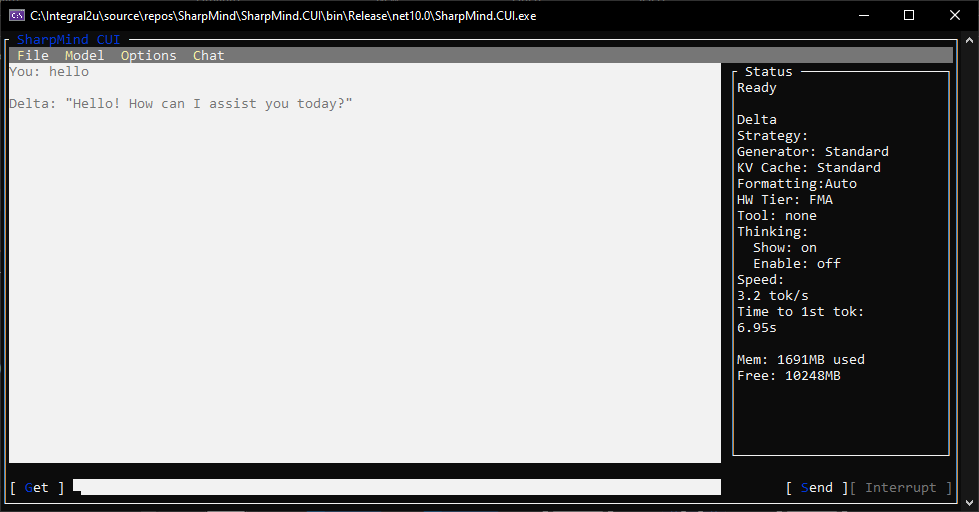
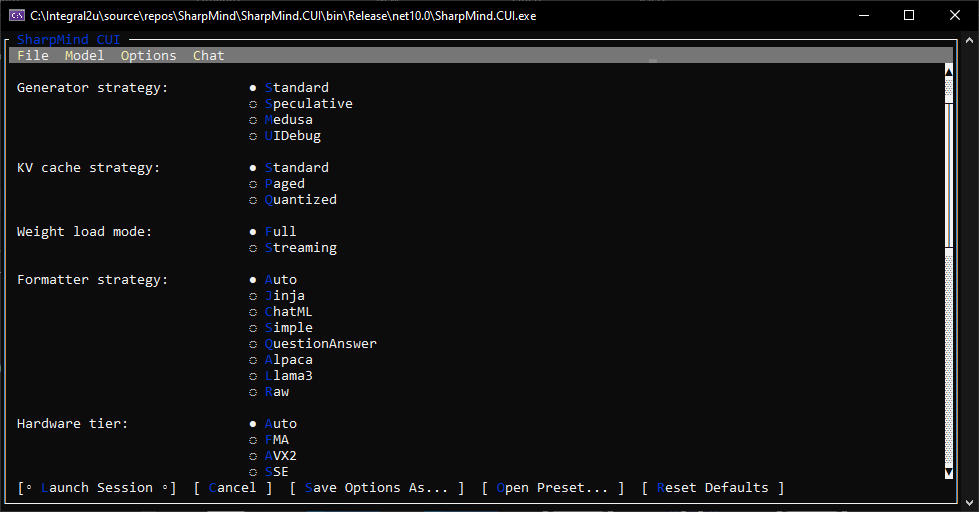
It ships as a set of composable libraries plus a terminal chat application (SharpMind.CUI) built on top of them.
Live video example on YouTube
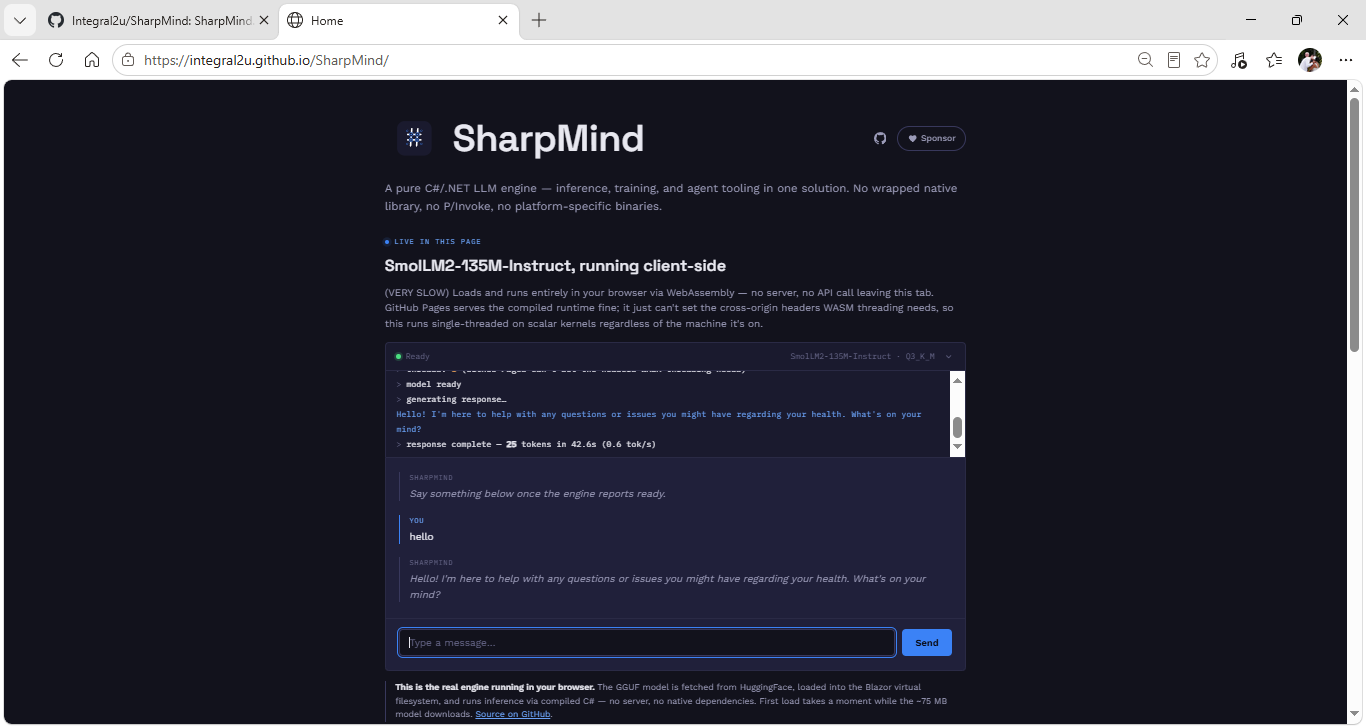
| Live in-browser demo | Chat / conversation view |
 |  |
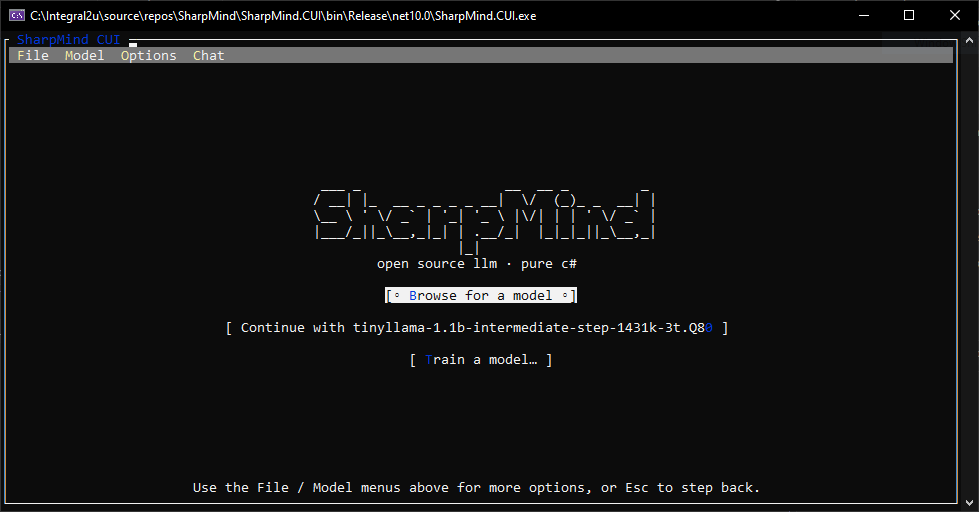
| Model & session welcome view | Runtime options (hardware tier, load mode, sampling) |
 |  |
Why SharpMind
- No native runtime required. Tensor math, quantization kernels, and the training loop are all managed C#. Inference runs entirely on the CPU; GPU acceleration (via ILGPU/cuBLAS) is opt-in, training-only, and lives in its own assembly loaded as a plugin — the CPU path never needs it.
- Runs models bigger than your RAM. A disk-streaming load mode pages transformer layers in and out during the forward pass instead of holding the whole model resident (details below).
- Modern decoding, not just greedy/top-p. Both classic speculative decoding and Medusa-style multi-head speculative decoding are implemented from scratch, with careful KV-cache rollback on rejection.
- A genuinely pluggable kernel system. Hardware-specific kernel variants (scalar/SSE/AVX2/FMA) are wired up at runtime through a small internal dispatch layer JigSawDotNet rather than hand-written
if/switchladders — adding a new backend means adding an assembly, not editing the core. - Agent tooling included. Tool-calling, permission gating (
Never/Ask/Always), and sub-agent orchestration ship inSharpMind.Inference.Agent. - Inference and training in one codebase. Most C# "LLM" libraries are thin bindings around llama.cpp and only run models. SharpMind can load a GGUF checkpoint, chat with it, or train a model from scratch. LoRA fine-tuning and distillation are also present in the training stack but are still experimental — see Training.
Live in-browser demo
SharpMind.Live is the engine running entirely inside your browser tab — no server, no native runtime, no API call leaving the page. It fetches SmolLM2-135M-Instruct (Q3_K_M) from Hugging Face into the Blazor virtual filesystem, then runs inference through the AOT-compiled engine (IL →
WebAssembly via RunAOTCompilation, from the same managed C# kernels the desktop CLI uses).
- Zero backend. GitHub Pages hosts the static site; the model streams in client-side on first load and is then served from the browser's own cache on later visits — no re-download.
- Live streaming. Boot, model load, and every generated token stream to the page as they happen — the decode loop yields to the browser between tokens.
- What to expect: GitHub Pages can't set the cross-origin headers WASM threading needs, so the demo runs single-threaded on scalar kernels — roughly 1 token/s on a mid-size laptop. It's the real engine in a tab, not a wrapper.
Install the chat app (Windows)
The quickest way to try the terminal chat client is the installer, which sets up SharpMind.CUI, Start Menu + desktop shortcuts, and the app folder:
Download SharpMind Console Setup (MSI)
Download SharpMind CLI Setup (MSI)
Requires the .NET 10 Runtime. Running the MSI installs the app and shortcuts; uninstall or repair is available via Apps & Features. Then grab a model as described in Quick Start — the running app also has a built-in model browser.
Quick Start: Load and Run a Model
This walks through the smallest possible program that loads a GGUF model and starts an interactive chat session.
1. Get a model
Download a small instruct model to get started — Qwen3-0.6B-Q8_0 is a good first choice: it's under 1GB, loads quickly, and is known to produce coherent output out of the box.
Place the .gguf file in a folder, e.g. C:\Models\Qwen3-0.6B-Q8_0.gguf.
2. Minimal Program.cs
using SharpMind.Core.Quantization;
using SharpMind.Inference;
using SharpMind.Inference.Chat;
using SharpMind.Model;
using SharpMind.Model.Config;
using SharpMind.Model.Format;
using SharpMind.Tokenization;

var modelPath = @"C:\Models\Qwen3-0.6B-Q8_0.gguf";

// 1. Load model metadata, config, and tokenizer from the GGUF file.
var metaHelper = ModelFormatHelpers.GetModelMetaHelperFor(ModelFormat.Gguf);
metaHelper.Load(modelPath, null, out ModelMetaData meta, out ModelConfig modelConfig, out Tokenizer? tokenizer);

if (tokenizer == null)
{
    Console.WriteLine("No tokenizer data found in this GGUF file.");
    return;
}

// 2. Resolve hardware/quant mapping and load the weights.
var sharpConfig = modelConfig.ForModel();
var qOps = QuantizationFactory.Create(sharpConfig.ResolvedHardware);

using var weights = ModelFactory.CreateWeights(modelConfig, sharpConfig, qOps, modelPath, LoadMode.Full);
weights.InitializeWeights();

// 3. Build the transformer.
using var model = ModelFactory.CreateTransformer(weights, sharpConfig);

// 4. Start a chat session.
await using var session = new ChatSession<StandardGeneratorBuilder<KVCacherBuilder>, KVCacherBuilder>(model, tokenizer, meta)
{
    MaxTokens = 512,
    Temperature = 0.7f,
    TopK = 40,
    TopP = 0.9f,
};
session.InitializeChat();

Console.WriteLine("Chat ready! Type a message (or 'exit' to quit).\n");
var cts = new CancellationTokenSource();

await session.StartChatAsync(Prompt, Response, cts.Token);

async Task<ChatMessage> Prompt()
{
    Console.Write("\nYou: ");
    var input = Console.ReadLine() ?? "exit";
    if (input == "exit") cts.Cancel();
    return new ChatMessage { Content = input, Role = ChatRole.User };
}

void Response(ChatStreamEntry entry) => Console.Write(entry.Token);
What each step does
| Step | Purpose |
|---|---|
metaHelper.Load | Reads the GGUF file's architecture, hyperparameters, and tokenizer vocab. Pass null for the second argument unless the model ships an external tokenizer file. |
modelConfig.ForModel() | Resolves the config into a hardware-aware mapping (CPU SIMD tier, quant ops). |
ModelFactory.CreateWeights(..., LoadMode.Full) | Loads and dequantizes all weights into memory up front. Use LoadMode.Streaming instead on memory-constrained machines — it loads one layer at a time during inference rather than holding everything resident. |
ModelFactory.CreateTransformer | Wires the loaded weights into the actual forward-pass graph. |
ChatSession<...> | Manages conversation history, prompt formatting (auto-detected from the model's chat template), and the generation loop. |
StartChatAsync(Prompt, Response, token) | Runs the chat loop — Prompt supplies the next user message, Response receives streamed output tokens as they're generated. |
Notes
Temperature = 0.7f,TopK = 40,TopP = 0.9fgive more natural, varied output than greedy decoding (Temperature = 0). SetTemperature = 0for deterministic, reproducible output when debugging.MaxTokenscaps the response length per turn — lower it (e.g.128) on slower hardware if you don't need long responses.- On memory-constrained machines, prefer
LoadMode.StreamingoverLoadMode.Full, and stick to Q4–Q8 quantized models under ~1B–3B params for reasonable throughput.
Compatibility matrix
Validated across two independent runs against 15 model/architecture/quantization combinations. "Runs clean" means the model loaded, built a transformer, and completed all five benchmark prompts with no exceptions or crashes — it is not a quality claim; output coherence varies a lot by model size and quant level, which is expected and not specific to SharpMind.
| Architecture | Model | Quant | Runs clean (both runs) |
|---|---|---|---|
| Gemma (function-calling variant) | functiongemma-270m-it | Q8_0 | ✅ |
| Gemma 3 | gemma-3-270m-it | Q8_0 | ✅ |
| Gemma 3 | gemma-3-270m-it | Q4_K_M | ✅ |
| SmolLM2 | SmolLM2-135M-Instruct | Q4_K_M | ✅ |
| SmolLM | SmolLM-135M | Q4_K_M | ✅ |
| Qwen2 | Qwen2-0.5B | Q2_K | ✅ |
| Qwen2 (instruct) | qwen2-0.5b-instruct | Q4_K_M | ✅ |
| Qwen2 (instruct) | qwen2-0.5b-instruct | Q8_0 | ✅ |
| Qwen2.5 (instruct) | qwen2.5-1.5b-instruct | Q8_0 | ✅ |
| Qwen3 | Qwen3-0.6B | Q8_0 | ✅ |
| DeepSeek-R1-Distill-Qwen | DeepSeek-R1-Distill-Qwen-1.5B | Q3_K_M | ✅ |
| DeepSeek-R1-Distill-Qwen | DeepSeek-R1-Distill-Qwen-1.5B | Q8_0 | ✅ |
| TinyLlama | tinyllama-1.1b-chat-v1.0 | Q8_0 | ✅ |
| Llama 3 (small) | llama3-small | Q2_K | ✅ |
| Llama 3 (small) | llama3-small | Q3_K_M | ✅ |
| Ministral 3 (sliding window) | Ministral-3-3B-Instruct-2512 | Q4_K_M | ✅ |
| Phi-3 | Phi-3-mini-4k-instruct | Q4_K | ✅ |
| LFM2 (short-conv) | LFM2.5-2.6B-Instruct | Q8_0 | ✅ |
Tested on: AMD Ryzen 3 2200U (2C/4T, 2.5GHz base) w/ Radeon Vega Mobile Graphics, 12GB RAM — a modest mobile/laptop-class chip, not a workstation. Load times and throughput scale heavily with hardware and quant level — as a rough sense of range on this machine, SmolLM-135M.Q4_K_M loaded in ~2s, while qwen2.5-1.5b-instruct-q8_0 (the largest model tested) took ~2 minutes to load and initialize. That everything above ran clean on a 2-core/4-thread laptop CPU is itself a reasonable data point for SharpMind's baseline hardware requirements — run your own copy of the benchmark against your target hardware before relying on these numbers for capacity planning.
Extensibility: plugins
Beyond JigSaw's compile-time kernel dispatch, SharpMind.CUI has a separate, simpler runtime plugin loader for extending the app itself without touching the core libraries. Drop a .dll into the app's Plugins/ folder and PluginLoader.LoadFrom will scan it and wire up anything it recognizes:
-
Tools — any class with a method tagged
[ToolDesc("...")](parameters can carry their own[ToolDesc]too, for per-argument descriptions) is picked up as an agent tool automatically, the same mechanism the built-inEchoTool,FileSystemTool, andWeatherTooluse:public class WeatherTool { [ToolDesc("Gets the current weather for a specified city.")] public async Task<string> GetCurrentWeather([ToolDesc("The name of the city.")] string city) { ... } } -
Context compactors — classes implementing
IContextCompactorregister under their ownNameand become selectable alongside the built-in summarizing/truncating compactors. -
Prompt pre/post-processors —
IPromptPreProcessor/IPromptPostProcessorimplementations get to rewrite a prompt before it's sent or a completion after it comes back. -
Generators — any type implementing
IGeneratorBuilder<TCache>is discovered by matching the open generic interface via reflection and added to the generator-strategy list next to Standard/Speculative/Medusa — a third-party decoding strategy can appear in the same options menu as the built-in ones.
The loader is defensive by design: each .dll loads independently (a failure is recorded as a warning, not a crash), duplicate names are rejected rather than silently overwritten, and only concrete classes with a public parameterless constructor are considered. Today this loader is wired into SharpMind.CUI specifically; nothing about the interfaces is CUI-specific, so the same plugin assemblies work if you host the inference/chat libraries directly.
Streaming model loading (LoadMode.Streaming)
Normally (LoadMode.Full) every transformer layer's weights are allocated and loaded up front. LoadMode.Streaming instead:
- Memory-maps the GGUF file and reads only tensor metadata (offsets, shapes, dtypes) at load time — no weight bytes are touched yet.
- Before each layer runs in the forward pass,
EnsureLayerLoadedSyncblocks (if needed) on that layer's data being read from disk. - While the current layer computes, the next layer is prefetched on a background task (
PreloadLayerAsync), overlapping I/O with compute. - Once a layer has been consumed, its weights are released (
FreeLayer) — only the current and next layer's weights are ever resident at once. CompleteForwardsweeps any remaining resident layers at the end of a pass so memory doesn't creep up across tokens.
The net effect: a model whose full weights don't fit in RAM can still run, trading some throughput for a small, roughly constant memory footprint (current + next layer, rather than all layers). The quantized LM head is also read directly from its raw on-disk bytes in streaming mode rather than materialized as a float tensor, cutting one of the largest single allocations for typical vocab sizes.
Inference deep dive
Decoding strategies
SharpMind ships three interchangeable generators behind a common IGenerator<T> / IGeneratorBuilder interface, so switching strategy is a builder call, not a rewrite:
| Generator | Idea | Where |
|---|---|---|
StandardGenerator | Classic one-token-per-forward-pass autoregressive decoding. | SharpMind.Inference/StandardGenerator.cs |
SpeculativeGenerator<T> | A small draft model proposes several tokens ahead; the target model verifies them in a single batched forward pass. | SharpMind.Inference/SpeculativeGenerator.cs |
MedusaGenerator<T> | K extra "draft heads" attached to one hidden state each predict a token at a future offset; all K+1 candidates are verified in one forward pass — no separate draft model needed. | SharpMind.Inference/MedusaGenerator.cs |
Medusa in more detail, since it's the more novel of the two: each decoding round, the LM head's own greedy pick becomes token₀, and K trained head projections from the same hidden state produce token₁ … token_K. That draft of length K+1 is run through the model as one batch. Verification then walks the draft left to right — token₀ is always accepted (it's the model's own choice), and each subsequent token is accepted only if the model's forward pass agrees with the head's guess; the walk stops at the first disagreement. If every token in the draft is accepted, a bonus token is generated for free before the next round starts. On partial acceptance, the KV cache is trimmed back to the last accepted position so generation is bit-for-bit identical to plain greedy decoding — Medusa can only change throughput, never correctness. In the ideal case, with K=3 well-calibrated heads, this gives up to a ~2.5× reduction in forward passes per token; today the heads are randomly initialized and need MedusaHeads.Calibrate to be run before that speedup materializes.
Speculative decoding follows the more familiar draft-and-verify pattern with an independent draft model, defaulting to 4 draft tokens per round, and shares the same accept/rollback discipline over the KV cache.
KV-cache strategies
The attention cache is just as swappable as the generator: sessions build one through an IKVCacheBuilder, chosen by ChatSession<T,C>'s second type parameter (or by CacheStrategy on the CUI's Options screen). SharpMind ships four:
| Cache | Idea | Where |
|---|---|---|
KVCacherBuilder (Standard) | Full-precision float32 K/V in one flat pre-allocated buffer. Simplest, most memory per sequence, and the default. | SharpMind.Model/KVCacherBuilder.cs |
PagedKVCacherBuilder | Block/page-based allocation — better for many concurrent or growing sequences than one big contiguous reservation. | SharpMind.Model/PagedKVCacherBuilder.cs |
QuantizedKVCacherBuilder | K/V stored block-quantized (Q8_0 by default, other QuantDTypes selectable) — far less memory at a small accuracy cost. | SharpMind.Model/QuantizedKVCacherBuilder.cs |
Int8KVCacherBuilder | K and V stored as int8 with symmetric scaling (values: one scale per row; keys: one scale per 16 values, so outlier channels don't spoil the block) and attended to by a dedicated int8 flash-attention kernel (ScaledDotProductI8) — about ¼ of Standard's memory. Exposed in the CUI as CacheStrategy.Int8; opt-in. | SharpMind.Model/Int8KVCacherBuilder.cs |
Like generator builders, a custom IKVCacheBuilder is discovered by reflection and appears in the same options as the built-ins — the cache strategy is a plug point, not a fork.
Quantization
Full GGUF-style quant coverage — Q2_K through Q8_0/Q8_1/Q8_K, plus the classic block types (Q4_0/Q4_1/Q5_0/Q5_1) and several 1-bit/ternary formats (IQ1_S, IQ1_M, TQ1_0, TQ2_0) — each with scalar, SSE, AVX2, and FMA kernel variants. (No GPU variants — inference is CPU-only; see GPU-accelerated training for where the GPU is used.)
The "JigSaw" dispatch mechanism
Most inference engines pick a kernel implementation with a big switch over CPU features, duplicated at every call site. SharpMind instead defines each swappable operation (a vec-dot, a quantized matmul, an activation, a norm, an optimizer step, …) once as an abstract method on a small "ops" class, decorated with a [PuzzleCornerPiece] attribute that lists the concrete method for each hardware variant:
[PuzzleCornerPiece(QuantizationKeys.KeyVecDotQ4K, true, null,
    "q4k_fma",    $"{NS}.{nameof(QuantizationKernels.VecDotQ4K_FMA)}",
    "q4k_avx2",   $"{NS}.{nameof(QuantizationKernels.VecDotQ4K_AVX2)}",
    "q4k_sse",    $"{NS}.{nameof(QuantizationKernels.VecDotQ4K_Scalar)}",
    "q4k_scalar", $"{NS}.{nameof(QuantizationKernels.VecDotQ4K_Scalar)}")]
public abstract unsafe float VecDotQ4K(float* input, byte* rawWeights, int col, int inFeatures);
At startup, a MappingBuilder inspects the detected HardwareTier (or an explicit override) and the active SharpMindConfig (activation, attention, gating, quantization scheme, etc.) and produces a Dictionary<string,string> mapping each operation key to the variant name it should use — "q4k_fma", "q4k_avx2", and so on. Assembler.CreateInstance<QuantizationOps>(mapping) then builds a concrete implementation of the abstract class at runtime, resolving every abstract method straight to its chosen static kernel. The result is cached by a hash of the mapping, so a given hardware/config combination only pays the assembly cost once.
The part that makes this genuinely extensible rather than just "reflection instead of a switch": other assemblies can contribute additional variants for an existing key without the core project referencing them. An assembly declares its own [PuzzleCornerPiece] entries against an existing key (KeyVecDotQ4_0, KeyQuantizedMatMulQ4K, …) pointing at its own kernels; JigSaw discovers these via assembly scanning at startup, so loading that assembly into the process is enough for its variants to become selectable, with no compile-time dependency from SharpMind.Core on the contributing project at all. Adding a future Metal, Vulkan, or SIMD-width-specific inference backend is the same pattern: a new assembly, new [PuzzleCornerPiece] entries, zero changes to existing call sites. (SharpMind.GPU does not currently use this mechanism — it contributes a training engine through a separate plugin interface instead; see GPU-accelerated training.)
Training
This half of SharpMind is functional today but earlier in its lifecycle than inference — expect the fastest churn here.
- Autograd (
SharpMind.Training/Autograd) — a from-scratch gradient engine (ForwardContext,BlockContext,Gradients) underpinning the training loop. - Optimizers & schedulers — including AdamW, gradient norm, and LR scheduling, each also dispatched through the JigSaw mapping system so training kernels get the same hardware-tier treatment as inference kernels.
- LoRA (
SharpMind.Training/LoRA) — low-rank adapters over attention and FFN layers for parameter-efficient fine-tuning. ModelSizer— given a data source, samples it, trains a throwaway tokenizer, and grid-searches architecture hyperparameters under aSizingBudget/SizingConstraintsto recommend a model configuration that fits a target parameter budget — a small AutoML step for "how big a model should I even train on this data."- Synthetic data (
SharpMind.Data/Sources/PseudoLanguage) — a generated toy-language pipeline (morphemes, vocabulary, configurable complexity) for exercising the tokenizer/training pipeline without needing a real corpus. - Data sources — CSV, JSONL, plain text, HuggingFace
datasets-serverstreaming (dependency-free, viaHttpClient+System.Text.Json), and a composable cleaningPipelinewith branch/merge nodes.
Expect the training API surface (config records, trainer entry points) to change as this matures.
GPU-accelerated training
SharpMind.GPU is an optional GPU accelerator for LoRA fine-tuning and first-turn inference prefill. It's loaded as a plugin (dropped in the CUI's Plugins/ilgpu/ folder, discovered at runtime via AcceleratorLoader), so the CPU-only main line never references it at compile time. Weights and activations stay device-resident for the whole training step (a bump-allocated arena, reset once per step), and matmuls run through cuBLAS on CUDA hardware, falling back to a tiled ILGPU kernel on OpenCL. A training job (.smmt) opts in with an Accelerator: ilgpu setting (the pre-1.0.5 name cuda still resolves as a legacy alias); if the named plugin isn't found the run fails with an explicit error, and if a suitable device isn't available the CUI asks the user how to proceed (CPU or another plugin that can) rather than silently falling back.
Current scope (GpuBackpropEngine, "M1"): RMSNorm-only models with RoPE or no positional encoding, a gated FFN, and LoRA adapters of rank ≥ 2 as the only trainable parameters — LayerNorm, MoE, dense (ungated) FFN, and quantization-aware training all fall back to the CPU engine (BackpropEngine), which supports the full training surface. Measured on a GTX 1060 with cuBLAS 12.8 at SmolLM2-135M scale, LoRA rank 8, sequence length 256: roughly 1,150 tok/s at batch 2.
Special Thanks to MBrekhof efforts.
Training sample with actual data
SharpMind.Samples/Training/Acutal/ ships a complete, reproducible end-to-end training run on real text:
| File | Description |
|---|---|
shakespeare.txt | The training corpus — 40,000 lines of Shakespeare's complete works. |
shakespeare-job.smmt | The training job config (GPT-2-style: HiddenDim=384, 6 layers, 6 heads, MaxSeqLen=256, 650 steps, AdamW with warmup). |
shakespeare.smm | The resulting trained checkpoint — a real model you can load and chat with immediately. |
Run SmmRealTextExample to reproduce the full pipeline: BPE tokenizer training → data loading → finite-difference training → .SMM export → reload → greedy/sampled/chat inference. The model is deliberately tiny (finite-difference gradients are O(parameters) forwards per step), but it produces recognisably language-like output and exercises every stage of the training-to-inference path.
To load the pre-trained checkpoint directly in the CUI, point it at shakespeare.smm or use SmmTrainingPipeline.LoadForInference in code. The chat formatter is auto-resolved from the ChatML-style Jinja template embedded in the .SMM file.
Actual output run to 766 steps
You: who dwells there

Delta: The queen of Hereford have been so forth,
And then to come home, they shall be then.

BUCKINGHAM:
Yea, and I rejoice the word of Enonestrfresthe istrisid thear
Frondwerond hashe wisagrrrunouse and wofte kine'twe Lessenfer:
I How wendd thament tou twindrith
IChatClient integration (Microsoft.Extensions.AI)
SharpMind.Extensions.AI bridges SharpMind into the standard .NET AI ecosystem by wrapping an IChatSession behind an IChatClient. This means any library that accepts IChatClient — semantic-kernel planners, ASP.NET minimal APIs, MAUI apps, or your own code — can use a SharpMind-backed model without knowing anything about GGUF, KV caches, or prompt formatters.
What it does
| Component | Role |
|---|---|
SharpMindChatClient | IChatClient adapter — supports both single-shot (GetResponseAsync) and streaming (GetStreamingResponseAsync). |
ChatMessageConverter | Bidirectional ChatMessage mapping (MEAI ↔ SharpMind) plus ChatOptions → IChatSession forwarding (temperature, top-k, top-p, max tokens). |
AiFunctionToolAdapter | Routes MEAI AIFunction instances into SharpMind's IAgentBuilder.WithTool delegate path — MEAI tools run inside SharpMind's agent loop, not as a separate execution path. |
Quick start
using Microsoft.Extensions.AI;
using SharpMind.Core.Quantization;
using SharpMind.Extensions.AI;
using SharpMind.Inference;
using SharpMind.Inference.Agent;
using SharpMind.Inference.Chat;
using SharpMind.Model;
using SharpMind.Model.Config;
using SharpMind.Model.Format;
using SharpMind.Tokenization;

var modelPath = @"C:\Models\Qwen3-0.6B-Q8_0.gguf";

// 1. Load the model (same as the basic Quick Start).
var metaHelper = ModelFormatHelpers.GetModelMetaHelperFor(ModelFormat.Gguf);
metaHelper.Load(modelPath, null, out ModelMetaData meta, out ModelConfig modelConfig, out Tokenizer? tokenizer);
var sharpConfig = modelConfig.ForModel();
var qOps = QuantizationFactory.Create(sharpConfig.ResolvedHardware);
using var weights = ModelFactory.CreateWeights(modelConfig, sharpConfig, qOps, modelPath, LoadMode.Full);
weights.InitializeWeights();
using var model = ModelFactory.CreateTransformer(weights, sharpConfig);

// 2. Create a SharpMind chat session (with optional agent builder for tools).
var agentBuilder = new AgentBuilder("MyAgent");
using IChatSession session = ChatSessionFactory.CreateChatSession(
    typeof(StandardGeneratorBuilder<KVCacherBuilder>),
    typeof(KVCacherBuilder),
    model, tokenizer!, meta,
    agentBuilder: agentBuilder);

// 3. Wrap it in the IChatClient adapter.
await using var client = new SharpMindChatClient(session, agentBuilder);

// 4. Use the standard IChatClient API.
var messages = new List<ChatMessage>
{
    new(ChatRole.System, "You are a helpful assistant."),
    new(ChatRole.User, "What is 2 + 2?"),
};

// Single-shot response.
ChatResponse response = await client.GetResponseAsync(messages);
Console.WriteLine(response.Text);

// Streaming response.
await foreach (ChatResponseUpdate update in client.GetStreamingResponseAsync(messages))
    Console.Write(update.Text);
Using MEAI tools with SharpMind
Tools defined as AIFunction instances are automatically routed into SharpMind's agent loop when passed via ChatOptions.Tools:
using Microsoft.Extensions.AI;

// Define a tool using the MEAI factory.
var getWeather = AIFunctionFactory.Create(
    (string city) => $"72°F and sunny in {city}",
    name: "GetWeather",
    description: "Get the current weather for a city.");

// The adapter registers it with the agent builder on first use.
var response = await client.GetResponseAsync(
    new List<ChatMessage>
    {
        new(ChatRole.User, "What's the weather in London?")
    },
    new ChatOptions { Tools = [getWeather] });

Console.WriteLine(response.Text);
The tool executes inside SharpMind's existing tool-loop infrastructure — no separate execution path, no extra dependencies beyond Microsoft.Extensions.AI.Abstractions.
Installation
SharpMind.Extensions.AI is a separate project/package. Add it alongside your SharpMind references:
<ProjectReference Include="..\SharpMind.Extensions.AI\SharpMind.Extensions.AI.csproj" />
Or as a NuGet package (once published):
dotnet add package SharpMind.Extensions.AI
The only additional dependency is Microsoft.Extensions.AI.Abstractions — no full Microsoft.Extensions.AI or Microsoft.Extensions.DependencyInjection required.
OpenAI-compatible HTTP server
SharpMind.Server exposes an HTTP API wire-compatible with the OpenAI chat completions spec, so any OpenAI client library (or raw curl) can talk to a SharpMind-backed model. It ships as two projects:
| Project | Role |
|---|---|
SharpMind.Server | Class library — SharpMindService, ModelManager, SessionFactory, and the ASP.NET endpoint map. |
SharpMind.Server.CLI | Executable — spawns the service as an orphaned process, provides an interactive REPL, and forwards chat messages over HTTP. |
Quick start
# Start the server with a model directory
sharpmind-server --models C:\Models

# Start and preload a specific model
sharpmind-server --models C:\Models --model Qwen3-0.6B-Q8_0.gguf

# Connect to an already-running service
sharpmind-server
The CLI spawns the service process, waits for the health endpoint, then drops into a REPL:
you (Qwen3-0.6B-Q8_0.gguf)> Hello!
assistant> Hello! How can I help you today?
you> /models                  # list available models on disk
you> /loaded                  # list models loaded in memory
you> /model SmolLM-135M.Q4_K_M.gguf   # switch model (unloads previous)
you> /unload                  # unload current model from memory
you> /stop                    # shut down the service and exit
CLI flags
| Flag | Description |
|---|---|
--models <path> | Directory containing .gguf model files (default: ~/SharpMind/Models) |
--host <host> | Hostname or IP to bind to (default: localhost) |
--port <port> | HTTP port to listen on (default: 11435) |
--model <names> | Model(s) to preload at startup (comma-separated for multiple) |
--stop | Shut down a running service and exit |
--nocli | Process args, start service, then exit without REPL |
--no-files | Disable file IO for tool calls (read/write only) |
--no-network | Disable network IO for tool calls |
-h, --help | Show help |
API endpoints
| Method | Path | Description |
|---|---|---|
GET | /v1/health | Returns {"status":"ok"} when the service is up. |
POST | /v1/chat/completions | OpenAI-compatible chat completion (streaming and non-streaming). |
GET | /v1/models | List all .gguf models found on disk. |
GET | /v1/models/loaded | List models currently loaded in memory. |
GET | /v1/models/{model} | Get info for a specific model. |
POST | /v1/models/{model}/load | Load a model into memory. |
DELETE | /v1/models/{model} | Unload a model from memory. |
POST | /v1/shutdown | Gracefully stop the service. |
Example: curl
# Non-streaming
curl http://localhost:11435/v1/chat/completions \
  -H "Content-Type: application/json" \
  -d '{"model":"Qwen3-0.6B-Q8_0.gguf","messages":[{"role":"user","content":"Hello"}]}'

# Streaming
curl http://localhost:11435/v1/chat/completions \
  -H "Content-Type: application/json" \
  -d '{"model":"Qwen3-0.6B-Q8_0.gguf","messages":[{"role":"user","content":"Hello"}],"stream":true}'
Example: Python (openai library)
from openai import OpenAI

client = OpenAI(base_url="http://localhost:11435/v1", api_key="not-needed")

response = client.chat.completions.create(
    model="Qwen3-0.6B-Q8_0.gguf",
    messages=[{"role": "user", "content": "What is 2+2?"}],
)
print(response.choices[0].message.content)
Architecture notes
- Lazy loading — models are loaded on first request (or at startup with
--model). TheModelManagerscans the models directory at startup and reports available models immediately; weights are loaded on demand. - Ref-counted caching — each
/v1/chat/completionsrequest increments the model's ref count; when the response completes, the ref count decrements. Models stay resident until explicitly unloaded (DELETE /v1/models/{model}) or the service stops. - Session-per-request — each chat completion creates a fresh
IChatSession. Conversation history from themessagesarray is replayed viaAddMessagebefore generation. - Permission gating —
--no-filesand--no-networkrestrict tool calls at the session level. The flags are forwarded from the CLI to the service process. - Streaming — uses
text/event-stream(SSE) with the standarddata: {...}/data: [DONE]framing. Prefill progress and other status-only entries are filtered out; only actual token content is streamed to the client.
Also included
- Agent framework (
SharpMind.Inference.Agent) — tool-calling with a three-state permission model (Never/Ask/Always), tool categories, and auto-named sub-agents (temperature → a "Greek tier" naming scheme, e.g.Athena-Alphaat low temperature,Prometheus-Epsilonat high). - Chat layer (
SharpMind.Inference.Chat) — pluggable prompt formatters (ChatML, a small Jinja-template evaluator, a simple formatter), pinned-message-aware context compaction (summarizing or truncating), and aChatArtifactconcept for attaching text/image/code/JSON blocks to a response. SharpMind.CUI— a full terminal chat client: model browser, session manager, settings, file picker, plugin loading, and a permission gate UI, shown above.SharpMind.GPU— optional NVIDIA accelerator for LoRA training (ILGPU + cuBLAS), loaded as a plugin — see GPU-accelerated training. Inference has no GPU path; it's CPU-only.SharpMind.Extensions.AI—IChatClientadapter for theMicrosoft.Extensions.AIecosystem. Wraps any SharpMindIChatSessioninto a standardIChatClient, routes MEAI tools through SharpMind's agent loop, and maps chat types bidirectionally — see IChatClient integration.SharpMind.Extensions.Tools— optional common tools (grep, git, datetime) packaged as a plugin DLL. Auto-discovered from the CUI'splugins/folder at runtime — no compile-time dependency required. The CUI build copies it there automatically.SharpMind.Server— OpenAI-compatible HTTP server. Serves/v1/chat/completions(streaming and non-streaming),/v1/models, and related endpoints. Models load lazily, cache with ref-counting, and stay resident until explicitly unloaded. Ships as a class library (SharpMind.Server) and a CLI executable (SharpMind.Server.CLI) with an interactive REPL, permission gating (--no-files,--no-network), and multi-model management.
Project layout
SharpMind.Core          Zero-dependency tensor primitives, quantization, activations, memory pooling, MemoryHelpers/BigArray
SharpMind.Model         Architectures, layers, GGUF loading, model config
SharpMind.Inference     Generators (standard/speculative/Medusa), chat, agents, sampling
SharpMind.Training      Autograd, optimizers, LoRA
SharpMind.Tokenization  BPE tokenizer, vocab, serialization
SharpMind.Data          Data sources, cleaning pipeline, batching
SharpMind.Data.Parquet  Parquet data source
SharpMind.GPU           Optional NVIDIA accelerator plugin for LoRA training (ILGPU/cuBLAS)
SharpMind.CUI           Terminal chat application
SharpMind.Extensions.AI Microsoft.Extensions.AI IChatClient adapter
SharpMind.Extensions.Tools Optional common tools (grep, git, datetime) — plugin DLL
SharpMind.Server        OpenAI-compatible HTTP server (class library)
SharpMind.Server.CLI    Server CLI executable + interactive REPL
SharpMind.Samples       Example programs + training sample data (Shakespeare corpus, checkpoint, job config)
SharpMind.Tests         Test suite
SharpMind.Live          Blazor WebAssembly browser demo — AOT-compiled engine, static-hostable on GitHub Pages
Status & roadmap
See CHANGELOG.md for release history.
Longer-term ideas and proposals live in Discussions → Wishlist rather than here, so they can be discussed and voted on without going stale in the README.
Issues, questions, and early feedback are welcome.
Notice
The SharpMind.Live example in this repository uses SmolLM2-135M-Instruct-Q3_K_M.gguf Hosted on huggingface, a quantized derivative of HuggingFaceTB/SmolLM2-135M-Instruct (https://huggingface.co/HuggingFaceTB/SmolLM2-135M-Instruct), GGUF conversion by Unsloth (https://huggingface.co/unsloth/SmolLM2-135M-Instruct-GGUF). Licensed under Apache 2.0. See LICENSE-SmolLM2 for the full license text.Significant stargazers

11 followers · starred Aug 2026
Similar repos


Languages
C#
98.5%
SharpMind. A pure C# / .NET LLM engine — inference, training, and agent tooling in one solution.
C#
65
724 commits
updated Oct 3, 2026
README
SharpMind. A pure C# / .NET LLM engine — inference and agent tooling in one solution.
What is SharpMind?
SharpMind is an end-to-end LLM stack written entirely in C#, with no dependency on llama.cpp, PyTorch, or any native runtime for its core path. It loads GGUF models, runs quantized CPU inference with modern decoding acceleration (speculative + Medusa-style drafting), and — unusually for a C# inference engine — also includes its own autograd engine so you can fine-tune (LoRA), distill, and prune models in the same process that serves them. LoRA fine-tuning can optionally run on an NVIDIA GPU via a separate accelerator plugin (see GPU-accelerated training).
It ships as a set of composable libraries plus a terminal chat application (SharpMind.CUI) built on top of them.
Live video example on YouTube
| Live in-browser demo | Chat / conversation view |
| |
| Model & session welcome view | Runtime options (hardware tier, load mode, sampling) |
| |
Why SharpMind
- No native runtime required. Tensor math, quantization kernels, and the training loop are all managed C#. Inference runs entirely on the CPU; GPU acceleration (via ILGPU/cuBLAS) is opt-in, training-only, and lives in its own assembly loaded as a plugin — the CPU path never needs it.
- Runs models bigger than your RAM. A disk-streaming load mode pages transformer layers in and out during the forward pass instead of holding the whole model resident (details below).
- Modern decoding, not just greedy/top-p. Both classic speculative decoding and Medusa-style multi-head speculative decoding are implemented from scratch, with careful KV-cache rollback on rejection.
- A genuinely pluggable kernel system. Hardware-specific kernel variants (scalar/SSE/AVX2/FMA) are wired up at runtime through a small internal dispatch layer JigSawDotNet rather than hand-written
if/switchladders — adding a new backend means adding an assembly, not editing the core. - Agent tooling included. Tool-calling, permission gating (
Never/Ask/Always), and sub-agent orchestration ship inSharpMind.Inference.Agent. - Inference and training in one codebase. Most C# "LLM" libraries are thin bindings around llama.cpp and only run models. SharpMind can load a GGUF checkpoint, chat with it, or train a model from scratch. LoRA fine-tuning and distillation are also present in the training stack but are still experimental — see Training.
Live in-browser demo
SharpMind.Live is the engine running entirely inside your browser tab — no server, no native runtime, no API call leaving the page. It fetches SmolLM2-135M-Instruct (Q3_K_M) from Hugging Face into the Blazor virtual filesystem, then runs inference through the AOT-compiled engine (IL →
WebAssembly via RunAOTCompilation, from the same managed C# kernels the desktop CLI uses).
- Zero backend. GitHub Pages hosts the static site; the model streams in client-side on first load and is then served from the browser's own cache on later visits — no re-download.
- Live streaming. Boot, model load, and every generated token stream to the page as they happen — the decode loop yields to the browser between tokens.
- What to expect: GitHub Pages can't set the cross-origin headers WASM threading needs, so the demo runs single-threaded on scalar kernels — roughly 1 token/s on a mid-size laptop. It's the real engine in a tab, not a wrapper.
Install the chat app (Windows)
The quickest way to try the terminal chat client is the installer, which sets up SharpMind.CUI, Start Menu + desktop shortcuts, and the app folder:
Download SharpMind Console Setup (MSI)
Download SharpMind CLI Setup (MSI)
Requires the .NET 10 Runtime. Running the MSI installs the app and shortcuts; uninstall or repair is available via Apps & Features. Then grab a model as described in Quick Start — the running app also has a built-in model browser.
Quick Start: Load and Run a Model
This walks through the smallest possible program that loads a GGUF model and starts an interactive chat session.
1. Get a model
Download a small instruct model to get started — Qwen3-0.6B-Q8_0 is a good first choice: it's under 1GB, loads quickly, and is known to produce coherent output out of the box.
Place the .gguf file in a folder, e.g. C:\Models\Qwen3-0.6B-Q8_0.gguf.
2. Minimal Program.cs
using SharpMind.Core.Quantization;
using SharpMind.Inference;
using SharpMind.Inference.Chat;
using SharpMind.Model;
using SharpMind.Model.Config;
using SharpMind.Model.Format;
using SharpMind.Tokenization;

var modelPath = @"C:\Models\Qwen3-0.6B-Q8_0.gguf";

// 1. Load model metadata, config, and tokenizer from the GGUF file.
var metaHelper = ModelFormatHelpers.GetModelMetaHelperFor(ModelFormat.Gguf);
metaHelper.Load(modelPath, null, out ModelMetaData meta, out ModelConfig modelConfig, out Tokenizer? tokenizer);

if (tokenizer == null)
{
    Console.WriteLine("No tokenizer data found in this GGUF file.");
    return;
}

// 2. Resolve hardware/quant mapping and load the weights.
var sharpConfig = modelConfig.ForModel();
var qOps = QuantizationFactory.Create(sharpConfig.ResolvedHardware);

using var weights = ModelFactory.CreateWeights(modelConfig, sharpConfig, qOps, modelPath, LoadMode.Full);
weights.InitializeWeights();

// 3. Build the transformer.
using var model = ModelFactory.CreateTransformer(weights, sharpConfig);

// 4. Start a chat session.
await using var session = new ChatSession<StandardGeneratorBuilder<KVCacherBuilder>, KVCacherBuilder>(model, tokenizer, meta)
{
    MaxTokens = 512,
    Temperature = 0.7f,
    TopK = 40,
    TopP = 0.9f,
};
session.InitializeChat();

Console.WriteLine("Chat ready! Type a message (or 'exit' to quit).\n");
var cts = new CancellationTokenSource();

await session.StartChatAsync(Prompt, Response, cts.Token);

async Task<ChatMessage> Prompt()
{
    Console.Write("\nYou: ");
    var input = Console.ReadLine() ?? "exit";
    if (input == "exit") cts.Cancel();
    return new ChatMessage { Content = input, Role = ChatRole.User };
}

void Response(ChatStreamEntry entry) => Console.Write(entry.Token);
What each step does
| Step | Purpose |
|---|---|
metaHelper.Load | Reads the GGUF file's architecture, hyperparameters, and tokenizer vocab. Pass null for the second argument unless the model ships an external tokenizer file. |
modelConfig.ForModel() | Resolves the config into a hardware-aware mapping (CPU SIMD tier, quant ops). |
ModelFactory.CreateWeights(..., LoadMode.Full) | Loads and dequantizes all weights into memory up front. Use LoadMode.Streaming instead on memory-constrained machines — it loads one layer at a time during inference rather than holding everything resident. |
ModelFactory.CreateTransformer | Wires the loaded weights into the actual forward-pass graph. |
ChatSession<...> | Manages conversation history, prompt formatting (auto-detected from the model's chat template), and the generation loop. |
StartChatAsync(Prompt, Response, token) | Runs the chat loop — Prompt supplies the next user message, Response receives streamed output tokens as they're generated. |
Notes
Temperature = 0.7f,TopK = 40,TopP = 0.9fgive more natural, varied output than greedy decoding (Temperature = 0). SetTemperature = 0for deterministic, reproducible output when debugging.MaxTokenscaps the response length per turn — lower it (e.g.128) on slower hardware if you don't need long responses.- On memory-constrained machines, prefer
LoadMode.StreamingoverLoadMode.Full, and stick to Q4–Q8 quantized models under ~1B–3B params for reasonable throughput.
Compatibility matrix
Validated across two independent runs against 15 model/architecture/quantization combinations. "Runs clean" means the model loaded, built a transformer, and completed all five benchmark prompts with no exceptions or crashes — it is not a quality claim; output coherence varies a lot by model size and quant level, which is expected and not specific to SharpMind.
| Architecture | Model | Quant | Runs clean (both runs) |
|---|---|---|---|
| Gemma (function-calling variant) | functiongemma-270m-it | Q8_0 | ✅ |
| Gemma 3 | gemma-3-270m-it | Q8_0 | ✅ |
| Gemma 3 | gemma-3-270m-it | Q4_K_M | ✅ |
| SmolLM2 | SmolLM2-135M-Instruct | Q4_K_M | ✅ |
| SmolLM | SmolLM-135M | Q4_K_M | ✅ |
| Qwen2 | Qwen2-0.5B | Q2_K | ✅ |
| Qwen2 (instruct) | qwen2-0.5b-instruct | Q4_K_M | ✅ |
| Qwen2 (instruct) | qwen2-0.5b-instruct | Q8_0 | ✅ |
| Qwen2.5 (instruct) | qwen2.5-1.5b-instruct | Q8_0 | ✅ |
| Qwen3 | Qwen3-0.6B | Q8_0 | ✅ |
| DeepSeek-R1-Distill-Qwen | DeepSeek-R1-Distill-Qwen-1.5B | Q3_K_M | ✅ |
| DeepSeek-R1-Distill-Qwen | DeepSeek-R1-Distill-Qwen-1.5B | Q8_0 | ✅ |
| TinyLlama | tinyllama-1.1b-chat-v1.0 | Q8_0 | ✅ |
| Llama 3 (small) | llama3-small | Q2_K | ✅ |
| Llama 3 (small) | llama3-small | Q3_K_M | ✅ |
| Ministral 3 (sliding window) | Ministral-3-3B-Instruct-2512 | Q4_K_M | ✅ |
| Phi-3 | Phi-3-mini-4k-instruct | Q4_K | ✅ |
| LFM2 (short-conv) | LFM2.5-2.6B-Instruct | Q8_0 | ✅ |
Tested on: AMD Ryzen 3 2200U (2C/4T, 2.5GHz base) w/ Radeon Vega Mobile Graphics, 12GB RAM — a modest mobile/laptop-class chip, not a workstation. Load times and throughput scale heavily with hardware and quant level — as a rough sense of range on this machine, SmolLM-135M.Q4_K_M loaded in ~2s, while qwen2.5-1.5b-instruct-q8_0 (the largest model tested) took ~2 minutes to load and initialize. That everything above ran clean on a 2-core/4-thread laptop CPU is itself a reasonable data point for SharpMind's baseline hardware requirements — run your own copy of the benchmark against your target hardware before relying on these numbers for capacity planning.
Extensibility: plugins
Beyond JigSaw's compile-time kernel dispatch, SharpMind.CUI has a separate, simpler runtime plugin loader for extending the app itself without touching the core libraries. Drop a .dll into the app's Plugins/ folder and PluginLoader.LoadFrom will scan it and wire up anything it recognizes:
-
Tools — any class with a method tagged
[ToolDesc("...")](parameters can carry their own[ToolDesc]too, for per-argument descriptions) is picked up as an agent tool automatically, the same mechanism the built-inEchoTool,FileSystemTool, andWeatherTooluse:public class WeatherTool { [ToolDesc("Gets the current weather for a specified city.")] public async Task<string> GetCurrentWeather([ToolDesc("The name of the city.")] string city) { ... } } -
Context compactors — classes implementing
IContextCompactorregister under their ownNameand become selectable alongside the built-in summarizing/truncating compactors. -
Prompt pre/post-processors —
IPromptPreProcessor/IPromptPostProcessorimplementations get to rewrite a prompt before it's sent or a completion after it comes back. -
Generators — any type implementing
IGeneratorBuilder<TCache>is discovered by matching the open generic interface via reflection and added to the generator-strategy list next to Standard/Speculative/Medusa — a third-party decoding strategy can appear in the same options menu as the built-in ones.
The loader is defensive by design: each .dll loads independently (a failure is recorded as a warning, not a crash), duplicate names are rejected rather than silently overwritten, and only concrete classes with a public parameterless constructor are considered. Today this loader is wired into SharpMind.CUI specifically; nothing about the interfaces is CUI-specific, so the same plugin assemblies work if you host the inference/chat libraries directly.
Streaming model loading (LoadMode.Streaming)
Normally (LoadMode.Full) every transformer layer's weights are allocated and loaded up front. LoadMode.Streaming instead:
- Memory-maps the GGUF file and reads only tensor metadata (offsets, shapes, dtypes) at load time — no weight bytes are touched yet.
- Before each layer runs in the forward pass,
EnsureLayerLoadedSyncblocks (if needed) on that layer's data being read from disk. - While the current layer computes, the next layer is prefetched on a background task (
PreloadLayerAsync), overlapping I/O with compute. - Once a layer has been consumed, its weights are released (
FreeLayer) — only the current and next layer's weights are ever resident at once. CompleteForwardsweeps any remaining resident layers at the end of a pass so memory doesn't creep up across tokens.
The net effect: a model whose full weights don't fit in RAM can still run, trading some throughput for a small, roughly constant memory footprint (current + next layer, rather than all layers). The quantized LM head is also read directly from its raw on-disk bytes in streaming mode rather than materialized as a float tensor, cutting one of the largest single allocations for typical vocab sizes.
Inference deep dive
Decoding strategies
SharpMind ships three interchangeable generators behind a common IGenerator<T> / IGeneratorBuilder interface, so switching strategy is a builder call, not a rewrite:
| Generator | Idea | Where |
|---|---|---|
StandardGenerator | Classic one-token-per-forward-pass autoregressive decoding. | SharpMind.Inference/StandardGenerator.cs |
SpeculativeGenerator<T> | A small draft model proposes several tokens ahead; the target model verifies them in a single batched forward pass. | SharpMind.Inference/SpeculativeGenerator.cs |
MedusaGenerator<T> | K extra "draft heads" attached to one hidden state each predict a token at a future offset; all K+1 candidates are verified in one forward pass — no separate draft model needed. | SharpMind.Inference/MedusaGenerator.cs |
Medusa in more detail, since it's the more novel of the two: each decoding round, the LM head's own greedy pick becomes token₀, and K trained head projections from the same hidden state produce token₁ … token_K. That draft of length K+1 is run through the model as one batch. Verification then walks the draft left to right — token₀ is always accepted (it's the model's own choice), and each subsequent token is accepted only if the model's forward pass agrees with the head's guess; the walk stops at the first disagreement. If every token in the draft is accepted, a bonus token is generated for free before the next round starts. On partial acceptance, the KV cache is trimmed back to the last accepted position so generation is bit-for-bit identical to plain greedy decoding — Medusa can only change throughput, never correctness. In the ideal case, with K=3 well-calibrated heads, this gives up to a ~2.5× reduction in forward passes per token; today the heads are randomly initialized and need MedusaHeads.Calibrate to be run before that speedup materializes.
Speculative decoding follows the more familiar draft-and-verify pattern with an independent draft model, defaulting to 4 draft tokens per round, and shares the same accept/rollback discipline over the KV cache.
KV-cache strategies
The attention cache is just as swappable as the generator: sessions build one through an IKVCacheBuilder, chosen by ChatSession<T,C>'s second type parameter (or by CacheStrategy on the CUI's Options screen). SharpMind ships four:
| Cache | Idea | Where |
|---|---|---|
KVCacherBuilder (Standard) | Full-precision float32 K/V in one flat pre-allocated buffer. Simplest, most memory per sequence, and the default. | SharpMind.Model/KVCacherBuilder.cs |
PagedKVCacherBuilder | Block/page-based allocation — better for many concurrent or growing sequences than one big contiguous reservation. | SharpMind.Model/PagedKVCacherBuilder.cs |
QuantizedKVCacherBuilder | K/V stored block-quantized (Q8_0 by default, other QuantDTypes selectable) — far less memory at a small accuracy cost. | SharpMind.Model/QuantizedKVCacherBuilder.cs |
Int8KVCacherBuilder | K and V stored as int8 with symmetric scaling (values: one scale per row; keys: one scale per 16 values, so outlier channels don't spoil the block) and attended to by a dedicated int8 flash-attention kernel (ScaledDotProductI8) — about ¼ of Standard's memory. Exposed in the CUI as CacheStrategy.Int8; opt-in. | SharpMind.Model/Int8KVCacherBuilder.cs |
Like generator builders, a custom IKVCacheBuilder is discovered by reflection and appears in the same options as the built-ins — the cache strategy is a plug point, not a fork.
Quantization
Full GGUF-style quant coverage — Q2_K through Q8_0/Q8_1/Q8_K, plus the classic block types (Q4_0/Q4_1/Q5_0/Q5_1) and several 1-bit/ternary formats (IQ1_S, IQ1_M, TQ1_0, TQ2_0) — each with scalar, SSE, AVX2, and FMA kernel variants. (No GPU variants — inference is CPU-only; see GPU-accelerated training for where the GPU is used.)
The "JigSaw" dispatch mechanism
Most inference engines pick a kernel implementation with a big switch over CPU features, duplicated at every call site. SharpMind instead defines each swappable operation (a vec-dot, a quantized matmul, an activation, a norm, an optimizer step, …) once as an abstract method on a small "ops" class, decorated with a [PuzzleCornerPiece] attribute that lists the concrete method for each hardware variant:
[PuzzleCornerPiece(QuantizationKeys.KeyVecDotQ4K, true, null,
    "q4k_fma",    $"{NS}.{nameof(QuantizationKernels.VecDotQ4K_FMA)}",
    "q4k_avx2",   $"{NS}.{nameof(QuantizationKernels.VecDotQ4K_AVX2)}",
    "q4k_sse",    $"{NS}.{nameof(QuantizationKernels.VecDotQ4K_Scalar)}",
    "q4k_scalar", $"{NS}.{nameof(QuantizationKernels.VecDotQ4K_Scalar)}")]
public abstract unsafe float VecDotQ4K(float* input, byte* rawWeights, int col, int inFeatures);
At startup, a MappingBuilder inspects the detected HardwareTier (or an explicit override) and the active SharpMindConfig (activation, attention, gating, quantization scheme, etc.) and produces a Dictionary<string,string> mapping each operation key to the variant name it should use — "q4k_fma", "q4k_avx2", and so on. Assembler.CreateInstance<QuantizationOps>(mapping) then builds a concrete implementation of the abstract class at runtime, resolving every abstract method straight to its chosen static kernel. The result is cached by a hash of the mapping, so a given hardware/config combination only pays the assembly cost once.
The part that makes this genuinely extensible rather than just "reflection instead of a switch": other assemblies can contribute additional variants for an existing key without the core project referencing them. An assembly declares its own [PuzzleCornerPiece] entries against an existing key (KeyVecDotQ4_0, KeyQuantizedMatMulQ4K, …) pointing at its own kernels; JigSaw discovers these via assembly scanning at startup, so loading that assembly into the process is enough for its variants to become selectable, with no compile-time dependency from SharpMind.Core on the contributing project at all. Adding a future Metal, Vulkan, or SIMD-width-specific inference backend is the same pattern: a new assembly, new [PuzzleCornerPiece] entries, zero changes to existing call sites. (SharpMind.GPU does not currently use this mechanism — it contributes a training engine through a separate plugin interface instead; see GPU-accelerated training.)
Training
This half of SharpMind is functional today but earlier in its lifecycle than inference — expect the fastest churn here.
- Autograd (
SharpMind.Training/Autograd) — a from-scratch gradient engine (ForwardContext,BlockContext,Gradients) underpinning the training loop. - Optimizers & schedulers — including AdamW, gradient norm, and LR scheduling, each also dispatched through the JigSaw mapping system so training kernels get the same hardware-tier treatment as inference kernels.
- LoRA (
SharpMind.Training/LoRA) — low-rank adapters over attention and FFN layers for parameter-efficient fine-tuning. ModelSizer— given a data source, samples it, trains a throwaway tokenizer, and grid-searches architecture hyperparameters under aSizingBudget/SizingConstraintsto recommend a model configuration that fits a target parameter budget — a small AutoML step for "how big a model should I even train on this data."- Synthetic data (
SharpMind.Data/Sources/PseudoLanguage) — a generated toy-language pipeline (morphemes, vocabulary, configurable complexity) for exercising the tokenizer/training pipeline without needing a real corpus. - Data sources — CSV, JSONL, plain text, HuggingFace
datasets-serverstreaming (dependency-free, viaHttpClient+System.Text.Json), and a composable cleaningPipelinewith branch/merge nodes.
Expect the training API surface (config records, trainer entry points) to change as this matures.
GPU-accelerated training
SharpMind.GPU is an optional GPU accelerator for LoRA fine-tuning and first-turn inference prefill. It's loaded as a plugin (dropped in the CUI's Plugins/ilgpu/ folder, discovered at runtime via AcceleratorLoader), so the CPU-only main line never references it at compile time. Weights and activations stay device-resident for the whole training step (a bump-allocated arena, reset once per step), and matmuls run through cuBLAS on CUDA hardware, falling back to a tiled ILGPU kernel on OpenCL. A training job (.smmt) opts in with an Accelerator: ilgpu setting (the pre-1.0.5 name cuda still resolves as a legacy alias); if the named plugin isn't found the run fails with an explicit error, and if a suitable device isn't available the CUI asks the user how to proceed (CPU or another plugin that can) rather than silently falling back.
Current scope (GpuBackpropEngine, "M1"): RMSNorm-only models with RoPE or no positional encoding, a gated FFN, and LoRA adapters of rank ≥ 2 as the only trainable parameters — LayerNorm, MoE, dense (ungated) FFN, and quantization-aware training all fall back to the CPU engine (BackpropEngine), which supports the full training surface. Measured on a GTX 1060 with cuBLAS 12.8 at SmolLM2-135M scale, LoRA rank 8, sequence length 256: roughly 1,150 tok/s at batch 2.
Special Thanks to MBrekhof efforts.
Training sample with actual data
SharpMind.Samples/Training/Acutal/ ships a complete, reproducible end-to-end training run on real text:
| File | Description |
|---|---|
shakespeare.txt | The training corpus — 40,000 lines of Shakespeare's complete works. |
shakespeare-job.smmt | The training job config (GPT-2-style: HiddenDim=384, 6 layers, 6 heads, MaxSeqLen=256, 650 steps, AdamW with warmup). |
shakespeare.smm | The resulting trained checkpoint — a real model you can load and chat with immediately. |
Run SmmRealTextExample to reproduce the full pipeline: BPE tokenizer training → data loading → finite-difference training → .SMM export → reload → greedy/sampled/chat inference. The model is deliberately tiny (finite-difference gradients are O(parameters) forwards per step), but it produces recognisably language-like output and exercises every stage of the training-to-inference path.
To load the pre-trained checkpoint directly in the CUI, point it at shakespeare.smm or use SmmTrainingPipeline.LoadForInference in code. The chat formatter is auto-resolved from the ChatML-style Jinja template embedded in the .SMM file.
Actual output run to 766 steps
You: who dwells there

Delta: The queen of Hereford have been so forth,
And then to come home, they shall be then.

BUCKINGHAM:
Yea, and I rejoice the word of Enonestrfresthe istrisid thear
Frondwerond hashe wisagrrrunouse and wofte kine'twe Lessenfer:
I How wendd thament tou twindrith
IChatClient integration (Microsoft.Extensions.AI)
SharpMind.Extensions.AI bridges SharpMind into the standard .NET AI ecosystem by wrapping an IChatSession behind an IChatClient. This means any library that accepts IChatClient — semantic-kernel planners, ASP.NET minimal APIs, MAUI apps, or your own code — can use a SharpMind-backed model without knowing anything about GGUF, KV caches, or prompt formatters.
What it does
| Component | Role |
|---|---|
SharpMindChatClient | IChatClient adapter — supports both single-shot (GetResponseAsync) and streaming (GetStreamingResponseAsync). |
ChatMessageConverter | Bidirectional ChatMessage mapping (MEAI ↔ SharpMind) plus ChatOptions → IChatSession forwarding (temperature, top-k, top-p, max tokens). |
AiFunctionToolAdapter | Routes MEAI AIFunction instances into SharpMind's IAgentBuilder.WithTool delegate path — MEAI tools run inside SharpMind's agent loop, not as a separate execution path. |
Quick start
using Microsoft.Extensions.AI;
using SharpMind.Core.Quantization;
using SharpMind.Extensions.AI;
using SharpMind.Inference;
using SharpMind.Inference.Agent;
using SharpMind.Inference.Chat;
using SharpMind.Model;
using SharpMind.Model.Config;
using SharpMind.Model.Format;
using SharpMind.Tokenization;

var modelPath = @"C:\Models\Qwen3-0.6B-Q8_0.gguf";

// 1. Load the model (same as the basic Quick Start).
var metaHelper = ModelFormatHelpers.GetModelMetaHelperFor(ModelFormat.Gguf);
metaHelper.Load(modelPath, null, out ModelMetaData meta, out ModelConfig modelConfig, out Tokenizer? tokenizer);
var sharpConfig = modelConfig.ForModel();
var qOps = QuantizationFactory.Create(sharpConfig.ResolvedHardware);
using var weights = ModelFactory.CreateWeights(modelConfig, sharpConfig, qOps, modelPath, LoadMode.Full);
weights.InitializeWeights();
using var model = ModelFactory.CreateTransformer(weights, sharpConfig);

// 2. Create a SharpMind chat session (with optional agent builder for tools).
var agentBuilder = new AgentBuilder("MyAgent");
using IChatSession session = ChatSessionFactory.CreateChatSession(
    typeof(StandardGeneratorBuilder<KVCacherBuilder>),
    typeof(KVCacherBuilder),
    model, tokenizer!, meta,
    agentBuilder: agentBuilder);

// 3. Wrap it in the IChatClient adapter.
await using var client = new SharpMindChatClient(session, agentBuilder);

// 4. Use the standard IChatClient API.
var messages = new List<ChatMessage>
{
    new(ChatRole.System, "You are a helpful assistant."),
    new(ChatRole.User, "What is 2 + 2?"),
};

// Single-shot response.
ChatResponse response = await client.GetResponseAsync(messages);
Console.WriteLine(response.Text);

// Streaming response.
await foreach (ChatResponseUpdate update in client.GetStreamingResponseAsync(messages))
    Console.Write(update.Text);
Using MEAI tools with SharpMind
Tools defined as AIFunction instances are automatically routed into SharpMind's agent loop when passed via ChatOptions.Tools:
using Microsoft.Extensions.AI;

// Define a tool using the MEAI factory.
var getWeather = AIFunctionFactory.Create(
    (string city) => $"72°F and sunny in {city}",
    name: "GetWeather",
    description: "Get the current weather for a city.");

// The adapter registers it with the agent builder on first use.
var response = await client.GetResponseAsync(
    new List<ChatMessage>
    {
        new(ChatRole.User, "What's the weather in London?")
    },
    new ChatOptions { Tools = [getWeather] });

Console.WriteLine(response.Text);
The tool executes inside SharpMind's existing tool-loop infrastructure — no separate execution path, no extra dependencies beyond Microsoft.Extensions.AI.Abstractions.
Installation
SharpMind.Extensions.AI is a separate project/package. Add it alongside your SharpMind references:
<ProjectReference Include="..\SharpMind.Extensions.AI\SharpMind.Extensions.AI.csproj" />
Or as a NuGet package (once published):
dotnet add package SharpMind.Extensions.AI
The only additional dependency is Microsoft.Extensions.AI.Abstractions — no full Microsoft.Extensions.AI or Microsoft.Extensions.DependencyInjection required.
OpenAI-compatible HTTP server
SharpMind.Server exposes an HTTP API wire-compatible with the OpenAI chat completions spec, so any OpenAI client library (or raw curl) can talk to a SharpMind-backed model. It ships as two projects:
| Project | Role |
|---|---|
SharpMind.Server | Class library — SharpMindService, ModelManager, SessionFactory, and the ASP.NET endpoint map. |
SharpMind.Server.CLI | Executable — spawns the service as an orphaned process, provides an interactive REPL, and forwards chat messages over HTTP. |
Quick start
# Start the server with a model directory
sharpmind-server --models C:\Models

# Start and preload a specific model
sharpmind-server --models C:\Models --model Qwen3-0.6B-Q8_0.gguf

# Connect to an already-running service
sharpmind-server
The CLI spawns the service process, waits for the health endpoint, then drops into a REPL:
you (Qwen3-0.6B-Q8_0.gguf)> Hello!
assistant> Hello! How can I help you today?
you> /models                  # list available models on disk
you> /loaded                  # list models loaded in memory
you> /model SmolLM-135M.Q4_K_M.gguf   # switch model (unloads previous)
you> /unload                  # unload current model from memory
you> /stop                    # shut down the service and exit
CLI flags
| Flag | Description |
|---|---|
--models <path> | Directory containing .gguf model files (default: ~/SharpMind/Models) |
--host <host> | Hostname or IP to bind to (default: localhost) |
--port <port> | HTTP port to listen on (default: 11435) |
--model <names> | Model(s) to preload at startup (comma-separated for multiple) |
--stop | Shut down a running service and exit |
--nocli | Process args, start service, then exit without REPL |
--no-files | Disable file IO for tool calls (read/write only) |
--no-network | Disable network IO for tool calls |
-h, --help | Show help |
API endpoints
| Method | Path | Description |
|---|---|---|
GET | /v1/health | Returns {"status":"ok"} when the service is up. |
POST | /v1/chat/completions | OpenAI-compatible chat completion (streaming and non-streaming). |
GET | /v1/models | List all .gguf models found on disk. |
GET | /v1/models/loaded | List models currently loaded in memory. |
GET | /v1/models/{model} | Get info for a specific model. |
POST | /v1/models/{model}/load | Load a model into memory. |
DELETE | /v1/models/{model} | Unload a model from memory. |
POST | /v1/shutdown | Gracefully stop the service. |
Example: curl
# Non-streaming
curl http://localhost:11435/v1/chat/completions \
  -H "Content-Type: application/json" \
  -d '{"model":"Qwen3-0.6B-Q8_0.gguf","messages":[{"role":"user","content":"Hello"}]}'

# Streaming
curl http://localhost:11435/v1/chat/completions \
  -H "Content-Type: application/json" \
  -d '{"model":"Qwen3-0.6B-Q8_0.gguf","messages":[{"role":"user","content":"Hello"}],"stream":true}'
Example: Python (openai library)
from openai import OpenAI

client = OpenAI(base_url="http://localhost:11435/v1", api_key="not-needed")

response = client.chat.completions.create(
    model="Qwen3-0.6B-Q8_0.gguf",
    messages=[{"role": "user", "content": "What is 2+2?"}],
)
print(response.choices[0].message.content)
Architecture notes
- Lazy loading — models are loaded on first request (or at startup with
--model). TheModelManagerscans the models directory at startup and reports available models immediately; weights are loaded on demand. - Ref-counted caching — each
/v1/chat/completionsrequest increments the model's ref count; when the response completes, the ref count decrements. Models stay resident until explicitly unloaded (DELETE /v1/models/{model}) or the service stops. - Session-per-request — each chat completion creates a fresh
IChatSession. Conversation history from themessagesarray is replayed viaAddMessagebefore generation. - Permission gating —
--no-filesand--no-networkrestrict tool calls at the session level. The flags are forwarded from the CLI to the service process. - Streaming — uses
text/event-stream(SSE) with the standarddata: {...}/data: [DONE]framing. Prefill progress and other status-only entries are filtered out; only actual token content is streamed to the client.
Also included
- Agent framework (
SharpMind.Inference.Agent) — tool-calling with a three-state permission model (Never/Ask/Always), tool categories, and auto-named sub-agents (temperature → a "Greek tier" naming scheme, e.g.Athena-Alphaat low temperature,Prometheus-Epsilonat high). - Chat layer (
SharpMind.Inference.Chat) — pluggable prompt formatters (ChatML, a small Jinja-template evaluator, a simple formatter), pinned-message-aware context compaction (summarizing or truncating), and aChatArtifactconcept for attaching text/image/code/JSON blocks to a response. SharpMind.CUI— a full terminal chat client: model browser, session manager, settings, file picker, plugin loading, and a permission gate UI, shown above.SharpMind.GPU— optional NVIDIA accelerator for LoRA training (ILGPU + cuBLAS), loaded as a plugin — see GPU-accelerated training. Inference has no GPU path; it's CPU-only.SharpMind.Extensions.AI—IChatClientadapter for theMicrosoft.Extensions.AIecosystem. Wraps any SharpMindIChatSessioninto a standardIChatClient, routes MEAI tools through SharpMind's agent loop, and maps chat types bidirectionally — see IChatClient integration.SharpMind.Extensions.Tools— optional common tools (grep, git, datetime) packaged as a plugin DLL. Auto-discovered from the CUI'splugins/folder at runtime — no compile-time dependency required. The CUI build copies it there automatically.SharpMind.Server— OpenAI-compatible HTTP server. Serves/v1/chat/completions(streaming and non-streaming),/v1/models, and related endpoints. Models load lazily, cache with ref-counting, and stay resident until explicitly unloaded. Ships as a class library (SharpMind.Server) and a CLI executable (SharpMind.Server.CLI) with an interactive REPL, permission gating (--no-files,--no-network), and multi-model management.
Project layout
SharpMind.Core          Zero-dependency tensor primitives, quantization, activations, memory pooling, MemoryHelpers/BigArray
SharpMind.Model         Architectures, layers, GGUF loading, model config
SharpMind.Inference     Generators (standard/speculative/Medusa), chat, agents, sampling
SharpMind.Training      Autograd, optimizers, LoRA
SharpMind.Tokenization  BPE tokenizer, vocab, serialization
SharpMind.Data          Data sources, cleaning pipeline, batching
SharpMind.Data.Parquet  Parquet data source
SharpMind.GPU           Optional NVIDIA accelerator plugin for LoRA training (ILGPU/cuBLAS)
SharpMind.CUI           Terminal chat application
SharpMind.Extensions.AI Microsoft.Extensions.AI IChatClient adapter
SharpMind.Extensions.Tools Optional common tools (grep, git, datetime) — plugin DLL
SharpMind.Server        OpenAI-compatible HTTP server (class library)
SharpMind.Server.CLI    Server CLI executable + interactive REPL
SharpMind.Samples       Example programs + training sample data (Shakespeare corpus, checkpoint, job config)
SharpMind.Tests         Test suite
SharpMind.Live          Blazor WebAssembly browser demo — AOT-compiled engine, static-hostable on GitHub Pages
Status & roadmap
See CHANGELOG.md for release history.
Longer-term ideas and proposals live in Discussions → Wishlist rather than here, so they can be discussed and voted on without going stale in the README.
Issues, questions, and early feedback are welcome.
Notice
The SharpMind.Live example in this repository uses SmolLM2-135M-Instruct-Q3_K_M.gguf Hosted on huggingface, a quantized derivative of HuggingFaceTB/SmolLM2-135M-Instruct (https://huggingface.co/HuggingFaceTB/SmolLM2-135M-Instruct), GGUF conversion by Unsloth (https://huggingface.co/unsloth/SmolLM2-135M-Instruct-GGUF). Licensed under Apache 2.0. See LICENSE-SmolLM2 for the full license text.Similar repos
Significant stargazers
11 followers · starred Aug 2026
Languages
C#
98.5%