The server for Musify, a Spotify-style music player for your own music files (iPhone, Android, Mac). The app works offline without it; with it, you also get YouTube Music, downloads, and sync between your devices.
Made entirely by Claude. This server, the app and their tests were written by Claude (Anthropic's AI) in Claude Code, from a person's requests and bug reports.
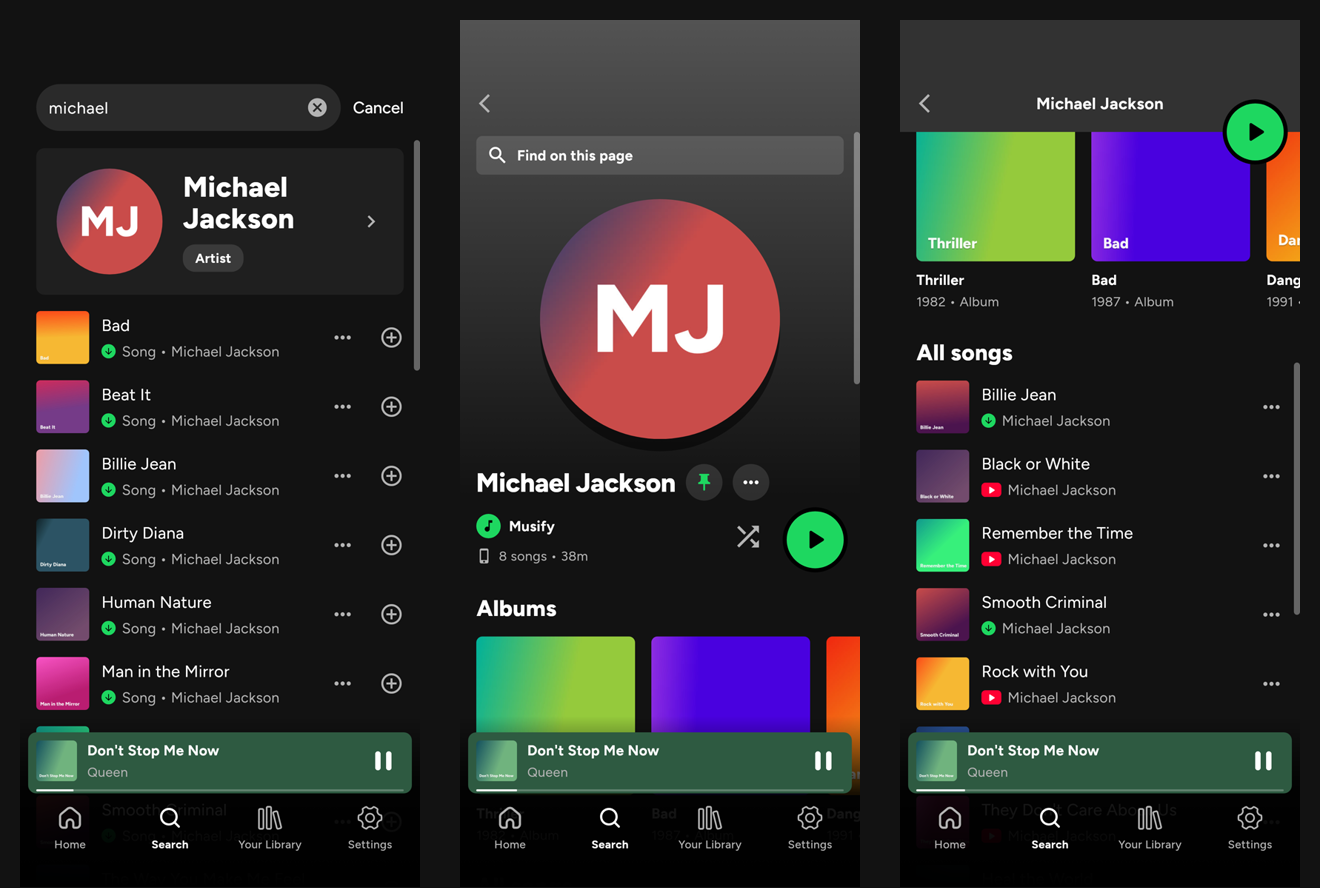
YouTube doesn't let phones download songs, so the app asks this server, which uses yt-dlp and ytmusicapi to:
And it syncs your devices: playlists, tags, Liked Songs and Home pins; what's playing, so you can pause on one device and carry on from another, or control the one that's playing from the one in your hand; and the music files in a folder, mirrored in the same subfolders. Your library is never stored here: only a song another device lacks passes through, and it's deleted once every device has it.
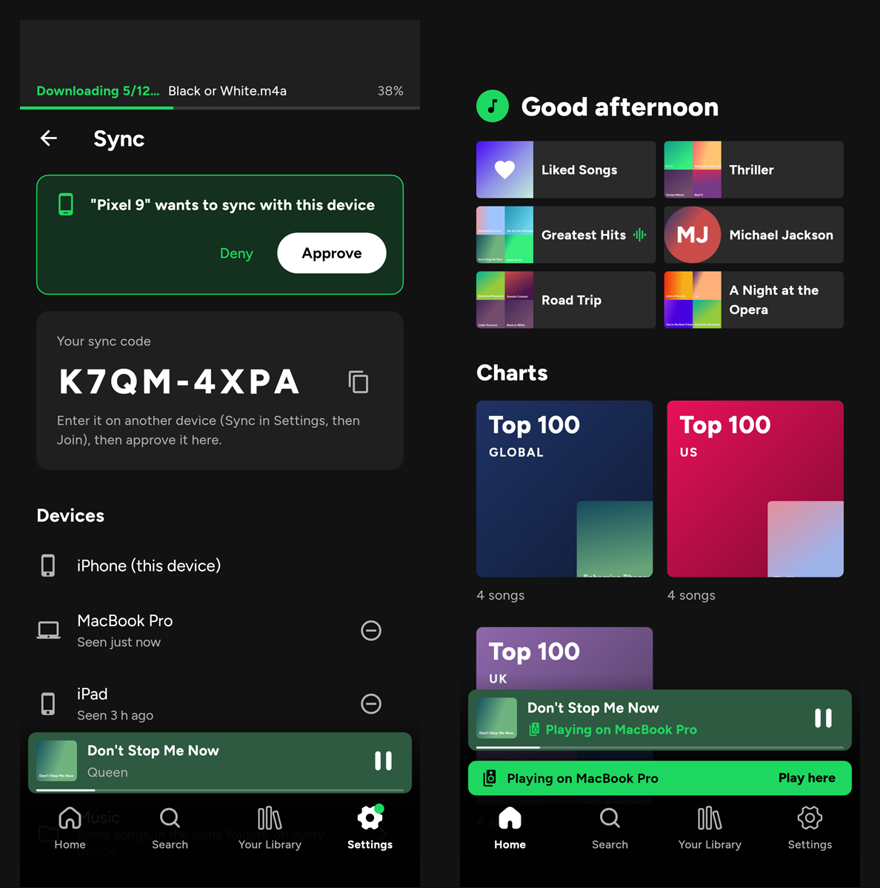
Everyone runs their own server: it's small (one Python file in Docker) and each one has its own key.
Every request needs the key: an X-Musify-Key: <key> header (or ?key=).
| Request | Answer |
|---|---|
GET /health | {"ok": true, "ytdlp": "<version>"} |
GET /audio/<video id>.m4a | The song as tagged M4A |
GET /charts | {"charts": [playlist, ...]}: Top 100 Global, United States, United Kingdom, Canada, Australia, India |
GET /playlist?id=<playlist id> | Any public playlist |
GET /search?q=<query> | {"artist": artist or null, "songs": [track, ...]}: YouTube Music's songs only (no videos or mixes), and the artist when the query names one |
GET /artist?id=<channel id> | The artist with "tracks" (all their songs) and "albums" |
GET /album?id=<album id> | The album with "tracks" |
A playlist is {"id", "title", "tracks": [track, ...]}. A track is {"id", "title", "channel", "duration", "thumbnail"} (duration in seconds), plus
"album" and "artistId" from YouTube Music. An artist is {"id", "name", "thumbnail"}; an album is {"id", "title", "year", "thumbnail"} (plus
"artist" from /album).
The app can sync its devices through the server: playlists, tags, Liked
Songs, pins, what's playing (to carry on from another device), and the
music files in a folder. A device creates a sync group and shows its code;
another device asks to join with that code, and a device in the group
approves it. Each device then has its own token (X-Musify-Sync).
| Request | |
|---|---|
POST /sync/create {device, name, platform} | A new group: {code, token} |
POST /sync/join {code, device, name, platform} | Ask to join: {request} |
GET /sync/join/<request> | pending, denied, or approved with the token (given once) |
GET /sync/me | The group: code, devices, requests waiting, and music files waiting for this device (files.incoming to download, files.wanted to upload) |
POST /sync/requests/<id> {approve} | Let a device in, or not |
DELETE /sync/devices/<id> | Take a device out (itself, to leave) |
GET/PUT /sync/state/<library|playback|command> | Shared JSON with a revision; a PUT with an old rev gets 409 and the latest. command is one device asking the one playing to play, pause, skip or seek |
GET/POST /sync/files | The synced folder's files: {add: [{path, sha1, size}], delete: [path]}; a GET also says which are available to download and which this device should upload (wanted) |
POST /sync/have {sha1s} | The songs this device holds: songs every device has are never uploaded |
GET/PUT /sync/blobs/<sha1> | A file's contents, stored once by SHA-1 |
POST /sync/blobs/missing {sha1s} | Which of them still need uploading |
Music files don't live on the server: devices list their songs by path and fingerprint (SHA-1) and say which they hold, so songs every device already has never move. Only a song another device lacks is uploaded, kept just until every device has it, then deleted.
Sync data lives in the musify_data volume (/data): an SQLite database
and songs on their way. Songs up to 300 MB each (MUSIFY_MAX_SONG_MB).
Songs are cached (2 GB at most, oldest first out) and playlists for an hour; the charts are refreshed in the background. YouTube breaks old yt-dlp versions, so the server installs the newest yt-dlp and ytmusicapi every time it starts and restarts itself once a day when idle.
You need a Linux server with Docker
(with Compose) and a domain or subdomain pointing at it, e.g.
musify.example.com. The phone talks to it over HTTPS.
git clone https://github.com/fatmachines/musify_backend.git
cd musify_backend
cp .env.example .env
sed -i "s/^MUSIFY_KEY=.*/MUSIFY_KEY=$(openssl rand -hex 24)/" .env
chmod 600 .env
cat .env        # the key, for the app
docker compose up -d --build
curl -H "X-Musify-Key: <your key>" http://127.0.0.1:8790/health
It listens on 127.0.0.1:8790 only, so it's not on the internet until a
reverse proxy puts it there with HTTPS.
Caddy (simplest: it handles certificates). Add to /etc/caddy/Caddyfile
(see Caddyfile.example), then sudo systemctl reload caddy:
musify.example.com {
	reverse_proxy 127.0.0.1:8790
}
nginx: copy nginx.conf.example to
/etc/nginx/sites-available/musify, change the domain, enable it and get a
certificate:
sudo ln -s /etc/nginx/sites-available/musify /etc/nginx/sites-enabled/
sudo nginx -t && sudo systemctl reload nginx
sudo certbot --nginx -d musify.example.com
A proxy in another Docker network (e.g. a Caddy container): instead of
the published port, join its network with a docker-compose.override.yml
(kept out of git) and proxy to musify-api:8790:
services:
  musify-api:
    ports: !reset []
    networks: [proxy]
networks:
  proxy:
    name: <your proxy's network>
    external: true
Behind Cloudflare, keep downloads under its 100-second limit: they usually take a few seconds.
In Musify: Settings → Musify server, then enter
https://musify.example.com and the key. The app checks them before saving.
Or build them in: flutter run --dart-define=MUSIFY_SERVER=https://musify.example.com --dart-define=MUSIFY_KEY=<key>.
git pull && docker compose up -d --build   # new server code
docker compose restart                     # newest yt-dlp right away
docker logs -f musify-api
YouTube sometimes blocks servers in data centres. Restarting (for the newest yt-dlp) is the first thing to try. If it keeps happening, see yt-dlp's notes on exporting YouTube cookies.
Python 3.10+, ffmpeg and Node.js 20+ (or Deno), then:
python3 -m venv .venv && .venv/bin/pip install -r requirements.txt
MUSIFY_KEY=<key> MUSIFY_CACHE=./cache .venv/bin/python musify_server.py
Settings (environment): MUSIFY_KEY (required), MUSIFY_HOST (default
127.0.0.1), MUSIFY_PORT (8790), MUSIFY_CACHE (/var/cache/musify),
MUSIFY_CACHE_MB (2000), MUSIFY_NODE (path to node, found on PATH
otherwise).
Download only what you have the right to, and keep your server to yourself: anyone with its key can use it.
The server for Musify, a Spotify-style music player for your own music files (iPhone, Android, Mac). The app works offline without it; with it, you also get YouTube Music, downloads, and sync between your devices.
Made entirely by Claude. This server, the app and their tests were written by Claude (Anthropic's AI) in Claude Code, from a person's requests and bug reports.
YouTube doesn't let phones download songs, so the app asks this server, which uses yt-dlp and ytmusicapi to:
And it syncs your devices: playlists, tags, Liked Songs and Home pins; what's playing, so you can pause on one device and carry on from another, or control the one that's playing from the one in your hand; and the music files in a folder, mirrored in the same subfolders. Your library is never stored here: only a song another device lacks passes through, and it's deleted once every device has it.
Everyone runs their own server: it's small (one Python file in Docker) and each one has its own key.
Every request needs the key: an X-Musify-Key: <key> header (or ?key=).
| Request | Answer |
|---|---|
GET /health | {"ok": true, "ytdlp": "<version>"} |
GET /audio/<video id>.m4a | The song as tagged M4A |
GET /charts | {"charts": [playlist, ...]}: Top 100 Global, United States, United Kingdom, Canada, Australia, India |
GET /playlist?id=<playlist id> | Any public playlist |
GET /search?q=<query> | {"artist": artist or null, "songs": [track, ...]}: YouTube Music's songs only (no videos or mixes), and the artist when the query names one |
GET /artist?id=<channel id> | The artist with "tracks" (all their songs) and "albums" |
GET /album?id=<album id> | The album with "tracks" |
A playlist is {"id", "title", "tracks": [track, ...]}. A track is {"id", "title", "channel", "duration", "thumbnail"} (duration in seconds), plus
"album" and "artistId" from YouTube Music. An artist is {"id", "name", "thumbnail"}; an album is {"id", "title", "year", "thumbnail"} (plus
"artist" from /album).
The app can sync its devices through the server: playlists, tags, Liked
Songs, pins, what's playing (to carry on from another device), and the
music files in a folder. A device creates a sync group and shows its code;
another device asks to join with that code, and a device in the group
approves it. Each device then has its own token (X-Musify-Sync).
| Request | |
|---|---|
POST /sync/create {device, name, platform} | A new group: {code, token} |
POST /sync/join {code, device, name, platform} | Ask to join: {request} |
GET /sync/join/<request> | pending, denied, or approved with the token (given once) |
GET /sync/me | The group: code, devices, requests waiting, and music files waiting for this device (files.incoming to download, files.wanted to upload) |
POST /sync/requests/<id> {approve} | Let a device in, or not |
DELETE /sync/devices/<id> | Take a device out (itself, to leave) |
GET/PUT /sync/state/<library|playback|command> | Shared JSON with a revision; a PUT with an old rev gets 409 and the latest. command is one device asking the one playing to play, pause, skip or seek |
GET/POST /sync/files | The synced folder's files: {add: [{path, sha1, size}], delete: [path]}; a GET also says which are available to download and which this device should upload (wanted) |
POST /sync/have {sha1s} | The songs this device holds: songs every device has are never uploaded |
GET/PUT /sync/blobs/<sha1> | A file's contents, stored once by SHA-1 |
POST /sync/blobs/missing {sha1s} | Which of them still need uploading |
Music files don't live on the server: devices list their songs by path and fingerprint (SHA-1) and say which they hold, so songs every device already has never move. Only a song another device lacks is uploaded, kept just until every device has it, then deleted.
Sync data lives in the musify_data volume (/data): an SQLite database
and songs on their way. Songs up to 300 MB each (MUSIFY_MAX_SONG_MB).
Songs are cached (2 GB at most, oldest first out) and playlists for an hour; the charts are refreshed in the background. YouTube breaks old yt-dlp versions, so the server installs the newest yt-dlp and ytmusicapi every time it starts and restarts itself once a day when idle.
You need a Linux server with Docker
(with Compose) and a domain or subdomain pointing at it, e.g.
musify.example.com. The phone talks to it over HTTPS.
git clone https://github.com/fatmachines/musify_backend.git
cd musify_backend
cp .env.example .env
sed -i "s/^MUSIFY_KEY=.*/MUSIFY_KEY=$(openssl rand -hex 24)/" .env
chmod 600 .env
cat .env        # the key, for the app
docker compose up -d --build
curl -H "X-Musify-Key: <your key>" http://127.0.0.1:8790/health
It listens on 127.0.0.1:8790 only, so it's not on the internet until a
reverse proxy puts it there with HTTPS.
Caddy (simplest: it handles certificates). Add to /etc/caddy/Caddyfile
(see Caddyfile.example), then sudo systemctl reload caddy:
musify.example.com {
	reverse_proxy 127.0.0.1:8790
}
nginx: copy nginx.conf.example to
/etc/nginx/sites-available/musify, change the domain, enable it and get a
certificate:
sudo ln -s /etc/nginx/sites-available/musify /etc/nginx/sites-enabled/
sudo nginx -t && sudo systemctl reload nginx
sudo certbot --nginx -d musify.example.com
A proxy in another Docker network (e.g. a Caddy container): instead of
the published port, join its network with a docker-compose.override.yml
(kept out of git) and proxy to musify-api:8790:
services:
  musify-api:
    ports: !reset []
    networks: [proxy]
networks:
  proxy:
    name: <your proxy's network>
    external: true
Behind Cloudflare, keep downloads under its 100-second limit: they usually take a few seconds.
In Musify: Settings → Musify server, then enter
https://musify.example.com and the key. The app checks them before saving.
Or build them in: flutter run --dart-define=MUSIFY_SERVER=https://musify.example.com --dart-define=MUSIFY_KEY=<key>.
git pull && docker compose up -d --build   # new server code
docker compose restart                     # newest yt-dlp right away
docker logs -f musify-api
YouTube sometimes blocks servers in data centres. Restarting (for the newest yt-dlp) is the first thing to try. If it keeps happening, see yt-dlp's notes on exporting YouTube cookies.
Python 3.10+, ffmpeg and Node.js 20+ (or Deno), then:
python3 -m venv .venv && .venv/bin/pip install -r requirements.txt
MUSIFY_KEY=<key> MUSIFY_CACHE=./cache .venv/bin/python musify_server.py
Settings (environment): MUSIFY_KEY (required), MUSIFY_HOST (default
127.0.0.1), MUSIFY_PORT (8790), MUSIFY_CACHE (/var/cache/musify),
MUSIFY_CACHE_MB (2000), MUSIFY_NODE (path to node, found on PATH
otherwise).
Download only what you have the right to, and keep your server to yourself: anyone with its key can use it.



