Swing Music is a beautiful, self-hosted music player for your local audio files. Like a cooler Spotify ... but bring your own music.
See the code

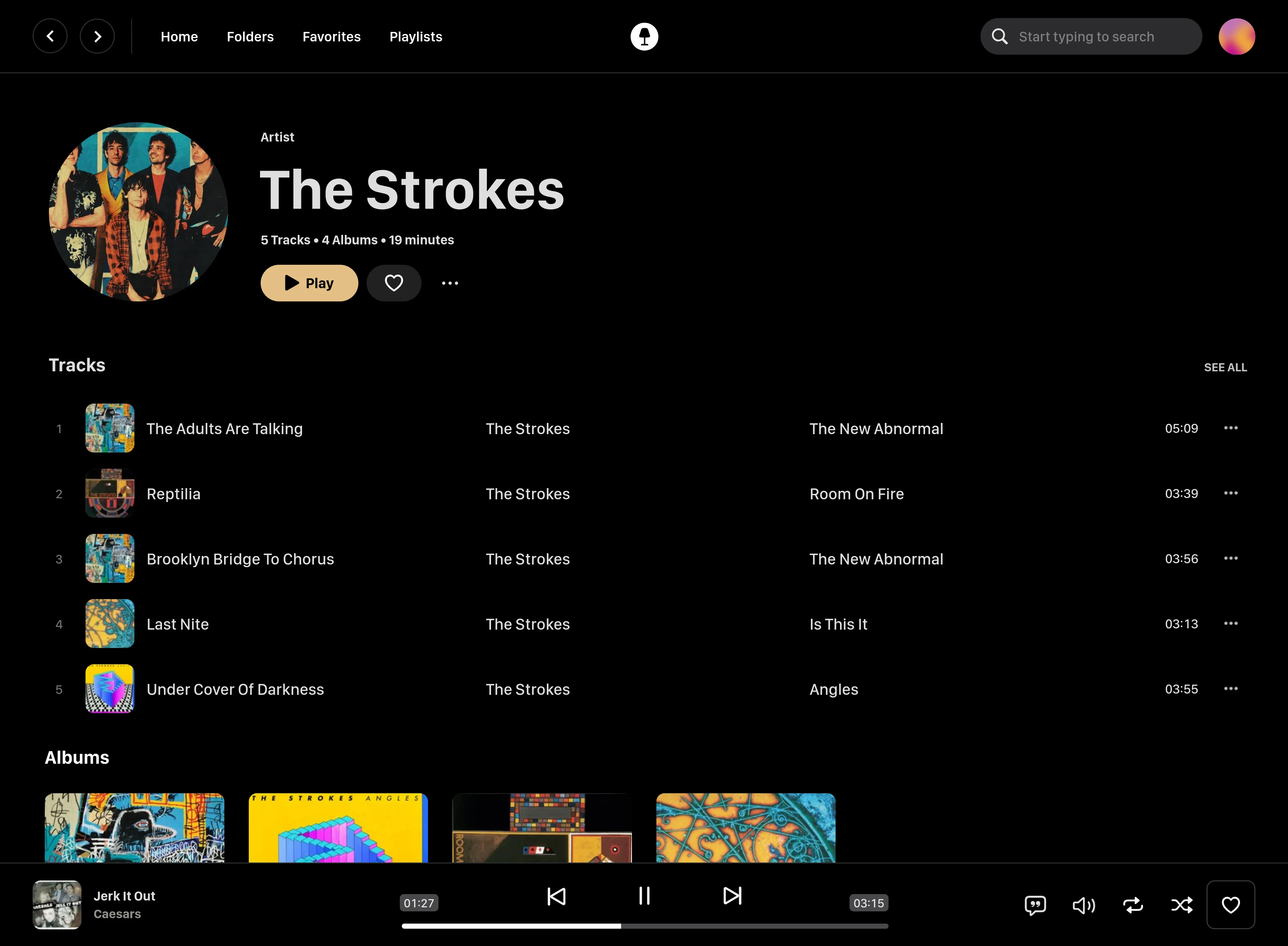
Swing Music is a blazingly fast and beautiful, self-hosted music streaming server. Like a cooler Spotify ... but bring your own music.
On Linux or MacOS run the command below to install Swing Music:
curl -fsSL https://setup.swingmx.com | bash
To run Swing Music on Windows, download the portable build from the downloads page and run it.
The app should start at http://localhost:1970 by default. Open the URL in your browser to configure and use Swing Music.
[!TIP] To stream your music from your Android device, download the Android mobile client.
Here's a sample Docker compose file:
services:
  swingmusic:
    image: ghcr.io/swingmx/swingmusic:latest
    container_name: swingmusic
    ports:
      - "1970:1970"
    volumes:
      - /path/to/music:/music
      - /path/to/config:/config
    environment:
      - SWINGMUSIC_PORT=1970
      - SWINGMUSIC_DEVICE_NAME=Host name here
    restart: unless-stopped
The SWINGMUSIC_DEVICE_NAME sets the name this server reports to connected clients. To use a different port, change both SWINGMUSIC_PORT and the ports mapping to match (e.g. 2001:2001 with SWINGMUSIC_PORT=2001).
docker pull ghcr.io/swingmx/swingmusic:latest
Then run:
docker run --name swingmusic -p 1970:1970 -e SWINGMUSIC_PORT=1970 -e SWINGMUSIC_DEVICE_NAME="Host Name Here" -v /path/to/music:/music -v /path/to/config:/config --restart unless-stopped ghcr.io/swingmx/swingmusic:latest
Replace the following with appropriate values:
/path/to/music - Your music directory on the host/path/to/config - Path to create Swing Music configs on the hostHost Name Here - Your host device nameYou can change the Swing Music port by updating both the -p mapping and SWINGMUSIC_PORT to the same value (e.g. -p 2001:2001 -e SWINGMUSIC_PORT=2001).
Options flags can be passed when starting the app in the terminal to tweak runtime settings or perform tasks. You can use the -h flag to see all supported options.
[!TIP] You can read more about options in the docs.
Swing Music is looking for contributors. If you're interested, please join us at the Swing Music Community group on Telegram. For more information, take a look at https://github.com/swing-opensource/swingmusic/issues/186.
This software is provided to you with terms stated in the AGPLv3 License or any later version. Read the full text in the LICENSE file located at the root of this repository.
Shout out to the following code contributors who have helped maintain and improve Swing Music:
39 followers · starred Apr 2023
160 followers · starred Aug 2026
575 followers · starred Jul 2026
17 followers · starred Dec 2025
Swing Music is a beautiful, self-hosted music player for your local audio files. Like a cooler Spotify ... but bring your own music.
See the code
Swing Music is a blazingly fast and beautiful, self-hosted music streaming server. Like a cooler Spotify ... but bring your own music.
On Linux or MacOS run the command below to install Swing Music:
curl -fsSL https://setup.swingmx.com | bash
To run Swing Music on Windows, download the portable build from the downloads page and run it.
The app should start at http://localhost:1970 by default. Open the URL in your browser to configure and use Swing Music.
[!TIP] To stream your music from your Android device, download the Android mobile client.
Here's a sample Docker compose file:
services:
  swingmusic:
    image: ghcr.io/swingmx/swingmusic:latest
    container_name: swingmusic
    ports:
      - "1970:1970"
    volumes:
      - /path/to/music:/music
      - /path/to/config:/config
    environment:
      - SWINGMUSIC_PORT=1970
      - SWINGMUSIC_DEVICE_NAME=Host name here
    restart: unless-stopped
The SWINGMUSIC_DEVICE_NAME sets the name this server reports to connected clients. To use a different port, change both SWINGMUSIC_PORT and the ports mapping to match (e.g. 2001:2001 with SWINGMUSIC_PORT=2001).
docker pull ghcr.io/swingmx/swingmusic:latest
Then run:
docker run --name swingmusic -p 1970:1970 -e SWINGMUSIC_PORT=1970 -e SWINGMUSIC_DEVICE_NAME="Host Name Here" -v /path/to/music:/music -v /path/to/config:/config --restart unless-stopped ghcr.io/swingmx/swingmusic:latest
Replace the following with appropriate values:
/path/to/music - Your music directory on the host/path/to/config - Path to create Swing Music configs on the hostHost Name Here - Your host device nameYou can change the Swing Music port by updating both the -p mapping and SWINGMUSIC_PORT to the same value (e.g. -p 2001:2001 -e SWINGMUSIC_PORT=2001).
Options flags can be passed when starting the app in the terminal to tweak runtime settings or perform tasks. You can use the -h flag to see all supported options.
[!TIP] You can read more about options in the docs.
Swing Music is looking for contributors. If you're interested, please join us at the Swing Music Community group on Telegram. For more information, take a look at https://github.com/swing-opensource/swingmusic/issues/186.
This software is provided to you with terms stated in the AGPLv3 License or any later version. Read the full text in the LICENSE file located at the root of this repository.
Shout out to the following code contributors who have helped maintain and improve Swing Music:
39 followers · starred Apr 2023
160 followers · starred Aug 2026
575 followers · starred Jul 2026
17 followers · starred Dec 2025