Fight computer neck: a Windows tray app that gets you up from the desk every 30–45 minutes for a short neck-and-shoulders break. Detects breaks automatically.
JavaScript
1
2 commits
updated Oct 13, 2026

Fight computer neck: a quiet Windows tray app that gets you up from the desk every 30–45 minutes
for a short neck-and-shoulders break, and notices when you've already stepped away.




Hours at a screen with your head pushed forward and shoulders still load the neck far more than it's built for. That's "computer neck" (also called tech neck): stiffness, neck and shoulder pain, headaches, and over the years, wear of the cervical spine. Mine ended up as osteochondrosis, and this is the advice I was given. Every 30–45 minutes:
Don't turn it into a workout. The point is to break up hours of sitting in the same position, before the neck gets stiff. Getup makes sure that actually happens.
Getup is a reminder, not medical advice. If your neck hurts, see a doctor.
Download Getup Setup <version>.exe from the latest release and run it. It installs for your user only (no admin rights needed) and starts in the tray.
The installer isn't code-signed yet, so Windows SmartScreen may warn about it the first time: choose More info → Run anyway.
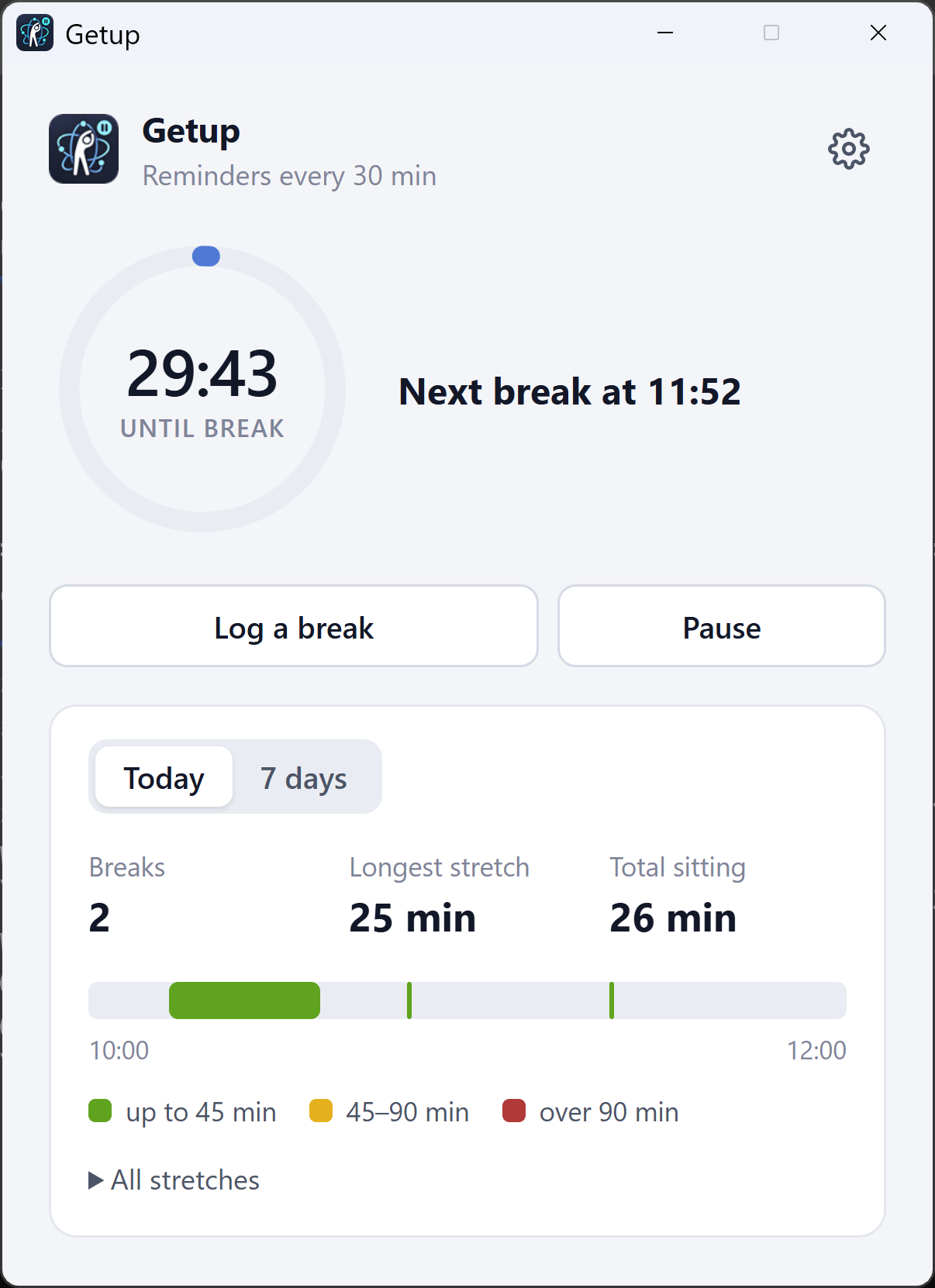
Click the tray icon to open the window, or right-click it for the menu (open, log a break, pause, quit). Settings (the gear icon) has the reminder interval, sound, whether the window pops up, start with Windows, and language.
If you turn off startup in Task Manager or in Windows Settings → Apps → Startup, the setting in Getup turns off too.
| Option | What it does |
|---|---|
--clear-history | Deletes the break history. Settings and the current countdown are kept. If Getup is already running, it clears its history and shows the window. |
--interval=<minutes> | Overrides the reminder interval (fractions allowed), for testing. Also available as the GETUP_INTERVAL environment variable. |
--hidden | Starts in the tray without showing the window. This is how it starts with Windows. |
& "$env:LOCALAPPDATA\Programs\getup\Getup.exe" --clear-history
History and settings are kept in %APPDATA%\Getup\getup.json, for the last 60 days. Nothing is sent anywhere.
The app used to be called Stand-up. On the first run after the rename, Getup copies the history and settings from %APPDATA%\Stand-up\stand-up.json; the old folder is left as it was and can be deleted.
Requires Node.js 20 or newer.
npm install
npm start          # run from source
npm run debug      # run with a reminder every 5 minutes
npm test           # tests for the break logic
npm run dist       # Windows installer in dist\ (Getup Setup <version>.exe)
.\build.ps1        # the same, behind a TLS-inspecting proxy
The break logic lives in src/tracker.js and has no Electron dependencies, so it's tested with plain node --test.
.exe, so when run with npm start it's called "Electron". Getup gives it its own icon and makes it start Getup, but the name in the notification header stays "Electron". An installed build shows "Getup" everywhere.stand-up.reminder, stand-up.window) are kept from the old name on purpose: with them, a new installer upgrades an existing install, and the startup entry and taskbar pins keep working.ISC © Dmitry Sheiko
Fight computer neck: a Windows tray app that gets you up from the desk every 30–45 minutes for a short neck-and-shoulders break. Detects breaks automatically.
JavaScript
1
2 commits
updated Oct 13, 2026
Fight computer neck: a quiet Windows tray app that gets you up from the desk every 30–45 minutes
for a short neck-and-shoulders break, and notices when you've already stepped away.
Hours at a screen with your head pushed forward and shoulders still load the neck far more than it's built for. That's "computer neck" (also called tech neck): stiffness, neck and shoulder pain, headaches, and over the years, wear of the cervical spine. Mine ended up as osteochondrosis, and this is the advice I was given. Every 30–45 minutes:
Don't turn it into a workout. The point is to break up hours of sitting in the same position, before the neck gets stiff. Getup makes sure that actually happens.
Getup is a reminder, not medical advice. If your neck hurts, see a doctor.
Download Getup Setup <version>.exe from the latest release and run it. It installs for your user only (no admin rights needed) and starts in the tray.
The installer isn't code-signed yet, so Windows SmartScreen may warn about it the first time: choose More info → Run anyway.
Click the tray icon to open the window, or right-click it for the menu (open, log a break, pause, quit). Settings (the gear icon) has the reminder interval, sound, whether the window pops up, start with Windows, and language.
If you turn off startup in Task Manager or in Windows Settings → Apps → Startup, the setting in Getup turns off too.
| Option | What it does |
|---|---|
--clear-history | Deletes the break history. Settings and the current countdown are kept. If Getup is already running, it clears its history and shows the window. |
--interval=<minutes> | Overrides the reminder interval (fractions allowed), for testing. Also available as the GETUP_INTERVAL environment variable. |
--hidden | Starts in the tray without showing the window. This is how it starts with Windows. |
& "$env:LOCALAPPDATA\Programs\getup\Getup.exe" --clear-history
History and settings are kept in %APPDATA%\Getup\getup.json, for the last 60 days. Nothing is sent anywhere.
The app used to be called Stand-up. On the first run after the rename, Getup copies the history and settings from %APPDATA%\Stand-up\stand-up.json; the old folder is left as it was and can be deleted.
Requires Node.js 20 or newer.
npm install
npm start          # run from source
npm run debug      # run with a reminder every 5 minutes
npm test           # tests for the break logic
npm run dist       # Windows installer in dist\ (Getup Setup <version>.exe)
.\build.ps1        # the same, behind a TLS-inspecting proxy
The break logic lives in src/tracker.js and has no Electron dependencies, so it's tested with plain node --test.
.exe, so when run with npm start it's called "Electron". Getup gives it its own icon and makes it start Getup, but the name in the notification header stays "Electron". An installed build shows "Getup" everywhere.stand-up.reminder, stand-up.window) are kept from the old name on purpose: with them, a new installer upgrades an existing install, and the startup entry and taskbar pins keep working.ISC © Dmitry Sheiko



